| |
| News - More Fighters Are Being Added To The Super Smash Bros. Ultimate amiibo Line |
|
Posted by: xSicKxBot - 11-02-2018, 04:41 PM - Forum: Nintendo Discussion
- No Replies
|
 |
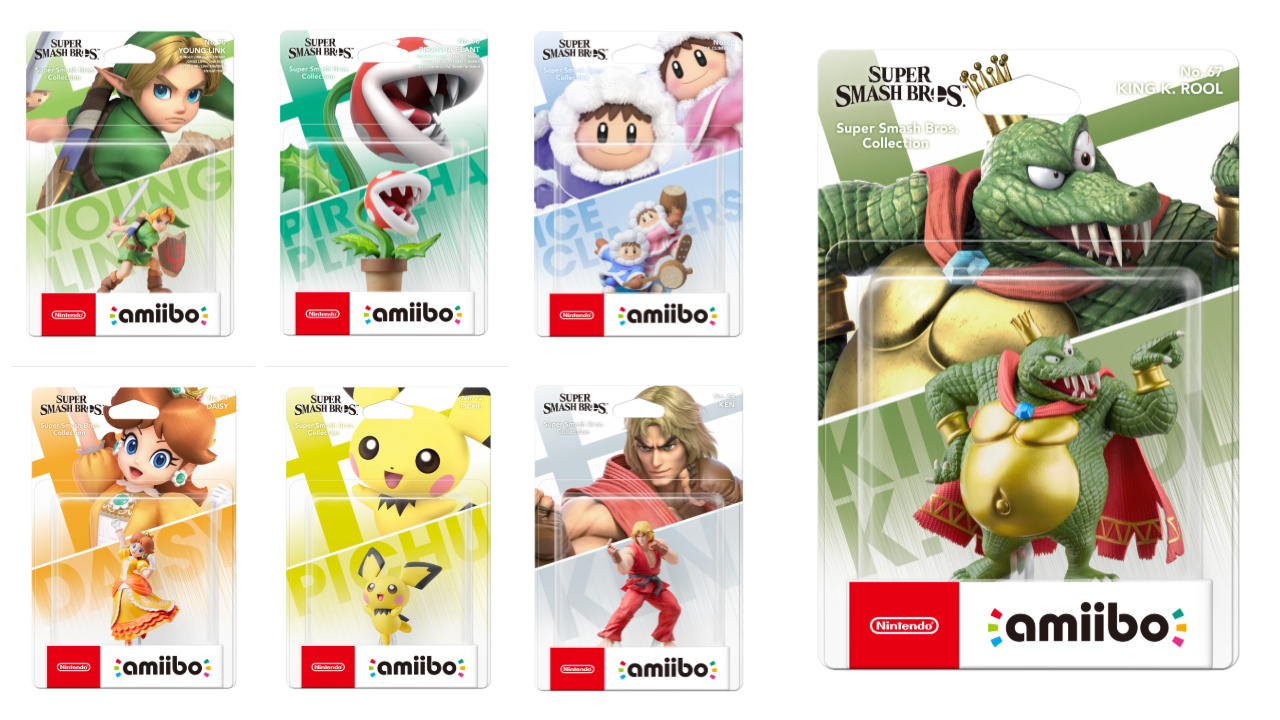
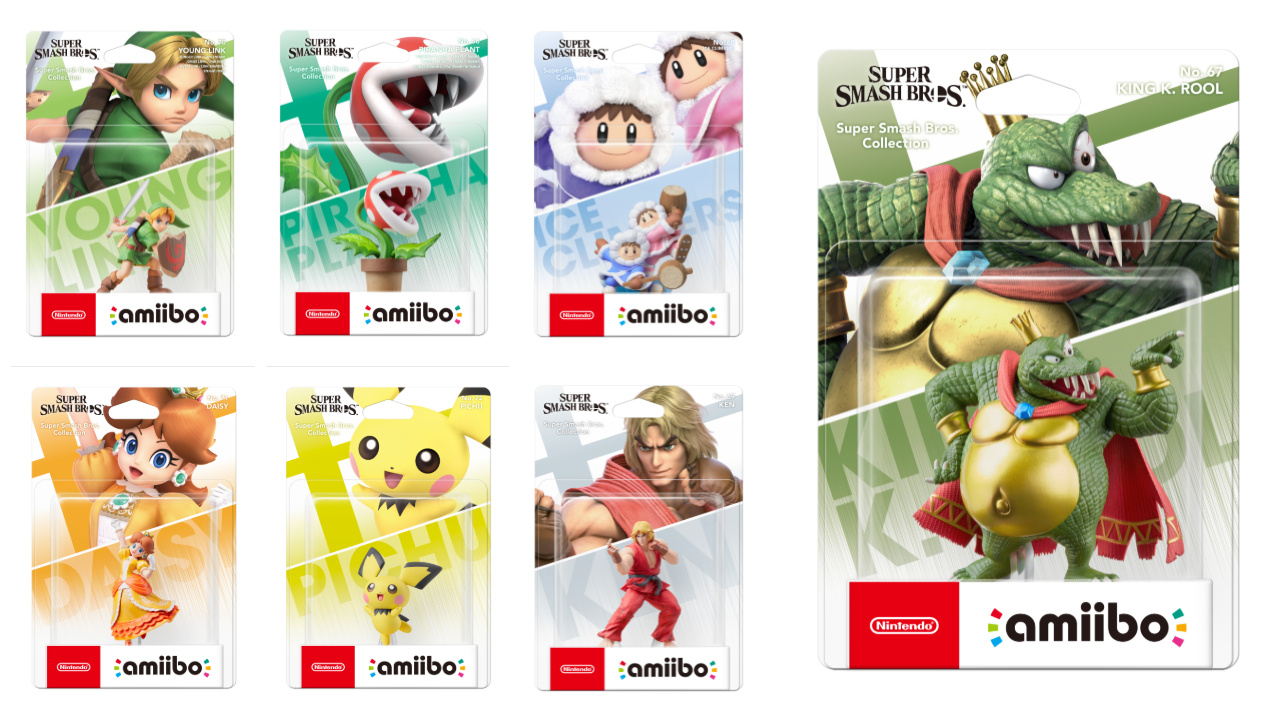
More Fighters Are Being Added To The Super Smash Bros. Ultimate amiibo Line
@Knuckles-Fajita Looks like you were right about the reprints. Still blows my mind. Toys R Us is gone and Target doesn’t even have a section for NFC toys anymore, Starlink was buried with the games. Guess Gamestop and Walmart will be overflowing.
Piranaha Plant could potentially be the best ever selling amiibo. If they make enough, which we know they never do.
King K. Rool looks big and expensive, but it works for him.
Did we really need another freakin Link? That’s 12 I think. 12 different poses of Link, not counting Wolf Link b/c thats’ Midna on a wolf. Kind of defeats the whole “buy 1 toy to play anywhere” amiibo logic. Twelve. That’s more than Mario, and he got gold, silver and married.
Here’s the really important question of the day – anybody know the answer – will Switch Smash overwrite Wii U Smash save data? Also, will our Wii U Smash amiibo data be read, a level 50 amiibo in Smash 4 is a level 50 amiibo in SSBU, or do they all start from zero?
Hopefully it’s a MUCH better progression system. Every amiibo we have the kids leveled up to 50 in 4 hours. Should be at least be 20 or 30 hours for 50 levels, it was so fast it was nearly pointless.
Maybe I could get a good price for my AC:aF Isabelle on eBay from some impatient player. Hardly used.
|

|
|
| News - Grim Fandango Appears Out Of Nowhere On The European Switch eShop |
|
Posted by: xSicKxBot - 11-02-2018, 04:41 PM - Forum: Nintendo Discussion
- No Replies
|
|
Grim Fandango Appears Out Of Nowhere On The European Switch eShop
Amid all the Smash Bros. excitement, Lucasarts’ seminal point-and-click adventure Grim Fandango has gone live on the European Switch eShop, seemingly without warning.
The game – which is based on the recently remastered version – wasn’t included in today’s download update, but there you go. It’s live.
Grim Fandango is also available in other PAL regions, such as Australia. Let us know if you’ve downloaded it.
|
|
|
|
| Steam - Daily Deal – Witch It, 50% Off |
|
Posted by: xSicKxBot - 11-02-2018, 04:41 PM - Forum: PC Discussion
- No Replies
|
|
Daily Deal – Witch It, 50% Off
– Fixed a longstanding bug that caused units to attack more slowly than expected at certain attack speeds.
– Fixing a bug that caused Morphling to not gain stats when leveling up while morphed.
– Fixed a bug that allowed the Silence from Riki’s Smoke Screen to be applied to units with Spell Immunity.
– Fixed a bug that caused Monkey King to become disabled when Feared during Primal Spring channeling.
– Fixed post-game scoreboard text not clipping correctly with long strings.
|
|
|
|
| News - Minecraft 1.14 Snapshot 18W44A |
|
Posted by: xSicKxBot - 11-02-2018, 04:41 PM - Forum: Minecraft
- No Replies
|
|
Minecraft 1.14 Snapshot 18W44A

It’s a very spooky day today, zombies everywhere, bats flapping around… It must be october 31st, Halloween! Man, can you imagine if it were also friday the 13th? That’d be truly scary. Here at Mojang, we celebrate halloween in style: with snapshots! And this weeks snapshot is another doozy! New cats! New blocks! Lots of new blocks! Keeping in the spooky theme of the day, though, we’ve not added any new functionality to the new blocks contained within this snapshot. How fiendish of the developers! What could they possibly be for? We may never find out… At least not today.
A full summary of the content available in this snapshot can be found in the changelog on Minecraft.net, the following is a short summary:
- Split cats and ocelots to their own creatures and updated cats with new features!
- Added lots of new blocks!
- You can now right click on signs with dyes to change the text color
- Lots of performance improvements, especially to client stuttering!
- Added “Programmer Art” in the resource pack menu: it’s the old textures, easy to use!
CAT AND OCELOT SPLIT
- Stray cats can be tamed
- Tamed cats can give lovely (or less lovely) morning gifts to their owners
- Ocelots can’t be tamed, but they might start trusting you if you feed them with fish
- Phantoms are terribly scared of cats – how convenient!
- Cat collars can now be dyed
- Added several new cat skins!
NEW BLOCKS
Even more! Can you believe it?!
All of these blocks currently have no functionality and are only available in the creative inventory. This will change really soon, we just wanted to get the actual blocks themselves out there as soon as we could! They might also change visually, too!
- Added Barrel
- Added Smoker
- Added Blast Furnace
- Added Cartography Table
- Added Fletching Table
- Added Grindstone
- Added Lectern
- Added Smithing Table
- Added Stonecutter
- Added Bell
To get snapshots, open your launcher and go to the “launch options” tab. Check the box saying “Enable snapshots” and save. To switch between the snapshot and normal version, you can find a new dropdown menu next to the “Play” button. Back up your world first or run the game on in a different folder (In the “launch options” page).
Please report any and all bugs you find in Minecraft to bugs.mojang.com.
Snapshots can corrupt your world, please backup and/or run them in a different folder from your main worlds.
Share your thoughts on how 1.14 is shaping up in the comments below!
|
|
|
|
| News - This Week At Bungie – 11/01/2018 |
|
Posted by: xSicKxBot - 11-02-2018, 04:41 PM - Forum: Lounge
- No Replies
|
|
This Week At Bungie – 11/01/2018

This week at Bungie, we sent you out on a quest.
As trick-or-treaters take stock of their sweet loot in real life, our own Festival of the Lost is entering its final stage. If you have yet to earn the mask that has eluded you, or still need to get your 600 Power Horror Story, you have until Tuesday, November 6. To close out the festivities, Amanda has a final quest. Over the next three weeks, she will unleash you in pursuit of those who killed Master Ives, the less-hated of the Cryptarchs. Each week offers up a new step in the quest, along with a powerful reward.
Happy hunting.
Getting Granular with Masterwork Armor
There have been some questions on how damage resistance works when Masterworking armor. In an effort to better explain some mechanics in the game where tooltips fall short, we are going to dive into some specifics. To explain the maths that goes into protecting your Guardian from incoming Arc barrages, Sandbox Tester Ryan Hammond will approach the chalkboard.
Ryan: Hello everyone. Here is a brief rundown on how Masterworking your armor increases your damage resistance from both all incoming elemental damage from combatants and all damage during your Super.
Masterwork Armor Breakdown:
- Three families of Masterwork perks: Arc, Solar, and Void
- Each family of perks has five tiers
- Each Legendary armor item has a Masterwork perk, randomly assigned, allowing each player to potentially build up 25 cumulative tiers of Masterworks for a given damage type
- Each tier bestows the following effects:
- +1% damage resistance against any combatant attack carrying the specified damage type (not player attacks)
- +1% damage resistance against any attack while the Guardian is in Super
- Super damage resistance stacks regardless of family disparity; for example, if a player has tier 12 Arc and tier 3 Void, they have a cumulative additional 15% damage resistance while in Super, but only 12% damage resistance vs. Arc combatant damage and 3% vs. Void combatant damage
- The in-Super damage resistance stacks multiplicatively with the innate damage resistance of a Super
Keep in mind that while your Masterwork Super damage resistance stacks with the base damage resistance of your Supers, you will never be 100% invulnerable to attacks. Lastly, differences in power levels between the Guardian and combatants, no matter how minor it may seem, play a large role in determining incoming damage, with Damage Resistances modifying that damage further. I hope this helps explain a little better what is going on under the hood.
When we see you asking the unanswered questions, we’ll continue to use this space to seek out the answers from the people who know the facts.
Unmasking the Winners
Yesterday, the streets in our town were crowded with people on the prowl, dressed as their inner heroes or villains. On the internet, we saw the same thing. The Festival of the Lost Costume Contest was a parade of passion and creativity. Here is a recap of the winners who paraded past the followers of our official Twitter account. Each winner will receive the special emblem that we reserve for those with an artistic eye.
The winners!
Refer Your Friends
With the weekly reset, we launched a new Refer-a-Friend program. It’s a great way to earn some new teammates and some fresh loot at the same time. The mission is simple: Introduce your friends to Forsaken and show them the ropes of the world where you’ve become the legend. You’ll earn some cool rewards along the way. Here is a look at what two Guardians are capable of when they work together.
For more information on how to refer your friends, visit this helpful resource. If you need more assistance with making the magic happen, your other friends on our Player Support team are standing by to assist you. How Can We Help?
Something awry? Player Support is on the case. This is their report.
The Lost Cryptarch
We have observed reports from players who were unable to receive the Lost Cryptarch quest because their Pursuits inventory was full at the time they accepted the quest from Amanda Holliday.
Players who have not yet picked up this quest should ensure they have an open slot in their Pursuits inventory prior to speaking with Amanda Holliday. For players who have already been affected and are unable to begin this quest, we are pursuing a hotfix to resolve this issue.
Refer-a-Friend
As mentioned above, we launched Refer-a-Friend for Destiny 2: Forsaken. Players who previously played Destiny 2: Forsaken can now invite non-Forsaken players for to unlock Refer-a-Friend-themed rewards.
To participate in Refer-a-Friend, players must:
- Own base Destiny 2 and Destiny 2: Forsaken on the participating platform account (PS4, Xbox One, Battle.net)
- Have an applicable platform membership (PS+, Xbox Live) to join fireteams and participate in matchmade activities
- Have an appropriately linked bungie.net account
Additionally, effective immediately, all players who purchase Destiny 2: Forsaken between October 16 and November 6 have an extended referral period to be invited as new players. After November 6, only players who have purchased and played Destiny 2: Forsaken for fewer than seven days may be invited as a new player referee.
Destiny 2: Forsaken Known Issues
In addition to the items listed above, Destiny Player Support is tracking the latest issues reported by players on the #Help forum. Provided below is a brief overview of the latest known issues in Destiny 2: Forsaken.
- Harbinger’s Echo: We are investigating an issue where the Harbinger’s Echo Exotic Sparrow is not unlocking for some eligible players.
- Hawthorne’s Weekly Challenge: Players who do not redeem their engram for Hawthorne’s Weekly Clan reward until after the following weekly reset will not be able to earn another engram for that week. Players will have to wait until the following weekly reset to get out of this state.
- Tree of Probabilities: We are investigating an issue with point thresholds for the Tree of Probabilities strike.
- Warden’s Law and Fourth Time’s the Charm: We are investigating an issue with the Fourth Time’s the Charm perk for the Warden’s Law not activating correctly.
- Xbox One X Crashes: We are investigating an issue Xbox One X players may encounter a crash while in the Haunted Forest, receiving an “insufficient ventilation” error. Players who encounter this issue should play the Firewalled version of the Haunted Forest which disables matchmaking.
- 150 RPM Scout Rifles: We are investigating an issue where 150 RPM Scout Rifles may not fire at their intended rate.
Scary Movies
Welcome to Movie of the Week. This is where we show you our favorite community created videos. Here is what caught our eye this week.
Movie of the Week: Spooky Church
Honorable Mention: Your Chaperone Has Arrived
Want to see your video here? Submit your video to the Creations page. If you win, we will send you a special emblem to show off to your friends. Since the release of Destiny 2: Forsaken, we’ve been on the hunt for feedback. Whether it be a request to improve your quality of life or conversations over the viability of an Exotic Fusion Rifle in the Crucible, we want to hear your thoughts.
We’ll be posting a few of threads to both bungie.net and the community run Destiny subreddit to gather your feedback. While we’ve been consistently gathering your feedback and giving it to the team, we feel this is a good way to get eyes on a lot of great feedback now that we are eight weeks into Forsaken. These first feedback posts that we’re hosting will be general. Tell us how you’re feeling overall. No specific topic or agenda. We plan to keep posting these threads to gather more targeted feedback through the end of the year, and beyond.
Hope everyone has a happy Festival of the Lost.
<3 Cozmo
|
|
|
|
| Two Open Source Mobile App Development Frameworks To Make Mobile Dev Easier |
|
Posted by: xSicKxBot - 11-02-2018, 04:41 PM - Forum: Linux, FreeBSD, and Unix types
- No Replies
|
|
Two Open Source Mobile App Development Frameworks To Make Mobile Dev Easier

Mobile apps have been a boon for developers. With Android the most widely used platform on the planet, it makes perfect sense for developers to ply their trade in the mobile market. Not only do developers have the chance to get their work seen, they can make money from the Google Play Store or the iOS App Store. For those who have yet to delve into the mobile development market, however, the process may be a bit daunting. What tools are available? More importantly, what open source tools are available? After all, if you’re developing on the Linux platform, you probably don’t want to work with proprietary software.
So, to get started creating the greatest mobile app on the planet, you need to get the right tools. One such tool is a framework. In programming terms, a framework is an abstraction in which common code (that provides a generic or general functionality) can be used and rewritten to provide a specific functionality. Say you need Function X for your app, but you don’t want to write all the necessary code for that function. You can use a framework that offers Function X and modify that function so it perfectly fits your needs. In other words, a framework is a way to make development easier and more efficient.
Are there open source frameworks available for mobile development? There certainly are. Let’s take a look at two tools available for this particular task.
Ionic
Ionic is both 100 percent free and open source. This project, licensed under MIT, enables you to build fully cross-platform, progressive web and native mobile apps for every major app store… all from a single codebase. You can develop Ionic apps on any platform you like. Of course, our platform of choice is Linux. Fortunately, Ionic offers a simple command-line interface (CLI) that can be used to create, build, test, and deploy your apps to any platform. Ionic also features:
-
Ionic Native, which allows you to unlock native APIs (and other features), by wrapping Cordova plugins in TypeScript.
-
Live Reload, which allows you to compile and re-deploy an app at every development step.
-
Ionicons, which is an icon pack that includes hundreds of the most common app icons (all MIT licensed and ready to use).
-
Deeplinking, which allow you to start your app from a web link (and can even load a specific view out of the box).
-
AoT Compiling, which helps your apps to load faster.
Create a free Ionic account here and then install Ionic on your distribution. For example, if you’re using Ubuntu as your development platform, to install Ionic you must first install Node.js and npm like so:
-
Open a terminal window.
-
Issue the command sudo apt install curl
-
Add the necessary repository with the command curl -sL https://deb.nodesource.com/setup_10.x | sudo bash –
-
Install node.js and npm with the command sudo apt install nodejs
Install Ionic with the command:
sudo npm install -g ionic
You can now begin creating and working with your project. To create a new project, issue the command:
ionic start PROJECT_NAME blank --type ionic1
where PROJECT_NAME is the name of your project. You should see a newly created folder (with the same name as your project), that includes a number of new files and folders (Figure 1).
For more information on using the Ionic CLI, check out the official Ionic Guide.
PhoneGap
PhoneGap is an open source distribution of Adobe Cordova that makes it possible to develop your mobile app using web development technologies (e.g., HTML, CSS, and JavaScript) in just a few minutes. If you don’t want to work from the command line, PhoneGap does offer a desktop app (which is only available for macOS and Windows). The desktop app uses the same libraries found in the CLI, but it makes it a bit less daunting for those who prefer a more point and click-friendly method of app development.
PhoneGap includes the following:
-
PhoneGap Developer is a mobile app to connect your devices to your development machine (to see changes you make instantly).
-
PhoneGap Build enables you get app-store ready apps without having to maintain native SDKs for each mobile environment.
-
Plugin Library gets you access to a robust library of plugins to extend the capability of your mobile apps.
-
Third party tools is where you can find additional tools, created by the PhoneGap community, to help test, debug, and manage apps.
-
Developer community allows you to connect to thousands of developers working with PhoneGap.
-
Mobile App helps you pair your mobile device to the desktop app, so you can preview your new app.
To install the PhoneGap CLI tool, you’ll need jode.js and npm installed (as described above). Once that is taken care of, you can install the PhoneGap CLI tool with the command:
sudo npm install -g phonegap@latest
Once you’ve install the CLI, issue the command phonegap to see the help file (and show that the tool was successfully installed—Figure 2).
You might find you run into a permissions issue, when running the phonegap command. To resolve that, issue the command:
sudo chown -R USER:USER ~/.config/configstore
Where USER is your Linux username.
You should now be able to create your first project with the command:
phonegap create PROJECT_NAME
Where PROJECT_NAME is the name of your project.
To find out more on how to use the PhoneGap CLI, check out this reference.
There’s more to be found
There are plenty more open source mobile developer frameworks to be found. These two tools, however, can be thought of as a great launching point to help you get started with your mobile development journey. They are certainly not the only players on the field, but offer quite a lot in the way of power, flexibility, and feature sets. Give one of these tools a try and see if it doesn’t empower your mobile app development with the help of open source.
Learn more about Linux development in the Introduction to Open Source Development, Git, and Linux training course, and sign up now to start your open source journey.
|
|
|
|
| Microsoft - How your company can be a positive force for disability employment |
|
Posted by: xSicKxBot - 11-02-2018, 04:41 PM - Forum: Windows
- No Replies
|
|
How your company can be a positive force for disability employment
 by Jessica Rafuse, Microsoft Accessibility Senior Program Manager
NDEAM is a wrap, what’s next?
As National Disability Employment Awareness Month comes to an end, I reflect on the last month and ask, “Now what?!” Making a positive impact on the unemployment and underemployment rates for people with disabilities is a challenge that must extend beyond NDEAM and must be a collaborative effort. So how do we keep the momentum going?
To help answer the question, we gathered experts and influencers from over 75 different organizations from across the Seattle-area to the second annual Microsoft DisAbility Employment Symposium.
As Bri Sambo from T-Mobile put it, we must “lean on the community we have and collaborate with other companies.” The Symposium generated discussion on common challenges, lessons learned, and innovation in disability employment. We celebrated people with disabilities and committed to our ongoing efforts towards inclusion. Then we said goodbye. As the last guest exited the building, the lights dimmed in the conference room, and I realized, “Now, the real work begins.”
What can your company do to continue the journey to positively impact disability employment? Three things: get Ready, get Set, Hire!
GET READY
1. Nurture a culture of inclusion
A common theme across the Symposium was the importance of nurturing a culture of inclusion. Celebrating people with disabilities within your organization will ignite a sense of disability pride that results in a more inclusive and productive workplace. Here are a few things to consider:
- Recognize Talent: People with disabilities are an asset to the workplace. From innovation to troubleshooting to project management skills, each individual with a disability brings with them a unique set of skills that they have honed as a result of their disabilities. Remember that 70% of disabilities are non-apparent, so you like have someone in your workplace today who is already adding value to the team.
- Create opportunity for connection: To build a culture you first need to build a community. Our Disability Employee Resource Group is a long standing group of employees, who have helped to define disability inclusion at Microsoft. If you are looking for a first step in this journey, start here. Just a few passionate employees with common experiences can support your business in the creation of truly inclusive culture.
DisAbility Employment Symposium Opening Panel – in order left to right: Jessica Rafuse (Microsoft), Keith Clark (Seattle Lighthouse), Megan Mauney (Amazon), Becky Curran (Disability: IN) and Bri Sambo (T-Mobile)
GET SET
2. Invest in accessibility
Another common theme we saw during the event was companies referencing the importance of embedding accessibility into the fabric of their companies as key to recruiting and retaining talent with disabilities. So how do they do it?
- Be creative, be frugal, and be resourceful. “Investment” does not always mean “budget” allocation. Utilize resources that are available for free on public platforms. For example, watch Introduction to Disability and Inclusion to learn the basics, and educate your colleagues by using Microsoft Accessibility Training Resources particularly our At a Glance series, which provides bite-sized accessibility trainings.
- Leverage technology to empower people with disabilities. The role of technology is indisputable in empowering all people, including people with disabilities. From accessible career websites to assistive technologies like screen readers (e.g., Narrator and JAWS) for people who are Blind or Low Vision, accessible technology can make your company more attractive to talent with disabilities. As an individual, you also have a role in making your workplace more accessible with a few simple tricks. Try using the Accessibility Checker before sending an email or turn on Translator within PowerPoint during your next meeting. If you want to know more about accessibility features check out our Accessibility Feature Sway and at the Microsoft Accessibility Site.
- Accessibility in all levels of your company. Senior leaders are immensely influential as accessibility champions. Ignite your leader’s passion for accessibility by sharing personal stories about how your company’s business has positively impacted the lives of people with disabilities. In support of NDEAM, Microsoft CEO, Satya Nadella, celebrated with six accessibility feature demos: Inclusive Presentations, Seeing AI, Xbox Adaptive Controller, Learning Tools, Soundscape, and Eye Control.
HIRE
3. Hire someone with a disability today!
The timing is now. While nurturing your company culture and integrating accessibility into all that you do, actively seek candidates with disabilities to join in your journey. People with disabilities are just the problem solvers you need to provide feedback on your efforts as you strive for improvement.
- Transparency in recruiting: candidates appreciate transparency in your company’s inclusion efforts and clear timelines on the accessibility journey. For hiring managers, open communication is key to confront bias and to allow for discussion around your company’s policies for workplace accommodations and benefits.
- Identifying gaps: partner with your internal talent acquisition team, HR, legal, or other stakeholders to understand the process for working with candidates with disabilities. Ensure that your organization has a process for soliciting and responding to requests for accommodations. Offer trainings to all members of a recruiting ecosystem and co-create resource guides that are specific to your business. Don’t wait for the processes and policies to be perfect, “Hiring talent with disabilities is just common sense, just ask us what we need.”- Nyle DiMarco
- Resources abound: check out the Disability Equality Index (DEI), which serves as an neutral benchmarking tool to evaluate, measure, and improve your company’s disability inclusion efforts. We are sharing even more of our learnings through our Disability Inclusion Sway and the Microsoft Inclusive Hiring Site.

Jenny Lay-Flurrie and Nyle DiMarco onstage at DisAbility Employment Symposium
Thank you again to all the companies, organizations, and disability influencers who participated in our DisAbility Employment Symposium and to those who helped develop these learnings. For those who were not able to join us in-person, Disability:IN can help you to find other businesses in your area that are also committed to disability inclusion. Be curious, be bold, and be collaborative. Hire someone with disabilities and they will guide you along the way.
|
|
|
|
| News - Xbox Game Pass Will Expand To PC, Says Microsoft Head |
|
Posted by: xSicKxBot - 11-02-2018, 09:55 AM - Forum: Lounge
- No Replies
|
|
Xbox Game Pass Will Expand To PC, Says Microsoft Head
Microsoft has plans to expand the Game Pass subscription service from Xbox One to PC. CEO Satya Nadella reportedly mentioned during an earnings call that bringing Game Pass to PC will help increase the strength of the Xbox brand. Ars Technica reports that Nadella didn't give any indication of when to expect the subscription to expand, or if it would be included within the same all-you-can-eat price as the Xbox version. It would make some sense for the service to be all-encompassing, given that its current "Play Anywhere" initiative has made PC and Xbox versions of games available across both platforms regardless of where you bought it. On the Xbox One, though, Game Pass has an isolated marketplace for such a service, competing only somewhat with the more niche EA Access. A PC subscription service would face competition from other similar monthly services at various price tiers. An Xbox One Game Pass subscription currently costs $10 a month. Expanding that pass to include PC games could come through an optional extra fee without paying for an entirely separate subscription. Microsoft made a bold play for Game Pass by announcing early this year that it would feature all first-party games, on the day of release. That has included big names like Sea of Thieves and Forza Horizon 4. The company also works with publishers to introduce a new slate of third-party Game Pass games every month, and the list is growing pretty large. It also made Game Pass part of its All Access plan, which bundles the console, Game Pass, and Xbox Live Gold together. Meanwhile, Sony appears to be keen on competing with Microsoft, changing its PlayStation Now service to allow players to download games. PlayStation Now had been a strictly streaming service, which Microsoft will be exploring in more depth next year with Project xCloud.
|
|
|
|
| Fedora - Create a containerized machine learning model |
|
Posted by: xSicKxBot - 11-02-2018, 09:55 AM - Forum: Linux, FreeBSD, and Unix types
- No Replies
|
|
Create a containerized machine learning model
 After data scientists have created a machine learning model, it has to be deployed into production. To run it on different infrastructures, using containers and exposing the model via a REST API is a common way to deploy a machine learning model. This article demonstrates how to roll out a TensorFlow machine learning model, with a REST API delivered by Connexion in a container with Podman.
Preparation
First, install Podman with the following command:
sudo dnf -y install podman
Next, create a new folder for the container and switch to that directory.
mkdir deployment_container && cd deployment_container
REST API for the TensorFlow model
The next step is to create the REST-API for the machine learning model. This github repository contains a pretrained model, and well as the setup already configured for getting the REST API working.
Clone this in the deployment_container directory with the command:
git clone https://github.com/svenboesiger/titanic_tf_ml_model.git
prediction.py & ml_model/
The prediction.py file allows for a Tensorflow prediction, while the weights for the 20x20x20 neural network are located in folder ml_model/.
swagger.yaml
The file swagger.yaml defines the API for the Connexion library using the Swagger specification. This file contains all of the information necessary to configure your server to provide input parameter validation, output response data validation, URL endpoint definition.
As a bonus Connexion will provide you also with a simple but useful single page web application that demonstrates using the API with JavaScript and updating the DOM with it.
swagger: "2.0" info: description: This is the swagger file that goes with our server code version: "1.0.0" title: Tensorflow Podman Article consumes: - "application/json" produces: - "application/json" basePath: "/" paths: /survival_probability: post: operationId: "prediction.post" tags: - "Prediction" summary: "The prediction data structure provided by the server application" description: "Retrieve the chance of surviving the titanic disaster" parameters: - in: body name: passenger required: true schema: $ref: '#/definitions/PredictionPost' responses: '201': description: 'Survival probability of an individual Titanic passenger' definitions: PredictionPost: type: object
server.py & requirements.txt
server.py defines an entry point to start the Connexion server.
import connexion app = connexion.App(__name__, specification_dir='./') app.add_api('swagger.yaml') if __name__ == '__main__': app.run(debug=True)
requirements.txt defines the python requirements we need to run the program.
connexion tensorflow pandas
Containerize!
For Podman to be able to build an image, create a new file called “Dockerfile” in the deployment_container directory created in the preparation step above:
FROM fedora:28 # File Author / Maintainer MAINTAINER Sven Boesiger <donotspam@ujelang.com> # Update the sources RUN dnf -y update --refresh # Install additional dependencies RUN dnf -y install libstdc++ RUN dnf -y autoremove # Copy the application folder inside the container ADD /titanic_tf_ml_model /titanic_tf_ml_model # Get pip to download and install requirements: RUN pip3 install -r /titanic_tf_ml_model/requirements.txt # Expose ports EXPOSE 5000 # Set the default directory where CMD will execute WORKDIR /titanic_tf_ml_model # Set the default command to execute # when creating a new container CMD python3 server.py
Next, build the container image with the command:
podman build -t ml_deployment .
Run the container
With the Container image built and ready to go, you can run it locally with the command:
podman run -p 5000:5000 ml_deployment
|
Navigate to http://0.0.0.0:5000/ui in your web browser to access the Swagger/Connexion UI and to test-drive the model:
Of course you can now also access the model with your application via the REST-API.
|
|
|
|
| How to Search for Files from the Linux Command Line |
|
Posted by: xSicKxBot - 11-02-2018, 09:55 AM - Forum: Linux, FreeBSD, and Unix types
- No Replies
|
|
How to Search for Files from the Linux Command Line

Learn how to use the find command in this tutorial from our archives.
It goes without saying that every good Linux desktop environment offers the ability to search your file system for files and folders. If your default desktop doesn’t — because this is Linux — you can always install an app to make searching your directory hierarchy a breeze.
But what about the command line? If you happen to frequently work in the command line or you administer GUI-less Linux servers, where do you turn when you need to locate a file? Fortunately, Linux has exactly what you need to locate the files in question, built right into the system.
The command in question is find. To make the understanding of this command even more enticing, once you know it, you can start working it into your Bash scripts. That’s not only convenience, that’s power.
Let’s get up to speed with the find command so you can take control of locating files on your Linux servers and desktops, without the need of a GUI.
How to use the find command
When I first glimpsed Linux, back in 1997, I didn’t quite understand how the find command worked; therefore, it never seemed to function as I expected. It seemed simple; issue the command find FILENAME (where FILENAME is the name of the file) and the command was supposed to locate the file and report back. Little did I know there was more to the command than that. Much more.
If you issue the command man find, you’ll see the syntax of the find command is:
find [-H] [-L] [-P] [-D debugopts] [-Olevel] [starting-point...] [expression]
Naturally, if you’re unfamiliar with how man works, you might be confused about or overwhelmed by that syntax. For ease of understanding, let’s simplify that. The most basic syntax of a basic find command would look like this:
find /path option filename
Now we’ll see it at work.
Find by name
Let’s break down that basic command to make it as clear as possible. The most simplistic structure of the find command should include a path for the file, an option, and the filename itself. You may be thinking, “If I know the path to the file, I’d already know where to find it!”. Well, the path for the file could be the root of your drive; so / would be a legitimate path. Entering that as your path would take find longer to process — because it has to start from scratch — but if you have no idea where the file is, you can start from there. In the name of efficiency, it is always best to have at least an idea where to start searching.
The next bit of the command is the option. As with most Linux commands, you have a number of available options. However, we are starting from the beginning, so let’s make it easy. Because we are attempting to find a file by name, we’ll use one of two options:
-
name – case sensitive
-
iname – case insensitive
Remember, Linux is very particular about case, so if you’re looking for a file named Linux.odt, the following command will return no results.
find / -name linux.odt
If, however, you were to alter the command by using the -iname option, the find command would locate your file, regardless of case. So the new command looks like:
find / -iname linux.odt
Find by type
What if you’re not so concerned with locating a file by name but would rather locate all files of a certain type? Some of the more common file descriptors are:
-
f – regular file
-
d – directory
-
l – symbolic link
-
c – character devices
-
b – block devices
Now, suppose you want to locate all block devices (a file that refers to a device) on your system. With the help of the -type option, we can do that like so:
find / -type c
The above command would result in quite a lot of output (much of it indicating permission denied), but would include output similar to:
/dev/hidraw6

/dev/hidraw5

/dev/vboxnetctl

/dev/vboxdrvu

/dev/vboxdrv

/dev/dmmidi2

/dev/midi2

/dev/kvm
Voilà! Block devices.
We can use the same option to help us look for configuration files. Say, for instance, you want to locate all regular files that end in the .conf extension. This command would look something like:
find / -type f -name "*.conf"
The above command would traverse the entire directory structure to locate all regular files ending in .conf. If you know most of your configuration files are housed in /etc, you could specify that like so:
find /etc -type f -name “*.conf”
The above command would list all of your .conf files from /etc (Figure 1).
Outputting results to a file
One really handy trick is to output the results of the search into a file. When you know the output might be extensive, or if you want to comb through the results later, this can be incredibly helpful. For this, we’ll use the same example as above and pipe the results into a file called conf_search. This new command would look like:
find /etc -type f -name “*.conf” > conf_search
You will now have a file (conf_search) that contains all of the results from the find command issued.
Finding files by size
Now we get to a moment where the find command becomes incredibly helpful. I’ve had instances where desktops or servers have found their drives mysteriously filled. To quickly make space (or help locate the problem), you can use the find command to locate files of a certain size. Say, for instance, you want to go large and locate files that are over 1000MB. The find command can be issued, with the help of the -size option, like so:
find / -size +1000MB
You might be surprised at how many files turn up. With the output from the command, you can comb through the directory structure and free up space or troubleshoot to find out what is mysteriously filling up your drive.
You can search with the following size descriptions:
-
c – bytes
-
k – Kilobytes
-
M – Megabytes
-
G – Gigabytes
-
b – 512-byte blocks
Keep learning
We’ve only scratched the surface of the find command, but you now have a fundamental understanding of how to locate files on your Linux systems. Make sure to issue the command man find to get a deeper, more complete, knowledge of how to make this powerful tool work for you.
Learn more about Linux through the free “Introduction to Linux” course from The Linux Foundation and edX.
|
|
|
|
|