Currently in a steady orbit at number three in the BoardGameGeek rankings, Terraforming Mars has certainly made a big impression since its initial release in 2016. As the leaders of giant corporations, players must work together to make Mars habitable by raising the temperature, increasing the oxygen level, and creating oceans. Enhancing these global parameters is all very fine and dandy, but a global corporation wouldn’t be a global corporation without putting its interests first. With this in mind, players must also compete amongst themselves to gain the most recognition and enhance the reputation of their respective businesses. This is achieved by overseeing projects and developing the landscape until Mars is a nice and comfy place to live, with lashings of breathable air, a hospitable climate and plenty of new oceans to fill with plastic.
Terraforming Mars is played on a hexagonal map, which is an accurate representation of the Tharsis region of Mars. Terraforming involves replacing the barren regions with more fertile alternatives. The lower elevation areas are perfect for placing ocean tiles that provide bonuses to a corporation’s income. The equator has a more hospitable climate, great for greenery tiles which will add to the temperature and provide victory points. There is also the opportunity to build point yielding cities and other special tiles such as steel and titanium mines.
In turn, players can execute a maximum of two actions or pass, as soon everyone passes that particular round, or generation as it is called, draws to a close. The standard project actions can be used by all players and allow you to spend MegaCredits to do such things as raise the planet’s temperature, build a city, place a terrain tile or sell unwanted cards for some ready cash. These standard actions may not be the most cost-effective, but they can still get you out of many a tight corner. A more efficient way of getting things done is to use a project card from your hand. Each one will cost MegaCredits and you may also need to meet one or more preconditions. For instance, the Artificial Lake project card costs 15 MegaCredits and allows you to place an ocean tile as long as the temperature is above -7°C.
Project cards are at the heart of Terraforming Mars, there are around 200 of them, ten of which will make up each player’s starting hand. Thankfully, these cards can be organised in various ways, which makes selecting which ones to play much easier. The way that the explanation text is sometimes cut off mid-sentence is not a great look, but a tap will bring up the text in full at the expense of the illustrations. Some cards have ongoing uses, like the one that introduces tardigrades and then allows you to regularly introduce extra microbes that will award victory points.
Most cards will have tag icons that have a thematic link, for instance, the Deep Well Heating card has both building and power tags. Our friendly little tardigrades have a microbe tag. This works well with the Decomposers card, which states that if you play a card with an animal, plant or microbe tag then you can add an extra microbe. Chaining together these card combos gives a real sense of satisfaction, especially since they make perfect sense thematically.
The resources that you produce and collect have various uses. Steel and titanium can be used to reduce the cost of playing cards, which are tagged with ‘building’ or ‘space’ icons respectively. Plants can be transformed into greenery tiles and electricity can be used to power certain production cards. Any unused electricity is converted into heat to raise the temperature of the planet. Every time that an action causes one of the global parameters to increase, the player concerned will add to their terraforming rating, a measure of their base victory points.
Victory points can also be earnt by claiming milestones and funding awards. There are five milestones available but only three can be claimed each game. For instance, the first player to have placed three greenery tiles can spend eight MegaCredits to gain the gardener milestone, not only proving their green-fingeredness but also grabbing five victory points. Awards work similarly in that a player will pay to fund one of the five awards. The key difference is that the victory point bonus isn’t awarded until the end of the game. Just because a player has paid for and is on course to claim the landlord award for having the most tiles in play isn’t a guarantee that the situation will not change before the game ends.
For me, the standout feature is the way that such a rich theme has been melded into Terraforming Mars’ balanced mechanics. It is clear that the designer has put a lot of thought and research into his game. Consider the knock-on effects of changes to the global parameters. Using oxygen to thicken the atmosphere will create greenhouse gasses that will raise the temperature. This increase in temperature will cause ice to melt creating water and eventually oceans. The mountains contain vital elements, plant life flourishes in the more temperate equatorial region and historic points of interest, such as the Viking lander site, gives bonus project cards.
The graphics certainly evoke a feeling of sparse bleakness, you can zoom and scroll the map but don’t expect any fancy 3D flourishes, just a rather disconcerting ripple effect. It is certainly a case of function over form, but everything is smooth and responsive. The way that the player boards have been condensed works really well, allowing you to track ongoing effects and card tags with ease. A few issues have been resolved and improvements made in the recent update, including a fix for the protected habitats card.
Although the app works well, I still have some reservations. Terraforming Mars is a lengthy and involved game. The five-stage tutorial takes you through the rules in a logical and concise way, but the game takes a long time to play, especially if you make use of the more strategic and highly recommended card-drafting variant. The idea of committing such a large chunk of time to a local pass-and-play game isn’t great, especially when the save game option seems a bit hit and miss.
Online games can be set with a time-limit of between 30 minutes and 450 hours! Mercifully, the latest update has significantly improved the online experience with the introduction of notifications. How such a vital feature was missing from the initial release is baffling. That leaves the option to play solo. Firstly, do not expect any opposition from the lame AI; I beat all three levels on my first attempt. The dedicated solo mode is also disappointing, being just a straight race to fully terraform Mars within fourteen generations. The game is really screaming out for a fully featured solo campaign where goals are varied, and project cards limited.
The designers have done a terrific job of adapting a complex game to digital devices, but haven’t paid nearly enough attention to how digital gamers will actually want to play. I’m not convinced that long and involved games are a great fit for online play, even with the notifications issue fixed. There is just too much to remember and to keep track of between turns. With better AI and a substantial campaign, the digital version could have been an excellent solo experience. I would like to see more developers focus not just on producing an accurate digital conversion of a board game but also really exploiting the advantages offered by the digital format.
Posted by: xSicKxBot - 12-12-2019, 04:42 AM - Forum: Lounge
- No Replies
Sekiro: Shadows Die Twice Cut Content Reveals New Piece Of Story
A piece of cut content from Sekiro: Shadows Die Twice has been uncovered, and it recontextualizes an important moment late in the game. Spoilers follow.
The modder Lance McDonald, who is known for having uncovered cut content in previous FromSoftware games, found an important but missing piece of dialogue surrounding the character Anayama. If he catches Dragonrot, he can be cured, but he curiously lacks any kind of dialogue when it happens.
Apparently that's not the case if he's cured using a special curative pellet that was cut from the game. In that instance, he was going to have an exchange in which he refused to accept the item for free, and so Sekiro charged him a nominal fee of a single Sen. That information changes the context of a later story event, when Sekiro meets Anayama for the last time near the end of the game. At that point, Ayanama offers the Promisory Note for a single Sen, effectively exchanging the kindness back in return.
Sekiro: Shadows Die Twice was one of our nominees for the best games of 2019, which are being detailed throughout this week. GameSpot's top Game of the Year winner will be revealed on December 17.
Osiris and Saint stood on a Tower platform overlooking one of the six paths into the City. The road beyond the wall still burned with scorching pits of blue flame.
“Vanguard Commander Saint-14,” said Osiris. “What a ludicrous title.”
“The Consensus wants a new leader in the wake of… all of this,” Saint replied. He shook his head as he gestured at the destruction beyond the City limits. “It’s time.”
“You’ll serve them well,” Osiris replied, manipulating a cube-shaped device into an array of smaller hexahedrons that floated between his fingers. Vex components, Saint thought.
“But… I’m afraid it’s not a title I can keep.”
Osiris looked up.
“Father has plans for me,” Saint continued.
“Giving up Commandership in one day? That’s a record. So go. Be a Titan for the Speaker. After this madness, they will need you to rebuild.”
“I put the Titan aside for this mission. I’m a soldier. There is… difficult work to be done.”
Osiris narrowed his eyes. “What has he asked you to do this time?”
“Take the fight to the Fallen. Seek them out beyond our borders, find them wherever they are. Strike first and hard.”
“This is precisely what I mean when I say the Speaker likes to lead you astray,” Osiris muttered to his cubes.
“You would not say that if you saw what the Fallen have done to our people out there. You’ve forgotten how to see.”
“The Fallen are not so different from us. How hard would you fight if the Light were taken from you?”
“Those stories ring false to me,” said Saint. “They are not a noble people. I’ve fought them, and so have you.”
“I have not fought them all,” the Warlock replied, pulling his hands apart to create an intricate web of hovering cubes and points of light. “They are nothing, no threat—not like the Vex. Not like the Darkness.”
Saint stepped close enough to breathe on Osiris. “Look past the wall, brother. Are you blind?”
Osiris folded the device into his palm and met the Titan’s gaze. “You know I’m the only one watching the whole canvas.”
“But you’ve lost sight of why we fight.”
Osiris turned away and tossed the cubes again to form a miniature constellation in the twilight sky. “As ex-Commander, you have the power to dictate a replacement, should you choose. Who’s it going to be?”
“I have recommended you for the position of Vanguard Commander.”
Osiris turned back. The cubes hung listless in the air.
“You want to give me control over the databases? The Vaults? Jurisdiction over Owl Sector, access to the Last City grimoire?”
“I want you to protect our people,” Saint said. “For all our disagreements—you’re one of the few who can.”
The Warlock stared at the Titan with an unchanging expression.
“We don’t have the resources to do this twice,” Saint continued. “I fought representatives of every House across this conflict. It was a joint effort to exterminate us. If threat should come to the City ever again, you’ll have to fight in my stead.”
We know you’re busy and might miss out on all the exciting things we’re talking about on Xbox Wire every week. If you’ve got a few minutes, we can help remedy that. We’ve pared down the past week’s news into one easy-to-digest article for all things Xbox! Or, if you’d rather watch than read, you can feast your eyes on our weekly video show above. Be sure to come back every Friday to find out what’s happening This Week on Xbox!
Rock Band Rivals Apple Music Takeover The Rock Band 4 team is mixing things up this holiday, partnering with Apple Music for a special four week season that will feature music from some of our favorite Apple Music playlists. Each week features a different playlist, with a great selection of new DLC to choose from. All Rock Band Rivals crews will start the season in Gold…
Man of Medan Gets Free Friend’s Pass and The Curator’s Cut is Available to Owners We’ve been delighted by the response to Man of Medan and wanted to celebrate by announcing an exciting free update that we are releasing for the holiday season! It’s called Friend’s Pass and allows you and a friend one complete playthrough of Man of Medan’s Shared Story mode for free – and only one of you needs to own…
Astro and Gears Esports Team Up for 2019/20 Season and Launch Astro Battles Series Building on from a successful 2018/19, Astro Gaming and Gears Esports have expanded their partnership with Astro becoming the Official Audio Partner of Gears Esports across the full 2019/20 season. The agreement will see Astro’s industry leading audio equipment being used across all four Gears Esports Majors…
The Design Process Behind Story of a Gladiator, Available Now on Xbox One Story of a Gladiator is an arena beat ’em up where you take the role of a man in search of his destiny, only to find it in the sands of the colosseum. The very first idea of the game was to make a simple 1v1 icon game with some turn-based combat. It was a simple screen of two characters taking turns at attacking each other…
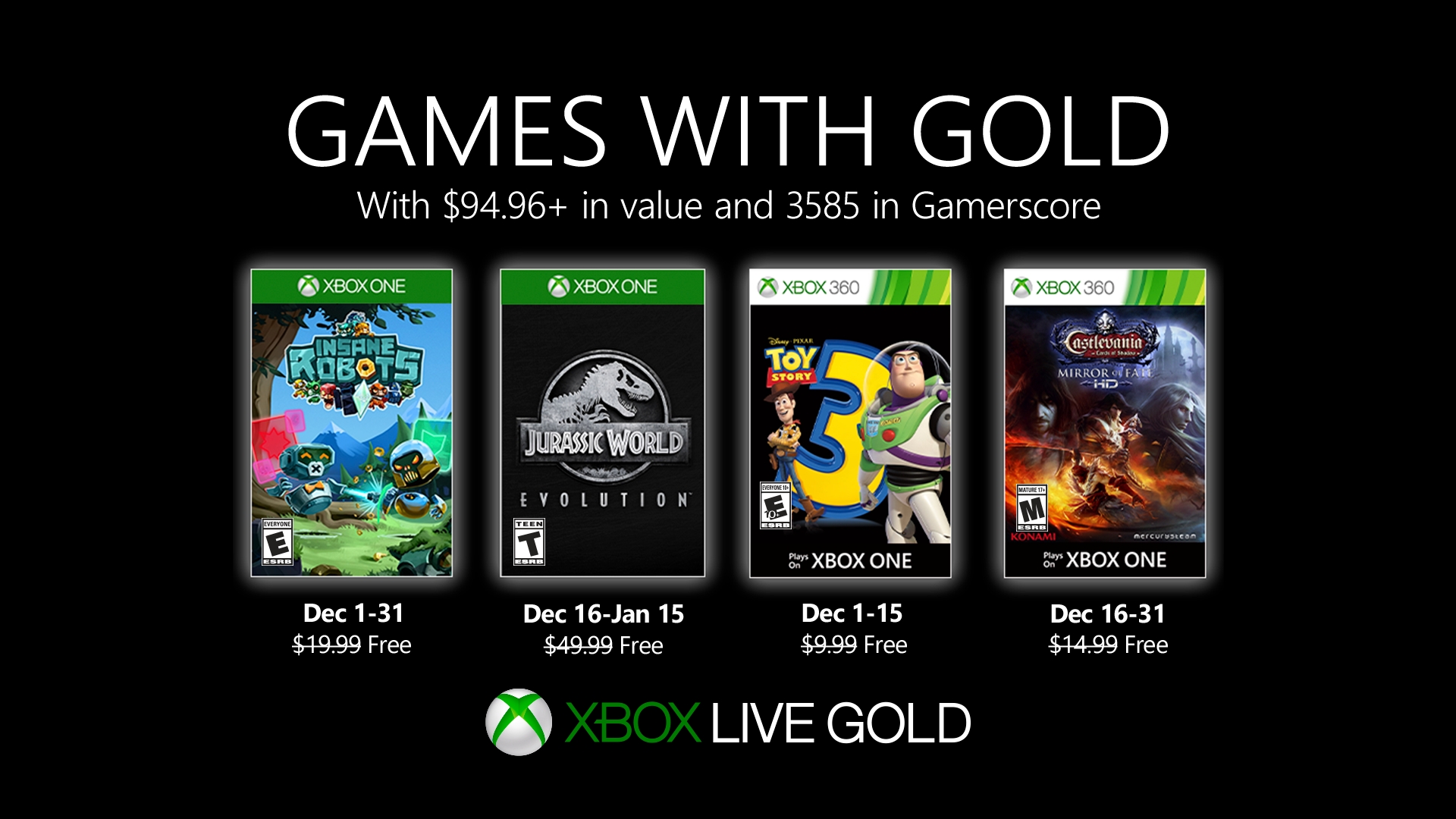
New Games with Gold for December 2019 In December on Xbox One, play the unique card battler Insane Robots and then bring the wonder and majesty of dinosaurs to life in Jurassic World Evolution. On Xbox 360, and Xbox One via Backward Compatibility, unleash your imagination in Toy Story 3 then continue the fight against Dracula in Castlevania: Lords of Shadow – Mirror of Fate HD…
Synthesis Update for No Man’s Sky Launches November 28 on Xbox One Back in August we launched our biggest ever update for No Man’s Sky to date. Beyond was our 2.0 update and since then we have been blown away with the response. New Xbox One players and old friends alike from all over the world have come together in the all-new multiplayer hub, the Space Anomaly. Together they have embarked…
Generation Zero: Alpine Unrest Expansion Available Now on Xbox One Hi everyone, I’m here to talk about our exciting new expansion, Alpine Unrest. Taking place a month after the events of the original game, it unlocks a new island off the east coast with lots of new content for you to explore. First, a quick breakdown of the game for those of you who may be new: Generation Zero is an atmospheric…
Brand New Free American Fugitive DLC Breaks Out on Xbox One Today Following three years in development, we were thrilled with the popularity of American Fugitive at launch, and that so many gamers were enjoying tearing up the world we created! After a post-release phase of bug-fixing and performance improvements, we added some Quality of Life features, including a much requested mini-map…
Next Week on Xbox: New Games for December 3 to 6 Welcome to Next Week on Xbox, where we cover all the new games coming soon to Xbox One! Every week the team at Xbox aims to deliver quality gaming content for you to enjoy on your favorite gaming console. To find out what’s coming soon to Xbox One, read on below and click on each of the game profiles for pre-order details (dates are subject to change).
Ranked Battles and More in World of Warships: Legends on Xbox One World of Warships: Legends is releasing Ranked Battles and more! The November update is packed with player-driven content including Ranked Battles, new maps, and UI improvements. Of course, there are Black Friday events ready to go with Black Edition ships, Premium time, and tons of other items are on sale for the event…
The following blog post, unless otherwise noted, was written by a member of Gamasutras community. The thoughts and opinions expressed are those of the writer and not Gamasutra or its parent company.
FPS (first-person shooter) games have been a staple in the video game industry ever since the explosion of Wolfenstein 3D back in 1992. Since then, the genre has been evolving with graphical upgrades, huge budgets, and an eSports ecosystem. But what about its core, the shooting mechanics? How have we progressed on that front? Why do some guns feel like it’s the real thing, while others feel like toys?
“How do bullets work in video games?”
In the earlier days, many games relied on a technique called raycasting to render 3D environments onto 2D images (your screen). Raycasting also allows the engine to determine the first object intersected by a ray. Developers then started to question, “What if that ray originated from the muzzle of a gun to mimic a bullet?” With this idea, hitscan was born.
Above: An example of raycasting
In most implementations of a hitscan weapon, when the player shoots a bullet, the physics engine will:
Figure out the direction the gun is pointing at,
Cast a ray from the muzzle of the gun until a defined range,
Use raycasting to determine if the ray hit an object.
If the engine determines that an object is in the line of fire, it will notify it with a message that it was “hit” with a bullet. The target then can do all the calculations needed to register the damage.
Above: From Unity. Point A represents a gun casts a ray until its maximum point B. The ray makes contact with the cube, which the engine will tell it has been hit.
Hitscan is simple at its core, but a lot of different modifications can be made to support other logic:
If we continue the ray past the first object that it hit, we can penetrate multiple objects in a line, like the railgun in Quake
Removing the maximum range of the ray means that we can shoot out a laser that will continue forever until we hit something
Programming certain surfaces to be reflective, to bounce bullets off of
Above: Overwatch. Genji’s deflect is an example of a reflective surface.
The main advantage of using raycasting is that it’s super fast. It’s quick to compute and does not need overhead memory or processing time to build a new physics object. That means the network engineering needed to keep many clients in sync is minimal since the server only needs to keep track of the direction of the ray. Recoil is simple to add, as the addition of a small perturbation in the aim of the gun will mimic the effect.
Thus, it’s no surprise that many games in the industry use hitscan for its shooting logic. Wolfenstein 3D and Doom are classic examples, but even recent games use this technology. Characters such as Soldier 76, McCree and Widowmaker from Overwatch have hitscan weapons, and most Call of Duty guns are hitscan as well.
Below: Examples from Overwatch, Call of Duty, Wolfenstein 3D
So why don’t all games use this method?
First, you may have noticed that rays have an infinite traveling velocity, thus reaching their destination instantly. There is no travel time after you fire a bullet and hit an object. This means it’s impossible to dodge a bullet if a ray is on target, even if the target is miles away.
Above: Halo. Notice how the muzzle flare and the hit effects on the ground show up at the same time.
Second, most implementations of hitscan use straight rays. This means it’s hard to account for wind, gravity, and other external factors that may affect the bullet once it leaves the gun. Programmers can add kinks and bends to the ray to help it mimic real rounds, but once the player shoots a ray, there is no real way to modify its path in the middle.
A lot of “casual” games end up using the hitscan method as it simplifies the learning curve for most beginner players. But what about games that aim to create an “immersive and realistic” shooting experience? They cannot achieve their goals within these constraints. We need to use an alternative method.
It sounds pretty fancy, but the high-level idea is straightforward. Every bullet or projectile shot out of a weapon creates a new physics object in the environment. It has its own mass, velocity, and hitbox that the engine will track.
Above: Max Payne 3
The advantages of using projectile ballistics shine in games where realism is the top priority. Since every projectile exists on its own, you can now factor in wind, friction, gravity, temperature; any force that should act on the bullet. Now that you can change the physics, players can now use weapons other than simple guns and lasers; you can now add grenade and rockets to your arsenal.
Since bullets under this system aren’t moving at the speed of light, you can also implement temporal features:
“Bullet-time” as seen in Max Payne, Sniper Elite or Superhot is feasible.
Travel time for projectiles, which means if you’re taking a long-distance shot (or shooting a slow-moving projectile), aiming ahead becomes crucial.
Delayed explosions on projectiles, like grenades
With these additional computations, the processing is more taxing relative to using hitscan. Servers will have to do a lot more work to make sure all the objects are in sync, and discrepancies or conflicts in logic across clients have to be resolved not to create inconsistent experiences for players on the same server.
Below: Examples from Superhot, Battlefield 1, Overwatch
There are many ways around this to squeeze out as much performance as possible. An example of engine optimization is to have a “pool” of objects loaded before playtime, and “warp in and enable” them when needed. Once it hits a surface, you can play a ballistics animation and disable the projectile, saving it for later. This method will reduce some computation and memory costs from creating and destroying objects over and over again.
There are also multiple ways to do the computations, but the high-level difference is where they decide to process a “tick” of a game, a unit of time measurement:
The tick is calculated separately from the rendering logic, which means the game will have a more accurate representation of the objects even if there are frame skips. More logic is needed to calculate the exact time that passed since the last render.
Calculating the tick on every frame; binding the physics to the frame rate. If you disable frame rate caps or start to drop frames, you can see the accelerated or choppy effects on the world.
The consequence of tying movement to ticks is clear when projectiles are moving fast enough to cover large amounts of distance between ticks. You may run into situations where objects seem to “phase through” each other since they were never overlapping in the engine.
All of this sounds fancy, thus leading many people to think that this is a relatively new method; but it actually predates hitscan! Before FPS games, there were already many top-down shooters, such as Asteroids, Space Invaders or Galaxian. These are arcade games from the 70s that were already implementing projectile ballistics, albeit a bit primitive.
Above: Asteroids. The bullets are a bit hard to see, but they are there!
Even with all these features, we’re not able to create a realistic representation of the real world. Is there a way we can get the advantages of both methods?
Yes, we can!
Most game engines can handle both types of bullet simulations: hitscan and projectile ballistics. This gives the option to have a huge variety of weapons; games such as Halo, GTA, and Half-Life have weapons that can support both types of physics.
Below: Halo. The Assault Rifle uses hitscan; the Needler uses projectile ballistics
Developers can also mix two techniques to cover the weaknesses of each system to provide an even more life-like experience. For example, to fix the issue of objects phasing through each other from projectile ballistics, each bullet can draw a ray every tick of the engine. This helps the engine to see if any of the rays would intersect between ticks, colliding mid-air.
They can also be blended to enhance features in a game. A great example of this is in the Sniper Elite series; after pulling the trigger, the engine uses hitscan to determine if the shot is close enough to any detectable target to trigger slow motion. If true, it will fire a bullet with projectile ballistics in bullet-time.
Above: Sniper Elite
And that about covers the basics about how bullets work in video games! It’s interesting to see that the field is more focused on smaller refinements and improvements rather than massive overhauls. We haven’t made significant bounds and leaps after the first few revolutionary games were released.
So what now? What lies on the road ahead?
I don’t see the hybrid approach going away anytime soon due to the extra features it provides, but I predict a lot of the improvements will happen on projectile ballistics. As we continue to increase the frequency of the tick computation (with increased CPU power), we will be able to approach the asymptotic limit of “real-life” bullet simulation.
This article was based on a Quora answer I posted. I would like to thank Pavel Drotár, Renaud Kyokushin, Paul Winstone, and Jason Fletcher for their comments.
Indies hit with takedowns over trademarked ‘Choose Your Own Adventure’ term
Chooseco, the owner of the “Choose Your Own Adventure” trademark and the publisher behind the modern run of “Choose Your Own Adventure” gamebooks, has issued takedown notices to a number of indie games hosted on itch.io over their use of “Choose Your Own Adventure” in the descriptions for their games.
From Barcade to Kleenex, it’s not uncommon for trademarked product names to slip into the common lexicon and become informal ways to describe similar products. Though, as Chooseco’s trademark infringement notices highlight, adopting those terms leaves developers open to legal complications.
In the case of “Choose Your Own Adventure”, the term is often informally used to describe the sorts of interactive stories where players are able to make choices that send a story down diverging paths both in video games, books, and other interactive media as a whole.
Itch.io founder Leaf Corcoran tweeted a word of warning to indie developers that the book publisher was exercising its legal rights as owner of the trademarked term, later telling The Verge that the platform is suspending flagged games to avoid issues with its web host in the meantime.
warning to any devs using the phrase “choose your own adventure” to describe their games, Chooseco is issuing takedown notices to @itchio for trademark infringement. Example game page they went after: pic.twitter.com/YG0JGUoHAA
He tells the publication that this isn’t the first time Chooseco has issued takedown notices against games on itch.io, but notes that the platform typically tries to help the developers of affected games remove infringing content from their itchi.io pages when trademark infringement notices come into play.
While this latest wave of takedowns seems to be aimed at indie developers, Chooseco has taken similar actions against larger entities in the past. At the beginning of 2019 for instance, the company sued Netflix for trademark infringement for its use of the “Choose Your Own Adventure” brand within its interactive film Bandersnatch, accusing the massive entertainment company of purposefully using the brand’s ‘80s roots to “capitalize on viewers’ nostalgia.”
Silverblue is an operating system for your desktop built on Fedora. It’s excellent for daily use, development, and container-based workflows. It offers numerous advantages such as being able to roll back in case of any problems. If you want to update to Fedora 31 on your Silverblue system, this article tells you how. It not only shows you what to do, but also how to revert back if anything unforeseen happens.
Prior the the update to Fedora 31 it is better to do any pending upgrades.
Updating using GNOME Software
Unfortunately the update can’t be done in GNOME Software right now, because of a bug in GNOME Software itself. For additional information please look at upstream issue.
Updating using terminal
If you do not like GNOME Software or like to do everything in terminal, than this next guide is for you.
Updating to Fedora 31 using terminal is easy. First, check if the 31 branch is available, which should be true now:
$ ostree remote refs fedora
You should see the following in the output:
fedora:fedora/31/x86_64/silverblue
Next, rebase your system to the Fedora 31 branch.
$ rpm-ostree rebase fedora:fedora/31/x86_64/silverblue
Finally, the last thing to do is restart your computer and boot to Fedora 31.
How to revert things back
If anything bad happens — for instance, if you can’t boot to Fedora 31 at all — it’s easy to go back. Just pick the previous entry in GRUB, and your system will start in its previous state before switching to Fedora 31. To make this change permanent, use the following command:
$ rpm-ostree rollback
That’s it. Now you know how to rebase to Fedora 31 and back. So why not do it today?
The Talos Principle Brings Narrative First-Person Puzzling To Switch Today
After launching on PC back in December 2014, The Talos Principle is launching on Switch later today almost five years to the day after its debut.
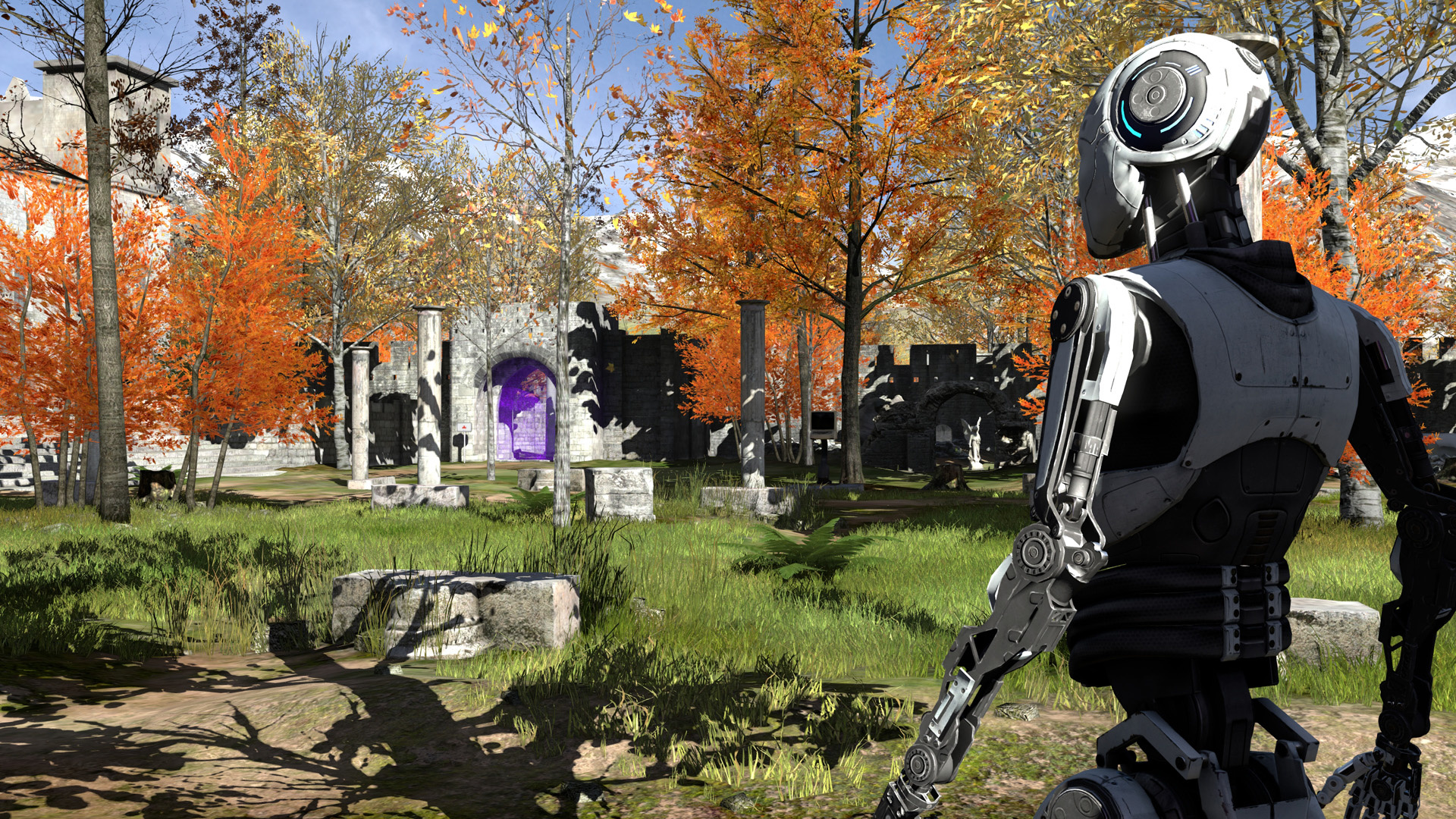
It’s a single-player game from Croatian developer Croteam, the creators of the Serious Sam series, and launched to widespread acclaim five years ago. A first-person narrative puzzler, it features over 120 environmental head-scratchers and has you exploring ancient ruins littered with sexy tech.
Here’s a list of the key features from the game’s page, followed by a few screenshots:
– Overcome more than 120 immersive puzzles in a stunning world. – Divert drones, manipulate laser beams and even replicate time to prove your worth – or to find a way out. – Explore a story about humanity, technology and civilization. Uncover clues, devise theories, and make up your own mind. – Choose your own path through the game’s non-linear world, solving puzzles your way.
No word yet on exactly what makes this the ‘Deluxe Edition’, but we’ll let you know as soon as we find out. It’ll take up 3.5GBs of space on your Switch and will set you back $29.99. We’ll investigate as soon as possible to let you know how the Switch version holds up, but it’s certainly nice to see it on Nintendo’s console.
Boyfriend Dungeon Is A Dating Sim Where Your Soulmate Turns Into A Weapon
Kitfox Games has revealed that it is bringing its dating sim/dungeon crawler mashup Boyfriend Dungeon to the Nintendo Switch next year.
Set in a world where boyfriends can also transform into powerful weapons, you’ll need to find the perfect date in order to conquer the game’s monster-filled levels. If you succeed in capturing their hearts, then they will level-up and become even more powerful in battle.
Developed “in coordination with dating-dungeon fans”, Boyfriend Dungeon seems like the perfect counterpoint to Is It Wrong To Try To Pick Up Girls In A Dungeon, if you ask us. Let us know if you’ll be giving it a spin in 2020.
Resident Evil 2 Remake Has Outsold The Original RE2
It's been a good few years for Capcom and Resident Evil. 2017's release of Resident Evil 7: Biohazard marked a return to form for the long-running survival horror series, with a surprising shift to a first-person viewpoint, while this year's remake of Resident Evil 2 was also met with critical acclaim--it's one of GameSpot's Best Games of 2019.
Capcom has now announced that the high praise from fans and critics alike has led to the Resident Evil 2 remake achieving more than 5 million units in sales as of December 4, 2019. This is significant, because it means the remake has now surpassed the lifetime sales of the original 1998 release of Resident Evil 2, which has sold around 4.96 million units.
That's still not quite enough to push it into Capcom's top five best-selling games of all time, as Street Fighter II occupies the fifth spot with 6.3 million units sold. It's also behind Resident Evil 7 which has sold 6.8 million units as of September 2019. Resident Evil 2 is on its way, though, especially considering it's been on sale for less than a year.
Capcom will be hoping the recently announced remake of Resident Evil 3 performs just as well. Much like this year's Resident Evil 2, the Resident Evil 3 remake is a reimagining of the original game, with an over-the-shoulder viewpoint and modernized gameplay mechanics. The 1999 release went on to sell 3.5 million units, so the remake won't have to sell quite as many units to surpass it. Resident Evil 3 also comes packaged with Resident Evil Resistance, an asymmetrical multiplayer game, and is launching on April 3, 2020, for PlayStation 4, Xbox One, and PC.