The first argument is the pattern (iPhone|iPad). It either matches the first part right in front of the or symbol |—which is iPhone—or the second part after it—which is iPad.
The second argument is the text 'Buy now: iPhone only $399 with free iPad' which you want to search for the pattern.
The result shows that there are two matching substrings in the text: 'iPhone' and 'iPad'.
Python Regex Or: Examples
Let’s study some more examples to teach you all the possible uses and border cases—one after another.
You start with the previous example:
>>> import re

>>> text = 'Buy now: iPhone only $399 with free iPad'

>>> re.findall('(iPhone|iPad)', text)

['iPhone', 'iPad']
In the second example, you just skipped the parentheses using the regex pattern iPhone|iPad rather than (iPhone|iPad). But no problem–it still works and generates the exact same output!
But what happens if you leave one side of the or operation empty?
The output is not as strange as it seems. The or operator allows for empty operands—in which case it wants to match the non-empty string. If this is not possible, it matches the empty string (so everything will be a match).
The previous example also shows that it still tries to match the non-empty string if possible. But what if the trivial empty match is on the left side of the or operand?
This shows some subtleties of the regex engine. First of all, it still matches the non-empty string if possible! But more importantly, you can see that the regex engine matches from left to right. It first tries to match the left regex (which it does on every single position in the text). An empty string that’s already matched will not be considered anymore. Only then, it tries to match the regex on the right side of the or operator.
Think of it this way: the regex engine moves from the left to the right—one position at a time. It matches the empty string every single time. Then it moves over the empty string and in some cases, it can still match the non-empty string. Each match “consumes” a substring and cannot be matched anymore. But an empty string cannot be consumed. That’s why you see the first match is the empty string and the second match is the substring 'iPhone'.
How to Nest the Python Regex Or Operator?
Okay, you’re not easily satisfied, are you? Let’s try nesting the Python regex or operator |.
>>> text = 'xxx iii zzz iii ii xxx'

>>> re.findall('xxx|iii|zzz', text)

['xxx', 'iii', 'zzz', 'iii', 'xxx']
So you can use multiple or operators in a row. Of course, you can also use the grouping (parentheses) operator to nest an arbitrary complicated construct of or operations:
But this seldomly leads to clean and readable code. And it can usually avoided easily by putting a bit of thought into your regex design.
Python Regex Or: Character Class
If you only want to match a single character out of a set of characters, the character class is a much better way of doing it:
>>> import re

>>> text = 'hello world'

>>> re.findall('[abcdefghijklmnopqrstuvwxyz]+', text)

['hello', 'world']
A shorter and more concise version would be to use the range operator within character classes:
>>> re.findall('[a-z]+', text)

['hello', 'world']
The character class is enclosed in the bracket notation [ ] and it literally means “match exactly one of the symbols in the class”. Thus, it carries the same semantics as the or operator: |. However, if you try to do something on those lines…
… you’ll first write much less concise code and, second, risk of getting confused by the output. The reason is that the parenthesis is the group operator—it captures the position and substring that matches the regex. Used in the findall() method, it only returns the content of the last matched group. This turns out to be the last character of the word 'hello' and the last character of the word 'world'.
How to Match the Or Character (Vertical Line ‘|’)?
So if the character '|' stands for the or character in a given regex, the question arises how to match the vertical line symbol '|' itself?
The answer is simple: escape the or character in your regular expression using the backslash. In particular, use 'A\|B' instead of 'A|B' to match the string 'A|B' itself. Here’s an example:
Do you really understand the outputs of this code snippet? In the first example, you’re searching for either character 'A' or character 'B'. In the second example, you’re searching for the string 'A|B' (which contains the '|' character).
Python Regex And
If there’s a Python regex “or”, there must also be an “and” operator, right?
Correct! But think about it for a moment: say, you want one regex to occur alongside another regex. In other words, you want to match regex A and regex B. So what do you do? You match regex AB.
You’ve already seen many examples of the “Python regex AND” operator—but here’s another one:
>>> import re

>>> re.findall('AB', 'AAAACAACAABAAAABAAC')

['AB', 'AB']
The simple concatenation of regex A and B already performs an implicit “and operation”.
Python Regex Not
How can you search a string for substrings that do NOT match a given pattern? In other words, what’s the “negative pattern” in Python regular expressions?
The answer is two-fold:
If you want to match all characters except a set of specific characters, you can use the negative character class [^...].
If you want to match all substrings except the ones that match a regex pattern, you can use the feature of negative lookahead(?!...).
Here’s an example for the negative character class:
>>> import re

>>> re.findall('[^a-m]', 'aaabbbaababmmmnoopmmaa')

['n', 'o', 'o', 'p']
And here’s an example for the negative lookahead pattern to match all “words that are not followed by words”:
The negative lookahead (?![a-z]+) doesn’t consume (match) any character. It just checks whether the pattern [a-z]+ does NOT match at a given position. The only times this happens is just before the empty space and the end of the string.
[Collection] What Are The Different Python Re Quantifiers?
The “and”, “or”, and “not” operators are not the only regular expression operators you need to understand. So what are other operators?
Next, you’ll get a quick and dirty overview of the most important regex operations and how to use them in Python. Here are the most important regex quantifiers:
Quantifier
Description
Example
.
The wild-card (‘dot’) matches any character in a string except the newline character ‘n’.
Regex ‘…’ matches all words with three characters such as ‘abc’, ‘cat’, and ‘dog’.
*
The zero-or-more asterisk matches an arbitrary number of occurrences (including zero occurrences) of the immediately preceding regex.
Regex ‘cat*’ matches the strings ‘ca’, ‘cat’, ‘catt’, ‘cattt’, and ‘catttttttt’.
?
The zero-or-one matches (as the name suggests) either zero or one occurrences of the immediately preceding regex.
Regex ‘cat?’ matches both strings ‘ca’ and ‘cat’ — but not ‘catt’, ‘cattt’, and ‘catttttttt’.
+
The at-least-one matches one or more occurrences of the immediately preceding regex.
Regex ‘cat+’ does not match the string ‘ca’ but matches all strings with at least one trailing character ‘t’ such as ‘cat’, ‘catt’, and ‘cattt’.
^
The start-of-string matches the beginning of a string.
Regex ‘^p’ matches the strings ‘python’ and ‘programming’ but not ‘lisp’ and ‘spying’ where the character ‘p’ does not occur at the start of the string.
$
The end-of-string matches the end of a string.
Regex ‘py$’ would match the strings ‘main.py’ and ‘pypy’ but not the strings ‘python’ and ‘pypi’.
A|B
The OR matches either the regex A or the regex B. Note that the intuition is quite different from the standard interpretation of the or operator that can also satisfy both conditions.
Regex ‘(hello)|(hi)’ matches strings ‘hello world’ and ‘hi python’. It wouldn’t make sense to try to match both of them at the same time.
AB
The AND matches first the regex A and second the regex B, in this sequence.
We’ve already seen it trivially in the regex ‘ca’ that matches first regex ‘c’ and second regex ‘a’.
Note that I gave the above operators some more meaningful names (in bold) so that you can immediately grasp the purpose of each regex. For example, the ‘^’ operator is usually denoted as the ‘caret’ operator. Those names are not descriptive so I came up with more kindergarten-like words such as the “start-of-string” operator.
We’ve already seen many examples but let’s dive into even more!
import re text = ''' Ha! let me see her: out, alas! he's cold: Her blood is settled, and her joints are stiff; Life and these lips have long been separated: Death lies on her like an untimely frost Upon the sweetest flower of all the field. ''' print(re.findall('.a!', text)) '''

Finds all occurrences of an arbitrary character that is

followed by the character sequence 'a!'.

['Ha!'] ''' print(re.findall('is.*and', text)) '''

Finds all occurrences of the word 'is',

followed by an arbitrary number of characters

and the word 'and'.

['is settled, and'] ''' print(re.findall('her:?', text)) '''

Finds all occurrences of the word 'her',

followed by zero or one occurrences of the colon ':'.

['her:', 'her', 'her'] ''' print(re.findall('her:+', text)) '''

Finds all occurrences of the word 'her',

followed by one or more occurrences of the colon ':'.

['her:'] ''' print(re.findall('^Ha.*', text)) '''

Finds all occurrences where the string starts with

the character sequence 'Ha', followed by an arbitrary

number of characters except for the new-line character. Can you figure out why Python doesn't find any?

[] ''' print(re.findall('n$', text)) '''

Finds all occurrences where the new-line character 'n'

occurs at the end of the string.

['n'] ''' print(re.findall('(Life|Death)', text)) '''

Finds all occurrences of either the word 'Life' or the

word 'Death'.

['Life', 'Death'] '''
In these examples, you’ve already seen the special symbol ‘\n’ which denotes the new-line character in Python (and most other languages). There are many special characters, specifically designed for regular expressions. Next, we’ll discover the most important special symbols.
Related Re Methods
There are seven important regular expression methods which you must master:
The re.findall(pattern, string) method returns a list of string matches. Read more in our blog tutorial.
The re.search(pattern, string) method returns a match object of the first match. Read more in our blog tutorial.
The re.match(pattern, string) method returns a match object if the regex matches at the beginning of the string. Read more in our blog tutorial.
The re.fullmatch(pattern, string) method returns a match object if the regex matches the whole string. Read more in our blog tutorial.
The re.compile(pattern) method prepares the regular expression pattern—and returns a regex object which you can use multiple times in your code. Read more in our blog tutorial.
The re.split(pattern, string) method returns a list of strings by matching all occurrences of the pattern in the string and dividing the string along those. Read more in our blog tutorial.
The re.sub(The re.sub(pattern, repl, string, count=0, flags=0) method returns a new string where all occurrences of the pattern in the old string are replaced by repl. Read more in our blog tutorial.
These seven methods are 80% of what you need to know to get started with Python’s regular expression functionality.
Where to Go From Here?
You’ve learned everything you need to know about the Python Regex Or Operator.
Summary:
Given a string. Say, your goal is to find all substrings that match either the string 'iPhone' or the string 'iPad'. How can you achieve this?
The easiest way to achieve this is the Python or operator | using the regular expression pattern (iPhone|iPad).
Want to earn money while you learn Python? Average Python programmers earn more than $50 per hour. You can certainly become average, can’t you?
Join the free webinar that shows you how to become a thriving coding business owner online!
Random: Smash Bros. Tournament Offers Up A Cheeky Surprise Few Were Expecting
Anything can happen when you’re streaming a video game online. You could catch a moment of pure magic, or you could capture a proud competitor falling on hard times. Or, you could see the contents of a player’s Switch screenshot gallery, and see if they’ve been playing ‘mature’ games like Dead or Alive Xtreme 3: Scarlet.
That’s precisely what happened in this Super Smash Bros. Ultimate matchup; while the challengers were setting up, one of them clicked the gallery icon on the Switch UI and presented the crowd with some scantily-clad Tecmo ladies. Ahem.
While the images were arguably PG-13 stuff, it was still amusing – as was the reaction of the assembled crowd, who wanted to see more after that initial glimpse. Tut tut.
Persona 5 Scramble Japanese Demo Goes Live On Nintendo Switch
As had been previously promised, a demo for the upcoming Persona 5 Scramble has now been released for Nintendo Switch. If you want to give the game a go before its full launch, here’s your chance.
You can access the demo by logging onto the Switch eShop with a Japanese account (if you don’t already have one, it’s not too complicated to set one up). Once you’re logged in, go down to the third tab on the left-hand side (below the one called ‘New’), and you’ll see the Persona 5 Scramble page listed.
Once you’ve clicked that, choose the bottom option on the right-hand side (the smaller of the two boxes) and you’ll be able to download the demo. Then you can choose to play it just as you would with any other game on your console, as long as you don’t mind playing in Japanese.
The demo was first announced last month alongside a new – and very flashy – trailer. The game is scheduled to launch on 20th February in Japan, although no western release has been confirmed just yet.
Are you hoping to hear of a western release date soon? Will you be trying out this demo? Let us know in the usual place.
Apex Legends Season 4: Assimilation - Everything You Need To Know
Apex Legends Season 4: Assimilation, the new season in developer Respawn's battle royale, is now live on PS4, Xbox One, and PC, and there's plenty of new content to look forward to in the free update. In the following article, we detail everything you need to know about the start of Year 2 in Apex Legends.
Season 4 has plenty of new content to offer, including playable character Revenant and the Sentinel sniper rifle. Kings Canyon makes a return in this new season as well, though not how we expected. Assimilation also overhauls Ranked Mode and makes adjustments to how certain in-game features work, like getting Assists.
In Season 4, Apex Legends gains a new character, Revenant. Respawn has slowly been teasing the creepy legend ever since the Halloween-themed Fight or Fright. Originally, Respawn announced that Forge would be the new legend, but then Revenant killed him.
Gameplay-wise, Revenant is a support legend. In the Season 4 gameplay trailer, we see Revenant climbing higher and faster than most legends, throw out an explosive orb of dark energy that seems to stun enemies and disable their abilities, and set up a totem that gives him and his allies a chance to immediately respawn after being killed. Now that Season 4 is live, you can learn more about Revenant's new abilities, including Stalker, Silence, and Death Totem.
New Weapon
Apex Legends is getting another sniper rifle. Like Season 3: Meltdown's Charge Rifle, Season 4: Assimilation's Sentinel is a sniper rifle focused around a charging mechanic. However, instead of needing to charge in order to fire, the Sentinel seems to be a gun that can charge itself to fire a more powerful shot--allowing you to snipe at foes with fast but weak shots or strong but slow shots.
The Sentinel isn't a Titanfall or Titanfall 2 weapon, though its name may be in reference to a spaceship from the games.
Two Maps, Two Halves For Ranked Mode
Kings Canyon is returning to Apex Legends in Season 4, though you'll still have to wait a bit before you can play on it again. Assimilation's Ranked Mode will now be divided into two halves--the first of which will see you continue to play on a drastically remade World's Edge, while the latter half will take players back to Kings Canyon.
Season 4 will be split between two different maps, instead of solely focusing on one.
Help Your Friends And Earn More Points
Respawn is changing how Assists work in Assimilation. The timer for getting an Assist will be extended from 5 seconds to 7.5 seconds, giving you a larger window of opportunity to earn points for helping a teammate down an opponent. Season 4 will also allow you to earn Assist points when an ally kills an enemy you tricked with a Mirage Decoy, nabbed with a Pathfinder Grapple, damaged with a Crypto EMP, or scanned with Crypto or Bloodhound.
Brand-New Rank Tier
In Ranked Mode, the tiers have been adjusted so that levels that were once considered Apex Predator are now called Master. The tier of Apex Predator will only be given to the 500 highest-ranking players on each platform (Xbox One, PS4, and PC), so only 1500 people in the world will hold the title.
Other than that, ranks will work as they did in Season 3, with the start of Season 4 giving all players a soft reset. The soft reset will lower your current rank by 1.5 tiers. So, for example, if you're currently Gold I, Season 4 will see you start as Silver III.
Party Restrictions
Season 4: Assimilation will also have brand-new restrictions on who you can party-up with. Once you reach Platinum IV, you can only party up with players who are within one tier rank of you. So, for instance, if you're Platinum, you can only party up with players who are Gold through Diamond, while a Diamond player can only party with teammates who are Platinum through Master.
This does mean you will no longer be able to boost a low-ranking player and get a fresh Bronze-level account into Diamond or Master, as new accounts won't be able to join high-ranking matches until they've earned enough points to be Gold at the very minimum. On the other hand, the change should also mean that you will be consistently paired up against players within your skill bracket once you enter high-tier play.
Start Of The Season Rewards
At the start of Season 4, you'll earn rewards dependent on the rank you achieved in Season 3: Meltdown. All players will receive a new badge that reflects their Season 3 rank. Ranks Gold through Apex Predator will also receive a gun charm cosmetic that's colored to match your Season 3 rank--with the exception of Diamond and Apex Predator, which will receive ice and molten lava-themed charms, respectively. Diamond and Apex Predator will also get new dive trails, the former will get ice and the latter fire.
You'll also get rewards just for logging in on February 4. All players will receive a paper crane gun charm as well as a new badge that reflects when in the past year you started playing Apex Legends.
You'll only earn this particular charm if you've been playing Apex Legends since basically the beginning.
End Of The Season Rewards
All ranks will earn new badges at the end of Season 4, but only Gold through Apex Predator will earn a new weapon cosmetic and only Diamond and Apex Predator will earn a new dive trail.
Only the highest-ranking 1500 players across the world (500 on Xbox One, 500 on PS4, and 500 on PC) will be able to earn the title of Apex Predator in Season 4.
Previously we looked at OpenGL alternatives shortly after OpenGL on Apple products was deprecated. One of the technologies we mentioned was The Forge, a cross platform rendering solution. It is an open source cross platform rendering framework with several game development building blocks created by Confetti.
In addition to taking are of the low level details of working with Direct3D and Vulkan, the Forge provides the following features:
Asynchronous Resource loading with a resource loader task system as shown in 10_PixelProjectedReflections
Lua Scripting System – currently used in 06_Playground to load models and textures and animate the camera
Now, in an update added to the Kickstarter campaign, the game’s director Hideki Kamiya has shared early design documents and little tidbits of info from the original game‘s development. He says, “The Wonderful 101 has a staggering amount of content – so much, in fact, that I have full confidence it can satisfy everyone even now, 6 long years after it was originally released”, giving him a reason to search through an old hard drive and show off the content found below.
He kicks things off with the first draft of the game’s design document, which was made entirely by himself. It features early sketches, the name ‘Wonder-Red’ (which had already been chosen very early on), and mentions the number ‘100’ rather than ‘101’. Kamiya said he was told to “get a little more creative with the title”, so he added one to the number.
The “line action” page shows off what the player can do with their team members; ideas here made it into the final game.
The update also includes initial designs for the team members. Here we can see Wonder-Red with and without a mask; Kamiya says, “The mask shape looks a little different, but I pretty much knew how the design would look from the start… I hadn’t decided on what day job he would take on to hide himself from the world, and was still experimenting with different ideas”.
Finally, he also shows off the game’s very first screenshot created as a prototype – although he wasn’t satisfied with this early graphical style – and a poster which was created by a designer for fun. It was created “to look like a movie poster”, and the team hung it up in the office for all to see.
If you’re interested, you can see the entire update for yourself right here, as well as pledge towards the game itself, of course.
Xbox Boss Doesn’t See Nintendo As A “Main Competitor” In The Next-Gen War
With the launch of the PS5 and Xbox Series X looming on the horizon, it’s inevitable that we’re going to see some posturing from the various platform holders as they try to convince consumers that their black box is the one you really need under your TV.
A few days ago, Nintendo’s president Shuntaro Furukawa voiced the opinion that neither the PS5 or Xbox Series X would have any real impact on the fortunes of the Switch. Now, Xbox chief Phil Spencer has added his comments to what will no doubt be a real melting pot of soundbites as the year progresses, telling Protocol that Nintendo and Sony aren’t the companies Microsoft is looking to beat in this upcoming war:
When you talk about Nintendo and Sony, we have a ton of respect for them, but we see Amazon and Google as the main competitors going forward… That’s not to disrespect Nintendo and Sony, but the traditional gaming companies are somewhat out of position. I guess they could try to re-create Azure, but we’ve invested tens of billions of dollars in cloud over the years.
Microsoft, more so than its traditional rivals, is heavily banking on cloud gaming in this next-gen war, with the Azure-powered Project xCloud promising to revolutionise the way Xbox fans access and enjoy their games. Sony, which purchased Gaikai back in 2012, also has an interest in cloud gaming, but Nintendo is yet to dip its toe into the technology (although it’s worth noting that some third-parties, like Capcom and Ubisoft, have done so on Switch already).
Given Microsoft’s focus on cloud gaming and its investment in its Azure platform, it’s understandable that Amazon and Google would be seen as key rivals, despite the fact that neither company has made any real dent in the ‘traditional’ gaming space as yet. However, if cloud gaming takes off in the same way that music and movie streaming has done, then the battlefield of the future could look very different – but will Sony and Nintendo, with their market-leading first-party exclusives and massively-popular titles, really be out of the picture?
Posted by: xSicKxBot - 02-06-2020, 03:24 AM - Forum: Lounge
- No Replies
Minions Sequel Trailer Features Villainous, Hilarious Mayhem
The animated hit Despicable Me is now 10 years old, but the franchise it spawned remains hugely popular. As well as the two direct sequels, the 2015 spin-off Minions was a massive success, grossing $1.15 billion at the worldwide box office. Inevitably, a Minions follow-up is on the way--it releases this summer and the first trailer has arrived.
Minions: The Rise of Gru is both a sequel to Minions and a prequel to the main films. It's set in the 1970s and focuses on Steve Carell's Gru, who is a young boy dreaming of becoming a feared supervillain. In order to prove his villainy, he steals a valuable stone from the evil group Vicious 6, and finds himself on the run. Luckily, those iconic yellow Minions are on hand to help him out. Check out the trailer below.
Minions: The Rise of Gru also stars Taraji P. Henson, Russell Brand, and Julie Andrews, plus a host of action stars, including Jean-Claude Van Damme, Dolph Lundgren, Michelle Yeoh, Danny Trejo, and Lucy Lawless. And while this is the first movie in the series not to be co-directed by Pierre Coffin, he's still on hand to provide the voice of the Minions. The movie releases on July 3.
How do you know your readers’ or customers’ thoughts on your website content? How does the star rating feature help to collect customers’ opinions?
Star rating is a feature that is used across different domains in a variety of ways. For example, it is one of the key building blocks in an eCommerce website.
Star rating helps you to know how people rank your content. It not only gives rank on your content. Also, it brings more readers to your page by the gained rating.
When you build a website, if you have got scope for implementing a star rating system and you should definitely experiment with it.
Websites use a variety of ways to allow users to rate content. For example, star rating, up-down rating, emoji rating and more.
We have seen so many examples for star rating, emoji rating and more. I grouped all those in this one single example.
I supported three UI alternatives for the rating section. Those are,
Five-star rating
Favorite rating
Emoji rating
I created a directive in PHP to configure the template for the rating appearance.
Existing plugins to implement a dynamic star rating
There are various plugins available in the market to enable star rating. The ready-made plugins are with enormous features.
For example, Rateit is a jQuery based star rating plugin. It allows embedding a star rating with a list, select and more HTML markup. It supports Font Awesome, Material icons to display rating icons.
The UpvoteJS is a JavaScript package to render a StackExchange-like rating widget.
If you are having a WordPress website, there are built-in rating plugins available. Wp-PostRatings is a popular plugin to implement rating.
Advantages of creating a custom star rating script
With a custom star rating, we can simplify the code logic instead of stuffing a lot.
And thereby, it will make it easy at the time of enhancement or maintenance phase.
It rectifies your overload with a feature-packed built-in. Also, it reduces your effort on managing a thousand lines of code for this simple UI feature.
Various types of rating options
Websites use a different type of rating options to get user’s reviews. The following list shows some of the types.
Single or multiple star rating
Facebook-like emoji rating
Simple up-down voting.
Like-unlike rating
Bar rating
The types are veries in user’s mindset while rating. For example, the like-unlike and up-down rating expects binary options 0 or 1 from the user. But with the bar rating, it can have a range of points out of some limit.
Star rating example with AJAX
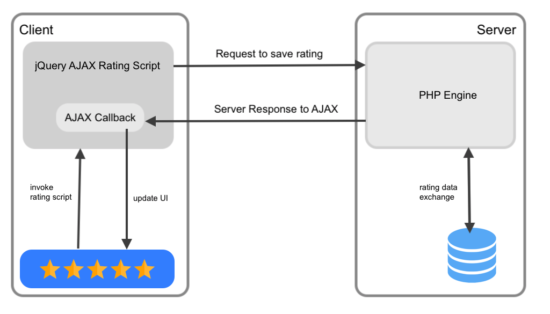
I have created an AJAX-based star rating example code with PHP and jQuery.
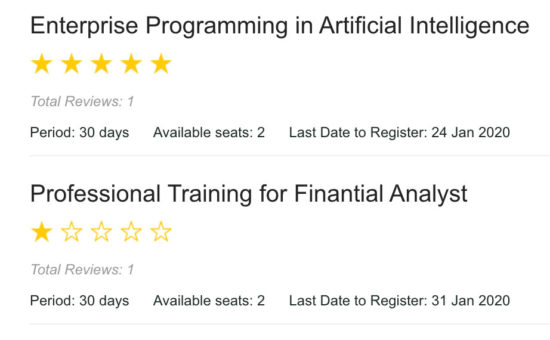
This code will show a list of courses with an option to rate each course. The courses are from the database.
The rating element in the UI is configurable. I provided three UI alternatives for the rating section. Star, favorite and emoji ratings are there to collect users’ reviews.
While adding the rating, the code sends it to the PHP via AJAX. Then, it saves the ratings in the MySQL database.
Once rated, the user cannot rerate a course again to avoid duplicate ratings.
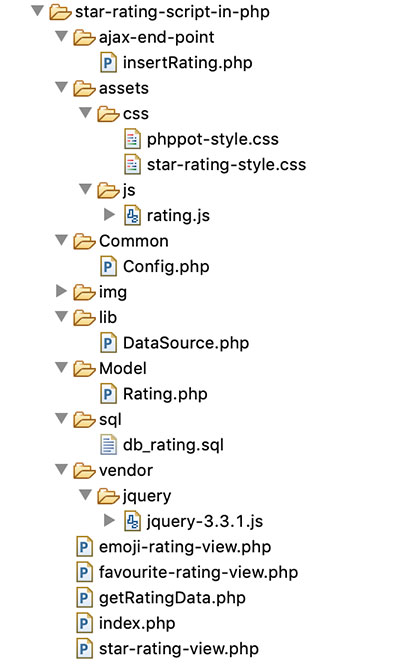
The following figure shows the file strucuture of the example code.
The rating example database
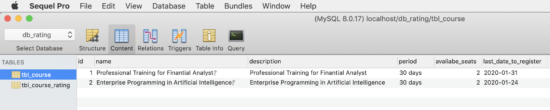
This section shows the structure and the SQL of the database used in this example.
I have created two tables tbl_courses and tbl_course_rating. The tbl_cources database table contains courses on which the user will add ratings.
The tbl_cource_rating table has the mapping with the tbl_cource database. It has a unique rating without duplicates.
The below script shows the CREATE statement and the data dump for these two tables. By importing this script, you can setup this example in the local environment.
sql/db_rating.sql
--

-- Database: `db_rating`

-- -- -------------------------------------------------------- --

-- Table structure for table `tbl_course`

-- CREATE TABLE `tbl_course` ( `id` int(11) NOT NULL, `name` varchar(255) NOT NULL, `description` varchar(255) NOT NULL, `period` varchar(255) NOT NULL, `availabe_seats` int(11) NOT NULL, `last_date_to_register` date NOT NULL

) ENGINE=InnoDB DEFAULT CHARSET=latin1; --

-- Dumping data for table `tbl_course`

-- INSERT INTO `tbl_course` (`id`, `name`, `description`, `period`, `availabe_seats`, `last_date_to_register`) VALUES

(1, 'Professional Training for Finantial Analyst\r\n', 'Professional Training for Finantial Analyst', '30 days', 2, '2020-01-31'),

(2, 'Enterprise Programming in Artificial Intelligence\r\n', 'Enterprise Programming in Artificial Intelligence', '30 days', 2, '2020-01-24'); -- -------------------------------------------------------- --

-- Table structure for table `tbl_course_rating`

-- CREATE TABLE `tbl_course_rating` ( `id` int(11) NOT NULL, `course_id` int(11) NOT NULL, `member_id` int(11) NOT NULL, `rating` int(11) NOT NULL

) ENGINE=InnoDB DEFAULT CHARSET=latin1; --

-- Indexes for dumped tables

-- --

-- Indexes for table `tbl_course`

--

ALTER TABLE `tbl_course` ADD PRIMARY KEY (`id`); --

-- Indexes for table `tbl_course_rating`

--

ALTER TABLE `tbl_course_rating` ADD PRIMARY KEY (`id`); --

-- AUTO_INCREMENT for dumped tables

-- --

-- AUTO_INCREMENT for table `tbl_course`

--

ALTER TABLE `tbl_course` MODIFY `id` int(11) NOT NULL AUTO_INCREMENT, AUTO_INCREMENT=3; --

-- AUTO_INCREMENT for table `tbl_course_rating`

--

ALTER TABLE `tbl_course_rating` MODIFY `id` int(11) NOT NULL AUTO_INCREMENT, AUTO_INCREMENT=95;

COMMIT;
UI design to render star rating option
In a landing page, it shows the list of courses from the database. The HTML code for this page is below.
It loads the rating element based on the PHP constant defined in a common configuration file.
The rating element will show clickable 5-stars or favorite-icons or emoji icons.
On clicking the rating element, it invokes a jQuery script to send AJAX requests to save ratings.
I created separate template files to have different types of rating UI. Those are star-rating-view.php, favorite-rating-view.php and emoji_rating_view.php.
The template files show the onClick event handling specification in the markup.
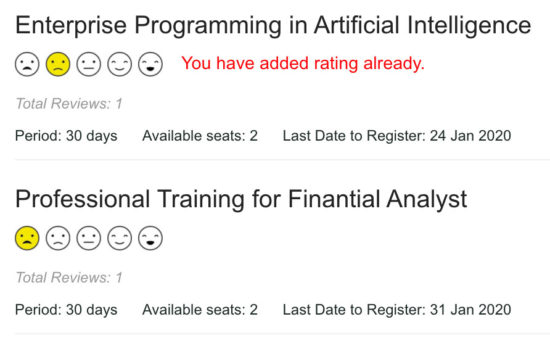
In the emoji rating template, it shows a range of five emotion icons from very-sad to very-happy.
If you are providing support on the user’s queries, you can use the emoji rating. Embedding the emoji rating will give the customer’s emotional feel on your support.
This file contains jQuery functions to prepare AJAX requests to save user ratings.
It also handles the mouse hover events to highlight the rating element. The mouseOverRating() function highlights the star or other rating elements on hovering.
Similarly, mouseOutRating() resets the rating UI back to its original form on mouse out.
The AJAX code in the addRating() prepares the request with PHP endpoint URL and data params.
It receives the server response in the AJAX success callback at which it updates the UI accordingly.
assets/js/rating.js
function mouseOverRating(courseId, rating, appearance) { if (appearance == "star") { for (var i = 1; i <= rating; i++) { $('#' + courseId + "_" + i + ' img').attr('src', "./img/" + appearance + "-filled.png"); } } else { ratingIconPrefix = "./img/" + appearance; for (var i = 1; i <= rating; i++) { if (appearance == "emoji") { ratingIconPrefix = "./img/" + appearance + "1"; } if (i == rating) { $('#' + courseId + "_" + i + ' img').attr('src', ratingIconPrefix + "-filled.png"); } } } } function mouseOutRating(courseId, userRating, appearance) { var ratingId; if (appearance == "star") { if (userRating != 0) { for (var i = 1; i <= userRating; i++) { $('#' + courseId + "_" + i + ' img').attr('src', "./img/" + appearance + "-filled.png"); } } if (userRating <= 5) { for (var i = (userRating + 1); i <= 5; i++) { $('#' + courseId + "_" + i + ' img').attr('src', "./img/" + appearance + "-open.png"); } } $(".selected img").attr('src', "./img/" + appearance + "-filled.png"); } else { ratingIconPrefix = "./img/" + appearance; if (userRating <= 5) { for (var i = 1; i <= 5; i++) { if (appearance == "emoji") { ratingIconPrefix = "./img/" + appearance + i; } if (userRating == i) { $('#' + courseId + "_" + i + ' img').attr('src', ratingIconPrefix + "-filled.png"); } else { $('#' + courseId + "_" + i + ' img').attr('src', ratingIconPrefix + "-open.png"); } } } var selectedImageSource = $(".selected img").attr('src'); if (selectedImageSource) { selectedImageSource = selectedImageSource.replace('open', "filled"); $(".selected img").attr('src', selectedImageSource); } } } function addRating(currentElement, courseId, ratingValue, appearance) { var loaderIcon = $(currentElement).closest(".row-item"); $.ajax({ url : "ajax-end-point/insertRating.php", data : "index=" + ratingValue + "&course_id=" + courseId, type : "POST", beforeSend : function() { $(loaderIcon).find("#loader-icon").show(); }, success : function(data) { loaderIcon = $(currentElement).closest(".row-item"); $(loaderIcon).find("#loader-icon").hide(); if (data != "") { $('#response-' + courseId).text(data); return false; } if (appearance == 'star') { $('#list-' + courseId + ' li').each( function(index) { $(this).addClass('selected'); if (index == $('#list-' + courseId + ' li').index( currentElement)) { return false; } }); } else { $(currentElement).addClass('selected'); } } }); }
Storing user rating to MySQL database from PHP
When the AJAX script called, it prepares a request to the PHP. In PHP, it receives the chosen rating post data and stores it in the rating database.
Though the UI displays different elements, the rating value ranges from 1 to 5. In the database, it has the mapping between the rating value, course id and member id.
The below configuration is for setting the rating element appearance. The possible values are there with a comment statement.
Common/Config.php
<?php

namespace Phppot; class Config

{ // Possible values: star | favourite | emoji const RATING_APPEARANCE = "favourite";

}
Before insert, it checks if the user added a rating already for that particular course. If so, then the code will not allow the user to rate again.
ajax-end-point/insertRating.php
<?php

namespace Phppot; use Phppot\Rating;

require_once __DIR__ . "./../Model/Rating.php";

$rating = new Rating();

// Here the user id is harcoded.

// You can integrate your authentication code here to get the logged in user id

$userId = 5; if (isset($_POST["index"], $_POST["course_id"])) { $courseId = $_POST["course_id"]; $ratingIndex = $_POST["index"]; $rowCount = $rating->isUserRatingExist($userId, $courseId); if ($rowCount == 0) { $insertId = $rating->addRating($userId, $courseId, $ratingIndex); if (empty($insertId)) { echo "Problem in adding ratings."; } } else { echo "You have added rating already."; }

}
This file displays the courses list with the rating option in a landing page.
getRatingData.php
<?php

namespace Phppot; use Phppot\Rating;

require_once "./Common/Config.php";

$config = new Config();

require_once "./Model/Rating.php";

$rating = new Rating();

// Here the user id is harcoded.

// You can integrate your authentication code here to get the logged in user id

$userId = 5; $apperance = $config::RATING_APPEARANCE; $courseResult = $rating->getCourse();

if (! empty($courseResult)) { foreach ($courseResult as $row) { $userRating = $rating->getUserRating($userId, $row['id']); $totalRating = $rating->getTotalRating($row['id']); $date = date_create($row["last_date_to_register"]); ?>

<div class="row-item"> <div class="row-title"><?php echo $row['name']; ?></div> <ul class="list-inline" id="list-<?php echo $row['id']; ?>"> <?php require $apperance . "-rating-view.php"; ?> <img src="img/loader.gif" class="loader-icon" id="loader-icon"> </ul> <div class="response" id="response-<?php echo $row['id']; ?>"></div> <p class="review-note">Total Reviews: <?php echo $totalRating; ?></p> <p class="text-address"> <label class="course-detail">Period: <?php echo $row["period"]; ?></label><label class="course-detail">Available seats: <?php echo $row["availabe_seats"]; ?></label><label class="course-detail">Last Date to Register: <?php echo date_format($date, "d M Y"); ?></label> </p>

</div>

<?php }

}

?>
In the above two PHP files, I have harcoded the user id with a PHP variable $userId. You can plugin user authentication code and get the logged-in user id.
The Rating.php is a PHP model class created for performing the rating actions.
It has functions to read courses and user ratings on them. The getUserRating() and getTotalRating() functions returns data to display the rating statistics.
The isUserRatingExist() checks the uniqueness of the user rating on a particular course.
I used prepared statements with MySQLi for executing the database queries. The source contains a generic DAO class DataSource.php for executing database operations.
Model/Rating.php
<?php

namespace Phppot; use Phppot\DataSource; class Rating

{ private $ds; function __construct() { require_once __DIR__ . './../lib/DataSource.php'; $this->ds = new DataSource(); } function getCourse() { $query = "SELECT * FROM tbl_course ORDER BY id DESC"; $result = $this->ds->select($query); return $result; } function getUserRating($userId, $courseId) { $average = 0; $avgQuery = "SELECT rating FROM tbl_course_rating WHERE member_id = ? and course_id = ?"; $paramType = 'ii'; $paramValue = array( $userId, $courseId ); $result = $this->ds->select($avgQuery, $paramType, $paramValue); if ($result > 0) { foreach ($result as $row) { $average = round($row["rating"]); } // endForeach } // endIf return $average; } function getTotalRating($courseId) { $totalVotesQuery = "SELECT * FROM tbl_course_rating WHERE course_id = ?"; $paramType = 'i'; $paramValue = array( $courseId ); $result = $this->ds->getRecordCount($totalVotesQuery, $paramType, $paramValue); return $result; } function isUserRatingExist($userId, $courseId) { $checkIfExistQuery = "select * from tbl_course_rating where member_id = ? and course_id = ?"; $userId; $courseId; $paramType = 'ii'; $paramValue = array( $userId, $courseId ); $rowCount = $this->ds->getRecordCount($checkIfExistQuery, $paramType, $paramValue); return $rowCount; } function addRating($userId, $courseId, $rating) { $insertQuery = "INSERT INTO tbl_course_rating(member_id,course_id, rating) VALUES (?,?,?) "; $paramType = 'iii'; $paramValue = array( $userId, $courseId, $rating ); $insertId = $this->ds->insert($insertQuery, $paramType, $paramValue); return $insertId; }

}
Output screenshot of different rating options with star, favorite, emoji
In the following screenshot, it displays a text in red. It is an error message to notify the user if he tries to add rating again.
Conclusion
We have seen the importance of implementing a rating script in an application. Also, we have seen the types of ratings generally used by the applications.
By supporting 3 types of rating UI components in an example script, I sure it helps you to have options. You can choose and fix one among them on a need basis.
For example, if you manage more applications, then integrate this one in all. The rating configuration allows setting based on the nature of the application.
There is no limit. We can enhance this component by adding more rating options like-unlike, up-down voting, rating with a ranger and more.