Posted on Leave a comment

‘Minecraft Village & Pillage’ update now available

Did it take a village to finish Minecraft’s biggest update yet? Oh pah-lease. It took so much more! It took hardworking developers, pixel artists, that wonderful person who keeps the office fridge stocked, far too many employees to thank here, and most of all – you! – the players, giving us your constant feedback every step of the way. You helped make Village & Pillage an update we couldn’t be more proud of.

Best of all, we get to release it today! Xbox One, Windows 10 Edition, iOS, Android and Nintendo Switch players will find the update ready to be installed either right now, very soon, or in the recent past – in fact, why not check your chosen Minecraft platform now and see if you’re ready to join all new-villages, fight all-new mobs, and discover tons more all-new all-great features!

(Playing Minecraft: Java? You get Village & Pillage today too! Click this lush line of emerald green text to find out more).

You’ll find a full changelog below, but while you’re still up here, I’ll highlight some of my favourite new features:

  • Pillagers! What can I say? I love a good scrap, and so do the newest mob to enter Minecraft, even if they’re not too bright. Quick, craft a brand-new crossbow before they attack you with theirs!
  • The Wandering Trader! A mysterious merchant who travels the lands in search of sales. Sure, I could waste more of my life telling you all about this sales savant, but why bother when I can just link you to this ace video all about the Wandering Trader instead? Or this brilliant article written by Per ‘you better mention I also worked on that video’ Landin?
  • New villager trades! You’ll find villagers busy beavering away at their new jobs in each village you visit, and we’ll have a deep dive into all their new occupations this Saturday!

Keep checking Minecraft on Xbox One, Windows 10 Edition, iOS, Android and Nintendo Switch for the update, and enjoy!

Want to chat with us about the update? Join us on the official Minecraft Discord at discord.gg/Minecraft

Known Issue: some mobs are bugged and might look like new villagers in some Marketplace maps. We’re working on a hotfix and we want to get it out to you as soon as we can – please don’t open these worlds until then. See aka.ms/brokenworlds for more information.

Please note that there is a bug that currently affects HD texture packs on mobile devices. Using these texture packs may cause your game to crash. Until we get this bug fixed, we advise you to not use HD texture packs on mobile devices. We hope to get this bug fixed soon!

FULL CHANGELOG

Village

  • Updated Villages

    • Many new building types and enhanced village generation

    • Biome specific architecture for plains, desert, savannah, and taiga

  • New Villagers

    • Villagers have new clothing to indicate their level, profession, and biome

    • Added Mason and Nitwit villagers

    • Villagers now sleep in beds

    • Villagers now visit their job sites during the day and go home at night

    • Greatly improved villager pathfinding

    • Villagers in existing worlds will convert to new villagers (if they are not part of a template world)

    • Zombie Villagers now have biome-specific and profession skin layers

  • Village Job Sites

    • Villagers can now take on a new profession when near a job site block

    • While villagers claim these sites, they also have functions for players

    • Cartography Table – Provides an easier way to copy and enlarge maps. Maps can be locked by using glass panes

    • Grindstone – Used to repair weapons and tools, plus disenchanting

    • Barrel – Stores items like a chest but can still be opened with blocks on top of it

    • Smoker – Cooks food much faster than a furnace

    • Blast Furnace – Faster ore smelting

    • Composter – Adding enough crops will produce bone meal

    • Stonecutter – Easy crafting for stone and cobblestone items

    • Smithing Table and Fletching Table – Functionality coming in a later update

  • Villager Trading

    • Added brand new villager trades (169044)

    • Villagers now have a visual based trading system and will hold up an item they wish to trade if the player is holding something they want

    • When villagers make trades, they gain experience. When they gain enough experience, they level up. Leveling up unlocks new trades

    • Villagers will resupply their trades when arriving at their job site (172559)

  • Wandering Trader

    • A villager mob that will appear at a village’s gathering site periodically and stays for a period of 2-3 game days

    • This trader offers items from a wide variety of different biomes, random dyes, and other rare materials

    • Accompanied on their journey by two fancy llamas!

  • Bells

    • When rung, all villagers will run into their houses

    • Bells ring when players interact with them or are powered by redstone

Pillage

  • Pillager Outposts

    • The new tower hangout for pillagers that generate in the same biomes as villages

    • Pillagers will respawn around the tower

    • Clear them out and score some loot!

  • Illager Captain

  • Raids

    • When a player enters a village with Bad Omen, a raid will be triggered

    • Pillager enemies will attack a village in waves

    • Players that successfully defend a village from a raid will receive the Hero of the Village effect, giving a steep discount on trades with villagers

  • Ravager

    • A powerful, new enemy mob found in illager patrols and during village raids

    • When running, it can destroy some blocks like crops so watch out!

    • Can be ridden into battle by illagers

  • Pillager Patrols


New Features

  • Campfire

    • A new light source to cozy up your village

    • Works great as a fireplace in a home, with no fire spread to worry about

    • Throw some food on it and become a campfire cooking pro!

  • Sweet Berries

  • Bamboo Jungle

  • New Achievements

    • Plethora of Cats – Befriend twenty stray cats (20G)

    • Kill the Beast! – Defeat a Ravager (30G)

    • Buy Low, Sell High – Trade for the best possible price (50G)

    • Disenchanted – Use a Grindstone to get experience from an enchanted item (20G)

    • We’re being attacked – Trigger a Pillager Raid (20G)

    • Sound the Alarm! – Ring the bell with a hostile enemy in the village (20G)

    • I’ve got a bad feeling about this – Kill a Pillager Captain (20G)

  • Roaming Skin Choice

    • When choosing a skin from a skin pack, the selected skin will now be selected automatically on other Bedrock devices using the same account

    • Some skin packs may not be eligible for roaming selection

  • Accessibility Features

    • Text to Speech can now be enabled to read in-game chat

    • UI Screen Reader can be enabled to say the name of interface controls and their current state

    • Accessibility features can be enabled in Settings

Changes

  • Note on World Generation: In order to deliver the coolest generated villages possible, some world seeds may have villages generate in different areas than they used to before this update

  • A fresh new batch of seeds are now available in the Seed Picker when creating a new world

  • Added even more new textures to blocks and items, including stained glass

  • Increased the amount of scaffolding that can be placed out from its initial support

  • Changes to the way cats spawn in villages:

    • Cats now respawn based on number of beds in the village

    • The number of cats = 1/4 the number of beds

    • Cat total caps at 10 cats per village

  • Lecterns now emit a redstone signal when turning pages

  • Darkened portions of the game’s menus to provide stronger contrast for accessibility

Fixes

Posted on Leave a comment

Full session catalog for June 10-11 Microsoft Business Applications Summit now available

Time to get excited – the full session catalog for Microsoft Business Applications Summit is here. Explore every breakout session and workshop coming to the conference, taking place in Atlanta, Georgia June 10 – 11, 2019. Get ready to flex your skills – and build new ones – with all things Power BI and beyond.

This is the place for more data wow – we’ll be covering data with cloud collaboration, modern data visualizations, and the power of the Power Platform. You can also expand your toolset in sessions covering Dynamics 365, mixed reality, and more. Meet the engineers, hang out with our vibrant community, and explore the latest innovations. Registration is open – secure your spot today.

Just launched, the complete session catalog – check it out.

The session catalog is live – we’re talking 150+ expert-led sessions and workshops (plus 16 pre-days!) filled with hints and hacks to ramp up your skills and generate better data to transform your business.

Turn your data into insights and action through customized real-time reports, and connect with Microsoft engineers who know the ins-and-outs of data connectors, DAX, and more. Plus, learn about the latest trends and product roadmaps before anyone else.

Here’s a sample of what’s in store this year, and be sure to check out the session catalog for the full rundown and latest updates:

Microsoft Power BI: AI powered analytics

Learn how AI can empower you to solve your toughest business problems.

Microsoft Power BI: Building connectors

Learn everything you need to know to leverage Power Query and take your data to the next level.

Microsoft Power BI: Common Data Model and Azure Data Services

Discover how the Common Data Model is bringing powerful semantic consistency to Azure Data Lake Storage Gen2 with CDM folders, allowing organizations to tap into Azure Data Lake, SQL DW, Azure Databricks, Azure ML, and more.

Microsoft Power BI: Connect and transform data from hundreds of data sources using Power Query

Learn how Power Query and M are providing a best-in-market experience for importing, reshaping, and combining data from a wide range of data sources, from File and Enterprise-grade sources, to Azure and more.

Microsoft Power BI: Democratizing self-service data prep with dataflows

Everything you need to know about dataflows and beyond – learn how to easily prep your data with ease, leverage Microsoft’s Common Data Model, improve time-to-value, and create one source of truth for your organizational insights.

Microsoft Power BI: The future of modern BI – roadmap and vision

Meet Microsoft’s BI leadership team as they share the Power BI vision and strategy, and learn how to harness the insights deep within your data.

Special guest keynote with Reddit co-founder Alexis Ohanian, aka “Mayor of the Internet”

Also just announced, Alexis Ohanian will deliver our special guest keynote! Dubbed “Mayor of the Internet” by Forbes, Ohanian co-founded Reddit in 2005. Since then, the site has grown into one of the Internet’s most powerful community gathering spaces, and is currently the 6th largest website in the world.

Ohanian has invested in and advised more than 200 tech startups, was a partner at Y Combinator, and co-founded Initialized Capital, an early stage venture capital firm, where he now serves as managing partner. He also created and hosted two seasons of Small Empires, a series profiling tech startups and their communities. Named to Forbes’ “30 Under 30” list two years in a row, Ohanian is the bestselling author of Without Their Permission, a guidebook for harnessing the power of the Internet for good.

You won’t want to miss this visionary keynote, sure to inspire you to take your organization to the next level with innovative new solutions.

All this, plus our vibrant community – register today

We’re bringing together an incredible community of power users, analysts, solution architects, developers, and more – you’ll have plenty of opportunities to connect and collaborate. Browse the session catalog and start planning your best conference. We hope you’ll join us for 2+ days of total immersion to drive better data, stronger solutions, and bigger transformation. Register today!

Posted on Leave a comment

Machine teaching: How people’s expertise makes AI even more powerful

Most people wouldn’t think to teach five-year-olds how to hit a baseball by handing them a bat and ball, telling them to toss the objects into the air in a zillion different combinations and hoping they figure out how the two things connect.

And yet, this is in some ways how we approach machine learning today — by showing machines a lot of data and expecting them to learn associations or find patterns on their own.

For many of the most common applications of AI technologies today, such as simple text or image recognition, this works extremely well.

But as the desire to use AI for more scenarios has grown, Microsoft scientists and product developers have pioneered a complementary approach called machine teaching. This relies on people’s expertise to break a problem into easier tasks and give machine learning models important clues about how to find a solution faster. It’s like teaching a child to hit a home run by first putting the ball on the tee, then tossing an underhand pitch and eventually moving on to fastballs.

“This feels very natural and intuitive when we talk about this in human terms but when we switch to machine learning, everybody’s mindset, whether they realize it or not, is ‘let’s just throw fastballs at the system,’” said Mark Hammond, Microsoft general manager for Business AI. “Machine teaching is a set of tools that helps you stop doing that.”

Machine teaching seeks to gain knowledge from people rather than extracting knowledge from data alone. A person who understands the task at hand — whether how to decide which department in a company should receive an incoming email or how to automatically position wind turbines to generate more energy — would first decompose that problem into smaller parts. Then they would provide a limited number of examples, or the equivalent of lesson plans, to help the machine learning algorithms solve it.

In supervised learning scenarios, machine teaching is particularly useful when little or no labeled training data exists for the machine learning algorithms because an industry or company’s needs are so specific.

YouTube Video

In difficult and ambiguous reinforcement learning scenarios — where algorithms have trouble figuring out which of millions of possible actions it should take to master tasks in the physical world — machine teaching can dramatically shortcut the time it takes an intelligent agent to find the solution.

It’s also part of larger goal to enable a broader swath of people to use AI in more sophisticated ways. Machine teaching allows developers or subject matter experts with little AI expertise, such as lawyers, accountants, engineers, nurses or forklift operators, to impart important abstract concepts to an intelligent system, which then performs the machine learning mechanics in the background.

Microsoft researchers began exploring machine teaching principles nearly a decade ago, and those concepts are now working their way into products that help companies build everything from intelligent customer service bots to autonomous systems.

“Even the smartest AI will struggle by itself to learn how to do some of the deeply complex tasks that are common in the real world. So you need an approach like this, with people guiding AI systems to learn the things that we already know,” said Gurdeep Pall, Microsoft corporate vice president for Business AI. “Taking this turnkey AI and having non-experts use it to do much more complex tasks is really the sweet spot for machine teaching.”

Today, if we are trying to teach a machine learning algorithm to learn what a table is, we could easily find a dataset with pictures of tables, chairs and lamps that have been meticulously labeled. After exposing the algorithm to countless labeled examples, it learns to recognize a table’s characteristics.

But if you had to teach a person how to recognize a table, you’d probably start by explaining that it has four legs and a flat top. If you saw the person also putting chairs in that category, you’d further explain that a chair has a back and a table doesn’t. These abstractions and feedback loops are key to how people learn, and they can also augment traditional approaches to machine learning.

“If you can teach something to another person, you should be able to teach it to a machine using language that is very close to how humans learn,” said Patrice Simard, Microsoft distinguished engineer who pioneered the company’s machine teaching work for Microsoft Research. This month, his team moves to the Experiences and Devices group to continue this work and further integrate machine teaching with conversational AI offerings.

Machine teaching researchers Patrice Simard, Alici Edelman Pelton and Riham Mansour sit in their Microsoft research office
Microsoft researchers Patrice Simard, Alicia Edelman Pelton and Riham Mansour (left to right) are working to infuse machine teaching into Microsoft products. Photo by Dan DeLong for Microsoft.

Millions of potential AI users

Simard first started thinking about a new paradigm for building AI systems when he noticed that nearly all the papers at machine learning conferences focused on improving the performance of algorithms on carefully curated benchmarks. But in the real world, he realized, teaching is an equally or arguably more important component to learning, especially for simple tasks where limited data is available.

If you wanted to teach an AI system how to pick the best car but only had a few examples that were labeled “good” and “bad,” it might infer from that limited information that a defining characteristic of a good car is that the fourth number of its license plate is a “2.” But pointing the AI system to the same characteristics that you would tell your teenager to consider — gas mileage, safety ratings, crash test results, price — enables the algorithms to recognize good and bad cars correctly, despite the limited availability of labeled examples.

In supervised learning scenarios, machine teaching improves models by identifying these high-level meaningful features. As in programming, the art of machine teaching also involves the decomposition of tasks into simpler tasks. If the necessary features do not exist, they can be created using sub-models that use lower level features and are simple enough to be learned from a few examples. If the system consistently makes the same mistake, errors can be eliminated by adding features or examples.

One of the first Microsoft products to employ machine teaching concepts is Language Understanding, a tool in Azure Cognitive Services that identifies intent and key concepts from short text. It’s been used by companies ranging from UPS and Progressive Insurance to Telefonica to develop intelligent customer service bots.

“To know whether a customer has a question about billing or a service plan, you don’t have to give us every example of the question. You can provide four or five, along with the features and the keywords that are important in that domain, and Language Understanding takes care of the machinery in the background,” said Riham Mansour, principal software engineering manager responsible for Language Understanding.

Microsoft researchers are exploring how to apply machine teaching concepts to more complicated problems, like classifying longer documents, email and even images. They’re also working to make the teaching process more intuitive, such as suggesting to users which features might be important to solving the task.

Imagine a company wants to use AI to scan through all its documents and emails from the last year to find out how many quotes were sent out and how many of those resulted in a sale, said Alicia Edelman Pelton, principal program manager for the Microsoft Machine Teaching Group.

As a first step, the system has to know how to identify a quote from a contract or an invoice. Oftentimes, no labeled training data exists for that kind of task, particularly if each salesperson in the company handles it a little differently.

If the system was using traditional machine learning techniques, the company would need to outsource that process, sending thousands of sample documents and detailed instructions so an army of people can attempt to label them correctly — a process that can take months of back and forth to eliminate error and find all the relevant examples. They’ll also need a machine learning expert, who will be in high demand, to build the machine learning model. And if new salespeople start using different formats that the system wasn’t trained on, the model gets confused and stops working well.

By contrast, Pelton said, Microsoft’s machine teaching approach would use a person inside the company to identify the defining features and structures commonly found in a quote: something sent from a salesperson, an external customer’s name, words like “quotation” or “delivery date,” “product,” “quantity,” or “payment terms.”

It would translate that person’s expertise into language that a machine can understand and use a machine learning algorithm that’s been preselected to perform that task. That can help customers build customized AI solutions in a fraction of the time using the expertise that already exists within their organization, Pelton said.

Pelton noted that there are countless people in the world “who understand their businesses and can describe the important concepts — a lawyer who says, ‘oh, I know what a contract looks like and I know what a summons looks like and I can give you the clues to tell the difference.’”

Microsoft CVP Gurdeep Pall talks in front of a presentation on a TV monitor
Microsoft Corporate Vice President for Business AI Gurdeep Pall talks at a recent conference about autonomous systems solutions that employ machine teaching. Photo by Dan DeLong for Microsoft.

Making hard problems truly solvable

More than a decade ago, Hammond was working as a systems programmer in a Yale neuroscience lab and noticed how scientists used a step-by-step approach to train animals to perform tasks for their studies. He had a similar epiphany about borrowing those lessons to teach machines.

That ultimately led him to found Bonsai, which was acquired by Microsoft last year. It combines machine teaching with deep reinforcement learning and simulation to help companies develop “brains” that run autonomous systems in applications ranging from robotics and manufacturing to energy and building management. The platform uses a programming language called Inkling to help developers and even subject matter experts decompose problems and write AI programs.

Deep reinforcement learning, a branch of AI in which algorithms learn by trial and error based on a system of rewards, has successfully outperformed people in video games. But those models have struggled to master more complicated real-world industrial tasks, Hammond said.

Adding a machine teaching layer — or infusing an organization’s unique subject matter expertise directly into a deep reinforcement learning model — can dramatically reduce the time it takes to find solutions to these deeply complex real-world problems, Hammond said.

For instance, imagine a manufacturing company wants to train an AI agent to autonomously calibrate a critical piece of equipment that can be thrown out of whack as temperature or humidity fluctuates or after it’s been in use for some time. A person would use the Inkling language to create a “lesson plan” that outlines relevant information to perform the task and to monitor whether the system is performing well.

Armed with that information from its machine teaching component, the Bonsai system would select the best reinforcement learning model and create an AI “brain” to reduce expensive downtime by autonomously calibrating the equipment. It would test different actions in a simulated environment and be rewarded or penalized depending on how quickly and precisely it performs the calibration.

Telling that AI brain what’s important to focus on at the outset can short circuit a lot of fruitless and time-consuming exploration as it tries to learn in simulation what does and doesn’t work, Hammond said.

“The reason machine teaching proves critical is because if you just use reinforcement learning naively and don’t give it any information on how to solve the problem, it’s going to explore randomly and will maybe hopefully — but frequently not ever — hit on a solution that works,” Hammond said. “It makes problems truly solvable whereas without machine teaching they aren’t.”

Related machine teaching links:

 Jennifer Langston writes about Microsoft research and innovation. Follow her on Twitter.

Posted on Leave a comment

Mud, debris and technology: Working side by side with Team Rubicon

Last week, I had the opportunity to serve on the frontlines with Team Rubicon to support their Midwest flood operations. Team Rubicon, a disaster relief organization comprised mostly of veterans and first-responders, is one nonprofit that Microsoft’s Tech for Social Impact team partners with to support communities in need around the world. My experience reinforced my conviction in the social business model we’re building here at Microsoft to serve nonprofits. This model is not principally about top line revenue or profit optimization, it’s about building a scalable and sustainable way to move nonprofit missions forward through the power of technology – reinvesting any incremental profits back into philanthropy and the community at large. Here’s why I believe in this model:

The site of our work was Pacific Junction, a small community south east of Omaha, Nebraska, just across the Iowa border. Pacific Junction is one of the communities that fell victim to record-setting flooding that recently devastated the Midwest. Flood water surged throughout the town, reaching the roofs of many single-story homes and bringing damaging water currents and mud that destroyed and defaced the homesteads throughout the town. Many residents have been unable to reach their homes for weeks, allowing mold to set in, making homes utterly uninhabitable. While some had flood insurance, many did not. For many, their homes represented a lifetime of hard work and savings now lost in a blink of the eye. With a mission to rebuild communities and lives, Team Rubicon has already deployed over 312 volunteers in Operation Heartlander to provide flood response and recovery support. 

We spent the first day in the field focused on assessing damage. On its face, damage assessment is a fairly mechanical process. First, assess the house for visual damage and potential dangers for the first responder team, and then enter the observations into a system to activate “strike teams” for help. However, I quickly learned that the assessment involves far more than creating a work order to activate strike teams: in many cases, it’s the point of first contact with residents who are in one of the hardest and most vulnerable moments of their life. In fact, one of the homeowners we helped was unable to contain their emotion when they learned that Team Rubicon would support them. The assessment process is about showing empathy and taking the time to hear the resident’s story and concerns. It’s about showing respect, as you, essentially a stranger, sludge through a person’s house and life which has been turned upside down. It’s about the deep human connection that is at the heart of Team Rubicon’s work, and so many of our humanitarian partners around the world.      

On the second day, I had the opportunity to go out to the field with two strike teams of Team Rubicon volunteers. We went to a house that had its 1,200 square foot basement destroyed by water, mud, silt and debris. The situation looked overwhelming and desperate. 

We started by bringing in sleds to haul mud, shovels to scrape, saws to break down debris, hammers and crow bars to peel off molding drywall and ceiling material. We then began clearing large debris – what Team Rubicon lovingly calls “mucking” – shoveling sled-load after sled-load of mud, and hauling it out of the house. Once clear, we began removing drywall and ceiling material to clear the house of mold. At each stage of work, the homeowner worked side-by-side with us, deeply thankful to have the support. After a solid eight hours, the mud was clear, mold removed, and the house was set to dry so that the rebuilding could begin. 

I flew home thinking about the experience, and I felt the immense responsibility we have in the technology industry to deliver affordable solutions that work well and work every time. 

Technology for many nonprofits is what undergirds and supports the work that happens in places like Pacific Junction. Behind the scenes and often invisible to the work on the ground, it’s the technology that my team is responsible for providing which helps organizations like Team Rubicon. Team Rubicon depends on technology to mobilize volunteers, plan missions, and route strike teams. Any glitches mean that the Team Rubicon volunteers are not able to fully support communities. 

I feel energized about my experience with Team Rubicon and more committed than ever to build solutions that truly live up to the demanding environments that so many nonprofits operate in. At Microsoft, we are committed to learning how to better serve this sector each day and evolving our social business model to help move nonprofit missions forward.

I want to thank the Team Rubicon team and all of the first responder organizations working in the Midwest. Microsoft is proud to “step into the arena” with you and be a small part of your mission.

Posted on Leave a comment

See the road ahead with traffic camera images on Bing Maps

The Bing Maps Routing and Traffic Team is constantly working to make navigation and route planning easier! Hot on the heels of our previous announcement about traffic coloring, the Bing Maps team is proud to announce that we have made it possible for users to access traffic camera images along a planned driving route! You can now see traffic camera icons along a short to moderate-length route. By clicking on a traffic camera icon, you can view the latest image from the traffic camera at that location.

Confirming Traffic Conditions

In the example below, the orange colored segment of the route indicates that traffic on I-405 South is starting to get backed up. With traffic camera images now available, you can confirm local traffic conditions with just a click of the camera icon along the route.

Traffic Camera Image

Checking Extreme Weather Road Conditions

Gaining access to the traffic camera imagery not only helps with checking for traffic, accidents and general navigation, but can be invaluable to users when traversing areas impacted by extreme weather conditions, such as heavy snowfall, wind storms, flooding, etc.

Getting to and from the resort for your annual ski trip can become both challenging and dangerous when the roads are covered with snow and ice. This past February, Washington state was hit with unprecedented snowfall. Many sections of road near the Snoqualmie Pass were rendered impassible because of record amounts of snow, resulting in motorists getting stuck and stranded. With traffic camera images now accessible along the route, you can quickly check for dangerous road conditions before heading out.

In the example below, it snowed throughout the day at Alpental on April 13. The traffic camera image shows that the road was clear and safe for driving at 5:48 PM despite the snowfall.

Traffic Camera Images

Getting a look at the road ahead can help you avoid heavy traffic and tricky road conditions, so be sure to check out the “traffic” option with camera imagery on Bing Maps when you are routing your next trip at https://www.bing.com/maps/.

– Bing Maps Team

Posted on Leave a comment

What’s New in EDU: Earth Day brings updates to your ecosystem of tech tools

Happy Earth Day, educators! We’re celebrating with a suite of updates to your ecosystem of teaching tools, including a playful new set of Earth Day emoticons on Skype. OneNote, Teams, Minecraft Education Edition, Skype and Apple School Manager are all benefitting from added features and functionality this month.

Check out the full roster of updates below and be sure to visit our Earth Day 2019 resource center for ideas, activity plans and access to virtual field trips your students won’t soon forget. Also, for those who missed E2 in Paris last week, don’t miss our event recap.

New for educators this month

To Math Assistant or not to Math Assistant …

Learning Tools, the set of features designed to support you and your students in reading, writing, math, and communication, now includes the ability to control Math Assistant via an on/off switch in OneNote Class Notebooks. As previously announced at Bett, the flexibility to temporarily turn the Math Assistant on or off is especially useful during practice tests or assessments.

When teachers want to turn it back on, it’s just the simple click of a button! The on/off switch is supported in OneNote Windows 10 and OneNote Online.

Also new, teachers can now drag and drop the solutions and steps from Math Assistant to a OneNote page in OneNote Online. This provides students an easy reference when looking back at their work and breaking down solution steps.

Teams adds real-time captions

Microsoft Teams, the digital hub that brings conversations, content, assignments and apps together in one place, now includes real-time captioning during meetings. By allowing everyone to read speaker captions in real time, meetings are made more inclusive for students or colleagues who are deaf or hard of hearing, have different levels of language proficiency, or are connecting from a noisy location. For more on this and the other great new Teams features announced at Enterprise Connect, check out our new blog here.

OneNote navigation updates (based on your feedback)

We heard your feedback and incorporated some new elements to improve navigation in OneNote for Mac and OneNote for Windows 10. The updated navigation allows teachers to switch easily between notebooks, search results and recent notes using the buttons along the left-hand rail as well as use the drop-down button across the top of sections and pages to view additional notebooks. If you want to maximize your canvas, you can hide navigation by clicking the notebooks icon at the top of the left rail. Click the icon again when you need to navigate your way to another page, section or notebook. Read more about the new navigation or find support.

OneNote also now supports EdPuzzle embedded on the canvas. This allows educators who use EdPuzzle to easily integrate their video lesson into OneNote—this update is supported in all versions of OneNote, except OneNote 2016.

Minecraft adds new ways to learn while you play this Earth Day

A trio of updates to Minecraft: Education Edition further empowers educators like yourself to use game-based learning across a variety of curriculum.

      • A Partnership with the World Wildlife Foundation
        Minecraft Education Edition is partnering with the World Wildlife Foundation on a month-long design challenge focused on the theme of zero waste. Throughout the month, we’re encouraging our educator community to share Flipgrid videos and social posts that feature their students’ boldest, most thoughtful designs. At the end of the month, we’ll publish a blog showcasing the best student submissions. Educators with Minecraft: Education Edition licenses can launch the challenge’s starter world here. Also, check out the World Wildlife Fund’s Zero Waste Toolkit. Starting Monday, we’ll be sharing daily tips on how you can easily reduce waste via Twitter and Facebook. A special Earth Day OneNote full of ideas, activities and resources is available here.
      • Minecraft Math Curriculum
        Now educators can access a full math curriculum for all grade 3 and grade 4 aligned to Common Core math standards. Featuring over 60 activities including lesson plans, rubrics, student worksheets and downloadable worlds, these curricula are designed to complement and enhance math teaching and learning. Browse our Math Subject Kit or download the guides directly (grade 3 or grade 4) for descriptions of standards alignment.
      • New Badges & Community Resources
        We have re-launched our Minecraft educator community page, now including digital badges. Join our global community to get advice on teaching with Minecraft: Education Edition, share and discuss lesson plans and classroom management strategies, and earn badges! Start by creating a profile and signing up for the community newsletter. Once you’ve unlocked the first two badges, share your experience and expertise with the world and apply to be a Minecraft Mentor.

Hacking STEM portfolio for Earth Day
Hacking STEM has you covered with ready-to-use lesson plans on earth science, environmental science, chemistry and physical science. These lessons include hands-on, interdisciplinary, inquiry-driven activities like monitoring water quality from a local waterway, measuring ocean depths to map the ocean floor and designing a windmill to generate electrical power. They teach 21st-century technical skills like electrical engineering, mechanical engineering, software engineering and data science. You can find these and other standards-aligned Hacking STEM lesson plans at the Hacking Stem site

Celebrate Earth Day with new emoticons

Each year, Skype in the Classroom celebrates Earth Day by bringing a world of exciting activities directly into your classroom throughout the month of April. This year, we’re adding to the fun with a custom collection of Earth Day-themed emoticons. Use them before, during and after your Skype sessions this month to raise awareness about our fragile planet.

New for IT administrators this month

Apple School Manager now supports Azure Active Directory for easy access for students and staff

We’re excited to announce that schools can now connect Apple School Manager with Azure Active Directory to setup easy access for students and staff. By setting up Apple School Manager with Azure Active Directory, students and staff members can automatically be set up with Apple services for seamless access. Instead of remembering separate usernames and passwords, students and staff members can simply use their existing Microsoft account to sign into an iPad, Mac, iCloud and Schoolwork. Students and staff members can now use the same account to sign into Apple devices and services as they do to Microsoft services such as Office 365. By connecting Apple School Manager with Azure Active Directory, schools can benefit from:

      • Streamlining processes: When you federate Apple School Manager with Azure AD, Managed Apple ID’s are created automatically.
      • Increasing timely access: Reduce the time that students or staff members can get access to relevant Apple services and devices by allowing them to sign into their Apple devices with their school email address and password.

To link your Apple School Manager to Azure Active Directory follow the steps below:

      1. Start the federated authentication process
      2. Connect to your identity provider by linking Apple School Manager to Microsoft Azure AD
      3. Verify your Azure AD domain ownership
      4. Turn on and test federated authentication

You can find additional details on how to configure this for your school on Apple’s documentation (need link here). We’re excited about bringing this integration to schools to help better provide seamless access for students and staff members.

Intune for Education makes it easy to set up and manage Windows 10 and iOS devices in just a few steps, including deploying apps or settings to users and managing shared devices.

      • Refined list of iOS Settings in Intune for Education – We’ve refined the list of iOS settings in Express configuration to help you get devices up and running even faster. Express configuration enables you to quickly set up devices and only features the essential settings. For more customization, view the full list of Windows 10 or iOS device settings.
      • Improved iOS settings names and tooltips – We’ve revised many of the iOS setting names, tooltips, and categories in Intune for Education to make settings easier to find and understand. For a detailed list of these settings see iOS device settings in Intune for Education.
      • New iOS device naming options – We’re adding new naming settings to help you group and identify your iOS devices. During iOS enrollment and MDM server token setup, Intune for Education will automatically name each of your devices with their unique device serial number. You’ll then have the option to add a custom name, such as Contoso or Math1, to the prefix. If you do customize the name, the device serial number will be attached to the end of it. For example: Contoso012a345b67c8.
      • New settings for Windows 10 – We’ve added new settings to give you more control over areas such as security power management, and Windows Update. Among the changes are new Windows notifications settings, which allow you to choose whether or not users see notifications about Windows Updates, and new Manual Windows Update settings, which allow you to choose whether or not users have access to the Windows Update scan, download and install features.

This month, we hope you’ll join us in highlighting Earth Day for your students. Inspiring them to take positive action begins with educating them on how to be responsible stewards of the planet, and that’s a mission we’re honored to put our resources behind.

Posted on Leave a comment

Advancing accessibility on the web, in virtual reality and in the classroom

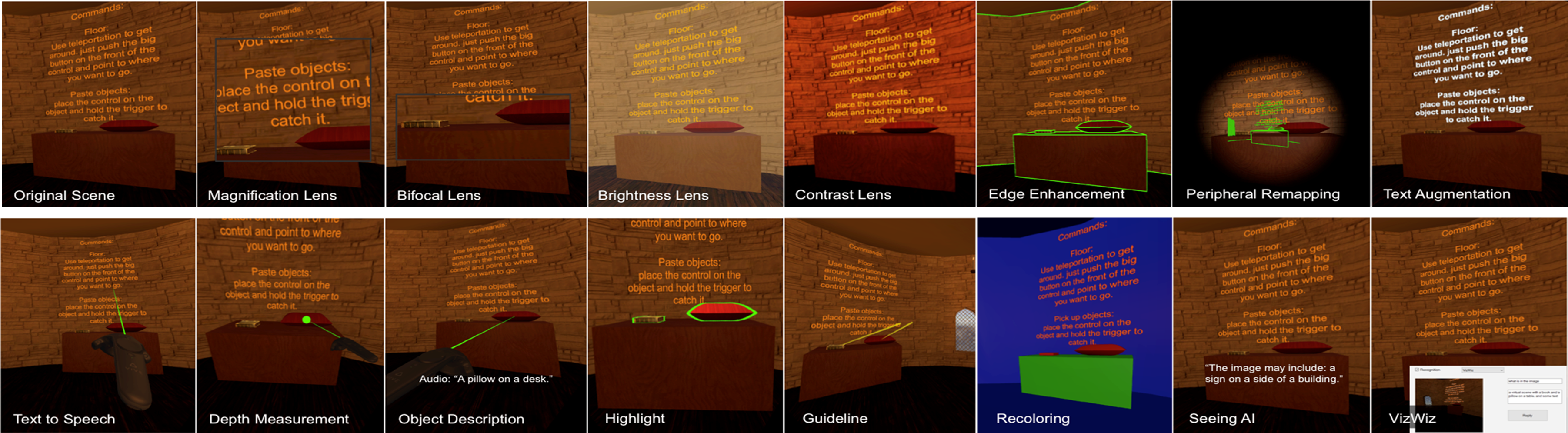
The 14 SeeingVR tools, overlaid individually upon a scene from the open source Unity game EscapeVR-HarryPotter; end-users can combine the individual tools as needed, based on their visual abilities.

At the ACM CHI Conference on Human Factors in Computing Systems conference in Glasgow, Scotland this May, researchers from Microsoft’s Redmond and UK labs, together with our university collaborators, will be presenting several papers and demos that explore how to design technologies more inclusively, to support accessibility by users with cognitive and/or sensory disabilities.

Microsoft researchers Adam Fourney, Kevin Larson, and myself teamed up with University of Washington researchers Qisheng Li and Katharina Reinecke to explore the accessibility of the Web to people with dyslexia. Dyslexia is a cognitive disability estimated to affect about 15% of English-speaking adults; people with dyslexia can experience varying degrees of difficulty with reading-related tasks. Because access to information on the Web is a key modern literacy skill, ensuring that online information is cognitively accessible is an important concern; beyond people with dyslexia, improving cognitive access to the Web may benefit other groups who experience reading challenges such as English language learners or children.

At CHI 2019, lead author and University of Washington graduate student Qisheng Li will present the Microsoft Research-UW team’s findings, summarized in their paper, “The Impact of Web Browser Reader Views on Reading Speed and User Experience.” The team explored whether the “reading mode” common in most modern browsers significantly impacted users’ reading speed and comprehension, and whether users with dyslexia specifically benefitted from this intervention. Using the “Lab in the Wild” infrastructure developed by Professor Reinecke, the team conducted an online study with 391 English-speaking adults (42 with dyslexia), in which participants read several popular webpages and answered associated reading-comprehension questions, some in the typical browser view and some in the reading mode.

A webpage in typical browser view (left), and in the reading mode (right).

A webpage in typical browser view (left), and in the reading mode (right).

As expected, people with dyslexia had substantially slower reading speeds than people without dyslexia; however, people with dyslexia did not seem to receive any differential benefit of the reading mode. Instead, the team found that reader view overall enhanced reading speed of all users by about 5%, as compared to the default website view. However, the study found that reader mode buttons are disabled by default, and that the rules governing the availability of reader mode are opaque to web developers. Only 41% of 1100 popular webpages sampled successfully enabled reader view. Our findings suggest that web page designers should develop their page in a way that enables the reader mode button in major browsers, so that users can have the option to reap this reading-speed benefit. Making it easier for web developers to intentionally enable the reading mode option as well as exploring which particular aspects of the reader view transformations provide the most benefit are key areas for future work.

Accessibility beyond the traditional desktop computing experience is also a focus of Microsoft Research’s contributions to CHI this year. Intern Yuhang Zhao, a graduate student at Cornell Tech, will present a paper summarizing joint research with Microsoft researchers Ed Cutrell, Christian Holz, Eyal Ofek, myself, and Andrew Wilson that explores how to enhance the accessibility of emerging virtual reality (VR) technologies: “SeeingVR: A Set of Tools to Make Virtual Reality More Accessible to People with Low Vision.” The team will also present a live demo during the conference’s demonstration session and at the Microsoft booth; blog readers can experience a demo by viewing the project’s online video figure.

Low vision (that is, visual disabilities that cannot be fully corrected by glasses) impacts 217 million people worldwide according to the World Health Organization. While desktop software offers some accommodation features for people with low vision (for example, screen magnifiers), VR systems have not yet grappled with the issue of accessibility for this audience. Indeed, when interviewing VR developers, the team found that none had received training or guidance on how to develop accessible VR experiences.

Because low vision encompasses a range of visual abilities (for example, tunnel vision, blind spots, brightness sensitivity, low visual acuity, and so on), the team took a toolkit approach—they developed SeeingVR, a set of 14 tools for Unity developers (Unity is one of the most widely-used VR development platforms). End-users can activate different combinations of these tools depending on their abilities and the context of the current application and task. Example tools include a magnifier and bifocal views, brightness and contrast adjustment for the scene, edge-enhancement to make virtual objects more salient from their backgrounds, depth measurement tools, and the ability to point at text or objects in a virtual scene to have them read or described aloud. The majority of these tools can be applied to existing Unity applications post-hoc, to support easy adoption.

The 14 SeeingVR tools, overlaid individually upon a scene from the open source Unity game EscapeVR-HarryPotter; end-users can combine the individual tools as needed, based on their visual abilities.

The 14 SeeingVR tools, overlaid individually upon a scene from the open source Unity game EscapeVR-HarryPotter; end-users can combine the individual tools as needed, based on their visual abilities.

Evaluation with 11 people with low vision completing a variety of tasks in VR (for example, menu selection, grasping objects, shooting moving targets) found that all participants could complete tasks more quickly and accurately when using SeeingVR tools as compared to the default VR experience. All participants chose different combinations of the available tools, reinforcing the value of allowing flexibility and customization of low vision accessibility options.

Microsoft Research researchers are also exploring non-visual representations of VR for people who are completely blind. Microsoft Soundscape is a smartphone application that uses spatial audio to deliver a rich, non-visual navigation experience. At the CHI 2019 workshop on “Hacking Blind Navigation” (co-organized by Principal Researcher Ed Cutrell), Microsoft Research intern and University of Washington student Anne Spencer Ross will present research on how to craft an audio-only VR experience that can allow people to rehearse a walking route virtually before experiencing the route in the physical world via Soundscape. Her paper, “Use Cases and Impact of Audio-Based Virtual Exploration” is a collaboration between engineers from the Soundscape team (Melanie Kneisel and Alex Fiannaca) and researchers in the Microsoft Research Redmond Lab (Ed Cutrell and myself). Melanie Kneisel will also be a featured speaker at the workshop.

In addition to presenting research on accessible Web browsing and accessible VR, researchers from Microsoft’s Cambridge, UK lab will be sharing a tangible toolkit to enhance the accessibility of computer science education for children who are blind. Led by researcher Cecily Morrison, the CodeJumper project is a physical programming language for teaching children ages 7 – 11 basic programming concepts and computational thinking regardless of level of vision. It was inspired by the need to provide a way for young blind and low vision students to access the computing curriculum inclusively alongside their sighted peers. Children plug together pods that represent lines of code in a program to create programs that when run make music, stories, or poetry. Children can start with very simple concepts—such as, a program is a sequence of commands—and progress to complicated program flows that utilise variables, covering the whole of the curriculum for this age band. It was successfully tested with 75 children and 30 teachers across the United Kingdom and found to support age-appropriate learning of coding as well as encouraging whole-child learning, such as creating friendships with sighted peers. The tangible CodeJumper kit will be available for CHI participants to experience during the conference’s demo session.

We look forward to seeing you at CHI 2019 in Glasgow and sharing ideas and advancing the accessibility conversation together.

Posted on Leave a comment

This Slovak startup is using AI and drones to help preserve natural water cycles

Working on their model for more than three decades, Rain for Climate founder Michal Kravčík has gathered scientists, ecologists, hydrologists, entrepreneurs and government agencies around him to create a plan to restore climate stability:

“The research we’ve been working on for years has shown that climate change is not just about high greenhouse gas production, but especially about desertification – the planet’s drying out. According to the analyses, we have about five years to act, otherwise the ecosystem will be irreversibly damaged,” says Vlado Zaujec , CEO and co-founder of Rain for Climate.

[embedded content]

When AI meets nature
Rain for Climate’s unique solution involves gathering territorial data with drones, which can provide perspective and information faster and more accurately than standard ground-level analysis. This data can then be used to create a personalised report for each customer, based on the needs of their land, providing bespoke technical solutions from a catalogue of over 5,000 different possible measures and actions.

As a Microsoft AI for Earth grant winner, the company has been given free Azure credits to help power and develop an AI solution to more accurately analyse drone data, at a faster rate. Currently in an internal testing phase, the solution also makes use of machine learning, allowing the AI to also improve with time, teaching itself to spot patterns and make connections across its ever-growing data pool.

“We get a lot of data from the drones, which we can quickly analyse thanks to artificial intelligence and machine learning, made possible by our Microsoft grant,” says Vlado Zaujec. “Based on the evaluation, experts can then prepare a water retention project, where they select different technical solutions from a catalogue of more than 5000 measures. The type of solution, size, location and materials used reflect the uniqueness of each territory.”

As with all environmental projects, Rain for Climate’s goal is seen by its founder as a long-distance endeavour. The AI-powered solution that the company is working on is an evolution in its journey towards its ultimate goal of restoring water to its natural balance in affected areas, as quickly, and as efficiently as possible. Thanks to technology and innovative companies like Rain for Climate, we look forward to seeing more innovative solutions that will help conserve our planet.

Posted on Leave a comment

Learn about hybrid cloud strategies with Windows Server Summit on May 22

This blog post was authored by Dianna Marks, Product Marketing Manager, Azure Marketing.

It’s that time of the year again! Spring is in the air and Windows Server Summit is right around the corner. On May 22nd at Windows Server Summit 2019 you can discover how Windows Server can help you deliver your hybrid cloud strategy as well as gain tips on how to modernize your evolving infrastructure. The great thing about Windows Server Summit is that you can attend from anywhere in the world since it is all virtual – just kick up your feet and hit the link to join.

This year expect to deep dive in to technical Windows Server content covered by leading industry experts. Some of the heavy hitters you’ll hear from include leaders from the product team like Jeff Woolsey, Ned Pyle, Cosmos Darwin, and Haley Rowland. We’ll even have a fireside chat with experts from our Windows Sever community and live Q&A. You don’t want to miss this!

Sign up now for Windows Server Summit 2019.

What’s included in the event?

  • Innovations in Microsoft Hybrid Strategy: Deep dive into Microsoft’s hyper-converged technologies and how to add hybrid services from Azure.
  • Modernize Windows Server apps and workloads: Learn about security, Remote Desktop Services (RDS), containers, and application compatibility.
  • New in management and security: See what’s new in Windows Admin Center, System Center 2019, and Windows Server 2019 – making it easier to deploy, manage, and monitor Windows Server anywhere.
  • Insights and best practices: Fireside chat with Windows Server community experts.
  • Looking ahead: Learn more about Windows Server Semi-Annual Channel and Windows Server on Azure.

In the meantime, check out our latest and greatest products:

Windows Server 2019

Leverage the benefits of the cloud in a hybrid cloud environment with Azure services now available in the latest release of Windows Server 2019.

Windows Admin Center

It couldn’t be easier to manage servers, clusters, and hyper-converged infrastructures than on Windows Admin Center. Download the latest release of Windows Admin Center and see it for yourself!

Azure Stack HCI

Run virtual machines on-premises and easily connect to Azure with a Hyper-Converged Infrastructure (HCI) solution. Learn more on our new Azure Stack HCI page.

Get a head start

Check out the on-demand videos on our Windows Server Summit page.

As you can see, we have lots of great new content to share with you. Stay tuned as we continue to provide more about Windows Server Summit 2019. We can’t wait to see you at the event!

Posted on Leave a comment

Microsoft acquires Express Logic, accelerating IoT development for billions of devices at scale

IoT sensors are being infused into just about everything, from industrial equipment to consumer devices, and increasingly these devices are connecting to the cloud. By 2020, Gartner predicts there will be more than 20 billion connected devices*. In April 2018, we announced we’re investing $5 billion in IoT and the intelligent edge over the next four years. Since then, we’ve been making a number of investments from product innovation – including Azure Sphere, Azure Digital Twins, Azure IoT Edge, Azure Maps and Azure IoT Central – new partnerships with DJI, SAP, PTC, Qualcomm and Carnegie Mellon University for IoT and edge app development, and programs to help drive the next wave of innovation for our customers.

Express Logic logoToday, I am incredibly excited to share we have acquired Express Logic, a leader in real time operating systems (RTOS) for IoT and edge devices powered by microcontroller units (MCUs). Express Logic’s ThreadX RTOS has over 6.2 billion deployments, making it one of the most deployed RTOS in the world. This widespread popularity is driven by demand for technology to support resource constrained environments, especially those that require safety and security. Manufacturers building products across a range of categories – from low capacity sensors like lightbulbs and temperature gauges to air conditioners, medical devices, and network appliances – leverage the size, safety and security benefits of Express Logic solutions to achieve faster time to market. Even highly constrained devices (battery powered and having less than 64KB of flash memory) can use Express Logic solutions. Over 9 billion of these MCU-powered devices are built and deployed globally every year, many of which can benefit from Express Logic solutions.

With this acquisition, we will unlock access to billions of new connected endpoints, grow the number of devices that can seamlessly connect to Azure and enable new intelligent capabilities. Express Logic’s ThreadX RTOS joins Microsoft’s growing support for IoT devices and is complementary with Azure Sphere, our premier security offering in the microcontroller space. Our goal is to make Express Logic’s ThreadX RTOS available as an option for real time processing requirements on an Azure Sphere device and also enable ThreadX-powered devices to connect to Azure IoT Edge devices when the IoT solution calls for edge computing capabilities. While we recommend Azure Sphere for customers’ most secured connections to the cloud, where Azure Sphere isn’t possible in highly constrained devices, we recommend Express Logic’s ThreadX RTOS over other RTOS options in the industry because of its additional certifications and out-of-the-box connectivity to Azure IoT Hub.

As we’ve stated consistently in the past, our primary goal is to simplify IoT – from the cloud all the way down to the smallest MCU based devices. We do this by meeting our customers where they are with the right developer tools, software and intelligent cloud services to manage their solutions at scale. Express Logic’s technology and team will be an incredible addition to Microsoft in our quest to give every customer the ability to transform their businesses, and the world at large, with connected solutions.

*Gartner, Inc., “Leading the IoT: Gartner Insights on how to Lead in a Connected World”, by Mark Hung https://www.gartner.com/imagesrv/books/iot/iotEbook_digital.pdf

Tags: , ,