Posted on Leave a comment

The path to prosperity through access to high-speed internet

Last year, the world reached a major modern milestone – as of 2018, half of the world’s population is online with some form of internet connection. The bad news is that, despite this progress, this status quo still puts billions of people on the wrong side of the digital divide. Leaving half the world without access to the electricity of today’s age – internet access, and increasingly at broadband speeds – means that existing inequalities, poverty and insecurity will persist, worsen and become increasingly difficult to address.

Efforts to accelerate internet access globally, with a focus on developing nations, are not new. But it’s clear that the world needs a new approach to this work. The UN State of Broadband Report found that broadband adoption has slowed, and progress is especially elusive in low-income countries and rural areas across the globe. Most of the connected population relies on low speed, basic cellular services and only 14.1% of the global population has an in-home internet subscription.

That is why Microsoft is reaffirming our commitment to global connectivity today at the Devex Conference on International Finance. Through the new international track of the Airband Initiative, our goal is to extend internet access to 40 million unserved and underserved people around the globe by July 2022. We’ll concentrate our efforts to areas with significant underserved populations – initially, Latin America and Sub-Saharan Africa – that also have regulatory interest in solving connectivity issues. Extending internet access to 40 million people around the world in the span of three years is a big task – but it’s informed by our ongoing work in connectivity, experience with partners and engagement from development finance institutions.

In the past, we’ve done this work on a project-by-project basis spanning across Africa, Latin America and Asia. In the U.S., we formalized our connectivity work in 2017 by launching the Airband Initiative, with the goal of bringing broadband connectivity to 3 million people in rural America by July 2022, and today marks the formalization of the international work within the Initiative.

How the program will work

Like our work in the U.S., our goal is to empower local partners who know their communities’ geographies and needs to solve their community’s last mile connectivity challenges. Experience has taught us that diverse challenges require diverse solutions. What works in one part of South Africa may not be a fit for Ghana. A wireless technology or a business model that is suitable for connecting customers in one location might not be suitable for connecting customers in another location. Bringing broadband access to the world’s unserved communities will require much greater reliance on innovative technologies, regulatory approaches and business models. Our experience has shown us that a multi-stakeholder approach is needed to close the connectivity gap. While we might go faster alone, we go much farther together. For this reason, these programs seek to combine our and our partners’ expertise and assets.

Airband International will rely on a four-part approach:

  • Removing regulatory obstacles to TV White Space (TVWS) and other technologies that help our partners extend their networks quickly in unserved, predominantly rural, areas.
  • Partnering with local internet service providers (ISPs) to provide affordable, reliable internet services.
  • Enabling rural digital transformation in newly connected areas, with a focus on supporting agriculture, education, rural entrepreneurship and telemedicine, as well as off-grid energy sources where necessary in order to improve rural productivity and livelihood.
  • Building a larger ecosystem of support, with a focus on stimulating international financing, to scale connectivity projects beyond our own direct investments.

Early signs of success

We know that new technologies like TVWS can be incredibly useful in meeting rural connectivity needs at an affordable price. However, regulatory frameworks in many parts of the world have not kept pace with innovation. We’ve seen great progress from engagements to date. In Colombia, as we started our work to create a long-term solution for the Meta region, we sat down with the national spectrum regulator to understand the region’s needs, existing regulations and to determine any gaps. In Ghana, we partnered with government officials to ensure strong regulations were in place to deploy long-term solutions such as TVWS.

School children sitting and holding tablets
In Colombia, we worked with regulators to create a framework that will now allow us to extend access to 6 million people throughout the country. Photo credit: Colombian Ministry of ICT

Once these hurdles are removed, partners around the world are poised to move quickly and deliver big results. BLUETOWN is a connectivity and digital content service provider committed to making broadband connectivity more accessible. With regulations in Ghana now permitting access to the TVWS, BLUETOWN is on a path to bring affordable broadband access to over 800,000 people living in the rural eastern part of Ghana who were previously underserved.

These large-scale gains in connectivity are not limited to smaller countries, nor does it stop at connectivity alone. In Colombia, with coffee company Lavazza, ALO partners, Makaia and Microsoft’s support, a small project connected two schools and five farms to broadband via TVWS technology – perfect technology for the region’s jungled and mountainous terrain. It has continued to grow, and now includes an agreement between Lavazza, Microsoft and the National Coffee Growers Association of Colombia that will result in the rural digital transformation for half a million small coffee farmers in the region. Additionally, Airband has co-invested with ISPs in Colombia to extend broadband access to 6 million rural Colombians – that’s 12% of Colombia’s total population.

This work was accelerated by a partnership with the Inter-American Development Bank (IDB). Additional financing is critical to bring these from small projects to scale. The partners invited IDB to join, and this support has helped create results and a blueprint that can be showcased in other countries of the region to accelerate this work.

Looking forward

To close the digital divide once and for all, we need to act to connect the world quickly. This will require the engagement of companies like Microsoft, but importantly, the financial support of international financing organizations around the world. Internet connectivity and technology infrastructure has made up a very small percentage of development bank funding historically, and that will need to change to bring connectivity to the more than three billion people around the globe who lack access to some form of internet connection. To help tackle these challenges, international financing organizations also need to be willing to make bets on local entrepreneurs deploying innovative new technologies and business models better suited to reaching the remaining unconnected communities.

Through our work and our engagement, we hope to not just connect people, but provide a blueprint for other public and private sector entities to think about connectivity as a core part of their investments in health, gender equity, water, energy or any other core area of sustainable development.

There are too many things that divide us in the world today. The internet can bring us closer together, foster new understandings and connections and remove structural barriers to opportunity and equality. Airband International is focused on doing just that, and we hope that you’ll add your support to these efforts as we move forward.

Tags: , ,

Posted on Leave a comment

Get ready for Yammer at Microsoft Ignite

Microsoft Ignite is less than a month away and 2019 is turning out to be the year of Yammer. The event is sold out, but you can watch online if you missed your chance to be in Orlando. We’ll have a lot to share for IT Pros, Community Managers, Business Decision Makers, and end users. 

It’s going to be big. 

[youtube https://www.youtube.com/watch?v=VK76xSyyn74]

Sessions

The session builder is now live and we have a great mix of roadmap sessions, deep dives, customer stories, and practical learning and opportunities to up-skill. Make sure you add these Yammer-focused sessions to your schedule before they fill up.  

The Big One.  

The future of Yammer: Share knowledge, engage leaders, and build communities in Microsoft 365 (BRK2233)

Come see the future of Yammer. The Yammer product leadership team unveils the most significant innovations in Yammer history. Explore the vision for Yammer powering leadership engagement, corporate communications, and communities in Microsoft 365. Be the first to discover new Yammer features and integrations that empower people to connect and share knowledge across the organization with open conversation backed by enterprise-grade privacy, security, and compliance.

Featured Sessions

Learn how Yammer powers communities and knowledge sharing in SharePoint and Microsoft Teams. Come see what’s new and coming next across Microsoft 365 to extend the powers of what your community can do and how knowledge management and AI can provide real business outcomes, save time, and deliver value.


What’s new in Yammer. Take a deeper look at the latest innovative capabilities and experiences coming to Yammer. Don’t miss this demo-heavy exploration of how Yammer powers and connects organizations and how it’s designed to drive engagement, increase communication and learning, and forge the path of knowledge management in the modern workplace.

Learn how to administer your Yammer network and manage its compliance using the same Microsoft 365 tools you use for Microsoft Teams, Office 365 groups, and other Microsoft products. This session covers recently added support in Yammer for data residency in Europe, and dives deep into Native Mode, which allows all users, groups, and files to be managed through the Microsoft 365 and Azure Active Directory admin centers. Also, learn about new Yammer eDiscovery and data governance features in the Microsoft 365 compliance center.


This session provides both the strategy and tools needed to supercharge engagement and reduce the distance between leadership through to your Firstline workforce. Understand how to foster employee participation, address issues, and take important steps towards driving company initiatives. Learn the components of a modern leadership engagement environment using Yammer, SharePoint, Microsoft Stream, Microsoft Teams, and live events.


Yammer for Good!

Creating an inclusive and diverse workplace has numerous business and cultural benefits for an organization. Come learn actionable strategies, campaigns, and methods you can employ to begin delivering a modern employee experience. We demonstrate how you can use Yammer and Microsoft Teams to: • Build and manage open communities of interest • Create and share inclusive comms campaigns • Host townhalls around topics and initiatives • Navigate challenging conversations to create a culture of open sharing Come with an open mind. Leave with the resources, skills, and confidence to create a D&I initiative at your company.


Yammer_Ignite_Rectangle.PNG

Community 

We’re planning a lot of great chances to connect with community and the folks who work on Yammer at Microsoft. Sign up for a pre-day, keep an eye out for meetups and community events, stop by the Expo hall for demos and swag at the Yammer booth, and take exams for free while you’re at the event.  We’ll have more to share as we get closer to November. 

Keep up with the latest news and share in the excitement by following @Yammer on Twitter and following the #YearOfYammer tag. 

See you in Orlando! 

-Mike Holste 

Product Marketing Manager, Yammer

@mike_holste 

Posted on Leave a comment

Recent cyberattacks require us all to be vigilant

Today we’re sharing that we’ve recently seen significant cyber activity by a threat group we call Phosphorus, which we believe originates from Iran and is linked to the Iranian government. We’re sharing this for two reasons. First, it is important that we all – governments and private sector – are increasingly transparent about nation-state attacks and efforts to disrupt democratic processes. Second, while we have processes to notify customers about nation state activity and have AccountGuard to monitor accounts of campaigns and other associated organizations related to election processes in democracies around the world, publishing this information should help others be more vigilant and take steps to protect themselves.

In a 30-day period between August and September, the Microsoft Threat Intelligence Center (MSTIC) observed Phosphorus making more than 2,700 attempts to identify consumer email accounts belonging to specific Microsoft customers and then attack 241 of those accounts. The targeted accounts are associated with a U.S. presidential campaign, current and former U.S. government officials, journalists covering global politics and prominent Iranians living outside Iran. Four accounts were compromised as a result of these attempts; these four accounts were not associated with the U.S. presidential campaign or current and former U.S. government officials. Microsoft has notified the customers related to these investigations and threats and has worked as requested with those whose accounts were compromised to secure them.

Phosphorus used information gathered from researching their targets or other means to game password reset or account recovery features and attempt to take over some targeted accounts. For example, they would seek access to a secondary email account linked to a user’s Microsoft account, then attempt to gain access to a user’s Microsoft account through verification sent to the secondary account. In some instances, they gathered phone numbers belonging to their targets and used them to assist in authenticating password resets.

While the attacks we’re disclosing today were not technically sophisticated, they attempted to use a significant amount of personal information both to identify the accounts belonging to their intended targets and in a few cases to attempt attacks. This effort suggests Phosphorus is highly motivated and willing to invest significant time and resources engaging in research and other means of information gathering. MSTIC works every day to track threat groups including Phosphorus so we can notify customers when they face threats or compromises and so that we can build our products to better defend against these threats.

As we’ve previously disclosed, our Digital Crimes Unit has also taken legal and technical steps to combat Phosphorus attacks and we continue to take these types of actions.

There are also a range of steps customers can take to help secure their consumer accounts. We strongly encourage all customers to enable two-step verification on their accounts which can be done in Account Security settings. While there are a number of ways to enable this two-step verification, the most secure option is through a password-less solution like Microsoft Authenticator.

People can also periodically check their login history, and we recommend this for journalists, political campaigns staff, and others interested in assuring account security. These logs are made available through the Account Security Sign-In Activity tab. They are easy to read and look like this:

Screenshot of account security login information

Expanding any of these events in this tab will provide details on the device and IP address used to access the account in question. If any of the activity looks suspicious, you can notify Microsoft by clicking on the associated “Secure Your Account” link. If you detect suspicious activity, you should change your password and enable two-step verification. To better secure your Microsoft account, follow these tips for keeping your Microsoft account safe and secure.

While this advice relates to consumer accounts, we also provide a range of additional tools and advice to IT administrators to protect their corporate networks. A starting point for accessing these tools is here.

However, if you are part of a political campaign, a political party committee or an NGO or think tank working on issues related to democracy, you are eligible for Microsoft AccountGuard, an offering from our Defending Democracy Program, and can sign up here. There are currently 60,000 accounts in 26 countries protected by AccountGuard, which provides monitoring and unified threat notification across the Office 365 accounts you use for work and the personal accounts of your staff and others affiliated with your organization that opt-in for this protection. To date, we’ve made more than 800 notifications of attempted nation-state attacks to AccountGuard customers.

We hope all governments, companies and advocacy groups will consider joining the Paris Peace Call for Trust & Security in Cyberspace and that all companies will consider joining the Cybersecurity Tech Accord. These are two important initiatives that aim to keep the internet safer from the types of malign activity we’re discussing today.

Tags: , ,

Posted on Leave a comment

Enabling government to advance ‘tech intensity’ with newest cloud product innovations

In a world where every company is transforming to be digital, we see examples of organizations across public and private sectors embracing the concept of ‘tech intensity’ to maximize their impact. From our perspective, there are three aspects to the leadership principle of tech intensity: First, every leader will need to tune their organization to become a fast adopter of best-in- class technology.  Second, organizations will need to build their own unique digital capabilities, which starts with workers who are deeply knowledgeable about the latest technology. And finally, leadership in the digital economy will be exponentially amplified by the level of trust that is created with customers, partners, and stakeholders.

Today’s landscape demands a different leadership approach to capitalize on opportunities at the accelerated pace required to deliver modern mission outcomes. In the U.S. federal government, leaders are adopting technology to successfully optimize existing programs and to accelerate new services that improve the lives of American citizens. Many of our government customers are leading by example in building their own tech capabilities, which enable them to be more efficient and be better positioned to deliver on their mission service to their citizens. Examples abound and you’ll hear us showcase our partnerships with the Department of Veterans Affairs, USDA Agricultural Research Service, the Department of the Interior and more in the coming weeks.

Government is Embracing Tech Intensity

Tech intensity is really an equation – Tech Intensity = (Tech Adoption X Tech Capability) ^ Trust and as a company Microsoft is focused on providing the inputs to help our customers solve it. For the government agencies harnessing the benefits tech intensity today there are three critical factors to success we’re seeing them embrace: First, they’re finding ways to increase agility and become fast adopters of best-in-class technology, and equally important, they’re building or looking to build their own unique digital capabilities. Don’t forget the human factor here which starts with workers who are deeply knowledgeable about the latest technology backed by a culture that encourages capability-building and collaboration to generate new, breakthrough concepts. To speed tech adoption, they recognize how vital it is that they are able to access the latest commercial platforms, tools and training, so that they don’t have to re-create technology that already has been commoditized. It’s really the first step to building tech intensity.  Finally, to assist government leaders in building trust in technology and its deployment to meet Agency missions, Microsoft provides a variety of tools including AI Business School government curriculum (see below) and books like The Future Computed and Tools and Weapons which provide guidance around the impact and ethics of AI which we are seeing government agencies beginning to adopt.

Enabling Government’s Tech Intensity Journey

Microsoft is committed to supporting the technology needs of all branches and levels of government and we’ve worked with our government customers to achieve the most certifications of any cloud provider. We’ve built the most trusted, comprehensive cloud for government which includes Azure Government, Microsoft 365 Government, and Dynamics 365 Government. Today, we’re announcing the latest advances to these government cloud solutions, demonstrating our commitment to our customers unique needs and desire to empower their tech intensity journey.

Delivering mobility and power at the tactical edge with new Data Box capabilities

Microsoft offers a comprehensive portfolio designed to bring compute, data analysis and insight to the tactical edge. Azure Data Box and Azure Stack family of products help government agencies with remote operations access the information they need to make decisions at the edge, along with access to the full range of cloud capabilities as connectivity allows.

Azure Data Box EdgeFor example, Azure Data Box Edge, an AI-enabled edge computing appliance, processes and analyzes data right at the tactical edge and transfers data to cloud when connected. It includes an FPGA on-board to accelerate machine learning inferencing at the edge and transfers the data to Azure over network to retrain the machine learning model or perform aggregated data analytics.

Today we’re sharing that we are getting ready to deliver a new form-factor of Data Box Edge, which will be rugged, portable, and battery-operated. The new form-factor will be ruggedized to meet MIL-STD-810G and MIL-STG-461 standards. A single person can carry this appliance in the field, for example, in their backpacks, in remote and disconnected areas.  In field operations, speed is of the essence and insights empower decisions. We’ve partnered with Klas Telecom to bring you this new form-factor, which will further the intelligence of the forward-deployed operating units, ground patrols, or similar mission needs at the tactical edge and empower faster decision making.

New Microsoft 365 Government capabilities for cross agency collaboration and security

In March 2019 we announced that Microsoft Teams – the hub for teamwork– is available in all U.S. Government cloud environments. To further enable cross agency collaboration, we’re excited to announce. Teams Phone Systems and Audio Conferencing are rolling out GCC High and Department of Defense (DoD) environments starting mid-October. These new capabilities along with all the current collaboration services in Teams will enable governments to be mission focused and better service citizens.

As governments embrace tech intensity there’s in increasing demand on time and resources to manage data with a secure cloud environment. Microsoft 365 Government includes built-in security capabilities to protect, detect, and respond to cyberattacks. We’ve also recently announced general availability of Microsoft Defender Advanced Threat Protection (ATP) to the GCC High environment, bringing endpoint detection, response, automated investigation and remediation to U.S. government customers in this environment.

New Business Applications capabilities to empower citizens through proactive customer service

Empowering citizens to engage is essential to modern government. With our Microsoft Business Applications portfolio, government is better able to interact with citizens, empower employees, optimize operations and transform cities at scale with our immersive solutions across Dynamics 365 and Power Platform. Earlier in 2019, we announced PowerApps and Flow for our GCC environments  and Dynamics 365 Customer Engagement Government  availability meeting DoD requirements for contractors holding, or processing DoD controlled unclassified information or subject to International Traffic in Arms Regulations (ITAR). By the end of this calendar year, Dynamics 365 Customer Engagement Government  for DoD will be available.

Today, we are expanding the availability of PowerApps and Flow to GCC High environments. This means our government customers and DoD contractors with higher compliance demands can benefit from these tools. PowerApps and Flow, along with Power BI enables users to do three key actions on data: analyze, act, and automate. Power BI, PowerApps, and Flow work together to help anyone, regardless of technical ability, drive decisions with data.

Outdated tools, systems and practices can make interacting with the government cumbersome. To provide additional channels of engagement that make connections easier, we are announcing Chat for Dynamics 365 is generally available in GCC environments. Chat is an engagement channel that enables your agents to connect with customers in real-time.

Connecting global locations with fast, private, hybrid network connectivity

Customers with distributed operations across the United States or across the globe can benefit from the speed and efficiency of high-bandwidth connectivity, intelligent traffic routing, and the global scale of our network. With ExpressRoute Global Reach, customers gain not only a fast, private connection to the cloud, they can also use our global network as a backbone to connect their on-premises networks together. ExpressRoute can also be used to bring satellite data from ground to cloud, so it can be harnessed at the tactical edge or rapidly distributed to locations around the globe.

Meeting the full spectrum of data classification requirements

As previously announced, Azure Government Secret includes dedicated regions built to support US agencies and partners working with Secret U.S. security classification level data. We’re seeing significant demand for these new regions, and today we’re announcing Sequoia Combine for Azure Government and Azure Government Secret, delivering dev, test and deployment capabilities for classified clouds from an unclassified environment. This emulator service, currently in preview, offers an approved, trusted, and proven approach for IC and DoD air-gapped region solution development.

Accelerating the path to compliance

We’re continually working to streamline compliance, making it easier for customers and partners to accelerate their path to ATO. FedRAMP is a critical certification for many federal agencies and a growing number of state and local government agencies. Today we’re announcing the built-in Blueprint for FedRAMP to help customers with compliance requirements based on FedRAMP proactively manage and monitor the compliance of their Azure environments. This new offering joins a series of recent releases including the NIST SP 800-53 R4 blueprint, all focused on helping you meet your compliance requirements more easily and efficiently.

Responsible AI in Government Business School Module

We launched AI Business School because we know AI will be used more and more to help organizations to innovate and solve problems, and we wanted to help leaders be ready to do so in the right way. We recognize that every organization faces its own challenges, and we wanted to provide concrete examples for each of them through tailored information and real-world case studies. That’s why we added a learning path specific to government because of the uniqueness of the problems these agencies face when considering AI applications. Earlier this week, we rolled out a new version of AI Business School, with updates to that government path, new and adapted lessons within our Responsible AI module and a new learning path for education industry decision makers and educators. The new module focuses on identifying governing practices for responsible AI in government and draws on the wisdom from experts at EY and Altimeter Group. In it we share examples from governments around the world to shed light on what government officials should consider and how to take action. It also has information on tools to support responsible AI and how to make AI governance both tangible and measurable

We’re on a Mission Together

Tech intensity is the motivation behind our mission at Microsoft to empower every person and every organization on the planet to achieve more. As agencies face a range of new challenges in meeting their missions, we are committed to helping our more than 10,000 government customers use technology to unlock the power of data, which underpins everything they do. I look forward to sharing many more examples of how government is embracing tech intensity to better engage and connect with citizens, modernize the government workplace, and enhance government services to benefit society. Learn more about how government agencies are using Microsoft cloud technology here.

Tags: , , ,

Posted on Leave a comment

Running on ritual: How Microsoft Netherlands used data and relentless experimentation to reinvent the way it works

Days before the 2018 New Year, the brisk Amsterdam cold was settling into the city’s streets and canals and Ernst-Jan Stigter was beginning to wonder if he was about to make a major visionary move or take things too far.

As GM of Microsoft’s Netherlands subsidiary, he had been helping to steer, along with a group of involved employees, a full renovation of the organization’s office, a six-story glass edifice located on the outskirts of the city alongside the swooping planes of Schiphol Airport. But early on, Stigter and his team had decided that they would not simply rebuild the space. They would use the opportunity to take the next big step in a relentless experiment their organization had been conducting for more than a decade. Since 2005, Microsoft Netherlands has been obsessed with finding ever-new ways for employees to work and engage with customers, believing that if it harnessed the latest research in behavioral science and productivity, it could end up with happier, more innovative workers and stronger partner and customer relationships.

In short, the team was constantly trying to figure out not so much how to squeeze more into their days—more emails, more projects, more checkboxes checked—but how to get more out of their days—more focus, more balance, more relationship-building and collaboration. How, as they put it, to find “more life in a day.”

Against the backdrop of a broad transformation Microsoft embarked upon after CEO Satya Nadella came onboard in 2014, the Netherlands office was seeking to future-proof its workforce and accelerate success. It was a natural next step for the change-hungry team with a growth mindset, which had begun pioneering innovative office space and prioritizing work-life balance for employees before either was part of the mainstream business paradigm.

That culture of experimentation and customer obsession is how Stigter ended up feeling more than a little nervous as an important milestone loomed in January 2018. He and about 800 of his reports and other Microsoft employees were preparing for an almost unheard of exercise, one undertaken voluntarily as part of this new wave of transformation: while the Netherlands office was closed for 10 weeks of renovations, there would be no official temporary workspace.

Posted on Leave a comment

New innovations in voice, digital ink and touch make working and playing in Microsoft 365 more natural

Today at our Surface event, we announced several new devices to help make modern work more natural and intuitive for everyone, including busy professionals, parents, students, and teachers. Over the past several years, our engineering teams have invested countless hours of user research into understanding how people work in our apps and what they would like to see from Microsoft.

Last week, we announced several new capabilities that bring new inking capabilities to our Office apps, including inking in Slide Show while in PowerPoint on the web and Ink Replay to bring your presentations to life. Today, I’m excited to share our progress with you on a set of innovations to help people be more productive when away from their desk, utilizing voice, digital pen, and touch across Office 365 and our Surface devices.

Transcribe audio files or record your own while staying in the flow in Word

Image of an audio file being transcribed in Microsoft Word.

We spoke with researchers, reporters, lawyers, and teachers, and learned that people spend a ton of time recording audio interviews on their phone, and then spend even more time transcribing those conversations into Word.

Today, we’re announcing a solution that helps busy professionals upload their own audio files or record new ones on the fly, all within Word. Once your audio has been uploaded or recorded, Word—leveraging your OneDrive account to securely store the audio files and Azure Speech Services under the hood—displays a written audio transcription in the side panel and allows you to quickly and easily bring relevant snippets or the entire transcript into your document to edit. The transcript itself is automatically separated by speaker and into relevant chunks of content, and the interactive panel allows you to easily jump around the recording to find and verify the perfect quote.

Audio transcription in Word will be available in early 2020 in Word for the web, with integration into the Word desktop and mobile apps following in the spring. Exact plans and pricing will be announced closer to general availability.

Input data directly into your Excel workbooks with your digital pen

Animated image of a digital pen erasing and writing content in a Microsoft Excel spreadsheet.

Excel is an extremely powerful tool to do complex data analytics, but that doesn’t mean you need to be sitting at a desk to use it. Today, people fill out checklists, research reports, and more using paper and a clipboard and then must type those results into their computer later. Or they fumble to balance a computer to type while walking around. To address these issues, we’re elevating what your digital pen can do in Excel so Firstline Workers, busy professionals, students, and researchers can easily write, edit, or delete values using only their digital pen and tablet. Now it will be easier than ever to be productive and stay connected for workers who aren’t always able to find a desk to work.

Data entry using a digital pen will be available in Excel for the web and desktop in spring 2020 for Office 365 subscribers.

Create and reply to comments from anywhere using pen or voice

Image of a note written in digital ink in a sales analysis file.

With Ink Editor we’ve made it so that editing your documents is easier and more natural than ever, and now we’re extending those intelligent capabilities and the expressiveness of digital ink into the realm of commenting as well.

On devices with a touch interface and/or supported microphone, people will be able to create expressive ink comments directly from within the comment pane, or use dictation to provide feedback. Together, and combined with existing Ink Editor capabilities, anyone reviewing a document can now complete that task end-to-end using just their tablet, digital pen, and voice.

Expressive ink comments and easy entry to dictation in comments will be available starting with Word desktop in Spring 2020 for Office 365 subscribers.

Office + Surface are better together

Today at the Surface event, we showcased several new enhancements to Office that leverage the unique capabilities of Surface’s latest hardware advancements.

The new Studio Mics in the Surface Pro 7 offer best-in-class audio-capture with no additional hardware, which makes Office features such as dictation and transcription work at their best.

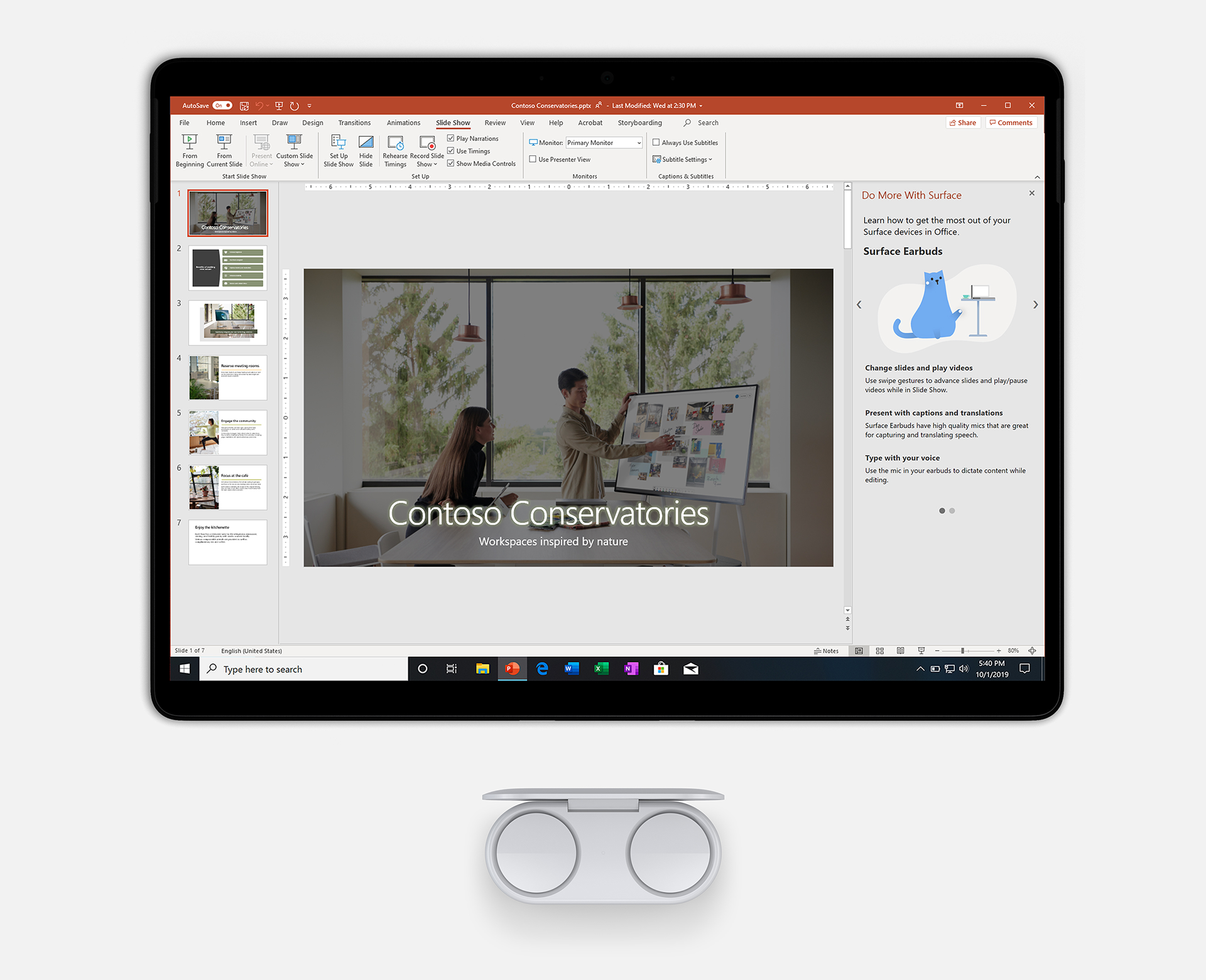
Image of Earbuds and the Surface Pro 7 displaying PowerPoint.

When using your Surface Earbuds together with PowerPoint, you get the benefit of incredible microphones to hear you clearly even as you walk around, allowing Live Captions and Subtitles and Presenter Coach in PowerPoint for the web to operate with better accuracy. The intuitive gestures can be used to navigate Slide Show and start/stop video without having to buy a separate clicker. You can even have just one in your ear for the best mic capture while keeping the other invisibly hidden in your hand to navigate slides.

Surface Earbud gesture support will be available in November, alongside the general availability of the Earbuds, in PowerPoint desktop for Office 365 subscribers.

Image of a hand removing a pen from the new Surface Pro X.

The ultra-portability of the Surface Pro X allows you to be productive on the go, whether that’s using Excel to enter data or Word to review documents. The Pro X offers a revolutionary new storage mechanism for your pen so you’ll always have it handy when you need it. Office leverages the fact that the Pro X knows when the pen is removed from its storage to automatically bring your inking tools front and center.

In addition, Office will now showcase everything you can do with your Surface accessories within each app, whether that’s the Surface Pen, Earbuds, or the Dial. If there are new capabilities available in an Office app you’re using, they will be displayed, so you always know you’re getting the best out of your Office + Surface combination.

Support for reacting to the Surface Pen being removed from its storage location is available now in Word, Excel, PowerPoint, and Outlook for Office 365 subscribers. Surface tips in Office will first be available in November in PowerPoint desktop for Office 365 subscribers.

Listening to customers to improve the ink in PowerPoint experience

We recently announced a set of improvements to Office, including several additions to the overall inking experience in PowerPoint based directly on what we’ve heard from customers. This includes support for replaying pre-drawn ink in Slide Show, myriad improvements sourced primarily from educators who ink in Slide Show on Windows and Mac to teach their classes, and the beginning of bringing ink to Office for the Web, starting in PowerPoint Slide Show.

We’re happy to announce that all these capabilities are now rolling out to everyone.

Animated image of animated lettering being added to a slide in Microsoft PowerPoint.

Ink Replay is available in PowerPoint for Windows and Mac for Office 365 subscribers.

Animated image of inking used in a PowerPoint slide. It is a pop quiz about the solar system.

Inking is now available in Slide Show mode in PowerPoint for the web. Inking in PowerPoint Editor on the web will be available by the end of the year.

New templates for Microsoft Whiteboard

Microsoft Whiteboard helps you collaborate more effectively—whether you’re trying to brainstorm your next big idea or get everyone on the same page. New templates for Whiteboard can help you run more effective meetings with KANBAN sprint planning, SWOT analysis, project planning, learning, and more.

Animated image of sticky notes being arranged in Microsoft Whiteboard.

Pre-created layouts provide an immediate structure, so you don’t have to start from scratch. They’re perfect for collaboration scenarios like ad-hoc brainstorms, running meetings, and project planning. The Whiteboard canvas also dynamically expands to fit all your content. Read more about the new Microsoft Whiteboard templates.

Microsoft Whiteboard templates are in public preview for Windows 10 and rolling out to iOS this week. To add templates, click or tap the Insert button in the toolbar.

Microsoft Whiteboard

Meet the freeform digital canvas where ideas, content, and people come together.

Get Whiteboard

Posted on Leave a comment

Surface reveals new holiday lineup, introduces new category of dual-screen devices built for mobile productivity

Surface reveals new holiday lineup and introduces a new category of dual-screen devices built for mobile productivity

We are announcing our broadest Surface lineup ever – with five new products coming this holiday and two new dual-screen devices, Surface Neo and Surface Duo, coming in Holiday 2020.

When we started Surface, we had a vision to remove the conflict between the tablet and laptop. What started as an effort to create the two-in-one evolved into a full line of products that are more versatile, more adaptable and more personal. We know that to be your best, you need devices that adapt to you to help you accomplish your goals. These new products are about empowering you to be your most productive, and your most creative.

Read more

Posted on Leave a comment

Xbox Game Pass and Spotify team up to deliver the ultimate value in gaming and music

Everyone has a favorite gaming song. Say you’ve got iconic video game music playing while you’re hunting the elusive side-quests, or you’ve got another jam playing to keep you amped while you and your buddies decide where you’re going to drop – either way, listen to what makes your gaming more fun, and we’re going to make that even better.

Starting today and for a limited time only, gamers in the U.S. and U.K who join Xbox Game Pass Ultimate or Xbox Game Pass for PC (Beta) for the first time will also receive 6 months of Spotify Premium. With all the benefits of Xbox Live Gold, access to a curated library of over 100 great games on console and PC, and millions of songs available on-demand on Spotify, new members will never run out of hits for their gaming playlists.

Let me point out the biggest deal here:  it’s only a $1 to upgrade to Xbox Game Pass Ultimate right now.  Already an Xbox Live Gold or Xbox Game Pass for Console member? When you upgrade to Xbox Game Pass Ultimate for $1, you convert your pre-paid time on Xbox Live Gold or Xbox Game Pass to Xbox Game Pass Ultimate credit, AND you get 6 months of Spotify Premium on top of it. It’s the best dollar you’re going to spend.

Spotify is the most popular global audio streaming subscription service, giving you access to millions of songs and thousands of podcasts from artists and creators around the world. Spotify Premium offers unlimited access to over 50+ million songs, allowing you to play music without ads, and skip to your heart’s content. Can’t stress enough that part about ad-free music and unlimited skips. When you’re in the zone, the last thing you need is a break in your playlist!

Xbox Game Pass Ultimate wraps up all the benefits of Xbox Live Gold, Xbox Game Pass for PC (Beta), and Xbox Game Pass for Console, including access to over 100 high-quality titles on console and PC. We’re adding new games all the time, including Xbox Game Studios titles the same day as their global release, so if you’ve been hype to check out our latest release Gears 5, now is the perfect time to dive in with Xbox Game Pass Ultimate. With Xbox Live Gold included, you can get exclusive deals and discounts, and play together with friends on the most advanced multiplayer network.

Here’s the deal: To be able to take advantage of this offer you need to reside in the U.S. or the U.K and you must be a new Xbox Game Pass Ultimate or Xbox Game Pass for PC member. You also must be both eligible for, and new toe Spotify Premium. If you subscribed to either the Spotify Premium Service or Unlimited Service, or you’ve taken a trial or introductory offer previously, you’re unfortunately not eligible for this offer. Check out the terms and conditions here and here

So, I join Xbox Game Pass Ultimate – then what? Your code for 6 months of Spotify Premium will be sent via email and the console or Xbox (Beta) app message center, following your purchase of Xbox Game Pass Ultimate (this can take a few days). The codes must be redeemed at the Spotify website listed in the message or email. Then, it’s time to get gaming and start listening.

Want to learn more? You can learn more about Spotify and Spotify Premium over on their site, or hit up Xbox.com for complete details on Xbox Game Pass.

Posted on Leave a comment

Microsoft’s AI Business School now offers path for education leaders and students

We live in an ever more digital, connected world. With the emergence of Artificial Intelligence, the opportunity we have to provide truly personalized, accessible learning and experiences to all students around the world is now upon us. Leaders in education have the opportunity to dramatically impact outcomes more than ever, from changing the way in which they engage with students throughout the student journey, to providing truly personalized learning, to improving operational efficiencies across the institution. At Microsoft, our mission in education is to empower every student on the planet to achieve more. Through that lens, we believe education leaders should consider opportunities to introduce new technologies like AI into the design of learning and technological blueprint to expand the horizon for driving better outcomes and efficiencies for every student and institution around the world.

That’s why I’m excited to share that Microsoft’s AI Business School now offers a learning path for education. Designed for education leaders, decision-makers and even students, the Microsoft AI Business School for Education helps learners understand how AI can enhance the learning environment for all students—from innovations in the way we teach and assess, to supporting accessibility and inclusion for all students, to institutional effectiveness and efficiency with the use of AI tools. The course is designed to empower learners to gain specific, practical knowledge to define and implement an AI strategy. Industry experts share insights on how to foster an AI-ready culture and teach them how to use AI responsibly and with confidence. The learning path is available on Microsoft Learn, a free platform to support learners of all ages and experience levels via interactive, online, self-paced learning.

The Microsoft AI Business School for Education includes a number of modules across sales, marketing, technology and culture, but most importantly, it calls upon the expert insights from education leaders including:

  • Professor Peter Zemsky uses INSEAD’s Value Creation Framework to show the advantages AI presents for educational institutions and how an organization can determine the right approach that works with their strategy and goals.
  • Michelle Zimmerman, author of “Teaching AI: Exploring New Frontiers for Learning,” shares her experience as an educator and why she sees believes AI can transform how students learn.
  • David Kellerman of the University of New South Wales (UNSW) shares his perspective on what’s unique about AI in higher education and how using AI can transform the way institutions collaborate and encourage students to be lifelong learners. As a key research institution in Australia, the University of New South Wales (UNSW)is focused on being a learning institution that collaborates across academic and operational departments as it uses AI to create a personalized learning journey for students. Dr. Kellerman shares his perspective on what’s unique about AI in higher education and how using AI to transform the way institutions collaborate can create students that are lifelong learners.

The Microsoft AI Business School for Education joins a larger collection of industry-specific courses including financial services, manufacturing, retail, healthcare and government. With this holistic portfolio, the AI Business School can also help students learn about AI application across a number of industries and roles. We’ve already seen several universities and vocational colleges incorporate this curriculum into their courses across business, finance, economics and health-related degrees as a means of providing real-world examples of AI opportunity and impact.

New research has highlighted the importance of adopting AI to transform the learning experience for students. Last week at the Asian Summit on Education and Skills (ASES) in India, Microsoft and IDC unveiled the latest findings from the study “Future-Ready Skills: Assessing the use of AI within the Education sector in Asia Pacific.” The study found that Artificial Intelligence (AI) will help double the rate of innovation improvements for higher education institutions across the region. Despite 3 in 4 education leaders agreeing that AI is instrumental to an institute’s competitiveness, 68% of education institutions in the region today have actually yet to embark on their AI journey. Those who have started integrating AI have seen improvements in student engagement, efficiency and competitiveness, as well as increased funding and accelerated innovation.

Microsoft is proud to be working with schools and institutions around the world to improve understanding of Artificial Intelligence and support leaders, educators and students to get ready for the future, like the recent collaboration in India with CBSE to train up over 1000 educators.

Click here for free STEM resourcesExplore tools for student-centered learning

Posted on Leave a comment

Chief Accessibility Officer Jenny Lay-Flurrie on empowering employees with disabilities

We Are All Advocates

There is a simple concept in the world of accessibility and disability inclusion if you don’t know, ask‘. If you don’t know what resources are available in your workplace, raise the question. If you are unsure of what responsibilities your organization has to help empower employees with disabilities, seek out the information. The more we ask questions and have a willingness to learn and grow, the better off we will all be. 

Microsoft President Brad Smith recently spoke at the National Federation of the Blind 2019 National Convention about why we can’t just focus on technology, we need to put people first. He underscored that we need to look beyond the products and features that everyone uses today and fundamentally ask ourselves, “How can we imagine new technology that can fundamentally improve people’s lives in ways they haven’t yet experienced?” Over the summer, Microsoft Chief Marketing Officer Chris Capossela attended the Disability:IN Annual Conference and Expo and represented Microsoft, where he accepted the Marketplace Innovator of the Year Award on behalf of the company. Reflecting on his experience at the conference, he noted that, “including people with disabilities in our organizations pays off in multiple ways. At Microsoft, inclusion is at the core of our mission.” 

This gets to the heart of what we do every day at Microsoft and how we can empower people with disabilities around the world. We are all on a journey together. Building partnerships, listening, asking, and learning can net results for your organization. We don’t have all the answers, but if we work together, we can create positive change for everyone.  

I also think it is incredibly important to try new things and ask ourselves, “what more can we do to empower our employees and the broader disability community?” For example, we have been working with BraunAbility, a leading manufacturer of wheelchair accessible vehicles and other mobility transportation solutions, to test a new 3-D graphic for ADA Parking spaces at the Living Well Health Center on our Redmond Campus. Our goal is to help drivers and passengers get in and out of their vehicle safely and to help deter misuse of the accessible spaces and access aisles. This is part of BraunAbility’s Drive for Inclusion initiative and we are getting great feedback from employees. Creating an inclusive culture is so much more than just adhering to laws (which is important!), but really focusing on everything we can do to build an environment where everyone can thrive. 

Tune in throughout the month as we share more stories, demos, and ways to get involved in the movement.