The most Pythonic way to convert a list of tuples to a string is to use the built-in method str(...). If you want to customize the delimiter string, the most Pythonic way is to concatenate the join() method and the map() function '\n'.join(map(str, lst)) to convert all tuples to strings and gluing those together with the new-line delimiter '\n'.
Exercise: Run the interactive code snippet. Which method do you like most?
Method 1: Default String Conversion
Say, you’ve got a list of tuples, and you want to convert it to a string (e.g., see this SO post). The easiest way to accomplish this is to use the default string conversion method str(...).
The map() function transforms each tuple into a string value, and the join() method transforms the collection of strings to a single string—using the given delimiter '--'. If you forget to transform each tuple into a string with the map() function, you’ll get a TypeError because the join() method expects a collection of strings.
Method 3: Flatten List of Tuples
If you want to flatten the list and integrate all tuple elements into a single large collection of elements, you can use a simple list comprehension statement [str(x) for t in lst for x in t].
lst = [(1,1), (2,1), (4,2)] print('\n'.join([str(x) for t in lst for x in t])) '''
1
1
2
1
4
2 '''
If you want to redefine how to print each tuple—for example, separating all tuple values by a single whitespace character—use the following method based on a combination of the join() method and the map() function with a custom lambda function lambda x: str(x[0]) + ' ' + str(x[1]) to be applied to each list element.
To become successful in coding, you need to get out there and solve real problems for real people. That’s how you can become a six-figure earner easily. And that’s how you polish the skills you really need in practice. After all, what’s the use of learning theory that nobody ever needs?
Practice projects is how you sharpen your saw in coding!
Do you want to become a code master by focusing on practical code projects that actually earn you money and solve problems for people?
Then become a Python freelance developer! It’s the best way of approaching the task of improving your Python skills—even if you are a complete beginner.
Problem: Given a list of Boolean elements. What’s the best way to join all elements using the logical “OR” and logical “AND” operations?
Example: Convert the list [True, True, False] using
The logical “AND” operation to True and True and False = False,
The logical “OR” operation to True or True or False = True, and
The logical “NOT” operation to [not True, not True, not False] = [False, False, True].
Solution:
To perform logical “AND”, use the built-in Python function all(),
To perform logical “OR”, use the built-in Python function any(), and
To perform logical “NOT”, use a list comprehension statement [not x for x in list].
Here’s the solution for our three examples:
lst = [True, True, False] # Logical "AND"
print(all(lst))
# False # Logical "OR"
print(any(lst))
# True # Logical "NOT"
print([not x for x in lst])
# [False, False, True]
This way, you can combine an arbitrary iterable of Booleans into a single Boolean value.
Puzzle: Guess the output of this interactive code snippet—and run it to check if you were correct!
The challenge in the puzzle is to know that Python comes with implicit Boolean type conversion: every object has an associated Boolean value. Per convention, all objects are True except “empty” or “zero” objects such as [], '', 0, and 0.0. Thus, the result of the function call all([True, True, 0]) is False.
Where to Go From Here?
Enough theory, let’s get some practice!
To become successful in coding, you need to get out there and solve real problems for real people. That’s how you can become a six-figure earner easily. And that’s how you polish the skills you really need in practice. After all, what’s the use of learning theory that nobody ever needs?
Practice projects is how you sharpen your saw in coding!
Do you want to become a code master by focusing on practical code projects that actually earn you money and solve problems for people?
Then become a Python freelance developer! It’s the best way of approaching the task of improving your Python skills—even if you are a complete beginner.
The '_'.join(list) method on the underscore string '_' glues together all strings in the list using the underscore string as a delimiter—and returns a new string. For example, the expression '_'.join(['a', 'b', 'c']) returns the new string 'a_b_c'.
Definition and Usage
The string.join(iterable) method joins the string elements in the iterable to a new string by using the string on which it is called as a delimiter.
The string elements in the list friends are concatenated using the delimiter string '' in the first example and the underscore character '_' in the second example.
You can call this method on each list object in Python. Here’s the syntax:
string.join(iterable)
Argument
Description
iterable
The elements to be concatenated.
Code Puzzle
To practice what you’ve learned so far, feel free to solve the following interactive code puzzle:
Exercise: Guess the output and check if you were right by running the interactive code shell.
Where to Go From Here?
Enough theory, let’s get some practice!
To become successful in coding, you need to get out there and solve real problems for real people. That’s how you can become a six-figure earner easily. And that’s how you polish the skills you really need in practice. After all, what’s the use of learning theory that nobody ever needs?
Practice projects is how you sharpen your saw in coding!
Do you want to become a code master by focusing on practical code projects that actually earn you money and solve problems for people?
Then become a Python freelance developer! It’s the best way of approaching the task of improving your Python skills—even if you are a complete beginner.
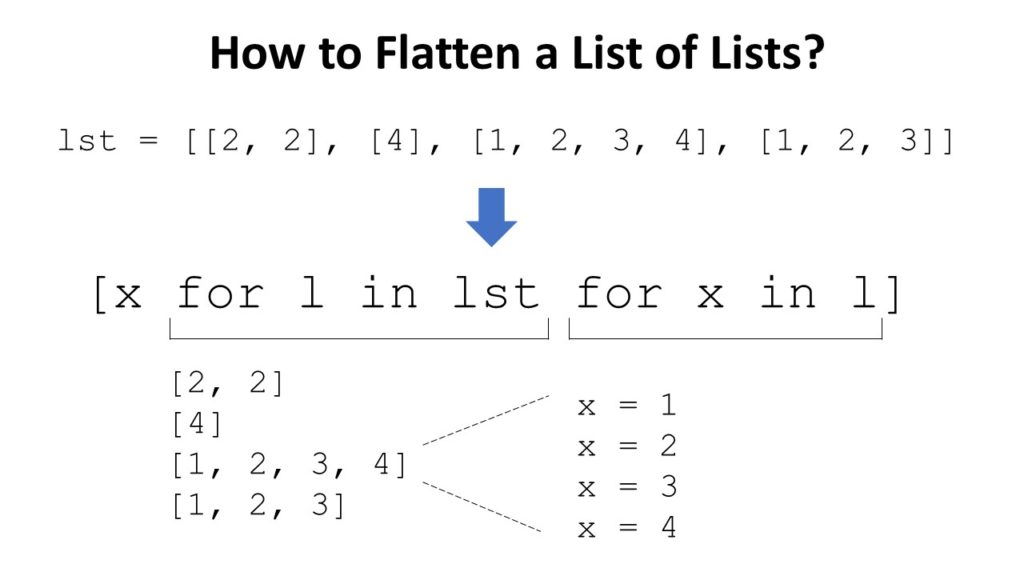
Short answer: To flatten your list of list lst, use the nested list comprehension [x for l in lst for x in l] to iterate over all nested lists (for l in lst) and over all their elements (for x in l). Each element x, you just place in the outer list, unchanged.
When browsing StackOverflow, I stumble upon this question from time to time: “How to Join a List of Lists?“. My first thought is that the asking person is referring to the join() function that converts an iterable (such as a list) to a string by concatenating its elements.
But nothing can be further from the truth! The question is usually about “flattening” the list: to transform a nested list of lists such as [[1, 2, 3], [4, 5, 6]] to a flat list [1, 2, 3, 4, 5, 6]. So, the real question is:
How to Flatten a List of Lists in Python?
Problem: Given a list of lists. How to flatten the list of lists by getting rid of the inner lists—and keeping their elements?
Example: You want to transform a given list into a flat list like here:
Solution: Use a nested list comprehension statement [x for l in lst for x in l] to flatten the list.
lst = [[2, 2], [4], [1, 2, 3, 4], [1, 2, 3]] # ... Flatten the list here ...
lst = [x for l in lst for x in l] print(lst)
# [2, 2, 4, 1, 2, 3, 4, 1, 2, 3]
Explanation: In the nested list comprehension statement [x for l in lst for x in l], you first iterate over all lists in the list of lists (for l in lst). Then, you iterate over all elements in the current list (for x in l). This element, you just place in the outer list, unchanged, by using it in the “expression” part of the list comprehension statement [x for l in lst for x in l].
Try It Yourself: You can execute this code snippet yourself in our interactive Python shell. Just click “Run” and test the output of this code.
Exercise: How to flatten a three-dimensional list (= a list of lists of lists)? Try it in the shell!
Video: List Comprehension Python List of Lists
Watch the video to learn three ways how to apply list comprehension to a list of lists:
To become successful in coding, you need to get out there and solve real problems for real people. That’s how you can become a six-figure earner easily. And that’s how you polish the skills you really need in practice. After all, what’s the use of learning theory that nobody ever needs?
Practice projects is how you sharpen your saw in coding!
Do you want to become a code master by focusing on practical code projects that actually earn you money and solve problems for people?
Then become a Python freelance developer! It’s the best way of approaching the task of improving your Python skills—even if you are a complete beginner.
FastAPI is a modern Python web framework that leverage the latest Python improvement in asyncio. In this article you will see how to set up a container based development environment and implement a small web service with FastAPI.
Getting Started
The development environment can be set up using the Fedora container image. The following Dockerfile prepares the container image with FastAPI, Uvicorn and aiofiles.
FROM fedora:32
RUN dnf install -y python-pip \ && dnf clean all \ && pip install fastapi uvicorn aiofiles
WORKDIR /srv
CMD ["uvicorn", "main:app", "--reload"]
After saving this Dockerfile in your working directory, build the container image using podman.
$ podman build -t fastapi .
$ podman images
REPOSITORY TAG IMAGE ID CREATED SIZE
localhost/fastapi latest 01e974cabe8b 18 seconds ago 326 MB
Now let’s create a basic FastAPI program and run it using that container image.
You now have a running web service using FastAPI. Any changes to main.py will be automatically reloaded. For example, try changing the “Hello Fedora Magazine!” message.
To stop the application, run the following command.
$ podman stop fastapi
Building a small web service
To really see the benefits of FastAPI and the performance improvement it brings (see comparison with other Python web frameworks), let’s build an application that manipulates some I/O. You can use the output of the dnf history command as data for that application.
First, save the output of that command in a file.
$ dnf history | tail --lines=+3 > history.txt
The command is using tail to remove the headers of dnf history which are not needed by the application. Each dnf transaction can be represented with the following information:
id : number of the transaction (increments every time a new transaction is run)
command : the dnf command run during the transaction
date: the date and time the transaction happened
Next, modify the main.py file to add that data structure to the application.
from fastapi import FastAPI
from pydantic import BaseModel app = FastAPI() class DnfTransaction(BaseModel): id: int command: str date: str
FastAPI comes with the pydantic library which allow you to easily build data classes and benefit from type annotation to validate your data.
Now, continue building the application by adding a function that will read the data from the history.txt file.
import aiofiles from fastapi import FastAPI
from pydantic import BaseModel app = FastAPI() class DnfTransaction(BaseModel): id: int command: str date: str async def read_history(): transactions = [] async with aiofiles.open("history.txt") as f: async for line in f: transactions.append(DnfTransaction( id=line.split("|")[0].strip(" "), command=line.split("|")[1].strip(" "), date=line.split("|")[2].strip(" "))) return transactions
This function makes use of the aiofiles library which provides an asyncio API to manipulate files in Python. This means that opening and reading the file will not block other requests made to the server.
Finally, change the root function to return the data stored in the transactions list.
FastAPI is gaining a lot a popularity in the Python web framework ecosystem because it offers a simple way to build web services using asyncio. You can find more information about FastAPI in the documentation.
In this ultimate guide, you’ll learn everything you need to know about joining list elements in Python. To give you a quick overview, let’s have a look at the following problem.
Problem: Given a list of elements. How to join the elements by concatenating all elements in the list?
Example: You want to convert list['learn ', 'python ', 'fast'] to the string 'learn python fast'.
Quick Solution: to convert a list of strings to a string, do the following.
Call the ''.join(list) method on the empty string '' that glues together all strings in the list and returns a new string.
The string on which you call the join method is used as a delimiter between the list elements.
If you don’t need a delimiter, just use the empty string ''.
Problem: Given a list of strings. How to convert the list to a string by concatenating all strings in the list—using a comma as the delimiter between the list elements?
Example: You want to convert list ['learn', 'python', 'fast'] to the string 'learn,python,fast'.
Solution: to convert a list of strings to a string, call the ','.join(list) method on the delimiter string ',' that glues together all strings in the list and returns a new string.
Problem: Given a list of strings. How to convert the list to a string by concatenating all strings in the list—using a newline character as the delimiter between the list elements?
Example: You want to convert list ['learn', 'python', 'fast'] to the string 'learn\npython\nfast' or as a multiline string:
'''learn
python
fast'''
Solution: to convert a list of strings to a string, call the '\n'.join(list) method on the newline character '\n' that glues together all strings in the list and returns a new string.
Problem: Given a list of strings. How to convert the list to a string by concatenating all strings in the list—using a space as the delimiter between the list elements?
Example: You want to convert list ['learn', 'python', 'fast'] to the string 'learn python fast'. (Note the empty spaces between the terms.)
Solution: to convert a list of strings to a string, call the ' '.join(list) method on the string ' ' (space character) that glues together all strings in the list and returns a new string.
Problem: Given a list of strings. How to convert the list to a string by concatenating all strings in the list—using a comma character followed by an empty space as the delimiter between the list elements? Additionally, you want to wrap each string in double quotes.
Example: You want to convert list ['learn', 'python', 'fast'] to the string '"learn", "python", "fast"' :
Solution: to convert a list of strings to a string, call the ', '.join('"' + x + '"' for x in lst) method on the delimiter string ', ' that glues together all strings in the list and returns a new string. You use a generator expression to modify each element of the original element so that it is enclosed by the double quote " chararacter.
Code: Let’s have a look at the code.
lst = ['learn', 'python', 'fast']
print(', '.join('"' + x + '"' for x in lst))
The output is:
"learn", "python", "fast"
Python Join List With None
Python Join List With Tabs
Python Join List With Delimiter
Python Join List With Carriage Return
Python Join List with Underscore
Python Join List of Integers
Problem: You want to convert a list into a string but the list contains integer values.
Example: Convert the list [1, 2, 3] to a string '123'.
Solution: Use the join method in combination with a generator expression to convert the list of integers to a single string value:
lst = [1, 2, 3]
print(''.join(str(x) for x in lst))
# 123
The generator expression converts each element in the list to a string. You can then combine the string elements using the join method of the string object.
If you miss the conversion from integer to string, you get the following TypeError:
lst = [1, 2, 3]
print(''.join(lst)) '''
Traceback (most recent call last): File "C:\Users\xcent\Desktop\code.py", line 2, in <module> print(''.join(lst))
TypeError: sequence item 0: expected str instance, int found '''
Python Join List of Floats
Python Join List of Booleans
Python Join List of Tuples
Python Join List of Sets
Python Join List of Bytes
Python Join List of Dictionaries
Python Join List Except First or Last Element
Python Join List Remove Duplicates
Python Join List Reverse
Python Join List Range
Python Join List By Row
Python Join List of Unicode Strings
Python Join List in Pairs
Python Join List as Path
Python Join List Slice
Python Join Specific List Elements
Python Join List of DataFrames
Python Join List Comprehension
Python Join List Map
Python Join List Columns
Where to Go From Here?
Enough theory, let’s get some practice!
To become successful in coding, you need to get out there and solve real problems for real people. That’s how you can become a six-figure earner easily. And that’s how you polish the skills you really need in practice. After all, what’s the use of learning theory that nobody ever needs?
Practice projects is how you sharpen your saw in coding!
Do you want to become a code master by focusing on practical code projects that actually earn you money and solve problems for people?
Then become a Python freelance developer! It’s the best way of approaching the task of improving your Python skills—even if you are a complete beginner.
Believe it or not—how you answer this question in your day-to-day code reveals your true Python skill level to every master coder who reads your code.
Beginner coders check if a list a is empty using crude statements like len(a)==0 or a==[]. While those solve the problem—they check if a list is empty—they are not what a master coder would do. Instead, the most Pythonic way to check if a list (or any other iterable for that matter) is empty is the expression not a.
You may call it implicit Booleanness (or, more formal, type flexibility): every object in Python can be implicityl converted into a truth value.
Here’s an example in our interactive Python shell—try it yourself!
Exercise: What’s the output of the code if you add one element to the list a?
Truth Value Testing and Type Flexibility
Python implicitly associates any object with a Boolean value. Here are some examples:
The integers 1, 2, and 3 are associated to the Boolean True.
The integer 0 is associated to the Boolean False.
The strings 'hello', '42', and '0' are associated to the Boolean True.
The empty string '' is associated to the Boolean False.
Roughly speaking, each time a Boolean value is expected, you can throw in a Python object instead. The Python object will then be converted to a Boolean value. This Boolean value will be used to decide whether to enter, say, a while loop or an if statement. This is called “type flexibility” and it’s one of Python’s core design choices.
Per default, all objects are considered True if they are semantically non-empty. Empty objects are usually associated to the Boolean False. More specifically, only if one of the two cases is met, will the result of an object be False: (i) the __len__() function returns 0, or (ii) the __bool__() function returns False. You can redefine those two methods for each object.
From the Python documentation, here are some common objects that are associated to the Boolean False:
Defined constants: None and False.
Zero of numerical types: 0, 0.0, 0j, Decimal(0), Fraction(0, 1)
Empty iterables: '', (), [], {}, set(), range(0)
Here are some examples:
if []: print('1') if (): print('2') if [()]: print('3')
# 3 if 0: print('4') if 0.00: print('5') if 0.001: print('6')
# 6 if set(): print('7') if [set()]: print('8')
# 8
Again, even if the iterable contains only a single element (that may evaluate to False like integer 0), the implicit Boolean conversion will return True because an empty element is an element nonetheless.
PEP8 Recommendation: How to Check if a List is Empty
As some readers argued with me about how to correctly check for an empty list in Python, here‘s the explicit excerpt from the PEP8 standard (Python’s set of rules about how to write readable code):
For sequences, (strings, lists, tuples), use the fact that empty sequences are false:
# Correct:
if not seq:
if seq:
# Wrong:
if len(seq):
if not len(seq):
Performance Evaluations
To see which of the three methods is fastest, I repeated each method 100 times using the timeit library on my notebook with Intel Core i7 (TM) CPU of 8th Generation, 8GB RAM—yes, I know—and NVIDIA Graphic Card (not that it mattered).
The third method is the most Pythonic one with type flexibility. We measure the elapsed time of 100 executions of each method. In particular, we’re interested in the average time and the variance of the elapsed time. Both should be minimal.
Our thesis is that the third, most Pythonic method is also the fastest because there’s no need to create a new empty list (like in method 2) or performing nested function calls like in method 1. Method 3 consists only of a single function call: converting the list into a Boolean value with the __bool__ or __len__ methods.
Here’s the result in terms of elapsed average runtime and variance of the runtimes:
Method 1: len(a) == 0
avg: 0.06273576400000003
var: 0.00022597495215430347 Method 2: a == []
avg: 0.034635367999999944
var: 8.290137682917488e-05 Method 3: not a
avg: 0.017685209000000004
var: 6.900910317342067e-05
You can see that the third method is not only 50% faster than method 2 and 75% faster than method 3, it also has very little variance. It’s clearly the best method in terms of runtime performance. Being also the shortest method, you can now see why the method is considered to be most “Pythonic”.
Where to Go From Here?
Enough theory, let’s get some practice!
To become successful in coding, you need to get out there and solve real problems for real people. That’s how you can become a six-figure earner easily. And that’s how you polish the skills you really need in practice. After all, what’s the use of learning theory that nobody ever needs?
Practice projects is how you sharpen your saw in coding!
Do you want to become a code master by focusing on practical code projects that actually earn you money and solve problems for people?
Then become a Python freelance developer! It’s the best way of approaching the task of improving your Python skills—even if you are a complete beginner.
In Python, there are always multiple ways to accomplish the same thing—but with subtle differences in the side effects. A great coder will always choose the most effective way for the problem at hand.
This tutorial shows you six different ways to add elements to a list in Python. In a nutshell, the different ways to add one or more elements to a list are:
append(): add a single element to an existing list.
extend(): add multiple elements to an existing list.
insert(): add an element at an arbitrary position in an existing list.
Try It Yourself: Before we dive into each of those methods, let’s try them yourself in our interactive Python shell!
Exercise: Use each method to add yet another integer element 42 to each list. Which method is the best one to add multiple elements?
Next, you’ll learn about each method in a video tutorial and short example code snippet. I’ve written in-depth articles for each method so feel free to follow the references given in each method.
Method 1: append()
The list.append(x) method—as the name suggests—appends element x to the end of the list. You can call this method on each list object in Python. Here’s the syntax:
The list.extend(iter) method adds all elements in the argument iterable iter to an existing list. You can call this method on each list object in Python. Here’s the syntax:
list.extend(iterable)
Argument
Description
iterable
All the elements of the iterable will be added to the end of the list—in the order of their occurrence.
The list.insert(i, element) method adds an element element to an existing list at position i. All elements j>i will be moved by one index position to the right. You can call this method on each list object in Python. Here’s the syntax:
list.insert(index, element)
Argument
Description
index
Integer value representing the position before you want to insert an element
Slice assignment is a little-used, beautiful Python feature to replace a slice with another sequence. Simply select the slice you want to replace on the left and the values to replace it on the right side of the equation. For example, the slice assignment list[2:4] = [42, 42] replaces the list elements with index 2 and 3 with the value 42.
If you use the + operator on two integers, you’ll get the sum of those integers. But if you use the + operator on two lists, you’ll get a new list that is the concatenation of those lists.
There are many applications of the asterisk operator. But one nice trick is to use it as an unpacking operator that “unpacks” the contents of a container data structure such as a list or a dictionary into another one.
Here’s your freePDF cheat sheet showing you all Python list methods on one simple page. Click the image to download the high-resolution PDF file, print it, and post it to your office wall:
Let’s summarize the strengths and weaknesses of the different methods:
Use the append() method to add a single element to an existing list without creating a new list.
Use the extend() method to add multiple elements to an existing list without creating a new list.
Use the insert() method to add an element at an arbitrary position in the list—without creating a new list.
Use slice assignment to replace a slice of an existing list—without creating a new list.
Use list concatenation with + to add one or more elements to a list—if you want to create a new list.
Use the asterisk operator * to unpack multiple iterables into a new list—if you want to create a new list.
Where to Go From Here?
Enough theory, let’s get some practice!
To become successful in coding, you need to get out there and solve real problems for real people. That’s how you can become a six-figure earner easily. And that’s how you polish the skills you really need in practice. After all, what’s the use of learning theory that nobody ever needs?
Practice projects is how you sharpen your saw in coding!
Do you want to become a code master by focusing on practical code projects that actually earn you money and solve problems for people?
Then become a Python freelance developer! It’s the best way of approaching the task of improving your Python skills—even if you are a complete beginner.
In this article, we will completely ignore the coding technicalities and syntax for a change. We’ll focus on time and work management, which represents a significant portion of a skillset of well-rounded and successful companies and individuals.
Disclaimer: A clear distinction between project and product management might be blurred in some organizations, and could be a topic for another short blog. Therefore, without further ado, we shall be using “project management” terminology for this blog.
Software engineering consists of creative problem solving and innovation. Almost daily, coders and developers face new challenges or problems that they’ve never solved before.
Software engineering as a filed involves minimal routine and, therefore, a higher degree of uncertainty or variety not only towards HOW to solve a specific problem but often also about WHAT exactly needs to be solved.
To be successful, good time and work management are essential. Let’s begin with a few statements which we will expand on as we go along:
Time and work management is a skill. And, as with any other skill, you can learn it.
Even the world’s best coder is useless without good work or time management—regardless whether they’re working as a freelancer or an employee in a development team).
Management is a highly transferable skill: you can apply it in almost any field.
Overview
You can use and take advantage of several project management frameworks, approaches, and concrete techniques. Their advantages and disadvantages are a common topic for debate, which we’ll try and avoid addressing in this blog. The topic quickly becomes highly complex, and very rarely is there an ultimate right answer as to which approaches, techniques, or methods are the best. In reality, it depends on a wide variety of factors such as type of the project, spectrum of personalities of people involved, management skills, company policies, etc.
There are three ultimate truths to keep in mind:
Each method possesses certain elements that are suitable to adopt or use in a particular project.
No plan and no structure leads to anarchy.
If you have to apply any method because the framework you’ve chosen tells you so, you’re doing it wrong! Every management method you choose to implement should be at your service and help you optimize your workflow.
Many would argue that project management approaches are “brand-named common sense”: recently, names were put to processes that happened naturally.
In this sense, we mostly speak of three approaches:
Traditional or “waterfall” model,
Agile methodologies, and
Lean software development methods.
Related: You can read more about the most common methodologies in this article, which includes summaries and also links to external resources.
Traditional Waterfall Methodology
Waterfall is the most traditional approach and is mainly plan-driven, meaning that a substantial amount of time is spent on planning at first.
Once all requirements are well-defined, there comes a design phase. There, all requirements are translated into technical language, meaning how they would be implemented or accomplished.
This is followed by an implementation phase, where all functionalities are actually implemented according to what’s been outlined so far.
Once all is implemented, there is a verification and testing phase takes place where all functionalities are double-checked and verified.
Upon completion, the product is deployed, which is followed by a maintenance phase. This approach is very well established, repeatedly proving itself as the most useful in projects where the goal is apparent, and the team knows how to get there.
Agile Methodologies
A whole family of agile methodologies and frameworks are all designed around the same baseline, challenging the high rigidity (or lack of flexibility) of the waterfall model. Agile approaches are designed to accommodate changes that inevitably happen as we learn new things during development. Agile approaches allow for re-planning and strongly rely on people’s communication, transparency, commitment, common goals, and values over a fixed plan.
Agile methodologies mostly apply in projects where the degree of uncertainty and complexity are high.
To this category, we can attach projects that are on the high end of innovation, where we don’t know what they will become, what impact they will have, and we might need to re-direct or focus as we go along so we can match the audience’s expectations.
On the other hand, we have highly complex projects that are out of our scope of skills. We are attempting to develop something we’ve never done before, which makes our early planning highly inaccurate.
According to Google trends, the term “Scrum framework” has undergone an increasing interest over the past decade.
Scrum is a variant of an agile approach that puts the development team on its front page. It assumes that the most efficient way of working is having small, “self-officiating” and self-organizing teams (up to 9 people) with a few key roles. The development process relies on incremental work of short periods (“sprints”), where the goal of each period (sprint) is to come up with a concluded deliverable (“increment”) that maximizes the final product’s value.
Scrum is people-oriented and assumes small groups working together. It is purposefully defined in a lightweight way, and it highly relies on people’s character. The values that are promoted are values of commitment, courage, focus, openness, and respect. It is assumed that people in organizations that practice scrum framework would in time adopt those values and live by them: commit to a common goal, always do the right thing and maintain transparent and respectful relationships with their fellow team members. It is also assumed that a scrum team consists of people with all necessary relevant skills to complete the work.
Following this principle, the size of the scrum team is strictly limited to between 3 and 9 people. Fewer than three would increase the probability of lacking skills to complete the work, whereas having more than nine people makes the communication too complicated.
The main roles defined in a scrum team are:
The product owner is responsible for maximizing the product’s value under development, managing the product backlog, and ensuring the development team understands it. The product owner is NOT a part of the development team.
The Scrum master: facilitates the scrum principles among the scrum team by promoting the rules, values, and practices of Scrum. Scrum master is also a part of the development team.
The development team: professionals who deliver a potentially releasable increment at the end of each sprint (what those can be read in the next section)
No member of the Scrum team is superior on inferior to another in this core definition.
Scrum Events
Scrum frameworks have clearly defined events during work execution. All product features are kept and prioritized in a product backlog (managed by the product owner).
Activities are executed through sprints, a max. 4 weeks long periods during which an increment is designed, developed, tested, and delivered. In this case, the increment represents a small enough feature or development step that can be completed and declared as “done” in one sprint. Bigger chunks of work are sensibly broken down into smaller pieces.
Every sprint begins with a sprint planning session where a sprint backlog is created. The development team then performs daily scrum/stand-up where they plan the work for the next 24h. When the sprint comes to an end, and an increment is developed, the sprint review session is held. There, all stakeholders (also external ones) review what was done and together refine the product backlog. The development team on their own finally hold a sprint retrospective where the point of debate is to answer questions like “how can we function better as a team?” or “what would make our work more enjoyable?”. It’s more work-oriented rather than product-oriented.
How formal are these roles, and how much are they worth? According to Glassdoor, a Scrum product owner’s annual salary is between 90k and 120k USD, whereas the Scrum Master’s salary is between 90k and 100k USD (source).
Conclusion
Any organization you will be involved with will practice a different methodology. Mastering the skill of using the values, structures, or disciplines promoted in any of these frameworks is highly transferable. Values promoted in Scrum can be useful in any other environment, even in your private life.
There are much doubt and debate about whether scrum principles are too vague. It is being argued that they have to be so vastly modified to be implemented in a work environment among different organizations, that they are often largely decoupled from the “rulebook” of Scrum. Secondly, some organizations had trouble translating principles of scrum framework into reality, arguing that it took a very long time. It can be hard to make it work with the people who are not open to changes. Many people don’t want to alter their well-functioning ways of working just to fit the model.
In reality, scrum practice is as challenging to master as any other. Clearly, lack of understanding or competence in this field can adversely affect your business. To function properly, Scrum must be adopted corporate-wide.
All of these models put the messiness of reality into a model or framework of actions and relationships that might fit your business. It is up to you to decide whether to adopt them or not and to what extent. Adhering to the principles of one is the most useful step to make at a certain point. The ultimate goal is to tweak and tune your project management to make it the most compatible with your technical skills, marketing, and all other skills that complete you as a freelancer, business owner, or team member in general.
About the Author
Luka Banović is a full-time engineering project manager at IRNAS LTD in Slovenia (and also a Finxter). A line of experience in engineering project leading has taught him many perks of this job, and he is happy to share some ideas with the Finxter community.
If you’re like me, you try things first in your code and fix the bugs as they come. One frequent bug in Python is the IndexError: list index out of range. So, what does this error message mean?
The error “list index out of range” arises if you access invalid indices in your Python list. For example, if you try to access the list element with index 100 but your lists consist only of three elements, Python will throw an IndexError telling you that the list index is out of range.
Let’s have a look at an example where this error arises:
lst = ['Alice', 'Bob', 'Carl']
print(lst[3])
The element with index 3 doesn’t exist in the list with three elements. Why is that? The following graphic shows that the maximal index in your list is 2. The call lst[2] would retrieve the third list element 'Carl'. Did you try to access the third element with index 3? It’s a common mistake: The index of the third element is 2 because the index of the first list element is 0.
lst[0] –> Alice
lst[1] –> Bob
lst[2] –> Carl
lst[3] –> ??? Error ???
Try It Yourself: Before I tell you what to do about it, try to fix the code yourself in our interactive Python shell:
Exercise: Fix the code in the interactive code shell to get rid of the error message.
How to Fix the IndexError in a For Loop? [General Strategy]
So, how can you fix the code? Python tells you in which line and on which list the error occurs.
To pin down the exact problem, check the value of the index just before the error occurs. To achieve this, you can print the index that causes the error before you use it on the list. This way, you’ll have your wrong index in the shell right before the error message.
Here’s an example of wrong code that will cause the error to appear:
# WRONG CODE
lst = ['Alice', 'Bob', 'Ann', 'Carl'] for i in range(len(lst)+1): lst[i] # Traceback (most recent call last):
# File "C:\Users\xcent\Desktop\code.py", line 5, in <module>
# lst[i]
# IndexError: list index out of range
The error message tells you that the error appears in line 5. So, let’s insert a print statement before that line:
lst = ['Alice', 'Bob', 'Ann', 'Carl'] for i in range(len(lst)+1): print(i) lst[i]
The result of this code snippet is still an error. But there’s more:
0
1
2
3
4
Traceback (most recent call last): File "C:\Users\xcent\Desktop\code.py", line 6, in <module> lst[i]
IndexError: list index out of range
You can now see all indices used to retrieve an element. The final one is the index i=4 which points to the fifth element in the list (remember: Python starts indexing at index 0!). But the list has only four elements, so you need to reduce the number of indices you’re iterating over. The correct code is, therefore:
# CORRECT CODE
lst = ['Alice', 'Bob', 'Ann', 'Carl'] for i in range(len(lst)): lst[i]
Note that this is a minimal example and it doesn’t make a lot of sense. But the general debugging strategy remains even for advanced code projects:
Figure out the faulty index just before the error is thrown.
Eliminate the source of the faulty index.
IndexError When Modifying a List as You Iterate Over It
The IndexError also frequently occurs if you iterate over a list but you remove elements as you iterate over the list:
l=[1,2,3,0,0,1]
for i in range(0, len(l)): if l[i]==0: l.pop(i)
This code snippet is from a StackOverflow question. The source is simply that the list.pop() method removes the element with value 0. All subsequent elements now have a smaller index. But you iterate over all indices up to len(l)-1 = 6-1 = 5 and the index 5 does not exist in the list after removing elements in a previous iteration.
You can simply fix this with a short list comprehension statement that accomplishes the same thing:
l = [x for x in l if x]
Only non-zero elements are included in the list.
String IndexError: List Index Out of Range
The error can occur when accessing strings as well:
s = 'Python'
print(s[6])
To fix the error for strings, make sure that the index falls between the range 0 ... len(s)-1 (included):
s = 'Python'
print(s[5])
# n
Tuple IndexError: List Index Out of Range
In fact, the IndexError can occur for all ordered collections where you can use indexing to retrieve certain elements. Thus, it also occurs when accessing tuple indices that do not exist:
s = ('Alice', 'Bob')
print(s[2])
Again, start counting with index 0 to get rid of this:
s = ('Alice', 'Bob')
print(s[1])
# Bob
Note: The index of the last element in any sequence is len(sequence)-1.
Where to Go From Here?
Enough theory, let’s get some practice!
To become successful in coding, you need to get out there and solve real problems for real people. That’s how you can become a six-figure earner easily. And that’s how you polish the skills you really need in practice. After all, what’s the use of learning theory that nobody ever needs?
Practice projects is how you sharpen your saw in coding!
Do you want to become a code master by focusing on practical code projects that actually earn you money and solve problems for people?
Then become a Python freelance developer! It’s the best way of approaching the task of improving your Python skills—even if you are a complete beginner.