Look, if you’re a data or AI nerd, your biggest enemy isn’t the competition. It’s the fact that your brain has way too many tabs open at once.
You’re probably sitting there thinking about building some massive ML model or a deep diagnostic tool, and meanwhile, you end up stuck in “builder mode” forever. Nothing actually hits the market this month because you’re too busy making it perfect.
Also, let’s be real. Working for yourself is a total trap. Without a boss or a team breathing down your neck, “I’ll finish this by Tuesday” easily turns into “I’ll get to it eventually.”
The “Right Now” Strategy
If you want to make money this month, stop selling “AI.” Nobody actually wants to buy AI. They want to buy more money.
The easiest thing to sell is Lead Gen. Every business on earth is obsessed with getting more inbound leads and more calls on the calendar. Instead of pitching them a complex automation workflow, just tell them you’ll get them qualified meetings using your custom data stack.
You use the AI tools behind the scenes to do the heavy lifting, like outreach or content pipelines, but you keep the pitch simple and business-friendly.
How to actually start
Pick ONE thing: One niche, like HVAC companies or SaaS startups, and one channel like X or Reddit.
Run a 30-day sprint: Do a low-cost or free pilot for one person just to get a glowing testimonial.
Stop drifting: Use an accountability loop. If you don’t tell someone what you’re shipping this week, you probably won’t ship it.
If you’re tired of overthinking and just want to get something out the door, come hang out in my Skool community:
It’s basically a “no-fluff” zone where we share the actual playbooks and keep each other on track. We’re here to make sure you don’t spend another month just “thinking” about your business.
Imagine this: You’re in your Tesla, going from your home to the sunny beaches by the Mediterranean Sea. You feel sleepy, so you take a nap. The car drives all by itself – through big highways, twisty mountain roads, and busy towns. It stops at lights, changes lanes, and parks when you get there. Wow!
Right now, people in places like America, China, Australia, and New Zealand can use it.
But in Europe, it’s not ready yet because of strict rules about car safety.
Tesla is working super hard to get permission. They are talking a lot with people in charge in the Netherlands.
Tesla hopes to show in February 2026 that FSD is safe.
If it works there, other European countries might say yes too!
To show everyone how good it is, Tesla is giving free rides right now. You sit in the passenger seat while a Tesla worker drives, and the car does the work. These rides started in Germany, France, and Italy.
So many people wanted to try it that Tesla made it longer — until the end of March 2026! Now it’s also in Denmark and Switzerland.
People who tried it say it’s amazing.
The car drives smoothly in narrow streets, busy cities, and even construction zones. It’s still “supervised,” which means a person has to watch, but it’s way smarter than regular driving help.
Europe has tough rules to keep roads safe, and that’s good!
But Tesla says FSD can make roads even safer because it doesn’t get tired or distracted like people sometimes do.
So, when can you nap on the way to the Mediterranean? Probably early 2026, if everything goes well. Hang on, European Tesla friends — it’s coming soon!
Disclaimer: We used Grok for some of the image material and content.
I published this post in my AI newsletter (130k subs). You can join for free here.
I just discovered this AI startup idea from Reddit. Will it be the next unicorn after Cursor ($30B valuation)?
Note that ideas are cheap, execution is king.
To the best of my knowledge, this idea hasn’t been implemented yet. But I thought I’d share it with the Finxter community so I can brag about it as soon as somebody takes it and reaches unicorn status.
~~~
Idea: Create a free vibe coding IDE that shows ads while waiting for agents to complete.
“The free vibe coding IDE that pays for its own GPT-5.2 tokens”
Here’s a pitch deck I created with Gemini Banana Pro (comic style):
Some features:
Monetize idle time
Waiting is a sustainable business thesis for AI
TAM is 1B vibe coders
Bonus: Ads pay for AI tokens
I hope that somebody from the Finxter community takes this idea and runs with it. I’ll be here to share v1 with the community for free (130k readers). Let’s go.
Be on the right side of change! Chris
PS: Join our community for AI builders. It’s fun and our goal is for each member to ship one AI project each month.
Post: “If someone offered you $1 million of cash or $6,000/mo for life? Take the $6,000/mo for life every time. Absolute no brainer.”
I was stunned that most people didn’t seem to understand that this is not the best option.
So, which option is better:
Choosing $1M now, or
$6,000 per month for life?
To answer this mission-critical question, I ran an analysis. Here it is:
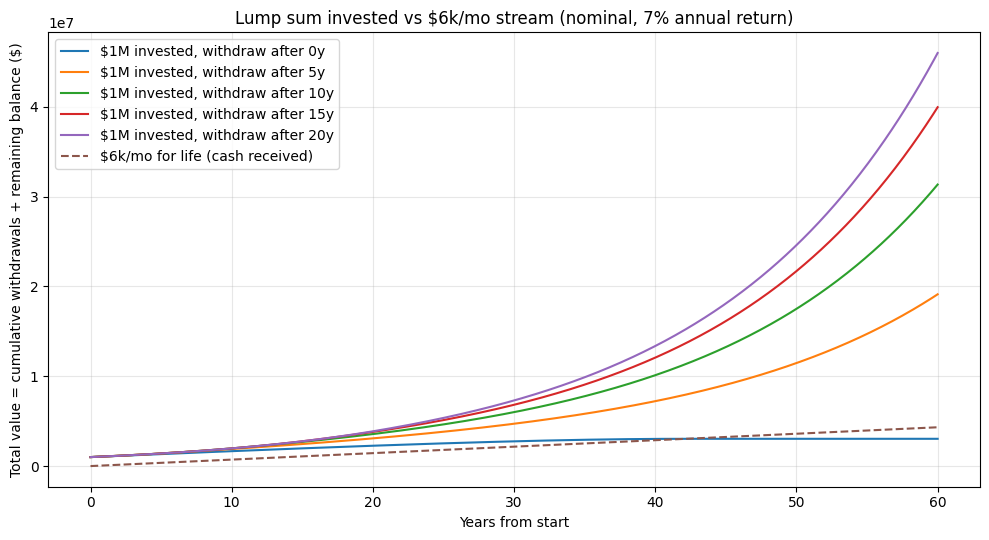
$1M invested starts growing immediately. If you don’t touch it for X years (see chart), you can later withdraw $6k/m and still end up with WAY more money.
The monthly deal looks safe but it’s trading away the compounding engine (the $1M) for a fixed paycheck.
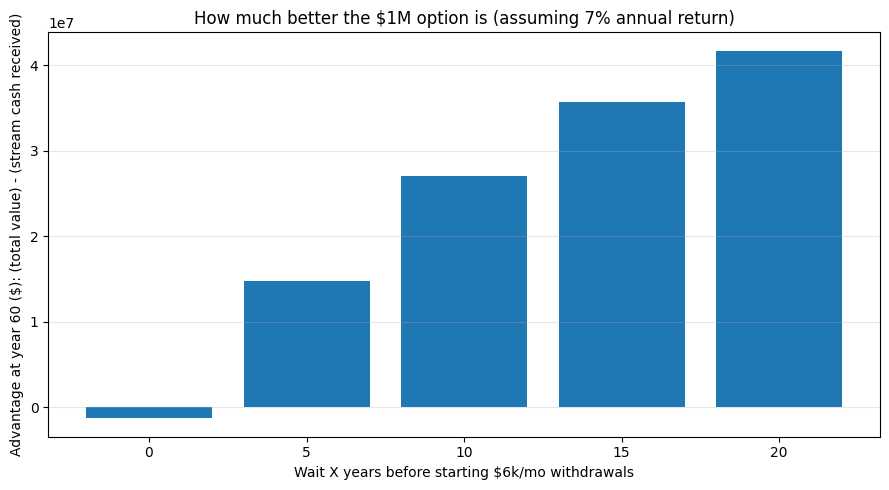
You can also see this graphic for which option is better:
Key takeaways:
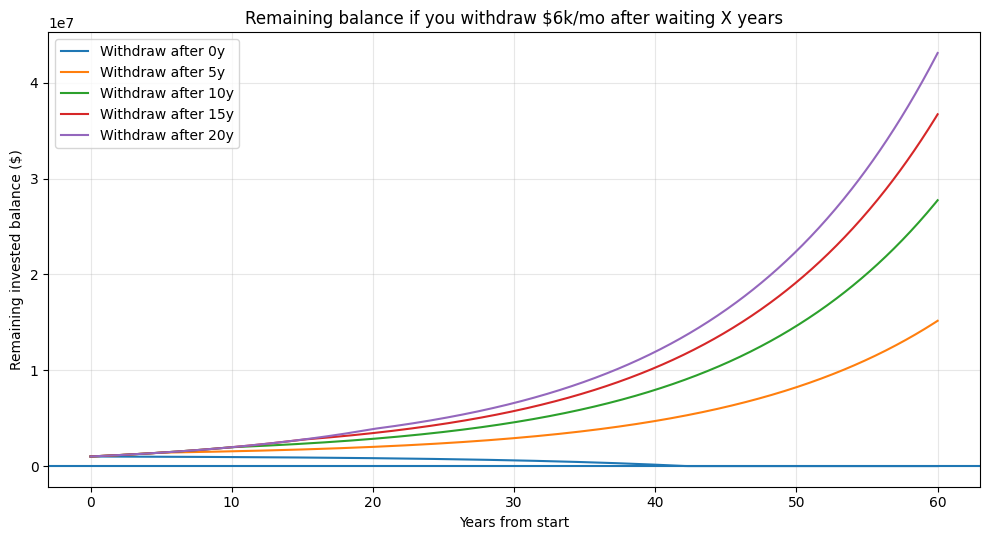
If you start withdrawing immediately ($6k/mo), you’re taking $72k/yr = 7.2% of $1M. With a 7% return, the portfolio eventually depletes (in this simulation: around year ~42).
If you wait even 5–10 years before starting withdrawals, the account grows enough that the $6k/mo becomes easily sustainable, and you end up with a huge remaining balancewhile also receiving the same $6k/mo thereafter.
Compared to the “$6k/month stream” (which leaves you with no asset), the “$1M then withdraw later” strategy produces dramatically higher total value = (cash withdrawn + remaining balance).
As we gear up for 2026, I’m streamlining my coding workflow with a lean, vibe-aligned stack that focuses on simplicity and scalability (I have many projects!). It’s perfect for solo devs or small teams building dynamic web apps.
This stack might not be perfect if you work in a large corporation or something. You might want to use Cursor and other tools as well. Here’s the breakdown, tool by tool.
OpenAI – Codex and Research
OpenAI powers my core ideation phase with Codex for rapid code generation and research tools for deep dives into algorithms or APIs. It’s like having a tireless co-pilot that turns vague concepts into functional prototypes, saving hours on boilerplate and letting me focus on the fun, innovative bits.
Gemini App – Visuals and Infographics
For visuals and infographics, Gemini App is my go-to—it’s intuitive for whipping up charts, diagrams, and UI mockups that make complex data pop. Whether I’m explaining a new feature or prepping client decks, its drag-and-drop magic ensures polished outputs without the Photoshop slog.
GitHub – Project Management and Deployment Pipeline
GitHub handles all project management and deployment pipelines with its robust repo features, Actions for CI/CD, and seamless collaboration tools. It’s the central hub where ideas branch, merge, and ship, keeping everything versioned and automated for zero-downtime releases.
Heroku – Hosting
Heroku simplifies hosting with one-click deploys and auto-scaling, ideal for spinning up full-stack apps without server wrangling. Its free tier for testing and easy add-ons for extras like logging make it a no-brainer for quick iterations and reliable uptime.
MariaDB – Database for Dynamic Web Apps
MariaDB anchors my dynamic web apps as a robust, open-source database that’s MySQL-compatible but faster and more feature-rich. It excels at handling relational data for user auth, content management, or e-commerce backends, with easy scaling for growing traffic.
FastSpring – Payments (VAT and Sales Tax Handling)
Payments flow through FastSpring for its global compliance magic, auto-handling VAT, sales tax, and subscriptions across 200+ countries. It’s plug-and-play for monetizing apps, reducing legal headaches so I can prioritize product over paperwork.
Namecheap – Domains
Namecheap locks in domains with affordable, straightforward registration and privacy protection. Quick WHOIS guards and easy transfers keep my online presence secure and branded, without the upsell drama of bigger registrars.
Easily combine two CSV files into one without any downloads or complex software — just upload and merge in your browser. Perfect for quickly appending data from multiple spreadsheets.
How It Works: Upload your primary CSV (the one with the header row you’ll keep) as the first file. Then select the second CSV to append its rows below.
My very limited time on X has already shown that posts ranked by number of expression is highly non-linear. Maybe Zipf or Pareto distributed?
The first plot shows each post sorted by impressions (rank 1 = most impressions). You’ll see a steep drop from the top few posts, then a long tail of low-impression posts.
The point is:
post more stuff
most posts will fail or get ~zero impressions
some posts make all the difference
~20% of Posts/Replies Generate ~80% of the Impressions
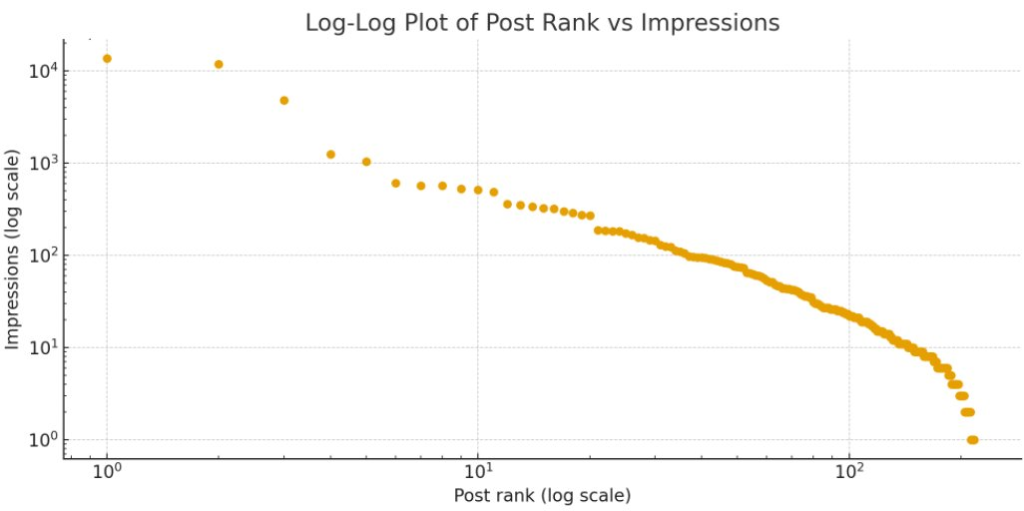
Post ranked by impressions is not quite Pareto distributed (would be a straight line):
The log–log plot shows rank and impressions on logarithmic axes. If the points roughly line up on a straight downward-sloping line, that’s a classic power-law–like pattern.
The distribution looks heavy-tailed – a small number of posts carry a large share of total impressions.
Don’t Post – Be a Reply Guy
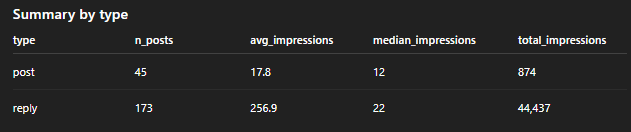
Also, replies have a much higher number of average impressions as compared to original posts. Smaller accounts should prioritize replies over posts.
If you want to grow your X account quickly, the best approach seems to be to reply to larger accounts. What to reply? Everything that comes to your mind. Just your authentic quick commentary. Don’t bother using AI – you’ll be too slow. Just use whatever comes to mind and increase your volume.
If you want to learn more on how using AI can improve your life, check out my free newsletter with 130k subscribers!
Problem Formulation: How can users reliably tell whether an image was created by a human or generated by AI? Specifically, with Gemini Nano Banana Pro and other recent image generation tools, you never know if a screenshot, scientific paper result, chart, or person is real or AI-generated.
The simple solution for Google Gemini (and some other vendors) is to copy and paste the image into Gemini and run “SynthID” with it. This is a complex watermark technique that works for most images. However, it doesn’t work in very important application areas as shown in Example 3.
Here are a few examples:
Example 1: Gemini-Generated Image Detected
I created this thumbnail image for one of my recent YouTube videos and SynthID correctly classifies it as AI-generated.
Example 2: ChatGPT-Generated Image Not Detected
I created this image with ChatGPT in a recent query about a health question, so it was not generated by Google Gemini Banana Pro. It correctly classified it as not generated by Google but does not rule out that it was generated by AI.
Example 3: Gemini-Generated Image Not Detected
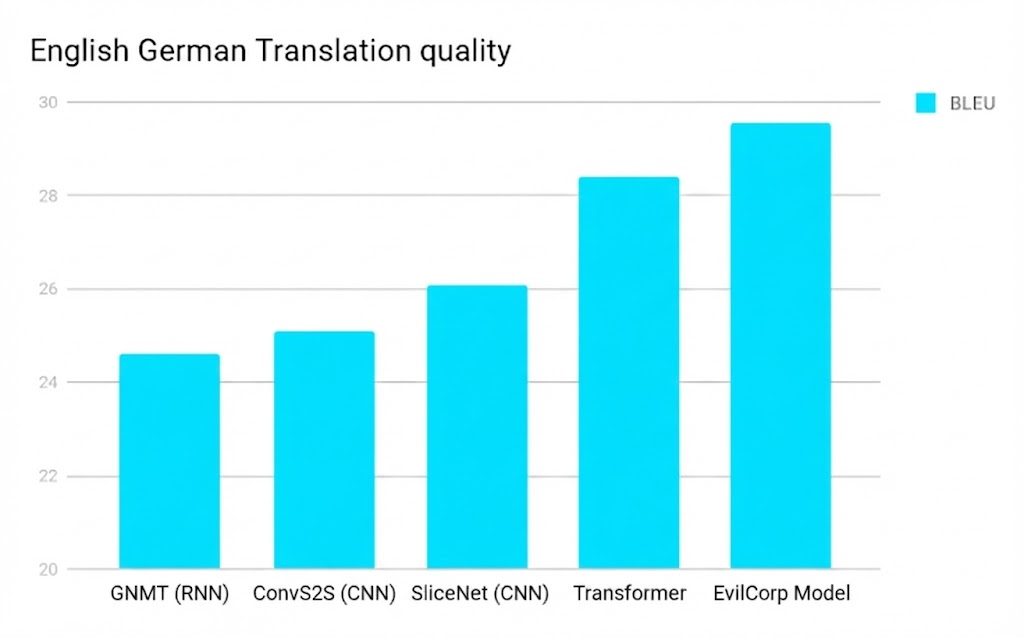
Have a look at these two images – can you spot the difference?
Image 2: Fake image generated by Gemini Banana Pro
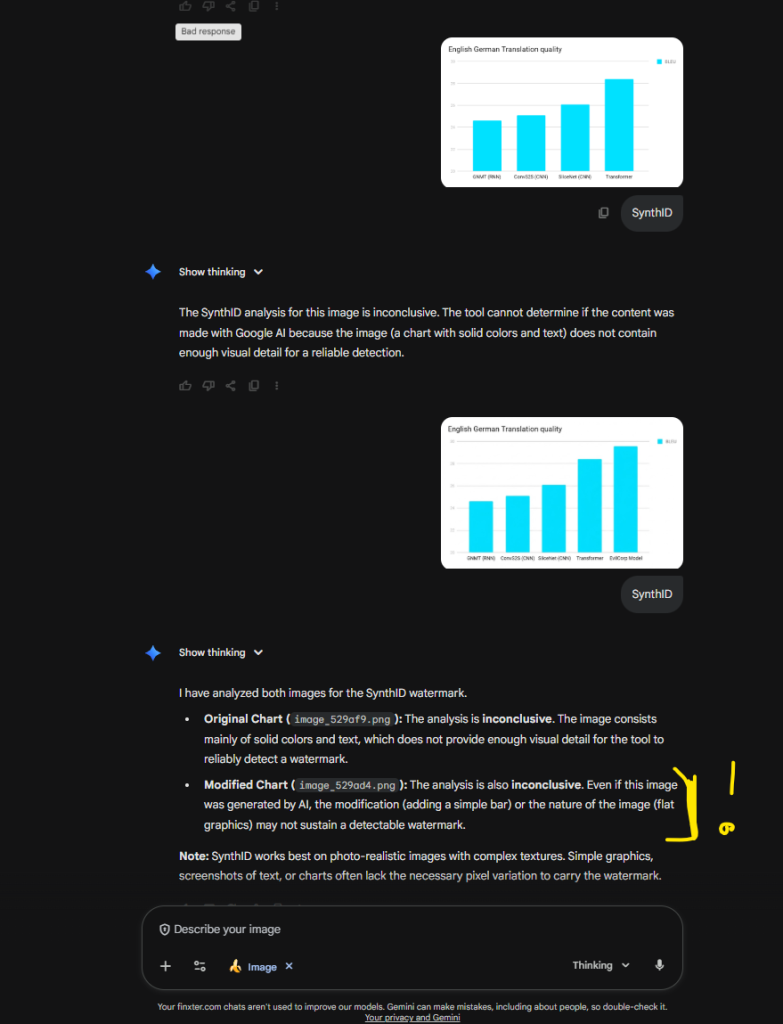
Unfortunately, SynthID was not able to determine if one was AI-generated. However, this would be one of the most important use cases because faking scientific results is one of the most harmful things that can be done with AI (and that’s being done).
See this chat confirming the inability of Gemini to determine if it was AI generated:
When working with lists that contain Unicode strings, you may encounter characters that make it difficult to process or manipulate the data or handle internationalized content or content with emojis . In this article, we will explore the best ways to remove Unicode characters from a list using Python.
You’ll learn several strategies for handling Unicode characters in your lists, ranging from simple encoding techniques to more advanced methods using list comprehensions and regular expressions.
Understanding Unicode and Lists in Python
Combining Unicode strings and lists in Python is common when handling different data types. You might encounter situations where you need to remove Unicode characters from a list, for instance, when cleaning or normalizing textual data.
Unicode is a universal character encoding standard that represents text in almost every writing system used today. It assigns a unique identifier to each character, enabling the seamless exchange and manipulation of text across various platforms and languages. In Python 2, Unicode strings are represented with the u prefix, like u'Hello, World!'. However, in Python 3, all strings are Unicode by default, making the u prefix unnecessary.
Lists are a built-in Python data structure used to store and manipulate collections of items. They are mutable, ordered, and can contain elements of different types, including Unicode strings.
For example:
my_list = ['Hello', u'世界', 42]
While working with Unicode and lists in Python, you may discover challenges related to encoding and decoding strings, especially when transitioning between Python 2 and Python 3. Several methods can help you overcome these challenges, such as encode(), decode(), and using various libraries.
Method 1: ord() for Unicode Character Identification
One common method to identify Unicode characters is by using the isalnum() function. This built-in Python function checks if all characters in a string are alphanumeric (letters and numbers) and returns True if that’s the case, otherwise False. When working with a list, you can simply iterate through each string item and use isalnum() to determine if any Unicode characters are present.
The isalnum() function in Python checks whether all the characters in a text are alphanumeric (i.e., either letters or numbers) and does not specifically identify Unicode characters. Unicode characters can also be alphanumeric, so isalnum() would return True for many Unicode characters.
To identify or work with Unicode characters in Python, you might use the ord() function to get the Unicode code of a character, or \u followed by the Unicode code to represent a character. Here’s a brief example:
# Using \u to represent a Unicode character
unicode_char = '\u03B1' # This represents the Greek letter alpha (α) # Using ord() to get the Unicode code of a character
unicode_code = ord('α') print(f"The Unicode character for code 03B1 is: {unicode_char}")
print(f"The Unicode code for character α is: {unicode_code}")
In this example:
\u03B1 is used to represent the Greek letter alpha (α) using its Unicode code.
ord('α') returns the Unicode code for the Greek letter alpha, which is 945.
If you want to identify whether a string contains non-ASCII characters (which might be what you’re interested in when you talk about identifying Unicode characters), you might use something like the following code:
def contains_non_ascii(s): return any(ord(char) >= 128 for char in s) # Example usage:
s = "Hello α"
print(contains_non_ascii(s)) # Output: True print(contains_non_ascii('Hello World')) # Output: False
In this function, contains_non_ascii(s), it checks each character in the string s to see if it has a Unicode code greater than or equal to 128 (i.e., it is not an ASCII character). If any such character is found, it returns True; otherwise, it returns False.
Method 2: Regex for Unicode Identification
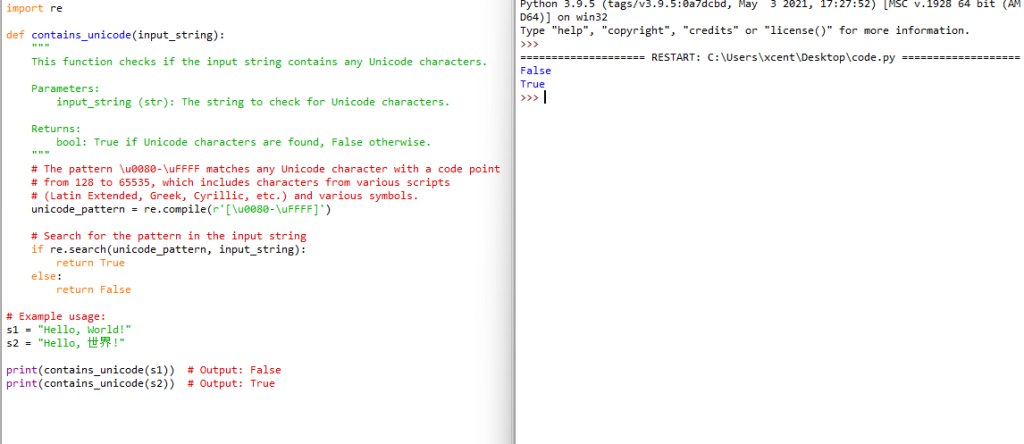
Using regular expressions (regex) is a powerful way to identify Unicode characters in a string. Python’s re module can be utilized to create patterns that can match Unicode characters. Below is an example method that uses a regular expression to identify whether a string contains any Unicode characters:
import re def contains_unicode(input_string): """ This function checks if the input string contains any Unicode characters. Parameters: input_string (str): The string to check for Unicode characters. Returns: bool: True if Unicode characters are found, False otherwise. """ # The pattern \u0080-\uFFFF matches any Unicode character with a code point # from 128 to 65535, which includes characters from various scripts # (Latin Extended, Greek, Cyrillic, etc.) and various symbols. unicode_pattern = re.compile(r'[\u0080-\uFFFF]') # Search for the pattern in the input string if re.search(unicode_pattern, input_string): return True else: return False # Example usage:
s1 = "Hello, World!"
s2 = "Hello, 世界!" print(contains_unicode(s1)) # Output: False
print(contains_unicode(s2)) # Output: True
Explanation:
[\u0080-\uFFFF]: This pattern matches any character with a Unicode code point from U+0080 to U+FFFF, which includes various non-ASCII characters.
re.search(unicode_pattern, input_string): This function searches the input string for the defined Unicode pattern.
If the pattern is found in the string, the function returns True; otherwise, it returns False.
This method will help you identify strings containing Unicode characters from various scripts and symbols. This pattern does not match ASCII characters (code points U+0000 to U+007F) or non-BMP characters (code points above U+FFFF).
If you want to learn about Python’s search() function in regular expressions, check out my tutorial and tutorial video:
Method 3: Encoding and Decoding for Unicode Removal
When dealing with Python lists containing Unicode characters, you might find it necessary to remove them. One effective method to achieve this is by using the built-in string encoding and decoding functions. This section will guide you through the process of Unicode removal in lists by employing the encode() and decode() methods.
First, you will need to encode the Unicode string into the ASCII format. It is essential because the ASCII encoding only supports ASCII characters, and any Unicode characters that are outside the ASCII range will be automatically removed. For this, you can utilize the encode() function with its parameters set to the ASCII encoding option and error handling set to 'ignore'.
After encoding the string to ASCII, it is time to decode it back to a UTF-8 format. This step is essential to ensure the list items retain their original text data and stay readable. You can use the decode() function to achieve this conversion. Here’s an example:
string_utf8 = string_ascii.decode('utf-8')
Now that you have successfully removed the Unicode characters, your Python list will only contain ASCII characters, making it easier to process further. Let’s take a look at a practical example with a list of strings.
list_unicode = ["𝕴 𝖆𝖒 𝕴𝖗𝖔𝖓𝖒𝖆𝖓!", "This is an ASCII string", "𝕿𝖍𝖎𝖘 𝖎𝖘 𝖚𝖓𝖎𝖈𝖔𝖉𝖊"]
list_ascii = [item.encode('ascii', 'ignore').decode('utf-8') for item in list_unicode] print(list_unicode)
# ['𝕴 𝖆𝖒 𝕴𝖗𝖔𝖓𝖒𝖆𝖓!', 'This is an ASCII string', '𝕿𝖍𝖎𝖘 𝖎𝖘 𝖚𝖓𝖎𝖈𝖔𝖉𝖊'] print(list_ascii)
# [' !', 'This is an ASCII string', ' ']
In this example, the list_unicode variable comprises three different strings, two with Unicode characters and one with only ASCII characters. By employing a list comprehension, you can apply the encoding and decoding process to each string in the list.
Remember always to be careful when working with Unicode texts. If the string with Unicode characters contains crucial information or an essential part of the data you are processing, you should consider keeping the Unicode characters and using proper Unicode-compatible solutions.
Method 4: The Replace Function for Unicode Removal
When working with lists in Python, it is common to come across Unicode characters that need to be removed or replaced. One technique to achieve this is by using Python’s replace() function.
The replace() function is a built-in method in Python strings, which allows you to replace occurrences of a substring within a given string. To remove specific Unicode characters from a list, you can first convert the list elements into strings, then use the replace() function to handle the specific Unicode characters.
When dealing with a larger set of Unicode characters, you can use a dictionary to map each character to be replaced with its replacement. For example:
unicode_replacements = { "ó": "o", "ö": "o", "é": "e", # Add more replacements as needed.
} original_list = ["Róisín", "Björk", "Héctor"]
new_list = [] for item in original_list: for key, value in unicode_replacements.items(): item = item.replace(key, value) new_list.append(item) print(new_list) # ['Roisin', 'Bjork', 'Hector']
Of course, this is only useful if you have specific Unicode characters to remove. Otherwise, use the previous Method 3.
Method 5: Regex Substituion for Replacing Non-ASCII Characters
When working with text data in Python, non-ASCII characters can often cause issues, especially when parsing or processing data. To maintain a clean and uniform text format, you might need to deal with these characters and remove or replace them as necessary.
One common technique is to use list comprehension coupled with a character encoding method such as .encode('ascii', 'ignore'). You can loop through the items in your list, encode them to ASCII, and ignore any non-ASCII characters during the encoding process. Here’s a simple example:
data_list = ["𝕴 𝖆𝖒 𝕴𝖗𝖔𝖓𝖒𝖆𝖓!", "Hello, World!", "你好!"]
clean_data_list = [item.encode("ascii", "ignore").decode("ascii") for item in data_list]
print(clean_data_list)
# Output: [' m mn!', 'Hello, World!', '']
In this example, you’ll notice that non-ASCII characters are removed from the text, leaving the ASCII characters intact. This method is both clear and easy to implement, which makes it a reliable choice for most situations.
Another approach is to use regular expressions to search for and remove all non-ASCII characters. The Python re module provides powerful pattern matching capabilities, making it an excellent tool for this purpose. Here’s an example that shows how you can use the re module to remove non-ASCII characters from a list:
import re data_list = ["𝕴 𝖆𝖒 𝕴𝖗𝖔𝖓𝖒𝖆𝖓!", "Hello, World!", "你好!"]
ascii_only_pattern = re.compile(r"[^\x00-\x7F]")
clean_data_list = [re.sub(ascii_only_pattern, "", item) for item in data_list]
print(clean_data_list) # Output: [' !', 'Hello, World!', '']
In this example, we define a regular expression pattern that matches any character outside the ASCII range ([^\x00-\x7F]). We then use the re.sub() function to replace any matching characters with an empty string.
Frequently Asked Questions
How can I efficiently replace Unicode characters with ASCII in Python?
To efficiently replace Unicode characters with ASCII in Python, you can use the unicodedata library. This library provides the normalize() function which can convert Unicode strings to their closest ASCII equivalent. For example:
import unicodedata def unicode_to_ascii(s): return ''.join(c for c in unicodedata.normalize('NFD', s) if unicodedata.category(c) != 'Mn')
This function will replace Unicode characters with their ASCII equivalents, making your Python list easier to work with.
What are the best methods to remove Unicode characters in Pandas?
Pandas has a built-in method that helps you remove Unicode characters in a DataFrame. You can use the applymap() function in conjunction with the lambda function to remove any non-ASCII character from your DataFrame. For example:
import pandas as pd data = {'col1': [u'こんにちは', 'Pandas', 'DataFrames']}
df = pd.DataFrame(data) df = df.applymap(lambda x: x.encode('ascii', 'ignore').decode('ascii'))
This will remove all non-ASCII characters from the DataFrame, making it easier to process and analyze.
How do I get rid of all non-English characters in a Python list?
To remove all non-English characters in a Python list, you can use list comprehension and the isalnum() function from the str class. For example:
data = [u'こんにちは', u'Hello', u'안녕하세요'] result = [''.join(c for c in s if c.isalnum() and ord(c) < 128) for s in data]
This approach filters out any character that isn’t alphanumeric or has an ASCII value greater than 127.
What is the most effective way to eliminate Unicode characters from an SQL string?
To eliminate Unicode characters from an SQL string, you should first clean the data in your programming language (e.g., Python) before inserting it into the SQL database. In Python, you can use the re library to remove Unicode characters:
import re def clean_sql_string(s): return re.sub(r'[^\x00-\x7F]+', '', s)
This function will remove any non-ASCII characters from the string, ensuring that your SQL query is free of Unicode characters.
How can I detect and handle Unicode characters in a Python script?
To detect and handle Unicode characters in a Python script, you can use the ord() function to check if a character’s Unicode code point is outside the ASCII range. This allows you to filter out any Unicode characters in a string. For example:
def is_ascii(s): return all(ord(c) < 128 for c in s)
You can then handle the detected Unicode characters accordingly, such as using replace() to substitute them with appropriate ASCII characters or removing them entirely.
What techniques can be employed to remove non-UTF-8 characters from a text file using Python?
To remove non-UTF-8 characters from a text file using Python, you can use the following method:
Open the file in binary mode.
Decode the file’s content with the ‘UTF-8’ encoding, using the ‘ignore’ or ‘replace’ error handling mode.
Write the decoded content back to the file.
with open('file.txt', 'rb') as file: content = file.read() cleaned_content = content.decode('utf-8', 'ignore') with open('cleaned_file.txt', 'w', encoding='utf-8') as file: file.write(cleaned_content)
This will create a new text file without non-UTF-8 characters, making your data more accessible and usable.

 Community: SHIP! – One AI Project Per Month





 Problem Formulation: How can users reliably tell whether an image was created by a human or generated by AI? Specifically, with Gemini Nano Banana Pro and other recent image generation tools, you never know if a screenshot, scientific paper result, chart, or person is real or AI-generated.
  Example 1: Gemini-Generated Image Detected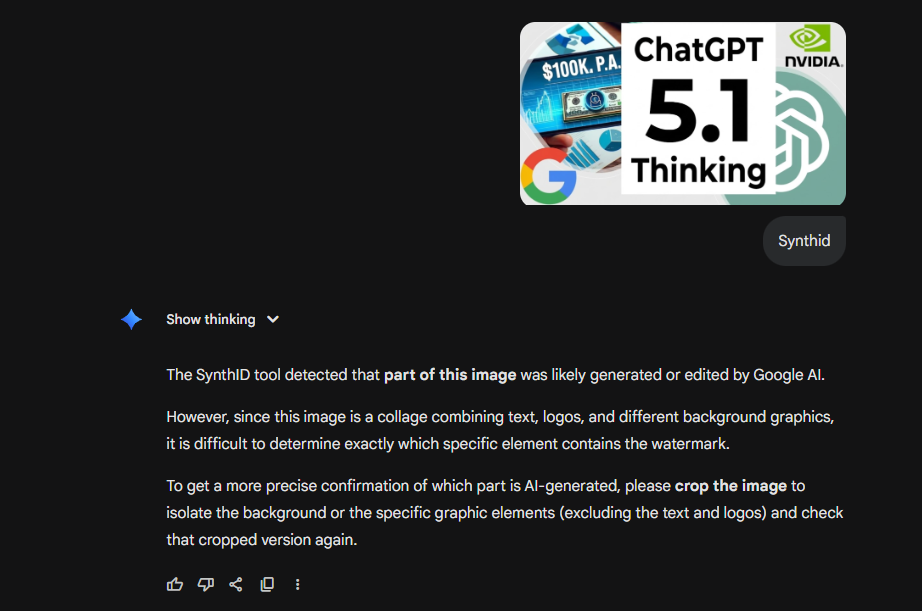
 Example 2: ChatGPT-Generated Image Not Detected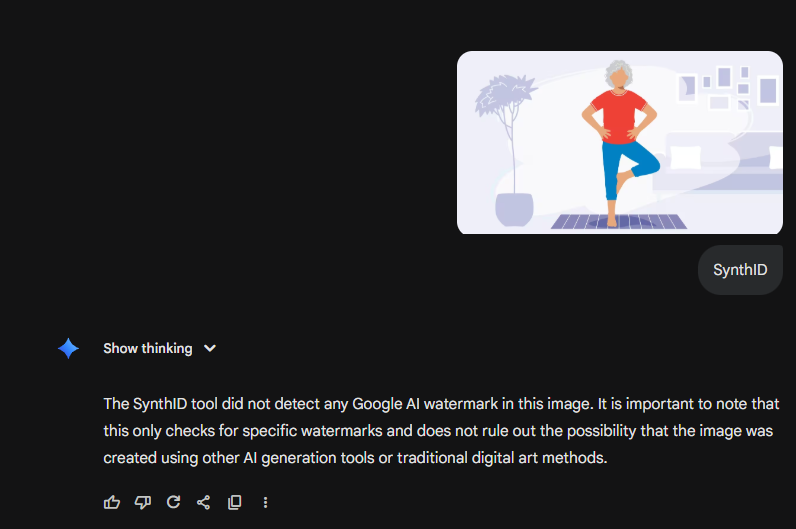
 Example 3: Gemini-Generated Image Not Detected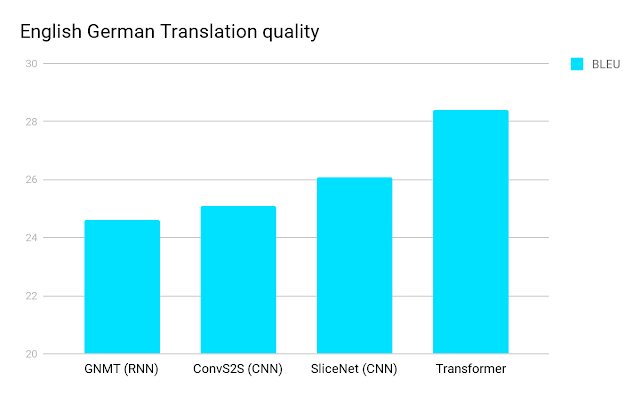
 . In this article, we will explore the best ways to remove Unicode characters from a list using Python.
 Lists are a built-in Python data structure used to store and manipulate collections of items. They are mutable, ordered, and can contain elements of different types, including Unicode strings.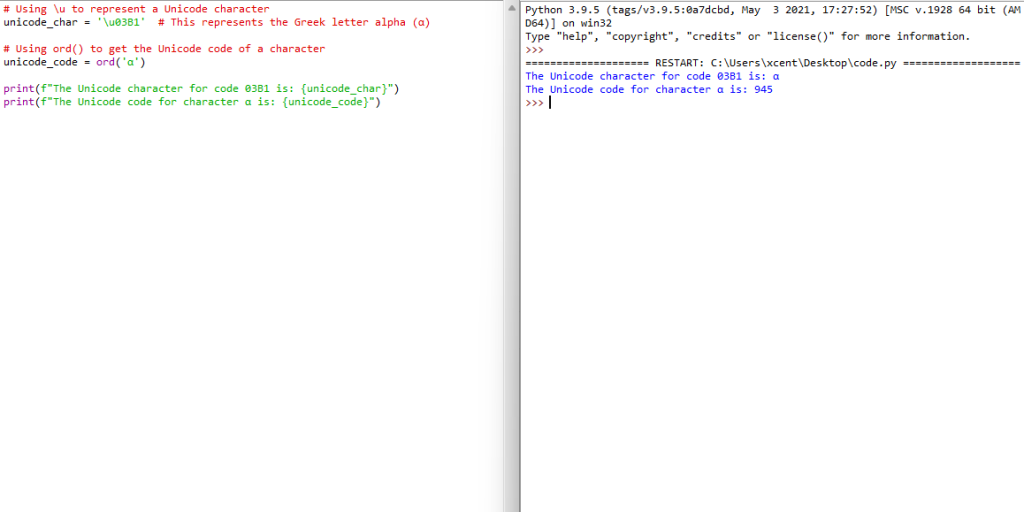

 Recommended: