To print all values of a Python list without the trailing newline character or line break, pass the end='' argument in your print() function call. Python will then avoid adding a newline character after the printed output. For example, the expression print(*[1, 2, 3], end='') will print without newline.
lst = [1, 2, 3]
print(*lst, end='')
# 1 2 3
If you print anything afterward, it’ll be added right to the list.
To print all values of a Python list without newline character pass the end='' argument in your print() function call. To overwrite the default empty space as a separator string, pass the sep=’…’ argument with your separator. For example, the expression print(*[1, 2, 3], sep='|', end='') will print without newline.
Also, check out the following video tutorial on printing something and using a separator and end argument:
Python Print Raw List Without Newline
If you don’t want to print the individual elements of the list but the overall list with square brackets and comma-separated, but you don’t want to print the newline character afterwards, the best way is to pass the list into the print() function along with the end='' argument such as in print([1, 2, 3], end='').
The idea of BitcoinVows.com is to create an immortal message, i.e., a “vow”, promise, love message, dedication, or just a simple note to your (future) kids that shall outlast civilizations.
Bitcoiners believe that the Bitcoin Blockchain will exist for hundreds of years.
The last Bitcoin will be mined in the year 2140. So, the “launch” process of the Bitcoin token distribution was set to roughly 132 years by Satoshi. After that, all 21 million tokens will have been distributed, and the Bitcoin network will start to converge to its steady state in which it may operate forever.
One day not too far in the future, we’ll all be dead. But the Bitcoin network will still produce block, after block, after block.
Tick, tock, next block. Forever.
Becoming Immortal
Nations collapse. Religions come and go. Stories and legends will eventually be forgotten.
If you craved immortality and glory in the years 10, 100, or 1000 BB (Before Bitcoin), you had to win epic battles such as Julius Caesar, create groundbreaking technologies and artworks such as Leonardo DaVinci, or launch whole new religions such as Jesus Christ.
Too much work, you say? I agree. Fortunately, there’s an easier solution to becoming immortal today and it doesn’t involve effort. Just some imagination…
How to Become Immortal as a Lazy Early Adopter?
If you crave immortality and glory today, your best shot is to become an early adopter of the Bitcoin network and engrave your message into the Blockchain — rest assured: your message will be read by generations of humans far in the future!
Why not send your partner a love message, renew your vows, or write a note to your future children into the Blockchain?
Today, it’s still possible. In only a few years, Blockspace will be too expensive for us mere mortals. Blockspace will be so expensive that only higher-layer protocols can afford to pay for it in order to batch thousands or even millions of second-layer transactions into a single first-layer Bitcoin transaction.
Only the richest of the rich will compete for the right to become immortal by writing to the Bitcoin network in the year 2140!
So, if you agree with this futuristic outlook and you also believe that Bitcoin will endure, write your partner a love message like I did:
Figure: See the message I sent to my partner using BitcoinVows.com!
You can order the full service on our new offering: BitcoinVows.com. We’ll handle all the technical difficulties of creating OP_RETURN scripts and all that. You just send us the 30-character message to be included in the Blockchain!
Challenge: How to convert a Parquet file 'my_file.parquet' to a CSV file 'my_file.csv' in Python?
In case you don’t know what a Parquet file is, here’s the definition:
Info: Apache Parquet is an open-source, column-oriented data file format designed for efficient data storage and retrieval using data compression and encoding schemes to handle complex data in bulk. Parquet is available in multiple languages including Java, C++, and Python.
The most simple way to convert a Parquet to a CSV file in Python is to import the Pandas library, call the pandas.read_parquet() function passing the 'my_file.parquet' filename argument to load the file content into a DataFrame, and convert the DataFrame to a CSV using the DataFrame to_csv() method.
import pandas as pd
df = pd.read_parquet('my_file.parquet')
df.to_csv('my_file.csv')
Here’s a minimal example:
import pandas as pd
df = pd.read_parquet('my_file.parquet')
df.to_csv('my_file.csv')
For this to work, you may have to install pandas and pyarrow. But if I were you, I’d just try it because chances are you’ve already installed them or don’t explicitly need to install the PyArrow library.
The purpose of this article is to help you refresh your knowledge of all the basic Python keywords, data structures, and fundamentals. I wrote it for the intermediate Python programmer who wants to reach the next level of programming expertise.
The way of achieving an expert level is through studying the basics.
Computer science professors usually have an extremely profound knowledge of the basics in their field. This enables them to argue from “first principles” rather than from the state-of-the-art—it’s easier for them to identify research gaps because they know about the ground rules in their field rather than being blinded by the latest technology and state-of-the-art.
Tip: If you want to reach the next level in coding, take your time and study the basics carefully.
This article provides you with the most important Python basics which serve as a foundation for more advanced topics.
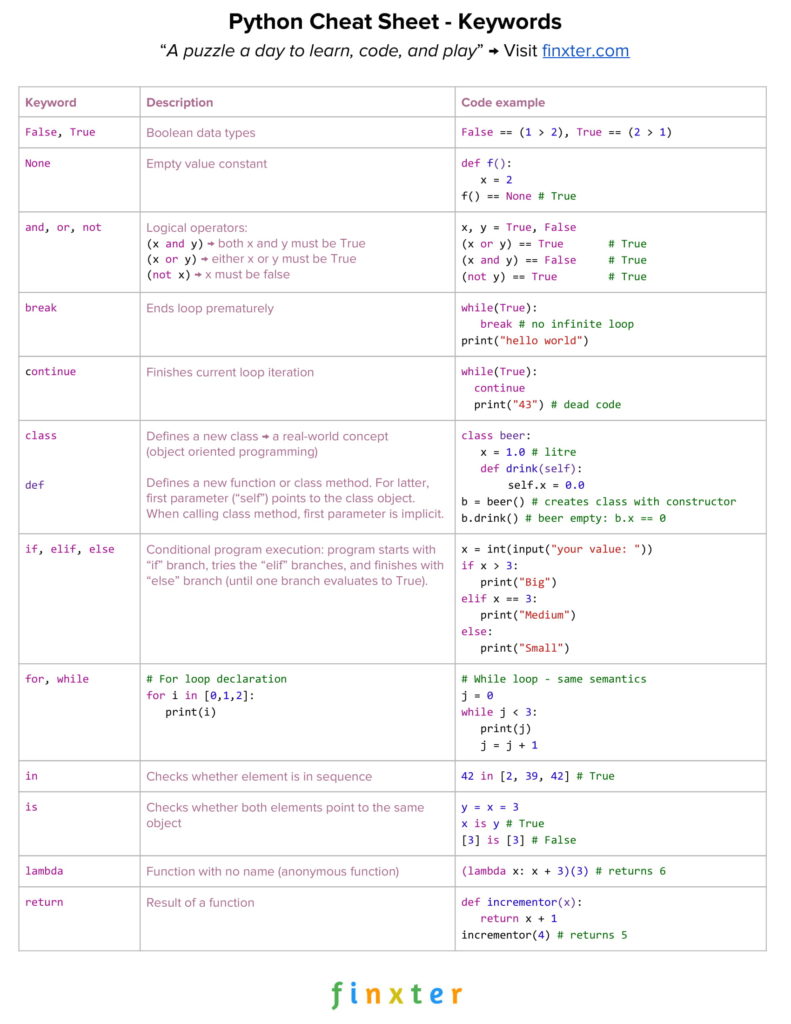
Click the image to register and download all Python cheat sheets.
Python Keywords
Like any other programming language, Python has many keywords with special meaning. For instance, Python 3.7 comes with 33 special keywords:
False
class
finally is return
None
continue
for
lambda
try
True
def
from nonlocal while
and del global not with
as elif if or yield
assert else import pass break except in raise
Exercise: Quickly glance over the list of keywords and try to explain their meaning.
In the following, you will study the most important Python
keywords with short examples.
Keywords: False, True
These keywords represent the only two data values from the Boolean data type.
In Python, Boolean and integer data types are closely related: the Boolean data type internally uses integer values. Per default, the Boolean value False is represented by integer 0, and the Boolean value True is represented by integer 1.
The following code snippet gives you an example of these two Boolean keywords.
x = 1 > 2
print(x)
# False y = 2 > 1
print(y)
# True
After evaluating the given expressions, variable name x refers to the Boolean value False , and variable y refers to the Boolean value True.
Keywords: and, or, not
These keywords represent basic logical
operators.
Keyword and: The expression x and y evaluates to True if both values x and y evaluate to True. If one or both evaluate to False, the overall expression becomes False.
Keyword or: The expression x or y evaluates to True if x is True or y is True (or both are True). If one of those is True, the overall expression becomes True.
Keyword not: The expression not x evaluates to True if x evaluates to False.
Consider the following Python code example:
x, y = True, False print((x or y) == True)
# True print((x and y) == False)
# True print((not y) == True)
# True
By using these three operations—and, or, and not—you can express all logical expressions you’ll ever need.
Learn More: The following three tutorials guide you into those crucial Python logical operators:
Algorithms are often compared to cooking recipes. Imagine a cooking recipe that consists only of a sequential list of commands: fill water into a pot, add the salt, add the rice, get rid of the water, and serve the rice.
Strictly speaking, without a conditional execution, the sequence of commands would take only a few seconds to execute and the rice would not be ready for sure.
For example, you would fill in water, salt, and rice and immediately get rid of the water without waiting for the water to be hot and the rice to be soft.
We need to respond in a different way to different circumstances: we need to remove the water from the pot only if the rice is soft, and we need to put in the rice if the water is hot.
It’s almost impossible to write programs in a way that anticipates what happens in the real world in a deterministic manner.
Instead, we need to write programs that respond differently if different conditions are met. This is precisely why we need conditional execution with the keywords if, else, and elif.
x = int(input("your value: "))
if x > 3: print("Big")
elif x == 3: print("Medium")
else: print("Small")
It then tests the variable value whether it is larger than, equal to, or smaller than the value 3. In other words, the code responds to real-world input that is unpredictable in a differentiated manner.
Keywords: for, while
Computers are extremely fast—they execute billions of instructions per second.
Now imagine a world without a way of executing the same code snippet multiple times (with modified input). A program that runs only for a day would have to consist of trillions of lines of code (otherwise it would quickly run out of code to be executed). And the code would look like a mess because it would be highly redundant and not readable.
To allow for repeated execution of similar code snippets, Python (like any other major programming language) allows for two types of loops: for loops and while loops.
This way, you can easily write a program consisting only of two lines of code that executes forever. It’s hard to do this without loops–the only alternative is recursion.
# For loop declaration
for i in [0, 1, 2]: print(i) '''
0
1
2 ''' # While loop - same semantics
j = 0
while j < 3: print(j) j = j + 1 '''
0
1
2 '''
Both loop variants achieve the same thing: they print the integers 0, 1, and 2 to the shell.
The loops accomplish this in two different ways.
The for loop repeatedly executes the loop body by declaring a loop variable i that iteratively takes on all values in the list [0, 1, 2].
The while loop executes the loop body as long as a certain condition is met—in our case j < 3.
Keyword: break
There are two fundamental ways of terminating a loop: (i) define a loop condition that evaluates to False, or (ii) use the keyword break at the exact position in the loop body.
The following code snippet shows an example of the latter.
while True: break # no infinite loop print("hello world")
# hello world
We create a while loop with a loop condition that will always evaluate to True.
For example, this is common practice when developing web servers that repeat the following procedure forever: wait for a new web request and serve the request.
However, in some cases, you still want to terminate the loop prematurely.
In the webserver example, you would stop serving files for security reasons when your server detects that it is under attack. In these cases, you can use the keyword break to immediately stop the loop and execute the code that follows.
In the example, the code executes print("hello world")after the loop ends prematurely.
Keyword: continue
The break statement is not the only statement that allows you to modify the execution flow of Python loops.
It is also possible to force the Python interpreter to skip certain areas in the loop while not ending it prematurely.
In the previously considered web server example, you may just want to skip malicious web requests instead of halting the server completely. This can be achieved using the continue statement that finishes the current loop iteration and brings the execution flow back to the loop condition.
while True: continue print("43") # dead code
The code executes forever without executing the print statement once. The reason is that the continue statement finishes the current loop iteration.
The effect of using the continue statement in this way is that there exists dead code that will never be executed.
That’s why the continue statement (as well as the break statement) is commonly used under a certain condition by using a conditional if-else environment.
Keyword: in
The membership operator, i.e., in keyword, checks whether a certain element exists in a given sequence or container type.
print(42 in [2, 39, 42])
# True print("21" in {"2", "39", "42"})
# False
The code snippet shows that the keyword in can be used to test the membership of an integer value 42 in a list of integer values or to test the membership of a string value "21" in a set of strings.
Beginners in Python are often confused about the exact meaning of the keyword is.
However, if you take the time to properly understand it now, you won’t belong to this group for long. The keyword simply checks whether both variables refer to the same object in memory.
y = x = 3 print(x is y)
# True print([3] is [3])
# False
If you create two lists—even if they contain the same elements—they still refer to two different list objects in memory. Modifying one list object does not affect the other list object.
We say that lists are mutable because they can be modified after creation. Therefore, if you check whether one list refers to the same object in memory, the result is False.
However, integer values are immutable, so there is no risk of one variable changing the object which will then accidentally change all other variables.
The reason is that you cannot change the integer object 3—trying it will only create a new integer object and leave the old one unmodified.
The keyword returnterminates the execution of a function and passes the flow of execution to the caller of the function. An optional value after the return keyword specifies the function result.
def appreciate(x, percentage): return x + x * percentage / 100 print(appreciate(10000, 5))
# 10500.0
We create a function appreciate() that calculates how much a given investment appreciates at a given percentage of return.
To this end, we use the keyword return to specify the result of the function as the sum of the original investment and the nominal return in one unit of time. The return value of the function appreciate() is of type float.
Keyword: None
The keyword None is a Python constant with the meaning “the absence of a value”.
Other programming languages such as Java use the value null instead. But the term null often confuses beginners assuming it’s equal to the integer value 0.
Instead, Python uses the keyword None to indicate that it’s a different value than any numerical value for zero, an empty list, or an empty string.
An interesting fact is that the value None is of its own data type.
def f(): x = 2 print(f() is None)
# True print("" == None)
# False print(0 == None)
# False
The code snippet shows several examples of the None data value (and what it is not). If you don’t define a return value for a function, the default return value is None.
However, the value None is different from the empty string or the numerical zero value.
Keyword: lambda
The keyword lambda is used to define lambda functions in Python. Lambda functions are anonymous functions that are not defined in the namespace (roughly speaking: they have no names).
The syntax is:
lambda <arguments> : <return expression>
The lambda function can have one or multiple arguments (comma-separated). After the colon (:), you define the return expression that may (or may not) use the defined argument. It can be any expression or even another function.
Lambda functions are very important in Python. You’ll see them a lot in practical code projects: for example to make code shorter and more concise, or to create arguments of various Python functions (such as map() or reduce()).
print((lambda x: x + 3)(3))
# 6
Consider the code.
First, we create a lambda function that takes value x and returns the result of the expression x + 3. The result is a function object that can be called like any other function. Because of its semantics, we denote this function as incrementor function.
Second, when calling this incrementor function with the argument x=3, the result is the integer value 6.
At this point, you’ve learned about the Python keywords which I view as the bare minimum every Python coder must know.
However, writing code is more than using keywords correctly. Source code operates on data. But data can be represented in various ways—a thorough understanding of data structures is one of the most fundamental skills you can acquire as a programmer.
It will help you in every single of your future endeavors—no matter whether you create machine learning projects, work on large codebases, set up and manage websites, or write algorithms.
Data structures are fundamental to those areas.
The Boolean Data Type
A variable of type Boolean can only take two values—either True or False. You have already studied both keywords above.
## 1. Boolean Operations
x, y = True, False print(x and not y)
# True print(not x and y or x)
# True ## 2. If condition evaluates to False
if None or 0 or 0.0 or '' or [] or {} or set(): print("Dead code") # Not reached
The code snippet shows two important points:
First, Boolean operators are ordered by priority—the operator not has the highest priority, followed by the operator and, followed by the operator or.
Second, the following values are evaluated to the Boolean value False: the keyword None, the integer value 0, the float value 0.0, empty strings, or empty container types.
Numerical Data Types
The two most important numerical data types are integer and float.
An integer is a positive or negative number without floating point (for example 3).
A float is a positive or negative number with floating point precision (for example 3.14159265359).
Python offers a wide variety of built-in numerical operations, as well as functionality to convert between those numerical data types.
Study the examples carefully to master these highly important numerical operations.
Most of the operators are self-explaining. Note that the //operator performs integer division. The result is an integer value that is rounded toward the smaller integer number (for example 3 // 2 == 1).
The String Data Type
Python strings are sequences of characters. Strings are immutable so they cannot be changed, once created.
While there are other ways, these are the five most commonly
used.
Oftentimes, you want to explicitly use whitespace characters in strings. These are the most important ones: the newline character '\n', the space character '\s', and the tab character '\t'.
The following code snippet shows the most important string methods.
## Most Important String Methods
y = " This is lazy\t\n " print(y.strip())
# Remove Whitespace: 'This is lazy' print("DrDre".lower())
# Lowercase: 'drdre' print("attention".upper())
# Uppercase: 'ATTENTION' print("smartphone".startswith("smart"))
# True print("smartphone".endswith("phone"))
# True print("another".find("other"))
# Match index: 2 print("cheat".replace("ch", "m"))
# meat print(','.join(["F", "B", "I"]))
# F,B,I print(len("Rumpelstiltskin"))
# String length: 15 print("ear" in "earth")
# Contains: True
This non-exclusive list of string methods shows that the string data type is very powerful in Python and you can solve many common string problems with built-in Python functionality.
If in doubt about how to achieve a certain result regarding string problems, consult the following resource to learn about all built-in string methods.
In the last section, you’ve learned about the basic Python data types.
But Python also ships with so-called container data types that handle complex operations efficiently while being easy to use.
List
The list is a container data type that stores a sequence of elements. Unlike strings, lists are mutable. This means that you can modify them at runtime.
The use of the list data type is best described with a series of examples:
l = [1, 2, 2]
print(len(l))
# 3
This code snippet shows how to create a list and how to populate it with three integer elements. You can also see that some elements may arise multiple times in a single list.
Recommended Tutorial: The len() function returns the number of elements in a list.
All operations generate the same list [1, 2, 2, 4] but the append() operation is the fastest because it neither has to traverse the list to insert an element at the correct position (such as insert), nor create a new list out of two sublists (such as list concatenation).
Note that a fourth method is extend()which allows you to append multiple elements to the given list in an efficient manner.
Removing Elements
Removing an element x from a list can be easily achieved using the list method list.remove(x):
l = [1, 2, 2, 4]
l.remove(1)
print(l)
# [2, 2, 4]
Note that the method operates on the list object itself—no new
list is created.
Reversing Lists
You can reverse the order of the list elements using the method list.reverse().
Much like the method to remove an element from a list, reversing the
list modifies the original list object and does not merely create a new list
object.
Sorting Lists
You can sort the list elements using the method list.sort().
l = [2, 1, 4, 2]
l.sort()
print(l)
# [1, 2, 2, 4]
Again, sorting the list modifies the original list object.
The resulting list is sorted in an ascending manner.
You can also specify a key function and pass it as the parameter key to the sort() method to customize the sorting behavior. This way, you can also sort lists of custom objects (for example, sort a list of customer objects regarding their age).
The key function simply transforms one list element into an element that is sortable (such as an integer, float, or string element).
Indexing List Elements
You can determine the index of a specified list element x using the method list.index(x).
The stack data structure is a natural way of storing data items. Much like an unstructured person handles their paperwork: first in, first out.
Every new paper is placed at the top of a stack of papers. When working through the stack, they remove the topmost paper from the stack. As a result, the paper at the bottom never sees the daylight.
While this application does not seem to be a favorable way of using the stack data structure, the stack is still an extremely important fundamental data structure in computer science used in operating system management, algorithms, syntax parsing, and backtracking.
Python lists can be used intuitively as stacks via the two list operations append() and pop():
Definition: A set is an unordered collection of unique elements.
Let’s break this definition into its main pieces.
(1) Collection: A set is a collection of elements like a list or a tuple.
The collection consists of either primitive elements (e.g. integers, floats, strings), or complex elements (e.g. objects, tuples).
However, all data types must be hashable (a hash value of an object does never change and is used to compare the object to other objects).
Let’s have a look at an example.
hero = "Harry"
guide = "Dumbledore"
enemy = "Lord V."
print(hash(hero))
# 6175908009919104006 print(hash(guide))
# -5197671124693729851 ## Can we create a set of strings?
characters = {hero, guide, enemy}
print(characters)
# {'Lord V.', 'Dumbledore', 'Harry'} ## Can we create a set of lists?
team_1 = [hero, guide]
team_2 = [enemy]
teams = {team_1, team_2}
# TypeError: unhashable type: 'list'
As you can see, we can create a set of strings because strings are hashable. But we cannot create a set of lists because lists are unhashable.
The reason is that lists are mutable: you can change a list by appending or removing elements. If you change the list data type, the hash value changes (it is calculated based on the content of the list). This violates the above definition (the hash value does not change). As mutable data types are not hashable, you cannot use them in sets.
(2) Unordered: Unlike lists, sets are unordered because there is no fixed order of the elements. In other words, regardless of the order in which you put stuff into the set, you can never be sure in which order the set stores these elements.
You put in the hero first, but my interpreter prints the enemy first (the Python interpreter is on the dark side, obviously). Note that your interpreter may print yet another order of the set elements.
(3) Unique: All elements in the set are unique. Each pair of values (x,y) in the set produces a different pair of hash values (hash(x)!=hash(y)).
Hence, every two elements x and y in the set are different—as a result, we cannot create an army of Harry Potter clones to fight Lord V:
Note that an extension of the normal set data structure is the multiset data structure that can store multiple instances of the same value. However, it is seldom used in practice, so I don’t introduce it here.
Dictionary
The dictionary is a useful data structure for storing (key, value)
pairs.
A Python tuple is an immutable, ordered, and iterable container data structure that can hold arbitrary and heterogeneous immutable data elements.
Here’s a basic example of tuple creation and usage:
t = (1, 2, 'Python', tuple(), (42, 'hi')) for i in range(5): print(t[i]) '''
1
2
Python
()
(42, 'hi') '''
The tuple data structure is a built-in data structure of the Python language with the following characteristics:
Tuples are containers, you can store data in them. The Python documentation defines a container as an object which implements the method __contains__. In other words a container is something you can use the in operator on. Other examples of containers in Python are list, dict, set or frozenset. The module collection contains more container types.
Tuples are ordered, each element has its position or, the other way round, the position has meaning.
Tuples are iterable, so you can use them, for example, in a for loop.
Tuples are immutable which means, you can’t change a tuple once it was created. Once a tuple was created you can’t modify it anymore. Another example of an immutable data type in Python is string. You can’t modify tuples or strings in Python, instead, Python creates a new instance with the modified values. However, if a tuple contains mutable data types such as lists, the elements of those lists can change! Yet, the references in the tuple to those lists can’t.
Tuples are heterogenous because they can contain elements of several different data types at once. An example of a homogenous data type are strings because they can only contain characters.
Python’s “in” operator is a reserved keyword to test membership of the left operand in the collection defined as the right operand. For example, the expression x in my_list checks if object x exists in the my_list collection, so that at least one element y exists in my_list for that x == y holds. You can check membership using the “in” operator in collections such as lists, sets, strings, and tuples.
Check with the keyword in whether the set, list, or dictionary contains an element. Note that set membership is faster than list membership.
basket = {'apple', 'eggs', 'banana', 'orange'} print('eggs' in basket)
# True print('mushroom' in basket)
# False
This article gave you a concise Python crash course to refresh your basic Python education.
You studied the most important Python keywords and how to use them in code examples.
As a result, you learned how to control the program execution flow using if-elif-else statements, as well as the while and the for loop.
Moreover, you revisited the basic data types in Python—Boolean, integer, float, and string—and which built-in operations and functions are commonly used in practice.
Most code snippets in practice and non-trivial algorithms are built around more powerful container types such as lists, stacks, sets, and dictionaries. By studying the given examples, you learned how to add, remove, insert, and reorder elements.
Finally, you learned about membership operators and list comprehension: an efficient and powerful built-in method to create lists programmatically in Python.
I wrote this 5000—word article for my best-selling book “Python One-Liners” with the San Francisco-based publisher NoStarch.
Python One-Liners Book: Master the Single Line First!
Python programmers will improve their computer science skills with these useful one-liners.
Python One-Linerswill teach you how to read and write “one-liners”: concise statements of useful functionality packed into a single line of code. You’ll learn how to systematically unpack and understand any line of Python code, and write eloquent, powerfully compressed Python like an expert.
The book’s five chapters cover (1) tips and tricks, (2) regular expressions, (3) machine learning, (4) core data science topics, and (5) useful algorithms.
Detailed explanations of one-liners introduce key computer science concepts and boost your coding and analytical skills. You’ll learn about advanced Python features such as list comprehension, slicing, lambda functions, regular expressions, map and reduce functions, and slice assignments.
You’ll also learn how to:
Leverage data structures to solve real-world problems, like using Boolean indexing to find cities with above-average pollution
Use NumPy basics such as array, shape, axis, type, broadcasting, advanced indexing, slicing, sorting, searching, aggregating, and statistics
Calculate basic statistics of multidimensional data arrays and the K-Means algorithms for unsupervised learning
Create more advanced regular expressions using grouping and named groups, negative lookaheads, escaped characters, whitespaces, character sets (and negative characters sets), and greedy/nongreedy operators
Understand a wide range of computer science topics, including anagrams, palindromes, supersets, permutations, factorials, prime numbers, Fibonacci numbers, obfuscation, searching, and algorithmic sorting
By the end of the book, you’ll know how to write Python at its most refined, and create concise, beautiful pieces of “Python art” in merely a single line.
Given the following Markdown table stored in 'my_file.md':
| 1 | 2 | 3 | 4 | 5 |
|-------|-----|------|------|------|
| 0 | 0 | 0 | 0 | 0 |
| 5 | 4 | 3 | 2 | 1 |
| alice | bob | carl | dave | emil |
Python Challenge: How to convert the Markdown table to a CSV file 'my_file.csv'?
Solution
To convert a Markdown table .md file to a CSV file in Python, first read the Markdown table file by using the f.readlines() method on the opened file object f, by splitting along the markdown table separator symbol '|'. Clean up the resulting list (row-wise) and add all rows to a single list of lists. Then create a DataFrame from the list of lists and use the DataFrame.to_csv() method to write it to a CSV file.
An example is shown in the following script that you can use for your own conversion exercise by replacing only the in-file and out-file names highlighted below:
import pandas as pd # Convert the Markdown table to a list of lists
with open('my_file.md') as f: rows = [] for row in f.readlines(): # Get rid of leading and trailing '|' tmp = row[1:-2] # Split line and ignore column whitespace clean_line = [col.strip() for col in tmp.split('|')] # Append clean row data to rows variable rows.append(clean_line) # Get rid of syntactical sugar to indicate header (2nd row) rows = rows[:1] + rows[2:] print(rows)
df = pd.DataFrame(rows)
df.to_csv('my_file.csv', index=False, header=False)
A not-so-fictious problem: Say, you’ve created a web application that runs on a dedicated Linux server in the cloud. Thousands of users visit your web app and suddenly … it crashes. Your users start complaining, and you lose revenue. More importantly, you bleed credibility by the hour. Your server is down, so what do you do?
First, don’t panic.
Let’s analyze your server logs!
This article shows you how to convert your log file to a CSV file in Python, that you can use for further processing (e.g., in Pandas or Excel).
Problem Formulation by Example
Given a file my_file.log like this one I pulled from a real IBM server log example:
03/22 08:51:01 INFO :.main: *************** RSVP Agent started ***************
03/22 08:51:01 INFO :...locate_configFile: Specified configuration file: /u/user10/rsvpd1.conf
03/22 08:51:01 INFO :.main: Using log level 511
03/22 08:51:01 INFO :..settcpimage: Get TCP images rc - EDC8112I Operation not supported on socket.
03/22 08:51:01 INFO :..settcpimage: Associate with TCP/IP image name = TCPCS
How to convert this log file to a CSV file of the following standard comma-separated values format:
03/22,08:51:01,INFO,:.main: *************** RSVP Agent started ***************
03/22,08:51:01,INFO,:...locate_configFile: Specified configuration file: /u/user10/rsvpd1.conf
03/22,08:51:01,INFO,:.main: Using log level 511
03/22,08:51:01,INFO,:..settcpimage: Get TCP images rc - EDC8112I Operation not supported on socket.
03/22,08:51:01,INFO,:..settcpimage: Associate with TCP/IP image name = TCPCS
Or, here’s how that would look if you opened it with Excel:
Prettier, isn’t it? Unlike the first representation (log file), this CSV representation is easier to read for (most) human beings.
Convert Server Log to CSV with Pandas
You can convert a .log file to a CSV file in Python in four simple steps: (1) Install the Pandas library, (2) import the Pandas library, (3) read the log file as DataFrame, and (4) write the DataFrame to the CSV file.
Note: The regular expressionsep='\s\s+' specifies more than one single whitespace as a separator between two CSV values. If you have a different separator string, you can define it here.
You specify the engine='python' to tell Pandas that we want the Python regular expression engine to process the separator regular expression.
The result of the code is the following CSV file:
You can use this CSV file as input for, say, an Excel sheet or Google Spreadsheet for further processing and analysis.
This is what your log file looks converted to a CSV and imported to Excel:
In this article, we will introduce one of the core elements describing the mathematics of neural networks: tensors.
Although typically, you won’t work directly with tensors (usually they operate under the hood), it is important to understand what’s going on behind the scenes. In addition, you may often wish to examine tensors so that you can look directly at the data, or look at the arrays of weights and biases, so it’s important to be able to work with tensors.
Theoretically, we could use pure Python to implement neural networks.
We could use Python lists to represent data in the network;
We could use other lists representing weights and biases in the network; and
We could use nested for loops to perform the operations of multiplying the inputs by the connection weights.
There are a few issues with this, however: Python, especially the list data type, performs rather slowly. Also, the code would not be very readable with nested for loops.
Instead, the libraries that implement neural networks in software packages such as PyTorch use tensors, and they run much more quickly than pure Python. Also, as you will see, tensors allow much more readable descriptions of networks and their data.
Tensors
Tensors are essentially arrays of values. Since neural networks are essentially arrays of neurons, tensors are a natural fit for describing them. They can be used for describing the data, describing the network connection weights, and other things.
A one-dimensional tensor is known as a vector. Here is an example:
Vectors can also be written horizontally. Here’s the same vector written horizontally:
Switching a vector from vertical to horizontal, or vice versa, is called transposing, and is sometimes needed depending on the math specifics. We will not go into detail on this in this article (see here for more).
Vectors are typically used to represent data in the network. For example, each individual element in a vector can represent the input value for each individual input neuron in the network.
2D Tensor Matrix
A two-dimensional tensor is known as a matrix. Here’s an example:
For a fully connected network, where each neuron in one layer connects to every neuron in the next layer, a matrix is typically used to represent all the connection weights. If there are m neurons connected to n neurons you would need an n x m matrix to describe all the connection weights.
Here’s an example of two neurons connected to three neurons. Here is the network, with connection weights included:
And here is the connection weights matrix:
Why We Use Tensors
Before we finish introducing tensors, let’s use what we’ve seen so far to see why they’re so important to use when modeling neural networks.
Let’s introduce a two-element vector of data and run it through the network we just showed.
Info: Recall neurons add together their weighted inputs, then run the result through an activation function.
In this example, we are ignoring the activation function to keep things simple for the demonstration.
Here is our data vector:
Here’s a diagram depicting the operation:
Let’s calculate the operation (the neuron computations) by hand:
The final result is a 3 element vector:
If you have learned about matrices in grade school and remember doing matrix multiplication, you may note that what we just calculated is identical to matrix multiplication:
Note: Recall matrix multiplication involves multiplying first matrix rows by second matrix columns element-wise, then adding elements together.
This is why tensors are so important for neural networks: tensor math precisely describes neural network operation.
As an added benefit, the equation above showing matrix multiplication is so much more a succinct description than nested for loops would be.
If we introduce the nomenclature of bold lower case for a vector and bold upper case for a matrix, then the operation of vector data running through a neural network weight matrix is described by this very compact equation:
We will see later that matrix multiplication within PyTorch is a similarly compact code equation.
Higher Dimensional Tensors
A three-dimensional (3D) tensor is known simply as a tensor. As you can see, the term tensor generically refers to any dimensional array of numbers. It’s just one-dimensional and two-dimensional tensors that have the unique names “vector” and “matrix” respectively.
You might not think that there is a need for three-dimensional and larger tensors, but that’s not quite true.
A grayscale image is clearly a two-dimensional tensor, in other words, a matrix. But a color image is actually three two-dimensional arrays, one each for red, green, and blue color channels. So a color image is essentially a three-dimensional tensor.
In addition, typically we process data in mini-batches. So if we’re processing a mini-batch of color images we have the three-dimensional aspect already noted, plus one more dimension of the list of images in the mini-batch. So a mini-batch of color images can be represented by a four-dimensional tensor.
Tensors in Neural Network Libraries
One Python library that is well suited to working with arrays is NumPy. In fact, NumPy is used by some users for implementing neural networks. One example is the scikit-learn machine learning library which works with NumPy.
However, the PyTorch implementation of tensors is more powerful than NumPy arrays. PyTorch tensors are designed with neural networks in mind. PyTorch tensors have these advantages:
PyTorch tensors include gradient calculations integrated into them.
PyTorch tensors also support GPU calculations, substantially speeding up neural network calculations.
However, if you are used to working with NumPy, you should feel fairly at home with PyTorch tensors. Though the commands to create PyTorch tensors are slightly different, they will feel fairly familiar. For the rest of this article, we will focus exclusively on PyTorch tensors.
Tensors in PyTorch: Creating Them, and Doing Math
OK, let’s finally do some coding!
First, make sure that you have PyTorch available, either by installing on your system or by accessing it through online Jupyter notebook servers.
Reference: See PyTorch’s website for instructions on how to install it on your own system.
See this Finxter article for a review of available online Jupyter notebook services:
For this article, we will use the online Jupyter notebook service provided by Google called Colab. PyTorch is already installed in Colab; we simply have to import it as a module to use it:
import torch
There are a number of ways of creating tensors in PyTorch.
Typically you would be creating tensors by importing data from data sets available through PyTorch, or by converting your own data into tensors.
For now, since we simply want to demonstrate the use of tensors we will use basic commands to create very simple tensors.
You can create a tensor from a list:
t_list = torch.tensor([[1,2], [3,4]])
t_list
Output:
tensor([[1, 2], [3, 4]])
Note that when we evaluate the tensor variable, the output is labeled to indicate it as a tensor. This means that it is a PyTorch tensor object, so an object within PyTorch that performs just like math tensors, plus has various features provided by PyTorch (such as supporting gradient calculations, and supporting GPU processing).
You can create tensors filled with zeros, filled with ones, or filled with random numbers:
An important attribute to be familiar with to understand the shape of a tensor is the appropriately named shape attribute:
t_rand.shape
# Output: torch.Size([3, 2, 4])
This shows you that tensor “t_rand” is a three-dimensional tensor composed of three elements of two rows by four columns.
Note: The dimensions of a tensor is referred to as its rank. A one-dimensional tensor, or vector, is a rank-1 tensor; a two-dimensional tensor, or matrix, is a rank-2 tensor; a three-dimensional tensor is a rank-3 tensor, and so on.
Let’s do some math with tensors – let’s add two tensors together:
Note the tensors are added together element-wise. Now here it is in PyTorch:
Let’s add a scalar, that is, an independent number (or a rank-0 tensor!) to a tensor:
t_add3 = t_first + 3
t_add3
Output:
tensor([[4, 5], [6, 7]])
Note that the scalar is added to each element of the tensor. The same applies when multiplying a scalar by a tensor:
t_times3 = t_first * 3
t_times3
Output:
tensor([[ 3, 6], [ 9, 12]])
The same kind of thing applies to raising a tensor to a power, that is the power operation is applied element-wise:
t_squared = t_first ** 2
t_squared
Output:
tensor([[ 1, 4], [ 9, 16]])
Recall that after summing weighted inputs, the neuron processes the result through an activation function. Note that the same performance applies here as well: when a vector is processed through an activation function, the operation is applied to the vector element-wise.
Earlier, we pointed out that matrix multiplication is an important part of neural network calculations.
There are two ways to do this in PyTorch: you can use the matmul function:
Or you can use the matrix multiplication symbol “@“:
t_matmul2 = t_first @ t_second
t_matmul2
Output:
tensor([[19, 22], [43, 50]])
Recall previously, we showed running an input signal through a neural network, where a vector of input signals was multiplied by a matrix of connection weights.
Here is that in PyTorch:
x = torch.tensor([[7],[8]])
x
Output:
tensor([[7], [8]])
W = torch.tensor([[1,4], [2,5], [3,6]])
W
Output:
tensor([[1, 4], [2, 5], [3, 6]])
y = W @ x
y
Output:
tensor([[39], [54], [69]])
Note how compact and readable that is instead of doing nested for loops.
Other math can be done with tensors as well, but we have covered most situations that are relevant to neural networks. If you find you need to do additional math with your tensors, check PyTorch documentation or do a web search.
Indexing and Slicing Tensors
Slicing allows you to examine subsets of your data and better understand how the dataset is constructed. You may find you will use this a lot.
Indexing Slicing PyTorch vs NumPy vs Python Lists
Indexing and slicing tensors work the same way it does with NumPy arrays. Note that the syntax is different from Python lists. With Python lists, a separate pair of brackets are used for each level of nested lists. Instead, with Pytorch one pair of brackets contains all dimensions, separated by commas.
Let’s find the item in tensor “t_rand” that is 2nd element, first row, third column. First here is “t_rand” again:
Important Slicing Tip: In the above, we use the standard Python convention that a blank before a “:” means “start from the beginning”, and a blank after a “:” means “go all the way to the end”. So a “:” alone means “include everything from beginning to end”.
A likely use for slicing would be to look at a full array (i.e. a matrix) within a set of arrays, i.e. one image out of a set of images.
Let’s pretend our “t_rand” tensor is a list of images. We may wish to sample just a few “images” to get an idea of what they are like.
Let’s examine the first “image” in our tensor (“list of images”):
Using small tensors to demonstrate indexing can be instructive, but let’s see it in action for real. Let’s examine some real datasets with real images.
Real Example
We won’t describe the following in detail, except to note that we are importing various libraries that allow us to download and work with a dataset. The last line creates a function that converts tensors into PIL images:
import torch
from torch.utils.data import Dataset
from torchvision import datasets
from torchvision.transforms import ToTensor
import matplotlib.pyplot as plt import torchvision.transforms as T conv_to_PIL = T.ToPILImage()
The following downloads the Caltech 101 dataset, which is a collection of over 8000 images in 101 categories:
The above code shows the dataset contains 8677 items. Looking at the first item of the set we can see they are tuples of 2 items each. Here are the kinds of items in the tuples:
type(caltech101_data[0][0])
# torch.Tensor type(caltech101_data[0][1])
# int
The two items in the tuple are the image as a tensor, and an integer code corresponding to the image’s category.
Colab has a convenient function display() which will display images. First, we use the conversion function we created earlier to convert our tensors to a PIL image, then we display the images.
The previous article was focused on an installation via npm, and in this article, we’ll go through the installation and use of the Solidity compiler via Docker.
Our goal is to get more familiar with the possibilities of this approach, as well as to get introduced to the technology that “runs the show”. This knowledge and experience will enable us to recognize the reasons behind choosing any of the approaches in the future, depending on the real-world needs of our projects.
What is Docker?
Before we go into details about the Docker installation of solc, let’s first get introduced to what Docker is.
Docker is an open platform for developing, shipping, and running applications… Docker provides the ability to package and run an application in a loosely isolated environment called a container… Containers are lightweight and contain everything needed to run the application, so you do not need to rely on what is currently installed on the host.
There are some parts of the description I’ve deliberately left out (separated by the symbol …) because they’re not essential to our understanding of the technology.
Now, let’s dissect the Docker description: the keywords of our interest are platform,isolated environment, and container. Let’s quickly dive into each of those next
Platform
A platform is a software framework that supports a specific function or a goal.
The goal Docker supports is enabling a piece of software (application, service, etc.) to correctly run, regardless of the target environment.
For us, this means running the Solidity compiler, i.e. feeding it with the input source code and producing the output bytecode in the form of .abi and .bin files.
Isolated Environment
By mentioning an isolated environment, we remember the concept of virtualization learned about earlier, meaning that Docker enables our software to run as intended by providing it with the resources in form of software libraries, network access, remote services, and other dependencies.
Container
Docker ensures the resources are provided without additional intervention by arranging them in a package called a container. Containers begin their lifecycle as images that we most commonly download and run.
We can also create a Docker image, but that’s another story.
Running an image creates a live instance of it, a container. Before it can be used, a Docker image has to be prepared, meaning that someone should install and configure all the required resources needed for the software to run.
Preparation of a Docker image falls in the domain of DevOps, i.e. Development and Operations:
“DevOps engineers manage the operations of software development, implementing engineering tools and knowledge of the software development process to streamline software updates and creation.”
Now that we have introduced Docker in general, we are continuing with the installation of the Solidity compiler via Docker.
First, we have to check if Docker is present on our system by simultaneously checking the Docker version:
$ docker version
bash: /usr/bin/docker: No such file or directory
As our check shows, we have to install Docker on our system before we can use it. The installation process via the Ubuntu repository is made of several steps (https://docs.docker.com/engine/install/ubuntu/):
Step 1: Update the apt package index
$ sudo apt update
…
Reading package lists... Done
Building dependency tree Reading state information... Done
All packages are up to date.
Step 2: Install packages
Installation of additional packages; we need these packages to enable the installation process accessing the repository over the secure HTTPS connection (note the backslash symbol \ for the multiline command):
$ sudo apt install \
ca-certificates \
curl gnupg lsb-release
...
The following additional packages will be installed: gnupg-l10n gnupg-utils gpg-wks-server
Suggested packages: parcimonie xloadimage
The following NEW packages will be installed: ca-certificates curl gnupg gnupg-l10n gnupg-utils gpg-wks-server lsb-release
...
Do you want to continue? [Y/n] y
...
Info: “GPG, or GNU Privacy Guard, is a public key cryptography implementation. This allows for the secure transmission of information between parties and can be used to verify that the origin of a message is genuine.”
Setting up the repository by writing to docker.list file.
The echo command evaluates the text inside the $( ), populates it with the command outputs (in parentheses), and sends it via stdin to system utility sudo tee with root privileges, which in turn overwrites the docker.list file and omits the output by redirecting it to /dev/null:
Info: Repositories added by mistake can be removed from Ubuntu 20.04 by selectively deleting them in /etc/apt/sources.list.d/ directory.
Step 5: Update apt package index
Updating the apt package index (once again):
$ sudo apt update
...
Reading package lists... Done
Building dependency tree Reading state information... Done
All packages are up to date.
Step 6: Install Docker
Installing Docker (the latest stable version) and its components:
$ sudo apt-get install docker-ce docker-ce-cli containerd.io docker-compose-plugin
Reading package lists... Done
Building dependency tree Reading state information... Done
The following additional packages will be installed: docker-ce-rootless-extras docker-scan-plugin pigz slirp4netns
Suggested packages: aufs-tools cgroupfs-mount | cgroup-lite
The following NEW packages will be installed: containerd.io docker-ce docker-ce-cli docker-ce-rootless-extras docker-compose-plugin docker-scan-plugin pigz slirp4netns
0 upgraded, 8 newly installed, 0 to remove and 0 not upgraded.
Need to get 108 MB of archives.
After this operation, 449 MB of additional disk space will be used.
Do you want to continue? [Y/n] y
...
Let’s check the Docker version once again:
$ docker version
Client: Docker Engine - Community Version: 20.10.17 API version: 1.41 Go version: go1.17.11 Git commit: 100c701 Built: Mon Jun 6 23:02:57 2022 OS/Arch: linux/amd64 Context: default Experimental: true Server: Docker Engine - Community Engine: Version: 20.10.17 API version: 1.41 (minimum version 1.12) Go version: go1.17.11 Git commit: a89b842 Built: Mon Jun 6 23:01:03 2022 OS/Arch: linux/amd64 Experimental: false containerd: Version: 1.6.7 GitCommit: 0197261a30bf81f1ee8e6a4dd2dea0ef95d67ccb runc: Version: 1.1.3 GitCommit: v1.1.3-0-g6724737 docker-init: Version: 0.19.0 GitCommit: de40ad0
Now that we’re sure that our Docker installation went through and the Docker Engine version we have is 20.20.17 (at the time of writing this article). The next step is getting the Docker image with the Solidity compiler.
Docker images are identified by their release organization, image name (shorter, images), and tag, i.e. label that makes them unique. In general, we can download a Docker image by referencing it with its organization/image:tag marker.
We will download a Docker image of the Solidity compiler by specifying its marker as ethereum/solc:stable for a stable version, and ethereum/solc:nightly for the bleeding edge, potentially unstable version.
We can also specify a distinct version of the Solidity compiler by setting a tag to a specific version, e.g. ethereum/solc:0.5.4.
We will do three things with one Docker command: we’ll download the image, instantiate (run) a container from the image and print the container usage (flag – help):
docker run ethereum/solc:stable – help
Sure enough, we’d like to compile our Solidity files, so we’ll make three preparations (First, Second, Third):
First: Create a local directory containing our Solidity source code (I’ll use 1_Storage.sol from the Remix contracts folder by creating an empty file and pasting the content into it):
$ mkdir ~/solidity_src/ && cd ~/solidity_src/
$ touch 1_Storage.sol
Second: You can write your own contract for testing purposes or just open the 1_Storage.sol with your favorite text editor and paste the contents from 1_Storage.sol example in Remix.
Third: Run a Docker container (we already have the image so the download procedure will be skipped); command flag -v mounts our local ~/solidity_src directory to the container’s path /sources, path ethereum/solc:stable selects the Docker image to run a container, command flag -o sets the output location for the compiled files, --abi and --bin activate the generation of both .abi and .bin files, and the path /sources/1_Storage.sol selects the source file for compilation:
$ docker run -v ~/solidity_src:/sources ethereum/solc:stable -o /sources/output – abi – bin /sources/1_Storage.sol
Compiler run successful. Artifact(s) can be found in directory "/sources/output".
When checking our solidity_src directory, we’ll discover a new directory output, created by the Solidity compiler, containing both .abi and .bin files.
Docker also enables us to use the standard JSON interface, and it is a recommended approach when using the compiler with a toolchain. This interface doesn’t require mounted directories if the JSON input is self-contained, in other words, all the code is already contained in the source files and there are no references to external, imported files:
docker run ethereum/solc:stable – standard-json < input.json > output.json
Since we haven’t done any examples using the JSON interface, we’ll suspend this approach until a later time.
Conclusion
This article introduced us to a Solidity-supporting technology called Docker.
Of course, our main focus is on an ecosystem consisting of Solidity, Ethereum, blockchain technology, etc., but I recognized an opportunity of making a detour and walking us through the process of setting up and using the Solidity compiler via the Docker platform. Therefore, although initially unplanned, we’re also gaining some DevOps skills.
In the first and only chapter (yeah, I’m a bit surprised as well) we’ve set the mining charges by getting to know what Docker is. Then we blew a big piece of rock away by discovering how to install Docker on Ubuntu Linux (and by extension, some other operating systems). I believe this article will prove useful and provide multiple tips and tricks in terms of setting your development environment for Solidity on Ubuntu Linux. Besides that and personally speaking, it was always useful to gain secondary knowledge whenever I learned a specific topic, and I’m sure you’ll have the same experience.
Solidity is the programming language of the future.
It gives you the rare and sought-after superpower to program against the “Internet Computer”, i.e., against decentralized Blockchains such as Ethereum, Binance Smart Chain, Ethereum Classic, Tron, and Avalanche – to mention just a few Blockchain infrastructures that support Solidity.
In particular, Solidity allows you to create smart contracts, i.e., pieces of code that automatically execute on specific conditions in a completely decentralized environment. For example, smart contracts empower you to create your own decentralized autonomous organizations (DAOs) that run on Blockchains without being subject to centralized control.
NFTs, DeFi, DAOs, and Blockchain-based games are all based on smart contracts.
This course is a simple, low-friction introduction to creating your first smart contract using the Remix IDE on the Ethereum testnet – without fluff, significant upfront costs to purchase ETH, or unnecessary complexity.
You can unpack all list elements into the print() function to print all values individually, separated by an empty space per default (that you can override using the sep argument). For example, the expression print(*my_list) prints the elements in my_list, empty space separated, without the enclosing square brackets and without the separating commas!
Note: If you want a different separating character, you can set the sep argument of the print() function. For example, print(*my_list, sep='|') will use the vertical bar '|' as a separating character.
You can learn about the ins and outs of the built-in print() function in the following video:
To master the basics of unpacking, feel free to check out this video on the asterisk operator:
Method 2: String Replace Method
A simple way to print a list without commas and square brackets is to first convert the list to a string using the built-in str() function. Then modify the resulting string representation of the list by using the string.replace() method until you get the desired result.
Here’s an example:
my_list = [1, 2, 3] # Convert List to String
s = str(my_list)
print(s)
# [1, 2, 3] # Replace Separating Commas and Square Brackets
s = s.replace(', ', '\n').replace('[', '').replace(']', '') # Print List Without Commas and Brackets
print(s)
The result is a string without commas and without brackets:
1
2
3
Method 3: String Join With Generator Expression
You can print a list without brackets and without commas. Use the string.join() method on any separator string such as ' ' or '\t'. Pass a generator expression to convert each list element to a string using the str() built-in function. For example, the expression print(' '.join(str(x) for x in my_list)) prints my_list to the shell without enclosing brackets and commas.
my_list = [1, 2, 3]
print(' '.join(str(x) for x in my_list))
# Output: 1 2 3
You can modify the separator string on which you join to customize the appearance of the list:
my_list = [1, 2, 3]
print('xxx'.join(str(x) for x in my_list))
# Output: 1xxx2xxx3
The str(object) built-in function converts a given object to its string representation.
Generator expressions or list comprehensions are concise one-liner ways to create a new iterable based by reusing elements from another iterable.
You can dive deeper into generators in the following video:
Where to Go From Here?
Enough theory. Let’s get some practice!
Coders get paid six figures and more because they can solve problems more effectively using machine intelligence and automation.
To become more successful in coding, solve more real problems for real people. That’s how you polish the skills you really need in practice. After all, what’s the use of learning theory that nobody ever needs?
You build high-value coding skills by working on practical coding projects!
Do you want to stop learning with toy projects and focus on practical code projects that earn you money and solve real problems for people?
If your answer is YES!, consider becoming a Python freelance developer! It’s the best way of approaching the task of improving your Python skills—even if you are a complete beginner.
If you just want to learn about the freelancing opportunity, feel free to watch my free webinar “How to Build Your High-Income Skill Python” and learn how I grew my coding business online and how you can, too—from the comfort of your own home.


 The last Bitcoin will be mined in the year 2140. So, the “launch” process of the Bitcoin token distribution was set to roughly 132 years by Satoshi. After that, all 21 million tokens will have been distributed, and the Bitcoin network will start to converge to its steady state in which it may operate forever.
 Forever.
 If you craved immortality and glory in the years 10, 100, or 1000 BB (Before Bitcoin), you had to win epic battles such as Julius Caesar, create groundbreaking technologies and artworks such as Leonardo DaVinci, or launch whole new religions such as Jesus Christ.
 Why not send your partner a love message, renew your vows, or write a note to your future children into the Blockchain?

 Related Tutorial:

 Exercise: Quickly glance over the list of keywords and try to explain their meaning.
 Definition: A set is an unordered collection of unique elements.


 Python Challenge: How to convert the Markdown table to a CSV file





 If your answer is YES!, consider becoming a