Posted on Leave a comment

PHP compress image optimize, resize and upload

by Vincy. Last modified on April 11th, 2022.

Do you have heavy image files in your application? And do you want to optimize them before pushing them into application directory? This PHP compress image code will help you to optimize images before upload.

The compressed images are scaled down from the original by quality and size. This process makes your media library lightweight and optimized.

This article uses PHP GD functions to implement image compression. It uses the functions imagecreatefromjpeg(), imagejpeg() to resize the images.

We are going to see a quick example and a featured example in PHP to achieve this.

Quick Example

It is a two-step process that this example code performs PHP compress image.

  1. Step 1: imagecreatefromjpeg() gets a resource reference of the source image.
  2. Step 2: imagejpeg() creates the compressed image and outputs it to the browser.

<?php
$sourceFile = 'image.jpg';
$outputFile = 'compressed-image.jpg';
$outputQuality = 60;
$imageLayer = imagecreatefromjpeg($sourceFile);
imagejpeg($imageLayer, $outputFile, $outputQuality);
?>

In the second step, it accepts the source image identifier and the target quality. It also accepts the name of the output file in which the compressed version will be.

It has the least possible number of lines shown below.

It optimizes the source and outputs resized images with the specified quality.

There are alternative functions under different PHP extensions to implement image compress. The following PHP ImageMagick functions are used to do this.

  • Imagick::setImageCompression
  • Imagick::setImageCompressionQuality

Example 2: PHP compress image and upload to the database

This example gives more features on PHP compress image compared to the above code. Some of those features are,

  1. Image upload option via HTML form.
  2. Handling JPEG, GIF and PNG image sources to optimize.
  3. Image file validation and proper error reporting.

This will be useful for embedding to an application with these additional handlings.

File structure

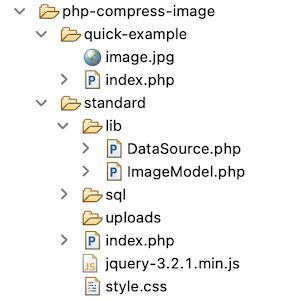
This screenshot shows the file structure of a simple PHP compress image example. It contains structured files and is easy to understand.


This section describes the steps to set up this example in a development environment.

Step 1: Import database script

Import this SQL script into your database table. It creates a tbl_image table to run this example. It will have the image name and its path on upload.

It also adds the index for primary key settings and auto_increament flag settings.

sql/structure.sql


--
-- Database: `image_upload`
-- --
-- Table structure for table `tbl_image`
-- CREATE TABLE `tbl_image` ( `id` int(11) NOT NULL, `name` varchar(255) NOT NULL, `image` varchar(255) NOT NULL
) ENGINE=InnoDB DEFAULT CHARSET=utf8mb4; --
-- Indexes for dumped tables
-- --
-- Indexes for table `tbl_image`
--
ALTER TABLE `tbl_image` ADD PRIMARY KEY (`id`); --
-- AUTO_INCREMENT for dumped tables
-- --
-- AUTO_INCREMENT for table `tbl_image`
--
ALTER TABLE `tbl_image` MODIFY `id` int(11) NOT NULL AUTO_INCREMENT;

Step 2: Design image upload form

This code displays the HTML form with the option to upload the image. The HTML accept attribute limits the file type to allow only images to choose from.

The form-submit action calls the JavaScript validation. It ensures that the file input is not empty.

It targets the endpoint to optimize images by the compressing process. After a successful PHP compress image process, it shows a preview of the image.

index.php (Image upload Form HTML)


<html>
<head>
<link href="style.css" rel="stylesheet" type="text/css" />
</head>
<body> <div class="container"> <h1>PHP Image Compress</h1> <div class="form-container"> <form class="form-horizontal" action="" method="post" id="image" enctype="multipart/form-data" name="form" onsubmit="return validateImage()"> <label>Choose image to compress</label> <div Class="input-row"> <input type="file" name="image" id="file" class="file" value="" accept=".jpg, .jpeg, .png, .gif"> </div> <?php if (! empty($result[0]["image"])) { ?> <!-- PHP image compress preview --> <img src="<?php echo $result[0]["image"] ;?>" class="img-preview" alt="photo"> <?php } ?> <div class="input-row"> <input type="submit" name="send" value="Upload" class="btn"> <div id="response" class="<?php if(!empty($response["type"])) { echo $response["type"] ; } ?>"> <?php if(!empty($response["message"])) { echo $response["message"]; } ?> </div> </div> </form> </div> </div> <script src="jquery-3.2.1.min.js"></script> <script> function validateImage() { var InputFile = document.forms["form"]["image"].value; if (InputFile == "") { error = "No source found"; $("#response").html(error).addClass("error");; return false; } return true; } </script>
</body>
</html>

Process PHP compress image action

This PHP code is at the beginning of the landing page named index.php. It requests the PHP compress image action once the user submits the form.

First, it calls the compressImage() function to resize. Thereby, it optimizes and stores the image into a folder. Once the image is successfully stored in the folder, then the path will be stored in the database.

index.php (PHP compress image action)


<?php
namespace Phppot; require_once __DIR__ . '/lib/ImageModel.php'; $imageModel = new ImageModel(); if (isset($_POST['send'])) { $source = $_FILES["image"]["tmp_name"]; $destination = "uploads/" . $_FILES["image"]["name"]; $response = $imageModel->compressImage($source, $destination, 90); if (!empty($response)) { $id = $imageModel->insertImage($destination); if (!empty($response)) { $response["type"] = "success"; $response["message"] = "Upload Successfully"; $result = $imageModel->getImageById($id); } } else { $response["type"] = "error"; $response["message"] = "Unable to Upload:$response"; }
} ?>

PHP model class to compress image

This PHP model class has functions to perform the following.

The PHP image insertion function sets a target to place the uploaded image path.

The compressImage() function is used to compress the uploaded file. The main focus of this process is to optimize the image quality.

lib/ImageModel.php


<?php
namespace Phppot; use Phppot\DataSource; class ImageModel
{ private $conn; function __construct() { require_once 'DataSource.php'; $this->conn = new DataSource(); } function getAll() { $query = "SELECT * FROM tbl_image"; $result = $this->conn->select($query); return $result; } function getImageById($id) { $query = "SELECT * FROM tbl_image WHERE id=?"; $paramType = 'i'; $paramValue = array( $id ); $result = $this->conn->select($query, $paramType, $paramValue); return $result; } function insertImage($destination) { $insertId = 0; if (! empty($destination)) { $query = "INSERT INTO tbl_image(name,image) VALUES(?,?)"; $paramType = 'ss'; $paramValue = array( $_FILES["image"]["name"], $destination ); $insertId = $this->conn->insert($query, $paramType, $paramValue); } return $insertId; } function compressImage($sourceFile, $outputFile, $outputQuality) { $imageInfo = getimagesize($sourceFile); if ($imageInfo['mime'] == 'image/gif') { $imageLayer = imagecreatefromgif($sourceFile); } else if ($imageInfo['mime'] == 'image/jpeg') { $imageLayer = imagecreatefromjpeg($sourceFile); } else if ($imageInfo['mime'] == 'image/png') { $imageLayer = imagecreatefrompng($sourceFile); } $response = imagejpeg($imageLayer, $outputFile, $outputQuality); return $response; }
}
?>

Output: PHP image compress

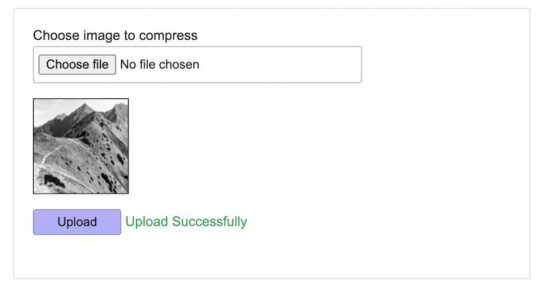
The below screenshot shows the output of this PHP compress image example. It displays a choose file option to upload an image via an HTML form.

It shows a preview of the uploaded image after form submission.

Use case scenarios that require ‘PHP compress image’

There are some scenarios that need to have media files in optimal quality. In such cases, this PHP compress image utility will be useful to have lightweight images.

  • Online photo gallery application.
  • Applications that create and maintain multiple thumbnails for each image.
  • When the user uploads heavy images that exceed the allowed limit.

Conclusion

I hope, it is useful for you to learn the PHP compress image process. We have seen the purpose and the necessity of this job in a PHP application.

The use case scenarios discussed above justify the importance of having compressed images.

The examples we have seen may help to know the steps to implement. It will make you create your own image file util to do PHP compress image action.
Download

↑ Back to Top

Posted on Leave a comment

PHP Pagination Code with Search using AJAX

by Vincy. Last modified on March 17th, 2022.

Fetching and displaying a bulk of records on a single fetch is not a good practice. It will increase the server load and has more disadvantages.

Pagination will resolve this problem.

Most of the website shows links of numbers for pagination. There are different ways to add pagination. Some of them are listed below.

  1. Previous-next navigation controls.
  2. Number links 1, 2, 3 … up to … total number of pages.
  3. A restricted number of page links that are expandable on navigation.

In this tutorial, we are going to see an example of a PHP pagination code with search sorting.

This example adds pagination to a list of records displayed in a tabular view. It uses jQuery AJAX to fetch records for each page from the database.

What is pagination

  • The Pagination is a simple method to split voluminous data into pages. It prevents the disadvantages of displaying all records on a page.
  • It shows a limited number of records per page which lets a quick glance at the page result.
  • Paginated results require the start offset and per-page count to set the LIMIT to fetch.

Merits and demerits of pagination

There are more merits of using PHP pagination. Some of them are listed below.

  • It increases efficiency by loading the page content quickly.
  • It reduces server overload.
  • The pagination links will reveal the approximate data stuff of the application.
  • It will greatly improve site responses on displaying the media library with pagination.
  • It increases user experience in browsing the paginated results.

Almost PHP pagination has no demerits, but it is not suitable in some scenarios. For example,

  • It is skippable for applications displaying records that are countable by fingers.
  • Without relational attributes (like prev, next URL), it gives negative impacts on SEO’s point of view.

About this example

This example has the code to group the pagination, sorting, search for a listing page.

The pagination UI will show limited pagination links. It extends the link stack on moving forward page by page.

In this example, we have three options based on which pagination format will be changed.

The pagination request carries over the search and sorting parameters if exist.

It calls an AJAX script to send the pagination, search and sort request data to the PHP.

It allows to search and sort by name via AJAX. The default sorting order is ascending (ASC) to sort the name column in alphabetical order.

The on-click event of the column header switches the sorting orders between ‘ASC’ and ‘DESC’

File structure

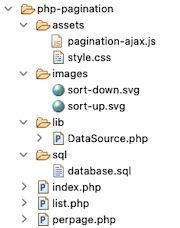
This is the file structure of the PHP pagination example. The has the paginated results to be rendered into the home page.

The list.php is to display the results queried with a per-page limit. The perpage.php file contains the handlers to prepare the pagination HTML to be shown into the UI.

php pagination files

Home page HTML to render pagination UI

The following code shows the HTML to display the member database results.

It displays a name-wise search panel above the table header. Also, the first column displays the member names with a sorting feature.

The PHP pagination, search and sorting actions give results without page refresh. It uses jQuery AJAX to request PHP to perform these actions without reloading the page.

The “listViaAJAX()” JavaScript function request PHP pagination result via AJAX. The “sortList()” function, sets the ordering request parameters to get the sorted results.

The search form submit-button invokes the listViaAJAX() code to send the keyword. In the callback, it gets the response HTML from the server and updates the UI.

index.php


<html>
<head> <link href="./assets/style.css" type="text/css" rel="stylesheet" />
</head>
<body> <h2 class="page-title">PHP Pagination with Search</h2> <div id="grid"> <form name="frmSearch" id="frmSearch" method="post" action="index.php"> <div class="search-box"> <label>Search :</label> <input type="text" id="search" placeholder="name" name="filter_value" class="demoInputBox" /> <input type="button" name="go" class="search-form-btn" value="Search" onClick="listViaAJAX();"> <input type="reset" class="search-form-btn" value="Reset" onclick="window.location='index.php'"> </div> <table id=mytable cellpadding="10" cellspacing="1"> <thead> <tr> <th class="sortable"><span onClick="sortList();"><input type="hidden" name="order_type" id="order-type" value="asc" />Name</span> <img src='images/sort-down.svg' /></th> <th>Registered Date</th> <th class="align-right">Subscription Amount</th> </tr> </thead> <tbody id="table-body"> <?php require_once __DIR__ . '/list.php'; ?> <tbody> </table> </form> </div>
</body>
<script src="https://code.jquery.com/jquery-3.6.0.min.js" integrity="sha256-/xUj+3OJU5yExlq6GSYGSHk7tPXikynS7ogEvDej/m4=" crossorigin="anonymous"></script>
<script src='./assets/pagination-ajax.js'></script>
</html> 

Paginated database results in a tabular view

This list.php file is to fetch and output the results to the UI. This PHP pagination request is called via AJAX by clicking the page links.

The below code prepares the MySQL query to fetch the data from the database. This query uses LIMIT to display the data with the per-page limit.

This code gets the total records’ count and per-page limit. It passes these two parameters the showPerpage() function to generate the PHP pagination HTML.

Added to the pagination parameters, this PHP code receives the search, sort request.

It prepares the WHERE and ORDER BY clause based on the search and sort request. These clauses are attached to the query to get the filtered result.

list.php


<?php
use Phppot\DataSource; require_once "perpage.php";
require_once __DIR__ . "/lib/DataSource.php";
$dataSource = new DataSource(); $name = "";
$queryCondition = "";
$paramType = "";
$paramValue = array();
if (! empty($_POST["filter_value"])) { $name = $_POST["filter_value"]; $queryCondition .= " WHERE name LIKE ?"; $paramType .= 's'; $paramValue[] = $_POST["filter_value"] . '%';
} $orderBy = "name";
$order = "asc";
if (! empty($_POST["order_type"])) { $order = $_POST["order_type"];
} $nextOrder = "asc";
if ($order == "asc") { $nextOrder = "desc";
}
$query = "SELECT * from tbl_member " . $queryCondition . " ORDER BY " . $orderBy . " " . $order . " ";
$href = 'index.php';
$perPage = 5;
$page = 1;
if (isset($_POST['pagination_offset'])) { $page = $_POST['pagination_offset'];
}
$start = ($page - 1) * $perPage; if ($start < 0) $start = 0; $queryWithLimit = $query . " limit " . $start . "," . $perPage; $resultpage = $dataSource->select($queryWithLimit, $paramType, $paramValue); if (! empty($resultpage)) { $count = $dataSource->getRecordCount($query, $paramType, $paramValue); $resultpage["perpage"] = showperpage($count, $perPage, $href);
}
?>
<?php if (! empty($resultpage)) { foreach ($resultpage as $k => $v) { if (is_numeric($k)) { ?> <?php $date = $resultpage[$k]["date"]; $newDate = date("d-m-Y", strtotime($date)); ?>
<tr> <td class="column1"><?php echo $resultpage[$k]["name"]; ?></td> <td class="column2"><?php echo $newDate ?></td> <td class="column3 align-right">$ <?php echo $resultpage[$k]["subscription_amount"]; ?></td>
</tr>
<?php } }
}
if (isset($resultpage["perpage"])) { ?>
<tr> <td colspan="5" class="align-center"> <?php echo $resultpage["perpage"]; ?></td>
</tr>
<?php } ?> 

External handlers to prepare PHP pagination controls

It uses a constant to split the database results into pages. This code uses the following two functions.

  • perpage() – prepares the HTML for the pagination UI links.
  • showperpage() – returns pagination HTML response.

The perpage() function adds the onClick attribute to the PHP pagination links. It calls the AJAX code by sending the pagination query offset.

It uses the offset, per-page count and the total number of records to calculate the number of pages.  It runs a loop through the number of pages to display the pagination links.

It adds HTML attributes to highlight the current page among the page links.

perpage.php


<?php
function perpage($count, $per_page = '5',$href) { $output = ''; $paging_id = "link_perpage_box"; if(!isset($_POST["pagination_offset"])) $_POST["pagination_offset"] = 1; if($per_page != 0) $pages = ceil($count/$per_page); if($pages>1) { if(($_POST["pagination_offset"]-3)>0) { if($_POST["pagination_offset"] == 1) $output = $output . '<span id=1 class="current-page">1</span>'; else $output = $output . '<input type="hidden" name="pagination_offset" value="1" /><input type="button" class="perpage-link" value="1" onClick="listViaAJAX()" />'; } if(($_POST["pagination_offset"]-3)>1) { $output = $output . '...'; } for($i=($_POST["pagination_offset"]-2); $i<=($_POST["pagination_offset"]+2); $i++) { if($i<1) continue; if($i>$pages) break; if($_POST["pagination_offset"] == $i) $output = $output . '<span id='.$i.' class="current-page" >'.$i.'</span>'; else $output = $output . '<input type="hidden" name="pagination_offset" value="' . $i . '" /><input type="button" class="perpage-link" value="' . $i . '" onClick="listViaAJAX()" />'; } if(($pages-($_POST["pagination_offset"]+2))>1) { $output = $output . '...'; } if(($pages-($_POST["pagination_offset"]+2))>0) { if($_POST["pagination_offset"] == $pages) $output = $output . '<span id=' . ($pages) .' class="current-page">' . ($pages) .'</span>'; else $output = $output . '<input type="hidden" name="pagination_offset" value="' . $pages . '" /><input type="button" class="perpage-link" value="' . $pages . '" onClick="listViaAJAX()" />'; } } return $output;
} function showperpage($count, $per_page = 5, $href)
{ $perpage = perpage($count, $per_page,$href); return $perpage;
}
?> 

jQuery AJAX script to call paginated list from PHP

This jQuery AJAX script calls the PHP pagination code on the server-side.

It calls the PHP endpoint index.php by sending the form data. It serializes and posts the following data to the PHP.

  • Page offset. Default is 0.
  • Search keyword.
  • Sorting order. Default is ascending order(ASC).

The sortlist() function toggles the sorting order by clicking the corresponding column name.

pagination-ajax.js


function listViaAJAX() { $.ajax({ method: "POST", url: "list.php", data: $("#frmSearch").serialize(), }).done(function( response ) { $("#table-body").html(response); });
} function sortList() { if($("#order-type").val() == 'asc') { $("#order-type").val('desc'); $(".sortable img").attr("src", "images/sort-up.svg"); } else { $("#order-type").val('asc'); $(".sortable img").attr("src", "images/sort-down.svg"); } listViaAJAX();
} 

Database script

Download the below database script into your environment. It shows the database schema with the table structure.

It also has the sample data in the target database table. It supports to start seeing the PHP pagination code result with search.

sql/database.sql

 --
-- Database: `blog_eg`
-- -- -------------------------------------------------------- --
-- Table structure for table `tbl_member`
-- CREATE TABLE `tbl_member` ( `id` int(255) NOT NULL, `name` varchar(256) NOT NULL, `date` date NOT NULL, `subscription_amount` varchar(256) NOT NULL
) ENGINE=InnoDB DEFAULT CHARSET=utf8mb4; --
-- Dumping data for table `tbl_member`
-- INSERT INTO `tbl_member` (`id`, `name`, `date`, `subscription_amount`) VALUES
(1, 'Jennifer d\' Sousa ', '2022-01-20', '10'),
(2, 'Tom Adomian', '2021-12-25', '10'),
(3, 'Vincent Thomas', '2021-12-24', '100'),
(4, 'Lara Ricky', '2021-12-25', '100'),
(5, 'Kevin Fernandes', '2021-12-17', '100'),
(6, 'Leena Christy', '2021-12-16', '40'),
(7, 'Christian Benchamin', '2021-12-19', '60'),
(8, 'Abraham Maslow', '2021-12-17', '175'),
(9, 'Helan Immaculate', '2021-12-16', '190'),
(10, 'Jane Jancy', '2021-12-19', '30'); --
-- Indexes for dumped tables
-- --
-- Indexes for table `tbl_member`
--
ALTER TABLE `tbl_member` ADD PRIMARY KEY (`id`); --
-- AUTO_INCREMENT for dumped tables
-- --
-- AUTO_INCREMENT for table `tbl_member`
--
ALTER TABLE `tbl_member` MODIFY `id` int(255) NOT NULL AUTO_INCREMENT, AUTO_INCREMENT=24; 

PHP pagination output

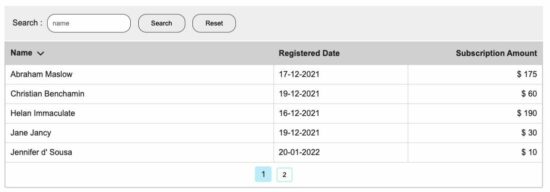
The following screenshot displays the PHP pagination code. It shows the tabular results with pagination links and a search panel.

php pagination search output

Download

↑ Back to Top

Posted on Leave a comment

PHP Login Form with MySQL database and form validation

by Vincy. Last modified on March 1st, 2022.

Login form – an entry point of a website to authenticate users. PHP login system requires users to register with the application first to log in later.

The registered users are managed in a database at the back end. On each login attempt via the PHP login form, it verifies the database to find a match.

It is a very simple and essential job. At the same time, it should be designed with security to guard the site. It should filter anonymous hits 100% not to let unregistered users get in.

The PHP login form action stores the logged-in user in a session. It uses PHP $_SESSION one of its superglobals. It’s better to validate the existence of this session at the beginning of each page to be protected.

This PHP code can also be used to add an admin login for your control panel. Also, it can be used as a common authentication entry for both admin and user side of an application.

PHP login form code

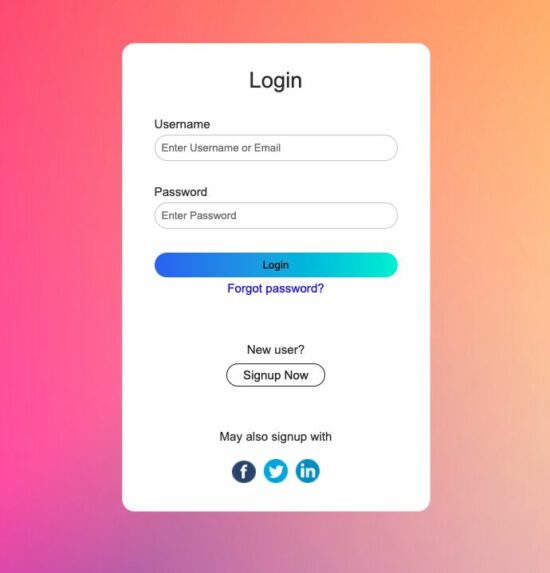
This example is to design a PHP login form working with backend processing. The login page in PHP shows the UI elements like social login, forgot password and etc.

It posts data to process a username/password-based login authentication. This example uses the database to authenticate the user login.

This PHP login system is capable of linking the following code to the additional login form controls.

  1. Link PHP forgot/reset password feature.
  2. Link User registration PHP example to the sign-up option.
  3. Also, Link Oauth login with Facebook, Twitter and Linkedin.

php login form

HTML form template

The landing page renders this template into the UI to let the user log in. It will happen when there is no logged-in session.

This form accepts the user’s login details username or email and a secure password. The submit event triggers the PHP login form validation and posts the login data to the PHP.

This PHP login form is responsive to the different viewport sizes. It uses simple CSS media queries for adding site responsiveness.

The form tag calls a JavaScript function validate() on the submit event. The below code includes the PHP login form validation script at the end.

view/login-form.php


<html>
<head>
<meta name="viewport" content="width=device-width, initial-scale=1">
<title>User Login</title>
<link href="./view/css/form.css" rel="stylesheet" type="text/css" />
<style>
body { font-family: Arial; color: #333; font-size: 0.95em; background-image: url("./view/images/bg.jpeg");
}
</style>
</head>
<body> <div> <form action="login-action.php" method="post" id="frmLogin" onSubmit="return validate();"> <div class="login-form-container"> <div class="form-head">Login</div> <?php if (isset($_SESSION["errorMessage"])) { ?> <div class="error-message"><?php echo $_SESSION["errorMessage"]; ?></div> <?php unset($_SESSION["errorMessage"]); } ?> <div class="field-column"> <div> <label for="username">Username</label><span id="user_info" class="error-info"></span> </div> <div> <input name="user_name" id="user_name" type="text" class="demo-input-box" placeholder="Enter Username or Email"> </div> </div> <div class="field-column"> <div> <label for="password">Password</label><span id="password_info" class="error-info"></span> </div> <div> <input name="password" id="password" type="password" class="demo-input-box" placeholder="Enter Password"> </div> </div> <div class=field-column> <div> <input type="submit" name="login" value="Login" class="btnLogin"></span> </div> </div> <div class="form-nav-row"> <a href="#" class="form-link">Forgot password?</a> </div> <div class="login-row form-nav-row"> <p>New user?</p> <a href="#" class="btn form-link">Signup Now</a> </div> <div class="login-row form-nav-row"> <p>May also signup with</p> <a href="#"><img src="view/images/icon-facebook.png" class="signup-icon" /></a><a href="#"><img src="view/images/icon-twitter.png" class="signup-icon" /></a><a href="#"><img src="view/images/icon-linkedin.png" class="signup-icon" /></a> </div> </div> </form> </div> <script> function validate() { var $valid = true; document.getElementById("user_info").innerHTML = ""; document.getElementById("password_info").innerHTML = ""; var userName = document.getElementById("user_name").value; var password = document.getElementById("password").value; if(userName == "") { document.getElementById("user_info").innerHTML = "required"; $valid = false; } if(password == "") { document.getElementById("password_info").innerHTML = "required"; $valid = false; } return $valid; } </script>
</body>
</html>

PHP login form action

A PHP endpoint script that is an action target of the login form handles the login data.

This login page in PHP sanitizes the data before processing them. It uses PHP filter_var function to sanitize the user entered authentication details.

It conducts the authentication process after receiving the user credentials.

This program puts the authenticated user details in a session. Then, it acknowledges the user accordingly.

login-action.php


<?php
namespace Phppot; use \Phppot\Member;
if (! empty($_POST["login"])) { session_start(); $username = filter_var($_POST["user_name"], FILTER_SANITIZE_STRING); $password = filter_var($_POST["password"], FILTER_SANITIZE_STRING); require_once (__DIR__ . "/class/Member.php"); $member = new Member(); $isLoggedIn = $member->processLogin($username, $password); if (! $isLoggedIn) { $_SESSION["errorMessage"] = "Invalid Credentials"; } header("Location: ./index.php"); exit();
} 

PHP login authentication model class

It contains the processLogin() function to check the PHP login form data with the database. It uses PHP password_verify() function to validate the user-entered password. This PHP function compares the password with the hashed password on the database.

The getMemberById() function reads the member result by member id. After successful login, it is called from the case to display the dashboard. It returns the array of data to be displayed on the dashboard.

class/Member.php


<?php
namespace Phppot; use \Phppot\DataSource; class Member
{ private $dbConn; private $ds; function __construct() { require_once "DataSource.php"; $this->ds = new DataSource(); } function getMemberById($memberId) { $query = "select * FROM registered_users WHERE id = ?"; $paramType = "i"; $paramArray = array($memberId); $memberResult = $this->ds->select($query, $paramType, $paramArray); return $memberResult; } public function processLogin($username, $password) { $query = "select * FROM registered_users WHERE user_name = ? OR email = ?"; $paramType = "ss"; $paramArray = array($username, $username); $memberResult = $this->ds->select($query, $paramType, $paramArray); if(!empty($memberResult)) { $hashedPassword = $memberResult[0]["password"]; if (password_verify($password, $hashedPassword)) { $_SESSION["userId"] = $memberResult[0]["id"]; return true; } } return false; }
}

Show dashboard and logout link after PHP login

After successful login, the site says there exists a session of the logged-in user. It can be shown in different ways.

In most sites, the site header displays the logged-in user’s profile link. It can be a clickable avatar that slides down a profile menu.

This PHP login system redirects the user to a dashboard page after login. This dashboard page shows a welcome message, about-user with an avatar.

The landing page checks the PHP session if any user has already login. If so, it will redirect to this dashboard page.

view/dashboard.php


<?php
namespace Phppot; use \Phppot\Member; if (! empty($_SESSION["userId"])) { require_once __DIR__ . './../class/Member.php'; $member = new Member(); $memberResult = $member->getMemberById($_SESSION["userId"]); if(!empty($memberResult[0]["display_name"])) { $displayName = ucwords($memberResult[0]["display_name"]); } else { $displayName = $memberResult[0]["user_name"]; }
}
?>
<html>
<head>
<title>User Login</title>
<style>
body { font-family: Arial; color: #333; font-size: 0.95em;
} .dashboard { background: #d2edd5; margin: 15px auto; line-height: 1.8em; color: #333; border-radius: 4px; padding: 30px; max-width: 400px; border: #c8e0cb 1px solid; text-align: center;
} a.logout-button { color: #09f;
}
.profile-photo { width: 100px; border-radius: 50%; }
</style>
</head>
<body> <div> <div class="dashboard"> <div class="member-dashboard"> <p>Welcome <b><?php echo $displayName; ?>!</b></p> <p><?php echo $memberResult[0]["about"]; ?></p> <p><img src="./view/images/photo.jpeg" class="profile-photo" /></p> <p>You have successfully logged in!</p> <p>Click to <a href="./logout.php" class="logout-button">Logout</a></p> </div> </div> </div>
</body>
</html>

PHP Logged in User Dashboard

Logging out from the site

This is a general routine to log out from the site. The following script clears the PHP session. Then it redirects back to login page in PHP.

Sometimes, the logout case may clear cookies. Example: In the case of using a cookie-based Remember Me feature in login.

view/dashboard.php


<?php session_start();
$_SESSION["user_id"] = "";
session_destroy();
header("Location: index.php"); 

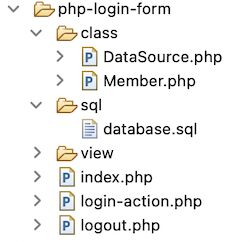
Files structure

See the below image that shows the file structure of this simple PHP login form example. It contains a featured login form UI with the application view files.

The login action calls the PHP model on the submit event. It performs backend authentication with the database.

php login form files

Database script

Look at this SQL script which contains the CREATE statement and sample row data.

By importing this SQL, it creates database requisites in your development environment.

The sample data helps to try a login that returns success response on the authentication.

Test data: username: kate_91 password: admin123

sql/database.sql


--
-- Database: `blog_eg`
-- -- -------------------------------------------------------- --
-- Table structure for table `registered_users`
-- CREATE TABLE `registered_users` ( `id` int(8) NOT NULL, `user_name` varchar(255) NOT NULL, `display_name` varchar(255) NOT NULL, `password` varchar(255) NOT NULL, `email` varchar(255) NOT NULL, `photo` text DEFAULT NULL, `about` text DEFAULT NULL
) ENGINE=InnoDB DEFAULT CHARSET=utf8mb4; --
-- Dumping data for table `registered_users`
-- INSERT INTO `registered_users` (`id`, `user_name`, `display_name`, `password`, `email`, `photo`, `about`) VALUES
(1, 'kate_91', 'Kate Winslet', '$2y$10$LVISX0lCiIsQU1vUX/dAGunHTRhXmpcpiuU7G7.1lbnvhPSg7exmW', 'kate@wince.com', 'images/photo.jpeg', 'Web developer'); --
-- Indexes for dumped tables
-- --
-- Indexes for table `registered_users`
--
ALTER TABLE `registered_users` ADD PRIMARY KEY (`id`); --
-- AUTO_INCREMENT for dumped tables
-- --
-- AUTO_INCREMENT for table `registered_users`
--
ALTER TABLE `registered_users` MODIFY `id` int(8) NOT NULL AUTO_INCREMENT, AUTO_INCREMENT=2; 

Secure DataSource using MySQL with prepared statements

This DataSource is a common file to be used in any stand-alone PHP application. It uses MySQLi with prepared statement to execute database queries. It works with PHP 8 and 7+

class/DataSource.php


<?php
namespace Phppot; /** * Generic datasource class for handling DB operations. * Uses MySqli and PreparedStatements. * * @version 2.3 */
class DataSource
{ // PHP 7.1.0 visibility modifiers are allowed for class constants. // when using above 7.1.0, declare the below constants as private const HOST = 'localhost'; const USERNAME = 'root'; const PASSWORD = ''; const DATABASENAME = 'blog_eg'; private $conn; /** * PHP implicitly takes care of cleanup for default connection types. * So no need to worry about closing the connection. * * Singletons not required in PHP as there is no * concept of shared memory. * Every object lives only for a request. * * Keeping things simple and that works! */ function __construct() { $this->conn = $this->getConnection(); } /** * If connection object is needed use this method and get access to it. * Otherwise, use the below methods for insert / update / etc. * * @return \mysqli */ public function getConnection() { $conn = new \mysqli(self::HOST, self::USERNAME, self::PASSWORD, self::DATABASENAME); if (mysqli_connect_errno()) { trigger_error("Problem with connecting to database."); } $conn->set_charset("utf8"); return $conn; } /** * To get database results * @param string $query * @param string $paramType * @param array $paramArray * @return array */ public function select($query, $paramType="", $paramArray=array()) { $stmt = $this->conn->prepare($query); if(!empty($paramType) && !empty($paramArray)) { $this->bindQueryParams($stmt, $paramType, $paramArray); } $stmt->execute(); $result = $stmt->get_result(); if ($result->num_rows > 0) { while ($row = $result->fetch_assoc()) { $resultset[] = $row; } } if (! empty($resultset)) { return $resultset; } } /** * To insert * @param string $query * @param string $paramType * @param array $paramArray * @return int */ public function insert($query, $paramType, $paramArray) { print $query; $stmt = $this->conn->prepare($query); $this->bindQueryParams($stmt, $paramType, $paramArray); $stmt->execute(); $insertId = $stmt->insert_id; return $insertId; } /** * To execute query * @param string $query * @param string $paramType * @param array $paramArray */ public function execute($query, $paramType="", $paramArray=array()) { $stmt = $this->conn->prepare($query); if(!empty($paramType) && !empty($paramArray)) { $this->bindQueryParams($stmt, $paramType="", $paramArray=array()); } $stmt->execute(); } /** * 1. Prepares parameter binding * 2. Bind prameters to the sql statement * @param string $stmt * @param string $paramType * @param array $paramArray */ public function bindQueryParams($stmt, $paramType, $paramArray=array()) { $paramValueReference[] = & $paramType; for ($i = 0; $i < count($paramArray); $i ++) { $paramValueReference[] = & $paramArray[$i]; } call_user_func_array(array( $stmt, 'bind_param' ), $paramValueReference); } /** * To get database results * @param string $query * @param string $paramType * @param array $paramArray * @return array */ public function numRows($query, $paramType="", $paramArray=array()) { $stmt = $this->conn->prepare($query); if(!empty($paramType) && !empty($paramArray)) { $this->bindQueryParams($stmt, $paramType, $paramArray); } $stmt->execute(); $stmt->store_result(); $recordCount = $stmt->num_rows; return $recordCount; }
}

Conclusion

We have seen a simple example on the PHP login form. Hope this will be useful to have a featured, responsive login form.

The article interlinks the constellations of a login form. It will be helpful to integrate more features with the existing login template.

Let me know your feedback on the comments section if you need any improvements on this PHP login system.

Download

↑ Back to Top

Posted on Leave a comment

PHP File Upload to Server with MySQL Database

by Vincy. Last modified on February 1st, 2022.

File upload is an important component in building websites. This article will help you to implement a file upload to the server feature with PHP and a MySQL database.

Example use cases of where the file upload may be needed in a website,

Let us see how to code PHP file upload for a website. You can split this article into the following sections.

  1. PHP file upload – A quick example.
  2. File upload – server-side validation.
  3. Upload file to the server with database.
  4. Upload file as a blob to the database.

PHP file upload – Quick example

<?php if (isset($_FILES['upload_file'])) { move_uploaded_file($_FILES["upload_file"]["tmp_name"], $_FILES["upload_file"]["name"]);
}
?>
<form name="from_file_upload" action="" method="post" enctype="multipart/form-data"> <div class="input-row"> <input type="file" name="upload_file" accept=".jpg,.jpeg,.png"> </div> <input type="submit" name="upload" value="Upload File">
</form>

This quick example shows a simple code to achieve PHP file upload. It has an HTML form to choose a file to upload. Let the form with the following attributes for supporting file upload.

  1. method=post
  2. enctype=multipart/form-data

By choosing a file, it will be in a temporary directory. The $_FILES[“upload_file”][“tmp_name”] has that path. The PHP move_uploaded_file() uploads the file from this path to the specified target.

$_FILES[‘<file-input-name>’][‘tmp_name’] PHP file upload temporary path
$_FILES[‘<file-input-name>’][‘name’] File name with extension
$_FILES[‘<file-input-name>’][‘type’] File MIME type. Eg: image/jpeg
$_FILES[‘<file-input-name>’][‘size’] File size (in bytes)
$_FILES[‘<file-input-name>’][‘error’] File upload error code if any
$_FILES[‘<file-input-name>’][‘full_path’] Full path as sent by the browser

The form allows multi-file upload by having an array of file input.

PHP file upload configuration

Ensure that the server environment has enough settings to upload files.

  • Check with the php.ini file if the file_uploads = on. Mostly, it will be on by default.

More optional directives to change the default settings

  • upload_tmp_dir – to change the system default.
  • upload_max_filesize – to exceed the default limit.
  • max_file_uploads – to break the per-request file upload limit.
  • post_max_size – to breaks the POST data size.
  • max_input_time – to set the limit in seconds to parse request data.
  • max_execution_time – time in seconds to run the file upload script.
  • memory_limit – to set the memory limit in bytes to be allocated.

File upload – server-side validation

When file uploading comes into the picture, then there should be proper validation. It will prevent unexpected responses from the server during the PHP file upload.

This code checks the following 4 conditions before moving the file to the target path. It validates,

  • If the file is not empty.
  • If the file does not already exist in the target.
  • If the file type is one of the allowed extensions.
  • If the file is within the limit.

It shows only the PHP script for validating the uploaded file. The form HTML will be the same as that of the quick example.

file-upload-validation.php

<?php
if (isset($_POST["upload"])) { // Validate if not empty if (!empty($_FILES['upload_file']["name"])) { $fileName = $_FILES["upload_file"]["name"]; $isValidFile = true; // Validate if file already exists if (file_exists($fileName)) { echo "<span>File already exists.</span>"; $isValidFile = false; } // Validate file extension $allowedFileType = array( 'jpg', 'jpeg', 'png' ); $fileExtension = strtolower(pathinfo($fileName, PATHINFO_EXTENSION)); if (! in_array($fileExtension, $allowedFileType)) { echo "<span>File is not supported. Upload only <b>" . implode(", ", $allowedFileType) . "</b> files.</span>"; $isValidFile = false; } // Validate file size if ($_FILES["upload_file"]["size"] > 200000) { echo "<span>File is too large to upload.</span>"; $isValidFile = 0; } if ($isValidFile) { move_uploaded_file($_FILES["upload_file"]["tmp_name"], $fileName); } } else { echo "No files have been chosen."; }
}
?>

Upload file to the server with database

This section gives a full-fledged PHP file upload example. It is with add, edit, preview, list images features. The add/edit allows users to choose an image file to upload to the server.

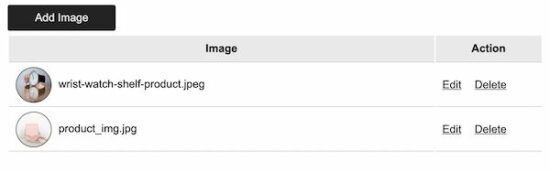
The home page displays a list of uploaded images with edit, delete action controls. The edit screen will show the preview of the existing file.

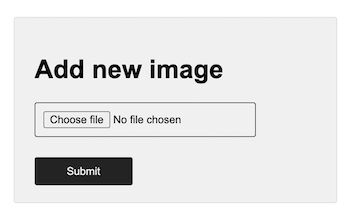
PHP file upload and add a new row to the database

This code is for showing a HTML form with a file upload option. This allows users to choose files to upload to the server.

The PHP code receives the uploaded file data in $_FILES. In this code, it checks for basic file validation to make sure of its uniqueness.

Then, it calls functions to upload and insert the file path to the database.

The uploadImage runs PHP move_upload_files() to put the uploaded file in a directory.

The insertImage calls database handlers to insert the uploaded path to the database.

image-upload-list-preview-edit/insert.php


<?php
namespace Phppot; use Phppot\DataSource;
require_once __DIR__ . '/lib/ImageModel.php';
$imageModel = new ImageModel();
if (isset($_POST['send'])) { if (file_exists('../uploads/' . $_FILES['image']['name'])) { $fileName = $_FILES['image']['name']; $_SESSION['message'] = $fileName . " file already exists."; } else { $result = $imageModel->uploadImage(); $id = $imageModel->insertImage($result); if (! empty($id)) { $_SESSION['message'] = "Image added to the server and database."; } else { $_SESSION['message'] = "Image upload incomplete."; } } header('Location: index.php');
} ?>
<html>
<head>
<link href="assets/style.css" rel="stylesheet" type="text/css" />
</head>
<body> <div class="form-container"> <h1>Add new image</h1> <form action="" method="post" name="frm-add" enctype="multipart/form-data" onsubmit="return imageValidation()"> <div Class="input-row"> <input type="file" name="image" id="input-file" class="input-file" accept=".jpg,.jpeg,.png"> </div> <input type="submit" name="send" value="Submit" class="btn-link"> <span id="message"></span> </div> </form> <script src="https://code.jquery.com/jquery-3.6.0.min.js" integrity="sha256-/xUj+3OJU5yExlq6GSYGSHk7tPXikynS7ogEvDej/m4=" crossorigin="anonymous"></script> <script src="assets/validate.js"></script>
</body>
</html> 

php file upload form

List of uploaded images with edit, delete actions

This is an extension of a usual PHP file upload example. It helps to build a file library interface in an application.

This page reads the uploaded images from the database using PHP.  The getAllImages function returns the image path data in an array format.

The list page iterates this array and lists out the result. And it links the records with the appropriate edit, delete controls.

image-upload-list-preview-edit/index.php


<?php
namespace Phppot; use Phppot\DataSource;
require_once __DIR__ . '/lib/ImageModel.php';
$imageModel = new ImageModel();
?>
<html>
<head>
<title>Display all records from Database</title>
<link href="assets/style.css" rel="stylesheet" type="text/css" />
</head>
<body> <div class="image-datatable-container"> <a href="insert.php" class="btn-link">Add Image</a> <table class="image-datatable" width="100%"> <tr> <th width="80%">Image</th> <th>Action</th> </tr> <?php $result = $imageModel->getAllImages(); ?> <tr> <?php if (! empty($result)) { foreach ($result as $row) { ?> <td><img src="<?php echo $row["image"]?>" class="profile-photo" alt="photo"><?php echo $row["name"]?> </td> <td><a href="update.php?id=<?php echo $row['id']; ?>" class="btn-action">Edit</a> <a onclick="confirmDelete(<?php echo $row['id']; ?>)" class="btn-action">Delete</a></td> </tr> <?php } } ?> </table> </div> <script src="https://code.jquery.com/jquery-3.6.0.min.js" integrity="sha256-/xUj+3OJU5yExlq6GSYGSHk7tPXikynS7ogEvDej/m4=" crossorigin="anonymous"></script> <script type="text/javascript" src="assets/validate.js"></script>
</body> </html> 

list uploaded files from server

Edit form with file preview

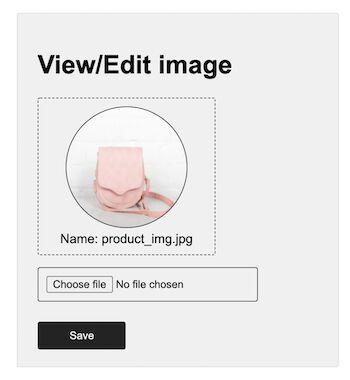
This shows an edit form with an uploaded file preview. It allows replacing the file by uploading a new one.

The form action passes the id of the record to update the file path in the database.

The PHP code calls the updateImage with the upload result and the record id.

image-upload-list-preview-edit/update.php


<?php
namespace Phppot; use Phppot\DataSource;
require_once __DIR__ . '/lib/ImageModel.php';
$imageModel = new ImageModel();
if (isset($_POST["submit"])) { $result = $imageModel->uploadImage(); $id = $imageModel->updateImage($result, $_GET["id"]);
}
$result = $imageModel->selectImageById($_GET["id"]); ?>
<html>
<head>
<link href="assets/style.css" rel="stylesheet" type="text/css" />
</head>
<body> <div class="form-container"> <h1>View/Edit image</h1> <form action="?id=<?php echo $result[0]['id']; ?>" method="post" name="frm-edit" enctype="multipart/form-data" onsubmit="return imageValidation()"> <div class="preview-container"> <img src="<?php echo $result[0]["image"]?>" class="img-preview" alt="photo"> <div>Name: <?php echo $result[0]["name"]?></div> </div> <div Class="input-row"> <input type="file" name="image" id="input-file" class="input-file" accept=".jpg,.jpeg,.png" value=""> </div> <button type="submit" name="submit" class="btn-link">Save</button> <span id="message"></span> </div> </form> <script src="https://code.jquery.com/jquery-3.6.0.min.js" integrity="sha256-/xUj+3OJU5yExlq6GSYGSHk7tPXikynS7ogEvDej/m4=" crossorigin="anonymous"></script> <script src="assets/validate.js"></script>
</body>
</html> 

file edit form with preview

The delete action is triggered after user confirmation. It removes the file path from the database.

delete.php


<?php
namespace Phppot; use Phppot\DataSource;
require_once __DIR__ . '/lib/ImageModel.php';
$imageModel = new ImageModel();
$id=$_REQUEST['id'];
$result = $imageModel->deleteImageById($id);
header("Location: index.php");
?> 

PHP model class to upload file

It contains functions to upload files to a directory and to the database. The PHP file upload function sets a target to put the uploaded file.

It processes the PHP $_FILES array to get the file data. It prepares the database query by using the file parameter to perform read, write.

imageModel.php


<?php
namespace Phppot; use Phppot\DataSource; class ImageModel
{ private $conn; function __construct() { require_once 'DataSource.php'; $this->conn = new DataSource(); } function getAllImages() { $sqlSelect = "SELECT * FROM tbl_image"; $result = $this->conn->select($sqlSelect); return $result; } function uploadImage() { $imagePath = "uploads/" . $_FILES["image"]["name"]; $name = $_FILES["image"]["name"]; $result = move_uploaded_file($_FILES["image"]["tmp_name"], $imagePath); $output = array( $name, $imagePath ); return $output; } public function insertImage($imageData) { print_r($imageData); $query = "INSERT INTO tbl_image(name,image) VALUES(?,?)"; $paramType = 'ss'; $paramValue = array( $imageData[0], $imageData[1] ); $id = $this->conn->insert($query, $paramType, $paramValue); return $id; } public function selectImageById($id) { $sql = "select * from tbl_image where id=? "; $paramType = 'i'; $paramValue = array( $id ); $result = $this->conn->select($sql, $paramType, $paramValue); return $result; } public function updateImage($imageData, $id) { $query = "UPDATE tbl_image SET name=?, image=? WHERE id=?"; $paramType = 'ssi'; $paramValue = array( $imageData[0], $imageData[1], $_GET["id"] ); $id = $this->conn->execute($query, $paramType, $paramValue); return $id; } /* * public function execute($query, $paramType = "", $paramArray = array()) * { * $id = $this->conn->prepare($query); * * if (! empty($paramType) && ! empty($paramArray)) { * $this->bindQueryParams($id, $paramType, $paramArray); * } * $id->execute(); * } */ function deleteImageById($id) { $query = "DELETE FROM tbl_image WHERE id=$id"; $result = $this->conn->select($query); return $result; }
}
?> 

Upload image as a blob to the database

Though this example comes as the last, I guess it will be very useful for most of you readers.

Uploading the file as a blob to the database helps to move the file binary data to the target database. This example achieves this with very few lines of code.

Uploading image file blob using database insert

This file receives the uploaded file from PHP $_FILES. It extracts the file binary data by using PHP file_get_contents() function.

Then, it binds the file MIME type and the blob to the prepared query statement.

The code specifies the parameter type as ‘b’ for the file blob data. First, it binds a NULL value for the blob field.

Then, it sends the file content using send_long_data() function. This function specifies the query parameter index and file blob to bind it to the statement.

file-blob-upload/index.php

<?php
if (!empty($_POST["submit"])) { if (is_uploaded_file($_FILES['userImage']['tmp_name'])) { $conn = mysqli_connect('localhost', 'root', '', 'blog_eg'); $imgData = file_get_contents($_FILES['userImage']['tmp_name']); $imageProperties = getimageSize($_FILES['userImage']['tmp_name']); $null = NULL; $sql = "INSERT INTO tbl_image_data(image_type ,image_data) VALUES(?, ?)"; $stmt = $conn->prepare($sql); $stmt->bind_param("sb", $imageProperties['mime'], $null); $stmt->send_long_data(1, $imgData); $stmt->execute(); $currentId = $stmt->insert_id; }
}
?> <html>
<head>
<link href="assets/style.css" rel="stylesheet" type="text/css" />
</head>
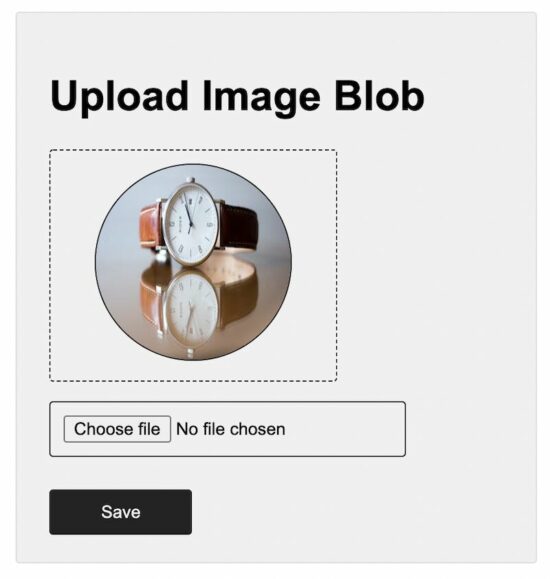
<body> <div class="form-container"> <h1>Upload Image Blob</h1> <form action="" method="post" name="frm-edit" enctype="multipart/form-data" > <?php if(!empty($currentId)) { ?> <div class="preview-container"> <img src="image-view.php?image_id=<?php echo $currentId; ?>" class="img-preview" alt="photo"> </div> <?php } ?> <div Class="input-row"> <input type="file" name="userImage" id="input-file" class="input-file" accept=".jpg,.jpeg,.png" value="" required> </div> <input type="submit" name="submit" class="btn-link" value="Save"> <span id="message"></span> </div> </form>
</body>
</html>

This file is to read a blob from the database and show the preview. It will be specified in the <img> tag ‘src’ attribute with the appropriate image id.

file-blob-upload/image-view.php

<?php $conn = mysqli_connect('localhost', 'root', '', 'blog_eg'); if(isset($_GET['image_id'])) { $sql = "SELECT image_type,image_data FROM tbl_image_data WHERE id = ?"; $stmt = $conn->prepare($sql); $stmt->bind_param("i", $_GET['image_id']); $stmt->execute(); $result = $stmt->get_result(); $row = $result->fetch_array(); header("Content-type: " . $row["image_type"]); echo $row["image_data"]; } mysqli_close($conn);
?>

php file upload blob to server

Conclusion

Thus, we have seen a detailed article to learn file upload. I swear we have covered most of the examples on PHP file upload.

We saw code in all levels from simple to elaborate file upload components. I hope, this will be helpful to know how to build this on your own.
Download

↑ Back to Top

Posted on Leave a comment

Bootstrap Sticky Navbar Menu on Scroll using CSS and JavaScript

by Vincy. Last modified on January 13th, 2022.

The Bootstrap navbar is a menu responsive header with navigation. Bootstrap supports enabling many UI effects with this navbar component. For example,

  1. Sticky navbar on scrolling the content.
  2. Slide-in effect by using Bootstrap expand-collapse
  3. Mobile-friendly responsive menu navigation.

This article is for creating a Bootstrap sticky navbar on the page top header. It shows both static and dynamic content on the navigation header. Let us see how to display a sticky navbar on a page using Bootstrap.

This quick example shows code to display the stick navbar. It includes Boostrap into the code by using CDN URL. You can also install Bootstrap via composer into your application vendor directory.

It uses Bootstrap sticky-top to the .navbar element.

Quick Example

Include this into the HTML <head>


<link href="https://cdn.jsdelivr.net/npm/bootstrap@5.1.3/dist/css/bootstrap.min.css" rel="stylesheet">
<script src="https://cdn.jsdelivr.net/npm/bootstrap@5.1.3/dist/js/bootstrap.bundle.min.js"></script> 

Put this Bootstrap sticky navbar into the <body>


<nav class="navbar navbar-expand-lg navbar navbar-expand-sm sticky-top navbar-dark bg-dark"> <div class="collapse navbar-collapse" id="navbarSupportedContent"> <ul class="navbar-nav mr-auto"> <li class="nav-item active"><a class="nav-link" href="#">Home</a></li> <li class="nav-item active"><a class="nav-link" href="#">Contact</a> </li> <li class="nav-item active"><a class="nav-link" href="#">About</a> </ul> </div>
</nav> 

Bootstrap navbar default behaviour

The below list shows the default behaviour of the Bootstrap navbar. This article features this UI component more by making it sticky on scrolling.

  • Navbar is responsive by default in any viewport.
  • It is hidden for printing but can be overridden by adding .d-print to the .navbar.
  • It lets assistive mechanism to identify navbar by using <nav>. Bootstrap recommends to add role=”navigation” attribute for the <div> like containers.

Uses  of  Bootstrap sticky navbar

The Bootstrap sticky navbar provides a fixed header element mostly at the top. Sometimes, it will be used in the page and form footer.

The following list of items shows some of the uses of a sticky navbar in a website.

  1. To create a fixed header menu. Eg: The header menu links like ‘Contact’, ‘Request a quote’ will be useful if they are sticky on scroll.
  2. To create fixed footer links. Eg: The social media share option in the footer can be sticky to let the user to share the content at any time of reading.
  3. To keep a HTML form footer sticky on scroll. The payment form with the ‘Pay now’ or ‘Buy now’ control should be fixed regardless of the page scroll. It reduces friction and allows users to buy the product easily.

Bootstrap sicky navbar with static menu HTML

This code will help users having static websites who want to add a sticky navbar in the header.

This example includes an expandable static header menu. It shows the sub-menu dropdown on clicking the main menu link.

bootstrap-sticky-navbar-static.php


<!DOCTYPE html>
<html>
<head>
<meta name="viewport" content="width=device-width, initial-scale=1">
<link href="https://cdn.jsdelivr.net/npm/bootstrap@5.1.3/dist/css/bootstrap.min.css" rel="stylesheet">
<script src="https://cdn.jsdelivr.net/npm/bootstrap@5.1.3/dist/js/bootstrap.bundle.min.js"></script>
</head>
<style>
.container { height: 1000px;
}
</style>
<body> <nav class="navbar navbar-expand-lg navbar navbar-expand-sm sticky-top navbar-dark bg-dark"> <a class="navbar-brand" href="#">Site logo</a> <button class="navbar-toggler" type="button" data-toggle="collapse" data-target="#navbarSupportedContent" aria-controls="navbarSupportedContent" aria-expanded="false" aria-label="Toggle navigation"> <span class="navbar-toggler-icon"></span> </button> <div class="collapse navbar-collapse" id="navbarSupportedContent"> <ul class="navbar-nav mr-auto"> <li class="nav-item active"><a class="nav-link" href="#">Home</a></li> <li class="nav-item active"><a class="nav-link" href="#">Contact</a> </li> <li class="nav-item active"><a class="nav-link" href="#">About</a> </li> <li class="nav-item dropdown active"><a class="nav-link dropdown-toggle" href="#" id="navbarDropdown" role="button" data-toggle="dropdown" aria-haspopup="true" aria-expanded="false"> Services </a> <div class="dropdown-menu" aria-labelledby="navbarDropdown"> <a class="dropdown-item" href="#">Map integration</a> <a class="dropdown-item" href="#">Chart generation</a> <a class="dropdown-item" href="#">Report generation </a> </div></li> <li class="nav-item dropdown active"><a class="nav-link dropdown-toggle" href="#" id="navbarDropdown" role="button" data-toggle="dropdown" aria-haspopup="true" aria-expanded="false"> Projects </a> <div class="dropdown-menu" aria-labelledby="navbarDropdown"> <a class="dropdown-item" href="#"> Chat plugin</a> <a class="dropdown-item" href="#">Form builder</a> </div></li> <li class="nav-item active"><a class="nav-link disabled" href="#">What's new</a></li> </ul> <form class="form-inline my-2 my-lg-0"> <input class="form-control mr-sm-2" type="search" placeholder="Search" aria-label="Search"> <button class="btn btn-outline-success my-2 my-sm-0" type="submit">Search</button> </form> </div> </nav> <div class="container"> <div class="row"> <div class="col-12 py-4"> <h1>Page scroll content</h1> Lorem ipsum dolor sit amet, consectetur adipiscing elit. Praesent tincidunt dolor eget lorem blandit, auctor porttitor enim faucibus. Mauris sed elit sollicitudin, aliquam lorem nec, suscipit ex. Sed mollis rhoncus scelerisque. Morbi varius a est sed luctus. Morbi sapien velit, venenatis a sapien vitae, commodo rutrum erat. Nam volutpat diam ac convallis egestas. Nunc convallis tempor hendrerit. Aenean turpis quam, viverra eu eros quis, ornare tristique velit. </div> </div> </div>
</body>
</html> 

Bootstrap navbar with data-target link

In the bootstrap sticky navbar, it allows specifying the data target to expand.

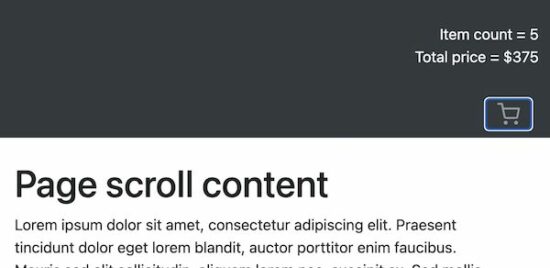
In this example, the header navbar shows a cart icon on page load. The header HTML also contains the cart info hidden by default.

The navbar cart element targets this hidden cart info to expand it on the click event.

navbar-with-data-target.php


<!DOCTYPE html>
<html>
<head>
<meta name="viewport" content="width=device-width, initial-scale=1">
<link href="https://cdn.jsdelivr.net/npm/bootstrap@5.1.3/dist/css/bootstrap.min.css" rel="stylesheet">
<script src="https://cdn.jsdelivr.net/npm/bootstrap@5.1.3/dist/js/bootstrap.bundle.min.js"></script>
</head>
<style>
.container { height: 1000px;
}
</style>
<body> <div class="pos-f-t sticky-top"> <div class="collapse " id="navbarToggleExternalContent"> <div class="bg-dark p-4 text-right"> <div class="text-light ">Item count = 5</div> <div class="text-light ">Total price = $375</div> </div> </div> <nav class="navbar navbar-dark bg-dark"> <div class="col-lg-12"> <button class="navbar-toggler float-right" type="button" data-toggle="collapse" data-target="#navbarToggleExternalContent" aria-controls="navbarToggleExternalContent" aria-expanded="false" aria-label="Toggle navigation"> <svg xmlns="http://www.w3.org/2000/svg" width="24" height="24" viewBox="0 0 24 24" fill="none" stroke="currentColor" stroke-width="2" stroke-linecap="round" stroke-linejoin="round" class="feather feather-shopping-cart"> <circle cx="9" cy="21" r="1"></circle> <circle cx="20" cy="21" r="1"></circle> <path d="M1 1h4l2.68 13.39a2 2 0 0 0 2 1.61h9.72a2 2 0 0 0 2-1.61L23 6H6"></path></svg> </button> </div> </nav> </div> <div class="container"> <div class="row"> <div class="col-12 py-4"> <h1>Page scroll content</h1> Lorem ipsum dolor sit amet, consectetur adipiscing elit. Praesent tincidunt dolor eget lorem blandit, auctor porttitor enim faucibus. Mauris sed elit sollicitudin, aliquam lorem nec, suscipit ex. Sed mollis rhoncus scelerisque. Morbi varius a est sed luctus. Morbi sapien velit, venenatis a sapien vitae, commodo rutrum erat. Nam volutpat diam ac convallis egestas. Nunc convallis tempor hendrerit. Aenean turpis quam, viverra eu eros quis, ornare tristique velit. </div> </div> </div>
</body>
</html> 

The below screenshot cart icon and the expanded cart info. It displays the number of items in the cart and the total amount.

bootstrap sticky navbar cart info

bootstrap data target

Dynamic menu in the sticky navbar

This example includes HTML as like as the static menu example. The difference is the menu items are from the database.

This code uses a PHP class DataSource.php to process the database operations. It uses MySqli with prepared-statement to access the database.

bootstrap-sticky-navbar-dynamic.php


<?php
namespace Phppot; use Phppot\DataSource;
require_once __DIR__ . '/DataSource.php';
$conn = new DataSource();
$query = "SELECT * FROM tbl_menu where parent = 0";
$mainresult = $conn->select($query);
?>
<!DOCTYPE html>
<html>
<head>
<meta name="viewport" content="width=device-width, initial-scale=1">
<link href="https://cdn.jsdelivr.net/npm/bootstrap@5.1.3/dist/css/bootstrap.min.css" rel="stylesheet">
<script src="https://cdn.jsdelivr.net/npm/bootstrap@5.1.3/dist/js/bootstrap.bundle.min.js"></script>
</head>
<style>
.container { height: 1000px;
}
</style>
<body> <nav class="navbar navbar-expand-lg navbar navbar-expand-sm sticky-top navbar-dark bg-dark"> <button class="navbar-toggler" type="button" data-toggle="collapse" data-target="#navbarSupportedContent" aria-controls="navbarSupportedContent" aria-expanded="false" aria-label="Toggle navigation"> <span class="navbar-toggler-icon"></span> </button> <div class="collapse navbar-collapse" id="navbarSupportedContent"> <ul class="navbar-nav mr-auto"> <?php foreach ($mainresult as $key => $val){?> <li class="nav-item dropdown active"><a class="nav-link " href="#" id="navbarDropdown" role="button" data-toggle="dropdown" aria-haspopup="true" aria-expanded="false"><?php echo $mainresult[$key]["menu_name"];?></a> <?php $query = "SELECT * FROM tbl_menu where parent= ?"; $paramType = "i"; $paramValue = array( $mainresult[$key]["id"] ); $subresult = $conn->select($query, $paramType, $paramValue); ?> <?php if (! empty($subresult)) {?> <div class="dropdown-menu" aria-labelledby="navbarDropdown"> <?php foreach ($subresult as $k => $v) {?> <a class="dropdown-item" href="#"><?php echo $subresult[$k]["menu_name"];?></a> <?php }?> </div> <?php } } ?> </li> </ul> <form class="form-inline my-2 my-lg-0"> <input class="form-control mr-sm-2" type="search" placeholder="Search" aria-label="Search"> <button class="btn btn-outline-success my-2 my-sm-0" type="submit">Search</button> </form> </div> </nav> <div class="container"> <div class="row"> <div class="col-12 py-4"> <h1>Page scroll content</h1> Lorem ipsum dolor sit amet, consectetur adipiscing elit. Praesent tincidunt dolor eget lorem blandit, auctor porttitor enim faucibus. Mauris sed elit sollicitudin, aliquam lorem nec, suscipit ex. Sed mollis rhoncus scelerisque. Morbi varius a est sed luctus. Morbi sapien velit, venenatis a sapien vitae, commodo rutrum erat. Nam volutpat diam ac convallis egestas. Nunc convallis tempor hendrerit. Aenean turpis quam, viverra eu eros quis, ornare tristique velit. </div> </div> </div>
</body>
</html> 

Responsive Bootstrap sticky navbar

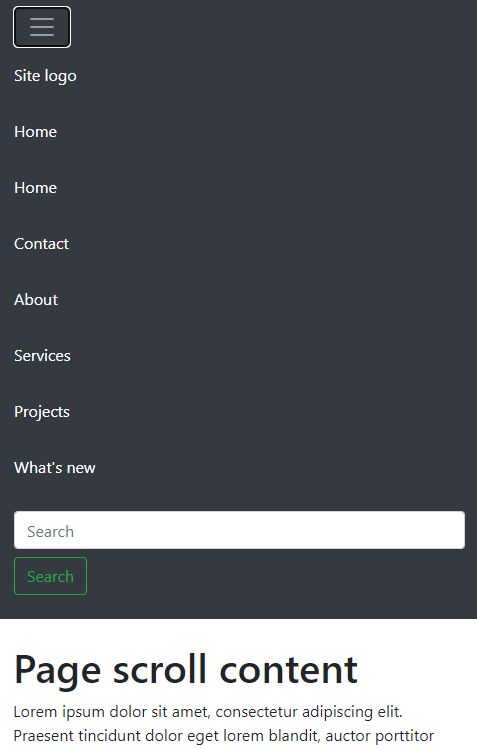
Bootstrap navbar is responsive by default. In a mobile viewport, it displays a slide-down responsive menu. On clicking the menu-expand icon it drops down the menu items.

responsive-navbar.php


<?php
namespace Phppot; use Phppot\DataSource;
require_once __DIR__ . '/DataSource.php';
$conn = new DataSource();
$query = "SELECT * FROM tbl_menu";
$result = $conn->select($query);
?>
<!DOCTYPE html>
<html>
<head>
<meta name="viewport" content="width=device-width, initial-scale=1">
<link href="https://cdn.jsdelivr.net/npm/bootstrap@5.1.3/dist/css/bootstrap.min.css" rel="stylesheet">
<script src="https://cdn.jsdelivr.net/npm/bootstrap@5.1.3/dist/js/bootstrap.bundle.min.js"></script>
</head>
<style>
.container { height: 1000px;
}
</style>
<body> <nav class="navbar navbar-expand-lg sticky-top navbar-dark bg-dark"> <button class="navbar-toggler" type="button" data-toggle="collapse" data-target="#navbarTogglerDemo03" aria-controls="navbarTogglerDemo03" aria-expanded="false" aria-label="Toggle navigation"> <span class="navbar-toggler-icon"></span> </button> <div class="collapse navbar-collapse" id="navbarTogglerDemo03"> <ul class="navbar-nav mr-auto mt-2 mt-lg-0"> <?php foreach ($result as $key => $val){?> <li class="nav-item active"><a class="nav-link" href="#"><?php echo $result[$key]["responsive_name"];?> </li> </a><?php }?> </ul> <form class="form-inline my-2 my-lg-0"> <input class="form-control mr-sm-2" type="search" placeholder="Search" aria-label="Search"> <button class="btn btn-outline-success my-2 my-sm-0" type="submit">Search</button> </form> </div> </nav> <div class="container"> <div class="row"> <div class="col-12 py-4"> <h1>Page scroll content</h1> Dolor sit amet, consectetur adipiscing elit. </div> </div> </div>
</body>
</html> 

Database script

Import this database script to display a dynamic Bootstrap sticky navbar. It contains menu items and the parent-child relationship data.

database.sql


CREATE TABLE `tbl_menu` ( `id` int(11) NOT NULL, `menu_name` text NOT NULL, `parent` varchar(255) NOT NULL
) ENGINE=InnoDB DEFAULT CHARSET=utf8mb4; --
-- Dumping data for table `tbl_menu`
-- INSERT INTO `tbl_menu` (`id`, `menu_name`, `parent`) VALUES
(1, 'Site logo', '0'),
(2, 'Home', '0'),
(3, 'Contact', '0'),
(4, 'About', '0'),
(5, 'Services', '0'),
(8, 'Map integration', '5'),
(9, 'Chart generation', '5'),
(10, 'Report generation', '5'),
(11, 'Projects', '0'),
(12, 'Chat plugin', '11'),
(13, 'Form builder', '11'),
(14, 'What\'s new', '0'); --
-- Indexes for table `tbl_menu`
--
ALTER TABLE `tbl_menu` ADD PRIMARY KEY (`id`); ALTER TABLE `tbl_menu` MODIFY `id` int(11) NOT NULL AUTO_INCREMENT, AUTO_INCREMENT=15; 

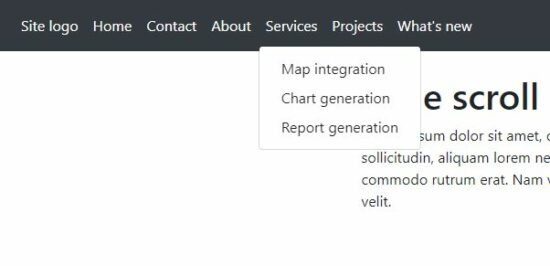
Bootstrap sticky navbar output

bootstrap sticky navbar

responsive sticky navbar
Download

↑ Back to Top

Posted on Leave a comment

HTML Contact Form Template to Email with Custom Fields

by Vincy. Last modified on January 5th, 2022.

Why do we need a contact form on a website? It is to enable (prospective) customers to connect with you.

Elon Musk says, “…maximize the area under the curve of customer happiness…”.

So, increasing the possibilities of reading the customer’s mind will drive us forward to attain the goal. The contact form interface is one of the tools to know our customers.

Let’s design a simple and useful contact form component for your website. The below sections explain how to create a contact form from the scratch.

Uses of a contact form in a website

There are a few more advantages of having a contact form interface.

  1. It helps have conversions by knowing the requirement of the customers.
  2. It helps to know the scope of improvements.
  3. It helps to collect the end users’ ideas and opinions relevant to the business model.

About this example

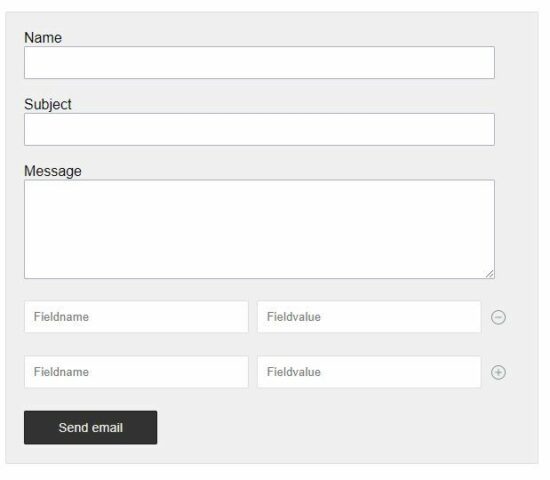
This example code is for designing an HTML contact form with the following features.

  1. Contact form with custom fields.
  2. Add/Delete custom fields dynamically via jQuery.
  3. Send an email with the posted form data.
  4. Storing the form data into the database.

Application configuration

This HTML contact form backend code allows both send an email and the store-to-database action. But, The store-to-database feature is optional and disabled initially.

This configuration file has the flag to enable or disable the store-to-database feature.

By default, the ENABLE_DATABASE flag is set to false. Make it true to show the “store-to-database” control in the UI.

config.php


<?php const ENABLE_DATABASE = false;
?> 

HTML contact form landing page code

This HTML code is to display a contact form on a landing page. The index.php file includes the following to make an HTML contact form dynamic.

  • It contains the form HTML.
  • It includes the application configuration file.
  • It requires the form action PHP file to process data submitted by the user.
  • It includes the form validation javascript and required jQuery dependency.

By connecting all the contact form example components, this file lets the HTML contact form be interactive.

It shows two controls to save to the database or to send an email. By default the save to the database control will be hidden. It is configurable to display this option.

index.php


<?php require_once __DIR__ . '/contact-form-action.php';?>
<?php require_once __DIR__ . '/config.php';?>
<!DOCTYPE html>
<html>
<head>
<link href="style.css" rel="stylesheet" type="text/css" />
<title>HTML Contact Form with Add More Custom Fields</title>
<script src="https://code.jquery.com/jquery-2.1.1.min.js" type="text/javascript"></script>
<script type="text/javascript" src="js/contact.js">
</script>
</head>
<body> <h1>HTML Contact Form with with Add More Custom Fields</h1> <div class="form-container"> <form name="mailForm" id="mailForm" method="post" action="" enctype="multipart/form-data" onsubmit="return validate()"> <div class="input-row"> <label style="padding-top: 20px;">Name</label> <span id="userName-info" class="info"></span><br /> <input type="text" class="input-field" name="userName" id="userName" /> </div> <div class="input-row"> <label>Subject</label> <span id="subject-info" class="info"></span><br /> <input type="text" class="input-field" name="subject" id="subject" /> </div> <div class="input-row"> <label>Message</label> <span id="userMessage-info" class="info"></span><br /> <textarea name="userMessage" id="userMessage" class="input-field" id="userMessage" cols="60" rows="6"></textarea> </div> <div class="input-row"> <div class="custom-field-name"> <input type="text" class="custom-field" name="Fieldname[]" id="Fieldname" placeholder="Fieldname" /> </div> <div class="custom-field-value"> <input type="text" class="custom-field" name="Fieldvalue[]" id="Fieldvalue" placeholder="Fieldvalue" /> </div> <div class="col"> <div class="custom-field-col"> <div onClick="addMore();" class="plus-button" title="Add More"> <img src="./images/icon-add.svg" alt="Add More"> </div> <div onClick="remove();" class="minus-button" title="Remove"> <img src="./images/icon-remove.svg" alt="Remove"> </div> </div> </div> </div> <div class="col"> <input type="submit" name="send" id="send" class="btn-submit" value="Send email" /> <div class="col"> <?php if(ENABLE_DATABASE == true){?> <input type="submit" name="savetodatabase" class=btn-submit id="savetodatabase" value="Save database" /> <?php }?> </div> <div id="pageloader"> <img id="loading-image" src="./images/loader.gif" /> </div> </div> <div id="statusMessage"> <?php if (! empty($message)) { ?> <p class='<?php echo $type; ?>Message'><?php echo $message; ?></p> <?php } ?> </div> </form> </div>
</body>
</html> 

Contact form validation script using jQuery

Form validation can be done either on the server-side or client-side. But, validation on the client-side with Javascript is very usual. And it is quite easy and seamless also.

So, I created a jQuery-based validation script to validate the HTML contact form. It requires all fields to be mandatory except the custom fields.

The contact form custom fields are optional. But, in PHP, it checks the custom field name and value not to be empty. This server-side validation will be done before preparing the contact-form action parameter.

Other JavaScript handlers

This contact.js file does not only include the validation handler. But also, defines handlers to add, delete custom field rows in the UI.

It allows anyone row of custom field inputs to be in the HTML contact form. It is coded in the showHideControls() function of the below file.

contact.js


function validate() { var valid = true; $(".info").html(""); var userName = document.forms["mailForm"]["userName"].value; var subject = document.forms["mailForm"]["subject"].value; var userMessage = document.forms["mailForm"]["userMessage"].value; if (userName == "") { $("#userName-info").html("(required)"); $("#userName").css('background-color', '#FFFFDF'); valid = false; } if (subject == "") { $("#subject-info").html("(required)"); $("#subject").css('background-color', '#FFFFDF'); valid = false; } if (userMessage == "") { $("#userMessage-info").html("(required)"); $("#userMessage").css('background-color', '#FFFFDF'); valid = false; } handleLoader(valid); return valid;
}
function handleLoader(valid) { if (valid == true) { if ($("#savetodatabase")) { $("#savetodatabase").hide();// hide submit } $("#send").hide(); $("#loading-image").show();// show loader }
}
function addMore() { $(".input-row:last").clone().insertAfter(".input-row:last"); $(".input-row:last").find("input").val(""); showHideControls();
}
function remove() { $(".input-row:last").remove(".input-row:last"); $(".plus-button:last").show(); $(".minus-button:last").hide(); $(".input-row:last").find("input").val("");
}
function showHideControls() { $(".plus-button").hide(); $(".minus-button").show(); $(".minus-button:last").hide(); $(".plus-button:last").show();
} 

PHP contact form action to send email or store to Database

Generally, the contact form action will send an email with the body of posted form data. This example gives additional support to store the posted message and the details in the database.

This will be suitable when the HTML contact form is used to collect the following.

  • Users’ feedback
  • Support request
  • Project inquiry
  • Comments

This PHP code handles the form submission by checking the posted action index. It uses the PHP mail() function to send the HTML contact form email. If you want to send an email via SMTP using the PHPMailer library, the link has the code for it.

Refer PHP.net manual to know more about this mail() function.

If the user clicks the ‘Save to database’ button, it connects the Database via the DataSource class. It triggers insert action by sending the form data in the query parameters.

contact-form-action.php


<?php
namespace Phppot; use Phppot\DataSource;
require_once __DIR__ . '/DataSource.php';
require_once __DIR__ . '/index.php';
if (! empty($_POST["savetodatabase"])) { $conn = new DataSource(); $query = "INSERT INTO tbl_contact_mail(userName,subject,userMessage)VALUES(?,?,?)"; $paramType = 'sss'; $paramValue = array( $_POST["userName"], $_POST["subject"], $_POST["userMessage"] ); $id = $conn->insert($query, $paramType, $paramValue); if (! empty($_POST["Fieldname"])) { $customFieldLength = count($_POST["Fieldname"]); for ($i = 0; $i < $customFieldLength; $i ++) { if (! empty($_POST["Fieldname"][$i]) && $_POST["Fieldvalue"][$i]) { $query = "INSERT INTO tbl_custom_field(fieldName,fieldValue,contact_id)VALUES(?,?,?)"; $paramType = 'ssi'; $paramValue = array( $_POST["Fieldname"][$i], $_POST["Fieldvalue"][$i], $id ); $conn->insert($query, $paramType, $paramValue); } } } if ($query==true) { $message = "Data Saved"; $type = "success"; } else { $message = "Problem in data"; $type = "error"; }
} elseif (! empty($_POST["send"])) { if (isset($_POST["userName"])) { $userName = $_POST["userName"]; } if (isset($_POST["subject"])) { $subject = $_POST["subject"]; } if (isset($_POST["userMessage"])) { $message = $_POST["userMessage"]; } $htmlBody = '<div>' . $message . '</div>'; $htmlBody .= '<br>'; $htmlBody .= '<div style=font-weight:bold;>More details:' . '</div>'; for ($i = 0; $i < count($_POST["Fieldname"]); $i ++) { if (isset($_POST["Fieldname"][$i]) && (isset($_POST["Fieldvalue"][$i]))) { $fieldname = $_POST["Fieldname"][$i]; $fieldvalue = $_POST["Fieldvalue"][$i]; $htmlBody .= '<div>' . $fieldname . '<div style=display:inline-block;margin-left:10px;>' . $fieldvalue . '</div>'; } } $htmlBody .= '<br><br><br>'; $htmlBody .= '<div>Thank You...!' . '</div>'; // Run loop
$recipient="recipient@domain.com"; if (mail($recipient, $subject, $htmlBody)) { $message = "Mail sent successfully"; $type = "success"; } else { $message = "Problem in sending email"; $type = "error"; }
} ?>

Database script

This .sql file contains the create a statement and required indices of the tbl_contact table.

Import this SQL after setting up this example code in your PHP environment.

Note: This is only required if you need the “Store to database” option.

database.sql


-- -------------------------------------------------------- --
-- Table structure for table `tbl_contact`
-- CREATE TABLE `tbl_contact` ( `id` int(11) NOT NULL, `userName` varchar(255) NOT NULL, `subject` varchar(255) NOT NULL, `userMessage` text NOT NULL
) ENGINE=InnoDB DEFAULT CHARSET=utf8mb4; -- -------------------------------------------------------- --
-- Table structure for table `tbl_custom_field`
-- CREATE TABLE `tbl_custom_field` ( `id` int(11) NOT NULL, `contact_id` int(11) NOT NULL, `fieldName` varchar(11) NOT NULL, `fieldValue` varchar(11) NOT NULL
) ENGINE=InnoDB DEFAULT CHARSET=utf8mb4; --
-- Indexes for dumped tables
-- --
-- Indexes for table `tbl_contact`
--
ALTER TABLE `tbl_contact` ADD PRIMARY KEY (`id`); --
-- Indexes for table `tbl_custom_field`
--
ALTER TABLE `tbl_custom_field` ADD PRIMARY KEY (`id`); --
-- AUTO_INCREMENT for dumped tables
-- --
-- AUTO_INCREMENT for table `tbl_contact`
--
ALTER TABLE `tbl_contact` MODIFY `id` int(11) NOT NULL AUTO_INCREMENT; --
-- AUTO_INCREMENT for table `tbl_custom_field`
--
ALTER TABLE `tbl_custom_field` MODIFY `id` int(11) NOT NULL AUTO_INCREMENT; 

html contact form custom field

Conclusion

I hope this article gives you a useful contact form component for your website. It will be helpful to have a good idea to create a form like this on your own.

Custom field integration with contact forms a rare and tricky requirement. Share your thoughts in the comments section to continue posting useful codes.

Download

↑ Back to Top

Posted on Leave a comment

Stripe Apple Pay Web Integration with Example

by Vincy. Last modified on December 7th, 2021.

Integrating Stripe Apple pay into a web application is easy. It requires a few steps to achieve this integration. This article shows how to enable Apple or Google pay option using Stripe.

We can divide this article into 2 sections. It narrates the action items, prerequisites, and codes for the payment integration.

  1. Preparing your web environment to display the payment request option.
  2. Building PHP example for  Stripe Apple Pay integration.

If you are new to the Stripe payment integration, check with the linked article. It explains how to get the Stripe API app credentials and other basic knowledge.

About Stripe Payment Request Button Element

This payment method collects details from customers using Stripe Apple Pay dialog. We have already seen how to collect recurring payments using Stripe subscriptions.

Stripe’s Payment Request Button method mounts a UI control to allow payment. This is a single point of integration for Apple Pay, Google Pay, and Microsoft Pay.

By ticking up the list of prerequisites in the documentation, we can see any one of the below buttons in the UI.
stripe apple pay

1. Preparing your web environment to display the payment request option

This section will tell the steps to display the Stripe apple pay. In Chrome or Microsoft edge, this will show other payment request buttons in a web interface.

  1. Ensure that the domain is HTTPS enabled.
  2. Let the domain pass through the Apple pay’s verification process.
  3. Save cards or other payment methods to the browser. The specifications vary based on the payment methods and browsers.

How to verify a domain with Apple Pay?

Follow the below steps to display the Stripe Apple pay button in your interface.

  1. Download and put the domain association file in the following path of your web root. /.well-known/apple-developer-merchantid-domain-association.
  2. Request to create a Stripe Apple Pay domain. This can be done in any one of the below methods.
    • By navigating to the Stripe Apple Pay tab in the Account Settings of your Dashboard.
    • By using the API with your live secret key.
  3. Use API keys to make payments via the website registered with Apple Pay Stripe.

Note: Need not create Apple merchant id or generate certificate signing request (CSR). Stripe will take care of these in the back end.

API request to create Stripe Apple Pay domain

The following PHP script shows how to create a Stripe API.


\Stripe\Stripe::setApiKey("STRIPE SECRET KEY HERE"); \Stripe\ApplePayDomain::create([ 'domain_name' => 'example.com',
]);

2. Building PHP example for  Stripe Apple pay integration

These are the steps to integrate Stripe Apple pay in a PHP web application. Some of the below are similar as we have seen in the Stripe payment gateway integration example.

  1. Download the Stripe API client.
  2. Configure Stripe API keys and tokens.
  3. Verify the payment request and mount the Stripe Apple pay button.
  4. Request and Confirm payment.
  5. Handle shipping/delivery address change events.
  6. Creating PHP endpoints to prepare and initiate Stripe API requests.

Download the Stripe client

Download PHP stripe API client and add up in the application dependency. This will be helpful to create AppleDomain and PaymentIntent objects via API.

It is available on Github. You can install this via composer also. The command to install the Stripe-PHP library is,


composer require stripe/stripe-php

Configure Stripe API keys and tokens

This is the web application config file. It includes the keys used to access the payment request API for Stripe Apple pay integration.

It also contains the web application root and the payment or order endpoint URLs. It defines Product details and shipping amount to build the payment request.

Common/config.php


<?php
namespace Phppot; class Config
{ const ROOT_PATH = "http://localhost/stripe-apple-pay"; /* Stripe API test keys */ const STRIPE_PUBLISHIABLE_KEY = ""; const STRIPE_SECRET_KEY = ""; const STRIPE_WEBHOOK_SECRET = ""; const RETURN_URL = Config::ROOT_PATH . "/success.php"; /* PRODUCT CONFIGURATIONS BEGINS */ const PRODUCT_NAME = 'A6900 MirrorLess Camera'; const PRODUCT_IMAGE = Config::ROOT_PATH . '/images/camera.jpg'; const PRODUCT_PRICE = '289.61'; const CURRENCY = 'usd'; const US_SHIPPING = 7; const UK_SHIPPING = 12;
} 

Verify the payment request and mount Stripe Apple pay button

The index.php is a landing page that contains the product tile. It has the container to mount the Stripe Apple pay button.

The HTML elements have the data attributes to have the payment configurations.

In imports the Stripe.js library and the payment.js file created for this example.

index.php


<?php
namespace Phppot; require_once __DIR__ . '/Common/Config.php';
?>
<html>
<title>Stripe Apple Pay integration</title>
<head>
<link href="assets/css/style.css" type="text/css" rel="stylesheet" />
</head>
<body> <div class="phppot-container"> <h1>Stripe Apple Pay integration</h1> <div id="payment-box" data-pk="<?php echo Config::STRIPE_PUBLISHIABLE_KEY; ?>" data-return-url="<?php echo Config::RETURN_URL; ?>"> <input type="hidden" id="unit-price" value="<?php echo Config::PRODUCT_PRICE; ?>" /> <input type="hidden" id="product-label" value="<?php echo Config::PRODUCT_NAME; ?>" /> <input type="hidden" id="currency" value="<?php echo Config::CURRENCY; ?>" /> <input type="hidden" id="shipping-amount" value="<?php echo Config::US_SHIPPING; ?>" /> <img src="<?php echo Config::PRODUCT_IMAGE; ?>" /> <h4 class="txt-title"><?php echo Config::PRODUCT_NAME; ?></h4> <div class="txt-price">$<?php echo Config::PRODUCT_PRICE; ?></div> </div> <!-- Element target to render Stripe apple pay button --> <div id="payment-request-button"> <!-- A Stripe Element will be inserted here. --> </div> </div> <script src="https://js.stripe.com/v3/"></script> <script src="assets/js/payment.js"></script>
</body>
</html>

This is a partial code of the payment.js file. It shows the script required for rendering the Stripe Apple pay button into the UI. It builds the Stripe payment request object by using the following details.

  • Customer details: name, email, address.
  • Amount
  • Currency
  • Shipping details: amount, description.

The data for these details are from the config file. The payment form HTML contains hidden fields and data attributes to hold the config. This script uses the data attributes and hidden data to prepare the request.

After preparing the request body, it calls canMakePayment() to verify the paymentRequest object. Once verified, then it will render the Apple pay button in the UI.

assets/js/payment.js


var publishableKey = document.querySelector('#payment-box').dataset.pk;
var returnURL = document.querySelector('#payment-box').dataset.returnUrl;
var unitPrice = document.querySelector('#unit-price').value;
unitPrice = Math.round((unitPrice * 100));
var productLabel = document.querySelector('#product-label').value;
var currency = document.querySelector('#currency').value;
var shippingAmount = document.querySelector('#shipping-amount').value;
shippingAmount = Math.round((shippingAmount * 100)); var stripe = Stripe(publishableKey, { apiVersion: "2020-08-27",
});
var paymentRequest = stripe.paymentRequest({ country: 'US', currency: currency, total: { label: productLabel, amount: unitPrice, }, requestPayerName: true, requestPayerEmail: true, requestShipping: true, shippingOptions: [ { id: 'Default Shipping', label: 'Default Shipping', detail: '', amount: shippingAmount, }, ],
}); var elements = stripe.elements();
var prButton = elements.create('paymentRequestButton', { paymentRequest: paymentRequest,
}); // Verify payment parameters with the the Payment Request API.
paymentRequest.canMakePayment().then(function(result) { if (result) { prButton.mount('#payment-request-button'); } else { document.getElementById('payment-request-button').style.display = 'none'; }
});

Request and Confirm payment

This section contains the rest of the payment.js code. It creates paymentIntent object by clicking the ‘pay’ button on the payment overlay.

Once paymentIntent is created, the endpoint returns the client-secret-key. Then, the script calls stripe.confirmCardPayment with the reference of the client-secret-key.

assets/js/payment.js


paymentRequest.on('paymentmethod', function(ev) { //Create Stripe payment intent var requestParam = { email: ev.payerEmail, unitPrice: unitPrice, currency: currency, name: ev.payerName, address: ev.shippingAddress.addressLine[0], country: ev.shippingAddress.country, postalCode: ev.shippingAddress.postalCode, shippingPrice: ev.shippingOption.amount, }; var createOrderUrl = "ajax-endpoint/create-stripe-order.php"; fetch(createOrderUrl, { method: "POST", headers: { "Content-Type": "application/json" }, body: JSON.stringify(requestParam) }).then(function(result) { return result.json(); }).then(function(data) { // Script to confirm payment stripe.confirmCardPayment( data.clientSecret, { payment_method: ev.paymentMethod.id }, { handleActions: false } ).then(function(confirmResult) { if (confirmResult.error) { // Report to the browser that the payment failed, prompting it to // re-show the payment interface, or show an error message and close // the payment interface. ev.complete('fail'); } else { // Report to the browser that the confirmation was successful, prompting // it to close the browser payment method collection interface. ev.complete('success'); // Check if the PaymentIntent requires any actions and if so let Stripe.js // handle the flow. If using an API version older than "2019-02-11" instead // instead check for: `paymentIntent.status === "requires_source_action"`. if (confirmResult.paymentIntent.status === "requires_action") { // Let Stripe.js handle the rest of the payment flow. stripe.confirmCardPayment(clientSecret).then(function(result) { if (result.error) { // The payment failed -- ask your customer for a new payment method. } else { // The payment has succeeded. window.location.replace(returnURL + "?orderno=" + data.orderHash); } }); } else { // The payment has succeeded. window.location.replace(returnURL + "?orderno=" + data.orderHash); } } }); });
});

Handle shipping/delivery address change events

This section deals with the shipping options on-change events. This code is applicable only if the payment object is enabled with shipping options.

It hits the PHP endpoint via AJAX and gets the JSON to change the shipping options. It passes the selected shipping address to the PHP.

assets/js/payment.js


paymentRequest.on('shippingaddresschange', function(ev) { // Perform server-side request to fetch shipping options fetch('ajax-endpoint/calculate-product-shipping.php', { method: "POST", headers: { "Content-Type": "application/json" }, body: JSON.stringify({ adress: ev.shippingAddress }) }).then(function(response) { return response.json(); }).then(function(result) { ev.updateWith({ status: 'success', shippingOptions: result.shippingOptions, }); });
});

This is the PHP endpoint file that reads the shipping data sent via AJAX. It parses the shipping data and gets the country from it.

It uses an appropriate shipping amount from the config based on the country. You can include your additional shipping calculation here if needed.

It returns a JSON response with the shipping address and corresponding amount.

ajax-endpoint/calculate-product-shipping.php


<?php
require_once __DIR__ . '/../Common/Config.php'; $content = trim(file_get_contents("php://input")); $jsondecoded = json_decode($content, true);
$country = filter_var($jsondecoded["adress"]["country"], FILTER_SANITIZE_STRING);
if ($country == 'UK') { $shippingAmount = Config::UK_SHIPPING;
} else { $shippingAmount = Config::US_SHIPPING;
} $shippingOptions = array( "shippingOptions" => array( array( "id" => 'Edited shipping', 'label' => "Shipping Costs based on Country", 'detail' => $detail, 'amount' => $shippingAmount ) )
); echo json_encode($shippingOptions);
exit(); ?>

Creating PHP endpoints to prepare and initiate Stripe API requests

The below PHP files contains the server-side code that hits API. It reads the request body and creates a payment object on sending the Stripe apple pay request.

The StripeService.php file sets the API secret key to the Stripe object. It contains a function captureResponse() function that updates orders and payment entity.

Stripe calls the webhook endpoint as configured in the config.php. This endpoint reads Stripe response. Then, it invokes the captureResponse() function to update the database.

PHP AJAX endpoint to create order

ajax-endpoint/create-stripe-order.php


<?php
namespace Phppot; use Phppot\StripeService;
use Phppot\StripePayment;
require_once __DIR__ . '/../Common/Config.php'; $content = trim(file_get_contents("php://input")); $jsondecoded = json_decode($content, true); if (! empty($jsondecoded)) { require_once __DIR__ . "/../lib/StripeService.php"; $stripeService = new StripeService(); $email = filter_var($jsondecoded["email"], FILTER_SANITIZE_EMAIL); $name = filter_var($jsondecoded["name"], FILTER_SANITIZE_STRING); $address = filter_var($jsondecoded["address"], FILTER_SANITIZE_STRING); $country = filter_var($jsondecoded["country"], FILTER_SANITIZE_STRING); $postalCode = filter_var($jsondecoded["postalCode"], FILTER_SANITIZE_STRING); $notes = 'Stripe Apple Pay Payment'; $currency = filter_var($jsondecoded["currency"], FILTER_SANITIZE_STRING); $orderReferenceId = $stripeService->getToken(); $unitPrice = ($jsondecoded["unitPrice"] + $jsondecoded["shippingPrice"]); $orderStatus = "Pending"; $paymentType = "stripe"; $customerDetailsArray = array( "email" => $email, "name" => $name, "address" => $address, "country" => $country, "postalCode" => $postalCode ); $metaData = array( "email" => $email, "order_id" => $orderReferenceId ); require_once __DIR__ . '/../lib/StripePayment.php'; $stripePayment = new StripePayment(); $orderId = $stripePayment->insertOrder($orderReferenceId, $unitPrice, $currency, $orderStatus, $name, $email); $result = $stripeService->createPaymentIntent($orderReferenceId, $unitPrice, $currency, $email, $customerDetailsArray, $notes, $metaData); if (! empty($result) && $result["status"] == "error") { http_response_code(500); } $response = json_encode($result["response"]); echo $response; exit();
}

Stripe apple pay webhook endpoint

webhook-ep/capture-response.php


<?php
namespace Phppot; use Phppot\StriService; require_once __DIR__ . "/../lib/StripeService.php"; $stripeService = new StripeService(); $stripeService->captureResponse(); ?>

Stripe Service with request-response handlers

lib/StripeService.php


<?php
namespace Phppot; use Phppot\StripePayment;
use Stripe\Stripe;
use Stripe\WebhookEndpoint;
require_once __DIR__ . '/../vendor/autoload.php'; class StripeService
{ private $apiKey; private $webhookSecret; private $stripeService; function __construct() { require_once __DIR__ . '/../Common/Config.php'; $this->apiKey = Config::STRIPE_SECRET_KEY; $this->webhookSecret = Config::STRIPE_WEBHOOK_SECRET; $this->stripeService = new Stripe(); $this->stripeService->setVerifySslCerts(false); } public function createPaymentIntent($orderReferenceId, $amount, $currency, $email, $customerDetailsArray, $notes, $metaData) { try { $this->stripeService->setApiKey($this->apiKey); $paymentIntent = \Stripe\PaymentIntent::create([ 'description' => $notes, 'shipping' => [ 'name' => $customerDetailsArray["name"], 'address' => [ 'line1' => $customerDetailsArray["address"], 'postal_code' => $customerDetailsArray["postalCode"], 'country' => $customerDetailsArray["country"] ] ], 'amount' => $amount, 'currency' => $currency, 'payment_method_types' => [ 'card' ], 'metadata' => $metaData ]); $output = array( "status" => "success", "response" => array( 'orderHash' => $orderReferenceId, 'clientSecret' => $paymentIntent->client_secret ) ); } catch (\Error $e) { $output = array( "status" => "error", "response" => $e->getMessage() ); } return $output; } public function captureResponse() { $payload = @file_get_contents('php://input'); $sig_header = $_SERVER['HTTP_STRIPE_SIGNATURE']; $event = null; try { $event = \Stripe\Webhook::constructEvent($payload, $sig_header, $this->webhookSecret); } catch (\UnexpectedValueException $e) { // Invalid payload http_response_code(400); exit(); } catch (\Stripe\Exception\SignatureVerificationException $e) { // Invalid signature http_response_code(400); exit(); } if (! empty($event)) { $eventType = $event->type; $orderReferenceId = $event->data->object->metadata->order_id; $paymentIntentId = $event->data->object->id; $amount = $event->data->object->amount; require_once __DIR__ . '/../lib/StripePayment.php'; $stripePayment = new StripePayment(); if ($eventType == "payment_intent.payment_failed") { $orderStatus = 'Payement Failure'; $paymentStatus = 'Unpaid'; $amount = $amount / 100; $stripePayment->updateOrder($paymentIntentId, $orderReferenceId, $orderStatus, $paymentStatus); $stripePayment->insertPaymentLog($orderReferenceId, $payload); } if ($eventType == "payment_intent.succeeded") { /* * Json values assign to php variables * */ $orderStatus = 'Completed'; $paymentStatus = 'Paid'; $amount = $amount / 100; $stripePayment->updateOrder($paymentIntentId, $orderReferenceId, $orderStatus, $paymentStatus); $stripePayment->insertPaymentLog($orderReferenceId, $payload); http_response_code(200); } } }
}

Updating orders and payments in database

lib/StripePayment.php


<?php
namespace Phppot; use Phppot\DataSource; class StripePayment
{ private $ds; function __construct() { require_once __DIR__ . "/../lib/DataSource.php"; $this->ds = new DataSource(); } public function insertOrder($orderReferenceId, $unitAmount, $currency, $orderStatus, $name, $email) { $orderAt = date("Y-m-d H:i:s"); $insertQuery = "INSERT INTO tbl_order(order_reference_id, amount, currency, order_at, order_status, billing_name, billing_email) VALUES (?, ?, ?, ?, ?, ?, ?, ?) "; $paramValue = array( $orderReferenceId, $unitAmount, $currency, $orderAt, $orderStatus, $name, $email ); $paramType = "sdssssss"; $insertId = $this->ds->insert($insertQuery, $paramType, $paramValue); return $insertId; } public function updateOrder($paymentIntentId, $orderReferenceId, $orderStatus, $paymentStatus) { $query = "UPDATE tbl_order SET stripe_payment_intent_id = ?, order_status = ?, payment_status = ? WHERE order_reference_id = ?"; $paramValue = array( $paymentIntentId, $orderStatus, $paymentStatus, $orderReferenceId ); $paramType = "ssss"; $this->ds->execute($query, $paramType, $paramValue); } public function insertPaymentLog($orderReferenceId, $response) { $insertQuery = "INSERT INTO tbl_stripe_payment_log(order_id, stripe_payment_response) VALUES (?, ?) "; $paramValue = array( $orderReferenceId, $response ); $paramType = "ss"; $this->ds->insert($insertQuery, $paramType, $paramValue); }
}
?>

Stripe Apple Pay Output

The below screenshot shows the product tile with the Stripe Apple pay button. The details are dynamic from the web application config.

stripe apple pay integration

By clicking the Stripe Apple pay button in the above tile, the following payment dialog will pop up. It will have the option to proceed with payment by using the Apple touch id.
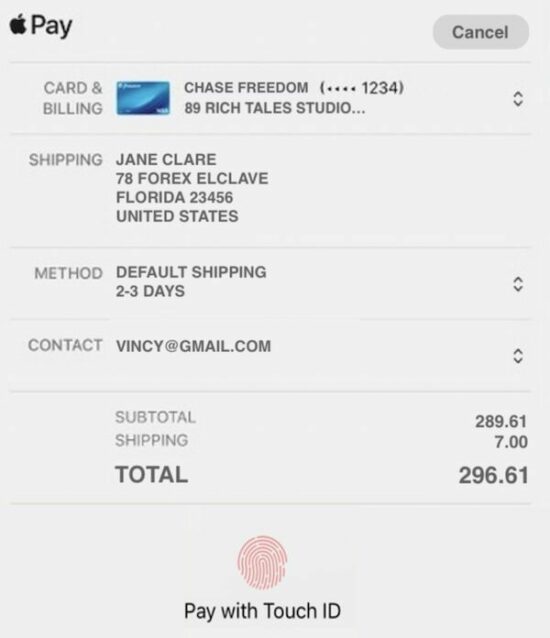
stripe apple pay form

Conclusion

Thus, we have integrated Stripe Apple pay in a web application using PHP. We used the Stripe Payment Request Button to display the Apple pay option in the UI.

We have seen the pre-requisites and configuration steps needed for this integration. I hope, the example code helps to understand the steps easily.
Download

↑ Back to Top

Posted on Leave a comment

How to use includes in JavaScript Array, String

by Vincy. Last modified on November 21st, 2021.

Coding in JavaScript is one of the critical skills required in building websites. Though mastering JavaScript is a journey to the center of the earth, continuous learning will help you make it.

We have seen some of the JavaScript functions like find(), forEach() earlier. Now, let’s learn about the function includes() in JavaScript.

Quick example


<script>
inputArray = ['Create', 'Read', 'Update', 'Delete', 'Filter'];
inputArray.includes('Read'); //returns true
inputArray.includes('Read','3'); //returns false
inputArray.includes('Error'); //returns false
inputArray.includes('Delete','-1'); //returns false inputString = 'How to learn JavaScript?';
inputString.includes('learn'); //returns true
inputString.includes('learn','8'); //returns false
</script> 

About JavaScript includes

It checks if an array or string includes a given value.

In an array context, it checks the given value is one among the array elements. In the string prototype, the includes() in JavaScript checks if the given value is the substring.

Syntax, parameters and return value


includes(searchElement, [fromIndex]); 

It has two parameters, searchElement and fromIndex. The fromIndex is optional and its default value is 0 to start with.

The fromIndex accepts signed numbers. With a negative value, it applies this formula to compute the position to start.

fromIndex = arrayLength + signedFromIndex

It returns boolean true if any match is found or false otherwise.

Note:

  • JavaScript includes() searches array or string with case sensitivity.
  • It can also be called as a generic method.
  • It works in most modern browsers.
  • The negative value is not applicable for the includes() in the String prototype.
  • The Array.prototype.includes() will not search for a sub-array.

include in javascript

Where to use JavaScript includes

The includes in JavaScript can be used for many scenarios. Some of them are listed below.

  1. To form a conditional code block based on the presence of the search element in an array or string.
  2. To highlight the keyword in the search result, if the includes in JavaScript returns true.
  3. To make the select, checkbox, radio options selected if the options found in the haystack.

Visit the linked article to know the other array prototype methods in JavaScript.

Examples for using includes in JavaScript

This article includes 4 examples to see how to use JavaScript includes(). Those are,

  1. To search array if a specified element exists or not.
  2. To use includes with a positive or negative fromIndex parameter.
  3. To use String.prototype.includes.
  4. To invoke includes() as a generic method.

Search array element using Includes in JavaScript

This example contains an array of 4 strings. It defines a custom function checkOption() to form a condition using includes().

This function receives a string and applies array.includes() on it. It returns Boolean true if the passed element is found on the array.

It prepares the output string based on the boolean value returned. It writes the log on the console to see the result of the program.

how-to-use-includes-in-javascript-array.php


<script> var optionArray = [ 'Create', 'Read', 'Update', 'Delete' ]; checkOption('Read'); checkOption('Filter'); function checkOption(keyword) { var isIncludes = optionArray.includes(keyword); if(!isIncludes) { console.log(keyword + ": not exists"); } else { console.log(keyword + ": exists"); } }
</script> 

Includes function with optional from-index parameter

It uses the optional fromIndex parameter while calling the includes() in JavaScript.

It supplies either positive or negative values in the second parameter. On getting a negative index, it computes the position from where it should start the search.

As passed -1 the computed position is 5, since arrayLength+negativeIndex = 6+(-1) = 5.

From the 5th position, it searches for ‘Pagination’ and returns true. When it searches for ‘Filter’ then it will return false.

javascript-includes-with-from-index.php


<script>
var optionArray = [ 'Create', 'Read', 'Update', 'Delete', 'Filter', 'Pagination' ]; console.log(optionArray.includes('Update', 2));
console.log(optionArray.includes('Update', 3));
console.log(optionArray.includes('Pagination', -1));
console.log(optionArray.includes('Filter',-1));
</script> 

JavaScript string includes

It’s for using String.prototype.includes() in Javascript. It assigns a long string to a variable and searches the passed keyword on it.

It also receives fromIndex position. A negative index will create no change. This program uses the fromIndex default value 0 and searches the string end to end.

check-string-includes-substring.php


<script>
var inputString = "How much wood would a woodchuck chuck if a woodchuck could chuck wood?";
var result = inputString.includes("woodchuck");
console.log(result);
</script> 

Invoke includes in JavaScript on array-like objects

JavaScript allows calling the includes() function as a generic method. In the above examples, the includes() is called with respect to this value representing an array or string context.

This example calls the includes in JavaScript on a functions’ argument list instead of an array.

how-to-call-includes-as-generic.php


<script>
(function() { console.log(Array.prototype.includes.call(arguments, 'Read', 1)); console.log(Array.prototype.includes.call(arguments, 'Read', -1));
})('Create', 'Read', 'Update', 'Delete') </script> 

Similar JavaScript methods like includes

There are more functions in JavaScript as like as the includes(). The below list shows some of those functions.

  • find() – applies condition on an array and returns the first element satisfying the condition.
  • findIndex() – as like as find() but returns index instead of the value.
  • indexOf() – returns index by element value.
  • lastIndexOf() – returns last index of an input element. It makes difference if the there are multiple occurances of the passed element.

Conclusion

We have seen about the includes in JavaScript end to end. The above article contains the basic idea about this function. It covers a beginner’s level introductory section and the usage mechanisms.

The examples will make it clear how to use includes in JavaScript. I hope the scenarios to use and the list of related functions gives relevancy to get the idea.

Download

↑ Back to Top
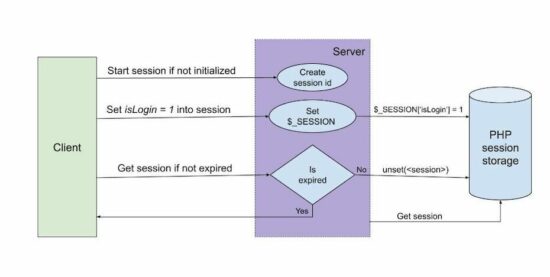
Posted on Leave a comment

PHP session time set unset and check existence

by Vincy. Last modified on November 21st, 2021.

PHP session is one of the methods for keeping data persistency on the server side.

PHP sessions have a deadline time limit for keeping data persistent. PHP configuration file includes directives to have this specification.

We can also create custom code to change the default PHP session deadline.

This article contains sections that describe the PHP sessions, their time-limit configurations. It provides examples for setting session limits and tracking existence.

The below example gives a quick solution to set PHP session time. It contains only two steps to set and track the session expiration status.

Quick example

1. Create a file set-session.php and set value and lifetime.


<?php
session_start();
//Set PHP session with value, time
$currentTime = time();
$_SESSION['color'] = array( "value" => "blue", "time" => $currentTime, "life_time" => 5
);
?>

2. Create a file check-session.php to compute if the session existence.


<?php
session_start();
if (isset($_SESSION['color'])) { $sessionSetTime = $_SESSION['color']['time']; $sessionLifeTime = $_SESSION['color']['life_time']; if ((time() - $sessionSetTime) > $sessionLifeTime) { unset($_SESSION['color']); print 'Session expired'; }
}
?>

About PHP session

We have already seen PHP sessions and cookies in a previous article. PHP sessions are for managing application data, state persistent during the working flow.

There are a lot of uses of sessions in an application. The below list shows some of the states or data managed by the use of sessions.

We have seen how to create a login script using the PHP session. In that, the session lifetime tracking can be used to log out after few minutes of inactivity.

php session

PHP session lifetime settings

This section describes the configuration directives used to set PHP session time. The below table shows two PHP.ini settings related to the session.

PHP directive Description
session.gc_maxlifetime It sets the max lifetime after which the session will be elapsed and collected as garbage.
session.cookie_lifetime It sets the time limit for the session cookie in seconds. Default is 0 which means to be persistent until the client quits. Note: PHP session_set_cookie_params() sets all the session cookie parameters in runtime.

The below PHP info highlights the session configuration settings. Refer to more runtime session configuration directives in the linked official site.

php session settings

Example: Working with PHP session time – Set expiration and limit lifetime

This PHP session time handling example is the enhanced version of the above quick example.

It creates three session variables to set color, shape and size. It sets the lifetime for each PHP session variable while setting values.

The PHP code checks if the session exists. Once the time is reached, it unset that particular session variable and destroys it.

php session time files

Landing page to set session

The landing page of this example shows a control to set the PHP session time. Once started, the session expiration status is checked at a periodic interval. This page includes the AJAX script to raise the call to PHP to check the session.

If the PHP session time is over, then this page will display a notice to the user. After all the sessions are expired, then the page will clear the notification and ask to reset the session.

index.php


<html>
<head>
<link href="./assets/css/style.css" rel="stylesheet" type="text/css" />
</head>
<body> <div class="session" data-status='<?php if(!empty($_GET["status"])) { echo $_GET["status"]; } ?>'> <div id="box"> <h1 align="center">Set PHP session time</h1> <div class="text"> <a href="set-session.php" class="btn">Reset Session</a> </div> <div id="status"></div> </div> <div id="message"></div> </div> <script src="https://code.jquery.com/jquery-3.6.0.min.js"></script> <script src="./assets/js/session.js"></script>
</body>
</html> 

Check PHP session time via JavaScript AJAX

This script sets an interval to call the AJAX script to check the PHP session time. After getting the response, this AJAX success block shows the expired PHP sessions.

It checks the PHP session time every 5 seconds via AJAX. This script uses JavaScript setInterval() to invoke the checkSession() method.

session.js


if($('.session').data('status') != "") { var interval; interval=setInterval(checkSession, 5000); $("#status").text("Checking session expiration status...");
}
function checkSession(){ $.ajax({ url:"check-session.php", method:"POST", success:function(response){ if(response!=""){ if(response == -1){ $("#status").hide(); clearInterval(interval); window.location.href='index.php'; } else{ $("#message").append(response); } } } });
};

Set unset PHP session time

In this section, it shows two PHP files to set and unset the PHP session time.

The set-session.php is called on clicking the UI control on the landing page. It sets the color, shape and size in the PHP session.

Each session array is a multi-dimensional associative array. It has the details of PHP session set time, lifetime and value.

The session set-time and lifetime are used to calculate the session expiry.

set-session.php


<?php
if (! isset($_SESSION)) { session_start();
}
$currentTime = time();
$_SESSION['color'] = array( "value" => "blue", "time" => $currentTime, "lifetime" => 3
);
$_SESSION['shape'] = array( "value" => "circle", "time" => $currentTime, "lifetime" => 5
);
$_SESSION['size'] = array( "value" => "big", "time" => $currentTime, "lifetime" => 10
);
header("Location: index.php?status=starts");
exit();
?> 

This code returns the response text once the session is expired.

It validates the session expiry by comparing the remaining time and the PHP session lifetime.

Once all three sessions are expired, then this code returns -1. On receiving -1, the AJAX callback stops tracking by clearing the interval.

check-session.php


<?php
if (! isset($_SESSION)) { session_start();
} if (! isset($_SESSION['color']) && (! isset($_SESSION['shape'])) && (! isset($_SESSION['size']))) { print - 1;
}
if (isset($_SESSION['color'])) { $sessionTimeColor = $_SESSION['color']['time']; $sessionLifeTimeColor = $_SESSION['color']['lifetime']; if ((time() - $sessionTimeColor) > $sessionLifeTimeColor) { unset($_SESSION['color']); print '<div class="response-text"><span>Color Session Expired</span></div>'; } } if (isset($_SESSION['shape'])) { $sessionTimeShape = $_SESSION['shape']['time']; $sessionLifeTimeShape = $_SESSION['shape']['lifetime']; if ((time() - $sessionTimeShape) > $sessionLifeTimeShape) { unset($_SESSION['shape']); print '<div class="response-text"><span>Shape Session Expired</span></div>'; } } if (isset($_SESSION['size'])) { $sessionTimeSize = $_SESSION['size']['time']; $sessionLifeTimeSize = $_SESSION['size']['lifetime']; if ((time() - $sessionTimeSize) > $sessionLifeTimeSize) { unset($_SESSION['size']); print '<div class="response-text"><span>Size Session Expired</span></div>'; }
}
exit();
?> 

Conclusion

Thus we have learned how to set PHP session time via programming. This article described the PHP configurations to set max session lifetime.

I hope this example helped to create your own code to manage PHP sessions and time.
Download

↑ Back to Top
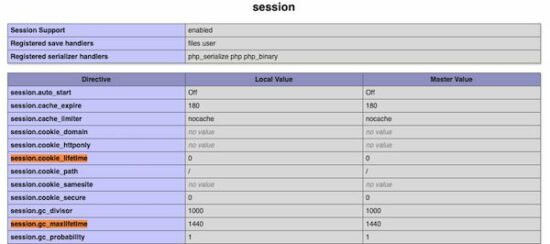
Posted on Leave a comment

Sendmail in PHP using mail(), SMTP with Phpmailer

by Vincy. Last modified on October 10th, 2021.

Sendmail in PHP is possible with just single line of code. PHP contains built-in mail functions to send mail.

There are reasons why I am feeling embraced with this PHP feature. Because I write lot of code for sending mails regularly. PHP really saves our time with its built-ins.

Quick Example


<?php
mail('recipient@domain.com', 'Mail Subject', 'Mail test content'); ?> 

In this tutorial, we will see how to add code to sendmail in PHP. We will see several examples in this to enrich the features with more support.

The below list examples we are going to see below. It will cover basic to full-fledged support to sendmail in PHP.

  1. Simple text mail with PHP mail().
  2. Send rich-text content via mail.
  3. Sendmail in PHP with attachments.
  4. Sendmail using PHPMailer with SMTP.

PHP mail()

The PHP mail() is to sendmail from an application. Let’s see the PHP configurations required to make the mail() function work. Also, we will see the common syntax and parameters of this PHP function below.

Syntax


mail( string $recipient_email, string $subject, string $message, array|string $headers = [], string $additional_params = ""
)

Parameters

$recipient_email
One or more comma-separated value that is the target mail addresses. The sample format of the values are,

  • name@domain.com
  • Name <name@domain.com>
  • name@domain.com, name2.domain.com
  • Name <name@domain.com>, Name2 <name2@domain.com>

$subject
Mail subject. It should satisfy RFC 2047.

$message
Mail content body. It uses \r\n for passing a multi-line text. It has a character limit of 70 for a line. It accepts various content types depends on the specification in the extra header.

$headers
This is an extra string or array append to the mail header. Use to pass the array of specifications like content-type, charset and more. It’s an optional parameter. It uses \r\n to append multiple headers. The header array contains key-value pair to specify header name and specification respectively.

$additional_params
This is also optional. It is to pass extra flags like envelope sender address with a command-line option.

Return Values

This function returns boolean true or false based on the sent status of the mail. By receiving boolean true that doesn’t mean the mail was sent successfully. Rather, it only represents that the mail sending request is submitted to the server.

PHP sendmail – configurations

We have to configure some directives to make the mail script work in your environment.

Locate your php.ini file and set the mail function attributes. The below image shows the PHP configuration of the mail function.

sendmail in php config

Set the mail server configuration and the sendmail path with this php.ini section. Then restart the webserver and ensure that the settings are enabled via phpinfo().

Examples to Sendmail in PHP

Sendmail in PHP to send plaintext content

This is a short example of sending plain text content via PHP Script. It sets the mail subject, message and recipient email parameter to sendemail in PHP.

This program print response text based on the boolean returned by the mail() function.

sendmail-with-plain-text.php


<?php
$to = 'recipient@email.com';
$subject = 'Mail sent from sendmail PHP script';
$message = 'Text content from sendmail code.';
// Sendmail in PHP using mail()
if (mail($to, $subject, $message,)) { echo 'Mail sent successfully.';
} else { echo 'Unable to send mail. Please try again.';
}
?>

PHP Sendmail code to send HTML content

Like the above example, this program also uses the PHP mail() function to send emails. It passes HTML content to the mail function.

For sending HTML content, it sets the content type and other header values with the mail header.

php-mail-with-html-content.php


<?php
$to = 'recipient@email.com'; $subject = 'Mail sent from sendmail PHP script'; $from = 'test@testmail.com';
$headers = "From: $from";
$headers .= "MIME-Version: 1.0\r\n";
$headers .= "Content-Type: text/html; charset=UTF-8\r\n"; $message = '<p><strong>Sendmail in PHP with HTML content. </strong></p>'; if (mail($to, $subject, $message, $headers)) { echo 'Mail sent successfully.';
} else { echo 'Unable to send mail. Please try again.';
}
?>

Sendmail in PHP to attach files

This program attaches a text file with the email content. It reads a source file using PHP file_get_contents(). It encodes the file content and prepares a mail header to attach a file.

It sets content-type, encoding with the message body to make it work. This script uses the optional $header variable on executing sendmail in PHP.

sendmail-with-attachment.php


<?php
$file = "example.txt"; $to = 'recipient@email.com';
$subject = 'Mail sent from sendmail PHP script'; $content = file_get_contents($file);
$encodedContent = chunk_split(base64_encode($content)); $divider = md5(time()); $headers = "From: TestSupport <example@email.com>\r\n";
$headers .= "Content-Type: multipart/mixed; boundary=\"" . $divider . "\"\r\n";
$headers .= "Content-Transfer-Encoding: 7bit\r\n"; // prepare mail body with attachment
$message = "--" . $divider. "\r\n";
$message .= "Content-Type: application/octet-stream; name=\"" . $file . "\"\r\n";
$message .= "Content-Transfer-Encoding: base64\r\n";
$message .= "Content-Disposition: attachment\r\n";
$message .= $encodedContent. "\r\n";
$message .= "--" . $divider . "--"; //sendmail with attachment
if (mail($to, $subject, $message, $headers)) { echo 'Mail sent successfully.';
} else { echo 'Unable to send mail. Please try again.';
}
?>

sendmail in php to attach file

Sendmail on form submit

Instead of static values, we can also pass user-entered values to the PHP sendmail. An HTML form can get the values from the user to send mail. We have already seen how to send a contact email via the form.

This example shows a form that collects name, from-email and message from the user. It posts the form data to the PHP on the submit action.

The PHP reads the form data and uses them to prepare mail sending request parameters. It prepares the header with the ‘from’ email. It sets the mail body with the message entered by the user.

All the form fields are mandatory and the validation is done by the browser’s default feature.

sendmail-on-form-submit.php


<?php
if (isset($_POST["submit_btn"])) { $to = "recipient@email.com"; $subject = 'Mail sent from sendmail PHP script'; $from = $_POST["email"]; $message = $_POST["msg"]; $headers = "From: $from"; // Sendmail in PHP using mail() if (mail($to, $subject, $message, $headers)) { $responseText = 'Mail sent successfully.'; } else { $responseText = 'Unable to send mail. Please try again.'; }
}
?>
<html>
<head>
<style>
body { font-family: Arial; width: 550px;
} .response-ribbon { padding: 10px; background: #ccc; border: #bcbcbc 1px solid; margin-bottom: 15px; border-radius: 3px;
} input, textarea { padding: 8px; border: 1px solid #ccc; border-radius: 5px;
} #Submit-btn { background: #1363cc; color: #FFF; width: 150px;
} #email-form { border: 1px solid #ccc; padding: 20px;
} .response-ribbon { }
</style>
</head>
<body> <?php if(!empty($responseText)) { ?> <div class="response-ribbon"><?php echo $responseText; ?></div> <?php } ?> <form id="email-form" name="email-form" method="post" action=""> <table width="100%" border="0" align="center" cellpadding="4" cellspacing="1"> <tr> <td> <div class="label">Name:</div> <div class="field"> <input name="name" type="text" id="name" required> </div> </td> </tr> <tr> <td><div class="label">E-mail:</div> <div class="field"> <input name="email" type="text" id="email" required> </div></td> </tr> <tr> <td><div class="label">Message:</div> <div class="field"> <textarea name="msg" cols="45" rows="5" id="msg" required></textarea> </div></td> </tr> <tr> <td> <div class="field"> <input name="submit_btn" type="submit" id="submit-btn" value="Send Mail"> </div> </td> </tr> </table> </form>
</body>
</html> 

mail sending html form

PHP sendmail via SMTP

PHP mail() function has some limitation. To have a full-fledge functionality to sendmail in PHP, I prefer to use the PHPmailer library.

This library is one of the best that provides advanced mailing utilities. We have seen examples already to sendmail in PHP using PHPMailer via SMTP. If you are searching for the code to sendmail using OAuth token, the linked article has an example.

This example uses a minimal script to sendmail in PHP with PHPMailer via SMTP. It loads the PHPMailer library to create and set the mail object.

The mail object is used to configure the mail parameters. Then it invokes the send() method of the PHPMailer class to send mail.

Download PHPMailer from Github and put it into the vendor of this example directory. Replace the SMTP configurations in the below script to make this mail script working.

sendmail-in-php-via-smtp.php


<?php
use PHPMailer\PHPMailer\PHPMailer;
use PHPMailer\PHPMailer\SMTP;
use PHPMailer\PHPMailer\Exception; require_once __DIR__ . '/vendor/phpmailer/phpmailer/src/Exception.php';
require_once __DIR__ . '/vendor/phpmailer/phpmailer/src/PHPMailer.php';
require_once __DIR__ . '/vendor/phpmailer/phpmailer/src/SMTP.php'; $mail = new PHPMailer(true);
$mail->SMTPDebug = 0;
$mail->isSMTP();
$mail->Host = 'smtp.gmail.com';
$mail->SMTPAuth = true;
$mail->Username = "";
$mail->Password = "";
$mail->SMTPSecure = "ssl";
$mail->Port = 465; $mail->From = "test@testmail.com";
$mail->FromName = "Full Name"; $mail->addAddress("recipient@email.com", "recipient name"); $mail->isHTML(true); $mail->Subject = "Mail sent from php send mail script.";
$mail->Body = "<i>Text content from send mail.</i>";
$mail->AltBody = "This is the plain text version of the email content"; try { $mail->send(); echo "Message has been sent successfully";
} catch (Exception $e) { echo "Mailer Error: " . $mail->ErrorInfo;
}
?>

Related function to sendmail in PHP

The PHP provides alternate mail functions to sendmail. Those are listed below.

  • mb_send_mail() – It sends encoded mail based on the language configured with mb_language() setting.
  • imap_mail() – It allows to sendmail in PHP with correct handling of CC, BCC recipients.

Conclusion

The mail sending examples above provides code to sendemail in PHP. It supports sending various types of content, file attachments in the mail.

The elaboration on PHP in-built mail() function highlights the power of this function.

Hope this article will be helpful to learn more about how to sendmail in PHP.
Download

↑ Back to Top