PHP upload is a single-line, built-in function invocation. Any user inputs, especially files, can not be processed without proper filtering. Why? Because people may upload harmful files to the server.
After file upload, the status has to be shown in the UI as an acknowledgment. Otherwise, showing the uploaded image’s preview is the best way of acknowledging the end user.
Call the PHP upload function to save the file to the target.
Display the uploaded image on the browser
1. Show an image upload option in an HTML form
This code is to show an HTML form with a file input to the user. This form is with enctype="multipart/form-data" attribute. This attribute is for uploading the file binary to be accessible on the PHP side.
Read file data from the form and set the upload target
This section shows a primary PHP condition to check if the form is posted and the file binary is not empty.
Once these conditions return true, further steps will be taken for execution.
Once the image is posted, it sets the target directory path to upload. The variable $uploadOK is a custom flag to allow the PHP file upload.
If the validation returns false, this $uploadOK variable will be turned to 0 and stop uploading.
<?php
if (isset($_POST["submit"])) { // Check image using getimagesize function and get size // if a valid number is got then uploaded file is an image if (isset($_FILES["image"])) { // directory name to store the uploaded image files // this should have sufficient read/write/execute permissions // if not already exists, please create it in the root of the // project folder $targetDir = "uploads/"; $targetFile = $targetDir . basename($_FILES["image"]["name"]); $uploadOk = 1; $imageFileType = strtolower(pathinfo($targetFile, PATHINFO_EXTENSION)); // Validation here }
}
?>
Validate the file type size before uploading to the server
This example applies three types of validation criteria on the server side.
Check if the uploaded file is an image.
Check if the image has the accepted size limit (0.5 MB).
Check if the image has the allowed extension (jpeg and png).
<?php
// Check image using getimagesize function and get size // if a valid number is got then uploaded file is an image if (isset($_FILES["image"])) { // directory name to store the uploaded image files // this should have sufficient read/write/execute permissions // if not already exists, please create it in the root of the // project folder $targetDir = "uploads/"; $targetFile = $targetDir . basename($_FILES["image"]["name"]); $uploadOk = 1; $imageFileType = strtolower(pathinfo($targetFile, PATHINFO_EXTENSION)); $check = getimagesize($_FILES["image"]["tmp_name"]); if ($check !== false) { echo "File is an image - " . $check["mime"] . "."; $uploadOk = 1; } else { echo "File is not an image."; $uploadOk = 0; } } // Check if the file already exists in the same path if (file_exists($targetFile)) { echo "Sorry, file already exists."; $uploadOk = 0; } // Check file size and throw error if it is greater than // the predefined value, here it is 500000 if ($_FILES["image"]["size"] > 500000) { echo "Sorry, your file is too large."; $uploadOk = 0; } // Check for uploaded file formats and allow only // jpg, png, jpeg and gif // If you want to allow more formats, declare it here if ( $imageFileType != "jpg" && $imageFileType != "png" && $imageFileType != "jpeg" && $imageFileType != "gif" ) { echo "Sorry, only JPG, JPEG, PNG & GIF files are allowed."; $uploadOk = 0; }
?>
4. Call the PHP upload function to save the file to the target
Once the validation is completed, then the PHP move_uploaded_file() the function is called.
It copies the file from the temporary path to the target direct set in step 1.
<?php
// Check if $uploadOk is set to 0 by an error
if ($uploadOk == 0) { echo "Sorry, your file was not uploaded.";
} else { if (move_uploaded_file($_FILES["image"]["tmp_name"], $targetFile)) { echo "The file " . htmlspecialchars(basename($_FILES["image"]["name"])) . " has been uploaded."; } else { echo "Sorry, there was an error uploading your file."; }
}
?>
5. Display the uploaded image on the browser.
This section shows the image preview by setting the source path.
Before setting the preview source, this code ensures the upload status is ‘true.’
Do you want to upload an image to the database? Most application services move the uploaded files to a directory and save their path to the database.
Earlier, we saw code for storing uploaded images to the database using MySQL BLOB fields. BLOB(Binary Large Data Object) is one of the MySql data types. It can have the file binary data. MySQL supports four types of BLOB datatype as follows. View demo
TINYBLOB
BLOB
MEDIUMBLOB
LONGBLOB
For this example, we created one of the above BLOB fields in a MySQL database to see how to upload an image. Added to that, this code will fetch and BLOB data from the database and display the image to the browser.
Database script
Before running this example, create the required database structure on your server.
CREATE TABLE images ( id INT(11) AUTO_INCREMENT PRIMARY KEY, image LONGBLOB NOT NULL );
HTML form with an image upload option
This is a usual file upload form with a file input. This field restricts the file type to choose only the images using the accept attribute.
On submitting this form, the upload.php receives the posted file binary data on the server side.
Insert an image into the database using PHP and MySql
This PHP script gets the chosen file data with the $_FILES array. This array contains the base name, temporary source path, type, and more details.
With these details, it performs the file upload to the database. The steps are as follows,
Validate file array is not empty.
Retrieve the image file content using file_get_contents($_FILES[“image”][“tmp_name”]).
Prepare the insert and bind the image binary data to the query parameters.
Execute insert and get the database record id.
<?php
// MySQL database connection settings
$servername = "localhost";
$username = "root";
$password = "admin123";
$dbname = "phppot_image_upload"; // Make connection
$conn = new mysqli($servername, $username, $password, $dbname); // Check connection and throw error if not available
if ($conn->connect_error) { die("Connection failed: " . $conn->connect_error);
} // Check if an image file was uploaded
if (isset($_FILES["image"]) && $_FILES["image"]["error"] == 0) { $image = $_FILES['image']['tmp_name']; $imgContent = file_get_contents($image); // Insert image data into database as BLOB $sql = "INSERT INTO images(image) VALUES(?)"; $statement = $conn->prepare($sql); $statement->bind_param('s', $imgContent); $current_id = $statement->execute() or die("<b>Error:</b> Problem on Image Insert<br/>" . mysqli_connect_error()); if ($current_id) { echo "Image uploaded successfully."; } else { echo "Image upload failed, please try again."; }
} else { echo "Please select an image file to upload.";
} // Close the database connection
$conn->close();
Fetch image BLOB from the database and display to UI
This PHP code prepares a SELECT query to fetch the image BLOB. Using the image binary from the BLOB, it creates the data URL. It applies PHP base64 encoding on the image binary content.
This data URL is set as a source of an HTML image element below. This script shows the recently inserted image on the screen. We can also show an image gallery of all the BLOB images from the database.
<?php // Retrieve the uploaded image from the database $servername = "localhost"; $username = "root"; $password = ""; $dbname = "phppot_image_upload"; $conn = new mysqli($servername, $username, $password, $dbname); if ($conn->connect_error) { die("Connection failed: " . $conn->connect_error); } $result = $conn->query("SELECT image FROM images ORDER BY id DESC LIMIT 1"); if ($result && $result->num_rows > 0) { $row = $result->fetch_assoc(); $imageData = $row['image']; echo '<img src="data:image/jpeg;base64,' . base64_encode($imageData) . '" alt="Uploaded Image" style="max-width: 500px;">'; } else { echo 'No image uploaded yet.'; } $conn->close(); ?>
A gauge chart is a scale to measure performance amid the target. Yeah! My attempt at defining ‘Gauge.’ This article uses the ChartJS JavaScript library to create a gauge chat.
The below example creates a speedometer in the form of a gauge change. It achieves this with type=doughnut. The other options, cutout, rotation, and circumference, make the expected gauge chart view. View Demo
<!DOCTYPE html>
<html> <head> <title>Gauge Chart Example using Chart.js</title> <script src="https://cdn.jsdelivr.net/npm/chart.js"></script>
</head> <body> <canvas id="gaugeChart"></canvas> <script> // data for the gauge chart // you can supply your own values here // max is the Gauge's maximum value var data = { value: 200, max: 300, label: "Progress" }; // Chart.js chart's configuration // We are using a Doughnut type chart to // get a Gauge format chart // This is approach is fine and actually flexible // to get beautiful Gauge charts out of it var config = { type: 'doughnut', data: { labels: [data.label], datasets: [{ data: [data.value, data.max - data.value], backgroundColor: ['rgba(54, 162, 235, 0.8)', 'rgba(0, 0, 0, 0.1)'], borderWidth: 0 }] }, options: { responsive: true, maintainAspectRatio: false, cutoutPercentage: 85, rotation: -90, circumference: 180, tooltips: { enabled: false }, legend: { display: false }, animation: { animateRotate: true, animateScale: false }, title: { display: true, text: data.label, fontSize: 16 } } }; // Create the chart var chartCtx = document.getElementById('gaugeChart').getContext('2d'); var gaugeChart = new Chart(chartCtx, config); </script>
</body> </html>
The above quick example script follows the below steps to render a gauge chart with the data and the options.
Many of the steps are similar to that of creating any other chart using this library. We have seen many examples in the ChartJS library. You can start with the ChartJS bar chart example if you are new to this JavaScript library.
The data and options are the main factors that change the chart view. This section has short notes for more information about the data and the options array created in JavaScript.
This JavaScript example uses an array of static data to form a gauge chart. You can supply dynamic data from the database or any external source instead.
The data array has the chart label, target, and current value. The target value is the maximum limit of the gauge chart scale. The current value is an achieved point to be marked.
Using these values, this script prepares the gauge chart dataset.
The options array is a configuration that affects the chart’s appearance.
The ChartJS allows featured configurations to experience the best chart views. Some of those options exclusive to the gauge chart are listed below.
Web pages contain external links that open URLs in a new tab. For example, Wikipedia articles show links to open the reference sites in a new tab. This is absolutely for beginners.
There are three ways to open a URL in a new tab.
HTML anchor tags with target=_blank attribute.
JavaScript window.open() to set hyperlink and target.
JavaScript code to create HTML link element.
HTML anchor tags with target=_blank attribute
This is an HTML basic that you are familiar with. I added the HTML with the required attributes since the upcoming JavaScript example works with this base.
<a href="https://www.phppot.com" target="_blank">Go to Phppot</a>
Scenarios of opening URL via JavaScript.
When we need to open a URL on an event basis, it has to be done via JavaScript at run time. For example,
Show product page from the gallery via Javascript to keep track of the shopping history.
The below two sections have code to learn how to achieve opening URLs in a new tab using JavaScript.
JavaScript window.open() to set hyperlink and target
This JavaScript one-line code sets the link to open the window.open method. The second parameter is to set the target to open the linked URL in a new tab.
Most of the applications have the requirement to upload files to the server. In previous articles, we have seen a variety of file upload methods with valuable features.
For example, we learned how to upload files with or without AJAX, validate the uploaded files, and more features.
This tutorial will show how to code for file uploading with a progress bar by Dropzone.
To the extreme, websites start showing the progressing percentage of the upload. It is the best representation of showing that the upload request is in progress.
About Dropzone
The Dropzone is a JavaScript library popularly known for file uploading and related features. It has a vast market share compared to other such libraries.
It provides a massive list of features. Some of the attractive features are listed below.
It supports multi-file upload.
It represents progressing state and percentage.
It allows browser image resizing. It’s a valuable feature that supports inline editing of images.
Image previews in the form of thumbnails.
It supports configuring the uploaded file’s type and size limit.
How to integrate dropzone.js to upload with the progress bar
Integrating Dropzone into an application is simple. It is all about keeping these two points during the integration.
Mapping the UI element with the Dropzone initiation.
Handling the upload event callbacks effectively.
Mapping the UI element with the Dropzone initiation
The below code has the HTML view to show the Dropzone file upload to the UI. It includes the Dropzone JS and the CSS via a CDN URL.
This section has the Dropzone library script to include in the view. This script sets the file properties and limits to the upload process. Some of the properties are,
maxFilesize – Maximum size allowed for the file to upload.
paramName – File input name to access like $_FILE[‘paramName here’].
maxFiles – File count allowed.
acceptedFiles – File types or extensions allowed.
The init property of this script allows handling the upload event. The event names are listed below.
uploadprogress – To track the percentage of uploads to update the progress bar.
success – When the file upload request is completed. This is as similar to a jQuery AJAX script‘s success/error callbacks.
Dropzone options have the upload form reference to listen to the file drop event. The callback function receives the upload status to update the UI.
The dropzone calls the endpoint action when dropping the file into the drop area.
The drop area will show thumbnails or a file preview with the progress bar.
Dropzone.options.myDropzone = { paramName: "file", // filename handle to upload maxFilesize: 2, // MB maxFiles: 1, // number of files allowed to upload acceptedFiles: ".png, .jpg, .jpeg, .gif", // file types allowed to upload init: function () { this.on("uploadprogress", function (file, progress) { var progressBar = file.previewElement.querySelector(".progress-bar"); progressBar.style.width = progress + "%"; progressBar.innerHTML = progress + "%"; }); this.on("success", function (file, response) { var progressBar = file.previewElement.querySelector(".progress-bar"); progressBar.classList.add("bg-success"); progressBar.innerHTML = "Uploaded"; }); this.on("error", function (file, errorMessage) { var progressBar = file.previewElement.querySelector(".progress-bar"); progressBar.classList.add("bg-danger"); progressBar.innerHTML = errorMessage; }); } };
PHP file upload script
This a typical PHP file upload script suite for any single file upload request. But, the dependent changes are,
File handle name ($_FILES[‘File handle name’]).
Target directory path for $uploadDir variable.
<?php if ($_SERVER['REQUEST_METHOD'] === 'POST' && isset($_FILES['file'])) { $file = $_FILES['file']; // file to be uploaded to this directory // should have sufficient file permissions $uploadDir = 'uploads/'; // unique file name generated for the uploaded file $fileName = uniqid() . '_' . $file['name']; // moving the uploaded file from temp directory to uploads directory if (move_uploaded_file($file['tmp_name'], $uploadDir . $fileName)) { echo 'File uploaded successfully.'; } else { echo 'Failed to upload file.'; }
}
How to hide the progress bar of uploaded files
By default, the Dropzone JS callback adds a dz-complete CSS class selector to the dropzone element. It will hide the progress bar from the preview after a successful upload.
This default behavior is by changing the progress bar opacity to 0. But the markup will be there in the source. Element hide and show can be done in various ways.
If you want to remove the progress bar element from the HTML preview, use the JavaScript remove() function. This script calls it for the progress bar element on the success callback.
Dropzone.options.myDropzone = { ... ... init: function () { ... ... this.on("success", function (file, response) { var progressBar = file.previewElement.querySelector(".progress-bar"); progressBar.remove(); }); ... ... }
};
If you want to upload a file using AJAX and also need to show a progress bar during the upload, you have landed on the right page.
This article has an example code for JavaScript AJAX file upload with a progress bar.
An AJAX-based file upload is a repeatedly needed requirement for a web application.
It is for providing an inline editing feature with the uploaded file content. For example, the following tasks can be achieved using the AJAX file upload method.
Photo or banner update on the profile page.
Import CSV or Excel files to load content to the data tables.
This XMLHttpRequestUpload object tracks the upload progress in percentage.
It creates event listeners to update the progressing percentage and the upload status.
Then finally, it posts the file to the PHP endpoint like usual AJAX programming.
function uploadFile() { var fileInput = document.getElementById('fileUpload'); var file = fileInput.files[0]; if (file) { var formData = new FormData(); formData.append('file', file); var xhr = new XMLHttpRequest(); xhr.upload.addEventListener('progress', function (event) { if (event.lengthComputable) { var percent = Math.round((event.loaded / event.total) * 100); var progressBar = document.getElementById('progressBar'); progressBar.style.width = percent + '%'; progressBar.innerHTML = percent + '%'; } }); xhr.addEventListener('load', function (event) { var uploadStatus = document.getElementById('uploadStatus'); uploadStatus.innerHTML = event.target.responseText; }); xhr.open('POST', 'upload.php', true); xhr.send(formData); }
}
PHP endpoint to move the uploaded file into a directory
This PHP has a standard code to store the uploaded file in a folder using the PHP move_uploaded_file(). The link has the code if you want to store the uploaded file and save the path to the database.
This endpoint creates a unique name for the filename before upload. It is a good programming practice, but the code will work without it, also.
It is for stopping file overwriting in case of uploading different files in the same name.
Note:Create a folder named “uploads” in the project root. Give sufficient write permissions.
<?php if ($_SERVER['REQUEST_METHOD'] === 'POST' && isset($_FILES['file'])) { $file = $_FILES['file']; // file will be uploaded to the following folder // you should give sufficient file permissions $uploadDir = 'uploads/'; // unique file name generated $fileName = uniqid() . '_' . $file['name']; // moving the uploaded file from temp location to our target location if (move_uploaded_file($file['tmp_name'], $uploadDir . $fileName)) { echo 'File uploaded successfully.'; } else { echo 'Failed to upload file.'; }
}
This tutorial will create an example for generating a QR code using PHP. This example uses the Chillerlan QR code library. It is a PHP library with advanced features for creating QR codes, bar codes, and more.
There are two examples in this project. The first is a basic use-case scenario, and the second is an advanced example.
Both will help familiarize this library to send data for QR code rendering.
Quick Example
<?php
require_once '../vendor/autoload.php'; use chillerlan\QRCode\QRCode; // Core class for generating the QR code
$qrCode = new QRCode(); // data for which the QR code will be generated
$data = 'www.phppot.com'; // QR code image generation using render function
// it returns the an image resource.
$qrCodeImage = $qrCode->render($data); // Show the generated QR code image on screen
// following header is necessary to show image output
// in the browser
header('Content-Type: image/png');
imagepng($qrCodeImage);
imagedestroy($qrCodeImage);
The above code is a quick example of generating a Chillerlan QR code. You should use Composer to download the chillerlan dependency.
This example imports the library class and gives the data to generate the QR code.
The render() function passes the data to the library with which it will output the QR code image. This output can be returned to a browser or can be saved as a file.
Run the following command in your terminal to install this Chillerlan PHP library.
composer require chillerlan/php-qrcode
Example 2 – How to configure size, EC level, scale
More configurations help to adjust the QR code quality without affecting readability. The below parameters are used, which override the default configurations.
The version is to set the size of a QR code.
ECC level to set the possible values(L, M, Q, H). It is the damage tolerance percentage. We have seen it when coding with phpqrcode library.
Scale sets the size of a QR code pixel. The maximum size increases the QR code’s quality.
This library has the QROptions class to set the configurations explicitly. When initiating this class, the code below prepares an array of {version, eccLeverl …} options.
This QROptions instance generates the QRCode object to call the render() action handler. As in the above example, the render() uses the data and bundles it into the QR code binary.
<?php
require_once '../vendor/autoload.php'; use chillerlan\QRCode\QRCode;
use chillerlan\QRCode\QROptions; // data to embed in the QR code image
$data = 'www.phppot.com'; // configuration options for QR code generation
// eccLevel - Error correction level (L, M, Q, H)
// scale - QR code pixe size
// imageBase64 - output as image resrouce or not
$options = new QROptions([ 'version' => 5, 'eccLevel' => QRCode::ECC_H, 'scale' => 5, 'imageBase64' => true, 'imageTransparent' => false, 'foregroundColor' => '#000000', 'backgroundColor' => '#ffffff'
]); // Instantiating the code QR code class
$qrCode = new QRCode($options); // generating the QR code image happens here
$qrCodeImage = $qrCode->render($data); header('Content-Type: image/png');
imagepng($qrCodeImage);
imagedestroy($qrCodeImage);
Chillerlan PHP library
This is one of the popular QR Code generators in PHP. It has clean and easily understandable code with proper modularity.
Some of its features are listed below. This feature list represents the capability of being a component of a PHP application.
Features
Creates QR Codes with an improved Model, Version, ECC level, and more configuration
It supports encoding numeric, alphanumeric, 8-bit binary, and more.
It supports QR code output in GD, ImageMagick, SVG markup, and more formats.
It provides QR code readers using GD and ImageMagick libraries.
More about QR code
Hereafter we will see more about the QR code and its evolution, advantages, and usage scenarios.
The QR code, or the quick response code, is a two-dimensional (2D) bar code. The linked article has the code to generate a barcode using PHP.
The QR code is a Japanese invention for the automotive industry. Later it spreads to more domains. Some of the commonly used places are,
Marketing
Linking to service providers
Information sharing
Online payments.
It provides easy access to online information through digital scanners. The QR code contains encoded data that can be decoded with digital scanning. It shares the information, links the service provider or prompts for the payment initiation after scanning.
Example usages of QR code generation and scanning
It shows payee details to ensure and allows one to enter the amount to make a mobile payment.
It facilitates storing location and contact details. It is for marking locations in the Google map while scanning.
When reading the QR code, the application will download v-cards using the contact details stored.
The app developing company shows QR codes in the app store to download mobile apps.
There are more PHP libraries to support this feature. In this tutorial, we will see one of the popular web-scraping components named DomCrawler.
This component is underneath the PHP Symfony framework. This article has the code for integrating and using this component to crawl web pages.
We can also create custom utilities to scrape the content from the remote pages. PHP allows built-in cURL functions to process the network request-response cycle.
About DomCrawler
The DOMCrawler component of the Symfony library is for parsing the HTML and XML content.
It constructs the crawl handle to reach any node of an HTML tree structure. It accepts queries to filter specific nodes from the input HTML or XML.
It provides many crawling utilities and features.
Node filtering by XPath queries.
Node traversing by specifying the HTML selector by its position.
Node name and value reading.
HTML or XML insertion into the specified container tag.
Steps to create a web scraping tool in PHP
Install and instantiate an HTTP client library.
Install and instantiate the crawler library to parse the response.
Prepare parameters and bundle them with the request to scrape the remote content.
Crawl response data and read the content.
In this example, we used the HTTPClient library for sending the request.
Web scraping PHP example
This example creates a client instance and sends requests to the target URL. Then, it receives the web content in a response object.
The PHP DOMCrawler parses the response data to filter out specific web content.
In this example, the crawler reads the site title by parsing the h1 text. Also, it parses the content from the site HTML filtered by the paragraph tag.
The below image shows the example project structure with the PHP script to scrape the web content.
How to install the Symfony framework library
We are using the popular Symfony to scrape the web content. It can be installed via Composer. Following are the commands to install the dependencies.
After running these composer commands, a vendor folder can map the required dependencies with an autoload.php file. The below script imports the dependencies by this file.
index.php
<?php require 'vendor/autoload.php'; use Symfony\Component\HttpClient\HttpClient;
use Symfony\Component\DomCrawler\Crawler; $httpClient = HttpClient::create(); // Website to be scraped
$website = 'https://example.com'; // HTTP GET request and store the response
$httpResponse = $httpClient->request('GET', $website);
$websiteContent = $httpResponse->getContent(); $domCrawler = new Crawler($websiteContent); // Filter the H1 tag text
$h1Text = $domCrawler->filter('h1')->text();
$paragraphText = $domCrawler->filter('p')->each(function (Crawler $node) { return $node->text();
}); // Scraped result
echo "H1: " . $h1Text . "\n";
echo "Paragraphs:\n";
foreach ($paragraphText as $paragraph) { echo $paragraph . "\n";
}
?>
Ways to process the web scrapped data
What will people do with the web-scraped data? The example code created for this article prints the content to the browser. In an actual application, this data can be used for many purposes.
It gives data to find popular trends with the scraped news site contents.
It generates leads for showing charts or statistics.
It helps to extract images and store them in the application’s backend.
Web scraping is theft if you scrape against a website’s usage policy. You should read a website’s policy before scraping it. If the terms are unclear, you may get explicit permission from the website’s owner. Also, commercializing web-scraped content is a crime in most cases. Get permission before doing any such activities.
Before crawling a site’s content, it is essential to read the website terms. It is to ensure that the public can be subject to scraping.
Installing Auto-GPT is not simple, especially if you’re not a coder, because you need to set up Docker and do all the tech stuff. And even if you’re a coder you may not want to go through the hassle. In this article, I’ll show you some easy Auto-GPT web interfaces that’ll make the job easier!
Tool #1 – Auto-GPT on Hugging Face
Hugging Face user aliabid94 created an Auto-GPT web interface (100% browser-based) where you can put in your OpenAI API key and try out Auto-GPT in seconds.
The example shows the Auto-GPT run of an Entrepreneur-GPT that is designed to grow your Twitter account.
Tool #2 – AutoGPTJS.com
I haven’t tried autogptjs.com but the user interface looks really compelling and easy to use. Again, you need to enter your OpenAI API key and you should create a new one and revoke it after use. Who knows where the keys are really stored?
Well, this project looks trustworthy as it’s also available on GitHub.
Tool #3 – AgentGPT
AgentGPT is an easy-to-use browser based autonomous agent based on GPT-3.5 and GPT-4. It is similar to Auto-GPT but uses its own repository and code base.
AutoGPT UI, built with Nuxt.js, is a user-friendly web tool for managing AutoGPT workspaces. Users can easily upload AI settings and supporting files, adjust AutoGPT settings, and initiate the process via our intuitive GUI. It supports both individual and multi-user workspaces. Its workspace management interface enables easy file handling, allowing drag-and-drop features and seamless interaction with source or generated content.
Some More Comments…
Before you go, here are a few additional notes.
Token Usage and Revoking Keys
To access Auto-GPT, you need to use the OpenAI API key, which is essential for authenticating your requests. The token usage depends on the API calls you make for various tasks.
You should set a spending limit and revoke your API keys after putting them in any browser-based Auto-GPT tool. After all, you don’t know where your API keys will end up so I use a strict one-key-for-one-use policy and revoke all keys directly after use.
3 More Tools
The possibilities with Auto-GPT innovation are vast and ever-expanding.
For instance, researchers and developers are creating new AI tools such as Godmode (I think it’s based on BabyAGI) to easily deploy AI agents directly in the web browser.
With its potential to grow and adapt, Auto-GPT is poised to make an impact on numerous industries, driving further innovation and advancements in AI applications.
AutoGPT Chrome extension is another notable add-on, providing an easily accessible interface for users.
Yesterday I found a new tool called JARVIS (HuggingGPT), named after the J.A.R.V.I.S. artificial intelligence from Ironman, that is an Auto-GPT alternative created by Microsoft research that uses not only GPT-3.5 and GPT-4 but other LLMs as well and is able to generate multimedia output such as audio and images (DALL-E). Truly mindblowing times we’re living in.
Greatness is not about overnight success but multiple periods of repeatable habits. It is not about being better than someone else but about being dependable, disciplined and earned.
Many people want to be great but do not want to put in the effort over a sustained period of time to get there.
Success comes from hard work, consistency and intentional inputs that lead to expected outputs. The best way to achieve this is to focus on small wins consistently rather than trying to achieve perfection. By doing small things a great number of times, one can achieve greatness.
Continuous improvement and developing a habit of progression are essential to achieving greatness. Stop speculating and start taking action, focusing on tangible progress and developing repeatable habits to transform into greatness.
Throughout our lives, we encounter various levels of success and failure. As we accumulate more experiences, it’s natural to wonder which ones were genuinely great and why.
Surprisingly, it’s often not the sudden, dramatic achievements that stand out, but the incremental, sustained efforts that lead to significant achievements over time.
In other words, greatness is not about overnight successes but about periods of repeatable habits.
This article seeks to explore the true nature of greatness, the importance of consistency, and the process of building a habit of progression to rise above mediocrity and achieve lasting success.
The Foundations of Greatness
Before delving into the heart of the article, let’s establish two fundamental principles:
Greatness is not instantaneous.
Greatness is earned.
The following story tries to establish those.
Story Warren Buffett
One of the most clear examples of a person achieving greatness through compounding effort and habits over a long time is Warren Buffett. Warren Buffett is one of the most successful investors in the world, known for his disciplined approach to investment and his philosophy of buying and holding.
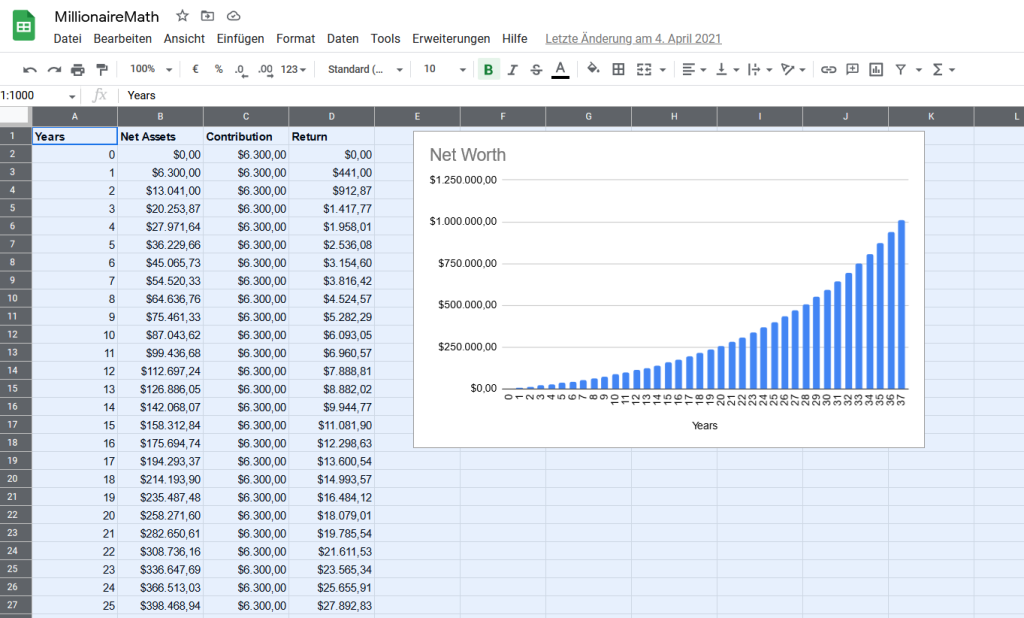
Buffett started investing when he was just 11 years old and learned about the power of compounding at a very young age. He was not an overnight success. His wealth and success have grown slowly and steadily over the decades, thanks to his consistent investment habits and the magic of compound interest.
Buffett’s investing principles involve patience, long-term thinking, and a focus on fundamentals, including the quality of the business, its management, and its potential for long-term profitability. This strategy allowed him to make consistent, measured investment decisions, often going against popular trends.
He is known for reading extensively, up to 500 pages per day, to increase his knowledge and understanding of different businesses and industries. This is a habit he developed early in life and has maintained throughout his career.
Additionally, he has been a strong advocate of living frugally and prioritizing saving and investing over excessive consumption. He still lives in the same house in Omaha, Nebraska, that he bought in 1958 for $31,500.
Buffett’s consistent investment strategies and frugal lifestyle habits, sustained over several decades, have allowed his wealth to compound and grow exponentially. As of my last knowledge cut-off in September 2021, Warren Buffett’s net worth was approximately $100 billion, making him one of the wealthiest people in the world. This success story is a testament to the power of compounding effort, disciplined habits, and long-term thinking.
Becoming great starts with acknowledging that you’re not already great and recognizing that greatness is not achieved in a single moment or through a stroke of luck. Instead, greatness is a reflection of consistent effort put in over time.
Additionally, greatness is not about being better than others. It’s about being reliable, disciplined, and continuous progress towards mastery.
In short, greatness is earned through hard work persisted over a long period.
The Role of Consistency in Achieving Greatness
One common misconception is that success or notoriety is achieved through flashy and unconventional methods.
This idea arises from the media’s focus on outliers – events or personalities that deviate from the norm. This portrayal can mislead people into aspiring for notoriety solely for the sake of it, or believing that the success of these outliers is solely due to their unorthodox approaches.
In reality, the most reliable and effective path to success is through consistency. Consistency may not be the easiest way to achieve success, but it provides a higher level of certainty and a more predictable outcome rather than relying on a lucky break or being “discovered.”
Check out the following example that beautifully illustrates these considerations.
The Art Class – Quantity vs Quality
James Clear, the author of “Atomic Habits,” provides an insightful example highlighting the importance of consistency.
A study in a photography class divided students into two groups – “quantity” and “quality.”
The quantity group would be graded based on the number of photographs they submitted, while the quality group would be graded on the excellence of a single image.
Surprisingly, the best photographs were produced by the quantity group. Rather than merely theorizing about perfection, they consistently tested and refined their skills through practice.
Developing a Habit of Progression
The journey to greatness requires the development of a habit of progression. In other words, you need to become accustomed to consistently improving even when faced with obstacles or setbacks. The key here is to ensure that your habits and efforts are focused on the right inputs, as consistency in the wrong direction will still lead you astray.
Nothing goes up into the right forever. Greatness is achieved when pushing forward with action when you doubt your future success the most.
If you’re struggling to identify the right path forward, try creating more opportunities for optimization. Instead of making significant life changes annually, be open to trying new things monthly or even weekly. Test various options and, when you’ve found a path that seems to work, double down.
Simple algorithm: Do more of what works.
Remember, the objective is not perfection but rather continuous and incremental improvements. Learn to be satisfied with being “good” at something and then working towards making those “good” habits second nature.
In time, these small, sustained efforts will be what sets you apart from those who merely aspire to greatness without putting in the necessary work.
Maintaining Patience and Perspective
Another key ingredient in achieving greatness is patience.
Recognize that progress may be slow, and that’s okay. In most cases, significant changes happen incrementally and often without fanfare. The key is to stay dedicated to your practice and improvement, even during periods where it feels like you’re not making any headway.
Additionally, avoid the temptation of getting bogged down in the search for an optimal plan or strategy.
While it’s essential to learn from your experiences and make informed decisions, it’s also crucial not to become paralyzed by the desire for a perfect approach. Focus instead on taking action, learning from the results and iterating your tactics accordingly.
The Power of Repeated Small Wins
One powerful strategy for achieving greatness is to accumulate small, consistent wins.
Rather than aiming for grandiose accomplishments, aim for reliable successes that you can build upon over time. These small and often unremarkable successes might not make headlines, but they add up and compound to significant achievements in the long run.
The Story of British Athlete Sir Chris Hoy
Sir Chris Hoy, one of Britain’s most successful Olympians, is an excellent example of how small, consistent wins can lead to greatness. Hoy didn’t burst onto the scene as an unstoppable force. Instead, his success was built slowly and steadily over time through disciplined training and continuous improvement.
Born in Edinburgh, Scotland, in 1976, Hoy was always athletic but did not start competitive cycling until his late teens. His early career was marked by consistent performances and modest successes, but he was not an immediate superstar.
Hoy’s approach to training emphasized incremental improvements. He followed a principle called the “aggregation of marginal gains,” which was popularized by Dave Brailsford, the British Cycling performance director. The idea was simple: find a 1% margin for improvement in everything you do. Instead of looking for one area to improve by 100%, Brailsford and Hoy sought hundreds of areas to improve by 1%, accumulating small, consistent wins.
From adjusting his training routines and optimizing his sleep patterns to tweaking the ergonomics of his bike, Hoy focused on these marginal gains. These small changes might not have made headlines, but they added up and compounded over time into significant improvements in performance.
The result? Hoy became one of the most decorated cyclists in history. He has six Olympic gold medals and eleven World Championship titles to his name. He was knighted by Queen Elizabeth II for his services to cycling.
Sir Chris Hoy’s story encapsulates the power of small, consistent wins.
His approach underscores the idea that the best things in life and the most successful endeavors are not usually the result of miraculous events, but rather of carefully planned and executed strategies born from dedication, consistency, and gradual improvement.
His story highlights that focusing on the process and developing the right habits can help achieve and sustain greatness.
Remember, the best things in life and the most successful endeavors are typically not miraculous events but carefully planned and executed strategies born from dedication, consistency, and gradual improvement.
By focusing on the process and developing the right habits, you’ll forge yourself into the person who can not only reach but also sustain greatness.
The Pursuit of Greatness …
… is not about achieving sudden, monumental successes but rather about embracing the power of consistency and adopting habits that foster continuous improvement and progression.
By staying focused on the process, learning from your experiences, and remaining patient, you’ll set yourself apart from those who only dream of greatness without ever putting in the work.
Remember: greatness is simply good, repeated consistently over time. By cultivating this mindset and dedicating yourself to the process, you’ll discover the true essence of greatness and see it reflected in your own accomplishments.
Share this page