Posted on Leave a comment

Female game devs in South Korea are being harassed for feminist beliefs

Feminist female game developers in South Korea are being targeted by Twitter users in an attempt to push out “anti-social ideology”, with harassers calling for companies to fire them over their social media posts. 

This censorship and bullying of South Korean women has apparently been ongoing in the South Korean game industry as far back as 2016.

Major companies have pressured female devs into removing their posts relating to women’s rights or feminism, choosing not to defend their employees. 

As reported by AFP News Agency (a reputable news agency covering global topics), the harassment began after CEO of Seoul-based IMC Games Kim Hak-kyu launched an investigation into a female employee after complaints about her personal activity on Twitter were raised.

The female developer, Sung Hye-jin, followed several feminist groups on Twitter and retweeted a post which had a slang term for sexist men.

After being called a “cancer-like creature” who “followed a dirty ideology” by male players, Sung apologized for the perceived offense. 

She was able to keep her job after Kim decided her actions were “just a mistake but not a crime”, assuring players she would “remain endlessly vigilant” to prevent a recurrence. 

After the investigation into Sung, Kim issued an apology for his actions after South Korean trade unions called out his decision. The Korean Confederation of Trade Unions said that “this misogynistic action… has left many women in shock and fear.” The organization also accused Kim and other studios of policing the actions of female employees. 

Players often monitor female developers online accounts to check whether any of their tweets, retweets or likes involve feminism, and if they do, file complaints to their employers with boycott threats, according to anonymous sources who have approached AFP.

“These gamers relentlessly attack whoever posts anything slightly related to women’s rights issues, and label the person a Megalia supporter who should be sacked immediately,” explained one anonymous source. “Game sales could go down very quickly if we don’t cave in.”

Posted on Leave a comment

Exploring interactive dialogue differently in #WarGames

Games have tried to do interactive dialogue for a very long time, and it’s still something we haven’t perfected yet.

Sam Barlow on wanting to take a different approach to interactive dialogue for #WarGames.

In an interview published by PCGamer, creator of Her Story and the recently released #WarGames Sam Barlow discusses the challenges of designing dialogue for games featuring full-motion video. 

When asked about the types of gimmicks and camera angles employed during production of full-motion video game projects, Barlow admits to putting more attention toward implementing interactive dialogue in different ways as opposed to being concerned over the conventions of FMV. 

“There are times when you want to say something and you can’t. Or the reaction you get from someone feels a bit off. Or the pacing of it doesn’t quite work,” he explains. “What I did with Her Story was essentially just ignore all of those problems by saying, I’m not trying to simulate all the dialogue—you’re interacting with a database.”

And looking past the issues associated with writing interactive dialogue worked for Barlow. “The best feedback I got was people saying, because I didn’t worry about all those things, actually, the loop I was in, the feel that I got, from Her Story was that I was in some kind of conversation,” he adds.

However, narrative driven games rely on providing the player with choices, which can start getting tricky to design after a certain point. 

“This is where I start getting stuck—you’re starting to play that game where you’re guessing the author’s intentions,” he notes. “The worst thing in those games is when you pick that choice and the character does something you weren’t expecting, or where you really want to do something specific and there is no option to do that.”

Barlow says that writing interactive dialogue is something that’s still being fine tuned. “It’s a craft and we’ll continue to iterate. What I wanted to do with #WarGames is to go in a different direction.” 

Barlow also dives into the idea behind #WarGames and the concept of games reflecting real world politics, so be sure to check out the full article over on PCGamer’s website.

Posted on Leave a comment

Get a job: Level Ex is hiring a Technical Art Director

The Gamasutra Job Board is the most diverse, active and established board of its kind for the video game industry!

Here is just one of the many, many positions being advertised right now.

Location: Chicago, Illinois

Located in Chicago’s River North area, Level Ex’s fast-growing game studio is transforming the way physicians hone and refine their skills in our industry-leading mobile, AR, and VR titles.

Our games are built on state-of-the-art graphics and physics tech, and use game mechanics to capture the thrill and challenge of being a physician. These games increase in difficulty as the player progresses, and are carefully crafted through level design, compulsion loops, and refined gameplay balance. Backed with a mature art pipeline and latest-gen engine tech, we’re able to recreate a variety of medical challenges with spectacular realism.

Our engine has earned the trust of the country’s leading physicians; plus we’ve custom-built real-time fluids, tissue shading, and soft-body systems to enable a wide range of realistic new game mechanics. Our team unites award-winning game designers, developers, and artists with industry-leading physicians, all passionate about using game design to empower doctors across the world to improve their skills and better treat their patients.

We’re currently looking for a smart, tools savvy Technical Art Director to join our expanding team.

What You’ll Be Doing with Us  

  • Create a suite of art pipeline and art creation tools to support new methods of high-end art content creation
  • Architect proprietary asset pipelines that use the latest art and engine tools efficiently
  • Identify ways to make 3D and 2D artists more effective and efficient – and make it happen
  • Write scripts to automate multi-step art creation, capture, import, and export processes
  • Define technical art creation and format standards across our products and pipelines
  • Research, integrate, and configure new art-content systems like particle systems, animation systems, etc.
  • Work with the art department to generate glorious asset renders for promotional use

Who We Want To Meet

  • 5+ years game industry development experience
  • Extensive experience building tools and scripts in Unity, including familiarity with the component model and tool-development functionality (2 years minimum)
  • A strong portfolio of tools and example effects/assets
  • Deep familiarity with industry art pipelines – understanding common problems and solutions for asset creation and flow in games built on a rapidly-moving tech stack
  • Experience with rigging, lighting, shading, texturing, both in terms of content creation and in-engine configuration
  • Comfortable working in Autodesk Maya for both content and tool-creation, including proficiency in -Python and MEL
  • A strong sense of artistic style and control
  • Fluent in C#
  • Comfortable prototyping and researching new art technology and techniques
  • Experience authoring shaders in HLSL, GLSL and/or Cg a major plus
  • Technical art experience in creating content for VR, AR, and/or mobile a bonus
  • Experience with Substance Designer, Houdini, Z-brush a bonus

How We Make You Happy

  • Creating games that actually make a difference in people’s lives
  • Competitive salary
  • Paid vacation, sick days, and holidays
  • Medical, dental and vision benefits
  • 401k plan with matching, flex spending account, and commuter benefits
  • Unlimited cold brew coffee, beer, and tasty snacks  
  • Flexible, reasonable work schedules in a team-focused environment

Interested? Apply now.

Whether you’re just starting out, looking for something new, or just seeing what’s out there, the Gamasutra Job Board is the place where game developers move ahead in their careers.

Gamasutra’s Job Board is the most diverse, most active, and most established board of its kind in the video game industry, serving companies of all sizes, from indie to triple-A.

Looking for a new job? Get started here. Are you a recruiter looking for talent? Post jobs here.

Posted on Leave a comment

Chat with the lead developer of Where the Water Tastes Like Wine at 3PM EDT

One of 2018’s most unique indie games so far has been Dim Bulb Studios’ Where the Water Tastes Like Wine, a game that not only stands out because it somehow got Sting to voice a key character, but also because of its nouveau storytelling mechanics and unusual team structure. Where many indie games include a group of programmers, artists, and writers, Dim Bulb Games relied on lead developer Johnnemann Nordhagen and a small army of writers to build the game’s content. 

Nordhagen himself has been expressly transparent about the process of making and selling Where the Water Tastes Like Wine, but we’re still excited to be chatting with him today at 3PM EDT over on the Gamsutra Twitch channel. If you’ve got questions about surviving as an indie, or making games about American folklore, you should swing by and ask them! 

And while you’re at it, be sure to follow the Gamasutra Twitch channel for more developer interviews, editor roundtables, and gameplay commentary. 

Posted on Leave a comment

Blog: Designing the gigantic map of Mafia III

The following blog post, unless otherwise noted, was written by a member of Gamasutra’s community.
The thoughts and opinions expressed are those of the writer and not Gamasutra or its parent company.


This is the first in a series of articles discussing gameworlds I’ve designed and worked on.

Ever since Wizardry and Bard’s Tale I’ve loved discovering and making world maps!  Mafia 3’s New Bordeaux was the biggest world I’ve ever been part of.  I must have gone through several hundred iterations and updates for the city layout and ecologies.

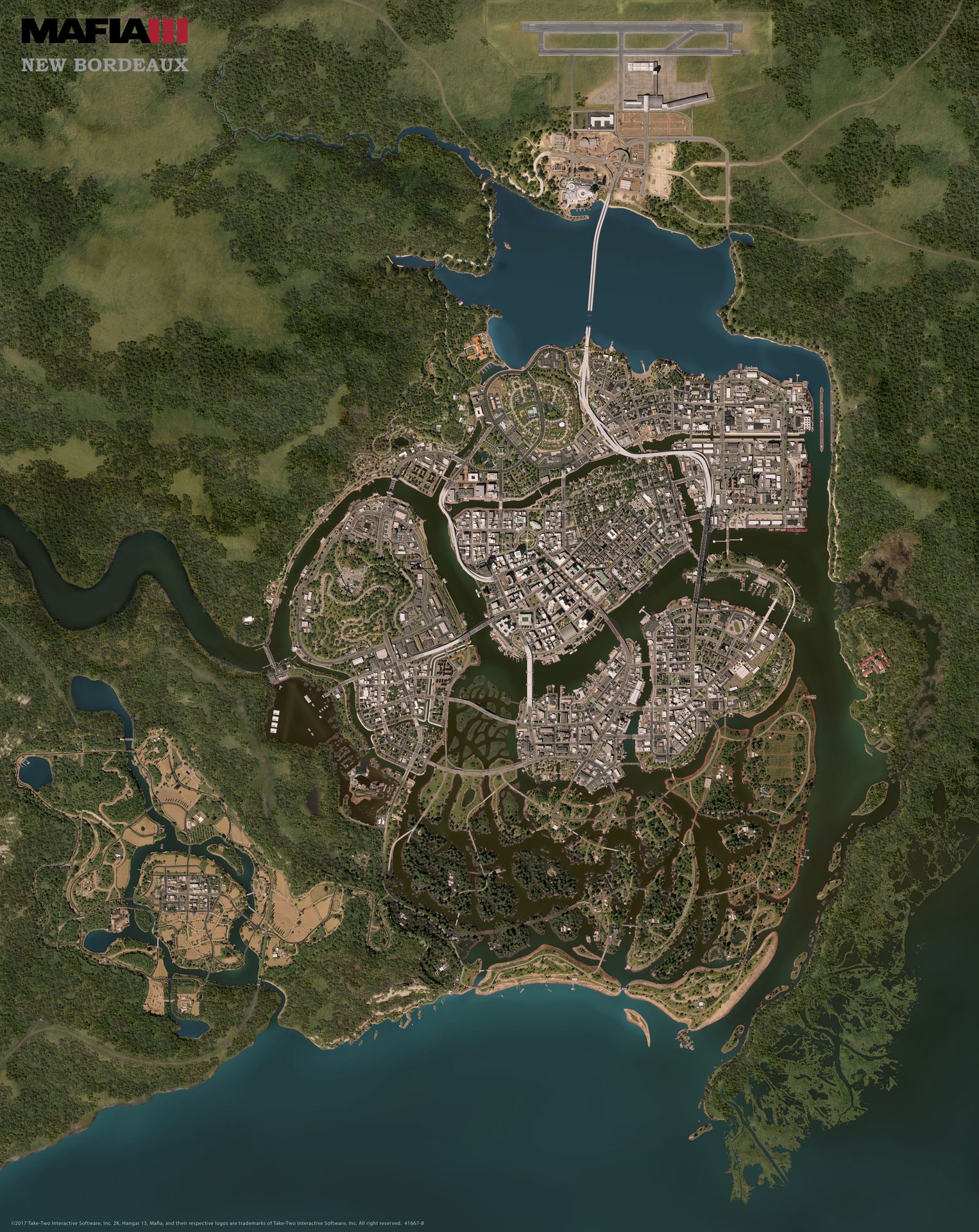
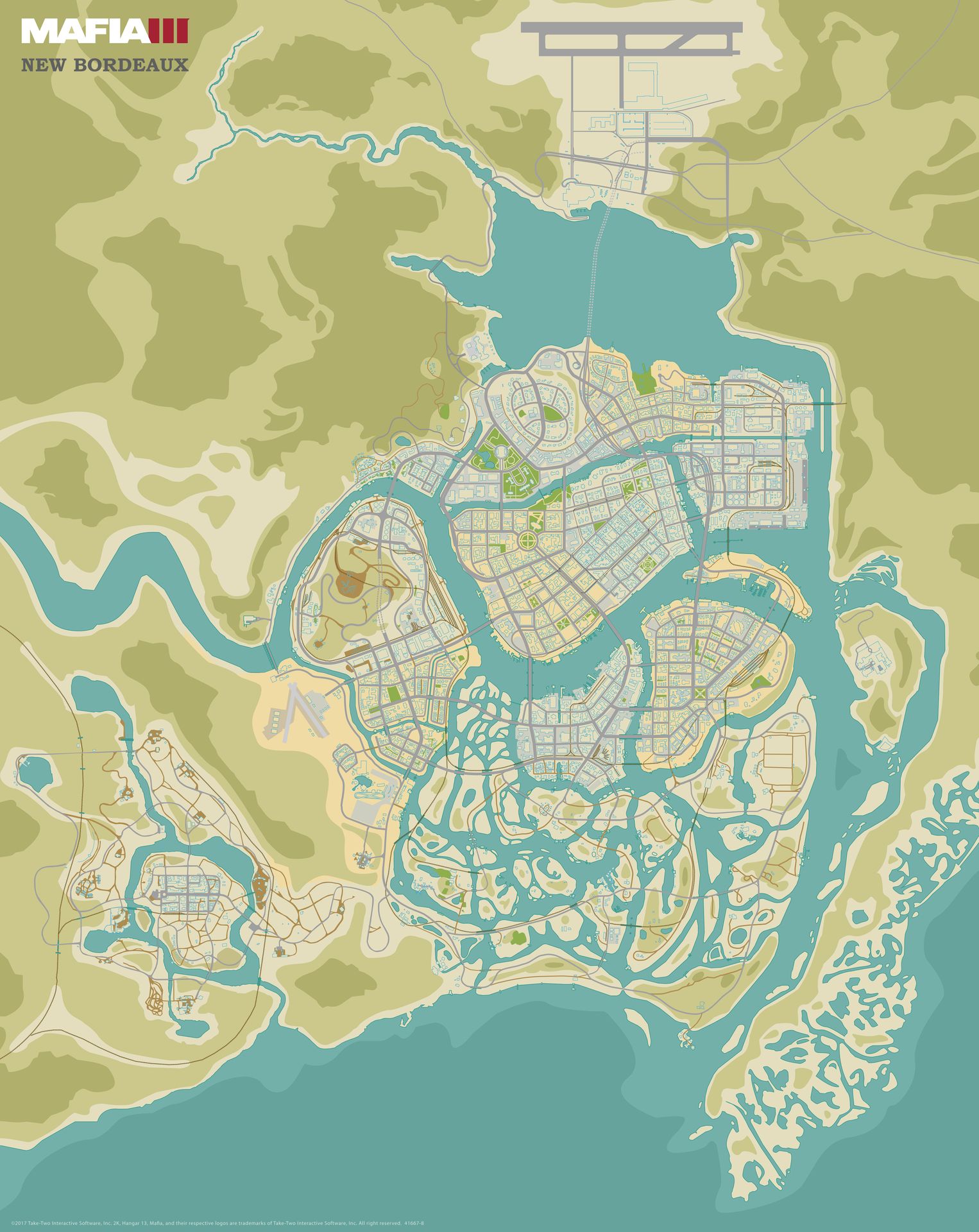
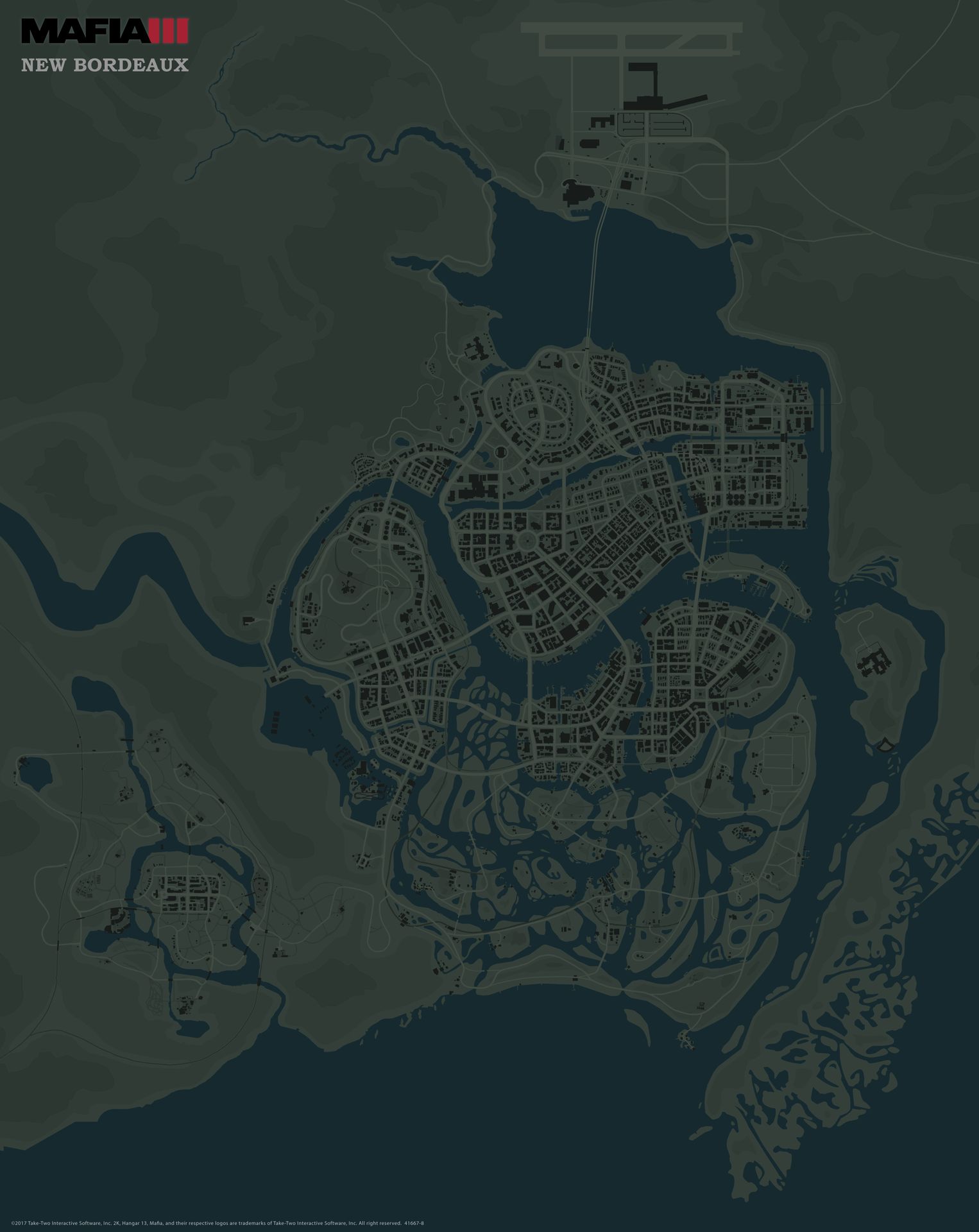
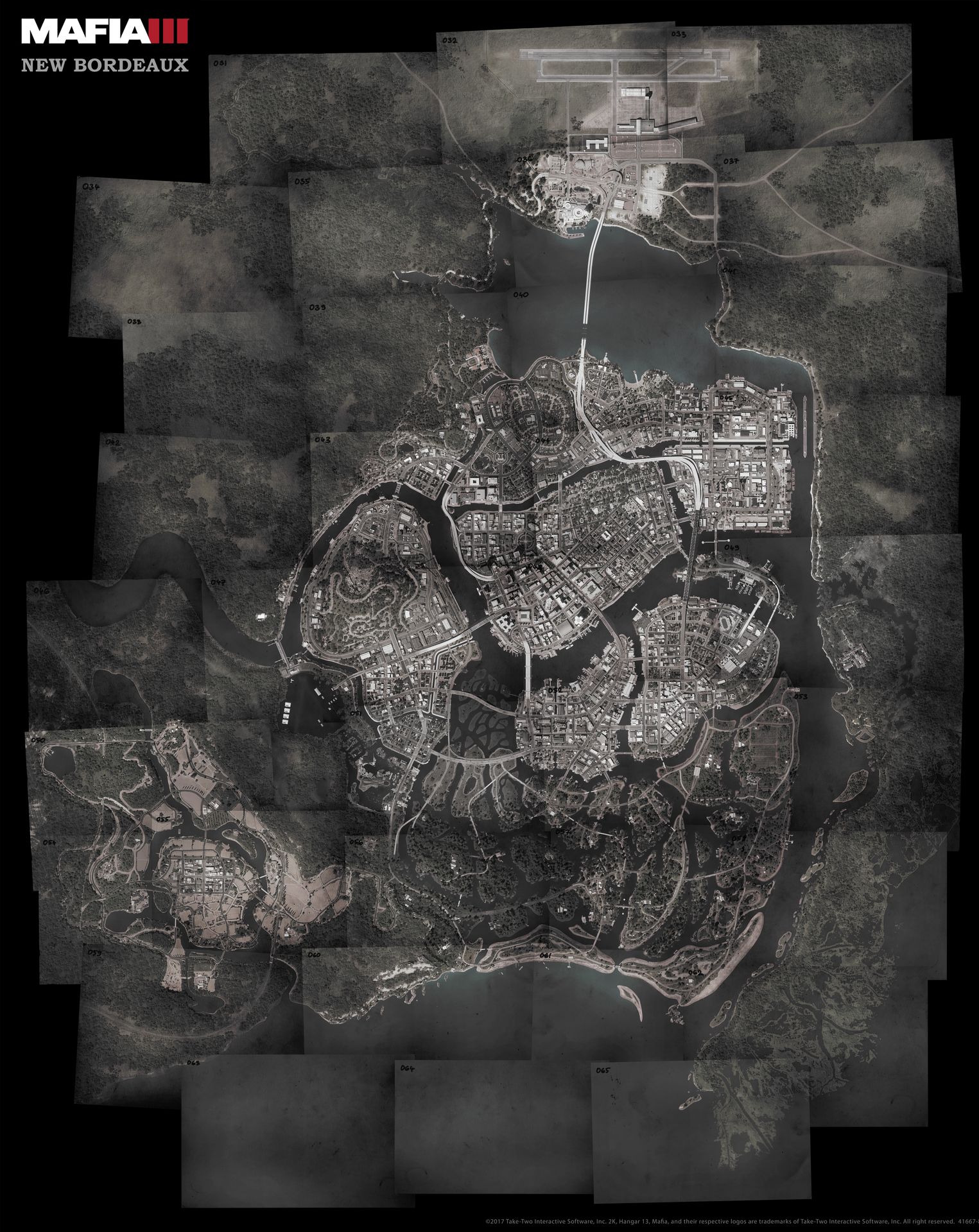
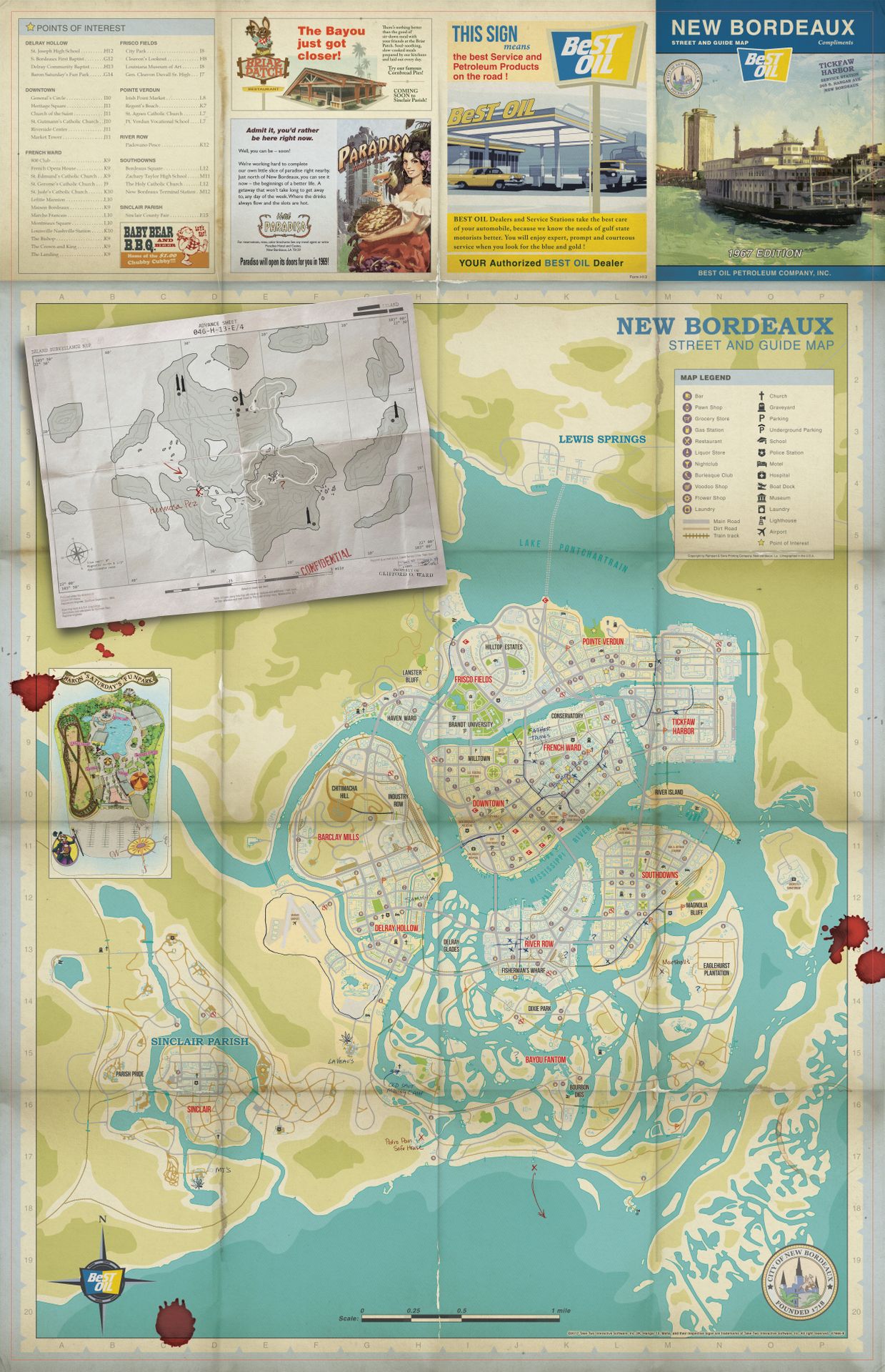
With the help of Petr Záveský and others we were able to create a fantastic top-down render of the city.  The next thing to do was getting 2K Games on board in creating a foldout map for the game.  Paul Pierce was the talented artist who stylized the Road Atlas.  I originally proposed it as a bonus item in the Collector’s Edition.  Then 2K Games took it to the next level and made it available in every game case!  Paul later updated it to include all DLC information too (see below).

  • Aerial − a satellite view of the city!
  • Stylized − a stylized version of the city!
  • Game UI − an updated UI map from the game!

BONUS maps!

  • CIA − Before Donovan showed up he grabbed the latest CIA photos of the region.
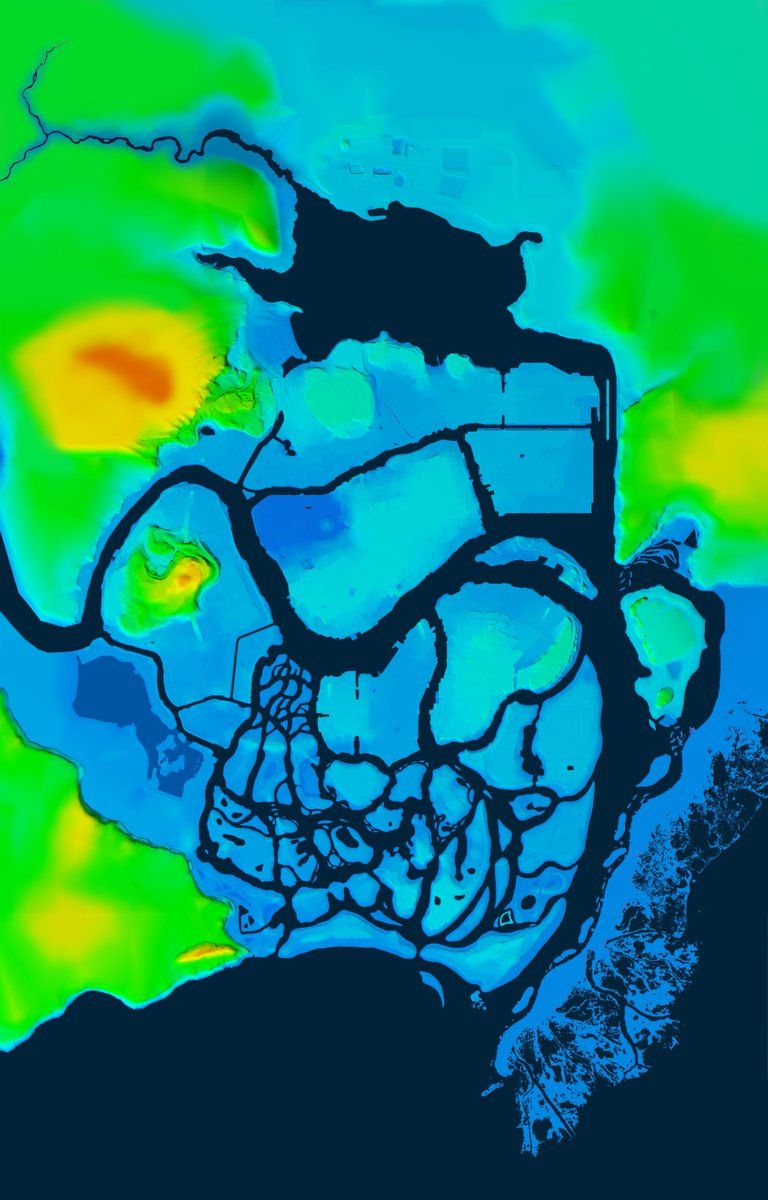
  • Height Map − For developers and hikers, here’s a heightmap.
  • Road Atlas − Visiting New Bordeaux? Pull out that map for all your tourist needs!

This 1967 street guide was something I’m real happy with getting into fan’s hands. Paul did a fantastic job making it look authentic.  He went through several styles with publishing’s Art Director Rob Clarke.  Once all DLC was known, an updated version was created for all future copies of the game.

One of the other reasons the Road Atlas is special − it allowed us to showcase a lot of the names and locations that weren’t mentioned or used heavily in the story.  Study the map and you’ll discover lots of new material such as…

Tourist Spots
All those famous landmarks and city areas you visited had names!

Handwritten Notes
Both Lincoln & Donovan scribbled notes on the map, like where all the entrances to the tunnels were. Even though Donovan choose to write his in red, I’ve no idea who’s blood is on the map… 

Special Locations
Did you find the sinking Bayou cemetery? This was made for a scene cut from the start of the game. Other trivia, the row of cabins along Bourbon Digs’ canal was made for a crossfire encounter which was never used.

A fun thing to do with these HUGE world maps… they’re the same scale as the official GTA5 maps.

Mafia Series

And for those curious, here’s all three Mafia game worlds next to one another.  While the first Mafia game looks fairly big, remember the player didn’t get to explore most of the areas outside the city.

Interactive Map

I also experimented with using these like a Google Map to find lost airplanes or secret routes.  It’d be fun to take other gameworlds and add them as layers you can flip through for comparison.

When you look at the huge 3D rendered map, you can see all the hours and talented people who made each cityblock a believable, tangible place for Mafia’s third chapter.  I hope anyone who ventured into New Bordeaux felt it captured the Louisiana heat of 1968.

This post originally appeared on my website at CuriousConstructs.com.

Posted on Leave a comment

Rainbow Six Siege has pulled in 30 million players

It might’ve launched well over two years ago, but Rainbow Six Siege has just hit 30 million players. 

It’s notable news given how Ubisoft has been talking up the positive performance of its back-catalog titles and ‘player recurring investment’ in recent months. 

It’s also a testament to the French developer-publisher’s focus on creating franchises that “offer long-term visibility,” with the company having managed to triple Siege’s playerbase since November 2016, when it stood at 10 million players. 

Indeed, the last time we checked in December 2017, the tactical shooter had just crossed the 25 million player mark, meaning it’s added another 5 million players in roughly four months. 

Of course, it’s worth nothing that those 30 million players don’t translate directly into sales, and it’s possible that some players could’ve created multiple accounts, but it’s a significant milestone nonetheless.

Posted on Leave a comment

Dota 2 Update – April 12th, 2018

7.13:
==

* Aegis now has an alt tooltip that explains how to pronounce the item

* Tier 1 Tower Team Bounty reduced from 120 to 100
* Tier 2 Tower Team Bounty reduced from 200 to 120
* Tier 3 Tower Team Bounty reduced from 200 to 140
* Tier 4 Tower Team Bounty reduced from 200 to 160
* Range barracks team bounty reduced from 150 to 100
* Filler buildings gold bounty from 125 to 75

* Ranged creep average gold bounty reduced from 57 to 54

* Glyph duration increased from 5 to 6
* Melee Barracks HP increased from 1500 to 1800

* Shrines HP increased from 1500 to 1750
* Shrines now have 5 HP regen

* Rescaled Level 12->25 respawn time curve to be slightly less early and the same later on (changed from 48/52/54/56/58/60/70/74/76/78/82/86/90/100 to 44/46/48/50/52/54/65/70/75/80/85/90/95/100)

* Removed hero class specific perks, the bonuses now affect all classes.
* Removed Status Resistance as a Strength based attribute bonus
* Rebalanced str/int/agi bonuses below (they still provide +1 bonus damage to primary attribute holders)
* Primary Attribute now provides +25% more benefit to the bonuses it provides

Old Strength:

20 Health
0.71% HP Regen
0.15% Status Resistance

New Strength:

18 Health (+25% for str heroes: 22.5)
0.55% HP Regen (+25% for str heroes: 0.68%)
+0.08% Magic Resistance (+25% for str heroes: 0.1%)

Old Intelligence:

12 Mana
2% Mana Regen
0.07% Spell Amplication
+0.15% Magic Resistance

New Intelligence:

12 Mana (+25% for int heroes: 15)
1.8% Mana Regen (+25% for int heroes: 2.25)
0.07% Spell Amplication (+25% for int heroes: 0.087%)

Old Agility:

0.17 Armor
1 Attack Speed
0.06% Movement Speed

New Agility:

0.16 Armor (+25% for agi heroes: 0.2)
1 Attack Speed (+25% for agi: 1.25)
0.05% Movement Speed (+25% for agi: 0.062%)

Posted on Leave a comment

Free Weekend – Ballistic Overkill

7.13:
==

* Aegis now has an alt tooltip that explains how to pronounce the item

* Tier 1 Tower Team Bounty reduced from 120 to 100
* Tier 2 Tower Team Bounty reduced from 200 to 120
* Tier 3 Tower Team Bounty reduced from 200 to 140
* Tier 4 Tower Team Bounty reduced from 200 to 160
* Range barracks team bounty reduced from 150 to 100
* Filler buildings gold bounty from 125 to 75

* Ranged creep average gold bounty reduced from 57 to 54

* Glyph duration increased from 5 to 6
* Melee Barracks HP increased from 1500 to 1800

* Shrines HP increased from 1500 to 1750
* Shrines now have 5 HP regen

* Rescaled Level 12->25 respawn time curve to be slightly less early and the same later on (changed from 48/52/54/56/58/60/70/74/76/78/82/86/90/100 to 44/46/48/50/52/54/65/70/75/80/85/90/95/100)

* Removed hero class specific perks, the bonuses now affect all classes.
* Removed Status Resistance as a Strength based attribute bonus
* Rebalanced str/int/agi bonuses below (they still provide +1 bonus damage to primary attribute holders)
* Primary Attribute now provides +25% more benefit to the bonuses it provides

Old Strength:

20 Health
0.71% HP Regen
0.15% Status Resistance

New Strength:

18 Health (+25% for str heroes: 22.5)
0.55% HP Regen (+25% for str heroes: 0.68%)
+0.08% Magic Resistance (+25% for str heroes: 0.1%)

Old Intelligence:

12 Mana
2% Mana Regen
0.07% Spell Amplication
+0.15% Magic Resistance

New Intelligence:

12 Mana (+25% for int heroes: 15)
1.8% Mana Regen (+25% for int heroes: 2.25)
0.07% Spell Amplication (+25% for int heroes: 0.087%)

Old Agility:

0.17 Armor
1 Attack Speed
0.06% Movement Speed

New Agility:

0.16 Armor (+25% for agi heroes: 0.2)
1 Attack Speed (+25% for agi: 1.25)
0.05% Movement Speed (+25% for agi: 0.062%)

Posted on Leave a comment

Sponsored: Designing architecture to support cross-platform play

Presented by Amazon GameLift. Learn more about cross-platform game development during our live webinar. Register today!

Development of multiplayer games has reached an inflection point: game developers have started supporting cross-platform play across all devices.  This is a significant shift that can create better player experiences while introducing new challenges for game developers. What makes this new development in cross-platform play so significant is that it challenges some long held beliefs and assumptions in multiplayer games:

  • Players value competitive fairness of matches over being able to play with friends
  • Mobile games can’t meet the same performance expectations as PC and console games
  • Certain genres – like shooters – don’t translate directly to mobile
  • Players only want to commit to playing a game on one gaming device

Why should you consider supporting cross-platform play for your game? 

  1. It’s all about the players.  Players can now play with their friends who are on other platforms without having to buy another copy of a game or invest in an entirely new gaming device.  They can engage more frequently with a game across a number of screens throughout the day:  on the bus with a phone, at lunch on a laptop, at home on a PC or console, etc. 
  2. Wait times go down and the competitiveness of matches go up. Combining all players into a single large pool allows matchmaking logic to handle where players intersect across gaming devices.  Players willing to opt-in across multiple gaming devices will find matches more easily, and with a larger pool of players to choose from, the likelihood of finding matches with similarly skilled players increases.  
  3. Build and manage a single community of players. Cross-platform play eliminates the inherently fractional nature of isolated gaming devices and brings all players together to play, creating stronger and more loyal communities for game developers. And you’ll likely increase MAU and profit.
  4. Simplify your backend infrastructure. With the right architecture, cross-platform play can simplify the backend services infrastructure around getting players matched and into games.  

This last point is what we are going to address in the remainder of this post by walking through an example using Amazon Web Services (AWS) and Amazon GameLift, the dedicated game server hosting and matchmaking solution.

How to design and support cross-platform play

Requirements for designing cross-platform play architecture

To get into the specifics of how your game can support cross-platform play on AWS, let’s explore the requirements of an end-to-end solution:

  • Accept game requests from desired gaming devices such as Xbox, PlayStation, Nintendo, PC, Mac and mobile devices.
  • Capture the device that the player is playing on
  • Allow players to opt-in to or out of cross-platform play
  • Capture player data for matchmaking such as skill and desired role
  • Match players into games based on your defined rules
  • Route player groups to a suitable game server for play

Figure 1 (below) shows a multiplayer back end architecture that supports cross-platform play. 

3 steps to implement a cross-platform play solution:

  1. Process requests from multiple gaming devices
  2. Match players across devices
  3. Place players onto game servers

Let’s take a closer look at how to achieve these three steps.

1. Process requests from multiple gaming devices

First, you need to accept game requests from players on any gaming device the game supports and use the data from those requests to generate matchmaking requests.

In our multiplayer backend service architecture, we have a game service that acts as a front door to game clients. The game service is a custom part of the end-to-end process, and there are many options for implementing this service.  One solution is to use Amazon API Gateway with AWS Lambda, but you may already have your own service that interacts with clients which can be extended.

This game service provides a means to:

  • Parse inbound game requests from clients
  • Handle any necessary player authentication
  • Perform any game specific logic for your game such as granting players permission to access a game mode or to check if a player is banned, for example
  • Integrate with Amazon GameLift FlexMatch to process matchmaking requests and place players on game servers

Cross-platform play data is specifically provided in the matchmaking request to FlexMatch, so let’s dive into that integration next.

Integrate with Amazon GameLift SDK

The game service will be the point of integration with FlexMatch. This integration will enable the game service to create new matchmaking requests and have them processed. The integration can be implemented via the AWS SDK, and most popular languages are supported, including C++, C# and JavaScript.

Create StartMatchmaking Requests

Now that integration between your game service and FlexMatch is complete, your game service can create StartMatchmaking requests for FlexMatch. The information Amazon GameLift FlexMatch will need for your cross-platform solution includes:

  • A unique matchmaking ticket ID
  • PlayerAttributes
    • A unique player ID
    • The player’s current gaming device
    • A list of gaming devices the player has opted-in to playing with
    • Latency data to allow FlexMatch to determine where to place the match
    • Any other game-specific data the matchmaker should consider about the player like skill, maps, etc.

The StartMatchmaking request gets a MatchmakingTicket in response. This ticket includes the information that was part of the original request, including Ticket ID and a status of “SEARCHING”. For more information about integrating a game service with Amazon GameLift FlexMatch please see this guide.

2. Match players across gaming devices

Now that you have integrated with FlexMatch and are successfully making matchmaking requests, you now need to configure FlexMatch to use the request data to match players across gaming devices.  Configuring FlexMatch is done via the rule set.  Here is an example of a simple rule set that configures FlexMatch to match across gaming devices, considering latency as well:
 

{ "ruleLanguageVersion": "1.0", "name": "Cross platform matching with latency and expansions", "playerAttributes": [{ "name": "acceptablePlatforms", "type": "string_list" }, { "name": "myPlatform", "type": "string_list" }], "teams": [{ "name": "red", "minPlayers": 2, "maxPlayers": 2 }, { "name": "blue", "minPlayers": 2, "maxPlayers": 2 }], "rules": [{ "description": "Find the common set of platforms among players in the match”, "name": "PlatformMatch", "type": "collection", "operation": "reference_intersection_count", "measurements": [ "flatten(teams[*].players.attributes[myPlatform])" ], "referenceValue": "set_intersection(flatten(teams[*].players.attributes[acceptablePlatforms]))", "minCount":1 }, { "name": "FastConnection", "description": "Prefer matches with fast player connections first", "type": "latency", "maxLatency": 50 }], "expansions": [{ "target": "rules[FastConnection].maxLatency", "steps": [{ "waitTimeSeconds": 10, "value": 100 }, { "waitTimeSeconds": 20, "value": 150 }] }] }

 
Let’s look at each section of the rule set.

This first section is a bit of booking that includes the name of the rule set and the rule set language:

 "ruleLanguageVersion": "1.0", "name": "Cross platform matching with latency and expansions",

Next, you tell the rule set what player attributes to expect.  Latency is actually a special attribute that is passed directly from the matchmaking request to the rules engine that evaluates rule sets, so you only need to include the platform data in the playerAttributes.

  "playerAttributes": [{  "name": "acceptablePlatforms",  "type": "string_list"  }, {  "name": "myPlatform",  "type": "string_list"  }],

acceptablePlatforms is a string list of the platforms that the player has opted-in to playing with others on, and myPlatform is the platform of the player.

Next, you define the teams for the match.  In this case, there are two teams – a “red” team and a “blue” team – with two players required for each team (minPlayers and maxPlayers are equal):

 "teams": [{ "name": "red", "minPlayers": 2, "maxPlayers": 2 }, { "name": "blue", "minPlayers": 2, "maxPlayers": 2 }],

After that, you define the rules used to match players with the passed in player data.  The rules sections is where the core part of the cross-platform play evaluation happens:

 "rules": [{ "description": "Find the common set of platforms among players in the match”, "name": "PlatformMatch", "type": "collection", "operation": "reference_intersection_count", "measurements": [ "flatten(teams[*].players.attributes[myPlatform])" ], "referenceValue": "set_intersection(flatten(teams[*].players.attributes[acceptablePlatforms]))", "minCount":1 }, { "name": "FastConnection", "description": "Prefer matches with fast player connections first", "type": "latency", "maxLatency": 50 }],

In this case, we have defined two rules:

  • The PlatformMatch rule does a reference_intersection_count operation between the acceptablePlatforms of the players in the match and the myPlatform value to determine if the platform of the current player being evaluated by the rules engine intersects with the rest of the players in the match.  If the values intersect, then the current player is added to the match.
  • The FastConnection rule indicates that only players that have 50 milliseconds of latency or less can be added to the match.

Finally, you can also tune the rules to relax their constraints over time to find the sweet spot in balancing matchmaking for your players by utilizing the expansions section of the rule set:

  "expansions": [{  "target": "rules[FastConnection].maxLatency",  "steps": [{  "waitTimeSeconds": 10,  "value": 100  }, {  "waitTimeSeconds": 20,  "value": 150  }]

This section indicates that if a match has not been found after evaluating the current set of players for 10 seconds, relax the rules[FastConnection].maxLatency requirement from the original 50 milliseconds defined in the FastConnection rule to 100 milliseconds.  If no match has been found after 20 seconds, relax that constraint again to 150 milliseconds.

3. Place players onto game servers

Now that you are processing requests from multiple gaming devices and matching players across them, you need to connect the players in those matches to game servers.

Once FlexMatch has found a group of players that meet your matchmaking rule set requirements, it will create a game session placement request and place this in to a queue to find the lowest latency game server for the match. FlexMatch is wired up to Amazon GameLift Queues to automate the process of efficiently allocating new game sessions onto game servers.

Queues are configurable and allow you to determine several options that are used when Amazon GameLift places a session onto a game server:

  • Queue Timeout
  • Member Fleets
  • Fleet Priority
  • Latency policies

Your rule set used player latency data to match players that had a similar latency value to one another. You can then use that same latency data to find an Amazon GameLift Fleet in your Queue with the lowest average latency value for the match. To do this, you set a latency policy.

Like the expansions section of the rule set, latency policies define how long you want the Queue to spend trying to meet a specific latency target for the match of players, and policies can be made up of one or more rules.

Once the Queue has determined the best Fleet for the game session to be placed in, Amazon GameLift will request that a server in that Fleet reserve sessions for our group of players.

Fleets in Amazon GameLift represent the deployed state of your game server. They enable you to define how your build should be hosted within Amazon GameLift including:

  • Instance Type
  • Region
  • Scaling Policies
  • Capacity Limits
  • Number of processes per instance

Now that Amazon GameLift has a game session for the players to connect to on a game server, it associates the server ip address and port number of the game server with the players in the MatchmakingTicket. This data is ready to be retrieved by the game service either through polling or via an SNS notification once the session has been placed.

Once the game clients have the server ip address and port, they can connect directly to the game server using that information. As a result, Amazon GameLift adds no latency between your game clients and the dedicated server when playing a game.

Start building a stronger community with cross-platform play

The design explored here allows you to start with a cross-platform configuration that works for you and evolve it over time with minimal overhead and impact. If you would like to learn more about supporting cross-platform play for your multiplayer game, join AWS and Gamasutra on April 24th at 2 PM EST (11 AM PST) for a live webinar. We’ll explain design patterns and backend architecture that allow you to accept game requests from multiple gaming devices, match players into games, and route player groups to suitable game servers. Register here >>

Bruce Brown is the Software Development Manager of the Amazon GameLift Player Experience team responsible for building the FlexMatch matchmaking service. He has been in the software industry for 12 years including time spent at Microsoft on the Xbox Live Cloud Compute and Xbox Multiplayer teams and at Riot Games working on the League of Legends Live Gameplay and Personalization teams. Currently, he is playing Zelda: Breath of the Wild with his 6 year old son, and he enjoys designing games with his wife in his free time.

Peter Chapman is a Solutions Architect in the Amazon GameLift and Lumberyard teams. He has over 13 years of software development and architecture experience. He has designed solutions in many industry sectors including Retail, Healthcare, and Gaming. Currently, he is having a great time playing Axiom Verge on his Switch.

Learn more about cross-platform game development during our live webinar. Register today!