Posted on Leave a comment

Video: Improving your odds in programming job interviews

In this 2017 GDC talk, Rez Graham and Brian Schwab share interviewing insights from a combined 30 years in the industry and dozens of companies, both as job seekers and hiring interviewers.

In addition to this presentation, the GDC Vault and its accompanying YouTube channel offers numerous other free videos, audio recordings, and slides from many of the recent Game Developers Conference events, and the service offers even more members-only content for GDC Vault subscribers.

Those who purchased All Access passes to recent events like GDC already have full access to GDC Vault, and interested parties can apply for the individual subscription via a GDC Vault subscription page. Group subscriptions are also available: game-related schools and development studios who sign up for GDC Vault Studio Subscriptions can receive access for their entire office or company by contacting staff via the GDC Vault group subscription page. Finally, current subscribers with access issues can contact GDC Vault technical support.

Posted on Leave a comment

Minecraft Earth is going dark at the end of June

Microsoft-owned Mojang has made the call to close down its Minecraft AR game Minecraft Earth, ending the location-based game’s run less than two years after first launch.

Mojang says that the decision was driven by difficulties of the current pandemic, which has understandably knocked the wind out of the location based social play Minecraft Earth is built around.

“As a result, we have made the difficult decision to re-allocate our resources to other areas that provide value to the Minecraft community and to end support for Minecraft Earth in June 2021,” reads a blog post.

The announcement comes paired with the game’s final update, which removes real-money transactions from the game, reducing resource time and material costs for in-game crafting, and releasing a batch of content that was planned to launch later in the game’s lifespan.

After that June 30 cutoff, Minecraft Earth will vanish from app stores and existing players will no longer be able to login and play the game. Players that spent real money on the game at any point since its debut will also snag a free copy of Minecraft proper.

“That being said, we want to take a moment to thank all of the players and creators that are bringing new adventures, mobs, and free in-game items for the community to enjoy while we finalize our timeline for sunsetting the game,” continues the blog.

“Your feedback and creations brought this game to an entirely different level, from the regular build challenges you absolutely smashed to the incredible builds you shared on social media. We’re eternally grateful for the amazing talent in the Minecraft community. This was not an easy decision, and we’re doing everything we can to make sure you get the most out of Minecraft Earth before it sunsets.”

Posted on Leave a comment

Minecraft Earth will shut down and be removed from stores in June

Minecraft Earth will shut down and be removed from stores on June 30. The augmented reality title tasks you with getting creative while exploring your surroundings in an entirely new way. That said, with it being a location-based experience, it was always going to struggle in a time such as this.

Minecraft Earth was designed around free movement and collaborative play – two things that have become near impossible in the current global situation,” says a blog post released today. As a result, the team has decided to “re-allocate” its resources into other areas that “provide value to the Minecraft community” by shutting down Minecraft Earth.

The news comes as a surprise given the game’s passionate following and the fact that it launched just over a year ago. Still, the Minecraft Earth team is working to ensure that these final few months will be enjoyable for those remaining players.

With today’s Minecraft Earth update, the game has removed real-money transactions, reduced the price of in-game currency, reduced time requirements for crafting and smelting, and granted everyone who logs in prior to its closure a special set of character creator items.

YouTube Thumbnail

All players with paid ruby balances will be granted Minecoins. These can be used on the Minecraft Marketplace to unlock texture packs, skins, maps, and more. Beyond that, anyone who’s ever spent a penny on Minecraft Earth will receive a free copy of Minecraft’s Bedrock version. More info on what the team is calling the game’s ‘sunset’ process can be seen here.

Posted on Leave a comment

Sony discontinues all but one PS4 model in Japan

Newsbrief: Sony Interactive Entertainment has slimmed down its line of last-generation consoles, at least in Japan.

According to Game Watch (via Gematsu), SIE has discontinued the PlayStation 4 Pro as well as several PlayStation 4 Slim models, aiming to instead point those manufacturing resources toward the now-current-gen PlayStation 5.

This leaves only one PlayStation 4 model, the 500GB Jet Black Slim, alive and kicking, and sees the end of production of PlayStation 4 Pro line altogether.

Posted on Leave a comment

CD Projekt gearing up for ‘vigorous action’ against investor lawsuit

CD Projekt, the parent company of CD Projekt Red which developed Cyberpunk 2077, has told investors it will mount a “vigorous defense” against a class action lawsuit filed over the game’s release.

In December the calamitous conditions around Cyberpunk 2077’s release took a dire turn when Sony agreed to provide players refunds for the game on PlayStation only after yanking it from the console’s digital store. (Microsoft and other platform owners would expand their refund policies as well, but did not remove the game from sale.)

In the aftermath, a group of investors led by Rosen Law Firm filed a class action lawsuit against CD Projekt, alleging that the company made false or misleading statements and failed to disclose that the game was “virtually unplayable” on then-current-generation consoles.

Over the holidays CD Projekt told investors that it had been made aware of the lawsuit and that it “will undertake vigorous action to defend itself” from its claims. It also noted that the Rosen Law Firm did not specify a specific quantity of damages to be claimed in the suit.

Posted on Leave a comment

Get a job: Join Remedy Entertainment as a Sr. Technical Artist

Remedy Entertainment, the creator of Control®, Quantum Break®, Max Payne®, Alan Wake® and Death Rally®, and one of the leading independent game studios in the world, is looking for a Senior Technical Artist for a key role working on Remedy’s projects.

As a Senior Technical Artist at Remedy, you will have the opportunity to design, prototype, and implement pipeline solutions with our internal and external content teams. You will help shape new workflows and mentor more junior technical and environment artists across multiple disciplines.

You will be a representative for content teams on all issues related to content creation, and work closely with other teams that develop tools and support internal and external production efforts.

You should be able to clearly communicate practical technical limits and ensure that content creators understand performance and validation targets. Your daily experience will range from workflow development, technical and user documentation, optimization, planning, prototyping, and bug-fixing.

Responsibilities

  • Assist in the development of an industry leading digital content creation pipeline
  • Collaborate with various Northlight engine teams in the development of game and editor features
  • Assist with the design and implementation of workflows with internal and external partners
  • Mentorship and guidance of junior technical artists

Requirements and qualifications

  • 5+ years of experience working in the game, film or equivalent industry
  • Proficiency in at least Python and C#
  • Experience working with any of the following APIs: Maya, Houdini, Substance Painter/Designer
  • Curiosity, ability to learn fast and to communicate concisely
  • Excellent verbal and written communication skills (in English)

The ideal candidate will also have

  • Working knowledge of Houdini and VEX
  • Proficiency with Qt4 and/or Qt5 (PySide/PyQt)
  • Experience with any of the following: proprietary game engines, test driven development, continuous integration, micro-serviecs, UI frameworks, API design

What is in it for you?

  • Above all, you get to work on awesome, unique video games that the global audience is interested in at a studio where your input is valued. We try our hardest to keep our team sizes and the work load sensible, so your contributions feel valuable
  • This position is based in Helsinki metropolitan area in Finland, where the quality of life is exceptional and cost of living is affordable. If you’re not already in Finland, our relocation service is there every step of the way to take care of you. You can concentrate on work, while we’ll take care of everything else
  • You will be offered competitive compensation with a bonus system
  • We work hard, but at Remedy we believe in a great work life balance. Happy people work better. In Finland you get up to 5 weeks of paid vacation every year. This is on top of public holidays and other special occasions

To apply, please fill in the application form with your demo reel/portfolio, CV and other information relevant to the position. The position will be filled as soon as a suitable applicant is found.

Interested? Apply now.

Whether you’re just starting out, looking for something new, or just seeing what’s out there, the Gamasutra Job Board is the place where game developers move ahead in their careers.

Gamasutra’s Job Board is the most diverse, most active, and most established board of its kind in the video game industry, serving companies of all sizes, from indie to triple-A.

Looking for a new job? Get started here. Are you a recruiter looking for talent? Post jobs here.

Posted on Leave a comment

Video: Behind Uncharted 4’s environment production pipeline

In this 2017 GDC session, Naughty Dog’s Christian Nakata and Erick Pangilinan use some of the more narrative-driven spaces of Uncharted 4 to walk you through their entire environment production pipeline from concept to polish.

In addition to this presentation, the GDC Vault and its accompanying YouTube channel offers numerous other free videos, audio recordings, and slides from many of the recent Game Developers Conference events, and the service offers even more members-only content for GDC Vault subscribers.

Those who purchased All Access passes to recent events like GDC already have full access to GDC Vault, and interested parties can apply for the individual subscription via a GDC Vault subscription page. Group subscriptions are also available: game-related schools and development studios who sign up for GDC Vault Studio Subscriptions can receive access for their entire office or company by contacting staff via the GDC Vault group subscription page. Finally, current subscribers with access issues can contact GDC Vault technical support.

Posted on Leave a comment

Scatter for Godot

Today we are looking at Scatter for the Godot Game Engine. Scatter is a Godot add-on that makes it incredibly easy to instance mesh objects in your game level. This makes level design tasks like placing grass, paths, fences, etc incredibly simple. Additionally Scatter supports instancing multiple meshes (think different tree meshes to make a forest) in the same scatter, excluding splines or points from being scatter targets and more.

Scatter is an open source project with the source code hosted on GitHub under the MIT open source license. The project is implemented as a simple Godot add-on, so simply clone the repository into your projects Addons folder (or create one if you don’t have one already). Next load your project, go to Project Settings, then Plugins and make sure Scatter is enabled.

Once scattered is enabled, you create a Scatter object. This is a spline path that defines the boundaries of the scatter object. You need to add a ScatterItem child to your Scatter, then add a MeshInstance to the ScatterItem. This mesh instance is the 3D model that will be “scattered” around the boundary defined by the Scatter path.

The creator of the Scatter add-on also created Concept Graph for Godot, an excellent procedural generation extension we previously covered here. You can learn more about Scatter for Godot and see it in action in the video below.

[youtube https://www.youtube.com/watch?v=MB3Vz6JFAOA?feature=oembed&w=1500&h=844]
Posted on Leave a comment

Finger on the App 2 guide: tips and tricks to win

January 3, 2020: Mr Beast has postponed Finger on the App 2 until February 19

What is Finger on the App? The game has quite a simple premise, really – touch your phone longer than anyone else. That becomes a lot harder when you factor in all the other competition. Finger on the App is interesting since it’s a one time game. So you get one shot to win the grand prize and walk away victorious. But popular philanthropist YouTuber Mr Beast has now announced Finger on the App 2, developed by Beast Interactive Games, with an even bigger prize pool.

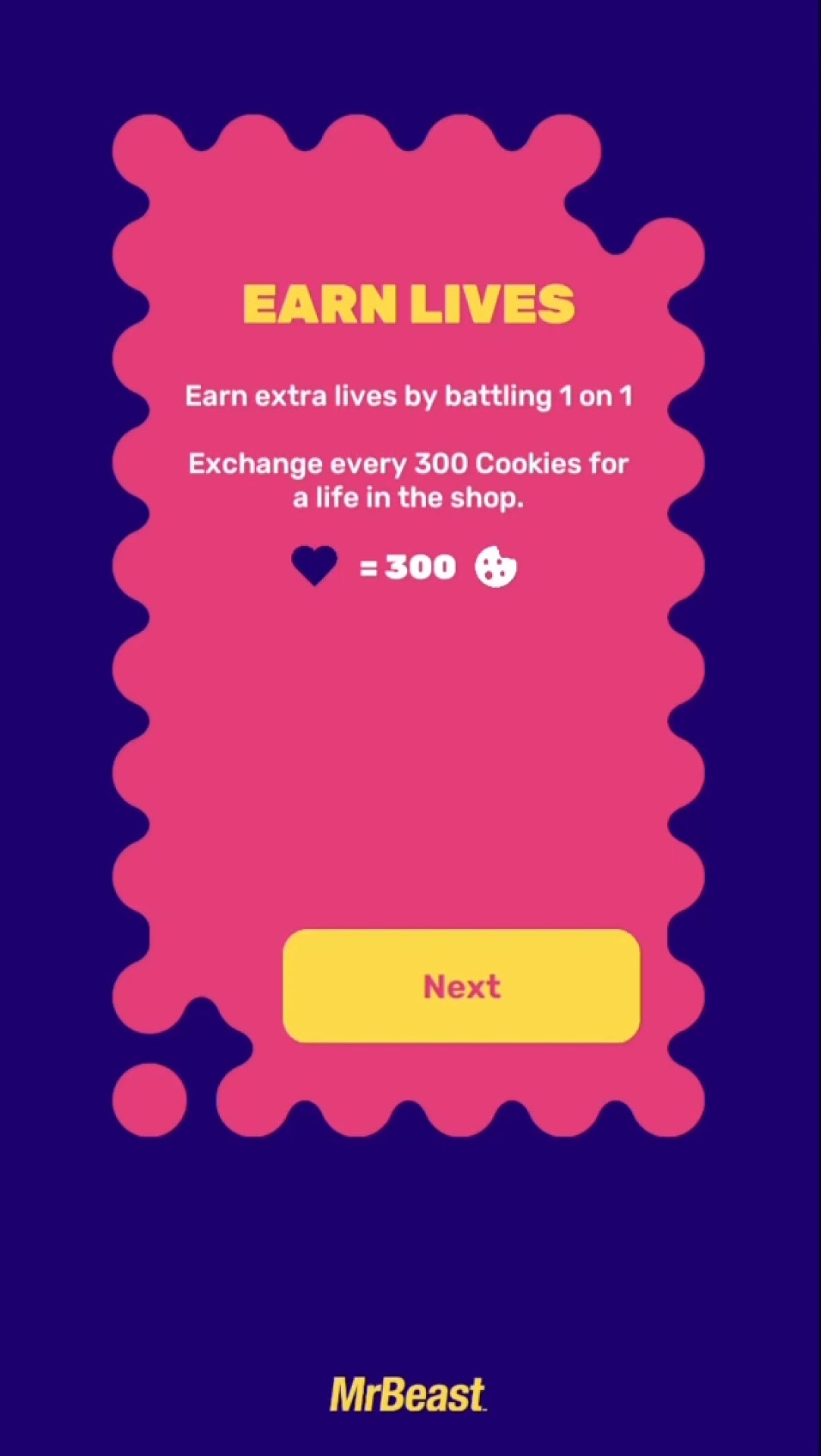
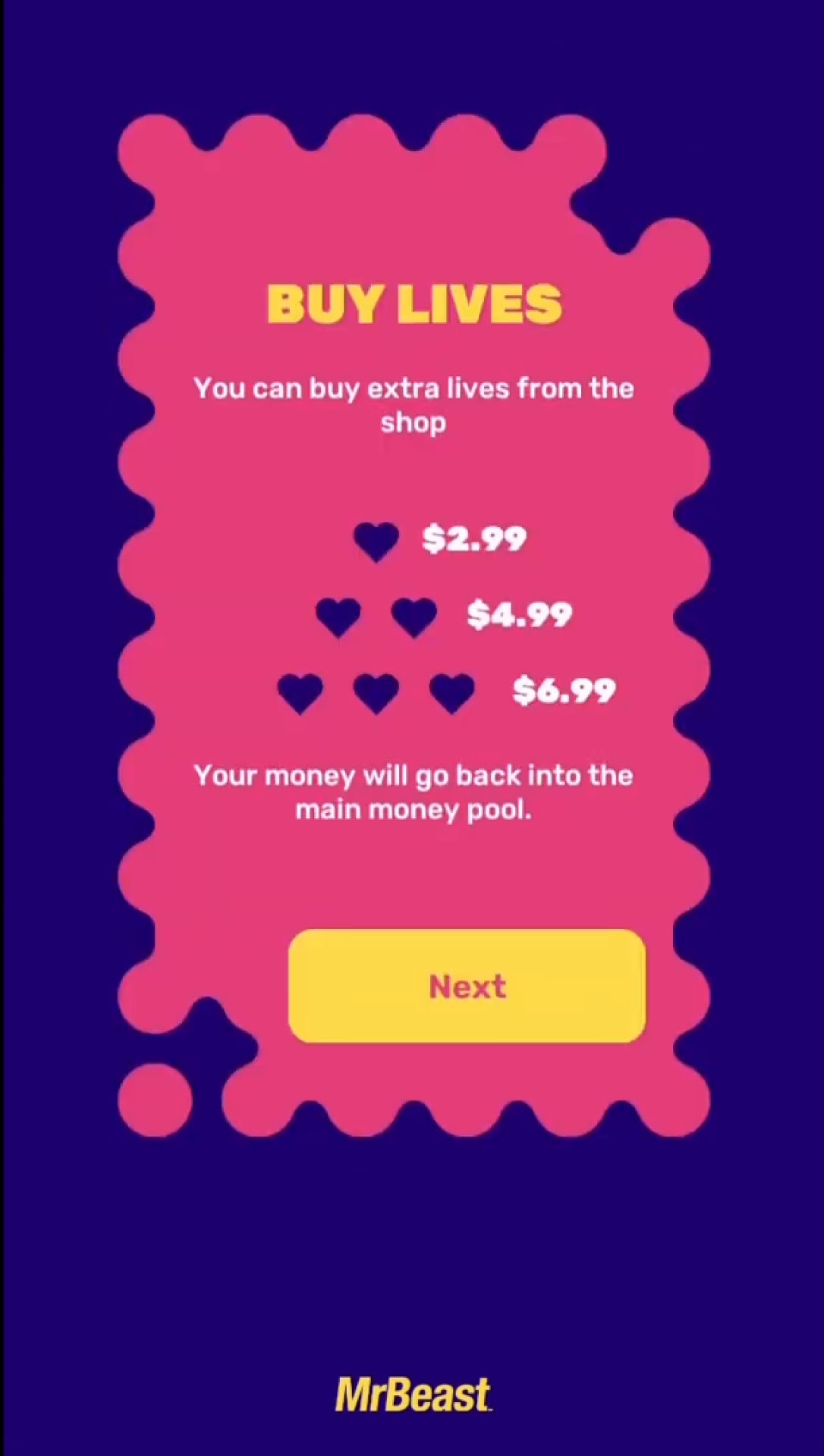
As opposed to last time, players can now buy lives, but also earn them in a new battle mode before the main game begins. So here we’re going to give you some tips to make the most of the competition – whether it’s staying healthy during, or in playing the game itself. Because after the first one lasted for 70 hours, it’s likely this could be pretty lengthy, too.

Though the prize is likely to go to someone who is buying lives, everyone still has a limit of three when it actually comes down to playing the game.

everything you need to know about finger on the app 2:

what is finger on the app 2?

Finger on the App 2 isn’t your typical mobile game, but is instead a  massive multiplayer experience available in the U.S, Canada, and Mexico. As opposed to last time, players can use both Android and iOS devices. The aim of the game is to stay touching the screen as long as possible, and the last one still touching it will win the grand prize.

when does finger on the app 2 begin?

The game starts on February 19, 2021. Just make sure to have the app open and that you’re ready to go by that time if you want to play.

what’s the prize?

As opposed to the $25,000 prize for the first game, Mr Beast has increased the amount to $100,000. The contest is also sponsored by the multiplayer game, Lords Mobile: Kingdom Wars. Last time the prize was supposed to be decided by a player poll – until Mr Beast just gave a prize to the final four players. But it seems like that poll has been removed this time around.

Finger on the App 2 life screen

How to download finger on the app 2

Finger on the App 2 can be downloaded on the App Store, or for Android on Mr Beast’s app website.

how to play finger on the app 2

The aim of the game is simple – keep touching the screen – but there are some other aspects that are important to remember. Here’s what you need to know:

  • Keep touching the screen at all times, moving your finger into merged circles that say ‘touch’
  • You can see where you are touching because the circles merge around that point
  • Your lives and the time elapsed can be seen at the top of the screen. You only have a maximum of three
  • You can earn cookies to buy lives in battle mode, going head to head with another opponent and trying to outlast them (though this mode doesn’t work just yet)

how do i get extra lives in finger on the app 2?

The amount of lives you have is important when playing, so here’s what you can do to get your hands on some extras:

  • You can buy lives in Finger on the App 2, with one for $2.99, two for $4.99, and three for $6.99. This money goes into the prize pool
  • You can play battle mode to earn cookies with which you purchase lives. As mentioned, battle mode doesn’t work yet, so keep an eye out for it coming online

what’s to stop people cheating?

Cheating was a concern in the original Finger on the App, but at numerous points in the 70 hour competition Mr Beast and MSCHF added in surprise changes to the touching pattern which threw off any bots that were playing. In the end, no bots won the competition.

Finger on the App 2 life purchase screen

tips and tricks

With no time limit on the game, if you want to get far, and maybe even win, you’re going to have to take some real-life things into consideration. It’s important to stay healthy and hydrated during, though sleep might be somewhat impossible. Here are some tips to stay on your game:

  • Stay hydrated: Make sure you have a good deal of water nearby to drink during the game – a caffeinated beverage to hand probably wouldn’t go amiss
  • You gotta eat: Snacks are a fundamental pillar of gaming, and this is no different. Make sure you have some to hand, but also keep some fruit nearby for that natural sugar boost
  • Don’t go crazy: There are always some people who take things to the extreme, and good on them, someone’s got to. But these games go on for an absurd amount of time, so bear in mind real life commitments
  • Have a phone charger nearby: Nothing would be worse than running out of battery during the game, so have a charger ready and to hand
  • Make plans for doing necessary things: There are some things, that you just have to do, especially if you’re in this for the long haul, so perhaps devise a way that you can keep playing while doing those things
  • Play with a friend: if you’re determined to get real serious with the game, get a friend to play with you, so you can play in shifts and stay sharp
  • Turn off Siri: loads of streamers lost the competition last time as they were tricked into opening Siri by reading out subscriber names, so if you don’t want to get trolled this time, best turn off those voice commands

who won the first finger on the app?

After 70 hours of play, and over 1.3 million players, Finger on the App concluded. A number of people won different amounts of money, with Mr Beast bribing some to leave the game for $10,000, and in the end he stopped the game and gave all four remaining players $20,000.

The 70 hours were also filled with plenty of other hilarious happenings – whether it was MrBeast calling contestants to try and catch them out, or the evil yet hilarious people who tricked streamers into calling up Siri on their phones – be warned of swears in the video.

If you want similar games to play while waiting for Finger on the App 2, check out our list of the best mobile puzzle games!

Posted on Leave a comment

Blender in 2021

The Blender Foundation have just announced their “Big Projects” list for Blender in 2021. It is hard to argue that 2020 wasn’t a banner year for Blender development, with three major releases as well as the first ever LTS release. Through 2020 we saw improvements to the Blender UI/UX, sculpting tools, modeling, EEVEE, Cycles and so much more. We also saw a record number of massive companies coming on board the Blender development fund. With the release today of the projects list, we get insight into the Blender priorities in 2021, including priorities such as:

  • launch of a new open movie called Sprite Fight
  • the everything nodes project, where everything in Blender will be able to be driven procedurally using nodes (see Geometry Nodes in action here)
  • all new Asset Browsers editor window for better content management
  • massive improvements to the VSE or Video Sequence Editor
  • EEVEE real-time rendering improvements including Vulkan support, motion blur, depth of field and possibly raytracing
  • VR improvements including the ability to use VR controllers and author content in virtual reality
  • Cycles rendering improvements especially related to perfromance
  • Animation 22 (previously Animation 2020), an effort to improve animation tools in Blender, sponsored by AWS
  • improved pipeline and USD support, Pixar’s open interchange format

You can learn more about the Blender’s accomplishments in 2020, as well as the new projects in 2021 in the video below.

[youtube https://www.youtube.com/watch?v=mU387jw8UNU?feature=oembed&w=1500&h=844]