Posted on Leave a comment

What’s new in Microsoft 365: From intuitive sharing with OneDrive to driving prioritization with Viva Goals

In today’s shifting macroeconomic climate, Microsoft is focused on helping organizations in every industry use technology to overcome challenges and emerge stronger. From enabling hybrid work to bringing business processes into the flow of work, Microsoft 365 helps organizations deliver on their digital imperative so they can do more with less.

This month in Microsoft 365, we’re introducing new sharing experiences in OneDrive, enabling creation and collaboration in Microsoft Office, and connecting employees to organizational goals with Microsoft Viva Goals. And our new How to Hybrid: The WorkLab Guides offer practical guidance to help leaders make hybrid work work.

Let’s dive in.

Streamline file sharing and communication in the flow of work

OneDrive is the core system for powering all file-sharing experiences across Microsoft 365. We’re excited to preview new capabilities to help you access everything you need, whether you’re working alone on a project, collaborating with your team, or organizing important documents or files.

We’re creating a more intuitive sharing experience across OneDrive, SharePoint, and Microsoft Teams that provides a quick, robust way to locate and share files and manage access settings across individuals and groups.

New sharing capabilities in OneDrive allow you to manage access settings across individuals and groups.

The redesigned OneDrive Home experience surfaces your most recent files along with any activity updates, so you can see everything at a glance and quickly prioritize where to start working. You can also filter by file type (.docx, .pptx, .xlsx, and .pdf) using the buttons at the top of the Recent file list.  

Filter by file type using buttons at the top of the Recent file list.

Finally, to easily find and access the places where you continually work, you can pin document libraries to the Quick access section in the left navigation bar of OneDrive Home. Learn more about the latest OneDrive capabilities.

Microsoft Teams Phone is the market leader in cloud calling across VoIP and PSTN with more than 12 million PSTN users. We are introducing a new Teams Phone Pay-As-You-Go calling plan option to give customers even more flexibility to choose the plan that best meets their organization’s needs. Each Pay-As-You-Go license includes a phone number and unlimited inbound calling, while outbound calls accrue per-minute charges. The Pay-As-You-Go calling plan is now available in select markets.

Enable creation and collaboration with Microsoft 365

Microsoft 365 lets you create, share, and collaborate all in one place with your favorite apps. New capabilities in Microsoft Office make it easier to access, create, and organize ideas on the web or on your mobile device.

On the web, People Pinning under My content enables you to create a more personalized experience by pinning your top collaborators so that you can easily get back to the content from your most important contacts.

People Pinning on Office.com allows you to create a more personalized experience by pinning your top collaborators.

On the mobile app, Microsoft Feed lets commercial users discover interesting and relevant content, activity, and insights all drawn from their Microsoft 365 network.

Discover interesting content in Microsoft feed categorized by activities from your network, news, and announcements.

And Microsoft Lens in the app uses interactive text to help you reuse information from existing photos, screenshots, or camera views to quickly capture notes, copy and paste across platforms, save to your device, or share with others.

Microsoft Lens enables you to copy text from existing photos, screenshots, or camera views.

Reconnect and engage a dispersed workforce

Organizations increasingly recognize that employee experience and wellbeing are essential to productivity—it’s why 25 percent of the Fortune 500 already use Microsoft Viva. We’re adding new capabilities in Viva and Teams to help keep employees connected to each other, their team, and to the organization’s mission, culture, and business goals.

Viva Goals—now generally available—connects employees to your organization’s goals, helps them stay aligned at scale, and drives business results to empower people and teams to understand their impact. Viva Goals supports the objectives and key results (OKR) goal-setting framework that naturally creates alignment between the work teams are doing and an organization’s top business priorities. Because Viva Goals is a part of Microsoft Viva, it integrates into the employee experience, empowering people and teams to be their best from anywhere. Use Viva Goals as a standalone web application or directly from inside Teams and our other third-party integrations. Learn more about Viva Goals.

We now have an improved polling experience in Teams. Teams meeting owners can easily create and launch new pre-defined polls or repurpose recent polls to increase engagement and collect input from their meeting attendees, as well as share the results live. A new, dynamic experience with animations for voting and results views makes polls more interactive and engaging. We’ve also added Rating as a new question type. Read more about what’s new in Microsoft Teams.  

Leverage the How to Hybrid: The WorkLab Guides

For leaders grappling with how to make hybrid work work, check out the new WorkLab Guides. From collaborating asynchronously to hosting effective meetings to knowing how and when to come together in person, these detailed guides include hands-on advice to help leaders navigate the new approach to work and figure out what works for their teams. Learn more at The WorkLab Guides.

Security practitioner or information worker working from home office.

How to Hybrid: The WorkLab Guides

Leverage hands-on advice to help leaders navigate the hybrid work world.

Looking forward

This month we debuted enhanced capabilities across Microsoft 365 to help people collaborate and stay connected and engaged in the flow of work. Stay tuned for more developments next month, as we highlight a number of new product innovations in Microsoft 365.

Posted on Leave a comment

MoCapAct: Training humanoid robots to ‘Move like Jagger’

A montage of four animated figures completing humanoid actions: standing up, walking, running, and jumping.

What would it take to get humanoid, bipedal robots to dance like Mick Jagger? Indeed, for something more mundane, what does it take to get them to simply stand still? Sit down? Walk? Move in myriads of other ways many people take for granted? Bipedalism provides unparalleled versatility in an environment designed for and by humans. By mixing and matching a wide range of basic motor skills, from walking to jumping to balancing on one foot, people routinely dance, play soccer, carry heavy objects, and perform other complex high-level motions. If robots are ever to reach their full potential as an assistive technology, mastery of diverse bipedal motion is a requirement, not a luxury. However, even the simplest of these skills can require a fine orchestration of dozens of joints. Sophisticated engineering can rein in some of this complexity, but endowing bipedal robots with the generality to cope with our messy, weakly structured world, or a metaverse that takes after it, requires learning. Training AI agents with humanoid morphology to match human performance across the entire diversity of human motion is one of the biggest challenges of artificial physical intelligence. Due to the vagaries of experimentation on physical robots, research in this direction is currently done mostly in simulation. 

Unfortunately, it involves computationally intensive methods, effectively restricting participation to research institutions with large compute budgets. In an effort to level the playing field and make this critical research area more inclusive, Microsoft Research’s Robot Learning group is releasing MoCapAct, a large library of pre-trained humanoid control models along with enriched data for training new ones. This will enable advanced research on artificial humanoid control at a fraction of the compute resources currently required. 

The reason why humanoid control research has been so computationally demanding is subtle and, at the first glance, paradoxical. The prominent avenue for learning locomotive skills is based on using motion capture (MoCap) data. MoCap is an animation technique widely used in the entertainment industry for decades. It involves recording the motion of several keypoints on a human actor’s body, such as their elbows, shoulders, and knees, while the actor is performing a task of interest, such as jogging. Thus, a MoCap clip can be thought of as a very concise and precise summary of an activity’s video clip. Thanks to this, useful information can be extracted from MoCap clips with much less computation than from the much more high-dimensional, ambiguous training data in other major areas of machine learning, which comes in the form of videos, images, and text. On top of this, MoCap data is widely available. Repositories such as CMU Motion Capture Dataset contain hours of clips for just about any common motion of a human body, with visualizations of several examples shown below. Why, then, is it so hard to make physical and simulated humanoid robots mimic a person’s movements? 

The caveat is that MoCap clips don’t contain all the information necessary to imitate the demonstrated motions on a physical robot or in a simulation that models physical forces. They only show us what a motion skill looks like, not the underlying muscular movements that caused the actor’s muscles to yield that motion. Even if MoCap systems recorded these signals, it wouldn’t be of much help: simulated humanoids and real robots typically use motors instead of muscles, which is a dramatically different form of articulation. Nonetheless, actuation in artificial humanoids is also driven by a type of control signal. MoCap clips are a valuable aid in computing these control signals, if combined with additional learning and optimization methods that use MoCap data as guidance. The computational bottleneck that our MoCapAct release aims to remove is created exactly by these methods, collectively known as reinforcement learning (RL). In simulation, where much of AI locomotion research is currently focused, RL can recover the sequence of control inputs that takes a humanoid agent through the sequence of poses from a given MoCap clip. What results is a locomotion behavior that is indistinguishable from the clip’s. The availability of control policies for individual basic behaviors learned from separate MoCap clips can open the doors for fascinating locomotion research, e.g., in methods for combining these behaviors into a single “multi-skilled” neural network and training higher-level locomotion capabilities by switching among them. However, with thousands of basic locomotion skills to learn, RL’s expensive trial-and-error approach creates a massive barrier to entry on this research path. It is this scalability issue that our dataset release aims to address. 

A flowchart showing motion capture clips producing clip-tracking agents via reinforcement learning. The agents then generate data using the simulated humanoid. The MoCapAct dataset consists of the agents and corresponding data.
Figure 1: The MoCapAct dataset consists of policies that track individual MoCap clips and data from these agents.

Our MoCapAct dataset, designed to be compatible with the highly popular dm_control humanoid simulation environment and the extensive CMU Motion Capture Dataset, serves the research community in two ways: 

  1. For each of over 2500 MoCap clip snippets from the CMU Motion Capture Dataset, it provides an RL-trained “expert” control policy (represented as a PyTorch model) that enables dm_control’s simulated humanoid to faithfully recreate the skill depicted in that clip snippet, as shown in these videos of the experts’ behaviors: 

Training this model zoo has taken the equivalent of 50 years over many GPU-equipped Azure NC6v2 virtual machines (excluding hyperparameter tuning and other required experiments) – a testament to the computational hurdle MoCapAct removes for other researchers. 

  1. For each of the trained skill policies above, MoCapAct supplies a set of recorded trajectories generated by executing that skill’s control policy on the dm_control’s humanoid agent. These trajectories can be thought of as MoCap clips of the trained experts but, in a crucial difference from the original MoCap data, they contain both low-level sensory measurements (e.g., touch measurements) and control signals for the humanoid agent. Unlike typical MoCap data, these trajectories are suitable for learning to match and improve on skill experts via direct imitation – a much more efficient class of techniques than RL. 

We give two examples of how we used the MoCapAct dataset. 

First, we train a hierarchical policy based on the neural probabilistic motor primitive. To achieve this, we combine the thousands of MoCapAct’s clip-specialized policies together into a single policy that is capable of executing many different skills. This agent has a high-level component that takes MoCap frames as input and outputs a learned skill. The low-level component takes the learned skill and sensory measurement from the humanoid as input and outputs the motor action. 

Two graphics of the hierarchical policy. The first graphic shows a MoCap clip of walking being fed into a high-level policy, which outputs a prediction of “walk forward.” This prediction and the humanoid observation are fed into the low-level policy, which then predicts the motor actions to execute the walking motion. The second graphic is similar to the first, with the only difference being that the MoCap clip shows a “run and jump” motion, and the predicted skill is “run and jump.”
Figure 2: The hierarchical policy consists of a high-level policy and low-level policy. The high-level policy maps the given MoCap frames to a learned skill. The low-level policy takes the skill and the humanoid observation and outputs an action that best realizes the skill. 

This hierarchical structure offers an appealing benefit. If we keep the low-level component, we can instead control the humanoid by inputting different skills to the low-level policy (e.g., “walk” instead of the corresponding motor actions). Therefore, we can re-use the low-level policy to efficiently learn new tasks. 

Graphic of a task policy feeding into a low-level policy. The task policy takes an observation from the humanoid as input, and outputs a “skill.” The skill and humanoid observation are fed into a low-level policy, which outputs the motor action.
Figure 3: We can replace the high-level policy with a task policy that is trained to output skills required to achieve some new task, such as running to a target. 

In light of that, we replace the high-level policy with a task policy that is then trained to steer the low-level policy towards achieving some task. As an example, we train a task policy to have the humanoid reach a target. Notice that the humanoid uses many low-level skills, like running, turning, and side-stepping. 

Graphic of the GPT policy. A sequence of humanoid observations is fed into the GPT module, which outputs the motor action.
Figure 4: Our GPT model takes in a sequence of observations from the humanoid (called the “context”) and outputs an action that it thinks best continues the observed motion. 

Our second example centers on motion completion, which is inspired by the task of sentence completion. Here, we use the GPT architecture, which accepts a sequence of sensory measurements (the “context”) and outputs a motor action. We train a control policy to take one second of sensory measurements from the dataset and output the corresponding motor actions from the specialized expert. Then, before executing the policy on our humanoid, we first generate a “prompt” (red humanoid in the videos) by executing a specialized expert for one second. Afterwards, we let the policy control the humanoid (bronze humanoid in the videos), at each time step, where it constantly takes the previous second of sensory measurements and predicts the motor actions. We find that this policy can reliably repeat the underlying motion of the clip, which is demonstrated in the first two videos. On other MoCap clips, we find that the policy can deviate from the underlying clip in a plausible way, such as in the third video, where the humanoid transitions from side-stepping to walking backwards.

On top of the dataset, we also release the code used to generate the policies and results. We hope the community can build off of our dataset and work to do incredible research in the control of humanoid robots. 

Our paper is available here. You can read more at our website

The data used in this project was obtained from mocap.cs.cmu.edu.
The database was created with funding from NSF EIA-0196217. 

Posted on Leave a comment

Microsoft Flight Simulator celebrates gamescom with first-ever City Update, details for 40th Anniversary Edition

Check out the free City Update 01 – available today!

To celebrate the return of Gamescom, Microsoft Flight Simulator has released its first-ever City Update today featuring five brand-new photogrammetry German cities: Hanover, Dortmund, Dusseldorf, Bonn, and Cologne. Simmers will even be able to spot the famous Koelnmesse, home to the renowned gamescom show. This free update can be downloaded from the in-sim marketplace right now.

Microsoft Flight Simulator

Furthermore, the Microsoft Flight Simulator team revealed additional details about the upcoming release of the exciting 40th Anniversary Edition. It will be available for free on November 11, 2022 to those who own Microsoft Flight Simulator or Xbox Game Pass members and will feature, for the first time since 2006, helicopters and gliders, the most requested enhancements by our community. In addition to the helicopters and gliders, we will introduce another highly-requested community feature: a true-to-life airliner, the sophisticated Airbus A-310 where nearly every single button works just as expected.

Microsoft Flight Simulator

We are also celebrating the storied history of aviation with seven famous historical aircraft in the Microsoft Flight Simulator 40th Anniversary Edition. These aircraft include the 1903 Wright Flyer, the 1915 Curtiss JN-4 Jenny, the 1927 Ryan NYP Spirit of St. Louis, the 1935 Douglas DC-3, the beautiful 1937 Grumman G-21 Goose, the 1947 Havilland DHC-2 Beaver, and the famous 1947 Hughes H-4 Hercules (the largest seaplane and largest wooden plane ever made), also known as the Spruce Goose.

[youtube https://www.youtube.com/watch?v=xYQCeJ6lZVc?version=3&rel=1&showsearch=0&showinfo=1&iv_load_policy=1&fs=1&hl=en-US&autohide=2&wmode=transparent&w=640&h=360]

We are also adding four classic airports, including the Meigs Field in Chicago which is a traditional starting airport for the Microsoft Flight Simulator franchise. It is an exciting update full of aviation history to celebrate our community and the beauty of aviation!

In summary, the 40th Anniversary Edition will bring:

  • 4 classic commercial airports
  • 10 glider airports
  • 12 new aircraft
  • 14 heliports
  • 20 classic missions from the franchise’s past

We hope you’ll check out the City Update 01 (German cities) available today and follow along as we get ready to bring you the Microsoft Flight Simulator 40th Anniversary Edition on November 11. The sky is calling!

Microsoft Flight Simulator

Microsoft Flight Simulator is now available for Xbox Series X|S and PC with Xbox Game Pass, PC Game Pass, Windows, and Steam, and on Xbox One and supported mobile phones, tablets, and lower-spec PCs via Xbox Cloud Gaming. For the latest information on Microsoft Flight Simulator, stay tuned to @MSFSOfficial on Twitter. 

Xbox Live
Xbox Play Anywhere

Microsoft Flight Simulator

Xbox Game Studios

368

Xbox One X Enhanced
PC Game Pass
Xbox Game Pass

Microsoft Flight Simulator is the next generation of one of the most beloved simulation franchises. From light planes to wide-body jets, fly highly detailed and stunning aircraft in an incredibly realistic world. Create your flight plan and fly anywhere on the planet. Enjoy flying day or night and face realistic, challenging weather conditions.

Posted on Leave a comment

A multidimensional approach to journalism security

The security community is continuously changing, growing, and learning from each other to better position the world against cyberthreats. In the latest post of our Community Voices blog series, Microsoft Security Senior Product Marketing Manager Brooke Lynn Weenig talks with Runa Sandvik, Former Senior Director of Information Security at The New York Times and member of CISA’s Technical Advisory Council. She recently was interviewed about her new startup, Granitt, in TechCrunch.1 The thoughts below reflect Runa’s views, not the views of Microsoft, and are not legal advice. In this blog post, Runa talks about security for journalists and media organizations.

Brooke: How did you get into cybersecurity?

Runa: I got my first computer when I was 15. I studied for a bachelor’s in computer science at a university in Norway, where I’m from. One thing I really enjoy about this industry is that within computer science and cybersecurity, there are so many different challenges to take on. There are so many problems that you can work on and so many things to be curious about and I’ve always really loved that.

During the summer of 2009, before the last year of my bachelor’s, I worked for the Tor Project as part of Google Summer of Code. Once that internship wrapped up, I stayed on with the Tor project and I volunteered to continue maintaining my project. Over time, Tor offered me a part-time contract and later, a full-time contract.

A lot of the work that I do today has been shaped by the four years that I spent working with the Tor project. When I first heard about Tor, I thought it was cool that you could be anonymous online by using a piece of technology. I didn’t consider who’s using it or for what reason. But over the four years with Tor, I got to meet not only other people working in the same space but also people around the world who told me about their experiences with the tool and what it enabled them to do, which was a hugely positive experience for me.

Brooke: What excites you the most about protecting journalists?

Runa: Around 2011, four projects got funding to train reporters on how to use the Tor browser and I ended up leading that project. We were building out a curriculum and we felt very quickly that it was not super helpful to teach someone how to use a Tor browser to be safe online if they’re not also familiar with general security best practices, like passwords and two-factor authentication and the importance of software updates. So, we built a curriculum around that. I later took that experience with me to the Freedom of the Press Foundation and The New York Times.

The work that I’ve done with journalists was something that I stumbled into, but looking at it now, I think investigative journalism has a lot of the same themes as security research. It has the same puzzles, same challenges, and the same digging that gets me really curious and really interested. It also has this incredibly important mission behind it.

Brooke: What do you do to protect journalists and at-risk groups or organizations?

Runa: For an individual to work safely or securely, I consider digital security, physical security, emotional safety, and legal issues. Journalism security really needs to encompass all four buckets, so some of the work that I do has been one-on-one discussions with reporters who want everyday security guidance, and I help them figure out what they can do to improve. They are usually preparing for a specific investigative project or preparing for a trip to an at-risk area.

I have worked closely with groups of people at media organizations that are a mix of reporters, IT, security, and legal to produce a security plan based on the challenges they face and the kind of support the newsroom needs. Years ago, if you were a big enterprise like The New York Times, Washington Post, Microsoft, or Google, there were a lot of big, complex cybersecurity frameworks to help you get a baseline and the steps to take to improve moving forward.

If you’re an individual looking to improve your security, there are guides from the Electronic Frontier Foundation and the Freedom of the Press Foundation giving you information like “here’s how you use a password manager” and “here’s how you set up two-factor authentication,” but Ford Foundation fellow, Matt Mitchell, found that if you’re a small organization or small team, there’s not a good option available. He put together a committee to develop the Ford Foundation Cybersecurity Assessment Tool, which is designed for smaller organizations. It is a really effective way to figure out where I am today and where the focus should be on the next year or two.

Brooke: What are the biggest threats you’ve seen in your line of work?

Runa: If we are talking about security issues that a journalist as an individual might face, we could talk about online account takeover and phishing scams. I recently gave a talk at Paranoia in Oslo about how the media gets hacked and the root cause behind all these issues. If we are talking about the organization that the journalist works for, it comes down to a lack of two-factor authentication credential stuffing, poor passwords, phishing, and outdated systems.

Over the years, my work has focused on the individual, but 10 years ago, Tor was clunky and complex. We had VPNs. We had tools to fully encrypt the drive in your laptop, but they were clunky to use. There was a long text of steps to get it all up and running. People needed a lot of help to use it. These days, we have all the tools and they’re either free or not super expensive. What is missing now is that buy-in from leadership to create the processes and the workflows to ensure that the newsrooms have all these tools provided to them. Currently, it is more of a building-the-bridges type of challenge. I don’t think we are necessarily missing any tools. We just need to figure out how to piece it together.

Brooke: What are the biggest security challenges for journalists?

Runa: A journalist is a journalist all day, every day. That is not just a job, it is an identity. They are journalists, whether they are in a movie theater with a personal phone or at work with their company laptop. Regardless of the device they are using, the time of day, and location in the world, they are still journalists, and they are going to report if there is something to report on. In a corporate context, historically, we have been focused on securing corporate accounts, corporate systems, and corporate devices, but for roles like journalism and other activist groups, which starts to break down a bit. I think there needs to be a greater conversation around how we go about securing identities as opposed to just the 9-to-5 corporate bits and bobs.

Another big challenge is building sufficient support on the business side of the company to be able to provide adequate support to the newsroom. Reporters who I have talked to are not questioning that they need to be more secure and that they need processes or tools. Once that is provided, they are very willing to try things. You just need to build that bridge and help the business side understand the challenges in the newsroom and the potential challenges that presents for the business, whether from a physical, digital, or legal standpoint, and then produce ways to address that.

Supporting the work that the newsroom is doing means developing products, developing the content management system (CMS), getting stories out, producing new ways to report, retaining subscribers, and funding reporters who go out on investigative trips. All of these things are incredibly important and sometimes more important than security. The challenge is where do I spend my resources knowing that everything is so strapped?

There are a lot of diverse ways that you could improve security at your organization and even if you do not have the resources currently for the best and biggest and greatest product, there are still small things that you can do. It is a matter of figuring out how to focus on this one thing you do have to focus on, even if it’s just one person, two people, or a small team. At this point, not focusing on cybersecurity is not an option.

Learn more

To learn more about Microsoft Security solutions, visit our website. Bookmark the Security blog to keep up with our expert coverage on security matters. Also, follow us at @MSFTSecurity for the latest news and updates on cybersecurity.


1Runa Sandvik’s new startup Granitt secures at-risk people from hackers and nation states, Zack Whittaker. July 15, 2022.

Posted on Leave a comment

New Teams features help improve students’ well-being

Listening to and empathizing with students through ongoing dialogue is vital to their current and future success. And with the right tools educators can foster an environment where students feel heard and help keep a pulse on their emotional well-being.

That’s why we’re excited to tell you about new Microsoft Teams features that help educators recognize students’ needs and foster more classroom communication.

Reflect helps students build their emotional skills

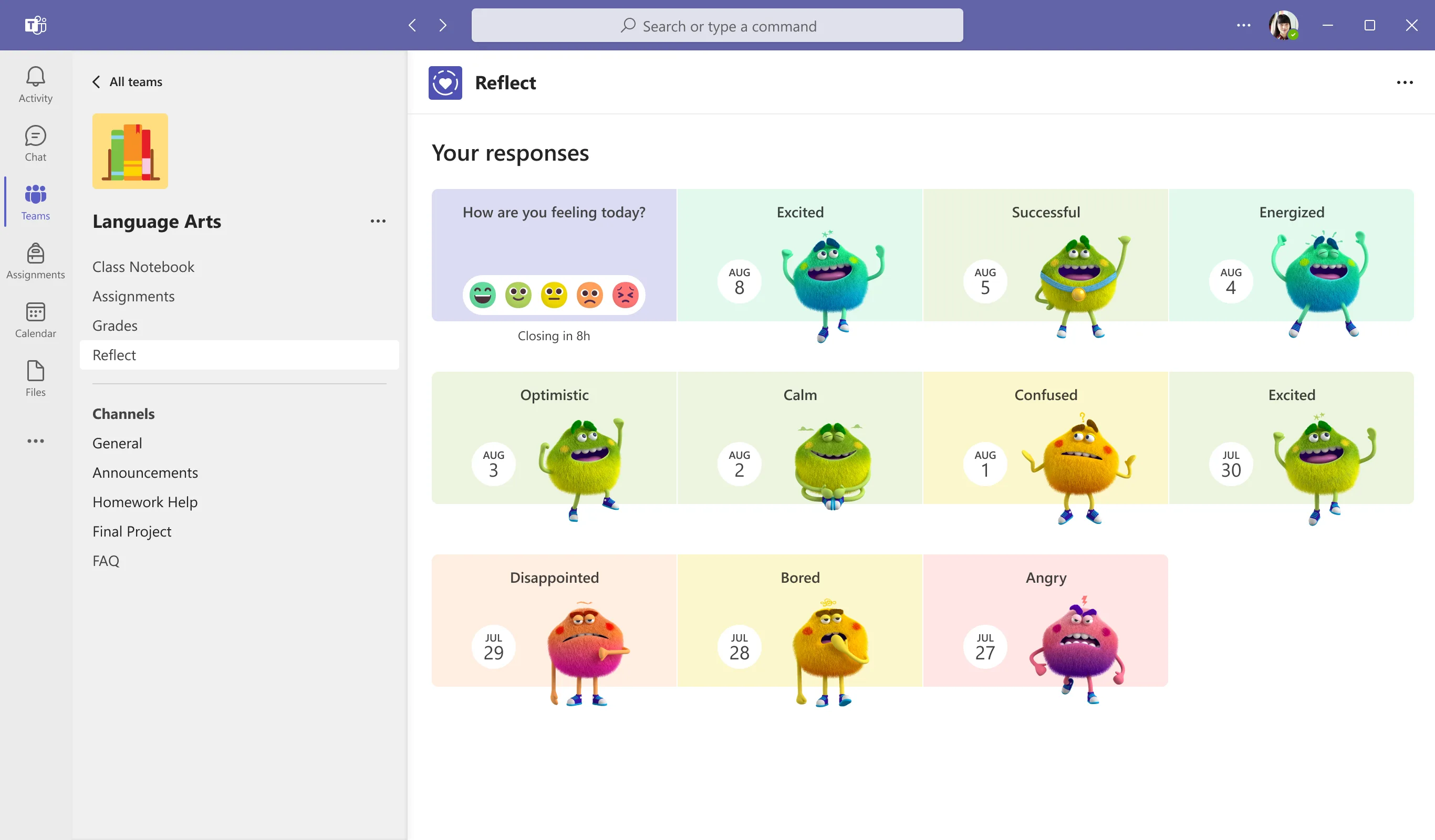
Reflect—a feature in Microsoft Teams—can help learners broaden their emotional vocabulary, recognize and navigate their emotions better, and deepen empathy for their peers. It does this in part by providing regular opportunities for students to share and be heard.

Reflect also benefits educators by providing them valuable feedback and helping build a healthy classroom community that makes social emotional learning routine. Research has demonstrated that explicit teaching of social and emotional skills improves student academic and behavioral performance and has lifelong positive effects.

At Microsoft, we know that self-awareness and self-management are critical skills for lifelong learning, so Reflect provides opportunities for students to reflect on their learning. This helps educators better understand how students receive their curriculum and work with students to increase the agency they have in their own learning process. The benefit is helping students develop a growth mindset by honestly evaluating their own effort, motivation, and progress.

Reflect also provides a safe space for students to practice asking for help in areas where they feel challenged. Students can do check-ins using emojis and characters, which allows them to express themselves and develop emotional awareness. Only educators can see their students’ reflections, so students never have to worry about privacy. Together view, another part of Reflect, allows students to build empathy for others by viewing the Feelings Monsters their classmates share (the Monsters are character representations of a person’s own feelings). 

Reflect also allows teachers to create custom questions for check-ins and view improved data visualizations of previous check-ins in Teams and Class Notebook. And using the OneNote Class Notebook toolbar, educators can easily insert a Reflect for learning poll that is contextualized on the Class Notebook page. These can be used as quick and easy pre- and post-assignment assessments, or as “exit slips” to help inform the next lesson.

Use Reflect to enhance your SEL routine

These are some quick ideas for how to use Reflect to either enhance your existing social and emotional learning (SEL) routine, or begin a new SEL routine:

  • Reach out one-on-one to students who are experiencing a pattern of difficult emotions.
  • Host conversations about the new emotional vocabulary that Reflect introduces to students. For example: Why is “excited” different than “motivated”? Or why does being able to express yourself matter?
  • Discuss empathy with students by asking: Did you notice there are others in class who are also in the same feelings range today? Did you notice people who are having a different experience than you? Why might they be feeling different?
  • Do some self-reflection of your own. What responses, feelings, and challenges do you have the power to impact through your teaching methods?
  • Expand social emotional learning or introduce the Feelings Monster with ready-to-play games and activities on Kahoot! and Flip.
  • Print a Feelings Monster poster with PowerPoint.

Learn how to create your SEL routine using Reflect today.

[youtube https://www.youtube.com/watch?v=2xuMsN8R1Ks?&wmode=opaque&rel=0&w=640&h=360]

New home page provides one place to communicate

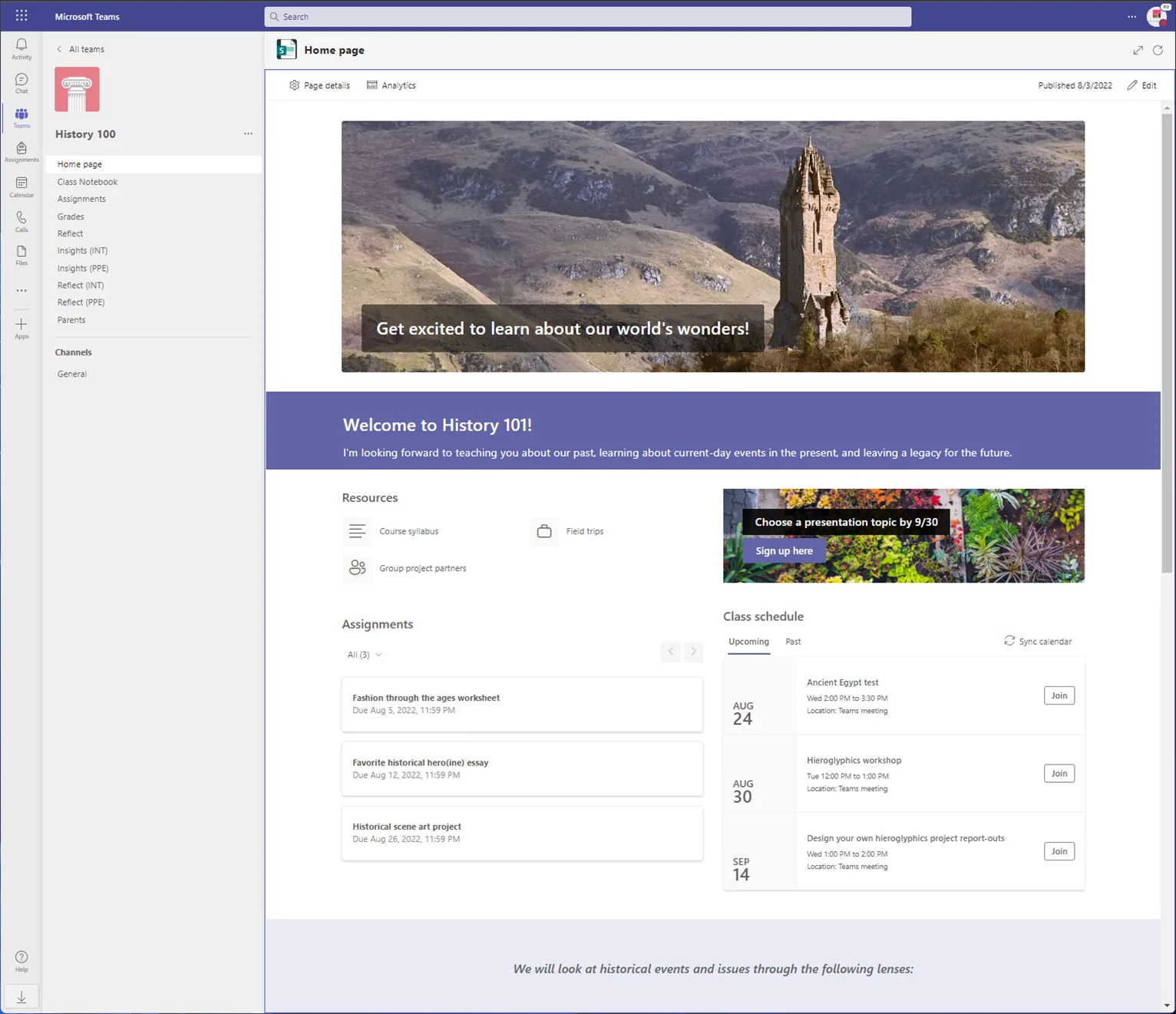
We’ve been listening to feedback from educators and students using Microsoft Teams, and one thing is clear: educators are looking for one place to catch up on all things. So, we’re thrilled to introduce the new home page feature rolling out this week to all class teams just in time for back to school.

Home page provides a central location to check the latest announcements, pinned class resources, upcoming assignments, recently edited class files, and more! It will be included automatically for all classes using Teams.

To get started, educators simply select Home page to launch it. Teams will pull in any assignments, virtual class meetings, or files you’ve already started adding. The rest can be customized by selecting Edit before you publish. Add fun images, additional sections, or key information about you and your class.

Only educators can make changes to the class home page, so you have control over what’s shared. And because it’s all customizable, you can set it up to your liking before admitting students to Teams at the start of the school year.

We’re excited to bring this new feature to you and your students, and we look forward to learning about how you use home pages for each of your classrooms.

Create and review assignments on iPad and Android tablets

In the past, educators have been able to create and review Reading Progress assignments on Teams using a Desktop PC, Mac and Web Browser, but not using an iPad or Android tablets. We’ve fixed that to make sure everyone has access no matter what kind of device they have. Teams now supports assignment creation and review on these two mobile platforms.

Get to know these new tools today

Want to learn more about how to get started with Reflect in Microsoft Teams, how to create Reflect check-ins or how to create an SEL routine to help students build self-awareness? Download the tools today and modify teaching methods based on the needs of students. Or check out other new Microsoft Teams features to help manage classrooms and workload.

Posted on Leave a comment

Second edition of Cyber Signals: Pulling back the curtain on the new ransomware landscape

Today, Microsoft is excited to publish our second edition of Cyber Signals, spotlighting security trends and insights gathered from Microsoft’s 43 trillion security signals and 8,500 security experts. In this edition, we pull back the curtain on the evolving cybercrime economy and the rise of Ransomware-as-a-service (RaaS). Instead of relying on what cybercriminals say about themselves through extortion attempts, forum posts, or chat leaks, Microsoft threat intelligence gives us visibility into threat actors’ actions.

RaaS is often an arrangement between an operator, who develops and maintains the malware and attack infrastructure necessary to power extortion operations, and “affiliates” who sign on to deploy the ransomware payload against targets. Affiliates purchase initial access from brokers or hit lists of vulnerable organizations, such as those with exposed credentials or already having malware footholds on their networks. Cybercriminals then use these footholds as a launchpad to deploy a ransomware payload against targets.

The impact of RaaS dramatically lowers the barrier to entry for attackers, obfuscating those behind initial access brokering, infrastructure, and ransoming. Because RaaS actors sell their expertise to anyone willing to pay, budding cybercriminals without the technical prowess required to use backdoors or invent their own tools can simply access a victim by using ready-made penetration testing and system administrator applications to perform attacks.

The endless list of stolen credentials available online means that without basic defenses like multifactor authentication (MFA), organizations are at a disadvantage in combating ransomware’s infiltration routes before the malware deployment stage. Once it’s widely known among cybercriminals that access to your network is for sale, RaaS threat actors can create a commoditized attack chain, allowing themselves and others to profit from your vulnerabilities.

While many organizations consider it too costly to implement enhanced security protocols, security hardening actually saves money. Not only will your systems become more secure, but your organization will spend less on security costs and less time responding to threats, leaving more time to focus on incoming incidents.

Businesses are experiencing an increase in both the volume and sophistication of cyberattacks. The Federal Bureau of Investigation’s 2021 Internet Crime Report found that the cost of cybercrime in the United States totaled more than USD6.9 billion.1 The European Union Agency for Cybersecurity (ENISA) reports that between May 2021 and June 2022, about 10 terabytes of data were stolen each month by ransomware threat actors, with 58.2 percent of stolen files including employees’ personal data.2

It takes new levels of collaboration to meet the ransomware challenge. The best defenses begin with clarity and prioritization, which means more sharing of information across and between the public and private sectors and a collective resolve to help each other make the world safer for all. At Microsoft, we take that responsibility to heart because we believe security is a team sport. You can explore the latest cybersecurity insights and updates at our threat intelligence hub Security Insider

With a broad view of the threat landscape—informed by 43 trillion threat signals analyzed daily, combined with the human intelligence of our more than 8,500 experts—threat hunters, forensics investigators, malware engineers, and researchers, we see first-hand what organizations are facing and we’re committed to helping you put that information into action to pre-empt and disrupt extortion threats.

Learn more

To learn more about Microsoft Security solutions, visit our website. Bookmark the Security blog to keep up with our expert coverage on security matters. Also, follow us at @MSFTSecurity for the latest news and updates on cybersecurity.


1Internet Crime Report, Federal Bureau of Investigation. 2021.

2Ransomware: Publicly Reported Incidents are only the tip of the iceberg, European Union Agency for Cybersecurity. July 29, 2022.

Posted on Leave a comment

Connect with Microsoft Security experts at the 2022 Gartner Identity & Access Management Summit

The transition to a remote and hybrid workforce happened fast during a time of uncertainty, and IT professionals rose to the challenge with ingenuity and dedication. But two years in, many IT teams are still responding with patchwork solutions to enforce identity and access management (IAM) across a newly decentralized, multiple-endpoint ecosystem. It’s clear that new IAM strategies are needed to accommodate these major shifts in the workplace, as well as meet new organizational priorities and user expectations.

In that spirit of discovery, we’re looking forward to joining the IAM community at the Gartner Identity & Access Management Summit, August 22 to 24, 2022, in Las Vegas, Nevada. We’ll be sharing some of Microsoft’s recent insights about strengthening lifecycle and permissions management, stopping attacks on identity infrastructure, and moving to a cloud-based identity platform. With the recently announced Microsoft Entra, identity threat detection and response (ITDR), and our security information and event management (SIEM) and extended detection and response (XDR) solutions, we’re committed to providing end-to-end protection for your organization. Be sure to visit Microsoft Booth #304 and connect with our frontline defenders.

Gartner IAM Summit—Microsoft sessions

We’re excited to meet with our customers, colleagues, and peers at the 2022 Gartner Identity & Access Management Summit. Microsoft will present three research-backed sessions led by senior product managers, including a special look at ITDR led by Alex Weinert, Director of Identity Security at Microsoft.

Balaji Parimi, Microsoft Partner Product Management

Title: Manage, Secure, and Govern Identities Across Multicloud Infrastructures
Speaker: Balaji Parimi, Partner General Manager
Date/Time: Monday, August 22, 2022 | 11:45 AM to 12:15 PM PT
Synopsis: Going multicloud makes you more agile and resilient. But it also creates more complexity and blind spots for your security and identity teams. It’s time to reimagine how we manage, secure, and govern identities, and enforce least-privileged access consistently across cloud platforms. In this session, we’ll explore how cloud infrastructure entitlement management (CIEM) can strengthen your Zero Trust security in a multicloud world.

Brjann Brekkan, Group Program Manager, Identity and Network Access

Title: Beyond the Firewall: Upgrading from On-Premises to the Microsoft Cloud Identity
Speaker: Brjann Brekkan, Group Program Manager, Identity and Network Access
Date/Time: Monday, August 22, 2022 | 1:15 PM to 1:35 PM PT
Synopsis: Today’s new normal of “work from anywhere” and “on any device” has exposed the challenges of using on-premises authentication technologies and platforms as the control plane for enterprise applications and collaboration. You’re invited to join the Microsoft Identity product group for this interactive session. We’ll discuss the latest trends and platform capabilities to accelerate and simplify the journey of adopting a modern cloud-based identity platform.

Alex Weinert, Director of Identity Security

Title: Identity Threat Prevention, Detection, and Response—Essential Defenses for a New Generation of Attacks
Speaker: Alex Weinert, Director of Identity Security
Date/Time: Tuesday, August 23, 2022 | 11:15 AM to 11:45 AM PT
Synopsis: Attacks against identity infrastructure are accelerating. Instead of trying to compromise individual accounts, today’s attackers seek to gain unrestricted access to multicloud environments and workloads wherever they’re deployed. For that reason, protecting accounts is not enough—organizations need robust protections for the identity infrastructure itself. In this session, we’ll share how Microsoft envisions the future of ITDR, including what an effective identity and security collaboration should look like to help your organization grow fearlessly.

Bridging the IAM and SOC divide

Even as we approach another IAM summit, many organizations are still shocked to learn the reality of how most identity breaches occur. According to the 2022 Verizon Data Breach Investigations Report, 65 percent of breaches are caused by credential misuse, while only 4 percent caused are by system vulnerabilities.1 A full 82 percent of breaches involve the human element, including social engineering attacks, user errors, and data misuse.

As I will discuss in my Tuesday session, ITDR offers a way of reimagining the scope and collaboration between the SOC and identity admins that can help stop more of these credential-based attacks. IAM requires a lot of the same telemetry and inventory that SOC teams have, but the two groups rarely share tools. That’s because each team buys tools for different reasons. Operations and identity admins want stable, predictable operations and high uptime. Security analysts aren’t concerned with uptime; they care about identifying threats. In other words, IAM is mostly focused on letting only the good guys in, but it also needs an equal capability for keeping the bad guys out.

So, how do we reduce that staggering 65 percent of breaches that result from account-takeover attacks? And how do we know if and when the architecture itself is faulty? The solution lies in unifying more signals and more controls into a holistic solution. Microsoft is positioned to bridge the chasm between SOC and IAM because Microsoft Azure Active Directory (Azure AD) is already the foundation identity that so many organizations rely on. In addition, Microsoft Sentinel provides a cloud-native SIEM and SOAR solution with built-in user entity and behavior analytics (UEBA), while Microsoft Defender provides XDR capabilities for user environments, and Microsoft Defender for Cloud provides XDR for infrastructure and multicloud platforms.

Microsoft Entra: The way in is the way forward

Along with bridging the SOC and IAM relationship, Microsoft Entra is a vital component of Microsoft’s approach to ITDR. The products in the Entra family help provide secure access by providing IAM, CIEM, and identity verification in one solution.

Entra encompasses all of Microsoft’s existing IAM capabilities and integrates two new product categories: Microsoft Entra Permissions Management is a CIEM solution that empowers customers to discover, remediate, and monitor permission risks across all major public cloud platforms (such as Amazon Web Services, Azure, and Google Cloud Platform) from a unified interface. Microsoft Entra Verified ID provides a decentralized identity service based on open standards, safeguarding your organization by allowing admins to seamlessly customize and issue verifiable credentials in all your apps and services. 

Microsoft is working with our customers to reimagine IAM for our new decentralized workplace, and we’re committed to providing end-to-end protection for your organization with Microsoft Entra and SIEM and XDR. We look forward to meeting with you at Gartner Identity & Access Management Summit, August 22 to 24, 2022, in Las Vegas, Nevada. Be sure to stop and chat with us at Microsoft Booth #304.

To learn more about Microsoft Security solutions, visit our website. Bookmark the Security blog to keep up with our expert coverage on security matters. Also, follow us at @MSFTSecurity for the latest news and updates on cybersecurity.


12022 Data Breach Investigations Report, Verizon. 2022.


GARTNER is a registered trademark and service mark of Gartner, Inc. and/or its affiliates in the U.S. and internationally and is used herein with permission. All rights reserved. 

Posted on Leave a comment

Marvel Studios’ ‘She-Hulk: Attorney at Law’ debuts on fan-favorite Windows 11 app Disney+

In 2021, Windows teamed up with Disney+ to bring the fan-favorite app to Windows 11 and Microsoft Store. This popular streaming service includes Disney classics, recent animated and live action movies from its studios, as well as series and films from the Marvel and Star Wars universes. ​

Disney+ was the first app to use a new feature in the Microsoft Store that produced a “Stream on Disney+” button upon searching for content in the store. ​

To celebrate the release of Marvel Studios’ “She-Hulk: Attorney at Law”, an Original series streaming exclusively on Disney+, Microsoft debuted a video showing She-Hulk using Windows 11 in her daily life – both personal and professional – with features like Snap Assist and Multiple Desktops.

Watch the video, download She-Hulk-themed backgrounds for Windows and install the Disney+ app to watch the show (a subscription is required).

In Marvel Studios’ “She-Hulk: Attorney at Law,” Jennifer Walters (Tatiana Maslany) — an attorney specializing in superhuman-oriented legal cases — must navigate the complicated life of a single, 30-something who also happens to be a green 6-foot-7-inch superpowered hulk. The nine-episode comedy series welcomes a host of MCU vets, including Mark Ruffalo as Smart Hulk, Tim Roth as Emil Blonsky/the Abomination, and Benedict Wong as Wong, as well as Jameela Jamil, Josh Segarra, Ginger Gonzaga, Jon Bass and Renée Elise Goldsberry. Directed by Kat Coiro (Episodes 1, 2, 3, 4, 8, 9) and Anu Valia (Episodes 5, 6, 7) with Jessica Gao as head writer, “She-Hulk: Attorney at Law” streams exclusively on Disney+ beginning August 18, 2022.

Posted on Leave a comment

Special Olympics and Xbox partner for Gaming for Inclusion esports event in September

The second annual esports experience will include immersive leadership training for three Special Olympics athletes to become shoutcasters for the broadcast

Since 1968, Special Olympics has been on a mission to end discrimination against people with intellectual disabilities across the world by fostering acceptance through the power of sports. Here at Xbox, we’re honored to partner with Special Olympics again for the second annual Gaming for Inclusion esports event, and to showcase the power of inclusion through gaming.

Following its successful debut in 2021, Gaming for Inclusion 2022 will bring together Special Olympics athletes and Unified partners to compete in Rocket League on Xbox and PC for the chance to play alongside Special Olympics celebrity supporters. This includes NFL legend Jamaal Charles, TikTok influencer and content creator vaultboy, and WWE Superstars in an upcoming Celebrity Showcase on September 17.

Gaming for Inclusion is a virtual, multi-day esports tournament giving people the opportunity to compete for something far greater than first place — the power of inclusion. The tournament will engage and connect people of all abilities from Canada and the United States.

Gamers Unite Inline Asset

For Xbox, the tournament is part of a larger goal to make gaming inclusive and welcoming to all players so that everyone can experience the joys of gaming. It is also a meaningful and important step in making esports more accessible by empowering Special Olympics athletes to compete in a new way.

 “We’re honored to again partner with Special Olympics International for the 2nd annual Gaming for Inclusion event this September,” said Jeff Hansen, GM Strategic Brand Partnerships at Microsoft. “This year, Microsoft is empowering Special Olympics athletes to participate beyond the playing field by providing hands-on training as on-air talent to host and shoutcast in the tournament broadcast on the official Xbox Twitch channel. Microsoft is committed to supporting Special Olympics in their mission to be a movement led by athletes and raise awareness for people with intellectual disabilities across areas such as sports and leadership.”

This year, Gaming for Inclusion will feature a leadership opportunity for three Special Olympics athletes to become esports shoutcasters and hosts for the Celebrity Showcase: Jose Moreno from Special Olympics Illinois, Amber Gertsch from Special Olympics Utah, and Ben Gregory from Special Olympics Indiana.

Gamers Unite Green In-line Asset

As a shoutcaster, each athlete will travel to Redmond, Washington for an immersive two-day training on Microsoft’s campus where they’ll develop skills from some of the best in esports. Through these trainings, Special Olympics athletes will learn how to analyze a game, provide commentary during a livestream, and interview athletes and celebrity guests.

“I appreciate Special Olympics and Microsoft for providing me with this incredible leadership opportunity to become a shoutcaster at this year’s Gaming for Inclusion event,” said Mr. Moreno who is also a Special Olympics Illinois Athlete Leader. “Gaming creates a common bond and a fun way to connect with people of all abilities around the world. I’ve made new friends through gaming because we love it, and anyone can play.”

Bracket-style tournaments will crown champions for each Rocket League ranking. All gaming competitions will be hosted through Microsoft’s esports platform Start.gg. Spectators can live stream the events on the official Xbox Twitch channel and the Special Olympics YouTube channel:

  • Saturday, September 10: Rocket League Tournament
  • Saturday, September 17: Celebrity Showcase with winners from tournaments

“From the beginning of the inaugural Gaming for Inclusion virtual experience, we saw connections made and friendships developed among athletes with and without intellectual disabilities,” said Chief Information and Technology Officer at Special Olympics Prianka Nandy. “Immediately, both Special Olympics and Microsoft knew this event would continue and get bigger and better because it truly embodies the power of inclusion. This year, thanks to our incredible partners at Microsoft, we are adding a unique leadership opportunity for some of our athletes to learn from some of the best in the industry and become shoutcasters during our Celebrity Showcase.”

Don’t forget to tune in to the Celebrity Showcase on September 17 on the official Xbox Twitch channel and the Special Olympics YouTube channel to see who comes out on top! You can learn more about Special Olympics by following them across Twitter, Facebook, YouTube, Instagram, LinkedIn, their official blog on Medium, and SpecialOlympics.org.

Posted on Leave a comment

What a powerful example of how technology can help address some of the most pressing issues of our time. Thank you to our partner ELCA Informatique…

LinkedIn and 3rd parties use essential and non-essential cookies to provide, secure, analyze and improve our Services, and to show you relevant ads (including professional and job ads) on and off LinkedIn. Learn more in our Cookie Policy.

Select Accept to consent or Reject to decline non-essential cookies for this use. You can update your choices at any time in your settings.