Posted on Leave a comment

Check out this year’s Black Friday deals from Microsoft and partners

Black Friday deals from Microsoft Store and our partners starting Saturday, November 10. Give wonder this holiday season with savings on Surface, Windows 10 PCs, Xbox One and more.

Microsoft Store Winter graphic

When I think back on a lifetime of giving holidays, I don’t always remember the exact presents or the pattern of the wrapping paper. What I recall clearly, though, is that smile, that laugh of someone unwrapping the perfect gift. For me – and from me – those gifts often had technology at the center, whether it was the latest gaming console I always wanted growing up, the perfect PC for my kids or the sold-out fitness wearable for my wife. Unwrapping a gift of technology always seems to generate a happy dance.

For this holiday season and one of my favorite times of year, I’m looking forward to celebrating with my family and loved ones, and to giving more than just gifts. I’m hoping to share new moments of wonder with others and look back on them fondly, years from now.

This year Microsoft Store and our partners have some great options to give wonder with Black Friday deals for today’s digital lifestyle – from Xbox One bundles to the Surface family and Windows 10 PCs. Select deals will be available across regions, and pricing and timing may vary. Check out the full list of savings here.

Save up to $330 on Surface

Surface devices

Give inspiration with a new Surface this holiday and see, feel and hear the difference. Imagine what they’ll create with the Surface family: the better than ever, ultra-light Surface Pro 6 delivers even more speed and performance, the Surface Laptop is the ultimate in power and design, while the small, strong Surface Go is always adventure-ready.

Save up to $100 on Xbox One, Get Xbox Game Pass for $1

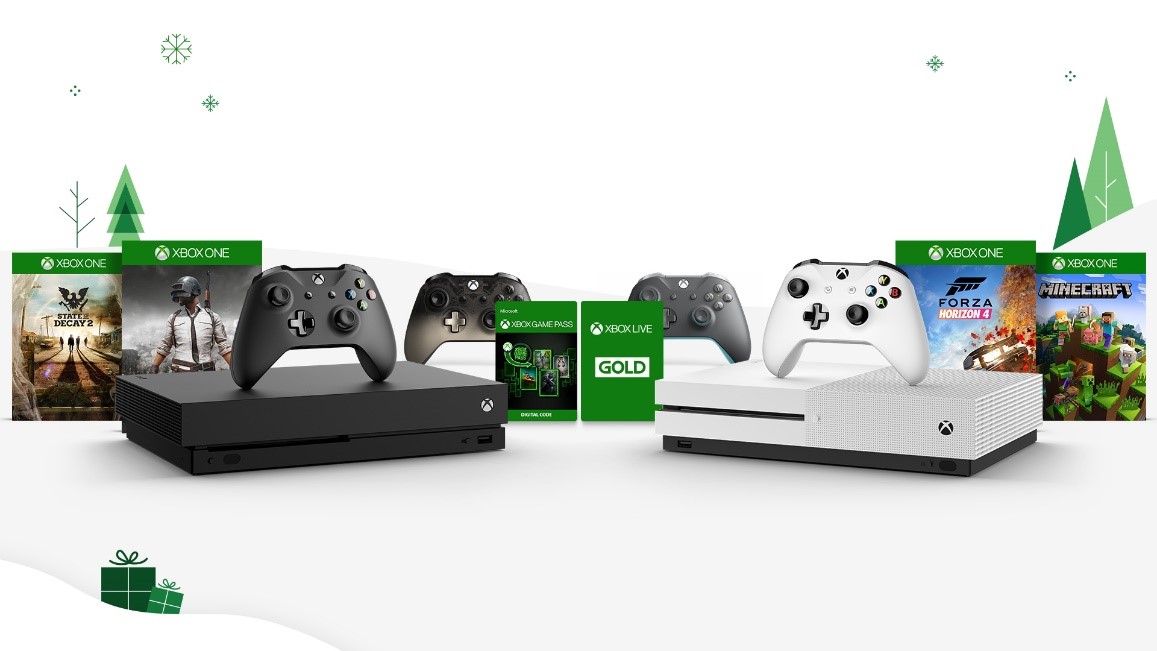
Xbox consoles and games

Give thrills this season for the gamer on your list with Xbox’s biggest Black Friday sale ever. With deals on Xbox consoles, accessories, Xbox Game Pass and Xbox Live Gold and must-have games, including the lowest price ever for Xbox One X at $399.99, there’s something for everyone.

Save Up to $740 on Windows 10 PCs

Give possibility with a Windows 10 PC and bring home gifts for work and play. Devices powered by Windows 10 provide you with all the latest features, and help you make the most of your time across work, home and anywhere in between.

  • Nov. 10-30: Get $120 off the MSI GL63 8RE-629 NewEgg.com and save up to $100 off the MSI GV62 8RD-200 on Amazon.com
  • Nov. 18-26: Get $400 off when you purchase the Odyssey Z ($1799.99) and the HMD Odyssey+ ($499.99) together on Samsung.com for just $1,899.99
  • Nov. 18-30: Save $150 on the Huawei Matebook X Pro at the Microsoft Store and get $30 off the Huawei MateBook D 14 on Amazon.com
  • Nov. 22-24: Get $200 off the Acer Nitro 5 Nov. 21-26 at BestBuy.com
  • Nov. 22-30: Buy a Dell Inspiron 15for $499, save $200
  • Nov 22-Dec.1: Save up to $100 on the Asus ZenBook 13 (UX331) at Amazon.com and get the Asus VivoBook Flip 14 (TP412) for only $399 at Walmart.com.
  • Starting Nov. 22: Don’t miss great Black Friday deals from HP.com where you can save up to $740 on select ENVY, Pavilion, OMEN and Spectre PCs
  • Starting Nov. 23: Buy the Lenovo X1 Carbon for just $899.99 while supplies last

Additional Black Friday deals include: 

Microsoft Store, whether shopping online, in a physical store, or through an Xbox or Windows 10 device, is the best destination for your holiday shopping. From getting tech recommendations from store associates, finding a standout gift at any price, trying out the latest devices, picking up a purchase you made online, or getting free shipping and returns for online purchases – Microsoft Store has you covered. Happy shopping!

*Select deals are available across markets. Timing and prices may vary by region. Visit your Microsoft Store location or online for more details on availability and pricing. 

Offers valid for a limited time, while supplies last. Not valid on prior orders or purchases; cannot be transferred or otherwise redeemed for cash or coupon code(s). May not be combinable with other offers. Refunds will take into account the discount. Price discount does not include taxes, shipping or other fees. Void where prohibited or restricted by law. Microsoft reserves the right to modify or discontinue offers at any time. Other exclusions and limits may apply.

Updated November 10, 2018 3:28 pm

Posted on Leave a comment

The Navy helped her find her voice; Microsoft helped her transform her career

For U.S. Navy veteran and Microsoft Software & Systems Academy (MSSA) graduate Jessica Helmer, building a career wasn’t an easy journey. Her road was fraught with setbacks, but she paved it with a determination to always learn and a refusal to ever settle.

Now, as a program manager with the Shared Services Engineering team at Microsoft, she can’t imagine a more rewarding career — or a more welcoming home.

Growing up in Point Blank, Texas, was challenging for Jessica. Her dad died when she was young. At times afterward, she, her mother and older brother had to skip meals. When they were “between homes,” they couch-surfed with family and friends. Even when her mom enrolled in college and they moved into campus housing during the school year, things never felt steady for Jessica. She was extremely shy and performed inconsistently at school. Through years of moving around, she tried to stay on track but eventually found herself failing out of college.

When Jessica did find a way to start attending classes regularly in her early 20s and earn decent grades, struggles at home once again threatened to throw her goals off course. So she made a plan: She would see her classes through finals. Then, she would enlist in the military.

During the semester, Jessica had connected with her stepdad’s secretary, who was married to an Air Force veteran. Their conversations inspired her, and she determined that military service could give her the stability she’d long craved — and more important, a sense of belonging.

Jessica at her first Hackathon event in July 2018.
Jessica at her first Hackathon event in July 2018, where her team supported the Agaram Foundation.

To put her plan into action, Jessica returned to Point Blank to visit the military recruiting centers. Within just three weeks, she had completed her paperwork, aptitude test and physical exam, and was headed off to Naval Station Great Lakes for boot camp.

To this day, Jessica recalls boot camp as the biggest mental and physical challenge she’s endured. Yet, it was a mostly positive experience because of the people looking out for her.

“Our Recruit Division Commander was like a father or a big brother to me — he wanted to make sure all the females were set up for success,” she recalls. “He gave us an idea of what to look out for in our male-dominant environment, and how to handle ourselves.”

As an electronic technician charged with maintaining communication and navigation systems, and the only female in her division of 35 people — and still extremely shy — success meant figuring out how to establish herself and prove she deserved to be there. It wasn’t easy.

“Some people doubted what I was doing or assumed I wasn’t smart enough, especially since it was technical stuff,” she says. “There was this mentality that women don’t do tech, they do nursing.”

The more she strived to do her best work and learn as much as she could, attitudes shifted. Still, Jessica felt continual pressure to prove herself. Doing so took a mix of figuring things out on her own and embracing guidance from de facto mentors. They pushed her when she wanted to settle. They encouraged her when she felt out of her element.

For instance, when she was in charge of systems during a power loss on the USS Boxer, tasked with keeping the ship afloat and in readiness, she successfully stood her watch.

“It was frankly terrifying,” she says. “But it was also a huge source of pride because I was young in terms of how long I’d been serving, and I was the only female that had done it.”

Her willingness to jump in and learn as she went served Jessica well throughout her 10 years of naval service. It’s how she turned a misassignment at the Fleet Anti-Submarine Warfare Training Center into a career opportunity, even though it meant learning a completely new set of skills, shifting from administering systems and networks to coding software.

“The captain straight-up told me, ‘Yeah, we messed up, you’re not the type of technician we need. But you’ve got this, you’ll figure it out,’” she says.

After being trained on the basics, she did figure it out. And she enjoyed it. Along the way, she gained another mentor: a senior systems engineer who regularly came out to help her with repairs.

So when the time neared to consider re-entering civilian life and Jessica discovered MSSA, she felt the program, designed for military veterans and transitioning service members, was a natural next step.

Jessica poses with the Halo 2 Master Chief.
Jessica poses with the Halo 2 Master Chief after her first Microsoft interview in September 2017.

Jessica attended the 18-week MSSA Cloud Application Development course in San Diego, where she learned database programming and other skills for building and maintaining modern applications. As a graduate, she was also guaranteed an interview for a full-time job at Microsoft or one of more than 360 hiring partners.

When her official transition date neared while she was still in the interview process, Jessica went into hyper-drive. She split her days between applying to jobs and taking online courses to deepen her technical knowledge, all the while remaining hopeful and determined that her efforts would pay off. They did.

After several rounds of interviews, including one in which she had follow-up meetings with two separate groups at Microsoft, Jessica accepted an offer from the team that had been urged to consider her for the role by her MSSA mentor.

“I think the interview process speaks to Microsoft’s desire to find the right fit,” Jessica says. “For both the hiring team and the person they’re bringing in.”

Now, she’s a program manager working on the back end of the systems that enable Microsoft to build its products. Her team is “the backbone of the company,” as she puts it. And she’s proud to be right in the mix of it all, coordinating and translating information between nontechnical customers and highly technical engineering teams.

It’s still mind-blowing to this Navy veteran that she has a successful career in tech, working for a company she admires. She credits her success to the military and MSSA, and especially the support network she’s developed.

“I’m so impressed that the military and Microsoft teamed up,” she says. “To me, growing up, the idea of being a software developer was like this magical thing that only the most special people could do. But here I am. It’s obvious that my Microsoft team wants to help me to be the best that I can be, and therefore make our team the best it can be. It’s been a fantastic transition process for me.”

Posted on Leave a comment

Gap Inc. partners with Microsoft to create a more seamless shopping experience

Nearly 50 years ago, a real estate entrepreneur named Don Fisher had a problem: He couldn’t find a pair of jeans that fit, even after going to three stores. With his wife Doris, they decided to open their own store with jeans in many sizes and styles, a radical concept at the time. It was the first-ever Gap store.

Today, Gap Inc. is a global retailer with six brands, over 3,100 company-operated stores and product sold in more than 90 countries. Customers still come looking for the perfect pair of jeans, but now their expectations for where, when and how they shop have transformed. As the company looks to the future, it is continuing its growth and role as a retail leader with a new cloud strategy announced Friday.

With Microsoft as its primary cloud provider, the retailer will accelerate mobile and digital capabilities, modernize its supply chain, improve the in-store experience and deliver new ways to shop.

Store customer pays for clothing at a mobile checkout station with smiling employee
Mobile checkout at Old Navy.

“Gap Inc. is focused on using technology to transform how we provide a frictionless customer experience wherever and however our customer wants to shop,” says Sally Gilligan, chief information officer at Gap Inc. “Our journey and partnership with Microsoft will enable us to be more resilient and stable as a platform, scale more efficiently, and innovate and build solutions faster.”

Gilligan is leading the company’s technology evolution with Rathi Murthy, Gap Inc.’s chief technology officer. Their work will facilitate ongoing growth of the retailer’s active and value business, and support expansion of online and mobile services across its brands, including Old Navy, Gap, Banana Republic and Athleta.

The elasticity of Azure will help Gap Inc. quickly scale for future holiday seasons, as the company migrates hundreds of applications to Azure over the next several years, starting with critical inventory, store and site management systems.

Cloud capabilities will allow efficient, reliable scaling with all peaks and valleys of consumer demand – from holidays to back-to-school season – and streamline a supply chain that moves over 1.2 billion product units a year. Azure will also support the company’s DevOps model of rapid software builds, releases and tests.

“Azure is going to play a very, very big role for us to be able to scale our business seamlessly,” Murthy says.

People process packages in a large distribution center
Gap Inc. distribution center in Fishkill, New York.

Gap Inc. is also building a centralized data platform on Azure to enable personalized shopping experiences and faster responses to a changing retail landscape, with more consumers shopping digitally and researching products online before they head to a store. The company will be able to better understand customers’ tastes and preferences with advanced analytics, data visualization and machine learning. It will be able to deliver tailored merchandising and marketing, and win more omnichannel, cross-brand shoppers.

Such shoppers are valuable consumers and Gap Inc.’s most loyal customers. That’s why the company’s technology teams have made it easy to shop online across brands, with easy toggling between sites and universal checkout for customers to combine items from several brands, like Gap and Athleta, in a single cart that ships together.

“We’ve seen a huge transformation in the whole retail industry in shopping patterns,” Murthy says. “Our online business continues to grow, so we need to make sure our platform is fast, responsive and able to scale.”

Headquartered where it began – San Francisco – Gap Inc. is also empowering its now-global workforce with Microsoft 365 solutions. The modern tools will help employees collaborate across brands and channels, and enable them to work faster and more efficiently through the company’s transformation.

“You can’t be on your legacy platforms if you want to empower your best talent,” says Murthy. “You’ve got to be on the next-generation platform. That’s where Office 365 and Windows 10 come in.”

Three people working together with laptops and a hand-held device
Gap Inc. employees work on technology solutions.

Murthy and Gilligan also share a passion for creating a modern, diverse workplace. Whether it’s developing female talent, working with students and community, or fostering innovation for everyone, the work is all part of a comprehensive strategy to build a faster, better Gap Inc.

“For me, diversity is not just diversity in race and gender, but diversity in thoughts and action as well,” says Murthy, a longtime mentor for other women. “Our customers are 70 percent women and it’s important to have the same representation in-house, in technology, in all aspects. Then we are best able to serve our business.”

To learn more about Gap Inc.’s digital transformation, read the press release.  

Top photo: Rathi Murthy (left), Gap Inc. chief technology officer, and Sally Gilligan, Gap Inc. chief information officer. All photos courtesy of Gap Inc.

Posted on Leave a comment

Life after the uniform: helping veterans when their tour of duty is complete

It was one of those moments when life seems to both speed up and slow down almost to a standstill. Solaire Brown, suited up in heavy gear, braced herself inside the specialized mine-resistant vehicle where she was training with her fellow US Marines. The vehicles are built to withstand improvised explosive devices and save military lives. But sometimes, when struck, they roll over. The Marine Corps requires extensive training on how to escape if a vehicle flips in an explosion.

Brown and her teammates were in the middle of this training when suddenly, Brown was tossed across the cab as her vehicle spun two and a half times—over, up, over, up, over—and landed upside down. Disoriented Marines hung from their seats. Quickly, they reached around to unclip seatbelts, help each other down, and grab their packs.

Brown exited the vehicle and took her position around the perimeter to complete the training, holding her rifle steady, not noticing the blood running down her face or realizing that the trajectory of her life had just begun to shift.

She soon learned that the impact had caused a concussion and a broken nose and had crushed multiple bones in both of her feet. After two surgeries and a year of rehabilitation, Brown realized that because of her injuries she wasn’t going to be able to maintain the rigorous lifestyle that the Marine Corps requires. She was devastated.

“I loved the Marines, and I wasn’t ready to get out,” Brown said. She’d planned a military career, so after five years in, she felt apprehensive about being without her fellow Marines.

“We trained together, ate together, slept in a pile like a litter of puppies, trying to get even five minutes of sleep between flights to and from deployments or amid missions, ” she said. “They had been my right-hand people for so long that I was sure I’d forget how to operate without them.”

Brown had to figure out what her next step in life would be, without them.

But Marines never get stuck for long. She immediately began to scan the perimeter of her life for other options.

YouTube Video

Solaire Brown (formerly Sanderson), who was a Sergeant in the US Marine Corps and is now a security analyst, learned tech skills in Microsoft Software and Systems Academy, which connects veterans to civilian jobs.

Brown is in good company. Nearly 200,000 service members leave active military duty for civilian life every year. Many of them don’t have college degrees and worry that will keep them from building new careers.

“It doesn’t matter if you serve five years or 40 years, transition is tough,” said US Marine Corps Major General Chris Cortez (Ret.), vice president of Military Affairs at Microsoft. “All of a sudden you’ve got to start all over again.”

While the unemployment rate for veterans has been on the decline, some groups of veterans, such as men aged 25 to 34, face higher unemployment rates than their civilian counterparts. Finding a job is a top concern.

Many veterans have found their footing in the civilian work world. But some really struggle, not only with lack of training for another career and little experience looking for work in a competitive environment, but also with overwhelming feelings of isolation, anxiety, pressure, and unfamiliarity.

“In the military, you walk into a room and you look at people in uniform, and you know exactly who they are, and they know exactly who you are,” Cortez said. “But in the industry, it’s much different. There is no uniform.”

In some cases, civilian jobs don’t offer the camaraderie or sense of purpose that drives many veterans. Corporate culture can feel disorienting, where passion isn’t a prerequisite and duty doesn’t drive work hours. And while many veterans yearn to find a new sense of belonging, some say it’s easy to be misunderstood in the civilian work world: coworkers might have no idea what they’ve experienced or keep their distance because of stereotypes around post-traumatic stress disorder.

“The hardest challenge for me is just trying to figure out people’s idea of what military people do, of what we are like,” explained Brown. “Some are so curious and supportive, but others are really intimidated by it. They think you might bark at them.”

Several years ago, a group of employees at Microsoft who had gone through the military-to-civilian adjustment themselves wondered: What if there was a way to transform a perceived weakness or lack of experience into a new set of talents? How could veterans maximize their strengths—grit, systems savvy, strong decision making, and steadfastness—and build needed skills on top of that? How could they connect with organizations who needed them and communities where they could feel like they belonged?

The answer came into focus: inspired and motivated by stories like Brown’s, Microsoft started a unique training program called Microsoft Software & Systems Academy (MSSA) in 2013, an effort which soon led to a the broader Military Affairs program to support veterans across the company.

From its inception, MSSA had the mission not only to inspire veterans to transform their lives, but also to help address a key challenge facing the technology world: the vast skills gap between the hundreds of thousands of needed computing jobs and the far fewer trained professionals entering the workforce.

After her life-changing injury, Brown was ready to start over, but she wasn’t sure what she wanted to do. A few months prior to her scheduled departure from the military, she heard about MSSA from a friend on base who was enrolled at the time.

The 18-week educational program is specifically designed to prepare military service members, before they step out into civilian life, for a career in the technology industry. To date, more than 240 companies have become hiring partners that seek out MSSA graduates.

Military members take the course on their base or at nearby community campuses; it’s their duty assignment for that period of time. Wearing civilian clothes—a subtle way to help begin the transition—they receive both classroom and hands-on training in technology products and skills. They also get help writing resumes, translating military skills to civilian and corporate audiences, and preparing for interviews by learning how to talk about themselves in the business world. Students also receive mentoring from Microsoft employees. Both veteran and nonveteran mentors walk students through the ups and downs of landing and thriving in a technology career.

Brown wondered if she could parlay the intelligence analysis skills she built in the Marines to the next step in her journey. Through MSSA at Camp Pendleton and her interaction with Microsoft employee mentors, she discovered that her skills could translate and that she had everything she needed to build a great career.

This is precisely the kind of connection Cortez hopes for, because veterans are such a great fit for technology companies, he said. They are trained to quickly assess, analyze, and fix a situation with the resources at hand while working with all different kinds of people. Supporting others and working as a team is second nature to them, and they thrive when working toward a bigger goal and purpose.

And they are badly needed. There are currently more than 490,000 open computing jobs nationwide, according to Code.org. Yet last year, only 42,969 computer science students graduated into the workforce.

Infographic with statistics about the MSSA program

“The IT industry overall has so many unfilled jobs,” said Cortez. And the military has hundreds of thousands of skilled workers.

“Why not bring those two together to help military men and women so they can leave and get into a new career?”

Microsoft Military Affairs invited other technology companies to hire the graduates because “we can reach more vets through partnerships,” said Cortez.

MSSA has a graduation rate of more than 90 percent, and graduates are guaranteed an interview with Microsoft or one of its hiring partners upon successful program completion.

Brown landed almost 20 interviews and received seven job offers from multiple companies.

“We wanted to make it a level playing field with our hiring partners,” said Carol Hedly, program manager for Microsoft Military Affairs, explaining why Microsoft partners with other companies. “Our hiring partner companies receive the resumes at the same time. We have an agreement: no one makes job offers before the interview week, and we all release our offers at the same time.”

MSSA graduates have been hired at more than 240 different companies, including Dell, Expedia, Accenture, the Department of Defense, Facebook, and many more. Greater than 90 percent of successful MSSA graduates are either employed or opt to complete a college degree.

“We want the individuals to have the choice and the best offer for them,” said Hedly. “That’s just good business for everyone.”

Posted on Leave a comment

New Dynamics 365 Nonprofit Accelerator supports organizations with end-to-end solutions

Over the past year, Microsoft’s Tech for Social Impact team has worked to deliver innovation to help advance the missions and impact of nonprofits around the world.  While we’ve made progress, too many nonprofits are struggling to efficiently deliver their mission and to measure and communicate their impact. This is a critical challenge in an era of unprecedented humanitarian need.  From delivering aid to some of the 108 million people living with severe food insecurity each day, to providing access to basic services such as education for 68 million refugees and displaced people globally, to combatting the alarming decline in species and biomass around the world – the issues that nonprofits are tackling have never been more critical.

In context of these incredible challenges, the organizations Microsoft partners with are asking for better systems to help them deliver their mission and scale their impact. Systems that are rooted in program delivery and impact measurement. Systems that embrace common data models and leverage shared and open standards so that data and insights can be easily shared within and across organizations. Perhaps most importantly, we hear that these systems need to be designed collaboratively with the nonprofit sector, including large and small organizations as well as institutional and private donors.

In response to this feedback, we are announcing the Dynamics 365 Nonprofit Accelerator which brings together solutions for nonprofits through our world-class partner ecosystem to help nonprofits improve end-to-end mission delivery and insights. These solutions will power core nonprofit processes like program delivery, constituent management, fundraising, volunteer management, impact measurement, and more. An example is the work that we’ve done with the U.S.-based consulting firm Wipfli which worked with Team Rubicon to build a volunteer management system by tapping into the power of Dynamics 365 to help organize its army of more than 80,000 volunteers. The new volunteer management system helps Team Rubicon more effectively leverage the skills of military veteran volunteers to help communities prepare for and respond to natural disasters. It will enable Team Rubicon’s leaders to see which volunteers are available at any given time and to more efficiently deploy those volunteers to impacted communities, as well as manage operations, training, equipment, donors and more. Initially developed specifically for Team Rubicon, a community version of this app will be made available in spring 2019 to nonprofits worldwide.

YouTube Video

Microsoft’s Dynamics 365 Nonprofit strategy specifically brings together three important elements:

  1. Microsoft Common Data Model for Nonprofits, the first common data standard built specifically with and for the nonprofit sector, is now openly available on GitHub. The Microsoft Common Data Model for Nonprofits is built on the Dynamics 365 Common Data Model. It is a unique solution, built from the ground up with program delivery and impact measurement in mind. It includes direct input from the world’s leading nonprofits, institutional donors and private foundations such as International Rescue Committee, Oxfam, SOS Children’s Villages, Ballmer Group and the Bill and Melinda Gates Foundation, to name a few. Critical to this effort is directly aligning this data model with the International Aid Transparency Initiative standard, which improves the transparency of development and humanitarian data. This unprecedented step for the nonprofit sector encourages interoperability across platforms, and helps nonprofits share data and work seamlessly across solutions, starting today.
  2. Dynamics 365 Nonprofit Accelerator: The Dynamics 365 Nonprofit Accelerator is a suite of sample apps, templates, and connectors specifically designed to solve the most pressing scenarios nonprofits face when delivering their programs and measuring their impact. The accelerators are meant for partners to use in their development of solutions to help reduce the cost to develop, and thus allow for more solutions to be built and available to nonprofits. To begin, we are releasing accelerators that support impact measurement and constituent management with more components available over time. These solutions help nonprofits better connect their impact to their fundraising strategies by creating opportunities for interoperability and data transparency across platforms. These solutions will be pre-mapped on the Microsoft Common Data Model for Nonprofits, enabling partners and the nonprofits they work with to rapidly create and implement new applications and solutions that help to drive their mission.
  3. Dynamics 365 Nonprofit Partners: Bringing these capabilities to life requires a range of innovative partners who are committed to delivering end-to-end solutions for nonprofits on the Nonprofit Accelerator. These partners include:
  • Blackbaud, the world’s leading cloud software company powering social good, announced the Integrated Cloud Initiative for Nonprofits™ with Microsoft earlier this fall. Blackbaud’s founding partnership is instrumental in shaping the Common Data Model for Nonprofits to ensure that it is relevant and based on proven taxonomy and data structures. In addition, Nonprofit Resource Management™ is the first jointly developed solution of its kind that leverages the Microsoft Common Data Model for Nonprofits.  This is yet another compelling example of how the Common Data Model for Nonprofits will be leveraged to bring more value to nonprofit organizations.
  • Avanade is a global leader in delivering innovative digital and cloud services, business solutions and design-led experiences through the power of people and the Microsoft ecosystem. Avanade has 34,000 digitally connected people across 24 countries, bringing clients the best thinking through a collaborative culture that honors diversity and reflects the communities in which they operate.  This month, Avanade is launching Technology for Social Good to serve the nonprofit sector and will be developing an end-to-end, native Dynamics 365 solution on the Microsoft Common Data Model for Nonprofits. This comprehensive suite of solutions will be designed and delivered specifically to address the needs of the sector, enabling organizations to connect core processes and deliver mission impact and insights.
  • threshold.world is a new company launched by Dan Lammot, the co-founder and former CEO of roundCorner – an organization that pioneered development of enterprise fundraising and grant management solutions on the Salesforce platform.  threshold.world will both participate in the design of the Dynamics Nonprofit Accelerator and serve as a catalyst to help partners worldwide design finished nonprofit solutions exclusively on the Dynamics platform.

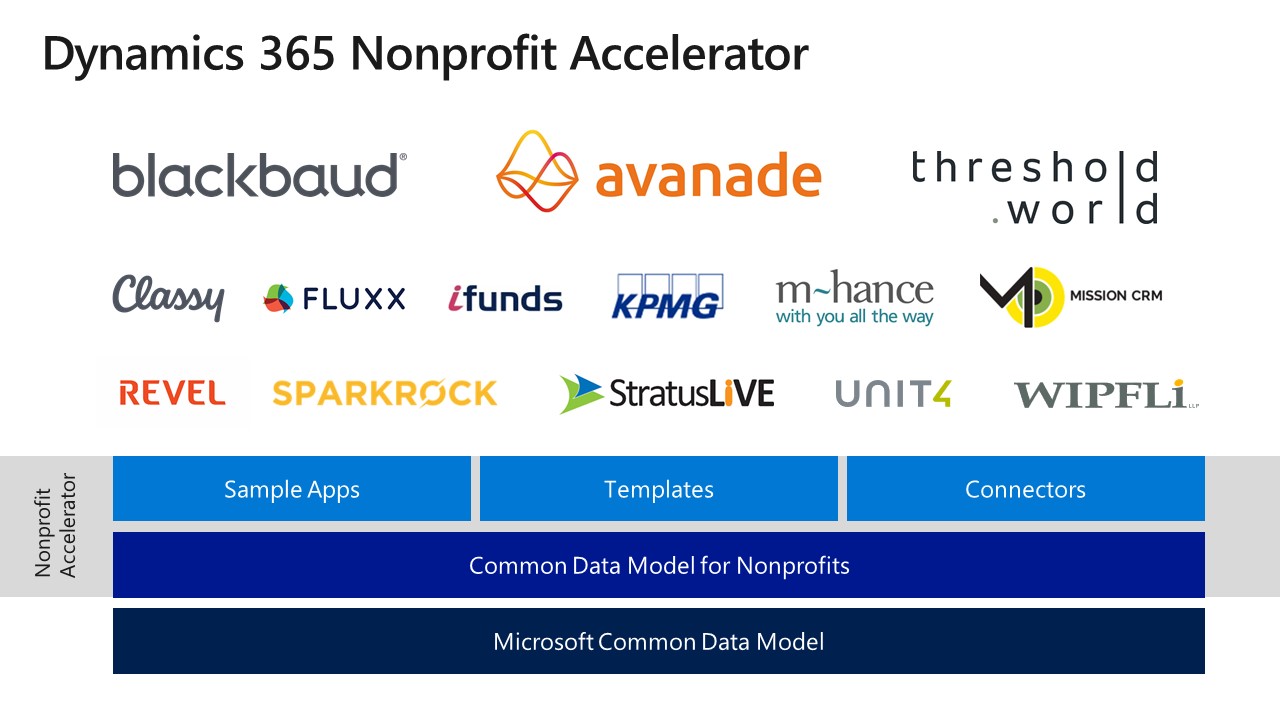
In addition, we have a range of partners committed to building on the Nonprofit Accelerator from integrations with born-in-the-cloud fundraising partners like Classy (helping to power Team Rubicon’s online fundraising efforts), to partners with world-class delivery capacity such as Revel and Wipfli.  Other key partnerships include Fluxx, Ifunds, KPMG Denmark, m-hance, MISSION CRM, Sparkrock StratusLIVE, and Unit4.

Dynamics 365 Nonprofit Accelerator logos

Going forward here’s what you can expect:

  • Microsoft Common Data Model for Nonprofits: This is now available on GitHub and we will continue to iterate based on community feedback.
  • Nonprofit Accelerators: For the first phase of this effort we will be building capabilities in six main areas – (1) constituent management (2) fundraising (3) donation management (4) program delivery (5) volunteer management (6) grant and award management.  Constituent management is now available and will be followed by the Program Management Accelerator in February.
  • Partners: Partners will ultimately finish and deliver these accelerators and the partners mentioned above are ready now to engage you. We will maintain a list of quality partners for your reference.
  • Nonprofit Early Adopter Success Credit:  To help ensure successful deployment, we will invest in an Early Adopter Success Program which will provide design and deployment support and incentives.  The aim of this program is to help ensure success for each organization while also capturing key learnings and feedback to incorporate into the design of the Microsoft Nonprofit Common Data Model and Accelerators.  The full details of this program will be released shortly at www.microsoft.com/nonprofits.
  • Ongoing updates and technical information: Additional updates and a deeper technical drill down will be available on Erik Arnold’s blog.

This is not a point-in-time release of a single new product, rather a long-term investment and commitment to the sector to truly unlock new capabilities for nonprofits and improve end-to-end mission delivery. Working with our partners, Microsoft is incredibly optimistic about the potential for digital technology to help transform large and small nonprofits. We’ve seen the potential of digital transformation with Team Rubicon and our aspiration is to ensure technology fulfills its promise to address the world’s biggest challenges. We can empower everyone to achieve more.

Tags: , ,

Posted on Leave a comment

Power BI Desktop adds dataflows, enterprise reporting and more

As organizations embrace a data culture to drive business decisions, they need an enterprise business intelligence platform that can meet their sophisticated needs – from self-service BI to full enterprise governance, from paginated reports to full interactive data exploration, and from small data sets to petabytes of data.

In July, we laid out the roadmap for Power BI to help organizations unify modern and traditional BI on one enterprise platform, and empower business analysts by expanding self-service data prep for big data.  Since then, we’ve shipped a number of capabilities that deliver on this roadmap: Premium multi-geo allows customers to address data residency requirements, aggregations enable data analysis over petabyte sized datasets with trillions of rows of data, and the new Power BI Home landing page and dashboard commenting make it easier to get to your most important content and collaborate across the enterprise.

Today, we’re announcing the availability of several new capabilities that we laid out in our July roadmap.

Dataflows expand self-service data prep in Power BI

Power BI already includes robust self-service data preparation capabilities in Power BI Desktop through the familiar Power Query based experiences that are used by millions of users worldwide. We are excited to announce the public preview of dataflows in Power BI, taking self-service data preparation to the next level.

  • Dataflows enable business analysts to create data preparation logic that can be reused across multiple Power BI reports and dashboards.
  • Dataflows can be linked together to create sophisticated data transformation pipelines that enable business analysts to build on each other’s work. A new recalculation engine automatically tracks dependencies and recomputes data as new data is ingested.
  • Dataflows can be configured to store the data in the customer’s Azure Data Lake Storage Gen2 instance, fueling collaboration across roles. Business analysts can seamlessly operate on data stored in Azure Data Lake Storage, taking advantage of its scale, performance, and security. Meanwhile, data engineers and data scientists can extend insights with advanced analytics and AI from complementary Azure Data Services like Azure Machine Learning, Azure Databricks, and Azure SQL Data Warehouse.
  • Dataflows support the Microsoft Common Data Model, giving organizations the ability to leverage a standardized and extensible collection of data schemas (entities, attributes and relationships)

dfblog_08

Columbia Sportswear uses Power BI to empower a broad group of employees to self-discover, share and monitor insights across a diverse range of data sources in the cloud and on-premises. Dataflows unlocks new possibilities for their analysts leveraging large datasets.

“Dataflows are one of the more exciting additions to Power BI,” said Chris Weis, Senior Analytics Product Manager at Columbia Sportswear. “It amplifies Power BI’s ability to handle large datasets. Our analysts can now scale large data transformations beyond the resources of their PC, and accelerate PowerQuery performance in a big way.”

For more background on dataflows, check out Adi Regev’s blog.

SQL Server Reporting Services technology now in Power BI

A modern, compliant and unified enterprise BI platform for business analytics is easier than ever with our latest enterprise operational reporting capabilities.

Our popular SQL Server Reporting Services technology is now part of Power BI and available in public preview, providing a unified, secure, enterprise-wide reporting platform accessible to any user across devices. Pixel-perfect paginated reports can now be included alongside Power BI’s existing interactive reports.

“The availability of paginated reports in the Power BI service removes the last technical barrier to running all types of reports in the cloud,” said John White, Power BI MVP and Chief Technology Officer of Tygraph. “The choice of on premises or in the cloud no longer needs to be a feature decision. Customers with a significant investment in reporting services can now move to Power BI knowing that their reports can move right along with them.”

For more background on Paginated reports in Power BI, check out Chris Finlan’s blog.

Power BI Desktop November Update

We continue to innovate at a rapid pace with weekly updates for the Power BI service and monthly updates for Power BI Desktop. The November update for Power BI Desktop, shipping next week, includes several features the Power BI community has asked for:

  • Follow-up questions for Q&A explorer. You can now ask follow-up questions inside the Q&A explorer pop-up, which means the question will take into account the previous questions you asked as context. For example, you can ask “List customers in London” and then ask the follow up question “What did they buy” and the result for that second question will only be for London customers.

  • New modeling view makes it easier to work with large models. You can now have multiple diagram layouts, customize and save them, leverage display folders, and several additional enhancements that improve performance and experience – available in preview.

  • Expand and collapse matrix row headers.  Row headers on the matrix visual now work like Excel PivotTables, with the ability to expand and collapse individual row headers.

  • Copy and paste between PBIX files. You can copy and paste visuals between PBIX files, greatly improving usability and speeding up the process of creating new reports.

Learn more about the public preview of dataflows and SQL Server Reporting Services technology in Power BI during the PASS Summit at the day 1 keynote. For a deeper dive, please join our session Power BI: the Future for Modern and Enterprise BI on November 8th.  Attendees will see the new capabilities in action and hear more about what’s coming.

We have other fantastic content at PASS that you also won’t want to miss, including sessions covering our latest announcements with Introducing Advanced Data Preparation using Power BI Dataflows and Modern Enterprise Reporting with Power BI Report Server and the Power BI Service.

Posted on Leave a comment

Tune in to Inside Xbox at 1 p.m. PT this Saturday for X018; see reveals for ‘Forza Horizon 4,’ ‘Sea of Thieves’ and more

Inside Xbox: Live from X018 presents a special two-hour show Saturday, November 10 at 4 p.m. ET / 1 p.m. PT on Mixer, Twitch, YouTube, Facebook, and Twitter.

We’ll be celebrating an incredible holiday season for gamers with our biggest episode of Inside Xbox yet, including news, interviews, great deals, and much more. Guests include Head of Xbox Phil Spencer, Head of Microsoft Studios Matt Booty, Minecraft Studio Head Helen Chiang and many, many more.

Tune in for games including Crackdown 3, Minecraft, Sea of Thieves, State of Decay 2, Forza Horizon 4 and of course, we’ll have a surprise or two as well.

Xbox Game Pass
Will we have Xbox Game Pass news? Do we ever! We’ll be making over a dozen game announcements for Xbox Game Pass.

MixPot!
Do you like free stuff as much as we like free stuff? If you watch this special X018 episode of Inside Xbox on Mixer and you’re logged into your Microsoft account, you’ll receive in-game items for Sea of Thieves and Forza Horizon 4! Remember, to be eligible all you need to do is watch the show live at Mixer.com/Xbox on any Xbox, PC or mobile device while logged into your Microsoft account.

Of course, we’ve got a couple big surprises up our sleeves, so make sure you don’t miss a minute!

See you online!

Posted on Leave a comment

Collaborate more easily, keep track of to-dos with new AI features in Word

Focus is a simple but powerful thing. When you’re in your flow, your creativity takes over, and your work is effortless. When you’re faced with distractions and interruptions, progress is slow and painful. And nowhere is that truer than when writing.

Word has long been the standard for creating professional-quality documents. Technologies like Editor—Word’s AI-powered writing assistant—make it an indispensable tool for the written word. But at some point in the writing process, you’ll need some information you don’t have at your fingertips, even with the best tools. When this happens, you likely do what research tells us many Word users do: leave a placeholder in your document and come back to it later to stay in your flow.

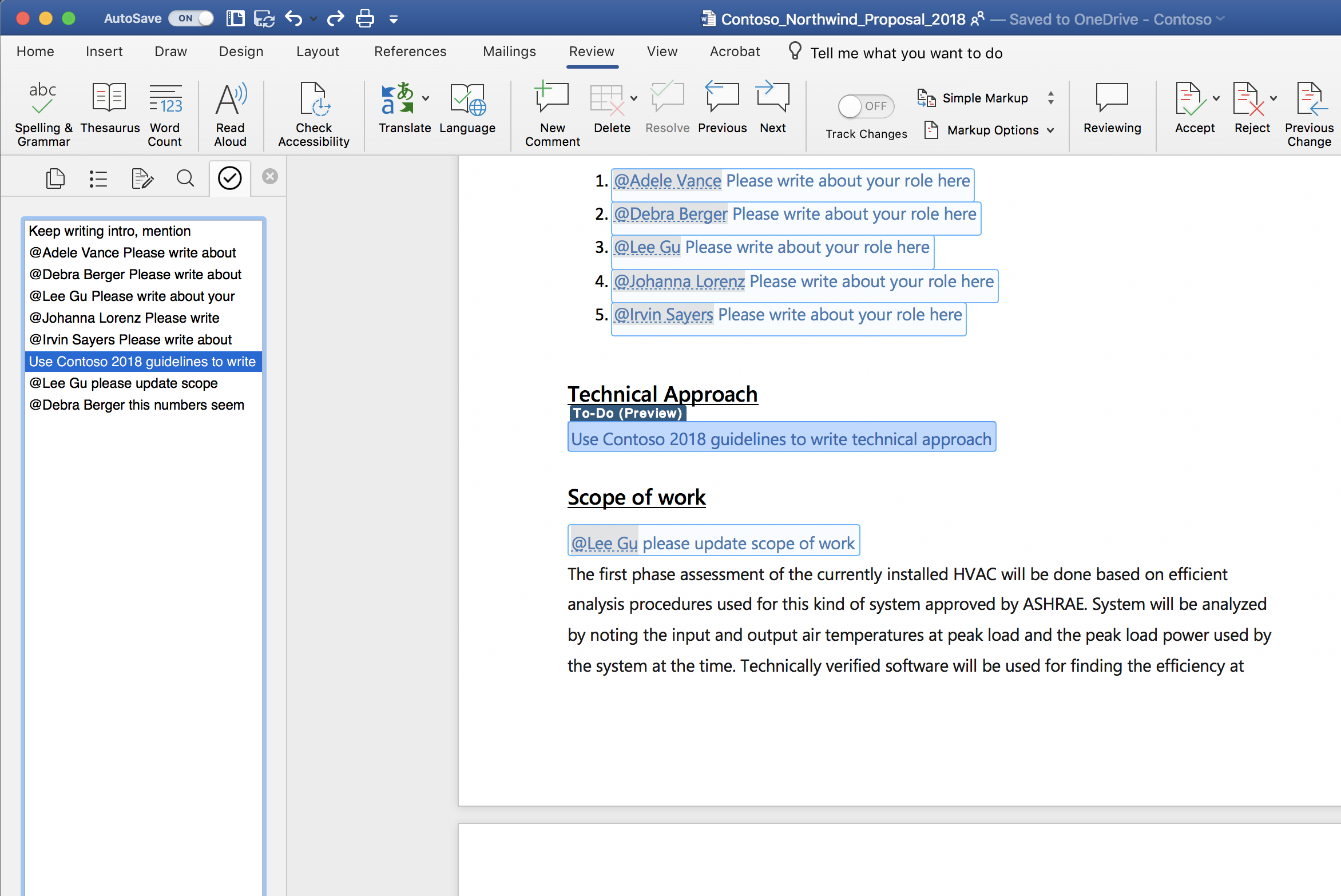
Today, we’re starting to roll out new capabilities to Word that help users create and fill in these placeholders without leaving the flow of their work. For example, type TODO: finish this section or <<insert closing here>> and Word recognizes and tracks them as to-dos. When you come back to the document, you’ll see a list of your remaining to-dos, and you can click each one to navigate back to the right spot.

Screenshot of a Word document open using the AI-powered To-Do feature.

Once you’ve created your to-dos, Word can also help you complete them. If you need help from a friend or coworker, just @mention them within a placeholder. Word sends them a notification with a “deep link” to the relevant place in the document. Soon, they’ll be able to reply to the notification with their contributions, and those contributions will be inserted directly into the document—making it easy to complete the task with an email from any device.

Over time, Office will use AI to help fill in many of these placeholders. In the next few months, Word will use Microsoft Search to suggest content for a to-do like <<insert chart of quarterly sales figures>>. You will be able to pick from the results and insert content from another document with a single click.

These capabilities are available today for Word on the Mac for Office Insiders (Fast) as a preview. We’ll roll these features out to all Office 365 subscribers soon for Word for Windows, the Mac, and the web.

Get started as an Office for Mac Insider

Office Insider for Mac has two speeds: Insider Fast and Insider Slow. To get access to this and other new feature releases, you’ll need a subscription to Office 365. To select a speed, open Microsoft Auto Update and on the Help menu select Check for Updates.

As always, we would love to hear from you, please send us your thoughts at UserVoice or visit us on Twitter or Facebook. You can also let us know how you like the new features by clicking the smiley face icon in the upper-right corner of Word.

Posted on Leave a comment

Tips and ideas for classrooms participating in next week’s Skype-a-Thon

Skype-a-Thon is coming soon! On November 13th and 14th, classrooms across the world will be breaking down their walls and connecting students with peers from various countries and cultures, as well as experts in various fields.

This year, our collective Skype-a-Thon goal will be to travel over 14 million virtual miles. For every 400 miles traveled, Microsoft will make a donation to schools in need. So, not only will we be making a positive change in the world by connecting students from various backgrounds, cultures and faiths, but we’ll also help raise funds for supplies for those less fortunate!

Students and some classmates, appearing on screen via Skype, smile for a group photo.

Students and some classmates, appearing on screen via Skype, smile for a group photo.

For new participants

If you are new to Skype in the Classroom, fear not! Any educator can take their students on a Skype-a-Thon adventure. First, create a free account on the Microsoft Educator Community.  Once there, spend some time perusing the rich content at your fingertips. Find a Virtual Field trip that connects to your unit of study or reach out to a guest speakerwho will inspire your students. You can request a free, live and interactive Skype experience directly on the site. Maybe you want to try a Skype collaboration or a game of Mystery Skype, too. Request a lesson, a field trip, a collaboration event, or a game for Skype-a-Thon, and you will be part of something massive!

For past participants

If you’re a veteran Skype in the Classroom teacher, challenge yourself to take your Skype-a-Thon to the next level. Try to participate in multiple calls during the eventm or travel to several countries in one day. Try something new, like a connected Kahoot using Skype screen sharing. Last year, my class played a Global Pop Culture Kahoot game with students from ten nations. Every question on the Kahoot dealt with pop culture. The students learned that despite their religion, race, and country of origin, they all knew that Shrek lives in a swamp. They found out we are way more alike than we are different! There are so many engaging ideas you can explore on Skype in the Classroom. Challenge yourself to try something new.

How to get parents involved

Maybe you might want to try something unique and include parents in your Skype-a-Thon plans. One fun idea that I do each year is to host an optional pitch-in Skype Breakfast during the morning of Skype-a-Thon. Parents have been hearing about the engaging and authentic learning that has occurred throughout our school year. They are curious and jump at the chance to experience the magic of Skype in the Classroom for themselves.

Students love showing off their Skype skills for their parents, and the parents are always blown away by what they see! Last year, they teamed up with their children for a Mystery Skype adventure with a 5th grade class in Spain.  This year, they’ll join on another Mystery Skype alongside their child. It’s a fun way to kick off Skype-a-Thon!

Another meaningful way to include the parents is to create a homework assignment where the students report back what they learned to their folks. Then, they ask the parents to respond about which Skype-a-Thon destination they found most interesting and why. The kids love having homework that their parents need to do. More importantly, this assignment encourages rich discussion between parent and child. That is a win-win!

A student's note on an answer sheet, describing what they learned from a recent cross-cultural Skype session.

A student's note on an answer sheet, describing what they learned from a recent cross-cultural Skype session.

And don’t forget…

There is a fantastic collection of Skype-a-Thon resources available to seasoned and new Skype enthusiasts alike on the Skype-a-Thon Teacher Toolkit. You might be inspired to create a passport for your class’ Skype-a-Thon journey, create a class map to track your travels, and so much more!

By joining you will be part of something amazing! You’ll be taking action on so many levels, and your students and their parents will benefit as well. Make sure you share your experiences on Twitter by using #skypeathon #MicrosoftEDU, and definitely use the Microsoft Educator Community to register for calls. Miles will be counted when Skype in the Classroom lessons are booked there. Finally, I would recommend you watch the on-demand how-to” webinar for Skype-a-Thon with VP of Education Anthony Salcito and Skype Master Teacher Stacey Ryan, to learn how your class can participate and how you can organize your Skype-a-Thon activities from start to finish.

Have an amazing Skype-a-Thon, everyone!

Posted on Leave a comment

Bringing our October 2018 release to life at Ignite

As we continue our momentum and investments in Microsoft business applications, I’m excited to highlight some of the new capabilities in the October 2018 release of Dynamics 365 and the Power platform at Ignite 2018 today.

In my keynote at the event with Alysa Taylor, we are featuring two customers, Polaris Industries and Northwell Health. These customers exemplify companies that are using Dynamics 365 and the Power platform to fundamentally reimagine how they engage with their customers, use data to optimize their operations, empower their employees and transform their products.

You’ll see how Polaris is transforming their customer engagement processes and manufacturing operations through connected products, using Dynamics 365. And we’ll show some pretty amazing applications of mixed reality as we demonstrate HoloLens used in a field service engagement.

You’ll also hear from Northwell Health about how they are changing patient engagement with Dynamics 365, the Power platform, Office 365 and Azure. One of my favorite parts of their story is about a PowerApp which gives physicians and nurses visibility into each other’s teams – developed by one of their doctors! These business applications are helping teams at Northwell collaborate more effectively and provide even better patient care that is truly transformational.

And this all comes on top up some phenomenal feedback we received from the market following our introduction of new Dynamics 365 AI and Mixed Reality applications last week. And we are incredibly excited to build on all this momentum with the announcement from Satya today on the Open Data Initiative with Adobe and SAP, which represents the next step in our journey to deliver unmatched value to our customers.

In addition, the October release is packed with hundreds of new capabilities across all Dynamics 365 applications and the Power platform, including new connected field service capabilities and deeper integrations with Office 365, Teams, and LinkedIn. Get the full details of this release through our release notes.

And watch my keynote at Ignite, here.

I look forward to hearing your thoughts.