Posted on Leave a comment

New innovations in voice, digital ink and touch make working and playing in Microsoft 365 more natural

Today at our Surface event, we announced several new devices to help make modern work more natural and intuitive for everyone, including busy professionals, parents, students, and teachers. Over the past several years, our engineering teams have invested countless hours of user research into understanding how people work in our apps and what they would like to see from Microsoft.

Last week, we announced several new capabilities that bring new inking capabilities to our Office apps, including inking in Slide Show while in PowerPoint on the web and Ink Replay to bring your presentations to life. Today, I’m excited to share our progress with you on a set of innovations to help people be more productive when away from their desk, utilizing voice, digital pen, and touch across Office 365 and our Surface devices.

Transcribe audio files or record your own while staying in the flow in Word

Image of an audio file being transcribed in Microsoft Word.

We spoke with researchers, reporters, lawyers, and teachers, and learned that people spend a ton of time recording audio interviews on their phone, and then spend even more time transcribing those conversations into Word.

Today, we’re announcing a solution that helps busy professionals upload their own audio files or record new ones on the fly, all within Word. Once your audio has been uploaded or recorded, Word—leveraging your OneDrive account to securely store the audio files and Azure Speech Services under the hood—displays a written audio transcription in the side panel and allows you to quickly and easily bring relevant snippets or the entire transcript into your document to edit. The transcript itself is automatically separated by speaker and into relevant chunks of content, and the interactive panel allows you to easily jump around the recording to find and verify the perfect quote.

Audio transcription in Word will be available in early 2020 in Word for the web, with integration into the Word desktop and mobile apps following in the spring. Exact plans and pricing will be announced closer to general availability.

Input data directly into your Excel workbooks with your digital pen

Animated image of a digital pen erasing and writing content in a Microsoft Excel spreadsheet.

Excel is an extremely powerful tool to do complex data analytics, but that doesn’t mean you need to be sitting at a desk to use it. Today, people fill out checklists, research reports, and more using paper and a clipboard and then must type those results into their computer later. Or they fumble to balance a computer to type while walking around. To address these issues, we’re elevating what your digital pen can do in Excel so Firstline Workers, busy professionals, students, and researchers can easily write, edit, or delete values using only their digital pen and tablet. Now it will be easier than ever to be productive and stay connected for workers who aren’t always able to find a desk to work.

Data entry using a digital pen will be available in Excel for the web and desktop in spring 2020 for Office 365 subscribers.

Create and reply to comments from anywhere using pen or voice

Image of a note written in digital ink in a sales analysis file.

With Ink Editor we’ve made it so that editing your documents is easier and more natural than ever, and now we’re extending those intelligent capabilities and the expressiveness of digital ink into the realm of commenting as well.

On devices with a touch interface and/or supported microphone, people will be able to create expressive ink comments directly from within the comment pane, or use dictation to provide feedback. Together, and combined with existing Ink Editor capabilities, anyone reviewing a document can now complete that task end-to-end using just their tablet, digital pen, and voice.

Expressive ink comments and easy entry to dictation in comments will be available starting with Word desktop in Spring 2020 for Office 365 subscribers.

Office + Surface are better together

Today at the Surface event, we showcased several new enhancements to Office that leverage the unique capabilities of Surface’s latest hardware advancements.

The new Studio Mics in the Surface Pro 7 offer best-in-class audio-capture with no additional hardware, which makes Office features such as dictation and transcription work at their best.
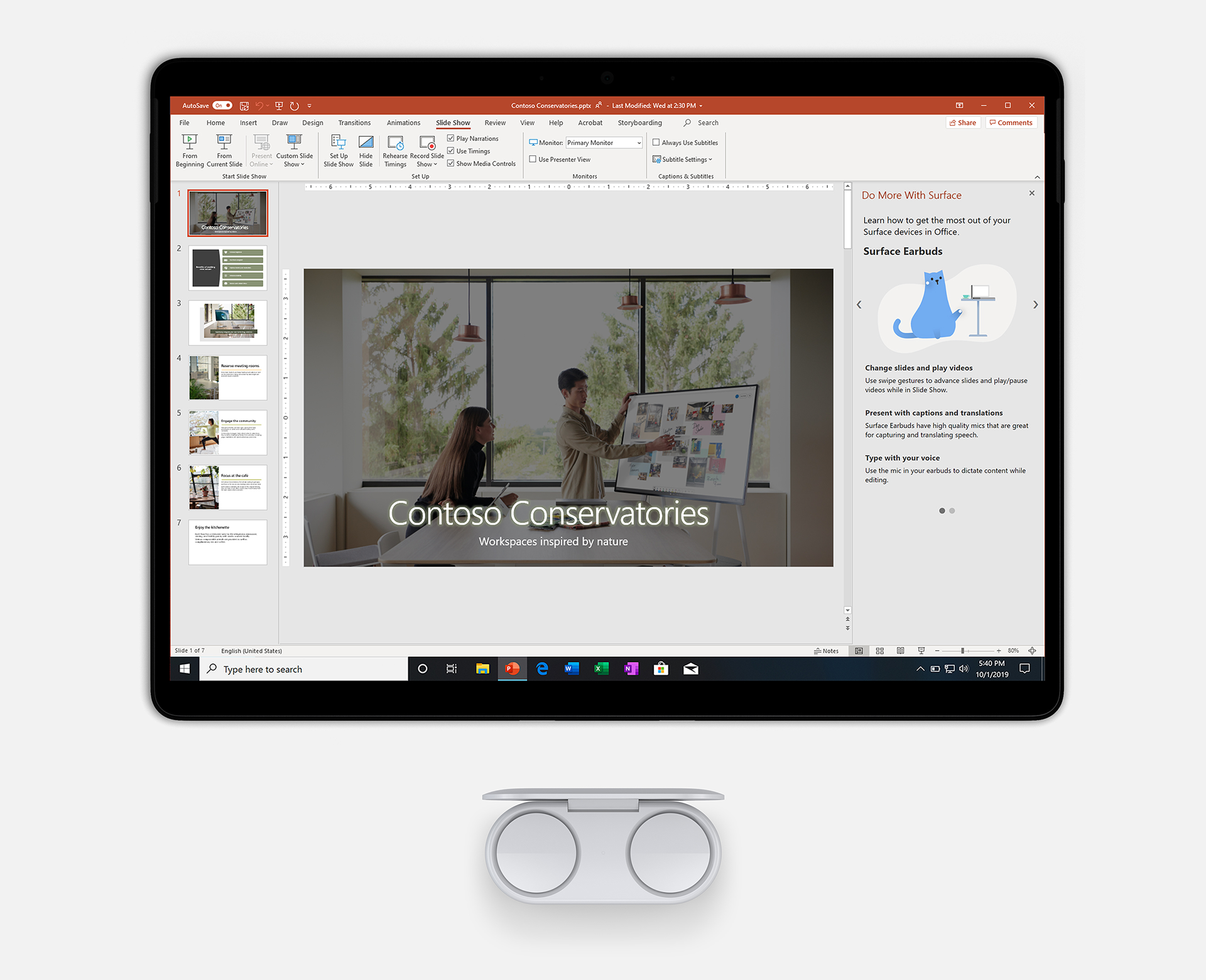
Image of Earbuds and the Surface Pro 7 displaying PowerPoint.

When using your Surface Earbuds together with PowerPoint, you get the benefit of incredible microphones to hear you clearly even as you walk around, allowing Live Captions and Subtitles and Presenter Coach in PowerPoint for the web to operate with better accuracy. The intuitive gestures can be used to navigate Slide Show and start/stop video without having to buy a separate clicker. You can even have just one in your ear for the best mic capture while keeping the other invisibly hidden in your hand to navigate slides.

Surface Earbud gesture support will be available in November, alongside the general availability of the Earbuds, in PowerPoint desktop for Office 365 subscribers.

Image of a hand removing a pen from the new Surface Pro X.

The ultra-portability of the Surface Pro X allows you to be productive on the go, whether that’s using Excel to enter data or Word to review documents. The Pro X offers a revolutionary new storage mechanism for your pen so you’ll always have it handy when you need it. Office leverages the fact that the Pro X knows when the pen is removed from its storage to automatically bring your inking tools front and center.

In addition, Office will now showcase everything you can do with your Surface accessories within each app, whether that’s the Surface Pen, Earbuds, or the Dial. If there are new capabilities available in an Office app you’re using, they will be displayed, so you always know you’re getting the best out of your Office + Surface combination.

Support for reacting to the Surface Pen being removed from its storage location is available now in Word, Excel, PowerPoint, and Outlook for Office 365 subscribers. Surface tips in Office will first be available in November in PowerPoint desktop for Office 365 subscribers.

Listening to customers to improve the ink in PowerPoint experience

We recently announced a set of improvements to Office, including several additions to the overall inking experience in PowerPoint based directly on what we’ve heard from customers. This includes support for replaying pre-drawn ink in Slide Show, myriad improvements sourced primarily from educators who ink in Slide Show on Windows and Mac to teach their classes, and the beginning of bringing ink to Office for the Web, starting in PowerPoint Slide Show.

We’re happy to announce that all these capabilities are now rolling out to everyone.

Animated image of animated lettering being added to a slide in Microsoft PowerPoint.

Ink Replay is available in PowerPoint for Windows and Mac for Office 365 subscribers.

Animated image of inking used in a PowerPoint slide. It is a pop quiz about the solar system.

Inking is now available in Slide Show mode in PowerPoint for the web. Inking in PowerPoint Editor on the web will be available by the end of the year.

New templates for Microsoft Whiteboard

Microsoft Whiteboard helps you collaborate more effectively—whether you’re trying to brainstorm your next big idea or get everyone on the same page. New templates for Whiteboard can help you run more effective meetings with KANBAN sprint planning, SWOT analysis, project planning, learning, and more.

Animated image of sticky notes being arranged in Microsoft Whiteboard.

Pre-created layouts provide an immediate structure, so you don’t have to start from scratch. They’re perfect for collaboration scenarios like ad-hoc brainstorms, running meetings, and project planning. The Whiteboard canvas also dynamically expands to fit all your content. Read more about the new Microsoft Whiteboard templates.

Microsoft Whiteboard templates are in public preview for Windows 10 and rolling out to iOS this week. To add templates, click or tap the Insert button in the toolbar.

Microsoft Whiteboard

Meet the freeform digital canvas where ideas, content, and people come together.

Get Whiteboard

Posted on Leave a comment

Surface reveals new holiday lineup, introduces new category of dual-screen devices built for mobile productivity

Surface reveals new holiday lineup and introduces a new category of dual-screen devices built for mobile productivity

We are announcing our broadest Surface lineup ever – with five new products coming this holiday and two new dual-screen devices, Surface Neo and Surface Duo, coming in Holiday 2020.

When we started Surface, we had a vision to remove the conflict between the tablet and laptop. What started as an effort to create the two-in-one evolved into a full line of products that are more versatile, more adaptable and more personal. We know that to be your best, you need devices that adapt to you to help you accomplish your goals. These new products are about empowering you to be your most productive, and your most creative.

Read more

Posted on Leave a comment

Xbox Game Pass and Spotify team up to deliver the ultimate value in gaming and music

Everyone has a favorite gaming song. Say you’ve got iconic video game music playing while you’re hunting the elusive side-quests, or you’ve got another jam playing to keep you amped while you and your buddies decide where you’re going to drop – either way, listen to what makes your gaming more fun, and we’re going to make that even better.

Starting today and for a limited time only, gamers in the U.S. and U.K who join Xbox Game Pass Ultimate or Xbox Game Pass for PC (Beta) for the first time will also receive 6 months of Spotify Premium. With all the benefits of Xbox Live Gold, access to a curated library of over 100 great games on console and PC, and millions of songs available on-demand on Spotify, new members will never run out of hits for their gaming playlists.

Let me point out the biggest deal here:  it’s only a $1 to upgrade to Xbox Game Pass Ultimate right now.  Already an Xbox Live Gold or Xbox Game Pass for Console member? When you upgrade to Xbox Game Pass Ultimate for $1, you convert your pre-paid time on Xbox Live Gold or Xbox Game Pass to Xbox Game Pass Ultimate credit, AND you get 6 months of Spotify Premium on top of it. It’s the best dollar you’re going to spend.

Spotify is the most popular global audio streaming subscription service, giving you access to millions of songs and thousands of podcasts from artists and creators around the world. Spotify Premium offers unlimited access to over 50+ million songs, allowing you to play music without ads, and skip to your heart’s content. Can’t stress enough that part about ad-free music and unlimited skips. When you’re in the zone, the last thing you need is a break in your playlist!

Xbox Game Pass Ultimate wraps up all the benefits of Xbox Live Gold, Xbox Game Pass for PC (Beta), and Xbox Game Pass for Console, including access to over 100 high-quality titles on console and PC. We’re adding new games all the time, including Xbox Game Studios titles the same day as their global release, so if you’ve been hype to check out our latest release Gears 5, now is the perfect time to dive in with Xbox Game Pass Ultimate. With Xbox Live Gold included, you can get exclusive deals and discounts, and play together with friends on the most advanced multiplayer network.

Here’s the deal: To be able to take advantage of this offer you need to reside in the U.S. or the U.K and you must be a new Xbox Game Pass Ultimate or Xbox Game Pass for PC member. You also must be both eligible for, and new toe Spotify Premium. If you subscribed to either the Spotify Premium Service or Unlimited Service, or you’ve taken a trial or introductory offer previously, you’re unfortunately not eligible for this offer. Check out the terms and conditions here and here

So, I join Xbox Game Pass Ultimate – then what? Your code for 6 months of Spotify Premium will be sent via email and the console or Xbox (Beta) app message center, following your purchase of Xbox Game Pass Ultimate (this can take a few days). The codes must be redeemed at the Spotify website listed in the message or email. Then, it’s time to get gaming and start listening.

Want to learn more? You can learn more about Spotify and Spotify Premium over on their site, or hit up Xbox.com for complete details on Xbox Game Pass.

Posted on Leave a comment

Microsoft’s AI Business School now offers path for education leaders and students

We live in an ever more digital, connected world. With the emergence of Artificial Intelligence, the opportunity we have to provide truly personalized, accessible learning and experiences to all students around the world is now upon us. Leaders in education have the opportunity to dramatically impact outcomes more than ever, from changing the way in which they engage with students throughout the student journey, to providing truly personalized learning, to improving operational efficiencies across the institution. At Microsoft, our mission in education is to empower every student on the planet to achieve more. Through that lens, we believe education leaders should consider opportunities to introduce new technologies like AI into the design of learning and technological blueprint to expand the horizon for driving better outcomes and efficiencies for every student and institution around the world.

That’s why I’m excited to share that Microsoft’s AI Business School now offers a learning path for education. Designed for education leaders, decision-makers and even students, the Microsoft AI Business School for Education helps learners understand how AI can enhance the learning environment for all students—from innovations in the way we teach and assess, to supporting accessibility and inclusion for all students, to institutional effectiveness and efficiency with the use of AI tools. The course is designed to empower learners to gain specific, practical knowledge to define and implement an AI strategy. Industry experts share insights on how to foster an AI-ready culture and teach them how to use AI responsibly and with confidence. The learning path is available on Microsoft Learn, a free platform to support learners of all ages and experience levels via interactive, online, self-paced learning.

The Microsoft AI Business School for Education includes a number of modules across sales, marketing, technology and culture, but most importantly, it calls upon the expert insights from education leaders including:

  • Professor Peter Zemsky uses INSEAD’s Value Creation Framework to show the advantages AI presents for educational institutions and how an organization can determine the right approach that works with their strategy and goals.
  • Michelle Zimmerman, author of “Teaching AI: Exploring New Frontiers for Learning,” shares her experience as an educator and why she sees believes AI can transform how students learn.
  • David Kellerman of the University of New South Wales (UNSW) shares his perspective on what’s unique about AI in higher education and how using AI can transform the way institutions collaborate and encourage students to be lifelong learners. As a key research institution in Australia, the University of New South Wales (UNSW)is focused on being a learning institution that collaborates across academic and operational departments as it uses AI to create a personalized learning journey for students. Dr. Kellerman shares his perspective on what’s unique about AI in higher education and how using AI to transform the way institutions collaborate can create students that are lifelong learners.

The Microsoft AI Business School for Education joins a larger collection of industry-specific courses including financial services, manufacturing, retail, healthcare and government. With this holistic portfolio, the AI Business School can also help students learn about AI application across a number of industries and roles. We’ve already seen several universities and vocational colleges incorporate this curriculum into their courses across business, finance, economics and health-related degrees as a means of providing real-world examples of AI opportunity and impact.

New research has highlighted the importance of adopting AI to transform the learning experience for students. Last week at the Asian Summit on Education and Skills (ASES) in India, Microsoft and IDC unveiled the latest findings from the study “Future-Ready Skills: Assessing the use of AI within the Education sector in Asia Pacific.” The study found that Artificial Intelligence (AI) will help double the rate of innovation improvements for higher education institutions across the region. Despite 3 in 4 education leaders agreeing that AI is instrumental to an institute’s competitiveness, 68% of education institutions in the region today have actually yet to embark on their AI journey. Those who have started integrating AI have seen improvements in student engagement, efficiency and competitiveness, as well as increased funding and accelerated innovation.

Microsoft is proud to be working with schools and institutions around the world to improve understanding of Artificial Intelligence and support leaders, educators and students to get ready for the future, like the recent collaboration in India with CBSE to train up over 1000 educators.

Click here for free STEM resourcesExplore tools for student-centered learning

Posted on Leave a comment

Chief Accessibility Officer Jenny Lay-Flurrie on empowering employees with disabilities

We Are All Advocates

There is a simple concept in the world of accessibility and disability inclusion if you don’t know, ask‘. If you don’t know what resources are available in your workplace, raise the question. If you are unsure of what responsibilities your organization has to help empower employees with disabilities, seek out the information. The more we ask questions and have a willingness to learn and grow, the better off we will all be. 

Microsoft President Brad Smith recently spoke at the National Federation of the Blind 2019 National Convention about why we can’t just focus on technology, we need to put people first. He underscored that we need to look beyond the products and features that everyone uses today and fundamentally ask ourselves, “How can we imagine new technology that can fundamentally improve people’s lives in ways they haven’t yet experienced?” Over the summer, Microsoft Chief Marketing Officer Chris Capossela attended the Disability:IN Annual Conference and Expo and represented Microsoft, where he accepted the Marketplace Innovator of the Year Award on behalf of the company. Reflecting on his experience at the conference, he noted that, “including people with disabilities in our organizations pays off in multiple ways. At Microsoft, inclusion is at the core of our mission.” 

This gets to the heart of what we do every day at Microsoft and how we can empower people with disabilities around the world. We are all on a journey together. Building partnerships, listening, asking, and learning can net results for your organization. We don’t have all the answers, but if we work together, we can create positive change for everyone.  

I also think it is incredibly important to try new things and ask ourselves, “what more can we do to empower our employees and the broader disability community?” For example, we have been working with BraunAbility, a leading manufacturer of wheelchair accessible vehicles and other mobility transportation solutions, to test a new 3-D graphic for ADA Parking spaces at the Living Well Health Center on our Redmond Campus. Our goal is to help drivers and passengers get in and out of their vehicle safely and to help deter misuse of the accessible spaces and access aisles. This is part of BraunAbility’s Drive for Inclusion initiative and we are getting great feedback from employees. Creating an inclusive culture is so much more than just adhering to laws (which is important!), but really focusing on everything we can do to build an environment where everyone can thrive. 

Tune in throughout the month as we share more stories, demos, and ways to get involved in the movement.  

Posted on Leave a comment

The power of AI comes with a powerful responsibility

I’m beyond excited to be here in London with my Microsoft colleagues, as well as innovators, researchers, experts and business decision-makers from around the world at Future Decoded. Over the next two days, we will hear inspiring stories about the possibilities that exist for artificial intelligence to transform the future of work in every industry – and how critical it is that businesses foster a culture that includes everyone as we search for ways to incorporate AI responsibly.

This morning’s announcement that Microsoft is collaborating with Novartis to use AI to develop treatments and medications faster has the potential to improve patients’ lives across the globe. A critical component of our work together is the commitment by Novartis to take AI across the entire organization.

This will enable Novartis to bring together previously siloed data sets and research, and to use AI to build upon existing work quickly and efficiently. But it will also do something that might be even more important: It will empower Novartis associates.

Whether they work in research and development, commercial, operations, finance or elsewhere, Novartis associates are being asked to join this AI transformation. Their contributions and voices matter and are vital to the organization’s success.

Advocating a holistic approach

A cultural transformation is required for a company like Novartis to implement an AI strategy successfully throughout the organization. It requires empathetic leadership, collaboration across departments, trust among employees and a willingness to accept change. It’s not an easy feat. We at Microsoft know this because we haven’t always gotten it right the first time out of the gate. We are happy to share our learnings and best practices with our partners and customers, and with business decision-makers at large through our AI Business School, a free online master class series.

We launched AI Business School because we knew AI will be used more and more to help businesses innovate and solve problems, and we wanted to help business leaders be ready to do so with confidence. We recognized that every industry in the private and public sector faces its own challenges, and we wanted to provide concrete examples for each of them through tailored information and real-world case studies. Today, we are excited to roll out a new release of AI Business School, with expanded information for government leaders, new and adapted lessons within our responsible AI module and a new learning path for education industry decision-makers and educators.

Responsible AI: The expanded responsible AI content aims to illustrate how organizations can put principles into practice. As an example, we share a view on design principles for building AI solutions, plus a video on what tools can help you develop responsible AI.  We also have a new video Q&A with Matt Fowler, VP and Head of Machine Learning, Enterprise Data and Analytics at TD Bank Group, who talks about his company’s AI journey. Plus, trusted AI expert Cathy Cobey from EY shares how to make governance both tangible and measurable.

Education: We teamed up with education experts including Michelle Zimmerman, author of “Teaching AI: Exploring New Frontiers for Learning,” to highlight ways AI can transform classrooms as well as the operations and processes of learning institutions. We know that educators and administrators at every level of education are being asked to do more with less, and AI can help.

Government: A new module about identifying governing practices for responsible AI in government draws on the wisdom from experts at EY and Altimeter Group. We share examples from governments around the world to shed light on what government officials should consider and how to take action.

In addition to continually bolstering the online learning experience, we partner with customers around the globe for in-person training and collaboration. For example, UK enterprise customers will soon be able to participate in AI Business School sessions in the Microsoft Store in London!

I believe that helping everyone understand how to better approach AI can be a boon to every industry, and to society at large. I have been overwhelmed by the feedback and engagement with AI Business School, and I am humbled and grateful for the many conversations it has enabled with customers and business leaders!

One such customer is TD Bank, whose leaders have sought to advance an industry-wide dialogue on what responsible AI looks like in financial services. Microsoft works with TD on a variety of fronts as the bank continues to advance its AI capabilities.

People sit in front of a white board. Written on the whiteboard are words inculding fairness, blindspots and explainability
TD hosts an industry roundtable on responsible AI. The organization’s leaders have sought to advance a dialogue on what responsible AI looks like in financial services. Photo by TD Bank.

Adapting to an AI-first world

As AI is adopted across financial services, TD’s leaders believe it’s a critical time to initiate an industry-wide discussion on the unique opportunities and challenges of this technology. TD recently released a report called Responsible AI in Financial Services that brought together perspectives from AI experts and consumers to inform key areas where the financial services industry needs to focus to build best practices for the responsible use of AI. The three areas of focus identified in the report – addressing explainability, controlling for bias and promoting diversity – are informing TD’s work as they develop AI-powered solutions and unlock new and innovative ways to meet customer needs.

Microsoft encourages each of our partners and customers to embed their organizational values into every aspect of their AI strategy. Our own core principles – fairness; reliability and safety; privacy and security; inclusiveness; transparency; and accountability – inform how we develop and design AI.

We continue to invest in the research and creation of tools that can tackle the challenges of bias, privacy, security and interpretability. Just last week we announced a partnership with Harvard University to develop a service for differential privacy that will open new possibilities for groundbreaking research while also protecting sensitive information.

And last month we joined forces with other industry leaders to improve the detection of AI-generated deepfakes. We will continue to make every effort to ensure that this technology we work so hard to advance will be used in ways that will also advance society. Because it is not enough to know that we CAN do something with the help of AI; it is vital that we first ask whether we SHOULD.

As I see it, the biggest potential that AI holds is its ability to help us work together to tackle our toughest problems. I see its possibility to bring people together, to improve lives and to help save our planet. One of our AI for Earth grantees, global nonprofit OceanMind, is doing just this: They are using AI to detect illegal and unregulated fishing, which helps authorities protect ocean life and promote sustainability.

YouTube Video

data-video-id=”naML4cML0ks”>

The responsible creation and use of AI is not the job of any one company, but one that we all share, and it requires the shared responsibility to think about not just what AI can do, but what it should do.  Our overarching goal is to empower everyone to innovate and use AI responsibly so that it reflects their positive goals, good intentions and core values.

Related:

Posted on Leave a comment

Novartis and Microsoft combine deep bioscience and AI to help patients worldwide

In the world of commercial research and science, there’s probably no undertaking more daunting – or more expensive – than the process of bringing a new medicine to market. For a new compound to make it from initial discovery through development, testing and clinical trials to finally earn regulatory approval can take a decade or more. Nine out of 10 promising drug candidates fail somewhere along the way. As a result, on average, it costs life sciences companies $2.6 billion to introduce a single new prescription drug.

This is much more than just a challenge for life sciences companies. Streamlining drug development is an urgent issue for human health more broadly. From uncovering new ways to treat age-old sicknesses like malaria that still kills hundreds of thousands of people every year, to finding new cancer treatments, or developing new vaccines to prevent highly-contagious diseases from turning into global pandemics, the impact in terms of lives saved worldwide would be enormous if we could make inventing new medicines faster.

As announced today, this is why Novartis and Microsoft are collaborating to explore how to take advantage of advanced Microsoft AI technology combined with Novartis’ deep life sciences expertise to find new ways to address the challenges underlying every phase of drug development – including research, clinical trials, manufacturing, operations and finance. In a recent interview, Novartis CEO Vas Narasimhan spoke about the potential for this alliance to unlock the power of AI to help Novartis accelerate research into new treatments for many of the thousands of diseases for which there is, as yet, no known cure.

[youtube https://www.youtube.com/watch?v=xh7iioCd-yU]

In the biotech industry, there have been amazing scientific advances in recent years that have the potential to revolutionize the discovery of new, life-saving drugs. Because many of these advances are based on the ability to analyze huge amounts of data in new ways, developing new drugs has become as much an AI and data science problem as it is a biology and chemistry problem. This means companies like Novartis need to become data science companies to an extent never seen before. Central to our work together is a focus on empowering Novartis associates at each step of drug development to use AI to unlock the insights hidden in vast amounts of data, even if they aren’t data scientists. That’s because while the exponential increase in digital health information in recent years offers new opportunities to improve human health, making sense of all the data is a huge challenge.

[youtube https://www.youtube.com/watch?v=Oo1Ye2BBh8w]

The issue isn’t just a problem of the overwhelming volume. Much of the information exists in the form of unstructured data, such as research lab notes, medical journal articles, and clinical trial results, all of which is typically stored in disconnected systems. This makes bringing all that data together extremely difficult. Our two companies have a dream. We want all Novartis associates – even those without special expertise in data science – to be able to use Microsoft AI solutions every day, to analyze large amounts of information and discover new correlations and patterns critical to finding new medicines. The goal of this strategic collaboration is to make this dream a reality. This offers the potential to empower everyone from researchers exploring the potential of new compounds and scientists figuring out dosage levels, to clinical trial experts measuring results, operations managers seeking to improve supply chains more efficiently, and even business teams looking to make more effective decisions. And as associates work on new problems and develop new AI models, they will continually build on each other’s work, creating a virtuous cycle of exploration and discovery. The result? Pervasive intelligence that spans the company and reaches across the entire drug discovery process, improving Novartis’ ability to find answers to some of the world’s most pressing health challenges.

As part of our work with Novartis, data scientists from Microsoft Research and research teams from Novartis will also work together to investigate how AI can help unlock transformational new approaches in three specific areas. The first is about personalized treatment for macular degeneration – a leading cause of irreversible blindness. The second will involve exploring ways to use AI to make manufacturing new gene and cell therapies more efficient, with an initial focus on acute lymphoblastic leukemia. And the third area will focus on using AI to shorten the time required to design new medicines, using pioneering neural networks developed by Microsoft to automatically generate, screen and select promising molecules. As our work together moves forward, we expect that the scope of our joint research will grow.

At Microsoft, we’re excited about the potential for this collaboration to transform R&D in life sciences. As Microsoft CEO Satya Nadella explained, putting the power of AI in the hands of Novartis employees will give the company unprecedented opportunities to explore new frontiers of medicine that will yield new life-saving treatments for patients around the world.

[youtube https://www.youtube.com/watch?v=wMfsQE-D2q4]

While we’re just at the beginning of a long process of exploration and discovery, this strategic alliance marks the start of an important collaborative effort that promises to have a profound impact on how breakthrough medicines and treatments are developed and delivered. With the depth and breadth of knowledge that Novartis offers in bioscience and Microsoft’s unmatched expertise in computer science and AI, we have a unique opportunity to reinvent the way new medicines are created. Through this process, we believe we can help lead the way forward toward a world where high-quality treatment and care is significantly more personal, more effective, more affordable and more accessible.

Tags: , , ,

Posted on Leave a comment

Novartis and Microsoft announce collaboration to transform medicine with artificial intelligence

  • Multiyear alliance underpins the Novartis commitment to leverage data & artificial intelligence (AI) to transform how medicines are discovered, developed and commercialized
  • Novartis to establish AI innovation lab to empower its associates to use AI across the business
  • Joint research activities will include co-working environments on Novartis Campus (Switzerland), at Novartis Global Service Center in Dublin, and at Microsoft Research Lab (UK) – starting with tackling personalized therapies for macular degeneration; cell & gene therapy; and drug design

Basel, and Redmond, October 1, 2019 – Novartis today announced an important step in reimagining medicine by founding the Novartis AI innovation lab and by selecting Microsoft Corp. as its strategic AI and data-science partner for this effort. The new lab aims to significantly bolster Novartis AI capabilities from research through commercialization and help accelerate the discovery and development of transformative medicines for patients worldwide.

As part of the strategic collaboration announced, Novartis and Microsoft have committed to a multi-year research and development effort. This strategic alliance will focus on two core objectives:

  • AI Empowerment. The lab will aim to bring the power of AI to the desktop of every Novartis associate. By bringing together vast amounts of Novartis datasets with Microsoft’s advanced AI solutions, the lab will aim to create new AI models and applications that can augment our associates’ capabilities to take on the next wave of challenges in medicine.
  • AI Exploration. The lab will use the power of AI to tackle some of the hardest computational challenges within the life sciences, starting with generative chemistry, image segmentation & analysis for smart and personalized delivery of therapies, and optimization of cell and gene therapies at scale.

Microsoft and Novartis will also collaborate to develop and apply next-generation AI platforms and processes that support future programs across these two focus areas. The overall investment will include project funding, subject-matter experts, technology, and tools.

Novartis logo
Vas Narasimhan, CEO of Novartis, said, “As Novartis continues evolving into a focused medicines company powered by advanced therapy platforms and data science, alliances like this will help us deliver on our purpose to reimagine medicine to improve and extend lives. Pairing our deep knowledge of human biology and medicine with Microsoft’s leading expertise in AI could transform the way we discover and develop medicines for the world.”

Microsoft CEO, Satya Nadella, added, “Our strategic alliance will combine Novartis’ life sciences expertise with the power of Azure and Microsoft AI. Together, we aim to address some of the biggest challenges facing the life sciences industry today and bring AI capabilities to every Novartis employee so they can unlock new insights as they work to discover new medicines and reduce patient costs.”

Novartis Data & Digital

Novartis is focusing itself as a leading medicines company powered by advanced therapies and data science. Going big on data and digital is a key strategic pillar that helps Novartis realize that ambition. Data science and digital technologies allow the company to reimagine how it innovates in R&D, engages with patients and customers, and increases operational efficiencies. Novartis focuses its efforts around four strategic digital priority areas:

  • Scaling 12 digital lighthouse projects: Build a strong foundation and jumpstart digital transformation
  • Make Novartis digital: sharing, learning and talent acquisition
  • Becoming the #1 partner in the tech ecosystem: bridge Novartis with external expertise
  • Bolder moves: lead through future disruptive healthcare scenarios with large-scale partnerships

Disclaimer

This press release contains forward-looking statements within the meaning of the United States Private Securities Litigation Reform Act of 1995 that can generally be identified by words such as “to transform,” “multiyear,” “commitment,” “to found,” “aims,” “vision,” “potential,” “can,” “will,” “plan,” “expect,” “anticipate,” “committed,” or similar terms, or regarding the development or adoption of potentially transformational technologies and business models and the collaboration with Microsoft; or by express or implied discussions regarding potential marketing approvals, new indications or labeling for the healthcare products described in this press release, or regarding potential future revenues from collaboration with Microsoft or such products. You should not place undue reliance on these statements. Such forward-looking statements are based on our current beliefs and expectations regarding future events, and are subject to significant known and unknown risks and uncertainties. Should one or more of these risks or uncertainties materialize, or should underlying assumptions prove incorrect, actual results may vary materially from those set forth in the forward-looking statements. There can be no guarantee that the collaboration with Microsoft will achieve any or all of its intended goals or objectives, or in any particular time frame. Neither can there be any guarantee that any healthcare products described in this press release will be submitted or approved for sale or for any additional indications or labeling in any market, or at any particular time. Nor can there be any guarantee that the collaboration with Microsoft or such products will be commercially successful in the future. In particular, our expectations regarding the collaboration with Microsoft and such products could be affected by, among other things, uncertainties involved in the development or adoption of potentially transformational technologies and business models; the uncertainties inherent in research and development of new healthcare products, including clinical trial results and additional analysis of existing clinical data; regulatory actions or delays or government regulation generally, including potential regulatory actions or delays with respect to the collaboration with Microsoft; global trends toward health care cost containment, including government, payor and general public pricing and reimbursement pressures and requirements for increased pricing transparency; our ability to obtain or maintain proprietary intellectual property protection; the particular prescribing preferences of physicians and patients; general political, economic and trade conditions; safety, quality or manufacturing issues; potential or actual data security and data privacy breaches, or disruptions of our information technology systems, and other risks and factors referred to in Novartis AG’s current Form 20-F on file with the US Securities and Exchange Commission. Novartis is providing the information in this press release as of this date and does not undertake any obligation to update any forward-looking statements contained in this press release as a result of new information, future events or otherwise.

About Novartis

Novartis is reimagining medicine to improve and extend people’s lives. As a leading global medicines company, we use innovative science and digital technologies to create transformative treatments in areas of great medical need. In our quest to find new medicines, we consistently rank among the world’s top companies investing in research and development. Novartis products reach more than 750 million people globally and we are finding innovative ways to expand access to our latest treatments. About 108 000 people of more than 140 nationalities work at Novartis around the world. Find out more at www.novartis.com.

Novartis is on Twitter. Sign up to follow @Novartis at http://twitter.com/novartisnews

For Novartis multimedia content, please visit www.novartis.com/news/media-library

For questions about the site or required registration, please contact media.relations@novartis.com

About Microsoft

Microsoft (Nasdaq “MSFT” @microsoft) enables digital transformation for the era of an intelligent cloud and an intelligent edge. Its mission is to empower every person and every organization on the planet to achieve more.

Novartis Media Relations

E-mail: media.relations@novartis.com

Peter Zuest

Novartis Global External Communications

+41 79 899 98 12 (mobile)

peter.zuest@novartis.com

Microsoft Media Relations

WE Communications for Microsoft
(425) 638-7777
rrt@we-worldwide.com

http://news.microsoft.com

Eric Althoff

Novartis US External Communications

+1 646 438 4335

eric.althoff@novartis.com

Novartis Investor Relations

Central investor relations line: +41 61 324 7944

E-mail: investor.relations@novartis.com

Central North America
Samir Shah +41 61 324 7944 Sloan Simpson +1 862 778 5052
Pierre-Michel Bringer

Thomas Hungerbuehler

Isabella Zinck

+41 61 324 1065

+41 61 324 8425

+41 61 324 7188

Cory Twining
+1 212 778 3258
Posted on Leave a comment

OneDrive Personal Vault and expandable storage now available worldwide

Microsoft OneDrive has long been an innovation leader in cloud storage, and today we’re excited to launch a new feature that gives you greater security for your files in the cloud. This summer, we announced OneDrive Personal Vault, which uses identity verification to protect your most important files. Now we’re happy to share that Personal Vault is available worldwide on all OneDrive consumer accounts. Additionally, we have more OneDrive news to share on expandable storage options, automatic folder backup, and dark mode—read on to learn more.

Meet Personal Vault

Personal Vault is a protected area in OneDrive that can only be accessed with a strong authentication method or a second step of identity verification, such as your fingerprint, face, PIN, or a code sent to you via email or SMS.1 Personal Vault gives you an added layer of protection for your most important files, photos, and videos—for example, copies of documents such as your passport, driver’s license, or insurance information—should someone gain access to your account or device.

Plus, this added security won’t slow you down. You can quickly access your important documents, photos, and files with confidence wherever you are, on your PC, OneDrive.com, or your mobile device.2

Beyond a second layer of identity verification, Personal Vault also includes the following security measures:

  • Scan and shoot—Using the OneDrive app, you can scan documents or shoot photos directly into your Personal Vault, keeping them off less secure areas of your device, like your camera roll.
  • Automatic lockingNo need to worry about whether you left your Personal Vault or your files open—both will close and lock automatically after a period of inactivity.3
  • BitLocker encryptionOn Windows 10 PCs, OneDrive automatically syncs your Personal Vault files to a BitLocker-encrypted area of your local hard drive.4
  • Restricted sharing—To prevent accidental sharing, files in Personal Vault and shared items moved into Personal Vault cannot be shared.

Taken together, these security measures help ensure that Personal Vault files are not stored unprotected on your PC, and your files have additional protection, even if your Windows 10 PC or mobile device is lost, stolen, or someone gains access to it or to your account.

Animated image of a user verifying her identity in OneDrive Personal Vault.

Personal Vault is the latest advancement in OneDrive’s suite of security features, which also includes file encryption at rest and in transit, suspicious sign-in monitoring, ransomware detection and recovery, mass file deletion notification and recovery, virus scanning on downloads for known threats, password protected sharing links, and version history for all file types.

Personal Vault is now available worldwide

To start using Personal Vault, look for the Personal Vault icon Personal Vault icon. in your OneDrive and simply click or tap it. If you’re using OneDrive’s free or standalone 100 GB plan, you can store up to three files in Personal Vault. Office 365 Personal and Office 365 Home subscribers can store as many files as they want in Personal Vault, up to their storage limit.

OneDrive

Don’t have OneDrive? Download the app and get your first 5 GB of storage free.

Get OneDrive

Learn more in this Personal Vault podcast on Intrazone.

Backing up your folders just got easier

We made it easy to back up your important folders to OneDrive—so your files are protected and available even if something happens to your PC. With PC folder backup you can choose to automatically back up files in your Desktop, Documents, or Pictures folders to OneDrive. Now you don’t have to worry about protecting your work—OneDrive will do it for you.

You can also access your backed-up files even when you’re away from your PC—just use the OneDrive mobile app or go to OneDrive.com. Plus, saving your files to OneDrive allows you to view and restore previous versions of your files up to 30 days in the past.

PC folder backup is now more deeply integrated with the newest version of Windows 10, so you can easily enable it during Windows setup or updates. The feature is included with all OneDrive consumer plans and is available on Windows 7, 8, and 10 PCs with the OneDrive sync app. Learn more about PC folder backup.

OneDrive fans rejoice—additional storage is now available!

In June, we announced that we would deliver on one of the most requested OneDrive features of all time—more storage options. Now you can add storage to your existing Office 365 subscription in 200 GB increments, starting at $1.99 per month.5 Learn more about OneDrive additional storage.

Dark mode is now available on OneDrive iOS

We’re also thrilled to announce that the OneDrive mobile app on iOS 13 now supports dark mode. This dramatic new look is both easy on the eyes and lets you take full advantage of an OLED screen to save battery life. To try it out, simply set your iOS 13 device to Dark Appearance in Settings > Display and Brightness and then open the OneDrive app.

Animated image of a phone switching between dark mode and standard, and back again.

Let us know what you think

To let us know what you think or share your thoughts and ideas, visit OneDrive UserVoice. To learn more about all the advanced protection features included in Office 365 Home and Office 365 Personal subscriptions, see our support page.

Notes:
1 Face and fingerprint verification requires specialized hardware including a Windows Hello capable device, fingerprint reader, illuminated IR sensor, or other biometric sensors and capable devices.
2 OneDrive for Android requires Android 6.0 or later; OneDrive for iOS requires iOS 11.3 or later.
3 Automatic locking interval varies by device and can be set by the user.
4 Requires Windows 10 version 1903 or above.
5Additional storage only available to Office 365 Home and Office 365 Personal subscribers. For Office 365 Home subscribers, only the primary subscription holder may purchase additional storage, and only for that user’s account.

Posted on Leave a comment

Minimize distractions and stay focused with AI-powered updates in Microsoft 365

It’s no secret that work and life are speeding up. It’s not uncommon to spend all day in meetings, writing emails, or on the phone, leaving little time to focus on what is most important to you. Many of us have never-ending to-do lists and spend time working after hours to complete pressing tasks. MyAnalytics, your source of personal productivity insights in Microsoft 365, was built to help with these very challenges—and today it’s getting a refresh.

Via a dashboard, Insights in Outlook, and weekly email digests, MyAnalytics provides insights and AI-powered suggestions to help you work smarter. A new MyAnalytics experience—generally available starting today—makes the insights more outcome-oriented in four key areas: focus, wellbeing, network, and collaboration. For example, insights that previously showed you the hours you spent on email, chats, calls, and meetings outside your working hours over the past week now show you the number of days you successfully disconnected after work over the past month. That way, you can set goals and build habits that help you achieve more quiet days.

Shareable video.

To make these insights even more actionable, in the coming quarters, we’ll introduce the ability to create personal plans to make it easy to set goals and take steps toward improving your work patterns each day. Focus plan will be the first in this series of MyAnalytics updates. By helping you plan focus time on a regular basis to complete your most pressing tasks and limiting distractions, focus plan in MyAnalytics will help you balance collaboration with meaningful output. Today, we’re unveiling the core elements of the focus plan.

Create a personal focus plan

Productivity preferences are different for everyone, but experts on deep work report that setting aside regular blocks of time to focus on challenging work can have massive benefits. With the focus plan, MyAnalytics will help you establish a daily focus time routine. The focus plan will offer you the flexibility to have daily focus time booked automatically based on your availability, or surface suggestions to book focus time manually as you work in Outlook. The automatic booking algorithm will prioritize booking morning hours, if they are open, so you can be at your peak capacity for tackling challenging analytics tasks.

MyAnalytics Dashboard with Focus tab selected. User clicks “Try it out” to get started and has book focus time automatically every day. Outlook calendar shows focus time slots in green.

Maintain your focus routine

If you receive a meeting invite that conflicts with booked focus time, Outlook will provide inline suggestions and weekly email digests with actionable messages—making it easy to reschedule the focus time right from your inbox and maintain your routine.

Email digest shows your week in review, calling out number of days with booked focus time. Also helps plan the next two weeks, highlighting days with no focus times or conflicts.

Make time for outstanding tasks

To help you set aside time for pressing tasks—tasks you promised to complete for coworkers and tasks they asked you to get done—new inline suggestions and adaptive cards in email digests will be introduced in Outlook. These will use AI to surface outstanding tasks from emails, making it seamless for you to reserve focus time for them.

Inline suggestion in Outlook highlights an outstanding task for the person user received an email from. User adds the task to an upcoming focus time slot.

Work uninterrupted during focus time

Information worker studies find it takes an average of around 23 minutes to return to your original task after interruptions or self-distractions. To help limit these when you are trying to get deep, meaningful work done, Microsoft Teams will automatically switch to “Do Not Disturb” during focus time. Your status will be set to “Focus” and you will only get notifications for messages that are urgent or from contacts with priority access during focus time.

A notification indicates focus time has begun. Teams automatically enters “Do not disturb” state and shows the user’s status set as “Focus.”

We’re on a journey at Microsoft to build technologies that empower you to do your best work. Visit the new MyAnalytics personal dashboard and check out the weekly email digests—generally available today. They can help you better understand your current work patterns and get actionable insights to prioritize focus, disconnect and recharge, keep up with important contacts and relationships, and improve team collaboration.

Stay tuned in the coming months for the preview of focus plan to Microsoft 365 and Office 365 Enterprise customers who have MyAnalytics as part of the E5 plan, as an add-on to E1 and E3, or with Workplace Analytics. Over time, focus plan will become available with additional plans that have business hosted email (Exchange Online).