Posted on Leave a comment

Customer billing issues will soon be solved in-app with no need for developer intervention

Payment failure issues will be processed in-app

App Store payment failures are a big inconvenience for users and developers alike, but Apple will soon let customers solve their issues without leaving the app.

Apple handles payment processing through in-app purchases, but when a payment fails, customers are often knocking on the developer’s door. A new system will enable users to get help without ever leaving an app or needing to bother the developer.

Before, if a payment failed and a subscription lapsed, customers may lose access to certain billing discounts or grandfathered plans. Customers would then go to the developer to complain, even though payment processing is Apple’s problem.

Posted on Leave a comment

Apple TV+ ‘Mythic Quest’ actor F. Murray Abraham exited series after sexual misconduct claims

F. Murray Abraham in ‘Mythic Quest’

Producers of the Apple TV+ comedy “Mythic Quest” were forced to let F. Murray Abraham go after sexual misconduct claims, which explains his character’s absence in season 3.

“Mythic Quest” is a comedy series from co-creators Rob McElhenney, Charlie Day, and Megan Ganz. The series follows a diverse cast of employees dealing with working in a popular video game company.

“We take allegations of misconduct seriously and investigate them thoroughly,” Lionsgate Television shared in a statement. “As a matter of corporate policy, we do not discuss our personnel actions.”

Mild spoilers for the series follow: His character, a fan favorite named C.W. Longbottom, was killed off in the first episode of season three. Season two featured an extended look at the character’s backstory in a critically acclaimed episode, so viewers were surprised by the sudden and unexplained character exit.

“It’s a bummer to not have Murray in this season,” McElhenney said in a previous interview. “But we recognize that C.W. is a beloved character and obviously a huge part of the show. So, we made sure that we have a really fitting tribute to him.”

Posted on Leave a comment

Drop CTRL mechanical keyboard review: premium typing but difficult customization

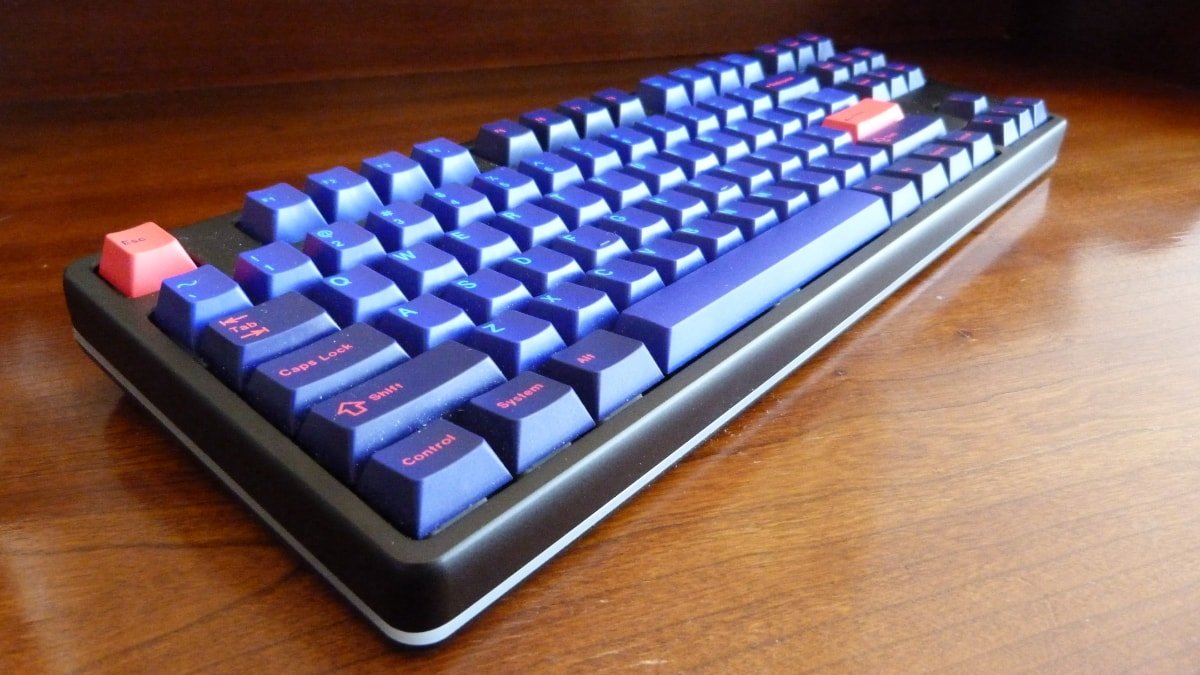
Drop CTRL mechanical keyboard


AppleInsider may earn an affiliate commission on purchases made through links on our site.

The Drop CTRL is a good keyboard for entering the world of mechanical keyboards, although the price is high compared to other mechanical keyboards.

It’s a superb mechanical keyboard with a premium design and high-end features. Drop designed it to provide an outstanding typing experience for gamers, programmers, and typists.

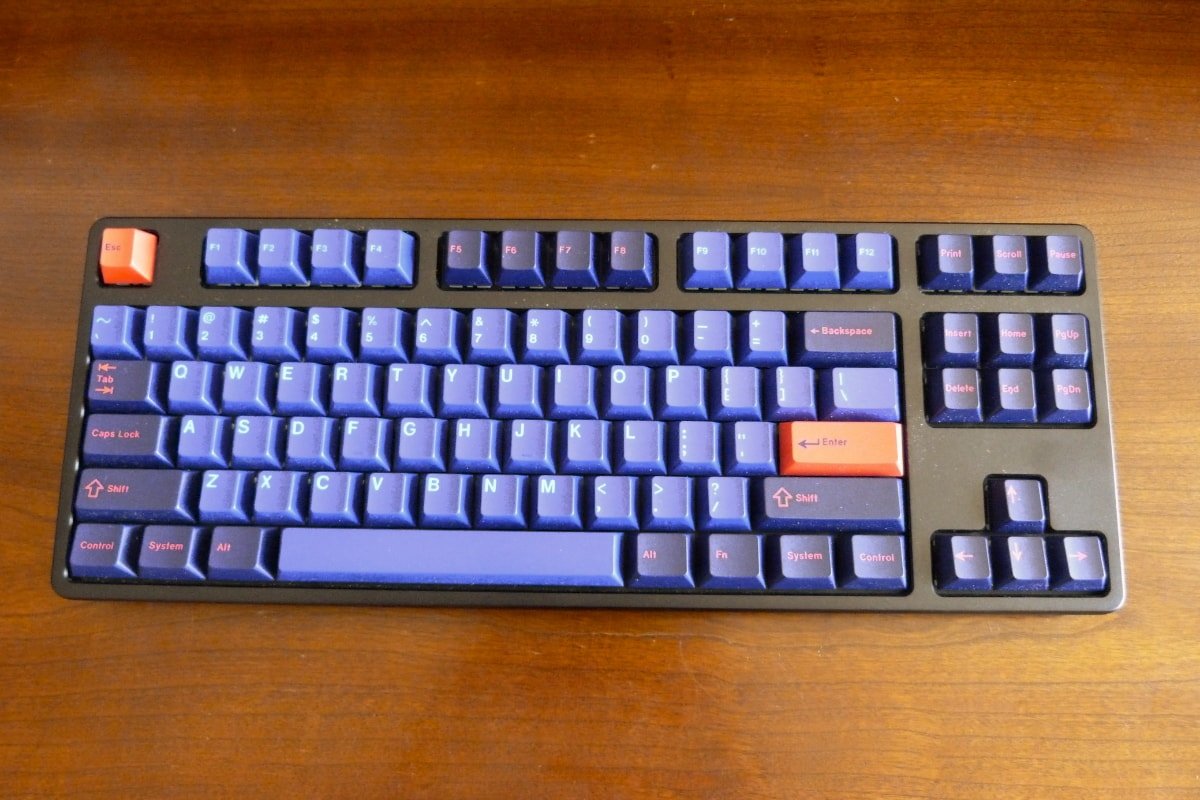
The keyboard is a tenkeyless (TKL) design, meaning it has a compact layout that saves space on your desk. And it’s ideal for people who don’t want to build a custom mechanical keyboard.

Design & Keys

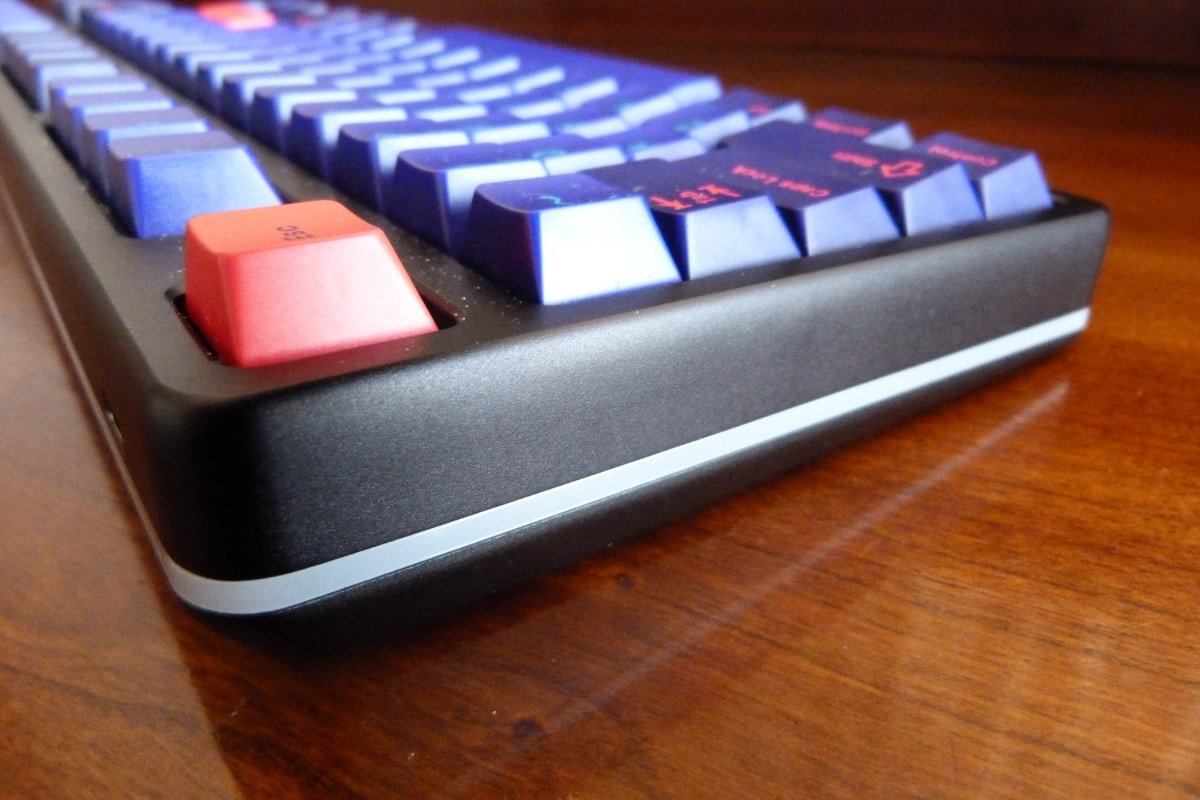
The build quality of the CTRL keyboard is impressive. Its solid aluminum frame gives it a premium look and feel at 14.5 inches by 5.5 inches by 1.4 inches, weighing 3.88 pounds.

The keycaps are made from PBT plastic, known for their durability and resistance to wear. The keyboard also features customizable RGB lighting, which can be programmed to create stunning effects.

It’s “per-key” RGB, which means users can program each key’s color individually.

One of the standout features of the CTRL keyboard is its hot-swappable switches. This means that users can easily swap out the switches on the keyboard without having to solder anything.

This feature allows people to experiment with different switch types and find the perfect one for their needs. Drop has various options for choosing the kind of keys at checkout, although only two are currently available.

The Halo Clear keycaps are 65g, while the Halo Trues are lighter at 60g. They are Tactile switches, meaning they have a point of resistance in the middle of each keystroke.

Drop has a helpful animation for each kind of switch when people click the “Help Me Choose” link on the product page.

The keyboard that Drop included is part of the Icon Collection, where the company handles the styling and hand assembly to offer a fully-functioning keyboard out of the box. The collection has various designs to suit different aesthetics.

Using the keyboard

The design that Drop sent us is called the Ultrasonic Keyboard. In a vaporwave-like style, the keyboard has Holy Panda switches made with stems from Halo Clears or Halo Trues with the housing from Invyr Panda switches.

No additional tools are needed to change switches because the package includes a keycap puller and a switch puller. Remove the keycap, remove the old switch, and press the new switch into position.

Some companies, like Keychron, offer a second set of keys inside the package but Drop only included the ones already built-into the keyboard. However, Drop does list switches and keycaps for the standard model, so that might only be the case for the Icon Collection.

The Configurator

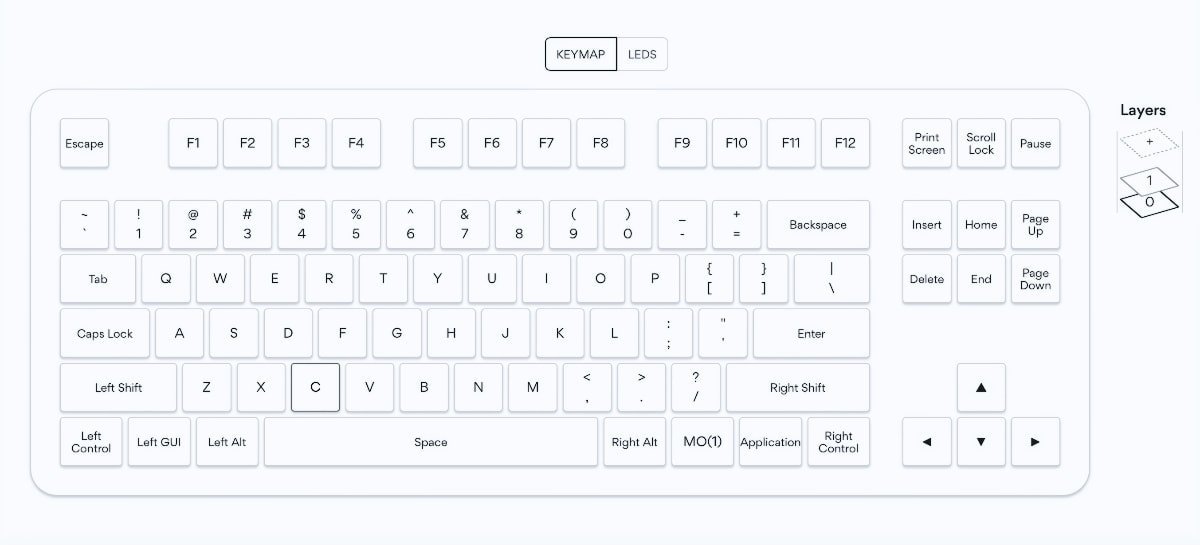
The Configurator

All this is to say that the keyboard was comfortable typing on. For people who type with force, the tactile “bump” that Drop describes as being in the middle of the keystroke makes it feel like you’re accomplishing your tasks with some power behind each word.

Although the keyboard has a Windows layout, with an Alt key instead of the Mac’s Option key and no Command key, the System key functions like Command. So, the Mac keyboard shortcuts you’re used to will work fine on the Drop CTRL.

A USB-C port on each side of the keyboard at the top front offers flexibility when positioning it on a desktop. For example, users can plug peripherals into the second port while using the other port to connect to a computer.

As mentioned, the keyboard has backlighting with RGB support, and the default lighting pattern is a rainbow that flows across the keys. Instead of software, it is a Quantum Mechanical Keyboard (QMK).

That means you can use Drop’s online Configurator tool to remap the keys or configure the LED backlighting. But it’s also possible to remap certain modifier keys directly in macOS for caps lock, control, option, and command keys.

The keyboard also supports up to 15 layers of key mapping. Users can create multiple keymaps using the Configurator and access them on the fly once downloaded using the Fn button.”

Drop CTRL Mechanical Keyboard – Pros

  • Sturdy metal frame
  • PBT keycaps are durable and resistant to wear
  • Multiple programmable layers allow for customization of key functions

Drop CTRL Mechanical Keyboard – Cons

  • Requires some technical knowledge to customize and program the keyboard fully
  • Expensive compared to other mechanical keyboards on the market

Rating: 4 out of 5

Drop CTRL Mechanical Keyboard – Where to Buy

Overall, the CTRL keyboard from Drop offers a premium typing experience with its high-quality build, hot-swappable switches, and customizable RGB lighting. While it may be more expensive than other mechanical keyboards on the market, it offers functionality that makes it a worthwhile investment for typists and gamers.

Some users may find the clicky keycaps too loud, although that’s a commonality that many mechanical keyboards share.

Posted on Leave a comment

NuPhy Air96 Wireless Mechanical Keyboard review: A light keyboard with heavy customization

NuPhy Air96 Wireless Mechanical Keyboard

AppleInsider may earn an affiliate commission on purchases made through links on our site.

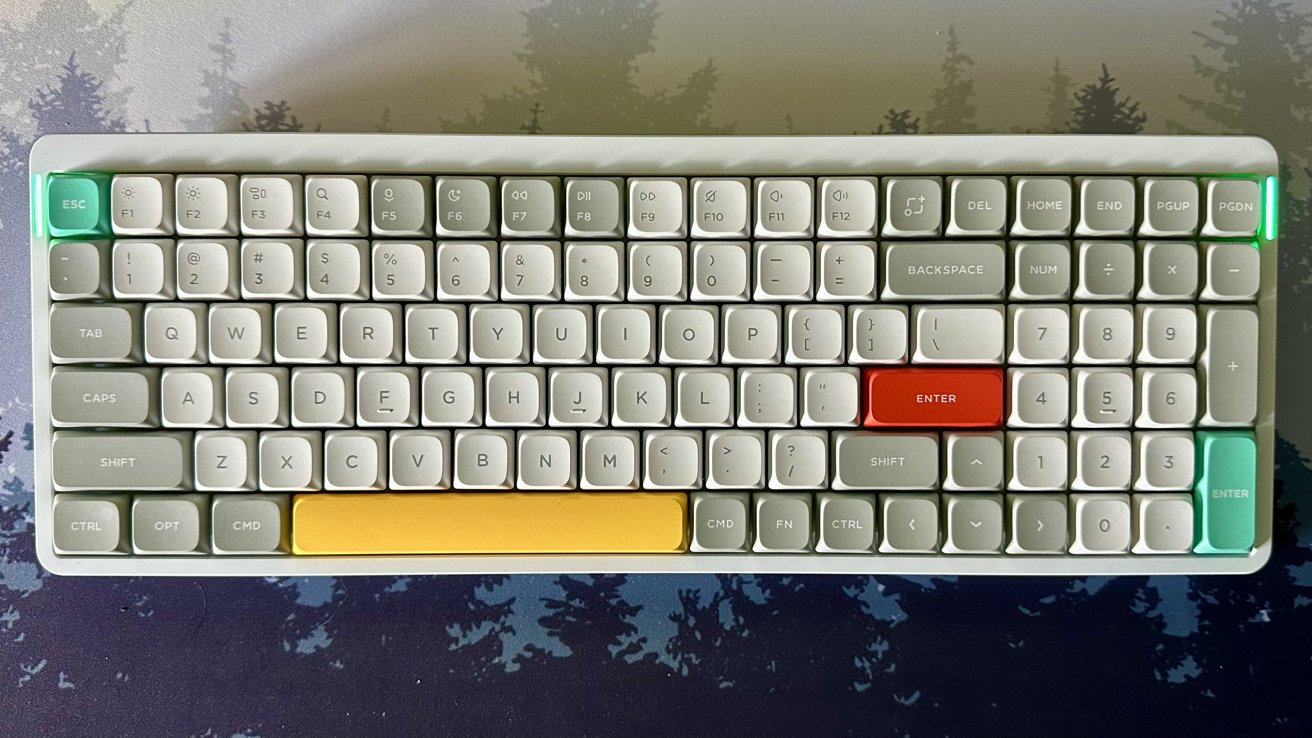
The NuPhy Air96 Wireless Mechanical Keyboard challenges stereotypes of mechanical keyboards being big and bulky, by providing a modern, lightweight design while still giving the beloved well-known feel.

It seems that the company took notes from how other NuPhy keyboard models were received, and compiled a list of features that many consumers will be happy to have.

If you are looking for a mechanical keyboard that is lightweight, modern-looking, and has multiple customization options and capabilities, then the NuPhy Air96 Wireless Mechanical Keyboard may be the right one for you to choose.

NuPhy Air96 Wireless Mechanical Keyboard design

The NuPhy Air96 Keyboard features a slim and lightweight design that weighs about 1.46 pounds and is 14.70×5.20 inches. It is also built via a wedge design, so the front is 17.5mm thick, and the back is 22.4mm.

Underneath the keyboard is a two-piece foot stand that allows you to prop up the keyboard to three different typing angles. The feet are positioned inside one another, so when you pop one out, it gives you a different angle.

Keyboard two-level foot stand

Keyboard two-level foot stand

The caps of the keys are made from a double-shot nSA profile that is placed out with a Plate Poron and PCB lxpe to allow for a new typing sound when using the Air96.

One thing that you do not find in many wireless keyboards — but is very nice to have — is a number pad. Located on the right side, it works as you would expect it to, and for any functions the main keyboard gets, the number pad also does.

NuPhy Air96 Wireless Mechanical Keyboard number pad

NuPhy Air96 Wireless Mechanical Keyboard number pad

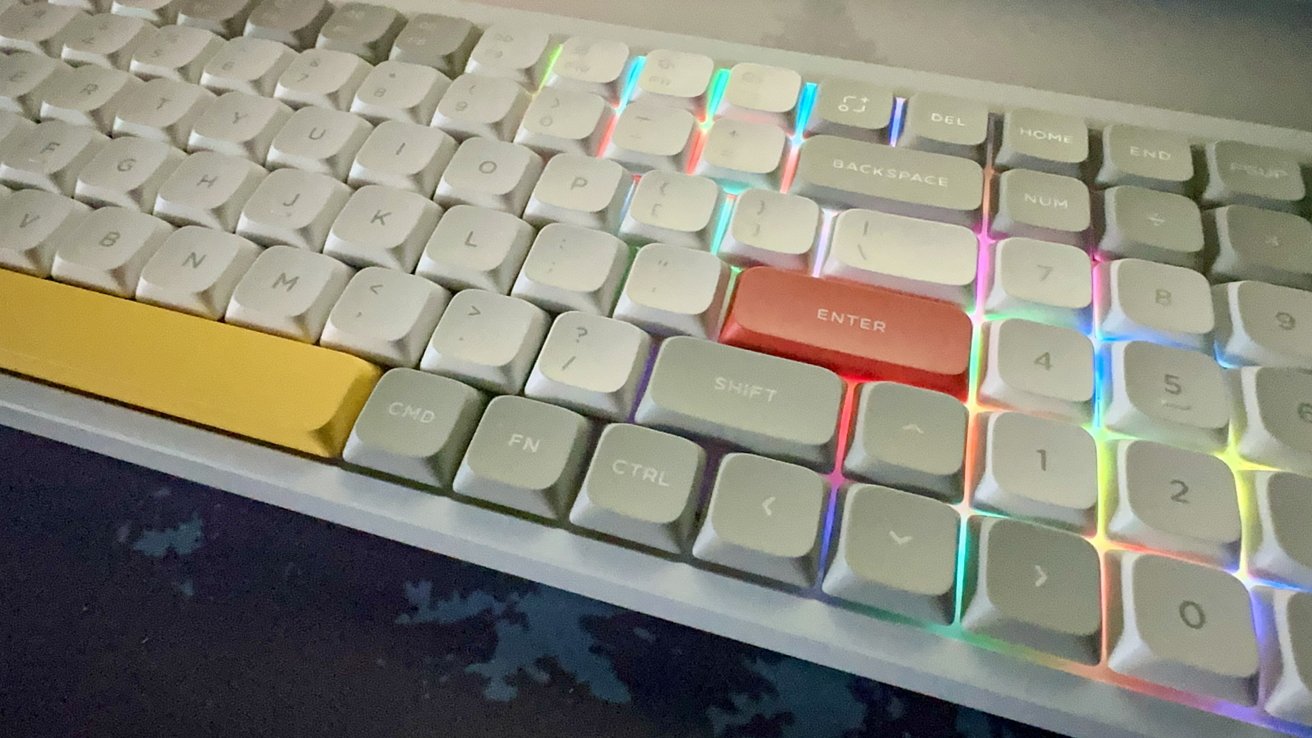
Behind the keys and on each side of the keyboard are RGB sidelights and backlights. These can be customized to your preferred effect that they perform, and there are ten different ones you can choose from.

The sidelights indicate different information about the keyboard. The left side shows if the caps lock is on or off and if the keyboard is in connection mode. The right side indicates the range of battery that the keyboard is at and system mode.

NuPhy Air96 Wireless Mechanical Keyboard sidelight

NuPhy Air96 Wireless Mechanical Keyboard sidelight

The Air96 can be used in Bluetooth or wired mode, and the wired way connects via USB-C. A braided USB-C cable is included inside the box — though it is made to connect to a USB-A port.

If you decide to go the wireless route, then bluetooth 5.0 and a 2.4GHz connection ensure a low latency between the keyboard and your device. The keyboard can be connected to up to four devices.

The Air96 can be used either with a Mac or PC, and to accommodate both systems, there are Mac-specialized keys to replace the existing ones so you can access macOS features easier. There are now dedicated keys for Spotlight, Do Not Disturb, and Dictation.

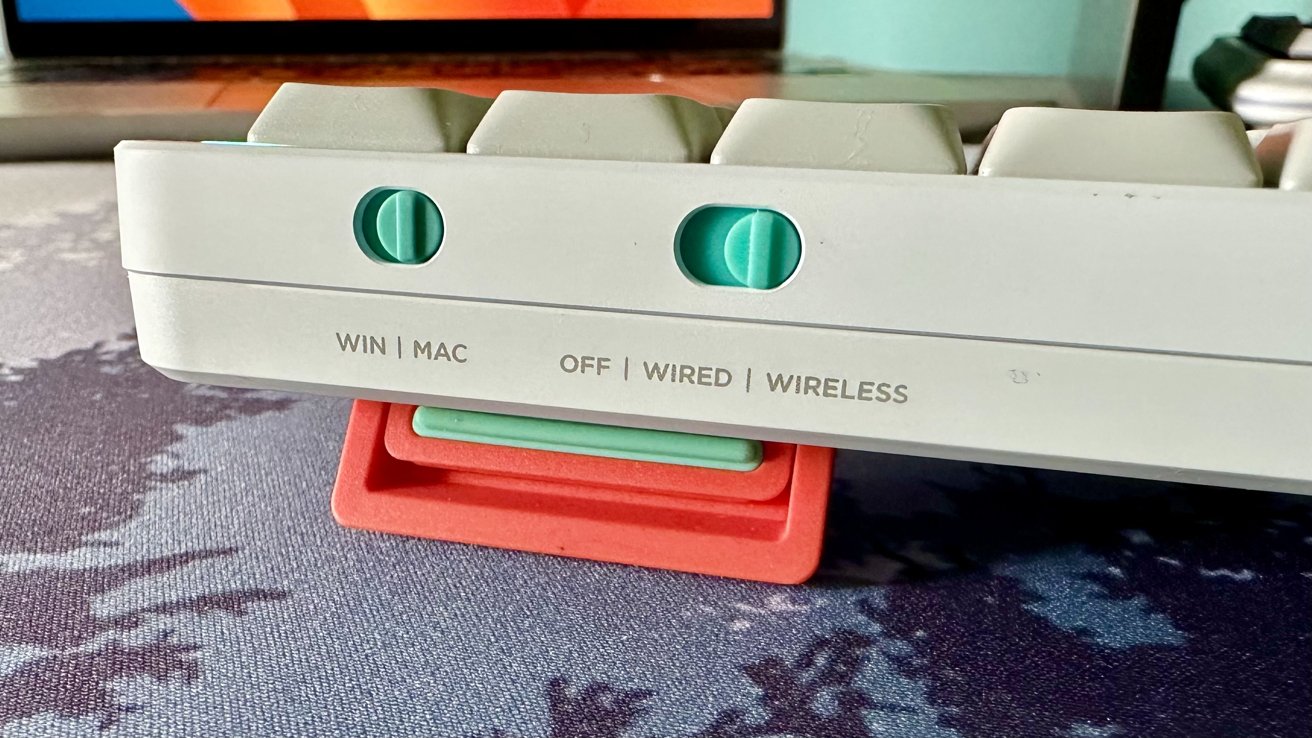
Behind the keyboard, you will find a USB-C port to charge your keyboard or use in wired mode, and two switches. One switch indicates which system you are using (PC or Mac), and the other switches the keyboard to the wired or wireless mode or turning it off entirely.

System switch and mode/power switch

System switch and mode/power switch

NuPhy Air96 Wireless Mechanical Keyboard customization

The NuPhy Air96 Keyboard allows deep customization from the surface to under the hood. Nearly every aspect can be customized on the Air96.

Removable keycaps offered

Removable keycaps offered

Aloe, Daisy, and Wisteria style switches are incorporated underneath the keys that offer 3.2mm travel and 16.5mm spring. Daisy and Aloe are both linear switches, while Wisteria is a tactile switch.

These switches can be replaced or changed to choose your preferred typing experience.

Above the switches are the keycaps that have been made slimmer and lighter to give the keyboard an airy feel. You can switch these out for thicker keys, which will give you a deeper clicking and mechanical keyboard experience.

Changing keycaps

Removing the keycaps is easy and no hassle to install, either. With the tool included, you can slide it between the sides of the key you want to take out, give it a slight pinch, and then quickly pull it off.

Keycap removal tool

Keycap removal tool

Within the box that the Air96 comes in, you have different color options for certain keys and icons specifically for macOS. You can purchase additional keys from NuPhy’s website.

Mac specific keys

Mac specific keys

Attaching the keys is no struggle to do, as you just place it on top of the switch, push it down, and then it will work as intended. You will not hear a click to ensure it is fully on, so you should give the key a few taps to make sure it’s working properly.

Keyboard backlights

The color effects behind the keys can be customized to ten different settings. You can change them by pressing the “FN” key and tapping one of the arrows continuously.

Backlights under the keys

Backlights under the keys

The settings you can change relates to the primary color that is displayed when tapping on a singular key, such as changing the brightness of the backlights, changing the speed of the effects, and changing the color that is shown when typing. That last one can be set to only one key lighting up or the whole keyboard.

NuPhy Air96 Wireless Mechanical Keyboard battery

The battery inside the NuPhy Air96 Keyboard is not shy on size, with it housing a 4,000 mAh battery for long-lasting use.

The keyboard can last 25-to-55 hours on a single charge with the backlights enabled and in use, or up to 300 hours with the backlights turned off.

Battery percentage range can be indicated from the right sidelight of the Air96. Red means that the battery is lower than 20%, blue indicates the battery is between 20-to-80 percent, and green means the Air96 currently has over 80% battery remaining.

USB-C port

USB-C port

If you’re seeing the red indicator, the Air96 can be recharged via USB-C.

NuPhy Air96 Wireless Mechanical Keyboard typing experience

The typing experience on the NuPhy Air96 Keyboard is delightful and easy to handle. The keys bounce freely, and there is no sticking when typing quickly or slowly.

NuPhy Air96 Wireless Mechanical Keyboard keys

NuPhy Air96 Wireless Mechanical Keyboard keys

With the 2.4GHz connection, the response time of the keys is rapid, with no notable lag. The connection between the keyboard and the device was smooth and solid.

The keys are soft and comfortable to type on with them being big enough to navigate when typing at a rapid pace. The spacing between each key is also well laid out, with them being not too close – but close enough together – to enjoy your experience with it.

Feel like you’re typing on air

The NuPhy Air96 Wireless Mechanical Keyboard is a great keyboard to type on that offers a bunch of customization within its light and slim body.

Each key is nicely situated and spaced out, so you do not feel claustrophobic when typing, and they have a nice bounce to them when pressed. Though the keys are slimmer than other NuPhy keyboards have, they still offer the same clicking sound that many mechanical keyboard advocates have come to love.

NuPhy Air96 Wireless Mechanical Keyboard keycaps

NuPhy Air96 Wireless Mechanical Keyboard keycaps

While every keyboard has a number row above the letters, having a dedicated number pad on the side is handy when you want to type multiple numbers out quickly and at length.

The backlit keyboard is very cool to watch when typing, and choosing which effect you want to be displayed is one of the great ways to customize the typing experience to your liking. The lights are bright and the animations are fluid, with no lag between pressing down on a key and the effects going off.

NuPhy Air96 Wireless Mechanical Keyboard backlit effect

NuPhy Air96 Wireless Mechanical Keyboard backlit effect

While the lighting effects are bright, they are behind the keys and not inside of them, so typing in the dark may be difficult since you may not be able to see the keys as easily.

Replacing the keycaps is easy to do and takes little-to-no time to perform. You take the tool that comes with the keyboard and pluck off the keys one by one. Firmly pressing the key on top of the switch will snap it right back into place.

With levels of customization from the inside out, the NuPhy Air96 Wireless Mechanical Keyboard is great all around. It’s sleek, personal, and light, all in one high-end keyboard.

NuPhy Air96 Wireless Mechanical Keyboard

NuPhy Air96 Wireless Mechanical Keyboard

This keyboard shows that functionality and slimness do not need to cancel one another out to work. If you want a reliable mechanical keyboard that is not bulky and heavy to handle, then the NuPhy Air96 Wireless Mechanical Keyboard is a good fit for you.

NuPhy Air96 Wireless Mechanical Keyboard — Pros

  • Lightweight
  • Thin and sleek design
  • Fluid lighting effects
  • Strong wireless connection
  • Long battery
  • Number pad included
  • Customizable all around

NuPhy Air96 Wireless Mechanical Keyboard — Cons

  • Difficulty typing in the dark
  • Wrist rest sold separately
  • USB-C cable made for USB-A port

Rating: 4.5 out of 5

Where to buy the NuPhy Air96 Wireless Mechanical Keyboard

You can purchase the NuPhy Air96 Wireless Mechanical Keyboard directly from their website for $119.95. It currently comes in lunar gray and ionic white.

Posted on Leave a comment

A practical guide for why spatial audio music is great

Dolby Atmos on Apple Music

AppleInsider may earn an affiliate commission on purchases made through links on our site.

Most people shrug off spatial audio because they don’t know what it is or have decided it’s a gimmick, but others are convinced Dolby Atmos songs sound better. Here are some practical examples of that, and why spatial audio benefits music.

At its heart, spatial audio music is about depth. Stereo mixes expand songs left and right while Dolby Atmos music mixes add a spatial depth to the equation which expands how big and detailed music can be.

Nintendo added depth and Mario went from side-scrolling to free-range roaming. Zillow allows realtors to supplement house photos with 3D tours to help buyers better understand a room’s space.

These are silly examples, but in all cases that I can think of, adding more depth to something expands how much detail can be seen or heard.

Dolby Atmos mixes add space and depth to songs and make, directly compared, stereo mixes feel much flatter and two-dimensional.

The benefit here is that depth in music gives sounds and instruments more room which usually means more clarity for the listener. The different parts are easier to hear because fewer pieces are layered on top of each other.

Spatial audio terminology

To confirm, there is no exact definition for spatial audio. Someone could mean Dolby Atmos, Sony’s 360 Reality Audio, or it could just be a general reference to anything mixed beyond stereo.

Apple uses Dolby Atmos songs on its streaming service and refers to this as Spatial Audio with Dolby Atmos. Amazon Music and Tidal have both Dolby Atmos and 360 Reality Audio.

Listening to spatial audio in headphones and on speakers

A lot of people assume you need special headphones to listen to Dolby Atmos music on Apple Music, but you don’t really. Most Bluetooth headphones and earbuds will work.

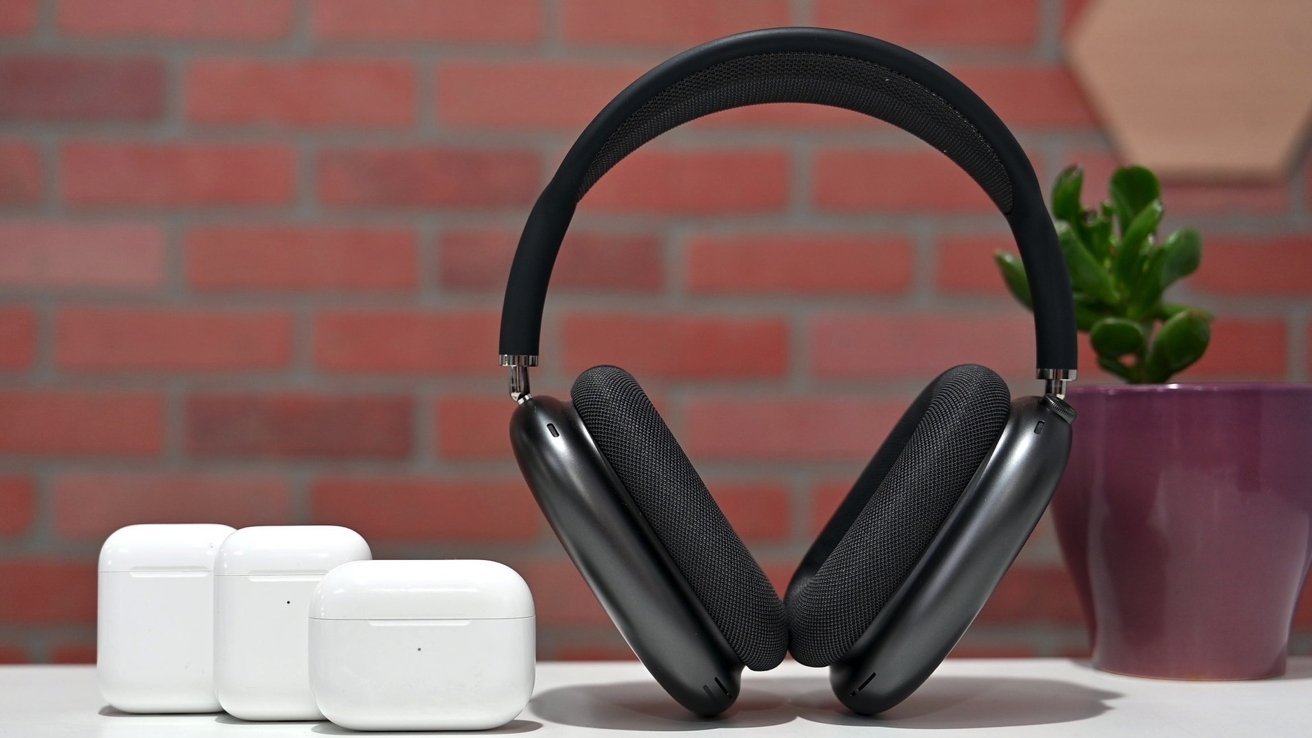
A lot of Apple's personal audio accessories support spatial audio with head tracking.

A lot of Apple’s personal audio accessories support spatial audio with head tracking.

I’ve spent the majority of my time listening with a range of AirPods earbuds and AirPods Max. Apple’s HomePod also supports playing Dolby Atmos.

I’ve also been able to listen to lots of music through the Sonos Era 300 speaker since early February.

The Era 300 has been the extra push for me to really confirm how much I appreciate listening to songs in Dolby Atmos. Songs really pop when listening out loud.

Sonos has also enabled Apple Music to play its Atmos music on Atmos-supported speakers like Arc and Beam (Gen 2).

Spatial audio examples

Instead of only talking about spatial audio in broad terms, I thought it would be helpful to give a few specific song examples.

Not every song employs surround effects or exaggerated spatial placements. In fact, I’ve found that most songs are mixed in subtle ways.

If you come to Atmos music with the mindset that every song needs to take advantage of the full space available then there are a lot of music that won’t make sense.

Boygenius’ latest album is an example of subtle Atmos mixing that I think still benefits from using the format, even though it doesn’t do anything dramatic.

The band’s song “Not Strong Enough” features multiple singing parts during the bridge which has more depth and feels closer to a live performance than the version on Spotify does.

Other examples I like are the albums “Scaled & Icy” and “Blurryface” by the rock band Twenty One Pilots. Multiple songs take advantage of height and surround effects, but in small ways through minor embellishments.

The opening chants on “No Chances” stretch up and far to each side. Additionally, the synths on “Stressed Out” reach around to circle the listener.

Similarly to the song “Stressed Out,” The Weeknd stretches the synth sound in “Starry Eyes” to build to surround a listener.

The reason this works especially well is that most of the time the job of a synth is to flood a space with omnidirectional sound, not to be placement specific.

Spatial audio gives the effect you're in the middle of a performance. [Apple]

Spatial audio gives the effect you’re in the middle of a performance. [Apple]

If you do want exaggerated songs to listen to, the quintessential Dolby Atmos song is probably “Rocketman” by Elton John. It sounds big and incorporates special effects to really make an impression.

Michael Jackson’s “Thriller” features some spatial trickery with the wolves at the beginning of the song, which is fun, but otherwise largely stays true to the original.

There’s a track on the “No Time To Die” soundtrack, done by Hans Zimmer, called “Mantra.”

It’s a modest orchestral song that blooms into a wall of sound. Listening on an Era 300 created a sound so big that it was unbelievable it was coming from the compact speaker.

And if you do crave surround sound effects, soundtracks do a good job of this because they have the cinematic experience in mind. Listen to the Black Panther: Wakanda Forever soundtrack in Dolby Atmos.

Spatial audio is better

One of the reasons I’ve become so enthusiastic about Dolby Atmos music is that it fails gracefully. At a minimum, people don’t notice a difference.

Even if you’re not getting the benefit of a wide soundstage and spatial effects, the slight depth is still present.

I listened to the same songs mixed in stereo and mixed in Dolby Atmos and the contrast of going back and forth made me hear how close it felt like the singer was to my face, or right on top of my brain, in stereo.

Try bouncing back and forth between listening to a song on Spotify or YouTube and the same song in Dolby Atmos on Apple Music.

If you’ve never given spatial audio music a fair shake, I’d encourage you to really give it a chance.

If you tried some early spatial audio music and decided it was a gimmick, I’d encourage you to give it another chance with depth in mind.

More than high-res audio, I think Dolby Atmos music adds a meaningful and noticeable improvement to music. It should only get better from here as more artists and producers understand how they can sculpt songs with it.

Posted on Leave a comment

Save $200 on this M2 MacBook Air with 24GB RAM, 1TB SSD, plus 3 years of AppleCare $189

Save $200 on a loaded MacBook Air.

Exclusive savings are in effect on every MacBook Air M2 with 24GB of memory, including the 10-core GPU configuration with 1TB of storage that’s $200 off. Plus, get three years of AppleCare for just $189.

If you don’t need as much storage, you can still save $200 on the 512GB model with a 10-core GPU and 24GB of memory, bringing the price down to $1,699 in your choice of Silver, Space Gray, or Starlight.

Posted on Leave a comment

Updated SwiftKey keyboard update gives access to Microsoft’s new Bing AI inside any app

New AI features in SwiftKey

With the addition of new smarts, users can access AI tools inside Microsoft’s SwiftKey keyboard that work in nearly any app to chat and search for information.

The second feature, Tone, lets people communicate more effectively by customizing text to fit any situation. For example, it can transform words to make them casual, polite, concise, or professional.

Finally, the Search functionality lets people quickly search the web from inside any app using their keyboard. It helps research various topics, including stock prices, dining options, and weather.

All markets offering the new Bing can use these new SwiftKey features. Anyone can use Search, but accessing Tone and Chat requires a user to sign into their Microsoft Account that has been approved to access the new Bing preview.

Posted on Leave a comment

iPhone 15 Pro won’t be getting solid-state buttons due to technical issues

Solid-state buttons were expected for iPhone 15 Pro

Apple has reportedly abandoned adding solid-state buttons to the iPhone 15 Pro due to production issues.

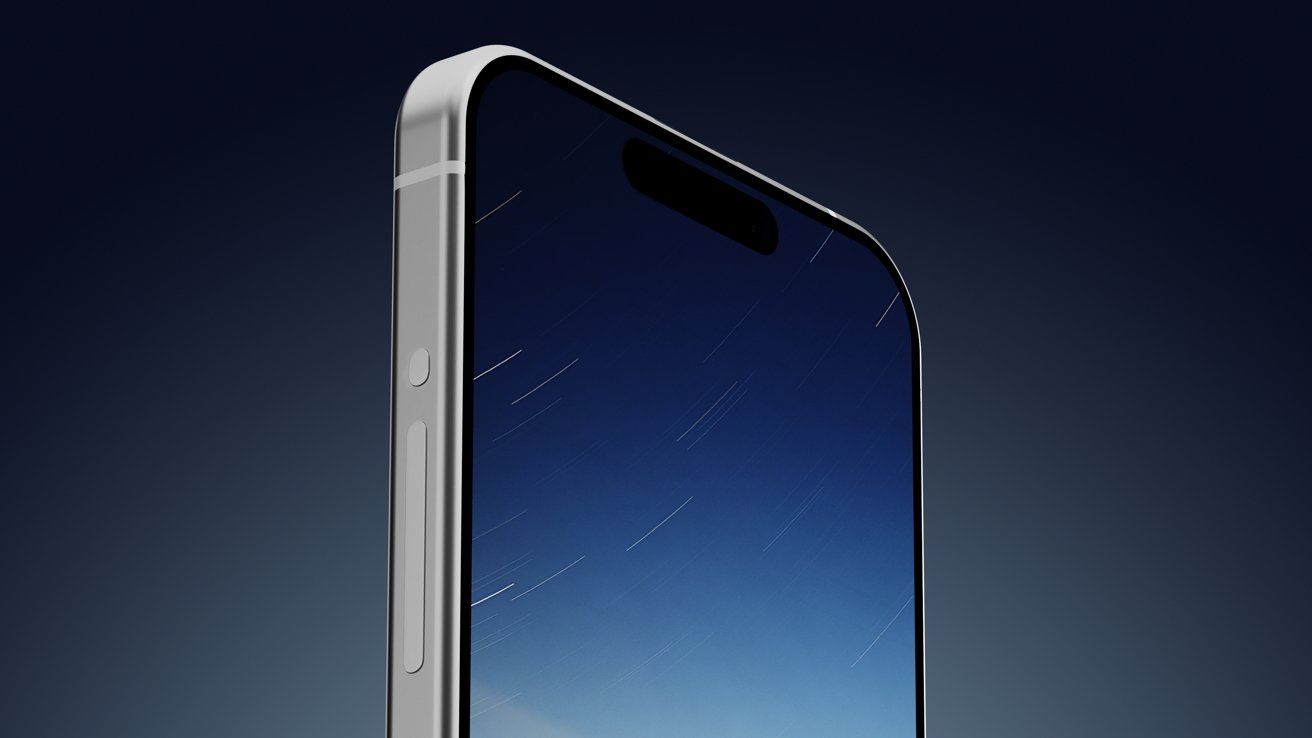
Multiple reliable sources suggested that the mute switch, volume, and power buttons would be replaced by solid-state components in the iPhone 15 Pro models. This controversial change would improve device watertight integrity and add new gestures.

However, a new report from Ming-Chi Kuo states that Apple has abandoned the solid-state buttons due to technical issues. This change comes during the EVT development stage, which gives the company time to make final hardware decisions like this.

Since Apple will revert the design to its physical buttons, this should reduce complexity and simplify development, according to Kuo. The last-minute change will have a limited impact on mass production or shipping schedules.

This report arrived only moments after Jeff Pu, an analyst at Hong Kong-based investment firm Haitong International Securities, made a similar declaration. It seems likely that the solid-state buttons were indeed planned but won’t be implemented now.

Posted on Leave a comment

Apple Music, iTunes, and News are experiencing outages

Apple services are experiencing outages

Various media services like Apple Music, iTunes Match, Apple Music Radio, and Apple News are intermittently down for some users.

The Apple System Status page shows Apple Music, Apple Music radio, iTunes Match, and Radio are experiencing an outage. Apple News shows it is also experiencing problems but is classified as an “issue” instead of an “outage.”

The various outages began at 8:18 p.m. EST, according to Apple. Users will encounter problems when interacting with these services, or they may not respond at all for short periods.

Posted on Leave a comment

Take home the ultimate 14-inch MacBook Pro workstation at a massive $1,000 discount

Save $1,000 instantly.

AppleInsider may earn an affiliate commission on purchases made through links on our site.

Shoppers looking for a MacBook Pro capable of handling the most resource-dependent photo, movie, and music editing projects can take advantage of $1,000 off a 14-inch M1 Max model with this exclusive deal.

B&H Photo is offering AppleInsider readers a phenomenal deal on a closeout 14-inch MacBook Pro by knocking $1,000 off when you shop through this exclusive pricing link, bringing the total cost of the beautiful laptop in Silver down to $3,099.

M1 Max for maximum capabilities

The deal from B&H Photo is not for an entry-level device. This MacBook Pro is a loaded beast capable of the most demanding processes, from ProRes video processing to full-stack app development.

It comes with 64GB of unified memory and 2TB of SSD storage space. Additionally, the M1 Max chip sports a 32-core GPU and 16-core Neural engine for incredible rendering speeds even with 4K video footage.

Exclusive savings on MacBook Pro laptops

This ultimate workstation normally sells for $4,099. But the B&H Photo deal allows more consumers the opportunity to experience the gorgeous 14-inch Liquid Retina XDR display, 1600 nits of peak brightness, and lightning fast processing capabilities.

Buyers looking for the larger 16-inch MacBook Pro can find great deals from the AppleInsider Price Guide. Check back frequently to uncover the deepest discounts on all of Apple’s great MacBooks.

More excellent Apple deals to outfit your home or office

Best Apple prices

From the M2 MacBook Air to the powerful Mac Studio, AI readers can snap up exclusive discounts on Apple hardware. Be sure to visit our Apple Price Guide to view the latest deals and special offers at Apple resellers.