Apple’s deft transition in the late 90s from an aging icon into a fresh, modern brand with the ability to capture the attention of buyers is now virtually ancient history. But it provides some perspective on Apple’s current position, which is frequently characterized as being one mistake away from doom. There are also lessons for Apple’s competitors.
iMac ushered in Apple’s new era of plastic fashion
How Apple’s Golden Age lost its luster
Apple’s Golden Age of the late 80s and early 90s was a period marked with high priced, highly regarded professional products from the Mac SE/30 to the wicked fast Mac IIfx.
Yet by 1994 serious problems were brewing, most notably the rise of a “good enough” Windows alternative that Microsoft was offering to commodity PC makers. Apple couldn’t just rest on its Golden Age status because the profits that had once established it were now waning away.
Apple’s Golden Age began to lose its luster as iconic product models expanded into mess of dull SKUs
Pundits of the day recommended that Apple license its software, make its own hardware cheaper, and maybe just sell itself to a larger company to stay afloat — IBM, Sun and Oracle were all once candidates. In hindsight, all of that advice turned out to be disastrous.
Early 90s initiatives to license Apple’s Mac software — as well as its new Newton platform — were largely a distraction that complicated the already problematic OS development plans of the company. Once it lined up cloners, it had to support their products as well as its own when charting the future of Mac OS.
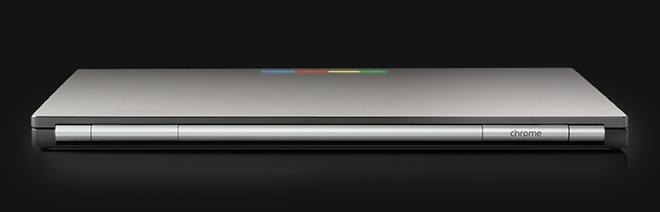
It might seem easy to draw correlations between Apple’s long ago expensive Macintoshes and today’s increasingly expensive iPhones, particularly if you equate Windows with Android as the outside competitor. However, Apple’s OS licensing programs of the mid 90s really had a lot more in common with Google’s Android and Chrome OS initiatives that occurred two decades later: both ended up being a lot of work with very little real payoff.
After setting up a series of Mac cloners, Apple found that none of its new partners were really creating any valuable new markets for Macs. Instead, they were mostly all just trying to sell small batches of the most lucrative models: fast premium Mac clones that cannibalized Apple’s profitability while forcing it to sell low profit models on the low end.
What had seemed like a simple and obvious solution turned out to be a really complex problem with unforeseen consequences. Neither licensing nor the new “low cost” Mac LC or Performa models did much of anything to expand Apple’s installed base of users. Being cheaper just watered down the attractiveness of Apple’s platform and reduced any differentiation from the “good enough” Windows PC alternatives, which were pioneering faster processors and new markets in areas like PC gaming.
By 1996, it was growing difficult for most consumers to see any reason to pay a premium for a Mac, particularly given that there was incrementally more exclusive Windows software appearing. Even Microsoft was producing a version of Office that was now better on Windows than its Mac version. And the key software that had been driving Mac sales, including PageMaker, QuarkXPress, illustrator, and other other creative tools, was increasingly available for Windows PCs as well.
Android’s fading glory today
Today, Apple no longer has these problems. It isn’t materially struggling to keep its iOS up to par with leading alternatives that attract more exclusive software. Instead, it’s Google that is struggling to match the advances of iOS, while Microsoft’s Windows Mobile has dropped out of the race entirely. Most commercially significant app developers are not working to support Android first as Google’s executives once predicted would happen. Instead, apps routinely launch on iOS and developers often only provide a “good enough” version tied to ads on Android, because buyers attracted to Android largely don’t want to pay anything for software.
And rather than Apple seeing its profits bleed away to cloners today, it’s Google that is struggling both to sell its own Pixel hardware and to promote partners’ “real” Android devices bundling its Google Play services in a world where most of Android’s growth is occurring in the “cloned” flavors of Android forks based in China that Google gets nothing from and has no control over.
Additionally, Google’s largest Android licensee is actively seeking ways to use its own Tizen platform instead, and the fastest-growing Android maker in China is also threatening to use its own Linux fork. Herding the cats of Android’s licensees are a bigger mess for Google than Apple’s once were for the classic Mac OS.
In mobile devices, Google is today’s Beleaguered Apple, suffering from not just a hardware cloner problem, but also from key software partners threatening to bail and go the commodity route the same way that Adobe once tried to abandon Apple for Windows out of commercial self-interest. Android really isn’t today’s Windows. iOS — and to an extent Android forks — are closer to playing the role of today’s Windows, while today’s “beleaguered Mac” is Google’s “pure” Android, which struggles to promote new APIs and attract the same kind of attention that iOS gets, while also a few steps behind the new iOS releases Apple cranks out every year in key features and in distribution.
It’s not clear how Google can turn things around and regain control over its increasingly factionalized cloners and the forked software platforms that call themselves Android, not to mention pull back the territory lost to Tizen and other proprietary OSs now powering TVs, wearables and other devices. Just like Apple’s 1990’s Performa, Googles’ cheap Nexus hardware also didn’t move the needle. And the market potential for Google’s higher end Pixel brand is eaten up by Android licensees’ own flagships desperately seeking profitable sales in the finite market for premium Androids.
Google’s various competing plans for its modern OS of the future, whether Chrome OS, some new version of Android, a hybrid, Fuchsia, or something else, have a lot in common with the constantly shifting OS strategies at the old mid-90s Apple. Perhaps there are lessons for Google in Apple’s late 90’s history of turning things around.
Steve Jobs big shift at Apple
After the third party advice recommending Mac software licensing and cheaper, commodity-like Mac hardware both failed to fix things for Apple, there was no obvious advice left to give, so the media began dumping on the company as a beleaguered failure with no way out.
Perhaps another company could pull simply buy it and turn it around? That too was bad but popular advice, as would later be clear from the results of some larger company buying out a struggling hardware maker like Be or Palm. Had IBM or Sun bought Apple, it most certainly would have just flubbed everything and turned Apple into another once-notable icon in the graveyard of tech history, the same way Google’s acquisition of Motorola resulted in simply destroying what was left of the once great brand and selling off the logo to Lenovo.
Instead, Apple was effectively taken over by Steve Jobs’ team at NeXT. Apple acquired the much smaller company in the final days of 1996 in a Hail Mary play that expected to use NeXT’s operating system software to replace the increasingly outdated underpinnings of the Mac. But in addition to acquiring software, Apple ended up getting a disciplined executive structure and a product visionary with the ambition to return Apple to its once-former glory.
Steve Jobs dramatically simplified Apple’s offerings in 1997
Rather than dialing Apple back to its late 80s Golden Age, Jobs turned Apple’s clock back even further to its early 80s “Insanely Great” era, one that could excite customers with new technology in a fresh package that stood out in a sea of boring sheet metal boxes. Instead of trying to convert Apple into a copy of Microsoft or Dell, Jobs aimed to return Apple back to what it was once really good at being: fashionable and premium.
Apple’s 2000s Era of Plastic Fashion
After Jobs had originally left Apple in 1986, he pursued the goal of building his future vision of desktop computing at NeXT, which shipped its first product in an attention-arresting black magnesium cube in 1988. A decade later after returning in 1997, Jobs turned to Apple’s existing design team to create something entirely fresh and new.
That team had already been experimenting with translucent plastics, most evident on the dark green Newton eBook 300. But to make a big splash, the new iMac would need to be more boldly styled.
After assuming control of the beleaguered Apple Computer in 1997 as its “interim CEO,” Jobs concentrated on Apple’s valuable technologies, capitalized on the strongest of its remaining business audiences (notably education and consumers buying products for themselves), and presided over the invention of a new style of technology. That helped to forge a new identity for the company, allowing it to more readily shed its problematic associations of being “cheaper but still expensive,” and selling relatively unexciting “beige box” computers.
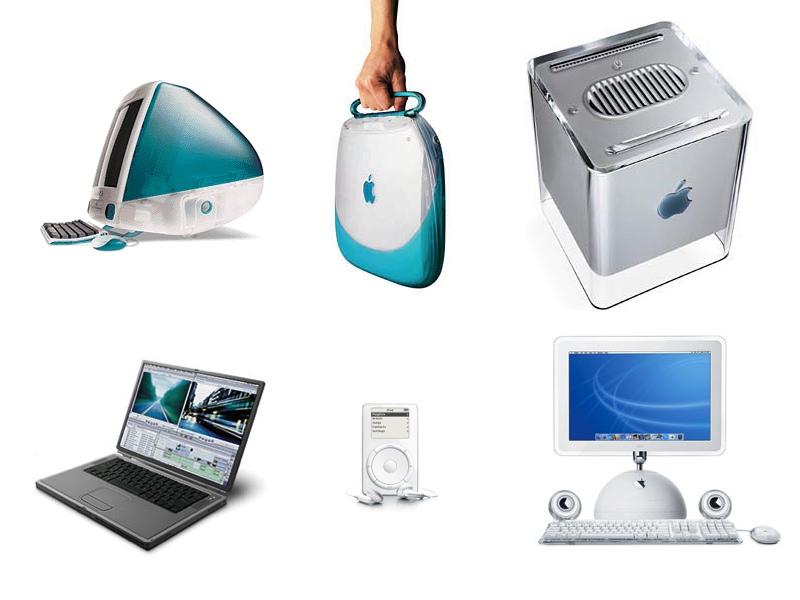
Rather than releasing a techy PC box intended to be locked down by a central team of IT administrators while supporting every available legacy port, Apple positioned the 1998 iMac as a curvey, translucent, colorful appliance that regular people could plug in to begin using immediately. Apple cleverly made the new iMac’s appearance a prominent subject on its website. At a time when animated autoplay graphics on the web were novel, Apple’s main page displayed a bright Bondi blue iMac rotating into view to introduce itself.
iMac launched Apple’s new era of plastic fashion. The use of plastic as a material certainly wasn’t new to Apple. In fact, it was the early Apple of the late 1970s that popularized the use of ABS moulded plastic as the casing for its Apple II at a time when most home computers were formed from cheap, simple sheet metal. Designing and moulding a styled case took additional time and effort, but resulted in a more distinctive product. When the first Macintosh shipped in 1984, its all-in-one plastic enclosure was iconic and modern looking.
But more than a decade later, the use of common ABS plastics to form a computer case was not novel at all. And as Windows began offering a cheaper alternative to the Mac desktop, the appearance and styling of the PC box had largely fallen out of focus. After all, most PCs were just thrown under a desk anyway, so it was fine to have a cheap sheet metal box with just a styled plastic front, commonly with convenient legacy ports across the back and perhaps even more on the front. The only thing that mattered at the time was how fast a PC could run Windows.
A technical, fashionable break with legacy
Instead of trying to beat PC makers at their own game, Jobs’ Apple built something distinctive. iMac, powered by a PowerPC processor, wasn’t intended to run Windows at all. Instead, Apple focused on the tasks people wanted to accomplish, including email and web browsing, neither of which required Windows.
In another break with the status quo, iMac also had no legacy ports. It exclusively provided one expansion method: Intel’s USB, a new style of port designed to make it much easier to connect a number of both fast and slow peripherals without any manual configuration or settings.
The tradeoffs of abandoning legacy were howled about by the media trying to cater to populist outrage over users being forced to change rather than being coddled as customers who knew best. But users and the media were wrong about USB.
The original iMac only supported USB for peripheral expansion
In fact, Apple’s big exclusive bet on USB not only created a new era of simplified Mac connectivity—no more ADB keyboards, old serial peripherals, GeoPort, and SCSI complicating the market and making Mac versions of peripherals more expensive—but also trail blazed for USB at at time when many PCs had included the new ports but either didn’t support them or dangled them off the side while prioritizing the old PS/2, Centronics, RS-232 and other old connections that were slightly cheaper.
The success of the new iMac, its translucent plastic appearance and simplified USB allowed Apple to stand out in a crowded market, and capitalized on style over pure cheapness. The new iMac didn’t sit under your desk out of sight; it was a showpiece. Apple’s distinctive look was immediately copied by PC makers — some of whom Apple successfully stopped on trade dress grounds — but also by makers of USB peripheral makers seeking to sell them to both Macs and PCs.
That meant that even commodity PC boxes were commonly attached to bright, translucent plastic boxes serving as a USB hub, a mouse, a keyboard or other device, effectively seeding the notion that the look of the future in the late 90s had shifted from the opaque “boring beige” that had once looked modern in the early 80s, to a new material design language that showed off the latest technology in producing translucent injected mold casings with a more precision fit and a closer attention to detail and styling.
To PC nerds who only cared about processor speed, Apple’s new translucent plastic styling was often regarded as silly. But mainstream users, particularly those new to computing who just wanted to get online and didn’t want to dedicate their lives to maintaining a peak performance computing machine, the “there is no step three” iMac was both an easy decision and a fashionable one that felt fresh and modern.
The Dotcom Plastic Bubble
Apple rapidly spread the iMac’s distinctive styling across its product line, starting with its wildly colorful new iBook in 1998 and moving across the pro line of Power Mac G3s the next year. In 2000 Apple released the G4 Cube — a pure showpiece of plastic innovation that effectively eclipsed its value as a computer. Apple had retained an edge with creative users, so its injection of colorful, translucent plastics grew prominently visible in markets where it could grab attention and stand out as the modern, fresh look of the new Millennium.
Apple’s early 2000s product lineup was fresh and unique
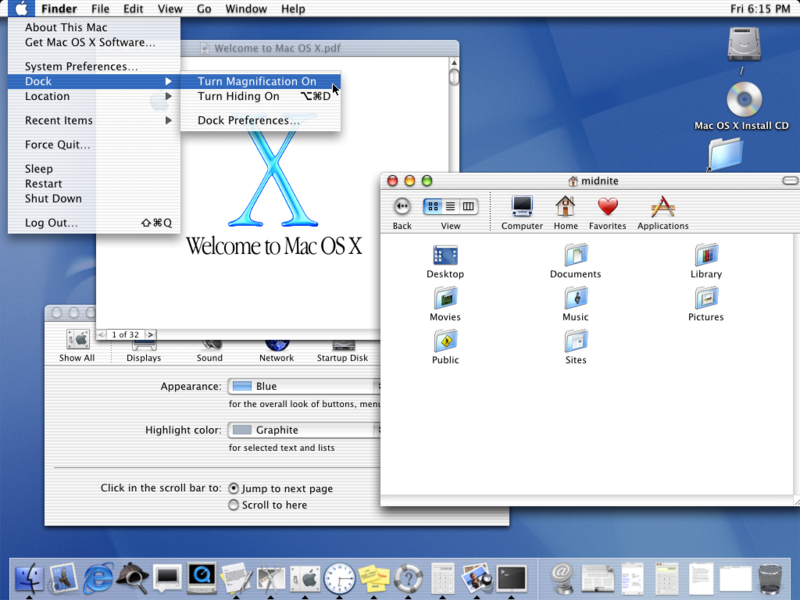
Beyond hardware, Apple’s fresh “plastic fashion” was also reflected in the company’s release of Mac OS X, which was given a new Aqua interface that not only looked new, but was grounded in entirely new Quartz technology. Rather than being just a bitmapped graphical display of simple 2D geometry that the original Mac had introduced in the 80s (and which Windows had copied verbatim), the new Mac OS X introduced a scalable, compositing graphics system that leveraged the 3D graphics power that video games had popularized.
This enabled Macs to present graphics elements with real translucency along with fluid, animated effects — most notably the Dock — that paired perfectly with the clear plastic hardware Apple was selling, differentiating Mac OS from Windows the same way that Apple had been contrasting flashy Mac hardware from basic PC boxes.
Mac OS X reflected Apple’s new translucent plastic hardware
Because Apple was launching a new platform, it had fewer legacy issues to manage than Microsoft’s Windows. Legacy complicated Microsoft’s ability to copy Apple’s modern vector graphics, delaying its own response with Windows Vista until the end of 2006. Apple enjoyed years of exclusivity of its own “plastic” innovations for a long enough period to strongly differentiate itself and its products from the status quo. By the time Vista did ship, it simply looked imitative rather than like a parallel development.
A flexible entry into mobility
In 2001, Apple also made a bold move into consumer electronics with iPod, using its advanced core technologies to enhance the simplicity and functionality of the device rather than exposing unlimited complications, settings, and configurations that would require a “Book for Dummies” just to use it.
In parallel, Apple was also capitalizing on mobility in personal computing, focusing more of its efforts into notebooks than desktop Macs because the market was clearly shifting toward mobility and away from the stationary 1990s home PC stuck under a desk.
Apple’s plastic mobility strategy was not just exceptionally successful, but it also leveraged cross-pollination between its mobile music devices and its advanced desktop operating system to deliver iPhone–the largest, most commercially successful product to ever be released.
iPhone similarly launched with a glossy, liquid look with even greater use of fluid animation in its graphical user interface, making it wildly fresh in a world where existing “smartphones” were mostly just basic button devices that reflected the simple user interface patterns of PC screens from the 1990s. And in its second and third versions, iPhone even shipped with a rounded plastic case that improved reception and lowered production costs, making it easier to produce in high volume. That was important because iPhones were helping to shift Apple from being the maker of a few million Macs into the producer of tens of millions of mobile computing devices.
A flexible demand for more space
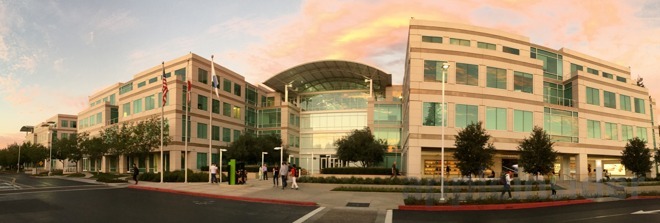
As the company’s fortunes–and need for expansion–grew dramatically over the early 2000s, Apple ran out of room at its original 1 Infinite Loop headquarters and expanded incrementally across a series of available office spaces.
Apple’s offices were too big in 1996 but too small in 2006
In 2006, just as it prepared to launch iPhone, Apple acquired a series of adjacent properties straddling the freeway just a few blocks east of 1 Infinite Loop, with the intent to build a major expansion of office space. Jobs explained the company’s voracious need for new space in a large, centralized building site at the time in saying, “we’ve rented every scrap of building we could find in Cupertino.”
As it drew up plans for a Campus 2, its own expansion was being matched by a decline at neighboring PC maker Hewlett Packard. Fortuitously, in 2010 HP decided to pull out of its Pruneridge Campus adjacent to the land that Apple had already pieced together, creating the opportunity for Apple to acquire HP’s old facility and build a very large new development across the combined area–an extremely rare opportunity to arise in the heart of Silicon Valley.
Real artists ship
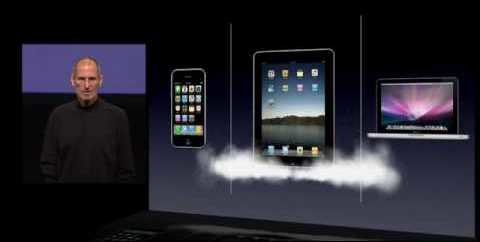
While the company was working to expand its available space, it continued to keep its focus narrowed on the attainable. In stark contrast to the cloud of ideas billowing out of Apple in the 1990s, most of which were ultimately largely monetized by others, Jobs’ Apple of the early 2000s imposed a stark austerity in governing the company’s engineering goals.
Apple didn’t attempt to support or pursue any concept that users might think up—as Google more recently did with its Project ARA component smartphone or the idea of a round smartwatch.
Apple’s iPods didn’t try to master playback of every dreamed-up file format, no matter how noble the philosophy supporting a codec—another divergence from today’s Google. iPhone also didn’t attempt to open up its platform to every developer to empower them to do anything they might conceive—the basic premise of Android.
In part, that’s because much of what developers can think up is actually awful, as Facebook and other malware have since demonstrated. In an era of emerging social networks and surveillance advertising, Apple didn’t race to own and target its customers as a commodity it could resell. It remained focused upon designing high quality hardware powered by regularly enhanced software releases.
Apple’s restraint, its ability to say no, kept it focused on what it could do well and how it could improve on what it was already doing. That enabled the company to rapidly ditch its reputation for beleaguerment among consumers and third party developers. It would eventually even shift the less malleable mindset of the conservative enterprise, leveraging those same converted consumers via the Bring Your Own Device trend.
Ten years of no tablet
One notable example of Apple’s extreme restraint: despite its corporate experience in shipping the first mainstream tablet device with Newton MessagePads across the 90s, Apple spent the full decade of the 2000s actively resisting calls to ship another tablet. Internally, it instead worked in secret on lining up the necessary building blocks needed to successfully deliver such a product: a new Safari browser, new mobile hardware technologies, and an efficient new iOS foundation.
Rather than dumping out an unfinished prototype for bragging rights, Apple patiently waited over a decade to refine its tablet strategy before shipping iPad
However, until it got to the point where it felt it could ship something that really made sense—iPad, in 2010—Apple focused on its conventional business notebooks and consumer laptops suitable for education. It even resisted the idea of shipping a mini tablet, instead branding its phoneless iPhone as “iPod touch,” and positioning it as a media device in the model of earlier iPods rather than a small general-purpose tablet computer, as other similar devices did at the time.
This allowed the company to perfect iOS and refine its slim, mobile device hardware for three full years without any direct comparisons to the bulky, “fully featured” tablet PC machines that repeatedly flopped in the market throughout the 2000s — despite their me-too claims of support for a stylus, handwritten recognition, and other ideas pioneered by Newton — as they attempted to deliver a 1990s desktop OS in an only incrementally newer form factor, or as a “hybrid” bridge anchored in the past.
After shifting Apple from its faded Golden Age to a new era of flexible, mobile, candy colored plastics, Apple just as rapidly started over with a new design language that would last through the next decade, one that would also be reflected across its hardware, software and even its new campus and other construction projects, as the next segment will examine.