Posted on Leave a comment

Animal Crossing: New Horizons 3.0.3 Patch Notes – Switch 2 And Switch Updates And Fixes

Animal Crossing: New Horizons
Image: Nintendo

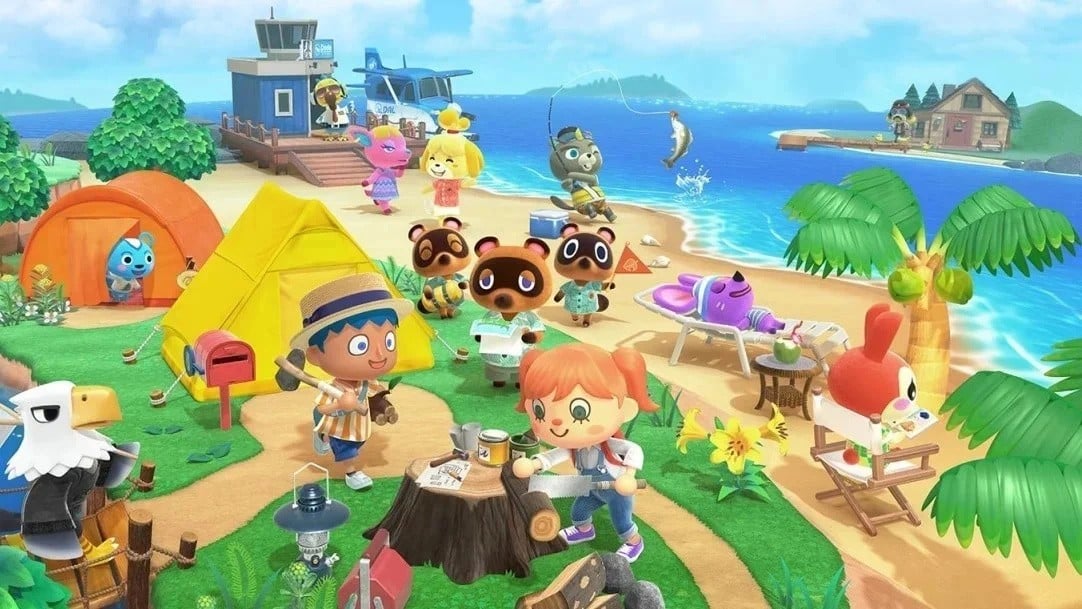
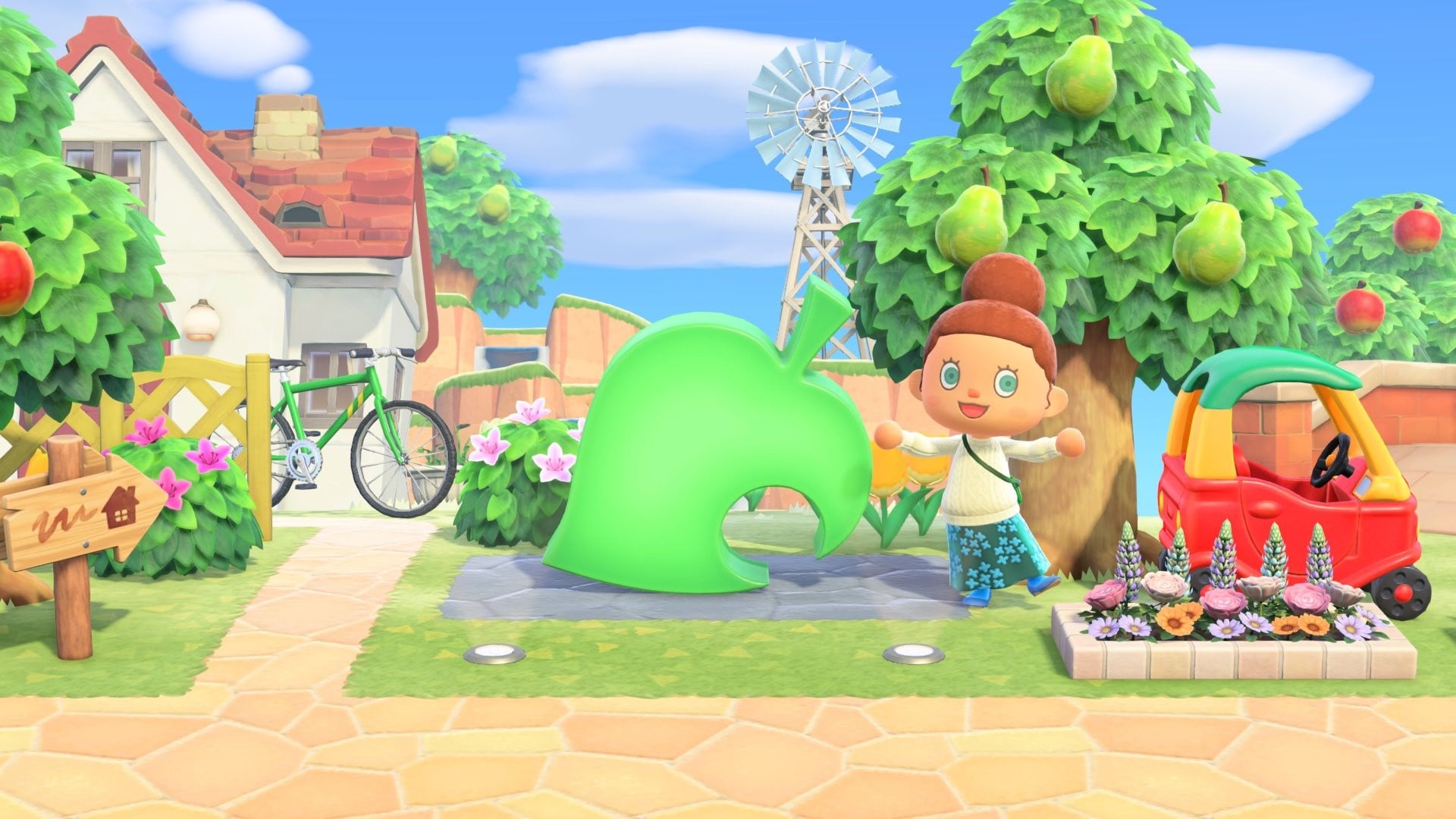
Animal Crossing: New Horizons received a special Animal Crossing anniversary update earlier this month, adding a leaf statue to the game.

Now, Nintendo has released Version 3.0.3, which makes this same item available for purchase from the Nook Shopping furniture catalog. It means even if you didn’t already have it, you can now see it in there. There’s also a price adjustment to this item, and to top it off are some bug fixes for the game on Switch 1 & 2.

If we hear anything else about this latest update for New Horizons, we’ll let you know. Here’s the full rundown via Nintendo’s official support page:

Animal Crossing: New Horizons: Ver. 3.0.3 (Released April 29, 2026)

The following updates have been made when playing the game on Nintendo Switch 2 and Nintendo Switch:

General updates

  • The 25th Anniversary item leaf statue is now available for purchase from the Nook Shopping furniture catalog.
    • Even players who have not previously obtained the leaf statue will now see it in their catalog.
    • The price of the leaf statue has also been adjusted with this update.
  • Fixed an issue where images for some items would not display when opening your home storage or the hotel room decoration catalog.
Animal Crossing: New Horizons
Image: Nintendo

In case you missed the previous update, the Animal Crossing series celebrated its 25th anniversary earlier this month. As part of the celebrations, it added the Animal Crossing GameCube soundtrack to Nintendo Music.

New Horizons also got a major free update earlier this year, adding a Resort Hotel, expanded storage, and much more. This was released alongside a Switch 2 Edition, which is available as a paid upgrade. You can find out more about all of this in our guide here on Nintendo Life.

Nintendo has also released a new update for Super Mario Galaxy 2 on the Switch today, adding a new story to the storybook.

Have you downloaded this update yet? Where did you put this leaf statue in the end? Let us know in the comments.

Posted on Leave a comment

Super Mario Galaxy 2 Updated To Version 1.4.0, Here Are The Full Patch Notes

Super Mario Galaxy
Image: Nintendo

Following a patch in February, Nintendo has today rolled out a new update for Super Mario Galaxy 2 on the Switch.

Surprisingly, this patch includes not just fixes but also a “new story” for the game’s storybook. You can see how to access it in the official patch notes below.

Here’s the full rundown of Version 1.4.0 via Nintendo’s support page:

General

  • Several issues have been fixed and adjustments made to ensure a smoother gaming experience on both Nintendo Switch 2 and Nintendo Switch.
  • A new story has been added to the storybook. Once Final Chapter is available in the storybook, you can read the new story by clearing any galaxy and earning a Power Star.

Note: The software must be updated to Ver. 1.2.0 or later to play on Nintendo Switch 2.


As reported by Vooks.net, the lighting in “Tall Trunk Galaxy” has also apparently been fixed in this latest game update. The same site has shared a video of the new storybook epilogue featuring Rosalina.

Apart from this, the Nintendo Music app has today added a new song from the latest Super Mario Galaxy 2 storybook chapter.

According to Nintendo’s support page, the first Super Mario Galaxy game for Switch is still running on Version 1.3.1, which was released in February 2026.

Have you downloaded this update yet? Notice anything else? Let us know in the comments.

Posted on Leave a comment

Tales Of Eternia Remastered Switch Rating Surfaces Online

It looks like the PEGI ratings board may have revealed the return of Tales of Eternia ahead of schedule.

A new rating has temporarily appeared on the classification website for “Tales of Eternia Remastered” on the Nintendo Switch.

The publisher is listed as Bandai Namco Entertainment Europe, and attached to the listing is a ‘PEGI 12’ rating along with a brief outline of the action role-playing title:

“Role-playing game which follows the story of Reid and his friends, Farah and Keele, as they meet a mysterious girl named Meredy who speaks an unknown language. Their subsequent quest to discover her origins leads them across a dimensional boundary to an entirely different realm known as Celestia.”

Tales of Eternia
Image: via Wario64 / PEGI

Tales of Eternia made its debut on Sony’s PlayStation in the year 2000 and is part of Bandai Namco’s ‘Tales of’ series. Tales of Berseria Remastered was released on the Switch earlier this year in February.

If we get an official update or announcement about this Tales of Eternia Remastered, we’ll let you know.

Have you played this game? Would you be interested in a remastered release? Let us know in the comments.

Posted on Leave a comment

Dragon Quest XI S: Echoes Of An Elusive Age – Definitive Edition Has Been Rated For Switch 2

Dragon Quest XI S
Image: Square Enix

Ahead of Dragon Quest Day next month, it looks like another entry in the series could be on the way to the Switch 2.

A new classification for a Switch 2 version of Dragon Quest XI S: Echoes of an Elusive Age – Definitive Edition has popped up on the classification board in Taiwan.

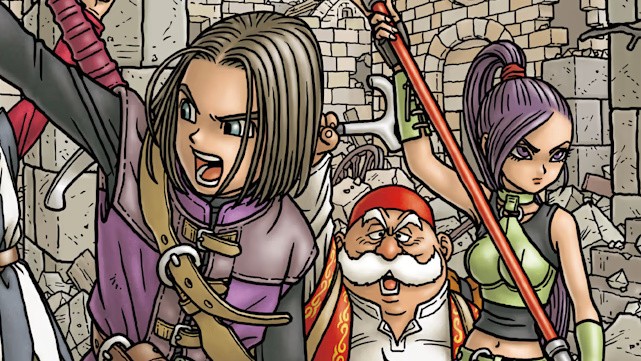
This ‘S’ version of the title made its debut on the original Nintendo Switch in 2019 and is described as the ultimate edition of the excellent RPG, adding additional character-specific stories, a new orchestral soundtrack and much more.

We awarded this Square Enix game nine out of ten stars, calling it “the gift that keeps on giving”:

“Dragon Quest XI S: Echoes of an Elusive Age – Definitive Edition is an achievement that Square should be proud of; this is one of the best games they’ve put out in years. A heartwarming, well-paced narrative supported by a cast of fantastic characters, a dense and interesting overworld packed with dozens of hours of content, and one of the finest soundtracks we’ve heard in a JRPG combine to make this an unforgettable modern classic. Whether you’re a newcomer to the JRPG genre or a returning vet, do yourself a favor and buy Dragon Quest XI S: Echoes of an Elusive Age as soon as you’re able.”

Of course, this is just a rating, so before we get too excited about a Switch 2 version, keep in mind nothing has been officially announced, and a rating doesn’t always guarantee a release.

Would you be interested in revisiting this title on the Switch 2? Have you already played through it on the Switch? Let us know in the comments.

Posted on Leave a comment

Iodyne Pro Data 24TB review: $15K, ridiculous speed, and probably not for you

The Iodyne Pro Data 24TB delivers enormous uninterrupted transfer speed, isn’t network attached, and it isn’t limited to one user. It’s also a $14,995 wallet-breaking money-saver for the right audience.

It’s not every day we get a second loaner for a review product years after the fact.

The market has changed, workflows have changed, since we first reviewed the Iodyne Pro Data. Video workflows are getting bigger and bigger with 8K HDR 3D, and so forth. A single iPod like the Lord of the Rings dailies were shuttled around on are a thing of the past.

Thunderbolt 5 isn’t as fast as it could be. The media inside is impacted by cache and slow writes as that cache fills up with large transfers.

The Iodyne Pro Data aims to let the user have their cake and eat it too. It is, in effect, a giant external drive that can be accessed by multiple Macs at the same time.

All at Thunderbolt speeds, uninterrupted by full caches, and not throttled by transferring over a network.

It’s costly, of course. It’s also a money-saver if you’re moving enormous files around.

Iodyne Pro Data 24TB review: Physical design

The Pro Data is hefty. At 15.39 inches long by 10 inches wide, it has a considerable footprint on any desk. It’s also 1.22 inches thick, or 1.4 inches including the feet.

So, it’s fortunate that there’s a vertical stand included.

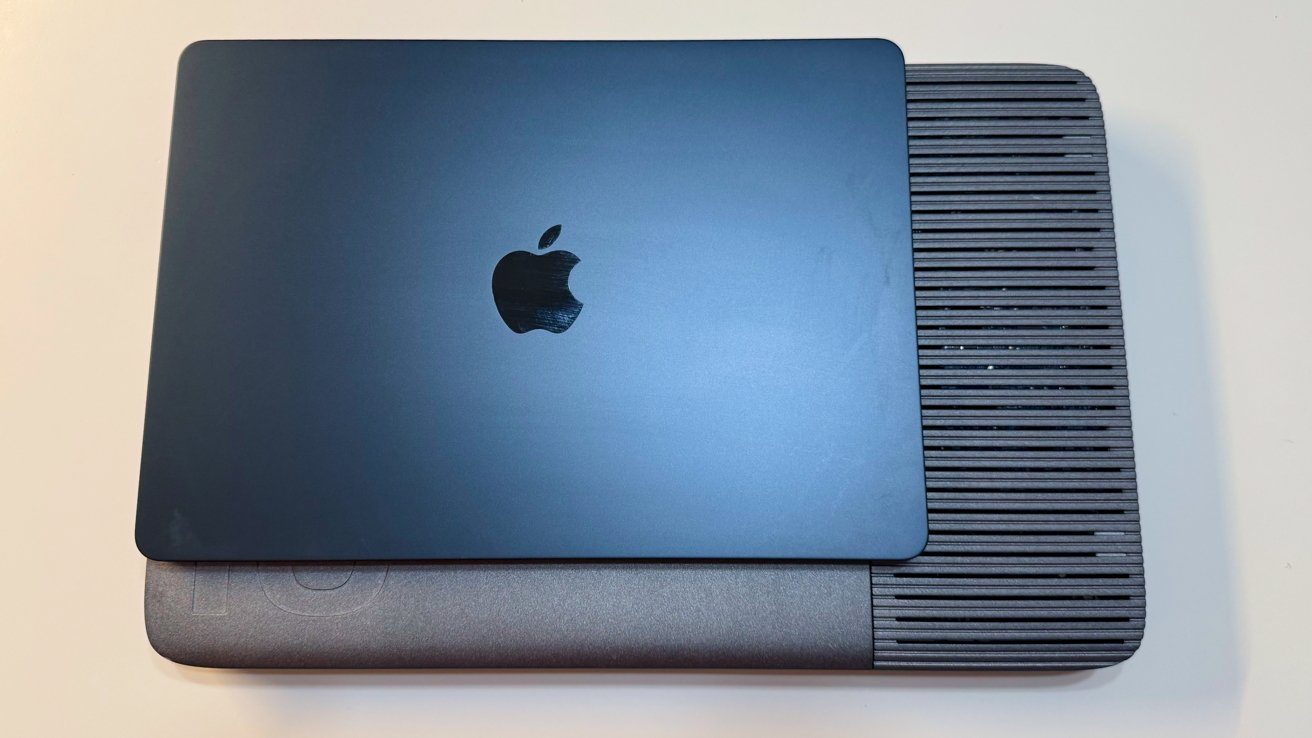
Closed dark blue MacBook with Apple logo resting on top of a larger gray device featuring horizontal ventilation slats, all placed on a light-colored surface

Iodyne Pro Data 24TB review: 13-inch MacBook Air for scale

It’s physically larger than a 16-inch MacBook Pro. It also happens to be heavier than a MacBook Pro, at 7.3 pounds. Its aluminum enclosure, which helps with thermal management, certainly counts a lot towards that figure.

I tested putting it into the ebags Pro Slim Laptop Backpack, a pretty typical tech bag capable of holding a 17-inch notebook. It fits, but only barely. If your bag is thick enough, you can cram in your 16-inch MacBook Pro, too, but don’t try this with one of the thinner bags.
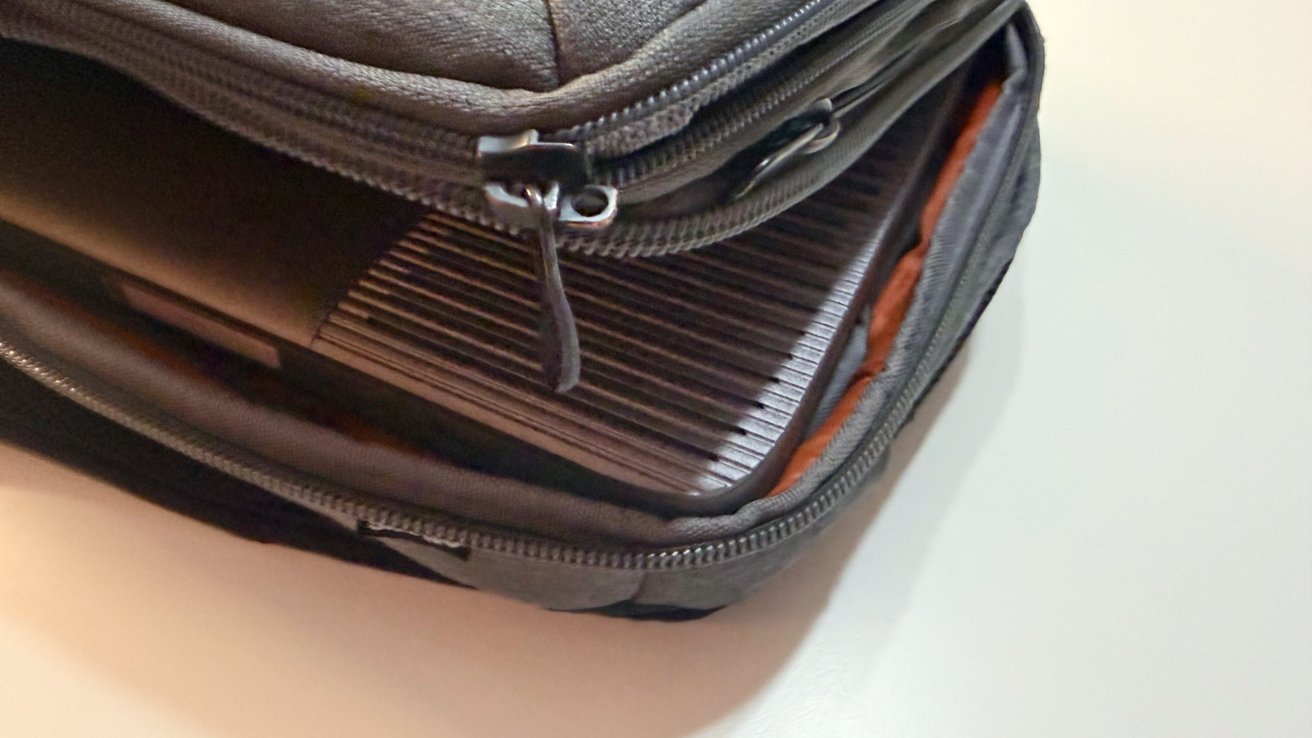
Partially open gray laptop bag on a white surface, revealing the edge and cooling vents of a laptop or electronic device inside, with visible zippers and orange interior lining

Iodyne Pro Data 24TB review: It just about fits in a backpack.

For single-person use, this is really impractical compared to a much smaller and lighter external drive. And, a single person can store data locally.

But, in the context of being used by a group of people on a project, this is still relatively portable. At least, it’s better than your typical boxy NAS in this respect.
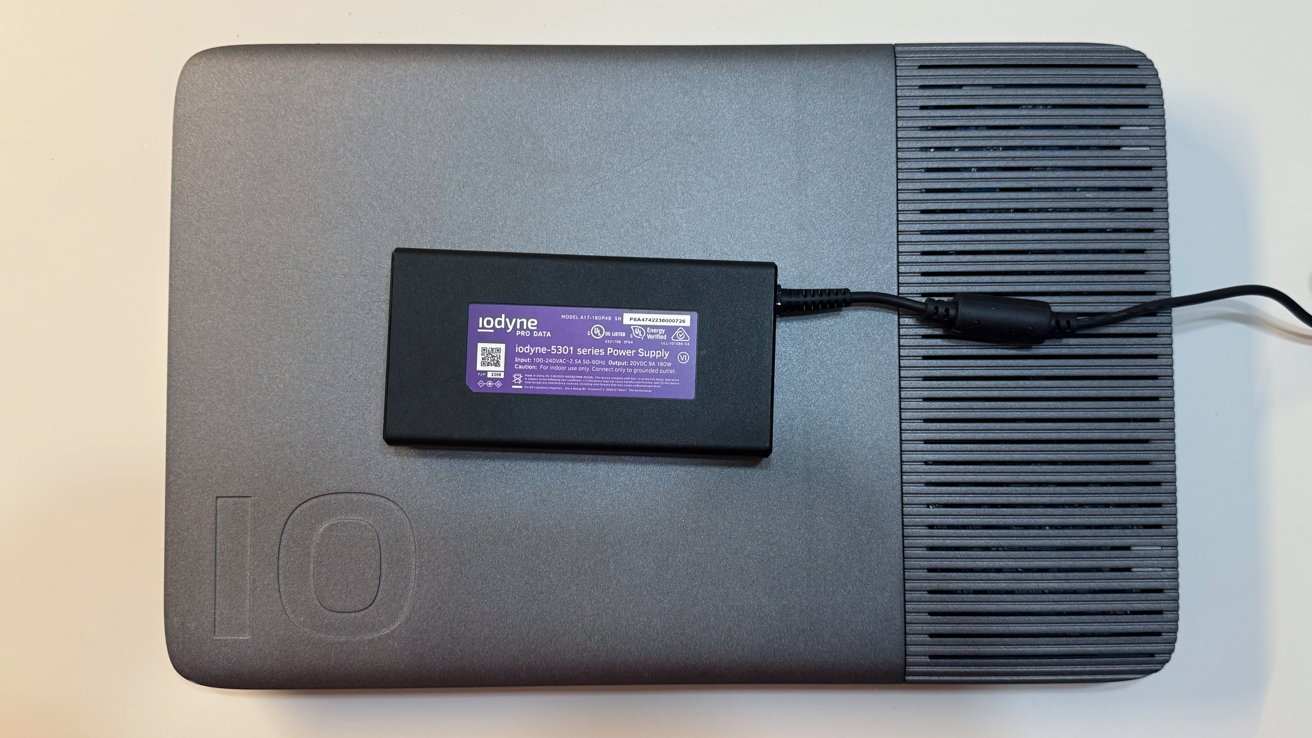
Rectangular iodyne Pro Data external storage device on a desk, with a black iodyne-5301 power supply brick resting on top, connected by a cable on the right

Iodyne Pro Data 24TB review: A relatively small power brick

The supplied power brick is relatively small and is a 180W Gallium Nitride (GaN) charger. It’s a merciful addition, given the overall mass of the unit.

Iodyne Pro Data 24TB review: Connectivity

The interesting thing about the Iodyne Pro Data is that it is intended as a fast storage device that runs off Thunderbolt, for multiple users. That lends itself to the relatively lean connection setup at hand here.

On one edge, there are eight Thunderbolt ports, each of which connects at 40Gbps. They are divided up into pairs, with each consisting of an upstream to a Mac and a downstream for other hardware to be connected.
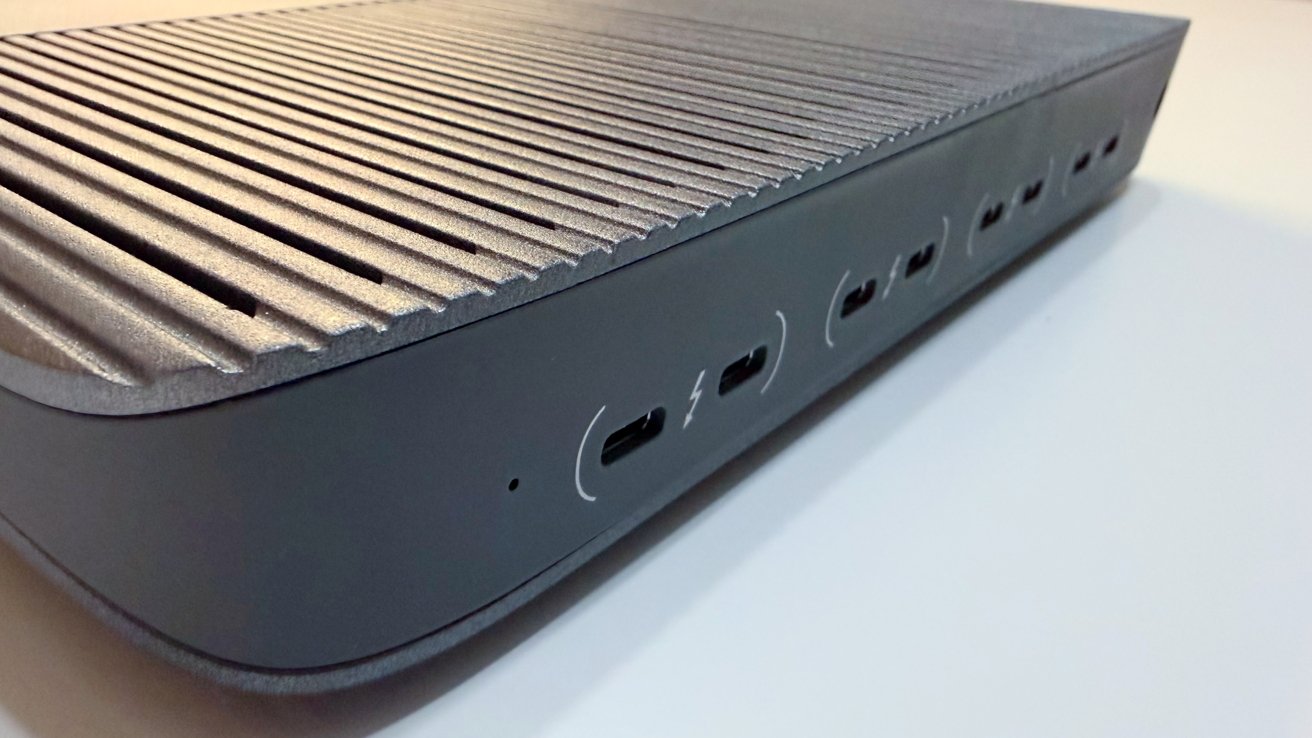
Close-up of a sleek gray electronic dock with a ribbed metal top and several USBC or Thunderbolt ports lined along the curved front edge on a white surface

Iodyne Pro Data 24TB review: Port pairs

For the upstream, you’ve got two options. One: four users can access the storage.

And two, the more interesting use case: if you need even more speed, you can connect two of the upstream ports to one Mac.

As originally reviewed, and is still the case today, each port is 40Gbps.

As for the downstream ports, each can be used to daisy-chain more Thunderbolt devices. You can connect up to six devices as a daisy-chain for each Thunderbolt pair, though that chain only works with the host connected to that pair’s upstream port.

That means if you have two upstream connections to one Mac, the host can also use two of the daisy chains, in what is called by Iodyne as Thunderbolt Multipathing.

It’s possible to use all four Thunderbolt connections with one host Mac. That’s really only practical if you want to maximize the daisy-chaining capability, and it isn’t possible at all on the MacBook Pro, since there are only three Thunderbolt ports now.

And yes, to be clear, all computers connected to the upstream ports can access the storage in the device.

As for host connectivity, a pair of 1-meter (3.2-feet) Thunderbolt cables is included. You are going to need to get more — and longer — cables if you want to connect more Macs.

There’s support for macOS 13.0 or later, with Windows 10 version 21H2 and Ubuntu 22.04 or later also capable of connecting to the device.

Iodyne Pro Data 24TB review: Storage

The Pro Data includes 12 NVMe SSDs, with supplied capacities between 12TB and 192TB. The version supplied to the review is 24TB in capacity, holding 12 2TB drives.

However, it is possible to expand the storage considerably, with Iodyne claiming it can go up to 6.9 petabytes. However, really, it’s a maximum of 576TB using built-in drives, with the petabyte level achieved using daisy-chaining.

This would be an astronomically expensive thing to do, but at least there’s headroom.
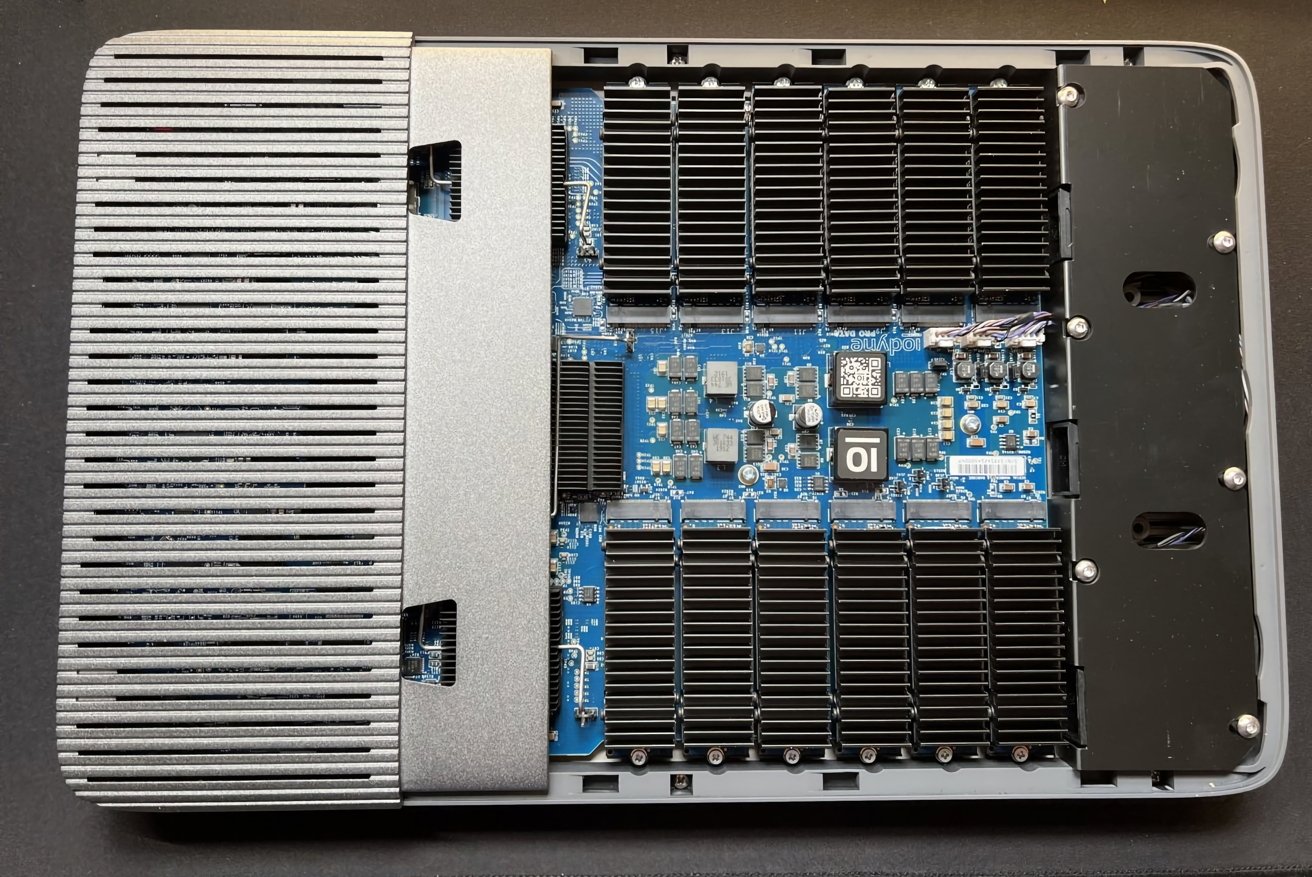
Open electronic device with large metal heatsink on the left and right, exposing a blue circuit board full of chips, capacitors, connectors, and black cooling fins in a rectangular enclosure

Iodyne Pro Data 24TB review: You can take the cover off to access the drives.

If you do want to add more, it is possible to take the enclosure off and replace the NVMe drives yourself. There’s no fixed-in-place storage here.

The panel can be removed by loosening just two screws, with each NVMe M.2 SSD able to be pulled after removing one more. Each module also has its own heatsink to help cool each drive.

All of these drives are connected and configured under RAID-0 or RAID-6. RAID-0 stripes data across all drives with no redundancy, so it’s full-speed but without a failsafe option.

RAID-6 is the more favorable one, as it uses dual parity to allow for two drives in the array to fail and still keep the data intact, while sacrificing some capacity. This provides robust redundancy, which, for the kind of projects this sort of drive would be used for, is the best option.

For the 24TB version supplied to us, that equates to 20 terabytes of usable storage.

The supplied software to manage and configure the device lets you set up separate containers with different properties. For example, one container could have RAID-6 and a large capacity as well as a password, while another could be a RAID-0 scratch disk without a password.

Practically speaking, you can configure storage for specific users or Macs, or for multiple Macs to use, depending on the task.

You can enable per-container passwords, using XTS-AES-256 encryption and a hardware Secure Enclave. Up to 15 containers can be set up per unit, which should be more than enough for small teams.

The software management in the app is also used to monitor the health of each installed SSD, warning of hardware issues when they come up.

You can also register the unit with the Iodyne Cloud, though it’s not a cloud storage service. Really, it takes telemetry reports on the health of the Pro Data itself and the SSD modules, not stored data.

This is very handy since replacements for under-warranty drives can be sent to users automatically at no charge. Users are also guided on how to replace the drive to minimize downtime.

Iodyne Pro Data 24TB review: Performance

I want to get this in front of this section, as it is key to the entire product, and why it exists.

This unit will run at maximum speed, essentially until the drive is full. You won’t be held back by slow SSD caches as the transfer size increases.

According to Iodyne, it is capable of up to 5.2 gigabytes per second for read speeds and up to 2.4 gigabytes per second for writes.

This sounds impressive, and it is. It’s also something we observed for ourselves, with 5.2 GBps on reads and 2.2 GBps for writes under multi-path RAID-0.

Single-path connections will be a little limited by the 40Gbps Thunderbolt connectivity. However, at 3.1 GBps for reads and 1.8GBps for writes, also under RAID-0, it’s still more than adequate for a single transfer.
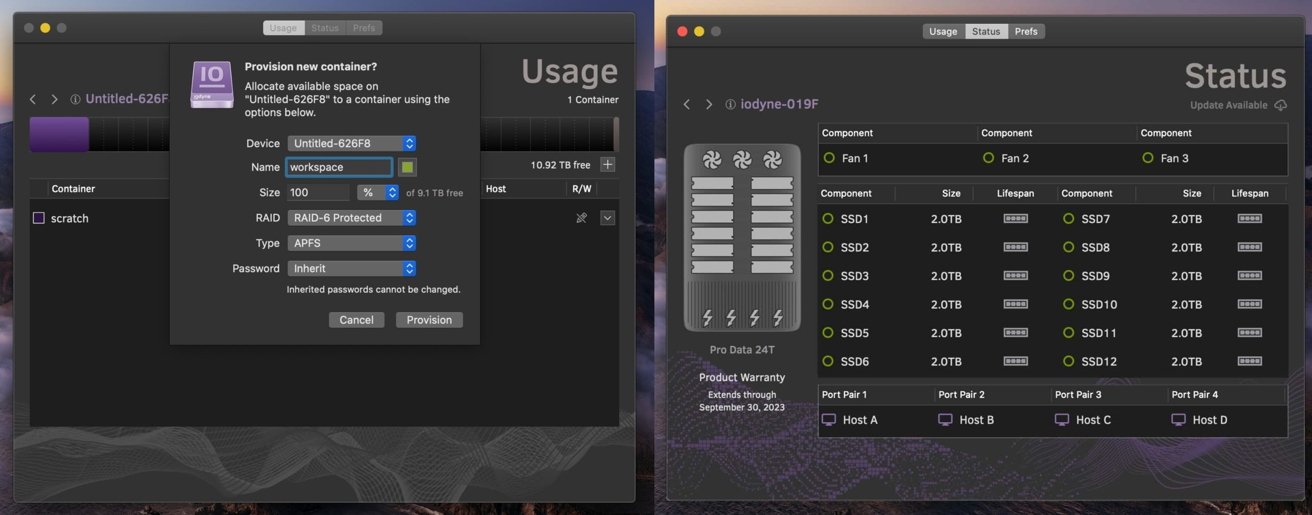
Dark macOS application windows showing storage management: left panel provisioning a new RAID-6 APFS container named workspace; right panel displaying Pro Data 24T device status with twelve SSDs and fan indicators.

Iodyne Pro Data 24TB review: Management software.

If you were to throw multiple users at it, the bandwidth will hit a bottleneck as all that bandwidth will be consumed. But even that is an extreme case.

In our testing, the speeds aren’t linearly cut, but you do see a bit of a drop as more devices connect up. Connecting two Macs using two Thunderbolt cables each and with different containers, reads reached 2.6 gigabytes per second, and writes were at 950 megabytes per second.

At three devices, we saw 2.1 gigabytes per second reads and 700 megabytes per second writes.

Changing over to RAID-6 instead of RAID-0, performance does dip a tiny bit. But, at about 200 megabytes per second down for both reads and writes, and under single- and multi-path modes, this is still a pretty speedy connection here.

One key point to clarify here is that the connection speeds are sustained over several hours. The bandwidth doesn’t dip over time as data is thrown at it.

Single- or dual-drive units will hit a transfer wall quickly. Each SSD has an onboard cache, which absorbs as much of the inbound data as possible and feeds it into the main storage element over time.

Normally, this results in a fast transfer at first, either to DRAM or relatively faster flash media, before slowing as the cache gets full. However, since we’re talking about 12 drives and therefore 12 cache allocations, that’s constant cache availability, especially since the data is striped across drives.

The sheer number of drives and caches means that you’re just about always going to have this high level of transfer speed.

And that’s the key to the Iodyne Pro Data. If you’re moving 20TB of data, it can take half a day on a dual-drive enclosure. It will just take a few hours on this unit.

If you buy one, take advantage of the container capabilities. There’s no versioning in play here, just bare RAID storage, so you have to be careful of users potentially overwriting the work of others if they are all working collaboratively on the same file.

Iodyne Pro Data 24TB review: It’s expensive and probably not for you

The idea of a massive and fast data store is a very appealing thought for most computer users. That said, the vast majority of people have no real need for this sort of device in the first place.

Partly because of the price, partly because of its utility.

It is safe to say that the cost is prohibitive for your average home user. To get the cheapest configuration at 12TB, you would have to pay $5,995.

The version sent to us, 24TB, would set you back a steep $14,995, with 48TB at $29,995, and 96TB for $58,995. The top-spec option, 192TB, is $117,995. The two new capacities were released after our first review, and the price of the smaller ones was half of what it is now.

Again, thanks AI data farms buying up all the flash media that’s made. This is your fault.

The key to remember here is that it is really specialized gear. It’s Thunderbolt storage designed to work with multiple hosts, with consistent data speeds, which really is something designed for a really narrow use case.

In the course of this second review, I’ve spoken to animation houses that have produced movies you have seen, some military and federal folks that need consistent transfer speeds, and filmmakers who have made movies that you’ve watched. I even threw in a few large YouTube channels to boot.

To a person, they all salivated at the hardware. They uniformly said that this would fix one workflow or another, where data ingestion speeds and access to that data by more than one user were major, major bottlenecks for production.

That said, home users working on just one Mac at home would find getting a NAS or a normal external drive to be a much more fiscally prudent approach.

Really, this sort of hardware is made for groups of people with a need to deal with a ton of data, and therefore need consistently high speed. That, as well as the pricing, puts it firmly into enterprise, federal, and creative industry offices.

If you’re producing a video and need to offload tons of video to a central store, so it can then be worked on by editors who are also on location, this device makes perfect sense. It’s more than fast enough to ingest footage and have that data available instantly for editors to immediately work on it.

Its size is also an advantage, as you can also imagine that same team of people being used to carrying around a lot of other equipment. A seven-pound storage appliance that is shaped like a very large notebook wouldn’t be much of a burden in that instance.

The mention of small teams working closely together on location is also apt, since it’s all based on Thunderbolt connections. If you want to connect at the maximum speed the 40Gbps Thunderbolt connections can manage, you’re going to be limited to keeping your Mac within about nine feet of the device.

A NAS device using Ethernet can cover a very large area, but in 2026 and probably through 2035, will not come close to delivering this speed. If you want the speed, you’re going to have to play within the limitations of the Thunderbolt specifications, and shell out for some expensive cables too.

As it stands, the Iodyne Pro Data 24TB is a great tool for YouTubers and others with data needs in both capacity and speed, and can afford it. In that respect, there’s no complaint to be made.

Calling it overkill for a home user who happens to have the spare cash lying around for it is an understatement. Unless they happen to be working on projects that require high-speed storage access in a locally collaborative fashion, there’s no need for this.

For the kind of groups and situations where it is useful to employ the Iodyne Pro Data, it is worth the weight of your choice of precious metal.

The average user, or even the most prosumer user, should not even begin to think about getting one.

Iodyne Pro Data 24TB review pros

  • Massive bandwidth, massive fast storage
  • User serviceable
  • Per-host daisy-chaining

Iodyne Pro Data 24TB review cons

  • Usage range is limited by Thunderbolt cable specifications
  • Massively expensive

Rating: 4.5 out of 5

I hate giving scores because they will never be universal. It’s clear that this product is not for the home, not for the small office, and not even for most large companies.

To be clear, the score here is based on it being useful for the target market, its intended purpose being to move mass quantities of data around, as fast as possible, for as long as possible.

For that, it is an incredible product. For that, it is best in class, and it is not close right now.

There’s no better product in this capacity to do that. You know if you need it already, and if you’re on the fence, you probably don’t, and have better options.

It’s been incredibly fun showing this off to people, and having that kind of consistent speed has been a joy to play around with. I’m going to miss it when it goes back.

Where to buy the Iodyne Pro Data 24TB

Iodyne sells the Pro Data directly, starting from $5,995 for 12TB. The 24TB model loaned for this review costs $14,995.

It’s also available from B&H Photo, with the 12TB priced at $5,995 and the 24TB at $14,495.

Posted on Leave a comment

Review: Constance (Switch) – A Beautiful Metroidvania With Something To Say

Constance Review - Screenshot 1 of 6
Captured on Nintendo Switch (Handheld/Undocked)

The idea of an indie Metroidvania exploring mental illness has become a bit of a cliche. The past decade has seen successes in the genre like the Hollow Knight and Ori games, as well as titles like Celeste that manifest their main character’s mental journey through their mechanics. Constance owes a lot to every game listed above, but uses those influences to say something profound, even if it doesn’t reinvent the wheel in any significant way.

Constance is a game about overstimulation and concentration, following the titular character as she escapes her overwhelming reality in favour of a fantasy realm of her own mind’s creation, manifesting both its charms and its horrors. Every now and again, we get a peek into Constance’s true reality, memories of her struggling to make deadlines at work, ignoring her loved ones and cracking under the pressure of day-to-day life.

Constance Review - Screenshot 2 of 6
Captured on Nintendo Switch (Handheld/Undocked)

However, Constance takes a while to get the phlegm out of its throat before it gets to interrogate those themes and feel like its own game. The first hour left me apprehensive. As much as I was completely enchanted by the iridescent 2D hand-drawn art style and Constance’s smooth, swooshing animations, I couldn’t help but be reminded of other games in the genre, particularly of Hollow Knight.

I don’t mean to sound like a ‘guy who’s only seen Boss Baby‘, but there are assets like levers and elevators that look almost exactly like Team Cherry’s interpretations, and a lot of players might take a while for those comparisons to fully leave their heads, especially when using moves like dashes and wall jumps.

But the more I played, the more I found Constance’s unique charm – the game is making you focus. In some platformers and Metroidvanias, clearing a difficult section once usually means you can run back through it without much issue. Developer Blue Backpack refuses to let you have that luxury. If you take an enemy, a platforming section or a puzzle for granted, you will be punished.

Constance Review - Screenshot 3 of 6
Captured on Nintendo Switch (Docked)

This design philosophy fits into the game’s themes excellently. The opening moments of Constance put me in the main character’s shoes, watching her computer screen explode with emails and messages, causing her to fall into this fantasy realm. If the game is her escape from reality, it makes sense that it’s a space where she only needs to focus on one thing. The idea of balancing work, relationships, food, sleep, and fun is overwhelming for a lot of us, but this is a game that requires you to concentrate. No podcasts playing in the background of this one, Constance demands your attention.

The overall gameplay is lacking any kind of reinvention or departure from what Metroidvania fans will be used to, but those familiar ideas are executed so well that it’s difficult to not have fun. Constance’s main weapon is a paintbrush, linking to her real-life job as an artist but also allowing for the game’s most satisfying animations.

Dashing on the ground means slinking into a puddle of purple paint in a Splatoon-like squelch, with a similar effect in play when melding into walls to wall jump. As well as a health bar, the top left of the screen is adorned with a paint-meter, which determines how much of these special abilities she can use before the colour is drained from both her hair and her brush.

Constance Review - Screenshot 4 of 6
Captured on Nintendo Switch (Handheld/Undocked)

In this state, using any paint abilities causes you to lose HP. I found this to be a wonderful limitation, something that was always in the back of my head during intense boss fights. Some enemies require the Paint Stab to defeat them, but that move also replenishes health when it lands. This caused me to be more tactical when I decide to avoid attacks and refill my meter and when I decide to go in for the kill.

The bosses themselves range from repetitive to glorious. Some, like the Astral Academy area’s High Patia, don’t use the area’s deeply satisfying Aerial Boost power-up in many interesting ways, but are visually stunning enough to make up for it. On the other hand, Cornelis forces you to use the Plunge ability, a harsh downwards strike, in such creative ways. For the most part, the bosses feel a bit too repetitive and lacking more than one dimension. It would have been great to see them exist in more phases rather than offer up the same challenge.

Constance Review - Screenshot 5 of 6
Captured on Nintendo Switch (Docked)

Another essential part of any Metroidvania, and one of Constance’s key strengths, is its atmosphere. It has a lovely blend of that classic Metroid isolation with the feeling that this world is populated by enough people for it to feel alive. Each area feels truly distinct from one another, the standout being Chaotic Carnival, whose deep orange backgrounds and circus-inspired soundtrack make for a memorable trek. Adding to its uniqueness is the area’s structure, being one long boss rush.

The design of key elements like Shrines, where you go to save and replenish health, also make Constance stand out. When saving, we see the character meditate and float into the air, fitting nicely into the idea of this world being an escape. The world is populated by machines both friendly and antagonistic, a subtle way to express technology as a key factor in our overstimulation, but also an indispensable tool.

The only reprieves from the intensity of the gameplay are death screens, where you’re fittingly met with the phrase “lost in thought,” and those flashbacks to Constance’s real life. A lot of these take on the form of low-stakes minigames that could revolve around designing a logo or a violin rhythm game. These are a great way to uphold the themes of the game without it feeling too punishing.

Constance Review - Screenshot 6 of 6
Captured on Nintendo Switch (Docked)

I mostly played Constance on Switch 2 and had a lovely, smooth experience in both handheld and docked modes. The Switch 2’s screen dovetails beautifully with the strength of the game’s colour palette. There are also Performance and Quality modes for Switch 2 users, which I found to be a bit unnecessary as in Balanced mode the game looks great and runs nicely.

As this is technically a Switch 1 game, I also tested it on that system and found the performance equally as good, even if the splendour of the screen is lacking slightly.

Conclusion

Constance is an example of one of the hardest things in gaming. To take ideas established four decades ago and use them to say something different and interesting is a wonderful feat worth celebrating. Constance has something to say, and it says it well. There are flaws in the moment-to-moment gameplay, such as its bosses and a few tedious platforming sections, and it’s not something that’s going to completely rock the Metroidvania space, but it doesn’t need to. It’s a much-needed reminder of the joys of concentration and an antidote to an overstimulating world.

This is an easy recommendation to any Metroidvania fans who want something familiar to spend 10 hours on. Those a bit more wary of the genre might find themselves less enchanted, but Constance is absolutely worth playing for its visuals and ideas alone.

Posted on Leave a comment

Shovel Knight Fans Will Really Dig Crypt Of The NecroDancer’s New Crossover DLC

Brace Yourself Games is celebrating Crypt of the NecroDancer‘s 11-year anniversary in 2026, and to mark the occasion, the studio has released a new crossover DLC pack for us all to dig into.

Yep, as if the headline and lead image weren’t enough of a giveaway, Mr. Indie himself, Shovel Knight, is joining the rhythm action game as a new playable character. We actually heard about this one towards the end of last year, but surprise! The DLC is now available on the eShop for a mere £1.69 / $1.99, and it looks like a match made in heaven.

In new Crypt form, Shovel Knight can use his iconic ‘drop’ move to bounce to the beat between enemies and spring off walls to keep the rhythm going, all accompanied by a boatload of Jake Kaufman’s original SK tunes.

Here’s a brief rundown of the DLC’s key features and a handful of screenshots so you can see it in action:

– Play as Shovel Knight — attack with Shovel Knight’s signature Shovel Drop move, leaping from enemy to enemy and even walls
– Move in all 8 directions
– No need for weapons: use stronger shovels to boost your power
– Create shortcuts to deeper floors by building Shovel Drop combos
– Dig up Treasure Piles for glorious loot

Shovel Knight crossed into Brace Yourself Games’ musical follow-up, Rift of the NecroDancer, earlier this year with a ‘Music Pack‘ of his own. With Mina the Hollower finally going gold, we wonder whether Yacht Club will be getting back to Shovel Knight: Shovel of Hope DX now — that 2024 reveal suddenly feels like an awfully long time ago…

Will you be checking out this Shovel Knight DLC soon? Let us know in the comments.

Posted on Leave a comment

Today Is Nintendo Legend Yoshiaki Koizumi’s 58th Birthday

Yoshiaki Koizumi Super Mario Odyssey
Image: Nintendo

Today, 29th April 2026, is Yoshiaki Koizumi 58th birthday.

Currently the Senior General Manager at Nintendo EPD, and a Senior Executive Officer at the company, Koizumi-san is a long-time legend, having been with the company for 35 years (via Stealth40k)

He’s also the face of many Nintendo Directs over the years, and he’s worked on and directed a number of huge Nintendo games, including Super Mario 64, Zelda: Ocarina of Time and Majora’s Mask, Super Mario Sunshine, and Super Mario Galaxy.

He joined Nintendo in April 1991 and cut his teeth on the manual for a little game known as The Legend of Zelda: A Link to the Past, where he came up with the idea of the three goddesses and the game’s backstory. he went one step further with Link’s Awakening, creating the bulk of the story alongside Kensuke Tanabe.

Working as assistant on Super Mario 64 and Wind Waker around the same time, his first game as lead director was Super Mario Sunshine, followed by Donkey Kong Jungle Beat, a bit of an NL fave.

But perhaps most famously, Koizumi directed Super Mario Galaxy, and is responsible for sneaking in more story elements to the main game. Since then, Koizumi has largely been a producer and supervisor on many Nintendo titles, most of which fall under Mario’s banner, including Super Mario 3D World and Super Mario Odyssey.

One of our favourite videos after Odyssey’s release is this Guessing Game, which Koizumi took part in alongside Breath of the Wild and Zelda series producer Eiji Aonuma.

Having held various positions at the company, he was Deputy General Manager at Nintendo EPD from 2015 to 2023, when he then became Senior General Manager, under fellow Nintendo Direct host Shinya Takahashi.

So, to say Koizumi is one of the most-influential people at Nintendo is an understatement. And to think, he played his very first video game at 21 years old: Super Mario Bros. 2. You can see a comprehensive list of all of his credits at Moby Games.

Happy birthday to Yoshiaki Koizumi! Here’s to many more fruitful and happy years.

Posted on Leave a comment

Mini Review: Total Chaos (Switch 2) – Performance Woes Tarnish Fort Oasis

Released on other platforms in November 2025, Total Chaos is an intriguing first-person survival horror in which you explore the mysterious island of Fort Oasis. Once a bustling community of industry, it’s since fallen into ruin, and it’s your job to explore the environment, piece together fragments of the past, and ultimately survive against the encroaching horror.

Born via a Doom II conversion mod from developer Trigger Happy Interactive, Total Chaos is a slow burn that encourages you to scour the environment for items, weapons, and notes. Emphasis is on survival, and you’ll need to not only keep your health full, but also make sure you’re eating to stave off hunger. Thankfully, you have a pretty hefty inventory, so it’s worthwhile just grabbing whatever you see lying around.

Throughout the environment are crafting benches, and here you can combine certain objects to make weapons or recovery items. They show up quite frequently, as do the manual save stations, so you’ll rarely find yourself lacking essential resources or having to reload to a much earlier save.

Though it’s a slow-paced experience, you’ll quickly come across waves of enemies on the island. Combat is fast and responsive, though there’s a jankiness that could do with ironing out. Swinging melee weapons or using ‘A’ to dodge will quickly deplete your stamina, so you’ll need to be strategic in how you approach each encounter.

What’s nice is an abundance of options when it comes to tackling the main game. You can adjust your inventory space to give yourself a little boost, or begin in ‘Tourist Mode’, which allows you to disable mechanics like weapon durability, hunger, and bleeding. Chapter select is also an option, but you’ll need to make sure you complete each at least once to unlock them.

There’s a lot here that directly speaks to me as a horror fan, and I wish I could say that I loved my time with Total Chaos, but unfortunately the visuals and performance severely dampen the experience. This is a Switch 2 title, but it feels like it was built for Switch 1. Visually, it looks muddy and lacks essential detail, especially in the outdoor environments. Some of the lighting effects are nice, but the overall brightness is way too low. You can crank it up in the settings, but then you completely lose the sense of atmosphere. Sophie’s choice.

Then you have the frame rate. Oh boy… You can choose between quality and performance modes, but neither feels particularly great. At a push, quality mode probably offers a bit more stability, but it still judders. Performance mode, meanwhile, hits that 60fps sweet spot on rare occasions, but you’ll find it struggles to keep up no matter what environment you’re exploring.

With a patch or two, this one could be worth investigating, but for now, maybe stick to other platforms.

Posted on Leave a comment

Want To Make Your Own 3D Zelda Dungeons? This N64 Love Letter On Steam Is For You

Temple Maker 64
Image: Ki3 Games

We’re baffled that, somehow, Nintendo hasn’t given us a proper Zelda dungeon maker. No, the Chamber Dungeon in Link’s Awakening on Switch doesn’t quite scratch the itch. So thank goodness for indie developers, huh?

Temple Maker 64 (spotted via Dexerto) is looking to fill that gap with a specific chunky N64 flair. Developed by Ki3 Games, a one-man studio with a passion for Zelda and developing 3D Zelda-likes, it’s currently slated for release on Steam, but we had to report on this, because look at it; it’s basically an Ocarina of Time and Majora’s Mask dungeon maker.

Using an intuitive 3D map editor, players can create their own devilish dungeons and then share them online for others to play.

You place down traps, monsters, and all sorts of objects where you please. And you can even include various sub-weapons — classics such as bows and bombs, but also more-unique items.

If you’re not the creative type, however, you can just try out other people’s creations, too. Looking at the way the main character moves, it looks like Ki3 has really nailed the N64 feel, not just the chunky look.

Ki3 has been running a playtest for the game over the past few weeks, and some creators are already going all-in on creating both realisting Zelda-like dungeons or crazy challenge maps:

The developer has been working on the game for about a year and a half now, but they’re also working on another 3D Zelda-like in Seed of Life. This game takes a more traditional route — except, you’re a wolf accompanied by a bird and not a boy who can transform into a wolf.

There’s no release date for Temple Maker 64 yet, and so far, it looks to only be coming to Steam. Perhaps we can pray for a Switch (2) version in the future?

We wish Ki3 the best of luck on the game — it looks fantastic so far!


What do you think of Temple Maker 64? Want to see it on Switch? Let us know in the comments.