Games have, over their history, often sought to become interactive movies or cartoons. There is the general decades-long race towards realism in Triple-A games running on higher and higher-specced hardware, the labour-intensive, hand-drawn aesthetic of many indie games like Cuphead or Hoa and, of course, that art form traditionally maligned but subject of a recent renaissance: full-motion video.
The challenge has always been that the more a game resembles a movie or cartoon, the less it resembles a game. The more cutscenes, the less interaction; the more bespoke animation, the less resource available to expand the game. Madrid-based indie developer Gammera Nest’s The Many Pieces of Mr. Coo has decided which way that particular cookie is going to crumble: it takes a hit to its point-and-click-adventure gameplay, but makes almost no compromise on presenting a superbly animated and fantastically surreal cartoon.
The story of Mr. Coo is not the easiest to explain, since the minute-to-minute events are so absurd. But the overarching thread of it is that Mr. Coo wants an apple; Mr. Coo acquires and eventually eats an apple; Mr. Coo is sliced into pieces by a monster; Mr. Coo must recover and reunite his assorted parts. The scenes in which this all plays out are impressive in how bespoke they are to the scenario at hand. There are no overlaid inventory items that pop out from the scenery, no tile-based movement over which animations can be repeated, and no conformation of the playing areas to the size and shape of the screen. It seems like absolutely everything is hand-drawn specifically for each click of the cursor.
And the things that are drawn are wonderfully bizarre: a giant kung-fu chick, an eyeball on a leg wearing a dress, an arcade machine hosting a Punch and Judy show run by a cat following signals from a backstage lightbulb… we could go on, but we won’t in case we go mad. Meanwhile, the abstract jazz soundtrack couldn’t be more right for the action on screen.
The stand-out gimmick of the animation on display is the way objects regularly transmogrify from one thing to another. An umbrella magically – in front of your eyes, hand-drawn frame by hand-drawn frame – becomes a flower. In the same way, a house is suddenly a pig’s head wearing a top hat, or one eyeball is suddenly two. Perhaps the most captivating example of this is the loading animation. Usually, the mention of a loading screen in a review is not a good thing, but here, although their timing can sometimes be intrusive, we almost wanted more.
With so much creative work poured into every moment, the game can only be so long – it took us about 90 minutes, including crashing three times. With such priority given to scripted animation, the interaction can only go so far. Finally, with so surreal an atmosphere, puzzles struggle to adhere to any sort of logic. But it really does look lovely.
The Many Pieces of Mr. Coo is a standout title in its commitment to presenting spectacular, surrealist animation. However, it does so at the expense of having much gameplay to offer. The playtime is short, the interaction is limited, and the puzzles are obtuse. Fortunately, the animation and music are good enough to distract you from those facts and provide an hour or two of great entertainment.
If like us you grew up watching the iconic Inspector Gadget animated series, you’ll be excited to hear about the Inspector Gadget – Mad Time Party release date for the Nintendo Switch. That’s right! This kooky crime-fighter is getting his own detective game.
Inspector Gadget – Mad Time Party is a multiplayer party game set in the world of the Inspector Gadget animated series, created by Jean Chalopin. In this adventure, you must save Metro City from the evil Dr. Claw by using a time machine, but the machine malfunctions, sending you all to the present.
Complete quests and challenges in Adventure Mode to explore the city and take down Dr. Claw, and experience 16 minigames that are fun for all the family. This game even has a family connection as Jean Chapolin’s daughter, Tanis, scored its original soundtrack.
When is the Inspector Gadget – Mad Time Party release date?
Inspector Gadget – Mad Time Party is available now for the Nintendo Switch and other consoles both digitally and physically. The physical copy comes with two sticker sheets and a poster for all you megafans out there.
To celebrate the launch, the publisher Microids has released an exclusive interview with Tanis Chapolin that you can watch below:
That’s everything you need to know about the Inspector Gadget – Mad Time Party release date. For more family fun, check out our list of the best party games, or get more into espionage with our list of the best spy games.
Have you ever seen an original Contra up close? What about an original Mario Kart?
For Stephan Reese, organizer and showrunner for the non-profit Interactive Art Collection (and a Senior Producer at video game developer Bungie when he’s not busy doing that), it’s his life’s mission that you might have the pleasure of seeing pop-culture history outside of the confines of your TV screens and old magazines.
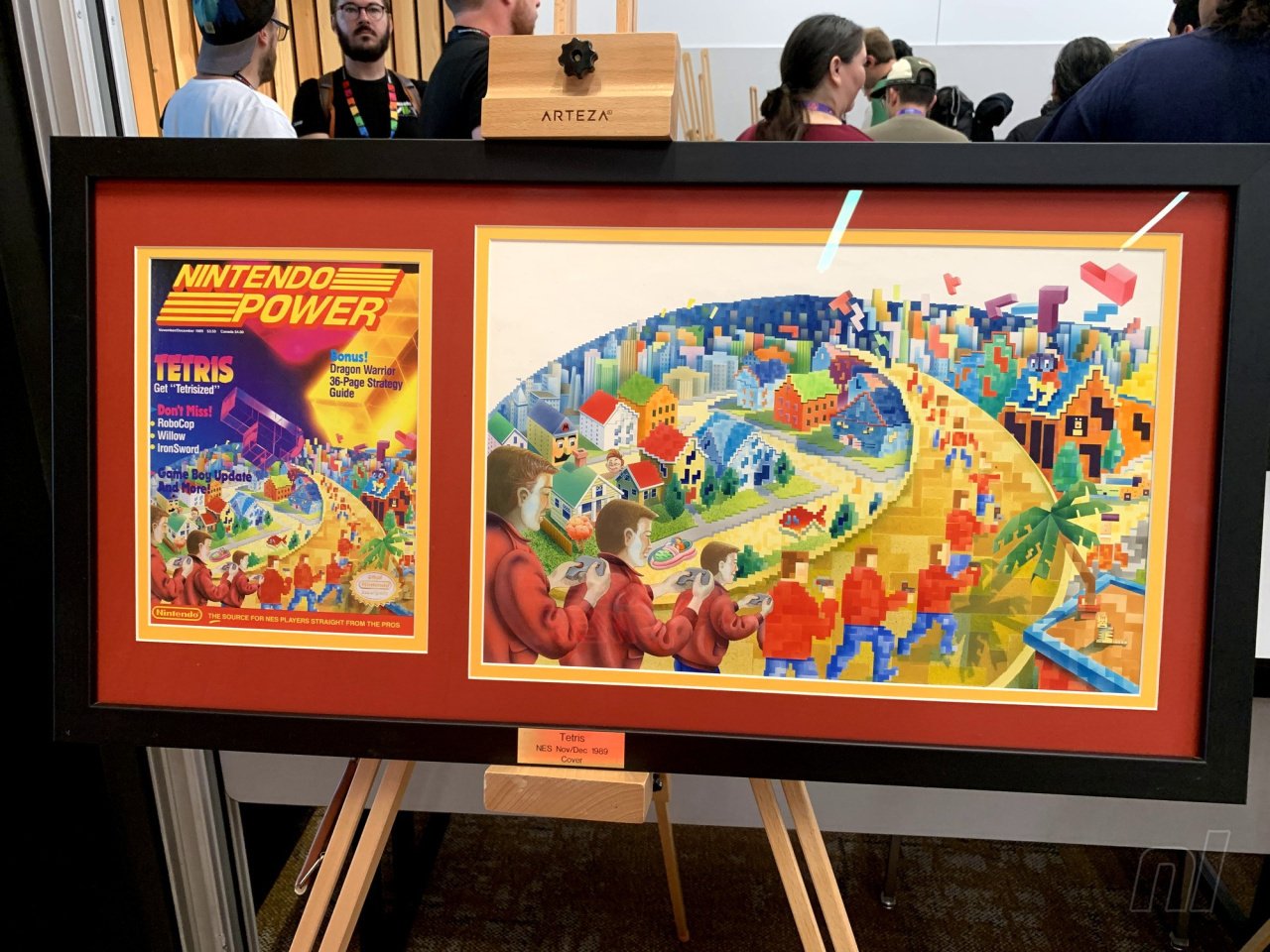
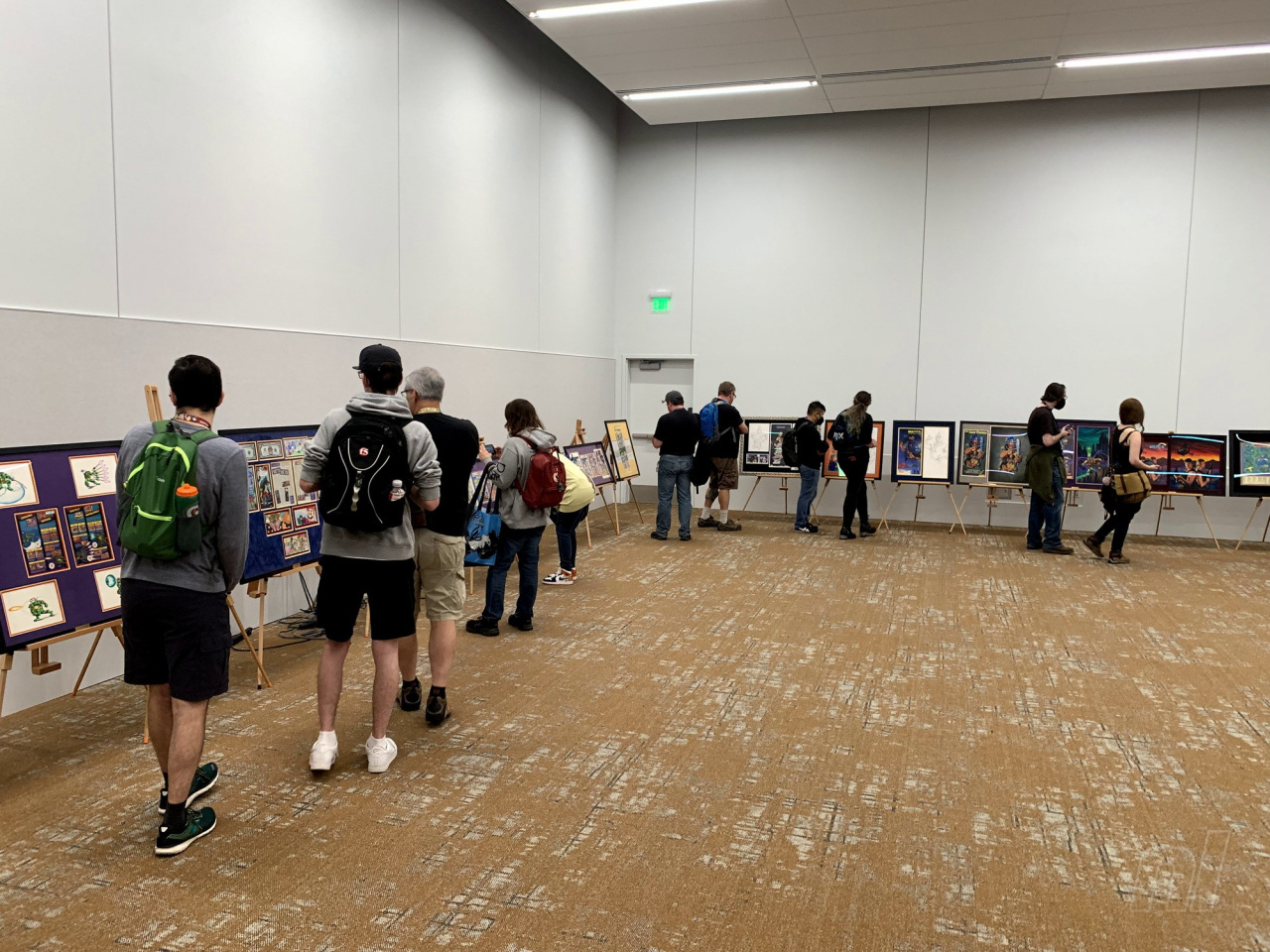
His team’s latest exhibit is the aptly titled “The Art of Nintendo Power,” a traveling art show that most recently exhibited at PAX West 2023 in Seattle. For four days, attendees could walk a room and bask in original Nintendo Power prints, line art, posters, 3D models, and much more. The exhibit features all original art with zero replications, stemming from the earliest points in the history of the 1980s print magazine, which was originally crafted and written for kids, as well as for all of us kid-like adults who now fondly remember its technicolor, off-the-wall pages.
Nintendo Life caught up with Reese at this year’s PAX and asked him to highlight choice pieces from the non-profit’s collection, hoping to gain a little insight into one of the most quintessential eras in retro media…
Image: Alan Lopez / Nintendo Life
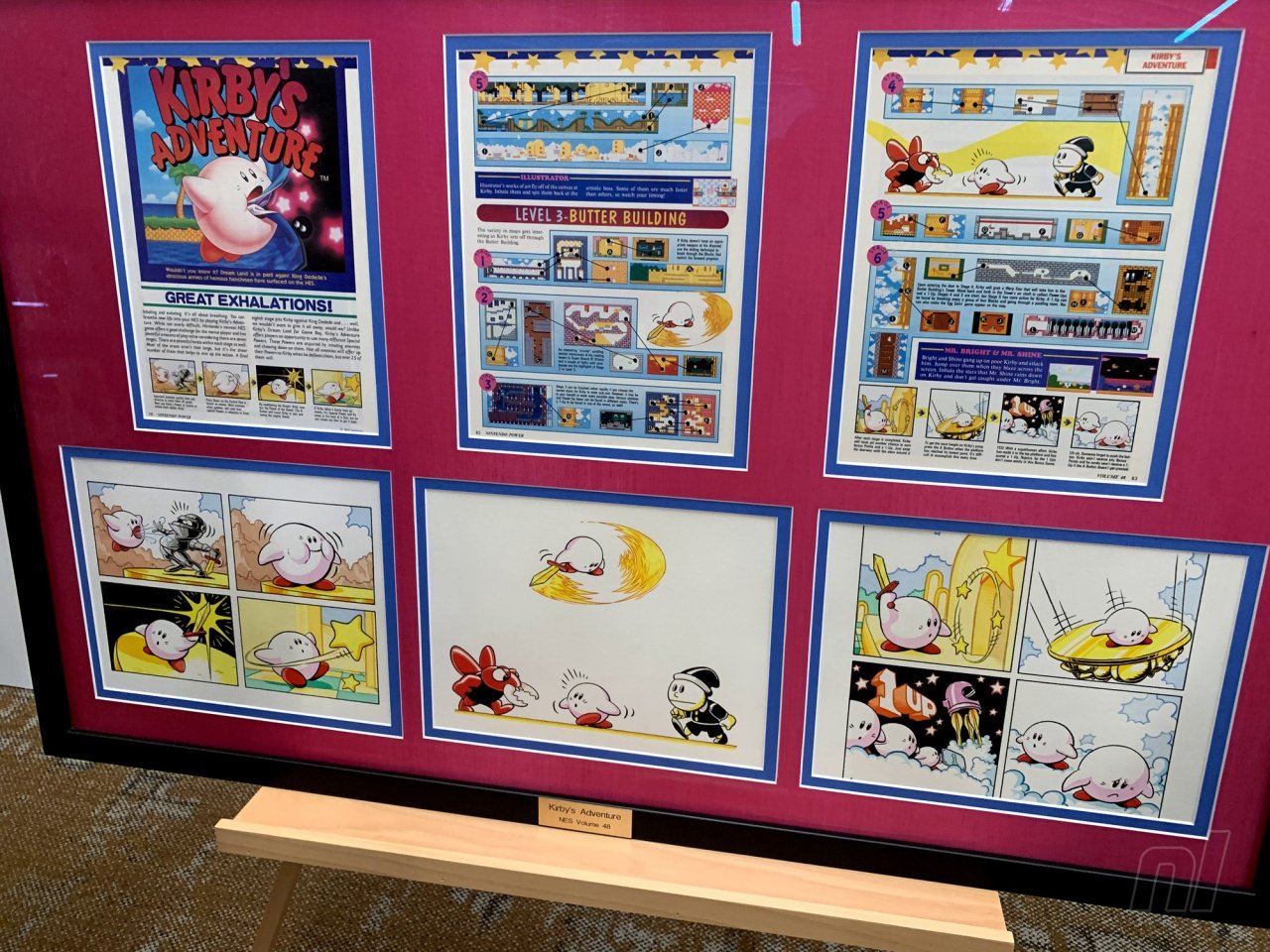
Stephan Reese: This is a number of panels by an artist named Kev Brockschmidt who’s most notably known for his Magic: The Gathering cards.
A lot of artists who had worked for Nintendo Power were also moonlighting doing other things, either working for the magazine and moonlighting or just contract artists who were also doing many other things. This is actually one of my favorite images of Kirby, this little chubby-cheeks Kirby in the upper right-hand corner of that first frame…I used him for my profile picture for a long time.
Kevin is just an absolutely amazing artist, and they used him for a lot of internal pages for first-party. This is an amazing example of his work.
Alan Lopez for Nintendo Life: Do you have any knowledge if this informed the eventual style guide for Kirby?
It was definitely an earlier depiction. But for Nintendo Power magazine, oftentimes, especially for first-party [games], this was the first time a lot of this had been drawn by hand. I think they did what they could…and he is already pink in these, which I think is interesting. [Editor’s note: Kirby was originally colored white on the cover of his debut game, Kirby’s Dream Land.]
Image: Alan Lopez / Nintendo Life
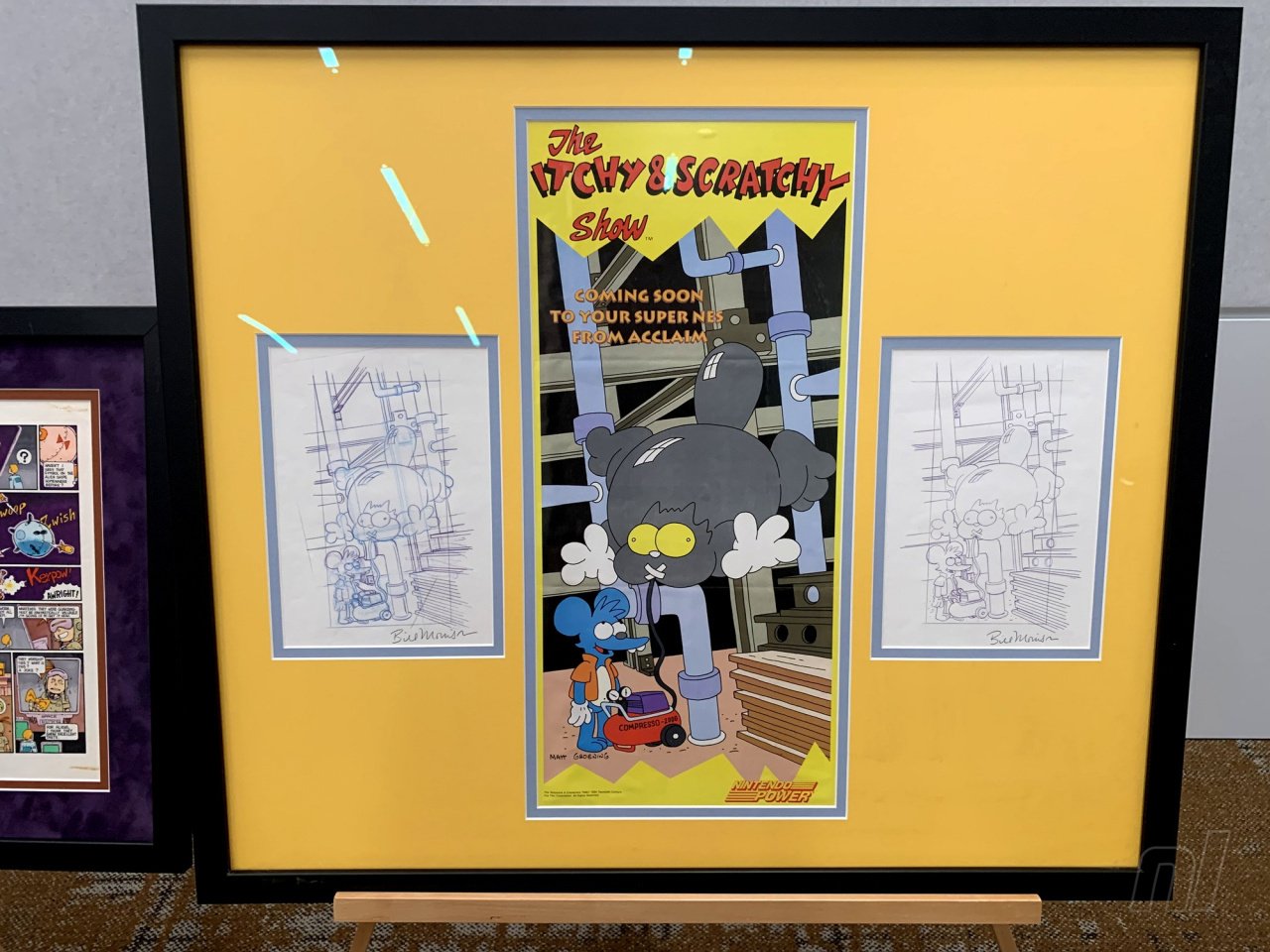
This piece is an example of what is often referred to as ‘blue line.’ These would have been preliminary sketches for the eventual poster. This is Bill Morrison’s work, despite the fact that it says ‘Matt Groening’ on the finished product. That was common with Simpsons stuff; Matt would put his name on anything Simpsons, but almost all of the commercial work for The Simpsons, be it t-shirts, board games, advertisements, almost all of it was Bill Morrison’s work. These were purchased directly from Bill.
That method [of obtaining pieces] is common for us. Almost nothing [in the exhibit] was bought through auctions. Almost all of it is working directly with the artist’s estate, or sometimes, very seldomly, private collectors. I just knew, already, offhand, that Bill Morrison draws almost everything product-related for The Simpsons, so I just went to Bill Morrison and showed him this piece and asked him if he had it, and he had the blue lines.
Does this stuff get shared very frequently, stuff from The Simpsons?
No.
How does that make you feel?
I mean, it’s great! The whole mission is to share the work. This show in particular has been very validating for us. It’s very clear that people care about the work.
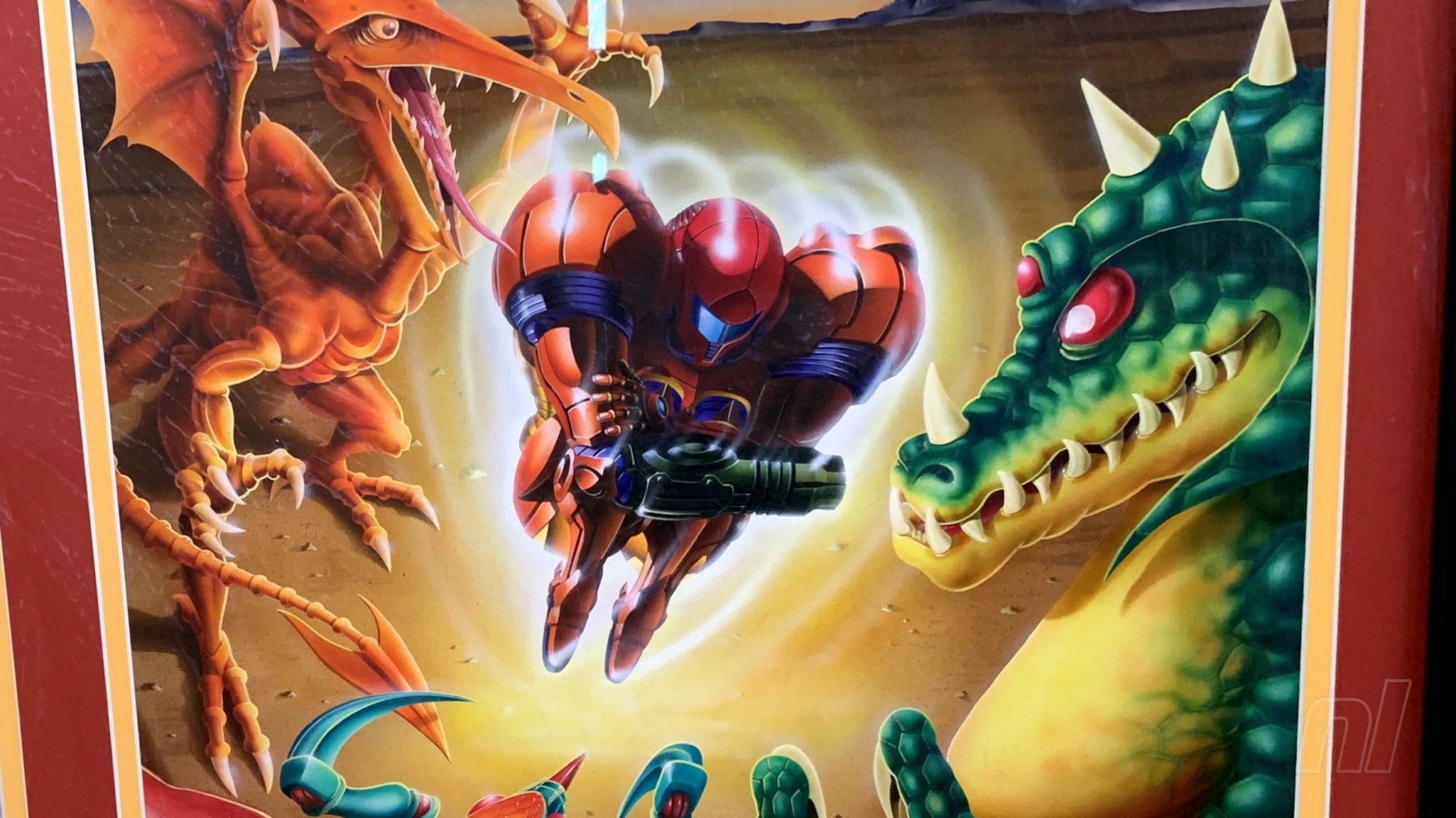
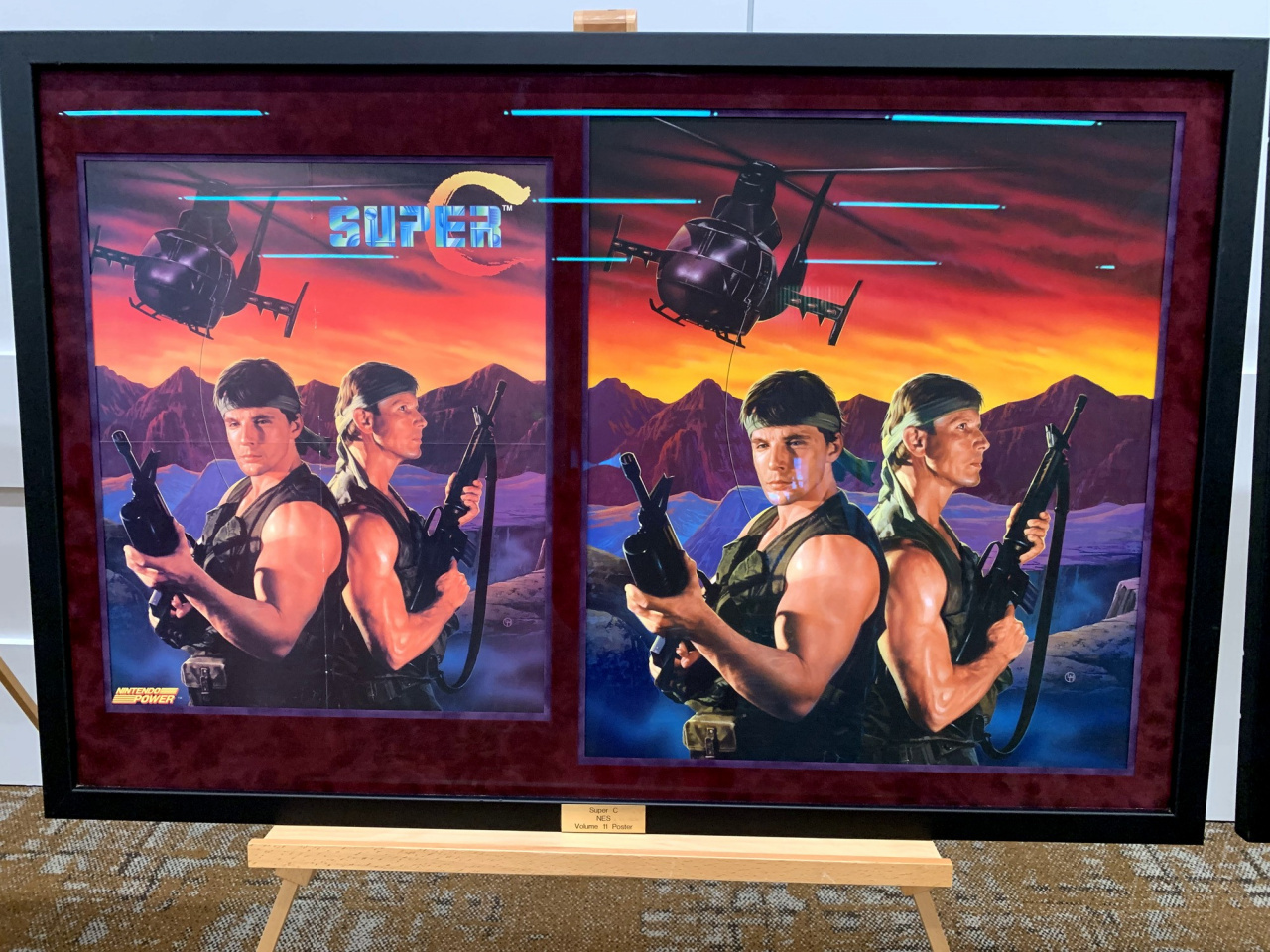
Super C in particular is a paint-over of a photograph. So underneath the paint is a photo of those two gentlemen holding guns and then he painted in, of course, the rest of the mountains, and the helicopter. So yes, it’s a paint-over of a photograph.
In fact, the painting is so exact, that I was able to find one of the actor’s Facebook profiles just by doing a Google image search with the painting.
Image: Alan Lopez / Nintendo Life
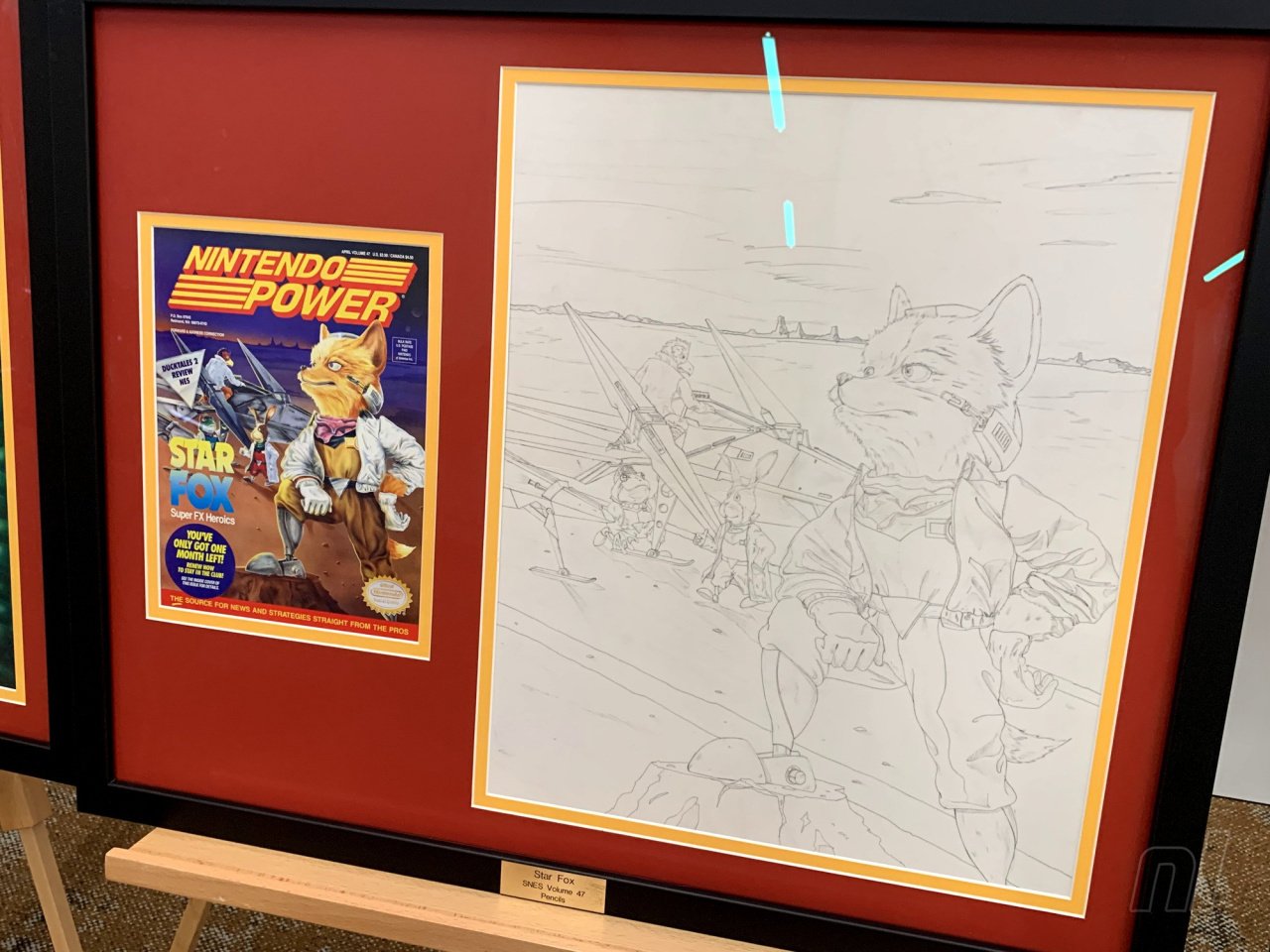
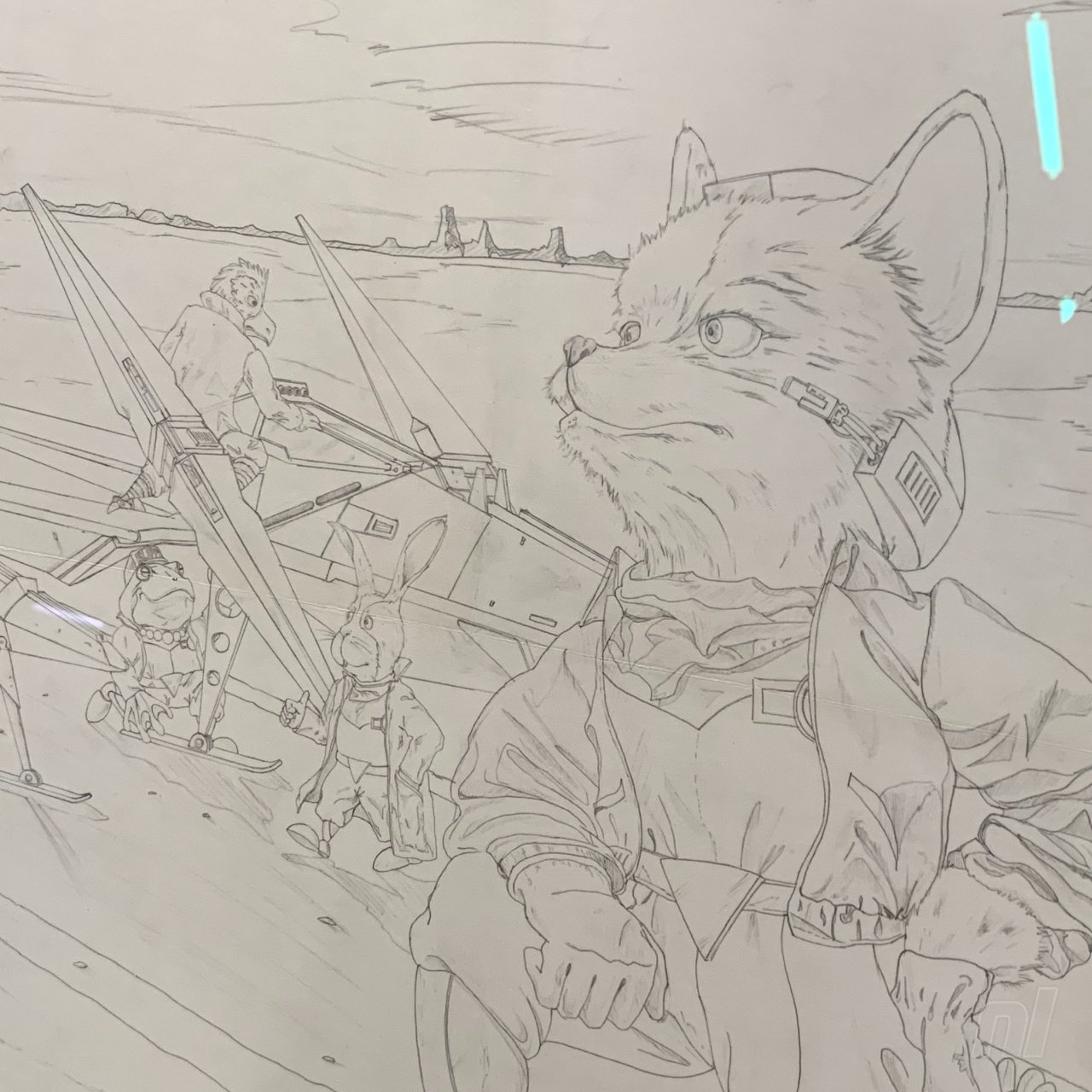
These were the pencils that were used for the stencil for the final. The way that airbrush art works — and most of these covers are acrylic airbrush — it starts as a pencil sketch like this, and then it’s used to make a stencil out of a material called frisket tape. And then at that point, it’s basically paint-by-numbers. You peel off a piece of tape, you paint it, you put it back down, you peel off a piece of tape, you paint it, you put it back down…
Image: Alan Lopez / Nintendo Life
And so that’s why these pencils, unlike the Itchy and Scratchy piece, you can clearly tell the difference between the sketch, and the final. They look different. [But] these pencils on the Star Fox are identical line for line to the finished painting because these lines were used to make the stencil for the final work.
Who made this?
David Harto. Almost all the covers came from U.S. artists. The covers and the posters are almost exclusively U.S. artists.
Do you have any insight on the back-and-forth between the Japanese creators and Nintendo Power?
Early on it was Gail Tilden and Howard Phillips flying to Japan once a month to work on the magazine with the Japanese team, both were members of a publishing company called Tokuma Shoten and Work House Japan. And then, over the years, they established Work House U.S. as a U.S. company, so it became kind of a hybrid.
There were almost always Japanese artists working on the magazine to some extent, but it did become more of a hybrid situation.
This is also another David Harto, [and] he also did the Darkwing Duck right next to it.
Between the two pieces you can sort of see the entire [creation] process, where Dave would have done the ink lines, printed those on a piece of acetate, and used airbrush to do the colors underneath.
These lines on Mario Kart are much thicker, yeah.
So the Mario Kart, that’s the lines that would be printed on the acetate. On the Darkwing, you can see where he’s printed those lines on a piece of plastic and then painted in the background.
Nintendo Power envelopes and letters
Image: Alan Lopez / Nintendo Life
How did you obtain these envelopes?
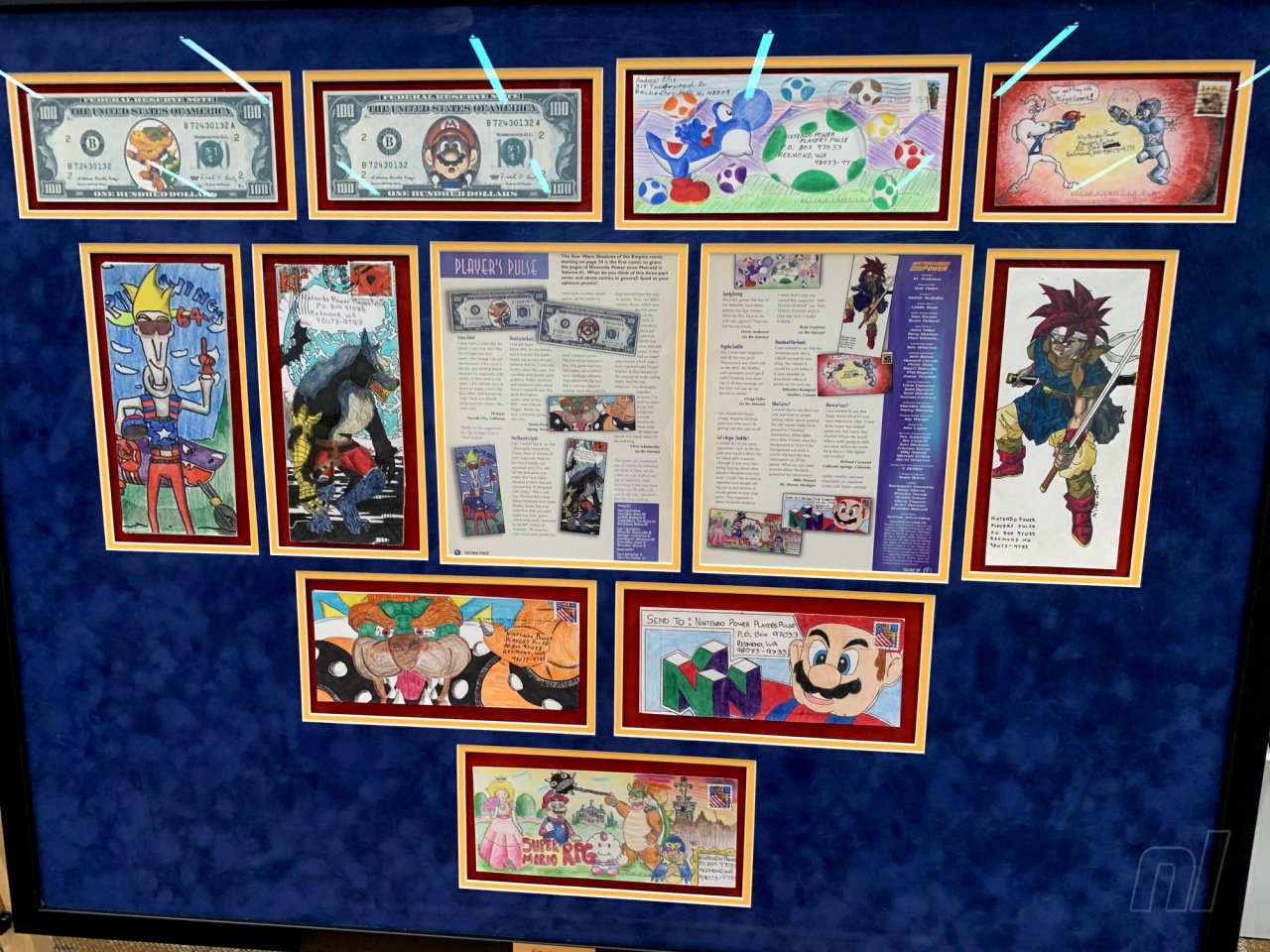
These are all children’s envelopes that they would have drawn on and mailed in.
These came from an ex-Nintendo employee who had taken them off the wall in the call center. The original Redmond building was bulldozed in 2010, and when they were gonna bulldoze that, this employee came in and just took some art off the wall, and then years later connected with me.
We have about 125 pieces of envelope art, altogether. They’re very expensive to frame in a frame like that [laughs]. So it takes some time. But we’re really happy to have what we have. It’s just tough. It’s great that we saved so many, but at the same time, there’s tens, and tens, and tens of thousands that we didn’t save.
Did you ever submit any?
I did not! No. I didn’t write Nintendo at all. I called the Nintendo gameplay counselors once, for Mega Man 2.
Image: Alan Lopez / Nintendo Life
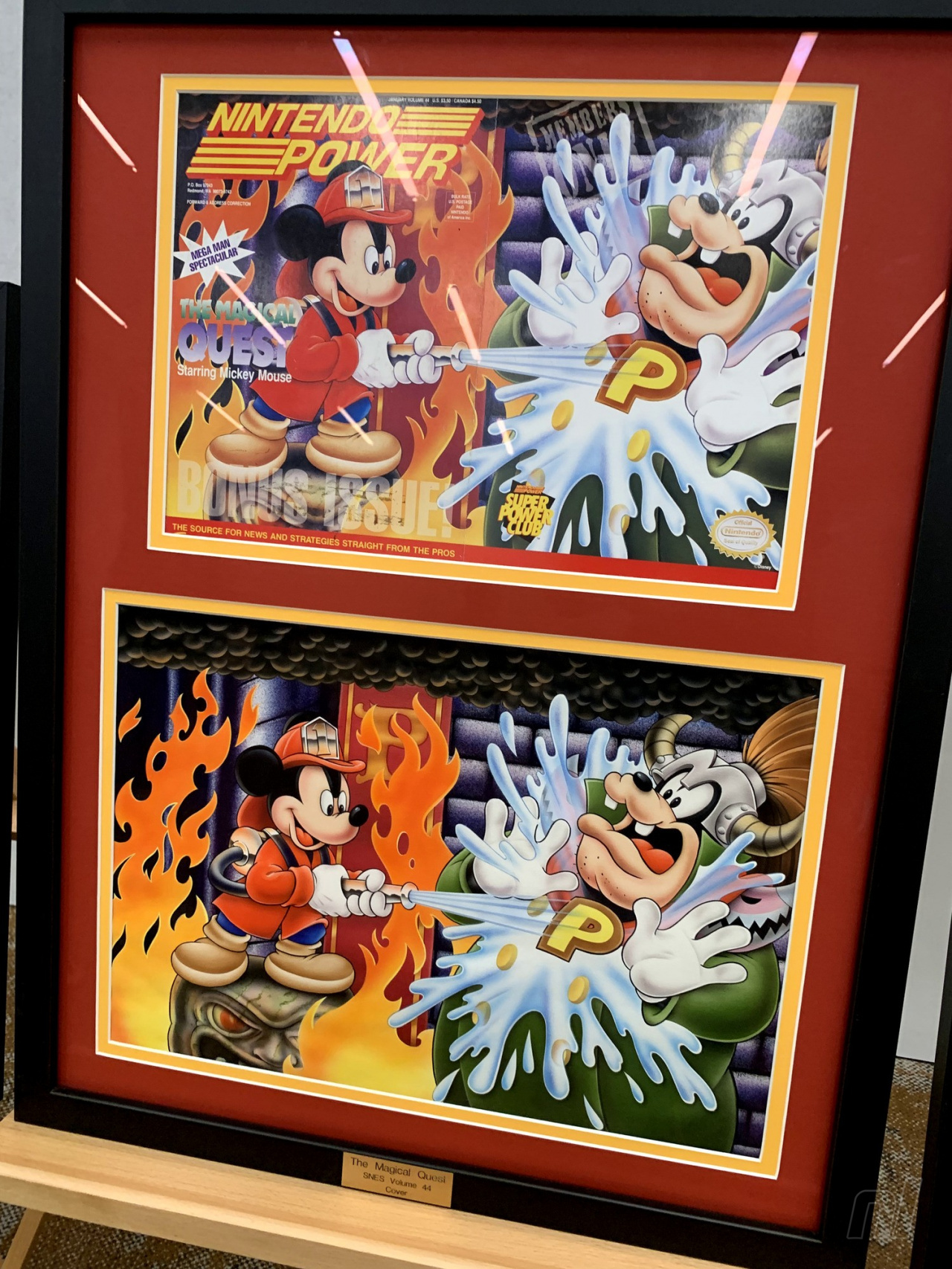
This is the work of Dan McGowan. He was an incredible artist. Basically, most of the covers [at the exhibit] were either painted by Dan McGowan or David Harto. But Dan is no longer with us, he passed away about a decade ago from cancer. But we worked with his estate to be able to save a number of his paintings.
What I love about this piece in particular is that it really shows really bold talent on behalf of Dan in that, it’s painted to scale, or very close to scale. If you notice, a lot of these paintings are painted much larger than the covers, and that is, honestly, to be able to easily fix mistakes in the event that there are mistakes. And so when I see a painting that’s painted basically the size of the cover, it really shows bold talent.
It looks indistinguishable from a typical Disney depiction of Mickey.
Yeah, I worked for Disney Interactive for years, and before I had any of these Disney covers I thought, ‘I should be able to find these!’ And so I looked for them, and it turns out none of them were painted by official Disney artists. Dan McGowan also painted the [Road Runner] cover [in the exhibit], and he was not a Warner Bros. artist either. Nintendo just got really talented contract artists.
Nintendo Power “Top” lists
Image: Alan Lopez / Nintendo Life
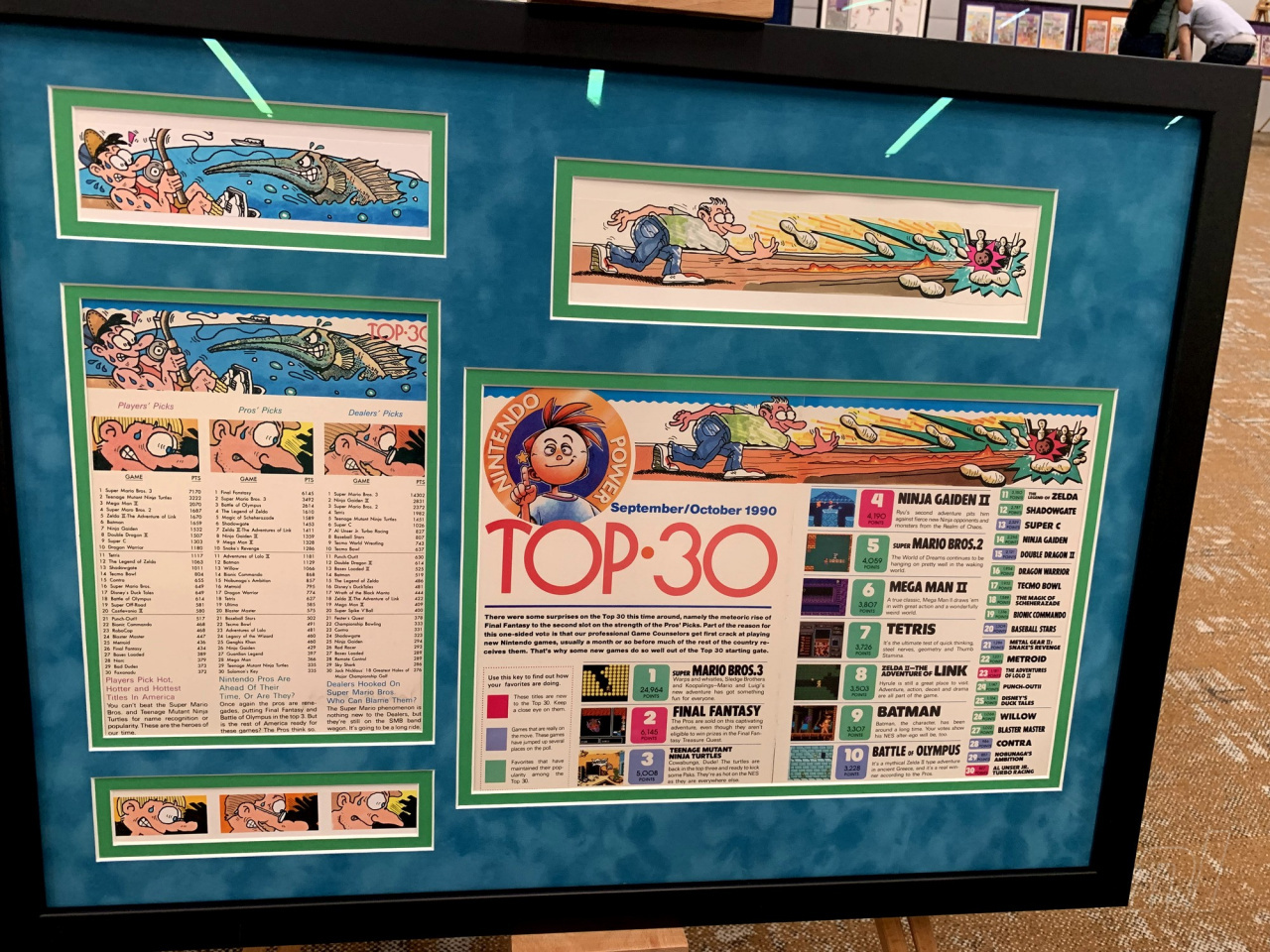
All of this work is painted by an artist named Orange Nakamura. This is some of the Japanese origin art in the room. He painted under a pseudonym, so we don’t know who he is. “Orange” is definitely not his first name. [laughs]
Image: Alan Lopez / Nintendo Life
So this iconic Nintendo Power art style…is anonymous?
Well, he wasn’t [fully] anonymous at the time. If you look at Japanese credits in the magazine, most of them did paint under pseudonyms, not using their real names.
Why?
Just a cultural thing. There may be a little bit of the fact that they were artists working for Tokuma Shoten, a very established manga company. So, you would have people like Shotaro Ishinomori who created Super Sentai, [he] was the artist who drew The Legend of Zelda: A Link to the Past comic for Nintendo Power. Katsuya Terada was another one, an absolutely prolific artist who was ‘slumming it’ in Nintendo Power. There may have been a little been of that, I’m not sure. But mostly it was a cultural thing. A lot of Japanese artists just painted under pseudonyms.
What is your opinion on their art direction?
I love that, I mean, not that there wasn’t art direction, there absolutely was…but it was so varied from page to page. It made the publication feel like it was something that me and my friends could have made. I think that added to the charm of the magazine on the whole. And I love how Orange Nakamura’s work in particular really kind of bound all of the issues together, made it feel like a more coherent product.
It reminds me very much of EarthBound in that it was a Japanese artist’s interpreting American culture, and so these were the most American kids ever. It’s really incredible work, and we’re so lucky to have them because Japanese art is just so difficult to source.
Howard and Nester
Archive image by Stephan Reese — Image: Alan Lopez / Nintendo Life
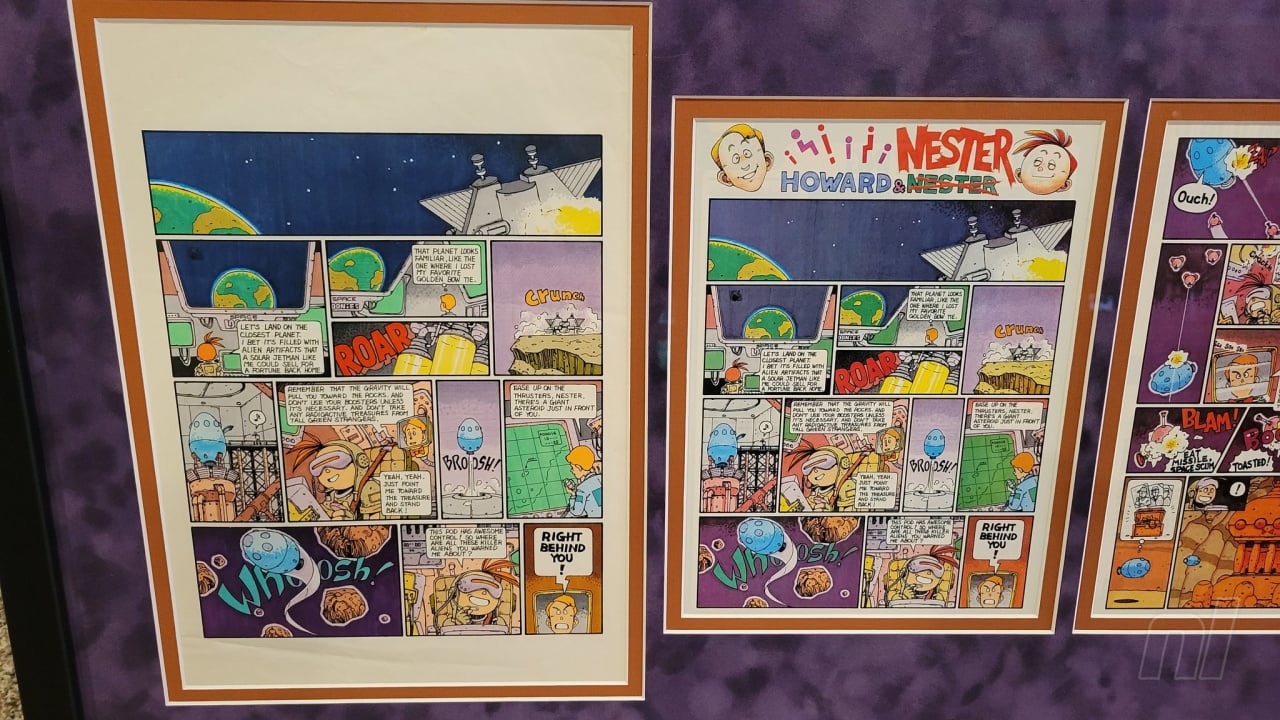
The Howard and Nester work that we have is by Shuji Imai, who was the first Howard and Nester artist. And he was of Japanese origin. Shuji at the time did not read or speak any English, which was interesting because he lettered the English directly onto the pages, which you don’t necessarily see with comic art, especially of that age. Usually, the lettering is done separately, but he lettered the page directly. He basically interpreted those letters artistically…he was drawing them instead of writing them, if that makes sense? It’s an interesting distinction.
There have been about four or five artists who drew Howard and Nester, depending on who you ask, but he was the very first.
I feel like a lot of people might not even know this was real.
I think most of this work, you know, nobody really stopped to think about someone having to create any of it. It’s similar to how, as kids, we didn’t really think about there being a voice actor behind characters that we loved. We just didn’t stop to think that somebody had to create a thing.
I decided I wasn’t gonna try to restore him. I think it would have made it less ‘the thing.’
Most of these, with the exception of the cover for Nintendo Power #1, most of these are made out of polymer clay. It’s bakable clay that then hardens, so that’s why they’re in reasonably good shape, because they last.
Unfortunately, the cover for the first issue was made out of oil clay…it was made by the Will Vilton artists, the people who did the California Raisins and the Moonwalker video, and stuff like that. So, oil clay is made to never dry, and so when the model was unfortunately dropped, instead of shattering like one of these would do, making it repairable, the oil clay just flattened. And you can’t resculpt flattened clay like that.
I see this Mario is missing an ear.
Yeah, that’s just, you know, 35 years. Guy’s had a hard time. Early on I decided I wasn’t gonna try to restore him. I think it would have made it less ‘the thing.’ It doesn’t matter what kind of condition these are in, what matters is that they are ‘the thing.’ And so, I did ask the original artist, who doesn’t want to be named, I asked them if they would be interested in resculpting it themselves, and they declined.
So at that point, I was like, okay, if it isn’t going to be the original artist resculpting him, then I’m not going to bother trying to resculpt him. He can be missing an ear. That’s fine.
You got it directly from the artist?
I did.
Was that process difficult?
Yes, it was. Because with the exception of maybe Dan McGowen and maybe one other artist, none of the artists were credited. They were only credited under the agency name. And oftentimes that agency, Griffith’s Advertising, would also sub-contract other agencies. So it wasn’t necessarily even as easy as finding out who Griffith’s was representing, it was often deeper layers.
Image: Alan Lopez / Nintendo Life
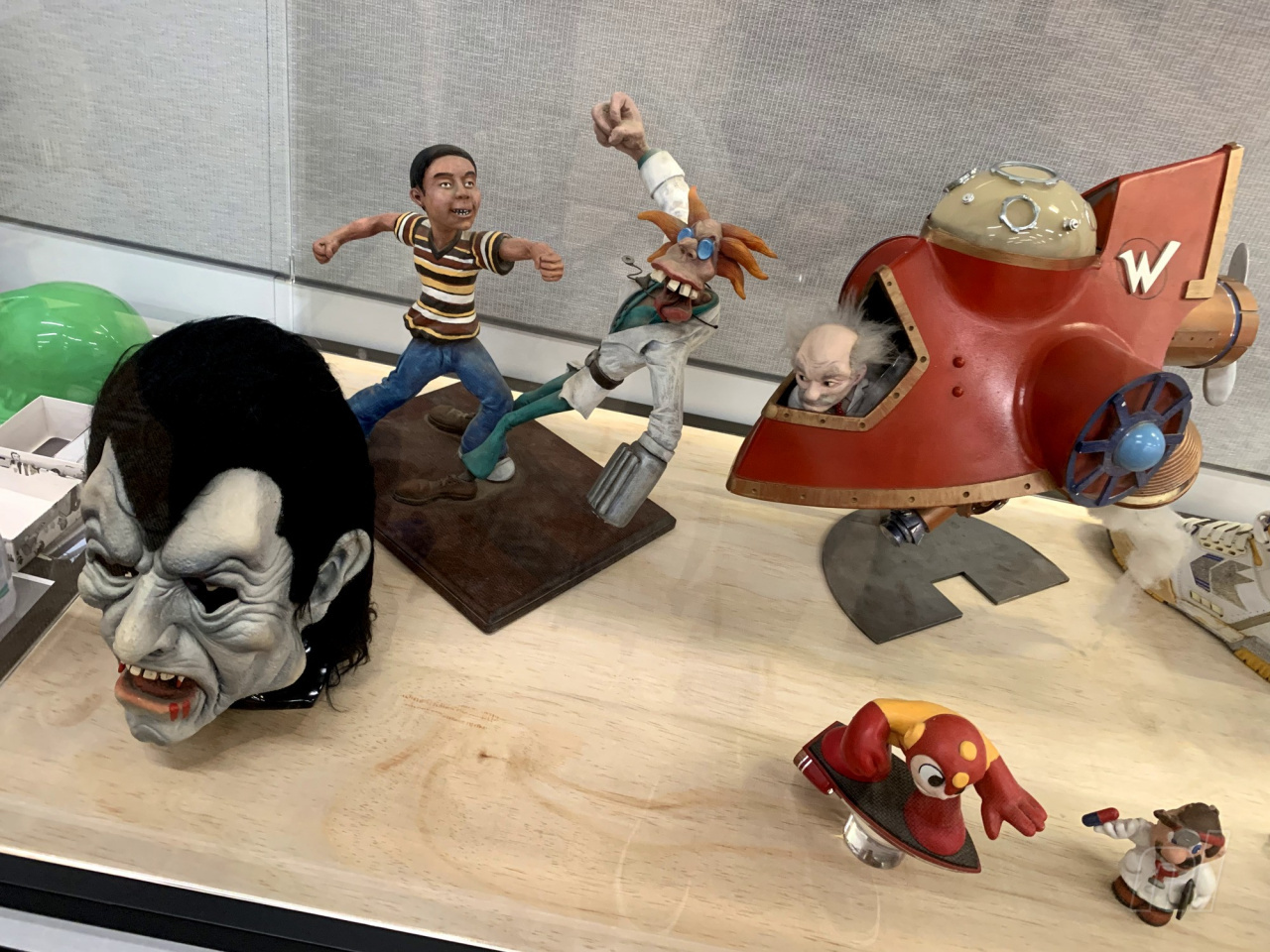
The Dr. Wily, the Dr. Mario, the Mario Paint, the Contra, and the Mario 3-Mario were all the same artist.
Did you get all of the 3D pieces at the same time?
The shoes came in separately. I’m not sure who the artist is of the shoes, but the shoes are basically just stickers and glue on a regular pair of Converse high-tops. But the Dr. Mario came in separately because he had fallen behind a bookcase for 25 years.
[laughs]
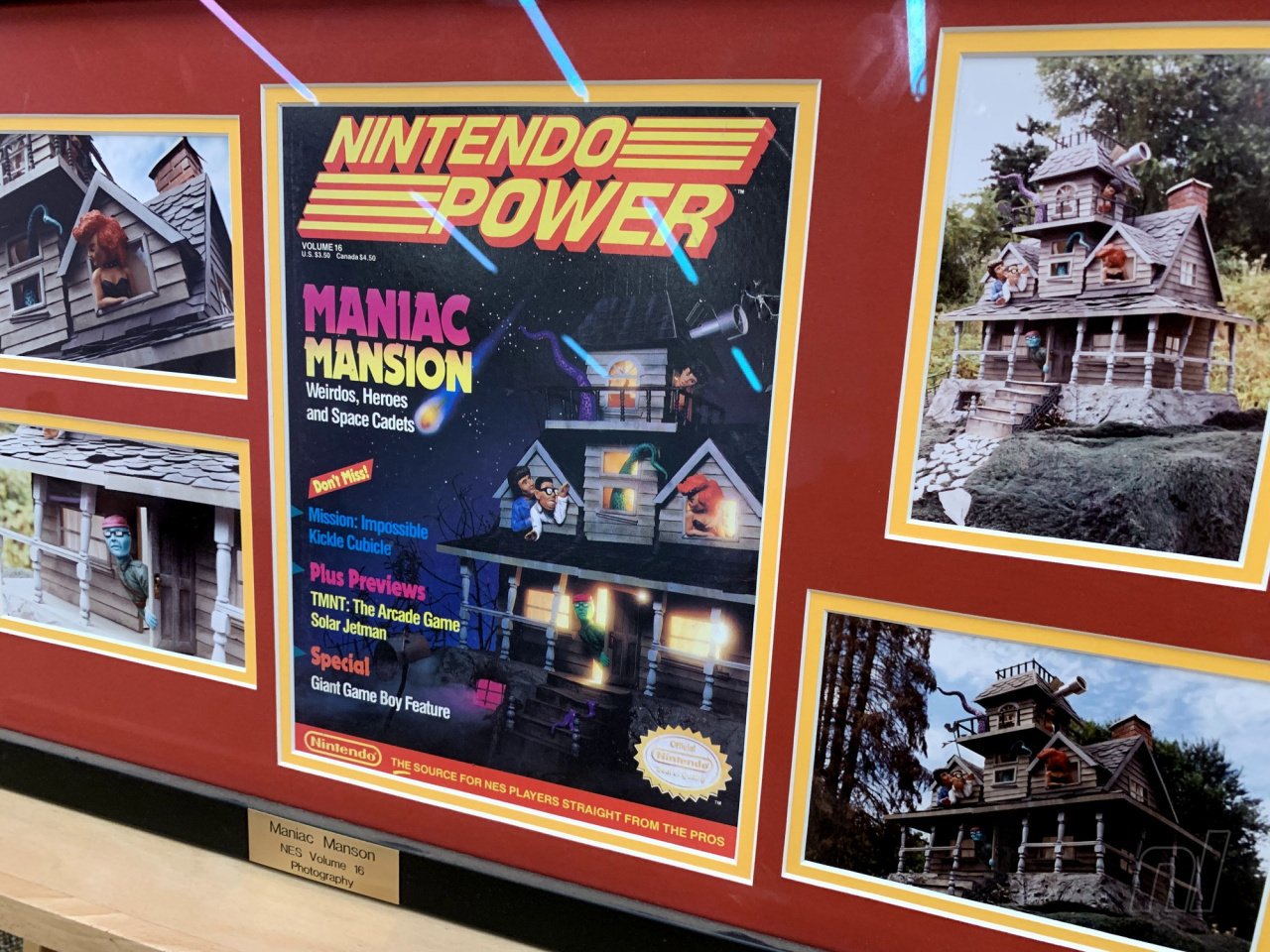
He was rediscovered when they were remodeling their office. When most of this stuff was sculpted…we have photographs of the Maniac Mansion mansion. That mansion was destroyed right after the photographs were done being taken, because it was a 300-pound piece of polymer clay, why would someone keep that? Nintendo wasn’t Nintendo at the time and it was just a job to a lot of these artists. They had no reason to keep it.
[It’s] the same thing with the METAL STORM robot. It’s a Gundam kitbash. At some point, I’d love to sit down with someone who really specializes in 1980s Gundam kits and try to pick apart exactly what went into that model, because I’d love to build one. We just have that one Poloraid of it, and that’s all that’s left.
Image: Alan Lopez / Nintendo Life
Have you witnessed any of the creators’ reactions to these pieces?
I sent [Maniac Mansion creator Ron Gilbert] photos of the mansion, because he hadn’t seen it either. Oftentimes, they didn’t view approvals for Nintendo Power, they were just like, “It’s free advertising!” It was very fast and loose back then. So he had never seen the Maniac Mansion mansion that they had done for the cover. The first time that he had seen it was for the photos.
[How did he react?]
Well. [laughs] He was very surprised.
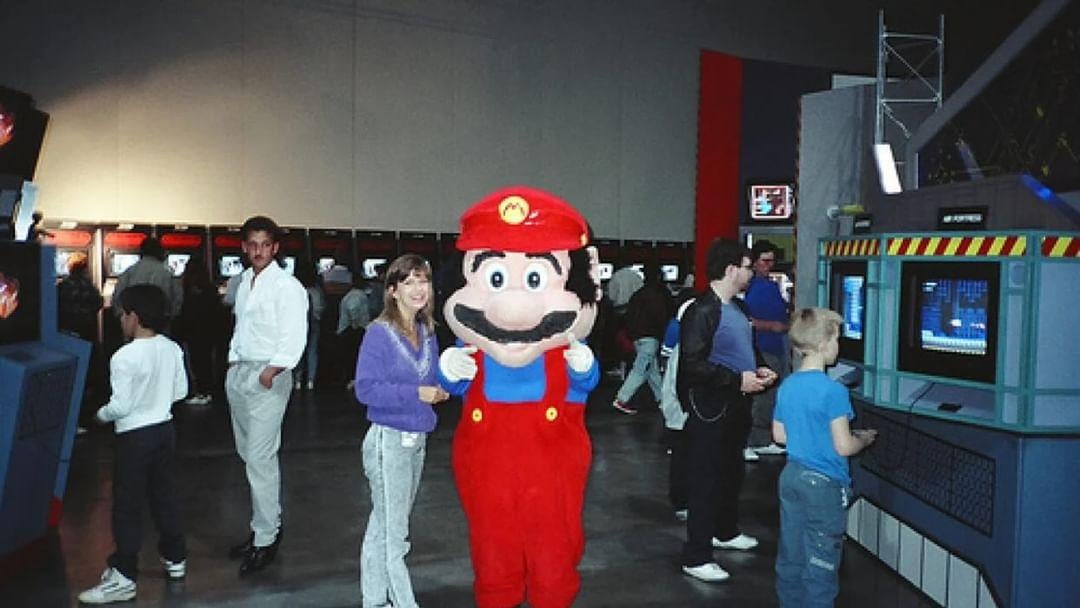
Mario mascot costume
This was built in 1989, first used in 1990. This is the 1989 Mario mascot costume for Nintendo. We have a photo here of him as he was in 1990 at the Nintendo World Championships, and then another photo of how he was re-discovered; the structure of his head had completely collapsed, and he was missing his eyes.
Image: Stephan Reese
There was a gentleman who found him before us, he was found in a storage locker that hadn’t been paid for, and so it was auctioned off. The same people who built him built all the miniatures, so I already had an existing relationship with them, so I was able to confirm that he was what I thought he was. And they had told me that he was beyond repair, and I was like, “Okay, well we’re gonna try anyway.” [laughs]
The gentleman who found him before us started a restoration and they did some things that probably we might not have chosen to do ourselves, and were kind of irreversible. So we had to finish the work that was started rather than redo the work that was started. He’s probably about 85%, I would say, the way how he looked originally. Originally, he had a plastic skull under him, and now he’s mostly stuffed. He’s basically the difference between a hard plastic doll head and a teddy bear. He’s more teddy bear than plastic doll head.
Do you have fishing lines out? How do people know to reach out to you for these kinds of items?
We make ourselves very findable. The phrase ‘Art of Nintendo Power’ is very good SEO. You type in ‘Nintendo Power art’ into Google and we will sort higher than Nintendo does — that’s not a mistake. Sometimes some things come to us, but we still hunt every day.
Every day?
Every day.
Who is “we”?
Well, mostly me. [laughs] We’re a 501(c)(3) non-profit art museum. And The Art of Nintendo Power is our flagship exhibit…
Contract artists, unless Nintendo paid them extra, they were contractually obligated to return the art to the artists. So like, none of this has been archived by Nintendo, it was all sent back to the artist. (Presumably, sometimes it didn’t happen for whatever reason, because things happen.) So these pieces were not a collection that was maintained by Nintendo at all. So there’s no paper trails, there’s no nothing.
All of the roads that we’re forging, we’re forging them brand new. It’s quite a challenge.
Image: Alan Lopez / Nintendo Life
This interview has been lightly edited for clarity.
Many thanks to Stephan. You can follow him on Twitter X @ArtofNP and Instagram, you can see where the Art of Nintendo Power show will be next on their website.
As a Python developer, you may often deal with making HTTP requests to interact with APIs or to retrieve information from web pages. By default, these requests can be slow and block your program’s execution, making your code less efficient.
This is where Python’s async requests come to the rescue. Asynchronous HTTP requests allow your program to continue executing other tasks while waiting for the slower request operations to complete, improving your code’s overall performance and response time significantly.
The core of this non-blocking approach in Python relies on the asyncio and aiohttp libraries, which provide the necessary tools to perform efficiently and asynchronously. Using these libraries, you can build powerful async HTTP clients to handle multiple requests concurrently without stalling your program’s main thread.
Incorporating Python async requests into your projects can help you tackle complex web scraping scenarios, handling tasks like rate limiting and error recovery.
First Things First: Understanding Asynchronous Requests
Basic Principles of Asynchronous Requests
Asynchronous requests play a crucial role in improving the efficiency of your code when dealing with network tasks.
When you send an asynchronous request, your program can continue executing other tasks without waiting for the request to complete.
This is possible because of the async/await syntax in Python, which allows you to write asynchronous code more easily. In essence, this keyword pair breaks down asynchronous code into smaller, manageable pieces to provide better readability and maintainability.
Here’s a brief explanation of async and await:
async: This keyword is used to define a function as asynchronous, which means it’s able to run concurrently with other tasks in your code.
When working with network requests, it’s important to understand the difference between synchronous and asynchronous requests.
Synchronous requests involve waiting for the response of each request before proceeding, and it’s a typical way to handle requests in Python. However, this can lead to slower execution times, especially when dealing with numerous requests or slow network responses.
Asynchronous requests allow you to send multiple requests at the same time, without waiting for their individual responses. This means your program can continue with other tasks while the requests are being processed, significantly improving performance in network-intensive scenarios.
Here’s a basic comparison between synchronous and asynchronous requests:
Synchronous Requests:
Send a request and wait for its response
Block the execution of other tasks while waiting
Can cause delays if there are many requests or slow network responses
Asynchronous Requests:
Send multiple requests concurrently
Don’t block the execution of other tasks while waiting for responses
Improve performance in network-heavy scenarios
For example, the popular requests library in Python handles synchronous requests, while libraries like aiohttp handle asynchronous requests. If you’re working with multiple network requests in your code, it’s highly recommended to implement async/await for optimal efficiency and performance.
Python and Asyncio
Understanding Asyncio
Asyncio is a library introduced in Python 3.4 and has evolved rapidly, especially till Python 3.7. It provides a foundation for writing asynchronous code using the async/await syntax. With asyncio, you can execute concurrent programming in Python, making your code more efficient and responsive.
The library is structured around coroutines, an approach that allows concurrent execution of multiple tasks within an event loop. A coroutine is a specialized version of a Python generator function that can suspend and resume its execution. By leveraging coroutines, you can execute multiple tasks concurrently without threading or multiprocessing.
Asyncio makes use of futures to represent the results of computations that may not have completed yet. Using asyncio’s coroutine function, you can create coroutines that perform asynchronous tasks, like making HTTP requests or handling I/O operations.
Using Asyncio in Python
To utilize asyncio in your Python projects, your code must incorporate the asyncio library. The primary method of executing asynchronous tasks is by using an event loop. In Python 3.7 and later, you can use asyncio.run() to create and manage the event loop for you.
With asyncio, you can declare a function as a coroutine by using the async keyword. To call a coroutine, use the await keyword, which allows the coroutine to yield control back to the event loop and continue with other tasks.
In the example above, we created two asyncio tasks and added them to the event loop using asyncio.ensure_future(). When await is encountered, the coroutine is suspended, and the event loop can switch to another task. This continues until all tasks in the event loop are complete.
Now let’s get to the meat.
Using the Requests Library for Synchronous HTTP Requests
The requests library is a popular choice for making HTTP requests in Python. However, it’s primarily designed for synchronous operations, which means it may not be the best choice for handling asynchronous requests.
To make a simple synchronous GET request using the requests library, you would do the following:
While the requests library is powerful and easy to use, it doesn’t natively support asynchronous requests. This can be a limitation when you have to make multiple requests concurrently to improve performance and reduce waiting time.
Asynchronous HTTP Requests with HTTPX
HTTPX is a fully featured HTTP client for Python, providing both synchronous and asynchronous APIs. With support for HTTP/1.1 and HTTP/2, it is a modern alternative to the popular Python requests library.
Why Use HTTPX?
HTTPX offers improved efficiency, performance, and additional features compared to other HTTP clients. Its interface is similar to requests, making it easy to switch between the two libraries. Moreover, HTTPX supports asynchronous HTTP requests, allowing your application to perform better in scenarios with numerous concurrent tasks.
HTTPX Asynchronous Requests
To leverage the asynchronous features of HTTPX, you can use the httpx.AsyncClient class. This enables you to make non-blocking HTTP requests using Python’s asyncio library. Asynchronous requests can provide significant performance benefits and enable the use of long-lived network connections, such as WebSockets.
Here is an example to demonstrate how async requests can be made using httpx.AsyncClient:
import httpx
import asyncio async def fetch(url): async with httpx.AsyncClient() as client: response = await client.get(url) return response.text async def main(): urls = ['https://www.google.com', 'https://www.example.com'] tasks = [fetch(url) for url in urls] contents = await asyncio.gather(*tasks) for content in contents: print(content[:1000]) # Print the first 1000 characters of each response asyncio.run(main())
Here’s a breakdown of the code:
fetch: This asynchronous function fetches the content of a given URL.
main: This asynchronous function initializes the tasks to fetch content from a list of URLs and then gathers the results.
asyncio.run(main()): This runs the main asynchronous function.
The code will fetch the content of the URLs in urls concurrently and print the first 1000 characters of each response. Adjust as needed for your use case!
Managing Sessions and Connections
Session Management in Async Requests
When working with asynchronous requests in Python, you can use sessions to manage connections. The aiohttp.ClientSession class is designed to handle multiple requests and maintain connection pools.
To get started, create an instance of the aiohttp.ClientSession class:
import aiohttp async with aiohttp.ClientSession() as session: # Your asynchronous requests go here
Using the with statement ensures that the session is properly closed when the block is exited. Within the async with block, you can send multiple requests using the same session object. This is beneficial if you are interacting with the same server or service, as it can reuse connections and reduce overhead.
Connection Management with TCPConnector
Besides sessions, one way to manage connections is by using the aiohttp.TCPConnector class. The TCPConnector class helps in controlling the behavior of connections, such as limiting the number of simultaneous connections, setting connection timeouts, and configuring SSL settings.
Here is how you can create a custom TCPConnector and use it with your ClientSession:
import aiohttp connector = aiohttp.TCPConnector(limit=10, ssl=True)
async with aiohttp.ClientSession(connector=connector) as session: # Your asynchronous requests go here
In this example, the TCPConnector is set to limit the number of concurrent connections to 10 and enforce SSL connections to ensure secure communication.
Implementing Concurrency and Threading
Concurrency in Async Requests
Concurrency for efficient and fast execution of your Python programs involves overlapping the execution of multiple tasks, which is especially useful for I/O-bound tasks, where waiting for external resources can slow down your program.
One way to achieve concurrency in Python is by using asyncio. This module, built specifically for asynchronous I/O operations, allows you to use async and await keywords to manage concurrent execution of tasks without the need for threads or processes.
For example, to make multiple HTTP requests concurrently, you can use an asynchronous library like aiohttp. Combined with asyncio, your code might look like this:
import aiohttp
import asyncio async def fetch(url): async with aiohttp.ClientSession() as session: async with session.get(url) as response: return await response.text() async def main(): urls = ['https://example.com', 'https://another.example.com'] tasks = [fetch(url) for url in urls] responses = await asyncio.gather(*tasks) asyncio.run(main())
Threading in Async Requests
Another way to implement concurrency in Python is by using threads. Threading is a technique that allows your code to run concurrently by splitting it into multiple lightweight threads of execution. The threading module provides features to create and manage threads easily.
For instance, if you want to use threads to make multiple HTTP requests simultaneously, you can employ the ThreadPoolExecutor from the concurrent.futures module combined with the requests library:
import requests
from concurrent.futures import ThreadPoolExecutor def fetch(url): response = requests.get(url) return response.text def main(): urls = ['https://example.com', 'https://another.example.com'] with ThreadPoolExecutor(max_workers=len(urls)) as executor: responses = list(executor.map(fetch, urls)) main()
In this example, the ThreadPoolExecutor creates a pool of worker threads that execute the fetch function concurrently. The number of threads is determined by the length of the urls list, ensuring that all requests are handled in parallel.
Working with URLs in Async Requests
When managing and manipulating URLs in async requests, you might need to handle various tasks such as encoding parameters, handling redirects, and constructing URLs properly. Thankfully, Python provides the urllib.parse module for handling URL manipulations.
For instance, you may want to add query parameters to a URL. To do this, you can use the urllib.parse.urlencode function:
By properly handling URLs and leveraging async requests, you can efficiently fetch data in Python while maintaining a clear and organized code structure.
Handling Errors and Timeouts
Error Handling in Async Requests
When working with asynchronous requests in Python, it’s important to properly handle errors and exceptions that might occur. To do this, you can use the try and except statements. When a request fails or encounters an error, the exception will be caught in the except block, allowing you to handle the error gracefully.
For example, when using the asyncio and aiohttp libraries, you might structure your request and error handling like this:
import asyncio
import aiohttp async def fetch_url(url): try: async with aiohttp.ClientSession() as session: async with session.get(url) as response: data = await response.text() return data except Exception as e: print(f"An error occurred while fetching {url}: {str(e)}") return None results = await asyncio.gather(*[fetch_url(url) for url in urls])
In this example, if an exception is encountered during the request, the error message will be printed and the function will return None, allowing your program to continue processing other URLs.
Managing Timeouts in Async Requests
Managing timeouts in async requests is crucial to ensure requests don’t run indefinitely, consuming resources and blocking progress in your program. Setting timeouts can help prevent long waits for unresponsive servers or slow connections.
To set a timeout for your async requests, you can use the asyncio.wait_for() function. This function takes a coroutine object and a timeout value as its arguments and will raise asyncio.TimeoutError if the timeout is reached.
Here’s an example using the asyncio and aiohttp libraries:
import asyncio
import aiohttp async def fetch_url(url, timeout): try: async with aiohttp.ClientSession() as session: async with session.get(url) as response: data = await asyncio.wait_for(response.text(), timeout=timeout) return data except asyncio.TimeoutError: print(f"Timeout reached while fetching {url}") return None except Exception as e: print(f"An error occurred while fetching {url}: {str(e)}") return None results = await asyncio.gather(*[fetch_url(url, 5) for url in urls])
In this example, the requests will time out after 5 seconds, and the function will print a message indicating a timeout, then return None. This way, your program can continue processing other URLs after encountering a timeout without getting stuck in an endless wait.
Frequently Asked Questions
How do I send async HTTP requests in Python?
To send asynchronous HTTP requests in Python, you can use a library like aiohttp. This library allows you to make HTTP requests using the async and await keywords, which are built into Python 3.7 and later versions. To start, you’ll need to install aiohttp and then use it to write asynchronous functions for sending HTTP requests.
Which library should I use for asyncio in Python requests?
While the popular Requests library doesn’t support asyncio natively, you can use alternatives like aiohttp or httpx that were designed specifically for asynchronous programming. Both aiohttp and httpx allow you to utilize Python’s asyncio capabilities while providing a simple and familiar API similar to Requests.
What are the differences between aiohttp and requests?
The main differences between aiohttp and Requests lie in their approach to concurrency. aiohttp was built to work with Python’s asyncio library and uses asynchronous programming to allow for concurrent requests. On the other hand, Requests is a regular, synchronous HTTP library, which means it doesn’t inherently support concurrent requests or asynchronous programming.
How can I call multiple APIs asynchronously in Python?
By using an async-enabled HTTP library like aiohttp, you can call multiple APIs asynchronously in your Python code. First, define separate async functions for the API calls you want to make, and then use the asyncio.gather() function to combine and execute these functions concurrently. This allows you to perform several API calls at once, reducing the overall time to process the requests.
What is the use of async with statement in Python?
The async with statement in Python is an asynchronous version of the regular with statement, which is used for managing resources such as file I/O or network connections. In an async context, the async with statement allows you to enter a context manager that expects an asynchronous exit, clean up resources upon exit, and use the await keyword to work with asynchronous operations.
When should I use asynchronous programming in Python?
Asynchronous programming in Python is beneficial when you’re working with I/O-bound tasks, such as network requests, web scraping, or file operations. By using async techniques, you can execute these tasks concurrently, thus reducing the overall execution time and improving performance. However, for CPU-bound tasks, using Python’s built-in multiprocessing module or regular multi-threading might be more suitable.
In the most positive sense, it’s amazing what gets approved for release on the Switch. Raindrop Sprinters is an indie title that could well be a mobile phone game in everything except its aesthetic, which accurately resembles an early ’80s arcade title.
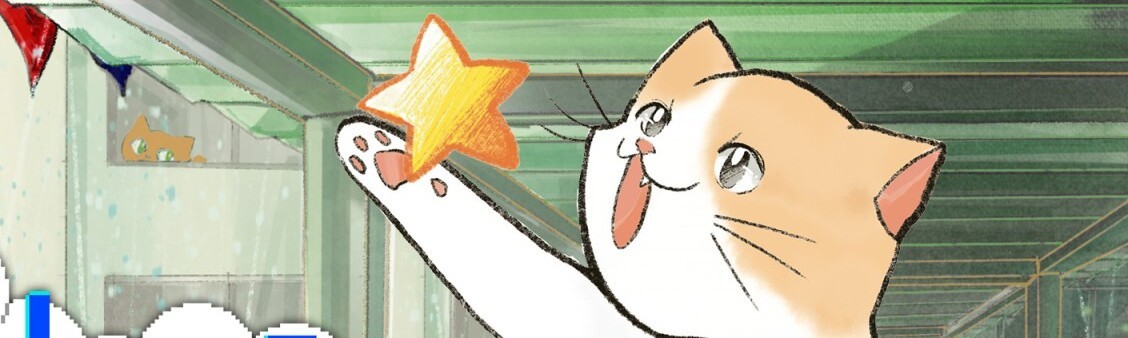
You play a cat represented by a bobbing paw, tasked only with crossing a screen from one side to the other, on repeat, 40 times to finish the Standard game. During each brief transit, raindrops fall from a corrugated overhead roof, dripping randomly, with enough gaps to allow you to make your crossing unscathed. With one life only, it’s simplistic, but there’s a core scoring game here that’s both utterly compelling and unapologetically brutal.
The raindrops rapidly pick up speed. Spend long enough on the first screen and the patter soon becomes a hell of a deluge. Lingering can have a scoring advantage, with each screen dropping a set number of stars at intermittent intervals. Most are yellow, and a few pink, netting a double bonus. But, with the tempo of the rainfall on a constant increase, dawdling for points makes things exponentially tougher. After a few minutes, it’s already thundering down, a torrential threat to kitty’s survival. Fulfilling hidden objectives such as catching all the stars, clearing a set number of screens, etc., grants badges, with seven unlocking “powerful skills”. The element that will really separate the scoreboards, though, is the last-second dodge. The closer a drop is to taking you out, the more score bonus you get, up to what appears to be a maximum of 500, signified by a burst of green bubbles appearing near your paw. Think about it almost like a parry; a cat playing chicken with droplets of doom.
It’s tough to clear 40 screens, but by hitting a button you engage a slow-motion mechanic that can save you in a clinch. Governed by a power gauge that, when reduced, will refill slightly with each screen cleared, the effect slows the rain and slightly boosts your speed. The gauge drains fast, however, requiring it to be used both tactically and sparingly. TATE mode is available for an extra level of arcade authenticity, and there are additional gameplay modes, too, including ‘Endless’ for pushing your limits, and ‘Cats and Dogs’ for instantaneous rain-related havoc. There’s also a Customise mode, allowing you to spend accrued points on protective bonuses to make the game easier or harder, depending on your skill level, and what appears to be a couple of other unlockable variations on the theme.
Raindrop Sprinters is as pure an arcade experience as one could wish for, its base simplicity underpinned by a deep scoring game that can be approached in a variety of ways, ultimately presenting a bottomless reflex-based affair that will wash out the impatient and reward the dedicated in a shower of euphoria. It’s not a game for everyone and will hold little appeal or longevity for the vast majority, but it does what it does well, and its construction is a little bit clever. When you reach that moment of dodging zen, where you’re weaving those drops against impossible odds, you run a real risk of just-one-more-go addiction.
Hello one and all, and welcome to another edition of Box Art Brawl.
Before we check out this week’s competitors, let’s take a look at how we fared last time. We took a look at New Super Mario Bros. on the Nintendo DS, the first entry in the polarising platforming sub-series. It was actually a fairly close battle, but in the end, the North American variant featuring a giant Mario won out with 58% of the vote.
This week, we’re going to check out Mario vs. Donkey Kong on the Game Boy Advance. Initially launched back in 2004, the original is now making a grand return on the Nintendo Switch via a full remake. Seems a great opportunity to chuck it into the Box Art Brawl ring then, no?
The Western design for this one is pretty similar across regions, so it’s going to be a duel this week between North America/Europe and Japan. Let’s get cracking!
Be sure to cast your votes in the poll below; but first, let’s check out the box art designs themselves.
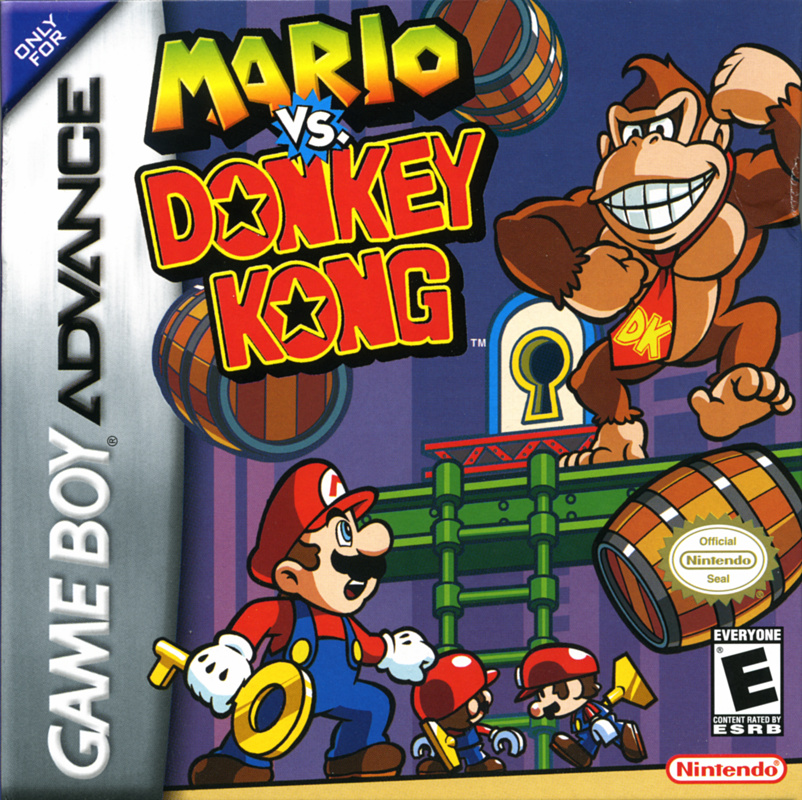
Europe / North America
Image: Nintendo
So this one is pretty straightforward in its design, depicting Mario facing off against, well, Donkey Kong. It’s a pretty neat illustration with a strong composition, drawing the viewers’ eyes to all corners of the box. Very nice!
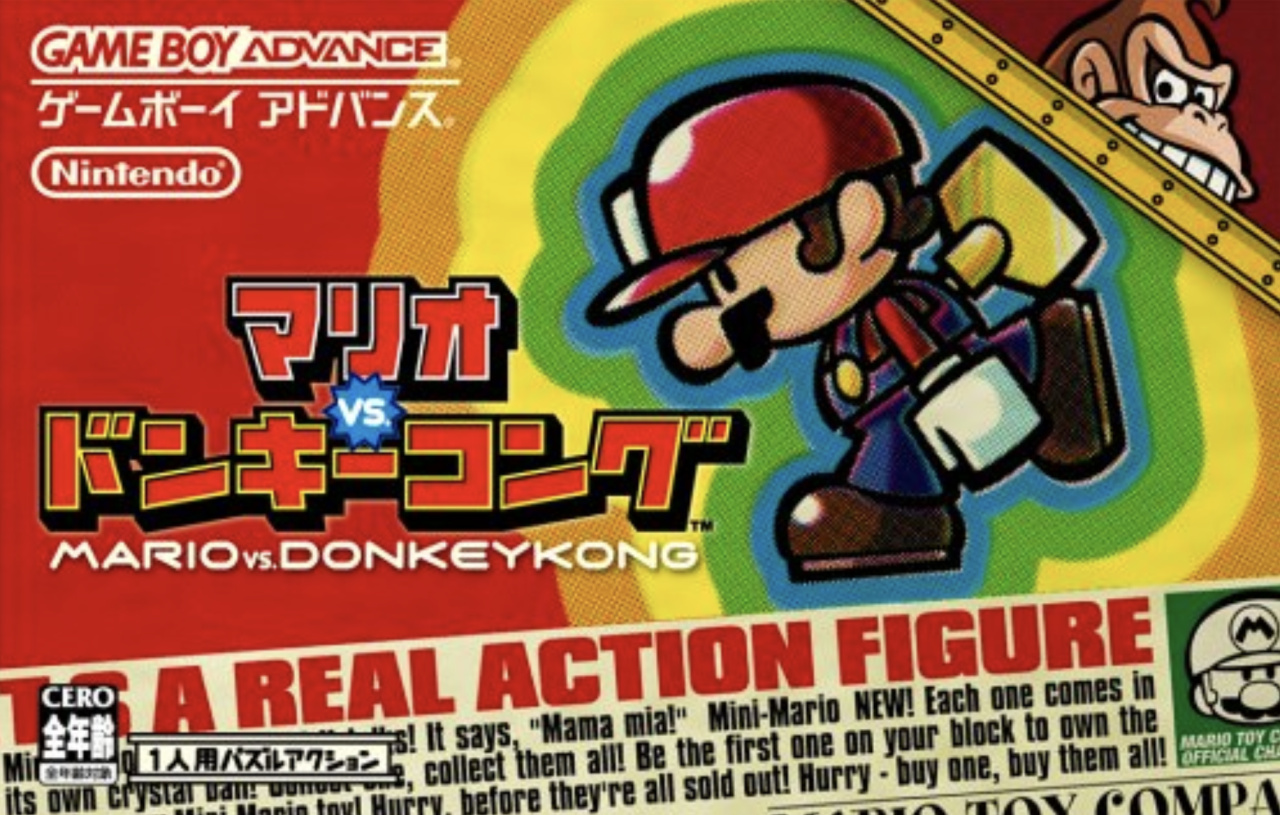
Japan
Image: Nintendo
The Japanese version, meanwhile, is wild. It acts as a fictional advertisement for the Mini-Mario toy, showcasing the figure in all its glory while plastering a bunch of buzzwords across the bottom half of the image. Oh, and look at Donkey Kong peeking out of the top right corner! Adorable.
Which region got the best Mario Vs. Donkey Kong box art? (2,063 votes)
North America / Europe85%
Japan15%
Thanks for voting! We’ll see you next time for another round of the Box Art Brawl.
When he’s not paying off a loan to Tom Nook, Liam likes to report on the latest Nintendo news and admire his library of video games. His favourite Nintendo character used to be a guitar-playing dog, but nowadays he prefers to hang out with Judd the cat.
The hit indie release Vampire Survivors made its debut on the Switch last month and since then it’s received some updates.
The latest one (Version 1.6.108) has now been released on Nintendo’s hybrid system and it contains all sorts of fixes and improvements for both the main game and DLC. In addition to this is added language support for Chinese (Traditional) and perhaps most interestingly there’s also been a Home menu icon update. Below is the before and after screenshots:
Here’s the full rundown of the latest patch (via Nintendo Everything):
Vampire Survivors – Nintendo Switch Version 1.6.108
Added language: Chinese (Traditional)
Updated game icon
Updated credits
Fix for revives triggering twice
Fixes for particle effect sizes and duration on Level Up and Arcana
Various small fixes for VFX at different aspect ratios
Pentagram flash now obeys Flashing VFX in the options
UI pages can now be scrolled quickly using shoulder buttons on controllers
Fixed lingering images on screen sides after completing the yellow sign collection animation
Improvements to Arcana selection navigation
Optimized Thunder Loop Projectile to reduce hitch after evolving
Fixed Gorgeous Moon display colors and alpha
Updated config for Rosary SFX
Fixed audio issue with vaccuum
Fixes for pickup vacuum behaviour differences
Fixed DLC enemies showing as white squares in the credits if you don’t own the DLC
Fixes for Luminaire’s VFX
Fix for walking characters hiding too early during preloader
Fixed an issue with CherryStarsWeapon/Projectile not despawning its sprites and effects properly
Fixed an issue where the bone giant weapon was not being removed properly during special events
Fixed an issue with some enemies starting at an angle when they should not (ex: The Directer)
Fixed issue where Sammy leveling up too much before starting the Directer fight would cause a crash
Fix for crashes occurring at or after 30 minutes
Fix for controller issue causing players to get stuck on the ‘Photosensitivity Warning’ screen
Fixed an issue where clicking on a blank arcana card after exhausting via rerolls could cause a crash
Fixed Selection arrow colors not always refreshing when reentering a panel
Fixed quick access options page failing to display when entering for a second time
Fixed a bug where extra players could clip through walls at boundaries
Fixed Crimson Shroud explanations not counting as retaliation damage
Fixed total egg count not updating when buying from the merchant or picking up Golden Eggs which caused Egg Man to not show up
Fixed an issue where projectiles supporting Heart of Fire Arcana were triggering retaliation explosions instead of weapon explosions
Fixed evolution highlights not covering the entire item in the Grimoire
Improvements to caching and performance of options menu
Fixed issue with Trickster appearing in non-inverted library
Removed Stained Window from weapon summary list
Multiple navigation arrow fixes across the UI
Fixed a crash that could happen when the Sire weapon was removed
Fixed an issue with sprite generation which resulted in higher vertex counts causing gradient tinting to not work
Enabled missing gradient tint and corrected depth sorting of mirage projectiles
Fixed issue with equipment panel spacing
Fixed potential crash related to equipment panel
Fixed issue with Gem physics offsets
Fixed Coin sound being more high-pitched during gold fever vs the original engine
Fixed Metaglio merging not showing in equipment panel
General improvements to formatting and alignment of items in the equipment panel
Improved sprite sizing across all panels
Optimized tilemap loading
Fix for UI popups being on the wrong layer in some situations
Fixed avatar infernas weapon not showing in secret page
Fixed a sorting order issue for cursors and their icons
Updated how toastie is spawned to ensure it is hidden when leaving gameplay
Added switching of Syuuto’s song during weapon evolution
The PC version of Vampire Survivors is currently on Version 1.6.109. This was released earlier this week on 14th September.
If you’ve not played Vampire Survivors yet, don’t sleep on it. In our review, we gave the game a lot of praise and would strongly encourage everyone to give it a go for the asking price of $4.99 / £3.99 or the regional equivalent. There’s also some great DLC.
Have you tried out this latest update yet? What do you think of the icon change? Tell us below.
Mortal Kombat 1 went into early access this week and players have finally been able to get their hands on all versions of the game. The question many have been wondering for some time now is how the game holds up on the Switch compared to other versions and now we’ve finally got some details.
The tech, visual and performance comparison YouTube channel ElAnalistaDeBits has released a graphics comparison of the Switch version alongside the Xbox Series, PlayStation and Steam Deck versions of the game. According to the source, here’s the rundown on the Switch release:
It’s further mentioned how the Switch “aims to reach 60fps during combat, but it’s a bit unstable”. In terms of cutbacks on Switch – all “visual aspects” have been impacted. This includes “textures, geometry, lighting, animations, post-processing effects” and more. One other note about the Nintendo release is the “wait times to start fights on Switch are somewhat tedious”.
Keep in mind, Mortal Kombat 1 is still technically in its “early access” period and has already received a day-one update addressing some issues across all platforms. In other words, there could be more updates in the future, improving the overall experience. Be on the lookout for our own Nintendo Life review of this new Mortal Kombat entry soon.
Will you be checking out Mortal Kombat 1 on the Switch? Let us know in the comments.
When he’s not paying off a loan to Tom Nook, Liam likes to report on the latest Nintendo news and admire his library of video games. His favourite Nintendo character used to be a guitar-playing dog, but nowadays he prefers to hang out with Judd the cat.





 Synchronous requests involve waiting for the response of each request before proceeding, and it’s a typical way to handle requests in Python. However, this can lead to slower execution times, especially when dealing with numerous requests or slow network responses.