Until earlier this year, I’d not really considered what I’d want to see in a Zelda: Ocarina of Time remake. After all, the 2011 3DS version did a pretty good job at updating the 1998 original, and so I’d operated under the assumption that it wouldn’t be a thing again for a long, long time.
Alas, it’s real. Ocarina of Time will be “reborn” on Switch 2 later this year, with our first brief glimpse at Link suggesting the most realistic depiction of Hyrule and its residents that we’ve seen so far.
It’s still too early to determine just how faithful the remake will be to the original. Will this be a 1:1 recreation like Star Fox, or should we be prepared for something more radical like Final Fantasy VII Remake or Resident Evil 2? Either way, beyond the obvious audio-visual improvements, there are a small handful of things from Ocarina of Time that I feel need updating for the remake, and one very specific thing that should be kept exactly as it is.
So let’s go through them together…
1. Much longer day/night cycle
Image: Nintendo Life / Nintendo
No matter how many times I replay Ocarina of Time, I always grimace slightly at how short the day/night cycle is.
When you first venture out into Hyrule Field, you can just make it from Kokiri Forest to Castle Town before the sun sets and the drawbridge rises – only just. It’s kind of crazy, and you can literally watch the sun and moon move across the sky in a handful of minutes.
It does keep you on your toes, because the Stalchildren show up fairly frequently at night, but I wouldn’t be opposed to a few enemies roaming about during the daytime, too. I just want a bit more time to soak in that stunning overworld music, y’know?
2. Fewer Navi interruptions (or make them optional)
Image: Nintendo Life
Hey! Listen!
Yeah, you knew this one was coming. Navi is a good character, but my goodness, does she make her presence known far too frequently.
Granted, it could be worse: the game could literally force you to listen to what she has to say (à la Myles MacKenzie); it mercifully requires you to hit a button to respond to her constant nudges.
This is still too much for me, though. Fewer interruptions would be welcome, or better yet, offer the ability to disable them completely. If this is a 1:1 remake, then there will be a lot of players familiar enough with the game that Navi won’t be needed at all.
3. No loading screens between areas
Image: Nintendo
Another obvious choice, but worth mentioning. Ocarina of Time, for as epic and sweeping as it often feels, is nevertheless limited by the original hardware, separating every major area with loading screens. There’s nothing wrong with this, as such, and the transitions are short enough that they don’t necessarily hamper the experience, but it would be great to ditch them entirely.
Imagine crossing the bridge from Kokiri Forest to Hyrule Field without any loads, or running straight into the Deku Tree and seamlessly transitioning into the first dungeon. It would make the whole world feel so much more cohesive and alive, and I think Nintendo finally has the technology to make it happen.
4. Put more interesting stuff in Hyrule Field
Image: Nintendo Life / Nintendo
My initial thought about Hyrule Field is that Nintendo should make it larger, but that doesn’t exactly feel like the right approach unless we’re looking at a complete reimagining of the original. Instead, if we’re going for a more faithful recreation, the overworld should contain a lot more interesting sights and sounds.
Again, we’re going back to the limitations of the N64 hardware and what Nintendo could feasibly fit onto the cartridge at the time, so it’s understandable why Hyrule Field feels so empty in this day and age. But for the remake, there just needs to be more stuff. Not needless bloat with no substance, but something to make the journey from one major area to another a bit more engaging.
Essentially, Hyrule Field should take a leaf out of BOTW‘s book.
5. Reload saves from anywhere in the world
Image: Nintendo Life / Nintendo
An Ocarina of Time remake in 2026 needs to be able to reload saves at the exact location you recorded your data. No more starting at Link’s house in Kokiri Forest or the Temple of Time, please. It made progression a much lengthier endeavour than it needed to be, and having to make identical treks back to your most recent location was a drag.
Again, options would be good here. If you enjoy starting fresh from Kokiri Forest with each reload, then the game should have some sort of toggle to let that happen. But in an age where you can quite literally save anywhere in the original with Switch Online, the remake needs to offer flexibility.
6. Give Princess Ruto more agency
Image: Nintendo
When you come across Princess Ruto in the depths of Jabu-Jabu’s belly, she comes across as a feisty, headstrong character who isn’t willing to be bossed around…until she curls up on the floor and lets you carry her around.
Sorry, what..? Obviously, her stubborn refusal to move was narrative dressing for Jabu-Jabu’s puzzle mechanics, but this never felt quite right to me, so I’d love to see Ruto show more agency, even if it’s just walking on her own two feet.
Tears of the Kingdom demonstrated that NPCs can be really helpful without getting in the way. Perhaps Ruto could possess some ability to let Link navigate Jabu-Jabu’s belly a bit better, triggered by a button press when you’re standing next to her.
Honestly, having to haul Ruto around in the original got on my nerves more than the Water Temple, so I’d like to see this changed.
And now, here’s one thing that should remain completely unchanged…
THAT title screen
Of course. Of course it’s the title screen.
Look, there’s so much in Ocarina of Time that shouldn’t be messed with, like the escape from Lon Lon Ranch atop Epona, the incredible Dark Link boss, or even just the entire opening segment leading up to the first dungeon. But really, the title screen was one of the most important aspects of the entire experience.
Ditching the bombastic theme from A Link to the Past for a more contemplative melody that perfectly encapsulates the game’s sense of wonder and majesty, Ocarina of Time’s title screen remains the absolute peak in all of gaming. NL’s editor, Gavin, summarises it wonderfully:
“So understated, so beautiful. No blaring Zelda march and trumpets – a plaintive theme and a lonely adventurer at sunrise. No notes. Don’t mess with perfection.”
What do you think most needs to change for the Ocarina of Time Remake? (2,261 votes)
Longer day/night cycles14%
Fewer Navi interruptions12%
Seamless transition between areas15%
More things to see and do in Hyrule Field36%
Reload saves from anywhere15%
Give Princess Ruto more agency4%
Something else (comment!)4%
So there you have it! Do you agree with these suggestions? What do you think perhaps needs to be changed for the Ocarina of Time remake? Let us know with a comment.
If you’ve played the Star Fox demo on Switch 2, then you’ll know that it’s an absolute visual feast, updating the N64 original to a degree we simply never thought possible (ball’s in your court now, Ocarina).
One person who’s been open about how much the update has impacted him is none other than Takaya Imamura, the art director for Star Fox 64 and the developer largely responsible for the series’ overall presentation.
Speaking on X, Imamura-san explained how the N64’s limited hardware made it difficult to convey the differences between pre-rendered graphics and real-time CG at the time. As such, he says that the improved visuals for the Switch 2 version “brings tears to my eyes”.
Here’s what he had to say (machine translated):
“Back in the Nintendo 64 days, it was a struggle to get people to understand the difference between pre-rendered graphics and real-time CG. Many people thought the beautiful cutscenes on the PlayStation were simply a reflection of the console’s capabilities.
“That’s why, with Star Fox 64, we aimed to create demo scenes and presentations that were just as impressive as pre-rendered graphics, while still pursuing the unique appeal of real-time graphics. In that sense, the improvements in graphics this time around really bring tears to my eyes.”
Previously, Imamura-san stated that although he likes the design of Fox McCloud in the new game, he personally prefers the movie version. No, there’s no Star Fox Movie – as a reminder, the character actually crops up in The Super Mario Galaxy Movie; a surprise Nintendo itself revealed prior to its release with an official poster.
Even if you’ve yet to play the demo, hopefully the trailers and footage so far has demonstrated just how much of an upgrade this is. In terms of gameplay, it’s largely the same experience that we all went through back in 1997, though some additional content has been added to beef up the overall package.
What are your thoughts on Star Fox so far? Have you tried the demo yet? Let us know with a comment.
Nintendo’s Japanese branch has announced it’s placed new purchase requirements on the Switch 2, after discovering “multiple orders” suspected of scalping consoles.
The notice specifically highlights the Switch 2 “multi-language” model sold on the Nintendo Store in Japan. To purchase one of these units, customers will now be required to have “50 hours or more” of play time on the original Switch (as of the end of May 2026) before they can purchase this new unit.
As further noted, this does not include the hours spent on demo software or free software, and Nintendo is also limiting Switch 2 orders to one purchase per Nintendo account. Here’s the full translated notice about this via social media:
Nintendo: Regarding sales of the Nintendo Switch 2 (Multilingual) on the Nintendo Store, we have temporarily suspended sales after identifying multiple orders suspected of hoarding or similar activities.
To ensure we can deliver the product to as many customers as possible, we will now limit sales to customers who meet the following conditions. We appreciate your understanding.
Please note that there are no changes to the purchase conditions for the Nintendo Switch 2 (Japanese/Japan-only).
<Requirements for Purchasing the Nintendo Switch 2 (Multilingual Version)>
・As of 11:59 PM on Sunday, May 31, 2026, you must have played the Nintendo Switch for 50 hours or more. *Excludes demo versions and free software. *The purchase limit is one unit per Nintendo Account.
In case you missed it, Nintendo’s new price for the Switch 2 will come into effect this September in Western markets. In Japan, the new prices have already been applied as of May 2026. The company is also increasing the price of the original Switch hardware in Japan as well as its Switch Online subscription in this location.
The reasoning for these price increases are due to “changes in market conditions” and “global business outlook”. This isn’t isolated to Nintendo, either. Every major player in the console space has announced price increases in recent months in response to global supply shortages and other market factors. It’s even ignited rumours about next-generation hardware delays.
You can find out more about the new prices for the Switch 2 and original Switch in our previous story here on Nintendo Life:
If you have encountered any bugs, Update 8 Hotfix 1 will hopefully resolve these problems. It comes loaded with bug fixes specifically addressing some problems with the Switch 2 version, and improving the overall stability of the title on the hybrid platform.
MachineGames has also included updates for “all platforms” – addressing stutters and more. Here’s the full rundown via the company’s official social media account:
Indiana Jones and the Great Circle – Update 8 Hotfix 1 (12th June 2026)
We’ve pushed a small hotfix today for Indiana Jones and the Great Circle. Check below for the official notes:
Bug Fixes
This small update fixes some player-reported issues encountered since the most recent release.
[Nintendo Switch 2] Fixed two common crashes, improving game stability.
[All platforms] Fixed the ragdoll system to prevent enemies from rotating when being picked up or popping when standing up after being knocked to the ground.
[All platforms] Fixed a small stutter when a game level first loads.
In our review here on Nintendo Life, we thought the Switch 2 port of Indiana Jones and the Great Circle was a great experience:
“A globe-trotting adventure with compelling exploration, crunchy melee, and tomb-raiding puzzles. With a great story and sky-high production value, Indiana Jones and the Great Circle is an authentic new franchise entry with a capable lead in Troy Baker. And despite taking the odd hit, the Switch 2 port holds its own admirably.”
Have you tried out Indiana Jones’ new game on the Switch 2 yet? How are you finding it so far and are there any other updates you would like to see for this title? Let us know in the comments.
This soundtrack contains a total of 99 tracks and has a run time of 1 hour and 37 minutes. To listen to this album, you’ll need to have an active Switch Online subscription and access to Nintendo Music via the official app or web browser.
Nintendo: “Featuring tracks sucha s Title Theme, tracks for Cycling and Skydiving and more.”
If you didn’t catch the Nintendo Switch Sports Resort announcement during the Nintendo Direct this week, it will come loaded with 12 sports including Boxing, Table Tennis, Archery, Tennis, Volleyball, Bowling, Basketball, Golf, Thumb Wrestling, Skateboarding, Power Cruising and Prop Plane.
This new title is arriving for the Switch 2 later this year on 22nd October 2026, with pre-orders now available on the eShop. This latest update for Nintendo Music follows an update earlier this week, which added some free roam songs from Mario Kart World.
What do you think about this latest album update for Nintendo Music? Let us know in the comments.
Resident Evil Code: Veronica is getting a remake for the Switch 2 next year, and it’s already led to questions about the possibility of the GameCube version Resident Evil Code: Veronica X being revived for the ‘Nintendo Classics’ Switch Online + Expansion Pack service.
Unfortunately, right now, there are “no plans for that”. This was mentioned by the Capcom producer Yoshiaki Hirabayashi during a private Q&A session last week (via Kotaku):
“Will the GameCube version of Veronica be coming to Switch Online’s Expansion Pack anytime soon? There are “no plans for that,” Hirabayashi said”
Nintendo’s GameCube library for the Switch 2 currently features a total of nine games, and includes titles such as Chibi-Robo!, Mario Smash Football, F-Zero GX and Soul Calibur II. Nintendo has also revealed a few other titles for the service, which haven’t been made available yet.
If it’s anything like the Nintendo 64 library, certain “mature” titles in the GameCube collection would likely require a separate application. Code: Veronica originally debuted on the Dreamcast in 2000 and was followed by Veronica X in 2001, which was then ported to the GameCube in 2003.
Capcom will release the upcoming remake of Resident Evil Veronica for the Switch 2 and multiple other platforms in 2027.
The latest Nintendo Download update for North America has arrived, and it’s bringing new games galore to the eShop. As always, be sure to drop a vote in our poll and comment down below with your potential picks for the week. Enjoy!
Switch 2 eShop – Highlights
Xenoblade Chronicles: Definitive Edition – Nintendo Switch 2 Edition(Nintendo, 9th Jun, $69.99)– Experience the critically-acclaimed first game in the Xenoblade Chronicles saga in 4K resolution on compatible TVs and full HD in handheld mode, all at 60 fps. The Xenoblade Chronicles: Definitive Edition – Nintendo Switch 2 Edition game features a host of new additions, such as a high-speed vehicle for traversing the game’s vast areas, new racing modes that let you earn in-game rewards, new equipment designs, and new voiceover added to the game’s Heart-to-Heart scenes.
Starseeker: Astroneer Expeditions(Devolver Digital, 11th Jun) – Start your mission in a brand-new game set within the Astroneer universe with a focus on discovery, cooperative expeditions and camaraderie. Exploring deep space on the ESS Starseeker, players will need to work together with the crew of the space station to complete objectives that will take them further into the unknown regions of each planet. Embark on timed expeditions to gather resources, complete missions and further your goals, as well as those of your squad and the entire station.
Star Fox Demo(Nintendo, 25th Jun, $49.99) – A cinematic take on the Star Fox 64 game, Star Fox features newly overhauled character designs, freshly revamped looks for each stage, plus detailed cutscenes, fully voiced dialogue and a sweeping orchestral soundtrack.
Switch 2 eShop – New Releases
and Roger(KODANSHA, 17th Jun, $3.49) – Past a Trail of Delusions and Roger is an interactive novel that lets you see through the protagonist’s eyes—whether what she sees makes sense or not. It is comprised of three chapters and can be played in its entirety in about one hour.
Arcade Archives 2 CAMELTRY(HAMSTER, 4th Jun, $9.99) – “CAMELTRY” is an action game released by TAITO in 1990. Rotate the maze to roll the ball and reach the goal before the timer hits zero. A variety of obstacles stand in your way, including traps that reduce your time and bumpers that bounce the ball away. It’s a unique ball-action game with a whole new sensation.
Atelier Yumia: The Alchemist of Memories & the Envisioned Land – Nintendo Switch 2 Edition(KOEI TECMO AMERICA, 9th Jun, $39.89) – People gather memories as they live their lives, thus developing their souls. This is the story of a young woman traveling across a ruined continent to find the path toward the future. The theme of this game is “memory. ” There are moments when everyone must confront the past and their own memories. All memories, including both successes and failures, become nourishment for the future and help shape people.
Console Archives Firework Thrower Kantaro’s 53 Stations of the Tokaido(HAMSTER, 4th Jun, $7.99) – “Firework Thrower Kantaro’s 53 Stations of the Tokaido” was released by SUNSOFT in 1986 for an 8-bit home console. This is an action game where Kantaro, a fireworks thrower, travels to Edo to launch fireworks over the Sumida River, where his fiancée, Momoko-chan, is waiting, while fending off enemies along the way. Will Kantaro safely reach Edo and be able to launch fireworks over the Sumida River?
Demeo x Dungeons & Dragons: Battlemarked(Resolution Games, 16th Jun, $29.99) – EPIC QUESTS. INSTANT ADVENTURES. Experience the magic of Dungeons & Dragons like never before in this tactical, cooperative digital board game set in Forgotten Realms. Command your heroes, unravel sinister plots and forge mighty alliances in turn-based combat and choice-based storytelling. Iconic D&D Elements with Streamlined Strategy
Denshattack!(Fireshine Games, 17th Jun) – Flip, trick and grind your train in a fast-paced, off-the-rails ride through a colourful Japanese dystopia. Take back the tracks with nothing but skill, speed, and style. Hop aboard your custom gravity-defying train and embark on a hectic quest to defeat the sinister Miraidō corporation, alongside a vibrant pack of outcasts. Ollie, kickflip, and grind your way through Japan’s biggest cities, as well as a world of meadows, volcanoes and oceans. Rack up points and chase that sweet high score as you flip, trick and stick the landing in your customisable ride.
Looks like Denshattack was delayed at the last minute:
Junkster(Stormcloud Games, 16th Jun, $9.99) – Junkster is a thrilling 3D action platforming adventure with a unique building mechanic. When an intergalactic cargo ship crash-lands on a dangerous junkyard planet, it is up to a scrappy, little construction bot named UM-13, or Um for short, to save the day! Armed only with his trusty robo-wrench, Um must transform the galaxy’s useless garbage into slightly more functional garbage as he searches for the parts to repair his ship and recovers his lost cargo of precious human artifacts.
SnowRunner(Focus Entertainment, 9th Jun, $39.99) – SnowRunner puts you in the driver’s seat of powerful vehicles as you conquer extreme open environments with the most advanced terrain simulation ever. Drive 40 vehicles from brands such as Ford, Chevrolet, and Freightliner as you leave your mark on an untamed open world. Overcome mud, torrential waters, snow, and frozen lakes while taking on perilous contracts and missions.
to a T(Annapurna Interactive, 11th Jun, $14.99) – to a T is a narrative adventure game that portrays the extraordinary life of a 13-year-old teenager, whose body happens to be in the shape of the letter “T.” They live in a modest seaside town that they explore by foot, train, or even their favorite unicycle, and interact with a the charming cast of characters who live there. – Read our to a T review
Unrailed 2: Back on Track – Nintendo Switch 2 Edition(Indoor Astronaut, 11th Jun, $14.99) – Unrailed 2: Back on Track brings chaotic local and online multiplayer track-building action to the next level – band together with friends to collaborate and build your track across new procedurally generated worlds – WHILST the train is running! So think fast, with more freedom than ever before, and conquer new obstacles in your way – before your trains becomes… a trainwreck!
Switch eShop – New Releases
Angry Capybara(Upscale Studio, 5th Jun, $4.99) – Capybaras are famous for their Zen-like patience, but even they have a breaking point! Welcome to Angry Capybara, a hilarious physics simulator in which nature’s most relaxed mammal finally resorts to violence. When denied access to your favourite outdoor hot spring, it’s time to take out your frustrations on Granny’s pristine living space. This isn’t about sneaking, it’s about embracing your inner wrecking ball!
Arashi Gaiden(NUNTIUS GAMES, 11th Jun, $8.99) – Arashi Gaiden is a turn-based action game with fast-paced dash and slash combat. Use the dash mechanic to quickly traverse levels and slice your enemies in half in style, combining your blade with shurikens, teleports and chains that paralyze your opponents.
Arcade Archives CAMELTRY(HAMSTER, 4th Jun, $7.99) – “CAMELTRY” is an action game released by TAITO in 1990. Rotate the maze to roll the ball and reach the goal before the timer hits zero. A variety of obstacles stand in your way, including traps that reduce your time and bumpers that bounce the ball away. It’s a unique ball-action game with a whole new sensation.
Arcade Pack(Sabec, 4th Jun, $14.99) – Jump into classic arcade-style action with the Arcade Pack, a collection of three exciting games inspired by retro machines and fast-paced gameplay. Test your reflexes, aim, and control skills across space battles, air hockey duels, and precision landings.
Asphalt Dominion(Gametry, 13th Jun, $4.99) – Asphalt Dominion is a thrilling arcade racing game where speed is everything and every race is a fight for control. Step into a world of exotic supercars, high-stakes competition, and visually striking tracks that take you through breathtaking environments filled with sharp turns, long straights, and intense rival action. From sunlit circuits to dramatic seasonal landscapes, every location is built to deliver fast, aggressive, and unforgettable racing.
Beholder: Conductor(Alawar Premium, 11th Jun, $16.99) – Welcome aboard the Determination Bringer! You have been appointed senior conductor of the legendary train, which all the citizens of our vast country are happy to see in their cities. Your responsibilities are maintaining order in the carriage assigned to you and providing assistance to passengers along the way. Your tools are reporting, intimidation, searches and ejection. Remember: the conductor is always right.
Beholgar 2(Dolores Ent., 12th Jun, $17.99) – The ancient evil has awakened, and the fate of the world hangs by a thread. Even Beholgar, the legendary warrior, knows that this enemy cannot be defeated by ordinary steel. There is only one weapon capable of slaying the darkness… but the blacksmith who forged it died centuries ago. To reclaim this cursed blade, Beholgar must descend into the depths of Hell itself, facing demonic horrors, ancient dragons, jinns, and corrupted creatures born from nightmare.
Blueberry(Hidden Trap, 12th Jun, $12.49) – Play as Blueberry and live through key memories from childhood to old age, piecing together fragments of her past in a deeply emotional story about trauma, resilience, and forgiveness. Climb the Tower of Life. Go on a journey from childhood to twilight years.
Car Guys(Ruben Alcaniz, 16th Jun, $6.00) – Experience the Ultimate Competitive Multiplayer Racing Game! Welcome to Car Guys, an exciting multiplayer racing game where skill and strategy come together in fast-paced, action-packed competitions. Represent your nation and climb the global leaderboard in adrenaline-fueled races that will put your reflexes and driving skills to the test!
Death Attraction(Upscale Studio, 5th Jun, $9.99) – The carnival has closed, but the real horror is just beginning. In Death Attraction, you awaken trapped inside a labyrinthine funhouse controlled by a terrifying, maniacal clown. What was supposed to be a thrilling amusement park ride has morphed into a spine-chilling fight for survival. The neon lights flicker, the eerie carnival music plays on a twisted loop, and somewhere in the shadows, a relentless killer is hunting you down.
Dragon Loop(Happy Player, 11th Jun, $13.49) – Help Xi navigate a five-day time loop and figure out what happened to her memories in a vast hand-drawn world. Together with her companion, Ouro, travel through a true metroidvania world where time changes the terrain in subtle ways. Escape the loop through exploration and battle. Change Xi’s fate and learn the truth of the Dragon Loop!
EGGCONSOLE MIRAI MSX2(D4 Enterprise, 11th Jun, $6.49) – Originally released in 1987, this action RPG casts you as the mysterious soldier mentioned above, embarking on an epic journey across six different planets. The game features side-scrolling action RPG mechanics where each planet is divided into two parts: aerial stages that play like a side-scrolling shooter, and underground stages where you fight using martial arts-style maneuvers. Powerful bosses guard key locations, such as the entrances to the underground and the end of each stage.
Flippy Jump(NOSTRA GAMES, 11th Jun, $1.99) – “You close the door of your refrigerator and an interesting life begins inside. Fruits and vegetables try to escape from this big white cage. Break everything around you and smash through shelves to find a way out. The more precise the timing of the jump, the more powerful the impact. That’s exactly what you need to succeed!
Frogborne(Downmeadowstreet, 12th Jun, $7.99) – Far from home and full of determination, a tiny frog sets off on the adventure of a lifetime. Explore a vibrant, storybook world brimming with secrets — from sun-dappled forests and cobblestone town squares to the towering halls of a grand castle, patrolled by a not-so-friendly giant guard. Hop, leap, and bounce your way through charming levels as you hunt down three legendary Power Gems, the only things that can carry you back where you belong.
Hamstory(Pixel Lantern, 5th Jun, $4.99) – Hamstory is a heartfelt 2D pixel platformer where every fall is part of the journey forward. Join Hamcho on a touching adventure to reach Haessi Star. Along the way, you will leap across challenging paths, sometimes miss your jump, and try again. Each attempt helps you grow stronger, teaching you how to go a little further than before. The way forward is not always clear, but with patience and a bit of courage, you will find your own path.
Hellbrella(Cyber Monkey Studios, 12th Jun, $8.99) – BECOME ONE WITH YOUR UMBRELLA! A fast-paced Aerial Roguelite Hack and Slash where Insane Combos and pure aggression are all that stand between you and death. Step into the paws of a Raincoat Cat and face an infernal journey with nothing but your Umbrella as a Weapon!
Honey Sprint(Afil Games, 11th Jun, $3.49) – Dive into an irresistible chase in Honey Sprint, where a hungry bear must escape a furious swarm while collecting as much honey as possible along the way. With simple controls and nonstop action, each run blends quick reflexes, smart decisions, and pure fun. Dodge obstacles, slide under branches, and jump at the right moment to keep your flow while chasing ever-higher scores.
Judy’s Adventure DX(RAWRLAB Games, 11th Jun, $5.99) – A peaceful picnic turns into a big adventure when Judy wakes up to find her house key gone! Run, jump, slip, and explore through colorful forests, golden cities, metallic sewers, and secret filled areas in this charming retro platforming adventure.
Little Kitty Meow(CGI LAB GAMES, 12th Jun, $9.99) – Explore a quiet and cosy office from the perspective of a curious little cat in Little Kitty Meow, a relaxing adventure focused on atmosphere, exploration, and peaceful wandering. Walk through office rooms, meeting areas, corridors, and workspaces while discovering hidden corners, cosy spots, and small environmental details that bring the workplace to life.
Love Chemistry – Sibella’s Formula(eastasiasoft, 11th Jun, $4.79) – Take the role of an unhinged lady chemist in raucous side-scrolling platformer Love Chemistry – Sibella’s Formula! Shoot syringes of your special mind-control formula at weird enemies, from robots and carnivorous plants to roving bookworms, and make your way through tricky corridors in old-school pixel art style!
Lovely Deco House(GaniTani, 11th Jun, $8.99) – Design the space of your dreams in a world filled with cozy emotions. In <Lovely Deco House>, gather materials from nature, such as plants and rocks, to create unique furniture and props, offering creative joy. Just like dyeing old cloth with cherry blossoms to make pretty pink fabric, your ideas will soon become wonderful interiors. Decorate the homes of your cute doll friends with carefully crafted furniture. From charming rabbit cafes to emotionally rich chick camping sites, new stories bloom wherever your touch reaches.
Mori Carta(Secret Item Games, 11th Jun, $12.49) – Mori Carta is a handless deckbuilding roguelike. Choose left or right on every card to adventure through stories. Simple decisions lead to rich and rewarding gameplay. Four dramatically different characters with their own unique card sets, more than 1000 playable cards, over 185 unique enemies.
Pitstop in Purgatory(Ratalaika Games, 12th Jun, $4.99) – Astrid wakes up in Purgatory and she doesn’t remember anything. Point and click your way through adventure-based gameplay mixed with visual novel storytelling. Solve the mystery of our heroine’s unexplained and unusual death. Experience a heartfelt story where your choices matter, with five different interactive routes. Feel your way through a charming, funny, dramatic and moving narrative full of compelling characters, brought to life by partial voice acting.
Planetfall Conquerors(Eathrabaria, 4th Jun, $4.99) – Build your ultimate spaceship and dive into a thrilling arcade-style space adventure. Customize every part of your ship—from body and wings to engine and weapons—then launch into fast-paced battles across the galaxy. Speed through dense asteroid fields, unleash powerful rockets, and take down enemy ships while skillfully avoiding deadly mines and hazards. Explore two distinct planets, each offering unique environments and challenges, from vast open space to dangerous planetary surfaces.
Re:Re:Ghosted(Playstige Interactive, 12th Jun, $3.99) – Endless job search. Hunt for the best resume. Die in someone else’s dream. Frame HR for murders. And fail in the backrooms. Re:re:ghosted is a first-person psychological horror game.
Reel it! World Fishing(SAT-BOX, 11th Jun, $12.80) – Let’s go fishing on the Nintendo Switch™! Travel to different world locations like North America, Europe, Africa, and the Amazon! Each spot is home to lots of unique fish to discover! Play solo, or compete with up to 4 players using one Joy-Con™ each! Become the world’s greatest angler! Catch as many fish as you can within the time limit! Look out for big fish to boost your score! Sit back, relax, and enjoy endless fishing! Watch the scenery shift from day to night!
Sayonara Wild Hearts + Lorelei and the Laser Eyes Bundle(Annapurna Interactive, 4th Jun, $34.18) – Sayonara Wild Hearts is a dreamy arcade game about riding motorcycles, skateboarding, dance battling, shooting lasers, wielding swords, and breaking hearts at 200 mph. A woman, summoned by an eccentric man to participate in a project in an old hotel somewhere in central Europe, becomes embroiled in a game of illusions, increasingly dangerous and surreal in Lorelei and the Laser Eyes.
Scarlet Wolf(Sometimes You, 3rd Jun, $9.99) – If you’re ready to run and play a deadly game of hide-and-seek, then come on in and make yourself at home. Behind the door, endless oppressive corridors, filthy walls, deadly traps, and a ravenous creature eagerly waiting to get up close and personal with you await. There are doors that should remain locked. There are places that no one should ever visit. Secrets hidden in the shadows should not come to light. But if you do wander into one of these places, know this: your enemy is strong and dangerous.
Tale of Dark Lands(Sometimes You, 2nd Jun, $9.99) – Tale of Dark Lands – a magical fantasy action RPG with an elegant low-poly style and the charm of a timeless fairy tale. Immerse yourself in a world of mysteries, perils, and glorious adventures! A story full of secrets and challenges. The main hero is a brave mercenary hired by the residents of a small village to defend them against fierce goblin raids. But what begins as a simple job turns into something far greater.
Thomas & Friends: Wonders of Sodor(Dovetail Games, 9th Jun, $39.99) – Join Thomas and his friends on a special journey across Sodor! Hop into the cabs of North Western Railway’s classic steam team to enjoy nostalgic stories and all-new narratives right from the drivers’ seats.
Unrailed 2: Back on Track(Indoor Astronaut, 11th Jun, $14.99) – Unrailed 2: Back on Track brings chaotic local and online multiplayer track-building action to the next level – band together with friends to collaborate and build your track across new procedurally generated worlds – WHILST the train is running! So think fast, with more freedom than ever before, and conquer new obstacles in your way – before your trains becomes… a trainwreck!
Urban Jungle(Assemble Entertainment, 11th Jun, $11.99) – Urban Jungle is a charming and relaxing simulation game that invites you to transform ordinary apartments into a lush, green haven by placing delightful plants with savvy. But no worries, you won’t have to deal with watering or pest control – the plants just need a good spot, and that’s enough to create to comfiest and coziest home of them all. Oh, and don’t forget to pet your cat!
What will you be downloading this week? (1 vote)
Xenoblade Chronicles: Definitive Edition – Nintendo Switch 2 Edition0%
Starseeker: Astroneer Expeditions0%
and Roger0%
Arcade Archives 2 CAMELTRY0%
Atelier Yumia: The Alchemist of Memories & the Envisioned Land – Nintendo Switch 2 Edition0%
Console Archives Firework Thrower Kantaro’s 53 Stations of the Tokaido0%
Demeo x Dungeons & Dragons: Battlemarked0%
Denshattack!0%
Junkster0%
SnowRunner0%
to a T0%
Unrailed 2: Back on Track – Nintendo Switch 2 Edition0%
Angry Capybara0%
Arashi Gaiden0%
Arcade Archives CAMELTRY0%
Arcade Pack0%
Asphalt Dominion0%
Beholder: Conductor0%
Beholgar 20%
Blueberry0%
Car Guys0%
Death Attraction0%
Dragon Loop0%
EGGCONSOLE Mirai MSX20%
Flippy Jump0%
Frogborne0%
Hamstory0%
Hellbrella0%
Honey Sprint0%
Judy’s Adventure DX0%
Little Kitty Meow0%
Love Chemistry – Sibella’s Formula0%
Lovely Deco House0%
Mori Carta0%
Pitstop in Purgatory0%
Planetfall Conquerors0%
Re:Re:Ghosted0%
Reel it! World Fishing0%
Sayonara Wild Hearts + Lorelei and the Laser Eyes Bundle0%
Scarlet Wolf0%
Super Farming Boy0%
Tale of Dark Lands0%
Thomas & Friends: Wonders of Sodor0%
Unrailed 2: Back on Track0%
Urban Jungle0%
Nothing for me this week100%
So that’s your lot for this week’s North American Nintendo Download. Drop a vote in the poll above, and comment below with your hot picks!
If you’ve tried the free demo for Denshattack! on Switch 2, then chances are you’re probably itching to play the full game, huh?
Well, you’ll have to wait a bit longer, we’re afraid. Originally scheduled to launch on 17th June 2026, it’s now been pushed back to 15th July. This is to allow developer Undercoders “a little more time to cook” to ensure everything’s running smoothly.
The announcement was made via social media on 4th June (yes, we’re quite late with this one, sorry – it’s been a busy week!):
We reckon the wait is going to be well worth it though. The demo is absolutely fantastic and it really leans into those early ’00s Sega / Dreamcast vibes.
We spoke with the development team back in April, during which Studio Director David Jaumandreu confirmed that the idea for Denshattack! came from playing with a Japanese train toy model. If you’re keen to find out more, then do give it a read when you’re able.
Are you keen to pick up Denshattack? Have you tried out the demo? Let us know with a comment.
As good as Final Fantasy VII Rebirth is, a lot of folks are in agreement that it suffered from poor pacing and an overstuffed world full of needless minigames.
Well, if you hoped that the upcoming sequel, Final Fantasy VII Revelation, would be a bit more streamlined, then you’d best just set your expectations accordingly. In a new interview with VGC, director Naoki Hamaguchi confirms that Revelations will actually have more minigames than its predecessor.
This comes from a desire to stick to the original vision and not bend over backwards to address fan feedback. If the team tried to fix absolutely everything that fans weren’t completely satisfied with, then you’d wind up with a game that “doesn’t really have any character”.
Here’s what he had to say:
“What I can say for Revelation is that it will feature as many mini-games as it did in Rebirth, if not more. I did not want to make a cut on that aspect. I didn’t want to reduce the number of mini-games. We’ll see how it turns out in terms of the fan feedback, but I will take that responsibility, depending on what happens. That was my decision.”
Despite this, Hamaguchi-san does confirm that some minigames can be skipped altogether; so even though there are more, it sounds like you’ll have more agency as to which ones you actually engage with.
The interview also naturally turns to how Revelation might conclude, and although Hamaguchi-san refrains from providing any specific details (thank goodness), it sounds like the team is satisfied with the overall conclusion, saying “I think we’re pretty confident and happy with how it’s turned out”.
What do you make of this? More minigames, but you can skip some of them. Sounds like a nice balance, right? Let us know your thoughts with a comment.
Because Apple tossed out a slide that has no context outside the keynote, the internet has convinced itself that Siri AI is only coming to hardware released since 2024. That’s untrue.
Apple announced Siri AI as part of the WWDC 2026 opening keynote on June 8. It’ll ship this fall as part of the iOS 27, macOS 27, iPadOS 27, and visionOS 27 software updates.
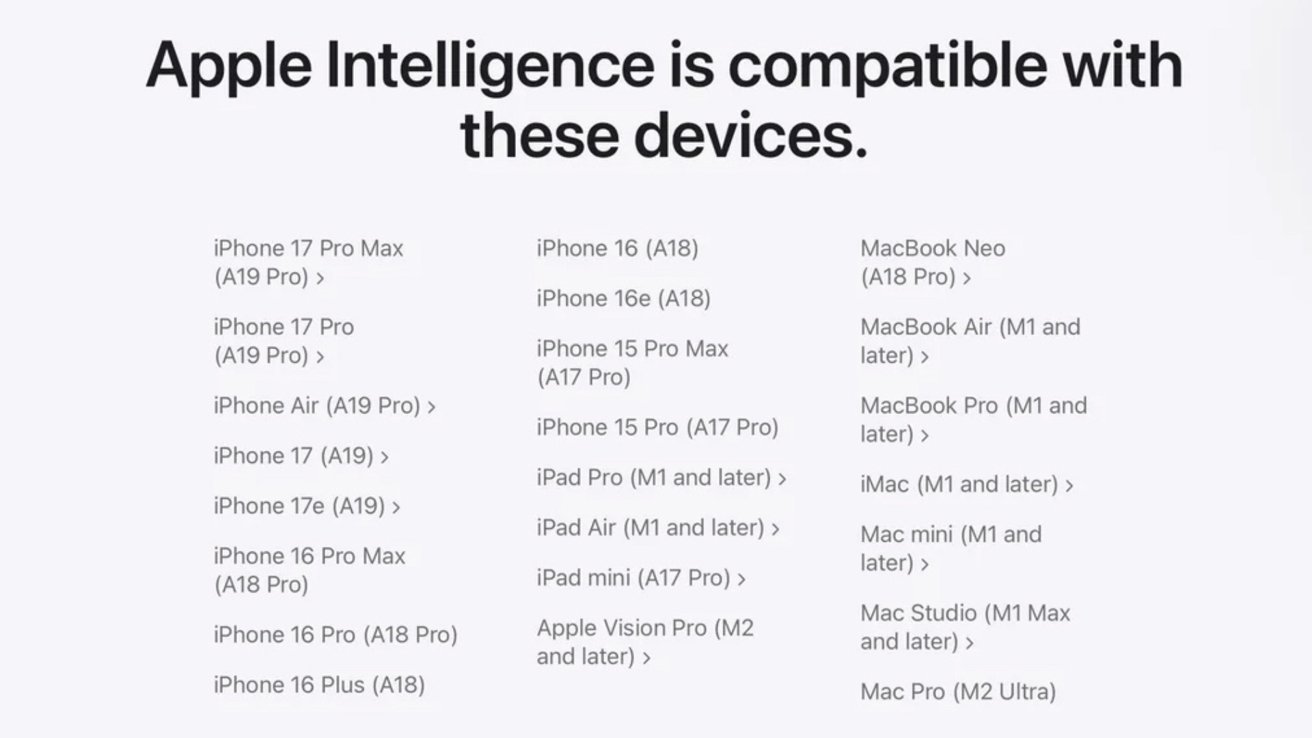
Siri AI is built on Apple Intelligence and will see the assistant gain new abilities, including a new chatbot-like interface. And it’ll be available on all of the same devices that already support other Apple Intelligence features.
That hasn’t stopped people from taking to social media and forums across the internet to cry foul, though. They want to know why their AI-ready iPhone 17 won’t get the new AI features this fall.
There’s clearly confusion, coupled with the internet’s tendency to go off half-cocked. And we only have to look at Apple’s Siri AI announcement to see where that confusion comes from.
Confusion at Apple’s core (advanced model)
During its Siri AI unveiling as well as in its press release, Apple mentioned its “most advanced on-device model ever.” It then went on to say that this model is only available on a very limited number of devices.
Apple says the most powerful on-device AI models will not be on all devices – image credit: Apple
In the case of the iPhone, those devices include the iPhone Air, iPhone 17 Pro, and iPhone 17 Pro Max. For iPad, you’ll need any of the models with an M5 chip or newer with 12GB of RAM. Mac owners with an M3 or newer, but still with 12GB of RAM or more, are also good to go.
Unfortunately, that’s where far too many people stopped paying attention. If they hadn’t, they’d know that the AFM Core Advanced model Apple was talking about is only actually used for two Siri AI features.
One of those features that older hardware won’t get allows users to customize the way Siri sounds, while the other brings improved system-wide dictation.
That’s it. Nothing more, and nothing less.
Apple Intelligence is available on plenty of new and older devices
These are the two features that you need a newer iPhone, iPad, or Mac to use. Everything else under the Siri AI and Apple Intelligence banners will come to existing Apple Intelligence-enabled devices.
That hasn’t stopped people from getting ready to ditch their M1 Pro MacBook Pros, though. Nor has it stopped them from readying the pitchforks because their iPhone 16 Pro Max won’t get the upgraded Siri.
All of this panic, the angst, the anger could have been avoided by simply “Googling Siri AI” and “supported devices.” Maybe these people chose to ask ChatGPT instead, and it just hallucinated an answer for them.