Welcome, Guest
You have to register before you can post on our site.

Username
  

Password


Search Forums

(Advanced Search)

Forum Statistics
» Members: 20,946
» Latest member: blackopsdlc
» Forum threads: 22,189
» Forum posts: 23,155

Full Statistics

Online Users
There are currently 1146 online users.
» 0 Member(s) | 1141 Guest(s)
Applebot, Baidu, Bing, Google, Yandex

Latest Threads
[WoW Retail News] NetEase...
Forum: World of Warcraft
Last Post: xSicKxBot

» Replies: 0
» Views: 2
[Dev News] Godot 4.8 Dev6...
Forum: Game Development
Last Post: xSicKxBot

» Replies: 0
» Views: 3
[MS Blog] Microsoft 365 a...
Forum: Windows
Last Post: xSicKxBot

» Replies: 0
» Views: 13
[PS.Blog] Kena: Scars of ...
Forum: Sony Discussion
Last Post: xSicKxBot

» Replies: 0
» Views: 10
[WoW Retail News] Rextroy...
Forum: World of Warcraft
Last Post: xSicKxBot

» Replies: 0
» Views: 11
[Ubuntu News] Android™ be...
Forum: Linux, BSD & Unix
Last Post: xSicKxBot

» Replies: 0
» Views: 13
Does Marvel Rivals featur...
Forum: PC Discussion
Last Post: xSicKxBot

» Replies: 0
» Views: 14
[WoW Retail News] More Pv...
Forum: World of Warcraft
Last Post: xSicKxBot

» Replies: 0
» Views: 14
(xbox 360) FIFA Street 4 ...
Forum: Xbox Mods
Last Post: xSicKxBot

» Replies: 0
» Views: 22
(Xbox 360) 100% resident ...
Forum: Xbox Mods
Last Post: xSicKxBot

» Replies: 0
» Views: 25

 
  News - Poll: Box Art Brawl: Duel #56 – Paper Mario: The Thousand-Year Door
Posted by: xSicKxBot - 08-17-2020, 06:29 PM - Forum: Nintendo Discussion - No Replies

Poll: Box Art Brawl: Duel #56 – Paper Mario: The Thousand-Year Door

Main

Welcome back to another edition of Box Art Brawl, the weekly bout of regional box art variants where you decide which one wins.

Last week we looked at Yoshi’s Island in the East and the West, and after some deliberation it was decided that the European / North American cover was the best by approximately two votes to one. It’s that big Nep-Enut that clinched it, we reckon.

This week we’re celebrating yet another anniversary: the twentieth birthday of the Paper Mario series which debuted on the Nintendo 64. In honour of the occasion, we recently asked you to rate all the games in the series and for this round we’ll we looking to the celebrated GameCube entry – once again we’re engaging in an East versus West contest!

So, which paper-thin combatant will float like a butterfly and tear its opponent to shreds? Let’s take a look at this week’s fighters…

Japan


JP

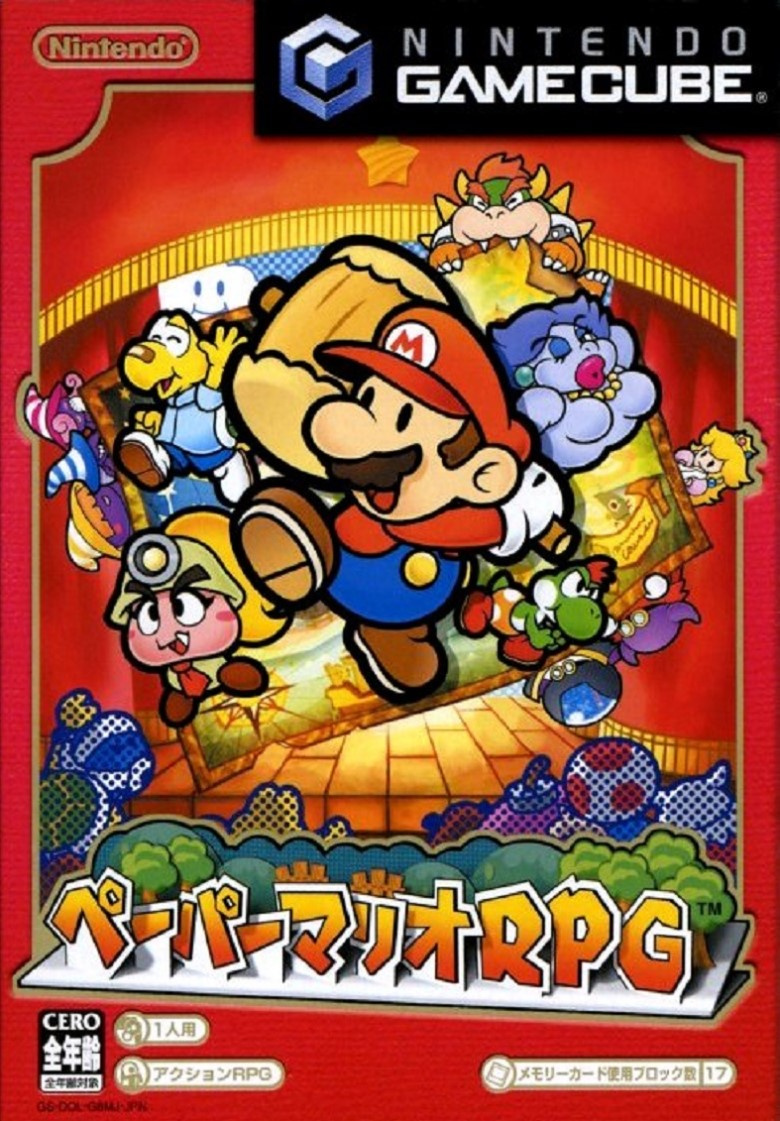
Carrying the name Paper Mario RPG in Japan, this cover has a lovely rich red border and the titular Mario bursting out of the middle. It’s hard to get a bad shot with all the paper-style character key art looking as good as it does, but the fact that this is framed on the box as a shot of a pop-up card construction makes it doubly great.

What else is there to say? Crafty Nintendo is the best kind of Nintendo. We think this looks spectacular.

Europe / North America


NAEU

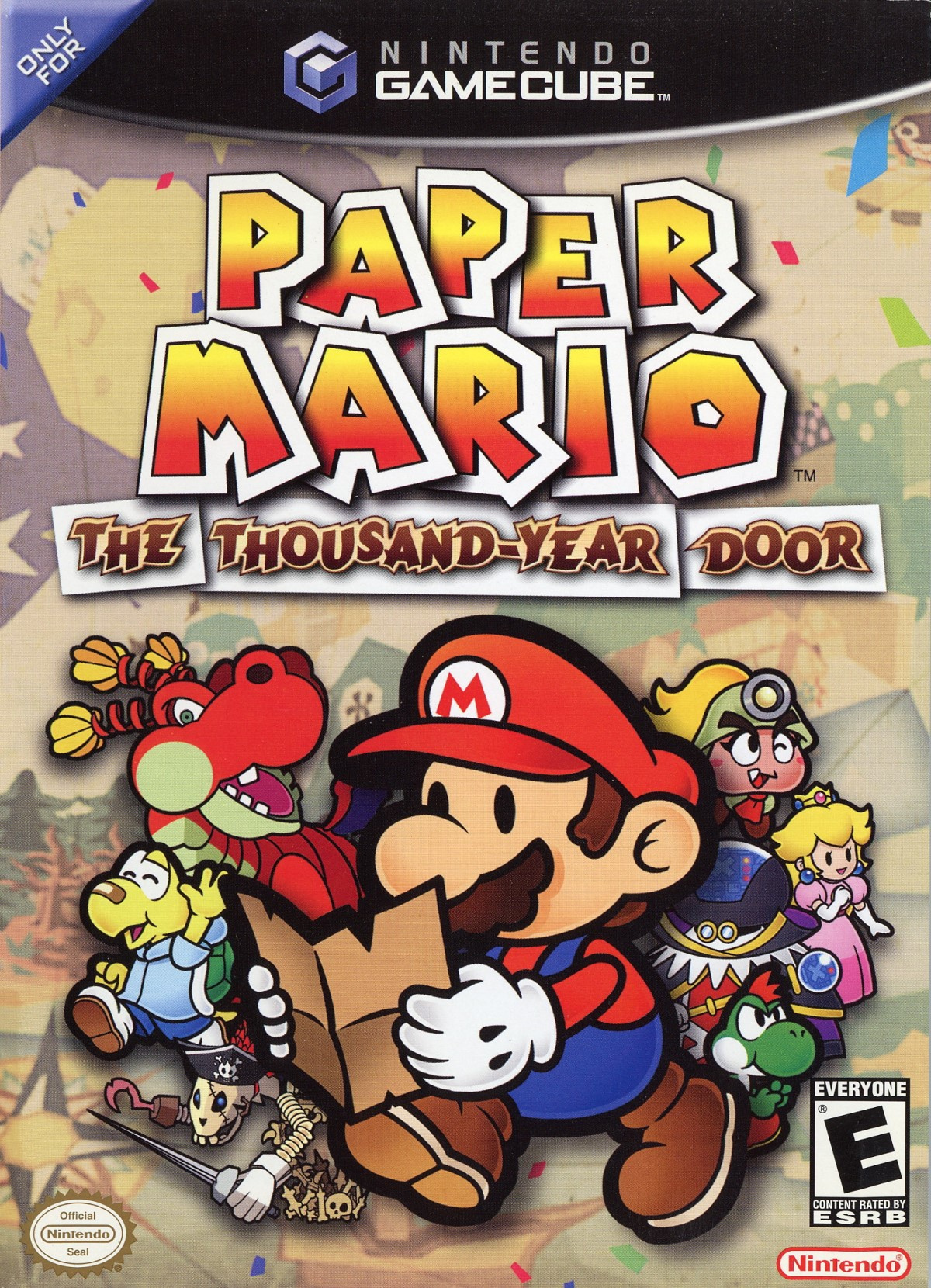
The version we got in the West features Mario reading a map, and although it doesn’t have the pop-up card look of the Japanese variant, we still love how the characters pop out thanks to their use of bold colouring against the faded background. The logo is strong, too. Personally we think the Japanese cover just edges it, but it’s not up to us, is it?


So, which one is the best? Pick your favourite from the two options below and hit ‘Vote’ to let us know:

That’s it for this week – feel free to check out our complete history of the Paper Mario series if you fancy, and we’ll catch you next time for another round of Box Art Brawl. Who knows, there might not be any anniversaries next week!


https://www.sickgaming.net/blog/2020/08/...year-door/

Print this item

  News - Ready Player Two Audiobook Will Be Narrated By This Star Trek Actor
Posted by: xSicKxBot - 08-17-2020, 06:29 PM - Forum: Lounge - No Replies

Ready Player Two Audiobook Will Be Narrated By This Star Trek Actor

Ernest Cline's sequel to his best-selling virtual reality adventure Ready Player One was announced last month, with the not-particularly-surprising title Ready Player Two. The novel will be published in November, and now we know who will narrate the audiobook version.

According to The Hollywood Reporter, former Star Trek: Next Generation star Wil Wheaton will narrate the Ready Player Two audiobook. The audio version is set to be released on November 24, the same day as the book arrives. Wheaton previously narrated Ready Player One and is best known for playing Wesley Crusher in all seven seasons of Star Trek: Next Generation, as well as appearing as himself in The Big Bang Theory. In addition, the actor narrated the audiobook for Cline's 2015 novel Armada.

Ready Player One was first published back in 2011, and Steven Spielberg's movie adaptation was released in 2018. The novel focuses on a boy named Wade Watts who lives in a dystopian future where everyone relies on a massive virtual reality game called The Oasis for the most basic necessities. Wade sets out to solve a series of puzzles within The Oasis in order to become the sole heir of its creator's company and fortune.

Continue Reading at GameSpot

https://www.gamespot.com/articles/ready-...01-10abi2f

Print this item

  [Tut] Closures and Decorators in Python
Posted by: xSicKxBot - 08-17-2020, 12:17 PM - Forum: Python - No Replies

Closures and Decorators in Python

This tutorial teaches you two advanced Python skills: closures and decorators. Mastering them will make you a better coder today—so, let’s dive right into them!

Closures


Every function in Python is first class, because they can be passed around like any other object. Usually, when a programming language creates a function just like other data types, that programming language supports something called Closures.

A closure is a nested function. It is defined within an outer function.

def outer_hello_fn(): def hello(): print("Hello Finxter!") hello()

Here, we have an outer function called outer_ hello_ fn, it has no input arguments. The function hello is a nested function defined within the outer function. The hello function is a closure.

Try It Yourself:

Exercise: What’s the output of this code snippet? Run the code to test if you’re correct.

When the outer function is called, the hello function within it will be defined and then invoked. Here is the function call and output:

outer_hello_fn()

Output:

Hello Finxter!

hello has been defined within outer_hello_fn, which means if you try and invoke the hello function, it will not work.

hello()

Output:

NameError: name 'hello' is not defined

If you want access to a function that is defined within another function, return the function object itself. Here is how.

def get_hello_fn(): def hello(): print("Hello Finxter!") return hello

The outer function is called get_hello_fn. hello, is an inner function, or closure. Instead of invoking this hello function, simply return the hello function to whoever calls get_hello_fn. For example:

hello_fn = get_hello_fn()

Invoking get_hello_fn stores the return function object in the hello_fn variable. If you explore the contents of this hello_fn variable, you will see that it is a function object.

hello_fn

Output:

<function __main__.get_hello_fn.<locals>.hello>

As you can see in the structure, it is a locally defined function within get_hello_fn, that is, a function defined within another function, that is a closure. Now, this closure can be invoked by using the hello_fn variable.

hello_fn()

Output:

Hello Finxter!

Invoke hello_fn() will print out Hello Finxter! to screen. A closure is something more than just an inner function defined within an outer function. There is more to it. Here is another example:

def hello_by_name(name): def hello(): print("Hello!", name) hello() return hello

Here, the outer function is called hello_by_name, which takes in one input argument, the name of an individual. Within this outer function, there is the hello inner function. It prints to the screen Hello!, and the value of the name.

The name variable is an input argument to the outer function. It is also accessible within the inner hello function. The name variable here can be thought of as a variable that is local to the outer function. Local variables in the outer function can be accessed by closures. Here is an example of passing an argument to the outside function:

greet_hello_fn = hello_by_name("Chris")

The function hello is returned and it is stored in the greet_hello_fn variable.

Executing this prints out Hello! Chris to screen. That is because we invoked the closure from within the outer function. We have a reference to the closure that was defined by the outer function.

greet_hello_fn()

Output:

Hello! Chris

Notice something interesting here. Chris is available in the variable name which is local to the hello_by_name function.

Now, we have already invoked and exited hello_by_name but the value in the name variable is still available to our closure. And this is another important concept about closures in Python. They hold the reference to the local state even after the outer function that has defined the local state has executed and no longer exists. Here is another slightly different example illustrating this concept.

def greet_by_name(name): greeting_msg = "Hi there!" def greeting(): print(greeting_msg, name) return greeting

The outer function, greet_by_name, takes in one input argument, name. Within the outer function, a local variable called greeting_msg is defined which says, “Hi there!”. A closure called greeting is defined within the outer function. It accesses the local variable greeting_msg as well as the input argument name. A reference to this greeting closure is returned from the outer greet_by_name function.

Let’s go ahead and invoke greet_by_name and store the function object that it returns in the greet_fn variable. We will use this function object to greet Ray by name. Go ahead and invoke the greet_fn() by specifying parentheses. And it should say, Hi there! Ray. Observe how the closure has access not just to the name Ray but also to the greeting message, even after we have executed and exited the outer function.

greet_fn = greet_by_name("Ray")
greet_fn()

Output:

Hi there! Ray

Closures carry around information about the local state. Let’s see what happens when the greet_by_name function is deleted, so you no longer have access to the outer function.

del greet_by_name

Now, remember that name and greeting message are both variables that were defined in the outer function. What happens to them? Now if you try to invoke greet by name.

greet_by_name("Ray")

Output:

NameError: name 'greet_by_name' is not defined

What about the greet_fn?

Remember that greet_fn is a reference to our closure. Does this still work?

greet_fn()

Output:

Hi there! Ray

Not only does it work, but it still has access to the local variables that were defined in the outer function. The outer function no longer exists in Python memory, but the local variables are still available along with our closure.

Decorators – Code Modification


Decorators help to add functionality to existing code without having to modify the code itself. Decorators are so-called because they decorate code, they do not modify the code, but they make the code do different things using decoration. Now that we have understood closures, we can work our way step by step to understanding and using decorators.

def print_message(): print("Decorators are cool!")

Here is a simple function that prints a message to screen.

print_message()

Output:

Decorators are cool!

Each time you invoke this function it will always print the same message. I want to use a few characters to decorate the original message, and I do this using the highlight function.

import random def highlight(): annotations = ['-', '*', '+', ':', '^'] annotate = random.choice(annotations) print(annotate * 50) print_message() print(annotate * 50)

The outer function highlight has no input arguments. Within the highlight function, a random choice of annotations is used to decorate the original message. The message will be highlighted with a random choice between the dash, the asterisk, the plus, the colon, and the caret.  The output will have an annotation of 50 characters before and after the message which is inside the print_message function.

Try It Yourself:

Exercise: What’s the output of this code snippet? Run the code to test your understanding!

highlight()

Output:

::::::::::::::::::::::::::::::::::::::::::::::::::
Decorators are cool!
::::::::::::::::::::::::::::::::::::::::::::::::::

Here is another function with a different message, print_another_message.

def print_another_message(): print("Decorators use closures.")

Now if I want to highlight this message as well, the existing highlight function will not work because it has been hardcoded to invoke the print_message function. So how do I change this highlight function so that it is capable of highlighting any message that I want printed out to screen? Remember that functions are first-class citizens in Python, which means whatever print function you have, you can pass it as an input argument to the highlight function. Here is a redefined highlight function, make_highlighted.

def make_highlighted(func): annotations = ['-', '*', '+', ':', '^'] annotate = random.choice(annotations) def highlight(): print(annotate * 50) func() print(annotate * 50) return highlight

The only difference here is that make_highlighted takes in an input argument that is a function. This function is what will print out the message to be displayed. The next change is that within the highlight closure, the function object that was passed in is invoked. That is the function object that will print out the message. Now we have two print functions so far.

print_message()
print_another_message()

And now with the help of  make_highlighted function, any printed message can be highlighted. For example:

highlight_and_print_message = make_highlighted(print_message) highlight_and_print_message()

Output:

++++++++++++++++++++++++++++++++++++++++++++++++++
Decorators are cool!
++++++++++++++++++++++++++++++++++++++++++++++++++

To print a different message and have it highlighted, simply pass a different function object to the make_highlighted function.

highlight_and_print_another_message = make_highlighted(print_another_message) highlight_and_print_another_message()

Output:

^^^^^^^^^^^^^^^^^^^^^^^^^^^^^^^^^^^^^^^^^^^^^^^^^^
Decorators use closures.
^^^^^^^^^^^^^^^^^^^^^^^^^^^^^^^^^^^^^^^^^^^^^^^^^^

It is clear that the make_highlighted function is very generic, you can use it to highlight any message that you want printed to screen. The function make_highlighted is a decorator.

Why is it a decorator? Well, it takes in a function object and decorates it and changes it. In this example, it highlights the function with random characters. Decorators are a standard design pattern, and in Python, you can use decorators more easily. Instead of passing in a function object to make_highlighted, accessing the closure, and then invoking the closure, you can simply decorate any function by using @ and placing the decorator before the function to decorate.

@make_highlighted
def print_a_third_message(): print("This is how decorators are used")

The use of the decorator @make_highlighted will automatically pass the function print_a_third_message as an input to make_highlighted and highlight the message.

print_a_third_message()

Output:

^^^^^^^^^^^^^^^^^^^^^^^^^^^^^^^^^^^^^^^^^^^^^^^^^^
This is how decorators are used
^^^^^^^^^^^^^^^^^^^^^^^^^^^^^^^^^^^^^^^^^^^^^^^^^^

Now you can use the decorator to highlight any messages.

@make_highlighted
def print_any_message(): print("This message is highlighted!")

And now if you invoke print_any_message, you will find that the result that is displayed to screen is highlighted.

print_any_message()

Output:

++++++++++++++++++++++++++++++++++++++++++++++++++
This message is highlighted!
++++++++++++++++++++++++++++++++++++++++++++++++++

Decorators – Customization


Let’s see another example of a Decorator that will do some work. It will do some error checking for us.

Here are two functions that will be the input to our decorator

def square_area(length): return length**2 def square_perimeter(length): return 4 * length

We assume that the value of the radius passed in is positive and correct.

square_area(5)

Output:

25

What if I invoke the square_area and pass in -1?

square_area(-1)

Output:

-4

The input -1 doesn’t make sense as a value for the length. The function should have thrown an error or told us in some way that negative values of length are not valid. Now, if you were to perform an error check for each of these functions, we would have to do it individually. We would have to have an if statement within the area function as well as the perimeter function. Instead of that, let’s write a decorator that will perform this error checking for us. The decorator safe_calculate takes in one input argument that is a function object.

def safe_calculate(func): def calculate(length): if length <= 0: raise ValueError("Length cannot be negative or zero") return func(length) return calculate

This is the function object that will perform the calculation. Within the safe_calculate outer function, the inner function called calculate is the closure. calculate takes in one input argument, the length. It checks to see whether length is less than or equal to 0. If yes, it throws an error. And the way it throws an error is by simply calling a raise ValueError, “Length cannot be negative or zero”. Once we raise this error, Python will stop the execution. But if length is positive, it will invoke func and pass in length as an input argument. The safe_calculate is our decorator, which takes as its input a function object and returns a closure that will perform the safe calculation.

square_area_safe = safe_calculate(square_area)

Let’s test it first:

square_area_safe(5)

This is safe and I get the result here on the screen.

25

Invoking it with a negative number will raise an error

square_area_safe(-1)

Output:

ValueError: Length cannot be negative or zero

Let’s decorate the perimeter function as well with the safe_calculate.

square_perimeter_safe = safe_calculate(square_perimeter) square_perimeter(10)

Output:

40

But if you were to call square_perimeter_safe with a negative value for length well, that is a ValueError.

square_perimeter_safe(-10)

Output:

ValueError: Length cannot be negative or zero

Now that you have a decorator, you should decorate your functions rather than use the way that we have been using so far.

@safe_calculate
def square_area(length): return length**2 @safe_calculate
def square_perimeter(length): return 4 * length

Now, the next time square_area or the square_perimeter is called, the safety check will be performed.

square_perimeter(3)

Output:

12

If you try to calculate the perimeter for a negative value of the length, you will get a ValueError. The safe_calculate function that we set up earlier has a limitation, and you will see what it in a future example.

square_perimeter(-3)

Output:

ValueError: Length cannot be negative or zero

What happens when you have more than one input? Here is a function that calculates the area of a rectangle.

@safe_calculate
def rectangle_area(length, width): return length * width

Within our safe_calculate function, we had invoked the func object which performs the calculation with just one input argument, with just the variable length. This is going to cause a problem when we use the safe_calculate decorator for the rectangle_area function.

Once I have decorated this function, I’m going to invoke it with 4, 5.

rectangle_area(4, 5)

Output:

TypeError: calculate() takes 1 positional argument but 2 were given

The problem is with the way we had defined the closure inside the safe_calculate function.

The calculate closure takes in just one input argument. If a function has multiple input arguments, then safe_calculate cannot be used. A redefined safe_calculate_all function is shown below:

def safe_calculate_all(func): def calculate(*args): for arg in args: if arg <= 0: raise ValueError("Argument cannot be negative or zero") return func(*args) return calculate. 

It takes in one input argument that is the function object that is to be decorated. The main change is in the input arguments that are passed into the calculate closure. The function calculate now takes in variable length arguments, *args.  The function iterates over all of the arguments that were passed in, and checks to see whether the argument is less than or equal to 0. If any of the arguments are less than or equal to 0, a ValueError will be raised. Remember, *args will unpack the original arguments so that the elements of the tuple are passed in individually to the function object, func. You can now use this safe_calculate_all decorator with functions that have any number of arguments.

@safe_calculate_all
def rectangle_area(length, width): return length * width
rectangle_area(10, 3)

Output:

30

Let’s try invoking the same function, but this time one of the arguments is negative. Width is negative and that gives me a ValueError, thanks to our safe_calculate_all decorator.

rectangle_area(10, -3)

When you invoke this function, it will check all arguments.

ValueError: Argument cannot be negative or zero

It doesn’t matter which argument is negative, you still get the ValueError. Here the length is negative:

rectangle_area(-10, 3)

Output:

ValueError: Argument cannot be negative or zero

Chaining Decorators


You can have a function decorated using multiple decorators. And these decorators will be chained together.

Here are two decorators, one prints asterisks and the other plus signs

def asterisk_highlight(func): def highlight(): print("*" * 50) func() print("*" * 50) return highlight def plus_highlight(func): def highlight(): print("+" * 50) func() print("+" * 50) return highlight

The print_message_one is decorated with the asterisk_highlight.

@asterisk_highlight
def print_message_one(): print("Decorators are cool!") print_message_one()

Output:

**************************************************
Decorators are cool!
**************************************************

Now let’s define another print function, but this time we will decorate it using two decorators, the plus_highlight and the asterisk_highlight.

@plus_highlight
@asterisk_highlight
def print_message_one(): print("Decorators are cool!")

What you see here is an example of chaining decorators together. But how are they chained? Which decoration comes first, the asterisk_highlight, or the plus_highlight? Whichever decorator is the closest to the function definition is what is executed first, and then the decorator which is further away from the function definition. This means that the message will be first highlighted with the asterisk, then the plus.

print_message_one()

Output:

++++++++++++++++++++++++++++++++++++++++++++++++++
**************************************************
Decorators are cool!
**************************************************
++++++++++++++++++++++++++++++++++++++++++++++++++

If you change the order of the decorators, the decorations order will change as well.

@asterisk_highlight
@plus_highlight
def print_message_one(): print("Decorators are cool!")

You will have the same function print_message_one, but the decorator that is closest to the function definition is the plus_highlight and then the asterisk_highlight.

print_message_one()

Output:

**************************************************
++++++++++++++++++++++++++++++++++++++++++++++++++
Decorators are cool!
++++++++++++++++++++++++++++++++++++++++++++++++++
**************************************************

Use of kwargs in Decorators


In this example we are using kwargs to display different messages for a decorator that times the execution of a function

def timeit(func): def timed(*args, **kw): if 'start_timeit_desc' in kw: print(kw.get('start_timeit_desc')) ts = time.time() result = func(*args, **kw) te = time.time() if 'end_timeit_desc' in kw: print('Running time for {} is {} ms'.format(kw.get('end_timeit_desc'), (te - ts) * 1000)) return result return timed 

The timeit decorator is used for the test function.  Three parameters are passed to the function test: a, b and, **kwargs. The parameters a and b are handled in the decorator with *args as we have seen before.  The **kwargs parameter is used to pass descriptions for the function.  These parameters are start_timeit_desc and end_timeit_desc.  These two parameters are checked inside the timed closure and will display the messages that are in them.

@timeit
def test(a,b, **kwargs): return a * b result = test(10,20, start_timeit_desc = "Start of test(10,20)...", end_timeit_desc = "End of test(10,20)")
print("result of test(10,20) = " + str(result))
Output:
Start of test(10,20)...
Running time for End of test(10,20) is 0.0 ms
result of test(10,20) = 200


https://www.sickgaming.net/blog/2020/08/...in-python/

Print this item

  [Tut] How to Migrate Website from PHP 5.6 to PHP 7
Posted by: xSicKxBot - 08-17-2020, 12:17 PM - Forum: PHP Development - No Replies

How to Migrate Website from PHP 5.6 to PHP 7

Last modified on August 16th, 2020.

If you have to come this article now with an intention to migrate your website from PHP 5.6 to PHP 7, first please be aware. Your time is already over. This is too late. Somehow you should get this done now. Do not postpone this work beyond this moment.

This is an overwhelming task. We never know what will break. For now things are running smooth with the website. If we migrate the version to PHP 7, we do not know if it will run or not. So everybody keeps postponing this sensitive task.

Fear not, I will guide you through this migration journey. I have done it for many shopping cart, financial domain and critical websites. I have sound experience doing this and you can bank on me. I will present you my experience doing these migrations.

Upgrading the setup or development or server environment to PHP 7


I will guide you for the migration of the PHP application or website only. Upgrading the server environment like Apache version or the installed PHP version can be dealt with another article. It is a sysadmin thing.

If you are on a shared web hosting server, you will have an option in your control panel. It should be a single click easy work. Otherwise your hosting provider will do it for you. You may have to raise a ticket to get it done. Unless if you are in a dedicated server environment, you need not worry about.

Whatsoever, migration of the website or the PHP application should be done by you. It is not in the hosting provider or sysadmin’s scope. It should be done by the PHP developer.

PHP versions, support and EOL


Why now? What is the necessity to migrate PHP 5.6 to PHP 7 now? Before going into why, you should know about the PHP versions, their support duration and EOL details. It will give you the answers.

PHP versions support and EOL

Ref: https://www.php.net/supported-versions.php

Why should you migrate from PHP 5.6?


PHP 5.6 version active releases ended in early 2017 and reached its end of life (EOL) by 2018 end. That was once upon a time and long long ago. After PHP 5.6, we had PHP 7.0, 7.1, … and the current live version is 7.4

My longtime client recently forward an email he got from his hosting provider. His website is hosted with a popular shared hosting server.

The hosting provider has given ten days time to upgrade from PHP 5.6 to PHP 7.2 Even they have asked to migrate PHP 7.0 and PHP 7.1 to PHP 7.2 If the upgrade is not done within the given time frame, the hosting provider will upgrade the PHP version to 7.2 themselves.

This timeframe is to allow migrate the website to be compatible with 7.2. The control panel allows to change the PHP versions back and forth.

If you are in a shared hosting server environment, you will be forced to migrate anytime soon. You better make the move yourself, so that you can plan and execute at your convenience.

Security


If there is one reason that stands on top of everything is security. There are many vulnerabilities that are being exposed to public daily. When there is a known vulnerability, PHP team will release a fix.

But if the PHP version has reached it EOL, then there will not be a release. Your website will stand exposed inviting the hackers. So it is important to migrate your website to a PHP version that is being supported. Upgrade your old PHP now!

Performance


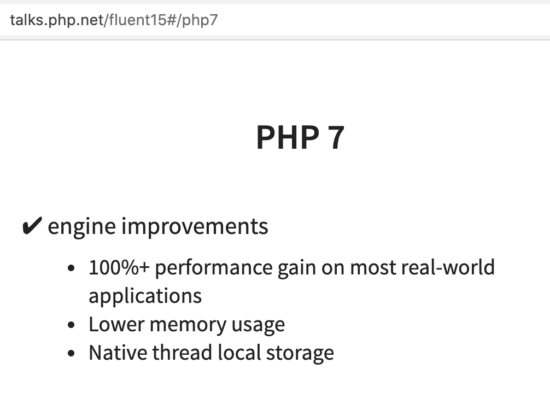
There are numerous studies published and circulated widely. PHP 7 has, “100%+ performance gain on most real-world applications” says Rasmus Lerdorf (Ref: http://talks.php.net/fluent15#/php7) This is from his slides from PHP 7 talk at fluentconf. The good performance due to low latency is widely acknowledged.

PHP 7 performance

So how does good performance help your website? For one second lag, you will loose a minimum of 10% visitors. Search engines give priority to fast loading websites. Are these two reasons not enough?

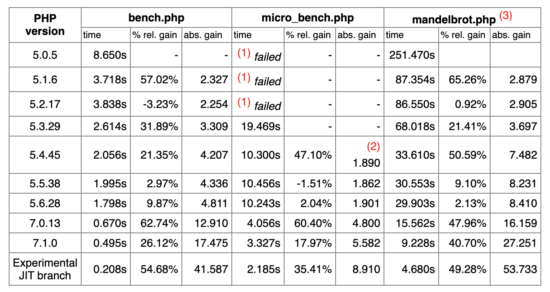
As published by Christian Vigh, PHP 7 is faster by a whooping 400% than PHP 5.2

PHP performance benchmark

Ref: https://www.phpclasses.org/blog/post/493-php-performance-evolution.html#performance

New PHP features


Developers should be armed with good set of tools. When the language gives a good set of features, that enables the developer to produce a good product. Following are some of the features that are available in PHP 7.

  • The null coalescing operator
  • Return and scalar type declarations
  • Anonymous Classes
  • Zero cost asserts
  • Typed properties 2.0
  • Preloading
  • Null coalescing assignment operator
  • Improve openssl_random_pseudo_bytes
  • Weak references
  • New custom object serialization mechanism
  • Password hash registry
  • Covariant returns and contravariant parameters
  • Spread operator in array expression
  • Multi-catch exceptions
  • Keys usable in lists

Backwards compatibility


This is the key thing to focus on website migration. You might have used a feature that is available only in the lower version and removed in the newer version. Here is a list of backward incompatible changes between PHP 5.6 and PHP 7.0

  • set_exception_handler() is no longer guaranteed to receive Exception objects
  • Internal constructors always throw exceptions on failure
  • Parse errors throw ParseError
  • list() no longer assigns variables in reverse order
  • Empty list() assignments have been removed
  • list() cannot unpack strings
  • Array ordering when elements are automatically created during by reference assignments has changed
  • Parentheses around function arguments no longer affect behaviour
  • foreach no longer changes the internal array pointer and more changes.
  • Changes to Division By Zero and more integer handling changes.
  • Hexadecimal strings are no longer considered numeric and more string handling changes.
  • All ext/mysql functions and more list of functions removed.
  • New objects cannot be assigned by reference
  • Switch statements cannot have multiple default blocks
  • JSON extension replaced with JSOND

The above list is a summary only. Go through Ref: https://www.php.net/manual/en/migration70.incompatible.php for the complete list.

Deprecated features in PHP 7.0


So you are going to move forward. Know about what you should not use going forward. If you have already used the deprecated features, then it is better to migrate them also. Here is a list the deprecated list.

  • PHP 4 style constructors
  • Static calls to non-static methods
  • password_hash() salt option
  • capture_session_meta SSL context option
  • ldap_sort() function is deprecated.

More list of changes to keep an eye on


Steps to do the PHP website migration


  1. Backup your website, application, database, data in disk.
  2. Check if your hosting provider or your environment will allow to rollback the PHP version. This will be helpful if in case you are stuck at some point.
  3. Check the PHP compatibility for the respective version of the dependent vendor applications, plugins, modules and extensions.
  4. Prepare a checklist for items to be changed for backwards incompatibility. Refer above for consolidated list.
  5. Add the deprecated items to the checklist. Refer above for consolidated list.
  6. Use a well equipped IDE. Detach the old dependent PHP library and then add the new to be migrated PHP library. The IDE will warn and show errors. I promise, this will be helpful. If you are a person using a plain texteditor, then now is the time to dump it.
  7. Refactor the code.
  8. Deploy in a staging environment.
  9. Test.
  10. Go live.

↑ Back to Top


https://www.sickgaming.net/blog/2020/08/...-to-php-7/

Print this item

  (Indie Deal) BEST OF BANDAI & METAL GEAR RISING: REVENGEANCE
Posted by: xSicKxBot - 08-17-2020, 12:17 PM - Forum: Deals or Specials - No Replies

BEST OF BANDAI & METAL GEAR RISING: REVENGEANCE

METAL GEAR RISING: REVENGEANCE BENDS THE RULES OF NATURE AT 78% OFF
[www.indiegala.com]
Take control of Raiden, a cyborg ninja armed with a High-Frequency Blade which can cut through virtually anything!

BEST OF BANDAI, up to -85%
[www.indiegala.com]
[www.indiegala.com]
Check out IndieGala on Twitter, YouTube & Facebook[www.facebook.com]


https://steamcommunity.com/groups/indieg...9958831094

Print this item

  AppleInsider - Review: August Smart Keypad adds more convenience to your HomeKit lock
Posted by: xSicKxBot - 08-17-2020, 12:17 PM - Forum: Apple Mac & macOS - No Replies

Review: August Smart Keypad adds more convenience to your HomeKit lock

The August Keypad is a great addition to any HomeKit-equipped August smart lock, including the recent Wi-Fi-connected model, and offers another physical way to control your security.

There are quite a few capable smart locks on the market, but typically you have to make the choice between a more intrusive door lock that involves swapping the hardware on your door or a minimalist one that can retrofit to existing deadbolts.

That also decides if you want a normal keyhole on the exterior or a number pad. With a number pad, it offers yet another way to control your door alongside HomeKit or a key.

August Wi-Fi Smart Lock is an excellent minimalist lock that can fit on the inside of your door, but on its own, lacks a number pad.

Fortunately, August offers an add-on accessory to provide that number pad for those that want it.

Design


The August Smart Keyboard is as simple as they come. It is very small, with two columns of numbers above the August logo. The front is a soft rubberized material so that the buttons can be pressed.

August Smart Keypad mounted to door

August Smart Keypad mounted to door

Even though it is doesn’t have a large footprint, it does stick out from the wall a solid amount, which isn’t a dealbreaker but it can look odd depending on where it is mounted.

Speaking of which, there are two ways to mount the August Smart Keypad.

A set of mounting screws are included that can be screwed to the exterior wall and the keypad can be pressed right onto them. Two rubber holes on the rear of the keypad hold tight onto those screws.

August Smart Keypad adhesive

August Smart Keypad adhesive

Alternatively, a precision-cut adhesive is also included, which you can affix to the rear of the keypad and then press it to the wall for mounting. Regardless of which mounting option you choose, the number pad can always be removed to gain access to the battery compartment around the back.

August Smart Keypad backlit numbers

August Smart Keypad backlit numbers

The keys are backlit in a well-suited red glow, making it easy to see in low-light settings. One small criticism is that the August logo is not inherently obvious as a button, as it isn’t always clear to new users that they must press the logo to submit their code.

A quick first-time “how-to” guide is all that is needed to solve this, however.

Setup and use


Setting up the August Smart Keypad is about as simple as it gets. Just launch the August app, tap on “Add a new product,” and choose the keypad from the list of possible devices.

Once you remove the plastic battery guards, it flashes and is then discovered by the app. Select the door lock you want the keypad to control and wait for the app to finish.

It was mildly confounding for a moment post-install as we looked for an option to set up the passcodes. August doesn’t prompt you for individual passcodes during the install, but rather you set them within settings afterward.

There, you view who has control of the August lock and what their passcodes are for the number pad. You can create a passcode for each person with smart lock control, as well as an emergency code or folks who don’t have a smartphone or access to the app. Kids and the older users are most suited for that last category.

Codes by default are five characters though you can create more secure or less secure passcodes as you choose.

Activity feed in the August app

Activity feed in the August app

The keypad connects to the August lock via Bluetooth, which is both simple and straightforward, but also a little time-consuming.

As you approach the door, you input your passcode and press the August logo, and after a few moments, the door will unlock. At times, it could take five to ten seconds for our lock to respond and unlock, which seems too long in our opinion, but it’s just something to keep in mind.

One of our favorite features of the August Smart Keypad is that it can be used to lock the door as well as unlock. On our way out, just tap that August logo, and the door will lock behind you.

Should you buy the August Smart Keypad


A constant theme in any of our smart home reviews is convenience for everyone — both for smart home users as well as kids, guests, and anyone who doesn’t have a phone or use technology. The August Smart Keypad provides benefits for all users.

August Smart Keypad

August Smart Keypad

HomeKit is great to control an August lock, but it isn’t always the best way to do it. Sometimes it is hard to open the Home app or invoke Siri and tapping a button is faster and easier.

That’s not to mention guests and others who may also benefit from having access.

August also controls these keys very securely, with access able to be revoked at any time. The codes can operate certain times or certain days of the week or just left on all the time.

We won’t say that the keypad is essential for all August users but it is convenient enough that we can see many August users opting to add it on.

  • Easy to setup and install
  • Activity log in app to see who accesses lock
  • Solid build that can be installed anywhere
  • Backlit buttons
  • Unique codes for everyone
  • Codes can be revoked any time and can be schedule to only work at certain times
  • Option for August lock users
  • August icon is not obvious as a button
  • Sticks out a bit too much for some locations
  • Gets expensive as a smart lock setup

Rating: 4.5 out of 5


Where to buy


The August Smart Keypad will work with any generation August smart lock and is available separately on Amazon for $55.


https://www.sickgaming.net/blog/2020/08/...ekit-lock/

Print this item

  Fedora - Rendering Music notation with ABC
Posted by: xSicKxBot - 08-17-2020, 12:17 PM - Forum: Linux, BSD & Unix - No Replies

Rendering Music notation with ABC

ABC is a human readable ascii representation of music notation.  John Chambers posted a brief history of ABC notation and there is a newer history by Chris Walshaw.

Unlike MusicXML, which is designed for exchanging music between score editing and performance applications, ABC is designed to be directly edited by humans. I can type a score in ABC with vim much faster than by fiddling with a mouse in a GUI score editor. Unlike other formats ABC works well with version control such as git. As with Latex, what you see is not what you get. But the notation is intuitive, the learning curve is pretty short, and the benefits are awesome.

While often touted as the standard for folk music, it works perfectly for Jazz lead sheets and does full scores as well. Some GUI score editors can import/export ABC notation. I used noteedit for a GUI editor until it was abandoned upstream, but was able to export as ABC. The result is reasonably human readable – letting me continue to edit in ABC notation, and serving as an example of a more complete score. When you are done with this lesson, you’ll be able to turn it into a PDF!

Ancient 4th Century Hymn


For a folk tune example, we will do a simple arrangement of a 4th century hymn, with a medieval era tune. “O Lux Beata Trinitas” is one of the twelve hymns which the Benedictine editors regarded as undoubtedly the work of St. Ambrose. It is cited as by St. Ambrose by Hinemar of Rheims in his treatise De unâ et non trinâ Deitate, 857. Hymnary.org

The hymn was still popular in the Gregorian Chant era. Here you can see the medieval notation and hear a performance as historically accurate as you will find today.

20th Century Interpretations


The medieval notation was updated in hymnals to more modern notation, This is our starting point. As reflected in those hymnals, there were no measures or bar lines in the medieval period.

Here are the basics of ABC:

  • Comments are lines beginning with ‘%’.
  • Notes beginning with “middle C” are entered as CDEFGABcdefgab.
  • Following a note with a number multiplies the timevalue by that number.
  • Notes that are next to each other are joined together whenever possible. This is the only way spaces are significant.
  • Parenthesis are used to tie or slur notes together.
  • The tune begins with X: 1, where 1 is the tune number. There can be multiple tunes in a file. Folk tunes are often collected into a file. For instance, we could collect all 12 known works of St. Ambrose into a single file named ‘ambrose.abc’.
  • The title is given with T:
  • The composer or source is given with C:
  • The key (default is C major) is given with K:

Here is a simple transcription of our tune into ABC:

X: 1
T: O lux beata Trinitas
C: Plainsong, Mode VIII
K: D
% Fedora Magazine example
(AB) (AGFG) EFG (AB) (BA) A4 (AB) (AGFG) EFG (AB) (BA) A4 (AB) d (cd) B (AG) (AB) (AGF) F4 (GA) (AGFG) EFG (AB) (BA) A4

We are going to do our work in a terminal emulator. Enter the above with your favorite text editor (bonus points if that is cat) into a file named ‘lux.abc’.
Or download lux.abc with all the tunes for this lesson. To format and view this, we need ghostscript, xreader, and abcm2ps. You probably have ghostscript and xreader (or other PDF viewer) already installed on a desktop, but it doesn’t hurt to ask again.

$ sudo dnf install ghostscript xreader abcm2ps make

I had you install make so a simple makefile can simplify rendering:

.SUFFIXES: .abc .ps .pdf .mid
.abc: abcm2ps $*
.abc.pdf: abcm2ps $* ps2pdf Out.ps $*.pdf
.abc.mid: abc2midi $*.abc -o $*.mid

Enter or download that as a file named ‘Makefile’. Now format and view our tune:

$ make lux.pdf
$ xreader lux.pdf &

I had you run xreader in the background, so you can switch back to your terminal. Xreader will update the view whenever lux.pdf is updated. If you are just reading this article, you can also view the output here.

Adding Lyrics


Lyrics are entered with ‘w:’ under the tune line they go with. Words are hyphenated to show how the syllables go with the notes. Use ’*’ to use additional notes for the last syllable.

Append tune 2 to the lux.abc file, it is the same tune with lyrics:

X: 2
T: O lux beata Trinitas
C: Words: St. Ambrose 4th century
C: Plainsong, Mode VIII
K: D
% Fedora Magazine example
(AB) (AGFG) EFG (AB) (BA) A4 w: O* lux*** be-a-ta trin-* ni-* tas, (AB) (AGFG) EFG (AB) (BA) A4 w: et* prin-*** ci-pa-lis U-* ni-* tas,
(AB) d (cd) B (AG) (AB) (AGF) F4 w: i-* am sol* re-ce-* dit* i-*gne-us, (GA) (AGFG) EFG (AB) (BA) A4
w: in-* fun-*** de lu-men cor-*di-* bus.

Now ‘make lux.pdf’ and see the results in your xreader window. Both tunes are rendered to the PDF.

Adding Measures


So, historical authenticity is all very fine, but I want to make a modern version. The first step for modern ears is to divide the tune into equal sized measures. My ear says that 7/8 is an excellent time signature for this tune.

  • M: 7/8

    specifies a default meter of 7/8

  • L: 1/8

    specifies a default note length of 1/8 of a whole note. This was already the default, but now it is documented.

  • Q: 1/4=80

    specifies a suggested speed: 80 quarter notes per minute.

  • Measures are separated by bar lines represented by ‘|’.
  • There will be multiple verses, so ‘:|’ adds a repeat bar line.
  • A final bar line is ‘||’, but we don’t use it for this example.
  • It is good practice for debugging to divide the lyrics into measures as well, and not rely on automatic distribution.
  • Note that additional spaces can be added for readability.
  • Lining up the bar lines is not required, but can make it more readable.

Here is tune 3 with bar lines (appended to lux.abc):

X: 3
T: O lux beata Trinitas (3)
C: Words: St. Ambrose 4th century
C: Plainsong, Mode VIII
M: 7/8
L: 1/8
Q: 1/4=80
K: D
% Fedora Magazine example
z(AB) (AGFG) | EFG (AB) (BA) | A3-A4 |
w: O* lux***|be-a-ta trin-* ni-*| tas, |
z(AB) (AGFG) | EFG (AB) (BA)| A3-A4 |
w: et* prin-***|ci-pa-lis U-* ni-*| tas, | (AB) d (cd) B (A |G) (AB) (AGF) F-| F7|
w:i-* am sol* re-ce-|* dit* i-*gne-us,| * |
z(GA) (AGFG) | EFG (AB) (BA) | A3-A4 :|
w:in-* fun-***| de lu-men cor-*di-*|bus. |

Bass Line, Chords, and Verses


Now we begin the real departure in our interpretation. First, chords are added to assist in improvising from a “lead sheet”. Then we add a suggested bass line.

  • V:1

    and

    V:2

    switch between voices.

  • Chords are entered in double quotes in the tune line, and are rendered above the following note.
  • Each comma after a note lowers it by an octave.
  • C:

    can also be used to document arranger and license.

  • Addition verses are added as additional lyric lines under a tune line.
  • Verse numbers can be added by using ‘~’ to join them to the next word with a non-break space. Otherwise they would be counted as words.
  • %%MIDI

    these are magic comments that are used in the next section!

Here is our final tune for this lesson:

X: 4
T: O lux beata Trinitas (4)
C: Words: St. Ambrose 4th century
C: Plainsong, Mode VIII
C: Arranged: Stuart D. Gathman
C: Copyright 2012: Creative Commons Attribution-ShareAlike 2.0
M: 7/8
L: 1/8
Q: 1/4=80
K: D
%%MIDI gchord c3c4
%%MIDI program 75
V:1 "D"z(AB) (AGFG) | "A7"EFG (AB) (BA) | "Dsus"A3-"D"A4 |
w:i.~O* lux*** |be-a-ta trin-* ni-*| tas, |
w:ii.~Te* ma-***|ne lau-dum car-*mi-*| ne, |
w:iii.~De-* o***|Pa-tri sit glo-*ri-*| a, |
V:2 D,3 A,2 A,2 | E,3 A,2 A,2 | D,3 A,2 A,2 |
V:1 "D"z(AB) (AGFG) | "A7"EFG (AB) (BA) | "Dsus"A3-"D"A4 |
w: et* prin-***|ci-pa-lis U-* ni-*| tas, |
w: te* de-*** |pre-ce-mur ves-*pe-*|re: |
w: ei-* us-*** |que so-li Fi-*li-*| o, |
V:2 D,3 A,2 A,2 | E,3 A,2 A,2 | D,3 A,2 A,2 |
V:1 "G"(AB) d (cd) B (A |"Em"G) (AB) (AGF) F-|"D"F7 |
w: i-* am sol* re-ce-|* dit* i-*gne-us,| * |
w: te* nos-tra* sup-plex|* glo-*ri-**a | * |
w: cum* Spi-ri-*tu Pa-|* ra-*cli-**to, | * |
V:2 G,3 B,2 B,2 | D,3 B,2 B,2 | D,3 A,2 A,2 |
V:1 "A7"z(GA) (AGFG) | "A7"EFG (AB) (BA) | "Dsus"A3-"D"A4 :|
w: in-* fun-*** | de lu-men cor-*di-*| bus. |
w: per* cunc-*** | ta lau-det sae-*cu-*| la. |
w: et* nunc,*** | et in per-pe-*tu-* | um |
V:2 E,3 A,2 A,2 | C,3 A,2 A,2 | D,3 A,2 A,2 :|

Rendering to MIDI


Rendering that makes a nice lead sheet! What does it sound like? You will need the abc to MIDI translator and a MIDI renderer. Fedora comes with a number of MIDI synthesizer and rendering options, but we will use timidity – a simple command line utility that can render to audio files or play on your speakers.

Install abcMIDI and timidity:

$ sudo dnf install abcMIDI timidity++

If you have been following the examples, you have 4 tunes in lux.abc. Render them to midi with the abc2midi utility:

$ abc2midi lux.abc

This creates four midi files, one for each tune: lux1.mid .. lux4.mid. Use timidity to play each file to your speakers:

$ timidity lux1.mid

When you play ‘lux4.mid’, you will hear what the ‘%%MIDI’ directives did. You can read more about abc2midi and its directives here. You can also hear me singing and playing piano from the lead sheet and totally butchering the Latin.

There is a lot more to ABC, but this has hopefully been a fun introduction!  There are more examples in /usr/share/doc/abcm2ps/examples, and check out folk tunes from many cultures.


https://www.sickgaming.net/blog/2020/08/...-with-abc/

Print this item

  News - Turns Out Engine Software Isn’t Bringing Killer7 To The Nintendo Switch
Posted by: xSicKxBot - 08-17-2020, 12:17 PM - Forum: Nintendo Discussion - No Replies

Turns Out Engine Software Isn’t Bringing Killer7 To The Nintendo Switch

Killer7

Update (Sun 16th Aug, 2020 07:30 BST): Engine Software’s owner & VP of development, Ruud van de Moosdijk, has reached out to Nintendo Life, and unfortunately, it doesn’t sound like Killer7 will be coming to the Switch anytime soon. The project he’s working on is not Killer7 for the Nintendo Switch and the banner on his LinkedIn page should have been changed. Sorry folks!

Without saying anything about unannounced projects, the unannounced project I am working on with a prolific Japanese developer, is not Killer7 for Switch sorry

The banner on linkedin should have been changed, as in the end we only did a PC version of Killer7.


Original story (Sat 15th Aug, 2020 05:05 BST): Earlier this year, legendary game designer Suda51 said he would love to bring some of Grasshopper Manufacture’s older titles to Nintendo’s latest system but it wasn’t his decision to make. One mentioned was the cult hit action-adventure, Killer7. It made its debut on the GameCube and PS2 in 2005 but a re-release on Switch is “pretty much” out of his control, last we heard.

Now, YouTuber Doctre81 – perhaps best known for uncovering evidence of The Witcher 3: Wild Hunt – Complete Edition, well before it was even announced for Nintendo’s hybrid platform – has found a LinkedIn page of an Engine Software employee making reference to a “Killer7 Remaster” for the Switch. Take a look below:


As noted by Doctre81, Engine Software teamed up with Suda51 in 2018 and released Killer7 on the PC. The profile description also mentions how the employee is a producer on an “unannounced title” in collaboration with a “prolific Japanese game designer”, which is believed to be – you guessed it – Suda51.

One other Suda51 classic that might be making a return is the original No More Heroes after a rating for it was discovered on the classification board in Taiwan earlier this month. Would you like to see Killer7 make a comeback? Tell us below.


https://www.sickgaming.net/blog/2020/08/...do-switch/

Print this item

  News - PS5 Wishlist: What I Want From Sony's Next-Gen Console
Posted by: xSicKxBot - 08-17-2020, 12:17 PM - Forum: Lounge - No Replies

PS5 Wishlist: What I Want From Sony's Next-Gen Console

The PlayStation 5's release is quickly approaching, but there are still quite a few details we don't know about Sony's next console. What we do know is that it looks enormous, seems like it was made out of the same stuff as Neo Midgar in FF7 Remake or Alan Tudyk in I, Robot, and comes with a spiffy new version of Sony's usual controller design. Apart from elements that are becoming standard, such as a solid-state drive, more power for visuals, and vastly decreased load times, we don't really know what to expect from the PS5 when we actually use it.

We do, however, know about the PlayStation 4--specifically, everything that's wrong with it. Seven years after the release of the current generation of gaming hardware, we've seen different versions of the PS4 pop up, we've seen trends come and go (miss you, weird and terrible motion control games), and we've listened to that PS4 fan. God, that fan is loud.

With the PS5 imminent, I've (briefly and without a lot of understanding) looked over the specs and (at length, with smoldering irritation) stared at the PS4's menu UI. Here are some things I want from the PS5 based on the shortcomings of the PS4, pie-in-the-sky desires that are probably technologically impossible, and random ideas that popped into my head while waiting for Fall Guys servers to clear up. You should also check out our wishlist for the Xbox Series X, as well.

Continue Reading at GameSpot

https://www.gamespot.com/articles/ps5-wi...01-10abi2f

Print this item

  News - This Week At Bungie – 8/13/2020
Posted by: xSicKxBot - 08-17-2020, 05:49 AM - Forum: Lounge - No Replies

This Week At Bungie – 8/13/2020

This week at Bungie, we kicked off Solstice of Heroes.

If you’re anything like us, you’re probably neck deep in Majestic armor, smashing through the Solstice of Heroes event. Our yearly celebration of Guardians near and far has begun. Solar, Arc, and Void have each taken a turn in the daily rotation of elemental damage. A few of you have already completed the majority of objectives towards your first Magnificent armor set, and are already off to the races on your alternate classes.

Tomorrow, Trials of Osiris will return at 10 AM PT. Seven wins might be all that’s standing between you and your Magnificent glow. Form your fireteam, grab your bounties, and get ready for a fight.

Before we get deeper in the TWAB, we’ve been seeing some questions on rewards for Solstice 2020 in comparison to years past. Let’s take a moment to clear up some confusion.

Last year, a Legendary Sparrow was available to anyone who fully Masterworked every armor piece for all three classes. We got quite a bit of feedback that this felt a little too grindy for a limited-time event. This year, we shifted focus to the individual Solstice of Heroes sets that you’ll be investing time in over the next few weeks. Rather than a single reward after completing the armor on all three characters, we’re providing a free glow when earning the Magnificent armor sets, per class.

Additionally, we’re seeing some players asking why Magnificent armor isn’t fully Masterworked when earned. This year, our approach was to give players a new path to earn high-stat rolled armor pieces outside of raids. As these armor sets have a Max Power Cap of 1,360, they’ll also have a lifespan that lasts through multiple seasons. End result: Players can spend their time finding that perfect roll through Solstice packages for the duration of Solstice of Heroes. Even after the event has concluded, players can Masterwork their armor pieces at their leisure, and finish up some of their final Majestic objectives to unlock their glow.

As a final note: Obtaining Majestic armor sets will grant progress bonuses on your other classes. So, if you’re like me and got your Magnificent Hunter set already, you’ll have a 2x progress bonus for your next character’s Renewed and Majestic armor objectives. Once you finish that character up, your third (and maybe final) character will have a 3x progress bonus for armor objectives. Pretty sweet, huh? With this change compared to last year’s event, we’re expecting to see more players getting all three sets.

We’ll be watching the conversation for the duration of the event, so be sure to sound off with feedback as you fly through the EAZ!

Bungie Foundation Update


It’s hard to believe that Bungie Day was a month ago. Time is flying by! We’ve been eager to give an update from the Bungie Foundation, concerning the Empathic Ghost Shell and the Bungie Foundation Emblem charity initiatives that were available. Senior Foundation Manager Christine Edwards is here today to share the details:

Christine: Last month we celebrated Bungie Day, a beloved tradition that celebrates the best of our community – the camaraderie, the competition, and the care we all have for one another. This year we invited you to incorporate charitable giving into your festivities and you all stepped up in a big way!

We unlocked two unique ways to participate, first through direct donations and second through in-game purchases in the Eververse store. Because of each of you, we raised $602,204.31 in donations and $555,639.06 from the Empathetic Ghost shell, for a whopping $1,157,843.37! Every single dollar will go directly to helping kids in children’s hospitals across the country by bringing them engaging digital entertainment that will brighten their day, make their treatments a little bit more bearable, and will remind them that even during hard times, their number one job is to play, smile, and be a kid.

As the parent of one of our patients put it, “[iPads for Kids] has made the experience more like home. It has helped keep King engaged and distracted from the pain.”

Another parent told us, “Draven is three years old and has been in the hospital for ATRT in his brain since December 29, 2019. Draven just loves the iPad; it has helped him in so many ways. When he cries and we give him the iPad he stops crying. There’s been times where he will fall asleep playing the iPad.”

Each one of you who has given generously to the iPads for Kids program over the past few years has played a direct role in creating smiles, hope, and laughter for kids like King and Draven, along with hundreds of thousands of other kids just like them.

Thank you.

Time and time again, you come together to show the world what Guardians stand for. From the bottom of our hearts, thank you for being one of the best communities in this solar system.

Feeling Fashionable? 


With some new Majestic armor sets in the game, we’d be crazy if we didn’t host another fashion show. For those new to the conversation, every so often we challenge players to strut their stuff in the wilds of Destiny 2. Mixing shaders, armor pieces, Exotics, and ornaments to find the perfect set, and bonus points to those who find the perfect destination for their photo shoot. If you’re selected, you’ll walk home with a fancy emblem for your troubles.

Solstice is a celebration, and we’re excited to highlight your fashion sense. Glow up, embrace your Arc, Solar, or Void side, and send some screenshots to @Bungie on Twitter with the hashtag #SolsticeFashionShow. We’ll be retweeting winners through Thursday, August 20.

Now, it wouldn’t be a fashion show without theming:

  • Players must be wearing at least one Solstice of Heroes armor piece (Renewed, Majestic, or Magnificent).
      • No Glows are required.
  • Players must take a picture on any destination to qualify.
      • In other words, an image of your Guardian in the character inspection screen won’t be considered!

Well, what are you waiting for? It’s go time! See you out there on the runway.

Dusted


With Solstice fresh on the mind, Player Support has been diving deep in the Help forums, looking for fresh issues to diagnose. Missing bright dust on bounties, inconsistent objective progress, and a few other minor issues have been discovered.

This is their report.

MISSING EMBLEM CONTACT FORM

Players can be eligible to receive Destiny 2 emblems by winning Bungie community contests, purchasing items in the Bungie Store, or by donating to one of the Bungie Foundation’s charity campaigns. Sometimes players don’t receive their emblem for one reason or another, so we’ve created a specific contact form to help them obtain their emblem.

We will help players with emblem issues from the following contests or campaigns:

    • Bungie Bounty (Aurora Clash)
    • Movie of the Week (Anamnesis)
    • Outstanding Artists (Aspect of Luminance)
    • Fashion Show (The Levante Prize)
    • Bungie Store
    • Bungie Foundation or Charity Drive

Before requesting help through the contact form, please note:

    • Players must wait at least 15 days from a qualifying contest win or charity campaign.
    • Players should first check their Spam/Junk email folder for any emails that may have their emblem code.
    • Players should check their Collections > Flair > General section for the emblem.

SOLSTICE BOUNTIES AND BRIGHT DUST

Shortly after Solstice of Heroes launched, Destiny Player Support became aware of an issue where weekly and repeatable bounties for the event were not giving Bright Dust as intended. We are currently investigating solutions to this issue. We are also investigating a solution for those who missed out on earning Bright Dust from these bounties during this time and will be granting Bright Dust to affected players as soon as we can. You can continue to complete and redeem your Solstice of Heroes bounties normally.

KNOWN ISSUES

While we continue investigating various known issues, here is a list of the latest issues that were reported to us in our #Help Forum:
    • We are aware of an issue where Gambit Prime will not count for Solstice armor with Gambit objectives.
    • We are aware of an issue where Nightfall: The Ordeals will not count for Solstice armor with strike objectives.
    • We are investigating reports of doubled progression progress on Solstice objectives not working for some players.
    • We are aware of an issue where the Majestic Solstice Bond for Warlocks has an objective that incorrectly states to get 150 Guardian Super kills. The objective progresses correctly with Arc Super kills against any enemy.
    • We are investigating an issue where shaders do not properly apply to the Majestic and Magnificent Robes for Warlocks.
    • We are investigating an issue where shaders do not properly apply to the Majestic and Magnificent Cloaks for Hunters.
For a full list of emergent issues in Destiny 2, players can review our Known Issues article. Players who observe other issues should report them to our #Help forum.

Sunblock


Here in the States, we’re in the thick of summer. Temperatures have risen, the Sun is out a little more often in Seattle, and we’re slowly losing our minds one bead of sweat a time. Many of us are hiding in our living rooms with air conditioners on full blast. No better time to sit back and watch some community creations.

Movie of the Week: 14 Reasons to get Excited for Solstice

Honorable Mention: F is for Flawless (but not really flawless)

Honorable Mention: Space Cowboy – Tex Mechanica Approved

I love nothing more than a montage of Tex Mechanica weaponry being used to dominate the Crucible. Think you’ve got better clips? Submit a video to the Creations page. Maybe you’ll win next week. Maybe you won’t. All we know is, you miss 100% of the shots you don’t take.

This is one of those weeks where I’m staying up past midnight to get some sweet loot. It’s been nice jumping through older adventures while completing my Solstice armor, or finishing orb requirements through random activities like raids or Zero Hour.

No matter what you play, you’ll gain progress towards an objective or two. Longer goals, like “Play 10 Gambit matches,” I’ve been doing at my own pace. A few matches here or there, then shifting to something else to keep things fresh.

For some of you, this is a race. For others, it’s a nice stroll through memory lane. However you’re tackling Solstice, we hope you’re having fun. Have a great weekend, and we’ll see you again soon.

Yum yum yum yum yum,

-dmg04 as he picks up elemental orbs to complete his Solstice armor objectives


https://www.sickgaming.net/blog/2020/08/...8-13-2020/

Print this item