The game is free to keep until Feb 17th 2022 - 16:00 UTC.
Next week's freebie: Brothers - A Tale of Two Sons
We are welcoming everyone to join our discord[discord.gg]. We are more active there on finding giveaways, small or large, and there are daily raffles you can participate.
GRID Legends is for the racing thrill-seekers, delivering thrilling wheel-to-wheel motorsport and edge of your seat action around the globe. Create your dream motorsport events, hop into live multiplayer races, be part of the drama in an immersive virtual production story, and embrace the sensation of spectacular action racing. Jostle for position. Drive legendary cars to their limits. Feel the rush of incredible speed. Push your Nemesis on the track. Defeat your friends again and again... and don't let them ever forget it!
Play together with up to 21 friends in the most social and connected GRID ever, including cross-platform play, and cause havoc on the track. Make racing memories with a stunning variety of cars, new city locations such as London and Moscow, exciting event types, and create on-track enemies. Use the Race Creator to design adrenaline-fueled races to tear up with your friends, with event types like Elimination, electrifying Boost races, and the return of Drift. Want to race hypercars against huge trucks? Go for it! Be part of the spectacle of motorsport with our dramatic virtual production story Driven to Glory, or dive into our largest ever Career, featuring hundreds of exhilarating events.
Posted by: xSicKxBot - 03-21-2022, 11:16 AM - Forum: Lounge
- No Replies
Steam Deck Now Supports Xbox Cloud Streaming Through Edge Browser
Steam Deck already supports a ton of games, but now you can add Xbox's cloud gaming service to that list. Microsoft says it worked closely with Valve to enable cloud gaming support, which is now available through Microsoft's Edge browser in beta.
The new addition means that any game that runs through Xbox's cloud service can now be played on the handheld system from Valve. Microsoft put out detailed instructions on how to get Edge up and running on your Steam Deck, how to switch the controller layout to recognize the gamepad, and even a piece of custom artwork you can use to set up a shortcut. This is how Game Pass eventually came to iOS devices, through a shortcut button made by a Safari browser. But keep in mind that since you're tinkering with Linux command lines to change permissions, if you do something wrong you may need to do a factory reset.
While this solution isn't quite the same as Xbox Game Pass support on Steam Deck, it's awfully close. The Game Pass library has a lot of crossover with Microsoft's cloud gaming library, and the only way to even access the cloud gaming service is with a Game Pass Ultimate subscription. Since this goes hand-in-hand with the rest of Microsoft's services, you should be able to pick up your progress on Steam Deck from a cloud save and then continue it on your PC or Xbox, or vice-versa.
Quarkus is revolutionizing the way that we develop Java applications for the cloud-native era, and in this presentation, Edson Yanaga explains why it also sparks joy.
Watch this live coding session to get familiar with Quarkus and learn how your old and new favorite APIs will start in a matter of milliseconds and consume tiny amounts of memory. Hot reload capabilities for development will bring you instant joy.
Posted by: xSicKxBot - 03-20-2022, 05:33 AM - Forum: Python
- No Replies
Python dict() — A Simple Guide with Video
Python’s built-in dict() function creates and returns a new dictionary object from the comma-separated argument list of key = value mappings. For example, dict(name = 'Alice', age = 22, profession = 'programmer') creates a dictionary with three mappings: {'name': 'Alice', 'age': 22, 'profession': 'programmer'}. A dictionary is an unordered and mutable data structure, so it can be changed after creation.
Read more about dictionaries in our full tutorial about Python Dictionaries.
Usage
Learn by example! Here are some examples of how to use the dict()built-in function:
You can pass an arbitrary number of those comma-separated key = value pairs into the dict() constructor.
Video dict()
Syntax dict()
You can use the dict() method with an arbitrary number of key=value arguments, comma-separated.
Syntax: There are four ways of using the constructor:

dict() -> new empty dictionary dict(mapping) -> new dictionary initialized from a mapping object's (key, value) pairs
dict(iterable) -> new dictionary initialized from an iterable of (key, value) tuples
dict(**kwargs) -> new dictionary initialized with the name=value pairs in the keyword argument list.
Interactive Shell Exercise: Understanding dict()
Consider the following interactive code:
Exercise: Guess the output before running the code.
But before we move on, I’m excited to present you my brand-new Python book Python One-Liners (Amazon Link).
If you like one-liners, you’ll LOVE the book. It’ll teach you everything there is to know about a single line of Python code. But it’s also an introduction to computer science, data science, machine learning, and algorithms. The universe in a single line of Python!
The book is released in 2020 with the world-class programming book publisher NoStarch Press (San Francisco).
The dict() function has many different options to be called with different types of arguments. You’ll learn different ways to use the dict() function next.
How to Create an Empty Dictionary?
You can create an empty dictionary by using Python’s built-in dict() function without any argument. This returns an empty dictionary. As the dictionary is a mutable data structure, you can add more mappings later by using the d[key] = value syntax.
>>> d = dict()

>>> d['Alice'] = 22

>>> d

{'Alice': 22}
How to Create a Dictionary Using Only Keyword Arguments?
You can create a dictionary with initial key: value mappings by using a list of comma-separated arguments such as in dict(name = 'Alice', age = 22) to create the dictionary {'name': 'Alice', 'age': 22}. These are called keyword arguments because each argument value has its associated keyword.
You can initialize your new dictionary by using an iterable as an input for the dict(iterable) function. Python expects that the iterable contains (key, value) pairs. An example iterable is a list of tuples or a list of lists. The first values of the inner collection types are the keys and the second values of the inner collection types are the values of the new dictionary.
Note that you can use inner tuples, inner lists, outer tuples or outer lists—as long as each inner collection contains exactly two values. If it contains more, Python raises an ValueError: dictionary update sequence element.
>>> dict([(1, 'one', 1.0), (2, 'two', 2.0)])

Traceback (most recent call last): File "<pyshell#22>", line 1, in <module> dict([(1, 'one', 1.0), (2, 'two', 2.0)])

ValueError: dictionary update sequence element #0 has length 3; 2 is required
You can fix this ValueError by passing only two values in the inner collections. For example use a list of tuples with only two but not three tuple elements.
How to Create a Dictionary Using an Existing Mapping Object?
If you already have a mapping object such as a dictionary mapping keys to values, you can pass this object as an argument into the dict() function. Python will then create a new dictionary based on the existing key: value mappings in the argument. The resulting dictionary will be a new object so if you change it, the changes are not reflected in the original mapping object.
How to Create a Dictionary Using a Mapping Object and Keyword Arguments?
Interestingly, you can also pass a mapping object into the dict() function and add some more key: value mappings using keyword arguments after the first mapping argument. For example, dict({'Alice': 22}, Bob = 23) creates a new dictionary with both key:value mappings {'Alice': 22, 'Bob': 23}.
>>> dict({'Alice': 22}, Bob = 23)

{'Alice': 22, 'Bob': 23}

>>> dict({'Alice': 22}, Bob = 23, Carl = 55)

{'Alice': 22, 'Bob': 23, 'Carl': 55}
How to Create a Dictionary Using an Iterable and Keyword Arguments?
Similarly, you can also pass an iterable of (key, value) tuples into the dict() function and add some more key: value mappings using keyword arguments after the first mapping argument. For example, dict([('Alice', 22)], Bob = 23) creates a new dictionary with both key:value mappings {'Alice': 22, 'Bob': 23}.
Python’s built-in dict() function creates and returns a new dictionary object from the comma-separated argument list of key = value mappings.
For example, dict(name = 'Alice', age = 22, profession = 'programmer') creates a dictionary with three mappings: {'name': 'Alice', 'age': 22, 'profession': 'programmer'}.
A dictionary is an unordered and mutable data structure, so it can be changed after creation.
I hope you enjoyed the article! To improve your Python education, you may want to join the popular free Finxter Email Academy:
Do you want to boost your Python skills in a fun and easy-to-consume way? Consider the following resources and become a master coder!
Where to Go From Here?
Enough theory, let’s get some practice!
To become successful in coding, you need to get out there and solve real problems for real people. That’s how you can become a six-figure earner easily. And that’s how you polish the skills you really need in practice. After all, what’s the use of learning theory that nobody ever needs?
Practice projects is how you sharpen your saw in coding!
Do you want to become a code master by focusing on practical code projects that actually earn you money and solve problems for people?
Then become a Python freelance developer! It’s the best way of approaching the task of improving your Python skills—even if you are a complete beginner.
By Andrew Binstock, Editor in Chief, Java Magazine When design patterns first appeared in programming via the famous “Gang of Four” book, they represented a breakthrough on two levels. The first was that they provided a prescription for implementing solutions to basic programming problems. In this s...
How to Make Online Photo Editing Effects like Blur Image, Sepia, Vintage
Last modified on August 23rd, 2020.
Photo editing effects will turn graphical elements to be expressive. With suitable effects, you can use a simple image and convey an idea. For example, you can bring logo to the foreground by blurring the background image.
The effects like image blur, transparency, shadowing creates attractive visual effects. There are many different image effects available. In fact, hundreds of them are available.
Online photo editing tools use a variety of methods to apply the effects on a target image. For example, either a CSS filter property or a SVG filter primitive can create an image blur effect.
Most of the visual effects are achievable with HTML5 and CSS3 filter properties. We will see how to make photo editing effects to blur, apply sepia, and vintage effect on a target image.
I created a simple image editing tool to apply blur, sepia, and vintage effect on a target image. Following is a live preview of the tool.
I have added a jQuery slider to allow you fiddle with the image editing effects between a min-max range.
What is inside?
Popular photo editing effects
Uses of image editing effects
About this example
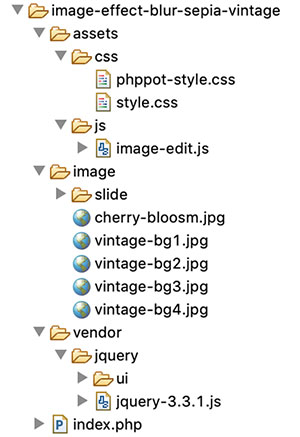
File structure
Online photo editing UI to apply blur sepia effects
Managing image editing effects with jQuery slider
Blur image using CSS and SVG filter
How to apply sepia effect on an image
Applying various tones with vintage effects
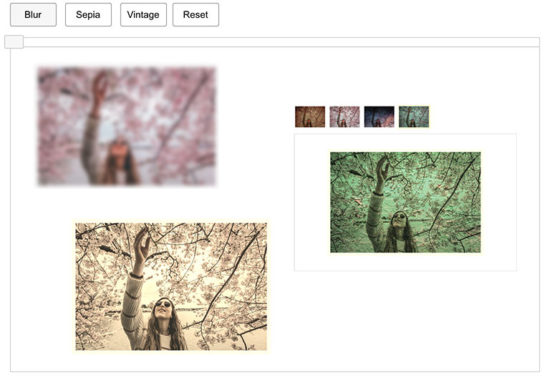
Editing tool output with image Blur Sepia and Vintage effects
Popular photo editing effects
You can use photo editing effects and manipulate images in an innovative way. They cause visual conversion on the UI graphics. You can add tones, brightness, shadow, themes, and lot more effects on a photo.
After selecting the action buttons, the slider control will supply the value of the selected editing effect.
The reset button helps revert back to the original state of the rendered image element.
Managing image editing effects with jQuery slider
This jQuery script initializes UI slider on document ready. It applies the selected effects on an image by clicking the blur, sepia, vintage buttons. On dragging the slider handle the value from the ui.value has the effect’s intensity.
On selecting each effect, the slider reset will happen to bring the handle to the min position.
The reset button will clear the applied photo effects on the image. It reverts the target image back to its original.
assets/js/image-edit.js
$(document).ready(function() { $("#slider").slider({ range : "min", min : 0, max : 100, slide : function(event, ui) { var val = ui.value; var action = $('.action.selected').val(); applyEffect(action, val); } }); $('.action').on('click', function() { resetSlider(); $('.btn').removeClass("selected"); $(this).addClass("selected"); }); $('#vintage').on('click', function() { $('.btn').removeClass("selected"); $(this).addClass("selected"); $("#slider").hide(); $("#vintage-slide").show(); vintage(1); }); $('.vintage-effect').on('click', function() { var val = $(this).data("slide") vintage(val); }); $('#reset').on('click', function() { resetSlider(); $('.btn').removeClass("selected"); $('.btn').first().addClass("selected"); }); });

function applyEffect(action, val) { if (action == 'Blur') { blur(val); } else if (action == 'Sepia') { sepia(val); }

}

function blur(val) { $("#image").css("filter", "blur(" + val + "px)");

}

function sepia(val) { $("#image").css("filter", "sepia(" + val + "%)");

}

function vintage(val) { $('.vintage-effect').removeClass("selected") $("#vintage-effect"+val).addClass("selected"); $(".overlay").show(); $(".overlay").css("background", "url('./image/vintage-bg"+val+".jpg')")

}

function resetSlider() { $("#slider").show(); $("#vintage-slide").hide(); $(".overlay").hide(); var options = $("#slider").slider('option'); $("#slider").slider("value", options.min); var action = $('.action.selected').val(); applyEffect(action, options.min);

}
Blur image using CSS and SVG filter
As shown in the above example, blur image action is possible with CSS filter function blur(). It accepts a value as its parameter to apply the blur filter on the target element.
The CSS in the below code will apply the blur effect on the image element of the HTML.
This example has a slider’s drag event-based photo editing effects. So, the jQuery script manages the CSS filter property on dragging the slider handle.
Blur image with SVG filter and CSS url() function
In the below code, it shows yet another way to blur images HTML element. It uses CSS url() function to apply the blur effect.
The url() function accepts a path or a selector string to apply the filter via CSS.
This code has the svg with <fegaussianblur> filter primitive. The blur intensity will vary based on the stdDeviation attribute’s value.
Sepia is one of the photo editing effects used in this example to apply on a HTML image. It gives light reddish or brownish tones to monochromatic photos.
There is yet another CSS filter function sepia() to apply this effect on an image.
The CSS sepia() function may have a number or percentage as a parameter. All the below CSS styles are valid to create the sepia() effect.
The vintage effect on a photograph gives an ancient tone to the photo. It’s an art to giving a flimsy tone to the modern photo output.
In this example, I have used template films to create a vintage effect on an image. It uses four types of films as a background to add different tones to the image element.
There are plugins to convert photos with vintage effects. For getting a basic result, the combination of the basic photo editing effects may help.
Editing tool output with image Blur Sepia and Vintage effects
In the below screenshot, I have shown all the three photo effects in a single output window.
Conclusion
We have seen how to apply three of the popular photo effects blur, sepia and vintage on an image. Though there are more possible effects, this example code is a very good beginning to achieve all.
I hope, applying effects with jQuery slider is more comfortable than any other type of input. I prefer slider whenever required to collect input between ranges.
Applying a creative combinational photo editing effects will give impressive results. Not only beautification but also helps to convey your thoughts via graphical representation. Rock on!
Posted by: xSicKxBot - 03-20-2022, 05:33 AM - Forum: Lounge
- No Replies
Hogwarts Legacy Already Has A Great Preorder Deal
On the heels of its gameplay reveal during the most recent State of Play, Hogwarts Legacy is now available to preorder for PlayStation, Xbox, and Nintendo Switch. The upcoming role-playing game, which puts you in the role of a new Hogwarts student, doesn't release until this holiday, but if you're a big Harry Potter fan, there's a good reason to preorder early. Best Buy is currently offering $10 gift cards for preordering Hogwarts Legacy on any console.
It's important to note that you won't receive the gift card until your order ships later this year. The gift card will be delivered via email and can be used to toward the purchase of any product at Best Buy, either online or in stores.
You're essentially getting Hogwarts Legacy for 50 bucks, since you'll be able to use that gift card for other games you want to pick up during the busy holiday season. Amazon was briefly offering discounts on the Nintendo Switch and Xbox editions of Hogwarts Legacy, but it appears that was a mistake, as preorders are now unavailable on Amazon.
This is a recurring giveaway, being given once on the Epic Store in Dec 2019. The game is free to keep until Feb 10th 2022 - 16:00 UTC.
Next week's freebie: Windbound
We are welcoming everyone to join our discord[discord.gg]. We are more active there on finding giveaways, small or large, and there are daily raffles you can participate.
[freebies.indiegala.com] A fun and emotional story about a female pilot who decided to fight to achieve her dream of flying & fighting. Happy International Women's Day!