A Musical Story is a rhythm game set against a 70s backdrop. Explore the memories of Gabriel, a young man trying to come to terms with his situation through the connections to his musical memory. Each correctly played melody opens a new chapter into Gabriel's past, bringing him closer to the truth.
In the following article you will learn how to disable GUI on boot in Ubuntu 20.04 Focal Fossa Linux Desktop.
In this tutorial you will learn:
How to disable GUI on boot
How to enable GUI on boot
How to how to start GUI from command line
Disable GUI on boot in Ubuntu 20.04 Focal Fossa Linux Desktop
System Installed Ubuntu 20.04 or upgraded Ubuntu 20.04 Focal Fossa
Conventions
# – requires given linux commands to be executed with root privileges either directly as a root user or by use of sudo command
$ – requires given linux commands to be executed as a regular non-privileged user
How to disable GUI on boot in Ubuntu 20.04 step by step instructions
The following command will disable GUI on boot hence upon the reboot the system will boot into multi user target:
$ sudo systemctl set-default multi-user
Reboot or log out from a current session to exit GUI:
$ gnome-session-quit
How to enable GUI to start on boot
Given that you have installed GUI on your Ubuntu 20.04 Server/Desktop you can enable the system to start to GUI by execution of the following command:
$ sudo systemctl set-default graphical
Start GUI manually from a command line
For a GNOME GUI installations using GDM as a default display manager you can start GUI from a command line by executing the bellow command:
Requirements may change depending on the server software (like the OS), such as using Bukkit and/or mods.
A Java runtime (JRE), version 8 or higher. JDK contains JRE, so it will work too. As of version 1.17, JRE version 16 is required. For version 1.18, JRE version 17 is required.
At least 1 GB of RAM allocated for the server to run (-Xmn 128M -Xmx 1G).
- If you are using Windows or a desktop-based Linux distribution, you should have at least 1 GB of additional physical RAM in the computer, so the graphics on the desktop don't become laggy.- Depending on the specific java version, you may be able to set a "soft max RAM" amount for the server JAR program. The JDK will try to keep memory usage below the soft max, but will allow it to go above it to reach -Xmx if needed. Try -Xmn 128M -XX:SoftMaxHeapSize=1G -Xmx 2G.
A CPU with good single-core performance. The server (as of 1.14) does use additional cores for other operations, but typically three cores are used at most.
- Hyperthreading (HT) or simultaneous multithreading (SMT), i.e. a CPU providing 2 "threads" or "logical cores" for each physical core, does not seem to benefit Minecraft much. On the other hand, it does not really hurt either, and having the setting on does allow your CPU to do some extra work on the side. Just don't worry about it.
- The situation with third-party software is that while additional work (from plugins) do use additional cores, the core world mechanics (ticking, etc.) largely remain the same. Attempts to make the core mechanics multithreaded include Akarin, but do be warned this is very complex work and things get buggy very easily.
Here is a simple recommendation to help you get started and/or help decide which hosting option is best for you:
Running a LAN Party type Server (since 1.11.2)
Note that these requirements are for the server only. You need to allocate more resources to the OS!
Also note that these suggestion presume default settings in server.conf - i.e., a Draw Distance no higher than 10, and is also based on a new world; the bigger the world gets, especially if there's advanced redstone circuitry at work, the requirements - especially the RAM, or in the case of lots of redstone or mobs (in e.g. grinders), the CPU - increase significantly (to the point where a major world with several camps, redstone machinery, grinders, etc. can easily more than double the requirements).
Minimum
1-4 (Players)
Intel Core 2 Duo or AMD Athlon 64 x2 (Cpu)
1GB (RAM)
At least 150MB for world saves (Storage)
Recommended
5-10 (Players)
Intel Core 2 Duo or AMD Athlon 64 x2 (Cpu)
2GB (RAM)
At least 200MB for world saves (Storage)
Best
10+ (Players)
Intel Core i5-4690 or AMD Ryzen 5 1600 (Cpu)
4GB (RAM)
At least 200MB SSD (Storage)
This Minecraft tutorial explains how to make an End Portal with screenshots and step-by-step instructions.
Works for minecraft 1.18.x
In Minecraft, an End Portal acts as a doorway from the Overworld to the End dimension. There are 2 ways to make an End Portal, you can either build the frame yourself or you can find a frame already assembled in a Stronghold. Let's explore both ways.
Required Materials to make an End Portal
In Minecraft, these are the materials you can use to craft an End Portal:
12 Eyes of Ender
12 End Portal Frames
TIP: The End Portal Frames are only needed if you are building the frame of the End Portal yourself!
How to build an End Portal from Scratch
The quickest way to travel to the End dimension is to build your own End Portal using 12 end portal frames and 12 Eyes of Ender. Let's show you how.
The End Portal must be built standing in one spot and placing the portal frames in a circle around you. This ensures that the Eyes of Ender will be facing the correct direction to activate the portal.
1. Build the Frame
You can start by building the frame for your End Portal using 12 end portal frames. Place 3 end portal frames to make the first side of the portal.
Next, pivot to the right and place 3 more end portal frames to make the second side of the portal. Be sure that the green tabs on the top of the end portal frames are pointed towards the inside of the portal.
Next, pivot to the right again and place 3 more end portal frames to make the third side of the portal. Again, make sure that the green tabs on the top of the end portal frames are pointed towards the inside of the portal.
Finally, pivot to the right and place the last 3 end portal frames to complete the frame of the End portal.
The pattern of the end portal frames must look exactly like the picture above.
WARNING: If all of the green tabs on the end portal frames are not pointing inwards, the End Portal will not activate in the next step.
2. Complete the End Portal by adding the Eye of Ender
To finish the End Portal, you will need to add the 12 Eyes of Ender. While standing in the center of the portal, place the Eyes of Ender inside each of the end portal frame blocks.
At this point, we have added 11 of the Eyes of Ender. Be careful not to add the 12th Eye of Ender while you are standing in the center of the portal. Doing so will activate the portal and you will fall into the portal sending you to the End dimension!
To add the last Eye of Ender, step outside of the portal or fly a bit above the portal and add the last Eye of Ender.
WARNING: All Eyes of Ender must face the same direction towards the center of the portal for the End Portal to activate.
The End Portal will now activate. You can go to the End dimension and battle the Ender Dragon! This is a very quick way to find your way to the End
How to complete an End Portal found in a Stronghold
If you prefer the more traditional way, you can look for a portal frame already assembled in a Stronghold. With this method, you will need at least 10 Eyes of Ender to find the Stronghold and activate the portal.
1. Find the Stronghold
In Minecraft, you will first use an Eye of Ender to find the Stronghold in your world. To do this, you need to select the Eye of Ender in your hotbar and then throw it into the air to see which direction it goes.
The game control to throw the Eye of Ender depends on the version of Minecraft:
For Java Edition (PC/Mac), right click to throw the Eye of Ender.
For Pocket Edition (PE), tap where you want to throw the Eye of Ender.
For PS3 and PS4, press the L2 button on the PS controller.
For Xbox 360 and Xbox One, press the LT button on the Xbox controller.
For Windows 10 Edition, right click to throw the Eye of Ender.
For Wii U, press the ZL button on the gamepad.
For Nintendo Switch, press the ZL button on the controller.
For Education Edition, right click to throw the Eye of Ender.
You will see the Eye of Ender float up into the air, hover, and then drop to the ground. This is the direction that you need to go. If the Eye of Ender did not break, you can pick it up and throw it again.
TIP: If you are in Creative mode, it is easiest to fly up in the air to get a better look at where the Eye of Ender is leading you.
Continue to throw the Eye of Ender into the air until it hovers over one spot. This is the location of your Stronghold.
Start digging straight down at this location.
Once you find the Stronghold, you will need to travel through the hallways searching for the frame of the End Portal. Chances are, you will not find it directly where you dig down, so it may take some time and patience.
Start searching through the Stronghold. While you are looking around, you find chests filled with treasures and eventually you will find the End Portal that has not been activated yet.
2. Complete the End Portal by adding the Eye of Ender
The End Portal will have 12 blocks where Eyes of Ender need to be placed. There should already be 1 or 2 of the Eyes of Ender placed for you, so you only need to add the other 10-11 Eyes of Ender to complete the end portal.
Once you place the Eyes of Ender, the portal will activate. Now, you can go through the end portal to get to the End.
In Minecraft, you can build a nether portal that acts as a doorway between the Overworld and the Nether.
You can then use this nether portal to easily move between the Overworld and the Nether, whenever you like.
TIP: Although there are a few different ways to design a nether portal, all nether portals work the same way.
This is the nether portal design that we will build in this tutorial:
Required Materials to make a Nether Portal
In Minecraft, these are the materials you can use to craft a nether portal:
14 Obsidian
+
1 Flint and Steel
OR
1 Fire Charge
TIP: You can use either Flint and Steel or a Fire Charge to activate the Nether Portal. You don't need both! in 1.18 crying obsidian will not substitute. Had to learn the hard way.
Steps to make a Nether Portal
1. Build the Obsidian Frame
In Minecraft, you need 14 obsidian to build the frame of the nether portal. The base of the nether portal should be 4 obsidian wide, and the sides of the nether portal should be 5 obsidian high. This design will use 14 blocks of obsidian.
The game control to place each block of obsidian depends on the version of Minecraft:
For Java Edition (PC/Mac), right click on the block.
For Pocket Edition (PE), you tap on the block.
For Xbox 360 and Xbox One, press the LT button on the Xbox controller.
For PS3 and PS4, press the L2 button on the PS controller.
For Wii U, press the ZL button on the gamepad.
For Nintendo Switch, press the ZL button on the controller.
For Windows 10 Edition, right click on the block.
For Education Edition, right click on the block.
2. Activate the Nether Portal
Next, you need to activate the Nether Portal. You can use either flint and steel or a fire charge to activate the portal. In this tutorial, we will use flint and steel. So, select the flint and steel in your hotbar.
Position your pointer (the plus sign) on a bottom block of obsidian and then use the flint and steel. The game control to use the flint and steel depends on the version of Minecraft:
For Java Edition (PC/Mac), right click on the block.
For Pocket Edition (PE), you tap on the block.
For Xbox 360 and Xbox One, press the LT button on the Xbox controller.
For PS3 and PS4, press the L2 button on the PS controller.
For Wii U, press the ZL button on the gamepad.
For Nintendo Switch, press the ZL button on the controller.
For Windows 10 Edition, right click on the block.
For Education Edition, right click on the block.
Once you have use the flint and steel in the portal frame, the center of the portal should glow and turn purple. This means that the nether portal is active and you can transport to the nether.
3. Walk through the Nether Portal
To use the nether portal, just jump/walk through the purple area of the nether portal. You will be transported to the nether.
Once you are in the nether, there will be another portal to return you to your Minecraft world. Have fun exploring the nether!
And so, from hour to hour, we ripe and ripe. And then, from hour to hour, we rot and rot; And thereby hangs a tale. Shakespeare Successful software platforms and their surrounding ecosystems have a symbiotic relationship, with both positive and negative feedback cycles. As developers use a platform ...
“Laravel is a PHP-based web application framework with expressive, elegant syntax. […] Laravel strives to provide an amazing developer experience while providing powerful features such as thorough dependency injection, an expressive database abstraction layer, queues and scheduled jobs, unit and integration testing, and more.”
Ya, well, this is marketing speak for Laravel handles the back-end part when building websites with PHP.
Now that you know about what it is, let’s have a look at what it earns next!
Annual Income
How much does a Laravel Developer make per year?
The average annual income of a Laravel Developer in the United States is between $40,000 (25th percentile) and $150,000 (75th percentile) with an average of $92,000 per year according to Kinsta (source).
More specifically, ZipRecruiter reports an average income of a Laravel Developer of $92,285 per year, Payscale reports an average income of $78,000, and Salary.com reports an average income of $79,000 per year in the US.
If you decide to go the route as a freelance Laravel Developer, you can expect to make between $35 and $55 per hour on Upwork (source). Assuming an annual workload of 2000 hours, you can expect to make between $70,000 and $110,000 per year.
Note: Do you want to create your own thriving coding business online? Feel free to check out our freelance developer course — the world’s #1 best-selling freelance developer course that specifically shows you how to succeed on Upwork and Fiverr!
But is there enough demand? Let’s have a look at Google trends to find out how interest evolves over time (source):
Work Description
So, you may wonder: Laravel Developer – what’s the definition?
Laravel Developer Definition: A Laravel Developer developer creates, edits, analyzes, debugs, and supervises the development of PHP-based web applications written in the Laravel programming framework. You should have a basic understanding of web technologies such as HTML, CSS, JavaScript, and PHP.
Learning Path, Skills, and Education Requirements
Do you want to become a Laravel Developer? Here’s a step-by-step learning path I’d propose to get started with Laravel:
But don’t wait too long to acquire practical experience!
Even if you have little skills, it’s best to get started as a freelance developer and learn as you work on real projects for clients — earning income as you learn and gaining motivation through real-world feedback.
Tip: An excellent start to turbo-charge your freelancing career (earning more in less time) is our Finxter Freelancer Course. The goal of the course is to pay for itself!
Related Video
You can find more job descriptions for coders, programmers, and computer scientists in our detailed overview guide:
The following statistic shows the self-reported income from 9,649 US-based professional developers (source).
The average annual income of professional developers in the US is between $70,000 and $177,500 for various programming languages.
Question: What is your current total compensation (salary, bonuses, and perks, before taxes and deductions)? Please enter a whole number in the box below, without any punctuation. If you are paid hourly, please estimate an equivalent weekly, monthly, or yearly salary. (source)
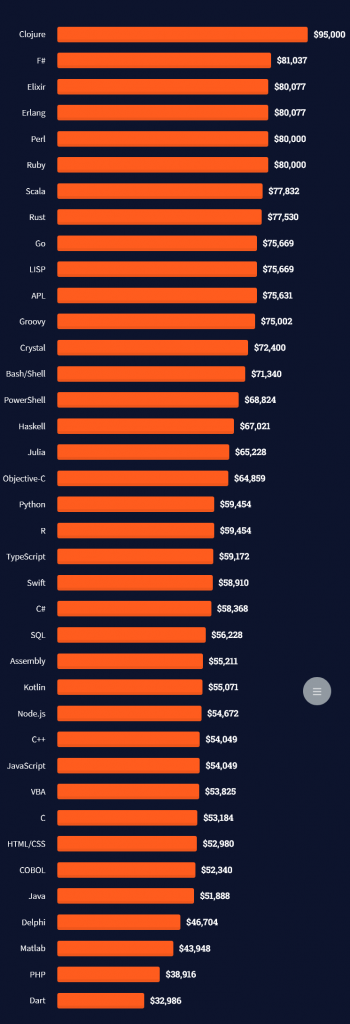
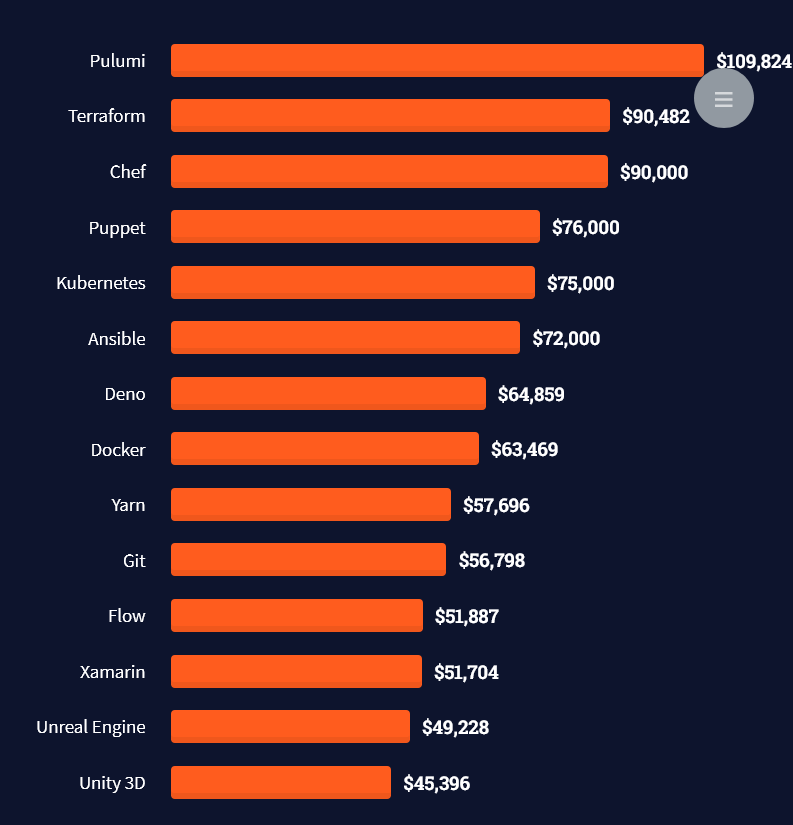
The following statistic compares the self-reported income from 46,693 professional programmers as conducted by StackOverflow.
The average annual income of professional developers worldwide (US and non-US) is between $33,000 and $95,000 for various programming languages.
Here’s a screenshot of a more detailed overview of each programming language considered in the report:
Here’s what different database professionals earn:
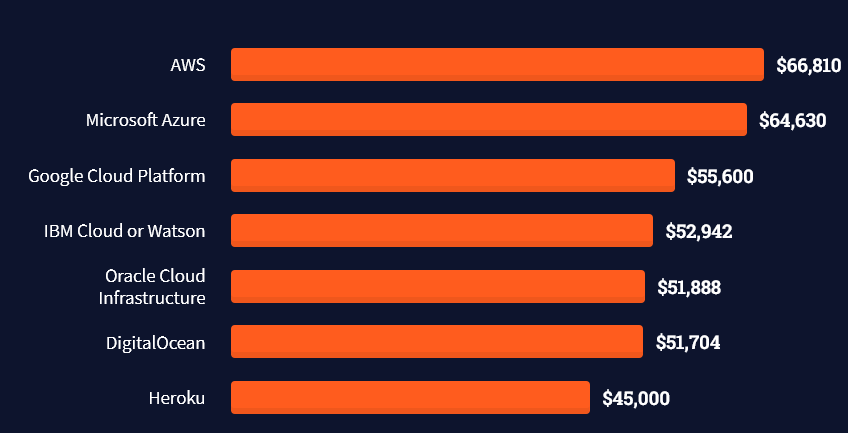
Here’s an overview of different cloud solutions experts:
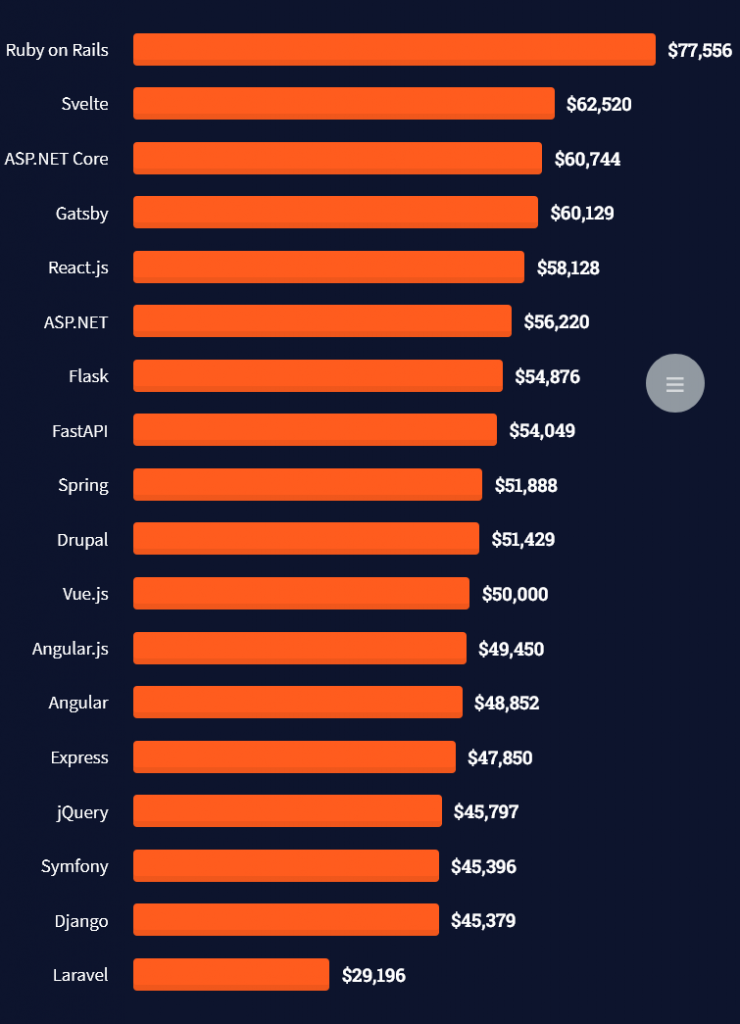
Here’s what professionals in web frameworks earn:
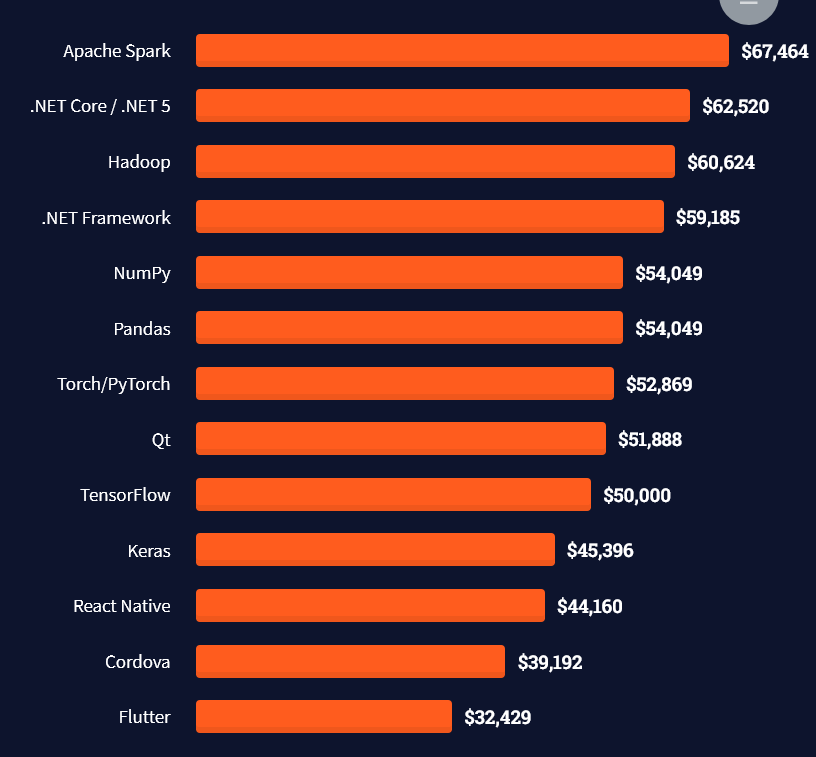
There are many other interesting frameworks—that pay well!
Look at those tools:
Okay, but what do you need to do to get there? What are the skill requirements and qualifications to make you become a professional developer in the area you desire?
Let’s find out next!
General Qualifications of Professionals
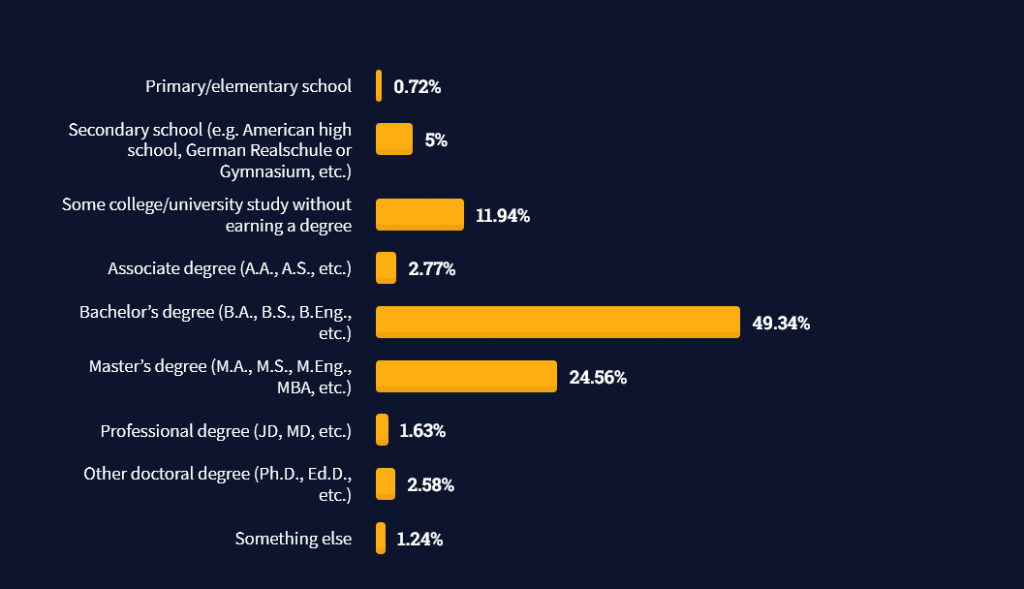
StackOverflow performs an annual survey asking professionals, coders, developers, researchers, and engineers various questions about their background and job satisfaction on their website.
Interestingly, when aggregating the data of the developers’ educational background, a good three quarters have an academic background.
Here’s the question asked by StackOverflow (source):
Which of the following best describes the highest level of formal education that you’ve completed?
However, if you don’t have a formal degree, don’t fear! Many of the respondents with degrees don’t have a degree in their field—so it may not be of much value for their coding careers anyways.
Also, about one out of four don’t have a formal degree and still succeeds in their field! You certainly don’t need a degree if you’re committed to your own success!
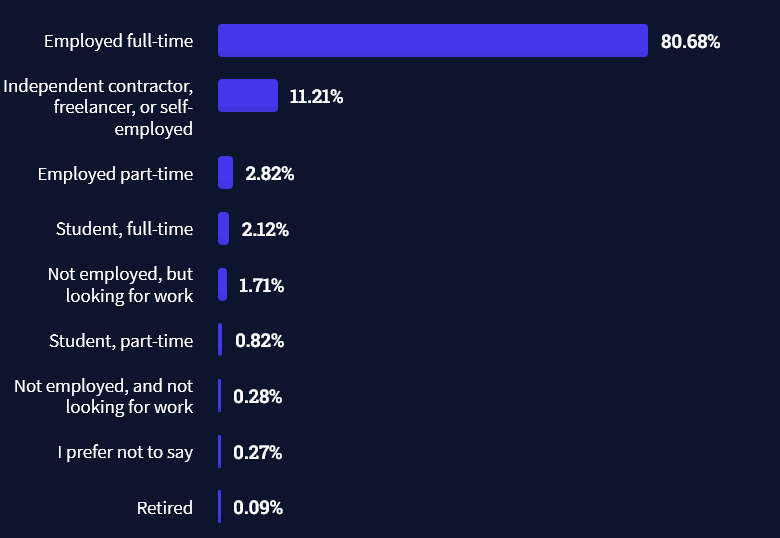
Freelancing vs Employment Status
The percentage of freelance developers increases steadily. The fraction of freelance developers has already reached 11.21%!
This indicates that more and more work will be done in a more flexible work environment—and fewer and fewer companies and clients want to hire inflexible talent.
Here are the stats from the StackOverflow developer survey (source):
Do you want to become a professional freelance developer and earn some money on the side or as your primary source of income?
Resource: Check out our freelance developer course—it’s the best freelance developer course in the world with the highest student success rate in the industry!
Other Programming Languages Used by Professional Developers
The StackOverflow developer survey collected 58000 responses about the following question (source):
Which programming, scripting, and markup languages have you done extensive development work in over the past year, and which do you want to work in over the next year?
These are the languages you want to focus on when starting out as a coder:
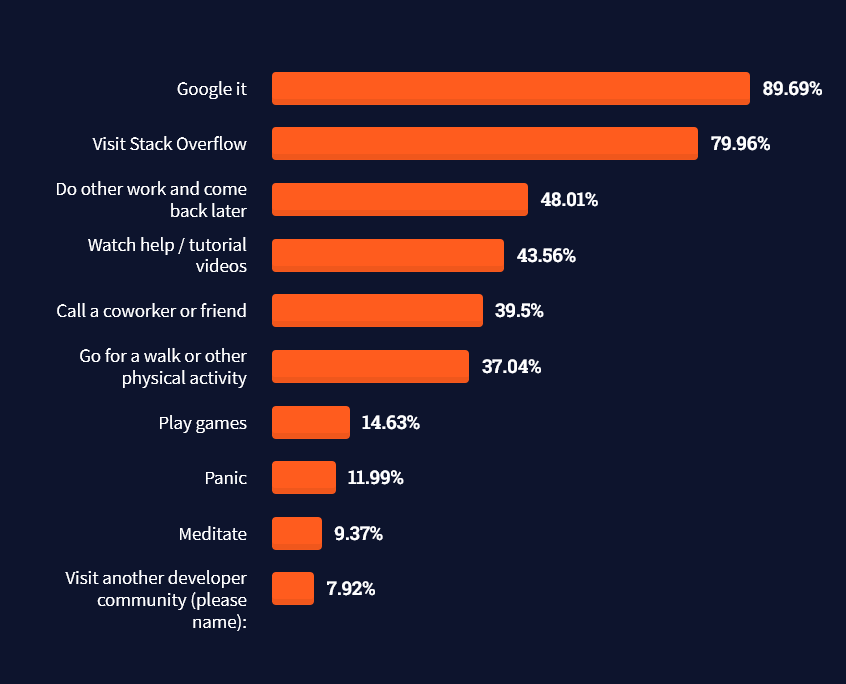
And don’t worry—if you feel stuck or struggle with a nasty bug. We all go through it. Here’s what SO survey respondents and professional developers do when they’re stuck:
What do you do when you get stuck on a problem? Select all that apply. (source)
Related Tutorials
To get started with some of the fundamentals and industry concepts, feel free to check out these articles:
Coders get paid six figures and more because they can solve problems more effectively using machine intelligence and automation.
To become more successful in coding, solve more real problems for real people. That’s how you polish the skills you really need in practice. After all, what’s the use of learning theory that nobody ever needs?
You build high-value coding skills by working on practical coding projects!
Do you want to stop learning with toy projects and focus on practical code projects that earn you money and solve real problems for people?
If your answer is YES!, consider becoming a Python freelance developer! It’s the best way of approaching the task of improving your Python skills—even if you are a complete beginner.
If you just want to learn about the freelancing opportunity, feel free to watch my free webinar “How to Build Your High-Income Skill Python” and learn how I grew my coding business online and how you can, too—from the comfort of your own home.
Coding in JavaScript is one of the critical skills required in building websites. Though mastering JavaScript is a journey to the center of the earth, continuous learning will help you make it.
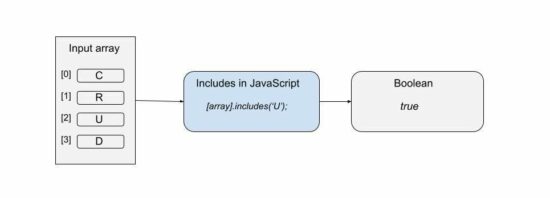
We have seen some of the JavaScript functions like find(), forEach() earlier. Now, let’s learn about the function includes() in JavaScript.
It checks if an array or string includes a given value.
In an array context, it checks the given value is one among the array elements. In the string prototype, the includes() in JavaScript checks if the given value is the substring.
Syntax, parameters and return value
includes(searchElement, [fromIndex]);
It has two parameters, searchElement and fromIndex. The fromIndex is optional and its default value is 0 to start with.
The fromIndex accepts signed numbers. With a negative value, it applies this formula to compute the position to start.
fromIndex = arrayLength + signedFromIndex
It returns boolean true if any match is found or false otherwise.
Note:
JavaScript includes() searches array or string with case sensitivity.
It can also be called as a generic method.
It works in most modern browsers.
The negative value is not applicable for the includes() in the String prototype.
The Array.prototype.includes() will not search for a sub-array.
Where to use JavaScript includes
The includes in JavaScript can be used for many scenarios. Some of them are listed below.
To form a conditional code block based on the presence of the search element in an array or string.
To highlight the keyword in the search result, if the includes in JavaScript returns true.
To make the select, checkbox, radio options selected if the options found in the haystack.
This article includes 4 examples to see how to use JavaScript includes(). Those are,
To search array if a specified element exists or not.
To use includes with a positive or negative fromIndex parameter.
To use String.prototype.includes.
To invoke includes() as a generic method.
Search array element using Includes in JavaScript
This example contains an array of 4 strings. It defines a custom functioncheckOption() to form a condition using includes().
This function receives a string and applies array.includes() on it. It returns Boolean true if the passed element is found on the array.
It prepares the output string based on the boolean value returned. It writes the log on the console to see the result of the program.
how-to-use-includes-in-javascript-array.php
<script> var optionArray = [ 'Create', 'Read', 'Update', 'Delete' ]; checkOption('Read'); checkOption('Filter'); function checkOption(keyword) { var isIncludes = optionArray.includes(keyword); if(!isIncludes) { console.log(keyword + ": not exists"); } else { console.log(keyword + ": exists"); } }

</script>
Includes function with optional from-index parameter
It uses the optional fromIndex parameter while calling the includes() in JavaScript.
It supplies either positive or negative values in the second parameter. On getting a negative index, it computes the position from where it should start the search.
As passed -1 the computed position is 5, since arrayLength+negativeIndex = 6+(-1) = 5.
From the 5th position, it searches for ‘Pagination’ and returns true. When it searches for ‘Filter’ then it will return false.
It’s for using String.prototype.includes() in Javascript. It assigns a long string to a variable and searches the passed keyword on it.
It also receives fromIndex position. A negative index will create no change. This program uses the fromIndex default value 0 and searches the string end to end.
check-string-includes-substring.php
<script>

var inputString = "How much wood would a woodchuck chuck if a woodchuck could chuck wood?";

var result = inputString.includes("woodchuck");

console.log(result);

</script>
Invoke includes in JavaScript on array-like objects
JavaScript allows calling the includes() function as a generic method. In the above examples, the includes() is called with respect to this value representing an array or string context.
This example calls the includes in JavaScript on a functions’ argument list instead of an array.
There are more functions in JavaScript as like as the includes(). The below list shows some of those functions.
find() – applies condition on an array and returns the first element satisfying the condition.
findIndex() – as like as find() but returns index instead of the value.
indexOf() – returns index by element value.
lastIndexOf() – returns last index of an input element. It makes difference if the there are multiple occurances of the passed element.
Conclusion
We have seen about the includes in JavaScript end to end. The above article contains the basic idea about this function. It covers a beginner’s level introductory section and the usage mechanisms.
The examples will make it clear how to use includes in JavaScript. I hope the scenarios to use and the list of related functions gives relevancy to get the idea.
[freebies.indiegala.com] The astronomical Spring begins on the day of the equinox, while Easter is nearly a month away, so why not celebrate early with a small Bonus?
Razer Gold Promotional Raffle
[gold.razer.com] Want to score some Razer Gear? Interested in some great game deals? Why not do both?! Use Razer Gold, enter the raffle and you could win big.
(NOTE: This Razer Gold Promotion is available only in the US region.)
Akupara, Europa Universalis IV, Annapurna Flash Sales
The game is free to keep until Mar 31th 2022 - 15:00 UTC.
Next week's freebie: City of Brass Total War: WARHAMMER
We are welcoming everyone to join our discord[discord.gg]. We are more active there on finding giveaways, small or large, and there are daily raffles you can participate.



![[Image: 01-how-to-disable-gui-on-boot-in-ubuntu-...esktop.png]](https://linuxconfig.org/wp-content/uploads/2019/12/01-how-to-disable-gui-on-boot-in-ubuntu-20-04-focal-fossa-linux-desktop.png)
![[Image: eye_ender.png]](https://www.digminecraft.com/basic_recipes/images/eye_ender.png)
![[Image: end_portal.png]](https://www.digminecraft.com/basic_recipes/images/end_portal.png)
![[Image: how_to_make_end_portal7.png]](https://www.digminecraft.com/getting_started/images/how_to_make_end_portal7.png)
![[Image: how_to_make_end_portal8.png]](https://www.digminecraft.com/getting_started/images/how_to_make_end_portal8.png)
![[Image: how_to_make_end_portal9.png]](https://www.digminecraft.com/getting_started/images/how_to_make_end_portal9.png)
![[Image: how_to_make_end_portal10.png]](https://www.digminecraft.com/getting_started/images/how_to_make_end_portal10.png)
![[Image: how_to_make_end_portal11.png]](https://www.digminecraft.com/getting_started/images/how_to_make_end_portal11.png)
![[Image: how_to_make_end_portal1.png]](https://www.digminecraft.com/getting_started/images/how_to_make_end_portal1.png)
![[Image: how_to_make_end_portal2.png]](https://www.digminecraft.com/getting_started/images/how_to_make_end_portal2.png)
![[Image: how_to_make_end_portal3.png]](https://www.digminecraft.com/getting_started/images/how_to_make_end_portal3.png)
![[Image: how_to_make_end_portal4.png]](https://www.digminecraft.com/getting_started/images/how_to_make_end_portal4.png)
![[Image: how_to_make_end_portal5.png]](https://www.digminecraft.com/getting_started/images/how_to_make_end_portal5.png)
![[Image: how_to_make_end_portal6.png]](https://www.digminecraft.com/getting_started/images/how_to_make_end_portal6.png)
![[Image: how_to_make_nether_portal1.png]](https://www.digminecraft.com/getting_started/images/how_to_make_nether_portal1.png)
![[Image: how_to_make_nether_portal3.png]](https://www.digminecraft.com/getting_started/images/how_to_make_nether_portal3.png)
![[Image: obsidian.png]](https://www.digminecraft.com/block_recipes/images/obsidian.png)
![[Image: flint_and_steel.png]](https://www.digminecraft.com/tool_recipes/images/flint_and_steel.png)
![[Image: fire_charge.png]](https://www.digminecraft.com/firework_recipes/images/fire_charge.png)
![[Image: how_to_make_nether_portal2.png]](https://www.digminecraft.com/getting_started/images/how_to_make_nether_portal2.png)
![[Image: how_to_make_nether_portal4.png]](https://www.digminecraft.com/getting_started/images/how_to_make_nether_portal4.png)


 Note: Do you want to create your own thriving coding business online? Feel free to check out our
 Tip: An excellent start to turbo-charge your freelancing career (earning more in less time) is our
  The average annual income of professional developers in the US is between $70,000 and $177,500 for various programming languages.