A treacherous betrayal has stirred a war amongst vampires, who are also targeted for annihilation by the secret society known as the Entity. Use your supernatural powers, weapons, and wit in this third-person battle royale game to dominate the night and restore the masquerade.
Feed on potent blood to grow in power then hunt using your supernatural abilities and senses. With Prague in lockdown, defy gravity and strike from anywhere in your quest to dominate the night.
Choose your Clan allegiance to define your playstyle and let your personality shine through as you create your most unique looks for rivals to remember.
Form unholy alliances or fight alone away from human eyesight. As the hunters become the hunted, fight to the last drop to become the ultimate vampire and restore order.
Accelerating OCI applications with GraalVM Enterprise
Oracle GraalVM Enterprise Edition is a high performance runtime that provides significant improvements in application execution and efficiency on premise and in the cloud. For cloud, the good news is that GraalVM Enterprise is included in all Oracle Cloud Infrastructure (OCI) subscriptions so you ca...
Posted by: xSicKxBot - 05-13-2022, 10:43 AM - Forum: Python
- No Replies
iOS App Developer — Income and Opportunity
5/5 – (2 votes)
Before we learn about the money, let’s get this question out of the way:
What Does an iOS App Developer Do?
An iOS app developer is a programmer who focuses on software creation for Apple mobile devices such as iPhones or wearables such as Apple Watches. Most mobile app developers create smartphone apps for the iOS or watchOS mobile operating systems using the Swift programming language.
For your motivation, I’ve compiled some interesting stats and facts about mobile app development:
The revenue of the mobile app market worldwide is mobile app revenue in 2022 is $437 billion USD. (Statista)
The number of iOS mobile app developers in the world is 2.8 million. (EvansData)
For comparison, the number of Android mobile app developers in the world is 5.9 million. (EvansData)
The average revenue per mobile app developer worldwide is $50,229 USD/year. (Finxter)
The average annual income of a mobile app developer in the US is $101,000 USD. (Finxter)
The average annual income of a mobile app developer in India is ₹5,17,819. (Glassdoor)
So, are you motivated? Great, let’s have a look on the skills you need next!
What Skills Does an iOS App Developer Need?
As an iOS app developer, your skillset varies depending on the concrete set of applications you’re working on. However, these skills will proof useful no matter what, and most successful mobile iOS app developers have these seven skills:
Of course, these are only the top seven most important skills from my point of view.
Mobile (iOS) App Developer vs Desktop (macOS) Developer
What’s the difference between a mobile iOS app developer and a desktop developer focusing on macOS?
An iOS developer creates applications for mobile operating systems iOS and watchOS.
A desktop developer creates applications for desktop-based operating systems like macOS.
Unlike desktop developers, mobile iOS app developers tend to focus more on utilizing native sensors such as NFC and GPS for location-based applications and more natural human-computer interaction means such as speech and touch.
Of course, there’s a two-way exchange of ideas and technologies because more and more desktop developers integrate ubiquitous computing technologies in their applications. And app developers use traditional “desktop” means of user interfaces such as virtual keyboards.
Now that you know about what it is, let’s have a look at what it earns next!
Annual Income
How much does an iOS App Developer make per year?
Figure: Average Income of an iOS Developer in the US by Source. [1]
Compare the significant income of an iOS developer with the income of a general app developer. iOS developer make $10,000 more than general mobile app developers, on average:
The average annual income of an iOS Developer in the United States is between $83,351 and $145,000 with an average of $110,331 and a statistical median of $111,716 per year.
This data is based on our meta-study of six (6) salary aggregators sources such as Glassdoor, ZipRecruiter, and PayScale.
If you decide to go the route as a freelance Mobile App Developer, you can expect to make between $40 and $120 per hour on Upwork (source). Assuming an annual workload of 2000 hours, you can expect to make between $80,000 and $240,000 per year.
Note: Do you want to create your own thriving coding business online? Feel free to check out our freelance developer course — the world’s #1 best-selling freelance developer course that specifically shows you how to succeed on Upwork and Fiverr!
But is there enough demand? Let’s have a look at Google trends to find out how interest evolves over time (source):
Looks like the interest in becoming an iOS and watchOS developer slightly decreased over the last couple of years.
But don’t let this fool you—this makes an excellent opportunity for you as a freelance developer because people are searching for hiring iOS app developers like never before:
While the interest in iPhone app development stays constant, the demand for Apple mobile developers is growing continuously. This means that the gap in the market place increases, and you can expect hourly rates to increase in the years to come!
If demand for a scarce resource outstrips the supply growth, prices rise. Your prices. Your income.
You can see that many freelancers now start creating apps for clients rather than creating apps for themselves—it’s just the more attractive market opportunity:
Learning Path, Skills, and Education Requirements
Do you want to become a Mobile App Developer? Here’s a step-by-step learning path I’d propose to get started with Mobile App :
But don’t wait too long to acquire practical experience!
Even if you have little skills, it’s best to get started as a freelance developer and learn as you work on real projects for clients — earning income as you learn and gaining motivation through real-world feedback.
Tip: An excellent start to turbo-charge your freelancing career (earning more in less time) is our Finxter Freelancer Course. The goal of the course is to pay for itself!
You can find more job descriptions for coders, programmers, and computer scientists in our detailed overview guide:
The following statistic shows the self-reported income from 9,649 US-based professional developers (source).
The average annual income of professional developers in the US is between $70,000 and $177,500 for various programming languages.
Question: What is your current total compensation (salary, bonuses, and perks, before taxes and deductions)? Please enter a whole number in the box below, without any punctuation. If you are paid hourly, please estimate an equivalent weekly, monthly, or yearly salary. (source)
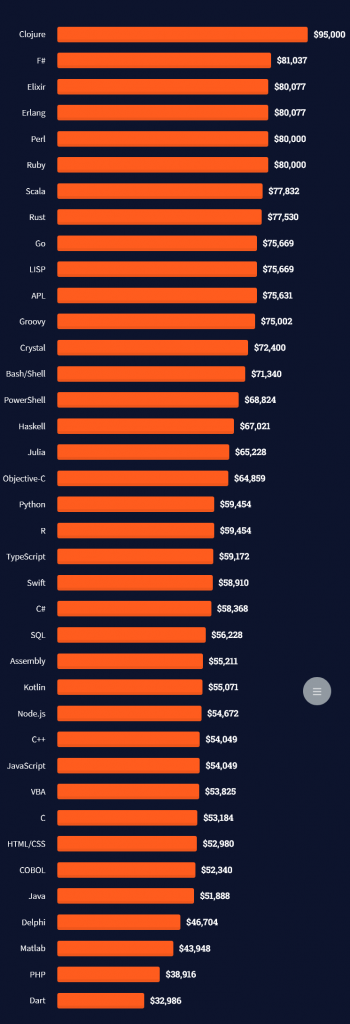
The following statistic compares the self-reported income from 46,693 professional programmers as conducted by StackOverflow.
The average annual income of professional developers worldwide (US and non-US) is between $33,000 and $95,000 for various programming languages.
Here’s a screenshot of a more detailed overview of each programming language considered in the report:
Here’s what different database professionals earn:
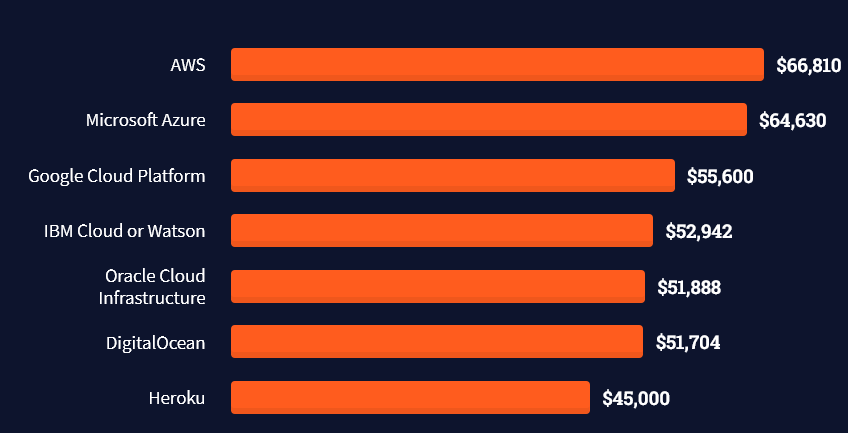
Here’s an overview of different cloud solutions experts:
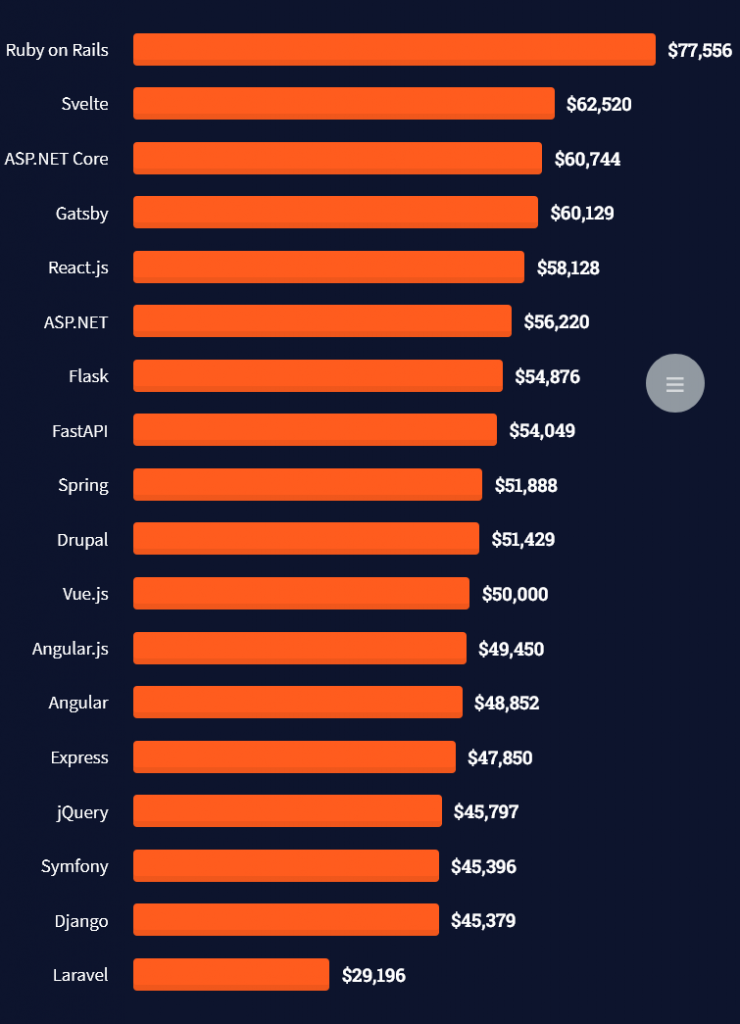
Here’s what professionals in web frameworks earn:
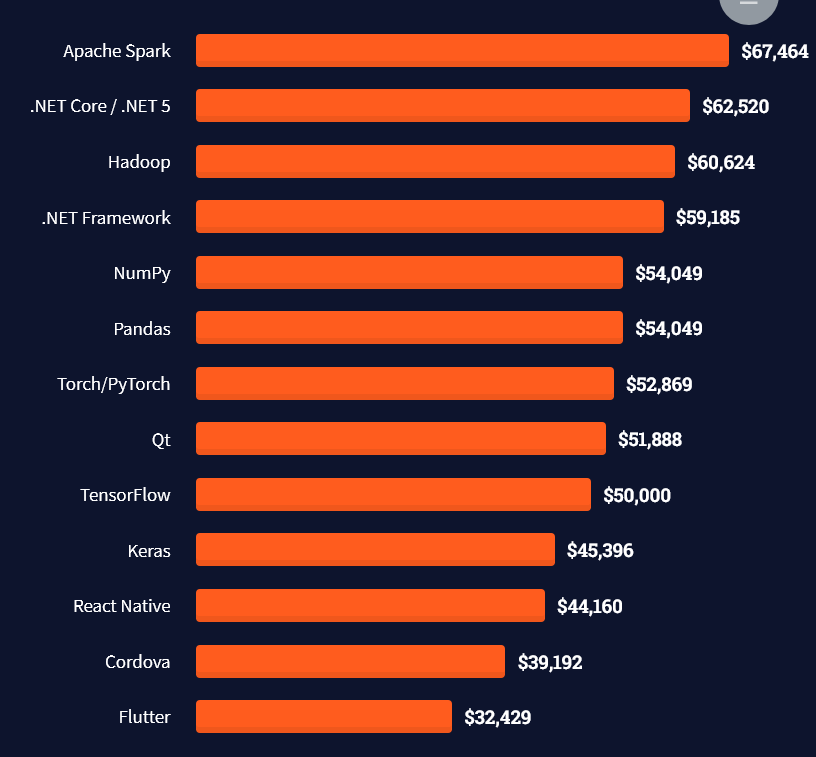
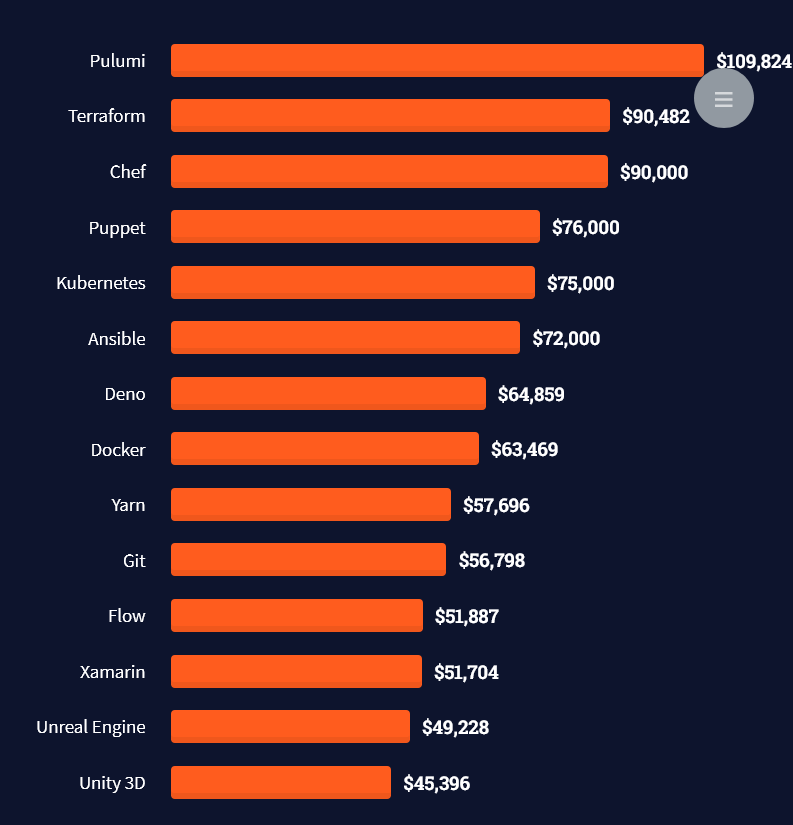
There are many other interesting frameworks—that pay well!
Look at those tools:
Okay, but what do you need to do to get there? What are the skill requirements and qualifications to make you become a professional developer in the area you desire?
Let’s find out next!
General Qualifications of Professionals
StackOverflow performs an annual survey asking professionals, coders, developers, researchers, and engineers various questions about their background and job satisfaction on their website.
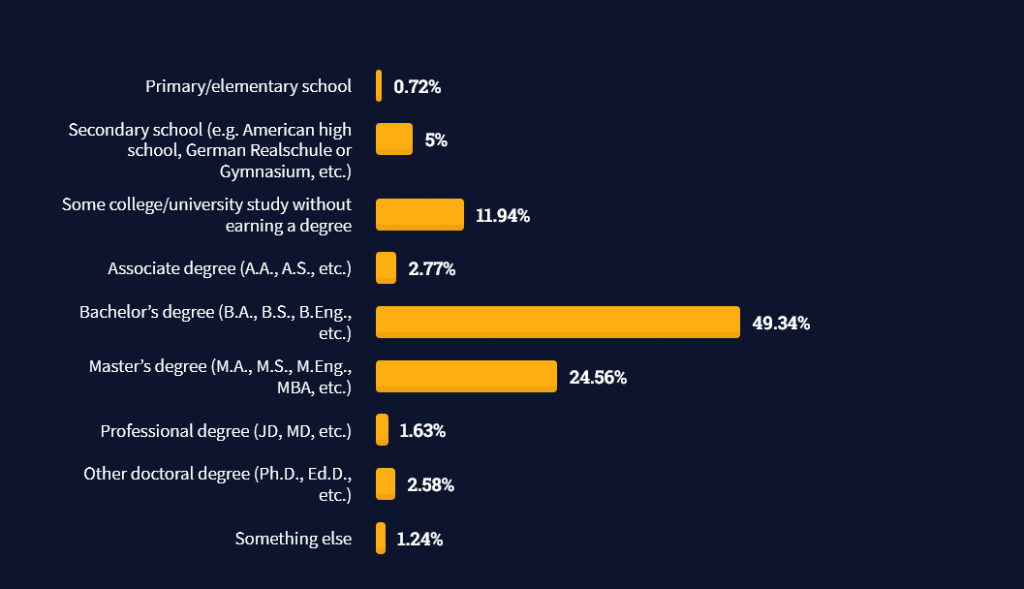
Interestingly, when aggregating the data of the developers’ educational background, a good three quarters have an academic background.
Here’s the question asked by StackOverflow (source):
Which of the following best describes the highest level of formal education that you’ve completed?
However, if you don’t have a formal degree, don’t fear! Many of the respondents with degrees don’t have a degree in their field—so it may not be of much value for their coding careers anyways.
Also, about one out of four don’t have a formal degree and still succeeds in their field! You certainly don’t need a degree if you’re committed to your own success!
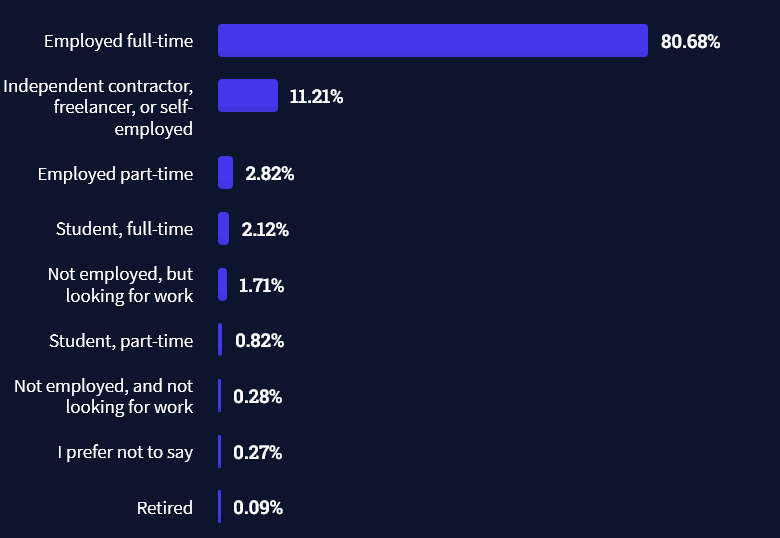
Freelancing vs Employment Status
The percentage of freelance developers increases steadily. The fraction of freelance developers has already reached 11.21%!
This indicates that more and more work will be done in a more flexible work environment—and fewer and fewer companies and clients want to hire inflexible talent.
Here are the stats from the StackOverflow developer survey (source):
Do you want to become a professional freelance developer and earn some money on the side or as your primary source of income?
Resource: Check out our freelance developer course—it’s the best freelance developer course in the world with the highest student success rate in the industry!
Other Programming Languages Used by Professional Developers
The StackOverflow developer survey collected 58000 responses about the following question (source):
Which programming, scripting, and markup languages have you done extensive development work in over the past year, and which do you want to work in over the next year?
These are the languages you want to focus on when starting out as a coder:
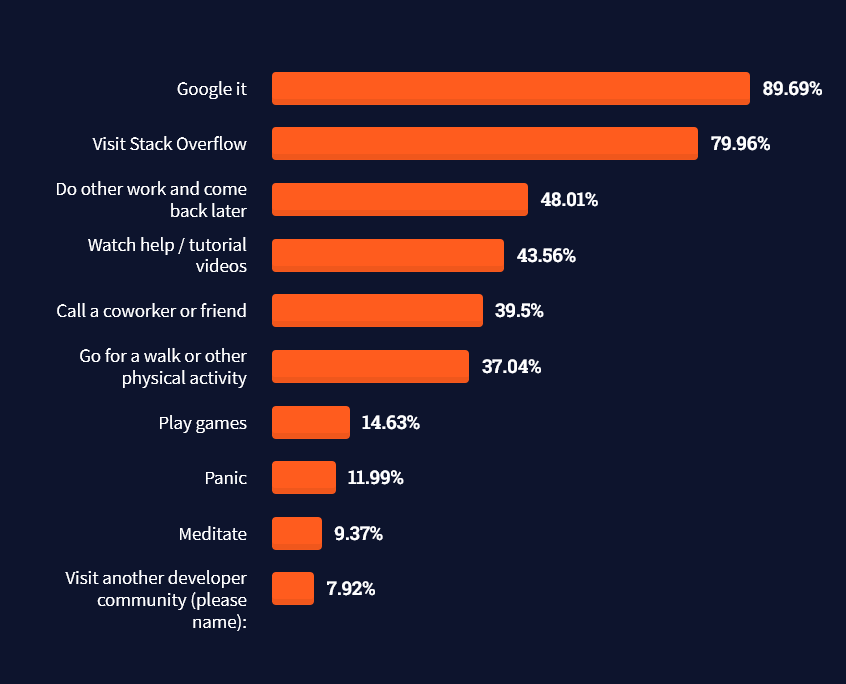
And don’t worry—if you feel stuck or struggle with a nasty bug. We all go through it. Here’s what SO survey respondents and professional developers do when they’re stuck:
What do you do when you get stuck on a problem? Select all that apply. (source)
Related Tutorials
To get started with some of the fundamentals and industry concepts, feel free to check out these articles:
Coders get paid six figures and more because they can solve problems more effectively using machine intelligence and automation.
To become more successful in coding, solve more real problems for real people. That’s how you polish the skills you really need in practice. After all, what’s the use of learning theory that nobody ever needs?
You build high-value coding skills by working on practical coding projects!
Do you want to stop learning with toy projects and focus on practical code projects that earn you money and solve real problems for people?
If your answer is YES!, consider becoming a Python freelance developer! It’s the best way of approaching the task of improving your Python skills—even if you are a complete beginner.
If you just want to learn about the freelancing opportunity, feel free to watch my free webinar “How to Build Your High-Income Skill Python” and learn how I grew my coding business online and how you can, too—from the comfort of your own home.
Generate PDF from HTML in a browser is one of the most wanted utilities. There are many hosted solutions generating PDF online from the posted source.
When using online tools the required features are not available with one tool. The users have to compromise some of their needs when depending on the online tools.
But, developers like us need not compromise. We can create a custom utility to generate PDF from HTML on our own.
Quick solution
There is a quick solution to generate PDF from an HTML page. The browser’s print wizard has the “Save as PDF” option along with the preview panel.
This JavaScript triggers the browser’s print action. Then, it supplies a particular portion of the HTM to print.
<div class="outer-content"> <div id="pdf-content"> <h2>PDF Page Title</h2> <hr> <p> How to generate a pdf from the <i>UI content</i> is easy. </p> <p> This describes how to <strong>generate pdf from HTML</strong> using programming. </p> </div> <hr> <button id="btn-generate">Generate PDF</button>

</div>
I am sure this is not enough to claim that the PDF generation is implemented ?
For creating a full-fledged solution to generate PDF from HTML we have to go for using libraries.
There are popular libraries available in the market to build a PDF generation tool for an application.
In this tutorial, we will see some of the top libraries that support PDF generation. For each library, we will see how-to steps for the integration and development.
Libraries available to Generate PDF from HTML
This section listed the libraries used to generate PDF from HTML in this article. It interlinks the appropriate example code below to land you in the right place.
The HTML to pdf and jspdf sections have more than one example. It is to know how to generate PDF from HTML containing complex nodes or containers. Example: HTML tables, image galleries and etc.
1. HTML to PDF
The HTML to pdf library method is a way to generate PDF from HTML. It is a two-step process to get a simple PDF output.
First, get the CDN URL of this library from an authentic source. Then, follow these two steps to get an output PDF file.
Instantiate html to pdf library class.
Map HTML content to generate and save PDF.
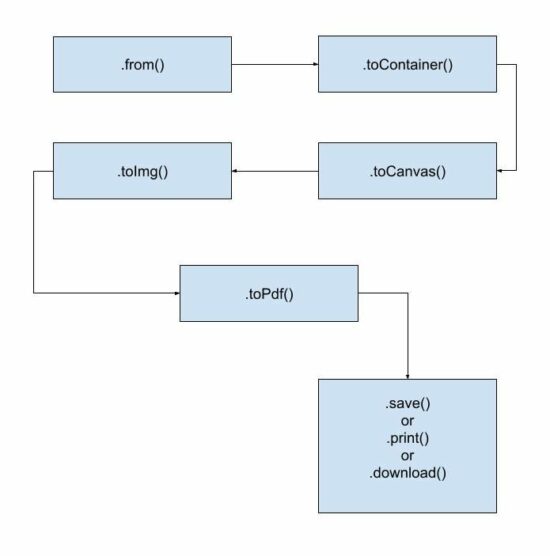
The basic life cycle to generate PDF from HTML using this library is shown in the below flow chart.
Example 1: Generate PDF from HTML containing only text.
<!DOCTYPE html>

<html lang="en">

<head>

<title>Generate PDF from HTML using html to pdf library</title>

<!-- CDN URL - html2pdf library -->

<script src="https://cdnjs.cloudflare.com/ajax/libs/html2pdf.js/0.10.1/html2pdf.bundle.min.js"></script>

</head> <body> <?php require_once __DIR__ . '/template.html'; ?> <script> var buttonElement = document.querySelector("#btn-generate"); buttonElement.addEventListener('click', function() { var pdfContent = document.querySelector("#pdf-content"); html2pdf().from(pdfContent).save(); }); </script>

</body>

</html>
Example 2: Supply library options to override defaults
Unlike the above example, it sends an array of options to generate PDF from HTML. It overrides the default file name, margin, orientation and more defaults as specified.
var pdfContent = document.querySelector("#pdf-content");

var optionArray = { margin: 10, filename: 'output.pdf', jsPDF: { unit: 'in', format: 'letter', orientation: 'portrait' }

}; // html to pdf generation with the reference of PDF worker object

html2pdf().set(optionArray).from(pdfContent).save();
In old monolithic method, the html2pdf() accepts the HTML reference and options. To generate PDF from HTML DOM object reference and JSON options are supplied like,
html2pdf(pdfContent, optionArray);
2. jsPDF
To generate PDF from HTML some libraries need document definition of the markup. The jsPDF is popularly known for its feature of getting the HTML input in any format.
For example, it is capable of accepting HTML in the following formats.
HTML markup.
HTML file input data.
HTML element object with the reference of selectors.
Example 1: Equivalent alternative solution to generate PDF from HTML
This example creates a basic usage reference of jsPDF to generate PDF from HTML template. It includes an external template source in the UI container.
The JavaScript maps an event handler to the “Generate PDF” button found in the HTML template.
On clicking the button, the script initiates jsPDF with the appropriate PDF specification. It uses .html() handling of the jsPDF library tp generate PDF from HTML object supplied as an argument.
This hander defines a callback function that executes the HTML to PDF conversion. It saves or opens the generated PDF document in the callback.
<!DOCTYPE html>

<html>

<head>

<title>jsPDF Example</title>

<script src="https://cdnjs.cloudflare.com/ajax/libs/jquery/3.3.1/jquery.min.js"></script>

<script src="https://cdnjs.cloudflare.com/ajax/libs/jspdf/2.5.1/jspdf.umd.min.js"></script>

<script src="https://cdnjs.cloudflare.com/ajax/libs/html2canvas/1.4.1/html2canvas.min.js"></script>

</head>

<body> <?php require_once __DIR__ . '/template.html'; ?> <script> var buttonElement = document.querySelector("#btn-generate"); buttonElement.addEventListener('click', function() { const { jsPDF } = window.jspdf; var doc = new jsPDF("p", "pt", 'a4'); var pdfContent = document.querySelector("#pdf-content"); // Generate PDF from HTML using right id-selector doc.html(pdfContent, { callback: function(doc) { doc.save("download.pdf"); }, x: 10, y: 19 }); }); </script>

</body>

</html>
Example 2: Generate multipage PDF from HTML page
The jsPDF library is one of the best libraries used to generate PDF from HTML on the client-side. We have seen more examples in previous articles.
This example is for generating a multipage document from lengthy HTML to PDF format.
It uses the jsPDF’s page handlers like addPage, setPage, insertPage and more.
It calculates the PDF page content height and width and split the HTML source content. It creates chunks of page content from the HTML markup.
It calculates the total pages to paginate split chunks of HTML to PDF multi-page document. The addPage() generates a page instance to render the page content chunk into it.
<!doctype html>

<HTML>

<HEAD>

<TITLE>Generate multi-page PDF from HTML - jsPDF</TITLE>

<script src="https://code.jquery.com/jquery-2.1.3.js"></script>

<script src="https://cdnjs.cloudflare.com/ajax/libs/jspdf/1.3.3/jspdf.min.js"></script>

<script src="https://cdnjs.cloudflare.com/ajax/libs/html2canvas/1.4.1/html2canvas.min.js"></script>

<style>

.description { font-size: 2em; line-height: 4;

}

</style>

</HEAD>

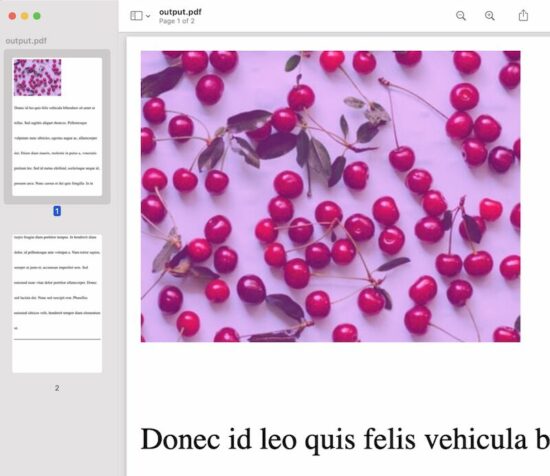
<BODY> <div class="outer-content"> <div id="pdf-content"> <img src="cherry.jpeg" /> <p class="description">Donec id leo quis felis vehicula bibendum sit amet ut tellus. Sed sagittis aliquet rhoncus. Pellentesque vulputate nunc ultricies, egestas augue ac, ullamcorper dui. Etiam diam mauris, molestie in purus a, venenatis pretium leo. Sed id metus eleifend, scelerisque neque id, posuere arcu. Nunc cursus et dui quis fringilla. In in turpis feugiat diam porttitor tempus. In hendrerit diam dolor, id pellentesque ante volutpat a. Nam tortor sapien, semper ut justo et, accumsan imperdiet sem. Sed euismod nunc vitae dolor porttitor ullamcorper. Donec sed lacinia dui. Nunc sed suscipit erat. Phasellus euismod ultrices velit, hendrerit tempor diam elementum ut.</p> <hr> </div> <button id="btn-generate">Generate PDF</button> </div> </BODY>

<script>

$(document).ready(function(){ $("#btn-generate").click(function(){ var htmlWidth = $("#pdf-content").width(); var htmlHeight = $("#pdf-content").height(); var pdfWidth = htmlWidth + (15 * 2); var pdfHeight = (pdfWidth * 1.5) + (15 * 2); var doc = new jsPDF('p', 'pt', [pdfWidth, pdfHeight]); var pageCount = Math.ceil(htmlHeight / pdfHeight) - 1; html2canvas($("#pdf-content")[0], { allowTaint: true }).then(function(canvas) { canvas.getContext('2d'); var image = canvas.toDataURL("image/png", 1.0); doc.addImage(image, 'PNG', 15, 15, htmlWidth, htmlHeight); for (var i = 1; i <= pageCount; i++) { doc.addPage(pdfWidth, pdfHeight); doc.addImage(image, 'PNG', 15, -(pdfHeight * i)+15, htmlWidth, htmlHeight); } doc.save("output.pdf"); }); });

});

</script>

</HTML>
3. wkHTMLtoPDF
It is a command-line tool to generate PDFs from HTML. Find the latest suitable release. Then, install this library before running the command in the terminal.
It requires supplying a sanitized HTML source to create a PDF output.
After installation, add the library path to the system classpath. Then, run the following command.
wkhtmltopdf sanitised_html_source_path output.pdf
The best practice is to read the remote page content and sanitize the HTML. Then write the sanitized content into a local HTML to pass it to the PDF generation command. The PHP cURL post will be best to read the remote content compared to the file_get_contents().
It provides a C library to get used to it via programming.
If you want to execute the command via a program, the PHP exec() function may help.
There is a third-party interface to generate PDF from HTML using the wkHTMLtoPDF. Visit the Github page to install the PHP library used to content HTML to PDF.
This code shows the command to install this library into your vendor directory.
composer require mikehaertl/phpwkhtmltopdf
This simple usage example may initiate to start with this PHP library to generate PDF from HTML.
<?php

use mikehaertl\wkhtmlto\Pdf; $pdf = new Pdf('html-source-file.html'); if (!$pdf->saveAs('output.pdf')) { $error = $pdf->getError(); // return error to the request handler

}
4. pdfmake
The pdfmake library has both client-side and server-side integrations. Both methods generate PDF from HTML by accessing the element content from JavaScript.
Installation
This example uses pdfmake CDN URL to import dependencies. The documentation has alternate methods of installing and integrating the library.
For example, it gives npm commands to download node_modules with required dependencies.
Client-side integration
This example uses the pdfmake’s client-side method to generate PDF from HTML objects.
It accesses HTML element content from JavaScript and prepares the document definition object.
The document definition can supply the following types of content.
The HTML contains a heading, text, and image content. The docDefinition object is built with the content of these HTML elements.
Images will be supplied as encoded binary data. In this example, the JavaScript getDataUrl()converts the image into a binary data URL.
Then the pdfmake.createPDF() handler code generate PDF from HTML. The below code opens the HTML to PDF output in the browser screen. The pdfmake library also allows to print, and download the PDF document.
Thus, we have seen various methods to generate PDF from HTML source code or files. I hope the usage examples of the libraries may give choices to enable PDF generation.
Share your thoughts about the PDF generation concept we have seen. Also, share your comments on the example codes to generate PDF from HTML.
[freebies.indiegala.com] Get Control Craft 3, a fast paced RTS which brings together quick thinking and clever tactics for some veritable planet conquering action!
The games are free to keep until May 19th 2022 - 15:00 UTC.
Next week's freebie: mystery
We are welcoming everyone to join our discord[discord.gg]. We are more active there on finding giveaways, small or large, and there are daily raffles you can participate.
Posted by: xSicKxBot - 05-13-2022, 10:43 AM - Forum: Lounge
- No Replies
3 Free Games Are Available On The Epic Games Store Right Now
The Epic Games Store continues to give away free games each week, more than three years after the digital storefront launched its awesome weekly freebies program. Epic has confirmed that the free games program will continue through at least the end of 2022. Every Thursday at the same time 8 AM PT / 11 AM ET--Epic gives up between one and three free games. You merely need to create a free Epic account and enable two-factor authentication to start snagging freebies. At this point, Epic has given away well over 100 free games, and there's no sign that the program will stop any time soon. We keep this article up to date weekly to highlight both the current free games and next week's offerings.
This week's free game at Epic
Prey
From now until May 19 at 8 AM PT / 11 AM ET, you can snag Prey, Jotun: Valhalla Edition, and Redout: Enhanced Edition. Two of these freebies--Jotun and Prey--have been free at Epic before, but if you didn't claim them then, they are definitely worth checking. The reboot of Prey from Arkane Studios is an atmospheric first-person shooter with some interesting ideas. While it has some dull moments and awkward pacing, the combat and stealth scenarios can be quite fun.
Meanwhile, Jotun is a gorgeous hand-drawn action game inspired by Norse mythology. You play as the Viking warrior Thora on a quest to reach Valhalla. The titular Jotun are large foes that you'll have to topple as you make your way through the game's levels.
Warfare. Planetary Conquest. Cultural Domination. Political Alliances. Technological Supremacy. How will you achieve victory? Galactic Civilizations IV is a space-based 4X strategy game set in the 24th century. Humans have discovered faster-than-light travel, and aliens compete with humanity for dominion of the galaxy. You begin the game with only your home planet and must research new technologies, explore the known galaxy, and colonize new worlds while keeping your people at home happy. At the same time, you will engage in trade, diplomacy, intrigue and war with other alien civilizations.
How to Read Specific Columns from CSV File in Python
Rate this post
Table of Contents
A Quick Glance at The Solutions [Each solution stays for 5-10 secs.]
Problem: Given a CSV file, how to read only specific column(s) from the csv file? (Reading a specific column from a csv file will yield all the row values pertaining to that column.)
Example: Consier the following csv file (countries.csv):
Using the Pandas library is probably the best option if you are dealing with csv files. You can easily read a csv file and store an entire column within a variable.
Code:
import pandas as pd df = pd.read_csv("countries.csv")

country = df['Country']

# or

# country = df.Country

capital = df['Capital']

# or

# capital = df.Capital # displaying selected columns (Country and Capital)

for x, y in zip(country, capital): print(f"{x} {y}") # displaying a single column (Country)

print()

print(df['Population'])
Output:
Germany Berlin

France Paris

Spain Madrid

Italy Rome

India Delhi

USA Washington

China Beijing

Poland Warsaw

Russia Moscow

England London 0 84,267,549

1 65,534,239

2 46,787,468

3 60,301,346

4 1,404,495,187

5 334,506,463

6 1,449,357,022

7 37,771,789

8 146,047,418

9 68,529,747

Name: Population, dtype: object
Explanation:
Read the csv file using pd.read_csv() Pandas function.
Save all the information of the columns Country and Capital within independent variables using
country = df['Country']
Alternatively, you can also use country = df.Country
capital = df['Capital']
Alternatively, you can also use capital = df.Capital
To display the country names and their capitals simultaneously, you can bind the two columns, country and capital, using the zip() function and then display each country along with its capital using a for loop upon the zipped object.
To display all the values in the population column, you can simply use df['Population'].
TRIVIA zip() is a built-in function in Python that takes an arbitrary number of iterables and binds them into a single iterable, a zip object. It combines the n-th value of each iterable argument into a tuple. Read more about zip() here.
➤List-Based Indexing of a DataFrame
In case you are not comfortable with using zip() to display multiple columns at once, you have another option. You can simply use list-based indexing to accomplish your goal.
List-based indexing is a technique that allows you to pass multiple column names as a list within the square-bracket selector.
Example:
import pandas as pd df = pd.read_csv("countries.csv")

print()

print(df[['Country', 'Capital']])
Output:
 Country Capital

0 Germany Berlin

1 France Paris

2 Spain Madrid

3 Italy Rome

4 India Delhi

5 USA Washington

6 China Beijing

7 Poland Warsaw

8 Russia Moscow

9 England London
Method 2: Integer Based Indexing with iloc
Approach: The idea here is to use the df.iloc[rows, columns].values to access individual columns from the DataFrame using indexing. Note that the first column always has the index 0, while the second column has index 1, and so on.
rows is used to select individual rows. Use the slicing colon: to ensure all rows have been selected.
columns is used to select individual columns.
Use country = data.iloc[:, 0].values to save the values of the Country column.
capital = data.iloc[:, 1].values to save the values of the Capital column.
population = data.iloc[:, 2].values to save the values of the Population column.
import pandas as pd data = pd.read_csv('countries.csv')

country = data.iloc[:, 0].values

capital = data.iloc[:, 1].values

population = data.iloc[:, 2].values

# displaying selected columns

print(data[['Country', 'Capital']])

print()

# displaying a single column (Population)

print(population)
Output:
Country Capital

0 Germany Berlin

1 France Paris

2 Spain Madrid

3 Italy Rome

4 India Delhi

5 USA Washington

6 China Beijing

7 Poland Warsaw

8 Russia Moscow

9 England London ['84,267,549' '65,534,239' '46,787,468' '60,301,346' '1,404,495,187' '334,506,463' '1,449,357,022' '37,771,789' '146,047,418' '68,529,747']
Method 3: Name-Based Indexing with loc()
Instead of selecting the columns by their index, you can also select them by their name using the df.loc[] selecter.
The following example shows how to select the columns Country and Capital from the given DataFrame.
import pandas as pd data = pd.read_csv('countries.csv')

val = data.loc[:, ['Country', 'Capital']]

print(val)
Output:
Country Capital

0 Germany Berlin

1 France Paris

2 Spain Madrid

3 Italy Rome

4 India Delhi

5 USA Washington

6 China Beijing

7 Poland Warsaw

8 Russia Moscow

9 England London
csv module is yet another spectacular option in Python that allows you to play with csv files. Let us have a look at the code that helps us to read the given csv file and then read specific columns from it:
import csv population = []

with open('countries.csv', newline='', encoding='utf-8-sig') as csvfile: data = csv.DictReader(csvfile) for r in data: print("Country", ":", "Capital") # append values from population column to population list population.append(r['Population']) # displaying specific columns (Country and Capital) print(r['Country'], ":", r['Capital']) # display the population list print(population)
Output:
Country : Capital

Germany : Berlin

Country : Capital

France : Paris

Country : Capital

Spain : Madrid

Country : Capital

Italy : Rome

Country : Capital

India : Delhi

Country : Capital

USA : Washington

Country : Capital

China : Beijing

Country : Capital

Poland : Warsaw

Country : Capital

Russia : Moscow

Country : Capital

England : London

['84,267,549', '65,534,239', '46,787,468', '60,301,346', '1,404,495,187', '334,506,463', '1,449,357,022', '37,771,789', '146,047,418', '68,529,747']
Explanation:
Import the csv module and open up the csv file. Ensure that you feed in the encoding argument as it helps to eliminate any unreadable characters that may occur in the given csv file.
with open('countries.csv', newline='', encoding='utf-8-sig') as csvfile
Allow Python to read the csv file as a dictionary using csv.Dictreader object.
Once the file has been read in the form of a dictionary, you can easily fetch the values from respective columns by using the keys within square bracket notation from the dictionary. Here each column represents the key within the given dictionary.
Bonus: Here’s a quick look at how the DictReader() class looks like:
import csv population = []

with open('countries.csv', newline='', encoding='utf-8-sig') as csvfile: data = csv.DictReader(csvfile) for row in data: print(row)
It is evident from the output that csv.DictReader() returns a dictionary for each row such that the column header is the key while the value in the row is the associated value in the dictionary.
Conclusion
To sum things up, there are majorly four different ways of accessing specific columns from a given csv file:
List-Based Indexing.
Integer-Based Indexing.
Name-Based Indexing.
Using csv modules DictReader class.
Feel free to use the one that suits you best. I hope this tutorial helped you. Please subscribe and stay tuned for more interesting tutorials. Happy learning!
Learn Pandas the Fun Way by Solving Code Puzzles
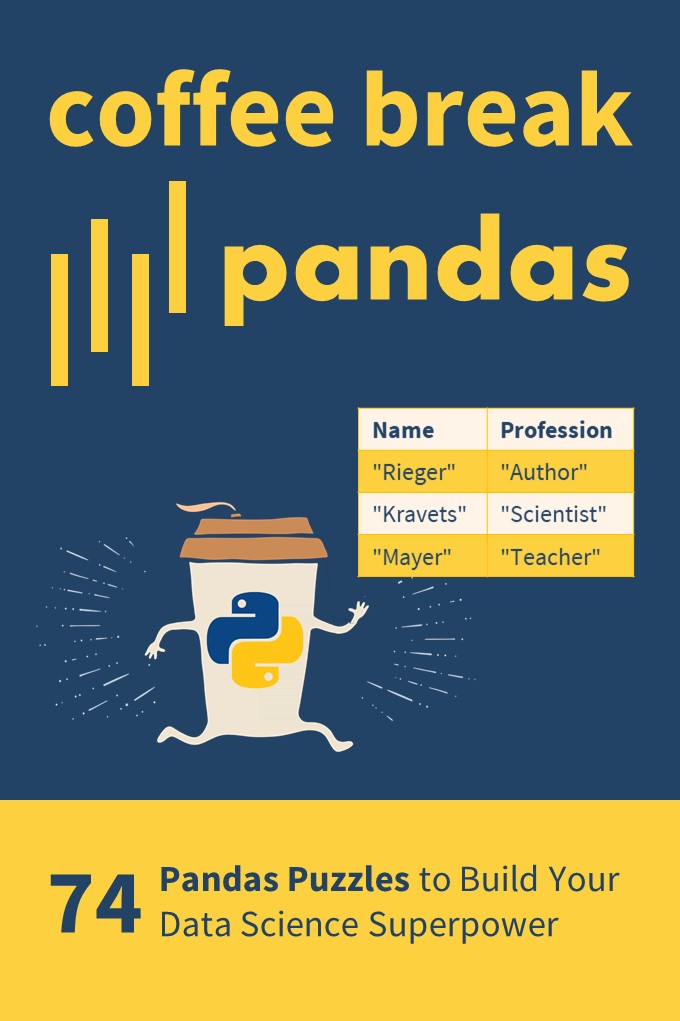
If you want to boost your Pandas skills, consider checking out my puzzle-based learning book Coffee Break Pandas (Amazon Link).
It contains 74 hand-crafted Pandas puzzles including explanations. By solving each puzzle, you’ll get a score representing your skill level in Pandas. Can you become a Pandas Grandmaster?
Coffee Break Pandas offers a fun-based approach to data science mastery—and a truly gamified learning experience.
Oracle has published an update to the Java Client Roadmap which extends availability and support timelines for many Java Client related technologies. Executive Summary: Oracle has extended commercial support and updates for Java SE 8 from March 2025 to at least December 2030. Oracle has extended ind...



 Note: Do you want to create your own thriving coding business online? Feel free to check out our


 Tip: An excellent start to turbo-charge your freelancing career (earning more in less time) is our
  The average annual income of professional developers in the US is between $70,000 and $177,500 for various programming languages.