Welcome, Guest
You have to register before you can post on our site.

Username
  

Password


Search Forums

(Advanced Search)

Forum Statistics
» Members: 20,946
» Latest member: blackopsdlc
» Forum threads: 22,001
» Forum posts: 22,968

Full Statistics

Online Users
There are currently 1375 online users.
» 1 Member(s) | 1369 Guest(s)
Applebot, Baidu, Bing, Google, Yandex, SickProdigy

Latest Threads
How to unlock Maya Aguina...
Forum: PC Discussion
Last Post: xSicKxBot

» Replies: 0
» Views: 6
[Steam Release] The Unive...
Forum: New Game Releases
Last Post: xSicKxBot

» Replies: 0
» Views: 12
[DevBlog MS] Creating a m...
Forum: C#, Visual Basic, & .Net Frameworks
Last Post: xSicKxBot

» Replies: 0
» Views: 12
[WoW Retail News] Fixed C...
Forum: World of Warcraft
Last Post: xSicKxBot

» Replies: 0
» Views: 14
[PS.Blog] Fading Echo mak...
Forum: Sony Discussion
Last Post: xSicKxBot

» Replies: 0
» Views: 14
[Steam Release] Cowbots a...
Forum: New Game Releases
Last Post: xSicKxBot

» Replies: 0
» Views: 16
[Dev News] September Free...
Forum: Game Development
Last Post: xSicKxBot

» Replies: 0
» Views: 13
Marvel Rivals Venom guide...
Forum: PC Discussion
Last Post: xSicKxBot

» Replies: 0
» Views: 18
[WoW Retail News] Midnigh...
Forum: World of Warcraft
Last Post: xSicKxBot

» Replies: 0
» Views: 23
[Steam Release] Kodon
Forum: New Game Releases
Last Post: xSicKxBot

» Replies: 0
» Views: 22

 
  (Free Game Key) Cook, Serve, Delicious! 3?! - Free Epic Game
Posted by: xSicKxBot - 08-12-2022, 01:58 AM - Forum: Deals or Specials - No Replies

Cook, Serve, Delicious! 3?! - Free Epic Game

Visit the store page and add the games to your account:

Cook, Serve, Delicious! 3?![store.epicgames.com]

The games are free to keep until August 18 2022 - 15:00 UTC.

Next week's freebie:
Next one: Rumbleverse™️ - Boom Boxer Content Pack

We are welcoming everyone to join our discord[discord.gg]. We are more active there on finding giveaways, small or large, and there are daily raffles you can participate.

?GrabFreeGames.com ?Twitter ?Steam Curator ?Facebook[fb.me]?Discord[discord.gg]
❤️Support us: ✔️HumbleBundle Partner[www.humblebundle.com] Epic Tag: GrabFreeGames


https://steamcommunity.com/groups/GrabFr...4385578636

Print this item

  PC - Frogun
Posted by: xSicKxBot - 08-12-2022, 01:57 AM - Forum: New Game Releases - No Replies

Frogun


Join Renata as she adventures across a world of mystical ruins with the titular FROGUN! Frogun is an old-school platformer with the soul of the PS1/N64 era, in which your frog-shaped grappling hook is a your best friend!. Renata's parents are world-renown explorers, archeologists and inventors that travel all over the world uncovering the secrets of the past, bringing her with them in their expeditions. However, in their latest adventure, they decide to leave her at the base camp - the Beelzebub ruins are said to be too dangerous. For three whole days she waits, her pride hurt and bored out of her mind, until she realized: if they haven't returned yet, something must have happened to them! In a hurry she grabs her parents' last invention, the Frogun, and heads to the ruins to rescue them, and prove that she's as capable as them!

Publisher: Top Hat Studios Inc

Release Date: Aug 02, 2022


https://www.metacritic.com/game/pc/frogun

Print this item

  [Tut] How to Sort Words Alphabetically in Python?
Posted by: xSicKxBot - 08-11-2022, 06:51 AM - Forum: Python - No Replies

How to Sort Words Alphabetically in Python?

5/5 – (1 vote)

Problem Formulation and Solution Overview


In this article, you’ll learn how to sort words alphabetically in Python.

To make it more fun, we have the following running scenario:

Some English sayings, also known as Tongue-Twisters, are fun to try and say quickly. They are also used to improve non-English speaking individuals and small children’s fluency and pronunciation of the English language.

Imagine how challenging tongue twisters would be if sorted in alphabetical order!


? Question: How would we write code to sort a string in alphabetical order?

We can accomplish this task by one of the following options:


Method 1: Use split() and sort()


This method uses Python’s built-in string library to reference split() and sort() to display the words in ascending alphabetical order.

twister = 'how much wood would a woodchuck chuck if a woodchuck could chuck wood?'.lower().split()
twister.sort()
print(twister)

Above declares a tongue twister, converts the entire string to lowercase (lower()) and breaks it apart (split()) by default, on the space (' ') character. The results save to twister in a List format. If output to the terminal, the following displays.


['How', 'much', 'wood', 'would', 'a', 'woodchuck', 'chuck', 'if', 'a', 'woodchuck', 'could', 'chuck', 'wood?']

The following line sorts twister (sort()) in ascending alphabetical order. If output to the terminal, the following would display.


['a', 'a', 'chuck', 'chuck', 'could', 'how', 'if', 'much', 'wood', 'wood?', 'woodchuck', 'woodchuck', 'would']

YouTube Video


Method 2: Use split(), sorted() and join()


This method uses Python’s built-in string library to reference split() and sorted() to display the words in descending alphabetical order.

twister = 'I scream, you scream, we all scream for ice cream!'.lower()
twister = ' '.join(sorted(twister.split(), reverse=True)) print(twister)

Above declares a tongue twister, then converts the string to lowercase (lower()). The results save to twister in a List format. If output to the terminal, the following would display.


['i', 'scream,', 'you', 'scream,', 'we', 'all', 'scream', 'for', 'ice', 'cream!']

The following line breaks it apart (split()) by default, on the space (' ') character. Then, twister is sorted (sorted()) in descending alphabetical order (reverse=True).

The words are combined using the join() function, saved to twister and output to the terminal.


['you', 'we', 'scream,', 'scream,', 'scream', 'ice', 'i', 'for', 'cream!', 'all']

YouTube Video


Method 3: Use Bubble Sort Algorithm


This method uses the famous Bubble Sort Algorithm. This function accepts a List and loops through each element, comparing two (2) values, the current element value and the next element value. The greater element floats to the top, and the loop continues until the List is sorted.

twister = 'Which wristwatches are Swiss wristwatches?'.lower().split() def bubblesort(lst): for passesLeft in range(len(lst)-1, 0, -1): for i in range(passesLeft): if lst[i] > lst[i + 1]: lst[i], lst[i + 1] = lst[i + 1], lst[i] return ' '.join(lst) print(bubblesort(twister)) 

Above declares a tongue twister, converts the entire string to lowercase (lower()) and breaks it apart (split()) by default, on the space (' ') character. The results save to twister in a List format. If output to the terminal, the following displays.


['which', 'wristwatches', 'are', 'swiss', 'wristwatches?']

Next, the bubblesort() function is declared and accepts one (1) argument, an iterable List. An explanation of this code is outlined above.

However, we modified the code slightly to return a new string containing the sorted List values.

The bubblesort() function is then called and passed twister as an argument. The results are output to the terminal.


are swiss which wristwatches wristwatches?

YouTube Video


Method 4: Use sort_values()


This function imports the Pandas Library to reference the sort_values() function. This function sorts column(s) in a DataFrame.

To run this code error-free, install the required library. Click here for installation instructions.

To follow along, click here to download the finxters.csv file. Move this file to the current working directory.

import pandas as pd df = pd.read_csv('finxters.csv', skip_blank_lines=True, usecols=['FID', 'Username', 'Rank'])
rank_sort = df.sort_values(by=["Rank"], ascending=True)
print(rank_sort)

Above, imports the Pandas library.

Then, the finxter.csv file is read in, omitting blank lines, selecting the three (3) stated columns and saving to df.

Next, sort is applied to the Rank column, which contains the words pertaining to a user’s achievement level. The DataFrame (df) is sorted based on this column and the results save to rank_sort and output to the terminal.

Below a snippet of the results displays.


FID Username Rank
0 30022145 wildone92 Authority
45 3002481 Moon_Star2 Authority
9 30022450 Gar_man Authority
4 30022359 AliceM Authority
24 3002328 Wall_2021 Authority
49 3002573 jJonesing Authority
47 3002521 KerrStreet Autodidact

YouTube Video


Summary


These four (4) methods of sorting words alphabetically should give you enough information to select the best one for your coding requirements.

Good Luck & Happy Coding!


Programmer Humor – Blockchain


“Blockchains are like grappling hooks, in that it’s extremely cool when you encounter a problem for which they’re the right solution, but it happens way too rarely in real life.” source xkcd


https://www.sickgaming.net/blog/2022/08/...in-python/

Print this item

  PC - The Sims 4: High School Years
Posted by: xSicKxBot - 08-11-2022, 06:51 AM - Forum: New Game Releases - No Replies

The Sims 4: High School Years


Class is in session! Be a good (or bad) student, join after-school activities, explore aesthetics, start trends, find your identity, and make the most of being a teenager with The Sims 4: High School Years Expansion Pack!

KEY FEATURES:

* Vibing Streamer Gear -- Transform your bedroom into a gaming paradise, streaming studio, or a platform to influence trends with a new gaming chair, wireless speaker, and LED panels.

* Experience High School -- Experience all the ups and downs of high school. Attend classes in person, get to know your teachers, hang out in the cafeteria, and even decorate your locker! Your most treasured moments might happen while loitering around with your friends after school.

* Iconic Teen Moments -- Dance the night away at prom and celebrate your graduation ceremony (if you keep up with your schoolwork!). In addition to those big moments, Sims can make lifelong friends, be asked out by other teens, participate in after-school activities and teams, and experience the rollercoaster of puberty.

* Shake Things Up -- High school is a time of self-discovery! Find the confidence to ask your crush out or the guts to skip class (don't let the principal catch you). Teen Sims will explore their own likes and dislikes, and have new opportunities to cause mischief. Pranks and sneaking out after dark can have consequences, so be careful you don't get caught.

* Explore Your Style -- Make your bedroom your own, plan outfits with clothes designed by Depop sellers, and become a Simfluencer! Teen Sims can earn money by selling outfits and hyping up looks they design on Trendi right from their bedrooms, which are now more interactive than ever. Use a laptop, read a book in bed, or even have a pillow fight!

Publisher: Electronic Arts

Release Date: Jul 28, 2022


https://www.metacritic.com/game/pc/the-s...hool-years

Print this item

  News - Edgar Allan Poe Horror Biopic Raven's Hollow Gets Disturbing First Trailer
Posted by: xSicKxBot - 08-11-2022, 06:51 AM - Forum: Lounge - No Replies

Edgar Allan Poe Horror Biopic Raven's Hollow Gets Disturbing First Trailer

Shudder has released an official trailer for its upcoming original film, Raven's Hollow. The movie, a film that explores the early days of Edgar Allan Poe's life in 1830 while serving in the military, will arrive September 22 on the horror streaming service.

A synopsis is as follows: "West Point military Cadet Edgar Allan Poe and four other cadets on a training exercise in upstate New York come upon a man eviscerated on a bizarre wooden rack. His dying words direct them to a forgotten community, which they believe is guarding sinister secrets. Enthralled by the Innkeeper's beautiful and mysterious daughter Charlotte and fueled by the town resident's refusal to speak to the murder, Poe determines to uncover the truth. Risking his life and more, Poe ultimately comes face to face with the terror that will haunt him forever."

William Moseley (Chronicles of Narnia) stars as Poe, supported by a cast of British talent that includes Melanie Zanetti (Young Rock), Kate Dickie (Game of Thrones), David Hayman (The Nest), Oberon K. A. Adjepong (The Dark Tower), and Callum Woodhouse (All Creatures Great and Small). Writer-director Christopher Hatton (Star Trek: The Next Generation) co-wrote the film with Chuck Reeves (Ogre).

Continue Reading at GameSpot

https://www.gamespot.com/articles/edgar-...01-10abi2f

Print this item

  [Oracle Blog] Announcing GraalVM Enterprise in OCI Code Editor and Cloud Shell
Posted by: xSicKxBot - 08-10-2022, 01:05 PM - Forum: Java Language, JVM, and the JRE - No Replies

Announcing GraalVM Enterprise in OCI Code Editor and Cloud Shell

Today, we are announcing that you can use GraalVM Enterprise directly in Oracle Cloud Infrastructure (OCI) Code Editor and Cloud Shell, at no additional cost. This means you can now edit and deploy high-performance Java, Spring Boot, and Micronaut application code from a browser, without any installation and configuration.

https://blogs.oracle.com/java/post/annou...loud-shell

Print this item

  [Tut] Best Solidity Linter
Posted by: xSicKxBot - 08-10-2022, 01:05 PM - Forum: Python - No Replies

Best Solidity Linter

Rate this post

? A code linter is a static code analysis tool to find programming errors, bugs, style mistakes, and suspicious constructs.

The best Solidity Linter is Ethlint with a close second Solhint. Most other linters are not well qualified to compete with those early tools!

Solidity Linter #1 – Ethlint


Ethlint comes with the popular slogan “yet another Solidity linting tool”.

I think the name is not well chosen because, due the fact that Solidity is super young, there is not a swamp of linting tools available, yet.

You can install it using the following expression:

npm install -g solhint

Here’s how you’d run this:

solhint [options] <file> […other_files]

? Learn More: Ethlint Linting Tool

Solidity Linter #2 – Solhint


Solhint is a linter for Solidity that provides security and a style guide validations.

You can install the Linter using this command:

npm install -g ethlintsolium -V

After initial configuration, the execution is as simple as running this command in your shell:

> npm run solhint

? Learn More: Solhint Linting Tool

I would recommend more but I think those are the two best tools at this point.

If you want to learn Soldity, I’d applause you because this means you rely less on Linters (a goal worth pursuing)! ?

You can check out our in-depth tutorial here:

Learn Solidity Course


Solidity is the programming language of the future.

It gives you the rare and sought-after superpower to program against the “Internet Computer”, i.e., against decentralized Blockchains such as Ethereum, Binance Smart Chain, Ethereum Classic, Tron, and Avalanche – to mention just a few Blockchain infrastructures that support Solidity.

In particular, Solidity allows you to create smart contracts, i.e., pieces of code that automatically execute on specific conditions in a completely decentralized environment. For example, smart contracts empower you to create your own decentralized autonomous organizations (DAOs) that run on Blockchains without being subject to centralized control.

NFTs, DeFi, DAOs, and Blockchain-based games are all based on smart contracts.

This course is a simple, low-friction introduction to creating your first smart contract using the Remix IDE on the Ethereum testnet – without fluff, significant upfront costs to purchase ETH, or unnecessary complexity.


https://www.sickgaming.net/blog/2022/08/...ty-linter/

Print this item

  [Tut] JavaScript Autocomplete TextBox (autosuggest) from Database
Posted by: xSicKxBot - 08-10-2022, 01:05 PM - Forum: PHP Development - No Replies

JavaScript Autocomplete TextBox (autosuggest) from Database

by Vincy. Last modified on August 9th, 2022.

AutoComplete is a feature to suggest relevant results on typing into a textbox. For example, Google search textbox autosuggest search phrases on keypress.

It can be enabled using client-side tools and attributes. The data for the autosuggest textbox can be static or dynamic.

For loading remote data dynamically, the source possibility is either files or databases. This article uses the database as a source to have dynamic results at the backend.

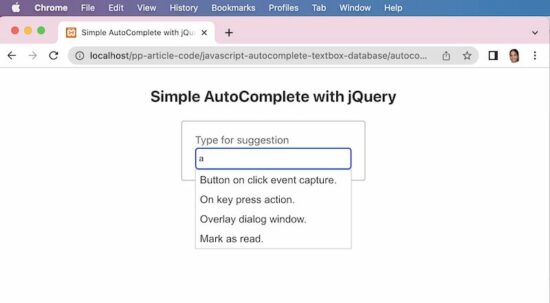
The below example has an idea for a quick script for enabling the autocomplete feature. It uses JavaScript jQuery and jQuery UI libraries to implement this easily.

The jQuery autocomplete() uses the PHP endpoint autocomplete.php script. Then, load the remote data into the textbox on the UI.

View Demo

Example 1: Simple autocomplete


Quick example


<link rel="stylesheet" href="https://cdnjs.cloudflare.com/ajax/libs/jqueryui/1.13.2/themes/base/jquery-ui.min.css" />
<script src="https://code.jquery.com/jquery-3.6.0.min.js"></script>
<script src="https://cdnjs.cloudflare.com/ajax/libs/jqueryui/1.13.2/jquery-ui.min.js"></script>
<script>
$(document).ready(function(){ $( "#textbox" ).autocomplete({ source: "autocomplete.php", minLength: 2 });
});
</script>
<input id="textbox" class="full-width" />

This PHP endpoint script reads the database results and forms the output JSON for the autocomplete textbox.

It receives the searched term from the UI and looks into the database for relevant suggestions.

autocomplete.php

<?php
$name = $_GET['term'];
$name = "%$name%";
$conn = mysqli_connect('localhost', 'root', '', 'phppot_autocomplete');
$sql = "SELECT * FROM tbl_post WHERE title LIKE ?";
$statement = $conn->prepare($sql);
$statement->bind_param('s', $name);
$statement->execute();
$result = $statement->get_result();
$autocompleteResult = array();
if (! empty($result)) { while ($row = $result->fetch_assoc()) { $autocompleteResult[] = $row["title"]; }
}
print json_encode($autocompleteResult);
?>

This database is for setting up the database created for this quick example. The next example also needs this database for displaying the autosuggest values.

Run the below database queries for getting a good experience with the above code execution.

CREATE TABLE `tbl_post` ( `id` int(11) UNSIGNED NOT NULL, `title` text DEFAULT NULL
) ENGINE=InnoDB DEFAULT CHARSET=utf8mb4; --
-- Dumping data for table `tbl_post`
-- INSERT INTO `tbl_post` (`id`, `title`) VALUES
(1, 'Button on click event capture.'),
(2, 'On key press action.'),
(3, 'Overlay dialog window.);
javascript autocomplete
Example 2: Load autocomplete with ID


The AutoComplete function sends an additional parameter with the default term argument. That is to limit the number of results shown in the autocomplete textbox.

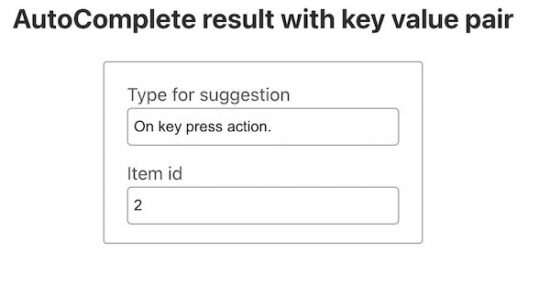
It returns the database results based on the searched term as a key-value pair. A JavaScript callback iterates the result and maps the key-value as label-value pair.

It is helpful when the result id is required while selecting a particular item from the autosuggest list.

The below screenshot shows the item value and id is populated. This data is put into the textbox on selecting the autocomplete list item.
autocomplete result with id

The below JavaScript code has two textboxes. One textbox is enabled with the autocomplete feature.

On typing into that textbox, the JavaScript autocomplete calls the server-side PHP script. The callback gets the JSON output returned by the PHP script.

This JSON data contains an association of dynamic results with their corresponding id. On selecting the autocomplete result item, the select callback function access the UI.item object.

Using this object, it gets the id and post title from the JSON data bundle. Then this JavaScript callback function targets the UI textboxes to populate the title and id of the selected item.

<script>
$(document).ready(function() { $("#textbox").autocomplete({ minlength: 3, source: function(request, response) { $.ajax({ url: "get-result-by-additional-param.php", type: "POST", dataType: "json", data: { q: request.term, limit: 10 }, success: function(data) { response($.map(data, function(item) { return { label: item.title, value: item.postId }; })); } }); }, select: function(event, ui) { event.preventDefault(); $('#textbox').val(ui.item.label); $('#itemId').val(ui.item.value); } });
});
</script>
<div class="row"> <label>Type for suggestion</label> <input id="textbox" class="full-width" />
</div>
<div class="row"> <label>Item id</label> <input id="itemId" class="full-width" />
</div>

This PHP script receives the post parameters sent via the autocomplete function.

The search keyword and the result limit are sent from the source callback of the autocomplete initiation.

This PHP script substitutes those parameters into the database query execution process.

Once found the results, it bundles the array into a JSON format to print as an auto-suggestion list.

get-result-by-additional-param.php

<?php
$name = $_POST['q'];
$limit = $_POST['limit'];
$name = "%$name%";
$conn = mysqli_connect('localhost', 'root', '', 'phppot_autocomplete');
$sql = "SELECT * FROM tbl_post WHERE title LIKE ? LIMIT $limit";
$statement = $conn->prepare($sql);
$statement->bind_param('s', $name);
$statement->execute();
$result = $statement->get_result();
$autocompleteResult = array();
if (! empty($result)) { $i = 0; while ($row = $result->fetch_assoc()) { $autocompleteResult[$i]["postId"] = $row["id"]; $autocompleteResult[$i]["title"] = $row["title"]; $i ++; }
}
print json_encode($autocompleteResult);
?>

Example 3: AutoComplete with recent search


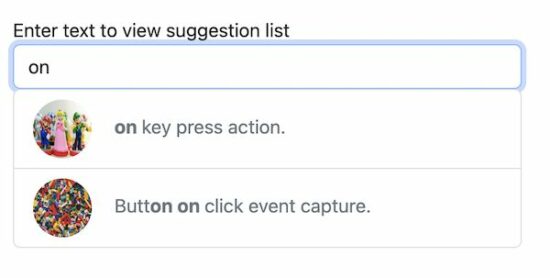
This example shows the autocomplete box with text and image data. The database for this example contains additional details like description and featured_image for the posts.

If you want a sleek and straightforward autocomplete solution with text, then use the above two examples.

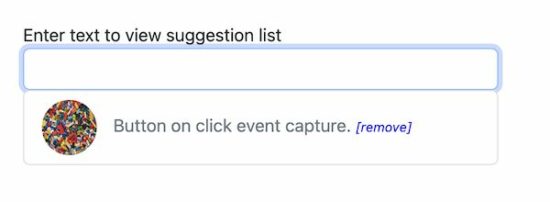
This example uses BootStrap and plain JavaScript without jQuery. It displays recent searches on focusing the autocomplete textbox.

Create AutoComplete UI with Bootstrap and JavaScript Includes


See this HTML loads the autocomplete textbox and required JavaScript and CSS assets for the UI. The autocomplete.js handles the autosuggest request raised from the UI.

The autocomplete textbox has the onKeyPress and onFocus attributes. The onKeyPress attribute calls JavaScript to show an autosuggest list. The other attribute is for displaying recent searches on the focus event of the textbox.

autocomplete-with-search-history/index.php

<link href="https://cdn.jsdelivr.net/npm/bootstrap@5.2.0/dist/css/bootstrap.min.css" rel="stylesheet" integrity="sha384-gH2yIJqKdNHPEq0n4Mqa/HGKIhSkIHeL5AyhkYV8i59U5AR6csBvApHHNl/vI1Bx" crossorigin="anonymous">
<script src="./assets/autocomplete.js"></script>
<style>
.post-icon { width: 50px; height: 50px; border-radius: 50%; margin-right: 15px;
} .remove-link { font-size: 0.75em; font-style: italic; color: #0000FF; cursor: pointer;
}
</style>
<input id="textbox" class="form-control" on‌keyup="showSuggestionList(this.value)" on‌focus="showRecentSearch()" autocomplete="off" />
<span id="auto-suggestion-box"></span>

Get the autosuggest list from the tbl_post database table


The below JavaScript function is called on the keypress event of the autocomplete field. In the previous examples, it receives a JSON response to load the dynamic suggestion.

In this script, it receives the HTML response from the endpoint. This HTML is with an unordered list of autosuggest items.

function showSuggestionList(searchInput) { if (searchInput.length &gt; 1) { var xhttp = new XMLHttpRequest(); xhttp.open('POST', 'ajax-endpoint/get-auto-suggestion.php', true); xhttp.setRequestHeader(&quot;Content-type&quot;, &quot;application/x-www-form-urlencoded&quot;); xhttp.send(&quot;formData=&quot; + searchInput); xhttp.onreadystatechange = function() { if (xhttp.readyState == 4 &amp;&amp; xhttp.status == 200) { document.getElementById('auto-suggestion-box').innerHTML = xhttp.responseText; } } } else { document.getElementById('auto-suggestion-box').innerHTML = ''; }
}

ajax-endpoint/get-auto-suggestion.php

<?php
require_once __DIR__ . '/../lib/DataSource.php';
$dataSource = new DataSource(); if (isset($_POST["formData"])) { $searchInput = filter_var($_POST["formData"], FILTER_SANITIZE_STRING); $highlight = '<b>' . $searchInput . '</b>'; $query = "SELECT * FROM tbl_post WHERE title LIKE ? OR description LIKE ? ORDER BY id DESC LIMIT 15"; $result = $dataSource->select($query, 'ss', array( "%" . $searchInput . "%", "%" . $searchInput . "%" )); if (! empty($result)) { ?>
<ul class="list-group">
<?php foreach ($result as $row) { ?> <li class="list-group-item text-muted" data-post-id="<?php echo $row["id"]; ?>" on‌Click="addToHistory(this)" role="button"><img class="post-icon" src="<?php echo $row["featured_image"]; ?>" /><span> <?php echo str_ireplace($searchInput, $highlight, $row["title"]); ?> </span></li>
<?php } ?>
</ul>
<?php }
}
?>
javascript autocomplete without jquery

Add to search history


When selecting the suggested list item, it triggers this JavaScript function on click.

This function reads the post id and title added to the HTML5 data attribute. Then passes these details to the server-side PHP script.

function addToHistory(obj) { var selectedResult = obj.dataset.postId; fetch("ajax-endpoint/add-to-history.php", { method: "POST", body: JSON.stringify({ selectedResult: selectedResult }) }).then(function() { document.getElementById('textbox').value = obj.innerText; });
}

This PHP endpoint checks if the selected item is already added to the database history table.

In the database, the tbl_search_history stores the search history.

If data is not found in the database, then the search instance will be added to this table.

ajax-endpoint/add-to-history.php

<?php
require_once __DIR__ . '/../lib/DataSource.php';
$dataSource = new DataSource(); $post_data = json_decode(file_get_contents('php://input'), true);
$selectedResult = filter_var($post_data['selectedResult'], FILTER_SANITIZE_STRING);
if (isset($selectedResult)) { $query = "SELECT * FROM tbl_search_history, tbl_post WHERE tbl_search_history.post_id = tbl_post.id AND tbl_post.id = ?"; $result = $dataSource->select($query, 'i', array( $selectedResult )); if (empty($result)) { $query = " INSERT INTO tbl_search_history (post_id) VALUES (?)"; $result = $dataSource->insert($query, 'i', array( $selectedResult )); }
}
?>

Show search history by focusing on the autocomplete textbox


This function calls the PHP endpoint to fetch the stored search history. It also receives the HTML response from the server side.

The response HMTL is loaded into the autosuggest textbox in the UI.

function showRecentSearch() { if (!(document.getElementById('textbox').value)) { fetch("ajax-endpoint/show-search-history.php", { method: "POST" }).then(function(response) { return response.text(); }).then(function(responseData) { if (responseData != "") { document.getElementById('auto-suggestion-box').innerHTML = responseData; } }); }
}

In this PHP file, it joins the tbl_post and the tbl_search_history database tables. It is to filter the already searched keyword list.

ajax-endpoint/show-search-history.php

<?php
require_once __DIR__ . '/../lib/DataSource.php';
$dataSource = new DataSource(); $post_data = json_decode(file_get_contents('php://input'), true);
$query = "SELECT tbl_post.* FROM tbl_search_history, tbl_post WHERE tbl_search_history.post_id = tbl_post.id ORDER BY id DESC LIMIT 10"; $result = $dataSource->select($query); ?>
<ul class="list-group">
<?php foreach ($result as $row) { ?> <li class="list-group-item text-muted" role="button"><img class="post-icon" src="<?php echo $row["featured_image"]; ?>" /><span><?php echo $row["title"]; ?></span> <span title="Remove from history" class="remove-link" on‌Click="removeFromHistory(this, <?php echo $row["id"]; ?>)">[remove]</span></li>
<?php } ?>
</ul>

Remove history from the autosuggest textbox


When focusing on the autocomplete textbox, the UI will display the recently searched post titles.

If the user wants to remove the recent searches, it is possible by this code.

The autosuggest entries have the remove link in the UI. On clicking the link, the corresponding record will be deleted.

function removeFromHistory(obj, postId) { fetch("ajax-endpoint/remove-history.php", { method: "POST", body: JSON.stringify({ postId: postId }) }).then(function() { obj.parentNode.remove(); });
}

This PHP code removes the search instances stored in the tbl_search_history database. The delete request posts the record id to fire the delete action.

ajax-endpoint/remove-history.php

<?php
require_once __DIR__ . '/../lib/DataSource.php';
$dataSource = new DataSource(); $post_data = json_decode(file_get_contents('php://input'), true);
$postId = filter_var($post_data['postId'], FILTER_SANITIZE_STRING);
$query = " DELETE FROM tbl_search_history WHERE post_id = ?"; $result = $dataSource->insert($query, 'i', array( $postId
));
?>
autocomplete with search history
View DemoDownload

↑ Back to Top


https://www.sickgaming.net/blog/2022/08/...-database/

Print this item

  PC - Bear and Breakfast
Posted by: xSicKxBot - 08-10-2022, 01:05 PM - Forum: New Game Releases - No Replies

Bear and Breakfast


Bear and Breakfast is a laid-back management adventure game where you build and run a bed and breakfast...but you’re a bear.

Publisher: Armor Games

Release Date: Jul 28, 2022


https://www.metacritic.com/game/pc/bear-and-breakfast

Print this item

  [Tut] How to Read and Convert a Binary File to CSV in Python?
Posted by: xSicKxBot - 08-09-2022, 04:41 AM - Forum: Python - No Replies

How to Read and Convert a Binary File to CSV in Python?

5/5 – (1 vote)

To read a binary file, use the open('rb') function within a context manager (with keyword) and read its content into a string variable using f.readlines(). You can then convert the string to a CSV using various approaches such as the csv module.

Here’s an example to read the binary file 'my_file.man' into your Python script:

with open('my_file.man', 'rb') as f: content = f.readlines() print(content)

Per default, Python’s built-in open() function opens a text file. If you want to open a binary file, you need to add the 'b' character to the optional mode string argument.

  • To open a file for reading in binary format, use mode='rb'.
  • To open a file for writing in binary format, use mode='rb'.

Now that the content is in your Python script, you can convert it to a CSV using the various methods outlined in this article:

? Learn More: Convert a String to CSV in Python

After you’ve converted the data to the comma-separated values (CSV) format demanded by your application, you can write the string to a file using either the print() function with file argument or the standard file.write() approach.


https://www.sickgaming.net/blog/2022/08/...in-python/

Print this item