Crypto is back with a license to probe. The alien invader returns, groovier than ever.
Experience the swinging '60s in all its chemical-induced glory and take revenge on the KGB for blowing up your mothership. You'll have to form alliances with members of the very species you came to enslave.
Posted by: xSicKxBot - 09-06-2022, 02:00 AM - Forum: Python
- No Replies
Python TypeError: NoneType is Not Subscriptable (Fix This Stupid Bug)
5/5 – (1 vote)
Do you encounter the following error message?
TypeError: NoneType is not subscriptable
You’re not alone! This short tutorial will show you why this error occurs, how to fix it, and how to never make the same mistake again.
So, let’s get started!
Summary
Python raises the TypeError: NoneType is not subscriptable if you try to index x[i] or slice x[i:j] a None value. The None type is not indexable, i.e., it doesn’t define the __getitem__() method. You can fix it by removing the indexing or slicing call, or defining the __getitem__ method.
Example
The following minimal example that leads to the error:
x = None

print(x[0])

# TypeError: 'NoneType' object is not subscriptable
You set the variable to the value None. The value None is not a container object, it doesn’t contain other objects. So, the code really doesn’t make any sense—which result do you expect from the indexing operation?
Exercise: Before I show you how to fix it, try to resolve the error yourself in the following interactive shell:
If you struggle with indexing in Python, have a look at the following articles on the Finxter blog—especially the third!
You overwrite the __getitem__ method that takes one (index) argument i (in addition to the obligatory self argument) and returns the i-th value of the “container”.
In our case, we just return a string "Value 0" for the element variable[0] and "Value 10" for the element variable[10].
I hope you’d be able to fix the bug in your code! Before you go, check out our free Python cheat sheets that’ll teach you the basics in Python in minimal time:
This tutorial uses JavaScript’s GeoLocation API to get users’ location. This API call returns location coordinates and other geolocation details.
The following quick example has a function getLatLong() that uses the GeoLocation API. It calls the navigator.geplocation.getCurrentPosition(). This function needs to define the success and error callback function.
On success, it will return the geolocation coordinates array. The error callback includes the error code returned by the API. Both callbacks write the response in the browser console.
User’s location is a privacy sensitive information. We need to be aware of it before working on location access. Since it is sensitive, by default browser and the underlying operating system will not give access to the user’s location information.
Important! The user has to,
Explicitly enable location services at operating system level.
Give permission for the browser to get location information.
function getLatLong() { // using the JavaScript GeoLocation API // to get the current position of the user // if checks for support of geolocation API if (navigator.geolocation) { navigator.geolocation.getCurrentPosition( function(currentPosition) { console.log(currentPosition)}, function(error) { console.log("Error: " + error.code)} ); } else { locationElement.innerHTML = "JavaScript Geolocation API is not supported by this browser."; }

}
JavaScript GeoLocation API’s getCurrentPosition() function
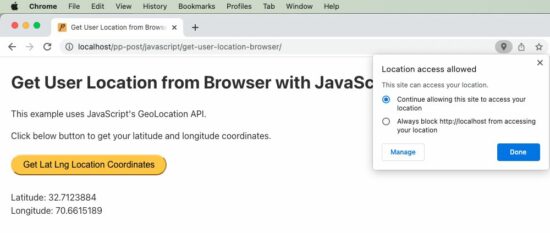
The below code is an extension of the quick example with Geo Location API. It has a UI that has control to call the JavaScript function to get the current position of the user.
The HTML code has the target to print the location coordinates returned by the API.
The JavaScript fetch callback parameter includes all the geolocation details. The callback function reads the latitude and longitude and shows them on the HTML target via JavaScript.
<!DOCTYPE html>
<html>
<head>
<title>Get User Location from Browser with JavaScript</title>
<link rel='stylesheet' href='style.css' type='text/css' />
<link rel='stylesheet' href='form.css' type='text/css' />
</head>
<body> <div class="phppot-container"> <h1>Get User Location from Browser with JavaScript</h1> <p>This example uses JavaScript's GeoLocation API.</p> <p>Click below button to get your latitude and longitude coordinates.</p> <div class="row"> <button onclick="getLatLong()">Get Lat Lng Location Coordinates</button> </div> <div class="row"> <p id="location"></p> </div> </div> <script> var locationElement = document.getElementById("location"); function getLatLong() { // using the JavaScript GeoLocation API // to get current position of the user // if checks for support of geolocation API if (navigator.geolocation) { navigator.geolocation.getCurrentPosition( displayLatLong, displayError); } else { locationElement.innerHTML = "JavaScript Geolocation API is not supported by this browser."; } } /** * displays the latitude and longitude from the current position * coordinates returned by the geolocation api. */ function displayLatLong(currentPosition) { locationElement.innerHTML = "Latitude: " + currentPosition.coords.latitude + "<br>Longitude: " + currentPosition.coords.longitude; } /** * displays error based on the error code received from the * JavaScript geolocation API */ function displayError(error) { switch (error.code) { case error.PERMISSION_DENIED: locationElement.innerHTML = "Permission denied by user to get location." break; case error.POSITION_UNAVAILABLE: locationElement.innerHTML = "Location position unavailable." break; case error.TIMEOUT: locationElement.innerHTML = "User location request timed out." break; case error.UNKNOWN_ERROR: locationElement.innerHTML = "Unknown error in getting location." break; } } </script>
</body>
</html>
In the above example script, we have a function for handing errors. It is important to include the function when getting user location via browser. Because, by default, the user’s permission settings will be disabled.
So most of the times, when this script is invoked, we will get errors. So we should have this handler declared and passed as a callback to the getCurrentPosition function. On error, JavaScript will call this error handler.
Geolocation API’s Output
Following is the output format returned by the JavaScript geolocation API. We will be predominantly using latitude and longitude from the result. ‘speed’ may be used when getting dynamic location of the user. We will be seeing about that also at the end of this tutorial.
We can get the user’s location by passing the latitude and longitude like below. There are many different service providers available and below is an example using Google APIs.
Get dynamic user location from browser using watchPosition()
Here is an interesting part of the tutorial. How will get you a user’s dynamic location, that is when he is on the move.
We should use an another function of GeoLocation API to get dynamic location coordinates on the move. The function watchPosition() is used to do this via JavaScript.
To test this script, run it in a mobile browser while moving in a vehicle to get user’s dynamic location.
I have presented the code part that is of relevance below. You can get the complete script from the project zip, it’s free to download below.
var locationElement = document.getElementById("location"); function getLatLong() { // note the usage of watchPosition, this is the difference // this returns the dynamic user position from browser if (navigator.geolocation) { navigator.geolocation.watchPosition(displayLatLong, displayError); } else { locationElement.innerHTML = "JavaScript Geolocation API is not supported by this browser."; } }
Final day, to check out the encore weekend freebies
[freebies.indiegala.com] "Encore, encore" we've been hearing and we listened. We've brought back for this weekend a few of your favorites. Keep an eye on for more.
The story takes place in the mid-21st century, a near future not too far from the present.
Submissive to the "Demon" with super powers, a survivor living under society, the Devil Summoner. He secretly guards society without anyone knowing.
Produced with high technology, the "Aion" that surpassed the human brain one day found a sign of the world's demise.
Aion's Ringo and Figg came to the human world to stop the world from perishing. Their purpose is to protect the key figures who can reverse the fate of their demise, but the key figures have all been killed.
Ringo then implemented the special ability "Soul Hack" possessed by Aion to revive them. They were given a "second chance", and the demon summoners joined Ringo and Figg to stop the world's demise.
As a result, will they be able to reverse their fate...?
If you run this code, instead of the desired plot, you get the following TypeError: 'AxesSubplot' object is not subscriptable:
Traceback (most recent call last): File "C:\Users\xcent\Desktop\code.py", line 4, in <module> axes[0, 0].plot([1, 2, 3], [5, 5, 5])

TypeError: 'AxesSubplot' object is not subscriptable
Question: How to resolve the TypeError: 'AxesSubplot' object is not subscriptable in your Python script?
Don’t panic! The solution is easier than you think…
Fix Not Subscriptable TypeError on ‘AxesSubplot’ Object
Generally, Python raises the TypeError XXX object is not subscriptable if you use indexing with the square bracket notation on an object that is not indexable. In this case, you tried to index an Axes object because you thought it was an array of Axes objects.
Let’s go over the code to understand why the error happened!
First, you assign the result of the plt.subplots() function to the two variables fig and axes.
fig, axes = plt.subplots()
If you don’t pass an argument in the plt.subplots() function, it creates a Figure with one Axes object.
So if you try to subscript using axes[0,0], axes[0], or any other indexing scheme, Python will raise an error. It’s simple: axes doesn’t hold a container type so it cannot be indexed using the square bracket notation!
So to fix the TypeError: 'AxesSubplot' object is not subscriptable, simply remove the indexing notation on the axes object obtained by plt.subplots() called without arguments.
However, this error is tough to spot because if you pass any other argument into the plt.subplot() function, it creates a Figure and a Numpy array of Subplot/Axes objects which you store in fig and axes respectively.
For example, this creates a non-subscriptable axes because you don’t pass any argument:
fig, axes = plt.subplots()
For example, this creates a subscriptable array of axes that is a one-dimensional array of subplots because you pass an argument:
fig, axes = plt.subplots(3)
For example, this creates a subscriptable array of axes that is a two-dimensional array of subplots because you passed two arguments
fig, axes = plt.subplots(3, 2)
No wonder did you think that you can call axes[0,0] or axes[0] on the return value of the plt.subplot() function! However, doing so is only possible if you didn’t pass an argument into it.
Make sure you never run into similar errors by spending a couple of minutes understanding the plt.subplot() function once and for all!
Learn More about plt.subplot()
To further understand the subplots() function, check out our detailed guide on the Finxter blog and the following video:
[www.indiegala.com] Something refreshing, something unusual, something unexpected. This indie game bundle has it all and more: All Walls Must Fall, Firelight Fantasy: Resistance, Niflhel's Fables: The Book of Gypsies, Adventures at the North Pole, Freddy Spaghetti & its sequel.
The GameCreators 2 Bundle | 98% OFF over $300-worth of content
[www.indiegala.com] Become a gamedev on your own & create your dream video game with the help of GameGuru, AppGameKit & a vast selection of steam game assets, software and dlcs. From Modern to Retro, from constructions to military/medical assets, a giant array of options & tools are available for you to choose from.
Posted by: xSicKxBot - 09-05-2022, 09:33 AM - Forum: Lounge
- No Replies
Back 4 Blood Separates Itself From Its Heritage With New Story Missions
When Back 4 Blood launched almost one year ago, whether you loved it, hated it, or landed somewhere in between, what was never in doubt was where the idea came from. Turtle Rock birthed the co-op horde shooter genre that, these days, gets about one or two new games added to it annually. Even its name, Back 4 Blood, is an obvious callback to Left 4 Dead, the common ancestor of the many games like it. But with its newly launched Act 5 expansion included in the game's Annual Pass, Back 4 Blood is shedding itself of its lineage in a way that only its rogue-ish card system previously attempted.
New human-like enemies have come to the campaign as part of a mysterious cult that takes center stage in the storyline for Act 5. The Children of the Worm have a backstory that players will need to uncover through environmental clues, as usual in games like this, though the newest Cleaner, Prophet Dan, seems to be intimately familiar with them in a way that brings conflict to the otherwise close-knit group.
Though I've not yet finished the new expansion, I've so far enjoyed the novel mixing of the game's common undead, its specially mutated mini-bosses, and these new human-like enemies. That's something Left 4 Dead and most games it inspired never tried. The new Act 5 levels are more intimidating as a result, because players need to manage the hordes while also dodging snipers, hunters, and other classes of new smarter-than-your-average-zombie enemies. Speaking to the game's executive producer, Lianne Papp, I was surprised to learn these Children of the Worm are not truly human after all, but neither are they quite like the monsters already in the game.
FRANCHISE - Call the shots from the front office as you lead your Madden NFL 23 Franchise to the top. New athlete motivations like salary demands factor into contract negotiations and add to the drama of NFL free agency. FACE OF THE FRANCHISE - Play your way into the history books in Madden NFL 23. The League drops you into your fifth NFL season, and you're seeking a fresh start as you negotiate a one-year deal with a new team and strive for a legendary career. ULTIMATE TEAM - Develop your dream fantasy roster of current NFL superstars, Hall of Fame legends, and more. Keep improving your Madden 23 Ultimate Team roster all season through simplified team-building and convenient competition. [Electronic Arts]
To print all values of a Python list without the trailing newline character or line break, pass the end='' argument in your print() function call. Python will then avoid adding a newline character after the printed output. For example, the expression print(*[1, 2, 3], end='') will print without newline.
lst = [1, 2, 3]

print(*lst, end='')

# 1 2 3
If you print anything afterward, it’ll be added right to the list.
To print all values of a Python list without newline character pass the end='' argument in your print() function call. To overwrite the default empty space as a separator string, pass the sep=’…’ argument with your separator. For example, the expression print(*[1, 2, 3], sep='|', end='') will print without newline.
Also, check out the following video tutorial on printing something and using a separator and end argument:
Python Print Raw List Without Newline
If you don’t want to print the individual elements of the list but the overall list with square brackets and comma-separated, but you don’t want to print the newline character afterwards, the best way is to pass the list into the print() function along with the end='' argument such as in print([1, 2, 3], end='').




 Related Articles:



 five minutes ago, and you want to create a
  Question: How to resolve the
  The solution is easier than you think…
 Generally, Python raises the


