NBA 2K23 is here, and that means hoop heads and casual NBA fans will have about a season's worth of debates to start and more than a few Michael Jordan dunks to choreograph. We're breaking down the new NBA 2K23 rosters for all 32 NBA teams, and in this guide we're taking a closer look at the Detroit Pistons. The Pistons still aren't ready to contend for a championship, but they've acquired some solid young talent that could be enjoyable to build around. If you're curious about who the Pistons' best players might be, where their top players rank in the league, or which team positions may need an upgrade in MyNBA Eras, then here's everything you need to know about the new NBA 2K23 Pistons roster.
Detroit Pistons - Best Players
The Pistons are the 27th best team in the league according to the new ratings for all 32 teams in NBA 2K23. At launch, Detroit's set for an overall team rating of 83. The Pistons will also have a total of two players rated 80 or above in NBA 2K23, including a pair of young playmakers:
Cade Cunningham (SG) - 84 OVR
Jaden Ivey (SG) - 76 OVR
Below you will find a table of the starting roster and bench players for the Detroit Pistons at launch in NBA 2K23, which includes all five starters and their new rookie class of Jalen Duren and Jaden Ivey.
Marissa Marcel was a film star. She made three movies. But none of the movies was ever released. And Marissa Marcel disappeared. An interactive trilogy from Sam Barlow, creator of Her Story.
We’ll first lay out the entire smart contract example without the comments for readability and development purposes.
Then we’ll dissect it part by part, analyze it and explain it.
Following this path, we’ll get a hands-on experience with smart contracts, as well as good practices in coding, understanding, and debugging smart contracts.
Parameters of the auction are variables beneficiary and auctionEndTime which we’ll initialize with contract creation arguments while the contract gets created, i.e. in the contract constructor.
Data type for time variables is unsigned integer uint, so that we can represent either absolute Unix timestamps (seconds since 1970-01-01) or time periods in seconds (seconds lapsed from the reference moment we chose).
address payable public beneficiary; uint public auctionEndTime;
The current state of the auction is reflected in two variables, highestBidder and highestBid.
address public highestBidder; uint public highestBid;
Previous bids can be withdrawn, that’s why we have mapping data structure to record pendingReturns.
mapping(address => uint) pendingReturns;
Indicator flag variable for the auction end. By default, the flag is initialized to false; we’ll prevent changing it once it switches to true.
bool ended;
When changes occur, we want our smart contract to emit the corresponding change events.
We’re defining four errors to describe relevant failures. Along with these errors, we’ll also introduce “triple-slash” comments, commonly known as natspec comments. They enable users to see comments when an error is displayed or when users are asked to confirm the transaction.
/// The auction has already ended. error AuctionAlreadyEnded(); /// There is already a higher or equal bid. error BidNotHighEnough(uint highestBid); /// The auction has not ended yet, the remaining seconds are displayed. error AuctionNotYetEnded(uint timeToAuctionEnd); /// The function auctionEnd has already been called. error AuctionEndAlreadyCalled();
Initialization of the contract with the contract creation arguments biddingTime and beneficiaryAddress.
/// Create a simple auction with `biddingTime` /// seconds bidding time on behalf of the /// beneficiary address `beneficiaryAddress`. constructor( uint biddingTime, address payable beneficiaryAddress ) { beneficiary = beneficiaryAddress; auctionEndTime = block.timestamp + biddingTime; }
A bidder bids by sending the currency (paying) to the smart contract representing the beneficiary, hence the bid() function is defined as payable.
/// Bid on the auction with the value sent /// together with this transaction. /// The value will only be refunded if the /// auction is not won. function bid() external payable {
The function call reverts if the bidding period ended.
if (block.timestamp > auctionEndTime) revert AuctionAlreadyEnded();
The function rolls back the transaction to the bidder if the bid does not exceed the highest one.
if (msg.value <= highestBid) revert BidNotHighEnough(highestBid);
The previous highest bidder was outbid and his bid is added to his previous bids reserved for a refund.
A direct refund is considered a security risk due to the possibility of executing an untrusted contract.
Instead, the bidders (recipients) will withdraw their bids themselves by using withdraw() function below.
if (highestBid != 0) { pendingReturns[highestBidder] += highestBid; }
The new highest bidder and his bid are recorded; the event HighestBidIncreased is emitted carrying this information pair.
Bidders call the withdraw() function to retrieve the amount they bid.
/// Withdraw a bid that was overbid. function withdraw() external returns (bool) { uint amount = pendingReturns[msg.sender]; if (amount > 0) {
It is possible to call the withdraw() function again before the send() function returns. That’s the reason why we need to disable multiple sequential withdrawals from the same sender by setting the pending returns for a sender to 0.
pendingReturns[msg.sender] = 0;
Variable type of msg.sender is not address payable, therefore we need to convert it explicitly by using function payable() as a wrapping function.
If the send() function ends with an error, we’ll just reset the pending amount and return false.
if (!payable(msg.sender).send(amount)) { // No need to call throw here, just reset the amount owing pendingReturns[msg.sender] = amount; return false; } } return true; }
The auctionEnd() function ends the auction and sends the highest bid to the beneficiary.
The official Solidity documentation recommends dividing the interacting functions into three functional parts:
checking the conditions,
performing the actions, and
interacting with other contracts.
Otherwise, by combining these parts rather than keeping them separated, more than one calling contract could try and modify the state of the called contract and change the called contract’s state.
/// End the auction and send the highest bid /// to the beneficiary. function auctionEnd() external {
Checking the conditions…
if (block.timestamp < auctionEndTime) revert AuctionNotYetEnded(auctionEndTime - block.timestamp); if (ended) revert AuctionEndAlreadyCalled();
Our smart contract example is a simple, but a powerful one, enabling us to bid an amount of currency to the beneficiary.
When the contract instantiates via its constructor, it sets the auction end time and its beneficiary, i.e. beneficiary address.
The contract has three simple features, implemented via dedicated functions: bidding, withdrawing the bids and ending the auction.
A new bid is accepted only if its amount is strictly larger than the current highest bid. A new bid acceptance means that the current highest bid is added to the bidder’s balance for later withdrawal. The new highest bidder becomes the current highest bidder and the new highest bid becomes the current highest bid.
Bid withdrawing returns all summed previous bids to each bidder (mapping pendingReturns).
Account 0x617F2E2fD72FD9D5503197092aC168c91465E7f2 withdraws his bids;
Appendix – The Contract Arguments
In this section is additional information for running the contract. We should expect that our example accounts may change with each refresh/reload of Remix.
Our contract creation arguments are the open auction duration (in seconds) and the beneficiary address (copy this line when deploying the example):
300, 0x5B38Da6a701c568545dCfcB03FcB875f56beddC4
Info: we could’ve used any amount of time, but I went with 300 seconds to timely simulate both a rejected attempt of ending the auction and the successful ending of the auction.
Conclusion
We continued our smart contract example series with this article that implements a simple open auction.
First, we laid out clean source code (without any comments) for readability purposes. Omitting the comments is not recommended, but we love living on the edge – and trying to be funny!
Second, we dissected the code, analyzed it, and explained each possibly non-trivial segment. Just because we’re terrific, safe players who never risk it and do everything by the book
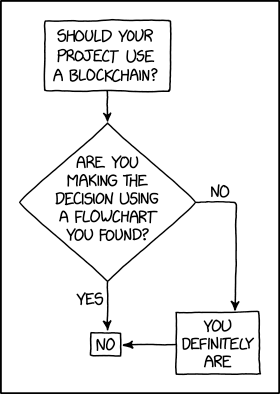
Programmer Humor – Blockchain
“Blockchains are like grappling hooks, in that it’s extremely cool when you encounter a problem for which they’re the right solution, but it happens way too rarely in real life.”source – xkcd
PHP has a core function session_destroy() to clear all the session values. It is a simple no-argument function that returns a boolean true or false.
The PHP session ID is stored in a cookie by default. Generally that session cookie file is name PHPSESSID. The session_destroy function will not unset the session id in the cookie.
To destroy the session ‘completely’, the session ID must also be unset.
This quick example uses session_destroy() to destroy the session. It uses the set_cookie() method to kill the entirety by expiring the PHP session ID.
Quick example
destroy-session.php
<?php

// Always remember to initialize the session,

// even before attempting to destroy it. // Destroy all the session variables.

$_SESSION = array(); // delete the session cookie also to destroy the session

if (ini_get("session.use_cookies")) { $cookieParam = session_get_cookie_params(); setcookie(session_name(), '', time() - 42000, $cookieParam["path"], $cookieParam["domain"], $cookieParam["secure"], $cookieParam["httponly"]);

} // as a last step, destroy the session.

session_destroy();
Note:
Use session_start() to reinitiate the session after the PHP session destroy.
Use PHP $_SESSION to unset a particular session variable. For an older PHP version, use session_unset().
This example provides an automatic login session expiry feature.
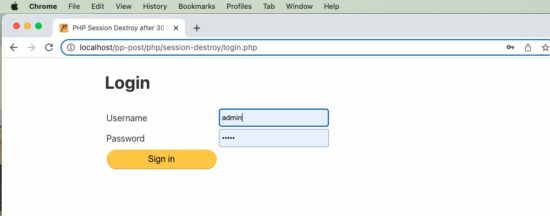
Landing page with a login form
This form posts the username and the password entered by the user. It verifies the login credentials in PHP.
On successful login, it stores the logged-in state into a PHP session. It sets the expiry time to 30 minutes from the last login time.
It stores the last login time and the expiry time into the PHP session. These two session variables are used to expire the session automatically.
login.php
<?php

session_start();

$expirtyMinutes = 1;

?>

<html>

<head>

<title>PHP Session Destroy after 30 Minutes</title>

<link rel='stylesheet' href='style.css' type='text/css' />

<link rel='stylesheet' href='form.css' type='text/css' />

</head>

<body> <div class="phppot-container"> <h1>Login</h1> <form name="login-form" method="post"> <table> <tr> <td>Username</td> <td><input type="text" name="username"></td> </tr> <tr> <td>Password</td> <td><input type="password" name="password"></td> </tr> <tr> <td><input type="submit" value="Sign in" name="submit"></td> </tr> </table> </form>

<?php

if (isset($_POST['submit'])) { $usernameRef = "admin"; $passwordRef = "test"; $username = $_POST['username']; $password = $_POST['password']; // here in this example code focus is session destroy / expiry only // refer for registration and login code https://phppot.com/php/user-registration...-download/ if ($usernameRef == $username && $passwordRef == $password) { $_SESSION['login-user'] = $username; // login time is stored as reference $_SESSION['ref-time'] = time(); // Storing the logged in time. // Expiring session in 30 minutes from the login time. // See this is 30 minutes from login time. It is not 'last active time'. // If you want to expire after last active time, then this time needs // to be updated after every use of the system. // you can adjust $expirtyMinutes as per your need // for testing this code, change it to 1, so that the session // will expire in one minute // set the expiry time and $_SESSION['expiry-time'] = time() + ($expirtyMinutes * 60); // redirect to home // do not include home page, it should be a redirect header('Location: home.php'); } else { echo "Wrong username or password. Try again!"; }

}

?>

</div>

</body>

</html>
Dashboard validates PHP login session and displays login, and logout links
This is the target page redirected after login. It shows the logout link if the logged-in session exists.
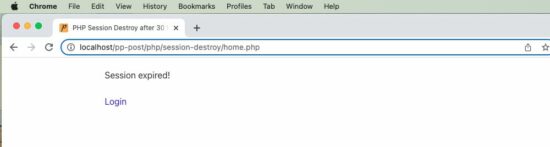
Once timeout, it calls the destroy-session.php code to destroy all the sessions.
If the 30 minutes expiry time is reached or the session is empty, it asks the user to log in.
I hope this example helps to understand how to destroy PHP sessions. And also, this is a perfect scenario that is suitable for explaining the need of destroying the session. Download
The games is free to keep until Thursday, September 8, 2022 5:00 PM.
Next week's freebies: Hundred Days - Winemaking Simulator Realm Royale Reforged Epic Launch Bundle
We are welcoming everyone to join our discord[discord.gg]. We are more active there on finding giveaways, small or large, and there are daily raffles you can participate.
In SD Gundam Battle Alliance, Mobile Suits and characters from across Mobile Suit Gundam history take center stage in this all-new action RPG.
A Battle Alliance to Correct a False World
The story takes place in G: Universe, a world where Gundam canon twists and turns in ways no one can predict. To correct this world's distorted history, the player leads a 3-unit squadron consisting of Mobile Suits and pilots from across Gundam history - a true Battle Alliance.What Awaits Beyond False History...
Combo action with stunning visuals and dynamic animation
Indulge in a wide array of Mobile Suit weaponry to crush many foes with! Control Mobile Suits portrayed with realistic weathering that showcases them as weapons of war as they tear across the battlefield with dynamic animations.
Strange phenomena known as Breaks are twisting legendary moments from Gundam history, and you're in charge to fix them.
Experience Gundam history's most famous scenes as you develop new Mobile Suits to add to your arsenal. Gather Capital and expansion parts to transform your favorite machine into the ultimate MS.
Tackle missions with friends in multiplayer!
Launch into battle with 2 partners to back you up. In multiplayer, you can play through the game with up to 2 other players in a 3-person team. Enjoy this new SD Gundam action RPG solo, or with friends.
More than five years after it first hit consoles and PC, Little Nightmares is coming to mobile. Developer Tarsier Studios made the announcement as a part of GameSpot's first-ever Swipe Showcase, revealing an Android and iOS version of the horror adventure game is coming later this year.
Set in a grim and mysterious world, Little Nightmares follows a young girl named Six as she navigates a ship filled with unusual horrors. All the while, Six must contend with a ravenous hunger that is taking over her body, leading to some pretty gruesome situations. The game features a dark, almost Coraline-like art style--though its content is decidedly more disturbing than that of the children's story. Little Nightmares explores horror through the eyes of a child and emphasizes the powerlessness they have through "hide-and-seek" style gameplay rather than allowing the players to engage in combat.
In GameSpot's review of Little Nightmares, we praised the game for its "haunting narrative," "tense cat-and-mouse style chases," and "enthralling visual and audio design." However, the game's short length did lead to some criticism.
The above code reads in the crimedescr column from the crimes.csv file downloaded earlier. This saves to the DataFrame df.
Next, the crimedescr column is then accessed, and the mode() method is appended. This method returns a value or set of values that appear most often along a selected axis. The results save to max_crime.
These results are output to the terminal.
0 10851(A)VC TAKE VEH W/O OWNER
Name: crimedescr, dtype: object
So, out of 7,854 rows of crimes committed on a given day for San Diego, the above offense was committed the highest number of times.
The above code only provides us with the name of the most common crime; what if we need the crime name and the respective count?
Now, you are equipped to return to your boss and tell them that 7,000 offenses of 10851 (A) VC TAKE VEH W/O OWNER occurred on a given day in San Diego.
Method 2: Use value_counts()
This example uses the value_counts() function to determine the top 5 most common crimes committed in San Diego on a given day.
The above code reads in the crimedescr and ucr_ncic_code columns from the crimes.csv file downloaded earlier. This saves to the DataFrame df.
Then, the crimedescr column is accessed, and the value_counts() function is appended. This function returns a series containing the counts of unique values.
However, since slicing is also appended ([:5]), only the top five (5) common crimes are retrieved and then converted to a List. The results save to top5_names.
['10851(A)VC TAKE VEH W/O OWNER', 'TOWED/STORED VEH-14602.6', '459 PC BURGLARY VEHICLE', 'TOWED/STORED VEHICLE', '459 PC BURGLARY RESIDENCE']
The above code only provides us with the names of the top 5 most common crimes; what if we need the names and their respective counts?
The above code reads in the crimedescr and ucr_ncic_code columns from the crimes.csv file downloaded earlier. This saves to the DataFrame df.
Then, the crimedescr column is accessed, and the value_counts() function is appended. This function returns a series containing the count of unique values.
Next, idxmax() is appended. This method returns the index of the first occurrence of the maximum index(es) over a selected axis.
The results save to max_crime and are output to the terminal.
10851(A)VC TAKE VEH W/O OWNER
Method 4: Use value_counts() and keys()
This example uses value_counts() and keys() to determine the top 5 most common crimes committed in unique grid areas of San Diego on a given day.
The above code reads in the crimedescr, grid, and the ucr_ncic_code columns from the crimes.csv file downloaded earlier. This saves to the DataFrame df.
Let’s break the highlighted line down.
If df['grid'].value_counts() was output to the terminal, the following would display (snippet). However, we have added a heading row to make it more understandable, and only five (5) rows are displayed.
Grid #
Grid Total
742
115
969
105
958
100
564
80
1084
71
Next, the code keys()[:5] is appended. The final output displays as follows.
The above code reads in the crimedescr and the ucr_ncic_code columns from the crimes.csv file downloaded earlier. This saves to the DataFrame df.
Next, the groupby() function is called and passed the first argument: df.groupby(['ucr_ncic_code','crimedescr']).size(). If this was output to the terminal at this point, the following would display (snippet).
As you can see, the other arguments need to be added to turn this into something usable. Sorting the data in descending order and adding a count column will provide the results we are looking for.
If the original Method 5 code example was output to the terminal, the following would display.
ucr_ncic_code
crimedescr
count
0
2404
10851(A)VC TAKE VEH W/O OWNER
653
1
7000
TOWED/STORED VEH-14602.6
463
2
2299
459 PC BURGLARY VEHICLE
462
3
7000
TOWED/STORED VEHICLE
434
4
2204
459 PC BURGLARY RESIDENCE
356
Summary
This article has provided five (5) ways to find the most common element in a Panda Column. These examples should provide you with enough information to select the one that best meets your coding requirements.
Good Luck & Happy Coding!
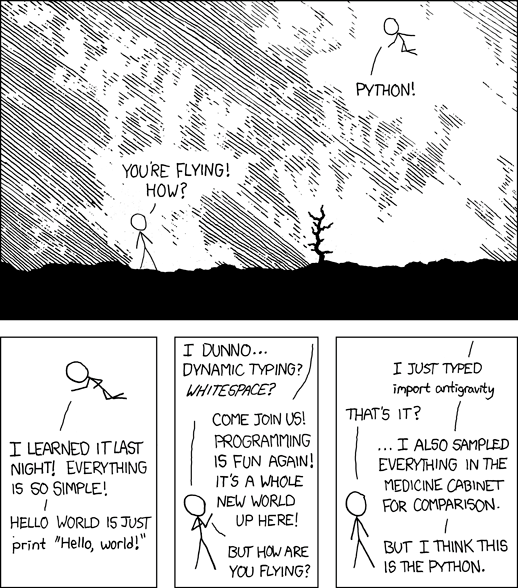
Programming Humor – Python
“I wrote 20 short programs in Python yesterday. It was wonderful. Perl, I’m leaving you.” — xkcd
Wake up babe, NBA 2K23 ratings are here. Visual Concepts' latest dissertation on dropping dimes arrives this week, Friday September 9th, and as a part of their own #2KDay Countdown with brand spotlights, 2K Beats, and J. Cole's Dreamer Edition, they have offered a first look at the official 2K23 overalls--highlighting rising stars, top rookies, and which new shooters are going to swoosh.



 Original Source Code:
  A direct refund is considered a





 Question: How would you determine the most common