The balance of the Holy Kingdom of Keidas is compromised when powerful, feral creatures known as "Wraiths" invade from the other side of the Veil, threatening to consume the living. The "Chimeras", hybrid warriors born of the union of two souls, are the only ones who can protect humankind.
Briar and Lute are two sisters who have been reborn as a Chimera. The transformation has granted Briar superhuman strength and resilience, while Lute, who was sacrificed in order to bind her soul to her sister's, has become a ghost with mystical powers. Voiced by Stefanie Joosten (Metal Gear Solid 5), Briar and Lute are sent on a mission to reclaim a city in ruins that has been ravaged by the Wraiths, only to discover that the Order they belong to has a far more complex plan in mind.
Explore a dark world brimming with hidden mysteries, master a diverse combat system, and inhabit the dual forces of two sisters in a coming-of-age fantasy story with fast-paced action, vicious enemies and breathtaking boss fights.
It’s part of our long-standing tradition to make this (and other) articles a faithful companion or a supplement to the official Solidity documentation.
Download PDF Slide Deck at the end of this tutorial!
Contract Types
To quote the official Solidity documentation, “every contract defines its own type”.
This statement might seem a bit cryptic, and since we’re an efficient crowd, we’d surely like to know what it means.
We can all remember that some number of articles ago, we mentioned how Solidity has key elements of an object-oriented programming language (OOPL). We also emphasized how smart contracts in Solidity are very similar to classes in an OOPL.
Classes themselves are a mesh of custom data types, i.e. structs, and functions, which qualifies classes to be treated as types.
By extension, our contracts are also treated as types, and as every contract is unique in its own right, it defines its own type. Being a type, we can implicitly convert a specific contract to a contract it inherits from, i.e. if contract “Aa” inherits from contract A, it can also be converted to contract “A”.
Besides that, we can explicitly convert each contract to and from the address type. Even more, we can conditionally convert a contract to and from the address payable type (remember, that’s the same type as the address type, but predetermined to receive Ether).
The condition is that the contract type must have a receive or payable fallback function. If it does, we can make the conversion to address payable by using address(x).
However, if the contract type does not implement (a more professional way to say “have”) a receive or payable fallback function, then the conversion to address payable has to be even more explicit (no swearing!) by stating payable(address(x)).
A local variable obc of a contract type OurBeautifulContract is declared by OurBeautifulContract obc;.
Once we point our variable obc to an instantiated (newly created) contract, we’d be able to call functions on that contract.
In terms of its data representation, a contract is identical to the address type. This is important because the contract type is not directly supported by the ABI, but the address type, as its representative, is supported by the ABI.
In contrast to the types mentioned so far, contract types don’t support any operators.
The members of contract types are the external functions (the functions only available to other contracts) and state variables whose visibility is set to public.
When we need to access type information about the contract, like the OurBeautifulContract above, we’d call the type(OurBeautifulContract) function (docs).
Fixed-Size Byte Arrays
The value type bytesN holds a sequence of bytes, whose length, and accordingly N goes from 1 to up to 32, i.e., bytes1, …, bytes32.
The available operators for fixed-size operators are:
Comparisons: <=, <, ==, !=, >=, > (evaluate to bool)
Index access: If x is of type bytesN, then x[k] for 0 <= k < N returns the k-th byte (read-only). In other words, x[0] up to (inclusive) x[N-1] is available for index access; if N = 1, then only x is of type bytes1, and x[0] is the only element, i.e. byte accessible by the index.
The shifting operator always uses an unsigned integer type as a right operand, which represents the number of bits to shift by, and returns the type of the left operand.
Let’s take a look at a simple example to illustrate:
bytes2 lo = 0x1234; // (lo is the left operand)

uint8 ro = 5; // (ro is the right operand variable, must be u... type)

lo << ro // will evaluate to an lo type, bytes2
A fixed-size byte array has only one member, .length, that holds the fixed length of the byte array. This member is accessible as the read-only value.
Warning: Since the type bytes1 is a sequence of 1 byte in length, the type bytes1[] is a fixed-size byte array of 1-byte sequences. However, each element of the array is padded with 31 bytes, due to padding rules for elements stored in memory, stack, and call data, i.e., except in storage. Therefore, according to the official Solidity documentation, it’s better to use bytes type instead of bytes1[].
Note: Value types in storage are packed/compacted together and share a storage slot, taking only as much space per value type as really needed. In contrast, the stack, memory, and calldata pad value types and store in separate slots, meaning that each variable uses a whole slot of 32 bytes, even if the value type is shorter than 32 bytes, effectively wasting the memory space.
Before Solidity v0.8.0, the keyword byte was an alias for bytes1.
Dynamically-Sized Byte Arrays
There are two dynamically-sized non-value types, namely bytes and string.
bytes is a dynamically-sized byte array, while
string is a dynamically-sized UTF-8-encoded string.
Address Literals
Address literals are hexadecimal literals that pass the address checksum test, e.g. 0xdCad3a6d3569DF655070DEd06cb7A1b2Ccd1D3AF.
Hexadecimal literals will produce an error if they are between 39 and 41 digits long and do not pass the checksum test.
However, we can remove the error by prepending zeros to integer types or appending zeros to bytesNN types.
The Ethereum Improvement Proposal EIP-55 defines the mixed-case address checksum.
Integer and Rational Literals
Integer Literals
Integer literals are created using a sequence of digits from a range 0-9, and each digit is interpreted (weighted) based on its position in the sequence.
Multiplied by an exponent of 10, e.g. 217 is interpreted as two hundred and seventeen, because, reading from right to left, we have 7 * 100 + 1 * 101 + 2 * 102.
A reminder, 100 = 1.
Octal literals don’t exist in Solidity and leading zeros are invalid.
Decimal Fractional Literals
Decimal fractional literals consist of a dot . (or, depending on the locale) and at least one number on either of the sides, e.g. 1., .1, and 1.3.
Info: “A locale consists of a number of categories for which country-dependent formatting or other specifications exist” (source).
Scientific Notation
Solidity also supports scientific notation in the form of 2e10, where 2 (left of “e”) is called mantissa (M) and the exponent (E) must be an integer. In a general form, we would write it as MeE and it is interpreted as M * 10**E, e.g. 2e10, -2e10, 2e-10, 2.5e1.
Readable Underscore Notation
We can also do a neat thing: separate the digits of a numeric literal for easier readability, such as in decimal 123_000, hexadecimal 0x2eff_abde, scientific decimal notation 1_2e345_678.
However, there are no leading, trailing, or multiple underscores; they can only be added between two digits.
Number Literal Expressions
Expressions containing number literals preserve their precision until they are converted to a non-literal type.
Such a conversion means an explicit conversion, or that the number literals are used with something else than a number literal expression, like boolean literals.
This behavior implies that computations don’t overflow and divisions don’t truncate in number literal expressions.
A very good example would be a number literal expression (2**800 + 1) – 2**800, which results in the constant 1 (of type uint8), although the intermediate results would not fit the capacity of the EVM word length of 32 bytes.
One more example shows that an integer 4 is produced by computing the expression .5 * 8, although the intermediary results are not integers.
More Operations
Warning: most operators produce a literal expression when applied to number literals, but there are also two exceptions:
Ternary operator (... ? ... : ...),
Array subscript (<array>[<index>]).
In other words, expressions like 255 + (true ? 1 : 0) or 255 + [1, 2, 3][0] are not equivalent to using the literal 256 (the result of these two expressions), as they are computed within the type uint8 and can lead to an overflow.
Number literal expressions can use the same operators as the integers, but both operands must compute yield an integer.
If either of the operands is fractional, bit operations are inapplicable for use;
If the exponent is a decimal fractional literal, the exponentiation operation is also inapplicable for use.
Shifts and exponentiation * operations with literal numbers in place of a left (base*) operand and integer types in place of the right (exponent*) operand are performed in the uint256 for non-negative literals or int256 for negative literals (a * symbol pertains to the exponentiation operations context).
Warning: Since Solidity v0.4.0 division on integer literals produces a rational number, e.g. 7 / 2 = 3.5.
Solidity has a number literal types for each rational number, e.g. integer literals and rational number literals belong to the same number literal type.
All number literal expressions (expressions with only number literals and operators) also belong to number literal types, e.g. 1 + 2 and 2 + 1 belong to the same number literal type.
Note: When number literal types are used with non-literal expressions, they are converted into a non-literal type, e.g. uint128 a = 1; uint128 b = 2.5 + a + 0.5;
Here, 1 is converted into a non-literal type uint128, i.e. variable a, but a common type for both 2.5 and uint128 doesn’t exist and the compiler will reject the code.
Conclusion
In this article, we added even more data types in Solidity under our proverbial belt!
First, we introduced and learned about the contract type.
Second, we fixed our understanding of the fixed-size byte array type.
Third, the situation got dynamic by studying the dynamically-sized byte array type.
Fourth, we addressed the… what was it called… Aha – address literals!
Fifth, we came to the most rational decision and discovered what rational and integer literals are and, of course, how can they be put to good use.
Slide Deck Data Types
You can scroll through the data types discussed in this tutorial here:
We are welcoming everyone to join our discord[discord.gg]. We are more active there on finding giveaways, small or large, and there are daily raffles you can participate.
Wylde Flowers is a cozy life and farming sim with a witchy twist! Escape to a cute world of diverse folks, and magical spells, as you and the coven unravel a mystery!
Play as Tara, as she arrives at a cozy rural island to help out her grandma and the family farm.
Explore a wholesome world of magical realms, beautiful beaches, secretive forests and the friendly town of Fairhaven.
Meet a charming cast of fully voice acted characters, with intriguing back stories to reveal. Find friendship or maybe even romance?
Transform the Wylde family farm into a productive haven bursting with fresh vegetables, fruit trees and cute baby animals!
Reveal the hidden darkness which is affecting the town and discover how to bring everyone together.
To convert a given Boolean value to a string in Python, use the str(boolean) function and pass the Boolean value into it. This converts Boolean True to string "True" and Boolean False to string "False".
Here’s a minimal example:
>>> str(True) 'True'

>>> str(False) 'False'
Python Boolean Type is Integer
Booleans are represented by integers in Python, i.e., bool is a subclass of int. Boolean value True is represented with integer 1. And Boolean value False is represented with integer 0.
Here’s a minimal example:
>>> True == 1

True

>>> False == 0

True
Convert True to ‘1’ and False to ‘0’
To convert a Boolean value to a string '1' or '0', use the expression str(int(boolean)). For instance, str(int(True)) returns '1' and str(int(False)) returns '0'. This is because of Python’s use of integers to represent Boolean values.
Here’s a minimal example:
>>> str(int(True)) '1'

>>> str(int(False)) '0'
Convert List of Boolean to List of Strings
To convert a Boolean to a string list, use the list comprehension expression [str(x) for x in my_bools] assuming the Boolean list is stored in variable my_bools. This converts each Boolean x to a string using the built-in str() function and repeats it for all x in the Boolean list.
Here’s a simple example:
my_bools = [True, True, False, False, True]

my_strings = [str(x) for x in my_bools]

print(my_strings)

# ['True', 'True', 'False', 'False', 'True']
Convert String Back to Boolean
What if you want to convert the string representation 'True' and 'False' (or: '1' and '0') back to the Boolean representation True and False?
You can convert a string value s to a Boolean value using the Python function bool(s).
For example, bool('True') and bool('1') return True.
However, bool('False') and bool('0') return False as well which may come unexpected to you.
This is because all Python objects are “truthy”, i.e., they have an associated Boolean value. As a rule of thumb: empty values return Boolean True and non-empty values return Boolean False. So, only bool('') on the empty string '' returns False. All other strings return True!
Easy – first pass the string into the eval() function and then pass the result into the bool() function. In other words, the expression bool(eval(my_string)) converts a string to a Boolean mapping 'True' and '1' to Boolean True and 'False' and '0' to Boolean False.
Finally – this behavior is as expected by many coders just starting out.
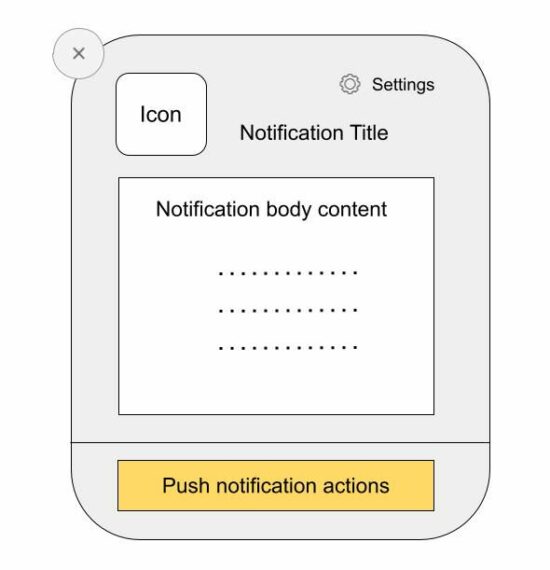
Web push notifications are messages pushed asynchronously from a website and mobile application to an event target.
There are two types of web push notifications:
Desktop notifications are shown when the foreground application is running and they are simple to use.
Notifications that are shown from the background even after the application is not running. It’s via a background service worker sync with the page or app.
This tutorial implements the first type of sending the push notification via JavaScript. It uses the JavaScript Notification class to create and manage notification instances.
Note: To show the notifications, permission should be granted by the user.
About the example
This example sends the web push notifications by calling the JavaScript Notification.
It sends only one notification by running this script. It can also be put into a cycle to automatically send notifications at a periodic interval.
This code uses the following steps to push the notification to the event target.
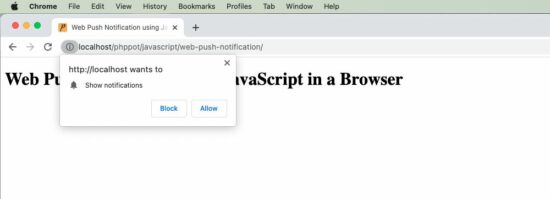
It checks if the client has the required permissions and popups content window to have user acceptance.
It creates a notification instance by supplying the title, body and icon (path).
It refers to the on-click event mapping with the notification instance.
When the user clicks on the notification, it opens the target URL passed while creating the JavaScript Notification class.
index.php
<!DOCTYPE html>

<html>

<head>

<title>Web Push Notification using JavaScript in a Browser</title>

<script src="https://code.jquery.com/jquery-3.6.1.min.js" integrity="sha256-o88AwQnZB+VDvE9tvIXrMQaPlFFSUTR+nldQm1LuPXQ=" crossorigin="anonymous"></script>

</head>

<body> <div class="phppot-container"> <h1>Web Push Notification using JavaScript in a Browser</h1> <script> pushNotify(); function pushNotify() { if (!("Notification" in window)) { // checking if the user's browser supports web push Notification alert("Web browser does not support desktop notification"); } else if (Notification.permission === "granted") { console.log("Permission to show web push notifications granted."); // if notification permissions is granted, // then create a Notification object createNotification(); } else if (Notification.permission !== "denied") { alert("Going to ask for permission to show web push notification"); // User should give explicit permission Notification.requestPermission().then((permission) => { // If the user accepts, let's create a notification createNotification(); }); } // User has not granted to show web push notifications via Browser // Let's honor his decision and not keep pestering anymore } function createNotification() { var notification = new Notification('Web Push Notification', { icon: 'https://phppot.com/badge.png', body: 'New article published!', }); // url that needs to be opened on clicking the notification // finally everything boils down to click and visits right notification.onclick = function() { window.open('https://phppot.com'); }; } </script> </div>

</body>

</html>
Permissions required
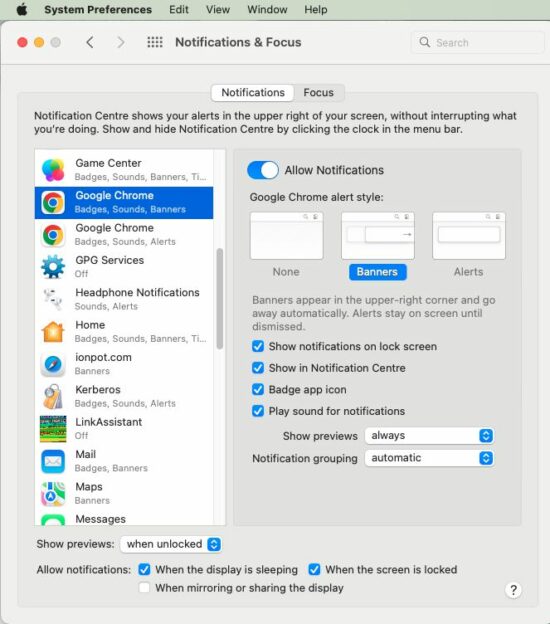
The following screenshot shows the settings to enable notification in the browser level and the system level.
Browser level permission
OS level permission
This is to allow the Google Chrome application to receive notifications. Similarly, select appropriate browser applications like Safai and Firefox to allow notification in them.
We are welcoming everyone to join our discord[discord.gg]. We are more active there on finding giveaways, small or large, and there are daily raffles you can participate.
Posted by: xSicKxBot - 10-04-2022, 11:37 AM - Forum: Lounge
- No Replies
Tower Of Fantasy Is Finally Coming To Steam Later This Month
Those waiting for Tower of Fantasy to arrive on Steam before diving into the anime MMORPG won't have to wait much longer, as publisher Level Infinite has confirmed that the free-to-play gacha game will be available to download and play on Valve's platform starting October 20.
The game has been available on PC via download from the official Tower of Fantasy site since its launch back in early August and is also available on mobile devices. In addition to the game's availability on Steam, October 20 is also the day Tower of Fantasy's first major update will arrive on all available platforms. The update will introduce the new Vera region, which is made up of the unforgiving wastes of the Desert Gobby and a floating cyberpunk city called Mirroria.
Developer Hotta Studios is promising new missions, events, raids, boss battles, vehicles, and weapons in the update, and fans have already gotten a glimpse at some of what is to come. A recent story trailer teased new unlockable characters and a deadly new enemy type known as Abyssants.
Announcing Return to Monkey Island, the long-awaited follow-up to the legendary Secret of Monkey Island and Monkey Island 2: LeChuck's Revenge by Ron Gilbert's Terrible Toybox in collaboration with Devolver Digital and Lucasfilm Games, coming 2022.



 Download PDF Slide Deck at the end of this tutorial!
 By extension, our contracts are also treated as types, and as every contract is unique in its own right, it defines its own type. Being a type, we can implicitly convert a specific contract to a contract it inherits from, i.e. if contract “Aa” inherits from contract A, it can also be converted to contract “A”.

 Warning: Since the type
  Note: Value types in storage are packed/compacted together and share a storage slot, taking only as much space per value type as really needed. In contrast, the stack, memory, and

 Question: Given a Boolean value



Share this page