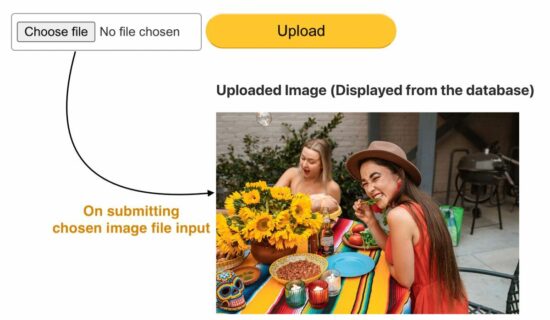
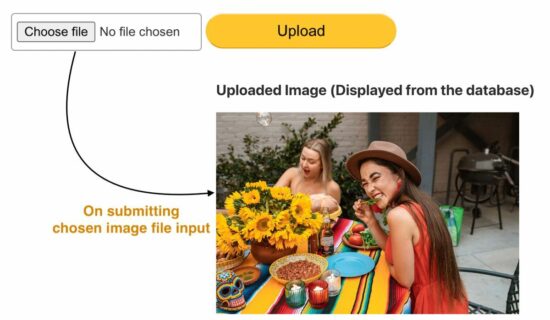
Do you want to upload an image to the database? Most application services move the uploaded files to a directory and save their path to the database.
Earlier, we saw code for storing uploaded images to the database using MySQL BLOB fields. BLOB(Binary Large Data Object) is one of the MySql data types. It can have the file binary data. MySQL supports four types of BLOB datatype as follows. View demo
TINYBLOB
BLOB
MEDIUMBLOB
LONGBLOB
For this example, we created one of the above BLOB fields in a MySQL database to see how to upload an image. Added to that, this code will fetch and BLOB data from the database and display the image to the browser.
Database script
Before running this example, create the required database structure on your server.
CREATE TABLE images ( id INT(11) AUTO_INCREMENT PRIMARY KEY, image LONGBLOB NOT NULL );
HTML form with an image upload option
This is a usual file upload form with a file input. This field restricts the file type to choose only the images using the accept attribute.
On submitting this form, the upload.php receives the posted file binary data on the server side.
Insert an image into the database using PHP and MySql
This PHP script gets the chosen file data with the $_FILES array. This array contains the base name, temporary source path, type, and more details.
With these details, it performs the file upload to the database. The steps are as follows,
Validate file array is not empty.
Retrieve the image file content using file_get_contents($_FILES[“image”][“tmp_name”]).
Prepare the insert and bind the image binary data to the query parameters.
Execute insert and get the database record id.
<?php

// MySQL database connection settings

$servername = "localhost";

$username = "root";

$password = "admin123";

$dbname = "phppot_image_upload"; // Make connection

$conn = new mysqli($servername, $username, $password, $dbname); // Check connection and throw error if not available

if ($conn->connect_error) { die("Connection failed: " . $conn->connect_error);

} // Check if an image file was uploaded

if (isset($_FILES["image"]) && $_FILES["image"]["error"] == 0) { $image = $_FILES['image']['tmp_name']; $imgContent = file_get_contents($image); // Insert image data into database as BLOB $sql = "INSERT INTO images(image) VALUES(?)"; $statement = $conn->prepare($sql); $statement->bind_param('s', $imgContent); $current_id = $statement->execute() or die("<b>Error:</b> Problem on Image Insert<br/>" . mysqli_connect_error()); if ($current_id) { echo "Image uploaded successfully."; } else { echo "Image upload failed, please try again."; }

} else { echo "Please select an image file to upload.";

} // Close the database connection

$conn->close();
Fetch image BLOB from the database and display to UI
This PHP code prepares a SELECT query to fetch the image BLOB. Using the image binary from the BLOB, it creates the data URL. It applies PHP base64 encoding on the image binary content.
This data URL is set as a source of an HTML image element below. This script shows the recently inserted image on the screen. We can also show an image gallery of all the BLOB images from the database.
<?php // Retrieve the uploaded image from the database $servername = "localhost"; $username = "root"; $password = ""; $dbname = "phppot_image_upload"; $conn = new mysqli($servername, $username, $password, $dbname); if ($conn->connect_error) { die("Connection failed: " . $conn->connect_error); } $result = $conn->query("SELECT image FROM images ORDER BY id DESC LIMIT 1"); if ($result && $result->num_rows > 0) { $row = $result->fetch_assoc(); $imageData = $row['image']; echo '<img src="data:image/jpeg;base64,' . base64_encode($imageData) . '" alt="Uploaded Image" style="max-width: 500px;">'; } else { echo 'No image uploaded yet.'; } $conn->close(); ?>
VORAX is an Open World Survival Horror game set on a Mediterranean island where a mysterious pathogen has infected the local population. https://youtu.be/eicLq7pU4g0
Posted by: xSicKxBot - 08-23-2023, 03:13 AM - Forum: Python
- No Replies
[Tut] 8 Millionaire Tips to Reach Financial Freedom as a Coder
5/5 – (1 vote)
If you’re like me, you don’t want to hear tips from people who haven’t been there and done that, so let’s start with a few words on my financial situation:
About Me: My investments and business portfolio is worth north of one million USD at the time of writing. While I’m technically financially free in that I don’t have to work anymore to maintain my lifestyle, I love business and finances, so I keep writing blogs for Finxter.
For some readers, my financial situation may be uninterestingly low. Others may find it significant. Only you can judge if I’m the right person for you to take seriously. Finally, this is not investment advice but educational entertainment.
With this out of the way, let’s get started with the slow lane to becoming a millionaire:
Five Millionaire Tips From the Slow Lane
The National Study of Millionaires by Ramsey Solutions provides valuable insights into the financial habits and behaviors of millionaires in the United States.
Contrary to popular belief, the majority of millionaires did not inherit their wealth, nor did they earn it through high salaries or risky investments.
Instead, they achieved their financial success through consistent investing, avoiding debt, and smart spending. Let’s recap these points as they are important:
Consistent Investing
Avoiding Debt
Smart Spending
Here are some key takeaways from the study, particularly relevant for techies and coders:
Millionaire Tip #1 – Invest Consistently
Three out of four millionaires (75%) attributed their success to regular, consistent investing over a long period of time. This is a crucial lesson for tech professionals, who often have access to employer-sponsored retirement plans like 401(k)s. By consistently contributing to these plans and taking advantage of employer matching, techies can build substantial wealth over time.
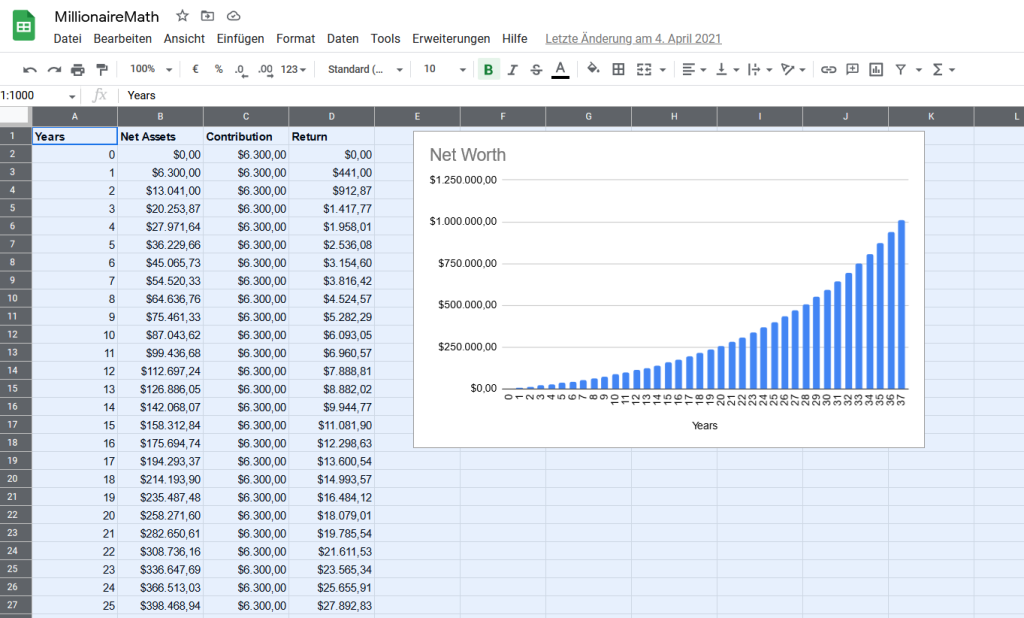
I have written a blog post about the math of consistent investments as a coder for various specific situations:
Nearly three-quarters of the millionaires surveyed have never carried a credit card balance. For tech professionals, who may face student loan debt or the temptation to overspend on gadgets and tech gear, it’s essential to prioritize paying off debt and avoiding new debt. This will free up more money for investing and reduce the financial stress that comes with carrying debt.
The only debt acceptable is debt to build financial assets such as a business or investments (e.g., real estate) because it can help you inject leverage and financial horsepower into your life.
However, the risk is significant, and even if financial leverage can accelerate your wealth-building journey, it can cost you dearly: every number, no matter how large, multiplied by zero is zero.
Millionaire Tip #3 – Spend Smartly
The study found that 94% of millionaires live on less than they make, and 93% use coupons when shopping. Tech professionals can adopt similar frugal habits by budgeting, tracking expenses, and looking for ways to save money on everyday purchases. This will allow them to invest more and reach their financial goals faster.
Millionaire Tip #4 – Educate Yourself
The majority of millionaires in the study graduated from college, with over half (52%) earning a master’s or doctoral degree. For tech professionals, continuing education and skill development can lead to higher earning potential and career advancement. Whether it’s pursuing advanced degrees, certifications, or online courses, investing in education can pay off in the long run.
The Finxter Academy, for example, provides relevant tech courses with certifications you can use to showcase your skills to potential employers such as Google, Facebook, Amazon, OpenAI, or Tesla.
Millionaire Tip #5 – Focus on the Right Career
The top five careers for millionaires in the study include engineer, accountant, teacher, management, and attorney. For techies, pursuing a career in engineering or management can be a path to financial success. However, it’s essential to remember that hard work and dedication are more critical factors than job title or salary. In fact, 93% of millionaires said they got their wealth because they worked hard, not because they had big salaries.
As my blog post “Millionaire Math” outlines, there are many paths to financial freedom, but all of them require a savings rate of 10% or (much) higher.
In conclusion, becoming a millionaire in the US is achievable for tech professionals who are willing to invest consistently, avoid debt, spend wisely, and work hard. By adopting the financial habits and behaviors of millionaires, techies can build substantial wealth and achieve their financial goals.
Three Millionaire Tips From The Fast Lane
The slow lane is good enough to becoming a millionaire coder. Many have done it. You can do it too. But becoming rich young may be even more attractive for you.
In that case, you have other options you can employ in addition to (not necessarily instead of) the slow lane:
Millionaire Tip #6 – Leverage Scalable Business Models
A coder creates a software application that solves a specific problem for a niche market. Over time, the app gains traction and attracts a large user base. The coder monetizes the app through a subscription model, generating $500,000 in annual revenue. After a few years of consistent growth, a larger software company takes notice and offers to acquire the app for $2.5 million at a 5x revenue multiple. The coder accepts the offer and experiences an explosive wealth event by selling the app.
Stories like these happen every day. The odds are much higher than playing the lottery — in fact, many savvy entrepreneurs have proven that this strategy is replicable. I have built roughly three-quarters of my wealth by leveraging scalable business models and asset value through the profit multiple.
Below is an expanded table of profit multiples and example business valuations for one-person coding startups, along with example businesses that a one-person coder could realistically build.
Profit Multiple
Annual Net Profit
Business Valuation
Example Business
2x
$50,000
$100,000
A mobile app for time management
3x
$100,000
$300,000
A SaaS platform for small business accounting
4x
$150,000
$600,000
A web application for project management
5x
$200,000
$1,000,000
A cryptocurrency trading bot
6x
$300,000
$1,800,000
A machine learning tool for data analysis
7x
$500,000
$3,500,000
A blockchain platform for supply chain tracking
8x
$1,000,000
$8,000,000
A cybersecurity software for enterprise protection
9x
$2,000,000
$18,000,000
A cloud-based platform for IoT device management
10x
$5,000,000
$50,000,000
A virtual reality platform for education
11x
$9,090,909
$100,000,000
An AI-powered platform for personalized marketing
It’s important to note that achieving a business valuation of $100 million as a one-person coder is a significant accomplishment and would likely require a highly innovative and scalable technology, a large addressable market, and strong competitive advantages. Additionally, as the business grows, it may be necessary to hire additional team members, seek external funding, and expand the business’s operations.
It’s also worth noting that the profit multiples used in the table are for illustrative purposes and may vary based on the specific circumstances of the business. Factors such as growth potential, competitive landscape, and risk profile can all influence the profit multiple and business valuation.
One-person coders have the potential to build valuable businesses by leveraging their technical skills and entrepreneurial mindset. By creating innovative and scalable technology solutions, coders can address market needs, generate revenue, and achieve significant business valuations.
Millionaire Tip #7 – Monetize Open-Source Contributions
A coder contributes to an open-source project that becomes widely used in the tech industry. The coder decides to offer premium features and support services for a fee. The coder’s contributions and premium offerings become so popular that they generate $200,000 in annual revenue. A venture capital firm recognizes the potential of the project and offers to invest $1 million in exchange for a minority stake in the coder’s business. The coder agrees to the investment, which provides an immediate influx of capital and an explosive wealth event.
Here are five real examples of open-source developers who have created significant wealth as a result of their open-source work:
Linus Torvalds: Linus Torvalds is the creator of the Linux kernel, which is the foundation of the Linux operating system. Linux is one of the most successful open-source projects in history and is used by millions of servers, desktops, and embedded systems worldwide. Torvalds has earned significant wealth through his work on Linux, including awards, speaking engagements, and his role as a Fellow at the Linux Foundation.
Guido van Rossum: Guido van Rossum is the creator of the Python programming language, which is one of the most popular programming languages in the world. Python is used for web development, data analysis, machine learning, and more. Van Rossum has earned significant wealth through his work on Python, including his role as a software engineer at Google and later as a Distinguished Engineer at Microsoft.
Matt Mullenweg: Matt Mullenweg is the co-founder of WordPress, the most popular content management system (CMS) in the world. WordPress is an open-source project that powers over 40% of all websites on the internet. Mullenweg has earned significant wealth through his work on WordPress, including his role as the CEO of Automattic, the company behind WordPress.com, WooCommerce, and other products.
Dries Buytaert: Dries Buytaert is the creator of Drupal, an open-source CMS that is used by many large organizations, including NASA, the White House, and the BBC. Buytaert has earned significant wealth through his work on Drupal, including his role as the co-founder and CTO of Acquia, a company that provides cloud hosting and support for Drupal sites.
John Resig: John Resig is the creator of jQuery, a popular JavaScript library that simplifies web development. jQuery is used by millions of websites and has become a standard tool for web developers. Resig has earned significant wealth through his work on jQuery, including his role as a software engineer at Khan Academy and his work as an author and speaker.
Millionaire Tip #8 – Build Multiple Income Streams
A coder starts a side hustle offering tech consulting services to small businesses. Over time, the coder’s reputation grows, and the consulting business generates $250,000 in annual revenue. The coder decides to scale the business by hiring additional consultants and expanding the service offerings. After a few years of growth, a larger consulting firm approaches the coder with an offer to acquire the business for $1 million at a 4x revenue multiple. The coder accepts the offer and experiences an explosive wealth event by selling the consulting business.
During all this time building the successful venture on the side, the coder also had a full-time income from their job and investment portfolio — multiple income streams!
In each of these scenarios, you leverage your technical skills and entrepreneurial mindset to create value and generate revenue. By seizing opportunities and making strategic decisions, you can experience explosive wealth events that significantly increase your net worth.
Feel free to read our advanced article on the math of becoming a millionaire:
Rise from the dust and liberate mankind from the oppression of corrupted gods. Glide the sands of a timeless land, filled with ancient dangers, mysteries and fragments of the past. Hunt legendary monsters, using powerful, shape-shifting weapons and devastating sand-powered abilities in spectacular, super-powered combat.
Target and gather the essence of your enemies to shape your own custom playstyle, forging a new era for humanity in a fully cooperative or solo story campaign.
Posted by: xSicKxBot - 08-22-2023, 09:07 AM - Forum: Python
- No Replies
[Tut] Python IndexError: Tuple Index Out of Range [Easy Fix]
5/5 – (1 vote)
Key Points:
To solve the “IndexError: tuple index out of range”, avoid do not access a non-existing tuple index. For example, my_tuple[5] causes an error for a tuple with three elements.
If you access tuple elements in a loop, keep in mind that Python uses zero-based indexing: For a tuple with n elements, the first element has index 0 and the last index n-1.
A common cause of the error is trying to access indices 1, 2, ..., n instead of using the correct indices 0,1, ..., (n-1).
The following video shows how I fixed a similar error on a list instead of a tuple:
If you’re like me, you try things first in your code and fix the bugs as they come.
One frequent bug in Python is the IndexError: tuple index out of range. So, what does this error message mean?
The error “tuple index out of range” arises if you access invalid indices in your Python tuple. For example, if you try to access the tuple element with index 100 but your tuple consist only of three elements, Python will throw an IndexError telling you that the tuple index is out of range.
Minimal Example
Here’s a screenshot of this happening on my Windows machine:
Let’s have a look at an example where this error arises:
The element with index 3 doesn’t exist in the tuple with three elements. Why is that?
The following graphic shows that the maximal index in your tuple is 2. The call my_tuple[2] would retrieve the third tuple element 'Carl'.
my_tuple[0] --> Alice
my_tuple[1] --> Bob
my_tuple[2] --> Carl
my_tuple[3] --> ??? Error ???
Did you try to access the third element with index 3?
It’s a common mistake: The index of the third element is 2 because the index of the first tuple element is 0.
How to Fix the IndexError in a For Loop? [General Strategy]
So, how can you fix the code? Python tells you in which line and on which tuple the error occurs.
To pin down the exact problem, check the value of the index just before the error occurs.
To achieve this, you can print the index that causes the error before you use it on the tuple. This way, you’ll have your wrong index in the shell right before the error message.
Here’s an example of wrong code that will cause the error to appear:
# WRONG CODE

my_tuple = ('Alice', 'Bob', 'Ann', 'Carl') for i in range(len(my_tuple)+1): my_tuple[i] ''' OUTPUT

Traceback (most recent call last): File "C:\Users\xcent\Desktop\code.py", line 5, in <module> my_tuple[i]

IndexError: tuple index out of range '''
The error message tells you that the error appears in line 5.
So, let’s insert a print statement before that line:
my_tuple = ('Alice', 'Bob', 'Ann', 'Carl') for i in range(len(my_tuple)+1): print(i) my_tuple[i]
The result of this code snippet is still an error.
But there’s more:
0

1

2

3

4

Traceback (most recent call last): File "C:\Users\xcent\Desktop\code.py", line 6, in <module> my_tuple[i]

IndexError: tuple index out of range
You can now see all indices used to retrieve an element.
The final one is the index i=4 which points to the fifth element in the tuple (remember zero-based indexing: Python starts indexing at index 0!).
But the tuple has only four elements, so you need to reduce the number of indices you’re iterating over.
The correct code is, therefore:
# CORRECT CODE

my_tuple = ('Alice', 'Bob', 'Ann', 'Carl') for i in range(len(my_tuple)): my_tuple[i]
Note that this is a minimal example and it doesn’t make a lot of sense. But the general debugging strategy remains even for advanced code projects:
Figure out the faulty index just before the error is thrown.
Eliminate the source of the faulty index.
Programmer Humor
“Real programmers set the universal constants at the start such that the universe evolves to contain the disk with the data they want.” — xkcd
Where to Go From Here?
Enough theory. Let’s get some practice!
Coders get paid six figures and more because they can solve problems more effectively using machine intelligence and automation.
To become more successful in coding, solve more real problems for real people. That’s how you polish the skills you really need in practice. After all, what’s the use of learning theory that nobody ever needs?
You build high-value coding skills by working on practical coding projects!
Do you want to stop learning with toy projects and focus on practical code projects that earn you money and solve real problems for people?
If your answer is YES!, consider becoming a Python freelance developer! It’s the best way of approaching the task of improving your Python skills—even if you are a complete beginner.
If you just want to learn about the freelancing opportunity, feel free to watch my free webinar “How to Build Your High-Income Skill Python” and learn how I grew my coding business online and how you can, too—from the comfort of your own home.
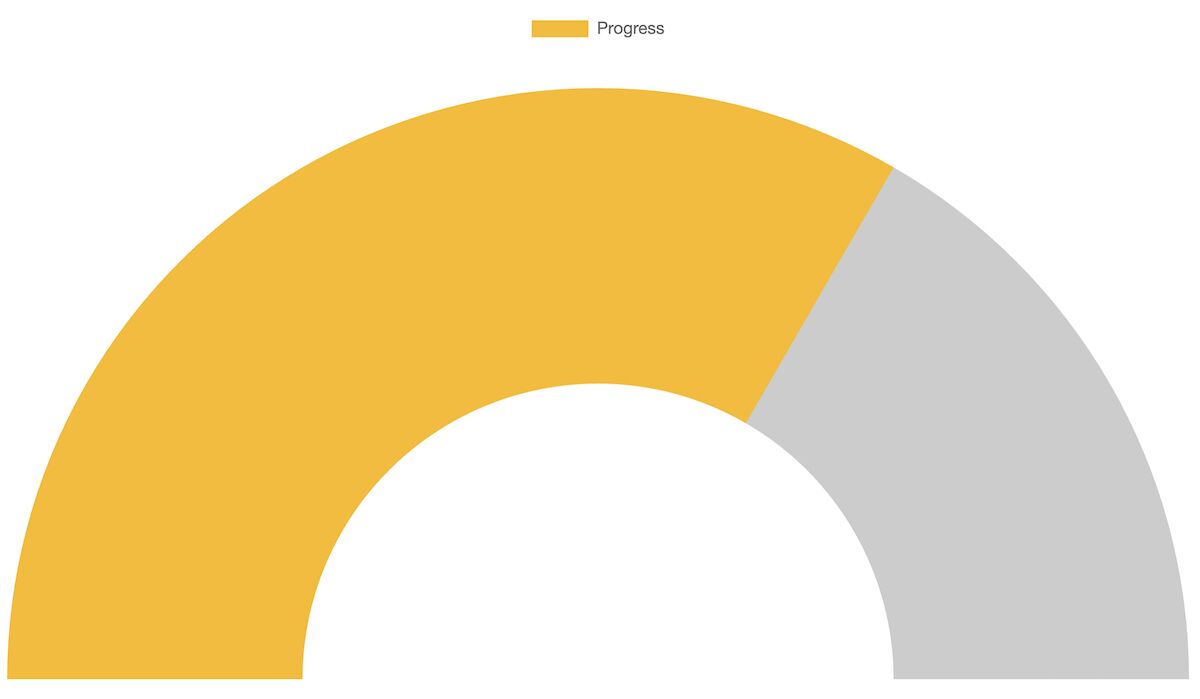
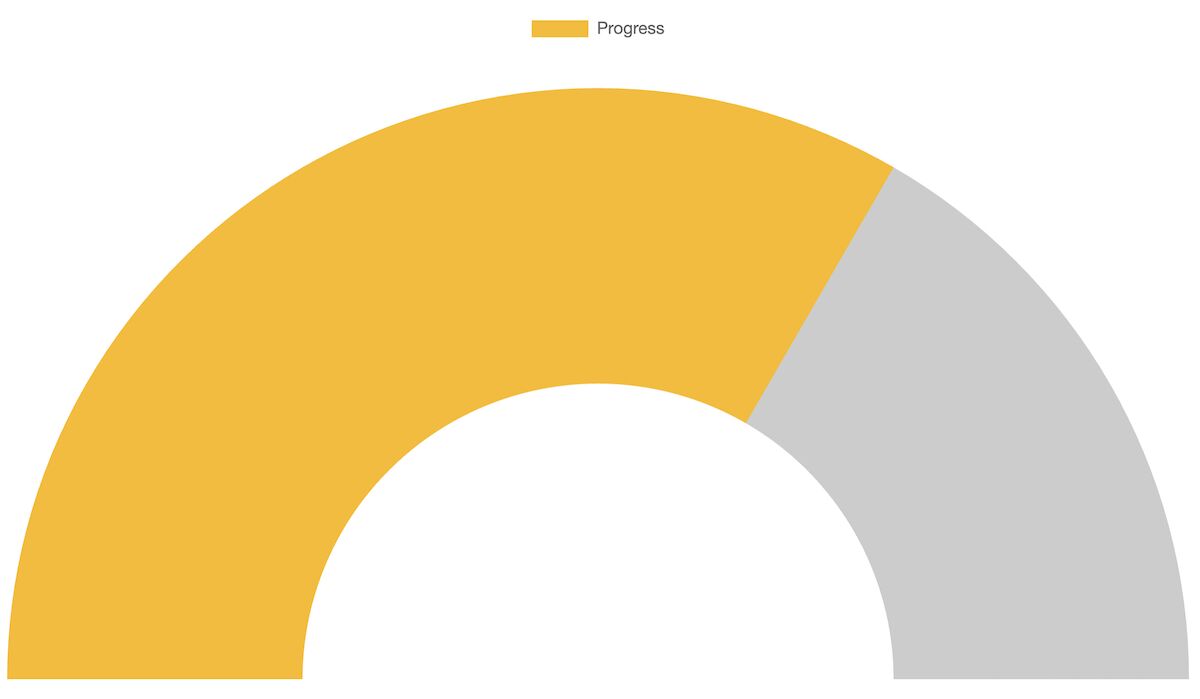
A gauge chart is a scale to measure performance amid the target. Yeah! My attempt at defining ‘Gauge.’ This article uses the ChartJS JavaScript library to create a gauge chat.
The below example creates a speedometer in the form of a gauge change. It achieves this with type=doughnut. The other options, cutout, rotation, and circumference, make the expected gauge chart view. View Demo
<!DOCTYPE html>

<html> <head> <title>Gauge Chart Example using Chart.js</title> <script src="https://cdn.jsdelivr.net/npm/chart.js"></script>

</head> <body> <canvas id="gaugeChart"></canvas> <script> // data for the gauge chart // you can supply your own values here // max is the Gauge's maximum value var data = { value: 200, max: 300, label: "Progress" }; // Chart.js chart's configuration // We are using a Doughnut type chart to // get a Gauge format chart // This is approach is fine and actually flexible // to get beautiful Gauge charts out of it var config = { type: 'doughnut', data: { labels: [data.label], datasets: [{ data: [data.value, data.max - data.value], backgroundColor: ['rgba(54, 162, 235, 0.8)', 'rgba(0, 0, 0, 0.1)'], borderWidth: 0 }] }, options: { responsive: true, maintainAspectRatio: false, cutoutPercentage: 85, rotation: -90, circumference: 180, tooltips: { enabled: false }, legend: { display: false }, animation: { animateRotate: true, animateScale: false }, title: { display: true, text: data.label, fontSize: 16 } } }; // Create the chart var chartCtx = document.getElementById('gaugeChart').getContext('2d'); var gaugeChart = new Chart(chartCtx, config); </script>

</body> </html>
The above quick example script follows the below steps to render a gauge chart with the data and the options.
Many of the steps are similar to that of creating any other chart using this library. We have seen many examples in the ChartJS library. You can start with the ChartJS bar chart example if you are new to this JavaScript library.
The data and options are the main factors that change the chart view. This section has short notes for more information about the data and the options array created in JavaScript.
This JavaScript example uses an array of static data to form a gauge chart. You can supply dynamic data from the database or any external source instead.
The data array has the chart label, target, and current value. The target value is the maximum limit of the gauge chart scale. The current value is an achieved point to be marked.
Using these values, this script prepares the gauge chart dataset.
The options array is a configuration that affects the chart’s appearance.
The ChartJS allows featured configurations to experience the best chart views. Some of those options exclusive to the gauge chart are listed below.
An ancient evil has returned to Baldur's Gate, intent on devouring it from the inside out. The fate of Faerun lies in your hands. Alone, you may resist. But together, you can overcome. Gather your party and return to the Forgotten Realms in a tale of fellowship and betrayal, sacrifice and survival, and the lure of absolute power. Mysterious abilities are awakening inside you, drawn from a mind flayer parasite planted in your brain. Resist, and turn darkness against itself. Or embrace corruption, and become ultimate evil.
Posted by: xSicKxBot - 08-21-2023, 10:25 AM - Forum: Python
- No Replies
[Tut] Python Tuple Concatenation: A Simple Illustrated Guide
5/5 – (1 vote)
Python tuples are similar to lists, but with a key difference: they are immutable, meaning their elements cannot be changed after creation.
Tuple concatenation means joining multiple tuples into a single tuple. This process maintains the immutability of the tuples, providing a secure and efficient way to combine data. There are several methods for concatenating tuples in Python, such as using the + operator, the * operator, or built-in functions like itertools.chain().
# Using the + operator to concatenate two tuples

tuple1 = (1, 2, 3)

tuple2 = (4, 5, 6)

concatenated_tuple = tuple1 + tuple2

print("Using +:", concatenated_tuple) # Output: (1, 2, 3, 4, 5, 6) # Using the * operator to repeat a tuple

repeated_tuple = tuple1 * 3

print("Using *:", repeated_tuple) # Output: (1, 2, 3, 1, 2, 3, 1, 2, 3) # Using itertools.chain() to concatenate multiple tuples

import itertools

tuple3 = (7, 8, 9)

chained_tuple = tuple(itertools.chain(tuple1, tuple2, tuple3))

print("Using itertools.chain():", chained_tuple)

# Output: (1, 2, 3, 4, 5, 6, 7, 8, 9)
The + operator is used to join two tuples, the * operator is used to repeat a tuple, and the itertools.chain() function is used to concatenate multiple tuples. All these methods maintain the immutability of the tuples
Understanding Tuples
Python tuple is a fundamental data type, serving as a collection of ordered, immutable elements. Tuples are used to group multiple data items together. Tuples are created using parentheses () and elements within the tuple are separated by commas.
For example, you can create a tuple as follows:
my_tuple = (1, 2, 3, 4, 'example')
In this case, the tuple my_tuple has five elements, including integers and a string. Python allows you to store values of different data types within a tuple.
Immutable means that tuples cannot be changed once defined, unlike lists. This immutability makes tuples faster and more memory-efficient compared to lists, as they require less overhead to store and maintain element values.
Being an ordered data type means that the elements within a tuple have a definite position or order in which they appear, and this order is preserved throughout the tuple’s lifetime.
One common operation performed on tuples is tuple concatenation, which involves combining two or more tuples into a single tuple. This section will discuss the basics of tuple concatenation using the + operator and provide examples to demonstrate the concept.
Using the + Operator
The + operator is a simple and straightforward way to concatenate two tuples. When using the + operator, the two tuples are combined into a single tuple without modifying the original tuples. This is particularly useful when you need to merge values from different sources or create a larger tuple from smaller ones.
Here’s the basic syntax for using the + operator:
new_tuple = tuple1 + tuple2
new_tuple will be a tuple containing all elements of tuple1 followed by elements of tuple2. It’s essential to note that since tuples are immutable, the original tuple1 and tuple2 remain unchanged after the concatenation.
Examples of Tuple Concatenation
Let’s take a look at a few examples to better understand tuple concatenation using the + operator:
In this example, we concatenated tuple1 and tuple2 to create a new tuple called tuple3. Notice that the elements are ordered, and tuple3 contains all the elements from tuple1 followed by the elements of tuple2.
Here’s another example with tuples containing different data types:
In this case, we combined a tuple containing strings with a tuple containing an integer and a string, resulting in a new tuple containing all elements in the correct order.
Using the * Operator
The * operator can be used for replicating a tuple a specified number of times and then concatenating the results. This method can be particularly useful when you need to create a new tuple by repeating an existing one.
In the example above, the original tuple is repeated three times and then concatenated to create the replicated_tuple. Note that using the * operator with non-integer values will result in a TypeError.
Using itertools.chain()
The itertools.chain() function from the itertools module provides another way to concatenate tuples. This function takes multiple tuples as input and returns an iterator that sequentially combines the elements of the input tuples.
Here’s an illustration of using itertools.chain():
In this example, the itertools.chain() function is used to combine tuple1 and tuple2. The resulting iterator is then explicitly converted back to a tuple using the tuple() constructor.
It’s important to note that itertools.chain() can handle an arbitrary number of input tuples, making it a flexible option for concatenating multiple tuples:
Both the * operator and itertools.chain() offer efficient ways to concatenate tuples in Python.
Manipulating Tuples
Tuples are immutable data structures in Python, which means their content cannot be changed once created. However, there are still ways to manipulate and extract information from them.
Slicing Tuples
Slicing is a technique for extracting a range of elements from a tuple. It uses brackets and colons to specify the start, end, and step if needed. The start index is inclusive, while the end index is exclusive.
my_tuple = (0, 1, 2, 3, 4)

sliced_tuple = my_tuple[1:4] # This will return (1, 2, 3)
You can also use negative indexes, which count backward from the end of the tuple:
sliced_tuple = my_tuple[-3:-1] # This will return (2, 3)
Tuple Indexing
Tuple indexing allows you to access a specific element in the tuple using its position (index).
my_tuple = ('apple', 'banana', 'cherry')

item = my_tuple[1] # This will return 'banana'
An IndexError will be raised if you attempt to access an index that does not exist within the tuple.
Adding and Deleting Elements
Since tuples are immutable, you cannot directly add or delete elements. However, you can work around this limitation by:
Concatenating tuples: You can merge two tuples by using the + operator.
Converting to a list: If you need to perform several operations that involve adding or removing elements, you can convert the tuple to a list. Once the operations are completed, you can convert the list back to a tuple.
my_tuple = (1, 2, 3)

my_list = list(my_tuple)

my_list.append(4) # Adding an element

my_list.remove(2) # Removing an element

new_tuple = tuple(my_list) # This will return (1, 3, 4)
Remember that manipulating tuples in these ways creates new tuples and does not change the original ones.
Common Errors and Solutions
One common error that users might encounter while working with tuple concatenation in Python is the TypeError. This error can occur when attempting to concatenate a tuple with a different data type, such as an integer or a list.
>>> (1, 2, 3) + 1

Traceback (most recent call last): File "<pyshell#2>", line 1, in <module> (1, 2, 3) + 1

TypeError: can only concatenate tuple (not "int") to tuple
To overcome this issue, make sure to convert the non-tuple object into a tuple before performing the concatenation.
For example, if you’re trying to concatenate a tuple with a list, you can use the tuple() function to convert the list into a tuple:
Another common error related to tuple concatenation is the AttributeError. This error might arise when attempting to call a non-existent method or attribute on a tuple. Since tuples are immutable, they don’t have methods like append() or extend() that allow addition of elements.
Instead, you can concatenate two tuples directly using the + operator:
When working with nested tuples, ensure proper syntax and data structure handling to avoid errors like ValueError and TypeError. To efficiently concatenate nested tuples, consider using the itertools.chain() function provided by the itertools module.
This function helps to flatten the nested tuples before concatenation:
The result variable now contains the concatenated tuple (1, 2, 3, 4, 5, 6).
What is the syntax for tuple concatenation?
The syntax for concatenating tuples is straightforward. Just use the + operator between the two tuples you want to concatenate.
concatenated_tuples = first_tuple + second_tuple
How to concatenate a tuple and a string?
To concatenate a tuple and a string, first convert the string into a tuple containing a single element, and then concatenate the tuples. Here’s an example:
The concatenated_result will be (1, 2, 3, 'hello').
Is it possible to modify a tuple after creation?
Tuples are immutable, which means they cannot be modified after creation (source). If you need to modify the contents of a collection, consider using a list instead.
How can I combine multiple lists of tuples?
To combine multiple lists of tuples, use a combination of list comprehensions and tuple concatenation. Here is an example:
lists_of_tuples = [ [(1, 2), (3, 4)], [(5, 6), (7, 8)]

] combined_list = [t1 + t2 for lst in lists_of_tuples for t1, t2 in lst]
The combined_list variable will contain [(1, 2, 3, 4), (5, 6, 7, 8)].
Can tuple concatenation be extended to more than two tuples?
Yes, tuple concatenation can be extended to more than two tuples by using the + operator multiple times. For example:




 About Me: My investments and business portfolio is worth north of one million USD at the time of writing. While I’m technically financially free in that I don’t have to work anymore to maintain my lifestyle, I love business and finances, so I keep writing blogs for Finxter.



 Recommended:
 Academy:





 If your answer is YES!, consider becoming a