A routine scavenging mission in the Belt has turned into a deadly standoff with relentless pirates. Camina Drummer, as the new captain, faces her first test: outnumbered and outgunned, the crew of The Artemis must formulate an escape plan and gather the supplies desperately needed to get away.
Posted by: xSicKxBot - 08-25-2023, 06:15 AM - Forum: Python
- No Replies
[Tut] Bitcoin Is Not Bad For the Environment
5/5 – (2 votes)
Story: Alice has just been orange-pilled and decides to spend a few hours reading Bitcoin articles.
She lands on a mainstream media article on “Bitcoin’s high energy consumption” proposing alternative (centralized) “green coins” that supposedly solve the problem of high energy consumption.
Alice gets distracted and invests in green tokens, effectively buying the bags of marketers promoting green crypto.
After losing 99% of her money, she’s disappointed by the whole industry and concludes that Bitcoin is not for her because the industry is too complex and full of scammers.
Here’s one of those articles recommending five centralized shitcoins:
Here’s another article with shallow content and no unique thought:
In this article, I’ll address Bitcoin’s energy “concern” quickly and efficiently. Let’s get started!
Bitcoin Is Eco #1: Inbuilt Incentive to Use Renewable Energy Sources
Miners, who are responsible for validating transactions and securing the network, are driven by profit. Consequently, Bitcoin’s decentralized nature and proof-of-work consensus mechanism have an inbuilt incentive to use renewable energy sources where they are cheapest.
Renewable energy often provides a more cost-effective solution, leading miners to gravitate towards these sources naturally:
This non-competition with other energy consumers ensures that Bitcoin’s energy consumption is sustainable and environmentally friendly.
Renewable energy (specifically: solar energy) offers the lowest-cost energy sources. Fossil-powered miners operate at lower profitability and tend to lose market share compared to renewable-powered miners.
Consider these statistics:
The Bitcoin Mining Council (BMC), a global forum of mining companies that represents 48.4% of the worldwide bitcoin mining network, estimated that in Q4 2022, renewable energy sources accounted for 58.9% of the electricity used to mine bitcoin, a significant improvement compared to 36.8% estimated in Q1 2021 (source).
In the first half of 2023, the members are utilizing electricity with a sustainable power mix of 63.1%, thereby contributing to a slight improvement in the global Bitcoin mining industry’s sustainable electricity mix to 59.9% (source).
Bitcoin is one of the greenest industries on the planet; year after year, it becomes greener!
Bitcoin Is Eco #2: Monetizing Stranded Energy
Bitcoin’s energy consumption provides a way to use excess energy that would otherwise go to waste.
For example, solar panels often generate more energy than needed, especially during peak hours.
Batteries are still expensive and not easily accessible everywhere. Also, they don’t solve the fundamental problem of excess energy — they only buffer it.
Bitcoin mining can consume this excess energy, ensuring that it is not wasted and contributing to the overall efficiency of the energy system.
Bitcoin’s role as an energy consumer of last resort is an innovative solution to a modern problem. By tapping into excess energy from renewable sources like solar, wind, and hydroelectric power, Bitcoin mining ensures that energy that would otherwise go to waste is put to productive use.
This is called stranded energy, and energy insiders already propose to use Bitcoin as a solution to utilize stranded energy in economically and ecologically viable ways:
Bitcoin’s energy consumption is not merely a drain on resources but a strategic tool for enhancing the energy system’s efficiency and sustainability.
By acting as a consumer of last resort, Bitcoin mining transforms a potential waste into a valuable asset, fostering economic development, encouraging renewable energy, and offering a flexible solution to energy grid stabilization.
Bitcoin Is Eco #3: Incentivizing Renewable Energy Development
TL;DR: According to Wright’s Law, technological innovation leads to a reduction in costs over time. Bitcoin’s demand for energy incentivizes developing and deploying renewable energy sources, such as solar and wind power, which, in turn, helps to reduce the cost per kilowatt-hour, making renewable energy more accessible and appealing to other industries as well.
Being able to monetize stranded energy (see previous point #2) not only contributes to the overall efficiency of the energy system but also encourages further investments in renewable energy sources, driving innovation in energy-efficient technologies.
And with more investments in solar energy, the price per kWh continues to drop due to Wrights Law accelerating the renewable energy transition.
In a Nutshell: More Bitcoin Mining --> More Solar Energy --> Lower Cost per kwh --> More Solar Energy
What sets Bitcoin mining apart is its geographical flexibility and ability to turn on and off like a battery for the energy grid. Mining operations can be strategically located near renewable energy sources, consuming excess energy when available and pausing when needed elsewhere.
This unique characteristic allows Bitcoin mining to act as a stabilizing force in the energy grid, reducing the need for energy storage or wasteful dissipation of excess stranded energy and providing economic incentives for both energy producers and local communities.
Bitcoin Is Eco #4: No It Won’t Consume All the World’s Energy
Contrary to popular belief, Bitcoin’s energy consumption does not grow linearly with Bitcoin adoption and price. Instead, it grows logarithmically with the Bitcoin price, meaning it will likely never exceed 1-2% of the Earth’s total energy consumption.
And even if it were to exceed a few percentage points, it’ll use mostly stranded energy (see previous points #2 and #3) and won’t be able to compete with other energy consumers such as:
Data Centers: High energy for cooling and uninterrupted operation.
Hospitals: Continuous power for life-saving equipment and systems.
Manufacturing Facilities: Energy for uninterrupted production processes.
These will always be able to pay a higher price for energy than Bitcoin.
Bitcoin’s energy consumption isn’t a big deal, even without considering its ecological benefits (see point #5).
Bitcoin Is Eco #5: Bitcoin’s Utility Overcompensates For Its Energy Use
Like everything else, Bitcoin has not only costs but also benefits. The main argument of Bitcoiners is, of course, the high utility the new system provides.
Bitcoin’s decentralized financial system reduces the need for the traditional financial sector’s overhead, such as large buildings, millions of employees, and other expenses related to gold extraction and banking operations. Bitcoin is the superior and more efficient technology that will more than half the energy costs of the financial system.
For example, this finding shows that both the traditional banking sector and gold need more energy than Bitcoin.
“A 2021 study by Galaxy Digital provided similar findings. It stated that Bitcoin consumed 113.89 terawatt hours (TWh) per year, while the banking sector consumed 263.72 TWh per year.
[…] According to the CBECI, the annual power consumption of gold mining stands at 131 TWh of electricity per year. That’s 10 percent more than Bitcoin’s 120 TWh. This further builds the case for Bitcoin as an emerging digital gold.” (CNBC)
And this doesn’t include the energy benefits that could accrue to Bitcoin when replacing much of the monetary premium in real estate:
Bitcoin Is Eco #6: Deflationary Benefits to the Economy
TL;DR: Bitcoin’s deflationary nature encourages saving rather than spending. A Bitcoin standard will lead to a reduction in overall consumption, which has significant ecological benefits.
Bitcoin, a deflationary currency with a capped supply, may offer environmental benefits by reducing consumption. Traditional economies, driven by inflation, encourage spending, often resulting in overconsumption and waste.
For instance, wars are usually funded more by inflation rather than taxation. Millions of people buy cars and houses they can’t afford with debt, the source of all inflation.
In contrast, Bitcoin’s deflationary nature incentivizes saving, leading to decreased and highly rational consumption. Because BTC money cannot be printed, the economy would have much lower debt levels, so excess consumption is far less common in deflationary environments.
Reduced consumption can benefit the environment in several ways. Lower demand for goods means fewer greenhouse gas emissions from manufacturing and transportation. It also means less pollution from resource extraction and waste.
All technological progress is deflationary, i.e., goods become cheaper and not more expensive with technological progress. A deflationary economy promotes sustainable businesses that deliver true value without excess overhead making the economic machine much more efficient and benefitting all of us.
Mainstream Keynesian economists do not share the view that deflation is good for the economy, so I added this summary of an essay from the Mises Institute:
“Deflation Is Always Good for the Economy” (Mises Institute)
Main Thesis: Deflation, defined as a general decline in prices of goods and services, is always good for the economy, contrary to the popular belief that it leads to economic slumps. The real problem is not deflation itself, but policies aimed at countering it.
Supporting Arguments:
Misunderstanding of Deflation: Most experts believe that deflation generates expectations for further price declines, causing consumers to postpone purchases, which weakens the economy. However, this view is based on a misunderstanding of deflation and inflation.
Inflation is Not Essentially a Rise in Prices: Inflation is not about general price increases, but about the increase in the money supply. Price increases are often a result of an increase in the money supply, but not always. Prices can fall even with an increase in the money supply if the supply of goods increases at a faster rate.
Rising Prices Aren’t the Problem with Inflation: Inflation is harmful not because of price increases, but because of the damage it inflicts on the wealth-formation process. Money created out of thin air (e.g., by counterfeiting or loose monetary policies) diverts real wealth toward the holders of new money, leaving less real wealth to fund wealth-generating activities. This weakens economic growth.
Easy-Money Policies Divert Resources to Non-Productive Activities: Increases in the money supply give rise to non-productive activities, or “bubble activities,” which cannot stand on their own and require the diversion of wealth from wealth generators. Loose monetary policies aimed at fighting deflation support these non-productive activities, weakening the foundation of the economy.
Allowing Non-Productive Activities to Fail: Once non-productive activities are allowed to fail and the sources of the increase in the money supply are sealed off, a genuine, real-wealth expansion can ensue. With the expansion of real wealth for a constant stock of money, prices will fall, which is always good news.
Facts and Stats:
Inflation Target: Mainstream thinkers view an inflation rate of 2% as not harmful to economic growth, and the Federal Reserve’s inflation target is 2%.
Example of Inflation: If the money supply increases by 5% and the quantity of goods increases by 10%, prices will fall by 5%, ceteris paribus, despite the fact that there is an inflation of 5% due to the increase in the money supply.
Example of Company Departments: In a company with 10 departments, if 8 departments are making profits and 2 are making losses, a responsible CEO will shut down or restructure the loss-making departments. Failing to do so diverts funding from wealth generators to loss-making departments, weakening the foundation of the entire company.
To summarize, Bitcoin has the potential to gradually shift our inflationary, high-consumption economy to a deflationary rational consumption economy while providing a more efficient and greener digital financial system that doesn’t rely on centralized parties and has built-in trust and robustness unmatched by any other financial institution.
The myth of Bitcoin’s high energy consumption is rooted in misunderstandings and oversimplifications. When examined closely, the cryptocurrency’s energy usage reveals a complex interplay of incentives, efficiencies, and innovations that not only mitigate its environmental impact but also contribute positively to global energy dynamics.
Bitcoin’s alignment with renewable energy, utilization of excess energy, incentivization of renewable energy development, logarithmic growth of energy consumption, and deflationary nature all point to a more sustainable and ecologically beneficial system.
As the world continues to grapple with environmental challenges, it is essential to approach the subject of Bitcoin’s energy consumption with an open mind and a willingness to engage with the facts. The evidence suggests that Bitcoin is not the environmental villain it is often portrayed to be, but rather a part of the solution to a more sustainable future.
We will be going to Gamescom 2023 in Cologne, Germany next week! Find us at Hall 10.1 | Stand B093 with the newest version of Vorax with all of its new additions on a massive and expanded map.
[www.indiegala.com] Add to your collection & get a selection of games made with heart and mind brought to you by Whale Rock Games for passionate gamers. [www.indiegala.com]
- Click on the GET Button - Verify that the price is zero - Click on the Place Order Button - That's it, the game will be added to you Epic Games Account
Not available in South Korea
This game is free to keep if claimed by Augusts 31st , 2023 5:00 PM or in a day
As humanity’s last hope, it’s up to you to stop the wicked Strogg’s warpath before it twists mankind into mechanical horrors. The odds are stacked against you on a hostile alien planet teeming with enemy forces, but so long as you have ammo and a pulse, it’s not over! Battle hordes of cybernetic creatures in blistering FPS combat, strafing through Quake II’s campaign with an iconic arsenal of bullets, rockets and shells. Enjoy Quake II’s legendary gameplay, preserved and complete with the original soundtrack by Sonic Mayhem, now enhanced with widescreen support, restored content previously left on the cutting room floor, visual and performance upgrades to make every muzzle flash and gib-plosion pop on-screen and even new levels. The enhanced release of Quake II comes with both expansions for the original game, Mission Pack: The Reckoning and Mission Pack: Ground Zero, adding over 30 additional single player levels and over 20 Deathmatch maps. Quake II now includes Call of the Machine, an all-new expansion created by Wolfenstein: The New Colossus developer, MachineGames. Consisting of 28 campaign levels plus a brand-new Deathmatch map, fight across time and space to find the Strogg-Maker, destroy it and change fate itself. [Bethesda]
[Tut] Check Python Version from Command Line and in Script
5/5 – (1 vote)
Check Python Version from Command Line
Knowing your Python version is vital for running programs that may be incompatible with a certain version. Checking the Python version from the command line is simple and can be done using your operating system’s built-in tools.
Windows Command Prompt
In Windows, you can use PowerShell to check your Python version. Open PowerShell by pressing Win+R, typing powershell, and then pressing Enter. Once PowerShell is open, type the following command:
python --version
This command will return the Python version installed on your Windows system. If you have both Python 2 and Python 3 installed, you can use the following command to check the Python 3 version:
python3 --version
macOS Terminal
To check the Python version in macOS, open the Terminal by going to Finder, clicking on Applications, and then navigating to Utilities > Terminal. Once the Terminal is open, type the following command to check your Python version:
python --version
Alternatively, if you have Python 3 installed, use the following command to check the Python 3 version:
python3 --version
Linux Terminal
In Linux, open a terminal window and type the following command to check your Python version:
This code snippet will print the Python version currently being used to run the script. It can be helpful in identifying version-related issues when debugging your code.
Check Python Version in Script
Using Sys Module
The sys module allows you to access your Python version within a script. To obtain the version, simply import the sys module and use the sys.version_info attribute. This attribute returns a tuple containing the major, minor, and micro version numbers, as well as the release level and serial number.
Another way to check the Python version in a script is using the platform module. The platform.python_version() function returns the version as a string, while platform.python_version_tuple() returns it as a tuple.
Here’s an example of how to use these functions:
import platform

version = platform.python_version()

version_tuple = platform.python_version_tuple()

print(f"Python version: {version}")

print(f"Python version (tuple): {version_tuple}")
Both the sys and platform methods allow you to easily check your python version in your scripts. By utilizing these modules, you can ensure that your script is running on the correct version of Python, or even tailor your script to work with multiple versions.
Python Version Components
Python versions are composed of several components that help developers understand the evolution of the language and maintain their projects accordingly. In this section, we will explore the major components, including Major Version, Minor Version, and Micro Version.
Major Version
The Major Version denotes the most significant changes in the language, often introducing new features or language elements that are not backwards compatible. Python currently has two major versions in widespread use: Python 2 and Python 3. The transition from Python 2 to Python 3 was a significant change, with many libraries and applications needing updates to ensure compatibility.
For example, to check the major version of your Python interpreter, you can use the following code snippet:
import sys

print(sys.version_info.major)
Minor Version
The Minor Version represents smaller updates and improvements to the language. These changes are typically backwards compatible, and they introduce bug fixes, performance enhancements, and minor features. For example, Python 3.6 introduced formatted string literals (f-strings) to improve string manipulation, while Python 3.7 enhanced asynchronous functionality with the asyncio module.
You can check the minor version of your Python interpreter with this code snippet:
import sys

print(sys.version_info.minor)
Micro Version
The Micro Version is the smallest level of changes, focused on addressing specific bugs, security vulnerabilities, or minor refinements. These updates should be fully backwards compatible, ensuring that your code continues to work as expected. The micro version is useful for package maintainers and developers who need precise control over their dependencies.
To find out the micro version of your Python interpreter, use the following code snippet:
import sys

print(sys.version_info.micro)
In summary, Python versions are a combination of major, minor, and micro components that provide insight into the evolution of the language. The version number is available as both a tuple and a string, representing release levels and serial versions, respectively.
Working with Multiple Python Versions
Working with multiple Python versions on different operating systems like mac, Windows, and Linux is often required when developing applications or scripts. Knowing how to select a specific Python interpreter and check the version of Python in use is essential for ensuring compatibility and preventing errors.
Selecting a Specific Python Interpreter
In order to select a specific Python interpreter, you can use the command line or terminal on your operating system. For instance, on Windows, you can start the Anaconda Prompt by searching for it in the Start menu, and on Linux or macOS, simply open the terminal or shell.
Once you have the terminal or command prompt open, you can use the python command followed by the specific version number you want to use, such as python2 or python3. For example, if you want to run a script named example_script.py with Python 3, you would enter python3 example_script.py in the terminal.
Note: Make sure you have the desired Python version installed on your system before attempting to select a specific interpreter.
To determine which Python version is currently running your script, you can use the sys module. In your script, you will need to import sys and then use the sys.version attribute to obtain information about the currently active Python interpreter.
Here’s an example that shows the Python version in use:
import sys

print("Python version in use:", sys.version.split()[0])
For a more platform-independent way to obtain the Python version, you can use the platform module. First, import platform, and then use the platform.python_version() function, like this:
import platform

print("Python version in use:", platform.python_version())
In conclusion, managing multiple Python versions can be straightforward when you know how to select a specific interpreter and obtain the currently active Python version. This knowledge is crucial for ensuring compatibility and preventing errors in your development process.
Python, one of the most widely-used programming languages, has two major versions: Python2 and Python3. Understanding and checking their compatibility ensures that your code runs as intended across different environments.
To check the Python version via the command line, open the terminal (Linux, Ubuntu) or command prompt (Windows), and run the following command:
python --version
Alternatively, you can use the shorthand:
python -V
For checking the Python version within a script, you can use the sys module. In the following example, the major and minor version numbers are obtained using sys.version_info:
import sys

version_info = sys.version_info

print(f"Python {version_info.major}.{version_info.minor} is running this script.")
Compatibility between Python2 and Python3 is essential for maintaining codebases and leveraging pre-existing libraries. The 2to3 tool checks for compatibility by identifying the necessary transitions from Python2 to Python3 syntax.
To determine if a piece of code is Python3-compatible, run the following command:
2to3 your_python_file.py
Python packages typically declare their compatibility with specific Python versions. Reviewing the package documentation or its setup.py file provides insight into supported Python versions. To determine if a package is compatible with your Python environment, you can check the package’s release history on its project page and verify the meta-information for different versions.
When using Ubuntu or other Linux distributions, Python is often pre-installed. To ensure compatibility between different software components and programming languages (like gcc), regularly verify and update your installed Python versions.
Comparing Python Versions
When working with Python, it’s essential to know which version you are using. Different versions can have different syntax and functionality. You can compare the Python version numbers using the command line or within a script.
To check your Python version from the command line, you can run the command python --version or python3 --version. This will display the version number of the Python interpreter installed on your system.
In case you are working with multiple Python versions, it’s important to compare them to ensure compatibility. You can use the sys.version_info tuple, which contains the major, minor, and micro version numbers of your Python interpreter. Here’s an example:
import sys if sys.version_info < (3, 0, 0): print("You are using Python 2.x")

else: print("You are using Python 3.x or higher")
This code snippet compares the current Python version to a specific one (3.0.0) and prints a message to the shell depending on the outcome of the comparison.
In addition to Python, other programming languages like C++ can also have different versions. It’s important to be aware of the version number, as it affects the language’s features and compatibility.
Remember to always verify and compare Python version numbers before executing complex scripts or installing libraries, since a mismatch can lead to errors and unexpected behavior. By using the command line or programmatically checking the version in your script, you can ensure smooth and error-free development.
Frequently Asked Questions
How to find Python version in command line?
You can find the Python version in the command line by running the following command:
python --version
Or:
python -V
This command will display the Python version installed on your system.
How to check for Python version in a script?
To check for the Python version in a script, you can use the sys module. Here’s an example:
This code will print the Python version and version information when you run the script.
Ways to determine Python version in prompt?
As mentioned earlier, you can use the python --version or python -V command in the command prompt to determine the Python version. Additionally, you can run:
python -c "import sys; print(sys.version)"
This will run a one-liner that imports the sys module and prints the Python version.
Is Python installed? How to verify from command line?
To verify if Python is installed on your system, simply run the python --version or python -V command in the command prompt. If Python is installed, it will display the version number. If it’s not installed, you will receive an error message or a command not found message.
Verifying Python version in Anaconda environment?
To verify the Python version in an Anaconda environment, first activate the environment with conda activate <environment_name>. Next, run the python --version or python -V command as mentioned earlier.
Determining Python version programmatically?
Determining the Python version programmatically can be done using the sys module. As shown in the second question, you can use the following code snippet:
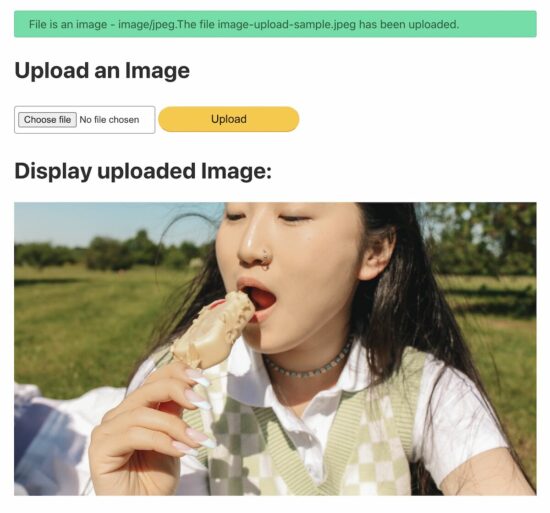
PHP upload is a single-line, built-in function invocation. Any user inputs, especially files, can not be processed without proper filtering. Why? Because people may upload harmful files to the server.
After file upload, the status has to be shown in the UI as an acknowledgment. Otherwise, showing the uploaded image’s preview is the best way of acknowledging the end user.
Call the PHP upload function to save the file to the target.
Display the uploaded image on the browser
1. Show an image upload option in an HTML form
This code is to show an HTML form with a file input to the user. This form is with enctype="multipart/form-data" attribute. This attribute is for uploading the file binary to be accessible on the PHP side.
Read file data from the form and set the upload target
This section shows a primary PHP condition to check if the form is posted and the file binary is not empty.
Once these conditions return true, further steps will be taken for execution.
Once the image is posted, it sets the target directory path to upload. The variable $uploadOK is a custom flag to allow the PHP file upload.
If the validation returns false, this $uploadOK variable will be turned to 0 and stop uploading.
<?php

if (isset($_POST["submit"])) { // Check image using getimagesize function and get size // if a valid number is got then uploaded file is an image if (isset($_FILES["image"])) { // directory name to store the uploaded image files // this should have sufficient read/write/execute permissions // if not already exists, please create it in the root of the // project folder $targetDir = "uploads/"; $targetFile = $targetDir . basename($_FILES["image"]["name"]); $uploadOk = 1; $imageFileType = strtolower(pathinfo($targetFile, PATHINFO_EXTENSION)); // Validation here }

}

?>
Validate the file type size before uploading to the server
This example applies three types of validation criteria on the server side.
Check if the uploaded file is an image.
Check if the image has the accepted size limit (0.5 MB).
Check if the image has the allowed extension (jpeg and png).
<?php

// Check image using getimagesize function and get size // if a valid number is got then uploaded file is an image if (isset($_FILES["image"])) { // directory name to store the uploaded image files // this should have sufficient read/write/execute permissions // if not already exists, please create it in the root of the // project folder $targetDir = "uploads/"; $targetFile = $targetDir . basename($_FILES["image"]["name"]); $uploadOk = 1; $imageFileType = strtolower(pathinfo($targetFile, PATHINFO_EXTENSION)); $check = getimagesize($_FILES["image"]["tmp_name"]); if ($check !== false) { echo "File is an image - " . $check["mime"] . "."; $uploadOk = 1; } else { echo "File is not an image."; $uploadOk = 0; } } // Check if the file already exists in the same path if (file_exists($targetFile)) { echo "Sorry, file already exists."; $uploadOk = 0; } // Check file size and throw error if it is greater than // the predefined value, here it is 500000 if ($_FILES["image"]["size"] > 500000) { echo "Sorry, your file is too large."; $uploadOk = 0; } // Check for uploaded file formats and allow only // jpg, png, jpeg and gif // If you want to allow more formats, declare it here if ( $imageFileType != "jpg" && $imageFileType != "png" && $imageFileType != "jpeg" && $imageFileType != "gif" ) { echo "Sorry, only JPG, JPEG, PNG & GIF files are allowed."; $uploadOk = 0; }

?>
4. Call the PHP upload function to save the file to the target
Once the validation is completed, then the PHP move_uploaded_file() the function is called.
It copies the file from the temporary path to the target direct set in step 1.
<?php

// Check if $uploadOk is set to 0 by an error

if ($uploadOk == 0) { echo "Sorry, your file was not uploaded.";

} else { if (move_uploaded_file($_FILES["image"]["tmp_name"], $targetFile)) { echo "The file " . htmlspecialchars(basename($_FILES["image"]["name"])) . " has been uploaded."; } else { echo "Sorry, there was an error uploading your file."; }

}

?>
5. Display the uploaded image on the browser.
This section shows the image preview by setting the source path.
Before setting the preview source, this code ensures the upload status is ‘true.’
Jump, shoot, and slash your way through 30XX, the roguelike action platformer you can play with a friend! Explore lush, ever-changing worlds that mix precise platforming with fevered combat. Destroy fearsome Guardians. Master unique Powers. Rediscover the thousand years we've lost.
List comprehension is a concise way to create lists in Python. They offer a shorter syntax to achieve the same result as using a traditional for loop and a conditional statement. List comprehensions make your code more readable and efficient by condensing multiple lines of code into a single line.
The basic syntax for a list comprehension is:
new_list = [expression for element in iterable if condition]
Here, the expression is applied to each element in the iterable (e.g., a list or a range), and the result is appended to the new_list if the optional condition is True. If the condition is not provided, all elements will be included in the new list.
Let’s look at an example. Suppose you want to create a list of squares for all even numbers between 0 and 10. Using a list comprehension, you can write:
squares = [x**2 for x in range(11) if x % 2 == 0]
This single line of code generates the list of squares, [0, 4, 16, 36, 64, 100]. It’s more concise and easier to read compared to using a traditional for loop:
squares = []

for x in range(11): if x % 2 == 0: squares.append(x**2)
You can watch my explainer video on list comprehension here:
For example, you can create a list of all numbers divisible by both 3 and 5 between 1 and 100 with the following code:
divisible = [num for num in range(1, 101) if num % 3 == 0 and num % 5 == 0]
In this case, the resulting list will be [15, 30, 45, 60, 75, 90].
One more advanced feature of Python list comprehensions is the ability to include conditional expressions directly in the expression part, rather than just in the condition.
For example, you can create a list of “even” and “odd” strings based on a range of numbers like this:
even_odd = ["even" if x % 2 == 0 else "odd" for x in range(6)]
This code generates the list ["even", "odd", "even", "odd", "even", "odd"].
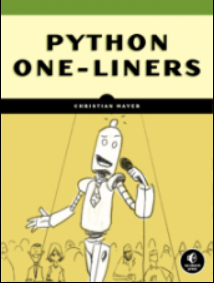
If you want to learn to write more concise Python code, check out my book:
If you like one-liners, you’ll LOVE the book. It’ll teach you everything there is to know about a single line of Python code. But it’s also an introduction to computer science, data science, machine learning, and algorithms. The universe in a single line of Python!
The book was released in 2020 with the world-class programming book publisher NoStarch Press (San Francisco).
List comprehensions provide a concise way to make new lists by iterating through an existing list or other iterable object. They are more time and space-efficient than traditional for loops and offer a cleaner syntax.
even_numbers = [x*2 for x in range(5)] # Output: [0, 2, 4, 6, 8]
This creates a new list by multiplying each element within the range(5) function by 2. This compact syntax allows you to define a new list in a single line, making your code cleaner and easier to read.
You can also include a conditional statement within the list comprehension:
even_squares = [x**2 for x in range(10) if x % 2 == 0] # Output: [0, 4, 16, 36, 64]
This example creates a new list of even squares from 0 to 64 by using an if statement to filter out the odd numbers. List comprehensions can also be used to create lists from other iterable objects like strings, tuples, or arrays.
For example, extracting vowels from a string:
text = "List comprehensions in Python"

vowels = [c for c in text if c.lower() in 'aeiou'] # Output: ['i', 'o', 'e', 'e', 'o', 'i', 'o', 'i', 'o']
This will create a list with five None elements. You can then replace them as needed, like placeholder_list[2] = 42, resulting in [None, None, 42, None, None].
Filtering and Transforming Lists
List comprehensions in Python provide a concise way to filter and transform values within an existing list.
Filtering a list involves selecting items that meet a certain condition. You can achieve this using list comprehensions by specifying a condition at the end of the expression.
For example, to create a new list containing only even numbers from an existing list, you would write:
numbers = [1, 2, 3, 4, 5, 6, 7, 8, 9]

even_numbers = [num for num in numbers if num % 2 == 0]
In this case, the condition is num % 2 == 0. The list comprehension iterates over each item in the numbers list and only includes items where the condition is true.
Aside from filtering, list comprehensions can also transform items in a list. You can achieve this by altering the expression at the beginning of the list comprehension.
For example, to create a list of squares from an existing list, you can use the following code:
squares = [num ** 2 for num in numbers]
Here, the expression num ** 2 transforms each item in the list by squaring it. The squares list will now contain the squared values of the original numbers list.
By combining filtering and transformation, you can achieve even more powerful results in a single, concise statement.
For instance, to create a new list containing the squares of only the even numbers from an existing list, you can write:
even_squares = [num ** 2 for num in numbers if num % 2 == 0]
In this example, we simultaneously filter out odd numbers and square the remaining even numbers.
To further explore list comprehensions, check out these resources on
List comprehensions in Python provide a way to create a new list by filtering and transforming elements of an existing list while significantly enhancing code readability. They enable you to create powerful functionality within a single line of code. Compared to traditional for loops, list comprehensions are more concise and generally preferred in terms of readability.
Here’s an example of using a list comprehension to create a list containing the squares of even numbers in a given range:
even_squares = [x ** 2 for x in range(10) if x % 2 == 0]
This single line of code replaces a multiline for loop as shown below:
even_squares = []

for x in range(10): if x % 2 == 0: even_squares.append(x ** 2)
As you can see, the list comprehension is more compact and easier to understand. In addition, it often results in improved performance. List comprehensions are also useful for tasks such as filtering elements, transforming data, and nesting loops.
Here’s another example – creating a matrix transpose using nested list comprehensions:
matrix = [[1, 2, 3], [4, 5, 6], [7, 8, 9]]

transpose = [[row[i] for row in matrix] for i in range(len(matrix[0]))]
This code snippet is equivalent to the nested for loop version:
transpose = []

for i in range(len(matrix[0])): row_list = [] for row in matrix: row_list.append(row[i]) transpose.append(row_list)
While using list comprehensions, be mindful of possible downsides, including loss of readability if the expression becomes too complex. To maintain code clarity, it is crucial to strike the right balance between brevity and simplicity.
List Comprehensions with Different Data Types
List comprehensions work with various data types, such as strings, tuples, dictionaries, and sets.
For example, you can use list comprehensions to perform mathematical operations on list elements. Given a list of integers, you can easily square each element using a single line of code:
num_list = [2, 4, 6]

squared_list = [x**2 for x in num_list]
Handling strings is also possible with list comprehensions. When you want to create a list of the first letters of a list of words, use the following syntax:
words = ["apple", "banana", "cherry"]

first_letters = [word[0] for word in words]
Working with tuples is very similar to lists. You can extract specific elements from a list of tuples, like this:
tuple_list = [(1, 2), (3, 4), (5, 6)]

first_elements = [t[0] for t in tuple_list]
Additionally, you can use list comprehensions with dictionaries. If you have a dictionary and want to create a new one where the keys are the original keys and the values are the squared values from the original dictionary, use the following code:
input_dict = {"a": 1, "b": 2, "c": 3}

squared_dict = {key: value**2 for key, value in input_dict.items()}
Using Functions and Variables in List Comprehensions
List comprehensions in Python are a concise and powerful way to create new lists by iterating over existing ones. They provide a more readable alternative to using for loops and can easily add multiple values to specific keys in a dictionary.
When it comes to using functions and variables in list comprehensions, it’s important to keep the code clear and efficient. Let’s see how to incorporate functions, variables, and other elements mentioned earlier:
Using Functions in List Comprehensions You can apply a function to each item in the list using a comprehension. Here’s an example with the upper() method:
letters = ['a', 'b', 'c', 'd']

upper_letters = [x.upper() for x in letters]
This comprehension will return a new list containing the uppercase versions of each letter. Any valid function can replace x.upper() to apply different effects on the input list.
Utilizing Variables in List Comprehensions With variables, you can use them as a counter or a condition. For example, a list comprehension with a counter:
squares = [i**2 for i in range(1, 6)]
This comprehension creates a list of squared numbers from 1 to 5. The variable i is a counter that iterates through the range() function.
For a more complex example, let’s say we want to filter out odd numbers from a list using the modulo % operator:
numbers = [1, 2, 3, 4, 5, 6, 7, 8, 9]

even_numbers = [x for x in numbers if x % 2 == 0]
In this case, the variable x represents the current element being manipulated during the iteration, and it is used in the condition x % 2 == 0 to ensure we only keep even numbers.
Working with Nested List Comprehensions
Nested list comprehensions in Python are a versatile and powerful feature that allows you to create new lists by applying an expression to an existing list of lists. This is particularly useful for updating or traversing nested sequences in a concise and readable manner.
I created a video on nested list comprehensions here:
A nested list comprehension consists of a list comprehension inside another list comprehension, much like how nested loops work. It enables you to iterate over nested sequences and apply operations to each element.
For example, consider a matrix represented as a list of lists:
matrix = [ [1, 2, 3], [4, 5, 6], [7, 8, 9]

]
To calculate the square of each element in the matrix using nested list comprehensions, you can write:
squared_matrix = [[x**2 for x in row] for row in matrix]
This code is equivalent to the following nested for loop:
squared_matrix = []

for row in matrix: squared_row = [] for x in row: squared_row.append(x**2) squared_matrix.append(squared_row)
As you can see, the nested list comprehension version is much more concise and easier to read.
Python supports various sequences like lists, tuples, and dictionaries. You can use nested list comprehensions to create different data structures by combining them. For instance, you can convert the matrix above into a dictionary where keys are the original numbers and values are their squares:
matrix_dict = {x: x**2 for row in matrix for x in row}
List comprehension is a powerful feature in Python that allows you to quickly create new lists based on existing iterables. They provide a concise and efficient way of creating new lists with a few lines of code.
The first advanced technique to consider is using range() with index. By utilizing the range(len(...)) function, you can iterate over all the items in a given iterable.
numbers = [1, 2, 3, 4, 5]

squares = [number ** 2 for number in numbers]
In addition to creating new lists, you can also use conditional statements in list comprehensions for more control over the output.
For example, if you want to create a new list with only the even numbers from an existing list, you can use a condition like this:
numbers = [1, 2, 3, 4, 5, 6]

even_numbers = [num for num in numbers if num % 2 == 0]
Another useful feature is the access of elements in an iterable using their index. This method enables you to modify the output based on the position of the elements:
words = ["apple", "banana", "cherry", "date"]

capitals = [word.capitalize() if i % 2 == 0 else word for i, word in enumerate(words)]
In this example, the enumerate() function is used to get both the index (i) and the element (word). The even-indexed words are capitalized, and the others remain unchanged.
Moreover, you can combine multiple iterables using the zip() function. This technique allows you to access elements from different lists simultaneously, creating new lists based on matched pairs.
x = [1, 2, 3]

y = [4, 5, 6]

combined = [a + b for a, b in zip(x, y)]
Frequently Asked Questions
What is the syntax for list comprehensions with if-else statements?
List comprehensions allow you to build lists in a concise way. To include an if-else statement while constructing a list, use the following syntax:
new_list = [expression_if_true if condition else expression_if_false for item in iterable]
For example, if you want to create a list of numbers, where even numbers are squared and odd numbers remain unchanged:
numbers = [1, 2, 3, 4, 5]

new_list = [number ** 2 if number % 2 == 0 else number for number in numbers]
How do you create a dictionary using list comprehension?
You can create a dictionary using a dict comprehension, which is similar to a list comprehension. The syntax is:
new_dict = {key_expression: value_expression for item in iterable}
For example, creating a dictionary with square values as keys and their roots as values:
squares = {num ** 2: num for num in range(1, 6)}
How can you filter a list using list comprehensions?
Filtering a list using list comprehensions involves combining the basic syntax with a condition. The syntax is:
filtered_list = [expression for item in iterable if condition]
For example, filtering out even numbers from a given list:
numbers = [1, 2, 3, 4, 5]

even_numbers = [number for number in numbers if number % 2 == 0]
What is the method to use list comprehension with strings?
List comprehensions can be used with any iterable, including strings. To create a list of characters from a string using list comprehension:
text = "Hello, World!"

char_list = [char for char in text]
How do you combine two lists using list comprehensions?
To combine two lists using list comprehensions, use a nested loop. Here’s the syntax:
combined_list = [expression for item1 in list1 for item2 in list2]
For example, combining two lists containing names and ages:
names = ["Alice", "Bob", "Charlie"]

ages = [25, 30, 35]

combined = [f"{name} is {age} years old" for name in names for age in ages]
What are the multiple conditions in a list comprehension?
When using multiple conditions in a list comprehension, you can have multiple if statements after the expression. The syntax is:
new_list = [expression for item in iterable if condition1 if condition2]
For example, creating a list of even numbers greater than 10:
numbers = list(range(1, 20))

result = [number for number in numbers if number % 2 == 0 if number > 10]
Python One-Liners Book: Master the Single Line First!
Python programmers will improve their computer science skills with these useful one-liners.
Python One-Linerswill teach you how to read and write “one-liners”: concise statements of useful functionality packed into a single line of code. You’ll learn how to systematically unpack and understand any line of Python code, and write eloquent, powerfully compressed Python like an expert.
The book’s five chapters cover (1) tips and tricks, (2) regular expressions, (3) machine learning, (4) core data science topics, and (5) useful algorithms.
Detailed explanations of one-liners introduce key computer science concepts and boost your coding and analytical skills. You’ll learn about advanced Python features such as list comprehension, slicing, lambda functions, regular expressions, map and reduce functions, and slice assignments.
You’ll also learn how to:
Leverage data structures to solve real-world problems, like using Boolean indexing to find cities with above-average pollution
Use NumPy basics such as array, shape, axis, type, broadcasting, advanced indexing, slicing, sorting, searching, aggregating, and statistics
Calculate basic statistics of multidimensional data arrays and the K-Means algorithms for unsupervised learning
Create more advanced regular expressions using grouping and named groups, negative lookaheads, escaped characters, whitespaces, character sets (and negative characters sets), and greedy/nongreedy operators
Understand a wide range of computer science topics, including anagrams, palindromes, supersets, permutations, factorials, prime numbers, Fibonacci numbers, obfuscation, searching, and algorithmic sorting
By the end of the book, you’ll know how to write Python at its most refined, and create concise, beautiful pieces of “Python art” in merely a single line.



 Story: Alice has just been orange-pilled and decides to spend a few hours reading Bitcoin articles.


 Renewable energy often provides a more cost-effective solution, leading miners to gravitate towards these sources naturally:

 Renewable energy (specifically: solar energy) offers the lowest-cost energy sources. Fossil-powered miners operate at lower profitability and tend to lose market share compared to renewable-powered miners.
 The Bitcoin Mining Council (BMC), a global forum of mining companies that represents 48.4% of the worldwide bitcoin mining network, estimated that in Q4 2022, renewable energy sources accounted for 58.9% of the electricity used to mine bitcoin, a significant improvement compared to 36.8% estimated in Q1 2021 (

 Bitcoin’s energy consumption is not merely a drain on resources but a strategic tool for enhancing the energy system’s efficiency and sustainability.
 In a Nutshell:


 To summarize, Bitcoin has the potential to gradually shift our inflationary, high-consumption economy to a deflationary rational consumption economy while providing a more efficient and greener digital financial system that doesn’t rely on centralized parties and has built-in trust and robustness unmatched by any other financial institution.


 Recommended: