News - Super Mario Bros. Wonder GameStop Pre-Orders Revealed (North America)
Image: Nintendo
Update [Sat 9th Sep, 2023 04:00 BST]:
GameStop has revealed Super Mario Bros. Wonder pre-orders in the US will come with an exclusive sticker sheet containing characters and power-ups from the game. This offer will be available while stock lasts.
Original article [Thu 7th Sep, 2023 03:35 BST]:
As we get closer to the release of Super Mario Bros. Wonder next month on the Nintendo Switch, more retailers are beginning to reveal some additional goodies you can get if you’re willing to hand over some coin for a pre-order.
In Canada, GameStop will be offering anyone who pre-orders the game for $79.99 a free keychain. As you can see, it’s based on the new power-up in the game that transforms Mario and friends into an elephant.
It’s not entirely clear how big it will be in the promotional shot below, but we do know it will be based on Mario’s transformation:
Image: GameStop
As mentioned in the fine print above, this offer is valid until 19th October and will be available while supplies last.
There doesn’t appear to be any similar deal being offered at GameStop in the US, but if we hear any updates, we’ll let you know. Yesterday, we also heard how Wonder had already topped the charts on Amazon’s “best sellers” list. Check our Nintendo Life guide for more information about Wonder pre-orders:
Will you be pre-ordering this game? Any interest in an elephant Mario keychain? Comment below.
Xbox Wire - Next Week on Xbox: New Games for November 7 to 11
Welcome to Next Week on Xbox! In this weekly feature we cover all the games coming soon to Xbox Series X|S, Xbox One, Windows, and Game Pass! Get more details on these upcoming games below and click their profiles for further info (release dates subject to change). Let’s jump in!
Recruit…Train…Fight! The All Valley Awaits! Eagle Fang, Cobra Kia, Miyagi-do — which is your dojo? That choice begins your journey, but then it’s up to you to recruit the most powerful team as you master your fighting style and battle to solidify your dojo’s legacy as the All Valley Karate Grand Champion!
Available on day one with PC Game Pass: Football Manager 2023 brings you closer to the beautiful game, from the supporters that live and breathe every match to your board, scouts, players, and opposition managers. Earn the backing of the fans by outsmarting your rivals and delivering success on the pitch.
Available on day one with Game Pass: Become the best in Football Manager 2023 Console, newly renamed for this season. Formerly titled the Xbox edition, this tailored version of Football Manager zones in on football’s most important areas: the transfer market, the tactics board, and the pitch.
Return to Monkey Island is an unexpected, thrilling return of series creator Ron Gilbert that continues the story of the legendary adventure games The Secret of Monkey Island and Monkey Island 2: LeChuck’s Revenge developed in collaboration with Lucasfilm Games.
Worlds are colliding in Sonic the Hedgehog’s newest high-speed adventure! In search of the missing Chaos emeralds, Sonic becomes stranded on an ancient island teeming with unusual creatures. Battle hordes of powerful enemies as you explore a breathtaking world of action, adventure, and mystery.
A young adventurer Hugh Radcliff is in pursuit of one of the greatest mysteries of history: The Lost Colony. Deal with pirates, dive into native rituals, reveal conspiracies, and make tough choices on your difficult journey for unveiling this mystery!
Play across a variety of environments where you will not have a second chance; precision is everything. When gaining intel, pay attention to the photo and information obtained by secret agents about your target. As a sniper, you must have a good memory to find and eliminate the target in the crowd before it gets away.
Feel the excitement of ‘90s racing, isometric style! Your story in Super Woden GP will see your career grow from limited resources and budget to championships across a multitude of intense racing events. Buy a cheap car and sign up for your first race, then use your winnings to acquire better vehicles, compete in bigger races, and advance to the top.
Geometric Feel the Beats describes itself as a fun and competitive, geometric arcade shooter accompanied by frantic music. Fulfill the mission requirements and accumulate points; the accumulated rank points can be used to purchase ship upgrades as well as display your overall rank.
Play out a Kaiju movie as the mayor of Floatio city, tasked with holding off the overwhelming strength of a Kaiju attack with (hopelessly) outclassed military. Defend your city as five unique and devastating Kaiju grow in power with every attack. Unfortunately, they can’t be killed, but can be slowed down and forced to fall back… for now.
LotC 3 concludes the epic story of our Clicker General who wages war against all enemies of the peaceful and prosperous kingdom. With new features like a new way to summon units, plenty of meaningful upgrades, and updated visuals so you can enjoy the pastoral cartoonish landscapes with fierce battles raging on.
Vampire Survivors (Console) – November 10 Game Pass
Jump straight into the action, mow down thousands of night creatures, and survive until dawn! The gothic-horror world of Vampire Survivors will throw relentless hordes of monsters at you: make the right choices or rely on your skills and favorite weapons to turn the tide and quickly snowball against your enemies.
Atari 50: The Anniversary Celebration takes you on an interactive journey through 50 years of video games. This massive selection of over 100 games spans seven different platforms: Arcade, 2600, 5200, 7800, Atari 8-bit computers, and, for the first time ever on modern consoles, Atari Lynx and Jaguar! Play the classics like Tempest 2000, Asteroids, and Yars’ Revenge, or dive into some deeper cuts.
In this original mix of Dungeon Management and Roguelite, you will lead your career as a Dungeon Manager! Plan your defense against a group of adventurers. Check their stats and resistances, then place the best traps and monsters to defeat them. When you think your dungeon is ready, let the crawl begin!
An interactive game experience that is designed to ease your mind and have fun popping innocent balloons. Jump into the role of a little paper plane and rescue the world from evil balloon demons by dashing through them.
SPRAWL is a hardcore retro FPS set in an endless cyberpunk megalopolis. Escape the walled city and take on the militarized government of the sprawl. Fueled by the blood of your enemies and a mysterious voice in your head, make your way towards the spire to topple whatever lays within.
(Free Game Key) Spelldrifter - Free Epic Games Game
To grab the game for free: - Go to the store page of Spelldrifter - https://store.epicgames.com/p/spelldrifter - Click on the GET Button - Verify that the price is zero - Click on the Place Order Button - That's it, the game will be added to you Epic Games Account
JetBrains Investigated by FBI in SolarWinds Hack Probe
JetBrains, maker of popular development software including the likes of IntelliJ IDEA, WebStorm, Project Rider, the Kotlin language and even the Mono font, are being investigated by the FBI as part of the SolarWinds hack probe according to the New York Times. The product in question targeted in this investigation is their build management solution TeamCity. Please keep in mind, this is just an investigation at this point, there is no guilt established and no indication JetBrains products have been compromised.
From the New York Times article, JetBrains deny any knowledge of a compromise in their software:
JetBrains said on Wednesday that it had not been contacted by government officials and was not aware of any compromise. The exact software that investigators are examining is a JetBrains product called TeamCity, which allows developers to test and exchange software code before its release. By compromising TeamCity, or exploiting gaps in how customers use the tool, cybersecurity experts say the Russian hackers could have invisibly planted back doors in an untold number of JetBrain’s clients.
Government officials are not certain how the compromise of the JetBrains software relates to the larger SolarWinds hacking. They are seeking to learn if it was a parallel way for Russia’s main intelligence agency to enter government and private systems, or whether it was the original pathway for Russian operatives to first infiltrate SolarWinds.
Information on the JetBrains investigation are limited, there is also an extremely short article on Reuters. The extent of the SolarWinds hack continue to grow daily. After the video was published, JetBrains have issued a response to the New York Times article, included in full:
The New York Times has published a story in which they point to JetBrains being under investigation and somehow related to the SolarWinds breach that recently took place.
First and foremost, JetBrains has not taken part or been involved in this attack in any way. SolarWinds is one of our customers and uses TeamCity, which is a Continuous Integration and Deployment System, used as part of building software. SolarWinds has not contacted us with any details regarding the breach and the only information we have is what has been made publicly available. It’s important to stress that TeamCity is a complex product that requires proper configuration. If TeamCity has somehow been used in this process, it could very well be due to misconfiguration, and not a specific vulnerability. Furthermore, security is our top concern and we notify and manage updates transparently in our Security Bulletin.
Secondly, we have not been contacted by any government or security agency regarding this matter, nor are we aware of being under any investigation. If such an investigation is undertaken, the authorities can count on our full cooperation.
We remain open to answering any and all questions regarding this matter and as always are committed to delivering the best possible products and services to our customers.
.NET from version .NET Core 3.1 up to .NET 7 has plenty of advantages over .NET
Framework: it provides performance improvements in almost every area, and those
improvements were an ongoing effort over each .NET version. The
latest improvements in .NET
6 and .NET
7 are
really worth checking out.
Migrating your Windows Forms (WinForms) Visual Basic Apps to .NET 6/7+ also
allows to adopt modern technologies which are not (or are no longer) supported in .NET
Framework. EFCore is one example: it is
a modern Entity Framework data access technology that enables .NET developers to
work with database backends using .NET objects. Although it is not natively
supported for VB by Microsoft, it is designed in a way that it is easy for the
community to build up on it and provide code generation support for additional
languages like Visual Basic. In
that context there are also changes and improvements in the new WinForms
Out-of-Process Designer for .NET, especially around Object Data
Sources.
For the WinForms .NET runtime, there are a series of improvements in different
areas which have been introduced with the latest releases of .NET:
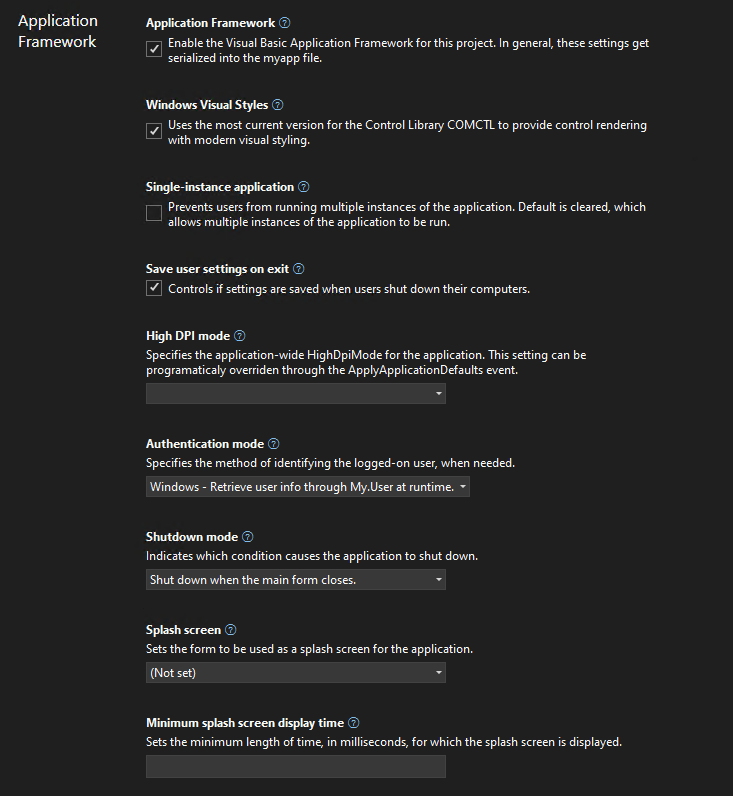
The new Visual Basic Application Framework Experience
In contrast to the project property Application Framework Designer experience in
earlier versions of Visual Studio and for .NET Framework, you will noticed that
the project properties UI in Visual Studio has changed. It’s style is now in
parity with the project properties experience for other .NET project types: we
have invested into modernizing the experience for developers, focusing on
enhancing productivity and a modern look and feel.
We’ve added theming and search to the new experience. If this is your first time
you’re working with the new project properties experience in Visual Studio, it’s
a good idea to read up on the the introductory
blog.
In contrast to C# projects, Visual Basic Application Framework projects use a
special file for storing the Application Framework project settings: the Application.myapp file. We’ll talk more about the technical details of how
this file connects the project settings to the VB project specific code
generation of the My namespace later, but one thing to keep in mind is how the
UI translates each property’s value to this file:
Windows Visual Styles is to determine if the application will use the most
current version for the Control Library comctl.dll to provide control
rendering with modern visual styling. This setting translates to the value EnableVisualStyles of type Boolean inside of Application.myapp.
Single-instance application is to determine if the application will prevent
users from running multiple instances of the application. This setting is
switched off by default, which allows multiple instances of the application to
be run concurrently. This setting translates to the value SingleInstance of
type Boolean.
Save user settings on exit is to determine if the application settings are
automatically saved when an app is about to shut down. The settings can be
changed with the settings editor. In contrast to .NET Framework, a new Visual
Basic Application Framework App doesn’t contain a settings file by default,
but you can easily insert one over the project properties, should you need
one, and then manage the settings
interactively.
High DPI mode is to identify the application-wide HighDpiMode for the
application. Note that this setting can be programmatically overridden through
the HighDpiMode
property
of the ApplyApplicationDefaultsEventArgs of the ApplyApplicationDefaults
application event. Choose from the following setting:
DPI unaware (0): The application window does not scale for DPI changes and
always assumes a scale factor of 100%. For higher resolutions, this will
make text and fine drawings more blurry, but may impose the best setting for
some apps which demand a high backwards compatibility in rendering content.
DPI unaware GDI scaled (4): similar to DPI unaware, but improves the
quality of GDI/GDI+ based on content. Please note that this mode will not
work as expected, when you have enabled double
buffering
for control rendering via OnPaint and related functionality.
Per monitor (2): Per-Monitor DPI allows individual displays to have their
own DPI scaling setting. WinForms doesn’t optimize for this mode, and
Per-Monitor V2 should be used instead.
Per monitor V2 (3): Per-Monitor V2 offers more advanced scaling features
such as improved support for mixed DPI environments, improved display
enumeration, and support for dynamically scaling on-client area of windows.
In WinForms common controls are optimized for this high dpi mode. Please
note the events Form.DpiChange, Control.DpiChangedAfterParent
and Control.DpiChangeBeforeParent,
when your app need to scale up or down content based on a changed DPI
environment, for example, when the user of your app has dragged a Form from
one monitor to another monitor with a different DPI setting.
System aware (1): The application queries for the DPI of the primary
monitor once and uses this for the application on all monitors. When content
in Forms is dragged from one monitor to another with a different HighDPI
setting, content might become blurry. SystemAware is WinForm’s most
compatible high-dpi rendering mode for all supported controls.
Authentication mode is to specify the method of identifying the logged-on
user, when needed. The setting translates to the value AuthenticationMode as
an enum value of type Integer:
0: The WindowsFormsApplicationBase(AuthenticationMode) constructor does
not automatically initialize the principal for the application’s main
thread. It’s completely the developer’s task, to manage authentication for
the user.
1: The WindowsFormsApplicationBase(AuthenticationMode) constructor
initializes the principal for the application’s main thread with the current
user’s Windows user info.
Shutdown mode is to to indicate which condition causes the application to
shut down. This setting translates to the value ShutdownMode as an enum
value of type Integer (Note: Please also refer to the application event ShutDown
and the further remarks down below.):
0: When the main form closes.
1: Only after the last form closes.
Splash screen represents the name of the form to be used as a splash screen
for the application. Note that the file name does not need to include the
extension (.vb). This setting translates to the value SplashScreen of type String.
Note: you will may be missing the settings for the Splash dialog up to
Visual Studio 2022 version 17.5. For a workaround, read the comments in
the section “A look behind the scenes”. To recap: a “Splash” dialog is
typically displayed for a few seconds when an application is launched.
Visual Basic has an item template which you can use to add a basic splash
dialog to your project. It usually displays the logo or name of the
application, along with some kind of animation or visual effects, to give
users the impression that the application is loading or initializing. The
term “splash” in this context is used because the dialog is designed to
create a splash or impact on the user, drawing their attention to the
application while it loads.
Application Framework is saved both in the Application.myapp file and the .vbproj file:
Application.myapp saves the setting MySubMain of type Boolean to
identify if the Application Framework is enabled.
.vbproj uses the setting MyType for identifying the usage of the
Application Framework for a VB project. If the Application Framework is
enabled, the value is WindowsForms; if the Application Framework is
disabled, the value is WindowsFormsWithCustomSubMain.
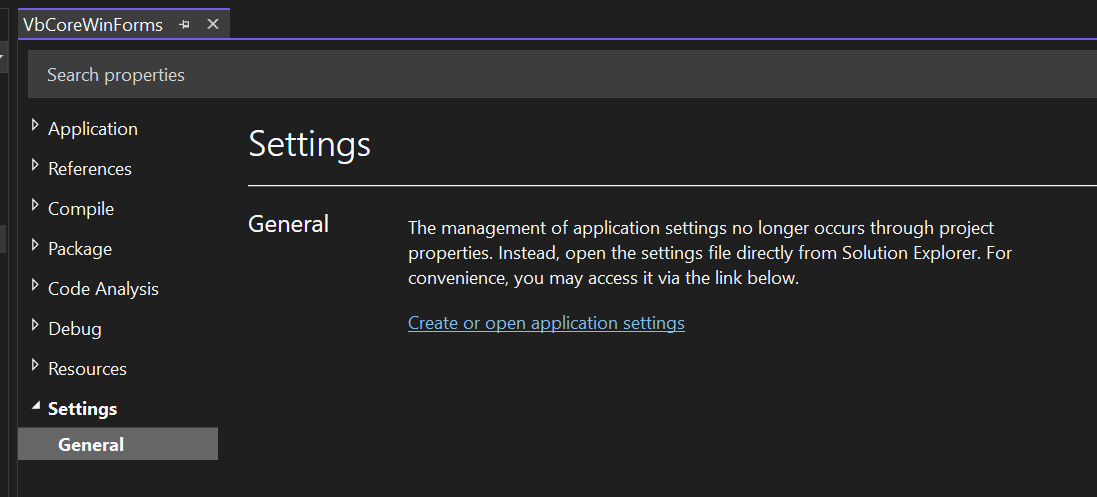
Startup object is the name of the form that will be used as the entry
point, without its filename extension. Note: this property is found in the
project property Settings under the General section, and not in the
Application Framework section. This setting translates to the value MainForm of type String, when the Application Framework is activated. The start object setting in
the .vbproj file is ignored in that case – see also the comments below on this
topic.
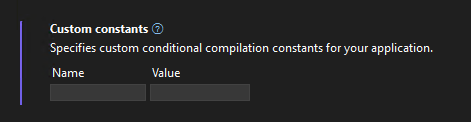
Custom constants new look
We are introducing a new custom constants-control in the modernized Project
Property Pages for VB Projects, that allows to encode the input to the format
key=”value”. Our goal is that users will be able to input their custom constants
in a more streamlined key-value pair format, thus enhancing their productivity.
Feedback is welcomed – if you have any comments or suggestions, feel free to
reach out to the project system
team by filing a new issue or
comment on existing ones.
A look behind the scenes of the WinForms VB Application Framework
The way basic properties and behaviors of a WinForms app are controlled and configured is fundamentally different between C# and Visual Basic. In C#, every app
starts with a static method called main which can usually be found in a file
called Program.cs, and in that main method all the setting get applied.
That is different in Visual Basic. Since VB Apps in WinForms are based on the
Application Framework runtime, there are a few features, which aren’t
intrinsically available to C# WinForms apps to begin with, like configuring to
automatically show Splash dialogs (see below) or ensure a single instance
application start. Since you configure most of the parts of your app
interactively in VB with the settings described above at design time, the actual
code which honors or ensures those settings later at runtime is mostly
code-generated and somewhat hidden behind the scenes. The starting point of a VB
app is therefore not so obvious. There are also a series of differences in .NET
Visual Basic apps when it comes to hooking up event code which is supposed to
run, for example when a VB WinForms app starts, ends, or runs into an unhandled
exception – just to name a few examples.
That all said, technically Visual Basic doesn’t break any fundamental rules.
Under the hood, there is of course a Shared Sub Main when you activate the
Application Framework. You just do not write it yourself, and you don’t see it,
because it is generated by the VB compiler and then automatically added to your
Start Form. This is done by activating the VB compiler switch /main.
At the same time, when you are activating the Application Framework, a series of
conditional compiler constants are defined. One of the constants is called _mytype. If that constant is defined as Windows then the VB compiler
generates all the necessary infrastructure code to support the Application
Framework. If that constant is defined as WindowsFormsWithCustomSubMain
however, the VB compiler just generates the bare minimum infrastructure code and
doesn’t apply any settings to the WinForms app on startup. The latter happens,
when you deactivate the Application Framework. This setting is stored in the vbproj project file, along with the Start Form. What’s important to know
though in this context: only in the case of WindowsFormsWithCustomSubMain, so
with the Application Framework deactivated, is the Start Form definition
actually taken from the vbproj file. When the Application Framework is
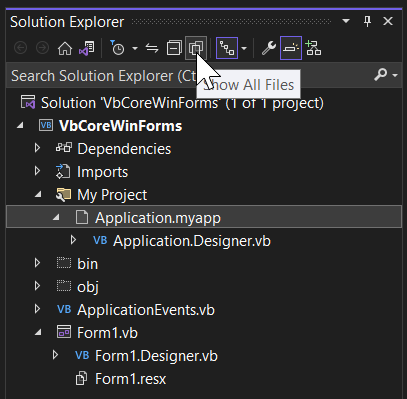
activated however then that is the case when the aforementioned Application.myapp file is used as the settings container. Note, that by
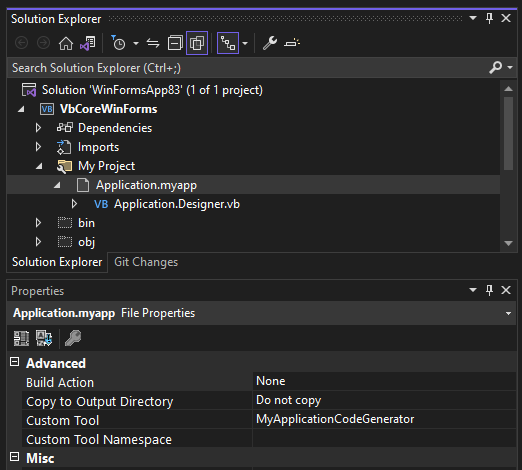
default you cannot find that file in the solution explorer.
You need to make sure first to show all files for that project (see screenshot
above). Then you can open the My Project-folder and show that setting file in
the editor by double-clicking it in the solution explorer. The content of that
file looks something like this:
Note: Visual Studio 2022 before version 17.6 (Preview 3) won’t have the
option to pick a Splash Dialog interactively, as mentioned above. We will have
an interactive designer for setting the splash form only from that version on
on. Up to then, you can manually patch the Application.myapp file to trigger
the code generation for the Splash dialog. Insert the following line of code in
that file and save the changes.
<SplashScreen>SplashDialog</SplashScreen>
When you do this, make sure not to include the filename extension (.vb) in
that definition, because otherwise the required code does not get generated.
Application.myapp as the source for code generation
Now, if you take a closer look at that file’s properties in the property
browser, you’ll see that it is triggering a custom tool which is invoked
whenever that file is saved.
And that custom tool generates VB code which you
can find under the Application.myapp node in the Solution Explorer in Application.Designer.vb. It does the following:
It defines a Friend Partial Class MyApplication. With the Application
Framework enabled, that class is inherited from WindowsFormsApplicationBase.
You don’t see that Inherits statement here and the reason is that the major
part of that Class’
definition
is injected by the Visual Basic compiler based on the earlier defined
conditional constant _myapp.
It generates the code to apply all the settings which were saved in Application.myapp file.
It creates code for a method which overrides OnCreateMainForm.
In that method, it assigns the Form, which is defined as the start form in the Application.myapp file.
Warning: The Application.Designer.vb is not supposed to be edited, as it’s
auto-generated. Any changes will be lost as soon as you make changes to Application.myapp. Instead, use the project properties UI.
Now, the class which is injected by the compiler is also responsible for
generating everything which the Visual Basic Application Framework provides you
via the My namespace. The My namespace simplifies access to frequently used
information about your WinForms app, your system, or simplifies access to
frequently used APIs. Part of the My namespace for an activated Application
Framework is the Application property, and its return type is of exactly that
type which is defined by the class generated based on your Application Settings
and then merged with the injected Visual Basic compiler file mentioned earlier.
So, if you access My.Application you are basically accessing a single instance
of the My.MyApplication type which the generated code defines.
With this context understood, we can move on to how two additional features of
the Application Framework work and can be approached. The first one is extending
the My namespace with additional function areas. We won’t go too much into
them, because there are detailed docs about the My namespace and how to
extend
it.
An even more important concept to understand are the Application Events which are
provided by the Application Framework. Since there isn’t a good way to intercept
the startup or shut down of an app (since that code gets generated
and sort of hidden inside the main Form) Application Events are the way to be
notified of certain application-global occurrences.
Note in this context, that there is a small breaking change in the UI: while in
.NET Framework, you had to insert a code file named ApplicationEvents.vb via
the Property Settings of the VB project, in a .NET Core App this file will be
there from the start when you’ve created a new Application Framework project.
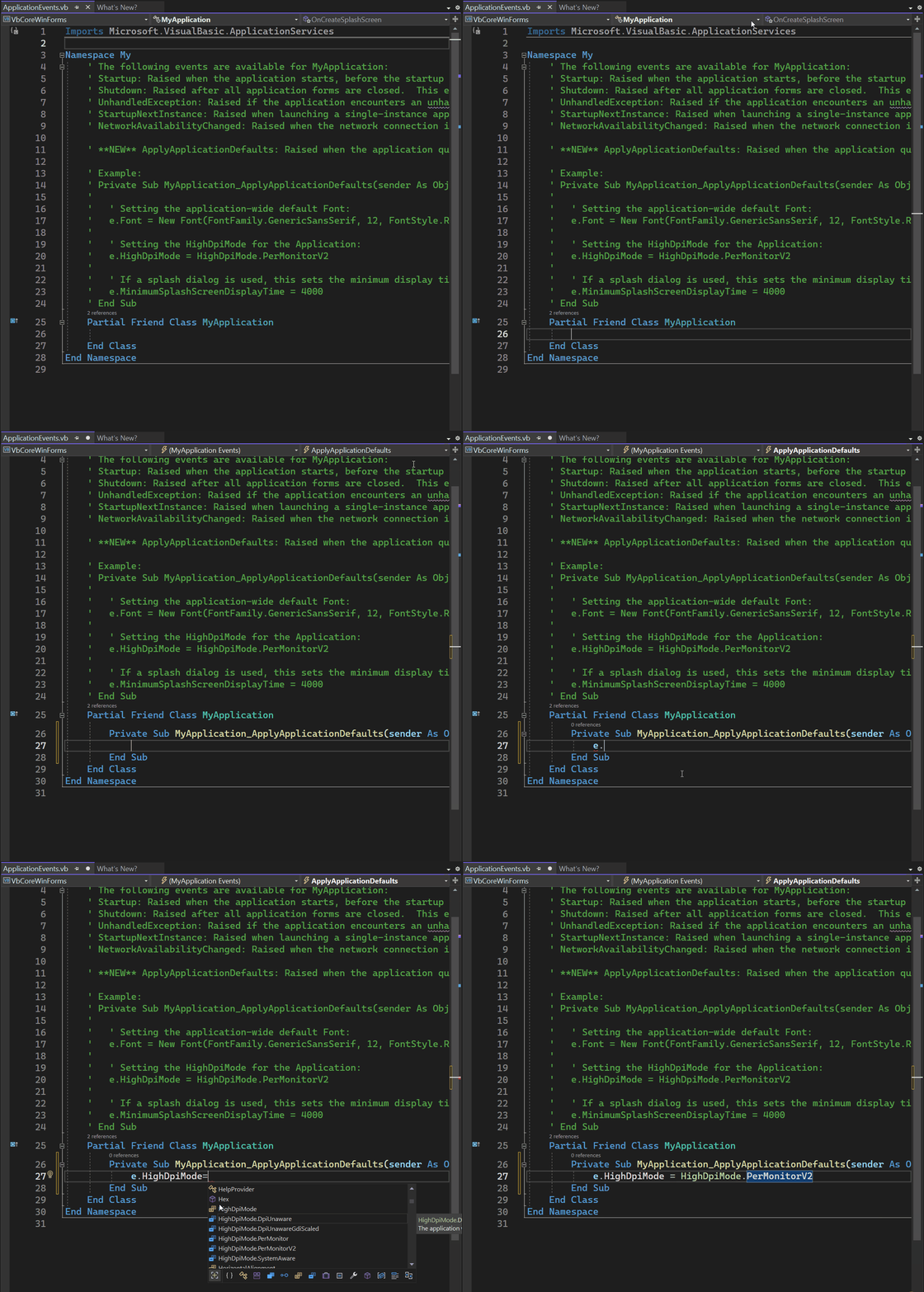
To wire up the available Application events, you open that ApplicationEvent.vb
code file, and then you select ApplicationEvents from the Object drop-down list,
and the application event you want to write up from the events list:
As you can see, the ApplicationEvent.vb code file again extends the MyApplication class – this time by the events handler you place there on demand. The options you have here are:
Startup: raised when the application starts, before the start form is created.
Shutdown: raised after all application forms are closed. This event is not raised if the application terminates abnormally.
UnhandledException: raised if the application encounters an unhandled exception.
StartupNextInstance: raised when launching a single-instance application and the application is already active.
ApplyApplicationDefaults: raised when the application queries default values to be set for the application.
Note: More general information about the Visual Basic Application Model is provided through the Microsoft Learn Docs about this topic. Also note, that, on top of the extensibility of the My namespace, this Application Model also has extensibility points which are also described in great detail by the respective docs.
Summary
With the new and modernized project properties pages, WinForm’s Application
Framework is ready for new, .NET 6,7,8+ based Visual Basic Apps to develop. It’s
also the right time to think about modernizing your older .NET Framework based
VB Apps and bring them over to .NET 6,7,8+. WinForms and the .NET runtime
deliver countless new features and provide considerable performance improvements
for your apps in almost every area. Visual Basic and the Visual Basic
Application Framework are and continue to be first class citizens and are fully
supported in WinForms. Our plans are to continue modernizing around the VB App
Framework in the future without breaking code for existing projects.
And, as always: Feedback about the subject matter is really important to us, so
please let us know your thoughts and additional ideas! Please also note that the
WinForms .NET and the Visual Basic Application Framework runtime is open source,
and you can contribute! If you have general feature ideas, encountered bugs, or
even want to take on existing issues around the WinForms runtime and submit PRs,
have a look at the WinForms Github repo.
If you have suggestions around the WinForms Designer feel free to file new
issues there as well.
AppleInsider - Apps by Apple promotes first-party apps already on iPhone and Mac
Apps by Apple
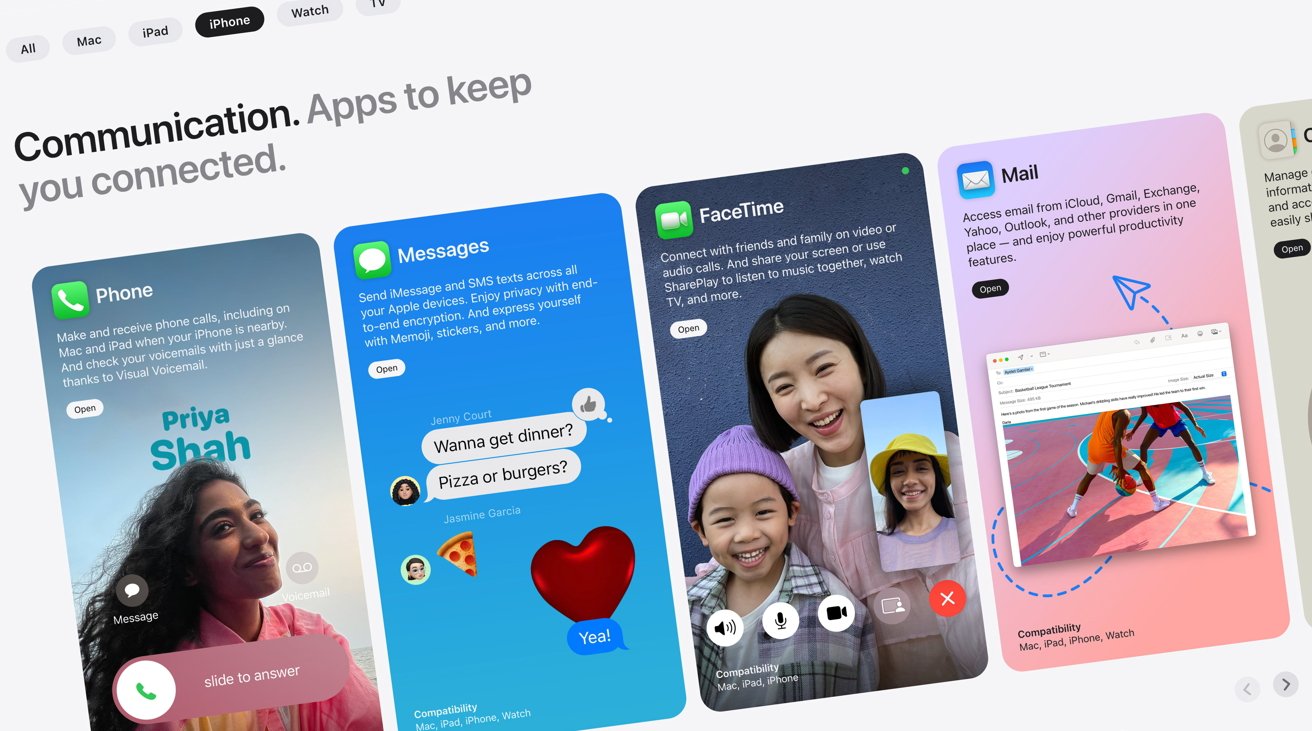
Apple has added a new page to its website, with Apps by Apple promoting all of the first-party tools and applications Apple makes for its iPhone and other hardware.
Updated on Saturday, the new Apps by Apple page explains users can “connect, create, and get things done with powerful and intuitive apps designed to be accessible, private, and secure.”
The headline carousel has slides promoting Messages, Safari, Final Cut Pro for iPad, and Logic Pro for iPad. Each listing, along with a small paragraph explaining what the user can get out of using the app, is accompanied by a link for users to find out more.
Further down the page are smaller carousels, organized by Communication, Creativity, Productivity, Exploration, Entertainment & Home, Health & Fitness, and Features. The default All view will show all apps on each carousel, but users can also elect to view apps for the Mac, iPad, iPhone, Apple Watch, or Apple TV, with the lists adjusting to match.
At the bottom, Apple has a large grid of non-interactive app icons, showing all of the smaller feature-like apps its operating systems also provide.
Toward the bottom of the page, Apple reiterates its commitment to privacy and accessibility, and a final part that takes users to the App Store.
The timing of the page’s introduction is curious, as Apple is thought to be bracing itself for the European Union to force the company to allow third-party App Stores to exist on its devices in 2024. It also occurs ahead of the expected fall release of iOS 17 and its other milestone operating systems.
Posted by: xSicKxBot - 09-10-2023, 04:59 PM - Forum: Windows
- No Replies
Microsoft - Lumen Technologies dives into Microsoft 365 Copilot to help enhance empl
Generative AI tool shows early signs of helping Lumen innovate for growth
DENVER, Colo., and REDMOND, Wash. — Aug. 30, 2023 — Lumen Technologies Inc. (NYSE: LUMN), a multinational technology company, is working with Microsoft Corp. (Nasdaq: MSFT) to deploy Microsoft 365 Copilot to empower its approximately 30,000 employees. Lumen is beta-testing Microsoft 365 Copilot as a part of the Early Access Program (EAP). The company has already seen the benefits of equipping some of its teams with Microsoft’s large language model (LLM) AI solutions, with plans to deploy the tech more broadly in the future.
“We are thrilled to be leading the early deployment of Microsoft 365 Copilot at Lumen Technologies,” said Kate Johnson, president and CEO, Lumen Technologies Inc. “Giving our workforce the digital tools they need to deliver dramatically improved customer experiences with greater ease is an essential part of our company transformation. Our people are seeing immediate productivity improvements with Copilot, allowing them to focus on more value-added activities each day.”
Microsoft 365 Copilot can disrupt the telecommunications industry by providing employees with a tool to help enhance creativity, productivity and skills with real-time intelligent assistance. It has the potential to significantly improve employee productivity by automating tedious tasks and providing powerful tools for data analysis and decision-making. With features such as meeting summaries in Microsoft Teams and Copilot enhancements across Outlook, PowerPoint and other Microsoft 365 apps, employees can get back important time to deliver on strategic priorities.
Customer service teams at Lumen are using Copilot to surface relevant policies, summarize tickets or easily access step-by-step repair instructions from manuals. Sales and customer experience teams are using Copilot to add depth and context to customer communications and summarize actions and next steps. Across the board, teams are using Copilot to quickly create presentations, and for new business proposal and statement-of-work creation to deliver a consistent Lumen message and experience.
Lumen is among the first companies to start working with Microsoft 365 Copilot as one of the EAP adopters. Microsoft 365 Copilot combines the power of LLMs with data in the Microsoft Graph — calendar, emails, chats, documents, meetings and more — and the Microsoft 365 apps to turn words into a powerful productivity tool.
“Microsoft 365 Copilot has the power to revolutionize the way we work, enabling people to focus on what truly matters and drive their organizations forward,” said Deb Cupp, president, Americas Microsoft. “We are thrilled to be delivering this technology to innovative companies like Lumen to help them achieve their goals.”
As a pioneer in the telecommunications industry, Lumen is pushing the envelope when it comes to enhancing the customer experience. By harnessing the power of advanced AI technologies such as generative AI and AI language models through tools like Microsoft 365 Copilot, Lumen can provide their teams with the cutting-edge tools they need to succeed and drive their business forward.
About Lumen Technologies
Lumen connects the world. We are dedicated to furthering human progress through technology by connecting people, data, and applications – quickly, securely, and effortlessly. Everything we do at Lumen takes advantage of our network strength. From metro connectivity to long-haul data transport to our edge cloud, security, and managed service capabilities, we meet our customers’ needs today and as they build for tomorrow. For news and insights visit news.lumen.com, LinkedIn: /lumentechnologies, Twitter: @lumentechco, Facebook: /lumentechnologies, Instagram: @lumentechnologies, and YouTube: /lumentechnologies.
About Microsoft
Microsoft (Nasdaq “MSFT” @Microsoft) enables digital transformation for the era of an intelligent cloud and an intelligent edge. Its mission is to empower every person and every organization on the planet to achieve more.
For more information, press only:
Microsoft Media Relations, WE Communications for Microsoft, (425) 638-7777, [email protected]
Danielle Spears, Corporate Communications for Lumen, (407) 961-3838, [email protected]
VMware today confirmed that it is in talks to acquire software development platform Pivotal Software, the service best known for commercializing the open-source Cloud Foundry platform. The proposed transaction would see VMware acquire all outstanding Pivotal Class A stock for $15 per share, a significant markup over Pivotal’s current share price (which unsurprisingly shot up right after the announcement). (Source: TFiR)