We have to hand this much to Kirby & The Amazing Mirror: it certainly isn’t afraid of trying new things. We might not be totally convinced of the necessity of those things, of course, but it’s always nice to see a series attempt to expand its boundaries somewhat.
The story forges no new ground whatsoever, though, as it’s based on the standard light world/dark world dynamic that we’ve seen in so many of Nintendo’s flagship franchises by this point that it’s practically a sub-genre. Kirby’s mission is to collect the shards of a magical mirror that will allow him to seal off the dark world for good, and let Dream Land get back to… whatever it is Dream Land does when it’s not under attack by something.
When you start playing, you’ll feel as though you’re in familiar territory: cute visuals, bouncy tunes, and some pretty standard platforming abound. Once you progress a little further, however, you’ll realise that this isn’t your standard, level-based Kirby adventure. Multiple exits adorn nearly every room, and if you find a map you can open it up and see just how convoluted the path ahead really is.
You see, within a single level you’ll fight several bosses and reach multiple goal rooms, but that doesn’t mean your work in that level is done. It’s up to you to scour every corner and unlock every secret, both of which will require much backtracking and pathfinding, giving this Kirby game a peculiar Metroid-like vibe.
This idea is appealing: Dream Land is quirky and varied enough that a looser allowance for exploration should be a good thing. In practice, though, it becomes irritating: rooms start to look the same before very long, and for most of the game you can only access certain levels through particular rooms in other levels. If you want to return somewhere to uncover a secret you couldn’t find before, you’re likely to find yourself trying every possible path until you stumble upon the right one.
The map, once you learn to read it as an abstract, is certainly helpful, but you’ll need a different map for each level. The hidden exits and alternate paths should liven up the experience somewhat, but, in actuality, it just manages to hide simple tasks behind tedious backtracking.
Kirby’s abilities shouldn’t surprise anybody who’s played a Kirby game before: he can fly, swim, inhale enemies, and steal powers. So far, so familiar. The controls feel a mite sluggish in their responsiveness, which really becomes a problem during boss fights and other fast-paced situations. There’s a slight delay between input and execution, and once that leads to a few cheap deaths you’ll come to regard it as a serious flaw.
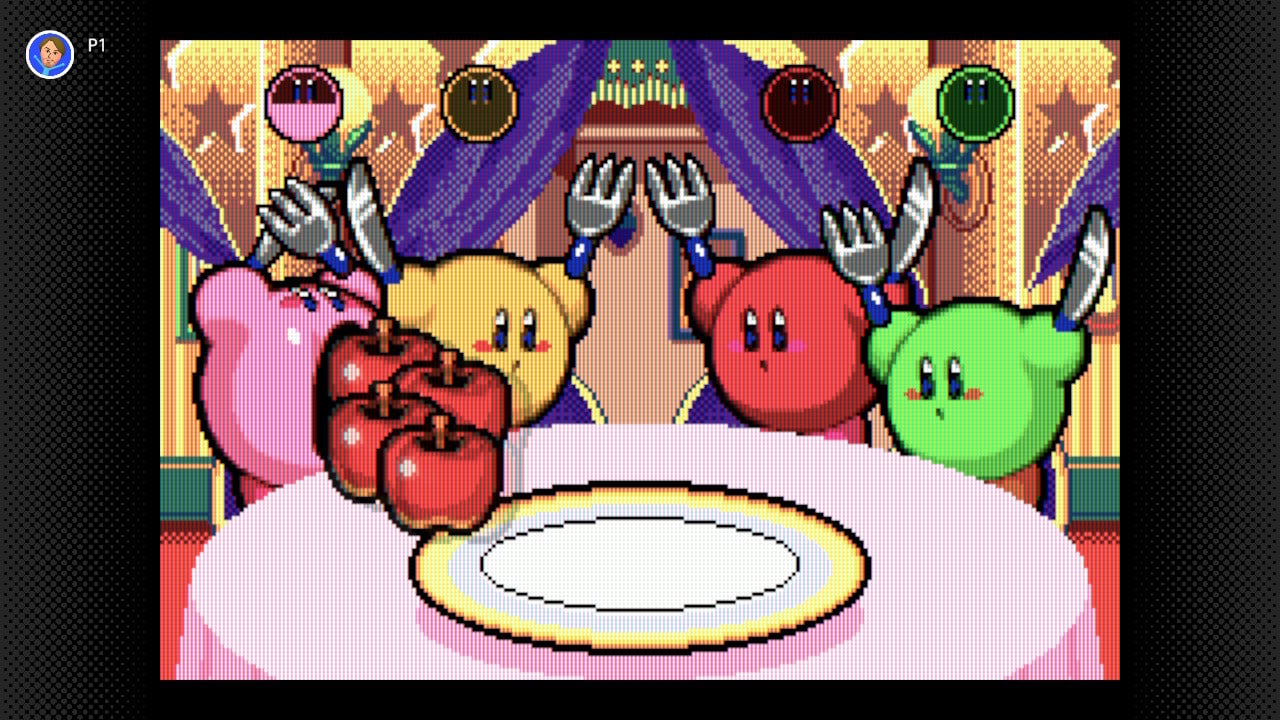
Unfortunately, that’s not the worst of the problems with Kirby & The Amazing Mirror. One conceit is that Kirby has been split into four entities of different colours, and let’s just say that the traditional pink Kirby must have all the brains. The other three Kirbys chaotically bound about, far more irritating than they are helpful. You can’t control them, so you just need to let them dominate the screen with their antics as they steal powers you wanted, get in your way, and even budge you into enemies and hazards.
Ostensibly, these additional three Kirbys are here to help, but good luck with that. Their AI is an embarrassment, and it’s a particular problem when you need one of them to trigger a switch, or a bomb block, or — heaven forbid — help you move something heavy by inhaling it with you. These three Kirbys do not stop moving long enough to realise you need their help, and their inclusion — and necessity — in this game drags the experience down severely. When playing multiplayer, however, each player gets to control a Kirby, and all of you work together or go off your own way and do whatever you want, even being able to go to completely opposite ends of the game world. With other people, it suddenly makes more sense (and, thankfully, the Nintendo Switch Online version enables you to play with others locally or over the internet).
It was a bizarre enough decision to give Kirby a cellphone in this game (yes, really), and the fact that he uses it to summon these rampaging nincompoops just adds insult to injury. The fact that the cellphone also has a function that causes you to exit the stage immediately makes things even worse: press the wrong button in the heat of the moment and you’re back to the start. The third or fourth time this happens, you might start to wonder why you’re bothering. We sure did.
The game’s not without its charms, though: the presentation is typically strong, with brilliant visuals and music as always. In fact, playing in short bursts can be quite fun: the classic Kirby actions of inhaling enemies and whooping them with their own weapons are as great here as they ever were. Unfortunately, the game isn’t really structured for short play sessions, what with its maze-like design and long-term goals rather than short, stage-based missions. There are a few minigames available to play which aren’t much fun solo but were largely intended for multiplayer and definitely work better with friends.
The main appeal of the game is meant to be the exploration, and for many it will be. For us, though, the exploration doesn’t feel particularly rewarding, the constant backtracking is unintuitive and dull, and your required companions are a group of hyperactive imbeciles. Fortunately, HAL would eventually get multiple-Kirby gameplay right in Kirby Mass Attack. This time around, though, consider it one big, well-intentioned misstep.
Conclusion
Kirby & The Amazing Mirror tries to introduce a lot of new things to the series, and because of that it was destined from the start to be a divisive title. Ultimately, though, we feel that the innovations here just aren’t particularly fun — certainly not for solo players. Sluggish controls and abysmal AI for your required companions sour the experience, and exploration quickly becomes more of a chore than a reward. Kirby’s had his share of ups and downs, certainly, but this is not the game we want to remember him by.
AppleInsider - Notes for iOS 17 has a right-to-left typing problem
Apple Notes
Users of the iOS Notes app may encounter issues when typing in some right-to-left languages, with iOS 17 not properly handling cursor movement when typing in the app.
The cursor’s movement while text is being typed is pretty well known to computer and mobile device users. Though there are often differences in how the cursor acts for typing left-to-right text or right-to-left versions depending on the language, the actions the cursor takes during that typing is almost universal across platforms and apps.
However, there appears to be a bug in the way that the cursor responds to typing for some languages that rely on reading text from right to left. Raised by an AppleInsider contributor and also spotted on X in a complaint to Apple Support, the cursor is not functioning properly for some right-to-left languages in the Notes app, including Arabic and Hebrew.
In languages that work from the left of the page to the right, the cursor tends to appear towards the right of the passage, or of the most recently typed word. In right-to-left languages, the cursor is supposed to change behavior, so that it can be better placed with text going towards the left of the page.
In AppleInsider’s testing using Hebrew, the bug in Notes has the cursor pinned to the right-hand side of the text string instead of the left. While typing straight without edits, sentences and words come out normally, but you’re typing blind when it comes to the cursor position.
If you attempt to add a word to the middle of an already typed sentence, the new word will appear on the right-hand side at the start of the sentence. Backspacing is also a problem since the cursor is treated as if it’s on the right margin.
For the affected users, the issue effectively means they have to get the sentence right the first time, or suffer problems trying to edit afterward.
It is unclear how many languages are affected by the issue, nor how many users are directly affected, nor if there are specific circumstances that can cause the problem to occur.
For the moment, Apple Support does have at least one English-language report on social media of there being a problem with typing in Notes, so there is an awareness of an issue.
Posted by: xSicKxBot - 09-30-2023, 03:56 AM - Forum: Windows
- No Replies
Microsoft - We’re expanding our AI partnership with Meta, as we bring the power of
Microsoft and Oracle have partnered to bring the best of both worlds together. OCI database services are now available in Azure. This partnership helps organizations meet their evolving needs and empowers customers to create new value in the cloud. With this integration, users can seamlessly build Azure applications with the high performance, high availability, and automated management of Oracle database services, such as Exadata and RAC, running on OCI.
Fedora - Contribute to Fedora 39 Upgrade, Virtualization, and Cloud Test Day
Fedora test days are events where anyone can help make certain that changes in Fedora work well in an upcoming release. Fedora community members often participate, and the public is welcome at these events. If you’ve never contributed to Fedora before, this is a perfect way to get started.
There are three test days occurring in the next two weeks covering three topics:
Tuesday October 03, is to test the Fedora Cloud
Thursday October 05 , is to test the Fedora Upgrade
Monday October 09 , is to test Virtualization
Come and test with us to make Fedora 39 even better. Read more below on how to do it.
Fedora Cloud test day
Fedora Linux 39 is coming close to the release date and the Fedora Cloud SIG would like to get the community together to find and squash some bugs.
The test day will occur on Tuesday October 03. This event will test Fedora Cloud Base content. See the wiki page for links to the Beta Cloud Base Images. We have qcow, AMI, and ISO images ready for testing.
Upgrade test day
As we come closer to Fedora Linux 39 release dates, it’s time to test upgrades. This release has a lot of changes and it becomes essential that we test the graphical upgrade methods as well as the command line methods.
This test day will happen on Thursday, October 05. It will test upgrading from a full updated F37 and F38 to F39 for all architectures (x86_64, ARM, aarch64) and variants (WS, cloud, server, silverblue, IoT). See this wiki page for information and details.
Virtualization test day
This test day will happen on Monday, October 09 and will test all forms of virtualization possible in Fedora. The test day will focus on testing Fedora or your favorite distro inside a bare metal implementation of Fedora running Boxes, KVM, VirtualBox and whatever you have. The general features of installing the OS and working with it are outlined in the test cases which you will find on the results page.
How do test days work?
A test day is an event where anyone can help make certain that changes in Fedora work well in an upcoming release. Fedora community members often participate, and the public is welcome at these events. Test days are the perfect way to start contributing if you not in the past.
The only requirement to get started is the ability to download test materials (which include some large files) and then read and follow directions step by step.
Detailed information about all the test days are on the wiki page links provided above. If you are available on or around the days of the events, please do some testing and report your results.
News - Epic Games Is Reportedly Laying Off Nearly 900 Employees
Image: Epic Games
Epic Games, the creator of Unreal Engine and the ludicrously popular Fortnite, is reportedly laying off 16% of its workforce, which works out at around 900 employees.
The news comes via Bloomberg, with a person familiar with the matter stating that an internal announcement of the job cuts was sent out in a staff memo. In the memo, CEO Tim Sweeney stated “For a while now, we’ve been spending way more money than we earn. I had long been optimistic that we could power through this transition without layoffs, but in retrospect, I see this was unrealistic.”
A total of 870 employees will be affected, and Sweeney states that no more job cuts are being planned beyond this. Around two-thirds of the cuts are said to be within teams that lie outside of Epic’s ‘core development’.
That said, one of the staff members affected was Ed Fear, director and writer at Mediatonic, who worked on titles such as Murder by Numbers. Mediatonic was founded in 2005 and was acquired by Epic Games in 2021.
To coincide with this news, it’s also recently been revealed that the price of Fortnite’s V-Bucks will be increasing in October, with Epic stating that the ‘adjustments are based on economic factors such as inflation and currency fluctuations’.
Here’s how the changes will be reflected going forward:
1,000 V-Bucks – $8.99 (currently $7.99)
2,800 V-Bucks – $22.99 (currently $19.99)
5,000 V-bucks – $36.99 (currently $31.99)
13,500 V-bucks- $89.99 (currently $79.99)
Late last year, Epic Games had agreed to pay a total of $540 million over allegations from the Federal Trade Commission (FTC) over allegations that the company had implemented ‘dark patterns’ to dupe users into making unintentional purchases.
What do you make of these potential redundancies over at Epic Games? Leave a comment with your thoughts below.
Posted by: xSicKxBot - 09-30-2023, 03:55 AM - Forum: Lounge
- No Replies
News - Fighting Pokémon weakness, resistance, and strength
If you’re trying to humble a Hitmontop or out-macho a Machamp, we’re here to help with our fighting Pokémon weakness guide. We’ve got everything you need to know about Pokémon’s most physical typing, including fighting Pokémon weaknesses, resistances, and strengths. So, take a scroll down the page and find out how to beat Bruno and the rest of the black belts of the Pokémon world with ease.
So, let’s ring for round one and get into our fighting Pokémon weakness guide.
What are fighting Pokémon weaknesses?
Until gen six, there were just two fighting Pokémon weaknesses in psychic- and flying-types, but these days there are also fairy Pokémon to contend with. Psychic and fairy moves are the biggest threat, especially as fighting Pokémon often have low special defence, but you should do your best to avoid all three of these dangerous typings.
What are fighting Pokémon resistances?
Fighting Pokémon are resistant to dark-, rock-, and bug-type attacks, making them perfect for taking into a forest on a pitch-black night. The bug-type resistance isn’t too helpful, with Pokémon distinctly lacking in potent bugs, but the option to switch in a fighting Pokémon when faced with a rock or dark Pokémon might help turn the tide of a battle.
What are fighting Pokémon strengths?
The fighting-type is easily one of the most offensive in Pokémon, with five different types hit for super-effective damage by fighting moves. If you face an opponent who specialises in any of these typings or has a couple of dual-type Pokémon with these types, a fighting-type move is sure to do some impressive HP damage.
AppleInsider - How to merge albums of the same person or pet in Photos for iOS 17
Merging photo collections together
Sometimes the Photos app separates the same person or pet into two different collections, but you can merge them without having to individually drag each photo over. Here’s how to do so in iOS 17.
Throughout people’s lives, physical features tend to change and they may look slightly different than they previously did. Due to this, the Photos app may think it’s another person when it’s not.
While this is not game-changing, it’s annoying to have multiple albums of the same person. You may want to combine the albums to tidy up your Photos app and make it less cluttered.
Merging two albums of the same person is simple to do, and once you complete it, your Photos app will look more organized than before.
Two (or more) become one
Merging two albums is as easy as dragging and dropping. Here’s how you can merge them efficiently.
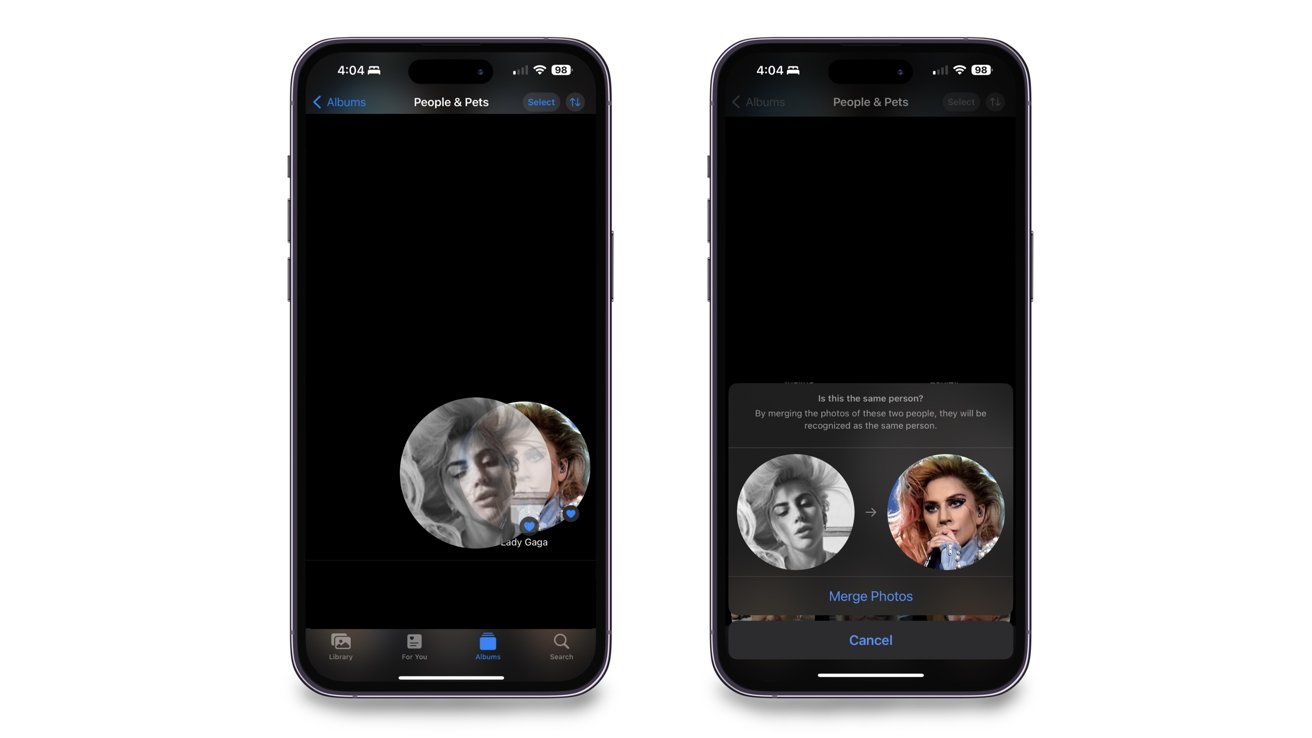
How to merge two albums of people or pets in Photos for iOS 17
Open the Photos app
Tap on Albums from the bottom menu
Scroll down until you see the People, Pets & Places section, and tap on the People & Pets collection
Find the two People or Pet collections you want to merge
Drag one collection over the other
Confirm that you want to merge them
Merging collections together via drag-and-drop
Once you confirm the merge, all the photos from one collection will go into the other. The collection will then take the name of the person you merged into.
There is also another way you can merge two albums via the person’s name. Here’s how to complete it.
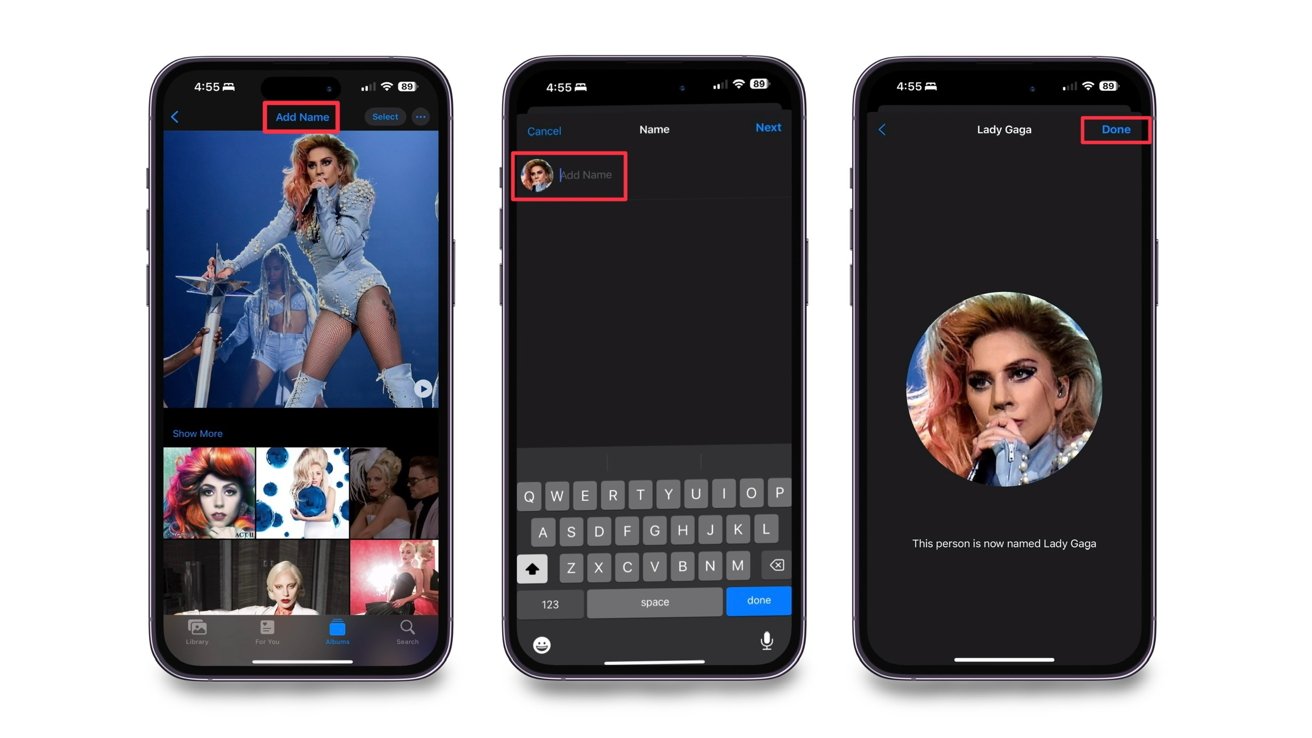
How to merge two albums of people or pets in Photos for iOS 17 by name
Find one of the collections of the person you want to merge
Tap on Add Name at the top
Type in the same name as the other collection
Confirm the name change and the two albums will merge into one collection
Merging collections via renaming
No matter which way you decide to merge the two collections, both will provide you with the same outcome of eliminating multiple collections based on one person.
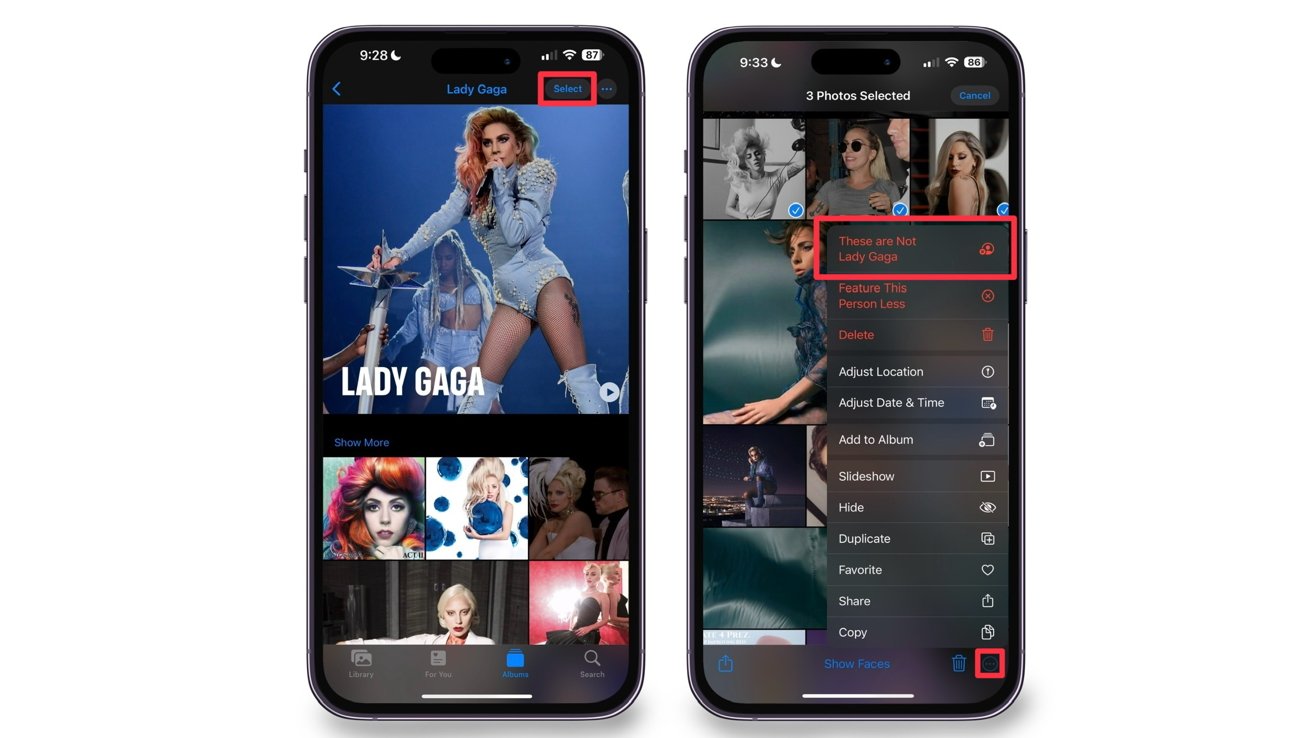
Undoing a merge
If you accidentally merge the wrong people, you must go into the collection and manually select the photos that should not be there. This is how you remove them.
Tap on Select in the upper right of the screen
Select the image(s) of the person that shouldn’t be in the collection
Tap on the three dots in the lower right of the screen
Select “These are Not [Person’s Name]”
Removing unwanted people from a collection
Once you select that these photos are not who the collection is dedicated to, the photos will automatically be taken out of it.
Clean up your Photos app
No matter who it is, merging two collections that consist of the same people or pet will clean up your Photos app and make it a little more organized.
Posted by: xSicKxBot - 09-29-2023, 03:57 AM - Forum: Windows
- No Replies
Microsoft - Microsoft and Mercy collaborate to empower clinicians to transform patie
Multiyear alliance creates foundation for innovation and deeper insights with data
REDMOND, Wash., and ST. LOUIS — Sept. 27, 2023— Microsoft Corp. and Mercy are forging a long-term collaboration using generative AI and other digital technologies to give physicians, advance practice providers and nurses more time to care for patients and improve the patient experience. This work represents what’s next in healthcare for applying advanced digital technologies to the delivery of care to consumers.
“With the latest advances in generative AI, this moment marks a true phase change where emerging capabilities can help health care organizations address some of their most pressing challenges, create needed efficiency and transform care,” said Peter Lee, corporate vice president of research and incubations at Microsoft. “Mercy has a reputation for ongoing innovation and — through our years working together — has been a leader in the industry in creating an intelligent data platform on which to launch this kind of transformation. This is just the beginning, and it’s inspiring to see Mercy’s leadership adopting these tools to empower physicians, providers, nurses and all clinicians to improve patient care.”
Mercy plans to use Microsoft Azure OpenAI Service to improve care in several immediate new ways:
Patients will have the information to better understand their lab results and engage in more informed discussions about their health with their provider through the help of generative AI-assisted communication. Patients will be empowered to get answers in simple, conversational language.
Mercy will apply generative AI when taking patient calls for actions like scheduling appointments. Beyond the initial call, the AI solution will provide recommendations for additional follow-up actions to make sure all the patient’s needs are met during a single interaction, limiting the need for follow-up calls.
A chatbot for Mercy co-workers will help quickly find important information about Mercy policies and procedures, and locate HR-related answers such as information on benefits or leave requirements. By helping nurses and co-workers find the information they need more quickly, they can spend more time on patient care.
“Because of all the investments we have made together with Microsoft in the past few years, including the use of Microsoft’s secure cloud, we are better positioned to perform real-time clinical decision-making that ultimately improves patient care,” said Joe Kelly, Mercy’s executive vice president of transformation and business development officer. “With Microsoft, we are exploring more than four dozen uses of AI and will launch multiple new AI use cases by the middle of next year to transform care and experiences for patients and co-workers. This is predictive, proactive and personalized care at its best.”
As Mercy’s preferred platform for ongoing innovation, the Microsoft Cloud provides the health system with a trusted and comprehensive platform to improve efficiency, connect and govern data, impact patient and co-worker experience, reach new communities, and build a foundation for ongoing innovation. By securely centralizing and organizing data in an AI-powered intelligent data platform built on Azure, Mercy is uniquely positioned to deliver on evolving clinician and patient expectations more quickly. For example, Mercy can tap into secure data insights to reduce many unnecessary patient days in the hospital by giving care teams smart dashboards and better visibility into the factors that impact how soon patients can return home. Additionally, Microsoft’s modern work solutions will help Mercy co-workers improve productivity and communication so they can spend more time improving patient care and experience.
“Mercy and Microsoft are creating a new path for health systems in which we are working shoulder to shoulder to combine our 200-year heritage in health care and Microsoft’s extensive expertise in cloud and AI to enhance care for the patients we serve and improve the working experience for our physicians, advanced providers, nurses and all co-workers,” said Steve Mackin, Mercy’s president and CEO. “By using technology in new and secure ways, we innovate better health care for all.”
The organizations recently brought together Mercy’s engineering teams and senior leaders with Microsoft leaders, engineers and industry experts for a hackathon to co-imagine and begin to co-innovate around the generative AI use cases in development. Additionally, Microsoft and Mercy are working together to showcase Mercy’s solutions in the Microsoft Technology Center (MTC) in Chicago in 2024. The showcase will highlight transformational clinical experiences and demonstrate what the future of health care could look like using Microsoft technology.
About Mercy
Mercy, one of the 20 largest U.S. health systems and named the top large system in the U.S. for excellent patient experience by NRC Health, serves millions annually with nationally recognized quality care and one of the nation’s largest Accountable Care Organizations. Mercy is a highly integrated, multi-state health care system including more than 40 acute care, managed and specialty (heart, children’s, orthopedic and rehab) hospitals, convenient and urgent care locations, imaging centers and pharmacies. Mercy has 900 physician practices and outpatient facilities, more than 4,000 physicians and advanced practitioners and more than 45,000 co-workers serving patients and families across Arkansas, Kansas, Missouri and Oklahoma. Mercy also has clinics, outpatient services and outreach ministries in Arkansas, Louisiana, Mississippi and Texas.
About Microsoft
Microsoft(Nasdaq “MSFT” @Microsoft) enables digital transformation for the era of an intelligent cloud and an intelligent edge. Its mission is to empower every person and every organization on the planet to achieve more.
For more information, press only:
Microsoft Media Relations, WE Communications for Microsoft, (425) 638-7777, [email protected]
Note to editors: For more information, news and perspectives from Microsoft, please visit the Microsoft News Center at http://news.microsoft.com. Web links, telephone numbers and titles were correct at time of publication but may have changed. For additional assistance, journalists and analysts may contact Microsoft’s Rapid Response Team or other appropriate contacts listed at https://news.microsoft.com/microsoft-public-relations-contacts.