
[Minecraft Hacks Cheats] [1.12] MATIX HACKED CLIENT - TONNES OF HACKS (Download)

07-17-2017, 01:33 AM · Forum: PC Mods - No Replies
? [1.12] MATIX HACKED CLIENT - TONNES OF HACKS

Game: Minecraft Hacks Cheats

Details



Works in Singleplayer

Works in Multiplayer

Works in Realms

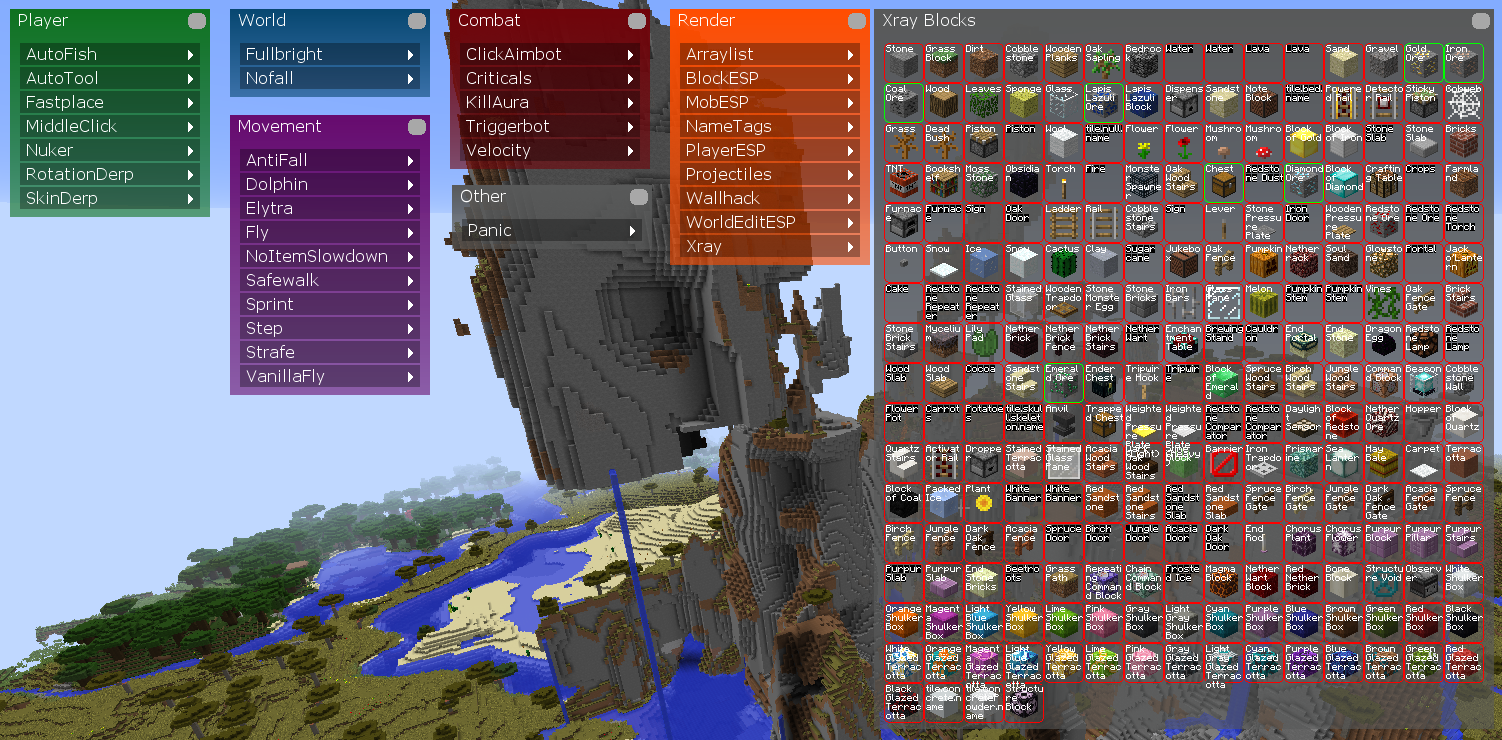
Screenshots of Matix


How To Install Matix & How To Run Matix

Preparing For Installation

You will need an extraction program such as WinRAR

Steps to Install

- Open the file you just downloaded from MPGH

- Extract the contents of the file you downloaded

- Go to Start and search %appdata%

- Open the folder called .minecraft

- Open the folder called versions

- Drag and drop the extracted content (the folder called Matix1.12) into the versions folder.

How To Run Matix

- Open your Minecraft Launcher

- Click Launch Options

- Click Add New

- Name your configuration Matix

- Select the version as Matix1.12

- Click Save

- Click News

- Next to the Play Button, there is an arrow. Click the arrow and select Matix

- Click Play

PS: To open the hack menu, you must be in game and press the right SHIFT key on your keyboard

How To Use Matix In Game (Controls etc)

When you are in game, you can:

- Open menu - Right Shift key on keyboard

- Get help by - Typing #help <mod's name> in chat. Example: #help xray

- Set key bind to a mod - In chat, type #key gui then, you will get the Matix Keys screen, where you will see a list of mods you can bind. Click on the mod you want to bind a key to. Then press the key you want to bind it to. If you accidently click a mod, you can press ESC to cancel it. Example: Type #key gui in chat. Then, I will get the Matix Key screen. Click on the Killaura. Press "f" on the keyboard.

Hacks In Matix

In the GUI, click and hold on the mod to see a description of what it does

Player

AutoFish

AutoTool

Fastplace

MiddleClick

Nuker

RotationDerp

SkinDerp

World

Fullbright

NoFall

Combat

ClickAimbot

Criticals

KillAura

Triggerbot

Velocity

Render

Arraylist

BlockESP

MobESP

NameTags

PlayerESP

Projectiles

Wallhack

WorldEditESP

Xray

Movement

AntiFall

Dolphin

Elytra

Fly

NoItemSlowDown

Safewalk

Sprint

Step

Strafe

VanillaFly

Other

Panic

Out Of In-Game

Alt Manager

Plugins

Virus Scans

Virus Total | Jotti

Client created by: Paxi

Download:
Hidden Content


Reply to this thread to unlock the contents

As always, use caution. This file is provided for archival purposes. SickGaming cannot be held liable.

Attached Files

.zip
Matix_1.12_sickgaming.net.zip

  [Payday 2] P3DHACK (Player-, missions-, stealth-, menu-, money, coins h... (Download)

07-11-2017, 06:53 AM · Forum: PC Discussion - No Replies
? P3DHACK (Player-, missions-, stealth-, menu-, money, coins hacks, DLC unlocker & etc)

Game: Payday 2

Details

Instructions P3DHack with BLT:

0) Be sure to install the 2013 Visual C ++ Runtime otherwise the game will crash on startup. Download and install

1) Unzip archive

2) Copy IPHLPAPI.dll and mods in the PAYDAY 2 Game Directory, removing the old version and cheats

3) Run Payday 2 and press F11 for assistance

4) Go to "Settings - Mod settings -P3DHack Config" for changing the language or enabling DLC,Skin Unlocker

Features of P3DHack from counterfeits and competitors:

Support 4 languages:

English, French, Russian, German [Italian coming soon]

A full-featured help menu on F11

Timely updates

All new achievements in 4 languages!

Professional approach to P3DHack

Updated code

Basic settings right in the game

Features UC versions:

Removed http requests and some code from BLT, now BLT can not be updated and use any Internet connection. BLT now does not violate site rules.

Removed all the moments that would violate the rules. (Thanks to the moderators for helping us with this.)

Added new achievements, which are not yet available in the original version of P3DHack.

Fixed problems with "shoot through walls"

Due to the removal of some code, the appearance in some menus was lost. We are already working on a fix

Higher priority of loading

With BLT

ONE THING! PAYDAY2 IS GAME WITHOUT VAC! U MAYBE BANNED ONLY IF OTHER GUYS WILL REPORT U! REMEMBER IT!

Changes that have been made with BLT v 1.5 to 1.6.1:

P3DHack BLT v 1.5:

Added new contracts in F9

Added new achievements in F10

Minor changes in F11

Reworked the settings menu in the game and other small fix

P3DHack BLT v 1.6 and 1.6.1:

Fix X-Ray. Forget about crashing with him!

There are no problems with the car turret

No more problems with a two-handed laser

Deleted Force skill list, since now it detected, like all skills use

Fixed a print in Num +, when instead of Civil was written Bandit

Fixed an imprint in the English version of "ВHack"

Fixed minor issues P3DHack works much more stable

Now, together with REVIVE TEAM ("?"), you release players from prison (Only Host)

Made changes that I did not write about

Updated contracts in F9

A small redesign in F10, some bugs fixed

Added new achievements

Added localization of achievements in 4 languages!

Credits

P3D Hack Group

P3D Family

The3DReaL

IamALS

BLEATII

Simplity

Simon_GBBB

YaPh1l

Mr_PaklZ

Andrey_Murav'yov

Sticky

stumpy3toes

SteenGooier

Harfatus

gir489

hejoro

Sirgoodsmoke

B1313

baldwin

LazyOzzy

OJSimpson

xiang

PierreDjays

siahi

Slynderdale

Yanrishatum

zephirot

90e

SilentSeduction

Subsimple

Maelform

stumpy3toes

Transcend

Ke007

RandyButternubs

and other!

Beware of fakes and suspicious files!

P3DHack BLT v1.6.1 UC cuted with blt.zip

SHA256:3c01761d4ea6042585b7cf0a81de41b70603e67b993 09f186d31ff42c6552697

Original version p3dhackblt161.zip

SHA256:833498b0e7db18826be6bd1a3f6813de6d1170bf6f4 f7830f8c5eb4b838cb8c5


P3DHack work only at licensed version of Payday 2 and operation system Win 7 and above. For legal and technical reasons, the software is proprietary by default.

PS: This is (text) a copypaste from another project. I cannot gave links to a VIRUSTOTAL, to another project, pictures and other, sorry, I haven't permissions for this on MPGH)

PSS: I use it for now and all of it is WORKED! (DLC unlocker, skins unlocker, money and coins hack, lvl hack, godmode, explode ammo and other more.

PSSS: my sreenshot in atachment pd2.png

Download:
Hidden Content


Reply to this thread to unlock the contents

As always, use caution. This file is provided for archival purposes. SickGaming cannot be held liable.

Attached Files

.zip
p3dhackblt161_sickgaming.net.zip

  Call of Duty: Black Ops II: How to use zombie land (Tutorial)

07-11-2017, 03:57 AM · Forum: Xbox Discussion - No Replies
Call of Duty: Black Ops II: How to use zombie land

Game: Call of Duty: Black Ops II

Description

Alot of people have an issue with zombie land where it crashes right when the game stars. I had this issue my self. If you are running a modded version of the game (defult_mp.xex) it will load the mod menus associated with your modded bo2. If it runs any mod menus anything you inject using GSC studio will crash. Since this happens you are to run the normal version of the game (defult_mp) I hope this helped you guys out!

  Grim Dawn (64Bit) Cheats and Trainer for Steam (Download)

07-04-2017, 09:27 PM · Forum: PC Mods - No Replies
[Image: attachment.php?aid=3615]

This is the official discussion topic of the Grim Dawn Trainer and Cheats in the WeMod app. Please post any suggestions, bug reports, or praise that you may have for the cheats in here!

Download:

[Image: attachment.php?aid=3616]

Download the trainer and find it in the WeMod app.

Trainer Options and Cheats:

Code:
1. Unlimited Health 2. Unlimited Constitution 3. Unlimited Energy 4. Instant Spell Cooldown 5. Instant Potion Cooldown 6. One-Hit Kills 7. Add 10 Attribute Points 8. Add 10 Skill Points 9. Add 10 Devotion Points 10. Add 1K Gold 11. Add 1K XP

Important Notes:

Click here to view important information about these cheats.

These mods are for the 64-bit version of the game.

Screenshot:

[Image: 1200.jpg]

Supported Game Versions:

We strive to keep our trainers up to date with the latest game versions. WeMod automatically detects which version you have installed and activates the mods accordingly. So there’s no need to worry about which version of the game you have!

Updates and Changes:
  • 06/05/2017

    Started development

  • 06/05/2017

    Released trainer with 11 cheats

  • 07/29/2017

    Bug fixes and game compatibility improvements

  • 10/16/2017

    Bug fixes and game compatibility improvements

  • 11/22/2017

    Bug fixes and game compatibility improvements

  • 01/20/2018

    Bug fixes and game compatibility improvements

  • 06/18/2018

    Bug fixes and game compatibility improvements

  • 06/18/2018

    Bug fixes and game compatibility improvements

  • 01/22/2019

    Bug fixes and game compatibility improvements

  • 04/25/2019

    Bug fixes and game compatibility improvements

    Updated notes

  • 01/13/2020

    Bug fixes and game compatibility improvements

Attached Files

Attached images

  Updating to a Specific PS4 Firmware | How to | Guide | Tutorial

07-01-2017, 03:54 PM · Forum: Sony Mods - No Replies
HOW TO: Update to a specific FW on PS4 (Works For Upd 4.0.1)

With the new jailbreak presentation in GeekPwn, the people who are in FW 3.55 would want to update to 4.0.1, without having to update to 4.0.5 and lose to opportunity to jailbreak (ouch)

[Image: updating-to-a-specific-ps4-firmware-guid...2-jpg.1508]

Lets put clear that this works for ALL the FW, not to the specific 4.0.1, but in this one we gonna update to 4.0.1

Requirements:
  • A Flash USB of 1GB at least
  • A PS4 on a FW lower than the one you want to update (Sorry, not downgrading on this one)
  • The update file (Link in first step)
  • A PC
So, lets start!

1- First of all, you gotta download the 4.0.1 FW in a PUP file, which you can get clicking
Hidden Content


Reply to this thread to unlock the contents
Note: if you want another PS4 FW update, check
Hidden Content


Reply to this thread to unlock the contents
2- Now, format your USB to FAT32 (This will wipe all your data, so make a backup!)

3- Now, make a folder in your flash drive called "PS4" (without the ") Remember it gotta be in UPPER CASE.

4- Inside the PS4 folder, make a folder called "UPDATE" (again without the ") IN UPPER CASE.

5- Copy the file you downloaded at the start of the tut to the UPDATE folder.

6- Rename the file to "PS4UPDATE"

We're ready in the PC, now lets go to the PS4.

7- First of all, shut down COMPLETELY your PS4.

8- Now, put your finger like if you were turning the console on, but release it when you hear two beeps.

9- Connect the FLASH drive to the PS4, followed act connect via USB the DS4 and press the PS Button.

10- Select the "Update FW" Option (I think is opt 3) and select via USB drive.

11- Follow the steps on screen, and select "Okay"/"Accept" in everything.

The PS4 Gonna reboot a couple of times, and guess what, you have successfully updated your PS4!

  How to Block PS4 Updates on Any PlayStation 4 Firmware Guide

07-01-2017, 03:45 PM · Forum: Sony Mods - Replies (2)
How to simply block PS4 updates from being downloaded to your PS4 when you launch games or connect to the Internet.

Below are the following hostnames PS4's on firmware 1.76 use to access various parts of the PSN, addition hosts could well be present in later PS4 updates, however I only have one PS4 on 1.76 to test with.

You need to block the following host names on your router, this will stop the PS4 from talking to any of Sony's server, however still allow internet access:

DNS Addresses:

fuk01.ps4.update.playstation.net
duk01.ps4.update.playstation.net
fus01.ps4.update.playstation.net
al02.cdn.update.playstation.net
a01.cdn.update.playstation.org.edgesuite.net
playstation.sony.akadns.net
a192.d.akamai.net
post.net.playstation.net
get.net.playstation.net
fus01.ps4.update.playstation.net
feu01.ps4.update.playstation.net
deu01.ps4.update.playstation.net
ps4updptl.eu.np.community.playstation.net
tmdb.np.dl.playstation.net
themis.dl.playstation.net
sf.api.np.km.playstation.net
asm.np.community.playstation.net
artcdnsecure.ribob01.net api-p014.ribob01.net
apicdn-p014.ribob01.net
t-prof.np.community.playstation.net
ps4updptl.eu.np.community.playstation.net
ps4.updptl.sp-int.community.playstation.net
ps4updptl.jp.sp-int.community.playstation.net
ps4-eb.ww.np.dl.playstation.net


If these addresses don't work please follow from 13:28 on the video. If your PlayStation 4 updates are blocked you'll receive a SU-30696-4 PS4 error code.

Download for wireshark:
Hidden Content


Reply to this thread to unlock the contents

Here is a video tutorial to help you through it.


The ps4 error code that pops up.

[Image: how-to-block-ps4-updates-on-any-playstat...e-jpg.2461]

  Sleeping Dogs: Definitive Edition Cheats and Trainer for Steam (Download)

06-30-2017, 08:48 PM · Forum: PC Mods - No Replies
[Image: attachment.php?aid=1847]
This is the official discussion topic of the Sleeping Dogs: Definitive Edition Trainer and Cheats in the WeMod app. Please post any suggestions, bug reports, or praise that you may have for the cheats in here!

Hidden Content


Reply to this thread to unlock the contents

Download the trainer or find it in the WeMod app.

Trainer Options and Cheats:

Code:
1. Unlimited Health 2. Unlimited Face Meter 3. Unlimited Ammo 4. No Reload 5. Reset Wanted Level 6. Unlimited Cop Points 7. Unlimited Triad Points 8. Unlimited Melee Points 9. Unlimited Cop XP 10. Unlimited Triad XP 11. Unlimited Face Advantage XP 12. Add 5K Money 13. One-Hit Kills 14. Save Location 15. Teleport to Saved Location 16. Undo Teleport

Important Notes:

Click here to view important information about these cheats.

Mods may need a moment to take effect.

Screenshot:

[Image: attachment.php?aid=1848]

Supported Game Versions:

We strive to keep our trainers up to date with the latest game versions. WeMod automatically detects which version you have installed and activates the mods accordingly. So there’s no need to worry about which version of the game you have!

Updates and Changes:
  • 05/31/2017

    Started development

  • 05/31/2017

    Released trainer with 16 cheats

  • 12/28/2017

    Bug fixes and game compatibility improvements

    Updated notes

  • 12/31/2024

    Teleport to Saved Location cheat added

    Updated notes

Attached Files

Attached images

  PS4 Cyber Save Editor 4.50 Bypass Tutorial (translated)

06-29-2017, 10:34 AM · Forum: Sony Mods - No Replies
Yesterday we saw a Cyber Save Editor Translated Guide, and today I posted this tutorial over on NGU and also below for those interested here.

Like many of you guys out there, I too was extremely disappointed in learning that the recent save editor released by Cyber Gadget was patched in the latest PS4 Firmware 4.50.

I did some examining of what exactly happens when you copy a save from a 4.50 system. Basically two errors occur. If you the save you are using is on a lower FW than 4.50 (backup from a USB, or off the Internet) the system won't allow you to copy it onto itself or use it unless the original from the console itself it up-to-date and then copied over. And if you copy a save from 4.50 onto a USB drive it appears as corrupted on a firmware below it.

So this gave me an idea, what if the system update isn't exactly the one that's preventing the save from not working? After some testing, I have concluded that the latest Firmware introduced a save patching system that only gets applied during USB Copying. Notice the key here is USB COPYING, meaning I have found a bypass to this.

*Down below you will find a guide that will allow you to continue to use the save Editor, but to keep in mind this will only be available to a limited amount of users due to the process of achieving it.


Requirements:

Hidden Content


Reply to this thread to unlock the contents
  • TWO PS4 *This right here is where I said it would be limited to how many people can actually do this, though if you have been following the scene you may already have two consoles. I had my PRo on 4.50, and my old one on 4.07
  • PlayStation Plus THIS IS A REQUIREMENT

So how does this work? Well after you have followed the PSProxy guide above, you will have your lower FW console that is capable with the save editor being able to go online. You can't download games unless you turn the proxy off, but you can however UPLOAD TO THE CLOUD.

This is where the bypass takes place, and why it lead me to believe that Sony placed a patcher during the USB copying process. Because you are uploading the gamesave into the cloud it doens't go through this process at all, meaning after doing testing with various titles, gamesaves from 4.07 work and run perfectly fine on a console that is running on 4.50 when it copies the gamesave VIA Cloud storage.*

This also works vice-versa, so copying a save from 4.50 onto cloud storage adn then downloading it onto 4.07 from cloud storage works. there's no Firmware issues whatsoever.*

HOWEVER, you do have to make sure that whatever version of X game is the same game patch (not system fw) version on both consoles. So, if you have say patch 1.05 of (random example) Call of duty on 4.50, you do have to make sure it's the same game patch firmware on the lower PS4 FW console. IDK if this applies to all games, but some games make saves incapable if the game versions are different.

I have yet to try Cyber Save Editor, but there is ZERO reasons why this wouldn't work

This part I leave to developers, or someone with more Knowledge. If someone who knows anything about exploits and such, you may want to look at a gamesave pre-4.50 (before you upload it onto the cloud) and then after 4.50 (download it from the cloud, then copy onto a USB). You may find something useful in there, or you might now. Just my suggestion

Here are two game saves, one on 4.07 before the cloud upload, the second one on 4.50 after the cloud upload and then patched VIA USB 4.50 feature: my hopes are someone can find use to these and maybe build a new save editor

Download:
Hidden Content


Reply to this thread to unlock the contents

  PS4 Save Wizard Guide to Edit PlayStation 4 Game Saves by Nitrowolf2

06-29-2017, 03:19 AM · Forum: Sony Mods - No Replies
PS4 Save Wizard Tutorial

I see a lot of people are having some issues with this so I figured lets start a tutorial thread. Down below is a step-by-step tutorial on how to use the Save Wizard Editor.

PLEASE DO NOT REQUEST ME TO MOD YOUR SAVE, I WILL NOT DO THIS. Also buy at own risk, I can't promise you that you won't get banned for using this. Also the product is in a pretty early stage it seems, a lot of issues with EU saves it seems.

Step 1: Purchase and Download The Save Wizard

This is an obvious step, don't be expecting a crack version of it either as all the application is, is a client. The work is done on the server end of things, which is why an internet connection is required.

Step 2: Look at the Capability list of Games

On the official website,
Hidden Content


Reply to this thread to unlock the contents
, you can view a full list of supported titles. More will be added as time goes on. It's also to take notice that the advance editor mode ONLY WORKS ON SUPPORTED TITLES, meaning if its not on the list it won't work with it.

Step 3: Copy a Supported Gamesave From The PS4 Console Onto A USB Drive

If you don't know how to copy a gamesave, on the PS4 go to Settings then Application Save Data Managment, Save Date On System Storage, and then Copy To USB.


[Image: ps4-save-wizard-tutorial-1-png.2367]

[Image: ps4-save-wizard-tutorial-2-png.2368]

[Image: ps4-save-wizard-tutorial-3-png.2369]

In this example we are gonna use Shovel Knight

[Image: ps4-save-wizard-tutorial-4-png.2370]

This image below is proof that my save was unedited before hand

[Image: ps4-save-wizard-tutorial-5-png.2371]

Step 4: Plug In The USB Into The Computer And Open Up Save Wizard


If for whatever reason it doesn't auto-detect the USB Drive, unmount it (unplug) and reMount (plug back in) while the app is open. You should have a screen like this

[Image: ps4-save-wizard-tutorial-6-png.2372]

Step 5: Go To Settings And Assign The Profile

If the app didn't do this for you already, go to the settings and hit Profile Manager. It should auto Detect the USB saves with a profile. Make sure it is the one you want to use.

[Image: ps4-save-wizard-tutorial-7-png.2373]

Afterwards, go back to game list.

Step 6: Select To Supported Game You Want To Edit And Apply The Cheats

Very easy to do from here, all you have to do is pick the game, hit the arrow so it shows the saves associated with it. Afterwards Right Click for Quick Mode. If you use Advance Mode, all this means is you are going to manually hex edit the gamesave. Either way works, Quick Mode is just the noob friendly way of doing things.

When quick mode is open, all the available cheats will appear. Select the cheats you want, and then apply. It will do its magic from there.If its slow, chances are you have slow upload speeds.

[Image: ps4-save-wizard-tutorial-8-png.2374]

[Image: ps4-save-wizard-tutorial-9-png.2375]

[Image: ps4-save-wizard-tutorial-10-png.2376]

[Image: ps4-save-wizard-tutorial-11-png.2377]

Step 7: Remove USB From Computer, Plug Into PS4 And Copy Save Data Back Onto Console And Profit

Just like in Step 3, only this time you are going to choose the Saves on USB Option and then copy the save back onto the console.Then boot the game up to see the results.

If you are having issues and it is not working properly contact their support and submit a ticket with your gamesave. If it is giving you server issues, try closing the app and opening it again. That seems to solve it for me


  PS4API Server Payload & Client with Source Code by DaBlackPantha

06-29-2017, 02:58 AM · Forum: Sony Mods - No Replies
Last year we saw both a PS4Payload IP Patcher and PS4 SDK Installer Script from PlayStation 4 developer @DaBlackPantha, and today he returns with a basic PS4API Server Payload and Client Side complete with source code and details below.

Download:
Hidden Content


Reply to this thread to unlock the contents

To quote from Black Panther on NGU: Basic PS4API Open Sourced

THIS IS FOR 1.76 ONLY!!! I'm releasing my PS4API that I wrote because there were no other APIs released when I made this.

I want to thank 2much4u and Bad ChoicesZ for their help with this. They helped me out a lot. As long as all the other big dogs in the PS4 community such as CTurt, Z80, and Zecoxao.


You can find the code over at this git also:

Hidden Content


Reply to this thread to unlock the contents


The code is not the best, but I just don't have the time or the interest to work on this anymore, hopefully someone else will build upon this and make it gr8.

The api is very similar to PS3API by imcsx, with most of the same functions, etc. I made it that way so it would be relatively easy to port projects from PS3 to PS4, etc.

How to use the API:

Add the dll as a resource to your project
Include the namespace in your project

Common function usage:

Code:
PS4API.ConnectTarget(string ip) - Connects to the supplied local ip address. This will only work obviously if the payload is still running on the ps4... PS4API.AttachProcess(string processName) - Attaches to the supplied procName. Most games use eboot.bin or default.elf or something like that. PS4API.ReadMemory(UInt32 address, int readLength) - Reads x amount of bytes from the supplied address PS4API.SetMemory(UInt32 address, byte[] memory) - Writes the byte array memory, to the supplied address PS4API.Extension.[] - This is a subclass that holds many extra memory functions such as Read/Write Int16/32/64, Floats, Doubles, Strings, etc. Similar to PS3LIB

You can also call the commands that the server can process directly by using:

Code:
PS4API.Commands.[] - Here has all the raw command calls, such as ReadMemory, GetPID, VSH Notification, etc.

Known bugs:

One of the biggest bugs that I have found, and am too lazy to debug, is a bug in which if you call the ReadMemory command to read a large chunk of memory too fast, it will crash the payload. This tells me the error lies in the payload code. But as I said, I have no interest in this project anymore.

Feel free to use this api as long as you do not use it for anything malicious or for anything commercial.

Again, thanks to the following people for all their hardwork: 2much4u, Bad ChoicesZ, CTurt, qwertyoruiop, kr105rlz, Z80, and Zecoxao.