
How to Set Up PSProxy to Bypass 4.70 PS4 Firmware + Download

this is working if your console was in the previous version 4.55 and should also work on every other firmware below since this program was originally made for 3.50.
Download:
PSProxy
First go ahead and download PSProxy and the 4.55 XML file and now install PSProxy. Go ahead and go to (C:Local Disk/Program Files(x86)/PSProxy) and drag and drop the "ps4-updatelist" XML into the PSProxy directory.
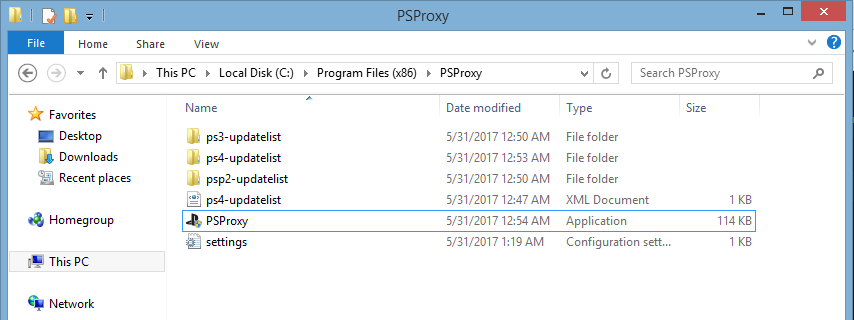
You will also see the "ps4-updatelist" folder but you'll notice there isn't a 4.55 located inside so go ahead and make the following folder directories and then drag it into the "ps4-updatelist" folder. First create a folder named "4.55" and inside that go ahead and make a folder called "update", inside the update folder make a folder named "ps4", inside the "ps4" folder make a folder named "list", inside that folder make a folder corresponding to your region so for me I named it "us" for United States, inside your region folder go ahead and drop the "ps4-updatelist" XML file you download earlier and put it in there now go ahead and drag the 4.55 Folder with all of the other folders inside of it and drop it into the "ps4-updatelist" folder with the rest of the update folders.

Now go back to the "PSProxy" directory and click the "settings" text document and you'll see the following. All you have to worry about is the [Playstation 4] section. For BypassVersion: you're going to want to put 04.700.000 because that is the latest 4.70 firmware. For FirmwareVersion: you're going to want to put whatever firmware your console is on. My console is on 4.55 so I put 4.55 but if your console is on 4.50 you would put 4.50 or if it's on 3.50 you put 3.50 and so on and so forth.

Now go ahead and open PSProxy as ADMINISTRATOR this way you don't run into any problems. If it doesn't look like this the first time you open it and instead you see something else that says PS3 Firmware, PSV Firmware, and PS4 Firmware. Underneath that, you will see Check For Updates and Save changes, go ahead and click Check For Updates and make sure you're on the latest version.
After it updates re-open PSProxy and if it brings you back to the same thing go ahead and click the PS4 Firmware box and type the firmware your console is on, for me I typed 4.55 since my console is on firmware 4.55 and then click save changes and the following program will open up. If this program opens up the first time you opened PSProxy don't worry, you just don't have to do the steps posted before this.
After you get to screen go ahead and check off PS4 Mode and Bypass Update and you'll notice the System Update Bypass will allow you to select your region, go ahead and click whatever region you live in and click start.

When you click START, the following message might pop up and if it does make sure you click ALLOW ACCESS to avoid problems.

Now head to your PS4 and go to Settings > Network > Set Up Internet Connection > Wi-Fi or LAN ( HIGHLY RECOMMEND LAN ) > Custom > IP Address : Automatic > DHCP Host Name : Do Not Specify > DNS Settings : Automatic > MTU Settings : Automatic > Proxy Server : Use [{ This is where you're going to enter the IP Address you see on PSProxy and after you enter that click "next" > Click Test Internet Connection and click circle immediately (DO NOT DO THE CONNECTION TEST) and go to Playstation Network/Account Management and click "Sign In"
When you click "Sign In" you will see the following screen simply click Update Later and wait a few seconds and you should now be signed into PlayStation Network. If this didn't work for you don't get worried, you're going to have to simply make a bridged connection between your PS4 and PC and it's very easy (takes about two minutes to do this) but to do so you need to have a LAN cable.

How to create a bridged connection (Only needed if you can't log into PSN with the method above)
1) Connect an Ethernet/LAN cable to your PS4 and your PC.
2) On your PC, go to control panel --> Network and Internet --> Network and Sharing Center
3) On the left panel choose "change adapter settings"
4) You will get a screen like this:

5) From here, click on your active WiFi connection so that it is selected and highlighted in blue
6) While holding the control button on your keyboard, click on your computer's Ethernet connection. If your PS4 is connected to the LAN cable it will say "Identifying..." under your Ethernet connection. Windows should also label it as "Ethernet". You should now have both your active WiFi connection and your Ethernet connection highlighted and selected.
7) Right click on your WiFi connection and choose "Bridge connections" Once you have done this right click on the newly created network bridge (should be labeled "Ethernet 2" or "Ethernet") and click "Status". Under "IPv4 Connectivity" it should say "Internet".
After you bridge the connections go ahead and restart the process.
Open PSProxy and make sure PS4 Mode and Bypass Update are checked off and make sure you select your region then click START.

Now head to your PS4 and go to Settings > Network > Set Up Internet Connection > LAN > Custom > IP Address : Automatic > DHCP Host Name : Do Not Specify > DNS Settings : Automatic > MTU Settings : Automatic > Proxy Server : Use [{Enter the IP Address you see on PSProxy}] and after you enter that click "next" > Click Test Internet Connection and click circle immediately (DO NOT DO THE CONNECTION TEST) and go to PlayStation Network/Account Management and click "Sign In"
Now when it asks you to update your console simply click "Update Later" and you're now logged into PSN.
 Doesn't work on 1.76 consoles (Got confirmation from Red, the creator of PSProxy)
Enjoy
Download:
PSProxy
First go ahead and download PSProxy and the 4.55 XML file and now install PSProxy. Go ahead and go to (C:Local Disk/Program Files(x86)/PSProxy) and drag and drop the "ps4-updatelist" XML into the PSProxy directory.
You will also see the "ps4-updatelist" folder but you'll notice there isn't a 4.55 located inside so go ahead and make the following folder directories and then drag it into the "ps4-updatelist" folder. First create a folder named "4.55" and inside that go ahead and make a folder called "update", inside the update folder make a folder named "ps4", inside the "ps4" folder make a folder named "list", inside that folder make a folder corresponding to your region so for me I named it "us" for United States, inside your region folder go ahead and drop the "ps4-updatelist" XML file you download earlier and put it in there now go ahead and drag the 4.55 Folder with all of the other folders inside of it and drop it into the "ps4-updatelist" folder with the rest of the update folders.
Now go back to the "PSProxy" directory and click the "settings" text document and you'll see the following. All you have to worry about is the [Playstation 4] section. For BypassVersion: you're going to want to put 04.700.000 because that is the latest 4.70 firmware. For FirmwareVersion: you're going to want to put whatever firmware your console is on. My console is on 4.55 so I put 4.55 but if your console is on 4.50 you would put 4.50 or if it's on 3.50 you put 3.50 and so on and so forth.
Code:
; Settings for PSProxy
[PSProxy]
Mode=PS4
UseUpdateBypass=True
TLD=us
ComboBoxIndex=11

[Playstation 3]
BypassVersion=
FirmwareVersion=

[Playstation Vita]
BypassVersion=
FirmwareVersion=

[Playstation 4]
BypassVersion=04.700.000
FirmwareVersion=4.55
Now go ahead and open PSProxy as ADMINISTRATOR this way you don't run into any problems. If it doesn't look like this the first time you open it and instead you see something else that says PS3 Firmware, PSV Firmware, and PS4 Firmware. Underneath that, you will see Check For Updates and Save changes, go ahead and click Check For Updates and make sure you're on the latest version.
After it updates re-open PSProxy and if it brings you back to the same thing go ahead and click the PS4 Firmware box and type the firmware your console is on, for me I typed 4.55 since my console is on firmware 4.55 and then click save changes and the following program will open up. If this program opens up the first time you opened PSProxy don't worry, you just don't have to do the steps posted before this.
After you get to screen go ahead and check off PS4 Mode and Bypass Update and you'll notice the System Update Bypass will allow you to select your region, go ahead and click whatever region you live in and click start.
When you click START, the following message might pop up and if it does make sure you click ALLOW ACCESS to avoid problems.
Now head to your PS4 and go to Settings > Network > Set Up Internet Connection > Wi-Fi or LAN ( HIGHLY RECOMMEND LAN ) > Custom > IP Address : Automatic > DHCP Host Name : Do Not Specify > DNS Settings : Automatic > MTU Settings : Automatic > Proxy Server : Use [{ This is where you're going to enter the IP Address you see on PSProxy and after you enter that click "next" > Click Test Internet Connection and click circle immediately (DO NOT DO THE CONNECTION TEST) and go to Playstation Network/Account Management and click "Sign In"
When you click "Sign In" you will see the following screen simply click Update Later and wait a few seconds and you should now be signed into PlayStation Network. If this didn't work for you don't get worried, you're going to have to simply make a bridged connection between your PS4 and PC and it's very easy (takes about two minutes to do this) but to do so you need to have a LAN cable.
How to create a bridged connection (Only needed if you can't log into PSN with the method above)
1) Connect an Ethernet/LAN cable to your PS4 and your PC.
2) On your PC, go to control panel --> Network and Internet --> Network and Sharing Center
3) On the left panel choose "change adapter settings"
4) You will get a screen like this:
5) From here, click on your active WiFi connection so that it is selected and highlighted in blue
6) While holding the control button on your keyboard, click on your computer's Ethernet connection. If your PS4 is connected to the LAN cable it will say "Identifying..." under your Ethernet connection. Windows should also label it as "Ethernet". You should now have both your active WiFi connection and your Ethernet connection highlighted and selected.
7) Right click on your WiFi connection and choose "Bridge connections" Once you have done this right click on the newly created network bridge (should be labeled "Ethernet 2" or "Ethernet") and click "Status". Under "IPv4 Connectivity" it should say "Internet".
After you bridge the connections go ahead and restart the process.
Open PSProxy and make sure PS4 Mode and Bypass Update are checked off and make sure you select your region then click START.
Now head to your PS4 and go to Settings > Network > Set Up Internet Connection > LAN > Custom > IP Address : Automatic > DHCP Host Name : Do Not Specify > DNS Settings : Automatic > MTU Settings : Automatic > Proxy Server : Use [{Enter the IP Address you see on PSProxy}] and after you enter that click "next" > Click Test Internet Connection and click circle immediately (DO NOT DO THE CONNECTION TEST) and go to PlayStation Network/Account Management and click "Sign In"
Now when it asks you to update your console simply click "Update Later" and you're now logged into PSN.
Doesn't work on 1.76 consoles (Got confirmation from Red, the creator of PSProxy)Enjoy



