New characters from the popular game series Ratchet & Clank make an appearance. Hailing from the Solana Galaxy, Ratchet Bomber is here with his trusty pal Clank strapped to his back. It?s time to save a whole new galaxy as the duo team up to bring their own brand of destruction to Super Bomberman R.
Radiating outward to meet the wilderness: Avery Alder on her games
Naomi Clark’s introduction of tabletop game developer Avery Alder, for her Practice 2018 talk, was an effusion for her trade: “We see non-digital design as a great way to prototype and jam quickly, but there are also things you can do in a non-digital space that digital games have only just begun to catch up to,” she said, describing various communal and interpersonal dimensions of tabletop play, “like the collaboration between gamemasters and emergent and collaborative storytelling that happens in these spaces.”
Alder, who is perhaps best known for the game Monsterhearts, spoke about her latest game, Dream Askew, through the lens of her past work including Monsterhearts, a paranormal romance game about messy teenage life; The Quiet Year, a conversational game about a post-apocalyptic community dealing with a good year after defeating a major threat; and Brave Sparrow, a solo LARP meant to be played amidst your daily life. The latter is a “pervasive game,” which asks the player to imagine they’re a sparrow, “to help you develop grace, and a sense of self.”
Wrapping up this development CV, she sums up the core themes of her work as “queerness, the apocalypse, relationships, self-doubt, and self-discovery.” All of these are combined in her latest game, a post-apocalyptic RPG entitled Dream Askew.
Alder, who understood herself to be performing something of a didactic role for an audience that was less familiar with indie tabletop, sought first to situate her new game in the larger, recent history of tabletop. She identified five design trends in tabletop roleplaying games from the aughts: scene-based conflict resolution, pre-negotiated stakes, everything was made a trait, bespoke dice mechanics, and endgame mechanics.
“Apocalypse World positioned the act of roleplaying as a conversation; we’re talking about what we’re doing to advance the story,” she said, arguing that Apocalypse World fundamentally responded to all these trends. Where mechanics were often constant and agnostic or orthogonal to the evolving story, Apocalypse World flipped that on its head, by Alder’s lights. Conversational story progressed the plot, and the mechanics were invoked by the story in a way that always produced clear story outcomes.
Situational moves and partial success were always deeply tethered to the unique circumstances of everyone’s character and story. Moves facilitated more conversation and collective storytelling, by compelling hard choices and exacting costs. Alder was quick to note that some gamemasters had always played games this way, but for many others it was a “revelation” to enthrone story and really emphasize the RP in RPG.
Ever the minimalist, with an eye to access, Alder critiqued her beloved Apocalypse World, however. Despite its pared-down, non-crunchy modality, the game still comes across as jargony and unduly complex. For veteran roleplayers, it may be intuitive. But for neophytes, it may still be unduly intimidating. The “arcane presentation” and “participation demands” imposed limits on people with only two hours to play.
More and more, she wanted to create an accessible game that could be picked up and enjoyed by someone who’d never played an RPG before–digital or analog.
“Acronyms are the number one way to convince new players that they can’t do what you’re trying to get them to do,” she said, and while this got a laugh, she was only half joking.
The lessons she took from this, with her own Powered by the Apocalypse games, were to reduce the appearance of complexity, eliminate jargon, and the alter appearance of math. Even Apocalypse World’s simple 2d6 was removed in favor of a simpler token-exchange economy. But this wasn’t merely a process of taking things away: it was also about adding more emphasis on relationships, which Apocalypse World already did well, “but I was greedy and wanted more,” Alder joked.
She then pivoted to discussing the origin of a mod for Dream Askew, set in a shtetl in the 19th Century Russian Pale of Settlement, created by Benjamin Rosenbaum with Alder’s blessing. It was called Dream Apart. As the two discussed the development of the game, it helped her better critique her own game, refining mechanics and making them more elegant. One innovation, developed by Rosenbaum, cut back on logistics in Dream Askew. Instead of having mutually exclusive playbooks (for their character class and a larger setting element), a mechanic was developed to allow players to swap mid-play.
She also noted that her own work failed to live up to her own goals. Some command language like ‘explore themes of compulsion and estrangement,’ in a list of thematic recommendations for a particular class, were too vague and cerebral, according to feedback. “I might as well have told people ‘make deep and meaningful art,’” she said. Paring these down to brief, punchy ‘tips’ as opposed to ‘principles,’ helped her realize her goals.
Dream Askew and Dream Apart are now being Kickstarted and sold together. Alder noted the many similarities between the games, each, for instance, dealing with the theme of hope amidst hardship in a marginalized community. Alder also noted where the games were different. Rosenbaum’s has an extensive glossary of Jewish terminology to help situate the player in the distinct historical setting, while Alder eschewed that in service to her understanding of queerness, which is “elusive to definition.” The queer relationships found in her games are meant to be contingent and polyvocal, after all.
Alder and Rosenbaum played off both each other and off of larger works like Apocalypse World, which in turn was a reaction to even larger design trends in the tabletop world. This sort of relational design creates complex, even beautiful lineages of design, and as Alder put up a slide with art from Askew, Apart, and Apocalypse World on screen, it seemed to emphasize this fact. “Dream Askew took the child role to the parent of Apocalypse World,” she said, driving the metaphor home. “Benjamin’s coming up with cool ideas, I want to let them change and challenge my vision,” she said, describing the emerging collaboration between her and Rosenbaum.
In the Q&A, she talked a bit about a subtle but profoundly important issue: “learning to trust people,” she said, “has been really rewarding.” In this case, that meant letting people mod her games without asking for royalties, which, she said “wasn’t profitable anyway.” She felt “gross” asking other, mostly queer developers for money for the right to modify her game which was, itself, heavily inspired by Apocalypse World. She spoke movingly of feeling rewarded by giving it away, and meeting those developers later at conventions; they’d buy her coffee and update her on their progress.
This, she said, felt much better to her and led to considerably more growth for everyone involved. As she put it when discussing design challenges in response to another question, there was a process of “radiating outward to meet the wilderness.”
Alder had a clear design goal–make a game anyone can pick up–and pursued it aggressively, whittling away the often lovable but impenetrable garnish of tabletop roleplaying. In the process, it served to surface the core of all tabletop roleplaying: the relationships between players, and between their characters. In the process, there was a lot to learn about trust between developers, and reaching out with an open hand. Sharing one’s work can be frightening, but, as was also made clear in Adriel Wallick’s talk, it’s a necessary step in one’s growth as a developer. What Alder added was simply this: if your work is to flourish, then even your sense of ownership might have to give way.
Newsbrief: According to the South Korean news publication Korea Joongang Daily, PUBG Corp parent company Bluehole is set to acquire the mobile game developer Delusion Studio.
Also based out of South Korea, Delusion Studio is known for creating mobile games like Castle Burn and Guardian Stone. Though Korea Joongang Daily notes that Bluehole announced the acquisition plans earlier this week, the exact terms of the deal were not disclosed.
The acquisition itself comes as reports circulate that Tencent has been eyeing ways to increase its stake in Bluehole. The Chinese company is reportedly considering a $470 million investment that would bring its ownership of Bluehole up to 11.5 percent, making it the second largest Bluehole shareholder in the process.
E3 2018: Playing in the Dark World of Ashen on Xbox One
At last year’s E3, we went hands-on with an earlier version of Ashen, an adventure game that aims to blend the difficulty of Dark Souls with the mystery of a dark fantasy tale. Featuring a co-op mechanic that allows you to join a friend on an adventure – or with an AI stand-in if no one is available – it was great to see more of the game at this year’s E3 and how its world, lore, and quest system have all started to expand, creating an even more intriguing and complex adventure that we’re looking forward to playing more of when the game launches day and date on Xbox Game Pass later this year.
One of the more striking things I appreciate from the game’s simple, direct, and low-poly character design is that of the blank face, making you a faceless pawn caught up in a larger adventure which will eventually define you. It’s a uniqueness that helps give Ashen an identity, but not necessarily giving one to the player. There are options when creating your adventure to adjust their skin tone, facial hair, and other identifiable markers — but the blank, eyeless, mouthless face remains.
For this year’s E3 build, we were able to sample the quest system that’s being built into the game that can involve tasks such as item retrieval or dispatching an enemy. The map system allows you to easily track these quests with a simple and direct interface, as well as a compass indicator on the top of the screen to help send you in the right direction without having to constantly refer to your map, allowing you to take in more of the polygon forest and its numerous enemies who wish to do you harm.
Combat in Ashen is very Dark Souls-esc: keep your shield up, dodge roll away from enemy attacks, take your time to see their swing pattern and strike them down. Your character controls are refined and responsive, with appropriate weight applied to both your strong and light attacks on enemy combatants. Knowing which to use and when is a learned experience that comes in time.
The primary quest for this demo early on was to retrieve a hammer for a one-armed giant who needed to use it to set off a spark, activating a stone pillar that works as the games respawn/checkpoint system should you fall in battle. And fall we did.
Again, like the Souls games, you have the chance to respawn item-less with the chance to retrieve your goods by retracing your steps and re-engaging with enemies in their original spawned positions. A harsh lesson-learning process as you fight your foes once again with the shared and accumulated knowledge of failure.
Further into our demo, we re-entered the dark and ominous giant spider-filled cave we experienced last year. This area of the map also allowed us to see some of Ashen’s impressive lighting effects as we descended into the cave, holding a lantern in our off-hand. Still, even with a passing familiarity of what was lying in wait, the giant, acid-spitting spiders still got the best of me, sending me back above ground, arriving back at the respawn shrine with the pull of “just one more try” becoming ever stronger the longer I played Ashen.
The pull will have to wait until next time when we have a chance to play more of Ashen when it comes to Xbox One. Be sure to keep it tuned to Xbox Wire throughout the year to learn more about this game and many others coming soon to your favorite console.
Capcom Explains Reasoning Behind Mega Man’s New Look In His Latest Outing
Mega Man has undergone a number of physical transformations over the years and in his next outing, Mega Man 11, he’ll adopt a fresh new look. In a collection of videos about the latest game in the long-running series, Capcom explained why exactly the iconic character has had a design tweak.
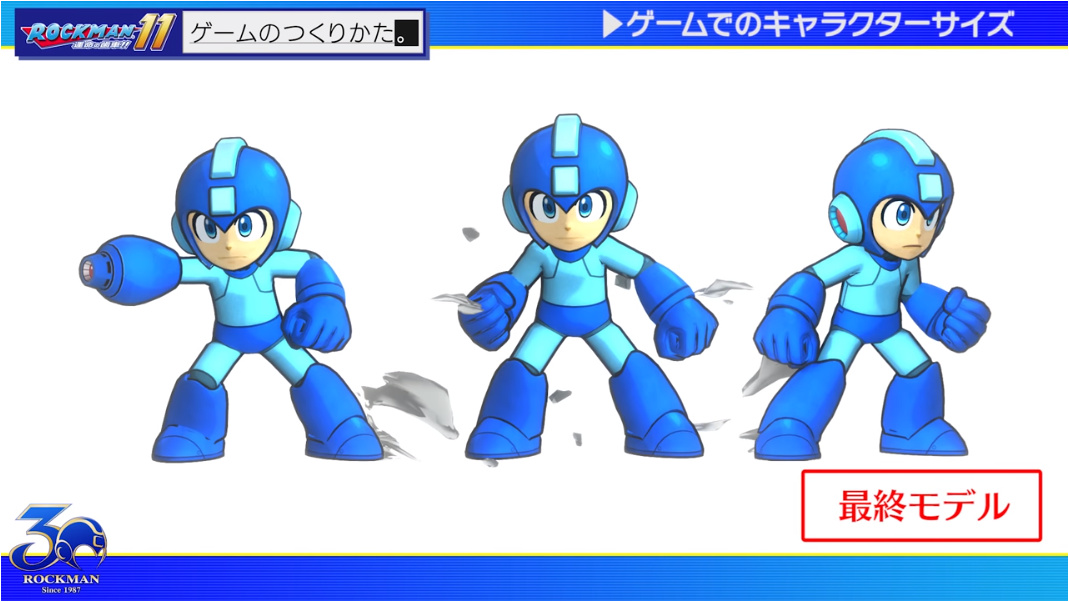
Apparently, it’s all because of a shift across to a sharper environment. The designers originally created a prototype based on the Mega Man 8 model only to discover this particular style was far too flat and featureless when presented at a higher definition. To overcome this, they decided to make a new version highlighting subtle details like the lines on his body while equipping him with a more detailed blaster. These alterations paved the way for his 3D form.
The size of Mega Man was also a hot topic during the development of Mega Man 11, with the team wanting to show as much of his face as possible. A rule of thumb was that the smaller the screen, the more distorted he should look to make the game feel less cramped.
How light reflected off the character’s model was another major talking point during the design process. It was previously an aspect of Mega Man’s design the team had never had to consider. Eventually, each character for this particular entry in the series got their own lighting effects to bring their personality to life. Surprisingly, the game itself actually has no environmental lighting at all. Whether Mega Man should have outlines was one of the many other contentious debates as well.
The final design was a slightly distorted take on the famous video game character, with the style magnifying his head, arms, and legs. This was considered by Capcom as the ideal compromise between his 2D proportions and new look.
Capcom’s Mega Man 11 arrives on the Nintendo Switch on 2nd October. Tell us below if you’re a fan of the new look he’s rocking.
Daily Deal – Microsoft Flight Simulator X: Steam Edition, 70% Off
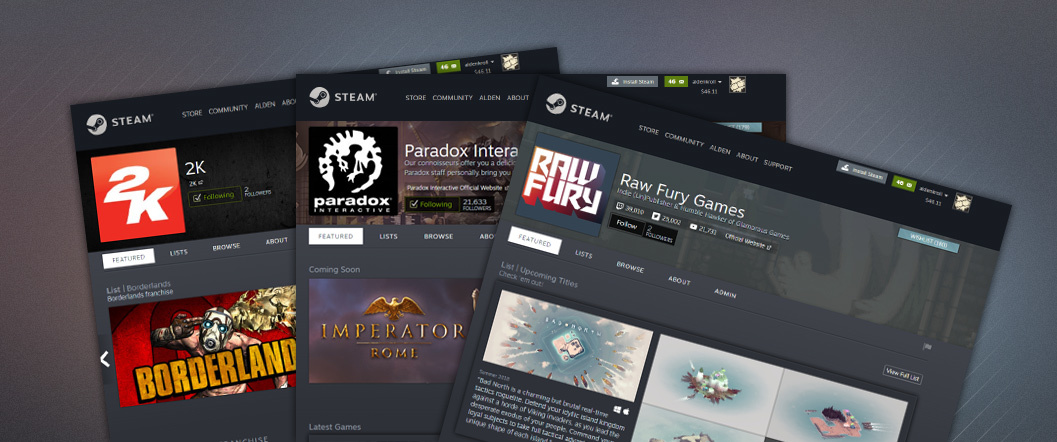
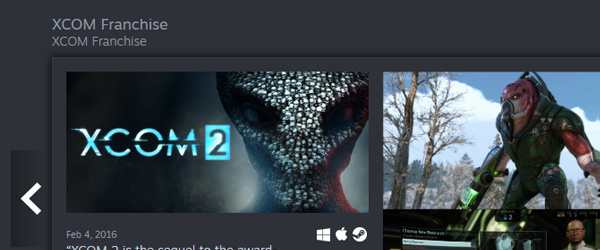
We’ve just launched an open beta for Creator Homepages, a new part of the Steam store designed to help players discover and connect with the developers and publishers behind their favorite games. With this feature, you can explore the full catalog of games created by the developers and publishers of games you enjoy and you can choose to follow those creators to be automatically notified when they release their next title.
How does it work?
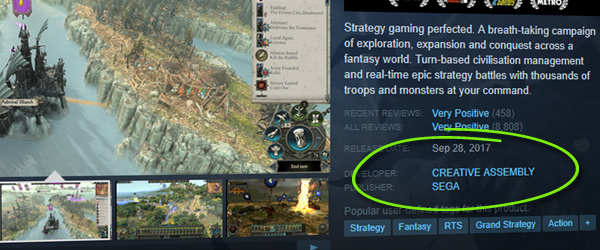
Any developer or publisher on the platform can now set up a customized homepage to showcase their full catalog of titles and content. Once set up, these homepages can be found by clicking on the developer or publisher name from the store page of your favorite games.
Check out the official Creator Homepage Announcement Page, which includes a list of all the homepages so far. This will quickly become an overwhelming and unusable list as more developers create their homepages, so at the top of the page we’ve also specifically highlighted the developers and publishers behind games that you’ve recently played.
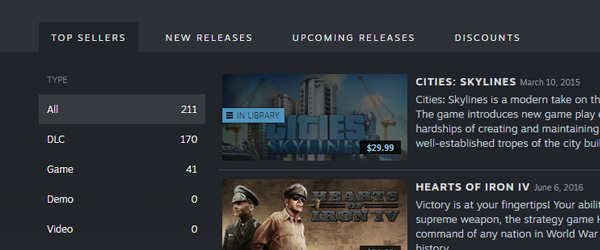
On these homepages, you’ll find standard lists of top-selling or new released titles from that developer or publisher.
You’ll also find collections that the developer or publisher has created to best highlight their portfolio of games and content available on Steam.
A studio might divide its games into collections by genre or franchise, or could choose to highlight their fan-favorite or top-selling games. A developer of only a single game might primarily dedicate their homepage to announcements of new projects.
Regardless of how each developer or publisher chooses to customize their homepage, you can easily follow them to be notified when they release their next title or post an announcement. Newly released titles from developers or publishers that you follow will show up at the top of your Steam homepage and we’ll send you an e-mail to let you know that they’ve released something new (as with other Steam e-mail notifications, you can opt out at any time by visiting your e-mail preferences page).
Creators can also set up unique URLs within Steam for easy reference to their homepage. You can see an example by following this customized URL for the Valve developer homepage: http://store.steampowered.com/dev/valve
Why Beta?
We’re pretty excited to get the core functionality into the hands of players and give developers the opportunity to set up their presence on Steam. While we haven’t worked out all of the smaller bugs or finished adding every feature we’d like to, we decided that the basic set of functionality is worth putting into the hands of players and creators. We still have a number of features that we are considering adding and there are still a few rough edges that need smoothing out, so opening this system up as a beta to players and developers will help us gather feedback and suggestions that inform the direction of those features.
Over the previous few weeks, we’ve worked with a number of developers and publishers on Steam to get their pages set up and help us work out as many of the bugs as we can. As a player, you’ll find that many of your favorite game makers probably already have a spiffy homepage created and customized. But there are still quite a few developers that have not yet had a chance to set up their pages and will do so during this open beta period.
For game developers, check out the Creator Homepages Steamworks documentation for more details and information on how the system works, the features that are included, and necessary permissions for game creators.
Reporting bugs and feedback
As always, we’ll keep an eye out for your feedback and suggestions as to what you’d like to see added or changed about this system.
Alibaba has more than 150 open source projects and is a long-time contributor to many others, Wei Cao, a Senior Staff Engineer at Alibaba, says that sharing knowledge and receiving feedback from the community helps Alibaba refine their projects. We spoke with Wei Cao — who is the head of Alibaba Cloud Database Department and leads the R&D of Alibaba RDS,POLARDB products — to learn more about the company’s open source focus and about some of the database-related projects they contribute to.
Linux.com: Why is open source so important for Alibaba?
Wei Cao: At present, Alibaba has more than 150 open source projects. We work on the open source projects with the aim to contribute to the industry and solve real-life problems. We share our experiences with the rest of the open source enthusiasts.
As a long-time contributor to various other open source projects, Alibaba and Alibaba Cloud have fostered a culture that encourages our teams to voluntarily contribute to various open source projects, either by sharing experiences or helping others to solve problems. Sharing and contributing to the community altogether is in the DNA of Alibaba’s culture.
When we first started to use open sources projects like MySQL, Redis, PostgreSQL, we received a lot of help from the community. Now we would like to give back to the same communities by sharing our accumulated knowledge and receive feedback from the community so that we can refine our projects.
We believe this truly represents the essence of open source development, where everyone can build on each other’s knowledge. We are dedicated to making our technology inclusive through continuously contributing to bug-fixing and patch optimization of different open source projects.
Linux.com: Can you tell us what kind of culture is within Alibaba to encourage its developers to consume and contribute to Open Source project?
Wei Cao: Alibaba has always had a culture of integrity, partnership, sharing and mutual assistance. At the same time, we always believe that more people participating in the community can promote the industry better and also make us more profitable. Therefore, our staff members are willing to pay close attention to open source projects in the community. They keep using open source projects and accumulating experience to give feedback on projects and jointly promote the development of the industry.
Linux.com: Can you tell us what kind of open source projects you are using in your company?
Wei Cao:Our database products use many open source projects such as MySQL, Redis, PostgreSQL, etc. Our teams have done feature and performance enhancement and optimization, depending on various use-cases. We have done compression for IoT and security improvements for financial industries.
Linux.com: Can you tell us about the open source projects that you have created?
Wei Cao:We will be releasing a new open source project, called Mongo-Shake, at the LC3 Conference. Based on MongoDB’s oplog, Mongo-Shake is a universal platform for services.
It reads the Oplog operation logs of a MongoDB cluster and replicates MongoDB data, and subsequently implements specific requirements through operation logs. Logs can provide a lot of scene-based applications.
Through the operation logs, we provide log data subscriptions to consume PUB/SUB functions and can be flexibly connected to adapt to different scenarios (such as log subscription, data center synchronization, Cache asynchronous elimination, etc.) through SDK, Kafka, MetaQ, etc. Cluster data synchronization is a core application scenario. Synchronization is achieved through playback after grabbing oplogs. Its Application Scenario includes:
Asynchronous replication of MongoDB data between clusters eliminates the need for double write costs.
Mirror backup of MongoDB cluster data. (Not support in this open source version)
Log offline analysis.
Log subscription.
Cache synchronization.
Through the results of the log analysis, it is known which caches can be eliminated and which caches can be preloaded to prompt the cache to be updated.
Monitor base on log.
Linux.com: Can you tell us about the major open source projects you contribute to?
Wei Cao: We have contributed many database-related open source projects. In addition, we have released open source projects, like AliSQL and ApsaraCache, which are widely used in Alibaba.
AliSQL: AliSQL is a MySQL branch, developed by Alibaba Cloud database team, and is servicing Alibaba’s business and Alibaba Cloud’s RDS. AliSQL version is verified to run many Alibaba workloads and is widely used within Alibaba cloud. The latest AliSQL also merged many useful
AliSQL does a lot of enhancement in the features and performance based on MySQL. It has more than 300 patches, We have added many monitor indicators, features, and optimized it for different user cases. enhancements from the other branches like Percona, MariaDB, WebScaleSQL, and also contains a lot of patches with Alibaba’s experiences.
In general test cases, AliSQL has 70% performance improvement over official MySQL version, according to R&D team’s sysbench benchmarks. In comparison with MySQL, AliSQL offers:
Better support for TokuDB, more monitoring and performance optimization.
CPU time statistics for SQL queries.
Sequence support.
Add Column Dynamically .
ThreadPool support. And a lot of Bugfix and performance improvements.
The founder of MySQL/MariaDB, Michael Widenius “Monty” has praised Alibaba for open sourcing AliSQL. We got a lot of help from the open source community in the early development of AliSQL.
Now open source AliSQL is the best contribution we have made to this community. We hope to continue our open source journey in future. Full cooperation with the open source community can make the MySQL/MariaDB ecosystem more robust.
ApsaraCache: ApsaraCache is based on the Redis 4.0, with additional features and performance enhancements. In comparison to Redis, ApsaraCache’s performance is independent of data size. It’s related to scenarios. It also has better performance in cases such as short connections, full memory recovery, and time-consuming instruction execution.
Multi protocol support
ApsaraCache supports both Redis and Memcached protocol with no client code need to be modified. ApsaraCache supports Memcached protocol and users can persist data by using ApsaraCache in Memcached mode just like Redis.
Reusing Redis architecture, we have developed new features of Memcache such as support for persistence, disaster tolerance, backup recovery, slow log audit, information statistics and other functions.
Ready for production
ApsaraCache has proven to be very stable and efficient during 4 years of technical grinding and tens of thousands of practical testing of production environment.
The major improvements in ApsaraCache are:
Disaster depth reinforcement refactors the kernel synchronization mechanism to solve the problem of full synchronization of native kernel caused by copy interrupt under weak network condition.
Compatible with the Memcached protocol, it supports dual copy of Memcached and offers more reliable Memcached service.
In short connection scenario, ApsaraCache makes 30% performance increase compared with the vanilla version.
ApsaraCache’s function of thermal upgrade can complete the thermal update of an instance within 3ms and solve the problem of frequent kernel upgrading on users.
AOF reinforcement, and solve the problem of Host stability caused by frequent AOF Rewrite.
ApsaraCache health detection mechanism.
This article was sponsored by Alibaba and written by Linux.com.
From the new trailer, we know that the hero will begin in city of Heliodor. The hero is then sent to jail by King Carnelian, who seems to have a grudge against the luminaries. We also got a good taste of what's to come with the the localized version of the title on PS4 and PC. The Switch version is expected to launch in the West eventually, but the 3DS version will remain a Japanese exclusive.
If you're looking to reserve your copy now, there are a few different options. There's the standard edition and "Edition of Light" on PS4 and PC, and a PS4 exclusive collector's edition called the "Edition of Lost Time." We've got all the details below on bonuses and where you can reserve your before launch.
Dragon Quest XI: Echoes of an Elusive Age Pre-Order Bonuses
Pre-orders from Square Enix will include an exclusive Dragon Quest XI lanyard. Pre-orders from the PlayStation Store will include a “The Legend Reborn” PS4 theme. Steam Pre-orders will include a PC wallpaper set.
Dragon Quest XI: Echoes of an Elusive Age Day One "Edition of Light"
The Edition of Light is a limited-time offer of the standard edition of the title. It will have a supplicant to replenish magic points, a healer to heal your characters, and three skill seeds for some extra experience.
Dragon Quest XI: Echoes of an Elusive Age "Edition of Lost Time"
The Edition of Lost Time will include the digital content of the Edition of Light, a 128-page hardback Companion Compendium featuring concept art and Akira Toriyama’s early designs, a two-disc music selection featuring pieces from the game, a cloth map, and a pep pop and 15 more seeds of skill to boost your characters.
From the new trailer, we know that the hero will begin in city of Heliodor. The hero is then sent to jail by King Carnelian, who seems to have a grudge against the luminaries. We also got a good taste of what's to come with the the localized version of the title on PS4 and PC. The Switch version is expected to launch in the West eventually, but the 3DS version will remain a Japanese exclusive.
If you're looking to reserve your copy now, there are a few different options. There's the standard edition and "Edition of Light" on PS4 and PC, and a PS4 exclusive collector's edition called the "Edition of Lost Time." We've got all the details below on bonuses and where you can reserve your before launch.
Dragon Quest XI: Echoes of an Elusive Age Pre-Order Bonuses
Pre-orders from Square Enix will include an exclusive Dragon Quest XI lanyard. Pre-orders from the PlayStation Store will include a “The Legend Reborn” PS4 theme. Steam Pre-orders will include a PC wallpaper set.
Dragon Quest XI: Echoes of an Elusive Age Day One "Edition of Light"
The Edition of Light is a limited-time offer of the standard edition of the title. It will have a supplicant to replenish magic points, a healer to heal your characters, and three skill seeds for some extra experience.
Dragon Quest XI: Echoes of an Elusive Age "Edition of Lost Time"
The Edition of Lost Time will include the digital content of the Edition of Light, a 128-page hardback Companion Compendium featuring concept art and Akira Toriyama’s early designs, a two-disc music selection featuring pieces from the game, a cloth map, and a pep pop and 15 more seeds of skill to boost your characters.