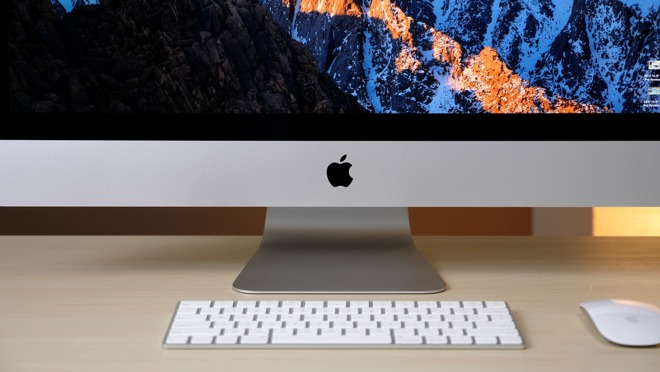
A year with Apple’s 5K iMac: Still the best Mac for your money
It’s been over a year since Apple refreshed its iMac lineup with updated hardware and added Thunderbolt 3. After long-term daily use of the computer in that period, now is probably a good time to reflect on the iMac, and how we feel about the machine a year after release.
[embedded content]
The iMac 5K has been AppleInsider’s main video editing machine since it was released. To make it more useful for the workload, we opted for the highest-specification model with 8 gigabytes of RAM and a 512-gigabyte SSD, a setup that was cheaper than the new top-spec i9 MacBook Pro released in July.
The iMac 5K is the only new Mac that allows you to easily add third-party RAM. Taking advantage of this, we added another 32 gigabytes, and now it is equipped with 40 gigabytes for only $3,000 —$300 less than the 32-gigabyte model from Apple.
The best comparison to make with it is against the iMac Pro, the next tier up in terms of specification. For $2,000 more in terms of cost, you’d get an 8-core processor, 32 gigabytes of RAM and 1 terabyte of SSD storage in the base model.
It may seem worth it to go with that over the iMac 5K because it should easily outperform the iMac 5K, right?
Initial thoughts
Before we get into performance testing, let’s discuss what we like and don’t like about the iMac 5K.
The design of the iMac 5K and iMac Pro is iconic and high quality, but it’s been 6 years since the last redesign, and the large chin is starting to look a bit dated. The 5K display, however, remains amazing, due to its high detail, brightness, and color accuracy.
We love the large amount of ports in the back, especially the Thunderbolt 3 ports, which we use to connect a 40TB storage area network device that can be accessed by two Macs at the same time, with the high bandwidth offered by Thunderbolt 3 providing very fast transfers to both desktops.
The keyboard and mouse supplied with the iMac are great, with few Bluetooth connection issues since buying it. The batteries stay charged for weeks, and they recharge incredibly quickly as well, which is handy since you have to flip the mouse over to do so.
Onto the internals, the 2017 iMac 5K switched over to Intel’s Kaby Lake processors, which added hardware acceleration for the HEVC codec, the current standard for 4K video streaming.
It also introduced desktop-class graphics chips for the first time in years, and even the cheaper Radeon Pro 570 is substantially faster than the best graphics options in older models from 2015.
Our iMac 5K has the Radeon Pro 580, which is actually the same graphics chip that came in the new Blackmagic eGPU, which is mostly marketed towards MacBook Pro users. We have previously compared the eGPU-equipped Core i9 2018 MacBook Pro with the 2017 5K iMac and the iMac Pro, and found that, even with the extra power of the eGPU, it isn’t enough to beat our iMac 5K.
Performance
Starting with Geekbench 4’s CPU test, the iMac 5K gets the best single-core score across the models we tested, but also the worst multi-core score, mainly due to the differences in the amount of cores. Under Geekbench 4’s graphics test, the iMac Pro is the clear winner.
In Cinebench R15, the iMac 5K is not far from the 2018 i9 MacBook Pro in its results, and that’s mostly because of the thermal design of the MacBook Pro. The iMac Pro simply destroyed both machines in the test.
We also looked at video gaming performance with Unigen’s Heaven Benchmark. The iMac Pro did extremely well here, and the iMac 5K easily did better than the MacBook Pro.
Onto the real world tests, the Lightroom export test showed the iMac 5K sits between the i9 MacBook Pro and the iMac Pro in the results.
The Final Cut Pro X video editing tests started with Bruce X, with the iMac 5K actually scoring incredibly close to the iMac Pro. A 20 second 4K clip stabilization test surprised us, as the iMac 5K was ahead of the other Mac systems by a huge amount.
The i9 MacBook Pro destroyed the iMac 5K in the HEVC to HEVC export test, even topping the iMac Pro, because the 8th-gen processor is using the latest QuickSync encoding and decoding technology. The iMac Pro’s Xeon CPU doesn’t have integrated graphics to enable QuickSync, but the raw power allows it to still get the job done quickly.
Moving on to a 5min 4K export, the iMac Pro was actually the slowest in this test, again due to the lack of QuickSync. The MacBook Pro was slower than the iMac 5K, due to the thermal throttling of the processor and the less powerful graphics.
For our Canon RAW 60 frames per second test, the iMac 5K was right behind the iMac Pro, while the MacBook Pro was extremely slow. We also tested timeline smoothness during this test, and the iMac Pro was the only one that played it back at the full 60 frames per second.
Overall, the top-spec i9 MacBook Pro performs worse than the 2017 iMac 5K in almost all of the tests we ran, which is completely unexpected based off the spec sheet.
We were also surprised at how close the iMac 5K performed compared to the iMac Pro, even beating it in some tests thanks to QuickSync.
The one-year opinion
After working in video editing full-time on the iMac 5K since it was released, I can tell you it’s really up to the job. I’ve used a top-spec 2016 15-inch MacBook Pro a few times, and it paled in comparison. We shoot and edit everything in 4K and perform a lot of stabilization, and since this processes almost twice as fast on this iMac 5K compared to the MacBook Pro, the time savings really add up throughout the day.
We export everything in 4K as well, which again is faster on the iMac 5K, so this machine really is the best bang for the buck for this particular situation.
On the negative side, the fans spin up and get loud when exporting longer 4K videos. I personally prefer using Google Chrome as a browser, and even with 40GB of RAM, the fans can sometimes kick up really loud when I’m researching and opening a bunch of tabs at once. This is more on Google than on Apple’s hardware, though.
Apple recently added HDR editing support to Final Cut Pro in the 10.14 update, but of course, there’s still no HDR display in any Mac device. This hints that Apple will either be working with a company like LG to bring us a new HDR display, or Apple will do it themselves in the next iMac or iMac Pro, or maybe even the rumored Apple Cinema Display, but that remains to be seen.
Overall, the 2017 top-spec iMac 5K is one of the best performing Macs ever made, and in our opinion, the best bang-for-your-buck Mac in terms of performance.
How to get the lowest price on Apple’s iMac 5K
Apple authorized resellers are currently discounting every iMac 5K by $80 to $200 thanks to instant rebates and/or coupon discounts. For the latest deals and up-to-date pricing, please visit the AppleInsider2017 27-inch iMac 5K Price Guide.
August is a difficult time for football fans, what with the endless gossip pages to scrutinise, those deadline day live blogs to agonisingly refresh and the countless hours it takes to craft the perfect fantasy squad.
It’s also when many supporters come down with a strange disease known as wannabemanageritis. The main symptom is the trance-like involuntary repeating of the words ‘I could do better than {insert the surname of their club’s manager here}’ over and over again. It’s coupled with lots of tutting, and the condition can persist for nine months or so if left untreated.
The most effective cure is to switch on a PC and fire up Football Manager, the behemoth sports sim that gives players the chance to sit in the virtual hot-seat and run the club of their choice, proving they really are a Guardiola-like tactical genius or a wheeler-dealer of Redknapp proportions.
But this remedy proves too complex and overwhelming for some people, with an injection of full-strength FM known to have the side-effect of making heads explode, but fortunately there is a slightly softer alternative which comes in tablet form for both iOS and Android.
Cue Football Manager Touch, which offers the same accuracy and depth minus some of the time-consuming micro-management that has resulted in the main game becoming so bloated and life-consuming. There have been yearly versions of it since 2015, when it was initially known as Football Manager Classic in reference to how it harks back to the good old days of the series (and Championship Manager before it) when the focus was on tactics and transfers.
Don’t be fooled though – being retro-inspired doesn’t make FM Touch simplistic. Far from it. If you do want something basic (and overly easy in my opinion) you need to try the third member of the squad, Football Manager Mobile, which is much more stripped back and faster to play.
No, FM Touch is still very much a monster of a game which, despite the instant result function that lets you see the scores without sitting through long matches, still has the power to suck up many hours of your life.
How far from being a lightweight casual game it is becomes immediately apparent after you complete the set-up phase of choosing which leagues you’ll have in the game and which club you’ll take charge of from the vast array of real-world options (you even get to, slightly bizarrely, decide what your Manager ‘character’ will look like).
As you get comfortable behind your desk, figuratively speaking, you begin to explore some of the dozens, may hundreds, of pages of information contained within the game and you start to grasp the scale of the task ahead of you. Getting familiar with your playing squad and identifying improvements can turn into several hours’ work, with each player being rated on 36 separate attributes.
It should go without saying given how long-established this style of sports sim is, but it’s worth noting at this point that, in line with the main Football Manager game, FM Touch is based around spreadsheets and stats. The only action, so to speak, is watching a 3D representation of your team’s matches. The rest of the time the game is very much static, filled with menus, lists and charts. If that sounds ‘boring’ to you then 1) What are you doing here? and 2) You need to play a different type of footy game.
If you’re prepared to take a leap of faith and use your imagination to bring it alive and give it personality, this version is every bit as immersive and utterly absorbing as Football Manager has always been. There is never a shortage of things to do and decisions to make as you go through the day-to-day running of your club, dealing with contract negotiations, coach reports, training schedules and much more. You can delegate some duties to your virtual assistants but being a make-believe manager is still a big role – more involved and complex than many real-life jobs.
A lot of your time is taken up with those two Ts – tactics and transfers. Winning matches doesn’t just happen by magic, unless you’re very lucky. It takes meticulous planning and analysing as you pick the best formation for your squad, then pick the best player for each position, then give those players detailed instructions for how you want them to play both individually and as a unit. FM Touch’s tactical options are extremely deep, giving you near-infinite possibilities for how to set your team up.
While small improvements to the game’s interface and navigation have been made in this edition which help to marginally enhance the overall experience, some of the screens are still slightly fiddly to use. You have to tap on some small precise areas to pull up the information you want without ending up on a page or pulling up a menu you didn’t want. Despite minor and occasional niggles like these, it’s still a tactician’s dream to have so much freedom to devise that perfect strategy – and of course it continues into the matches when you have to call upon all your shrewdness to achieve victory by switching formations, changing playing styles and making substitutions as needed.
Getting into the transfers area of the game is like diving down a rabbit hole from which you may never escape. It’s easy to lose all sense of time as you set your filters, send your scouts out and scope out the ideal additions to your squad from the game’s massive database. There’s a real buzz to be had from identifying the perfect target, having a bid accepted and then getting through tense talks before coming to a successful conclusion. A nice addition this time is getting a score out of 100 from your scouts on how suitable a signing each player might be, which makes it just that little bit easier to decide who to go for.
FM Touch is a magnificent game in many ways. One of the best things about it is being able to tuck into such a meaty slice of Football Manager anytime, anywhere whether on the daily commute or relaxing in the armchair of an evening. As a huge footy fan and long-time player of Championship/Football Manager, playing such a challenging and satisfying game is one of the very best things you can do on an iPad, or other tablet. So, why then, does this not deserve full marks?
Where the boys stop giving 110 per cent and where I feel as sick as a parrot at the end of the day Brian, is in how this version of Football Manager hasn’t changed much since its arrival in 2015. Now, like Ronaldo and Messi over the past few seasons, it’s had no equals so perhaps hasn’t needed to advance very far – but it means the complaints I had after the first edition still remain. The 3D match engine looks and works better, the tactics are a bit deeper, the game has more polish but there are still a couple of big omissions which I think stop this from going from Premier League regular to global superstar.
First is the near complete lack of any press or media work during the management journey. Sports Interactive boasts that FM Touch allows players to speed through seasons without “the pre-match build up and media fuss” – true, this makes the game quicker to play but it also sucks a lot of fun out of it. Crafting a media image and then using it to your advantage is a big part of a modern football manager’s job, like it or not, and its absence here makes the game feel less authentic.
The other key thing missing is human interaction. There are very few ways to communicate with players and staff at your club, or with rival managers and players. There are no team talks, no cosy chats, no taunts. This, combined with the lack of press conferences and interviews, makes the whole thing a little too passive – like it’s all about the numbers and not the people. It’s like being locked away in your office with no contact with the outside world.
Adding these two wishes into the game would fatten up FM Touch and take away some of the reason for is existing in the first place separate to the main FM game, but they really need to be represented in some way when FM Touch 2019 comes along in November. Leaving them out yet again would be something of an own goal.
It’s another unchallenged trophy-winning season for Sports Interactive’s mini beast but I’m hoping for something just a bit more next time to stop this series getting stale.
Free PUBG Crate For Amazon / Twitch Prime Members Now Available
There are a lot of benefits to being an Amazon Prime member, especially for PC gamers. Anyone with an Amazon Prime membership automatically gets a Twitch Prime membership. Simply by linking your accounts, you can get lots of free stuff. The latest freebie is a Jungle Crate in PlayerUnknown's Battlegrounds. Prime members can grab their free crate between now and September 17.
Available only in the PC version of PUBG, the Jungle Crate contains six jungle outfit items and two weapon skins. The outfits, detailed below, look like typical safari gear, albeit with purple being a prominent color. The weapon skins are Croc Bite for the M16A4 and Bengal Blade for the SCAR-L. Here's the full list of what's included in the Jungle Crate.
Explorer Hat
Tiger Print Bandana
Explorer Coat
Leopard Print Vest
Explorer Knickers
Leather Boots
Croc Bite Weapon Skin
Bengal Blade Weapon Skin
This is the third free PUBG crate for Twitch Prime members. In July, members could grab a Deadmau5 Crate and a Spa Day Crate. Two more free PUBG crates will be available in the future.
To grab your PUBG freebies, just head over to Twitch and click the crown button next to the search bar. This pops open a dropdown menu, where you'll find a link to access your free Jungle Crate. Just make sure to do it by September 17, when the offer goes away.
In addition to free games and add-ons, Prime members get one free Twitch channel subscription per month, plus pre-order discounts on games from Amazon, free two-day shipping on many items, access to Amazon Prime Video, Amazon Music, and more. You can find more details here.
Go bananas for a lightning-fast kart racer for all ages and abilities. All-Star Fruit Racing propels players into vibrant worlds filled with fast action.
Posted by: xSicKxBot - 08-18-2018, 02:30 AM - Forum: Lounge
- No Replies
See This Gold-Plated Xbox One X That You Can't Buy Anywhere
Microsoft is giving away an extremely shiny new console in August, as part of its Xbox Quests promotion. Finishing a pair of goals on Xbox Live within the next few weeks will enter you to win an Xbox One X plated in 24k gold.
As detailed on the Xbox Live Gold Quest site, you'll need to complete both quests between August 14 and August 27 to be entered to win the gold Xbox One X. The first is to play at least 30 minutes of multiplayer every day by August 20. The second is to score seven new achievements between August 21-27. Finishing both will get you a "mystery prize" as well as an entry into a drawing for the console.
Microsoft showed off the console in a tweet promoting the giveaway, in all its resplendent glory. It looks like it would be right at home in Las Vegas or Trump Tower. This is the only way to score the unique collector's item, as Microsoft has not announced any plans to actually sell gold-plated Xboxes.
Take on the role of a modern farmer in Farming Simulator 17! Explore farming possibilities in a new North American environment. Drive over 250 farming vehicles and equipment from over 75 manufacturers, including new brands such as Challenger, Fendt, Valtra or Massey Ferguson.
With the pre-release of 1810 you should now be seeing the new avatars throughout the Xbox One dashboard!
We are excited to hear what you think about them and would love to get your feedback. If you haven’t already, please take the time to fill out our Xbox Insider survey on avatars.
We have heard that some users are uncertain where avatars should show up. We want to help clear up any confusion.
First, as we roll out the feature, many of your friends may not have access to create their own avatar. You will see more avatars as the feature rolls out broadly and more and more of your friends are able to create avatars.
Next, you should check whether you have chosen to represent yourself as an avatar or a gamerpic. This setting can be found under your profile after selecting “Customize profile.” From there you will want to make sure to check the “Show my avatar” checkbox. This will enable you to see your own avatar on your profile page and in activity feeds. Additionally, now that you have chosen to be represented as an avatar, your friends will be able to see your avatar in various locations through their Xbox One Dashboard, including activity feeds, and friend content blocks.
Finally, you should be aware that, the first time after taking a console update, your avatar my take up to 10 seconds to appear on your profile page. In this scenario, you will see a gamerpic for the first 10 seconds before your avatar fades in. This will only occur for your own avatar in Profile, not for other people’s avatars or other scenes with avatars. It also will only happen the first time after an update.
Whether you select an avatar or not, you will still be able to see the avatars of any friends who have chosen to represent themselves as avatars.
Here are the key locations where you can find the new avatars:
Profile
If you choose to represent yourself as an avatar you will see your own avatar on your profile. If not and you have friends representing themselves as avatars, you will see their avatar on their profile page.
Activity Feed
Leaderboards
Profile Compare
GameHub
Club Header
Here are a few other places you may see your avatar.
Top of Home
Occasionally, the top of home will show avatars. This will typically be to call out friends online or to compare your Gamerscore with a friend.
Content Blocks
You can pin friends to home and will see their avatar if they have one.
Ambient Notifications
If your console is inactive for a while, you may get see a notification highlighting your friends’ status.
Frequently Asked Questions
Q: I don’t see any avatars, is something broken?
A: This can happen if neither you nor any of your friends have chosen to represent themselves as avatars. Refer to the section above on making changes to your profile to display your avatar. Also note that, as we continue to roll out avatars more broadly, not all your fiends will have the ability to create their own avatars. As more people get access to the new avatars, you will see more and more avatars appearing on the dashboard.
Q:Where can I see my own avatar?
A: If you have your profile set to show your avatar, you can see them on your profile page and in any activity feed posts that you make.
Q:I think I did everything right, but I don’t see my own avatar on my profile page. I only see a gamerpic. What is wrong?
A: The first time you go to your profile page after receiving a console update, you will see your gamerpic for up to 10 seconds before your avatar fades in.
Q:Why don’t I see any avatars on Home?
A: Avatars pop up at the top of Home on occasion based on a variety of different factors. Seeing them on Home is not guaranteed. That said, you can always pin your friends to Home to show their avatars.