The Zachtronics devs discuss the essence of cyberpunk in Exapunks
If you’re a fan of Zachtronics’ playable machine systems, you probably already know they’ve released a new coding simulator called Exapunks in the last month. After the fantastical logic of Opus Magnum, it’s a return to the programmatic roots of Shenzen I/O and TIS-100, which means when talking to developers Zach Barth & Matthew Burns about making the game (as we did earlier on the Gamasutra Twitch channel), we wound up talking to them about making coding languages too.
For those curious about how Exapunks was constructed, and why its creators did a lot of research into ’90s hacking culture and the original essence of cyberpunk, you can now watch our full conversation with Barth & Burns in the video linked up above.
Grimstroke – Stroke of Fate: reduced movement slow duration 2->1.5 – Stroke of Fate: movement slow can now be dispelled – Stroke of Fate: reduced projectile vision radius (240->160) – Stroke of Fate: reduced projectile’s endpoint vision radius (300->160) and duration (3.34->2) – Stroke of Fate: fixed +600 range talent incorrectly updating the range preview – Phantom’s Embrace: reduced phantom unit’s vision range 400->200 – Phantom’s Embrace: changed latch duration 4.0/4.5/5.0/5.5 -> 4.0/4.0/5.0/5.0 – Phantom’s Embrace: if the target dies, the Phantom now flies back to caster to refresh the cooldown – Phantom’s Embrace: fixed a bug with +2 hits required talent only giving +1.3 hits (4 non-hero hits instead of 6) – Ink Swell: reduced bonus movespeed 28/32/36/40->18/22/26/30 – Ink Swell: damage and stun amounts now range from 0 to max, instead of from a base value to max – Ink Swell: ink tendril particle doesn’t display if the affected enemy unit is invisible – Soulbind: no longer sees through invisibility on leashed targets – Reduced model scale 0.81->0.76 – Fixed some tooltip values that didn’t updated with talent values – Added some tooltip notes
gamescom 2018: 5 New Features Coming to Trials Rising
Ubisoft’s Trials franchise has built a legion of dedicated fans who come for the best physics-based motorcycling in the business and stay for the grueling challenge of inching past pals on the game’s online leaderboards. All of that excruciating goodness is intact in Rising, but developer RedLynx has gone the extra mile by enhancing their latest bike with several new upgrades. Pick yourself up, dust yourself off, and check out what the next entry in the world’s most explosive racing series has in store.
Unreal Tracks, Real Locations
While the core game mechanics are largely unchanged – you still gas, brake, and lean back and forth to fling your bike over gaps and nudge it up steep inclines – the tracks in Trials Rising are somehow bigger and badder than ever. Rising’s single-player campaign takes players to a slew of insane, over-the-top-tracks based on famous real-world locations like Mount Everest, Yellowstone National Park, and the Pyramids of Giza. Bunny hop up an in-construction Eiffel Tower, if you dare, though our current fave is the “Mile High” track. Featuring ridiculously slick sequences yanked straight out of a “Mission: Impossible” film, this one sees you escaping from a cargo plane while it plummets to the ground. Yeah.
A Word from Your Sponsors
To be sure, simply reaching the end of each devious track is its own victory. But to add incentive and increase the challenge, various sponsors will offer optional contracts. These may include simple requests, like getting a Bronze medal, to more hardcore challenges, like passing a particularly rough level without restarting at a checkpoint. If reaching the top of an Egyptian pyramid isn’t daunting enough, try doing it while landing six front flips.
Gear Up, Gear Out
Cash isn’t just a point total. Rising goes much bigger with its customization suite, letting players earn and equip a wealth of cosmetic items, including helmets, shirts, pants, boots, and jackets. Players can also choose a gender, tinker with bike skins, and tweak various animations, though for serious design types, the real treat is sharing creations with other players via a new “Gear Central” online hub. Dig a design? Download it and make it your own. That goes for tracks, too, as the franchise’s potent track editor will make a return.
Challenge the World
In addition to local and online multiplayer races, Rising ups the ante with a new Challenger Mode that expands the game’s famed asynchronous multiplayer. Instead of just taking down your leaderboard buddies, you’ll now get automatically matched up against random, similarly-skilled players from around the world and nab cool rewards for beating a few in a row. Likewise, other random players may wind up racing against your own ghost data. Set sweet times to haunt the world.
Tandem Tomfoolery
Are two heads really better than one? You can test this theory on Trial Rising’s diabolically fun tandem bike. Two local players can hop on this motorcycle monstrosity and attempt to co-operatively steer it through any track. Communication is key, as the players share control over the bike. Gassing, braking, and leaning must be done in tandem or the bike may not respond. Sounds extra tough for newbies, but it’s rip-roaringly fun for vets.
Trials Rising crashes into the Xbox One in February 2019, but those itching for an early whiff of its gasoline-fueled insanity can sign up for the free beta, which kicks off September 13.
For some time now, the Nintendo Switch has been sorely lacking in the life simulation game department. Of course, there’s Stardew Valley – easily one of the greatest titles to grace the console – but the obvious absence of instalments in the “relaxation” genre has left many fans feeling disenchanted.
Yasuhiro Wada, the original creator of Harvest Moon, appeared to have previously abandoned the farming simulation world in favour of sandbox-style games such as Happy Birthdays. Luckily, he’s thrown his hat back into the ring (or, at least close to it) with Little Dragons Café – an adorable new addition to the genre on Nintendo Switch.
In this game, you and your twin sibling are responsible for managing your mother’s café after she falls deathly ill – and, on top of this, caring for and raising a baby dragon bestowed upon you by a mysterious old man. This will involve cooking recipes, serving guests, and foraging for ingredients, among other tasks. The game is a unique blend of genres – including elements of management simulation, rhythm-based gameplay, and role-playing. Although farming is surprisingly absent from the game, a large focus is placed upon gathering ingredients and cooking recipes – something many Harvest Moon fans will remember and enjoy.
The art style is just as unique and charming as the gameplay, featuring storybook-like graphics that make you feel as if you’ve fallen into a hand-illustrated dream world. Fittingly, the game is even divided into chapters, like a novel. However, the actual performance can feel a bit nightmarish at times. Load times are a drag on the game’s pace, and can significantly interrupt and slow down the flow of the story. Each time your character steps into, or out of, the café (which is necessary at least every few minutes), you’ll wait anywhere from ten seconds to over a minute for loading.
Other issues occur when you begin venturing outdoors, and notice that frame rates can slow to a snail’s pace. Sometimes, this is also accompanied by haywire camera controls, spinning the screen in circles (expect some mild nausea). Frequent hitching can also occur while you explore the outside world – which isn’t ideal, considering the time mechanics in these types of games that require an increased pace of play.
Fortunately, you’ll find it difficult to stay frustrated for long with an adorable, colour-changing dragon at your side throughout the game (fair warning: the dragon is not house trained). Along with your new companion, there is a unique depth to the characters in the game’s storyline that can only be found in a title created by a master storyteller like Wada. The gameplay also gets better with time, as the story and pace pick up with each new chapter – and the world you’re able to explore expands along with it. New characters and details on their backstories will continue to be introduced throughout the game as well, something that fans of Harvest Moon games will be very familiar with. If these are things you value in a game, you won’t be disappointed.
Conclusion
Little Dragons Café is an endearing feast for the eyes – and extremely unique in its concept – but can lose some of its charm after too much time spent waiting on technical issues like load times. Hopefully, some of these problems can be fixed with a future patch or update. Still, Yasuhiro Wada is the master of turning a simple game into a living, breathing story – and you can expect to experience that same level of care and detail in his latest adventure. It feels as if he is inventing a brand new genre of game all over again – just as he did with Harvest Moon. For those who seek a laid-back experience on the Nintendo Switch, this game will lovingly fill the void, even if it’s a little rough around the edges.
This is the last blog update before-saken, and we’ve just served up a menagerie of content to get you prepared. If you’ve been looking to avoid spoilers, don’t click “play” on any of the following videos. If you’re chomping at the bit for info, this was cooked up just for you:
The hunt is about to begin, but we also have a long road ahead of this year. To share our goals for Forsaken and what waits beyond launch, we invited developers from the team to go on the record. Check out the new ViDoc to see what we have planned for the second year of Destiny 2:
If you’re looking for a quick reference on what’s covered in the ViDoc, we’ve also made a roadmap with details on Forsaken, Annual Pass content, and the free Seasons updates.
A single weekend is between you and Forsaken. We have a few treats ready to help you pass the time.
Gambit Showdown & Trial
On September 1, every player of Destiny 2 will be invited to try Gambit before the launch of Forsaken. For 24 hours, fireteams will bank motes in a race to beat their opponents and burn down a Primeval.
Tomorrow, before the games begin for everyone, we’re inviting some special guests into our studio to show how it’s done!
Gambit Showdown
Friday 8/31, 1 PM PDT
The following day, all are invited to join the fun. This is the final stop before launch, and we’ll be out there in the wild with you. If you happen to catch a Bungie employee on the opposite team, show ’em your favorite emote.
Gambit Trial
All platforms
Saturday 9/1, 10 AM PDT – Sunday 9/2, 10 AM PDT
We’re also planning to place a few bounties during the Gambit Trial event. If you want a chance to earn the “Sign of Mutual Combat” emblem, stay tuned to @Bungie for future announcements.
As always,
DEATH HEALS PRIMEVAL.
Penny Arcade Expo
Still hungry for a bit more Gambit before September 4? Stop by and see us at PAX 2018 in Seattle! With the convention center in our back yard, we’ll be here all weekend to host Gambit matches, hang out at signing tables, and offer some sweet Destiny gear for purchase from the Bungie store.
Location: Booth 229, on the fourth floor.
Play Gambit—Earn an Emblem
We will have Gambit playable on the floor at PAX. Stop by the booth and try out the new competitive co-op game mode all weekend long. Anyone who plays will also receive a code for our event emblem.
Bungie Store—Snag some Swag
Available throughout the weekend, the Bungie Store will have the following merch (and more!) available for purchase.
Signing Tables—Meet the Devs
We’ve rounded up a few developers from various teams who’ve brought Destiny and Destiny 2 to life! If you’d like to shake hands and snag an autograph, here’s the lineup.
Friday, 8/31
11 AM–12 PM: Narrative
3–4 PM: Crucible
4–5 PM: Gambit
Saturday, 9/1
11 AM–12 PM: Bungie Diversity Committee
1–2 PM: Art and UI
2–3 PM: Sandbox
3–4 PM: Gameplay and Investment
Cosplay Meetup—Meet the Guardians
Sunday 9/2, 1–2:30 PM
Each year, we’re humbled and amazed by the talents of our community. If you’ve ever wanted to see hand-crafted exotics or snap a photo with your favorite Destiny 2 character, chances are they’ll be there! For details on location, check out the Destiny Meetup at PAX West group.
Bringing the Hammer
The team has been hard at work the last few months improving their toolsets to watch over Destiny 2. They have some important information to share on how we’re improving your search for Glory in the Competitive playlist.
Security Team: Throughout Season 3, we’ve been working on improvements to our systems that identify players who may be tampering with their connection to Crucible matches or breaking the Terms of Service for Destiny 2. We have some news to share, but first a point of clarification…
We have received reports from players who have been using bungie.net or other third-party websites to attempt to identify wrongdoers. We want to clarify that our internal tools have much more detail, which players do not have access to. For example, a player who returns to orbit or switches their character will show as did not finish on a third-party website, while our internal tools have much more detail on the reason they left the match. This helps to ensure that we do not hand out restrictions when opponents are disconnecting due to temporary networking or ISP issues or opponents leaving of their own accord.
Using this data—and working with the PvP team directly—we’ve recently updated our detection and analysis tools and re-checked the previous four months of matches from the Competitive playlist.
Effective September 4, 2018, we will apply more restrictions and bans to player accounts that benefitted from opponent disconnects at a highly abnormal frequency throughout Season 3 with our improved detection methods. This will include “voluntary” disconnects when players are repeatedly matching against the same opponents.
Depending on the severity of infractions, players may receive Crucible restrictions and bans.
This will remove access to pinnacle Crucible rewards, such as Redrix’s Claymore, Redrix’s Broadsword, and Luna’s Howl, and any pinnacle Crucible rewards released in the future.
For the most severe infractions, players may permanently lose access to all Destiny 2 activities, including PvE.
As we begin to apply this moderation, we will be crosschecking matches to ensure the proper levels of punishment are applied.
We’ll continue to apply and revise our detections throughout Season 4 and beyond.
If you believe you’ve encountered a player who is breaking the terms of service, please see Report Suspected Cheating on help.bungie.net. This page details all available forms of reporting to Bungie for the platform on which you play.
As a final note, thanks to everyone who plays Destiny 2 legitimately. We appreciate the time you invest in our game, and we’re working hard to ensure everyone has a good experience when rightly earning their rewards.
Pardon Our Dust
Since the Year 2 deployment on Tuesday, we’ve seen reports that matchmaking time in the Crucible may be taking longer than usual. While no deliberate changes to matchmaking were deployed in Update 2.0, we have been investigating this issue.
We are planning to deploy a fix that we hope will increase the speed of matchmaking queues. As our investigation continues, please stay tuned to @BungieHelp for updates on our progress.
Upon the launch of Forsaken, skill matching will work in the same manner it has in recent weeks (i.e., no skill-based matchmaking). In the near future, we will preview any planned improvements to matchmaking in Crucible Labs first, so we can tune that experience collaboratively. As always, our commitment remains to communicate all changes to the competitive ecosystem in advance right here on bungie.net.
Thanks for playing!
Download After Download
As we said last week, things are a little weird right now. Player Support has been on the front lines, troubleshooting issue reports and identifying workarounds for some of the oddities you might be seeing since the release of Update 2.0.0.
This is their report:
Destiny 2 Hotfix 2.0.0.1
On Tuesday, September 4, Destiny 2 will undergo maintenance to receive Update 2.0.0.1. The conclusion of this maintenance will mark the launch of Destiny 2: Forsaken, and this hotfix will be required to log in and play. For the Hotfix 2.0.0.1 deployment schedule, please see the times listed below.
On Tuesday, September 4:
7:00 AM PDT: Players will no longer be able to log in to Destiny 2. Players leaving activities will be returned to the title screen. Hotfix 2.0.0.1 will begin rolling out across all platforms and regions.
7:30 AM PDT:Destiny 2 will be taken offline for maintenance, and all remaining players will be returned to the title screen.
7:30–10:00 AM PDT:Destiny 2 will remain offline for maintenance.
10:00 AM PDT:Destiny 2 maintenance is expected to conclude, and Destiny 2: Forsaken will become available to play on all platforms.
For Hotfix 2.0.0.1 patch notes on September 4, players should keep an eye on our Updates page or follow @Bungie on Twitter for live announcements.
Destiny 2 Update 2.0.0 Known Issues
Over the past few weeks, we have warned players that the weeklong transition between August 28 and September 4 may be a rocky one. In direct response to player reports on our #Help forum, we have listed below some of the known and emergent issues we’ve tracked since the launch of Update 2.0.0. Please be aware that not all of the issues below will be resolved in Hotfix 2.0.0.1.
We are aware of an issue impacting players’ ability to obtain specific loot from the Nightfall strike “Strange Terrain.” This issue should be resolved on September 4 with Update 2.0.0.1.
The XP bar is not showing XP gains for players at the level cap. This is a UI issue, and all players will continue to earn XP and Bright Engrams at their expected rates. This issue is expected to be resolved on September 4 with Hotfix 2.0.0.1.
We are currently investigating an issue that causes the precision multiplier for some weapons with explosive rounds to be incorrectly capped, making them deal less total damage than intended.
We are investigating reports of issues impacting sandbox gameplay, including Hand Cannon recoil on PC and aiming down sights not cancelling properly.
Some Year 2 Forsaken weapons and armor may drop prematurely from world loot sources. Items awarded to players early may see minor changes following Hotfix 2.0.0.1 and the launch of Destiny 2: Forsaken on September 4.
Some objectives that require Heroic strikes will not be achievable until Hotfix 2.0.0.1 on September 4.
Players who still have the “Spicy Ramen” quest will not be able to complete it because the ramen shop is no longer distributing expired coupons.
For the full list of known issues, as well as possible mitigation steps, players should see our Update 2.0.0 Known Issues list.
Gear Infusion and Level Requirements
Once Destiny 2: Forsaken is live on September 4, players may begin increasing their Power and character level beyond their Year 1 limits. As with all increases to player Power in Destiny 2, players should be aware that infusing gear with a requirement above their current character level will make the infusion recipient unavailable for use until the player levels up.
For example:
A player logs in to Destiny 2: Forsaken on September 4 at character level 30
The player receives new gear with a level 31 character requirement
The player infuses the new gear into their favorite Year 1 gear
This Year 1 gear is no longer available for use, since it has adopted the level 31 character requirement from its infusion material
The player must then increase their character level to 31 to reequip this gear
Players should pay extra attention to the character level requirements on their gear as they climb to max level in Destiny 2: Forsaken.
Mod Changes for All
As a reminder, mod changes will take full effect on September 4 at the launch of Destiny 2: Forsaken. Listed below is the full experience that players will encounter once Hotfix 2.0.0.1 becomes available.
Year 1 weapons will not accept Year 2 weapon mods
Elemental attributes on Year 1 weapons will be locked, and you will no longer be able to change them
Some targeted Year 1 Power weapons have had their elemental attributes changed and locked for Year 2
Year 1 armor will accept Year 2 armor mods
Year 1 Gear will not receive randomized perks
All Year 1 mods will be deprecated at the launch of Destiny 2: Forsaken on September 4
Year 1 mods may safely be dismantled ahead of time in preparation for the Year 2 mod system
Solstice of Heroes T-Shirt Redemption
As of this past Tuesday, Solstice of Heroes and Moments of Triumph have concluded in Destiny 2. Players who achieved 250 Triumph Points or more and redeemed the Triumph Shirt reward in-game are eligible to generate their Solstice of Heroes T-shirt code on their Bungie.net profile until September 12 at 10 AM PDT.
Players who generate their code by this deadline have until September 30 at 11:59 PM PDT to redeem their code at checkout with their shirt order at the Bungie Store. At that time, all remaining T-shirt codes will become invalid, and players may no longer place new Solstice of Heroes T-shirt orders on the Bungie Store.
It’s a Space Western
Things have been a bit wild this week. Anticipation is reaching a breaking point, and players are getting creative in their excitement. Here’s a sampling of what’s been bubbling to the top of the Creations page.
Movie of the Week: What’s This?!
[Editor’s note: Cheers to all involved in the creation of this week’s winner. Check out the Reddit thread here.]
Honorable Mention: Shaxx narration of a Gunslinger’s Last Stand
Next week, we deliver the start of a new year in Destiny 2. This week has been refreshing. We’ve deployed major system updates for Forsaken and a new season of content. Next week finishes off the implementation of changes not only to address feedback, but also to continue the growth and evolution of Destiny 2 and its universe. We’re excited to see you continue your journey, uncover new secrets, and take some of the new weapons in the arsenal for a spin.
When Destiny 2 was first released, new legends rose to the occasion. Who among you will be on the first fireteam to clear the “Last Wish” raid? To reach maximum Glory in Competitive Crucible in Season 4? To earn the “Chronicler” seal for completing all Lore Triumphs? Only time will tell, and we’ll be celebrating each moment alongside the community.
This next step is a big one. We can’t wait to see where the road leads, and we can’t thank you enough for being here with us. See you starside.
Epic Games this week rolled out another patch for Fortnite. The 5.30 content update is now available on all platforms--PS4, Xbox One, PC, Nintendo Switch, and mobile--and it introduces a new item and limited-time mode to Battle Royale, while Save the World receives a new hero and Horde Challenge to take on.
On the Battle Royale side, the recently teased Shockwave Grenade has been added to the ever-expanding weapons list. The Shockwave Grenade is an Epic rarity item that can be found in Supply Drops, Vending Machines, llamas, and chests, and when used, it launches players a huge distance. Those who've been knocked back by the Shockwave Grenade won't take any fall damage, but they'll destroy any structure they fly through.
The new content update also marks the start of another LTM: the returning Solid Gold mode. This time around, Solid Gold is playable in standard and 50v50 iterations, and as before, the only weapons and items that spawn in this mode are of the Legendary variety. Since launch, Epic has flipped this from a Solo playlist to a Duos one.
On the Save the World front, Epic is introducing a new hero: Mythic Bladestorm Enforcer Ninja. It will be available from the Event Store beginning tomorrow, August 29, at 5 PM PT / 8 PM ET and features the new Bladestorm subclass. Players can also unlock Redline Ramirez, a Legendary variant of the Raider, by completing the new Week 4 Horde Challenge.
You can find the full patch notes for the 5.30 content update on the official Fortnite website. Additionally, Epic has rolled out a client update to "improve stability." The update is available now for most platforms, but the developer says the Switch patch will follow "a little bit later" as it will also include matchmaking improvements for that console.
Posted by: xSicKxBot - 08-31-2018, 05:17 PM - Forum: Windows
- No Replies
Showcasing new computing possibilities at IFA
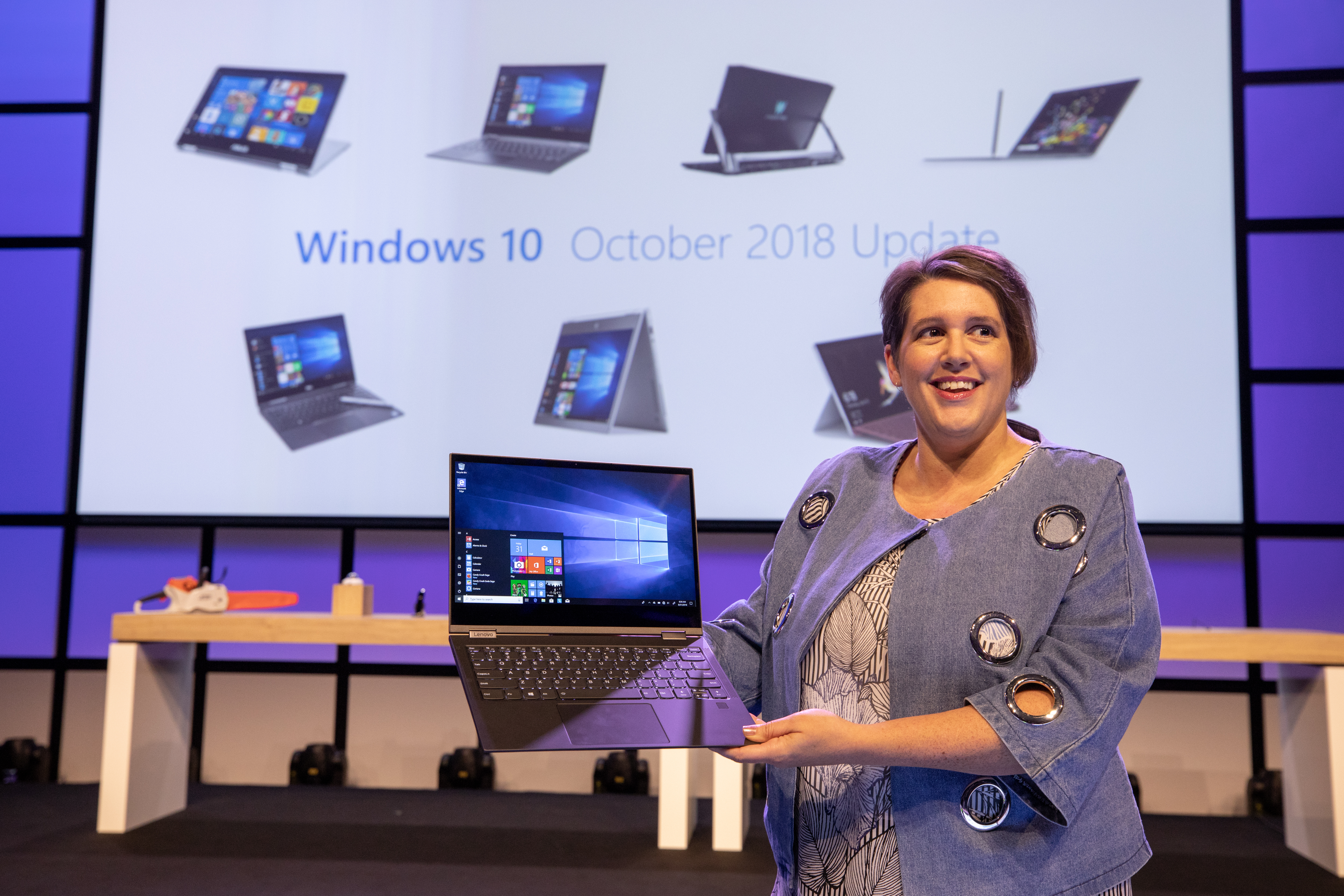
This year at IFA, we get another glimpse into what the future may hold as technology evolves and, more tangibly, the devices consumers will have in hand. This week, we’ve seen numerous partners announce new and innovative modern devices that allow people to achieve more. To fully light up these new devices, we’re continuing to evolve our experiences and features to bring more functionality and delight to our Windows users.
Erin Chapple, corporate vice president, Microsoft, speaking at the IFA 2018 keynote in Berlin
As part of this commitment, I’m pleased to announce that our next feature update to Windows will be called the Windows 10 October 2018 Update. With this update, we’ll be bringing new features and enhancements to the nearly 700 million devices running Windows 10 that help people make the most of their time. We’ll share more details about the update over the coming weeks.
We’re excited to continue to innovate with our partners and to bring new and meaningful technology to this ever-changing world. Today at IFA, Nick Parker, corporate vice president, Consumer and Device Sales, and Erin Chapple will be showcasing a number of these great new Windows PCs as part of our keynote presentation. For those of you that can’t be at IFA, not to worry. Here’s Erin to tell you more about the exciting innovation she’ll be showing in Berlin.
New PCs, new opportunities (Erin Chapple, corporate vice president, Microsoft)
I’m so excited to be here in Berlin to share new Windows experiences that help people achieve more – all come to life by new modern PCs announced this week.
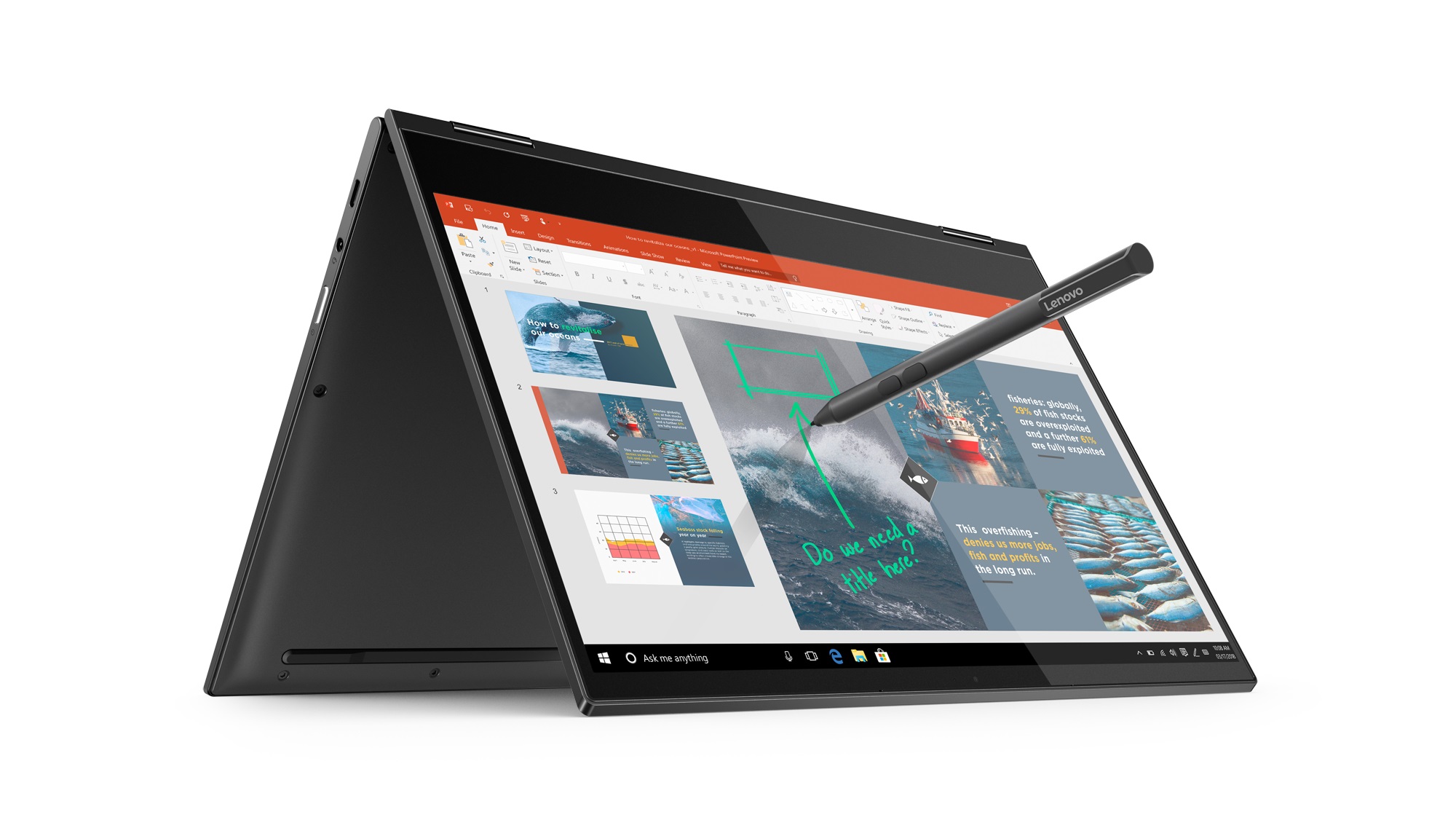
One of the areas that remains a top commitment for us is the connected computing space. Earlier this week, we took another step forward in our focus on connected PC experiences with the announcement of the first Qualcomm Snapdragon 850 powered Always Connected PC: the Lenovo Yoga C630 WOS (Windows on Snapdragon). Lean, light and crafted from premium aluminum, the Yoga C630 WOS offers LTE connectivity and, as noted by Lenovo, an incredible up to 25 hours [1] of battery life. Combined with powerful entertainment features and an optional Lenovo pen, the Yoga C630 WOS is designed for wherever the day takes you.
Lenovo Yoga Book C630
Beautiful devices like the Lenovo Yoga C630 WOS are pairing the functionality of Windows 10 with portable, lightweight devices that keep our users connected to the things that are important to them, while on the go. We believe that the mobile, cellular-connected PC experience is going to continue to grow in popularity, and devices like the Lenovo Yoga C630 WOS, as well as connected PCs from ASUS and HP that went on sale earlier this year, are ensuring that we have a robust and diverse portfolio of products to keep users connected and happy.
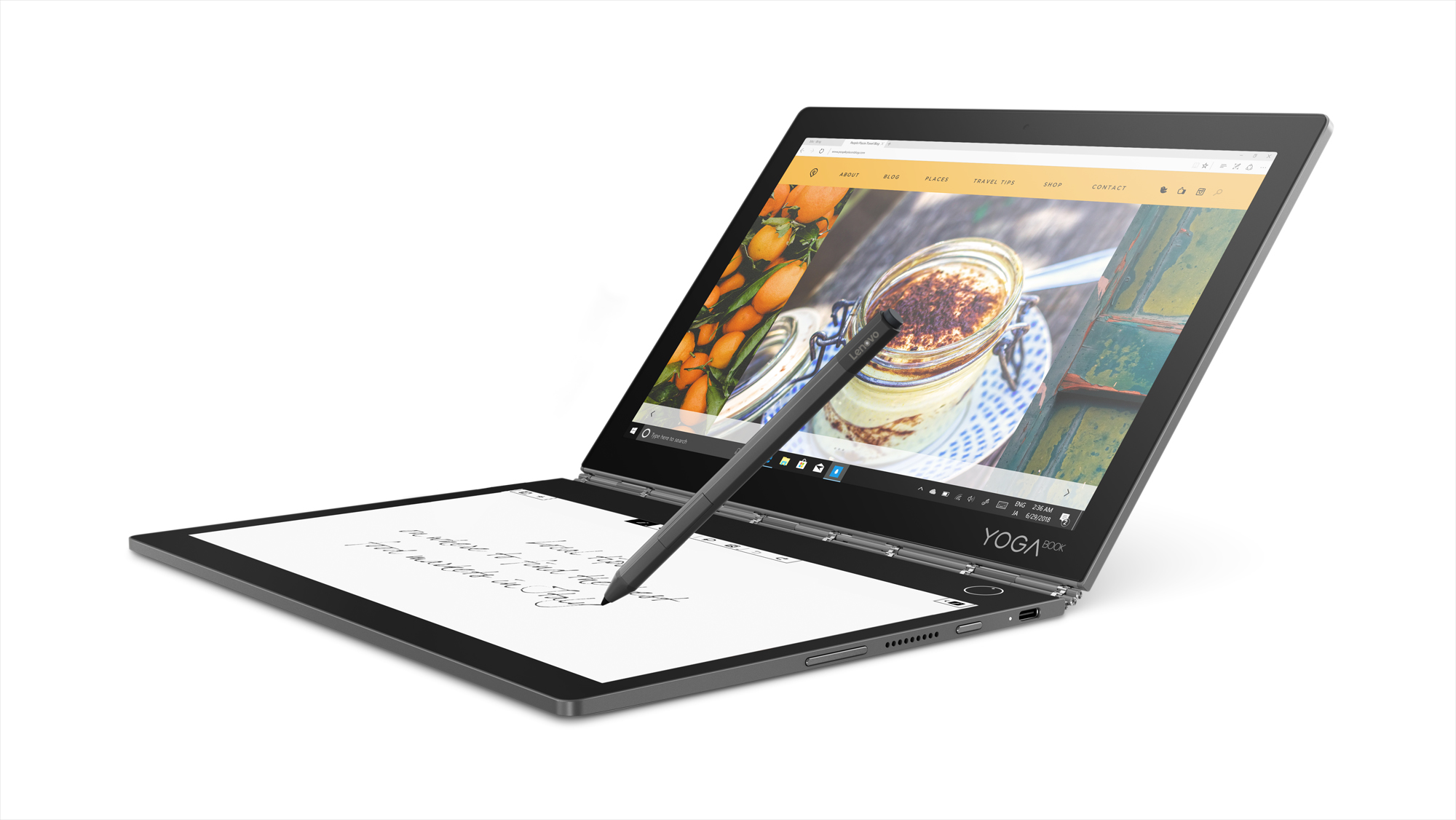
Lenovo also announced the Lenovo Yoga Book C930 – a multi-year, multi-release investment by Lenovo focusing on creativity and productivity for the mobile user, using new paradigms of input and content consumption built on the Windows 10 platform, combined with optional Office productivity tools. At the press of a button, the Yoga Book C930’s E Ink display appears and serves as a keyboard, notepad and eReader. Ultra-thin and light, the device is packed with Windows hero features like Cortana, Windows Ink and Windows Hello, along with optional 4G connectivity to keep you productive all-day long.
Lenovo Yoga Book C930
Another great productivity PC is the Dell Inspiron 13 7000 2-in-1. It brings beauty from every angle with a 3-sided narrow border that focuses on the IPS and Active Pen compatible touch screen. The Inspiron 13 7000 2-in-1 brings a ‘Modern Standby’ feature for instant-on performance and the ability to log in with just one touch using the Windows Hello fingerprint reader, while a miniature 4-element lens webcam offers temporal noise reduction and increases image quality in low-light settings.
Dell Inspiron 13 7000 2-in-1
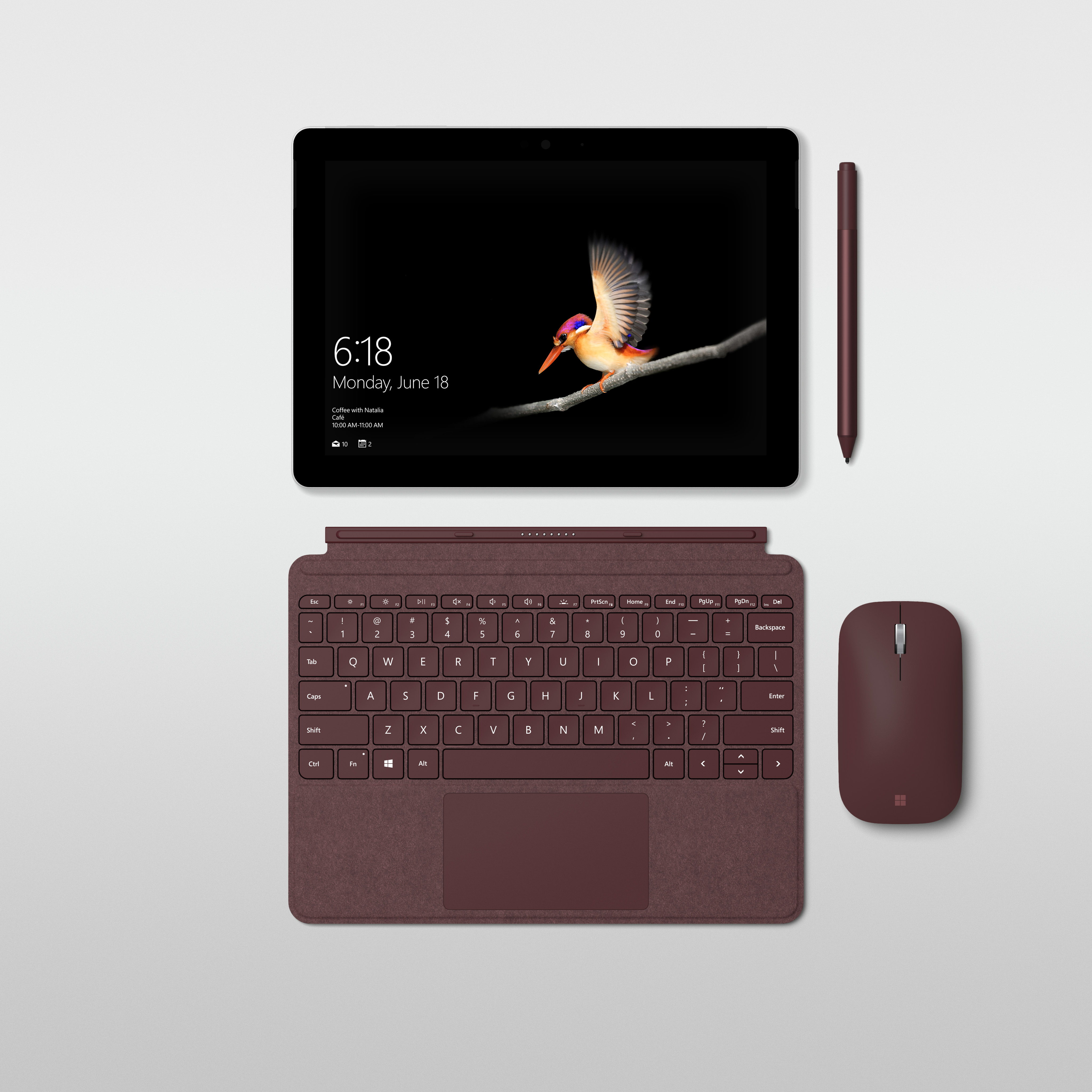
One of the devices that really turned heads in the booth this week was the new Surface Go. It offers all the comforts of a laptop, with the convenience of a 10’’ tablet. Sometimes, a little can go a long way, and the Surface Go offers a small, 1.15 pound portable 2-in-1 form factor that adapts to the way you want to work. Whether at work or home, travelling, or just for everyday tasks, it runs Office365 with a touchscreen, has built-in Windows Hello for a more secure sign-in and offers note taking, drawing and more with the Surface Pen.
Surface Go
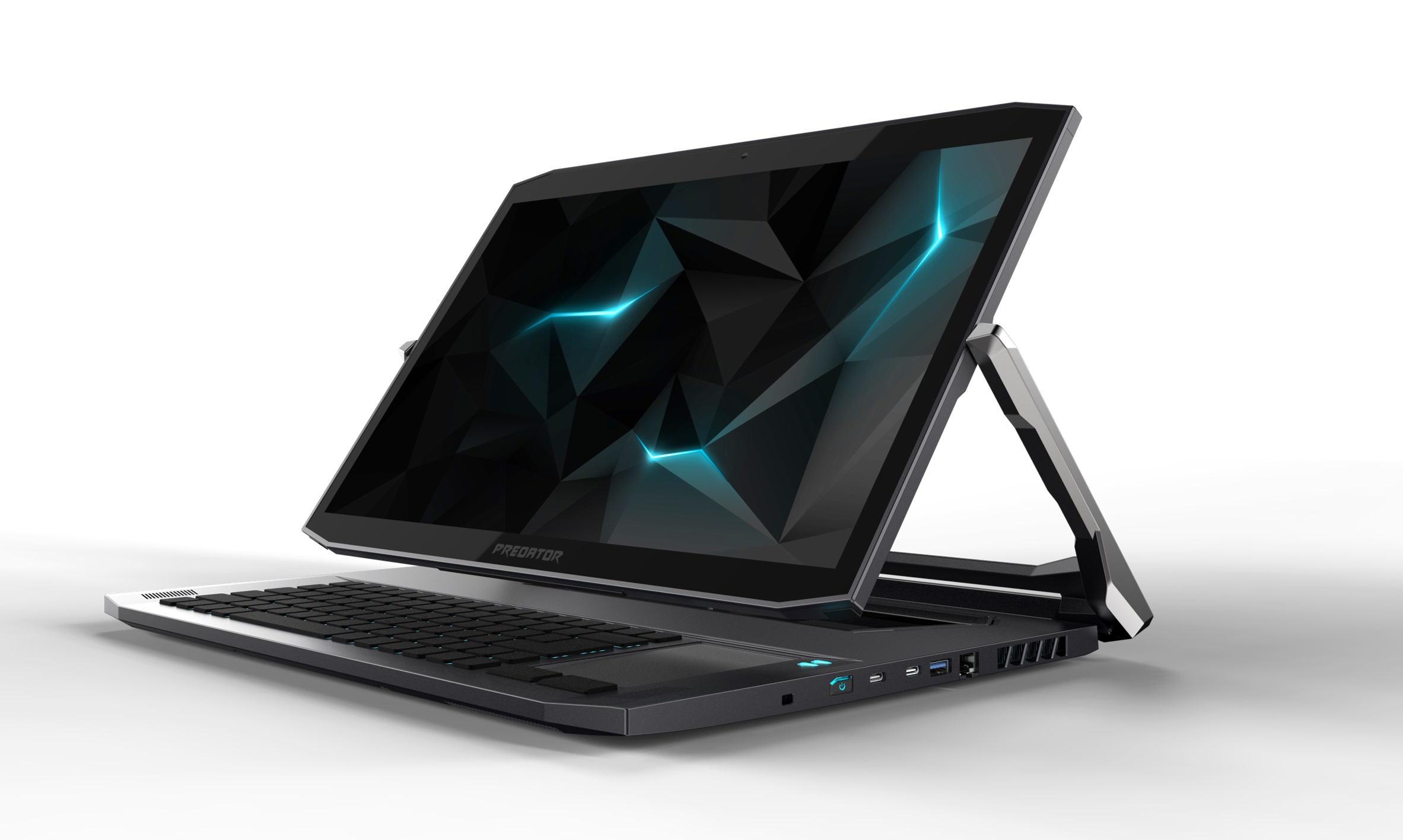
And, of course, we have to have something for our gaming fans! The newly refreshed Acer Predator Triton 900 gaming rig sports the latest 8th Generation Intel Core i7 processor for ultimate power and speed, while the laptop’s hinge pivots the screen to fit whatever angle you’d like to game at. With the garage door, you can insert an Xbox controller dongle to play Xbox games seamlessly, and a custom-engineered dual-fan keeps things cool while the RGB backlit keyboard and overclocking capabilities customize your gaming experience.
Acer Predator Triton 900
As you can imagine, this is only a small snapshot of the great innovation that is coming from our partners this week here in Berlin. Whether it’s gaming, productivity or creativity that drives you, there’s truly a modern Windows 10 PC that will help you achieve more. And, as Roanne mentioned, we’re excited to bring even more experiences and innovation to our customers with the Windows 10 October 2018 Update.
To learn more about the other devices announced this week at IFA, check out posts about Dell, Acer, Lenovo and MSI.
[1] Battery life varies significantly with settings, usage and other factors.
Every so often I run into a Linux distribution that reminds me of the power of open source software. SharkLinux is one such distribution. With a single developer creating this project, it attempts to change things up a bit. Some of those changes will be gladly welcomed by new users, while scoffed at by the Linux faithful. In the end, however, thanks to open source software, the developer of SharkLinux has created a distribution exactly how he would want it to be. And thatmy friends, is one amazing aspect of open source. We get to do it our way.
But what is SharkLinux and what makes it stand out? I could make one statement about SharkLinux and end this now. The developer of SharkLinux reportedly developed the entire distribution using only an Android phone. That, alone, should have you wanting to give SharkLinux a go.
Let’s take a look at this little-known distribution and see it’s all about.
What Exactly is SharkLinux?
First off, SharkLinux is based on Ubuntu and makes use of a custom Mate/Xfce desktop. Outside of the package manager, the similarities between SharkLinux and Ubuntu are pretty much non-existent. Instead of aiming for the new or average user, the creator has his eyes set on developers and other users who need to lean heavily on virtualization. The primary feature set for SharkLinux includes:
KVM hypervisor
Full QEMU Utilities
Libvirt and Virtual Machine Manager
Vagrant (mutate and libvirt support)
LXD/LXC/QLc/LXDock
Docker/Kubernetes
VMDebootstrap
Virt-Install/Convert
Launch Local Cloud Images
Full System Containers GUI Included
Kimchi – WebVirtCloud – Guacamole
Vagrant Box Conversion
Many Dashboards, Admin Panels
LibGuestFS and other disk/filesystem tools
Nested Virtualization (hardware depending)
Alien (rpm) LinuxBrew (Mac) Nix Package Manager
Powershell, Upstream WINE (Win)
Cloud Optimized Desktop
Dozens of wrappers, automated install scripts, and expansion packs
Guake terminal
Kernel Options v4.4** -> v4.12*
Clearly, SharkLinux isn’t built for those who simply need a desktop, browser, and office suite. This includes tools for a specific cross section of users. Let’s dive in a bit deeper.
Post Install
As per usual, I don’t want to waste time on the installation of another Linux distribution, simply because that process has become so easy. It’s point and click, fill out a few items, and wait for 5-10 minutes for the call to reboot.
Once you’ve logged into your newly installed instance of SharkLinux, you’ll immediately notice something different. The “Welcome to SharkLinux” window is clearly geared toward users with a certain level of knowledge. Tasks such as Automatic Maintenance, the creation of swap space, sudo policy, and more are all available (Figure 1).
The first thing you should do is click the SharkLinux Expansion button. When prompted, click Yes to install this package. Without this package installed, absolutely no upstream packages are enabled for the system. Until you install the expansion, you’ll be missing out on a lot of available software. So install the SharkLinux Expansion out of the gate.
Next you’ll want to install the SharkExtras. This makes it easy to install other packages (such as Bionic, MiniKube, Portainer, Cockpit, Kimchi, Webmin, Gimp Extension Pack, Guacamole, LXDock, Mainline Kernel, Wine, and much more (Figure 2).
Sudo Policy
This is where things get a bit dicey for the Linux faithful. I will say this: I get why the developer has included this. Out of the box, SharkLinux does require a sudo password, but with the Sudo Policy editor, you can easily set up the desktop such that sudo doesn’t require a password (Figure 3).
Click on the Sudo Policy button in the Welcome to SharkLinux window and then either click Password Required or Password Not Required. Use this option with great caution, as you’d reduce the security of the desktop by disabling the need for a sudo password.
Automatic Maintenance
Another interesting feature, found in the Welcome to SharkLinux window is Automatic Maintenance. If you turn this feature on (Figure 4), functions like system updates will occur automatically (without user interaction). For those that often forget to regularly update their system, this might be a good idea. If you’re like me, and prefer to run updates on a daily basis manually, you’ll probably opt to skip this feature.
After taking care of everything you need in the Welcome to SharkLinux window, close it out and you’ll find yourself on the desktop (Figure 5).
At this point, you can start using SharkLinux as you would any desktop distribution, the difference being you’ll have quite a bit more tools for virtualization and development at your disposal. One tiny word of warning: You will notice, by default, the desktop wallpaper is set to randomly change. In that mix of wallpapers, the developer has added one particular wallpaper that may not be quite suitable for a work environment (it’s nothing too drastic, just a woman posing seductively). You can remove that photo from the Appearance Preferences window (should you choose to do so). Beyond that, SharkLinux works as well as any desktop Linux distribution you can find.
One Quirky Distribution
Of all the Linux distributions I have used over the years (and I have used PLENTY), SharkLinux might well be one of the more quirky releases. That doesn’t mean it’s one to avoid. Quite the opposite. I highly recommend everyone interested in seeing what a single developer can do with the Linux platform give SharkLinux a try. I promise you, you’ll be glad you gave it a go. SharkLinux is fun, of that there is no doubt. It’s also a flavor of desktop Linux that shows you what is possible, thanks to open source.
Learn more about Linux through the free “Introduction to Linux” course from The Linux Foundation and edX.
Posted by: xSicKxBot - 08-31-2018, 11:12 AM - Forum: Lounge
- No Replies
Nintendo's Dragalia Lost Getting A Video Direct [Update]
Tonight, at 8:30 PM PT / 11:30 PM ET, Nintendo will have another Direct. The livestream will discuss new details about Nintendo's first original mobile title, Dragalia Lost. [Update: As promised, the Direct-style video offered up a full reveal for Dragalia Lost. It's an action RPG co-developed alongside Cygames, the company responsible for popular mobile RPG Granblue Fantasy.]
Announced last April, Dragalia Lost is an action RPG developed by both Nintendo and Cygames. Described as a "new gaming experience with worldwide appeal," Dragalia Lost launches in the United States, Japan, Hong Kong, Taiwan, and Macau on September 27. Nintendo hasn't announced any other information about the game, so you'll have to tune in to the Direct later tonight to learn more.
Nintendo long expressed a desire to stay away from mobile game development, but the company eventually changed its tune. The developer's three mobile titles--Super Mario Run, Animal Crossing: Pocket Camp, and Fire Emblem Heroes--each released to various levels of success. Both Super Mario Run and Heroes have done alright, but Pocket Camp faced heavy criticism for its repeated attempts to get players to buy into microtransactions.
Shigeru Miyamoto--most well known for creating games like Super Mario Bros. and The Legend of Zelda--recently announced that Nintendo is trying to find a different way for getting players to pay for mobile games. "I can't say that our fixed-cost model has really been a success," Miyamoto said, "But we're going to continue pushing it forward until it becomes entrenched. That way everyone can develop games in a comfortable environment. By focusing on bringing games to the widest range of people possible, we can continue boosting our mobile game business."
The Dragalia Lost Direct comes a day after Nintendo's announcement that 22 indie games are coming to Switch. The biggest surprise from yesterday's Direct is Into the Breach coming to Switch. One of our favorite titles from 2018--we gave Into the Breach a 9/10 in our review--this turn-based strategy game is available on Nintendo Eshop right now for $15/£11.39.