Nintendo Power Podcast is the official podcast of Nintendo of America, in which guests such as Nintendo employees and developers discuss the world of Nintendo each month.
In Episode 8, host Chris Slate (previously editor-in-chief of the Nintendo Power™ magazine) is joined by Toph, a competitive Super Smash Bros.™ player and commentator, and JC Rodrigo from Nintendo Treehouse to discuss recent Super Smash Bros. Ultimate announcements, the competitive scene and their favorite fighting games. The guests also answer listener questions, take the Warp Zone quiz and more.
Nazi tattoos scrubbed from Scum days after Early Access debut
A trio of tattoos that featured Nazi symbols or imagery have been removed from the prison-set survival game Scum, a discovery and removal that both fall within days of the game’s Early Access launch.
As reported by Polygon, both developer Gamepires and publisher Devolver Digital have shared an apology, with the latter noting that it plans to review the game for other inappropriate imagery.
While some games like Destiny 2 and Batman: The Telltale Series have had to patch out offensive or inappropriate images due to unintentional use in the past, the images found in Scum were included intentionally to, according to a statement from publisher Devolver Digital to Polygon, “assist in portraying a realistic element of prison culture and the horrid elements within it.”
“This content has been patched out as of this morning, and Devolver Digital are currently conducting a full review of all assets and content in the game with Gamepires,” said a representative from Devolver. “We strongly condemn any and all use of hateful symbology in our games and agree it should have never been in the game regardless of creative intent or realism. Devolver Digital apologizes unreservedly.”
Gamepires further elaborated on the tattoo’s inclusion in the game, saying that “our intention was to create an atmosphere of the worst of the worst criminals in Scum, and to portray the horrible type of people who would find themselves in a ‘fight to the death’ situation for a futuristic reality show where the worst criminals are pitted against one another.”
“Since our initial response on our forums we’ve discussed this as a team and with our publisher and agree wholeheartedly that this content was unnecessary, should not have been included, and have removed it,” continues the developer’s statement. “We apologize for this misstep and promise to our fans that we will take more caution in our approach moving forward.”
Now Available on Steam Early Access – The Universim, 10% off!
The Universim is Now Available on Steam Early Access and is 10% off!*
Jump straight into managing your own planets as you guide a civilization through the ages. Become the ultimate empire in The Universim, a new breed of God Game in development by Crytivo.
Referred to as "starter pack" versions of the games, each bundle includes both the game and a colored strategy guide to help players. Nintendo hasn't revealed what's exactly inside the guide, so it could be as simple as a collection of tips for getting started or as complex as a series of maps to every collectible and in-game secret. The company hasn't revealed whether the Breath of the Wild or Splatoon 2 bundles include their respective title's DLC expansions either. We're following up with Nintendo PR in hopes of finding out.
Also on September 28, three new New Nintendo 2DS XL handhelds are launching, each for $150. The new handhelds come in purple and silver, black and turquoise, and orange and white. Each one comes with Mario Kart 7 preinstalled as well.
Nintendo also announced 22 new games coming to Switch over the next several months. The most surprising among them is Into the Breach. Previously a PC exclusive, this turn-based strategy game is one of our favorites from 2018, even scoring a 9/10 in our review. You can buy it right now for $15/£11.39 on the Nintendo Eshop.
The next major exclusive for the PlayStation 4 is almost here. Spider-Man launches on September 7, and plenty of people are excited to get their hands on Peter Parker's latest adventure. A few of us have been playing early copies of the game for the past week and compiling our impressions, but you'll have to wait a little longer before you can read them.
The embargo date for Spider-Man reviews is Tuesday, September 4 at 7 AM PT / 10 AM ET / 3 PM BST (that's midnight in Sydney). You'll have to wait until then for our final thoughts on the game. That gives you three days to quickly change your mind over whether or not you want to pre-order the game if you were waiting on our review. Insomniac Games has already let a few details about Spider-Man slip prior to the embargo date, such as the game taking 20 hours to beat and the first DLC expansion launching on October 23.
For more information, you can read up on everything we've covered concerning Spider-Man from previous trailers, gameplay demos, interviews, and stage presentations. Kallie flew to Los Angeles to get a hands-on demo playing as Mary Jane Watson, whose levels are something you should be looking forward to, as well as interview Spider-Man's creative director Bryan Intihar. Edmond played a demo of the opening hours and found a lot of mechanics that players will like about Spider-Man, while also noticing a few annoying details.
At this past E3, we all agreed that Spider-Man gets the feel of our favorite wall-crawler just right. We also got our first look at Spidey's new Sinister Six--which is composed of Electro, Scorpion, Vulture, Shocker, Rhino and (probably) Doctor Octopus--in a new gameplay trailer. At Comic-Con, Spider-Man's enemies were expanded to include a task force led by Silver Sable that's been ordered to hunt him down.
Posted by: xSicKxBot - 09-02-2018, 06:21 AM - Forum: Lounge
- No Replies
Acclaimed RPG Wasteland 2 Is Coming To Switch In September
InXile Entertainment has partnered with Nintendo to release Wasteland 2: Director's Cut on Switch. Originally releasing in 2014, Wasteland 2 is a post apocalyptic RPG available for PC. Director's Cut--already available for Xbox One, PS4, and PC--adds a visual upgrade and numerous gameplay features.
"When I first showed a screenshot of Wasteland 2 running on the Nintendo Switch, it erupted into one of the largest social media reactions I have ever seen," said InXile Entertainment CEO Brian Fargo. "RPG fans are looking for new ways to experience old favorites, and Nintendo fans are looking for big, meaningful RPG experiences they can play anywhere they go. The game received a huge reaction last week at Gamescom, and it feels great to be this close to getting the game in fans' hands."
Although the Wasteland franchise takes place in a similar setting to the Fallout series--the original Wasteland went on to inspire the first Fallout--there are noticeable gameplay differences between Wasteland 2 and modern day Fallout titles. Wasteland 2 plays like early Fallout games, with a larger focus on squad building and tactical, turn-based combat.
Instead of creating one character, you'll start Wasteland 2 customizing four different party members. This allows you to have more than one specialization at the start. For example, you might make one character into a sniper, another into a medic, the third into a smooth-talking thief, and the final party member a soldier. Like Fallout, there are dozens of different skills, and you'll have to carefully balance them all amongst your team to ensure they survive their quest to discover the identity of a mysterious killer.
Back in 2014, we gave the game an 8/10. In our Wasteland 2 review, Daniel Starkey wrote, "In many ways ... Wasteland 2 represents everything about classic computer role-playing games that the modern iterations of Fallout aren't. Where Fallout 3 gives you an extreme amount of general latitude, Wasteland 2 focuses on the narrative minutiae and tangible consequences of your individual actions. Where Fallout 3 tries to craft a broad world that feels whole, Wasteland 2 loosely strings together several locations with hidden connections, with secrets waiting to be discovered and picked over. And where Fallout masterfully uses comedy to lambast the ludicrous tone of paranoia surrounding Cold War America, Wasteland 2 attacks the natural arrogance of the individual. It forces us to confront the painful truth of our own blind self-righteousness, and shows us how childish our own grand plans truly are."
Wasteland 2: Director's Cut comes to Switch on September 13. The game is now available to add to your Nintendo Eshop wishlist if you want a notification for when you can purchase it.
Digital board games have been getting better and better as the years go by – from made-for-digital games like Anti-Hero, to digital ports of popular table-top games like Scythe and Settlers of Catan. We’re now enjoying a veritable cornucopia of entertainment.
With that being said, it’s always a good day to pick the best of the best from the hoard of excellent board games. We’ve stuck with digital ports of physical games for now, and we’ve tried to cover a range of genres and types of games. It is our great pleasure to present to you our pick of the best boardgames for iPad, iPhone and Android. We’re a mobile gaming website, so we’d know these things.
This 2018 boardgame adaptation courted controversy when the developers were caught doing dodgy things with Steam reviews, effectively blocking the PC release. That didn’t stop them releasing on mobile though, and we’re so very glad they did.
Istanbul: Digital Edition is pretty much a flawless conversion of an excellent board game that has few moving parts and only limited information to track, which makes for an ideal mobile game. There are options to set up online games or offline multiplayer contests with a mix of human and computer controlled opponents. AI rivals blaze through their turns and on the hardest level offer even experienced players a challenging game. The evocative graphics stay true to the board game and the atmospheric music and context sensitive sound effects are the icing on a very tasty cake.
Developer: Handelabra Games Platforms:iOS Universal,Android Price: $9.99 Genre: Card Game/Dungeon Crawler Cross-Platform MP: No
The physical version of One Deck Dungeon by Asmadi Games is an excellent distillation of the pen-and-paper RPG formula, converted into card-driven strategy game that can played with a small group of friends, or even solo. Lots of tabletop games jump to digital and struggle to create a quality single-player campaign mode, instead relying on a passable AI and the lure of various multiplayer modes to provide enjoyment. Handelabra’s digital conversion of ODD suffers no such worries. It is packed with meaningful strategic decision making and oozing with replay value.
It’s another game that’s ideally suited for a mobile version and Handelabra have knocked it out of the park once more – one of 2018’s best releases by far, and a must-have for anyone’s collection provided you like card games and RPGs. Also, you may need to spend some time referencing the rules as you learn the ropes, and there’s always that harsh mistress that is Chance. Still, an excellent game all round.
Developer: Days of Wonder/Asmodee Digital Platforms:iOS Universal, Android Price: $4.99 Genre: Strategy/Set Collection Cross-Platform MP: Yes
An ‘original’ boardgame port, Ticket to Ride was an excellent proof of concept for the genre. Ahead of it’s time perhaps, as we’re only now starting to see the digital boardgame market really take off, but for a game released in 2011 Days of Wonder did a pretty bang-up job.
A game doesn’t get wide appeal with complicated rules, so Ticket to Ride isn’t going to give quite the tactical crunch you might want from meatier games. But it plays in less than ten minutes and manages to include a variety of delicate balancing problems: tactical vs. strategic, producing points vs. disrupting others, securing valued routes vs. obscuring your true goals, and seeking the rewards of missions vs. avoiding costly failures. A game which offers all that, and which you can comfortably play with children makes this an easy inclusion in any digital collection.
Another excellent Playdek adaptation, Lords of Waterdeep‘s mobile ports hark back to the developer’s heyday, before things to got a little rough. Despite offering a number of small innovations to the worker placement genre, it’s only a little harder to learn than something like Stone Age. At its core is a pretty abstract exercise, the theme it’s loosely connected to is so rich that it’s easy for it to shine through in more playful moments. Perhaps it’s even for the best that there’s no personality to hang on these cubes: you might start to feel a little bad about sending you characters on dangerous missions.
The interface, though portrait-only was very modern at the time and holds up well now: lots of lovely little touches and animations, reasonable menu structures with the options you expect from Playdek, and the information you need but a tap or scroll away. On the iPad, there’s perhaps enough room to put more of this onscreen at all times, but it’s about as crowded as you’d want on the phone, and there’s value in a unified interface.
Developer: Asmodee Digital Platforms: iOS, Android Price: $3.99 Genre: Co-op Cross-Platform MP: No
Pandemic: the cooperative game that launched a trillion microbes. Pandemic, the war waged against emerging for a clean bill of health. One to four players coordinate members of a global response team who treat individual locations for the outbreak. To win, players eliminate four separate virulent strains and prevent a pandemic and its ensuing apocalypse. Mostly, this means going to specific cities and removing disease cubes on-site, but to win the final victory, players must also pool and share resources until they research cures.
The game’s state of balance is a winning mixture of strategy and chaos, with the location deck providing a little uncertainty. Each player has a unique role and power which further specializes their niche. If the co-op nature of the game seems mild, consider that the ‘cooperation’ of choosing the best actions for the team can bring out the most bilious, divisive side of friendship. Fun solo, but even more lively with a group. The app is a dream: simple, intuitive, replayable and with the game’s expansions offered as DLC. Its only drawback is the lack of online multiplayer, but cooperative games shine best in-person anyways.
Talisman is a sprawling, chaotic, dice-based, fantasy race to the Crown of Command. Players might occasionally do battle or sling spells at one another, but for the most part the game is a struggle to build up a character’s stats and equipment until they can brave the challenges of the inner regions. Once they make it to the end space, the winner will use the devastating power of the Crown of Command turn by turn until all other characters have been eliminated. The core action of any turn is simply rolling a dice, moving across the board and drawing from the encounter deck, so it is easy to pick up.
The game has almost a dozen expansions, a thousand cards in many separate decks, a score of alternate endings. It has some of the zany unlikely comboes of Cosmic Encounter yet unlike the latter is not a direct conquest. The digital app is sleeker, for the magic of the board game can get bogged down in half-hour setup or longer, not to mention tracking everyone’s stats and inventory. The app refocus the game on the journey and removes other distractions, letting the game transport you to another world that never was, and never will be quite the same again.
Developer: TheCodingMonkeys, Asmodee Digital Platforms: iOS, Android Price: $9.99, $7.99, expansions as IAP Genre: Tile-placement
Tile-laying games are almost always soothing by nature, but the best of them, like Carcassonne, feel dire at the same time. Named for the beautiful French settlement established in misty B.C.E., the game sees players building the fields, roads and fortifications of its namesake turn-by-turn, with meeples staking claim on scoring zones. The game actually comes in two in two app flavors: vanilla 2D by TheCodingMonkeys on iOS and then a 3D re-release by Asmodee on Android. Both are excellent and well-supported offerings.
Publisher: Asmodee Digital (developed by Playdek) Platforms: iOS, Android Price: $5.99, $3.99, expansions as IAP Genre: Hand-management, Action allotment Cross-Platform MP: Yes
Historically didactic and apocalyptically intense, Twilight Struggle is the premier two-player card duel simulating the height of the Cold War as it played out across the global stage. The app’s release was long awaited but has since already been feted, for its release was a milestone and one of 2016’s highlights. Full of double-think and crisis management, the game is relatively easy to play and easy to lose.
Despite the name, Through the Ages is the hot new kid on the block. Charting the rise and continued hegemony of your civilization takes card-drafting chutzpah and attentive resource management. The app features a droll, informative tutorial and one of the best user interfaces within recent memory. Previously, to experience one of the enduring greats of board gaming, one had to wrangle together several committed friends and four or more hours for a first play. Now, one of the best games of all time (by present-day hobbyist consensus, anyway) is easier to play with a wider audience.
Terra Mystica could somewhat reductively be introduced as a heavyweight fantasy offshoot of Settlers of Catan. The game’s unique factions and interrelated systems of ritual and magic make for a fresh, intricate euro whose middling runtime doesn’t keep it from packing serious decisions. Even the initial placement phase can scuttle a player’s chances if it takes a bad turn. This level of competition and interdependence is always great fun.
Publisher: Asmodee Digital (developed by Playdek) Platforms: iOS Price: $6.99 Genre: Worker placement, Euro
Agricola, cruel master of fate, in which farmers struggle just to get by and maybe have some kids to help out with the day’s work. The game’s pinched cycles of boom and bust are seasonal yet also aspirational, tasking the players to marginally better their situations by stockpiling food, learning a new profession, breeding animals or else investing some other healthful, gainful pasttime. Agricola is only punishing in light of how many sheer options there are to pursue, yet despite all of the various cards, this is a classic worker-placement Euro at heart.
We’re keeping the list pretty tight at the moment, but there’s way more than ten excellent boardgames to celebrate, with even more on the way every year. Every now and then we’ll rotate games out for other games, but we don’t want those past greats to be forgotten. Below is a list of previous members of this list, never to be forgotten:
Posted by: xSicKxBot - 09-02-2018, 12:04 AM - Forum: Lounge
- No Replies
Goofy Tycoon Simulator PC Game Lets You Dress Up Your Dinosaurs
Washbear Studio has announced that the developer's dinosaur-themed park tycoon simulation game, Parkasaurus, is entering Early Access. The title costs $20/€20.
Parkasaurus plays out like a goofy Jurassic Park where you're primarily responsible for designing the dinosaur exhibits and taking care of the needs of your customers. At the game's launch, you'll have access to 80 buildable items, four different employee types, and 24 dinosaurs. Washbear Studio has more planned.
Every dino begins life as an egg, which you must hatch and raise to adulthood. To help you keep track of every dinosaur under your care--and to add some creative flair--you can accessorize your assortment of reptiles with sunglasses, neckties, and beanies.
You have complete control of your park, from the biome systems to guest attractions. Visitors will leave reviews based on their time under your care, and it's up to you to decide whether you listen to their advice when building further park improvements. You do have to turn a profit to afford more expensive accessories or buildable items, so it's in your best interest to listen to what they have to say. If all else fails, you can cut your losses and unleash your hungry predators upon the populace. No customers, no complaints.
Parkasaurus is currently only scheduled for PC and comes to Steam Early Access on September 25. There is no planned console release.
These watchOS 5 features make the Apple Watch even better
Apple’s watchOS 5 release is just around the corner, and it’s packing a bunch of awesome new features that have convinced me to preorder the Apple Watch Series 4 as soon as it’s available. So let’s run through some of those exciting new features and why they’ll make the Apple Watch experience better than ever before.
[embedded content]
First, some bad news to owners of the original Apple Watch, sometimes called the Series 0, as they will not be able to use watchOS 5 on their devices. The operating system is only supported on the Series 1 and newer models, including the anticipated Apple Watch Series 4.
Podcasts and Audio
The feature I’m most excited for is the Podcast app, which is finally coming to Apple’s wearable device. If you own a pair of AirPods, the listening experience will be even better, especially since you can adjust your AirPods volume with the crown.
The best thing about Podcasts is that your favorite shows are constantly being updated with new episodes, and you can even stream them over LTE if your Apple Watch supports it. You can easily skip back and forward and change the playback speed, just like you can on your iPhone.
Podcasts also comes with its own complication, so you can get into the app straight from your watch face.
There’s also a new feature for developers that allows music and audiobooks from apps like Pandora and Audible to be synced to your Apple Watch for offline playback, without needing your iPhone nearby.
Siri can even be used to search for any show on Podcasts, which leads us to the next awesome watchOS 5 feature.
Raise to Speak and Siri
Say goodbye to saying “Hey Siri,” because now you can just raise your wrist and tell Siri to start a 30 minute outdoor run without the vocal prompt.
This is handy for anyone who doesn’t want to obviously show themselves to be talking to their digital assistant in public, and for those who want to get into the feature they want as quickly as possible.
The Siri watch face now learns what you do throughout your day, proactively suggesting relevant content and shortcuts at the right time and place throughout the day, and it works with your favorite third-party apps as well.
You can even get live scores for your favorite sports team, right on your Siri Watch face.
Fitness
What if you’re the kind of person that constantly forgets to start your workout? WatchOS 5 has you covered, with the new automatic workout detection feature that senses when you’re moving and alert you to start the workout.
It’ll even give you credit for any exercise you performed before actually starting the workout on the Apple Watch.
For the more competitive, the new Activity Competitions feature allows you to invite friends to a 7-day workout competition. After your friend accepts your invitation, both users will gain points depending on the percentage of their rings they close each day.
You can see the competition progress at any time, and receive alerts when you’re falling behind. When the contest finishes, you’ll even get an award.
Apple has also added a couple more workout modes like Yoga and Hiking, which is pretty cool because I enjoy hiking, and the Apple Watch Series 3’s barometric altimeter shows you how high you’ve climbed.
Rounding out the workout additions, Pace Alerts advise when you are behind or ahead of a target pace, while the new rolling mile pace metric will show runners their current pace and average pace per mile.
Walkie-Talkie
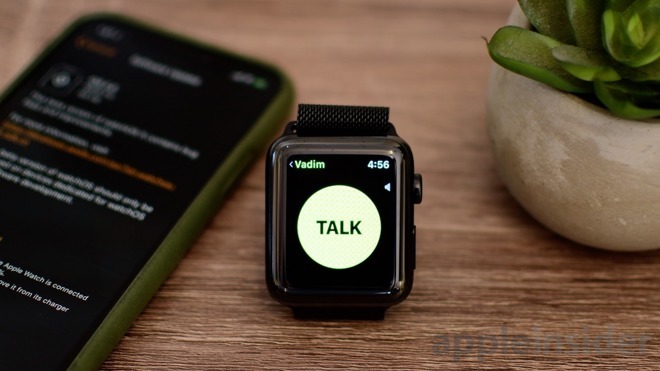
I don’t know about you, but sometimes I’m way too busy to call or text someone, especially with the fuss of calling and waiting for them to answer. That’s where the new Walkie-Talkie feature comes in.
Simply press the button, say a quick message, and release when you’re done. The message is instantly played out through the target Apple Watch.
To get started, open the app, choose a contact and send them an invitation. Once they accept, you’re ready to start sending and receiving audio messages, and it even works with LTE.
You can also keep your conversation private by using AirPods or other Bluetooth headphones. We tested this out, and found it worked incredibly well, even in beta.
Other Siri Improvements
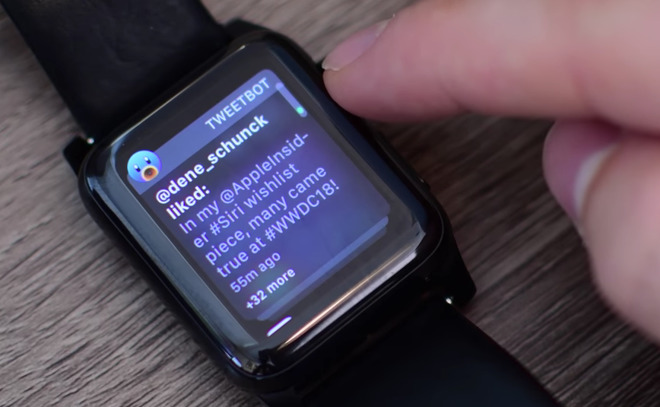
With watchOS 5, you can now respond to notifications without having to open up the relevant app. This makes it a lot easier to do quick tasks, like checking in to your flight.
One of the biggest features coming to iOS 12 is grouped notifications, and that same feature is coming to the Apple Watch. Instead of seeing a massive list of message notifications, they are grouped into one notification, which you can clear or open to view in more detail.
Apple has also added WebKit to watchOS 5, so if you receive a message containing a website link, you can now see a preview of that website right on your Apple Watch. You can even do some limited web browsing if you send yourself a link to a site or your preferred search engine.
If the Apple Watch Series 4 has a larger display, as rumors suggest, previewing websites should be a lot nicer on the new models.
Speaking of the rumored Series 4 Apple Watch, Apple seems to have inadvertently leaked images of the forthcoming wearable. In the leaked image, we see a brand new watch face full of complications —nine to be exact. This new face will likely be exclusive to the Series 4, but it does give users access to much more information at once.
With WatchOS 5, it’s a lot easier to use the Do Not Disturb mode. You can now schedule it to turn on for a certain amount of time, or until you leave your location, which is perfect for business meetings.
Along with these major new features that are coming with watchOS 5, there are also a bunch of small little changes and feature additions Apple has added, which AppleInsider has previously examined.
AppleInsider will also be getting its hands on the new Apple Watch Series 4 as soon as it’s released, so expect a hands-on shortly after its release.