R-Type Dimensions EX Is Getting A Very Limited Collector’s Edition On Switch
Stuttgart-based publisher Strictly Limited Games has revealed that it will be releasing two physical editions of R-Type Dimensions EX on Switch later this month.
R-Type Dimensions EX contains both R-Type I and R-Type II in one lovely shoot ’em up package, both of which are regarded as being up there with the most influential games of the genre. Players must save the universe from the evil Bydo in their spaceship and, across a total of 14 levels, shoot their way through the Bydo-contaminated worlds alone. In a nice touch, you can switch between the original, retro 2D graphics and the completely reworked 3D mode at the touch of a button. We described last year’s digital release as a “top-notch” package in our review, so feel free to give that a read for more info.
As well as a standard physical release, the game will be treated to a fancy Collector’s Edition, with pre-orders going live from Strictly Limited Games’ store from 24th February. The Collector’s Edition is limited to just 2,000 copies and will cost €49.99; the standard physical release will receive 3,000 copies and will be priced at €24.99.
Specific details about the Collector’s Edition haven’t been shared just yet, although Strictly Limited’s last Switch collector’s release, for Velocity 2X, came with a soundtrack CD, an artbook, and a poster.
Have you already played this one on Switch? Would you like to add a physical copy to your collection? Tell us below.
LG UltraWide 5K2K is a beast of a monitor with Thunderbolt 3
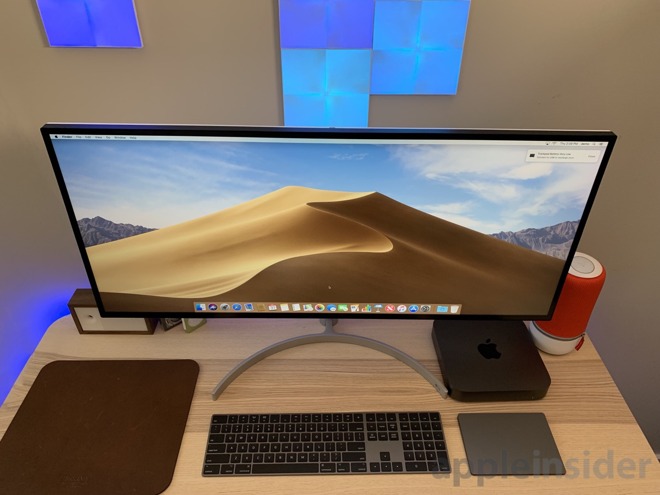
LG has been catering to Mac owners for years, and the company’s UltraWide 5K2K display is a great solution for creative professionals who want a bit more horizontal real estate.
LG UltraWide 5K2K and 15-inch MacBook Pro
If you’ve got a MacBook Pro on your desk, a big monitor absolutely helps workflow. If you’ve got a more compact Mac mini, it’s a requirement. With certain tasks such as video or audio editing, programming, or other content creation, more real estate is good, and a 34-inch wide display certainly provides that.
Resolution
As a display —especially at this level —it needs to kill it in the visuals department. The LG UltraWide 5K2K sports a resolution of 5120 x 2160, which at first blush makes this look like a 5K monitor.
Eagle-eyed readers will note, however, the vertical resolution. In short, it has the horizontal resolution of a 5K monitor and the vertical resolution of a 4K display.
LG UltraWide 5K
A massively wide 21:9 display is going to have a bit of a niche audience but anyone who is coming from a resolution of 4K or below should be happy.
Color representation is accurate and like many high-end monitors, an individually unique color calibration report is included in the box to verify its integrity. It supports DisplayHDR 600 (HDR10) so between the brightness and accuracy, colors pop —even with the matte finish.
As far as other specs go: The refresh rate is 60Hz, it has a max brightness of 450 nits, covers 90 percent of the DCI-P3 wide color gamut, has a contrast ratio of 1200:1, and an exceptionally wide 178-degree viewing angle.
A gamer may find flaws with the slower 60Hz refresh rate, but let’s be real —most hardcore gamers aren’t going to be using a Mac. If you are a steadfast gamer who needs a gaming-focused monitor, we’d suggest looking elsewhere for 120Hz or 240Hz.
Connectivity
Connectivity isn’t an issue, with a bevy of ports available.
LG UltraWide 5K
Ports include:
1 x Thunderbolt 3
1 x DisplayPort
2 x HDMI
1 x 3.5mm Headphone
2 x USB Type-A
1 x USB Type-B
1 x Power input
When you connect a 15-inch MacBook Pro over Thunderbolt 3, you get to take advantage of the audio output on the back of the monitor for headphones and the two USB ports while also drawing 85 watts of power. The 15-inch MacBook Pro can handle 87W so this is just shy of full speed charging.
In our testing so far, the 85W is more than sufficient to keep the MacBook Pro fully charged, even when under load.
LG UltraWide 5K
The Thunderbolt 3 signal also routes the audio through the monitor’s dual 5W speakers. The speakers themselves aren’t anything to write home about. They beat the MacBook Pros internal speakers but still far cry from dedicated studio speakers.
To control the monitor there is a multi-purpose joystick on the underside of the front panel. It can be moved in four directions, as well as be depressed to make a selection.
LG UltraWide 5K controls
Quickly moving it left and right will decrease and increase the volume while moving it forward will toggle mute on and off. If you depress the joystick, LG’s menu is presented where you can access picture mode, settings, power, and input.
It is a simple control scheme that does its best not to bury settings too deep within the menu. The main menu is displayed at the bottom center, but once you go into a settings option it will appear on the right side of the display.
Setup
The display ships in three pieces —the screen, the curved stand, and the pole that holds it all together. Unfortunately, the support post is largely made of plastic and painted to look like the silver metal of the bottom stand. This gives it a bit of a cheap feeling —a sentiment we also had regarding the bezels around the monitor itself.
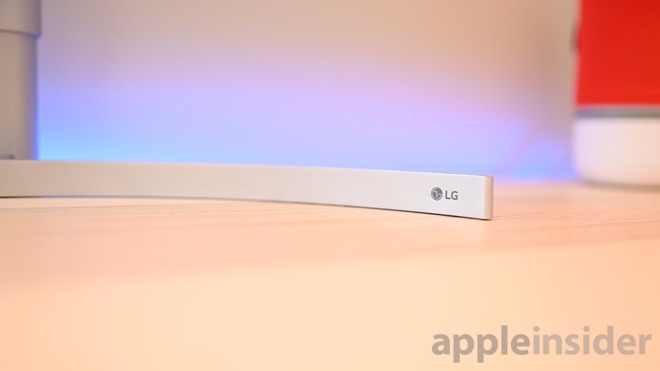
LG UltraWide 5K metal stand
We really like the minimalist design of the curved stand, it still keeps our desk free for other clutter and the whole setup can stay fairly close to the back of the desk.
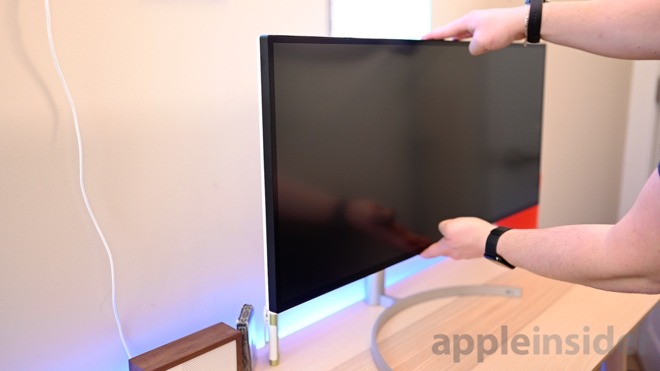
Once you take everything out of the box, the stand connects to the support pole with a simple thumb screw. Then the monitor snaps into place at the top.
LG has built in a very small amount of horizontal rotation which seems largely just to make sure the monitor is straight. The display is so big rotating it wouldn’t be feasible on most desks anyway.
LG UltraWide 5K adjustments
It easily adjusts up and down with very little assistance from the user. LG has the resistance balance perfectly which makes adjusting it a breeze. Vertically it can tilt ~5-15 degrees.
Build quality
LG did a bang-up job designing the LG34WK95U. The display itself looks fantastic, the silver and black body look sleek, but there are still areas that could improve.
It is odd that the front and sides are all black, but the hidden back is white. It would have looked a bit better if they went all one way or another in our opinion.
Most of the display is also plastic between the bezels, back, and the support column. We don’t expect to see others taking Apple’s approach of creating an all-metal display, but it could be improved.
The bezels around the display look particularly cheap. LG likely would have tried to get away with making the base plastic too if it didn’t need the added heft.
To be fair to LG, almost all other display companies employ similar tactics so it is something that we see time and time again, we just miss Apple’s propensity for design.
Nano IPS technology
LG is touting its new Nano IPS tech in this and other of its newer monitors. Nano IPS is a new, LG-specific version of in-plane switching LCD technology that uses nanometer-sized particles to help absorb excess light wavelengths to produce more intense colors. This is partially what earned it the DisplayHDR 600 compliancy badge on the front for HDR.
Even though HDR displays are often very bright, the LG34WK95U still isn’t quite as bright as Apple’s own displays —such as that in the 5K iMac.
Living with an ultrawide display
The width takes some getting used to. There are some obvious use-cases for the display right off the bat, though.
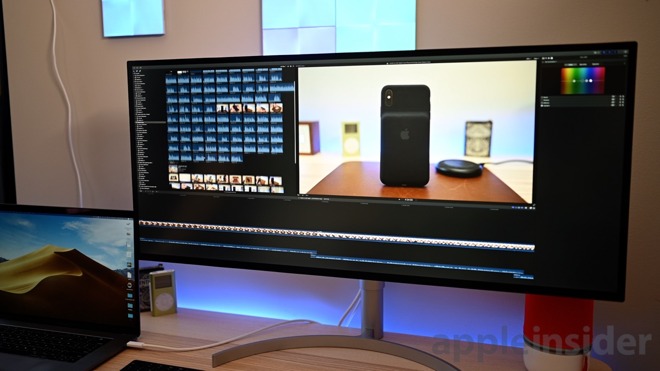
Jumping into Final Cut Pro X, a much larger view of your timeline with the added horizontal real estate makes working pleasant. Instead of just having a library, preview window, and Inspector open, you can add color wheels on the top which helps streamline that workflow and reduces the need to constantly open and close UI elements.
LG UltraWide 5K with Final Cut Pro X
I spent some time working on my web development projects as well. It was much easier to have multiple windows open at once such as the actual code and the live preview of my work. Instead of having to tab between my IDE and Safari, I can freely see them side by side.
This is a 34-inch monitor, so expectations should be set that it will occupy a large overall footprint. The horizontal span of this monitor will exclude it quickly from any smaller setups. For a long-term solution, we’d rather mount this to an arm so it can move more to the side and keep the space under it open.
LG UltraWide 5K
Our Mac does a great job powering up such a large display, though your mileage will vary based on your machine. For example, the latest Mac Mini is unable to push this display at full native resolution. When you do run a 4K or 5K display at native resolution though, on-screen objects get insanely small.
It may be easier to be run the display at a scaled 2560 x 1080 instead, which makes user interface elements a comfortable size while still leaving you room to work. But, on the other hand, why pay for 5K2K if you don’t need the resolution? This decision all comes down to workflow.
For the price, the display will be limited to the creative pros who can really benefit from the large horizontal space at a high resolution. It can make a world of a difference to those users’ workflows. The bulk of other users may be better off with one of the flagship LG UltraFine 4K or 5K displays.
Rating: 4 out of 5
Where to buy
LG’s 34-inch 5K monitor (34WK95U-W) is available at both B&H Photo and Amazon.com for $1,496.99. B&H is also throwing in free expedited shipping withing the contiguous U.S. and will not collect sales tax in a number of states.
When we launched Azure Key Vault a few years ago, it solved a major problem users had which was that storing sensitive and/or secret information in code or config files in plain text causes multiple problems including security exposure. Users stored their secrets in a safe store like Key Vault and used a URI to fetch the secret material. This service has been wildly popular and has become a standard for cloud applications. It is used by fledling startups to Fortune 500 companies world over.
Developers use Key Vault to store their adhoc secrets, certificates and keys used for encryption. And to follow best security practices they create secrets that are short lived. An example of typical flow in this case could be
Step 1: Developer creates a certificate in Key Vault
Step 2: Developer sets the lifetime of the secret to be 30 day. In other words developer asks Key Vault to re-create the certificate every 30 days. Developer also chooses to receive an email when a certificate is about to expire
Step 3: Developer writes a polling service to check if the certificate has indeed expired
In the above scenario there are few challenges for the customer. They would have to write a polling service that constantly checks if the certificate has expired and if so they wait for the new certificate and then bind it in Windows Certificate manager. Now what if developer doesn’t have to poll. And also if the developer doesn’t have to bind the new certificate in Windows Certificate manager. To solve this exact problem we built a Key Vault Virtual Machine Extension.
Azure virtual machine (VM) extensions are small applications that provide post-deployment configuration and automation tasks on Azure VMs. For example, if a virtual machine requires software installation, anti-virus protection, or to run a script inside of it, a VM extension can be used. Azure VM extensions can be run with the Azure CLI, PowerShell, Azure Resource Manager templates, and the Azure portal. Extensions can be bundled with a new VM deployment, or run against any existing system. To learn more about VM Extensions please click here
Key Vault VM Extension is supposed to do just that as explained in the steps below
Step 1: Create a Key Vault and create an Azure Windows Virtual Machine
Step 2: Install the Key Vault VM Extension on the VM
Step 3: Configure Key Vault VM Extension to monitor a specific vault by specifying how often it should fetch the certificate
By doing the above steps the latest certificate is bound correctly in Windows Certificate Manager. This feature enables auto-rotation of SSL certificates, without necessitating a re-deployment or binding.
In the lifecycle of secrets management fetching the latest version of the secret (for the purpose of this article a certificate) is just as important as storing it securely. To solve this problem, on an Azure Virtual Machine, we’ve created a VM Extension for Windows. A Linux version is coming soon. Virtual Machine Extensions are small applications that provide post-deployment configuration and automation tasks on Azure VMs. In this case the Key Vault Virtual Machine extension once installed fetches the latest version of the certificate at a specified interval and automatically binds the latest version of the certificate in the certificate store on Windows. As you can see this feature enables auto-rotation of SSL certificates, without necessitating a re-deployment or binding.
Also before we begin going through the tutorial, we need to understand a concept called Managed Identities. Your code needs credentials to authenticate to cloud services, but you want to limit the visibility of those credentials as much as possible. Ideally, they never appear on a developer’s workstation or get checked-in to source control. Azure Key Vault can store credentials securely so they aren’t in your code, but to retrieve them you need to authenticate to Azure Key Vault. To authenticate to Key Vault, you need a credential! A classic bootstrap problem. Through the magic of Azure and Azure AD, MI provides a “bootstrap identity” that makes it much simpler to get things started.
Here’s how it works: When you enable MI for an Azure resource such as a virtual machine, Azure creates a Service Principal (an identity) for that resource in Azure AD, and injects the credentials (of that identity) into the resource (in this case a virtual machine).
Your code calls a local MI endpoint to get an access token
MI uses the locally injected credentials to get an access token from Azure AD
Your code uses this access token to authenticate to an Azure service
Now within Managed Identities there are 2 types
System Assigned managed identity is enabled directly on an Azure service instance. When the identity is enabled, Azure creates an identity for the instance in the Azure AD tenant that’s trusted by the subscription. The lifecycle of the identity is managed by Azure and is tied to the Azure service instance.
User Assigned managed identity is created as a standalone Azure resource. Users first create an identity and then assign that identity to one or more Azure resources.
In this tutorial I will demonstrate how to create a Azure Virtual Machine with an ARM template which also includes creating a Key Vault VM Extension on the VM.
Prerequisites
Step 1
After the prerequisites are complete, create an System Assigned identity by following this tutorial
Step 2
Assign the newly created System Assigned identity to access to your Key Vault
Select Access Policies section and Add New by searching for the User Assigned identity
Step 3
Create or Update a VM with the following ARM template You can view full the ARM template here and the ARM Parameters file here.
The most minimal settings in the ARM template are shown below:
{
"secretsManagementSettings": {
"observedCertificates": [
"<KeyVault URI of a secret to be monitored/retrieved, in versionless format: https://myVaultName.vault.azure.net/secrets/myCertName">,
"<more entries here>",
"pollingIntervalInS": "[parameters('kvvmextPollingInterval')]",
]
}
}
As you can see we only specify the observedCertificates parameter and polling Interval in seconds
Note: Your observedCertificates urls should be of the form:
By following this tutorial you can create a VM with the above specified template
The above tutorial assumes that you are storing your certificates on Windows Certificate Manager. And so the VM Extension pulls down the latest certificates at a specified interval and automatically binds those certificates in your certificate manager.
That’s all folks!
Linux Version: We’re actively working on a VM Extension for Linux and would love to hear any feedback you might have.
We are eager to hear from you about your use cases and how we can evolve the VM Extension to help you. So please reach out to us and add your feature requests to the Azure feedback forum. If you run into issues using the VM extension please reach out to us on StackOverflow.
Prashanth Yerramilli, Senior Program Manager, Azure Key Vault
Prashanth Yerramilli is the Key Vault Program Manager on the Azure Security team. He has over 10 years of Software Engineering experience and brings to the team love for creating the ultimate development experience.
Posted by: xSicKxBot - 02-08-2019, 10:00 AM - Forum: Lounge
- No Replies
The Rock Says He Was First Choice To Host Oscars This Year
On the same day that The Academy officially confirmed there will be no single host for the Oscars this year, actor Dwayne "The Rock" Johnson has come forward to say he was initially the Academy's first choice to host the awards show. Writing on Twitter, The Rock said he wanted to make this year's Oscars broadcast the "most fun and entertaining Oscars ever."
However, The Rock's busy filming schedule prevented him from being able to be the host. Specifically, he's away filming the Jumanji: Welcome to the Jungle sequel. "Academy and I were super bummed but maybe one day down the road," The Rock said.
Ah mahalo dude, I was their first choice to host this year, and my goal was to make it the most fun and entertaining Oscars ever. We all tried hard, but couldn’t make it work since I’m shooting Jumanji. Academy and I were super bummed but maybe one day down the road ? https://t.co/eiiMuBNOzb
In December, The Academy announced comedian/actor and The Rock's Jumanji co-star Kevin Hart would host the 91st Oscars. However, there was controversy around some of his old tweets, and this eventually culminated in Hart stepping down.
Instead of a single host, the Oscars will feature numerous presenters, including Daniel Craig, Chris Evans, Jennifer Lopez, Whoopi Goldberg, and Brie Larson, among others.
The Oscars air on ABC, and the network's entertainment boss, Karey Burke, said at a Television Critics Association event this week that the show will start with a "very exciting opener." As relayed by The Hollywood Reporter, she also confirmed that the goal is to keep the show to three hours, which is good news considering last year's event was almost as long as Gone With The Wind.
The 91st Oscars take place Sunday, February 24. Black Panther and Bohemian Rhapsody are among the Best Picture nominees; you can see all the categories and nominees here.
Retro-Flavoured V.O.I.D. Side-Scrolls Onto Switch At The End Of February
Nape Games and Jandusoft are prepping their action side-scroller V.O.I.D. for release later this month (the 28th, to be exact). Offering the choice between two characters, they promise different gameplay depending on your character’s abilities that recalls the classic platforming action of the 8 and 16-bit eras, but updates it with new mechanics and fresh ideas.
According to the offical press release, the Earth itself is at stake (it’s always getting itself in trouble):
PLOIDS are the evolution of the human race by merging technology with its DNA. Our planet is invaded by a race from another galaxy, which destroys everything it touches to become thus with absolute power.
After some time, a group of Ploids decides to take action and return the peace. To achieve this, Alpha and Omega must travel through time to eras of ancient land, in order to obtain sacred stones that will give him the necessary power to defeat the invaders. Some of the ancient epochs are feudal Japan, the ice age, the medieval era or among others. What he does not know is that the invaders tried to get those holy stones before him! … In addition, time threatens to collapse, and only you can connect to the PLOIDS to save the Earth!
It goes on to mention time travel, retro passwords and ‘more than 50 levels’. Sounds lovely, then, and the game certainly looks the part, as you can see from the screens below:
Have you had your fill of pixel-y platformers? Think there’s always room for a little retro-flavoured treat? Let us know if this tickles your fancy in the comments.
Doom & Destiny Coming To Switch, But Not Those Ones
Turn-based RPG Doom & Destiny – the self-described ‘Flying Spaghetti-Fantasy Adventure’ – drops onto the eShop tomorrow. A farcical take on the old-school JRPG formula, your party of four friends encounter all the classic things you’d expect to find on a perilous top-down adventure – dragons, elves, monsters, er.., spaghetti – and you’ll likely come across a host of nods and winks to games and characters of old.
Although it’s been seen on various platforms over the years, this is the first time it’ll grace a Nintendo console. The official blurb highlights a comprehensive list of figures including:
– 20 hours of story and 20 hours of extra adventure – 100 levels of experience and nerdy customization – Choose your nerdy leader to apply special bonuses to your party – More than 200 special powers and spells – More than 300 enemies – More than 500 items between potions, chips and weapons – More than 700 locations, – More than 10,000 lines of crazy dialog – The one and only Epic Flying Spaghetti Monster!!!
That last entry aside, everything seems to be present and correct for a sterling retro adventure.
You’ll be able to grab this one for yourself for £10.49 / $11.99, directly from the Switch eShop.
It was warmly received on other platforms, so will you be downloading this one on your Switch come Friday? As always, let us know your thoughts.
Posted by: xSicKxBot - 02-08-2019, 10:00 AM - Forum: Windows
- No Replies
Solving a common corporate conundrum: Making sense of all that data
Most companies today are collecting enormous amounts of data, and chances are they know that data contains crucial insights about everything from what customers want to purchase at 10 p.m. on Friday versus 7 a.m. on Wednesday to how they could run their businesses more efficiently any day of the week. What’s more, that data is all available in real time.
But too often companies can’t hear those signals, or they hear them too late.
“It would be an understatement to say we’re able to see just the tip of that iceberg. It’s more like we are analyzing a single ice cube out of that iceberg,” said Daniel Yu, director of product marketing, Azure data and artificial intelligence at Microsoft.
Part of the problem is that there’s so much data, and it’s so difficult to understand. Much of this valuable information is in what’s called unstructured or semi-structured data — generated from customer interactions on the web, software as a service apps, social media, mobile apps or IoT devices such as connected refrigerators and intelligent assistants. It is then stored in the cloud, where many of the tools for analyzing it are still maturing.
Yu said that’s left companies feeling they have two choices: They can either have powerful systems that can do really sophisticated analysis but require them to know exactly what their needs are upfront, or they can opt for more flexible systems that don’t give them as many choices for sophisticated analysis and are more time-consuming to manage .
“We think that’s a false choice,” Yu said. “You can have both power and flexibility in analytics, at a reasonable cost.”
From left, Lidia Rozhentsova , Sofia Iasonidou and Niklas Arbin of BookBeat discuss data analytics tools they have used to make sense of the overwhelming amounts of raw data they gather every day. Photo by Alexander Donka for Microsoft.
On Thursday, Microsoft announced that its customer offerings are getting an upgrade, with the general availability of Azure Data Explorer (ADX) and Azure Data Lake Storage (ADLS).
Microsoft says its Azure-based cloud analytics platform delivers the industry’s best price-performance ratio, a standard that measures the speed of a system against its hourly cost. According to independent testing by GigaOM, analytics with Azure SQL Data Warehouse is up to 14 times faster and costs 94 percent less than other cloud analytics offerings.
Microsoft said ADX can analyze 1 billion records of streaming data per second, using simple query language, while leaving the data and its metadata in its original state. ADLS provides a repository for storing massive amounts of structured or unstructured data, with the efficiency and security features of Azure Blob Storage. This combination is optimized for analytics.
That’s exactly the kind of offering the company says everyone from small startups to big established businesses need.
A good example is BookBeat, a European-based streaming audiobook service that runs its business on the Azure platform. The company uses data analytics to serve customers crisp recommendations based on their own reading history and those of customers with similar interests. It also relies on data to launch new business models, like a shared family account that it rolled out after its data predicted, correctly, that it would succeed.
“All our teams are data-driven,” said Niklas Arbin, head of developers at BookBeat. “We use it for everything.”
Arbin said that, with Azure managing its server infrastructure, BookBeat’s technical specialists are free to work on other essential tasks. That includes mining the data to deliver real insight and value and building internal tools for managing the vast streams of books it offers.
“Azure enables us to use the highest standards in application development, which has been very hard to do in any business intelligence toolset,” Arbin said. “It gives our developers freedom to choose the best tool for the job.”
Many of the desks at BookBeat’s offices in Stockholm, Sweden, are loaded with analog books as well. Photo by Alexander Donka for Microsoft.
The company doesn’t even have a traditional IT department.
“We don’t have to worry about things like uptime for servers,” Arbin said. “We don’t like working in the middle of the night.”
To John Chirapurath, general manager of Azure data, Blockchain and AI at Microsoft, that sounds like success. He said Microsoft’s goal is to remove complexity for customers wherever possible, from ingesting data to presenting it.
“We always strive to make it very easy for IT staff to adopt analytics and for line of business people to utilize and deliver powerful insights using beautiful products,” Chirapurath said.
Microsoft says another selling point for customers is the company’s long history of securing its Azure cloud, which includes helping customers conform to privacy standards and regulation such as the General Data Protection Regulation, or GDPR.
To Yu, the ongoing advances in cloud analytics technology, and the relentless flow of useful data, are bringing customers to a tipping point. For many, he said it’s no longer going to make sense to host all that data on premises, and devote so many resources to managing those resources, when there are so much more interesting analytics that can be done in the cloud.
“Data and analytics are changing everything for businesses,” Yu said. “There’s not a single company that isn’t thinking about this.”
Posted by: xSicKxBot - 02-08-2019, 06:06 AM - Forum: Lounge
- No Replies
Vivox’s coming SDK brings text and voice chat to Nintendo Switch devs
Vivox, the communications platform that powers games like Fortnite and League of Legends, is releasing a SDK that gives Nintendo Switch developers the ability to use the company’s text and voice chat tools in their own multiplayer games.
It’s a welcome utility for devs working with the console since Nintendo’s flagship system isn’t exactly known for intuitive voice chat options, even for the company’s first-party games like Splatoon 2.
According to VentureBeat, Vivox’s tech also offers support for cross-platform play right out of the box, a feature that is creeping up more and more for multiplayer games, with games like Fortnite, Minecraft, and Rocket League now offering cross-console play on several systems.
Vivox itself was recently acquired by Unity, though the Switch SDK itself had been in the works months before that agreement came to be. Vivox also notably offers up its tools for free to smaller developers, so long as less than 5,000 players are logged in to that Vivox-using game at once. More information on that program and Vivox itself can be found on the platform’s website.
Wargroove is Available Today on Xbox One and Windows 10 PC
The turn-based strategy game Wargroove – and second in-house title created by Chucklefish — carries the torch of the retro turn-based strategy genre for a new generation of fans.
That translates to an impressive suite of tools for you to use with your chosen faction commander. Design your own cut-scenes, share your custom-made maps, exploit your specific “groove” power-ups for a strategic advantage. The world is yours to shape and mold.
What started as a small experiment, according to the fine folks at Chucklefish, is poised to become the kind of game that reinvents the game-space. It’s a robust strategy juggernaut with plenty of Easter eggs and customization, including content-sharing, and cross-play – and as an Xbox Play Anywhere title you can play on both Xbox One and Windows 10 PC.
Best of all, online and offline multiplayer capability for up to four gives players a chance to test allegiances and battle it out in a world expansive enough to burn up a lot of your spare time.
With Wargroove, the path to victory is one of diplomacy, strategy, and epic battles. Get it today!







 Prashanth Yerramilli is the Key Vault Program Manager on the Azure Security team. He has over 10 years of Software Engineering experience and brings to the team love for creating the ultimate development experience.