Posted by: xSicKxBot - 04-01-2019, 09:10 AM - Forum: Lounge
- No Replies
Borderlands 3 Trailer Released; Here's What We Think
Gearbox has finally confirmed the existence of Borderlands 3, and even revealed a new trailer for the long-awaited sequel to one of the studio's most beloved franchises. In the video above, GameSpot video producer Jean-Luc Seipke and associate editor Jordan Ramée voice their impressions of the new trailer after watching it.
Fans of the original Borderlands, Borderlands 2, Borderlands: The Pre-Sequel, and Tales from the Borderlands: A Telltale Series, both Jean-Luc and Jordan are happy to see several beloved characters return in the trailer for the new game. Most notable is an adult Tiny Tina, who was still 13-years-old in Borderlands 2: Tiny Tina's Assault on Dragon Keep, but the return of characters from Tales from the Borderlands is a welcome surprise. There are plenty of other familiar faces as well, such as Sirens Lilith and Maya (the latter of whom is now sporting longer hair), Ellie, Marcus, and Sir Hammerlock.
Although the sight of so many beloved Borderlands characters is nice, both Jean-Luc and Jordan are wary of just how little the Borderlands 3 trailer touches on the franchise's strongest points. The characters' hilariously ludicrous dialogue is absent, and there's little individuality in regards to the new heroes and villains. Jean-Luc and Jordan are also a little worried that the environments in the trailer all look a little too much like Pandora. If Borderlands 3 takes place on multiple worlds--as Borderlands 2 implied and the new trailer claims--then the people and places in this new game should be fairly different from what's been seen before.
Obviously, with this being the very first look at Borderlands 3, neither Jean-Luc or Jordan are ready to condemn or praise the game--especially not before they can get their hands on it. As is, after watching this trailer, they are optimistic Borderlands 3 can carve out its own identity in the now loot shooter heavy market.
Borderlands 3's announcement was accompanied by the reveal of an enhanced Borderlands GOTY Edition coming to Xbox One, PS4, and PC. A free update is also being released that adds 4K graphics to Borderlands: The Handsome Collection--a bundle of Borderlands 2 and Borderlands: The Pre-Sequel--which is also available on Xbox One, PS4, and PC.
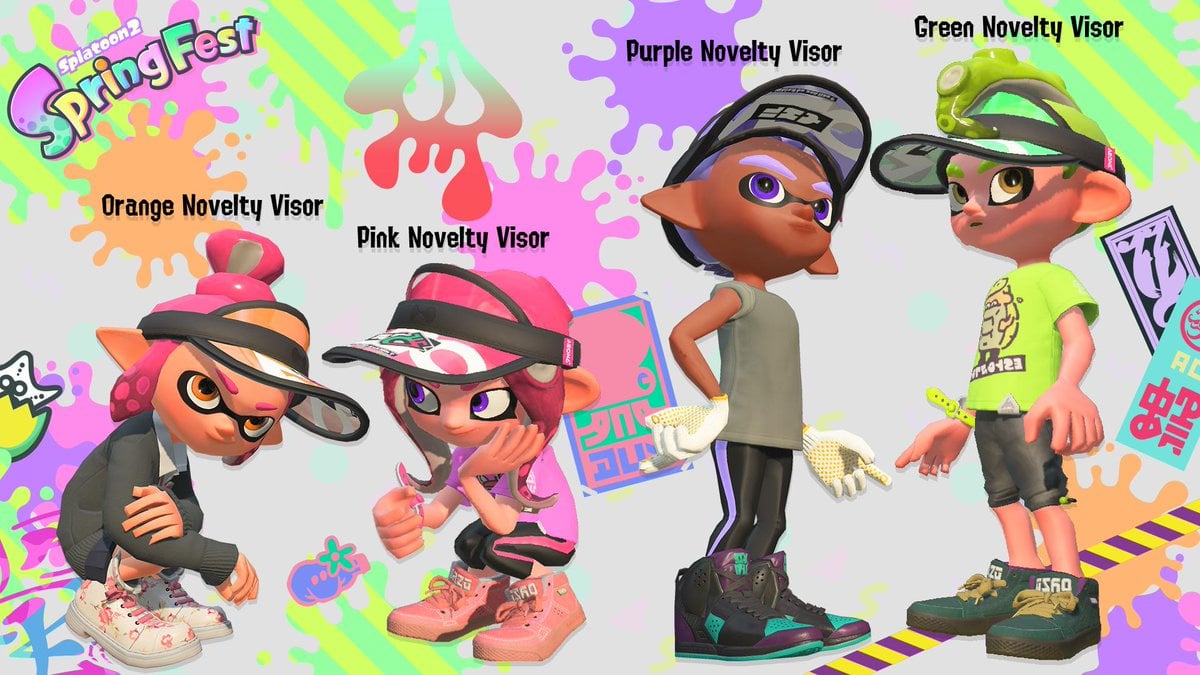
Nintendo has announced the next event coming to Splatoon 2 is the Spring Festival. This time around, players will be siding with team hare or team tortoise to decide once and for all who would win in a race. This Splatfest will start on 19th April and runs for 48-hours. Here’s the official announcement:
As a bonus, some spring coloured gear will also be given out via the Squid Research Lab Report (Splatoon 2) News Channel on the Switch. This includes custom-coloured visors and a variety of Pearl and Marina-designed kicks:
Version 4.6.0 of Splatoon 2 will also be released on 2nd April. Here’s what you can expect from it:
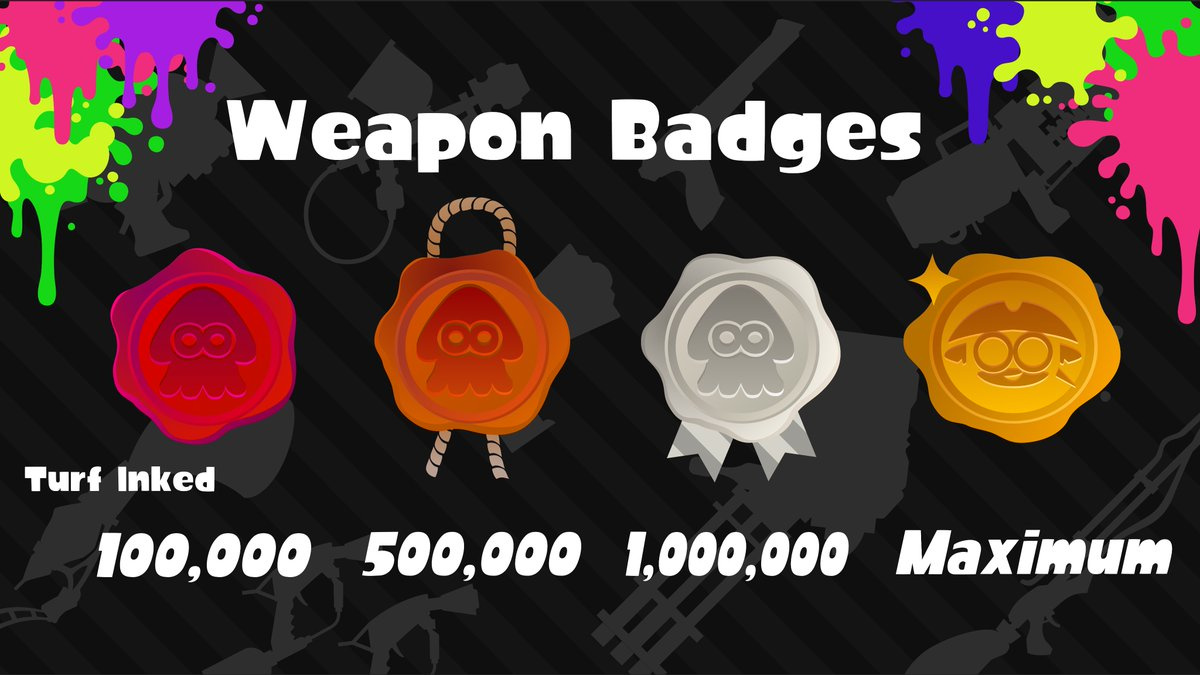
This update will include twelve Sheldon’s Picks weapons and weapon badges that display your dedication to a particular weapon.
Read more information about Sheldon’s Picks in our previous post.
Will you be participating in this upcoming event? Are you looking forward to the next update? Tell us down below.
Posted by: xSicKxBot - 04-01-2019, 12:34 AM - Forum: Lounge
- No Replies
PS4 6.51 Firmware Update is Live, Still No Option To Change PSN Online IDs
Sony has released the latest firmware patch for PS4, update 6.51. The update doesn't do all that much, despite being 463 MB in size. In the full patch notes for update 6.51, Sony states that the update "improves system performance." That's it. Overall, update 6.50 did a lot more, implementing several new features in the PS4. Update 6.50 added the choice of 720p video when broadcasting with Niconico Live, and also added button assignment support for "enter" operations--allowing you to change the selection button from circle to X.
Notably lacking from update 6.51 is the option to change your PSN online ID, a patch that, last year, Sony promised is coming early 2019. You can already change your PSN online ID if you're a part of PlayStation's Preview Program, but the update hasn't left beta and gone public. Sony has announced that when the patch does go live, the first name change will be for free. However, subsequent changes will cost $5 USD / €5 / £4 for PlayStation Plus members, and twice as much for everyone else.
Sony has admitted that implementing PSN online ID changes isn't a smooth process, so there could still be plenty of bugs the company is trying to iron out. Apparently, the feature won't be compatible with every game released prior to April 1, 2018. Not all PS4, PS3, and PS Vita games are guaranteed to support the feature either, so users may see several issues or errors in relation to their PSN online ID for certain games. Additionally, one of the Preview Program testers reported a bug that changing your PSN online ID might cause a loss in DLC purchases and game save data.
However, if you run into issues after changing your ID, PlayStation has said it will provide an option for players to revert back to their old one for free.
Talking Point: What Are You Playing This Weekend? (March 30th)
Well done, folks! We’ve made it to the end of yet another week. This week brought us a bonkers bug situation in Final Fantasy VII and even more rumours of new Switch models coming this year, so it’s probably about time we unwind by discussing our weekend gaming plans. Team Nintendo Life has just done that below, and we invite you to join us in the comments and poll. Enjoy!
Dom Reseigh-Lincoln, reviewer
This weekend I’ll be returning to an old favourite of mine, the Darksiders series, as it finally makes the leap to Nintendo Switch. I’ve completed it twice already on PS3 and PS4, so I’m in a good position to judge just how well this comic book-style action adventure stacks up on new hardware. Let’s hope it’s good enough to get Darksiders II and maybe even Darksiders III if we’re lucky/it’s even possible. Have a good ‘un!
Ryan Craddock, staff writer
This weekend is all about the adorable, wonderful, bundle of joy that is Yoshi. Yes, Yoshi’s Crafted World has arrived and it’ll likely take up most of my evenings for the foreseeable future.
Their relatively gentle nature make Yoshi games perfect opportunities for me and my partner to sit down and play together. She’s not the biggest gamer, but the cute, cuddly aesthetic of Yoshi’s Woolly World on Wii U was enough to get her interested and we had a great time exploring everything there was to see together. Crafted World was the first time she asked me to buy a video game rather than the other way around, so I wasn’t going to say no!
Austin Voigt, contributing writer
Honestly, I’ll probably just be playing Yoshi’s Crafted World this weekend. There’s something so satisfying about the realistic look of crafting materials inside of a game. Would I ever play a game with these items in real life? Nope. Would I play with fake versions on a screen? Apparently so! It’s adorable, the demo won me over, I’m burned out on my backlog and itching for something new to try… Well done, Nintendo – you dropped this game right about when you knew everyone would be getting bored. Cheers!
Gavin Lane, staff writer
This weekend I shall be diving back into Wolfenstein II. I bought it ages ago on sale but got sidetracked by other games after the first few levels. I’m probably a third of the way through and I fired it up again on a whim this week and was amazed at how good it looks! Sure, it doesn’t hold a candle to the versions on other platforms, but on its own terms I think it looks fantastic – better than I remembered. Maybe it’s been patched up the wazoo, or maybe I just have a horrible memory, but I’m looking forward to battling a whole bunch of nazis this weekend.
Gonçalo Lopes, contributing writer
OBJECTION! It’s 2019 and I have never played or owned any previous entry of the famous Capcom lawyer’em up, but that changes this weekend with the glorious Phoenix Wright: Ace Attorney Trilogy having arrived from the Far East. But law is out the window in this weekend’s ARMS Party Crash Bash: if Ninjara is eliminated, me and the entire Ninjara nation will riot on the streets. A quiet, silent riot because hey… we are really good ninjas. Cute platforming shenanigans are also on the way with Yoshi’s Crafted World and Unravel Two going back and forth in the Switch cartridge slot.
My game of the week goes out to the lovely Ultrawings. I truly hope there is an update in the near future to make it support Labo VR. It is also a stark reminder we deserve a new Pilotwings.
Which games are you playing this weekend? (204 votes)
Six More Sega Ages Games Announced For Nintendo Switch
During today’s Sega FES stage show, six more titles for the Sega AGES line were revealed.
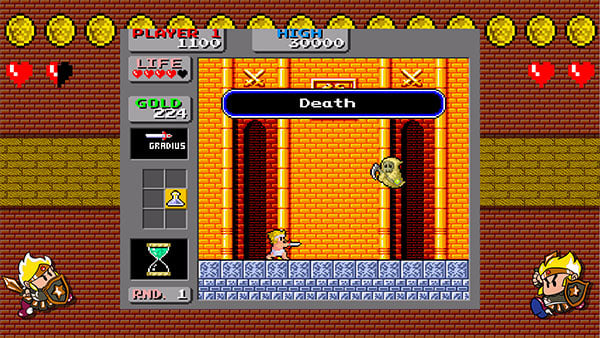
These upcoming Switch eShop releases include Shinobi, Wonder Boy in Monster Land, Fantasy Zone, Puzzle & Action: Inchidant-R, Herzog Zwei and G-LOC Air Battle.
Shinobi
This single-player action side-scroller is based on the original arcade release dating back to 1987.
Wonder Boy in Monster Land
This action game for one player includes the Japanese and western version of the game as well as online rankings. The arcade release dates back to 1987.
Fantasy Zone
Fantasy Zone’s Sega Ages debut is based on the 3DS (arcade) release and is designed for 1-2 players. The coin stock system makes the game easier to play and adds in the original Sega Mark III boss. The original arcade game came out in 1986.
Puzzle & Action: Inchidant-R
Inchidant-R is based on the arcade and overseas version and is a sequel to Puzzle & Action: Tant-R. It comes packed with 16 mini-games, supports two players and was originally released in 1984.
Herzog Zwei
Originally developed by Technosoft – the talent behind the Thunderforce series – this single-player real-time strategy game will receive online support in the Switch release. The original game launched on the Mega Drive in 1989.
G-LOC Air Battle
G-LOC Air Battle is a single-player 3D shooter and is a port of the 1990 arcade release.
More information regarding release dates and localisation will be revealed in the near future.
Contribute at the Kernel and Fedora IoT Edition Test Days
Fedora test days are events where anyone can help make sure changes in Fedora work well in an upcoming release. Fedora community members often participate, and the public is welcome at these events. If you’ve never contributed to Fedora before, this is a perfect way to get started.
There are two upcoming test days this week. The first, on Tuesday March 12, is to test the Kernel 5.0. Wednesday March 13, the test day is focusing on Fedora IoT Edition. Come and test with us to make the upcoming Fedora 30 even better.
Kernel test day
The kernel team is working on final integration for kernel 5.0. This version was just recently released and will arrive soon in Fedora. This version will also be the shipping kernel for Fedora 30. As a result, the Fedora kernel and QA teams have organized a test day for Tuesday, March 12. Refer to the wiki page for links to the test images you’ll need to participate.
Fedora IoT Edition test day
Fedora Internet of Things is a variant of Fedora focused on IoT ecosystems. Whether you’re working on a home assistant, industrial gateways, or data storage and analytics, Fedora IoT provides a trusted open source platform to build on. Fedora IoT produces a monthly rolling release to help you keep your ecosystem up-to-date. The IoT and QA teams will have this test day for on Wednesday, March 13. Refer to the wiki page for links and resources to test the IoT Edition.
How do test days work?
A test day is an event where anyone can help make sure changes in Fedora work well in an upcoming release. Fedora community members often participate, and the public is welcome at these events. If you’ve never contributed before, this is a perfect way to get started.
To contribute, you only need to be able to download test materials (which include some large files) and then read and follow directions step by step.
Detailed information about both test days are on the wiki pages above. If you’re available on or around the days of the events, please do some testing and report your results.
How to Install LDAP Account Manager on Ubuntu Server 18.04
Welcome back to this three-party journey to getting OpenLDAP up and running so that you can authenticate your Linux desktop machines to the LDAP server. In part one, we installed OpenLDAP on Ubuntu Server 18.04 and added our first LDAP entries to the directory tree via the Command Line Interface (CLI).
The process of manually adding data can be cumbersome and isn’t for everyone. If you have staff members that work better with a handy GUI tool, you’re in luck, as there is a very solid web-based tool that makes entering new users a snap. That tool is the LDAP Account Manager (LAM).
LAM features:
Support for 2-factor authentication
Schema and LDAP browser
Support for multiple LDAP servers
Support for account creation profiles
File system quotas
CSV file upload
Automatic creation/deletion of home directories
PDF output for all accounts
And much more
We’ll be installing LAM on the same server we installed OpenLDAP, so make sure you’ve walked through the process from the previous article. With that taken care of, let’s get LAM up and running, so you can more easily add users to your LDAP directory tree.
Installation
Fortunately, LAM is found in the standard Ubuntu repository, so installation is as simple as opening a terminal window and issuing the command:
sudo apt-get install ldap-account-manager -y
When the installation finishes, you can then limit connections to LAM to local IP addresses only (if needed), by opening a specific .conf file with the command:
Comment that line out (add a # character at the beginning of the line) and add the following entry below it:
Require ip 192.168.1.0/24
Make sure to substitute your network IP address scheme in place of the one above (should yours differ). Save and close that file, and restart the Apache web server with the command:
sudo systemctl restart apache2
You are now ready to access the LAM web interface.
Opening LAM
Point your web browser to http://SERVER_IP/lam (where SERVER_IP is the IP address of the server hosting LAM). In the resulting screen (Figure 1), click LAM configuration in the upper right corner of the window.
In the resulting window, click Edit server profiles (Figure 2).
You will be prompted for the default profile password, so type lam and click OK. You will then be presented with the Server settings page (Figure 3).
In the Server Settings section, enter the IP address of your LDAP server. Since we’re installing LAM on the same server as OpenLDAP, we’ll leave the default. If your OpenLDAP and LAM servers are not on the same machine, make sure to enter the correct IP address for the OpenLDAP server here. In the Tree suffix entry, add the domain components of your OpenLDAP server in the form dc=example,dc=com.
Next, take care of the following configurations:
In the Security settings section (Figure 4), configure the list of valid users in the form cn=admin,dc=example,dc=com (make sure to use your LDAP admin user and domain components).
In the Account Types tab (Figure 5), configure the Active account types LDAP options. First, configure the LDAP suffix, which will be in the form ou=group,dc=example,dc=com. This is the suffix of the LDAP tree from where you will search for entries. Only entries in this subtree will be displayed in the account list. In other words, use the group attribute if you have created a group on your OpenLDAP server that all of your users (who will be authenticating against the LDAP directory tree) will be a member of. For example, if all of your users who will be allowed to log in on desktops machines are part of the group login, use that.
Next, configure the List attributes. These are the attributes that will be displayed in the account list, and are predefined values, such as #uid, #givenName, #sn, #uidNumber, etc. Fill out both the LDAP suffix and List attributes for both Users and groups.
After configuring both users and groups, click Save. This will also log you out of the Server profile manager and take you back to the login screen. You can now log into LAM using your LDAP server admin credentials. Select the user from the User name drop-down, type your LDAP admin password, and click Login. This will take you to the LAM Users tab (Figure 6), where you can start adding new users to the LDAP directory tree.
Click New User and the New User window will open (Figure 7), where you can fill in the necessary blanks.
Make sure to click Set password, so you can create a password for the new user (otherwise the user won’t be able to log into their account). Also make sure to click on the Unix tab, where you can set the username, home directory, primary group, login shell, and more. Once you’ve entered the necessary information for the user, click Save and the user account can then be found in the LDAP directory tree.
Welcome to Simpler User Creation
The LDAP Account Manager makes working with OpenLDAP exponentially easier. Without using this tool, you’ll spend more time entering users to the LDAP tree than you probably would like. The last thing you need is to take more time than necessary out of your busy admin day to create and manage users in your LDAP tree via command line.
In the next (and final entry) in this three-part series, I will walk you through the process of configuring a Linux desktop machine, such that it can authenticate against the OpenLDAP server.
In .NET Core 3.0 we are introducing a new type of application template called Worker Service. This template is intended to give you a starting point for writing long running services in .NET Core. In this walkthrough we will create a worker and run it as a Windows Service.
Create a worker
Preview Note: In our preview releases the worker template is in the same menu as the Web templates. This will change in a future release. We intend to place the Worker Server template directly inside the create new project wizard.
Create a Worker in Visual Studio
Create a Worker on the command line
Run dotnet new worker
Run as a Windows Service
In order to run as a Windows Service we need our worker to listen for start and stop signals from ServiceBase the .NET type that exposes the Windows Service systems to .NET applications. To do this we want to:
Add the Microsoft.Extensions.Hosting.WindowsServices NuGet package
Add the UseServiceBaseLifetime call to the HostBuilder in our Program.cs
public class Program

{ public static void Main(string[] args) { CreateHostBuilder(args).Build().Run(); } public static IHostBuilder CreateHostBuilder(string[] args) => Host.CreateDefaultBuilder(args) .UseServiceBaseLifetime() .ConfigureServices(services => { services.AddHostedService<Worker>(); });

}
This method does a couple of things. First, it checks whether or not the application is actually running as a Windows Service, if it isn’t then it noops which makes this method safe to be called when running locally or when running as a Windows Service. You don’t need to add guard clauses to it and can just run the app normally when not installed as a Windows Service.
Secondly, it configures your host to use a ServiceBaseLifetime. ServiceBaseLifetime works with ServiceBase to help control the lifetime of your app when run as a Windows Service. This overrides the default ConsoleLifetime that handles signals like CTL+C.
Install the Worker
Once we have our worker using the ServiceBaseLifetime we then need to install it:
First, lets publish the application. We will install the Windows Service in-place, meaning the exe will be locked whenever the service is running. The publish step is a nice way to make sure all the files I need to run the service are in one place and ready to be installed.
dotnet publish -o c:\code\workerpub
Then we can use the sc utility in an admin command prompt
Security note: This command has the service run as local system, which isn’t something you will generally want to do. Instead you should create a service account and run the windows service as that account. We will not talk about that here, but there is some documentation on the ASP.NET docs talking about it here: https://docs.microsoft.com/en-us/aspnet/core/host-and-deploy/windows-service?view=aspnetcore-2.2
Logging
The logging system has an Event Log provider that can send log message directly to the Windows Event Log. To log to the event log you can add the Microsoft.Extensions.Logging.EventLog package and then modify your Program.cs:
After doing keynotes for Google, Unity and Unreal, some people have been asking when the Godot keynote is going to be. The answer is basically never… these things cost millions of dollars and that’s just not compatible with the way Godot’s open source development works. That doesn’t mean that exciting things haven’t been happening in the land of Godot, some big and some small enough they didn’t merit their own coverage. So here we are!
Godot 3.1 Was Released
Obviously the big news is, after a year in development, Godot 3.1 became a reality last week! You can watch our video on the subject here and read the official blog here. Usability improvements across the entire engine, a GL ES2 renderer, CSG support, optional static typing and much more were added to the engine.
Rust Language Bindings
Want to use the Rust programming language in Godot? Now you can thanks to this set of GDNative language bindings available on Github.
GDScript Playground
It’s an interactive browser based way to run and test GDScript. Check it out here.
Got spotty internet or just want an offline copy of the Godot documentation? Now you can get it from this nightly build source. It’s basically the online documentation built for offline use.
Linux Kernel 4.20 Reached End of Life, Users Urged to Upgrade to Linux 5.0
Renowned Linux kernel developer and maintainer Greg Kroah-Hartman announced the end of life of the Linux 4.20 kernel series, urging users to upgrade to a newer kernel series as soon as possible.
“I’m announcing the release of the 4.20.17 kernel. Note, this is the LAST release of the 4.20.y kernel. It is now end-of-life, please move to the 5.0.y kernel tree at this point in time. All users of the 4.20 kernel series must upgrade,” Greg Kroah-Hartman said in a mailing list announcement.