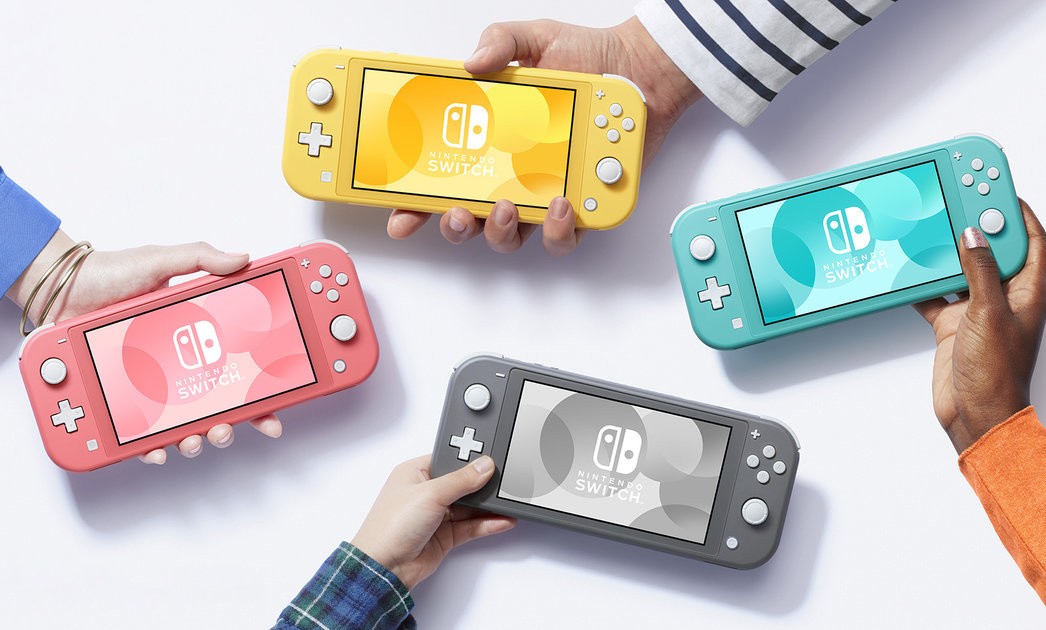
If you’re hoping to grab a Nintendo Switch Lite all for yourself, you’ve certainly come to the right place. Pre-orders for Nintendo’s latest console are now popping up all over the place and we’re gathering them for you below.
At the time of writing, all three standard colours of Switch Lite are available for pre-order from numerous UK and US retailers. You’ll also find a couple of options available for the fancy Pokémon edition console (or the Switch Lite Zacian & Zamazenta Edition, to give it its full name) in the US.
We’ll make sure to add to this list with any more Switch Lite deals we find going forward, so feel free to bookmark this page and check back if you’re hoping for a particular price or retailer. In the meantime, let us know if you spot any more options by leaving a comment below. We’ve also added a Frequently Asked Questions section to clear up any queries you might have about this new version of Nintendo Switch, including the differences between this and the standard model.
Where to pre-order Nintendo Switch Lite – USA
Please note that some of the links on this page are affiliate links. If you click them and make a purchase we may receive a small percentage of the sale which helps support the site. Please read our FTC Disclosure for more information.
Where to pre-order Nintendo Switch Lite – UK
Nintendo Switch Lite FAQ
What are the features of the Switch Lite?
The standard model’s left-side buttons have been replaced with a traditional D-Pad, and the speakers have moved from the front of the console to the bottom. Here’s a look at the Switch Lite from all angles, including all of the buttons, ports and other fancy gizmos available.
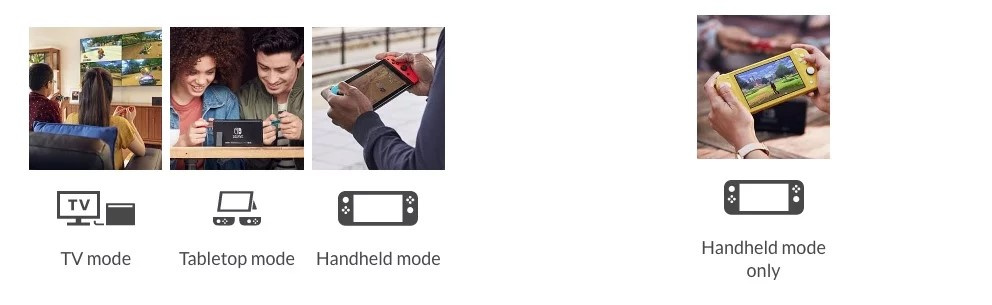
What gameplay modes does Switch Lite support?
One of the key features of the standard Switch model is its three gameplay modes: TV mode, Tabletop mode, and Handheld mode. However, the Nintendo Switch Lite can only be played in handheld; it cannot connect to the TV and does not feature a kickstand to use in a Tabletop setup.
It’s also worth noting that the Nintendo Switch Lite does not feature HD Rumble or an IR Motion Camera, although the console will recognise other wireless Joy-Con.
Are all Switch games compatible with Switch Lite?
The Nintendo Switch Lite can play any Switch games which support handheld mode.
For games that do not support handheld mode, players can wirelessly connect compatible controllers to the Switch Lite and effectively create a makeshift tabletop setup. If you’re using original Joy-Con controllers, you’ll need to have a way of recharging them as they cannot be docked to the Switch Lite.
What comes in the box with Switch Lite?
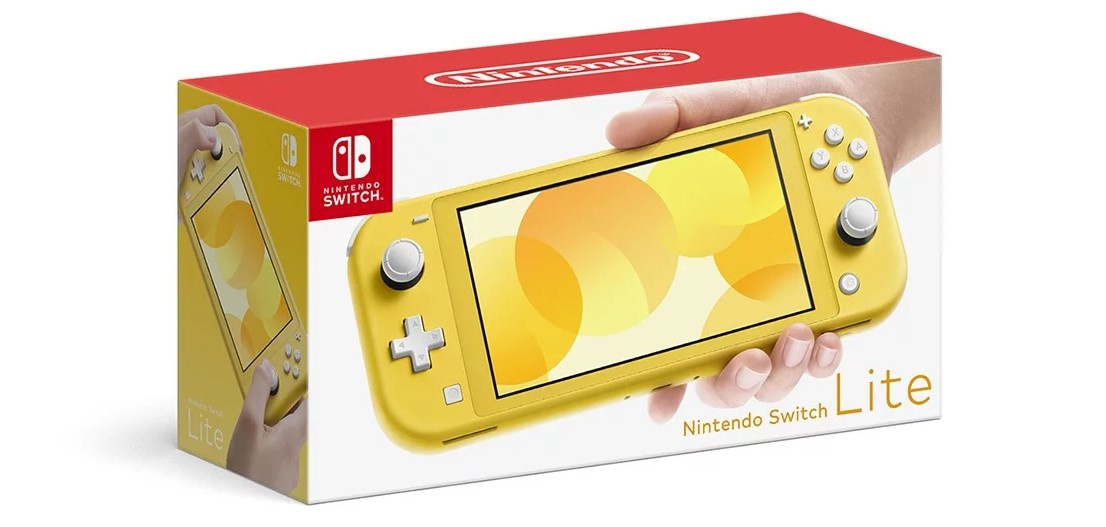
The Nintendo Switch Lite does not include a dock, HDMI cable, or kickstand like the original model. Instead, the box will simply contain the console and an AC adaptor.
What are the Switch Lite specs?
Here are the Nintendo Switch Lite vital statistics along with a comparison to the standard model:
Dimensions: Nintendo Switch Lite: 3.6″ high, 8.2″ long, 0.55″ deep | Nintendo Switch: 4″ high, 9.4″ long, 0.55″ deep with Joy-Con attached
Weight: Nintendo Switch Lite: .61lbs | Nintendo Switch: 0.88lbs with the Joy-Con attached
Screen: Nintendo Switch Lite: 5.5″ touchscreeen, 720p | Nintendo Switch: 6.2″ touchscreen, 720p
Battery Life: Nintendo Switch Lite: approx. 3 – 7 hours | Nintendo Switch: approx. 2.5 – 6.5 hours
Storage: Nintendo Switch Lite: 32GB | Nintendo Switch: 32GB
What Switch Lite colours or styles are available?
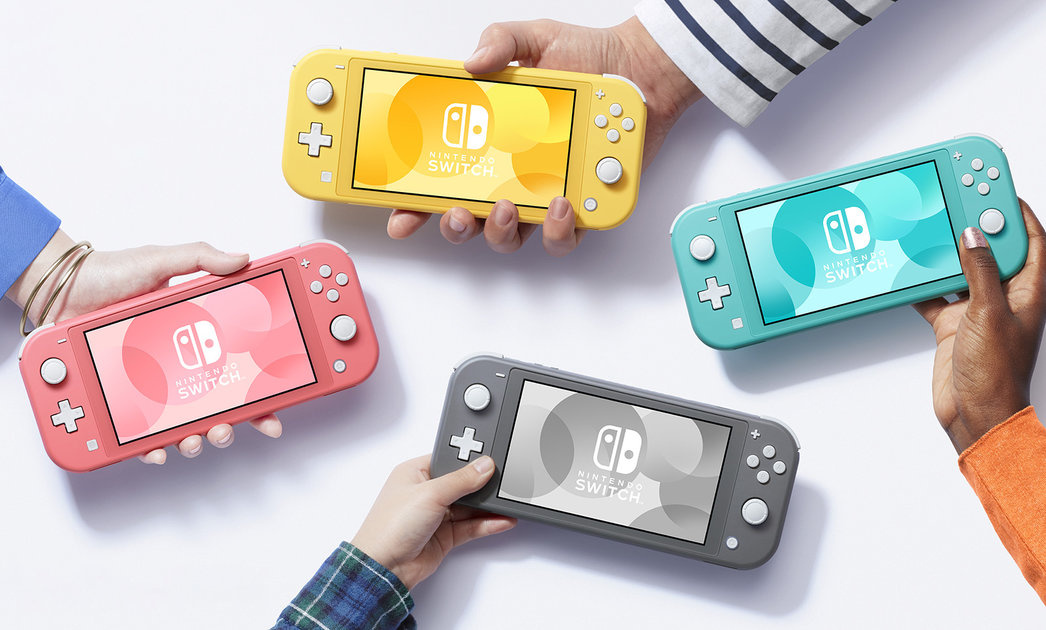
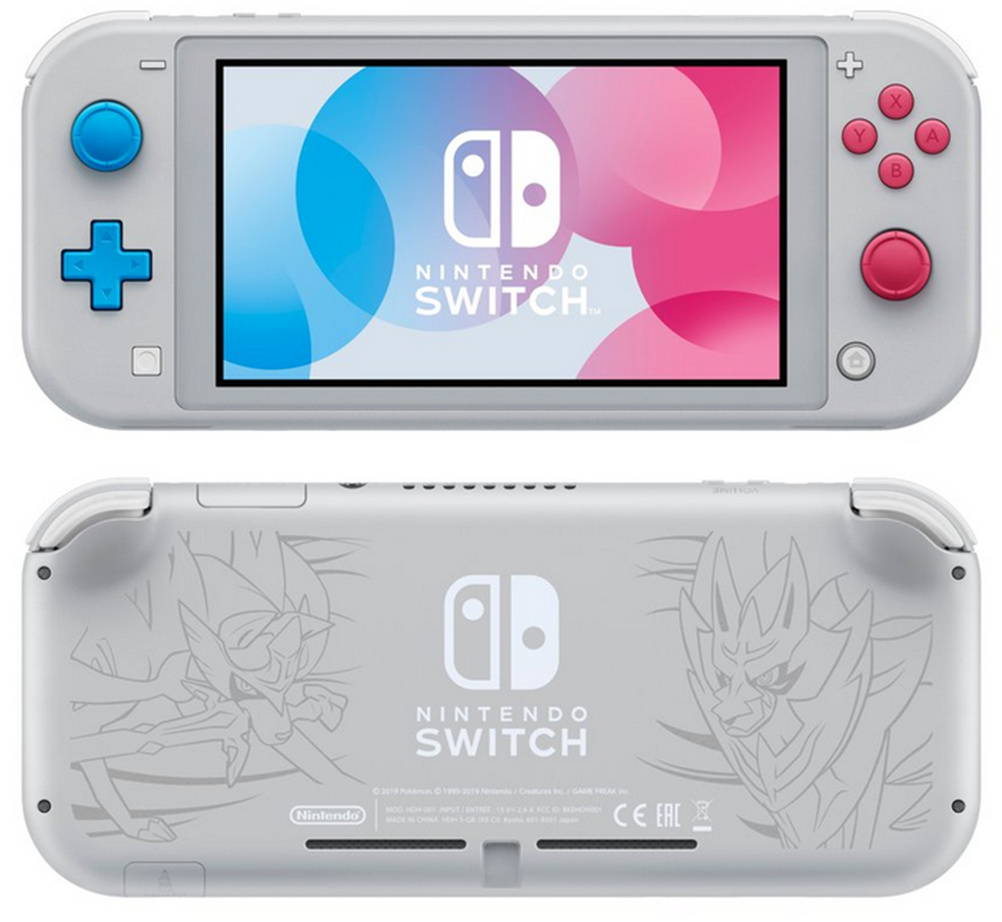
The Nintendo Switch Lite will be available in yellow, grey, or turquoise at launch.
A special Pokémon edition has also been revealed for a November release, which looks rather lovely:
How much does Switch Lite cost?
Missed all those pre-order links at the top of the page? Nintendo Switch Lite’s recommended retail price will be $199.99 / £199.99. The Nintendo Switch’s recommended retail price has been $299.99 / £299.99 since it launched in 2017, so the Lite variant will save you 100 notes if you’re happy to sacrifice a few of the features detailed above.
When does Switch Lite launch?
The Nintendo Switch Lite will be available from 20th September, while the snazzy Zacian & Zamazenta Edition (the Pokémon one) will arrive on 8th November, just a week before the launch of Pokémon Sword and Shield.
Are you thinking of securing a ‘Lite Switch’ ready for its release date of 20th September or will you be waiting for more colours to pop up (Spice Orange, perhaps…)? Tell us below.
Raiders of the North Sea is the second game in a series of board games, collectively known as the North Sea trilogy. Whilst the first game focuses on building ships and the third one revolves around exploration, the middle game has a more bloodthirsty raiding and pillaging theme. Players take on the role of Viking warriors competing to gain the recognition of their chieftain. Not from building fancy boats or sending postcards from far-off lands but from plundering settlements for gold, iron and livestock.
Raiders is a worker placement game, which has similar mechanics and complexity to Lords of Waterdeep. Turns are simple; players begin each round with a worker, which they place on any vacant village space. They then carry out the location’s action; a visit to the gatehouse, for example, allows the player to add two extra Viking cards to their hand. Next, the player removes a previously placed worker and also performs this action. Thus, each player will always have a worker in hand that can be brought into play during the following round.
The village houses eight different buildings and there are also three different colours of workers, which may influence the effect of each building. The workers that are coloured black for instance, will gather more silver when they visit the Silversmith. A Viking can be added to your crew by visiting the barracks and playing a crew card. Crew cards will have a military strength and a hire cost and two special actions. The forager, for example, may have zero military strength, but she only costs one silver to hire and she can provide you with extra provisions when you visit the mill. The avenger is a nasty piece of work, he has a strength of three and when killed or discarded, opponents are forced to lose crew members or silver. There is a nice variety of cards, all of which are strikingly illustrated using the same stunning artwork that featured in the original board game.
Working in the village is all well and good, but you cannot leave your newly recruited Viking crew just sitting around braiding their beards and admiring each other’s tattoos. Eventually, you will want to scroll the map northwards to see all of those nice juicy settlements that are just waiting to be pillaged. There are four progressively tougher types of settlement; harbours, outposts, monasteries and fortresses. To raid a settlement, you must have a large enough crew, adequate provisions, a worker of the required colour and sometimes you will also need some gold. In addition to plunder, most settlements will also allow players to earn some bonus victory points by overwhelming any opposition. The attacker rolls combat dice and adds the military strength of their crew and if the total is high enough then extra victory points will be awarded. Players can further enhance their military strength by using plundered iron to craft extra armour at the village armoury.
Raiding isn’t without its risks and attacking a settlement that contains black Valkyries will result in the death of some of your crewmembers. This isn’t all bad as an honourable one-way trip to the afterlife is looked upon favourably by the gods and so presents another way of earning victory points. Some unfortunate fellows must have victim tattooed on their foreheads; the gravedigger, for instance, is a useless fighter but does earn gold when he meets his inevitable demise. After a raid, Vikings can use their ill-gotten gains at the village’s Longhouse to fulfil the chieftain’s requests for specific sets of goods.
The digital version does a brilliant job of recreating the feel of the board game. The striking artwork has been stylishly reused, the illustrations of the different Vikings are especially brilliant. They are both imaginative and full of character, with more facial hair on display than at a craft beer festival. This version adds a few extra flourishes of its own, with some neat graphical animations, alongside incidental music and sound effects that are perfectly pitched to create atmosphere without ever becoming annoying.
For me, the biggest disappointment is that at the moment there isn’t a pass and play mode, which means that local games are limited to battles against AI opponents. There is, however, a captivating ten-level solo campaign to work through. It never gets that taxing but does add new Viking cards and twists to the rules for you to contend with. There are also plenty of well thought out achievements to aim for. Completing these will increase your level, something that has no impact on the actual game but it is a little extra to aim for. Online options include both asynchronous and live games, with the possibility of adding extra AI opponents to make up the numbers.
For such a ruthless theme, the gameplay is rather forgiving. The option to not just place but also to remove workers significantly cuts down on the blocking tactics that play such a large part in many worker placement games. The dice rolling may put some players off but the range of possible results is small and the gamble is only for a few more victory points rather than outright failure. The multiuse Viking cards also serve to reduce frustration; if a card doesn’t fit in with the rest of your crew then you can always exchange them for an immediate benefit.
Thankfully, all of this leniency doesn’t make the game any the less exciting or entertaining to play. It slips into a satisfying rhythm of building up your supplies and then raiding. The strict limit on the number of resources that a player can hold prevents stockpiling. The colour of the worker that you pick up may also impact on your raiding plans. The ever-present risk of death at the hands of a Valkyrie force some agonising decisions about when it is worth sacrificing a valuable crew member in return for plunder and Valkyrie points. All of these factors mean that whilst many worker placement games can begin to feel a little too linear and repetitive after a few games. Raiders manages to hold the feeling of monotony at bay by always presenting the player with interesting choices.
Take the journey of an NFL superstar. Create a college quarterback and dominate the College Football Playoff, then impress the scouts at the NFL Combine. Find out where your story begins at the NFL Draft, and then fight to prove you belong in the league. Last long enough and you just might leave a legacy and even play in a few Pro Bowls. This new and customizable career campaign is all about you, with personalized playable scenarios, events, and dynamic challenges. The choices you make early on will affect how your career pans out.
“The Blue Shell is everything that’s wrong with America.”
Ok, nobody said that, but you can imagine someone having done. The Blue Shell steals progress from a rightfully earned win on behalf of the lazy and the incompetent. The Blue Shell wrests spoils from leaders’ fingers just as they reach for the laurel. The Blue Shell is the cruel tax of gaming, the welfare queen of kart racing. God damn you kids today. We used to have to win a race to win it.
I’m talking about Mario Kart, of course, whose Spiny Blue Shell power-up has taunted players since its second iteration in 1996-7. It’s the pickup sometimes given to players far behind in a race, which homes in on the leader, bringing delight to the inferior player and torment to the superior one. Just as you were about to cross the finish, there’s a Blue Shell, spinning you out so that Mario or Donkey Kong crosses the finish just ahead of you. And, conversely, just as you thought yourself too far behind to catch up, there’s a Blue Shell to help put you on the winners’ podium.
1996 is a long time ago – 18 years, to be exact. In some sense, metaphorical though it may be, that makes the Blue Shell an adult. A lot has changed in those 18 years. When Mario Kart 64 first appeared, the Amazon.com IPO hadn’t yet taken place. Bill Clinton was starting his second term as President. Mark Zuckerberg was planning his Bar Mitzvah. You probably didn’t have a mobile phone, but you might have had an AOL account. The Macarena was a thing, as was the Sega Saturn. It’s easy to forget, to lump today’s Blue Shell in with yesterday’s like you’d lump today’s internet in with yesterday’s, forgetting that yesterday was an entire lifetime ago.
While all of us refer to the Blue Shell as such, it’s actually called “Spiny’s Shell” in the Mario Kart 64 manual. This difference makes a difference, because it re-connects the shell’s name to its origins and its function. A Spiny is a quadrupedal Koopa with a spiked shell. They’ve been around as long as the original NES Super Mario Bros. Back then, they served as the ammunition of Lakitu – that begoggled, cloud riding Koopa who hurls them from the air in some overworld levels. Spiny shells are red, and thanks to their spikes they cannot be jumped atop to defeat, nor can they be bumped from below to flip on their backs as can an ordinary Koopa. Only a fireball wrought by a Fire Flower-emblazoned Mario brother can defeat the Spinies – or a hero emboldened by the temporary immunity of an invincibility Star (or maybe a kicked Koopa shell, but such a resource is unlikely in the barren wastelands where Lakitu rears his head, at least in the original SMB).
The Spiny Shell is the most profoundly existentialist element of the Mario canon. It disrupts the entire logic of this familiar fantasy universe. We were told we could jump on things to destroy them! We were told we could flip them asunder! But no – all promises are tentative, even in the Mushroom Kingdom. Spiny Shells are chaos, unfairness, injustice. For those of us who were kids when Super Mario Bros. arrived, the Spiny Shell taught a lesson, and the lesson was: you are alone in the universe. Enough with your childish expectations. This is the real world, and just when you think you’ve mastered it, it’ll pull the rug out from under you. You have to find your own way.
The blueness of Blue Shells comes from elsewhere – half a decade but an entire generation later. A Koopa Troopa with a blue shell first appeared in Super Mario World, the launch title for the Super Nintendo in 1990-1. Blue-backed Koopas move faster than their blue or green-clad brethren. Super Mario World also marks the introduction of Yoshi, and ingesting a Blue Shell immediately causes the dinosaur steed to sprout wings and fly. Some things come easy.
“The Spiny Shell is the most profoundly existentialist element of the Mario canon.”
The Blue Shell didn’t appear again in a traditional Nintendo platformer until the triumphant return 2006 of 2D Mario, in New Super Mario Bros. for the Nintendo DS. Here, the Blue Shell takes the same form as it had sixteen years earlier, but as a power-up for the benefit of our heroes. Collecting the Blue Shell turns Mario into Shell Mario. By ducking, he becomes invulnerable under his azure armor. Shell Mario can also perform a “shell dash,” enacting the familiar destructive power of a Koopaless shell sent flying by foot, but under the control of the player via his plumberly counterpart.
In contrast to the Spiny Shell – a hazard that strips certainty and authority from the player – the Blue Shell has always been associated with speed, power, and security. Despite its rarity, the Blue Shell is a conservative bonus, a feature that entrenches the comforts of Mario, Luigi, and their human pilots rather than wresting it away. Would it be too much to say that Spiny Shell was a Gen X’ers lament, an NES-bred slacker’s plaid, tortugal sigh, while Blue Shell was a Gen Y transitional object, a comfort blanket – blue with calm like Linus van Pelt’s – that proffers assurance to the SNES milksop every time, no matter how infrequently it might appear? Probably so.
Making the bizarre, hilarious world of Trover Saves the Universe
The VR gameTrover Saves the Universe was created by Rick and Morty creator Justin Roiland and shows off much of the show’s trademark bizarre humor: for example, the game’s villain gains cosmic power by plugging your characters’ two dogs into its empty eye sockets, a development that is best described as “only the beginning.”
Developed and published by Squanch Games, Trover Saves the Universe invents in-universe explanations to get around many of the issues with VR play: your perspective doesn’t move around smoothly, but discretely, jumping from place to place, because your character is a “Chairoipian,” naturally spending their whole lives seated, and getting around by teleporting between specific locations in the landscape.
Erich Meyr, design director at Squanch, Tanya Watson, Squanch co-founder, and Mikey Spano, art director, answered our questions about the development of this unique game.
Erich Meyr: I’m the design director at Squanch Games. I started in the games industry in 2007 at Insomniac Games and worked as a UI designer on titles in the Ratchet and Clank and Resistance franchises. I moved into a design role on Sunset Overdrive and realized how much I enjoyed making funny, irreverent games. After eight and a half years I left Insomniac with a desire to work on a game from the ground up with a small team, and serendipitously was pointed towards Squanch Games!
Tanya Watson: I have been making games since 2003, when I first got my start as a software test engineer at Microsoft. Over the five years there, I worked on sports games, then moved to the RPG group, then to shooters – which had me working closely with Epic Games on Gears of War as the on-site QA lead. I loved working there with production so much that I asked to be hired as an associate producer. Thankfully, they said yes, and I was given the opportunity to grow from an AP, to a producer, and eventually to executive producer on some incredible games: Gears of War, Unreal Tournament, Bulletstorm, and Fortnite. In 2015, I left after almost 10 years there, and formed Squanch Games with Justin Roiland, and we’ve just celebrated our three year anniversary.
Mikey Spano: I’m the Art Director here at Squanch Games. I’ve been making games for almost 20 years, and I’ve shipped over a dozen titles including the original Gears of War trilogy and Fortnite.
Watson: When starting the company, I knew working with Justin was going to be interesting because he had this completely new perspective on games, and how to tell stories within them. He could easily draw on his experiences from animation, and describe or draw how that may work out in a “game way.” He wouldn’t necessarily understand all of the steps needed to get there, but the vision and ideas conveyed were really interesting. We had tons of scope and development conversations; they were on-going throughout the development process. Probably 50 percent of the overall scope of Trover was re-cut or re-scoped in some way in order to get what we wanted done, to the quality bar that we had set out to achieve.
Meyr: Justin is a huge gamer and we quickly were able to speak the same language and dig into how we could create comedy through gameplay in Trover. Over the years we’ve developed a good push and pull about what makes good design vs. what makes a good joke. There were many times in Trover where he’d throw out a pitch and say, “what game in their right mind would do this?” and just the idea alone would make us laugh so hard we knew we were on to something. Justin is a font of ridiculously funny ideas and part of our job is working with him to fit them into the game’s design.
Meyr: We iterated a lot on our dialog process and (like most new games) it wasn’t until the end of the project that we really figured out our pipeline. We started by laying out rough level beats and then we’d go into the recording booth and improv them without a script. This was initially intended as a temporary pass, but some of it was so hilarious we kept it!
As we got further in production we kept mapping out narrative beats and began to make them more granular based on varying player interactions in a given scene. Between design, programming, and animation we built out a framework we call Squanch Theater to enable us to quickly script dynamic dialog that could branch, be interrupted and return to where it left off, dynamically pick a line based on multiple factors, and all sound as natural as possible.
We wrote jokes and some specific dialog to make sure our character arcs were tracking, but would let many of our actors improv in the booth to keep things as loose and playful as the early scratch dialog. For animating this crazy amount of dialog, we build an automated lip-syncing system but still hand authored expressions and look-ats.
The character performances were animated by creating sets of smaller animations then layering them against the dialog track to create lots of well-timed performances. The benefit of this method was that it allowed other team members to pile on and help ‘tag’ dialog with animations as we closed out the project. A lot of larger games use this same technique but I think we achieved a very high quality bar across the whole game by using UE4’s sequencer tool for every line of dialog and having some amazing animators.
Watson: No, not really. We always knew that we were going to be a Mature-rated title, we just wanted to make sure that we didn’t tip the scale over into AO territory, hah. With the way that we did the recording pipeline, we really gave him free run to explore what was funny or might work for these sequences, and then the narrative team did a lot of editing in the game itself to help direct what may work for the pacing of that section, or what told the funniest story.
In all, we ended up not using almost 40 percent of the total amount of dialogue recorded! Pretty intense, but it really allowed us to be flexible and err on the side of funny, and not be too pigeonholed into a script.
There were maybe two areas where we really considered language as a factor and did some bleeping (even for the non-censored version), but in a way, it made it funnier, so we were OK with it.
Meyr: It was absolutely a challenge! Early on we tried many experiments to see how far we could push platforming difficulty and realized we couldn’t make a super skill-based platformer using a fixed camera. We really did not want to induce motion sickness so having a moving camera was not an option.
Instead, we added the ability for the player to “pop up” and get a better vantage point to combat poor depth perception. We ended up being very strict about our distance metrics and made rules like “never put a platform at a height within 2m of our three camera pop-up heights” to try and help depth perception as much as possible.
Adding a permanent 3D jump helper on the ground below Trover, instead of just a shadow on the ground, probably helped depth issues the most. Knowing difficult platforming wasn’t a core pillar of the game, we toned it down for the critical path but still wanted some harder jumps and challenges for finding hidden power babies.
Meyr: Trover began as a VR game and our main goal was to create complete immersion for the player and a locomotion system that reduced motion sickness as much as possible. Those are pretty common goals for a VR game and we embraced them full on by creating fiction and jokes around them. Justin came up with the concept of the player being stuck in a chair looking for warp nodes that you have to reach with Trover in order to then move yourself to that location.
We took that initial pitch and worked out moving and rotating the player at speeds that didn’t induce sickness in the majority of our playtesters. The upside of grounding our locomotion system into our narrative was when we decided to make the game also in non-VR the constraints still make sense in the narrative and the player’s immersion is still very much intact.
Spano: Justin, Erich, and I are like a little hive mind of weird ideas. We are super passionate about creating unique experiences, and we are constantly riffing off of each other’s ideas. After the initial idea is conceived, we always try to get tons of ideas flowing from everyone on the team, and we encourage the ideas to come in as raw as possible with no judgment. We really take a ‘no wrong answers’ approach to everything, and we encourage people to communicate in whatever way gets their idea across, which means we get everything from stick figure doodles, to fleshed out design documents.
Once we have all the ideas we want to try figured out on paper, the world then gets its own art direction guide, which includes reference images from cartoons, toys, movies, games, reality, etc. As the idea gets fleshed out, concept art and guidelines are added to keep everyone from level designers to artists on track. Guidelines typically include things like color schemes, silhouettes, atmospherics, lighting, etc.
Sometimes little jokes can lead to an entire world-building scenario; like how Chairorpean culture was formed around their reliance on chairs. Justin pitched the chair-obsession as a funny one-off note, and then we just kept pushing the idea forward: what about chair mailboxes? Chair Houses? Foliage shaped like cushions? We pushed until it was too far, and then we realized ‘too far’ was even funnier so we pushed it more.
A planet made of flesh was a dream for a lot of the artists on the team, so when we started designing Flesh World we had a lot of ideas flowing. The hardest question was how do we keep Flesh World ‘funny/gross’ and not ‘gore/gross’. On the art side, I pushed the team into more bulbous fun shapes and simpler color schemes to keep things feeling fleshy without feeling like you were inside someone’s guts; and on the design side, Erich and Justin kept everything themed more towards what was happening in this world, and less on the world itself. The less the characters talked about Flesh World, the less of a gimmick it was, and it really helped sell the absurdity of a prison/zoo/apartment all tangled together on a fleshy planet.
My biggest piece of advice for any team that’s trying to do unique world-building is to just stop worrying if your idea is good or not. If you have an idea, write it down, draw it, sing it, whatever works for you; then share it with people who are willing and able to riff on the idea. In the end the best idea should always win, regardless of where the idea came from. And take tons of notes! Write it all down as you go, draw doodles in meetings if they come to you, don’t be afraid to look distracted. My notes are always 50 percent words, 50 percent doodles, as a result tons of designs were figured out right in the middle of a pitch meeting.
Watson: We are an indie team, with a small game budget (and even smaller marketing budget). We thought, instead of spending the marketing money on ads and stuff, we should instead use that money on creating content. Idea being that word of mouth will drive awareness and get people to buy the game. Additionally, we knew that the game was fairly short, hence the price point – and we wanted ways to show fans that we plan to extend the experience over time.
So far, we don’t have a ton of data from this experiment because we’re still in the middle of it. Happy to report back once we release our first DLC :).
K.I.T.T. from “Knight Rider” Speeds into Rocket League on Xbox One
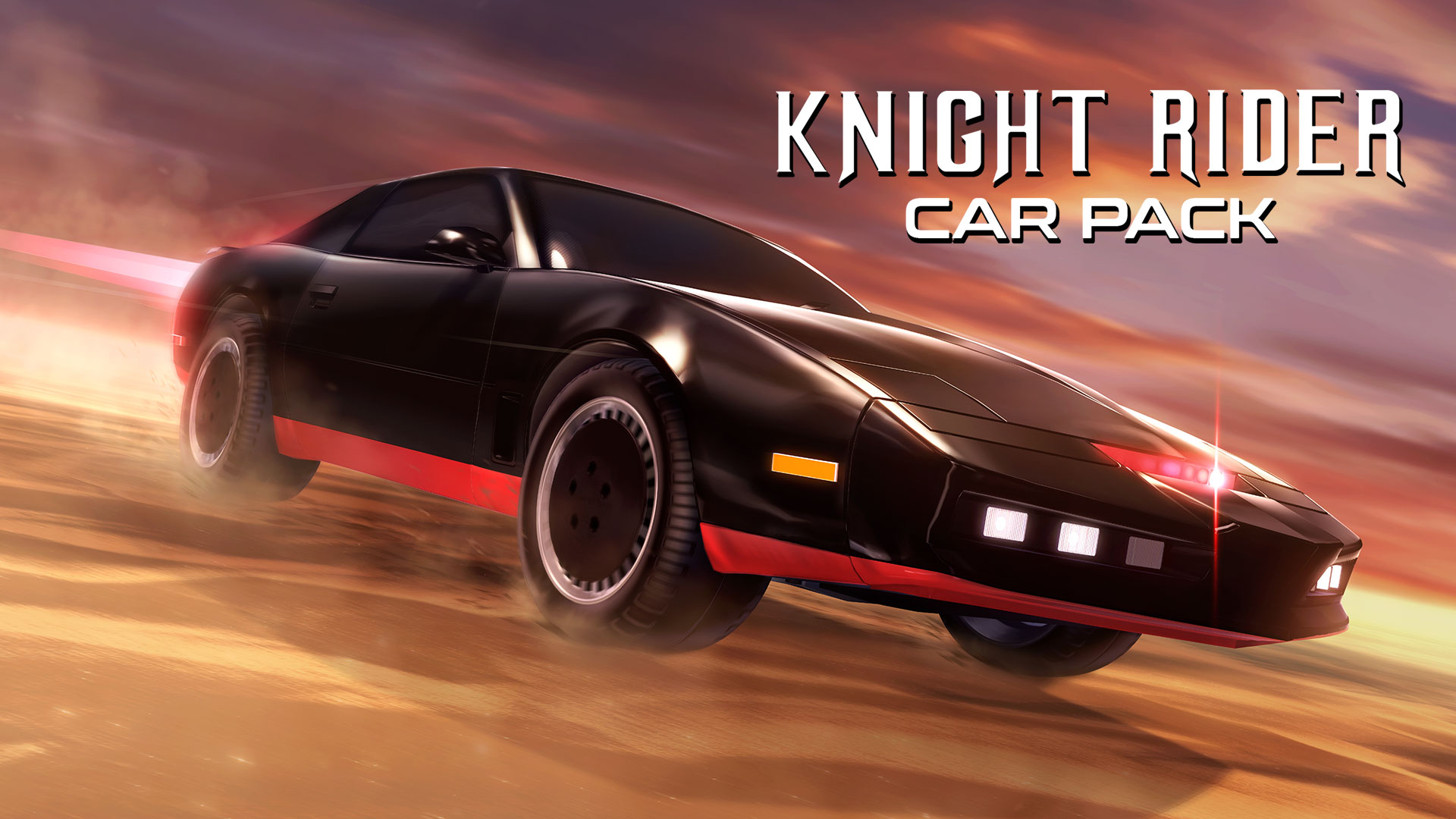
Summer is heating up and Rocket League‘s ’80s-themed event Radical Summer is keeping the party going in its third phase: a celebration of ’80s Television. Leading that celebration is none other than the iconic Knight Industries Two Thousand (more popularly known as K.I.T.T.) from the hit ’80s show “Knight Rider.”
K.I.T.T isn’t the only thing repping this totally tubular decade. Enjoy ’80s-themed, in-game items throughout Radical Summer, which is live through August 12. Earn Cassettes from playing Online Matches, which can be redeemed in the Event Store for in-game items inspired by ’80s television. In addition to “Knight Rider,” check out battle-car customization items from DreamWorks “Voltron Legendary Defender” and WWE.
Also, Xbox Game Pass members can play Rocket League or if you already own the hit sports/action hybrid where soccer meets driving, team up with your friends and jump into Radical Summer today. Good luck, have fun, and stay radical!
Today we’re releasing 1.14.4, a release that addresses left over issues from 1.14. We plan on this being the final release for 1.14 and we’ll continue our efforts on 1.15. Aside from new features, 1.15 will also focus on quality and performance improvements.
This week at Bungie, we make way for the Iron Lord.
We have begun to see Shadows lurking about this season. Many of you have been diligently knocking out every challenge and Triumph for Season of Opulence. Most of us still have a good backlog of Triumphs to complete and items to collect. Someone pointed out that this was the first week of Season of Opulence in which there wasn’t something new to do. Consider this week a chance for you to catch your breath if you have Triumphs and pursuits stacking up. If you’re already looking for more challenges, Solstice of Heroes will heap more of them onto your plate. You’ll find more details on the upcoming event next week.
Cry Wolf
It’s time to let the wolves howl again. Saladin will raise his banners next week when he returns to the Tower on July 23. He brings with him an invitation to a powerful fight and accelerated Valor gains.
Iron Banner and Increased Valor Start: 10 AM PDT on July 23 End: 10 AM PDT on July 30
This competitive event will allow you to advance any Iron Banner quest steps you didn’t finish earlier in the season. If you missed the first Iron Banner of Opulence, this is your chance to kick off the quest and earn that singular gear. Full details on how Iron Banner is being run this season are documented here. We did get some feedback on this quest and have some changes lined up, but they didn’t make it in time for this Iron Banner. We’ll give you the details before the next one starts up.
This will be the last Iron Banner before we deploy an update to Lord of Wolves. As Luke mentioned last month, anyone who plays during these two Iron Banners will receive a special Triumph and emblem to commemorate that you were there when the wolves ran wild.
A Guardian Always Pays Their Debts
As part of Season of Opulence, Guardians are paying homage to their previous adventures to earn awesome rewards. Some of us leveraged an exploit in the Tribute Hall, taking advantage of Calus’s generosity with some clever character-switching shenanigans to place that free tribute over and over and over… you get it. This allowed some players to skip the tribute experience entirely, making other players who had done bounties and pledged large amounts of their resource reserves feel a little irked.
We will be fixing this glitch on July 30 as we kick off Solstice of Heroes. As you all know, it not our policy to punish players who discover cheeses, loot caves, or workarounds in the game. If you took advantage of this short cut, you can rest easy. You won’t be marched in front of Calus for sentencing. However, you will not be able to keep using all of your ill-gotten rewards until you square up things with Calus.
The “Tributes Placed” total will now accurately reflect individual tributes placed on your accounts. If you used the exploit, this number will be updated to properly reflect the total number of tributes you’ve actually placed. The activation and equipping of both the Bad Juju catalyst and “X Marks the Spot” emotes are also gated by your total number of tributes placed. Bad Juju will not require you to have 18 tributes placed for it to be used. If you cheesed your way to the catalyst or emote, you have some time to start placing legit tributes before July 30.
Mysterious Benefactors
Player Support has their weekly report on the state of the game and any known issues to watch out for. Here is what you need to know.
Tribute Hall Triumphs—Exotic Weapons
In last week’s blog, we clarified which weapons and armor from the Menagerie contribute to Tribute Hall Triumphs. This week, we’d like to clarify which Exotic weapons provide bonus progress.
These Exotic weapons include:
Players should be aware that Truth does not count toward these Triumphs, and neither does the quest version of Legend of Acrius.
This version of Legend of Acrius can be identified by having no catalyst socket or ornament slot, having only a single round in its magazine, and having the “Shock Blast” intrinsic perk. Players with this version of Acrius can upgrade it by completing the Exotic quest that begins with “On the Comms.”
Vital Information: 22/24 Moments of Triumph
With the recent rollout of the 2019 Moments of Triumph, we’d like to clarify a point of confusion which has emerged among players.
Currently, players can complete only 22 of the 24 total Moments of Triumph. The final two Triumphs will become available with the launch of Solstice of Heroes on July 30, 2019. In the meantime, players will be unable to complete this seal and earn the “MMXIX” title.
For more information on Solstice of Heroes 2019, stay tuned to our News page.
Destiny 2: Season of Opulence Known Issues
Listed below are the latest player-impacting issues discovered in Season of Opulence, as reported by players to the #Help forum.
Destiny Services: We’re investigating an elevation of Destiny service issues over the past week. For live updates on Destiny services when issues arise, players should follow @BungieHelp on Twitter or monitor our support feed on help.bungie.net.
Bright Dust Tributes: We’re investigating an issue where the statues given for the Bright Engram and Bright Dust tributes are switched. This issue should not impact players’ ability to complete the Tribute Hall.
Tribute Hall Triumphs: We’re investigating an issue where Tribute Hall triumphs will sometimes not give players Tributes.
Sturm Catalyst and Drang (Baroque): We’re investigating an issue where Drang (Baroque) doesn’t count towards Sturm’s Catalyst.
Monologue
Welcome to Movie of the Week where we pick a few videos we like and give their creators an emblem. This week, we witnessed a truly herculean feat. Check this out.
Movie of the Week: Riven 1v1 me (language warning)
Honorable Mention: Pay it forward
It’s been a light couple of news weeks as we prepare to shift gears into Solstice of Heroes. In the weeks to come, we’ll dive into many topics that will require some detailed discussion to get you ready for what awaits you this fall. We know you have questions about cross save, Shadowkeep, new character customization, Season of the Undying, and things we haven’t even hinted at yet. This summer will be a time to get you ready for another Moon launch.
Microsoft has acquired BlueTalon, a start-up whose software can prevent people from accessing certain high-value data that companies keep. Terms of the deal weren’t disclosed. BlueTalon’s technology works with a variety of systems for storing data, including Hadoop, Spark and PostgreSQL. The software lets people run queries on sensitive data to make observations, while not revealing the actual underlying information. (Source: CNBC)