Get a job: Obsidian Entertainment, Insomniac Games, and more are hiring now!
Whether you’re just starting out, looking for something new, or just seeing what’s out there, the Gamasutra Job Board is the place where game developers move ahead in their careers.
Gamasutra’s Job Board is the most diverse, most active, and most established board of its kind in the video game industry, serving companies of all sizes, from indie to triple-A.
Here are just some of the many, many positions being advertised right now. If you’re a recruiter looking for talent, you can also post jobs here.
Location: Irvine, California
Obsidian Entertainment is looking for a Combat Designer with proven experience developing first-person melee combat gameplay to join our team of talented developers. This role will work closely with artists, animators, audio, and gameplay programmers to determine the overall flow, look, and feel of the total combat experience. The ideal candidate will be someone who can collaboratively plan and create fun, visceral, and epic combat including the main character, AI characters, and gameplay objects across varied encounter types.
Location: Chicago, Illinois
Currently, we’re looking for a junior programmer. This opportunity is for a full-time position in Chicago, IL. Junior programmers at Disbelief are called on to develop and debug in a variety of areas from game play to core engine programming. You are expected to learn new systems and projects as you grow as a developer, with support and training from more senior members of the team. Most importantly, you will work to solve problems with the help of the team. We work with leading edge technologies to make them perform at the top of their capabilities, and we take pride in solving problems others can’t. We believe a diverse team is a stronger team, and we encourage marginalized programmers to apply.
Location: Bellevue, Washington
Senior React Front-End Developer will take a prominent role in UI development utilizing their expertise implementing React.js components and workflows (e.g. Redux) to support our Pokémon Organized Play initiatives. This role is responsible for ensuring overall Web and/or React Native Mobile app robustness and ease of maintainability, writing high-quality code that is well-tested, and meeting the high demands of our fans. The Senior Software Engineer will work with members inside and outside the Technology Organization with a focus on software design and user experience, plus set an example for other Software Engineers.
Location:Maryland Heights, Missouri
Simutronics is expanding its awesome team and we are looking for an Assistant Technical Artist with experience in 3D art pipelines for games. We need someone who can help the art team keep everything running smoothly. If this sounds like you, then we want to talk.
Location: Burbank, California
Insomniac Games is searching for its next Lead Level Designer. This should be someone who’ll lead the Level Design team in the operation of designing, developing, and polishing game levels including level geometry, enemy encounters, puzzles, and unique gameplay. The individual in this position works closely with the project Leads, Design Director, Game Director, and/or Creative Director to help ensure game levels have cutting edge features, are creatively entertaining, and well balanced. This role will schedule team through the pre-production, production, and polish phases.
Review: Luigi’s Mansion 3 – Gooigi Takes Ghost Busting To The Next Level
Despite being the glimmering jewel of the GameCube’s launch, Luigi’s Mansion has enjoyed relatively few sequels for such a beloved Mario spin-off. The 3DS had a pop with a well-liked sequel, and the original got a second chance on the same system with a remake. Now it’s time for a true home console follow-up with Luigi’s Mansion 3, but can it stand up to the original in all its glorious originality?
The game starts off as you might expect – Luigi’s been sent an unsolicited invitation to come and stay as a VIP guest in a luxury hotel, and if that sounds familiar, well, how else are you supposed to set up this kind of game? He’s not alone though, as Mario, Princess Peach and a small gaggle of Toads are also along for the ride, and when they arrive, everything seems peachy (sorry) to the sextet of participants. To us players however, the red flags are all over the place. None of the staff seem to be normal, for starters; they’re all wearing creepy masks and their lack of feet makes them look like they’ve walked in from Fire Emblem: Awakening or something. It’s almost as if (and please at least try to act shocked) the whole hotel is haunted and populated by ghosts, which is just as well or this would be a very boring game.
And lo, it comes to light that there are some shady events transpiring, namely that the hotel’s owner (as well as the ever-welcome King Boo) has lured our supporting cast so they can be trapped in paintings against their will. Our old friend E Gadd has also befallen this fate, and so it’s up to Luigi to scour the many floors of the hotel, free his friends, suck up ghosts, and accumulate the ungodly amount of loose cash lying around the place because someone’s got to make a profit.
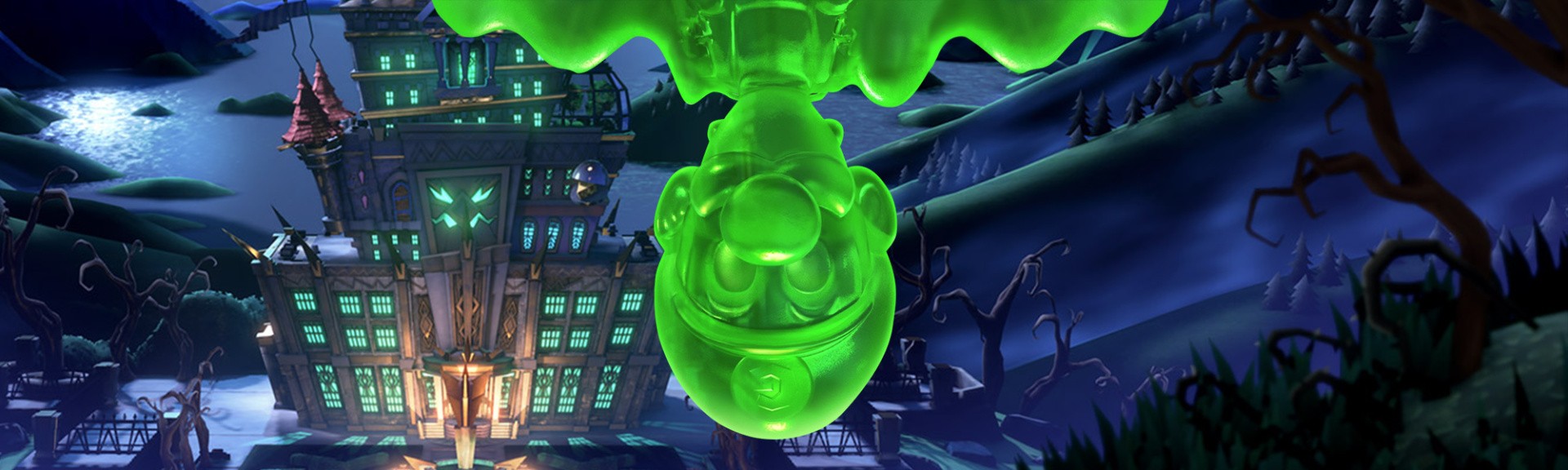
The Poltergust 3000 is so last year, the Poltergust 5000 is totally ‘whatever’, and the Poltergust 4000 was a Kart that isn’t practical in confined spaces, so this time around Luigi’s wielding the Poltergust G-00, which, just like the new iPhone, is able to produce an exact replica of Luigi made entirely out of nondescript jelly (OK, we might be wrong about the new iPhone bit). That’s not all it can do though; Luigi is now able to fire suction shots which attach to certain objects like a plunger, emit a dark light to reveal hidden objects a la Luigi’s Mansion 2, and even slam ghosts about the place like they’re made of wet tissue paper.
But the main event in this new arsenal is the cheeky chappy we alluded to earlier known as ‘Gooigi’. Not only does ‘he’ raise numerous ethical questions about the enslavement of sentient gelatinous artificial life forms, but also has all the abilities of Luigi to boot, as well as the means to pass through grating and other spaces that are too small even for the slightly less portly of the two plumber brothers. Gooigi’s molecular makeup does come at a cost though, as although he appears even more powerful than Luigi on the face of it, he does share the same weakness as Sonic the Hedgehog and the aliens from Signs: water. Get him even marginally moist and he’ll melt away into a useless pile of slop before slurping himself back up into the Poltergust.
You use Gooigi either when Luigi simply can’t traverse an obstacle, or in a few instances where two bodies are required to make progress, such as a door that needs raising and holding open through a mechanism that you simply can’t reach and get through the door at the same time. At first, the situations that demand the gooey cousin seem a bit too obvious, giving the impression that they’ve been shoehorned in; a gimmick to grab people’s attention that doesn’t necessarily fit the gameplay, especially as only one of the -igis can be controlled at any one time. As the game goes on, however, you’ll be surprised and pleased at the clever ways the two can work together to overcome obstacles and this sense of building wonderment is something that rings true for the gameplay as a whole.
To begin with, you may be a little bored if you’re a Luigi’s Mansion master; the game is of a slower pace, and the solutions to most of the mandatory puzzles probably won’t tax you much at all. Get further into the game, though, and things start to take a pleasing turn for the better; simple puzzles are still present, but they’re often presented in a way that forces you to think twice, and sometimes even second guess yourself. We even found puzzles that seemed completely impossible at first glance, only for the solution to be so achingly simple that we felt properly embarrassed even though we were in our own homes, and with the curtains drawn. In terms of the mainline gameplay, the solutions are generally relatively simple but often clever in their execution. If you want a bit more brunt however, you can find it with the hidden gems.
Each floor of the hotel has six gems hidden somewhere, and although you’ll probably stumble across one, two, maybe three in your first run through a floor, the rest are often extremely well hidden. Sometimes you’ll even be shown the gem which is only just out of reach, and there were instances where we went mad trying to figure out how to get our grubby, white-gloved mitts on them, but the sense of accomplishment for finally being able to snag that one last gem that’s been eluding you is pretty difficult to top. It’s all optional as well, so if you’re not keen on that higher level of difficulty, you can just pass them all by without so much as a by-your-leave.
All of this would be for nothing if the puzzles weren’t fun, however, and as you’ve probably guessed already from the overall tone of this review, they’re great fun. Couple these brain teasers with bouts of scuffling with undead ghoulies and you’ll be having yourself a jolly old jaunt through this gigantic beast of a building. But that’s not what Luigi’s Mansion is most remembered for, is it? Who remembers how many pink ghosts were in the dining hall or where to find the most pearls? No, what we and everyone else on the planet remembers are the Portrait Ghosts, and their triumphant return in the form of Boss Ghosts is where the gameplay shines the most fiercely.
A medieval knight, a prehistoric caveman, a literal pirate shark – the boss ghosts are, without a doubt, the highlight of the whole game. We don’t want to give anything away here, but suffice to say it’s amazing just how many creative and ingenious boss fights are possible using little more than a vacuum cleaner. Each contest is memorable, dramatic, and even decently challenging, and completing them will grant you a new button for the elevator that’ll allow you to make your way to the next floor. Every boss is brimming with personality, and leaves you desperate to see what the next area has in store for you.
Each area is completely distinct from the others thematically, ranging from a shopping centre to a gym complete with pool, a museum of natural history to a film studio; the variety is seriously rich throughout. What did leave us a tiny bit disappointed is the fact that all of these floors are not only distinct in terms of their aesthetic but also in terms of their layout. Each floor in Luigi’s Mansion 3 can only be accessed from the elevator, meaning the interconnectivity of the original game and suspicious dead ends are all gone, leaving only the essentially linear progression of floors in its place. It’s only a small gripe, and one that probably won’t bother most people playing given the sheer scale of the building and the gorgeous themed areas, all of which are immensely beautiful and charming. Speaking of which, we should probably talk about that as well.
The entire game from head to toe is absolutely dripping with charm and polish. The animations are so good that not only would they not look out of place in an animated feature film, they frankly put similar-looking games on the Switch to shame. Luigi’s face displays a range of emotions we wouldn’t have assumed would be practical to put in a game, but there they are; from the mild bemusement and satisfaction of another floor’s elevator button gracefully screwing itself in place, to the upwards look of timid horror at a colossal carnivorous plant (which might we add isn’t even in a cutscene, it can just happen mid-gameplay), the facial movement is an absolute masterclass.
As for the visuals when things aren’t moving, well you’ve probably seen the screenshots and trailers and all that good stuff, so let us just say that those don’t do Luigi’s Mansion 3 justice. At all. The lighting, the textures, the lighting, the models, the lighting… it’s easily one of the best looking games on the Switch to date, if not the best. There’s this one moment when Luigi’s torch casts light over a sand dune in one of the later levels that made us stop and just wonder how on Earth they got this to look as good as it does on a console that’s essentially a glorified mobile phone from two-and-a-half years ago. We know gameplay’s the most important part of any game, but boy oh boy did this game make us think twice about that stance.
What’s more, Luigi’s Mansion 3 runs extremely well at a very solid 30fps, with only very slight drops when there’s a lot of action on-screen at once. The environments are also littered with individual objects such as books, pizza boxes, jars, bottles, urns and other rubbish, and they all act separately within the physics engine, so to see such stable performance is fantastic – especially with the anti-aliasing and 1080p resolution (thanks, Digital Foundry) taken into account.
Multiplayer is also employed in various ways; you can enjoy a handful of Mario Party-like minigames on one console with up to seven other players in ScreamPark, delve into a randomly-generated mini-mansion with up to seven others online or locally (provided you have enough consoles and copies of the game) in ScareScraper, or even play the whole game with a friend, loved-one, or sworn enemy in co-op mode. The latter has player one controlling Luigi and player two Gooigi, which results in a largely symmetrical experience, although the person at the helm of OG Luigi is definitely more in control of things overall.
Whilst ScreamPark is a fun little aside (Cannon Barrage is our personal favourite), the main multiplayer meat is in ScareScraper. You have to play cooperatively with friends to overcome various tasks in either a five or ten-floor hotel. This usually ends up being catching ghosts or escorting Toads to safety, and even though we used that dirty word, escorting Toads is actually a lot of fun. We can’t imagine you’ll have much difficulty finding games online with other random players at launch, but we wouldn’t expect it to maintain any real long-lasting audience.
Posted by: xSicKxBot - 10-29-2019, 11:48 AM - Forum: Lounge
- No Replies
Join Our Halloween Costume Contest
Kristen G. as Weeping Angel from Doctor Who. She won the first runner up prize in CNET's and TV Guide's 2018 Halloween costume contest.
Show off your awesome Halloween costume and get a chance to win a brand new Nintendo Switch Lite!
We joined forces with CNET and TV Guide to celebrate the creativity of our readers with some awesome prize bundles and some money for your 2020 costume. The contest will have a winner per category and here are the prize bundles:
The individual prize consists of two $50 gift cards for Halloweenconstumes.com courtesy of Fun.com, a $25 gift card for CBS All Access, an Echo (3rd Gen), and a Nintendo Switch Lite.
The group prize bundle comes with a $350 Amazon gift card and five $25 gift cards for CBS All Access (Disclosure: CBS is GameSpot's parent company).
The kids prize package includes a $50 gift card for Halloweenconstumes.com, an Echo Dot Kids speaker, a Nintendo Switch Lite, and a $25 gift card for CBS All Access.
The pet prize winner gets a $50 gift card for Halloweenconstumes.com, a $25 gift card for CBS All Access, and a Petcube Bites 2.
Andrea K. as Winifred Sanderson from Hocus Pocus. Grand prize winner of CNET's and TV Guide's 2018 Halloween costume contest.
The contest has three phases, starting with the photo submission phase that ends Nov. 3 at 11:59 p.m. PT. The second phase consists of the judging, where our judges will select five finalists according to the following criteria: originality (30 percent), complexity (30 percent), caption (20 percent), creativity (10 percent), and relation to the theme (10 percent). The judges will select three finalists per category kicking off the voting period wherein finalists will rally friends and family to compete for the most votes. Contestants whose photos get the most votes between Nov. 5 at 11 a.m. PT and Nov. 4 at 11:59 p.m. PT will be crowned winners!
You can submit a photo per category but you will only receive one prize. Speaking of categories, here is a breakdown on what are the guidelines for each:
Individuals: you have to be 18 or older to participate
Groups: two or more people need to be part of the group photo and the person that submits it needs to be 18 years or older. They will be representing the group in the contest and they will be receiving the prize so it can be divided among the team
Kids: in order to participate in this category, you have to be the parent of the kid or kids in the picture. The minor must be under 13 years old in order to participate
Pet: this category is open to pets of all ages and types but they must be wearing a costume. And the pet's owner must be the one submitting the picture
With all that out of the way I can get into how to enter the contest. Please read the rules, accept the terms and conditions and fill out the form above. And keep things PG when submitting because any images with nudity, hate speech or discrimination will be disqualified. Please click here if you are having trouble viewing the form in your mobile device.
Head to our comments section and let us know what was your favorite childhood Halloween costume. Happy Halloween and good luck!
GDevelop 5 beta 82 was just released. GDevelop is a completely open source game engine with a very beginner friendly visual programming language and a complete set of tools for creating 2D games. A new tool addition this release is integration of a Yarn dialog editor enabling your game to support complex and branching dialogs.
The Yarn Dialogue editor is now embedded in GDevelop (thanks @blurymind!). Yarn is a powerful editor allowing to create advanced and dynamic dialogues with multiple choices.
When choosing a dialogue to load using the Dialogue Tree actions, you can edit or create a json file containing a dialogue in Yarn format.
See the example “Dialogue Tree with Yarn” to see how to use dialogue actions. You can also try the example online.
Improved Shape Painter object with new shapes and advanced features (thanks @Bouh!).
Add ellipse, rounded rectangle and star to Shape Painter
Add support for other advanced shapes (arc, bezier curves), and shapes composed of multiple shapes.
Various new smaller features:
Add condition to check for WebGL support (thanks @Wend1go!)
Add “Scene just resumed” condition (thanks @Wend1go!)
Add menu item to extract events into a new group (thanks @Bouh!)
Be sure to check out the complete release notes for a full list of improvements and changes in this release. If you are interested in learning more about GDevelop be sure to check out our hands-on video below.
The sheer volume of games available via Apple Arcade has meant that we’ve had to try and take a different approach to coverage. Richard’s ‘Arcade Roulette’ was an idea we came up with that would allow us to look at a range of games all at once, but in less detail than what would be typical.
After-all, if you’ve already committed to paying the subscription, you’ve got 80+ games at your finger-tips you can try out for free. If you’ve not, our bet is that you don’t necessarily need full-reviews of every game in order to sway you one way or the other.
Apple’s very committed to getting themselves to 100 games as part of their initial line-up, and at the pace they’re going it’s not going to take them long to get there. At least four new games have been added to the service over the past few days, and we actually managed to try out a few of them before they were due to go live.
Consider this a ‘bonus’ episode of the review roulette – please note that I wasn’t able to give them a full work-out like Richard would typically do. I was only at the event for about an hour, but here are some initial impressions anyway to help you decide whether these one are worth your time. I haven’t decided yet if I’ll keep these in the potential pool for a full Roulette entry, so they may turn up again with a more comprehensive overview (and a score).
Monimals
Monimals at first glance seems like a bit of a run-of-the-mill game, but it’s got some interesting additional applications it hope will earn it a bit more longevity on devices.
It’s a puzzle/platformer where you must navigate a sound jack underwater through levels to try and find ‘Monimals’, creatures that embody a single musical note. There’s the usual array of hazards and light level manipulation, with a ‘boss’ fight in the end that can help you win the monimal.
Each Monimal represents a single note or sound across lead guitar, bass and drum, and as you collect them you can then jump into the game’s ‘other’ mode and use the collected monimals to create your own music. It’s a simple drag and drop interface that lets you place a sound and define its length, as well as other typical tools you’d need for something like this. You’re not likely to create masterpieces, but you can create some pretty decent tunes. You can also have those songs play in the background as you go back into the ‘game’ part and find more monimals.
The developer’s have said that players will own the IP rights to everything they create within the app, but that it’s against the terms of service for someone to recreate a piece of music that already exists. They don’t sound too keen on trying to police that though, and they’re also working on ways for players to be able to share their music amongst themselves online.
Lifelike
This one stretches the definition of the term ‘game’, but it was still a really neat little app that I can actually see being great for young children. You are in charge of a little dot – the Diver – and you’re able to use simple swipe controls to guide it around a sparse open space inhabited by brightly coloured creatures that look a bit like swarms of fish.
The whole game is partly inspired by the lead designer’s experience with diving, but it also uses meditative techniques to give a very calming and relaxed experiences as you wander around. You can ‘discover’ a species by hovering over a specific point, and then that swarm will start interacting with you. Sometimes you can lead them, sometimes they lead you. There are lots of different levels, species and music to experience.
This one’s the least ‘game-y’ of the three, but I really appreciate how colourful the swarms are, and the way they move and flow about the map is quite mesmerising.
Hogwash
This one was definitely the most ‘fun’ of the three. I don’t want to say ‘enjoyable’ because given the breadth of apps available, something like ‘enjoyment’ is actually pretty relative to both a person’s tastes and the intent of the app to begin with (e.g. Lifelike).
This was definitely one you can imagine sitting down with some friends to have a couple of rounds. It’s got that ‘party game’ feel, even if it doesn’t quite support the numbers for it, being limited to only four players. One person plays as a farmhand, the three as pigs. The pigs need to run around the game map, getting themselves dirty, and then trying to make the Farmer’s prized possessions so dirty they can’t be cleaned.
The farmer, armed with only a simple (tho, unlimited) water hose, must chase after the pigs – they can wash clean anything that hasn’t been ‘maxed out’ in terms of dirt, and they can also try and catch the pigs and hogtie them (only another pig can free them). If the farmer catches all three he wins, otherwise it becomes a kind of ‘top score’ determined by how dirty/clean everything is, and then either the Farmer or the Pigs win.
It’s good clean (dirty?) fun, and has both a single-player mode against an AI (which is no slouch) and online multiplayer.
Make sure you check out our master game list to keep on top of new & upcoming releases!
Posted by: xSicKxBot - 10-29-2019, 05:00 AM - Forum: Windows
- No Replies
New cyberattacks targeting sporting and anti-doping organizations
Today we’re sharing that the Microsoft Threat Intelligence Center has recently tracked significant cyberattacks originating from a group we call Strontium, also known as Fancy Bear/APT28, targeting anti-doping authorities and sporting organizations around the world. As the world looks forward with anticipation to the Tokyo Summer Games in 2020, we thought it important to share information about this new round of activity.
At least 16 national and international sporting and anti-doping organizations across three continents were targeted in these attacks which began September 16th, just before news reports about new potential action being taken by the World Anti-Doping Agency. Some of these attacks were successful, but the majority were not. Microsoft has notified all customers targeted in these attacks and has worked with those who have sought our help to secure compromised accounts or systems.
This is not the first time Strontium has targeted such organizations. The group reportedly released medical records and emails taken from sporting organizations and anti-doping officials in 2016 and 2018, resulting in a 2018 indictment in federal court in the United States.
The methods used in the most recent attacks are similar to those routinely used by Strontium to target governments, militaries, think tanks, law firms, human rights organizations, financial firms and universities around the world. Strontium’s methods include spear-phishing, password spray, exploiting internet-connected devices and the use of both open-source and custom malware.
We’ve previously announced separate Strontium activity we’ve seen targeting organizations involved in the democratic process and have described the legal steps we routinely take to prevent Strontium from using fake Microsoft internet domains to execute its attacks. Additionally, the data and information we learn from our disruption work is used to improve the security and security features of our products and services.
As we’ve said in the past, we believe it’s important to share significant threat activity like that we’re announcing today. We think it’s critical that governments and the private sector are increasingly transparent about nation-state activity so we can all continue the global dialogue about protecting the internet. We also hope publishing this information helps raise awareness among organizations and individuals about steps they can take to protect themselves.
You can protect yourself from these types of attacks in at least three ways. We recommend, first, that you enable two-factor authentication on all business and personal email accounts. Second, learn how to spot phishing schemes and protect yourself from them. Third, enable security alerts about links and files from suspicious websites.
Wireguard is a new VPN designed as a replacement for IPSec and OpenVPN. Its design goal is to be simple and secure, and it takes advantage of recent technologies such as the Noise Protocol Framework. Some consider Wireguard’s ease of configuration akin to OpenSSH. This article shows you how to deploy and use it.
It is currently in active development, so it might not be the best for production machines. However, Wireguard is under consideration to be included into the Linux kernel. The design has been formally verified,* and proven to be secure against a number of threats.
When deploying Wireguard, keep your Fedora Linux system updated to the most recent version, since Wireguard does not have a stable release cadence.
Set the timezone
To check and set your timezone, first display current time information:
timedatectl
Then if needed, set the correct timezone, for example to Europe/London.
timedatectl set-timezone Europe/London
Note that your system’s real time clock (RTC) may continue to be set to UTC or another timezone.
Install Wireguard
To install, enable the COPR repository for the project and then install with dnf, using sudo:
Once installed, two new commands become available, along with support for systemd:
wg: Configuration of wireguard interfaces
wg-quick Bringing up the VPN tunnels
Create the configuration directory for Wireguard, and apply a umask of 077. A umask of 077 allows read, write, and execute permission for the file’s owner (root), but prohibits read, write, and execute permission for everyone else.
mkdir /etc/wireguard

cd /etc/wireguard

umask 077
Generate Key Pairs
Generate the private key, then derive the public key from it.
$ wg genkey > /etc/wireguard/privkey

$ wg pubkey < /etc/wireguard/privkey > /etc/wireguard/publickey
Alternatively, this can be done in one go:
wg genkey | tee /etc/wireguard/privatekey | wg pubkey > /etc/wireguard/publickey
There is a vanity address generator, which might be of interest to some. You can also generate a pre-shared key to provide a level of quantum protection:
wg genpsk > psk
This will be the same value for both the server and client, so you only need to run the command once.
Configure Wireguard server and client
Both the client and server have an [Interface] option to specify the IP address assigned to the interface, along with the private keys.
Each peer (server and client) has a [Peer] section containing its respective PublicKey, along with the PresharedKey. Additionally, this block can list allowed IP addresses which can use the tunnel.
Server
A firewall rule is added when the interface is brought up, along with enabling masquerading. Make sure to note the /24 IPv4 address range within Interface, which differs from the client. Edit the /etc/wireguard/wg0.conf file as follows, using the IP address for your server for Address, and the client IP address in AllowedIPs.
The client is very similar to the server config, but has an optional additional entry of PersistentKeepalive set to 30 seconds. This is to prevent NAT from causing issues, and depending on your setup might not be needed. Setting AllowedIPs to 0.0.0.0/0 will forward all traffic over the tunnel. Edit the client’s /etc/wireguard/wg0.conf file as follows, using your client’s IP address for Address and the server IP address at the Endpoint.
* “Formally verified,” in this sense, means that the design has been proved to have mathematically correct messages and key secrecy, forward secrecy, mutual authentication, session uniqueness, channel binding, and resistance against replay, key compromise impersonation, and denial of server attacks.
Video: We Almost Had A 2D Banjo-Kazooie Platformer On Game Boy Color
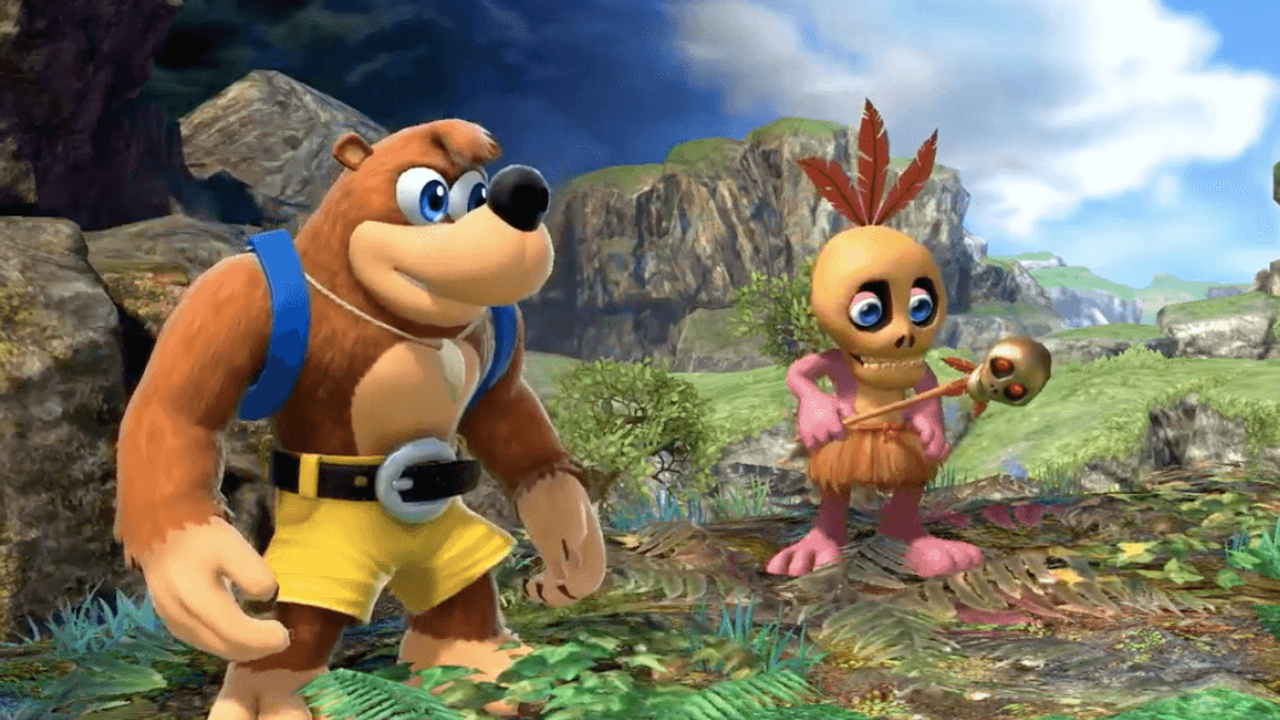
With the bear and bird now perfectly playable in Super Smash Bros. Ultimate, the love for Banjo-Kazooie has felt particularly strong as of late. You’ll no doubt be aware of the original N64 game, its sequel Banjo-Tooie and more, but did you know that the series almost received a 2D platformer on the Game Boy Color?
The cancelled game has been covered on the DidYouKnowGaming YouTube channel by video game researcher and archiver, Liam Robertson. In the video, he explains that the game – which would have been known as Banjo Kazooie: Grunty’s Curse – was actually a title that would go on to become Banjo Kazooie: Grunty’s Revenge, a spin-off of sorts which released on the Game Boy Advance in 2003.
The scrapped Game Boy Color title has some similarities with the game which eventually released on the newer hardware, but there are noticeable differences to be found within its storyline and levels, with some ideas sadly never making it across. We won’t spoil too much here as the video’s well worth watching, but feel free to dive in to learn more and see original design documents which go over some of the ideas had by the talented folks at Rare.
Do you wish you could have had the chance to experience this game? Give us your mightiest “Guh-huh!” in the comments below.
Posted by: xSicKxBot - 10-29-2019, 04:59 AM - Forum: Lounge
- No Replies
What's New To Netflix This Week? Movies, TV, And Originals
Halloween is arriving this week, and that means October is over, and Netflix will be releasing a lot of content this Friday, when November begins. From movies to TV shows to original programming, there is bound to be something you'll want to watch.
Arriving on November 1 is a slew of movies you may have seen, but you'll want to watch again. Step Brothers is the 2008 comedy about two adults--who act more like children--that are thrusted into each other's lives as their single parents marry each other. Starring Will Ferrell and John C. Reilly, this movie is hilarious and ludicrous in the best ways possible.
Also arriving on Friday are the three Matrix movies--Matrix 4 is in production which recently cast Neil Patrick Harris and Yahya Abdul-Mateen II. The first movie in this franchise still holds up, and after you're finished watching it, why not watch the other two movies to see the series slowly implode on itself? Also arriving on Friday are Rounders and Zombieland.
Below, you'll find everything headed to Netflix this week, and for more news on streaming services, check out what's coming to Shudder, Hulu, and Amazon Prime Video in November.
What's new to Netflix this week?
Monday, October 28
A 3 Minute Hug
Little Miss Sumo
Shine On with Reese: Season 1
Tuesday, October 29
Arsenio Hall: Smart & Classy
Wednesday, October 30
Flavorful Origins: Yunnan Cuisine
Thursday, October 31
Kengan Ashura: Part ll
Nowhere Man
Raging Bull
Friday, November 1
American Son
Atypical: Season 3
Drive
Fire in Paradise
Hache
Hello Ninja
Holiday in the Wild
The King
The Man Without Gravity
Queer Eye: We're in Japan!
True: Grabbleapple Harvest
We Are the Wave
Apache Warrior
Barbie Dreamhouse Adventures: Go Team Roberts: Season 1
Billy on the Street
Christmas Break-In
Christmas in the Heartlands
Christmas Survival
Elliot the Littlest Reindeer
Fear and Loathing in Las Vegas
Grease
Holly Star
How to Be a Latin Lover
Love Jones
Mars: Season 2
Mobile Suit Gundam: Iron-Blooded Orphans: Seasons 1-2
Fixed an issue where claiming a Seasonal Artifact during a locked loadout activity could block access to the Artifact
Disruption/Insults/Disrespect
Disruption/Insults/Disrespect
Harassment/Personal Attacks/Privacy Violation
Gory Violence/Explicit Sexuality
Illegal Activity
Hacking/Cheating
Spoilers/Stolen Content
Soliciting/Phishing/Impersonation
This site uses cookies for analytics, personalized content, and ads. By clicking ‘Accept’, you agree to this use. You can learn more at Privacy Policy.
Accept
This site uses cookies for analytics, personalized content, and ads. By continuing to browse this site, you agree to this use. Privacy Policy