The folks over at Humble Bundle are running a deal on software until November 18th, 2019. Included software includes game engines, art and video applications, audio applications, a 3D modeller and more.
Highlighted items from the sale include:
There are a few dozen more items on sale so be sure to check the sale homepage for more offers. You can learn more about the sale in the video below. All the above links contain affiliate codes that give GFS a small commission if you use them to purchase anything (and thanks if you do!).
Posted by: xSicKxBot - 11-11-2019, 10:43 PM - Forum: Windows
- No Replies
CVP James Phillips: Our vision for the Microsoft customer data platform
Empowering organizations everywhere to gain insight from all their data sources and deliver personalized customer engagement
There is a fundamental change occurring across industries and organizations: Data now comes from everywhere and everything. As customers have access to more content, purchasing channels, and brand options than before, the touchpoints become exponential—every website visit, use of a product, and interaction with a customer service representative creates an observation or generates data. But this data is often siloed across multiple systems and organizational departments, making it difficult to gain a single source of truth.
With such an overload of information and choices available, organizations must demonstrate they both understand and value their customers. To this end, we’ve been working to bring customer experiences to the forefront of the business conversation with a new set of intelligent applications with our modern, unified, intelligent, and adaptable business applications. Today, I’d like to dig into our vision and strategy for Microsoft’s customer data platform—a critically important investment from Microsoft. Specifically, how it is helping organizations overcome data silos and leverage artificial intelligence to guide decisions and empower organizations to take meaningful actions for their business.
Dynamics 365 Customer Insights: Microsoft’s customer data platform
Historically, the customer interaction with a brand ended the moment they completed the purchase and walked out the door—limiting an organization’s understanding of why or how its customers are using its products and services. Dynamics 365 Customer Insights enables organizations to gain the most comprehensive view of their customers by unifying data across diverse sources—be it transactional, behavioral, or observational data—as well as uniquely enriching profiles with market insights and real-time product usage.
From data analysts to marketing, sales, and service professionals, every employee in an organization can leverage AI-driven insights. These include churn risk, customer LTV, and recommended next best action, to power business processes across the customer journey that help boost personalization and build richer relationships.
The Microsoft CDP enables breakthrough experiences for customers while maintaining the strictest compliance and security standards so that all customer data is securely managed and adheres to GDPR regulations. Built on a hyper-scale Microsoft Azure platform, the application allows organizations to run powerful analytical capabilities using Microsoft AI and Azure-based machine learning models. Customer Insights can easily extend and customize with the Microsoft Power Platform for even richer data processing and customizations. Customers can benefit from the Microsoft partner ecosystem for development of custom applications and solutions to fit specific industry or business needs.
Let’s look at a few organizations using our CDP to deliver business outcomes and rich customer experiences:
Empowering organizations worldwide
The United Nations Children’s Fund (UNICEF) works tirelessly in over 190 countries and territories to save the lives of millions of children. As private donors and volunteers are increasingly hard to find and retain, UNICEF Netherlands found that personally engaging supporters increased their overall commitment to the organization. Key details on donors, such as their contact information, philanthropic interests, and donation history, were housed in disparate data silos, making it difficult to gain a unified view of the donor base and personalize interactions at scale. To solve this problem, the team adopted Dynamics 365 Customer Insights to quickly and easily combine data from multiple sources, analyze the data to derive insights, and activate the insights via marketing and communication channels. Customer Insights’ out-of-the-box interoperability with Dynamics 365 Marketing helps the team create and optimize marketing campaigns on-the-fly, enabling UNICEF to better develop a customer lifetime value model, which will help it identify and optimize engagement with high-impact donors. Learn more in the UNICEF video below.
American Electric Power (AEP)—a competitive retail energy solutions company serving more than 400,000 residential, small-business, and commercial customers nationwide—is using Dynamics 365 Customer Insights to deliver efficient and sustainable energy solutions to customers. Previously, AEP faced cumbersome manual processes that required lots of analysis and input to piece together various customer information for a holistic view of its customer, which was both timely and costly. With a cloud-first approach, using Dynamics 365 Customer Insights, AEP can now easily migrate large data sets across various systems of record into a single, unified customer profile. As a result, AEP can better understand its customer needs, identify gaps in product offerings, and ensure both front and back-end operations are focused and efficient to deliver quality, tailored experiences to its customers. Learn more in the AEP video below.
What’s next?
Thus far, we’ve seen great momentum and impact resulting from the customer data platform and how businesses are evolving customer engagement and experiences. Looking ahead, we will continue to innovate on the platform and plan to deliver more opportunities and features in the coming months.
Everything in a PC, laptop, or server is represented as binary digits (a.k.a. bits, where each bit can only be 1 or 0). There are no characters like we use for writing or numbers as we write them anywhere in a computer’s memory or secondary storage such as disk drives. For general purposes, the unit of measure for groups of binary bits is the byte — eight bits. Bytes are an agreed-upon measure that helped standardize computer memory, storage, and how computers handled data.
There are various terms in use to specify the capacity of a disk drive (either magnetic or electronic). The same measures are applied to a computers random access memory (RAM) and other memory devices that inhabit your computer. So now let’s see how the numbers are made up.
Suffixes are used with the number that specifies the capacity of the device. The suffixes designate a multiplier that is to be applied to the number that preceded the suffix. Commonly used suffixes are:
Kilo = 103 = 1,000 (one thousand)
Mega = 106 = 1,000,000 (one million)
Giga = 109 = 1000,000,000 (one billion)
Tera = 1012 = 1,000,000,000,000 (one trillion)
As an example 500 GB (gigabytes) is 500,000,000,000 bytes.
The units that memory and storage are specified in advertisements, on boxes in the store, and so on are in the decimal system as shown above. However since computers only use binary bits, the actual capacity of these devices is different than the advertised capacity.
You saw that the decimal numbers above were shown with their equivalent powers of ten. In the binary system numbers can be represented as powers of two. The table below shows how bits are used to represent powers of two in an 8 bit Byte. At the bottom of the table there is an example of how the decimal number 109 can be represented as a binary number that can be held in a single byte of 8 bits (01101101).
Eight bit binary number
Bit 7
Bit 6
Bit 5
Bit 4
Bit 3
Bit 2
Bit 1
Bit 0
Power of 2
27
26
25
24
23
22
21
20
Decimal Value
128
64
32
16
8
4
2
1
Example Number
0
1
1
0
1
1
0
1
The example bit values comprise the binary number 01101101. To get the equivalent decimal value just add the decimal values from the table where the bit is set to 1. That is 64 + 32 + 8 + 4 + 1 = 109.
By the time you get out to 230 you have decimal 1,073,741,824 with just 31 bits (don’t forget the 20) You’ve got a large enough number to start specifying memory and storage sizes.
Now comes what you have been waiting for. The table below lists common designations as they are used for labeling decimal and binary values.
Decimal
Binary
KB (Kilobyte)
1KB = 1,000 bytes
KiB (Kibibyte)
1KiB = 1,024 bytes
MB (Megabyte)
1MB = 1,000,000 bytes
MiB (Mebibyte)
1MiB = 1,048,576 bytes
GB (Gigabyte)
1GB = 1,000,000,000 bytes
GiB (Gibibyte)
1 GiB (Gibibyte) = 1,073,741,824bytes
TB (Terabyte)
1TB = 1,000,000,000,000
TiB (Tebibyte)
1TiB = 1,099,511,627,776 bytes
Note that all of the quantities of bytes in the table above are expressed as decimal numbers. They are not shown as binary numbers because those numbers would be more than 30 characters long.
Most users and programmers need not be concerned with the small differences between the binary and decimal storage size numbers. If you’re developing software or hardware that deals with data at the binary level you may need the binary numbers.
As for what this means to your PC: Your PC will make use of the full capacity of your storage and memory devices. If you want to see the capacity of your disk drives, thumb drives, etc, the Disks utility in Fedora will show you the actual capacity of the storage device in number of bytes as a decimal number.
There are also command line tools that can provide you with more flexibility in seeing how your storage bytes are being used. Two such command line tools are du (for files and directories) and df (for file systems). You can read about these by typing man du or man df at the command line in a terminal window.
Random: The Month Of Luigi Is Getting Completely Out Of Hand
Update (11th Nov, 12:00 GMT): For some reason, the ‘month’ of Luigi (see below for more details) appears to be showing no signs of slowing down. A quick look at the @SuperMario_UK Twitter account reveals that Luigi’s reign is still very much in effect despite the fact that we’re now well and truly in November.
The account has been posting daily facts about Luigi since the beginning of October, promising more throughout the month, but is still going strong eleven days later. The account’s humour is still shining through, too. Here’s ‘Day 41’ of Luigi’s special month:
When will it end? Will it ever end? Is Mario finished? Has someone made sure that the Nintendo social media team are OK? Has Luigi redefined what it means to be a month? Amazing.
Original Article (Fri 4th Oct, 2019 11:00 BST): The month of October is now upon us and there are plenty of things for Nintendo fans to be excited about. Arguably one of the main reasons, of course, is the upcoming launch of Luigi’s Mansion 3, and Nintendo is celebrating in style.
Remember the Year of Luigi a few years back? Well, for one month only, Nintendo has decided to once again celebrate all things green by dubbing October 2019 as ‘Super Luigi Month’. The Super Mario UK Twitter account has been rebranded as Super Luigi UK until 31st October, the day of the new game’s release; from now until then, the account will be “dedicated entirely to Luigi and his esteemed history”. As it should be.
Things have already begun, with one Luigi-themed message seemingly appearing per day. Here’s what we’ve had so far:
If you’re wanting to join in with the celebrations, make sure to give @SuperMario_UK a follow to receive lots of Luigi goodness all over your timeline.
Are you looking forward to Luigi’s Mansion 3 later this month? Let us know if you’re planning on getting it with a comment below.
Pokémon Sword And Shield’s Wild Area Web App Is Now Live
Update (11th Nov, 13:00 GMT): The Pokémon Sword and Shield Wild Area web app is now available to explore, allowing fans to track down some of their favourite Pokémon in a Google Maps-like diorama.
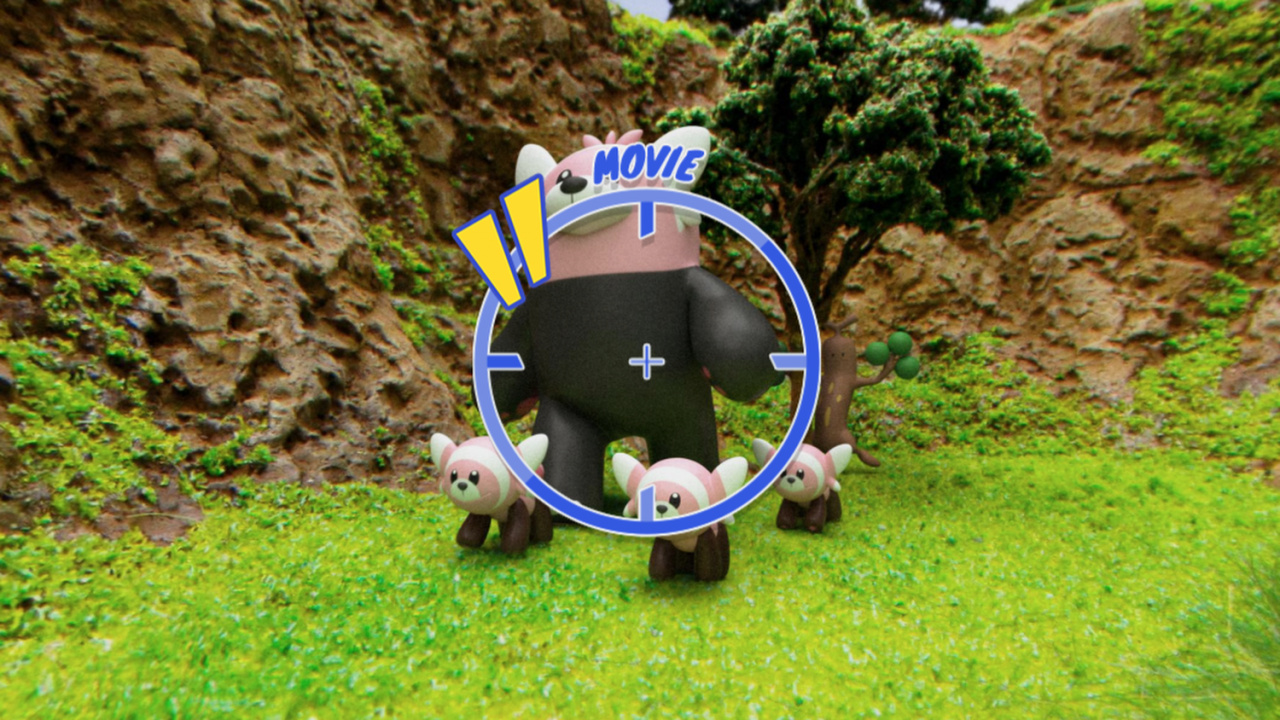
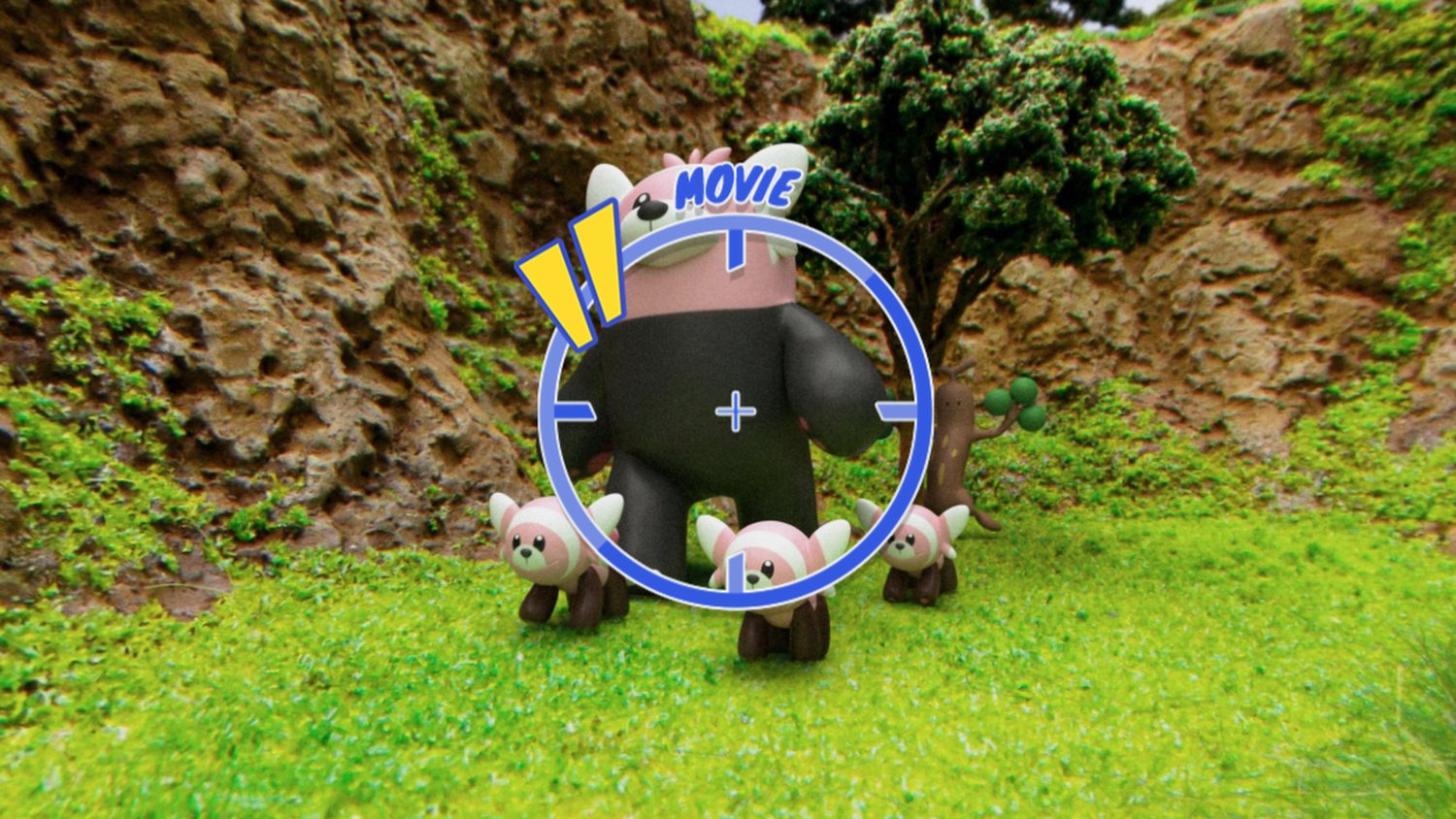
You can go ahead and visit the app for yourself here, although everything is presented in Japanese. You can explore the Wild Area using arrows to move around, or by dragging the screen to explore your current surroundings; when you spot a Pokémon, you can click on it to reveal information and – if you’re lucky – a little animated movie which can be shared to social media.
It’s not quite as exciting as catching the Pokémon and exploring properly – as you’ll be able to do in the games – but at least it provides something for those unable to cope with the hype. Pokémon Sword and Shield launch this Friday, 15th November.
Original Article (Wed 16th Oct, 2019 15:50 BST): The Pokémon news just keeps coming today! Not only have brand new Gigantamax Pokémon forms been revealed, but now we have news of an online app which will let fans explore Pokémon Sword and Shield‘s Wild Area.
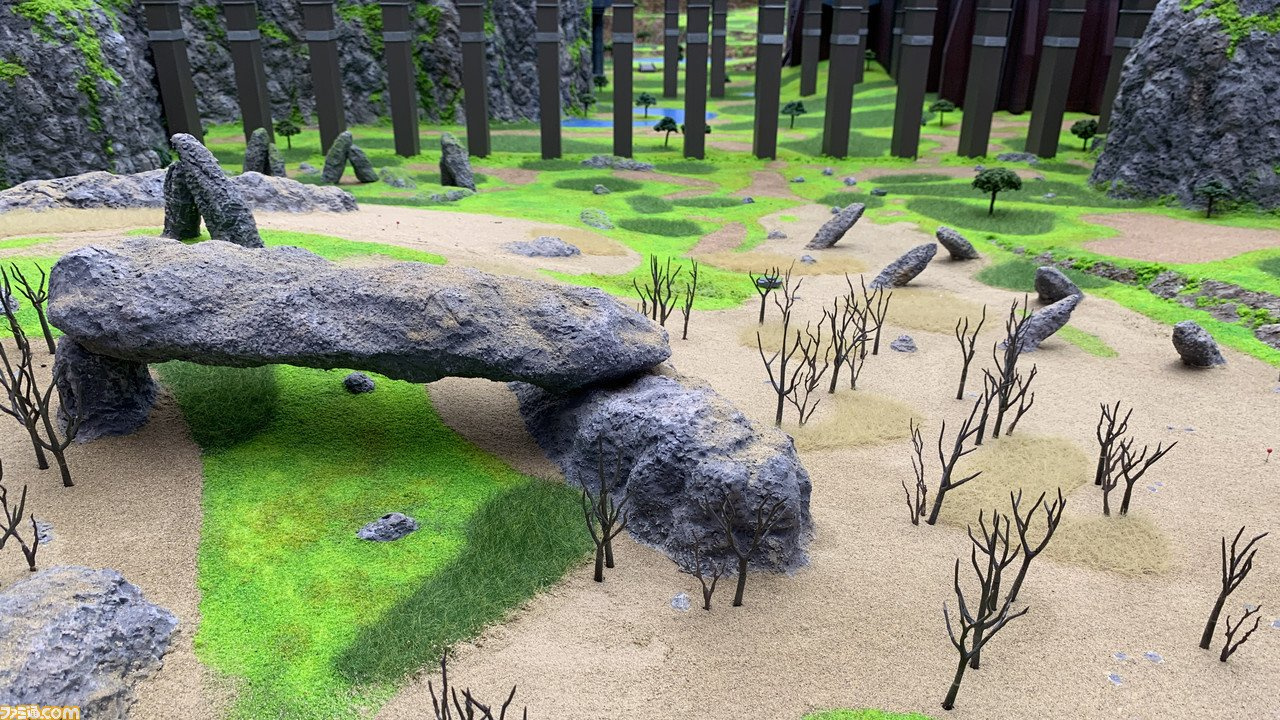
Scheduled to arrive in early November and to be available until 31st December, the new app will reportedly be known as ‘Pokémon Wild Area Search’ and will be available on PC, Mac, smartphones and tablets. It will allow fans to explore a diorama of the games’ Wild Area and find various Pokémon within it.
Famitsu
Famitsu
The app will feature a 360-degree camera and will allow users to enjoy encounters with certain Pokémon in CG form. We’re sure that more information on this will arrive in the near future, so we’ll make sure to update you when we hear more details on exactly how you can check this out for yourself.
It seems The Pokémon Company is coming up with a nice variety of new tricks to keep the hype rolling for the new games; the start of the month also saw a 24-hour livestream take place, giving players a chance to check out Pokémon in the new location of Glimwood Tangle.
Do you like the sound of this idea? Do you think it could be a fun way to check out some of the new Pokémon coming to the games? Share your thoughts with us below.
Social Media Bands Together To Show Pokémon Studio Game Freak Some Love
It’s been a difficult period for Japanese developer Game Freak since the producer Junichi Masuda revealed the upcoming titles Pokémon Sword and Shield for Switch would feature a limited Pokédex. There’s been backlash from fans, online leaks and a launch event in Japan was even recently cancelled due to operational reasons.
During an interview not long ago, Masuda revealed the “negative” feedback had taken its toll on the development team and there have also been some rumours floating about that company morale is at an all-time low leading up to what should be one of the most exciting video game releases of 2019.
Now, in an attempt to lift spirits at Game Freak, Pokémon fans from around the world have banded together to share messages of positivity about the embattled developer (via Twitter), with the hashtag #ThankYouGameFreak. It didn’t take long before the tag was trending in multiple countries, either.
We’ve rounded up some of the top posts right here. Also, feel free to share your own messages of thanks in the comments.
Come one, come all – we’re about to begin the Box Art Brawl! Yes, welcome back to the weekly battle where we throw three versions of box art from the same game into a ring to determine which one wins the beauty pageant and which one(s) deserves to be boxed up forever.
Last week Super Mario took on his continental brothers in a hard-fought bout that eventually saw the yellow Famicom cover for Super Mario Bros. crowned mushroom king, with North America trailing close behind and Europe just behind again. It was close, but an undeniable Japanese victory. Congratulations all.
Staying in the realm of platformers, we’re jumping two console generations onwards to the Nintendo 64 and into the third dimension this week with Banjo-Tooie, Rare’s 2000 sequel to the only game on the console to truly give Mario a run for his money. When deciding on worthy contenders, we try to choose entrants with as much variety as possible, but it wasn’t until our recent interview with character artist Ed Bryan that we realised the North American and European versions of this game are actually different. Similar, yes, but distinct enough to make this a more interesting competition than if the only difference was a black border.
So, take a look below at the bear, breegull and bone-faced one in their regional guises…
North America
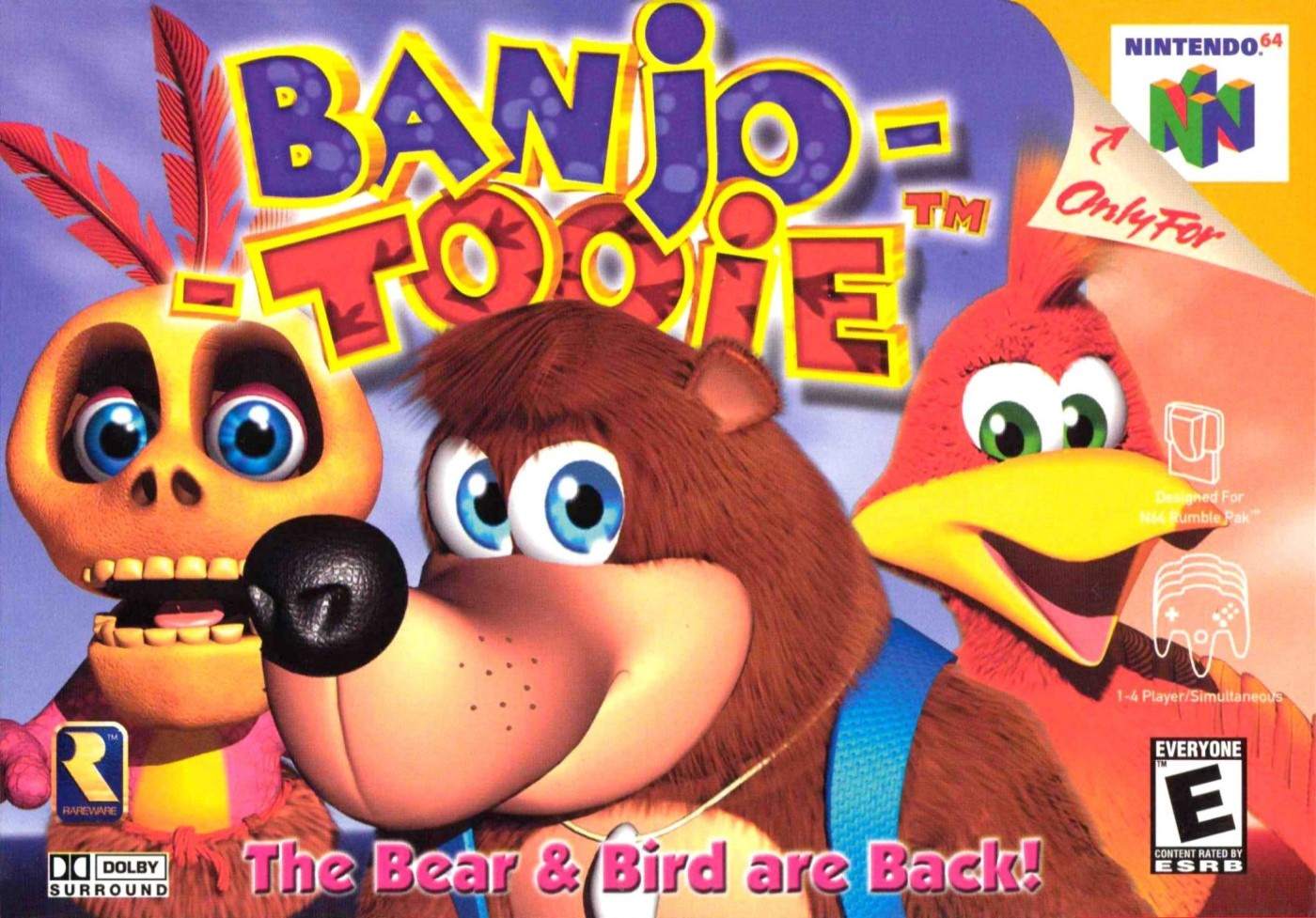
The Bear & Bird are Back! reads the text at the bottom in a slightly insipid pink that could probably stand out a bit better. The North American version gets Banjo front-and-centre, with Mumbo on the left behind him and Kazooie on his back to the right. The breegull is looking uncharacteristically doe-eyed and docile but the three faces give the cover impact, that’s for sure. A blue sky background doesn’t distract from them in any way, although the cover arguably lacks subtlety – once you’ve taken in the three characters there’s nothing much left for your eye to follow.
It’s a bold, bread-and-butter cover and we admire it, even if it lacks a little class.
Europe
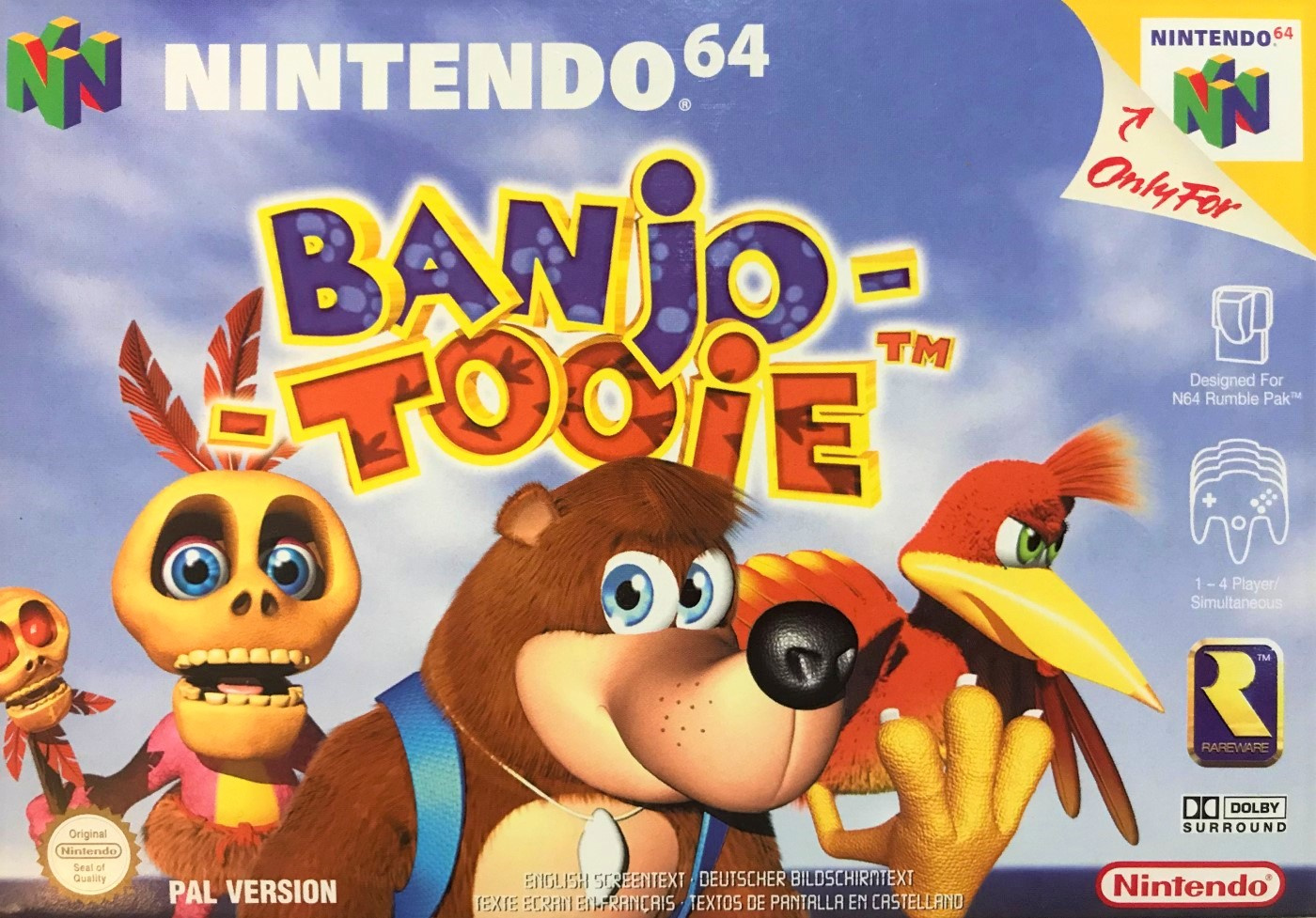
In our memories the EU and NA versions were the same, but as you can see they were different. Of course, they share most of the same elements, although they’re given a little more room to breathe on the European box. Both Banjo and Mumbo have been flipped to face the other way and Kazooie has been unleashed from her backpack prison (as she can be in the game itself). Her scrawny leg and claw could be mistaken for a strange hand rising from the bottom of the box (imagine her leg is the ‘thumb’), but we enjoy the steely look in her eyes here. Don’t mess with this breegull.
The standard black border of most EU N64 boxes is absent (which probably contributed to our mistakenly thinking this and the NA version were dupes). Zooming out from the three characters conveys a better sense of place, even if it’s just a cloudy blue sky and there’s plenty of room to fit not only the game’s logo, but also the ‘Nintendo 64’ at the top.
Japan
The Japanese version arguably manages to be more dynamic with its character poses, but perhaps blander overall. The same three characters appear, although in a different configuration with different art. The logo gets a wooden log background with a Jiggy under the ‘2’ and we very much like the Gold Feather and Eggs at the bottom, but the orange-y/white background feels a bit wishy-washy.
On the whole we like it, but we’d probably put a ‘could do better’ on its report card.
So, which one of these do you think wins in a bear-on-bird-on-bone battle? Take a long look below, tap your favourite and hit the ‘Vote’ button to bestow the power of your approval on your chosen combatant:
Ah, such poor souls. That’s all for this week – have a great one and we’ll see you next time for another beautiful Box Art Brawl.
November 1st Xbox Insider Release Notes – Alpha Ring (1911.191030-1945)
Hey Alpha ring users! Today’s Xbox Insider Release Notes highlight the latest fixes, known issues, and features coming to your console. Starting at 2:00 p.m. PT today, users will receive the latest 1911 Xbox One system update (build: 19H1_RELEASE_XBOX_DEV_1911\18363.8110.191030-1945). Keep reading for more details.
System Update Details:
OS version released: 19H1_RELEASE_XBOX_DEV_1911\18363.8110.191030-1945
Available: 2:00 p.m. PT – November 1, 2019
Mandatory: 3:00 a.m. PT – November 2, 2019
Fixes for Alpha
We’ve heard your feedback, and we’re happy to announce the following fixes have been implemented for this 1911 build:
Clubs
Fixed an issue where the “What’s New” filter was not working correctly.
Guide
Various UI/display fixes.
My Games & Apps
Users should no longer see an error when attempting to uninstall multiple titles from their collection.
We’ve fixed an issue where some titles would be missing from Ready to Install after an update.
Narrator
Various fixes to narrator functionality in Guide.
Party
We’ve fixed an issue where users would get an error when leaving a party.
Store
We’ve fixed an issue where some users were unable to complete in-game purchases after an update.
System
Updates to properly reflect local languages across the console.
Known Issues for Alpha
We understand some issues have been listed in previous Xbox Insider Release Notes. These issues aren’t being ignored, but it will take Xbox engineers more time to find a solution. We appreciate your patience at this time!
Audio
Users who have Dolby Atmos enabled and console display settings set to 120hz with 36 bits per pixel (12-bit) are experiencing loss of Dolby Atmos audio in some situations.
Workaround: Disable 120hz or set Video Fidelity to 30 bits per pixel (10-bit) or lower.
Home (Experiment)
Some users may see a different Store icon on the dashboard than what normally appears.
Some users may see their content blocks reset randomly during the experiment.
Users may see the images for ads on the dashboard looking cropped or cutoff.
Dolby Access
Users are unable to complete the setup for Dolby Atmos in the app and the app is not recognizing Dolby Atmos headphones.
Note: This is an issue with the Dolby Access app and the app developers are aware and investigating.
Profile Color
Sometimes users may encounter the incorrect Profile color when powering on the console.
Are you not seeing your issue listed above? Make sure to use Report a problem to keep us informed of your issue. We may not be able to respond to everyone, but the data we’ll gather is crucial to finding a resolution.
Learn more about feedback and how each ring is differentiated in the following links:
For more information regarding the Xbox Insider Program follow us on Twitter and join the community subreddit for support and updates. Keep an eye on future Xbox Insider Release Notes for more information regarding your Xbox One Update Preview ring!
Don’t Miss: How moving from 2D to 3D shaped the design of Risk of Rain 2
It’s not easy to ship a hit indie game, and it’s even harder to follow up that hit with an outstanding sequel.
But that’s what Hopoo Games seems to have done with Risk of Rain 2, which it launched on Steam’s Early Access service earlier this year and sold more than a million in its first month.
A follow-up to Risk of Rain, the studio’s 2D critically acclaimed 2013 roguelike, Rain 2 is a remarkable project. Whereas many devs seem to either avoid sequels entirely or double down on the same mechanics and modes which made their original game successful, Hopoo instead took what worked about Risk of Rain and brought it into a new dimension: 3D.
This is Hopoo’s first 3D game, and in a recent conversation with Gamasutra the team explained that the shift into three dimensions and a behind-the-back perspective required a lot of work — but also opened up a lot of new and interesting opportunities.
Who are you, and what is Risk of Rain 2?
We’re Hopoo Games, a small team who started out as two students from the University of Washington with our first game, Risk of Rain in 2013. After that we decided to continue building video games with our next title Deadbolt in 2016.
Now a team of three, we’ve been hard at work on the sequel to Risk of Rain which took the big jump to 3D and third person shooter mechanics.
The original Risk of Rain was very popular as a intense 2D platforming action/RPG. Why switch to 3D, with the inevitable navigation issues it contributes?
This is our first experience in making a 3D project. We thought it was a great way to evolve on the core experience of Risk of Rain, staying true to the experience, while having fans feel like it was an evolution worthy of a sequel.
The original Risk of Rain (2013)
As self-taught developers, we’re always looking for opportunities to expand our knowledge and expertise – 3D gameplay, to us, was a key thing we wanted to try. We are really happy with the way the game has turned out so far and there are so many more options for us to explore in 3D.
Both RoR and RoR 2 use premade levels (with variations), with randomly selected objects and enemies, instead of the usual roguelite procedural terrain. Did you consider going with full-random terrain this time? What informed your decision to use premade maps?
Procedural generation is something we messed around with for awhile for Risk 2 but the level of difficulty needed to make interesting / memorable procedural maps in 3D was too much for our team size.
However, we knew that players would be playing the same stages multiple times even in a single run so we wanted to provide as much variation on each map as possible. In 3D it has been a lot easier to turn on and off certain map elements that can have a huge impact on the moment to moment gameplay.
Let’s talk about item design. RoR had 100 items; RoR 2 currently has 75. There’s a huge variety of items in the game, from the ultra-powerful (like the amazingly great Ukelele) to the Monster Tooth, which just drops a very minor healing item when you kill an enemy. How do you brainstorm new items, and is there a tendency to make items that just adjust variables a bit (like the Soldier’s Syringe) over those that require creating new game objects like missiles, banners and auras?
Exciting item variety in Risk of Rain 2 has always been something that we strived for. All of the items that we end up adding to the game start with a specific purpose in mind. Like you mentioned, the Monster Tooth, while not being the most exciting item in the game serves the vital purpose of keeping the playing in the fight by rewarding them with healing after every kill.
We could have implemented this item as a simple gain X health for every monster death but that cuts out a lot of the design and player choice. As you are killing more monsters the orbs start to stack up on around the map and you can pick and choose when to run around and collect them for a heal at the right moment. Giving players a choice is always something we want to weave into our item designs whenever possible.
Risk 2 being in 3D has given us a ton of new design space for item effects and uses. Most of the items that we bring over from the original Risk of Rain need to be redesigned to fit into a 3D world. Some of our favorite new items and equipment like the ‘Royal Capacitor’ that targets a specific enemy for a massive lightning strike is only possible since we switched to 3D.
Of course, balancing items is a difficult act, giving them a mix of uses and coming up with new ways to vary the game. It might be helpful to other developers to have some insight into your philosophy in balancing items.
Item balance is something we talk a lot about in the office. With so many variations of items and different tiers there is always something we need to tweak. Thankfully for us, the game is all PVE so our balance comes more from how the items make players feel and making sure they are all rewarding.
Since we are in Early Access, the community has also played a huge role in giving us feedback on items and character balance to make sure any content we release is surpassing both our own and players expectations.
One danger with a roguelike with such high-value randomized items is a sense in some games, most visible perhaps in Binding of Issac, that your success is more due to what you find than how you play. Have you observed this happening in the RoR games, and do you think it needs to be countered by the designer, to encourage players to try out more things?
That is something that we as players have noticed in some games and are actively trying to design around. One of the more major ways we are trying to stray players away from those feelings is with the character system and how skill takes a front seat in being successful in Risk of Rain 2.
Even if the player doesn’t get a specific item or equipment at the start of the game they can extend their run by playing smart and actively influencing certain outcomes in the game to help them bridge that gap.
One of the interesting gameplay aspects of both games is the timed difficulty increase, where enemies get harder the longer the run continues, and quick advancement through the game is rewarded by easier opposition. I especially enjoy how this interacts with the game’s natural regeneration, where stalling and running away from battle will restore health to you, but at the cost of increased difficulty in the long term.
We really enjoy this aspect of the game design and it is core to the feeling of the game. The player never really feels safe, or like they can take a deep breath, and that is something that can keep you playing for hours at a time and not even realize it. There is always a balancing act to take time gathering more items to power up or racing against the timer to stay ahead of the difficulty curve that the player is always aware of.
One of the entertaining things about RoR 2 is how the items you collect are visible on your character. How does the game go about placing the additions to the player’s model? Is there a limit to the number of things that can be displayed at once?
Being able to show the items collected on the player character is one of the driving forces for us switching to 3D. We wanted to make sure that the player felt like when they started the game with no items and their weakest, and then progressed naturally into the game that they visually see how those items and equipment were impacting their character.
We have a pretty solid system build up for placing items on characters and displaying them, even with every item in the game showing at once. It gives you a true sense of progression to see your character standing at the Obelisk decked out in random items.
Finally, there is multiplayer. We have got to know about multiplayer. How does RoR 2 change when there’s more players? Which is the canonical way to play, solo or with friends? Which is the easiest way to play? With so much action potentially going on at once, was it difficult keeping everyone’s systems synced?
Those are all great questions! We are very proud of the fact that we were able to get online improved so much for Risk 2 and make it seamless for the player to connect with others online.
Something we often think about when adding new characters and items into the game is how they will affect both single and multiplayer games. We always want to make sure that the game is as fun as a single player game as it is playing with a group of friends, so we consider both to be the full Risk 2 experience.
The game has some internal logic to scale the difficulty by the number of players online so it always keeps things challenging. When playing online there are going to be small differences in player skill and items but we try to keep the balance in check so everyone has a good time.
Blizzard plans to merge Overwatch 1 and 2 clients down the line
Fresh off the announcement of Overwatch 2, Overwatch game director Jeff Kaplan says that, while the two will initially exist as completely separate products, that won’t always be the case.
Speaking to Kotaku, Kaplan shares that the team has plans to merge the clients for the two games in the future, a step that would keep the entire Overwatch and Overwatch 2 player base contained to one unified version.
“There will be a point where the clients merge. We think this is important, especially as a competitive experience,” Kaplan tells Kotaku. “The whole idea is to avoid fragmenting the player base and giving anybody a competitive advantage. If we’re playing in the same competitive pool, you’d better not have a better framerate just because you’re on a different version of the engine.”
Overwatch 2 exists as a way for Blizzard to introduce more cooperative modes and narrative into the Overwatch franchise, all while building on the player-versus-player foundation laid by the original. As part of that, both the original Overwatch and its sequel are set to share maps, even before the two merge into one client.
Blizzard president J. Allen Brack elaborated on the reasoning for doing so in a recent investor call, noting that “the thought behind this is we’ve worked hard to build a strong community and we want to move forward as one.”
He explains that new player-versus-environment modes aim to bring new players into the franchise, all while fulfilling longstanding player requests for more narrative content it the previously-PvP focused game. Even that PvE content, however, maintains Overwatch’s focus on replayability.
“One of the things that you alluded to and I think is worth really kind of articulating is this idea that the team has around redefining a sequel,” Brack offered in response to a question on Overwatch 2’s monetization. “And really what does that mean?”
“And so, if you think about for PvP, we’ve communicated that all the players of Overwatch will play on the same maps as players of Overwatch 2. In other words, there’ll be one map pool,” he continues. “Then we’ve also announced that all players will have access to the same set of heroes. And the principle for this is that no one is left behind and that we really are not splitting up the community.”