
Verdict

CyberGhost is one of the top VPNs around, and easily the most recognisable. I found it to be fast and flexible, with a low ping and jitter, making it suitable for gaming. Its collection of streaming-focused servers optimized for particular services is really helpful, and delivers reliable results. While CyberGhost is missing some of the more advanced features of competing VPNs, I think it’s a fine choice for most people.
- Useful free trial for mobile version
- Dedicated streaming servers
- Low ping
- Limited to 7 simultaneous connections
- No local LAN network support for printing and casting
- Advanced privacy options limited
Thanks to its quirky ghost logo, CyberGhost has become one of the most easily recognizable VPN providers. You’ll have seen its adverts on TV and YouTube, on podcasts, and in magazines. It has apps for mobile, desktop, and smart TVs, and a free trial for Android and iPhone, making it an attractive prospect if you’re looking for a new VPN – but is it worth it? And how does it stack up next to other providers?
Let’s examine the company first. CyberGhost launched in 2004, initially based in Romania, but has since been purchased by Kape Technologies. This is the same company that owns competing VPN services, Private Internet Access (also known as PIA), and ExpressVPN (both of which have a home on our list of the best mobile VPNs).
Meanwhile, CyberGhost has a 3.8-star rating on Google Play and 4.3/5 on the Apple App Store. These scores indicate that CyberGhost is well-regarded by mobile users… but, of course, I wasn’t going to come to any conclusions before I tested it myself.
Specs
CyberGhost VPN specs:
| Server range | 125 locations across 100 countries, with 21 dedicated IP locations |
| Compatible apps | FIFA Mobile, Minecraft, Roblox, Genshin Impact, Twitter, Facebook, Netflix, Disney+, and more |
| Free trial | 3 days (app only) |
| Money-back guarantee | 45-day money-back guarantee |
| Simultaneous connections | 7 |
| Router support | Yes |
| Average latency | 36m/s |
| Average jitter | 2m/s |
Using CyberGhost VPN on your smartphone
One of the key challenges for a mobile VPN is how well the app integrates with your network connection – and, of course, how easy it is to use.
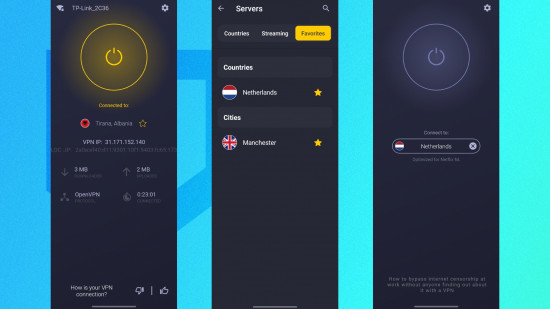
CyberGhost offers one of the cleanest, fuss-free interfaces in the mobile VPN field. A simple on/off button is complemented by a Settings icon and a server list that expands when tapped. This is grouped by countries, servers optimized for Netflix and other streaming services, and a list of your favorite servers (added by tapping the star icon).
With CyberGhost set to run when your phone starts up, the client app can be configured to automatically connect when a WiFi network is detected, and if approved at installation, it displays notifications that you can use to connect or disconnect the VPN with a touch – it’s much faster than going to the app and opening it up.

Privacy features
It is easy to improve your privacy with a VPN like CyberGhost installed. It uses the industry-standard AES 256-bit encryption to keep your connection private, so as long as you don’t log into an account at the destination website, no one will ever know you viewed it. Even if you do log in, if you always access the site with the VPN on and don’t submit any data that will identify you, you’re still fully anonymous.
In short, if you want to protect your privacy, you just need to install the VPN, select a server, and then switch it on with one tap. If you take advantage of its free trial, you don’t even need to spend anything. It’s swift, and it’s efficient.
Various privacy-enhancing tools are also included. Within the CyberGhost app’s Settings screen, beyond the tools to manage your connection and devices, a collection of toggles enable and disable various additional options. In most cases, you shouldn’t need to alter any of these, but knowing where to find them is useful. These control things like VPN protocol (OpenVPN or WireGuard are available, but you can set the app to choose automatically), transport mode (TCP, UDP, or automatic), and packet size. This option is useful for resolving connection or speed issues. You can also configure the app to block ads, trackers, and malware, and enable the VPN to activate when your phone connects to a specific network. If you’re likely to connect to a public WiFi service, this is useful to have.
If you’re wondering why you would ever want to turn off any of these features (they’re all pretty handy, after all) it’s really just to conserve your phone’s processing power. If you know you’re not going to be doing a lot on your phone while you’re out and about, but still want to be conscious about public WiFi, then you could turn off the more advanced features while just keeping it on. No need to drain battery power unnecessarily.
Also, if you want to know more about privacy, CyberGhost has a collection of articles in its Privacy Hub. These explain various concepts and practices to help you stay private and secure online. It’s a lot of general stuff that everybody should be aware of.

Other features
You’re probably considering a mobile VPN either for privacy over unsecured or untrusted WiFi networks, or to enable access to overseas game servers. Or you might be looking for a VPN that can help you to access streaming libraries in different regions (such as Netflix US when you live in the UK).
However, VPNs have other purposes, such as complete anonymity and protecting your browsing from observation under totalitarian regimes. Some VPNs offer tools that support this, usually a form of “double-VPN” (which encrypts the connection twice), but unfortunately, CyberGhost does not.
Although there is a domain fronting option, this feels like an afterthought. Rather, the app’s feature set suggest that it is geared more towards entertainment rather than life-saving privacy. That’s fine, because a lot of VPN users aren’t going to need a service as thorough as that, but if you do, then you should steer clear of this one.
Now let’s get to something very important – something that every VPN worth its salt should have: a no-logs policy. While CyberGhost has a strict no-logs policy, its owner, Kape Technologies, is based in the UK. This means that it could theoretically be subject to data requests on activity by a specific account from a member of the Five Eyes alliance (USA, Canada, Australia, New Zealand, and the UK). Its base in Romania should prevent that, but it is worth considering; that said, CyberGhost issues a Quarterly Transparency Report (Q3 2025) which lists the data requests from law enforcement, and states: “They all have the same goal: to connect an IP address to a person. That connection can’t be made on our network.”
That is reassuring. However, note that virtual server locations are in use. What this means is that servers that appear to be connecting from one location are actually connecting via another. This is done when laws in a particular country make it difficult or even impossible for secure VPN servers to be available there. India is one example.
When you use a VPN, your IP address is hidden, and destination websites instead see one that belongs to the VPN server you connected through. This is useful for anonymity, but not great if you want to use a banking app. In this case, subscribers to CyberGhost can request a dedicated IP address. It has an additional fee – $5/month on a monthly deal, with 20% and 50% savings each over six-month and two-year deals.
However, compared with other VPN apps and services, CyberGhost is missing a few features. While geared towards streaming (I tested access to Disney US from the UK, and it worked fine), casting to a TV with the VPN enabled doesn’t work. Split Tunneling, a feature where some apps can be excluded from the VPN connection, doesn’t fix this, as it requires the app to be able to access other devices on the network. Some competing VPNs – like NordVPN – offer this feature, often called “LAN access” but sadly, CyberGhost does not.
CyberGhost VPN performance
I did the following tests using a wireless router and a Vodafone fiber broadband connection.
- Baseline: 80.7Mpbs/69.9Mbps (Ping: 14m/s)
- UK Server (Manchester): 73.6Mbps/65.4Mbps (Ping: 36m/s)
- US Server (New York): 73.2Mbps/65.2Mbps (Ping: 92m/s)
Using a VPN inevitably impacts internet speed, and CyberGhost is no different from its competitors in this regard. However, you can see from these results that the signal drop is minimal.
When it comes to ping and jitter, CyberGhost performs well, but naturally, the performance is better the closer to home your target server. Attempting to play a game via a server situated on the other side of the planet, for example, will have a detrimental impact on the game’s playability.
Final verdict
VPN services increasingly need to stand out from the crowd, and CyberGhost has a strong brand. It’s recognizable to many, even if they don’t use a VPN or know what they do. This makes it a great gateway to the world of VPNs, and CyberGhost is affordable, too. Starting at $12/month on a rolling contract, with six-month and two-year options (equivalent to $6.99/month and $2.03/month at the time of writing), this VPN provider also lets you maintain anonymity by paying with Bitcoin, along with the usual credit card/PayPal/Amazon Pay combo.
In short, CyberGhost’s branding is all about keeping you barely visible – like a ghost – online. But with this marketing comes some pressure. Is CyberGhost a good VPN, and does it measure up to competing VPNs?
Well, I’ve tried and used a lot of VPNs over the years. I’ve always been impressed by CyberGhost for its cutesy, accessible presentation, but this is not something that is universally welcomed. I know of people who consider CyberGhost to be the “VPN for n00bs” (actual quote from one of them), but in my opinion, this is not something to be derisive about. Everyone should be using a VPN, and if the service is accessible and the app is easy to use, then that is a Very Good Thing Indeed.
But while CyberGhost is accessible, and perhaps the most ideal route to improved mobile device privacy, the speedtest.net results leave room for some improvement. Yes, the app is excellent, the streaming performance reliable, and CyberGhost is suited to gaming… but it falls short on a few of the more advanced options its competitors boast.