The NumPy argpatition function performs an indirect partition along the given axis using the algorithm specified by the kind keyword. It returns an array of indices of the same shape as a that index data along the given axis in partitioned order.
Arguments
Type
Description
c
array_like or poly1d object
The input polynomials to be multiplied
kth
integer or sequence of integers
Element index to partition by. The k-th element will be in its final sorted position and all smaller elements will be moved before it and all larger elements behind it. The order all elements in the partitions is undefined. If provided with a sequence of k-th it will partition all of them into their sorted position at once.
axis
integer or None
(Optional.) Axis along which to sort. The default is -1 (the last axis). If None, the flattened array is used.
kind
{'introselect'}
(Optional.) Selection algorithm. Default is 'introselect'.
(Optional.) When a is an array with fields defined, this argument specifies which fields to compare first, second, etc. A single field can be specified as a string, and not all fields need be specified, but unspecified fields will still be used, in the order in which they come up in the dtype, to break ties.
The following table shows the return value of the function:
Type
Description
Return Value
index_array : ndarray, int
Array of indices that partition a along the specified axis. If a is one-dimensional, a[index_array] yields a partitioned a. More generally, np.take_along_axis(a, index_array, axis=a) always yields the partitioned a, irrespective of dimensionality.
Related: See partition for notes on the different selection algorithms.
Let’s dive into some examples to show how the function is used in practice:
Any master coder has a “hands-on” mentality with a bias towards action. Try it yourself—play with the function in the following interactive code shell:
Exercise: Change the parameters of your polynomials and print them without the comparisons. Do you understand where they come from?
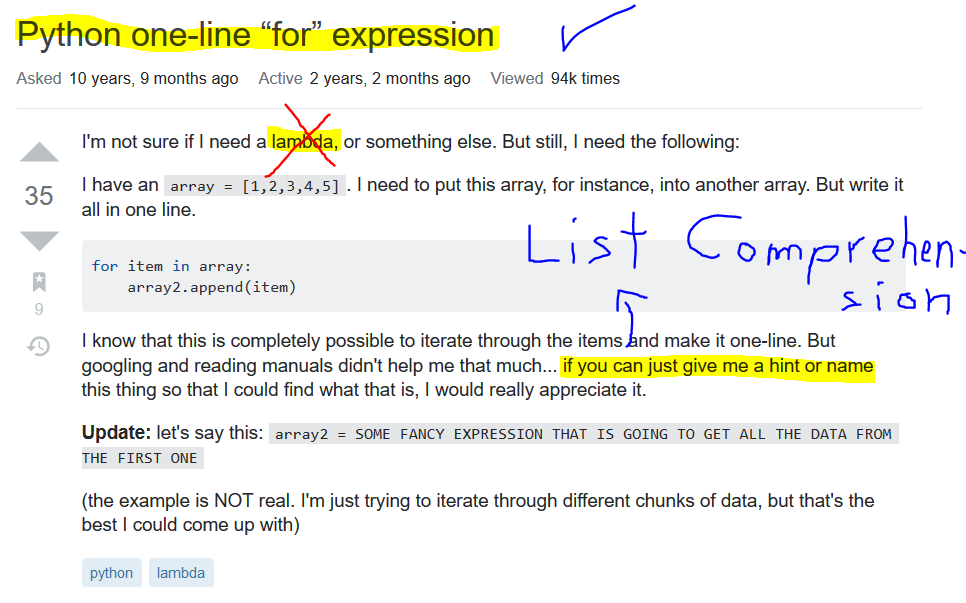
This tutorial will teach you how to write one-line for loops in Python using the popular expert feature of list comprehension. After you’ve learned the basics of list comprehension, you’ll learn how to restrict list comprehensions so that you can write custom filters quickly and effectively.
Are you ready? Let’s roll up your sleeves and learn about list comprehension in Python!
List Comprehension Basics
The following section is based on my detailed article List Comprehension [Ultimate Guide]. Read the shorter version here or the longer version on the website—you decide!
This overview graphic shows how to use list comprehension statement to create Python lists programmatically:
List comprehension is a compact way of creating lists. The simple formula is [expression + context].
Expression: What to do with each list element?
Context: What elements to select? The context consists of an arbitrary number of for and if statements.
The example [x for x in range(3)] creates the list [0, 1, 2].
Have a look at the following interactive code snippet—can you figure out what’s printed to the shell? Go ahead and click “Run” to see what happens in the code:
Exercise: Run the code snippet and compare your guessed result with the actual one. Were you correct?
Now, that you know about the basics of list comprehension (expression + context!), let’s dive into a more advanced example where list comprehension is used for filtering by adding an if clause to the context part.
List Comprehension for Filtering (using If Clauses)
You can also modify the list comprehension statement by restricting the context with another if statement:
Problem: Say, we want to create a list of squared numbers—but you only consider even and ignore odd numbers.
Example: The multi-liner way would be the following.
squares = [] for i in range(10): if i%2==0: squares.append(i**2) print(squares)
# [0, 4, 16, 36, 64]
You create an empty list squares and successively add another square number starting from 0**2 and ending in 8**2—but only considering the even numbers 0, 2, 4, 6, 8. Thus, the result is the list [0, 4, 16, 36, 64].
Again, you can use list comprehension [i**2 for i in range(10) if i%2==0] with a restrictive if clause (in bold) in the context part to compress this in a single line of Python code:
print([i**2 for i in range(10) if i%2==0])
# [0, 4, 16, 36, 64]
This line accomplishes the same output with much less bits.
Python programmers will improve their computer science skills with these useful one-liners.
Python One-Linerswill teach you how to read and write “one-liners”: concise statements of useful functionality packed into a single line of code. You’ll learn how to systematically unpack and understand any line of Python code, and write eloquent, powerfully compressed Python like an expert.
The book’s five chapters cover tips and tricks, regular expressions, machine learning, core data science topics, and useful algorithms. Detailed explanations of one-liners introduce key computer science concepts and boost your coding and analytical skills. You’ll learn about advanced Python features such as list comprehension, slicing, lambda functions, regular expressions, map and reduce functions, and slice assignments. You’ll also learn how to:
• Leverage data structures to solve real-world problems, like using Boolean indexing to find cities with above-average pollution • Use NumPy basics such as array, shape, axis, type, broadcasting, advanced indexing, slicing, sorting, searching, aggregating, and statistics • Calculate basic statistics of multidimensional data arrays and the K-Means algorithms for unsupervised learning • Create more advanced regular expressions using grouping and named groups, negative lookaheads, escaped characters, whitespaces, character sets (and negative characters sets), and greedy/nongreedy operators • Understand a wide range of computer science topics, including anagrams, palindromes, supersets, permutations, factorials, prime numbers, Fibonacci numbers, obfuscation, searching, and algorithmic sorting
By the end of the book, you’ll know how to write Python at its most refined, and create concise, beautiful pieces of “Python art” in merely a single line.
To become successful in coding, you need to get out there and solve real problems for real people. That’s how you can become a six-figure earner easily. And that’s how you polish the skills you really need in practice. After all, what’s the use of learning theory that nobody ever needs?
Practice projects is how you sharpen your saw in coding!
Do you want to become a code master by focusing on practical code projects that actually earn you money and solve problems for people?
Then become a Python freelance developer! It’s the best way of approaching the task of improving your Python skills—even if you are a complete beginner.
In this article, I’ll show you five free resources you can study to reach an intermediate Python level being an absolute beginner. Studying all the resources will take 20-40 hours. But after you’ve completed these steps, you’ll have created yourself a new high-income skill Python development. So, let’s get started!
Step 1: Complete Python Crash Course
The purpose of this tutorial is to help you refresh your knowledge of all the basic Python keywords, data structures, and fundamentals. I wrote it for the intermediate Python programmer who wants to reach the next level of programming expertise.
The way of achieving an expert-level is through studying the basics. Computer science professors usually have an extremely profound knowledge of the basics in their field. This enables them to argue from “first principles” rather than from the state-of-the-art—it’s easier for them to identify research gaps because they know about the ground rules in their field rather than being blinded by the latest technology and state-of-the-art. If you want to reach the next level in coding, take your time and study the basics carefully.
This tutorial provides you with the most important Python basics which serve as a foundation for more advanced topics.
Table of Contents:
Python Keywords Python Basic Data Structures Python Container Data Structures Membership Operator List and Set Comprehension Summary
Don’t have much time to learn Python? Cheat sheets to the rescue!
Cheat sheets are among the most efficient ways to acquire knowledge. A great cheat sheet focuses on the key learning material and skips the rest. If you read over them every day, you’ll quickly learn all the basics you need to know to master Python.
In this tutorial, we’ll share the top 11 Python cheat sheets with you. Download them, print them, put them on your wall and watch your Python skills grow!
Step 3: Solve Python Puzzles to Discover Your True Skill Level
Do you belong to the top 50% of Python coders? This article poses you 10 intermediate-level Python puzzles to test yourself. By solving all 10 Python puzzles and tracking your success rate, you will discover your exact Python skill level.
How to do this? The idea of solving rated Python puzzles to measure your skill level is inspired by the Elo rating system in chess. Two chess players play against each other fighting for Elo rating points. If you have collected enough points, you can become a chess grandmaster. We transformed this idea to Python coding: you play against the Python puzzle. If you solve it (=you win), you get points – but if you don’t, you lose points.
The Python puzzles and the test originate from our experience of teaching 23,464 online students at Finxter.com. (It’s free.)
You have read this far – you have skin in the game. Hereby, I officially challenge you to take the test and prove to yourself that you, indeed, belong to the top-50% of Python coders.
But first things first:
What is a Python Puzzle?
A Python puzzle is an educative snippet of Python source code that teaches a single computer science concept by activating the learner’s curiosity and involving them in the learning process.
Data structures are at the heart of every algorithm. Understanding data structures is the secret weapon of master coders. So, without further ado, let’s dive into the three most important Python data structures!
You cannot understand any advanced code base without understanding the single line. Mastering the single line is at the heart of any non-trivial Python project.
You may ask: what is a Pyhton one-liner anyway?
A Python one-liner is a snippet of code that solves a problem in a single line.
In this resource, you will find 50 (!) one-liner videos. Watch all of them so that you truly have mastered everything there is to know about the single line of Python code. As a result, you’ll truly master an essential skill that will prove valuable throughout your career!
If you’ve studied all the tutorials I proposed in this article, you should now be able to solve practical code projects by yourself. This is how you reach expert level. Close the room, turn off your smartphone, and dive into your dream practical code project in Python!
You can join our free email academy to gradually polish your skills over the upcoming months and access free Python resources for continuous improvement:
In this article, you’ll learn the basics of parsing an HTML document using Python and the LXML library.
Introduction
Data is the most important ingredient in programming. It comes in all shapes and forms. Sometimes it is placed inside documents such as CSV or JSON, but sometimes it is stored on the internet or in databases. Some of it is stored/transferred or processed through the XML format, which is in many ways similar to HTML format, yet its purpose is to transfer and store data, unlike HTML, whose main purpose is to display the data. On top of that, the way of writing HTML and XML is similar. Despite the differences and similarities, they supplement each other very well.
Both Xpath and XML are engineered by the same company W3C, which imposes that Xpath is the most compatible Python module to be used for parsing the XML documents. Since one of the programing principals which would push you towards the programming success is to “not reinvent the wheel”, we are going to refer to the W3C (https://www.w3.org/) consortium document and sources in regarding the syntax and operators on our examples to bring the concept of XPath closer to the people wishing to understand it better and use it on real-life problems.
The IT industry has accepted the XML way of transferring data as one of its principles. Imagine if one of your tasks was to gather information from the internet? Copying and pasting are one of the simplest tools to use (as it is regularly used by programmers as well); it might only lead us to gather some simple data from the web, although the process might get painfully repetitive. Yet, in case if we have more robust data, or more web pages to gather the data from, we might be inclined to use more advanced Python packages to automate our data gathering.
Before we start looking into scraping tools and strategies, it is good to know that scraping might not be legal in all cases, therefore it is highly suggested that we look at the terms of service of a particular web site, or copyright law regarding the region in which the web site operates.
For purposes of harvesting the web data, we will be using several Python libraries that allow us to do just that. The first of them is the requests module. What it does is that it sends the HTTP requests, which returns us the response object. It only used if urge to scrape the content from the internet. If we try to parse the static XML file it would not be necessary.
There are many parsing modules. LXML, Scrapy and BeautifulSoup are some of them. To tell which one is better is often neglected since their size and functionality differs from one another. For example, BeautifulSoup is more complex and serves you with more functionality, but LXML and Scrapy comes lightweight and can help you traversing through the documents using XPath and CSS selectors.
There are certain pitfalls when trying to travel through the document using XPath. Common mistake when trying to parse the XML by using XPath notation is that many people try to use the BeautifulSoup library. In fact that is not possible since it does not contain the XPath traversing methods. For those purposes we shall use the LXML library.
The requests library is used in case we want to download a HTML mark-up from the particular web site.
The first step would be to install the necessary packages. Trough pip install notation all of the modules above could be installed rather easily.
Necessary steps:
pip install lxml (xpath module is a part of lxml library)
pip install requests (in case the content is on a web page)
The best way to explain the XML parsing is to picture it through the examples.
The first step would be to install the necessary modules. Trough pip install notation all of the modules above could be installed rather easily.
What is the XPath?
The structure of XML and HTML documents is structurally composed of the nodes (or knots of some sort), which is a broader picture that represents the family tree-like structure. The roof instance, or the original ancestor in each tree, is called the root node, and it has no superior nodes to itself. Subordinate nodes are in that sense respectively called children or siblings, which are the elements at the same level as the children. The other terms used in navigating and traversing trough the tree are the ancestors and descendants, which in essence reflect the node relationship the same way we reflect it in real-world family tree examples.
XPath is a query language that helps us navigate and select the node elements within a node tree. In essence, it is a step map that we need to make to reach certain elements in the tree. The single parts of this step map are called the location steps, and each of these steps would lead us to a certain part of the document.
The terminology used for orientation along the axis (with regards to the current node) is very intuitive since it uses regular English expressions related to real-life family tree relationships.
XPath Selector
XPath selector is the condition using which we could navigate through an XML document. It describes relationships as a hierarchical order of the instances included in our path. By combining different segment of XML syntax it helps us traverse through to the desired parts of the document. The selector is a part of the XPath query language. By simply adding different criteria, the XPath selector would lead us to different elements in the document tree. The best way to learn the XPath selector syntax and operators is to implement it on an example. In order to know how to configure the XPath selector, it is essential to know the XPath syntax. XPath selector is compiled using an etree or HTML module which is included within the LXML package. The difference is only if we are parsing the XML document or HTML.
The selector works similarly as a find method with where it allows you to select a relative path of the element rather than the absolute one, which makes the whole traversing less prone to errors in case the absolute path gets too complicated.
XPath Syntax
XPath syntax could be divided into several groups. To have an exact grasp of the material presented we are going to apply further listed expressions and functions on our sample document, which would be listed below. In this learning session, we are going to use a web site dedicated to scraping exercises.
Node selection:
Expression
Description
nodename
Selects all nodes with the name “nodename“
/
Selects from the root node
//
Selects nodes in the document from the current node that match the selection no matter where they are.
.
Selects the current node
..
Selects the parent of the current node
@
Selects attributes
Using “..” and “.” we can direct and switch levels as we desire. Two dot notations would lead us from wherever we are to our parent element, whereas the one dot notations would point us to the current node.
The way that we travel from the “context node” (our reference node), which is the milestone of our search, is called “axes”, and it is noted with double slash //. What it does is that it starts traversing from the first instance of the given node. This way of path selection is called the “relative path selection”. To be certain that the // (empty tag) expression would work, it must precede an asterisk (*) or the name tag. Trough inspecting the element and copying its XPath value we are getting the absolute path.
XPath Functions and Operators
here are 6 common operators which are used inside the XPath query. Operators are noted the same way as in plain Python and serve the same purpose. The functions are meant to aid the search of desired elements or their content.
Path Expression
Result
=
Equal to
!=
Not equal to
>
Is greater than
<
Is less than
=>
Is greater or equal to
=<
Is less or equal to
To add more functionality to our XPath expression we can use some of LXML library functions. Everything that is written in-between the “[]” is called a predicate and it is used to closer describe the search path. Most frequently used functions are contains() and starts-with(). Those functions and their results would be displayed in the table below.
Going Up and Down the Axis
The conventional syntax used to traverse up and down the XPath axes is ElementName::axis.
To reach the elements placed above or below our current axes, we might use some of the following axes.
The goal of this scraping exercise is to scrape all the book genres placed at the left-hand side of the web site. It almost necessary to see the page source and to inspect some of the elements which are we aiming to scrape.
from lxml import html
import requests url = 'http://books.toscrape.com/' # downloading the web page by making a request objec
res = requests.get(url) # making a tree object
tree = html.fromstring(res.text) # navingating the tree object using the XPath
book_genres = tree.xpath("//ul/li/a[contains(@href, 'categ')]/text()")[0:60] # since the result is the list object, we iterate the elements,
# of the list by making a simple for loop
for book_genre in book_genres: print (book_genre.strip())
Crafting beautiful Python one-liners is as much an art as it is a science. In this tutorial, you’ll learn how to compress an if statement without an else branch into a single line of Python code.
Problem: What’s the one-liner equivalent of the simple if statement without an else branch?
Here’s an example:
condition = True if condition: print('hi') # hi
You may want to (i) print something, (ii) assign a value to a variable, or (iii) append an element to a list if the condition holds.
In this article, I’ll show you four methods of how to accomplish this goal. All four methods are generally applicable—and you can easily customize them to your specific application.
Let’s have a quick overview of the four methods in our interactive code shell:
Exercise: Run the code for both True and False conditions. Are all methods semantically equivalent?
Method 1: One-Liner If Statement
The first is also the most straightforward method: if you want a one-liner without an else statement, just write the if statement in a single line! There are many tricks (like using the semicolon) that help you create one-liner statements. But for an if body with only one statement, it’s just as simple as avoiding the line break.
condition = True # Method 1: One-Liner If
if condition: print('hi')
# hi
This method is perfectly valid and you could see it in practice. Yet, I have to mention that it “violates” the PEP8 standard (multiple statements in a single line). Therefore, you shouldn’t consider this to be Pythonic code (there are worse things under the sun though).
Method 2: Ternary with Throw-Away Else Branch
Sure, you can also use the ternary operator:
If you need a quick refresher on the ternary operator, check out my detailed blog article. The ternary operator is commonly used to conditionally assign values. But you can also throw away the return value by not assigning the result to any variable. In this case, it doesn’t matter if you use None or any other “dummy” return value as the result of the else branch:
condition = True # Method 2: Ternary with Dummy
print('hi') if condition else None
It’s readable, short, and concise and I like this (well, I may be a bit biased as author of the book Python One-Liners). Sure, people will ask why you didn’t write it in multiple lines. But where is the fun there?
Method 3: Ternary with Default Value for Assignment
If you need to assign a value conditionally to a variable, but you want to do so without an else branch, you can do the following:
condition = True # Method 3: Ternary with Dummy for Assignment
x = 42 if condition else None
If the condition does not hold, the “dummy” value None is assigned to the variable.
Method 4: Short Circuiting
This method I like most. It uses a Python optimization called “short circuiting” for Boolean operators: the logical and operator simply returns the second operand if the first is True. There’s no Boolean conversion of the second operand, it’s just returned as is.
If the first operand is False, the second operand is not even evaluated.
You can use this to conditionally execute the if branch print('hi') or any other code function.
condition = True # Method 4: Short circuiting
condition and print('hi')
There are two options:
condition == True: As the first operand is True, the second operand is returned. Thus, the statement print('hi') is executed and the string hi appears on the screen.
condition == False: As the first operand is False, the second operand is not even evaluated because the result of the logical and operation is False anyway. Thus, the statement print('hi') is never executed.
Where to Go From Here?
Enough theory, let’s get some practice!
To become successful in coding, you need to get out there and solve real problems for real people. That’s how you can become a six-figure earner easily. And that’s how you polish the skills you really need in practice. After all, what’s the use of learning theory that nobody ever needs?
Practice projects is how you sharpen your saw in coding!
Do you want to become a code master by focusing on practical code projects that actually earn you money and solve problems for people?
Then become a Python freelance developer! It’s the best way of approaching the task of improving your Python skills—even if you are a complete beginner.
The numpy.polymulx function multiplies the polynomial c with a value x which is the independent variable.
Arguments
Type
Description
c
array_like or poly1d object
The input polynomials to be multiplied
The following table shows the return value of the function:
Type
Description
Return Value
ndarray or poly1d object
The polynomial resulting from the multiplication of the inputs. If either inputs is a poly1d object, then the output is also a poly1d object. Otherwise, it is a 1D array of polynomial coefficients from highest to lowest degree.
Let’s dive into some examples to show how the function is used in practice:
This function is inspired from this Github repository.
Any master coder has a “hands-on” mentality with a bias towards action. Try it yourself—play with the function in the following interactive code shell:
Exercise: Change the parameters of your polynomials and print them without the comparisons. Do you understand where they come from?
Summary: To use an elif branch in the ternary operator, use another ternary operator as the result of the else branch (nested ternary operator). The nested ternary operator x if c0 else y if c1 else z returns x if condition c0 is met, else if (elif) condition c1 is met, it returns y, else it returns z.
Problem: You may have seen the ternary operator x if c else y. Is there a similar ternary operator with an additional elif statement? In pseudocode, you want something like:
# Pseudocodex if c elif y0 else y1
In other words: What’s the best way of extending the ternary operator to what you may call a “quaternary” operator?
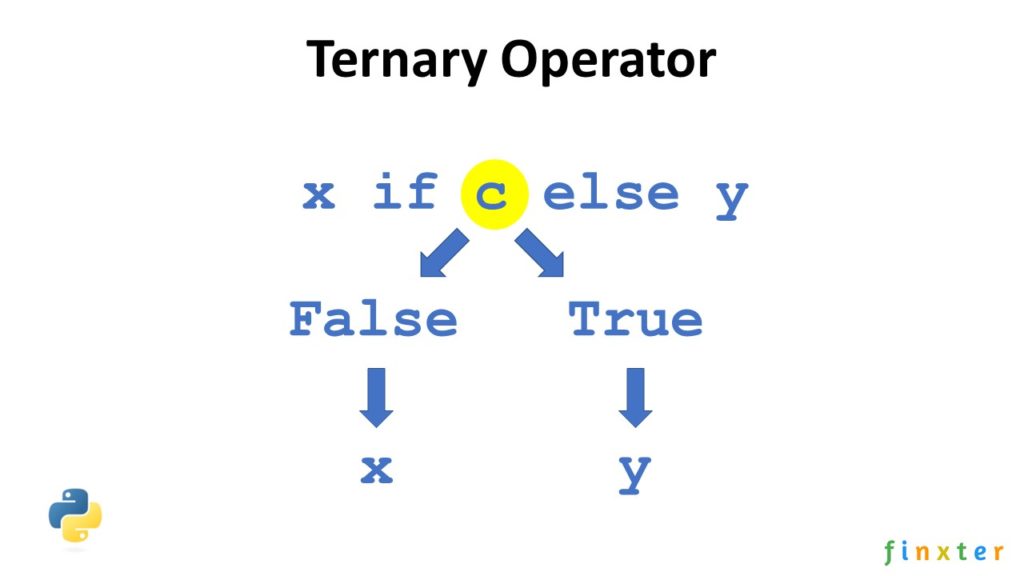
Background: The most basic ternary operator x if c else y consists of three operands x, c, and y. It is an expression with a return value. The ternary operator returns x if the Boolean expression c evaluates to True. Otherwise, if the expression c evaluates to False, the ternary operator returns the alternative y.
Example: Say, you want to write the following if-then-else condition in a single line of code:
>>> x = 42
>>> if x > 42:
>>> print("no")
>>> elif x == 42:
>>> print("yes")
>>> else:
>>> print("maybe")
yes
The elif branch wins: you print the output "yes" to the shell.
But how to do it in a single line of code? Just use the ternary operator with an elif statement won’t work (it’ll throw a syntax error):
Method: Nested Ternary Operator
The answer is simple: nest two ternary operators like so:
>>> print("no") if x > 42 else print("yes") if x == 42 else print("maybe")
yes
If the value x is larger than 42, we print “no” to the shell. Otherwise, we execute the remainder of the code (which is a ternary operator by itself). If the value x is equal to 42, we print “yes”, otherwise “maybe”.
So by nesting multiple ternary operators, we can greatly increase our Python one-liner power!
Try it yourself:
Exercise: Which method is more concise? Count the number of characters (or write a small script that does it for you ;))!
Python Ternary Multiple Elif
In the previous example, you’ve seen how a nested ternary operator semantically adds an elif branch. In theory, you can add an arbitrary number of elif branches by nesting more and more ternary operators:
# Method 1: If ... Elif ... Else
x = 42
if x > 42: y = 1
elif x == 42: y = 2
elif x == 12: y = 3
else: y = 4
print(y)
# 2 # Method 2: Nested Ternary Operator
y = 1 if x > 42 else 2 if x == 42 else 3 if x == 12 else 4
print(y)
# 2
However, readability suffers badly and you shouldn’t do anything of the sort. A simple mult-line if ... elif ... elif ... else statement is better!
Discussion
However, even if the nested ternary operator is more concise than an if-elif-else statement, it’s not recommended because of readability of your code. Most programmers don’t have any trouble understanding a simple if-elif-else statement. But a nested ternary operator is an advanced-level piece of Python code and especially beginners will struggle understanding it.
So, it’s great that you’ve expanded your One-Liner Superpower. But you should use it wisely!
Related Video: If-Then-Else in One Line of Python Code
Python One-Liners Book
Python programmers will improve their computer science skills with these useful one-liners.
Python One-Linerswill teach you how to read and write “one-liners”: concise statements of useful functionality packed into a single line of code. You’ll learn how to systematically unpack and understand any line of Python code, and write eloquent, powerfully compressed Python like an expert.
The book’s five chapters cover tips and tricks, regular expressions, machine learning, core data science topics, and useful algorithms. Detailed explanations of one-liners introduce key computer science concepts and boost your coding and analytical skills. You’ll learn about advanced Python features such as list comprehension, slicing, lambda functions, regular expressions, map and reduce functions, and slice assignments. You’ll also learn how to:
• Leverage data structures to solve real-world problems, like using Boolean indexing to find cities with above-average pollution • Use NumPy basics such as array, shape, axis, type, broadcasting, advanced indexing, slicing, sorting, searching, aggregating, and statistics • Calculate basic statistics of multidimensional data arrays and the K-Means algorithms for unsupervised learning • Create more advanced regular expressions using grouping and named groups, negative lookaheads, escaped characters, whitespaces, character sets (and negative characters sets), and greedy/nongreedy operators • Understand a wide range of computer science topics, including anagrams, palindromes, supersets, permutations, factorials, prime numbers, Fibonacci numbers, obfuscation, searching, and algorithmic sorting
By the end of the book, you’ll know how to write Python at its most refined, and create concise, beautiful pieces of “Python art” in merely a single line.
What if you have a ternary operator that’s very long?
var = 'I want to learn Python' if 42**2<166 else 'I want to learn Go programming'
print(var)
# I want to learn Go programming
Problem: How to write the ternary operator in multiple lines?
Short Recap: Ternary Operator
Ternary Operator: The most basic ternary operator x if c else y consists of three operands x, c, and y. It is an expression with a return value. The ternary operator returns x if the Boolean expression c evaluates to True. Otherwise, if the expression c evaluates to False, the ternary operator returns the alternative y.
Syntax: The three operands are written as x if c else y which reads as “return x if c else return y“. Let’s write this more intuitively as:
<OnTrue> if <Condition> else <OnFalse>
Operand
Description
<OnTrue>
The return expression of the operator in case the condition evaluates to True
<Condition>
The condition that determines whether to return the <On True> or the <On False> branch.
<OnFalse>
The return expression of the operator in case the condition evaluates to False
var = 'I want to learn Python' if 42**2<166 else 'I want to learn Go programming'
print(var) var = ('I want to learn Python' if 42**2<166 else 'I want to learn Go programming')
print(var)
# I want to learn Go programming
This is the PEP8 standard way of breaking long lines—if you cannot do it in a more natural way (such as avoiding the ternary operator and using the if statement in this example).
Try it yourself:
Exercise: Write a nested ternary operator and break it into multiple lines!
Where to Go From Here?
Enough theory, let’s get some practice!
To become successful in coding, you need to get out there and solve real problems for real people. That’s how you can become a six-figure earner easily. And that’s how you polish the skills you really need in practice. After all, what’s the use of learning theory that nobody ever needs?
Practice projects is how you sharpen your saw in coding!
Do you want to become a code master by focusing on practical code projects that actually earn you money and solve problems for people?
Then become a Python freelance developer! It’s the best way of approaching the task of improving your Python skills—even if you are a complete beginner.
Do you want to learn Python but you’re overwhelmed and you don’t know where to start? Learn with Python cheat sheets! They compress the most important information in an easy-to-digest 1-page format.
Here’s the new Python cheat sheet I just created—my goal was to make it the world’s most concise Python cheat sheet!