✹

“>
The post Play Arcade Tennis Online (Free, No Signup) appeared first on Be on the Right Side of Change.
✹

“>
The post Play Arcade Tennis Online (Free, No Signup) appeared first on Be on the Right Side of Change.
Easily combine two CSV files into one without any downloads or complex software — just upload and merge in your browser. Perfect for quickly appending data from multiple spreadsheets.
How It Works: Upload your primary CSV (the one with the header row you’ll keep) as the first file. Then select the second CSV to append its rows below.
Select the primary CSV (header will be used)
Select the CSV to append
Download ready!
Quick Tips:
If you run into issues, double-check file formats or try smaller files first.
The post Merge Two CSV Files Online (Free Tool) appeared first on Be on the Right Side of Change.
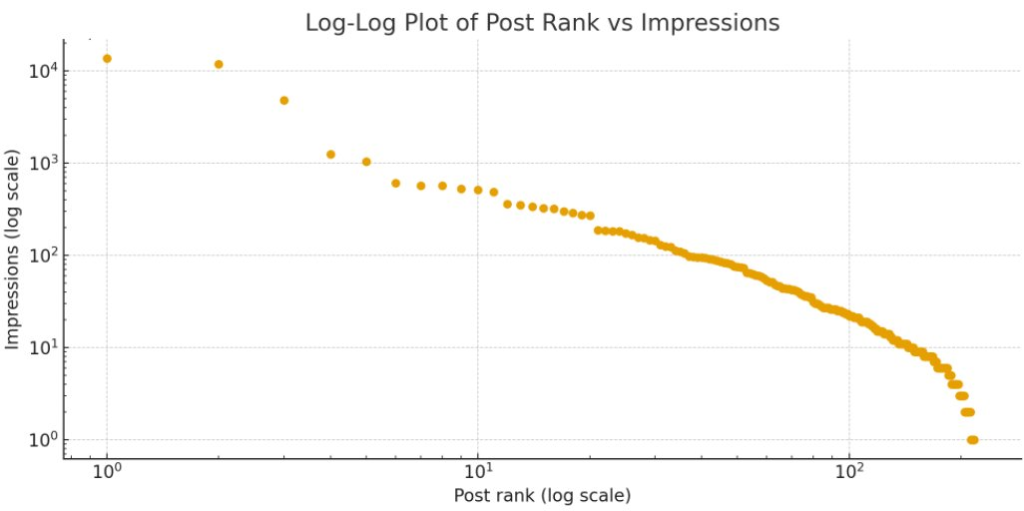
My very limited time on X has already shown that posts ranked by number of expression is highly non-linear. Maybe Zipf or Pareto distributed?
The first plot shows each post sorted by impressions (rank 1 = most impressions). You’ll see a steep drop from the top few posts, then a long tail of low-impression posts.
The point is:
Post ranked by impressions is not quite Pareto distributed (would be a straight line):

The log–log plot shows rank and impressions on logarithmic axes. If the points roughly line up on a straight downward-sloping line, that’s a classic power-law–like pattern.
The distribution looks heavy-tailed – a small number of posts carry a large share of total impressions.
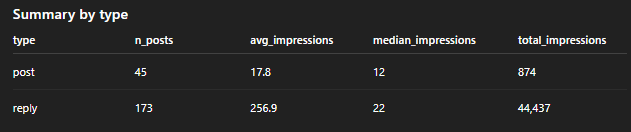
Also, replies have a much higher number of average impressions as compared to original posts. Smaller accounts should prioritize replies over posts.

If you want to grow your X account quickly, the best approach seems to be to reply to larger accounts. What to reply? Everything that comes to your mind. Just your authentic quick commentary. Don’t bother using AI – you’ll be too slow. Just use whatever comes to mind and increase your volume.
If you want to learn more on how using AI can improve your life, check out my free newsletter with 130k subscribers!
The post Be a Reply Guy on X: The 80/20 Math of Growing Your Social Media Brand appeared first on Be on the Right Side of Change.
Problem Formulation: How can users reliably tell whether an image was created by a human or generated by AI? Specifically, with Gemini Nano Banana Pro and other recent image generation tools, you never know if a screenshot, scientific paper result, chart, or person is real or AI-generated.
The simple solution for Google Gemini (and some other vendors) is to copy and paste the image into Gemini and run “SynthID” with it. This is a complex watermark technique that works for most images. However, it doesn’t work in very important application areas as shown in Example 3.
Here are a few examples:
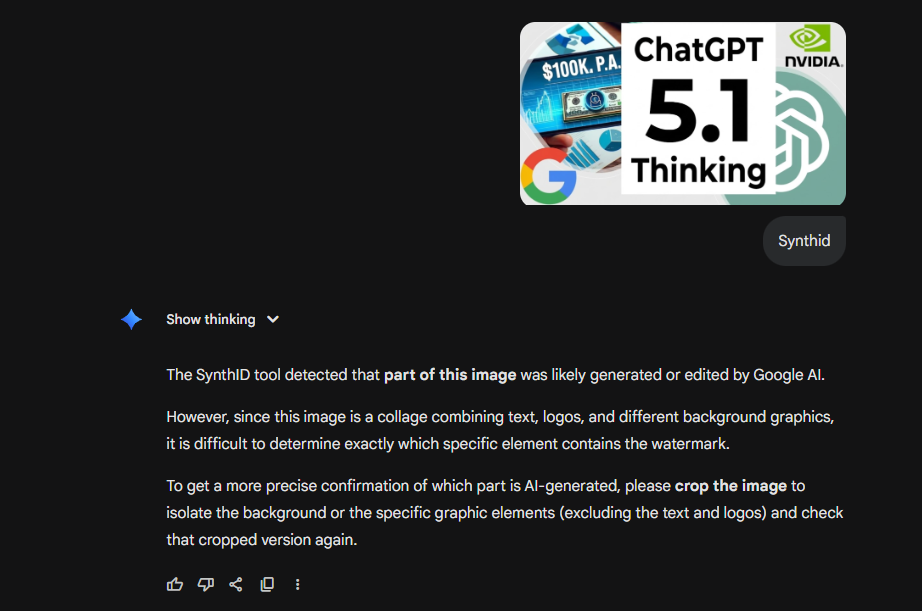
Example 1: Gemini-Generated Image Detected
I created this thumbnail image for one of my recent YouTube videos and SynthID correctly classifies it as AI-generated.
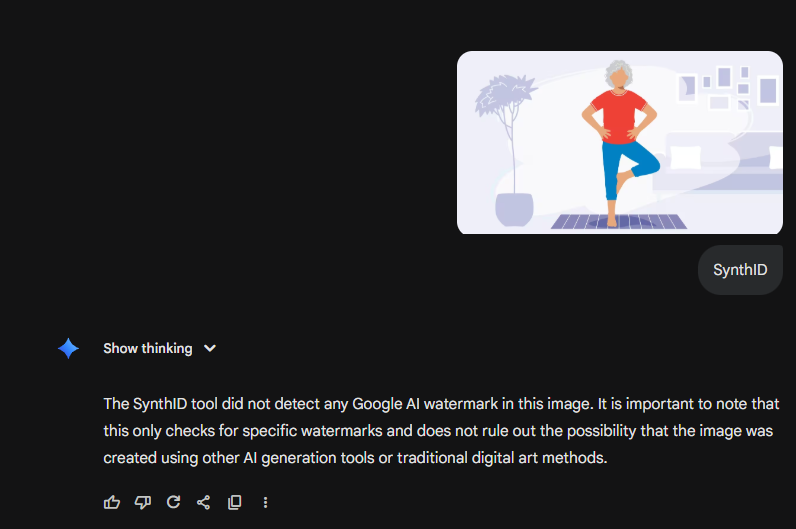
Example 2: ChatGPT-Generated Image Not Detected
I created this image with ChatGPT in a recent query about a health question, so it was not generated by Google Gemini Banana Pro. It correctly classified it as not generated by Google but does not rule out that it was generated by AI.
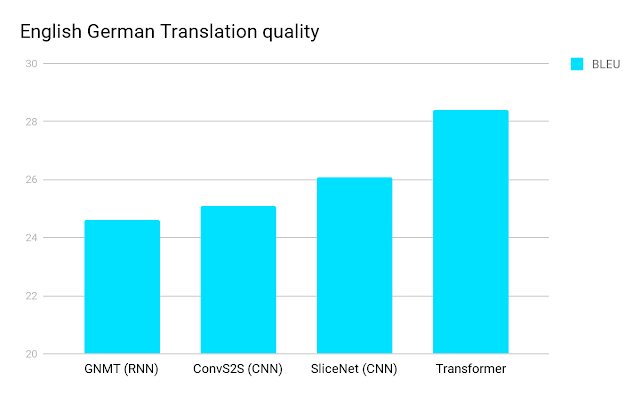
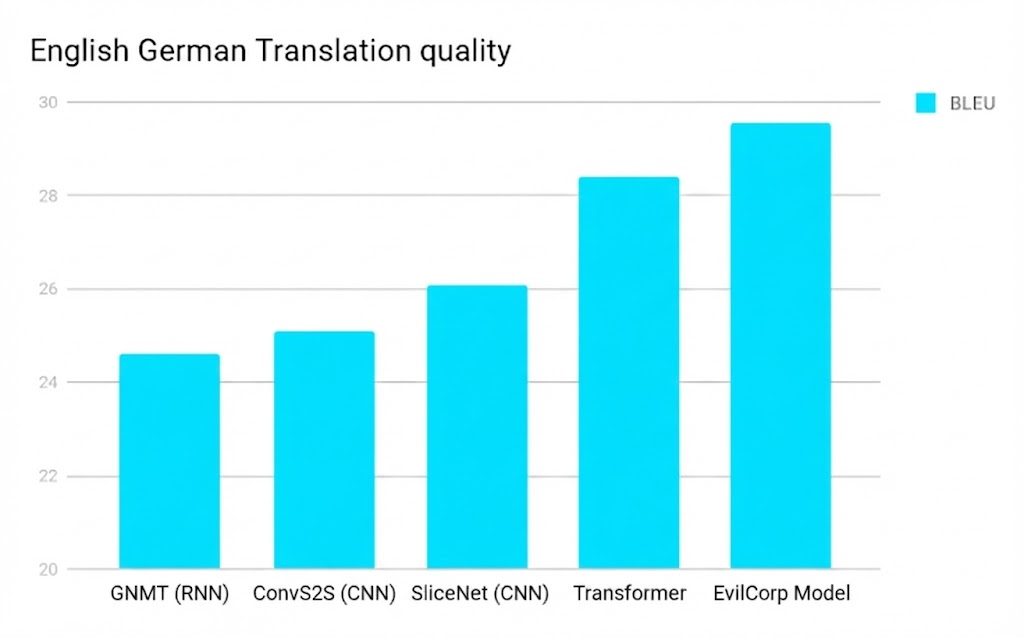
Example 3: Gemini-Generated Image Not DetectedHave a look at these two images – can you spot the difference?

Image 1: Original image from the Google Transformer Paper

Image 2: Fake image generated by Gemini Banana Pro
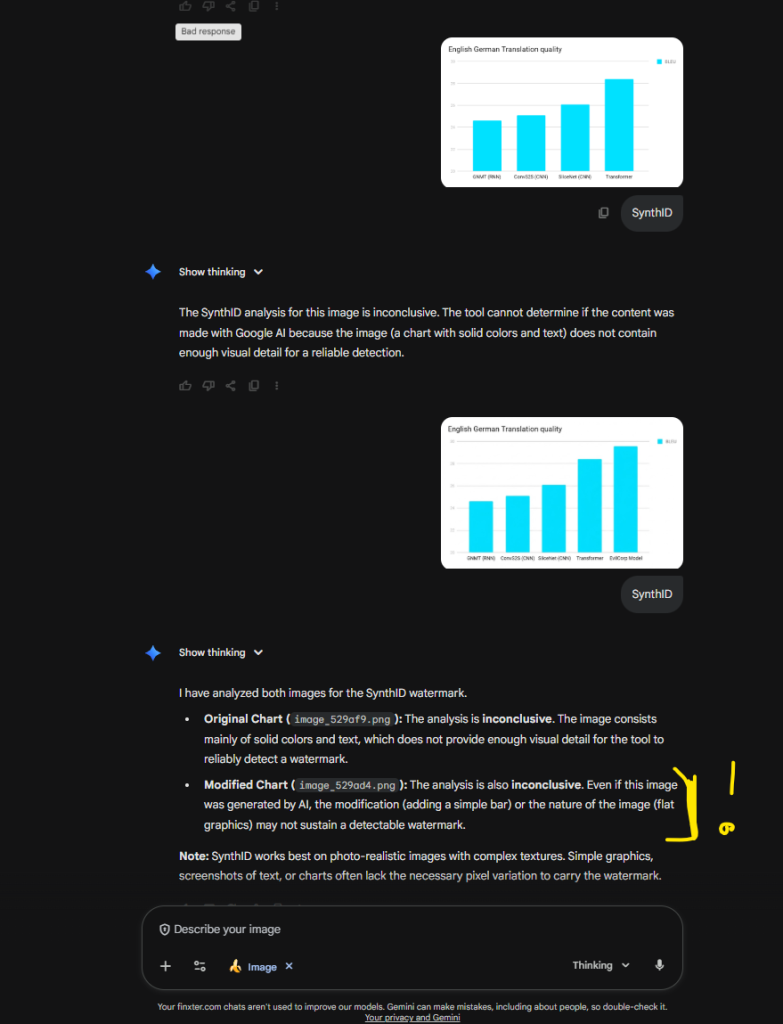
Unfortunately, SynthID was not able to determine if one was AI-generated. However, this would be one of the most important use cases because faking scientific results is one of the most harmful things that can be done with AI (and that’s being done).
See this chat confirming the inability of Gemini to determine if it was AI generated:

Here’s a video I made about this article:
The post Google’s SynthID is supposed to find fake AI images. But it failed when it mattered most. appeared first on Be on the Right Side of Change.
When working with lists that contain Unicode strings, you may encounter characters that make it difficult to process or manipulate the data or handle internationalized content or content with emojis
. In this article, we will explore the best ways to remove Unicode characters from a list using Python.
You’ll learn several strategies for handling Unicode characters in your lists, ranging from simple encoding techniques to more advanced methods using list comprehensions and regular expressions.
Combining Unicode strings and lists in Python is common when handling different data types. You might encounter situations where you need to remove Unicode characters from a list, for instance, when cleaning or normalizing textual data.
Unicode is a universal character encoding standard that represents text in almost every writing system used today. It assigns a unique identifier to each character, enabling the seamless exchange and manipulation of text across various platforms and languages. In Python 2, Unicode strings are represented with the u prefix, like u'Hello, World!'. However, in Python 3, all strings are Unicode by default, making the u prefix unnecessary.
Lists are a built-in Python data structure used to store and manipulate collections of items. They are mutable, ordered, and can contain elements of different types, including Unicode strings.
For example:
my_list = ['Hello', u'世界', 42]
While working with Unicode and lists in Python, you may discover challenges related to encoding and decoding strings, especially when transitioning between Python 2 and Python 3. Several methods can help you overcome these challenges, such as encode(), decode(), and using various libraries.
One common method to identify Unicode characters is by using the isalnum() function. This built-in Python function checks if all characters in a string are alphanumeric (letters and numbers) and returns True if that’s the case, otherwise False. When working with a list, you can simply iterate through each string item and use isalnum() to determine if any Unicode characters are present.
The isalnum() function in Python checks whether all the characters in a text are alphanumeric (i.e., either letters or numbers) and does not specifically identify Unicode characters. Unicode characters can also be alphanumeric, so isalnum() would return True for many Unicode characters.
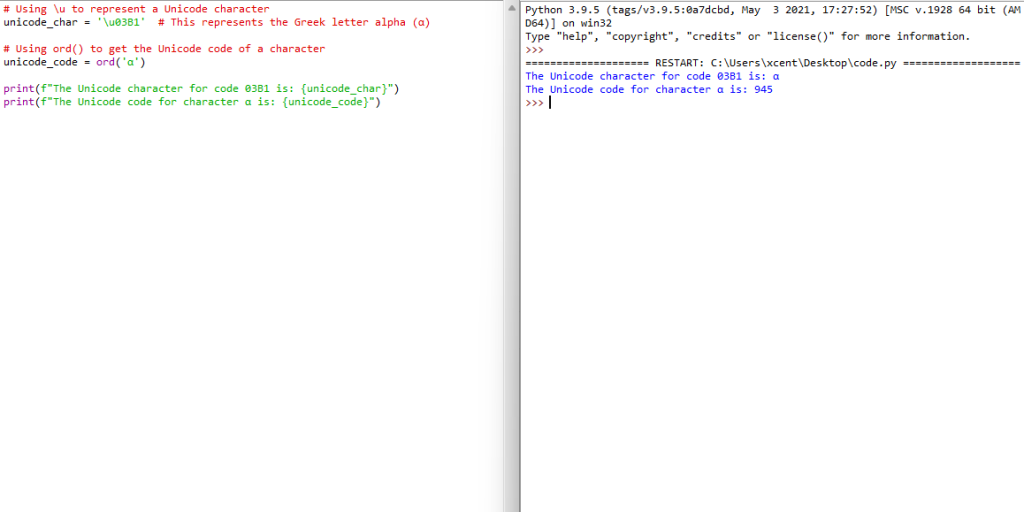
To identify or work with Unicode characters in Python, you might use the ord() function to get the Unicode code of a character, or \u followed by the Unicode code to represent a character. Here’s a brief example:

# Using \u to represent a Unicode character
unicode_char = '\u03B1' # This represents the Greek letter alpha (α) # Using ord() to get the Unicode code of a character
unicode_code = ord('α') print(f"The Unicode character for code 03B1 is: {unicode_char}")
print(f"The Unicode code for character α is: {unicode_code}")
In this example:
\u03B1 is used to represent the Greek letter alpha (α) using its Unicode code.ord('α') returns the Unicode code for the Greek letter alpha, which is 945.If you want to identify whether a string contains non-ASCII characters (which might be what you’re interested in when you talk about identifying Unicode characters), you might use something like the following code:
def contains_non_ascii(s): return any(ord(char) >= 128 for char in s) # Example usage:
s = "Hello α"
print(contains_non_ascii(s)) # Output: True print(contains_non_ascii('Hello World')) # Output: False
In this function, contains_non_ascii(s), it checks each character in the string s to see if it has a Unicode code greater than or equal to 128 (i.e., it is not an ASCII character). If any such character is found, it returns True; otherwise, it returns False.
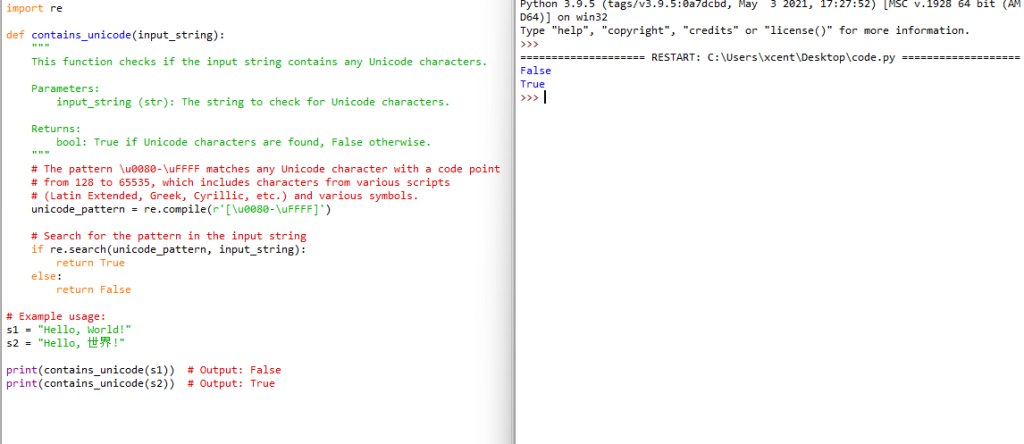
Using regular expressions (regex) is a powerful way to identify Unicode characters in a string. Python’s re module can be utilized to create patterns that can match Unicode characters. Below is an example method that uses a regular expression to identify whether a string contains any Unicode characters:

import re def contains_unicode(input_string): """ This function checks if the input string contains any Unicode characters. Parameters: input_string (str): The string to check for Unicode characters. Returns: bool: True if Unicode characters are found, False otherwise. """ # The pattern \u0080-\uFFFF matches any Unicode character with a code point # from 128 to 65535, which includes characters from various scripts # (Latin Extended, Greek, Cyrillic, etc.) and various symbols. unicode_pattern = re.compile(r'[\u0080-\uFFFF]') # Search for the pattern in the input string if re.search(unicode_pattern, input_string): return True else: return False # Example usage: s1 = "Hello, World!" s2 = "Hello, 世界!" print(contains_unicode(s1)) # Output: False print(contains_unicode(s2)) # Output: True
Explanation:
[\u0080-\uFFFF]: This pattern matches any character with a Unicode code point from U+0080 to U+FFFF, which includes various non-ASCII characters.re.search(unicode_pattern, input_string): This function searches the input string for the defined Unicode pattern.True; otherwise, it returns False.This method will help you identify strings containing Unicode characters from various scripts and symbols. This pattern does not match ASCII characters (code points U+0000 to U+007F) or non-BMP characters (code points above U+FFFF).
If you want to learn about Python’s search() function in regular expressions, check out my tutorial and tutorial video:

When dealing with Python lists containing Unicode characters, you might find it necessary to remove them. One effective method to achieve this is by using the built-in string encoding and decoding functions. This section will guide you through the process of Unicode removal in lists by employing the encode() and decode() methods.
First, you will need to encode the Unicode string into the ASCII format. It is essential because the ASCII encoding only supports ASCII characters, and any Unicode characters that are outside the ASCII range will be automatically removed. For this, you can utilize the encode() function with its parameters set to the ASCII encoding option and error handling set to 'ignore'.
For example:
string_unicode = "𝕴 𝖆𝖒 𝕴𝖗𝖔𝖓𝖒𝖆𝖓!"
string_ascii = string_unicode.encode('ascii', 'ignore')
After encoding the string to ASCII, it is time to decode it back to a UTF-8 format. This step is essential to ensure the list items retain their original text data and stay readable. You can use the decode() function to achieve this conversion. Here’s an example:
string_utf8 = string_ascii.decode('utf-8')
Now that you have successfully removed the Unicode characters, your Python list will only contain ASCII characters, making it easier to process further. Let’s take a look at a practical example with a list of strings.
list_unicode = ["𝕴 𝖆𝖒 𝕴𝖗𝖔𝖓𝖒𝖆𝖓!", "This is an ASCII string", "𝕿𝖍𝖎𝖘 𝖎𝖘 𝖚𝖓𝖎𝖈𝖔𝖉𝖊"]
list_ascii = [item.encode('ascii', 'ignore').decode('utf-8') for item in list_unicode] print(list_unicode)
# ['𝕴 𝖆𝖒 𝕴𝖗𝖔𝖓𝖒𝖆𝖓!', 'This is an ASCII string', '𝕿𝖍𝖎𝖘 𝖎𝖘 𝖚𝖓𝖎𝖈𝖔𝖉𝖊'] print(list_ascii)
# [' !', 'This is an ASCII string', ' ']
In this example, the list_unicode variable comprises three different strings, two with Unicode characters and one with only ASCII characters. By employing a list comprehension, you can apply the encoding and decoding process to each string in the list.
Recommended: Python List Comprehension – The Ultimate Guide
Remember always to be careful when working with Unicode texts. If the string with Unicode characters contains crucial information or an essential part of the data you are processing, you should consider keeping the Unicode characters and using proper Unicode-compatible solutions.
When working with lists in Python, it is common to come across Unicode characters that need to be removed or replaced. One technique to achieve this is by using Python’s replace() function.
The replace() function is a built-in method in Python strings, which allows you to replace occurrences of a substring within a given string. To remove specific Unicode characters from a list, you can first convert the list elements into strings, then use the replace() function to handle the specific Unicode characters.
Here’s a simple example:
original_list = ["Róisín", "Björk", "Héctor"]
new_list = [] for item in original_list: new_item = item.replace("ó", "o").replace("ö", "o").replace("é", "e") new_list.append(new_item) print(new_list) # ['Roisin', 'Bjork', 'Hector']
When dealing with a larger set of Unicode characters, you can use a dictionary to map each character to be replaced with its replacement. For example:
unicode_replacements = { "ó": "o", "ö": "o", "é": "e", # Add more replacements as needed.
} original_list = ["Róisín", "Björk", "Héctor"]
new_list = [] for item in original_list: for key, value in unicode_replacements.items(): item = item.replace(key, value) new_list.append(item) print(new_list) # ['Roisin', 'Bjork', 'Hector']
Of course, this is only useful if you have specific Unicode characters to remove. Otherwise, use the previous Method 3.
When working with text data in Python, non-ASCII characters can often cause issues, especially when parsing or processing data. To maintain a clean and uniform text format, you might need to deal with these characters and remove or replace them as necessary.
One common technique is to use list comprehension coupled with a character encoding method such as .encode('ascii', 'ignore'). You can loop through the items in your list, encode them to ASCII, and ignore any non-ASCII characters during the encoding process. Here’s a simple example:
data_list = ["𝕴 𝖆𝖒 𝕴𝖗𝖔𝖓𝖒𝖆𝖓!", "Hello, World!", "你好!"]
clean_data_list = [item.encode("ascii", "ignore").decode("ascii") for item in data_list]
print(clean_data_list)
# Output: [' m mn!', 'Hello, World!', '']
In this example, you’ll notice that non-ASCII characters are removed from the text, leaving the ASCII characters intact. This method is both clear and easy to implement, which makes it a reliable choice for most situations.
Another approach is to use regular expressions to search for and remove all non-ASCII characters. The Python re module provides powerful pattern matching capabilities, making it an excellent tool for this purpose. Here’s an example that shows how you can use the re module to remove non-ASCII characters from a list:
import re data_list = ["𝕴 𝖆𝖒 𝕴𝖗𝖔𝖓𝖒𝖆𝖓!", "Hello, World!", "你好!"] ascii_only_pattern = re.compile(r"[^\x00-\x7F]") clean_data_list = [re.sub(ascii_only_pattern, "", item) for item in data_list] print(clean_data_list) # Output: [' !', 'Hello, World!', '']
In this example, we define a regular expression pattern that matches any character outside the ASCII range ([^\x00-\x7F]). We then use the re.sub() function to replace any matching characters with an empty string.
To efficiently replace Unicode characters with ASCII in Python, you can use the unicodedata library. This library provides the normalize() function which can convert Unicode strings to their closest ASCII equivalent. For example:
import unicodedata def unicode_to_ascii(s): return ''.join(c for c in unicodedata.normalize('NFD', s) if unicodedata.category(c) != 'Mn')
This function will replace Unicode characters with their ASCII equivalents, making your Python list easier to work with.
Pandas has a built-in method that helps you remove Unicode characters in a DataFrame. You can use the applymap() function in conjunction with the lambda function to remove any non-ASCII character from your DataFrame. For example:
import pandas as pd data = {'col1': [u'こんにちは', 'Pandas', 'DataFrames']}
df = pd.DataFrame(data) df = df.applymap(lambda x: x.encode('ascii', 'ignore').decode('ascii'))
This will remove all non-ASCII characters from the DataFrame, making it easier to process and analyze.
To remove all non-English characters in a Python list, you can use list comprehension and the isalnum() function from the str class. For example:
data = [u'こんにちは', u'Hello', u'안녕하세요'] result = [''.join(c for c in s if c.isalnum() and ord(c) < 128) for s in data]
This approach filters out any character that isn’t alphanumeric or has an ASCII value greater than 127.
To eliminate Unicode characters from an SQL string, you should first clean the data in your programming language (e.g., Python) before inserting it into the SQL database. In Python, you can use the re library to remove Unicode characters:
import re def clean_sql_string(s): return re.sub(r'[^\x00-\x7F]+', '', s)
This function will remove any non-ASCII characters from the string, ensuring that your SQL query is free of Unicode characters.
To detect and handle Unicode characters in a Python script, you can use the ord() function to check if a character’s Unicode code point is outside the ASCII range. This allows you to filter out any Unicode characters in a string. For example:
def is_ascii(s): return all(ord(c) < 128 for c in s)
You can then handle the detected Unicode characters accordingly, such as using replace() to substitute them with appropriate ASCII characters or removing them entirely.
To remove non-UTF-8 characters from a text file using Python, you can use the following method:
with open('file.txt', 'rb') as file: content = file.read() cleaned_content = content.decode('utf-8', 'ignore') with open('cleaned_file.txt', 'w', encoding='utf-8') as file: file.write(cleaned_content)
This will create a new text file without non-UTF-8 characters, making your data more accessible and usable.
The post Best Ways to Remove Unicode from List in Python appeared first on Be on the Right Side of Change.
Disruptive innovation, a concept introduced in 1995, has become a wildly popular concept explaining innovation-driven growth.
Clayton Christensen’s “Disruptive Innovation Model” refers to a theory that explains how smaller companies can successfully challenge established incumbent businesses. Here’s a detailed breakdown:
Disruptive Innovation refers to a new technology, process, or business model that disrupts an existing market. Disruptive innovations often start as simpler, cheaper, and lower-quality solutions compared to existing offerings. They often target an underserved or new market segment. They often create a different value network within the market. However, truly disruptive innovation companies improve over time and eventually displace existing market participants.
In fact, there are two general types of disruptive innovation models:
Low-end disruption is exemplified by Southwest Airlines and BIC Disposable Razors. Southwest Airlines disrupted the aviation industry by focusing on providing basic, reliable, and cost-effective air travel, appealing to price-sensitive customers and those who might opt for alternative transportation. BIC, on the other hand, introduced affordable disposable razors, offering a satisfactory solution for customers unwilling to pay a premium for high-end razors, thereby securing a substantial market share.

In terms of new-market disruption, Tesla Motors and Coursera stand out. Tesla targeted environmentally conscious consumers, offering electric vehicles that didn’t compromise on performance or luxury, creating a new market for high-performance electric vehicles and prompting other manufacturers to expedite their EV programs. After introducing the high-end luxury cars, Tesla subsequently moved down market and even announced in the “Master Plan Part 3” that they plan to release a $25k electric car. Coursera disrupted the traditional educational model by providing online courses from renowned universities to a global audience, creating a new market for online education.

The Blue Ocean Strategy, which is somewhat related to new-market disruption, emphasizes innovating and creating new demand in unexplored market areas, or “Blue Oceans”, instead of competing in saturated markets, or “Red Oceans”. An example of this strategy is the Nintendo Wii, which carved out a new market space by targeting casual gamers with simpler, family-friendly games and innovative controllers, thereby reaching an entirely new demographic of consumers and avoiding direct competition with powerful gaming consoles like Xbox and PlayStation.
The disruptive innovation process often plays out like so:
Technological advancements typically undergo an S-curve progression, as seen with smartphones, which experienced slow initial adoption, followed by rapid uptake, and eventually, market saturation.
Companies often align innovations with their existing value networks, ensuring new products resonate with their established customer base, like how Apple’s product ecosystem is meticulously designed to ensure customer retention and continuous engagement.
The implications of disruptive innovation are profound, with established companies, such as Kodak, often facing dilemmas and organizational inertia in adopting new technologies due to a deep-rooted focus on existing offerings and customer bases.
To navigate through disruptive waters, incumbents might employ strategies like establishing separate units dedicated to innovation, akin to how Google operates Alphabet to explore varied ventures, adopting agile methodologies for nimble operations, and maintaining a relentless focus on evolving customer needs to stay relevant and competitive in the market.

Here’s my personal key take-away (not financial advice):
It is tough to create a huge disruptive startup. It is easy to disrupt a tiny niche.
A great strategy that I found extremely profitable is to focus on a tiny niche within your career, keep optimizing daily, and invest your income in star businesses, i.e., disruptive innovation companies in high-growth markets (>10% per year) that are also market leaders.
Only invest in companies or opportunities that are both, in a high-growth market and leader of this market.
Bitcoin, for example, is the leader of a high-growth market (=digital store of value). Tesla, another example, is the leader of a high-growth market (=autonomous electric vehicles).
The Star Principle, articulated by Richard Koch, underscores the potency of investing in or creating a ‘star venture’ to amass wealth and success in business.

A star venture is characterized by two pivotal attributes: (1) it is a leader in a high-growth market and (2) it operates within a niche that is expanding rapidly.
The allure of a star business emanates from its ability to combine niche leadership with high niche growth, enabling it to potentially command price premiums, lower costs, and subsequently, attain higher profits and cash flow.
The principle asserts that positioning is the key to success, provided that the positioning is truly exceptional and the venture is a star business. However, it’s imperative to note that star ventures are not devoid of risks; the primary pitfall being the loss of leadership within its niche, which can drastically diminish its value.
While star ventures are relatively rare, with perhaps one in twenty startups being a star, they are not so scarce that they cannot be discovered or created with thoughtful consideration and patience.
The principle emphasizes that whether you are an employee, an aspiring venture leader, or an investor, aligning yourself with a star venture can pave the way to a prosperous and enriched life.

Here’s a list of 20 example star businesses from the past (some are still stars
):
These businesses have demonstrated leadership in their respective niches and have experienced significant growth, aligning with the Star Principle’s criteria of operating in high-growth markets and being a leader in those markets.
Let’s dive into some practical strategies you can use as a small coding business owner to become more innovative, possibly disruptive in a step-by-step manner:

Imagine embarking on a journey to create a startup named “ChatHealer,” an online platform that uses Large Language Models (LLMs) and the OpenAI API to provide instant, empathetic, and anonymous conversational support for individuals experiencing stress or emotional challenges.
In the initial phase, identifying underserved needs is crucial. A thorough market research might reveal that there’s a gap in providing immediate, non-clinical emotional support to individuals in a highly accessible and non-judgmental platform.
The unique value proposition of ChatHealer would be its ability to offer instant, 24/7 emotional support through intelligent and empathetic conversational agents, ensuring user anonymity and privacy.
The development of a Minimum Viable Product (MVP) would involve creating a basic version of ChatHealer, focusing on core functionalities like user authentication, basic conversational abilities, and ensuring data security. The MVP would be introduced to a select group of users, and their feedback would be paramount in validating and iterating the product, ensuring it aligns with user expectations and experiences.

Recommended: Minimum Viable Product (MVP) in Software Development — Why Stealth Sucks
Leveraging LLMs and AI, ChatHealer could enhance its conversational agents to understand and respond to user inputs more empathetically and contextually, providing a semblance of genuine human interaction.
The business model might adopt a freemium approach, offering basic conversational support for free while providing a premium subscription that includes additional features like personalized emotional support journeys, and perhaps, priority access to human professionals.

Ensuring a seamless and supportive customer experience would be pivotal, as the nature of ChatHealer demands a safe and nurturing environment. As the platform gains traction, gradual scaling would involve introducing ChatHealer to wider demographics and possibly integrating multilingual support to cater to a global audience.
Continuous improvement would be embedded in ChatHealer’s operations, ensuring that the platform evolves with technological advancements and user needs. Building partnerships, perhaps with mental health professionals and organizations, could enhance its credibility and provide a pathway for users to access further support if needed.
Prudent financial management would ensure that funds are judiciously utilized, maintaining a balance between technological development, marketing, and operations. Cultivating a culture of innovation within the team ensures that ChatHealer remains at the forefront of technological and therapeutic advancements, always exploring new ways to provide support to its users.
Recommended: The Math of Becoming a Millionaire in 13 Years
Adaptability would be key, as ChatHealer would need to be ready to pivot its strategies and offerings in response to user needs, technological advancements, and market trends. Ensuring that all operations, especially data handling and user interactions, adhere to legal and compliance standards would be paramount to maintain user trust and regulatory adherence.
Lastly, employing analytics to measure and analyze user engagement, subscription conversions, and user feedback would be instrumental in shaping ChatHealer’s future strategies and innovations, ensuring that it not only remains a disruptive innovation but also a sustained, valuable service in the emotional support domain.
In this section, we will explore whether Uber is a disruptive innovation by examining its origins and how its quality compares to the mainstream market expectations.
Disruptive innovations typically begin in low-end or new-market footholds, as incumbents often focus on their most profitable and demanding customers. This focus can lead to less attention being paid to less-demanding customers, allowing disruptors to introduce products that cater to these neglected market segments.
However, Uber did not originate with either a low-end or new-market foothold. It did not start by targeting non-consumers or finding a low-end opportunity. Instead, Uber was launched in San Francisco, which already had a well-established taxi market. Its primary customers were individuals who already had the habit of hiring rides. Therefore, Uber did not follow the typical pattern of disruptive innovations that begin with low-end or new-market footholds.
Disruptive innovations are initially perceived as inferior in comparison to the offerings by established companies. Mainstream customers are hesitant to adopt these new, typically cheaper, alternatives until their quality satisfies their expectations.
In the case of Uber, most elements of its strategy appear to be sustaining innovations. Its service is often regarded as equal or superior to existing taxi services, with convenient booking, cashless payments, and a passenger rating system. Additionally, Uber generally offers competitive pricing and reliable service. In response to Uber, established taxi companies have implemented similar technologies and challenged the legality of some of Uber’s offerings.
Based on these factors, Uber cannot be considered a true disruptive innovation. While it has certainly impacted the taxi market and incited changes among traditional taxi companies, it did not originate from classic low-end or new-market footholds, and its service quality aligns with mainstream expectations rather than being perceived as initially inferior.
Disruptive innovation refers to a process where a smaller company with fewer resources challenges established businesses by entering at the bottom of the market and moving up-market. This is different from traditional or incremental innovations, which usually improve existing products or services for existing customers.
Some examples of disruptive innovation in healthcare include:
Some well-known companies that implemented disruptive innovation strategies include:
Low-end disruption refers to innovations targeting customers who are not well-served by the incumbent companies due to high prices or complex products. Examples include:
Launching disruptive innovations typically involves the following steps:
New market disruptions typically create entirely new markets that did not exist before. Examples include:
If you want to keep learning disruptive technologies, why not becoming an expert prompt engineer with our Finxter Academy Courses (all-you-can-learn) such as this one: 
The post Disruptive Innovation – A Friendly Guide for Small Coding Startups appeared first on Be on the Right Side of Change.
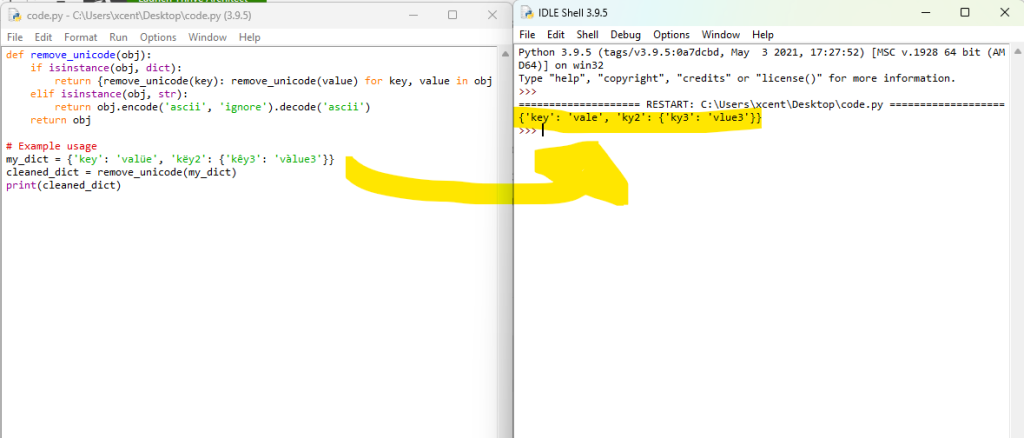
The best way to remove Unicode characters from a Python dictionary is a recursive function that iterates over each key and value, checking their type.
If a value is a dictionary, the function calls itself.
If a value is a string, it’s encoded to ASCII, ignoring non-ASCII characters, and then decoded back to a string, effectively removing any Unicode characters.
This ensures a thorough cleansing of the entire dictionary.
Here’s a minimal example for copy&paste

def remove_unicode(obj): if isinstance(obj, dict): return {remove_unicode(key): remove_unicode(value) for key, value in obj.items()} elif isinstance(obj, str): return obj.encode('ascii', 'ignore').decode('ascii') return obj # Example usage
my_dict = {'key': 'valüe', 'këy2': {'kêy3': 'vàlue3'}}
cleaned_dict = remove_unicode(my_dict)
print(cleaned_dict)
In this example, remove_unicode is a recursive function that traverses the dictionary. If it encounters a dictionary, it recursively cleans each key-value pair. If it encounters a string, it encodes the string to ASCII, ignoring non-ASCII characters, and then decodes it back to a string. The example usage shows a nested dictionary with Unicode characters, which are removed in the cleaned_dict.

You may come across dictionaries containing Unicode values. These Unicode values can be a hurdle when using the data in specific formats or applications, such as JSON editors. To overcome these challenges, you can use various methods to remove the Unicode characters from your dictionaries.
One popular method to remove Unicode characters from a dictionary is by using the encode() method to convert the keys and values within the dictionary into a different encoding, such as UTF-8. This can help you eliminate the 'u' prefix, which signifies a character is a Unicode character. Similarly, you can use external libraries, like Unidecode, that provide functions to transliterate Unicode strings into the closest possible ASCII representation (source).
Recap: Python dictionaries are a flexible data structure that allows you to store key-value pairs. They enable you to organize and access your data more efficiently. A dictionary can hold a variety of data types, including Unicode strings. Unicode is a widely-used character encoding standard that includes a huge range of characters from different scripts and languages.
When working with dictionaries in Python, you might encounter Unicode strings as keys or values. For example, a dictionary might have keys or values in various languages or contain special characters like emojis (

). This diversity is because Python supports Unicode characters to allow for broader text representation and internationalization.
To create a dictionary containing Unicode strings, you simply define key-value pairs with the appropriate Unicode characters. In some cases, you might also have nested dictionaries, where a dictionary’s value is another dictionary. Nested dictionaries can also contain Unicode strings as keys or values.
Consider the following example:
my_dictionary = { "name": "François", "languages": { "primary": "Français", "secondary": "English" }, "hobbies": ["music", "فنون-القتال"]
}
In this example, the dictionary represents a person’s information, including their name, languages, and hobbies. Notice that both the name and primary language contain Unicode characters, and one of the items in the hobbies list is also represented using Unicode characters.
When working with dictionary data that contains Unicode characters, you might need to remove or replace these characters for various purposes, such as preprocessing text for machine learning applications or ensuring compatibility with ASCII-only systems. Several methods can help you achieve this, such as using Python’s built-in encode() and decode() methods or leveraging third-party libraries like Unidecode.
Now that you have a better understanding of Unicode and dictionaries in Python, you can confidently work with dictionary data containing Unicode characters and apply appropriate techniques to remove or replace them when necessary.

Your data may contain special characters from different languages. These characters can lead to display, sorting, and searching problems, especially when your goal is to process the data in a way that is language-agnostic.
One of the main challenges with Unicode characters in dictionaries is that they can cause compatibility issues when interacting with certain libraries, APIs, or external tools. For instance, JSON editors may struggle to handle Unicode properly, potentially resulting in malformed data. Additionally, some libraries may not be specifically designed to handle Unicode, and even certain text editors may not display these characters correctly.
Note: Another issue arises when attempting to remove Unicode characters from a dictionary. You may initially assume that using functions like .encode() or .decode() would be sufficient, but these functions can sometimes leave the 'u' prefix, which denotes a unicode string, in place. This can lead to confusion and unexpected results when working with the data.
To address these challenges, various methods can be employed to remove Unicode characters from dictionaries:
json library. This process can effectively remove the Unicode characters, making your data more compatible and easier to work with.unidecode to convert Unicode to ASCII characters, which can be helpful in cases where you need to interact with systems or APIs that only accept ASCII text..encode() and .decode() methods, effectively stripping the unicode characters from your dictionary.Below are minimal code snippets for each of the three approaches:
Method 1: Using JSON Library
import json my_dict = {'key': 'valüe'}
# Convert dictionary to JSON object and back to dictionary
cleaned_dict = json.loads(json.dumps(my_dict, ensure_ascii=True))
print(cleaned_dict)
In this example, the dictionary is converted to a JSON object and back to a dictionary, ensuring ASCII encoding, which removes Unicode characters.
Method 2: Using Unidecode Library
from unidecode import unidecode my_dict = {'key': 'valüe'}
# Use unidecode to convert Unicode to ASCII
cleaned_dict = {k: unidecode(v) for k, v in my_dict.items()}
print(cleaned_dict)
Here, the unidecode library is used to convert each Unicode string value to ASCII, iterating over the dictionary with a dict comprehension.
Method 3: Using List or Dict Comprehensions
my_dict = {'key': 'valüe'}
# Use .encode() and .decode() to remove Unicode characters
cleaned_dict = {k.encode('ascii', 'ignore').decode(): v.encode('ascii', 'ignore').decode() for k, v in my_dict.items()}
print(cleaned_dict)
In this example, a dict comprehension is used to iterate over the dictionary. The .encode() and .decode() methods are applied to each key and value to strip Unicode characters.
Recommended: Python Dictionary Comprehension: A Powerful One-Liner Tutorial

When working with dictionaries in Python, you may sometimes encounter Unicode characters that need to be removed. In this section, you’ll learn the fundamentals of removing Unicode characters from dictionaries using various techniques.
Firstly, it’s important to understand that Unicode characters can be present in both keys and values of a dictionary. A common scenario that may require you to remove Unicode characters is when you need to convert your dictionary into a JSON object.
One of the simplest ways to remove Unicode characters is by using the str.encode() and str.decode() methods. You can loop through the dictionary, and for each key-value pair, apply these methods to remove any unwanted Unicode characters:
new_dict = {}
for key, value in old_dict.items(): new_key = key.encode('ascii', 'ignore').decode('ascii') if isinstance(value, str): new_value = value.encode('ascii', 'ignore').decode('ascii') else: new_value = value new_dict[new_key] = new_value
Another useful method, particularly for removing Unicode characters from strings, is the isalnum() function. You can use this in combination with a loop to clean your keys and values:
def clean_unicode(string): return "".join(c for c in string if c.isalnum() or c.isspace()) new_dict = {}
for key, value in old_dict.items(): new_key = clean_unicode(key) if isinstance(value, str): new_value = clean_unicode(value) else: new_value = value new_dict[new_key] = new_value
As you can see, removing Unicode characters from a dictionary in Python can be achieved using these techniques.

Utilizing the id and ast libraries in Python can be a powerful way to remove Unicode characters from a dictionary. The ast library, in particular, offers an s-expression parser which makes processing text data more straightforward. In this section, you will follow a step-by-step guide to using these powerful tools effectively.
First, you need to import the necessary libraries. In your Python script, add the following lines to import json and ast:
import json import ast
The next step is to define your dictionary containing Unicode strings. Let’s use the following example dictionary:
my_dict = {u'Apple': [u'A', u'B'], u'orange': [u'C', u'D']}
Now, you can utilize the json.dumps() function and ast.literal_eval() for the Unicode removal process. The json.dumps() function converts the dictionary into a JSON-formatted string. This function removes the Unicode 'u' from the keys and values in your dictionary. After that, you can employ the ast.literal_eval() s-expression parser to convert the JSON-formatted string back to a Python dictionary.
Here’s how to perform these steps:
json_string = json.dumps(my_dict) cleaned_dict = ast.literal_eval(json_string)
After executing these lines, you will obtain a new dictionary called cleaned_dict without the Unicode characters. Simply put, it should look like this:
{'Apple': ['A', 'B'], 'orange': ['C', 'D']}
By using the id and ast libraries, you can efficiently remove Unicode characters from dictionaries in Python. Following this simple yet effective method, you can ensure the cleanliness of your data, making it easier to work with and process.

When working with dictionaries in Python, you might come across cases where you need to remove Unicode characters. One efficient way to do this is by replacing Unicode characters with empty strings.
To achieve this, you can make use of the encode() and decode() string methods available in Python. First, you need to loop through your dictionary and access the strings. Here’s how you can do it:
for key, value in your_dict.items(): cleaned_key = key.encode("ascii", "ignore").decode() cleaned_value = value.encode("ascii", "ignore").decode() your_dict[cleaned_key] = cleaned_value
In this code snippet, the encode() function encodes the string into ‘ASCII’ format and specifies the error-handling mode as ‘ignore’, which helps remove Unicode characters. The decode() function is then used to convert the encoded string back to its original form, without the Unicode characters.
Note: This method assumes your dictionary contains only string keys and values. If your dictionary has nested values, such as lists or other dictionaries, you’ll need to adjust the code to handle those cases as well.
If you want to perform this operation on a single string instead, you can do this:
cleaned_string = original_string.encode("ascii", "ignore").decode()
When you need to remove Unicode characters from a dictionary, applying the encode() and decode() methods is a straightforward and effective approach. In Python, these built-in methods help you encode a string into a different character representation and decode byte strings back to Unicode strings.
To remove Unicode characters from a dictionary, you can iterate through its keys and values, applying the encode() and decode() methods. First, encode the Unicode string to ASCII, specifying the 'ignore' error handling mode. This mode omits any Unicode characters that do not have an ASCII representation. After encoding the string, decode it back to a regular string.
Here’s an example:
input_dict = {"𝕴𝖗𝖔𝖓𝖒𝖆𝖓": "𝖙𝖍𝖊 𝖍𝖊𝖗𝖔", "location": "𝕬𝖛𝖊𝖓𝖌𝖊𝖗𝖘 𝕿𝖔𝖜𝖊𝖗"}
output_dict = {} for key, value in input_dict.items(): encoded_key = key.encode("ascii", "ignore") decoded_key = encoded_key.decode() encoded_value = value.encode("ascii", "ignore") decoded_value = encoded_value.decode() output_dict[decoded_key] = decoded_value
In this example, the output_dict will be a new dictionary with the same keys and values as input_dict, but with Unicode characters removed:
{"Ironman": "the hero", "location": "Avengers Tower"}
Keep in mind that the encode() and decode() methods may not always produce an accurate representation of the original Unicode characters, especially when dealing with complex scripts or diacritic marks.
If you need to handle a wide range of Unicode characters and preserve their meaning in the output string, consider using libraries like Unidecode. This library can transliterate any Unicode string into the closest possible representation in ASCII text, providing better results in some cases.
When dealing with dictionaries containing Unicode characters, you might want an efficient and user-friendly way to remove or bypass the characters. Two useful techniques for this purpose are using json.dumps from the json module and ast.literal_eval from the ast module.
To begin, import both the json and ast modules in your Python script:
import json import ast
The json.dumps method is quite handy for converting dictionaries with Unicode values into strings. This method takes a dictionary and returns a JSON formatted string. For instance, if you have a dictionary containing Unicode characters, you can use json.dumps to obtain a string version of the dictionary:
original_dict = {"key": "value with unicode: \u201Cexample\u201D"}
json_string = json.dumps(original_dict, ensure_ascii=False)
The ensure_ascii=False parameter in json.dumps ensures that Unicode characters are encoded in the UTF-8 format, making the JSON string more human-readable.
Next, you can use ast.literal_eval to evaluate the JSON string and convert it back to a dictionary. This technique allows you to get rid of any unnecessary Unicode characters by restricting the data structure to basic literals:
cleaned_dict = ast.literal_eval(json_string)
Keep in mind that ast.literal_eval is more secure than the traditional eval() function, as it only evaluates literals and doesn’t execute any arbitrary code.
By using both json.dumps and ast.literal_eval in tandem, you can effectively manage Unicode characters in dictionaries. These methods not only help to remove Unicode characters but also assist in maintaining a human-readable format for further processing and editing.

Dealing with Unicode characters in nested dictionaries can sometimes be challenging. However, you can efficiently manage this by following a few simple steps.
First and foremost, you need to identify any Unicode content within your nested dictionary. If you’re working with large dictionaries, consider looping through each key-value pair and checking for the presence of Unicode.
One approach to remove Unicode characters from nested dictionaries is to use the Unidecode library. This library transliterates any Unicode string into the closest possible ASCII representation. To use Unidecode, you’ll need to install it first:
pip install Unidecode
Now, you can begin working with the Unidecode library. Import the library and create a function to process each value in the dictionary. Here’s a sample function that handles nested dictionaries:
from unidecode import unidecode def remove_unicode_from_dict(dictionary): new_dict = {} for key, value in dictionary.items(): if isinstance(value, dict): new_value = remove_unicode_from_dict(value) elif isinstance(value, list): new_value = [remove_unicode_from_dict(item) if isinstance(item, dict) else item for item in value] elif isinstance(value, str): new_value = unidecode(value) else: new_value = value new_dict[key] = new_value return new_dict
This function recursively iterates through the dictionary, removing Unicode characters from string values and maintaining the original structure. Use this function on your nested dictionary:
cleaned_dict = remove_unicode_from_dict(your_nested_dictionary)
When working with dictionaries in Python, you may come across special characters or Unicode characters that need to be removed or replaced. Using the re module in Python, you can leverage the power of regular expressions to effectively handle such cases.
Let’s say you have a dictionary with keys and values containing various Unicode characters. One efficient way to remove them is by combining the re.sub() function and ord() function. First, import the required re module:
import re
To remove special characters, you can use the re.sub() function, which takes a pattern, replacement, and a string as arguments, and returns a new string with the specified pattern replaced:
string_with_special_chars = "𝓣𝓱𝓲𝓼 𝓲𝓼 𝓪 𝓽𝓮𝓼𝓽 𝓼𝓽𝓻𝓲𝓷𝓰." clean_string = re.sub(r"[^\x00-\x7F]+", "", string_with_special_chars)
ord() is a useful built-in function that returns the Unicode code point of a given character. You can create a custom function utilizing ord() to check if a character is alphanumeric:
def is_alphanumeric(char): code_point = ord(char) return (code_point >= 48 and code_point <= 57) or (code_point >= 65 and code_point <= 90) or (code_point >= 97 and code_point <= 122)
Now you can use this custom function along with the re.sub() function to clean up your dictionary:
def clean_dict_item(item): return "".join([char for char in item if is_alphanumeric(char) or char.isspace()]) original_dict = {"𝓽𝓮𝓼𝓽1": "𝓗𝓮𝓵𝓵𝓸 𝓦𝓸𝓻𝓵𝓭!", "𝓽𝓮𝓼𝓽2": "𝓘 𝓵𝓸𝓿𝓮 𝓟𝔂𝓽𝓱𝓸𝓷!"}
cleaned_dict = {clean_dict_item(key): clean_dict_item(value) for key, value in original_dict.items()} print(cleaned_dict)
# {'1': ' ', '2': ' '}

To eliminate non-ASCII characters from a Python dictionary, you can use a dictionary comprehension with the str.encode() method and the ascii codec. This will replace non-ASCII characters with their escape codes. Here’s an example:
original_dict = {"key": "value with non-ASCII character: ę"}
cleaned_dict = {k: v.encode("ascii", "ignore").decode() for k, v in original_dict.items()}
One efficient way to remove hex characters from a string in Python is using the re (regex) module. You can create a pattern to match hex characters and replace them with nothing. Here’s a short example code:
import re
text = "Hello \x00World!"
clean_text = re.sub(r"\\x\d{2}", "", text)
To replace Unicode characters with their corresponding ASCII characters in a Python dictionary, you can use the unidecode library. Install it using pip install unidecode, and then use it like this:
from unidecode import unidecode
original_dict = {"key": "value with non-ASCII character: ę"}
ascii_dict = {k: unidecode(v) for k, v in original_dict.items()}
To filter out non-ASCII characters in a Python dictionary, you can use a dictionary comprehension along with a string comprehension to create new strings containing only ASCII characters.
original_dict = {"key": "value with non-ASCII character: ę"}
filtered_dict = {k: "".join(char for char in v if ord(char) < 128) for k, v in original_dict.items()}
If you want to remove the ‘u’ Unicode prefix from a list of strings, you can simply convert each element to a regular string using a list comprehension:
unicode_list = [u"example1", u"example2"] string_list = [str(element) for element in unicode_list]
Handling and removing special characters from a dictionary can be accomplished using the re module to replace unwanted characters with an empty string or a suitable replacement. Here’s an example:
import re
original_dict = {"key": "value with special character: #!"}
cleaned_dict = {k: re.sub(r"[^A-Za-z0-9\s]+", "", v) for k, v in original_dict.items()}
This will remove any character that is not an alphanumeric character or whitespace from the dictionary values.
If you learned something new today, feel free to join my free email academy. We have cheat sheets too!
The post 5 Expert-Approved Ways to Remove Unicode Characters from a Python Dict appeared first on Be on the Right Side of Change.
TLDR: GPT-4 with vision (GPT-4V) is now out for many ChatGPT Plus users in the US and some other regions! You can instruct GPT-4 to analyze image inputs. GPT-4V incorporates additional modalities such as image inputs into large language models (LLMs). Multimodal LLMs will expand the reach of AI from mainly language-based applications to a broad range of brand-new application categories that go beyond language user interfaces (UIs).
GPT-4V could explain why a picture was funny by talking about different parts of the image and their connections. The meme in the picture has words on it, which GPT-4V read to help make its answer. However, it made an error. It wrongly said the fried chicken in the image was called “NVIDIA BURGER” instead of “GPU”.
Still impressive!
OpenAI’s GPT-4 with Vision (GPT-4V) represents a significant advancement in artificial intelligence, enabling the analysis of image inputs alongside text.
Let’s dive into some additional examples I and others encountered:
Prompting GPT-4V with "How much money do I have?" and a photo of some foreign coins:
GPT4V was even able to identify that these are Polish Zloty Coins, a task with which 99% of humans would struggle:
It can also identify locations from photos and give you information about plants you make photos of. In this way, it’s similar to Google Lens but much better and more interactive with a higher level of image understanding.
It can do optical character recognition (OCR) almost flawlessly:
Now here’s why many teachers and professors will lose their sleep over GPT-4V: it can even solve math problems from photos (source):


GPT-4V can do object detection, a crucial field in AI and ML: one model to rule them all!
GPT-4V can even help you play poker 
A Twitter/X user gave it a screenshot of a day planner and asked it to code a digital UI of it. The Python code worked!
Speaking of coding, here’s a fun example by another creative developer, Matt Shumer:
"The first GPT-4V-powered frontend engineer agent. Just upload a picture of a design, and the agent autonomously codes it up, looks at a render for mistakes, improves the code accordingly, repeat. Utterly insane." (source)

I’ve even seen GPT-4V analyzing financial data like Bitcoin indicators:
I could go on forever. Here are 20 more ideas of how to use GPT-4V that I found extremely interesting, fun, and even visionary:
These are truly mind-boggling times. Most of those ideas are million-dollar startup ideas. Some ideas (like the real estate assistance app #18) could become billion-dollar businesses that are mostly built on GPT-4V’s functionality and are easy to implement for coders like you and me.
If you’re interested, feel free to read my other article on the Finxter blog:
Recommended: Startup.ai – Eight Steps to Start an AI Subscription Biz
GPT-4V is a multimodal large language model that incorporates image inputs, expanding the impact of language-only systems by solving new tasks and providing novel experiences for users. It builds upon the work done for GPT-4, employing a similar training process and reinforcement learning from human feedback (RLHF) to produce outputs preferred by human trainers.
Why RLHF? Mainly to avoid jailbreaking 
like so:
You can see that the “refusal rate” went up significantly:
From an everyday user perspective that doesn’t try to harm people, the "Sorry I cannot do X" reply will remain one of the more annoying parts of LLM tech, unfortunately.
However, the race is on! People have still reported jailbroken queries like this:
I hope you had fun reading this compilation of GPT-4V ideas. Thanks for reading!
If you’re not already subscribed, feel free to join our popular Finxter Academy with dozens of state-of-the-art LLM prompt engineering courses for next-level exponential coders. It’s an all-you-can-learn inexpensive way to remain on the right side of change.
For example, this is one of our recent courses:
The Llama 2 Prompt Engineering course helps you stay on the right side of change. Our course is meticulously designed to provide you with hands-on experience through genuine projects.
You’ll delve into practical applications such as book PDF querying, payroll auditing, and hotel review analytics. These aren’t just theoretical exercises; they’re real-world challenges that businesses face daily.
By studying these projects, you’ll gain a deeper comprehension of how to harness the power of Llama 2 using
Python, 
Langchain,
Pinecone, and a whole stack of highly 
practical tools of exponential coders in a post-ChatGPT world.
The post GPT-4 with Vision (GPT-4V) Is Out! 32 Fun Examples with Screenshots appeared first on Be on the Right Side of Change.
To remove all Unicode characters from a JSON string in Python, load the JSON data into a dictionary using json.loads(). Traverse the dictionary and use the re.sub() method from the re module to substitute any Unicode character (matched by the regular expression pattern r'[^\x00-\x7F]+') with an empty string. Convert the updated dictionary back to a JSON string with json.dumps().
import json
import re # Original JSON string with emojis and other Unicode characters
json_str = '{"text": "I love
and
on a
day! \u200b \u1234"}' # Load JSON data
data = json.loads(json_str) # Remove all Unicode characters from the value
data['text'] = re.sub(r'[^\x00-\x7F]+', '', data['text']) # Convert back to JSON string
new_json_str = json.dumps(data) print(new_json_str)
# {"text": "I love and on a day! "}
The text "I love 🍕 and 🍦 on a ☀ day! \u200b \u1234" contains various Unicode characters including emojis and other non-ASCII characters. The code will output {"text": "I love and on a day! "}, removing all the Unicode characters and leaving only the ASCII characters.
This is only one method, keep reading to learn about alternative ones and detailed explanations! 
Occasionally, you may encounter unwanted Unicode characters in your JSON files, leading to problems with parsing and displaying the data. Removing these characters ensures clean, well-formatted JSON data that can be easily processed and analyzed.
In this article, we will explore some of the best practices to achieve this, providing you with the tools and techniques needed to clean up your JSON data efficiently.
Unicode is a character encoding standard that includes characters from most of the world’s writing systems. It allows for consistent representation and handling of text across different languages and platforms. In this section, you’ll learn about Unicode characters and how they relate to JSON.
JSON is natively designed to support Unicode, which means it can store and transmit information in various languages without any issues. When you store a string in JSON, it can include any valid Unicode character, making it easy to work with multilingual data. However, certain Unicode characters might cause problems in specific scenarios, such as when using older software or transmitting data over a limited bandwidth connection.
In JSON, certain characters must be escaped, like quotation marks, reverse solidus, and control characters (U+0000 through U+001F). These characters must be represented using escape sequences in order for the JSON to be properly parsed.
You can find more information about escaping characters in JSON through this Stack Overflow discussion.
There might be times where you need to remove or replace Unicode characters from your JSON data. One way to achieve this is by using encoding and decoding techniques. For example, you can encode a string to ASCII while ignoring non-ASCII characters, and then decode it back to UTF-8.
This method can be found in this Stack Overflow example.
JSON (JavaScript Object Notation) is a lightweight, text-based data interchange format that is easy to read and write. It has become one of the most popular data formats for exchanging information on the web. When dealing with JSON data, you may encounter situations where you need to remove or modify Unicode characters.
JSON is built on two basic structures: objects and arrays.
A JSON file typically consists of a single object or array, containing different types of data such as strings, numbers, and other objects.
When working with JSON data, it is important to ensure that the text is properly formatted. This includes using appropriate escape characters for special characters, such as double quotes and backslashes, as well as handling any Unicode characters in the text. Keep in mind that JSON is a human-readable format, so a well-formatted JSON file should be easy to understand.
Since JSON data is text-based, you can easily manipulate it using standard text-processing techniques. For example, to remove unwanted Unicode characters from a JSON file, you can use a combination of encoding and decoding methods, like this:
json_data = json_data.encode("ascii", "ignore").decode("utf-8")
This process will remove all non-ASCII characters from the JSON data and return a new, cleaned-up version of the text.
In JSON, most Unicode characters can be freely placed within the string values. However, there are certain characters that must be escaped (i.e., replaced by a special sequence of characters) to be part of your JSON string. These characters include the quotation mark (U+0022), the reverse solidus (U+005C), and control characters ranging from U+0000 to U+001F.
When you encounter escaped Unicode characters in your JSON, they typically appear in a format like \uXXXX, where XXXX represents a 4-digit hexadecimal code. For example, the acute é character can be represented as \u00E9. JSON parsers can understand this format and interpret it as the intended Unicode character.
Sometimes, you might need or want to remove these Unicode characters from your JSON data. This can be done in various ways, depending on the programming language you are using. In Python, for instance, you could leverage the encode and decode functions to remove unwanted Unicode characters:
cleaned_string = original_string.encode("ascii", "ignore").decode("utf-8")
In this code snippet, the encode function tries to convert the original string to ASCII, replacing Unicode characters with basic ASCII equivalents. The ignore parameter specifies that any non-ASCII characters should be left out. Finally, the decode function transforms the bytes back into a string.
JSON supports Unicode character sets, including UTF-8, UTF-16, and UTF-32. UTF-8 is the most commonly used encoding for JSON texts and it is well-supported across different programming languages and platforms.
If you come across unwanted Unicode characters in your JSON data while parsing, you can use the built-in encoding and decoding functions provided by most languages. For example, in Python, the json.dumps() and json.loads() functions allow you to encode and decode JSON data respectively. To remove unwanted Unicode characters, you can use the encode() and decode() functions available in string objects:
json_data = '{"quote_text": "This is an example of a JSON file with unicode characters like \\u201c and \\u201d."}'
decoded_data = json.loads(json_data)
cleaned_text = decoded_data['quote_text'].encode("ascii", "ignore").decode('utf-8')
In this example, the encode() function is used with the "ascii" argument, which ignores unicode characters outside the ASCII range. The decode() function then converts the encoded bytes object back to a string.
When dealing with JSON APIs and web services, be aware that different programming languages and libraries may have specific methods for encoding and decoding JSON data. Always consult the documentation for the language or library you are working with to ensure proper handling of Unicode characters.
A second approach is to use a regex pattern before loading the JSON data. By applying a regex pattern, you can remove specific Unicode characters. For example, in Python, you can implement this with the re module as follows:
import json
import re def remove_unicode(input_string): return re.sub(r'\\u([0-9a-fA-F]{4})', '', input_string) json_string = '{"text": "Welcome to the world of \\u2022 and \\u2019"}'
json_string = remove_unicode(json_string)
parsed_data = json.loads(json_string)
This code uses the remove_unicode function to strip away any Unicode entities before loading the JSON string. Once you have a clean JSON data, you can continue with further processing.
Another approach to removing Unicode characters is to replace non-ASCII characters after decoding the JSON data. This method is useful when dealing with specific character sets. Here’s an example using Python:
import json def remove_non_ascii(input_string): return ''.join(char for char in input_string if ord(char) < 128) json_string = '{"text": "Welcome to the world of \\u2022 and \\u2019"}'
parsed_data = json.loads(json_string)
cleaned_data = {} for key, value in parsed_data.items(): cleaned_data[key] = remove_non_ascii(value) print(cleaned_data)
# {'text': 'Welcome to the world of and '}
In this example, the remove_non_ascii function iterates over each character in the input string and retains only the ASCII characters. By applying this to each value in the JSON data, you can efficiently remove any unwanted Unicode characters.
When working with languages like JavaScript, you can utilize external libraries to remove Unicode characters from JSON data. For instance, in a Node.js environment, you can use the lodash library for cleaning Unicode characters:
const _ = require('lodash');
const json = {"text": "Welcome to the world of • and ’"}; const removeUnicode = (obj) => { return _.mapValues(obj, (value) => _.replace(value, /[\u2022\u2019]/g, ''));
}; const cleanedJson = removeUnicode(json);
In this example, the removeUnicode function leverages Lodash’s mapValues and replace functions to remove specific Unicode characters from the JSON object.
Control characters are special non-printing characters in Unicode, such as carriage returns, linefeeds, and tabs. JSON requires that these characters be escaped in strings. When dealing with JSON data that contains control characters, it’s essential to escape them properly to avoid potential errors when parsing the data.
For instance, you can use the json.dumps() function in Python to output a JSON string with control characters escaped:
import json data = { "text": "This is a string with a newline character\nin it."
} json_string = json.dumps(data)
print(json_string)
This would output the following JSON string with the newline character escaped:
{"text": "This is a string with a newline character\\nin it."}
When you parse this JSON string, the control character will be correctly interpreted, and you’ll be able to access the data as expected.
JSON strings can also contain non-ASCII Unicode characters, such as those from other languages. These characters may sometimes cause problems when processing JSON data in applications that don’t handle Unicode well.
One option is to escape non-ASCII characters when encoding the JSON data. You can do this by setting the ensure_ascii parameter of the json.dumps() function to True:
import json data = { "text": "こんにちは、世界!" # Japanese for "Hello, World!"
} json_string = json.dumps(data, ensure_ascii=True)
print(json_string)
This will output the JSON string with the non-ASCII characters escaped:
{"text": "\u3053\u3093\u306b\u3061\u306f\u3001\u4e16\u754c\u0021"}
However, if you’d rather preserve the original non-ASCII characters in the JSON output, you can set ensure_ascii to False:
json_string = json.dumps(data, ensure_ascii=False) print(json_string)
In this case, the output would be:
{"text": "こんにちは、世界!"}
Keep in mind that when working with non-ASCII characters in JSON, it’s essential to use tools and libraries that support Unicode. This ensures that the data is correctly processed and displayed in your application.
Before starting with the examples, make sure you have your JSON object ready for manipulation. In this section, you’ll explore different methods to remove unwanted Unicode characters from JSON objects, focusing on JavaScript implementation.
First, let’s look at a simple example using JavaScript’s replace() function and a regular expression. The following code showcases how to remove Unicode characters from a JSON string:
const jsonString = '{"message": "𝕴 𝖆𝖒 𝕴𝖗𝖔𝖓𝖒𝖆𝖓! I have some unicode characters."}';
const withoutUnicode = jsonString.replace(/[\u{0080}-\u{FFFF}]/gu, "");
console.log(withoutUnicode);
In the code above, the regular expression \u{0080}-\u{FFFF} covers most of the Unicode characters you might want to remove. By using the replace() function, you can replace those characters with an empty string ("").
Next, for more complex scenarios involving nested JSON objects, consider using a recursive function to traverse and clean up Unicode characters from the JSON data:
function cleanUnicode(jsonData) { if (Array.isArray(jsonData)) { return jsonData.map(item => cleanUnicode(item)); } else if (typeof jsonData === "object" && jsonData !== null) { const cleanedObject = {}; for (const key in jsonData) { cleanedObject[key] = cleanUnicode(jsonData[key]); } return cleanedObject; } else if (typeof jsonData === "string") { return jsonData.replace(/[\u{0080}-\u{FFFF}]/gu, ""); } else { return jsonData; }
} const jsonObject = { message: "𝕴 𝖆𝖒 𝕴𝖗𝖔𝖓𝖒𝖆𝖓! I have some unicode characters.", nested: { text: "𝕾𝖔𝖒𝖊 𝖚𝖓𝖎𝖈𝖔𝖉𝖊 𝖈𝖍𝖆𝖗𝖆𝖈𝖙𝖊𝖗𝖘 𝖍𝖊𝖗𝖊 𝖙𝖔𝖔!" }
}; const cleanedJson = cleanUnicode(jsonObject);
console.log(cleanedJson);
This cleanUnicode function processes arrays, objects, and strings, making it ideal for nested JSON data.
In conclusion, use the simple replace() method for single JSON strings, and consider a recursive approach for nested JSON data. Utilize these examples to confidently, cleanly, and effectively remove Unicode characters from your JSON data in JavaScript.
When working with JSON data involving Unicode characters, you might encounter a few common errors that can easily be resolved. In this section, we will discuss these errors and provide solutions to overcome them.
One commonly observed issue is the presence of invalid Unicode characters in the JSON data. This can lead to decoding errors while parsing. To overcome this, you can employ a Python library called unidecode to remove accents and normalize the Unicode string into the closest possible representation in ASCII text. For example, using the unidecode library, you can transform a word like “François” into “Francois”:
from unidecode import unidecode
unidecode('François') # Output: 'Francois'
Another common error arises due to the presence of special characters in JSON data, which leads to parsing issues. Proper escaping of special characters is essential for building valid JSON strings. You can use the json.dumps() function in Python to automatically escape special characters in JSON strings. For instance:
import json
raw_data = {"text": "A string with special characters: \\, \", \'"}
json_string = json.dumps(raw_data)
Remember, it’s crucial to produce only 100% compliant JSON, as mentioned in RFC 4627. Ensuring that you follow these guidelines will help you avoid most of the common errors while handling Unicode characters in JSON.
Lastly, if you encounter non-compliant Unicode characters in text files, you can use a text editor like Notepad to remove them. For instance, you can save the file in Unicode format instead of the default ANSI format, which will help preserve the integrity of the Unicode characters.
By addressing these common errors, you’ll be able to effectively handle and process JSON data containing Unicode characters.
In summary, removing Unicode characters from JSON can be achieved using various methods. One approach is to encode the JSON string to ASCII and then decode it back to UTF-8. This method allows you to eliminate all Unicode characters in one go. For example, you can use the .encode("ascii", "ignore").decode('utf-8') technique to accomplish this, as explained on Stack Overflow.
Another option is applying regular expressions to target specific unwanted Unicode characters, as discussed in this Stack Overflow post. Employing regular expressions enables you to fine-tune your removal of specific Unicode characters from JSON strings.
To eliminate UTF-8 characters in Python, you can use the encode() and decode() methods. First, encode the string using ascii encoding with the ignore option, and then decode it back to utf-8. For example:
text = "Hello 你好"
sanitized_text = text.encode("ascii", "ignore").decode("utf-8")
There are several methods to remove non-ASCII characters in Python:
encode() and decode() methods as mentioned above.re.sub(r'[^\x00-\x7F]+', '', text)''.join(c for c in text if ord(c) < 128)To remove Unicode characters in a Pandas dataframe, you can use the applymap() function combined with the encode() and decode() methods:
import pandas as pd def sanitize(text): return text.encode("ascii", "ignore").decode("utf-8") df = pd.DataFrame({"text": ["Hello 你好", "Pandas rocks!"]})
df["sanitized_text"] = df["text"].apply(sanitize)
To replace Unicode characters in a JSON object, you can first convert the JSON object to a string using the json.dumps() method. Then, replace the Unicode characters using one of the methods mentioned earlier. Finally, parse the sanitized string back to a JSON object using the json.loads() method:
import json
import re json_data = {"text": "Hello 你好"}
json_str = json.dumps(json_data)
sanitized_str = re.sub(r'[^\x00-\x7F]+', '', json_str)
sanitized_json = json.loads(sanitized_str)
If you have a Python object containing Unicode strings and want to convert it to JSON format, use the json.dumps() method:
import json data = {"text": "Hello 你好"}
json_data = json.dumps(data, ensure_ascii=False)
This will preserve the Unicode characters in the JSON output.
To remove special characters from a JSON file, first read the file and parse its content to a Python object using the json.loads() method. Then, iterate through the object and sanitize the strings, removing special characters using one of the mentioned methods. Finally, write the sanitized object back to a JSON file using the json.dump() method:
import json
import re with open("input.json", "r") as f: json_data = json.load(f) # sanitize your JSON object here with open("output.json", "w") as f: json.dump(sanitized_json_data, f)
The post 4 Best Ways to Remove Unicode Characters from JSON appeared first on Be on the Right Side of Change.
This Llama 2 Prompt Engineering course helps you stay on the right side of change. Our course is meticulously designed to provide you with hands-on experience through genuine projects.

Prompt Engineering with Llama 2: Four Practical Projects using Python, Langchain, and Pinecone
You’ll delve into practical applications such as book PDF querying, payroll auditing, and hotel review analytics.
These aren’t just theoretical exercises; they’re real-world challenges that businesses face daily.
By studying these projects, you’ll gain a deeper comprehension of how to harness the power of Llama 2 using
Python, 
Langchain,
Pinecone, and a whole stack of highly 
practical tools of exponential coders in a post-ChatGPT world.
Specifically, you’ll learn these topics (ToC):
This knowledge can be your foundation in creating solutions that have tangible value for real people. Equip yourself with the expertise to keep pace with technological change and be a proactive force in shaping it.
The post Prompt Engineering with Llama 2 (Full Course) appeared first on Be on the Right Side of Change.