Posted on Leave a comment

60 seconds with … Cambridge Research Lab Director Chris Bishop

Chris BishopChris Bishop leads Microsoft’s research lab in Cambridge, which has been at the forefront of AI, machine learning and deep learning research for 20 years. Its work contributes to many Microsoft products and features, such as the Clutter feature in Office.

Name: Chris Bishop

Role: Technical Fellow and Laboratory Director

Age: 59

Lives: Cambridge, UK

Family: Wife and two sons (both at university, studying Biology and Computer Science)

Pets: Two cats

Hobbies: Flying aeroplanes

Tell us about your current role?

I was one of the first people to join Microsoft’s Research Lab in Cambridge UK, back when the lab was first opened in 1997, before being named Lab Director two-and-a-half years ago, so I’ve been involved in growing and shaping the lab for more than two decades. Today my role includes leadership of the MSR Cambridge lab, as well as coordination of the broader Microsoft presence in Cambridge. I am fortunate in being supported by a very talented leadership team and a highly capable and motivated team of support staff.

What were your previous jobs?

My background is in theoretical physics. After graduating from Oxford, I did a PhD in quantum field theory at the University of Edinburgh, exploring some of the fundamental mathematics of matter, energy, and space-time. After my PhD I wanted to do something that would have potential for practical impact, so I joined the UK’s national fusion research lab to work on the theory of magnetically confined plasmas as part of a long-term goal to create unlimited clean energy. It was during this time that there were some breakthroughs in the field of neural networks. I was very inspired by the concept of machine intelligence, and the idea that computers could learn for themselves. Initially I started applying neural networks to problems in fusion research, and we became the first lab to use neural networks for real-time feedback control of a high-temperature fusion plasma.

In fact, I found neural networks so fascinating that, after about eight years working on fusion research, I took a rather radical step and switched fields into machine learning. I became a Professor at Aston University in Birmingham, where I set up a very successful research lab. Then I took a sabbatical and came to Cambridge for six months to run a major, international programme called “Neural Networks and Machine Learning” at the Isaac Newton Institute. The programme started on July 1, 1997, on the very same day that Microsoft announced it was opening a research lab in Cambridge, its first outside the US. I was approached by Microsoft to join the new lab, and have never looked back.

What are your aims at Microsoft?

My ambition is for the lab to have an impact on the real world at scale by tackling very hard research problems, and by leveraging the advantages and opportunities we have as part of Microsoft. I often say that I want the MSR Cambridge lab to be a critical asset for the company.

I’m also very passionate about diversity and inclusion, and we have introduced multiple initiatives over the last year to support this. We are seeing a lot of success in bringing more women into technical roles in the lab, across both engineering and research, and that’s very exciting to see.

What’s the hardest part of your job?

A core part of my job is to exercise judgment in situations where there is no clear right answer. For instance, in allocating limited resources I need to look at the risk, the level of investment, the potential for impact, and the timescale. At any one time there will be some things we are investing in that are quite long term but where the impact could be revolutionary, along with other things that have perhaps been researched for several years which are beginning to get real traction, all the way to things that have had real-world impact already. The hardest part of my job is to weigh up all these factors and make some difficult decisions on where to place our bets.


What’s the best part of your job?

The thing I enjoy most is the wonderful combination of technology and people. Those are two aspects I find equally fascinating, yet they offer totally different kinds of challenges. We, as a lab, are constantly thinking about technology, trends and opportunities, but also about the people, teams, leadership, staff development and recruitment, particularly in what has become a very competitive talent environment. The way these things come together is fascinating. There is never a dull day here.

What is a leader?

I think of leadership as facilitating and enabling, rather than directing. One of the things I give a lot of attention to is leadership development. We have a leadership team for the lab and we meet once a week for a couple of hours. I think about the activities of that team, but also about how we function together. It’s the diversity of the opinions of the team members that creates a value that’s greater than the sum of its parts. Leadership is about harnessing the capabilities of every person in the lab and allowing everyone to bring their best game to the table. I therefore see my role primarily as drawing out the best in others and empowering them to be successful.

What are you most proud of?

Last year I was elected a Fellow of the Royal Society, and that was an incredibly proud moment. There’s a famous book I got to sign, and you can flip back and see the signatures of Isaac Newton, Charles Darwin, Albert Einstein, and pretty much every scientist you’ve ever heard of. At the start of the book is the signature of King Charles II who granted the royal charter, so this book contains over three-and-a-half centuries of scientific history. That was a very humbling but thrilling moment.

Another thing I’m very proud of was the opportunity to give the Royal Institution Christmas Lectures. The Royal Institution was set up more than 200 years ago – Michael Faraday was one of the early directors – and around 14 Nobel prizes have been associated with the Institution, so there is a tremendous history there too. These days it’s most famous for the Christmas Lectures, which were started by Faraday. Ever since the 1960s these lectures have been broadcast on national television at Christmas, and I watched them as a child with my mum and dad. They were very inspirational for me and were one of the factors that led me to choose a career in science. About 10 years ago, I had the opportunity to give the lectures, which would have been inconceivable to me as a child. It was an extraordinary moment to walk into that famous iconic theatre, where Faraday lectured many times and where so many important scientific discoveries were first announced.

One Microsoft anecdote that relates to the lectures was that getting selected was quite a competitive process. It eventually came down to a shortlist of five people, and I was very keen to be chosen, especially as it was the first time in the 200 year history of the lectures that they were going to be on the subject of computer science. I was thinking about what I could do to get selected, so I wrote to Bill Gates, explained how important these lectures were and asked him whether, if I was selected, he would agree to join me as a guest in one of the lectures. Fortunately, he said yes, and so I was able to include this is my proposal to the Royal Institution. When I was ultimately selected, I held Bill to this promise, and interviewed him via satellite on live television during one of the lectures.

Chris Bishop is elected a Fellow of the Royal Society

What inspires you?

I love the idea that through our intellectual drive and curiosity we can use technology to make the world a better place for millions of people. For example, the field of healthcare today largely takes a one-size-fits-all approach that reactively waits until patients become sick before responding, and which is increasingly associated with escalating costs that are becoming unsustainable. The power of digital technology offers the opportunity to create a data-driven approach to healthcare that is personalised, predictive and preventative, and which could significantly reduce costs while also improving health and wellbeing. I’ve made Healthcare AI one of the focal points of the Cambridge lab, and I find it inspiring that the combination of machine learning, together with Microsoft’s cloud, could help to bring about a much-needed transformation in healthcare.

What is your favourite Microsoft product?

A few years ago, the machine learning team here in Cambridge built a feature, in collaboration with the Exchange team, called Clutter. It sorts out the email you should pay attention to now, from the ones that can be left to, say, a Friday afternoon. I love it because it’s used by tens of millions of people, and it has some very beautiful research ideas at the heart of it – something called a hierarchical Bayesian machine learning model. This gives it a nice out-of-the-box experience, a sort of average that does OK for everybody, but as you engage with it, it personalises and learns your particular preferences of what constitutes urgent versus non-urgent email. The other reason I’m particularly fond of it is that when I became Lab Director, the volume of email in my inbox quadrupled. That occurred just as we were releasing the Clutter feature, so it arrived just in time to save me from being overwhelmed.

What was the first bit of technology that you were excited about?

When I was a child I was very excited about the Apollo moon landings. I was at an age where I could watch them live on television and knew enough to understand what an incredible achievement they were. Just think of that Saturn launch vehicle that’s 36 storeys high, weighs 3,000 tonnes, is burning 15 tonnes of fuel a second, and yet it’s unstable. So, it must be balanced, rather like balancing a broom on your finger, by pivoting those massive engines backwards and forwards on hydraulic rams in response to signals from gyroscopes at the top of the rocket. It’s that combination of extreme brute force with exquisite precision, along with dozens of other extraordinary yet critical innovations, that made the whole adventure just breath-taking. And the filtering algorithms used by the guidance system are an elegant application of Bayesian inference, so it turns out that machine learning is, literally, rocket science.

Tags: , , , , ,

Posted on Leave a comment

How to upgrade your financial analysis capabilities with Azure

In corporate finance and investment banking, risk analysis is a crucial job. To assess risk, analysts review research, monitor economic and social conditions, stay informed of regulations, and create models for the investment climate. In short, the inputs into an analysis make for a highly complex and dynamic calculation, one that requires enormous computing power. The vast number of calculations and the way the math is structured typically allows for high degrees of parallelization across many separate processes. To satisfy such a need, grid computing employs any number of machines working together to execute a set of parallelized tasks — which is perfect for risk analysis. By using a networked group of computers that work together as a virtual supercomputer, you can assemble and use vast computer grids for specific time periods and purposes, paying, only for what you use. Also, by splitting tasks over multiple machines, processing time is significantly reduced to increase efficiency and minimize wasted resources.

image
The Azure Industry Experiences team has recently authored two documents to help those involved in banking scenarios. We show how to implement a risk assessment solution that takes advantage of cloud grid computing technologies.

The first document is a short overview for technical decision makers, especially those considering a burst-to-cloud scenario. The second is a solution guide. It is aimed at solution architects, lead developers and others who want a deeper technical illumination of the strategy and technology.

Recommended next steps

  1. Read the Risk Grid Computing Overview
  2. Read the Risk Grid Computing Solution Guide
Posted on Leave a comment

Find out how easy it is to make videos in Microsoft Photos

When Alex Thomopoulos says “Get down, rise up,” she’s asking you what you’re passionate about and what makes you get up every day to pursue it. It’s a motto she reinforces as a Burton Girls Ambassador. The program encourages strength, independence and creativity for young women.

Food is one thing that makes Thomopoulos get down and rise up.

As a chef and entrepreneur, Thomopoulos can tell you how to make a gluten-free Meyer lemon cake, but she admits making videos that will take her business to the next level is not her forte.

“I know how to cook, but I don’t understand technology at all,” she says.

Fortunately, she gets help from Ashlie Little, a Microsoft product specialist, who shows Thomopoulos how to use the Microsoft Photos app in Windows 10 to edit existing video clips and still images into a movie that’s ready to share on social media.

Check out the tutorial, which goes over importing photos and videos; as well as adjusting lighting and cropping; syncing music; and adding text (recipe instructions and ingredients), filters and 3D effects.

Posted on Leave a comment

7 ways to make your internship a success, even after it’s over

Nurture your connections

If you haven’t already, use LinkedIn to connect with all the people you worked with in a meaningful way during your time as an intern—your manager, other people on your team, employees you collaborated with in other parts of the company, and fellow interns. Make recommendations and give endorsements where appropriate—this is good professional etiquette, and it will also help you obtain those endorsements from others. If there are connections doing work that interests you, follow their progress and consider engaging with and sharing their content or updates.

In addition to strengthening your LinkedIn network, consider setting up an in-person or Skype check-in session with anyone who was particularly influential or impactful to you—a mentor, an advisor, or a manager. This will give you a chance to build the relationship.

Follow up on projects

Did you work on a project that taught you something valuable during your internship? Ask for an update after your internship ends. This shows the people who you worked with that you are interested and invested in the project’s outcome and success and that you value following up. It also gives you a reason to reach out, give them an update about what you are doing or working on, and perhaps nurture relationships that can help your career down the road. Also, learning what the outcome of the project was will help you incorporate the work you did into your resume and LinkedIn profile and allow you to tell the full story, including the impact of the work.

Showcase your work

Speaking of telling the full story . . . you put in the hard work, built new skills, and had a successful internship. Now you want to make sure that you showcase it so that others, such as recruiters and hiring managers, can clearly see your experience.

Before or soon after your internship is over, update your resume and LinkedIn profile to reflect the role. As you think about what you accomplished during your internship and frame it for your resume, include projects that you worked on, focus on transferable skills, incorporate appropriate terms and keywords, and put some thought into your social media presence.

Keep these tips in mind as you move through your internship adventure, and of course don’t forget to have fun!

Posted on Leave a comment

Create technology projects with your family using web-based Microsoft MakeCode

Introduction

Microsoft MakeCode (makecode.com) is a web-based learning environment for kids and teens to create with technology. MakeCode takes a unique approach to computing education by combining the magic of making with the power of code as a way to make learning about computers and technology more accessible and interesting to a wider audience.

The MakeCode team at Microsoft is small, but mighty! We are passionate about making technology fun, exciting and accessible for all kids. We work in a fun office space at Microsoft campus in Redmond, Washington and love coming to work every day!

Over the next few weeks, we’ll be publishing some easy MakeCode projects that you can do with your kids at home over the summer using a different MakeCode product each week.

Grab your kids and a glue gun and come on the Summer of MakeCode tour with us!

– The MakeCode Team

MakeCode Office Space

Week 1: Micro:Pet

If your kids are like mine, they’ll spend a few minutes playing with their fancy toys, and a few hours playing with good old-fashioned cardboard boxes, string and markers in the garage!

Micro:Pet is a fun project that gets your kids’ creativity flowing using materials you can find around the house while incorporating electronics and coding concepts and activities with the micro:bit.

For the Micro:Pet project, you’ll need:

  • A computer with internet connection and USB port
  • A micro:bit Go Kit (available at Microcenter.com) that includes a micro:bit, a USB cable, a battery pack and batteries
  • Small cardboard boxes, toilet paper rolls, paper cups/bowls or anything you have around the house to construct your pet with
  • Markers, pipe cleaners, googly eyes, colored paper, feathers and anything else you have on hand to decorate your pet!

Check out our fun video about our micro:pets!

[embedded content]

Step 1: What’s your dream pet?

The first thing you’ll want to do is think about what kind of pet you want to create. It could be something you’ve always wanted to have as a pet, but couldn’t – say a unicorn, a dragon or a skunk.

Step 2: Make your pet

Using the materials at hand, create your dream Pet. Remember to include enough space in your design to attach your micro:bit and the battery pack.

Step 3: Code the micro:bit

If you have a Windows 10 computer, you can download and install the micro:bit app at http://aka.ms/microbitapp. Otherwise, go to https://makecode.microbit.org/.

You can use your micro:bit in many different ways on your pet. Here is an example of a program for your Micro:Pet, but be creative and come up with your own unique project!

Figure 1 – An example of a Micro:Pet program. Don’t miss the video at https://youtu.be/Sd_hB4nyUXI

Optional steps:

1. Adding audio

You can add audio and play sounds through your micro:bit by connecting it to headphones, earbuds or an external speaker. Note: there is only one volume level at which the micro:bit plays – and it is very loud! Don’t put earbuds in your ear when you run your program. In addition to the micro:bit, you will need:

Figure 2 – What you’ll need for sound. Don’t miss the video at https://youtu.be/Wx73kbW5s9E

Figure 3 – Example program using sounds.

2. Adding motion

You can add motion to your Micro:Pet – for example, wagging its tail when your pet is fed. To do this, you will need to attach a servo motor to your micro:bit. You will need:

Figure 4 – What you’ll need to put your pet in motion. Don’t miss the video at https://youtu.be/qdX86in2YXo

Figure 5 – Example program using a servo motor.

Check back next week to learn how to make your own Fortune Teller using the Circuit Playground Express and some simple crafting materials!

Posted on Leave a comment

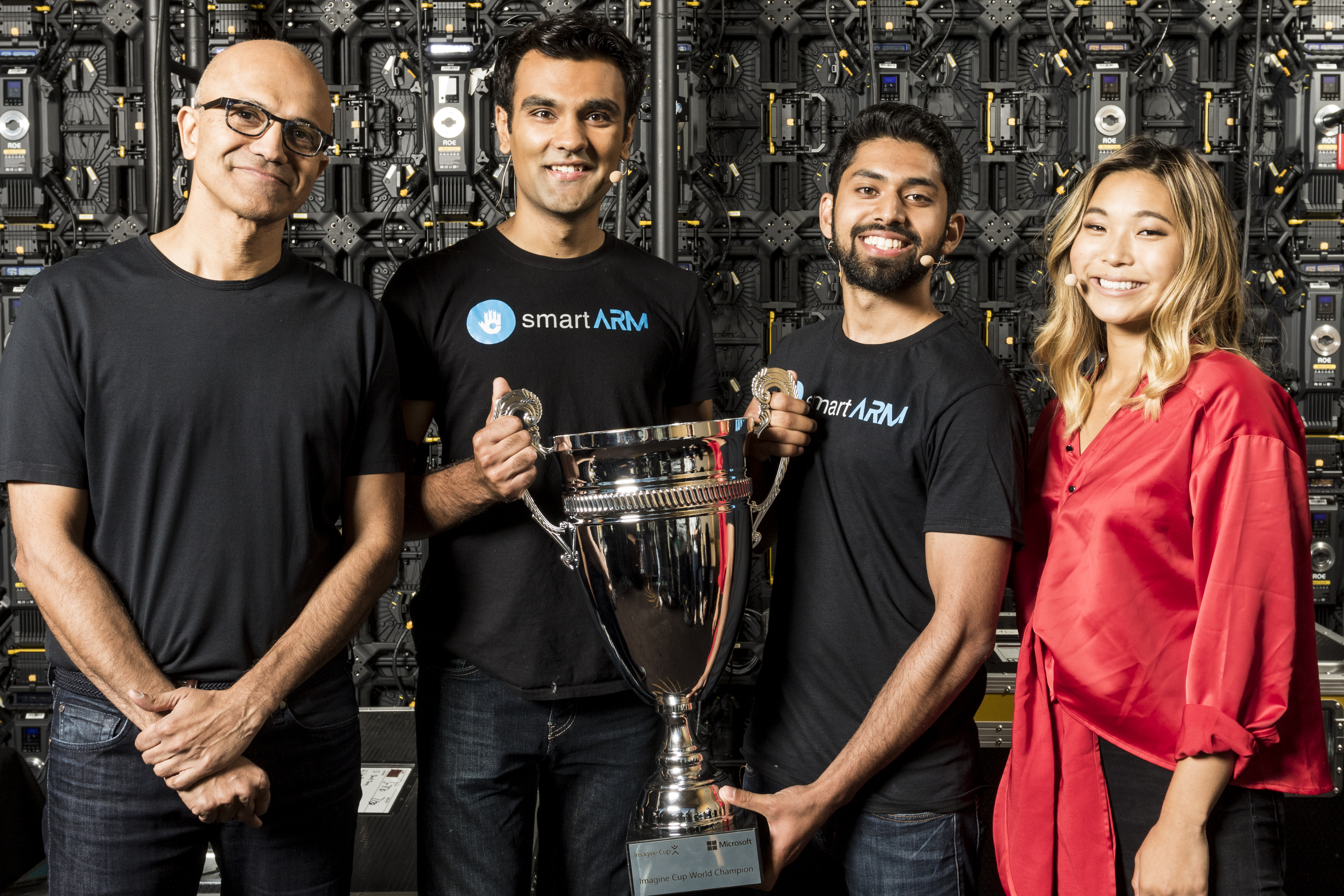
The 2018 Imagine Cup world champions are… smartARM of Canada!

Satya Nadella with the smartARM team, 2018 Imagine Cup winners, and Chloe Kim, special guest and Olympic snowboarding gold medalist.
Satya Nadella with smartARM team members, the 2018 Imagine Cup World Champions, along with Chloe Kim, special guest and Olympic snowboarding gold medalist.

At its heart, the Imagine Cup is all about bringing students together from across the globe, inspiring them to usher in our collective future using cloud-based technologies of today and tomorrow, including artificial intelligence (AI), big data, mixed reality and more. Since its inception 16 years ago, the Imagine Cup has motivated nearly 2 million students from over 190 countries around the world to bring their biggest, boldest ideas to life.

Today, we are excited to announce smartARM of Canada as the 2018 Imagine Cup champions! smartARM created a robotic hand prosthetic, using Microsoft Azure Computer Vision, Machine Learning and Cloud Storage, that uses a camera embedded in its palm to recognize objects and calculate the most appropriate grip for an object. Based on machine learning, the more the model is used, the more accurate it becomes.  As the victors, smartARM wins a mentoring session with Microsoft CEO Satya Nadella, $85,000 in cash and a $50,000 Azure grant. Team iCry2Talk of Greece earned second place with a low-cost and non-invasive intelligent interface between infant and parent that translates in real time the baby’s cry, and associates it with a specific physiological and psychological state, depicting the result in a text, image and voice message. Third place went to Team Mediated Ear of Japan for its project, Mediated Ear, software for hearing-impaired individuals to focus on a specific speaker among a multitude of conversations. Mediated Ear can relay specific sounds in audio waveforms through deep learning.

For the winners, and for their competitors, the road to the World Finals started with a single idea on how to change the world through innovative use of technology. Tens of thousands of students walked this road, spending months coding their solutions and dreaming up go-to-market plans to bring their ideas to life. From there, and through fierce competition at the national and regional level, 49 teams from 33 countries were selected to compete in the World Finals.

This year, we’ve added special Imagine Cup awards of $15,000 for three key areas of digital transformation: AI, big data and mixed reality. On Tuesday, we crowned the winners. SochWare from Nepal, won the AI award for designing a solution to help farmers identify plant diseases, suggest mitigation strategies, connect with experts and get updated with recent agriculture findings. Drugsafe from India won the big data award for their solution to validate genuine drugs and decrease illness from counterfeit substances. Pengram from the United States won the mixed reality award for allowing engineers from around the world to be holographically “teleported” into a workspace when needed.

The 2018 winners emerged from a strong field of competitors featuring projects that utilized leading-edge cloud technologies with the promise of improving the way we live and work. Throughout it all, the next generation of innovators put their creativity on display in addressing some of humanity’s most pressing issues.

This year’s participants weren’t just developing unique and potentially game-changing technology experiences, but they are also actively sharpening the skills that will boost their success as developers, technologists and entrepreneurs for the next generation. They follow in the footsteps of a long line of dreamers driven to succeed. For example, 2017 year Imagine Cup alumni Declan Goncalves of Canada was featured in Betakit’s “Canada’s Developer 30 Under 30” list for developing a platform which allows medical practitioners to better quantify their patient’s progress and detect neurodegenerative disease onset with the help of AI. Another alumni team, Kobojo, began their journey making Facebook games at Imagine Cup 2008 and has since raised $6 million in venture capital for their startup.

I’d like to thank this year’s championship judges: Co-founder and COO of Bitnami, Erica Brescia; CEO of Glitch, Anil Dash;, and Microsoft’s own Peggy Johnson, Executive Vice President of Business Development at Microsoft. Special thanks also to Microsoft Corporate Vice President of Azure Compute Corey Sanders, who hosted the championship and announced this year’s winner. Last but certainly not least, on behalf of Microsoft, I’d like to congratulate our new Imagine Cup champion, team smartARM, and all of the students who worked so hard to make this 16th anniversary Imagine Cup the most inspiring one yet. If you haven’t had a chance, be sure to view the championship video above to see some of the best student developers in the world envision a brighter, bolder future for us all.

— Charlotte

P.S. Follow me on Twitter for updates on Imagine Cup and other news and noteworthy information in the cloud and ecosystem space.

Tags: , , ,

Posted on Leave a comment

New accessibility improvements now available for Skype

A few months ago, we provided an update on our continued commitment to making Skype accessible. We are very grateful for the feedback you’ve given us—it continues to be an essential and impactful part of our work. We listened and made changes to make Skype more accessible for everyone.

Below are just some of the recent accessibility improvements available in Skype version 8:

  • Improved navigation now makes the app easier to use. Navigation is smoother and takes a more natural left-to-right and top-to-bottom path.
  • Additional information about messages that are sent and received is now displayed. For example, we now announce when messages are sent and when messages you attempt to send have failed.
  • A number of new keyboard shortcuts make it easier to start a chat, answer a call, and navigate within Skype. Visit Skype support for a full list of shortcuts.
  • Accessibility functionality was rolled out across all platforms. Skype version 8 is available on iOS, Android, Mac, Windows, and most recently iPad.

If you haven’t already done so, we encourage you to upgrade now—only Skype version 8 will be available after September 1, 2018.

We continually work to improve our technology to ensure it is accessible and empowers every person and every organization to achieve more. Please share your comments and feedback via Microsoft Accessibility UserVoice or contact the Disability Answer Desk for real-time support via phone, chat, or ASL videophone. If you are an early adopter and would like to participate in early preview releases, please consider joining the Skype Insider Community.

Posted on Leave a comment

How gamers with disabilities helped design the new Xbox Adaptive Controller’s elegantly accessible packaging

Romney said the experience has made him think about packaging differently.

“We have customers in our store every single day who buy product. I look at our laptop boxes and how they have to be opened. How many steps, how much packaging and how much of a barrier do each of those pieces become to someone with a mobility limitation?”

Romney thinks the Xbox Adaptive Controller packaging has the potential to set a new standard.

“I think it’s going to change how we look at things in the industry, in terms of how we make boxes. And I think it has to,” he said. “I think as a case study of inclusive design, the Xbox Adaptive Controller is going to make a brilliant example of how you do it, and how you include your audience and design with a population, rather than for a population.”

For Marshall and Weiser, the packaging project was challenging, time-consuming — and ultimately rewarding.

“It was a really powerful experience,” Marshall said. “I don’t think you realize, until you’re required to think differently, what you take for granted. As a designer, when you see things through a completely different lens, it’s paradigm-shifting.”

Said Weiser: “We put in a lot of extra time on it, but it was a pleasure to be able to work on this type of project. It’s great that we’re focused on this as a company.”

Discussions are underway about how Microsoft might use the learnings from the Xbox Adaptive Controller packaging. Marshall hopes the deceptively simple-looking box can serve as a springboard for future efforts.

“It’s certainly changing how we’re looking at packaging. We’re excited about moving forward from this point with a new lens and looking at what we can do,” he said.

“We’re really excited to take this journey on.”

Posted on Leave a comment

TD Bank empowers employees with assistive technology in Office 365 and Windows 10

Today’s post was written by Bert Floyd, senior IT manager of assistive technologies at TD Bank Group.

My journey with accessible technology at TD started more than 10 years ago, when I was called in to help incorporate a screen reader and Braille display into our retail environment for a new employee who was blind. Back then, it was a steep learning curve for the IT department. That’s not the case today. Over the intervening decade, we have created an inclusive corporate culture that celebrates everyone, including people with disabilities, and provides us with huge business potential. For example, one in seven people* in Canada identifies as having a disability, and there is an increasing incidence of age-related disabilities among our growing elderly demographic. Making sure our services are easily accessible is key to earning the business of this considerable segment of the population.

We are excited about introducing accessible technologies within Microsoft Office 365 and Windows 10 to empower our employees to help us work toward this strategic advantage. We find that most people can benefit from these accessible technologies, whether they identify as having a disability or not, because the technologies are built in to the Office apps. When employees can customize their environment and adapt to a wide variety of situations, they will be far more successful and productive.

And when we accommodate employees who identify as having a disability, we gain their insight and innovation to help us build accessibility right into our products and services. People with disabilities must think creatively about how to do things that other people don’t necessarily have to worry about, and we want to support that creativity in our workplace. We’re deploying Office 365 to all our employees and Windows 10 to almost 100,000 computers, which helps create an accessible workplace and ensure we will not miss out on hiring the best and the brightest.

From our websites to our brick-and-mortar branches and ATMs, we try to consider accessibility in every aspect of the customer experience. And we believe that with a more diverse and inclusive workforce, we’ll be in a better position to get there.

I’m excited about giving our employees the opportunity to leverage the accessibility features in Office 365 and Windows 10 in their everyday work lives. All employees need to think about accessibility, and everyone plays a role in creating a supportive, inclusive culture. When we all use the same inclusive tool set, there is enormous potential for improving productivity and driving awareness about the value of creating accessible documents and presentations for everyone to easily read and understand. Employees at TD already have access to Accessibility Checker, which makes it easy to spot problems and make content in Microsoft Word, Excel, PowerPoint, Outlook, and OneNote more accessible. People are learning about Narrator and Magnifier in Windows 10 and about the built-in color filters.

We have come a long way since hiring that first employee who was blind. Today, approximately 6 percent of our workforce identifies as having a disability. Our Assistive Technologies Lab welcomes anyone to come and learn about inclusive design and the technologies we have available to support our employees. We work with technology projects to help them conform to our IT accessibility standards, and we rolled out a training program for our developers and testers—a number of them with disabilities—to ensure we fully consider accessibility in our customer-facing products and services.

Today, TD prides itself on its diverse and talented workforce, and I’m incredibly lucky to be part of a great team that works hard to put so many resources behind our employees. Along with our assistive technologies, we are using Office 365 and Windows 10 to help us remove barriers for people with disabilities to create a more inclusive workplace that’s as diverse and exciting as the communities we serve.

*A profile of persons with disabilities among Canadians aged 15 years or older, 2012.

—Bert Floyd

Read the case study to learn more about how TD Bank is empowering its employees with assistive technology in Office 365 and Windows 10.

Posted on Leave a comment

Digital transformation in emerging Asian economies: Escaping the middle-income trap

David Arnold, President, The Asia Foundation

With the advent of the 4th Industrial Revolution and the rapid spread and adoption of cloud computing, cutting-edge technological solutions are now widely available around the world.

But to effectively tap this tech-driven potential, Asia’s emerging economies must pursue new ways of educating and training present and future workers – including women and girls who too often languish at the bottom of the employment pool with few educational opportunities.

“Ultimately it is the matter of human capital and developing relevant skills,” Arnold says. “That is currently a big constraint in many countries. So, we see this as an area of importance and priority.”

READ: Unlocking the Economic Impact of Digital Transformation in Asia Pacific

Breaking down and replacing long-held institutional and bureaucratic practices and barriers are high on the list of must-dos as well. It also happens to be a mantra that has been internalized by the Foundation, which has itself embraced technology to do its work better. Arnold sees the Foundation’s own internal digital transformation dividend as being a sort of microcosm of where the region should be heading.

Established by forward-thinking business people, academics, and U.S. government officials in 1954, The Asia Foundation is a non-profit international development organization committed to improving lives across the region. It works both at the high-end of public policymaking and at grassroots levels with local communities. It has an effective, integrated strategy to help Asian countries promote good governance, empower women, expand economic opportunity, boost education, increase environmental resilience, and promote international cooperation. It fosters deep, long-term partnerships with local organizations and individuals and relies on support from governments and a myriad of donors.

The Asia Foundation

In short, its goals are high, its reach wide, its challenges big and complex, and its stakeholders demanding. So, to boost its impact it embraced change.

For most of its early life, the Foundation was a largely paper-based, administratively disjointed, highly siloed and decentralized operation that stretched from its headquarters in San Francisco across a network of offices in 18 Asian countries.

READ: Microsoft Philanthropies Asia – Advancing a future for everyone

Ken Krug joined its ranks in 2011 to become Vice President for Finance, Chief Financial Officer, and a champion for digital transformation. “We were in the Middle Ages as far as technology was concerned,” he recalls.

Previous attempts to create in-house IT solutions had been unsuccessful. But about five years ago, the Foundation adopted “OneTAF” – a cloud-based Microsoft Office 365 solution named for the abbreviation of The Asia Foundation.

Now all sorts of files and knowledge are linked and made accessible across the Foundation’s diverse geographic footprint. One can imagine the unique challenges of being stretched from Colombo to Kabul and from Ulaanbaatar to Jakarta, and how much freedom and ease can be derived from sharing information and materials in real time.