Posted on Leave a comment

Integration of Azure IoT Hub with Event Grid makes it even easier to manage billions of devices

We’re proud to see more and more customers using Azure IoT Hub to control and manage billions of devices, send data to the cloud and gain business insights. We are excited to announce that IoT Hub integration with Azure Event Grid is now generally available, making it even easier to transform these insights into actions by simplifying the architecture of IoT solutions. Some key benefits include:

  • Easily integrate with modern serverless architectures, such as Azure Functions and Azure Logic Apps, to automate workflows and downstream processes.
  • Enable alerting with quick reaction to creation, deletion, connection, and disconnection of devices.
  • Eliminate the complexity and expense of polling services and integrate events with 3rd party applications using webhooks such as ticketing, billing system, and database updates.

Together, these two services help customers easily integrate event notifications from IoT solutions with other powerful Azure services or 3rd party applications. These services add important device lifecycle support with events such as device created, device deleted, device connected, and device disconnected, in a highly reliable, scalable, and secure manner.

Here is how it works:

As of today, this capability is available in the following regions:

  • Asia Southeast
  • Asia East
  • Australia East
  • Australia Southeast
  • Central US
  • East US 2
  • West Central US
  • West US

  • West US 2
  • South Central US
  • Europe West
  • Europe North
  • Japan East
  • Japan West
  • Korea Central
  • Korea South

  • Canada Central
  • Central India
  • South India
  • Brazil South
  • UK West
  • UK South
  • East US, coming soon
  • Canada East, coming soon

Azure Event Grid became generally available earlier this year and currently has built-in integration with the following services:

Azure Event Grid service integration

As we work to deliver more events from Azure IoT Hub, we are excited for you to try this capability and build more streamlined IoT solutions for your business. Try this tutorial to get started.

We would love to hear more about your experiences with the preview and get your feedback! Are there other IoT Hub events you would like to see made available? Please continue to submit your suggestions through the Azure IoT User Voice forum.

Posted on Leave a comment

What parents think about technology in the classroom

As a former educator, I’ve always been conscious of the parent’s role – essentially as their child’s first teacher – and their unique, valuable perspective on learning. Parents remember the ways they were taught in school and often have valid questions and thoughts on the new ways children learn, and about the curriculum being taught.

With summer coming to an end and parents sending their children back to school, Microsoft wanted to understand how parents felt about technology in the classroom. What did they really think of the importance of learning digital skills? Microsoft Education partnered with YouGov and surveyed parents in the U.S. with children aged 18 and under and found most parents are hopeful about what technology will do for their kids. [Download the accompanying infographic here.]

Parents optimistic about technology

The survey asked parents how they felt about the role of technology in their child’s life as that child grows up. In reply, 60 percent said they felt “optimistic” or “hopeful.”

Understandably, parents felt differently about tech depending on where it’s being used. When asked about tech use between home and school, 63 percent of parents cited concerns about their kids spending too much time on devices at home, while 86 percent of parents believed tech in school – including computers and educational software – would be helpful to their child’s education.

When I was teaching I would often talk to parents about screen-content, not just screen-time, and whether the engagement with digital content was active (like creating an animation) or passive (viewing a movie). It’s encouraging seeing parents understand that, when used in the right way, technology can help prepare their children for the jobs of the future and help them succeed.


The importance of Computer Science and learning digital skills

Using technology to learn isn’t the only way to prepare children for the future, however. According to The Bureau of Labor Statistics, 52 percent of job growth by the year 2020 will be in the fields of computing and mathematics, which shows a great importance in teaching Computer Science and digital skills in classrooms today.

According to the survey, half (50 percent) of parents believed coding and computer programming to be the most beneficial subject to their child’s future employability.

Another promising result: Parents felt strongly about the positive role federal and state governments can play in ensuring their children are learning these subjects. The survey sample indicated strongly that parents would like to see increased government support to help schools build kids’ digital skills.

When asked about the technology industry’s involvement, 75 percent of parents said they believe big tech companies should be involved in helping schools build kids’ digital skills. Many companies, including Microsoft and organizations like Code.org, are working to do just that. Programs like TEALS, which is supported by Microsoft Philanthropies, pairs trained Computer Science professionals from across the technology industry with classroom teachers to team-teach the subject.

Tech tips for teachers this school year

With parents seeing the importance of their children learning with technology and being taught Computer Science, coding and digital skills, the survey points to good news for teachers who work every day to ensure the children in their classrooms are prepared for the future.

Teachers work incredibly hard to bring the best and most inspiring learning opportunities to their classrooms. We celebrate and thank them.

For those teachers just starting to explore the potential of Computer Science in their classroom, I’d recommend these three simple approaches:

  1. Open up the conversation with your students. What do they understand CS to mean? What jobs are unlocked with CS?
  2. Take a short course and get started in Computer Science.
  3. Get involved with the Hour of Code.

Happy teaching!

Survey methodology

All figures, unless otherwise stated, are from YouGov Plc. Total sample size was 3927 adults, of which 1011 were parents of children under 19. Fieldwork was undertaken between 2nd – 6th August 2018.  The survey was carried out online. The figures have been weighted and are representative of all US adults.

Posted on Leave a comment

Find out what Xbox is up to at PAX West 2018

Xbox is bringing games, gear, and more to downtown Seattle for PAX West August 31 – September 3. Whether you’re joining us in person or following along on social media and Mixer, here’s what you can expect:

Xbox Booth
North Hall, 4th Floor, Booths 403, 411, 417

Experience a few of the games that make up Xbox One’s diverse line-up at the Xbox booth. We’ll have playable demos of Forza Horizon 4, The Division 2, Shadow of the Tomb Raider, Devil May Cry 5, NBA 2k19, Metro Exodus, Kingdom Hearts III, Tunic, Ooblets, Kingdom Two Crowns, Generation Zero, Bendy and the Ink Machine, Supermarket Shriek, My Time Portia, and some new DLC from State of Decay 2. You will also have the opportunity to earn a Cuphead Pinny Arcade pin, participate in a Tomb Raider-themed scavenger hunt, guess the amount of Nuka Cola caps in a Fallout 76 experience, visit the Game Pass vending machine, and pick up exclusive Xbox Official Gear for the first time at PAX.  (PAX Badge required)

Mixer
North Hall, 4th Floor, Booth #425

Drop by booth #425 in the North Hall to meet up with some of your favorite broadcasters and Mixer Partners, and for a chance to win swag in the HypeZone LIVE! In addition to that, there’s also going to be a main stage at PAX featuring our Mixer Partners, developers, and so much more. Can’t make it to PAX West in person? No problem! Watch all the action happening at PAX West via Mixer.com/Mixer and Mixer.com/HypeZoneLIVE!

Want the full rundown? Make sure to get all the latest details from the official Mixer blog, right here: https://blog.mixer.com/2018/08/22/mixer-pax-west-2018/

Xbox PAX West Panels

Find out more about streaming and the Xbox Adaptive Controller at these panels featuring Xbox and Mixer members. (PAX West badge required.)

Building Your Streaming Community
Wyvern Theater, Saturday, September 1 from 3:00 p.m. – 4:00 p.m.

Building a community comes with many challenges and hurdles, good news is we’re here to help! We’ve gathered a council of content creators to discuss the ins-and-outs of building a great online community in your own livestreams. We’ll be smashing myths and sharing the facts about streaming to help you set a foundation for a positive and effective community.

The Xbox Adaptive Controller: Designed with the Community
Sasquatch Theater, Sunday, September 2 from 12:30pm-1:30pm

The Xbox Adaptive Controller is the newest controller by Xbox, created to help people with limited mobility play. Larry Hryb will lead a conversation with pivotal community experts and representatives of game accessibility organizations like AbleGamers and Stack Up, along with one of the controller’s creators.  We’ll describe the journey of designing the controller leveraging the input of gamers with disabilities from the start… and where we need to go next.

Xbox One Summer of PUBG Tour

The Xbox One Summer of PUBG tour will be making their final stop in Westlake Center during PAX West. No badge required to visit! Check out the PUBG bus and enter to win it or one of many other prizes. More information can be found here.

Xbox PAX West Sweepstakes

PAX West 2018 Sweepstakes Image

PAX West 2018 Sweepstakes Image

Enter for a chance to win one of 11 Xbox Design Lab controllers, influenced by some of our favorite games. Xbox Design Lab allows you to create your own personal controller from over a billion different color combinations, metallic finishes, and rubberized grips. Check it out and design your own controller at xboxdesignlab.xbox.com.

There are two ways to enter:

  • Take a photo of your favorite Xbox Design Lab controller in the Xbox booth and share via Twitter using #XboxPAX #XboxDesignLab #Sweepstakes. Don’t forget to follow @Xbox while you’re at it!
  • Follow @Xbox or @XboxCanada on Twitter and retweet one of their tweets mentioning the sweepstakes and including #XboxPAX #XboxDesignLab #Sweepstakes.

You have until September 3rd to enter. The contest is open to anyone from the US or Canada. Click through for the Official Rules.

See you at PAX West! For more Xbox news, follow @Xbox on Twitter, visit the Xbox PAX West website, and stay tuned to Xbox Wire.

Posted on Leave a comment

CAE’s training simulators make us safer – from the hospitals to the heavens

The birth was seconds away. The mother rested on her back while a medical student sat at the foot of the bed, blue surgical gloves on her hands – a scene common to delivery rooms everywhere. Except the mom was a manikin, her fetus was a manikin and the student wore Microsoft HoloLens.

Using the device, the student looked at the mother’s abdomen and saw a hologram of the fetus inside the womb before it rotated and descended the birth canal. Then, her mixed-reality training session got tricky.

Suddenly, the baby’s shoulders became stuck inside the mother, a risky complication – but an emergency purposely triggered by a classroom instructor. The student had to act fast. She placed her hands on the tiny manikin and gently freed the shoulders, safely completing another digital delivery.

CAE LucinaAR – the first human-patient simulator augmented with HoloLens – simultaneously delivered another digital lesson. The technology comes from CAE, a Canadian company that offers virtual-to-live training solutions to assess human performance, improving overall safety from health care to civil aviation to defense operations.

A medical student practices delivering a baby with the use of a virtual-to-live patient simulator and Hololens.
A medical student practices delivering a baby with CAE LucinaAR and HoloLens.

“CAE operates in three sectors where the stakes are high, where there’s no room for error and where the people need to be properly trained to be ready for unlikely situations that could lead to catastrophes,” says Dr. Robert Amyot, president of CAE Healthcare, one of CAE’s three business segments.

“On-the-job training is dangerous and costly,” adds Amyot, a cardiologist by trade. “So, we train pilots to make flying safer. We train the forces in our defense and security division to make them more prepared for their missions. And we train clinicians and health care providers to improve patient safety.”

By going digital, each of those training regimens is becoming more precise at pegging and addressing human vulnerabilities, says Marc Parent, the CEO at CAE.

In the realm of aviation, CAE guides pilots to prep for potential airborne adversities by using individualized simulations built with artificial intelligence and the Internet of Things (IoT).

A new pilot trains on a CAE flight simulator.

“Although it’s the safest mode of transportation in the world, pilots have long been assessed in a subjective way,” Parent says. “But now, by leveraging the data that our simulators are giving us – powered by the cloud – we can give them an objective assessment in real time. That’s invaluable.

“When the pilots go into our simulator, we are able to give them personalized insights into their skills, into how they perform different operational practices. This raises their level,” Parent says. “And practice makes perfect.”

Posted on Leave a comment

Bing spotlight helps you learn more about the news in less time

Being an informed consumer of the news is more challenging today than it used to be. We live in a busy world where dozens of headlines compete for our attention every day. On top of that, it’s difficult to know if you’re getting all sides of a story or just leaning into an echo chamber, and it can feel like a full-time job to seek out various points of view.

At Bing, we want to empower users to get an overview of the news in less time. That’s why we built the Bing spotlight that provides overviews of news topics that you can see right in the Bing search results when you search for major developing news stories.

spotlightselfdrivingcars.jpg

Spotlight shows users the latest headlines, a rundown of how the story has developed over time, and relevant social media posts from people around the web. Spotlight also shows diverse perspectives on a given topic so users can quickly get a well-rounded view on the topic before deciding what they want to go deeper on and read by clicking on any of the articles.

Spotlight is currently available on Bing desktop and mobile web in the US.


Users’ trust in the news we present is of the utmost importance to Bing, and we’re committed to providing a well-rounded view of news from diverse, quality sources.

To start, Bing monitors millions of queries and news articles every day and identifies impactful stories that evolve over a period of weeks or months. We look at various user signals such as queries and browser logs, and document signals from publishers such as how many publishers cover a story, their angles, and how prominently they feature the story on their site.  For controversial topics, in the Perspectives module, we show different viewpoints from high-quality sources. For a source to be considered high quality, it must meet the Bing News PubHub Guidelines, which is a set of criteria that favors originality, readability, newsworthiness, and transparency. Top caliber news providers identify sources and authors, give attribution and demonstrate sound journalistic practices such as accurate labeling of opinion and commentary. Behind the scenes, we leverage our deep learning algorithms and web graphs of hundreds of millions of web sites in the Bing index to identify top sources for national news, per category, query, or article. Our goal is to provide broader context for impactful stories, from politics to business to major disasters, and much more.

To try the new experience, search for major news topics like self-driving cars on Bing.com, or find the latest spotlights on the Bing.com homepage carousel.


Providing different perspectives in our spotlight experience is part of a broader effort to help our users be more informed with various perspectives on a range of topics, from news to common health questions. We’re working hard to expand the range of topics covered by this approach, including expanding the numbers of topics spotlight covers, to help you become more informed in less time and effort. We hope you’re as excited about these updates as we are!


Posted on Leave a comment

Microsoft survey finds 67 percent of IT businesses use or plan to use a hybrid cloud

What does hybrid cloud mean to IT professionals, and why are so many companies using it? Microsoft conducted a survey with research firm Kantar TNS in January 2018, asking more than 1700 respondents to chime in. Surveys were collected from IT professionals, developers, and business decision makers to identify how they perceive hybrid cloud, what motivates adoption, and what features they see as most important. Survey participants in the United States, the United Kingdom, Germany, and India were asked their thoughts about hybrid, which for the survey was defined as consisting of “private cloud or on-premises resources/applications integrated with one or more public clouds”. We’ve created a summary infographic of the survey that you can review. A few survey highlights:

  • Hybrid is common, with a total of 67 percent of respondents now using or planning to deploy a hybrid cloud. Many of those hybrid users have made the move recently, 54 percent of users in the past two years.
  • Cost, a consistent IT experience, and the ability to scale quickly were all given as important reasons for moving to hybrid cloud.
  • The perceived benefits of hybrid cloud, as well as some of the challenges, vary by the geographic location of respondents. For example, increased security was the top benefit cited in the United Kingdom and Germany, while the top United States benefit was better scalability of compute resources.
  • The top use case given for hybrid cloud was controlling where important data is stored at 71 percent. Using the cloud for backup and disaster recovery was a close second at 69 percent.

image

We invite you to download and share our infographic on the state of today’s hybrid cloud. For a more complete review of the State of Hybrid Cloud 2018 survey findings, watch the on-demand webinar Among the Clouds: Enterprises Still Prefer Hybrid in 2018.

For more information about hybrid networking, identity, management and data on Azure, you can also check out this new Azure Essentials segment, Integrating Azure with your on-premises infrastructure.


State of Hybrid Cloud 2018 survey

Participants for this online survey were recruited from (non-Microsoft) local market lists selected by Microsoft and the international research firm Kantar TNS, which was hired to conduct the outreach. Survey participants included IT professionals, professional developers, and business decision makers/influencers who use, are planning, or have considered a hybrid cloud deployment. Surveyed company sizes were from mid-market to enterprise (250+). The survey was conducted January 4 – 24, 2018. For the purposes of this survey, hybrid cloud was defined as follows. Hybrid cloud consists of private cloud or on-premises resources/applications integrated with one or more public clouds.

Posted on Leave a comment

Empowering literacy for everyone with free Microsoft Stores workshops

America has a literacy crisis.

Students, parents and teachers attended a recent literacy kick-off event at Microsoft to see how Learning Tools improve reading.

More than 36 million adults in the United States cannot read, write, or do basic math above a third grade level. And children whose parents have low literacy levels have a 72 percent chance of being at the lowest reading levels themselves. These kids are more likely to get poor grades, display behavioral problems, have high absentee rates, repeat school years, or drop out1.

In a majority of classrooms today, teachers have students reading at up to four different grade levels, trying to keep the same pace on curriculum2.

That’s why Microsoft Store and Microsoft Education are teaming up to offer free workshops this fall, using Microsoft Learning Tools to create dedicated curriculum for those with literacy challenges.

Workshops will be offered at different times throughout the year at all Microsoft Stores in the US, Canada and Puerto Rico, so be sure to check out the local Store programming near you to find the right workshop for your needs. Workshops will be catered to students’ age range, including:

Empowering students affected by Dyslexia

Educators and parents/caregivers working with students of any age; and children in 8th grade or above who are accompanied by an adult, will get hands-on experience with Microsoft applications and tools – including Learning Tools, the Ease of Access menu and accessibility and productivity features of Office 365. Teachers will be empowered to create inclusive classrooms that support students of all abilities, while parents/caregivers will gain skills to support learners outside of the classroom.

The workshop covers why it’s important to create an inclusive classroom, tools to empower different learning styles and abilities, and tools to support students with disabilities.

Boost your reading confidence and literacy skills ages 8-12

This workshop introduces students, with foundational literacy skills, to the Immersive Reader in the OneNote app. Participants will build confidence and improve their reading comprehension through grade-level–appropriate activities with Immersive Reader features. Activities include demonstrations, playing “Mad-Lib” style games, and building and reading stories in pairs to gain hands-on experience using the tools.

Literacy skills for emerging readers ages 6-8

This workshop introduces emerging readers to Learning Tools for OneNote via age–appropriate activities with Immersive Reader features. Activities include discussions, demonstrations, and playing word and story games to gain hands-on experience using the tools. At the end, participants will share what they learned with their parent or caregiver. Throughout the workshop, participants will learn how to build confidence and improve their reading comprehension, and should leave prepared to continue using Learning Tools to further develop reading skills at home and at school.

Two students celebrate during the literacy kickoff event at Microsoft.

With free software like Microsoft Learning Tools and heroic educators like Merlyne Graves, we are encouraged by the progress that’s happening every day. More than 13 million teachers and students are already using Microsoft Learning Tools for free as part of Office 365 Education, including tools like Immersive Reader, Picture Dictionary and Dictation. These are proving to increase reading and writing skill successfully, as evidenced by the recent 3rd party study from RTI International, Leveling the Playing Field with Microsoft Learning Tools.

Through these workshops, we hope to give anyone who may have challenges with reading and writing skills the tools they need to feel empowered and to personalize their learning experience, especially those in underserved communities, or with learning differences like ADHD, Dyslexia, Dysgraphia or Autism.

Decoding Dyslexia, a parent-led movement to raise awareness around Dyslexia, is partnering with Microsoft on these workshops. “We need to get technology like Learning Tools into the hands of more students with Dyslexia and other learning differences before they fall behind,” said Rachel Berger, CEO of Decoding Dyslexia, “so I’m excited about the reach Microsoft Stores will have this fall. It’s truly empowering software that can make any classroom more inclusive.”

To kick off the program, Microsoft recently hosted more than 400 students, parents and teachers from across Washington and Oregon to be the first to try the new workshops. The event also included a keynote from former NFL cornerback Robert Tate, who shared his experience with dyslexia at a young age. “My friends didn’t know I had dyslexia,” Robert said. “I would hide within myself and make sure I wasn’t the one putting my hand up to ask questions or the one reading in class. You just have to keep moving forward and never go backwards.”

Ales Holecek, corporate vice president at Microsoft who helped spark discussions that led to Learning Tools, also spoke to the group, telling the audience of parents, teachers and students about his reading comprehension issues that started at a young age and continue today. “I take a long time to read anything and hate emails. I tell my team to send short emails; or better still, come speak to me in person,” said Holecek. For Ales, the turning point came in coding, which he felt operated on a simpler vocabulary.

To learn more and find the right workshop for you or your student, check out your local Store programming.

1 National Bureau of Economic Research (NBER)

2 https://files.eric.ed.gov/fulltext/ED562664.pdf

Posted on Leave a comment

Windows 10 Tip: Find out how to get HDR video on your PC

When you’re watching high dynamic range (HDR) video on your PC, colors are more vivid. You find more details in the darkest and brightest parts of a scene, such as dimly lit rooms or a blazing fire. You notice more contrast, with a pronounced difference between lights and shadows.

To see how HDR video compares to traditional content (SDR), look at the images below. The SDR version, in general, is more flat and washed out. With an actual video on an HDR-capable PC, the difference is like night and day – literally. 

Still of an HDR video showing a man with a a snowboard and a backpack walking toward a sunset

HDR video still

Still of an HDR video showing a man with a a snowboard and a backpack walking toward a sunset

SDR video still

Simulation of HDR content vs. SDR content 

Windows HD Color is a set of features bringing HDR content to Windows PCs. Our team works hard to improve the quality of every pixel on your display, including better colors and more vivid scenes. The goal is to help you get ultra-realistic movie, gaming and creative experiences in Windows 10.  

To enjoy HDR video, you need the right content, hardware and software. As more HDR hardware and content come to market, we’re committed to giving you the best HDR experiences. 

Gif shows moving from Settings to Apps to Video Playback to turn on Stream HDR Video

In settings, you’ll be able to choose “Stream HDR Video” in the Video Playback if your display supports HDR video

HDR is a dramatic improvement over traditional SDR (standard dynamic range) content in two ways: light and color.  

When it comes to light, HDR video takes advantage of new hardware that can show much higher contrast between the brightest whites and the darkest blacks on your screen. HDR video encodes additional information into your content (and allows for a much higher peak brightness) so you can see much more detail across the entire spectrum of display capabilities. For example, in a single frame of HDR video, the sun will appear distinctly brighter, details on the brightest surfaces will be sharper, and the darkest shadows will appear with terrific detail.  

With respect to color, HDR video also improves over traditional content in two ways. First, it typically uses wider color gamut (WCG) when encoding information, meaning that it shows a wider range of colors compared to traditional SDR content. This results in, for example, increasingly saturated hues of color. Second, color is more precise with HDR. This is because it can represent many more unique shades even within the same range of color. On new HDR-capable hardware, these two color-related improvements result in much deeper and more vivid reds, greens, and blues, and allows for more gradations of color in-between.  

How can I get HDR video? 

With Windows HD Color, our goal is to make HDR video look as good as possible using the fullest extent of your PC’s capabilities. Since fully HDR-capable, built-in displays aren’t on laptops today, our efforts are focused on:  

1. Playing HDR video on external HDR10 displays 

In the Windows 10 Fall Creators update, Windows supports external HDR TVs and monitors. Among other features, this allows Windows to consume HDR video and show full HDR quality (i.e., HDR features described above like higher peak brightness, wider color gamut, and more accurate color). You will also need a modern graphics card and updated drivers.  

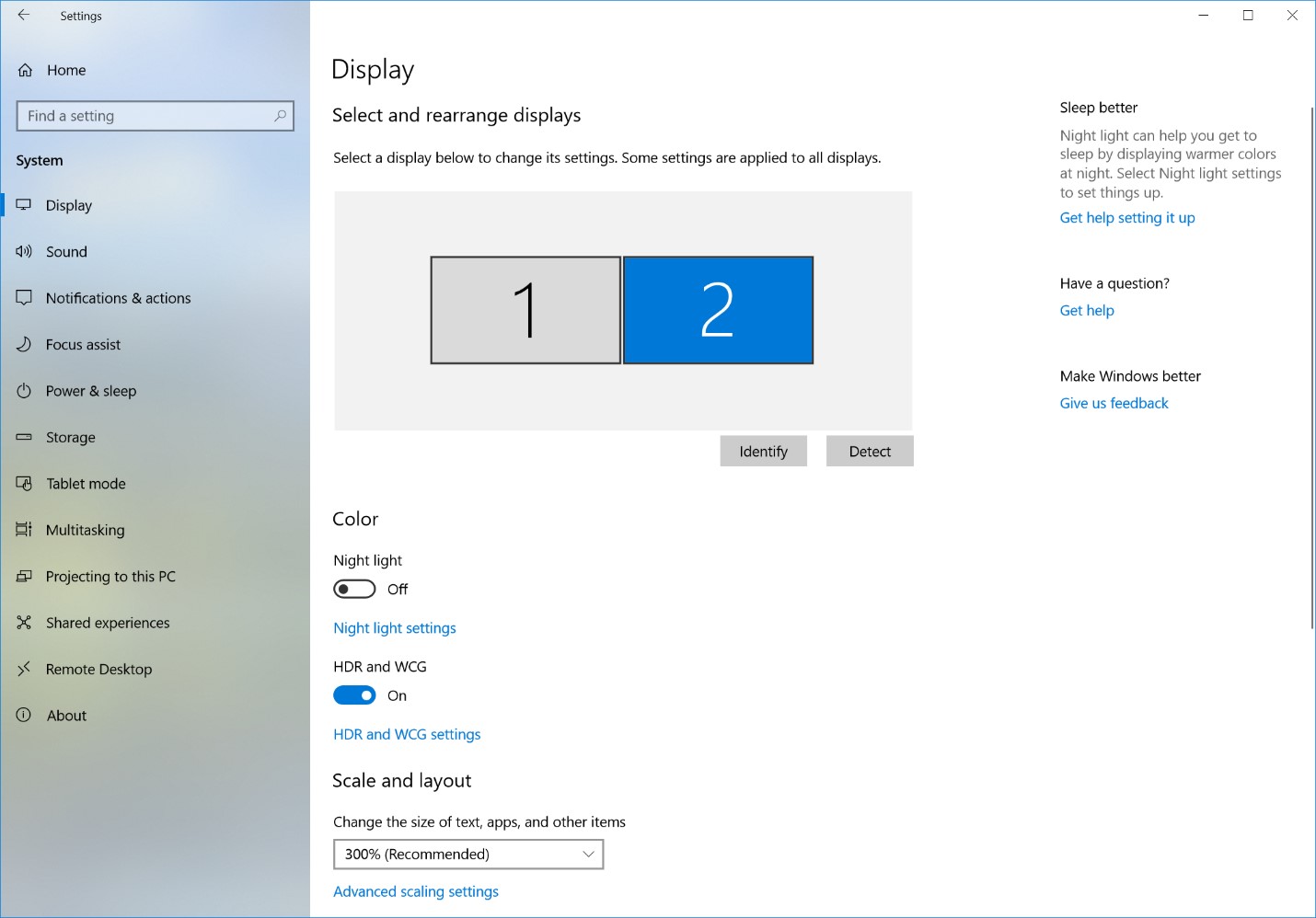
To get HDR, go to Settings > System > Display, and turn on “HDR and WCG.”

Screenshot of the display setting for HDR-capable external monitor

Display settings for HDR-capable external monitor

For more info on HDR on external monitors, see Display requirements for HDR video in Windows 10 

2. Improving video on current generation built-in displays (i.e., laptops)  

Currently, most laptop displays don’t truly support HDR content, particularly when it comes to color (they do not have wider color gamuts nor higher color precision). Nevertheless, medium- to high-end models tend to have bright screens. We can combine these bright screens with the expanded range of brightness information available in HDR video formats so that Windows plays HDR video at its best for that display. 

Playback quality of HDR content on these devices is noticeably better than the SDR version of the same content. This is particularly apparent in scenes where movie creators have mastered their content to fully exploit new HDR technologies. 

While this update for built-in displays focused on the better brightness of HDR content, in the future we are working on bringing you better color.  

Only devices that meet certain hardware requirements will be capable of playing HDR video.  

FAQ 

Does my Windows device support HDR? 

See our help articles Display requirements for HDR video in Windows 10 and Stream HDR video on Windows 10   

How can I set up my laptop display for HDR video? 

See our help article Calibrate your built-in display for HDR content in Windows 10 

What HDR content can I watch? 

There is a lot of free HDR content available online. You can find some good examples if you open Microsoft Edge on your Windows 10 PC, go to YouTube, and then search for “HDR.” 

Netflix has HDR content as well, but you need to be on the “Premium” tier plan to have access. If you are on this plan, either download the Netflix app from the Store or go to Netflix.com in Microsoft Edge and search for “HDR.” Check out “Chef’s Table: France.” 

(Side effects of this last show in HDR include uncontrollable hunger and impulse-purchase plane tickets to Paris.) 

We are working with other content providers to expand the scope of HDR content on Windows. 

Posted on Leave a comment

What’s next in your smart city evolution?

For most cities, becoming a smart city is no longer a question. It’s an imperative. Your city is likely well underway on its digital transformation journey. You’ve been investing in IT for years. And you’re looking to get the most out of those investments. So what’s next in your smart city evolution?

For many of the municipalities our CityNext team works with, it’s connecting everything. City leaders are looking to weave the fabric of a connected society. Ultimately, they want to bring together local and national governments with commercial businesses so that all systems are working together to improve urban experiences and citizens’ quality of life.

And they’re getting there step by step. Together with our partners, we help them navigate those steps in the context of their technology continuum.

That continuum often started sometime in the 80s, when individual city departments purchased their own on-premises, siloed solutions. Then came the 90s and the internet, which enabled cities to use webpages and portals that could present data from across departments in a singular view. But the data wasn’t really connected—it was just a presentation layer over those myriad, siloed systems.

The 2000s first brought the cloud, which made it easier to connect systems and data. Then it brought the Internet of Things (IoT) with sensors and devices—generally referred to as “the edge”—for everything from detecting water quality, to tracking hyper-local weather patterns, to enabling self-driving cars.

Now, with the intelligent cloud and intelligent edge, cities can enable connections not just centrally through the cloud, but on the edge. By that, I mean rather than data having to go to the cloud to be processed and then sent back out to an edge device, data can be connected and analyzed on and between edge devices.

In other words, rather than an autonomous car having to send a message to the cloud and wait for a response to acknowledge a red light and stop, the car and the traffic light can communicate with each other directly.

So for many cities, using the intelligent cloud and intelligent edge to start connecting everything is how they’re taking that next step in their smart city evolution. That way, they can enable cohesive experiences and computing capabilities wherever data exists. It’s also vital to helping them get the most out of advanced analytics and emerging technologies such as artificial intelligence (AI).

In fact, connecting data across departments and organizations’ systems and edge devices is one of the key recommendations in Gartner’s report: “Three Rules When Using AI to Add Value to Your IoT Smart Cities.”

Read the report to learn the three rules and six action items Gartner recommends for your city to get the most out of IoT and AI. Gartner’s research includes real-world use cases that illustrate how the synergy of IoT and AI can help cities better serve their citizens and achieve their desired outcomes.

If you would like to learn more about smart cities, meet with Microsoft at Smart City Expo World Congress in Barcelona.  Learn more about Microsoft CityNext at Smart City Expo World Congress 2018.

Posted on Leave a comment

Air France elevates customer service and empowers employees with Office 365

Image of the Air France logo.

Today’s post was written by Amel Hammouda, chief transformation officer at Air France and a member of the Air France executive committee.

Profile picture of Amel Hammouda, chief transformation officer at Air France and a member of the Air France executive committee.Whether they’re traveling overseas for business, taking a chance on a whirlwind romance, or reuniting with old friends, passengers count on Air France to deliver an exceptional customer experience on their journeys. Every year, Air France flies upwards of 87.3 million passengers to hundreds of destinations around the world. While we are internationally recognized for the lengths we go for our customers, we are equally committed to making sure our employees have a great experience on the job.

In fact, we see a direct correlation between empowered employees and satisfied customers. This idea drives our strategic business plan, which aims to foster an innovative mindset for the benefit of our customers and our employees. This means ensuring that our employees have the right tools to contribute their ideas and enthusiasm—from unique ways to present in-flight meals to project management on an international scale. We’re building a modern, mobile workplace with Microsoft Office 365, so we can tap into the enthusiasm of our dynamic, engaged employees. Continuing to innovate great customer service will help us maintain our advantage in today’s competitive airline industry.

It’s often said that you never know who you might meet on an airplane, and this spirit of potential is also at the core of our corporate culture. As we continue to build on a culture of innovation, we know that game-changing ideas can come from anywhere in the business. With Office 365, we have tools to break down silos and leverage our collective brainpower. More than 46,000 employees use the Yammer corporate social network to share their ideas and innovate through improved collaboration for the benefit of our customers. Many of our most successful Yammer initiatives have been entirely grassroots, like the viral “I Love My Job” project that started with a single flight attendant using Yammer to share pictures and stories about her job. This grew into an incredible network of Firstline Workers who use Yammer to share best practices, tips, and tricks—innovations that we can use to take customer service to the next level.

Consistency and accuracy occur naturally in a well-connected workforce. With our cloud-based communication tools taking off in the company, it is easier for Air France employees to provide accurate answers to customers’ questions, and even anticipate their needs. The more knowledge we share across the company, the more unified we are in our approach to service, and the more reliable we are in the eyes of our customers. Today, Air France is a more interconnected, productive organization because we have the technology to communicate and collaborate effortlessly.

Dynamic communication tools like Yammer don’t just improve employee connections, they also bring tangible business wins and help the focus remain on customers. The speed at which information can spread throughout the company translates to more agile decision-making and efficiency gains. Yammer was recently used by flight attendants who encountered a problem with snack packaging on a particular route. From posts across the company, it quickly became clear that flight attendants elsewhere noticed the same frustrating defect. Within 48 hours, Air France had negotiated a refund and replacement from the supplier—a win for both flight attendants and customers.

Air France operates a complex network of flights all over the globe; distributing information across our geographically dispersed enterprise can be equally complex. Working with intelligent communication applications like Microsoft Teams helps us to connect a mobile workforce that is always on the move. Our digital champions, employees who are passionate about promoting digital culture, use Skype for Business video calls to drive adoption of our new cloud tools. My team uses Microsoft SharePoint Online for document sharing and storage. I have seen firsthand how these tools can help us transcend department boundaries and drive projects across the company.

Our strategic priorities include two main lines of action: to continuously improve the customer experience and do the same for employees. Thanks to our modern, connected workplace, we are accelerating progress in both strategic directions and we expect great synergies over the next few years.

Read the case study to learn more about how Air France uses Office 365 to improve customer service and empower employees.