Posted on Leave a comment

New Dynamics 365 Nonprofit Accelerator supports organizations with end-to-end solutions

Over the past year, Microsoft’s Tech for Social Impact team has worked to deliver innovation to help advance the missions and impact of nonprofits around the world.  While we’ve made progress, too many nonprofits are struggling to efficiently deliver their mission and to measure and communicate their impact. This is a critical challenge in an era of unprecedented humanitarian need.  From delivering aid to some of the 108 million people living with severe food insecurity each day, to providing access to basic services such as education for 68 million refugees and displaced people globally, to combatting the alarming decline in species and biomass around the world – the issues that nonprofits are tackling have never been more critical.

In context of these incredible challenges, the organizations Microsoft partners with are asking for better systems to help them deliver their mission and scale their impact. Systems that are rooted in program delivery and impact measurement. Systems that embrace common data models and leverage shared and open standards so that data and insights can be easily shared within and across organizations. Perhaps most importantly, we hear that these systems need to be designed collaboratively with the nonprofit sector, including large and small organizations as well as institutional and private donors.

In response to this feedback, we are announcing the Dynamics 365 Nonprofit Accelerator which brings together solutions for nonprofits through our world-class partner ecosystem to help nonprofits improve end-to-end mission delivery and insights. These solutions will power core nonprofit processes like program delivery, constituent management, fundraising, volunteer management, impact measurement, and more. An example is the work that we’ve done with the U.S.-based consulting firm Wipfli which worked with Team Rubicon to build a volunteer management system by tapping into the power of Dynamics 365 to help organize its army of more than 80,000 volunteers. The new volunteer management system helps Team Rubicon more effectively leverage the skills of military veteran volunteers to help communities prepare for and respond to natural disasters. It will enable Team Rubicon’s leaders to see which volunteers are available at any given time and to more efficiently deploy those volunteers to impacted communities, as well as manage operations, training, equipment, donors and more. Initially developed specifically for Team Rubicon, a community version of this app will be made available in spring 2019 to nonprofits worldwide.

YouTube Video

Microsoft’s Dynamics 365 Nonprofit strategy specifically brings together three important elements:

  1. Microsoft Common Data Model for Nonprofits, the first common data standard built specifically with and for the nonprofit sector, is now openly available on GitHub. The Microsoft Common Data Model for Nonprofits is built on the Dynamics 365 Common Data Model. It is a unique solution, built from the ground up with program delivery and impact measurement in mind. It includes direct input from the world’s leading nonprofits, institutional donors and private foundations such as International Rescue Committee, Oxfam, SOS Children’s Villages, Ballmer Group and the Bill and Melinda Gates Foundation, to name a few. Critical to this effort is directly aligning this data model with the International Aid Transparency Initiative standard, which improves the transparency of development and humanitarian data. This unprecedented step for the nonprofit sector encourages interoperability across platforms, and helps nonprofits share data and work seamlessly across solutions, starting today.
  2. Dynamics 365 Nonprofit Accelerator: The Dynamics 365 Nonprofit Accelerator is a suite of sample apps, templates, and connectors specifically designed to solve the most pressing scenarios nonprofits face when delivering their programs and measuring their impact. The accelerators are meant for partners to use in their development of solutions to help reduce the cost to develop, and thus allow for more solutions to be built and available to nonprofits. To begin, we are releasing accelerators that support impact measurement and constituent management with more components available over time. These solutions help nonprofits better connect their impact to their fundraising strategies by creating opportunities for interoperability and data transparency across platforms. These solutions will be pre-mapped on the Microsoft Common Data Model for Nonprofits, enabling partners and the nonprofits they work with to rapidly create and implement new applications and solutions that help to drive their mission.
  3. Dynamics 365 Nonprofit Partners: Bringing these capabilities to life requires a range of innovative partners who are committed to delivering end-to-end solutions for nonprofits on the Nonprofit Accelerator. These partners include:
  • Blackbaud, the world’s leading cloud software company powering social good, announced the Integrated Cloud Initiative for Nonprofits™ with Microsoft earlier this fall. Blackbaud’s founding partnership is instrumental in shaping the Common Data Model for Nonprofits to ensure that it is relevant and based on proven taxonomy and data structures. In addition, Nonprofit Resource Management™ is the first jointly developed solution of its kind that leverages the Microsoft Common Data Model for Nonprofits.  This is yet another compelling example of how the Common Data Model for Nonprofits will be leveraged to bring more value to nonprofit organizations.
  • Avanade is a global leader in delivering innovative digital and cloud services, business solutions and design-led experiences through the power of people and the Microsoft ecosystem. Avanade has 34,000 digitally connected people across 24 countries, bringing clients the best thinking through a collaborative culture that honors diversity and reflects the communities in which they operate.  This month, Avanade is launching Technology for Social Good to serve the nonprofit sector and will be developing an end-to-end, native Dynamics 365 solution on the Microsoft Common Data Model for Nonprofits. This comprehensive suite of solutions will be designed and delivered specifically to address the needs of the sector, enabling organizations to connect core processes and deliver mission impact and insights.
  • threshold.world is a new company launched by Dan Lammot, the co-founder and former CEO of roundCorner – an organization that pioneered development of enterprise fundraising and grant management solutions on the Salesforce platform.  threshold.world will both participate in the design of the Dynamics Nonprofit Accelerator and serve as a catalyst to help partners worldwide design finished nonprofit solutions exclusively on the Dynamics platform.

In addition, we have a range of partners committed to building on the Nonprofit Accelerator from integrations with born-in-the-cloud fundraising partners like Classy (helping to power Team Rubicon’s online fundraising efforts), to partners with world-class delivery capacity such as Revel and Wipfli.  Other key partnerships include Fluxx, Ifunds, KPMG Denmark, m-hance, MISSION CRM, Sparkrock StratusLIVE, and Unit4.
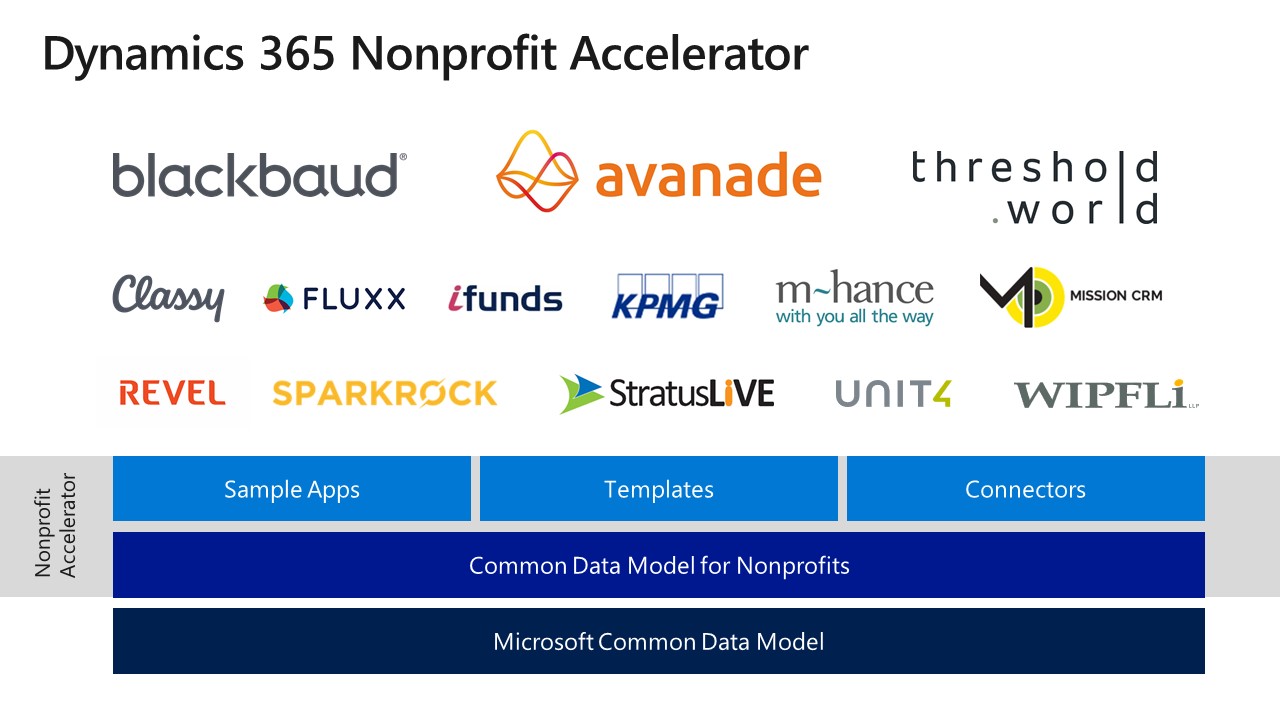
Dynamics 365 Nonprofit Accelerator logos

Going forward here’s what you can expect:

  • Microsoft Common Data Model for Nonprofits: This is now available on GitHub and we will continue to iterate based on community feedback.
  • Nonprofit Accelerators: For the first phase of this effort we will be building capabilities in six main areas – (1) constituent management (2) fundraising (3) donation management (4) program delivery (5) volunteer management (6) grant and award management.  Constituent management is now available and will be followed by the Program Management Accelerator in February.
  • Partners: Partners will ultimately finish and deliver these accelerators and the partners mentioned above are ready now to engage you. We will maintain a list of quality partners for your reference.
  • Nonprofit Early Adopter Success Credit:  To help ensure successful deployment, we will invest in an Early Adopter Success Program which will provide design and deployment support and incentives.  The aim of this program is to help ensure success for each organization while also capturing key learnings and feedback to incorporate into the design of the Microsoft Nonprofit Common Data Model and Accelerators.  The full details of this program will be released shortly at www.microsoft.com/nonprofits.
  • Ongoing updates and technical information: Additional updates and a deeper technical drill down will be available on Erik Arnold’s blog.

This is not a point-in-time release of a single new product, rather a long-term investment and commitment to the sector to truly unlock new capabilities for nonprofits and improve end-to-end mission delivery. Working with our partners, Microsoft is incredibly optimistic about the potential for digital technology to help transform large and small nonprofits. We’ve seen the potential of digital transformation with Team Rubicon and our aspiration is to ensure technology fulfills its promise to address the world’s biggest challenges. We can empower everyone to achieve more.

Tags: , ,

Posted on Leave a comment

Power BI Desktop adds dataflows, enterprise reporting and more

As organizations embrace a data culture to drive business decisions, they need an enterprise business intelligence platform that can meet their sophisticated needs – from self-service BI to full enterprise governance, from paginated reports to full interactive data exploration, and from small data sets to petabytes of data.

In July, we laid out the roadmap for Power BI to help organizations unify modern and traditional BI on one enterprise platform, and empower business analysts by expanding self-service data prep for big data.  Since then, we’ve shipped a number of capabilities that deliver on this roadmap: Premium multi-geo allows customers to address data residency requirements, aggregations enable data analysis over petabyte sized datasets with trillions of rows of data, and the new Power BI Home landing page and dashboard commenting make it easier to get to your most important content and collaborate across the enterprise.

Today, we’re announcing the availability of several new capabilities that we laid out in our July roadmap.

Dataflows expand self-service data prep in Power BI

Power BI already includes robust self-service data preparation capabilities in Power BI Desktop through the familiar Power Query based experiences that are used by millions of users worldwide. We are excited to announce the public preview of dataflows in Power BI, taking self-service data preparation to the next level.

  • Dataflows enable business analysts to create data preparation logic that can be reused across multiple Power BI reports and dashboards.
  • Dataflows can be linked together to create sophisticated data transformation pipelines that enable business analysts to build on each other’s work. A new recalculation engine automatically tracks dependencies and recomputes data as new data is ingested.
  • Dataflows can be configured to store the data in the customer’s Azure Data Lake Storage Gen2 instance, fueling collaboration across roles. Business analysts can seamlessly operate on data stored in Azure Data Lake Storage, taking advantage of its scale, performance, and security. Meanwhile, data engineers and data scientists can extend insights with advanced analytics and AI from complementary Azure Data Services like Azure Machine Learning, Azure Databricks, and Azure SQL Data Warehouse.
  • Dataflows support the Microsoft Common Data Model, giving organizations the ability to leverage a standardized and extensible collection of data schemas (entities, attributes and relationships)

dfblog_08

Columbia Sportswear uses Power BI to empower a broad group of employees to self-discover, share and monitor insights across a diverse range of data sources in the cloud and on-premises. Dataflows unlocks new possibilities for their analysts leveraging large datasets.

“Dataflows are one of the more exciting additions to Power BI,” said Chris Weis, Senior Analytics Product Manager at Columbia Sportswear. “It amplifies Power BI’s ability to handle large datasets. Our analysts can now scale large data transformations beyond the resources of their PC, and accelerate PowerQuery performance in a big way.”

For more background on dataflows, check out Adi Regev’s blog.

SQL Server Reporting Services technology now in Power BI

A modern, compliant and unified enterprise BI platform for business analytics is easier than ever with our latest enterprise operational reporting capabilities.

Our popular SQL Server Reporting Services technology is now part of Power BI and available in public preview, providing a unified, secure, enterprise-wide reporting platform accessible to any user across devices. Pixel-perfect paginated reports can now be included alongside Power BI’s existing interactive reports.

“The availability of paginated reports in the Power BI service removes the last technical barrier to running all types of reports in the cloud,” said John White, Power BI MVP and Chief Technology Officer of Tygraph. “The choice of on premises or in the cloud no longer needs to be a feature decision. Customers with a significant investment in reporting services can now move to Power BI knowing that their reports can move right along with them.”

For more background on Paginated reports in Power BI, check out Chris Finlan’s blog.

Power BI Desktop November Update

We continue to innovate at a rapid pace with weekly updates for the Power BI service and monthly updates for Power BI Desktop. The November update for Power BI Desktop, shipping next week, includes several features the Power BI community has asked for:

  • Follow-up questions for Q&A explorer. You can now ask follow-up questions inside the Q&A explorer pop-up, which means the question will take into account the previous questions you asked as context. For example, you can ask “List customers in London” and then ask the follow up question “What did they buy” and the result for that second question will only be for London customers.

  • New modeling view makes it easier to work with large models. You can now have multiple diagram layouts, customize and save them, leverage display folders, and several additional enhancements that improve performance and experience – available in preview.

  • Expand and collapse matrix row headers.  Row headers on the matrix visual now work like Excel PivotTables, with the ability to expand and collapse individual row headers.

  • Copy and paste between PBIX files. You can copy and paste visuals between PBIX files, greatly improving usability and speeding up the process of creating new reports.

Learn more about the public preview of dataflows and SQL Server Reporting Services technology in Power BI during the PASS Summit at the day 1 keynote. For a deeper dive, please join our session Power BI: the Future for Modern and Enterprise BI on November 8th.  Attendees will see the new capabilities in action and hear more about what’s coming.

We have other fantastic content at PASS that you also won’t want to miss, including sessions covering our latest announcements with Introducing Advanced Data Preparation using Power BI Dataflows and Modern Enterprise Reporting with Power BI Report Server and the Power BI Service.

Posted on Leave a comment

Tune in to Inside Xbox at 1 p.m. PT this Saturday for X018; see reveals for ‘Forza Horizon 4,’ ‘Sea of Thieves’ and more

Inside Xbox: Live from X018 presents a special two-hour show Saturday, November 10 at 4 p.m. ET / 1 p.m. PT on Mixer, Twitch, YouTube, Facebook, and Twitter.

We’ll be celebrating an incredible holiday season for gamers with our biggest episode of Inside Xbox yet, including news, interviews, great deals, and much more. Guests include Head of Xbox Phil Spencer, Head of Microsoft Studios Matt Booty, Minecraft Studio Head Helen Chiang and many, many more.

Tune in for games including Crackdown 3, Minecraft, Sea of Thieves, State of Decay 2, Forza Horizon 4 and of course, we’ll have a surprise or two as well.

Xbox Game Pass
Will we have Xbox Game Pass news? Do we ever! We’ll be making over a dozen game announcements for Xbox Game Pass.

MixPot!
Do you like free stuff as much as we like free stuff? If you watch this special X018 episode of Inside Xbox on Mixer and you’re logged into your Microsoft account, you’ll receive in-game items for Sea of Thieves and Forza Horizon 4! Remember, to be eligible all you need to do is watch the show live at Mixer.com/Xbox on any Xbox, PC or mobile device while logged into your Microsoft account.

Of course, we’ve got a couple big surprises up our sleeves, so make sure you don’t miss a minute!

See you online!

Posted on Leave a comment

Collaborate more easily, keep track of to-dos with new AI features in Word

Focus is a simple but powerful thing. When you’re in your flow, your creativity takes over, and your work is effortless. When you’re faced with distractions and interruptions, progress is slow and painful. And nowhere is that truer than when writing.

Word has long been the standard for creating professional-quality documents. Technologies like Editor—Word’s AI-powered writing assistant—make it an indispensable tool for the written word. But at some point in the writing process, you’ll need some information you don’t have at your fingertips, even with the best tools. When this happens, you likely do what research tells us many Word users do: leave a placeholder in your document and come back to it later to stay in your flow.

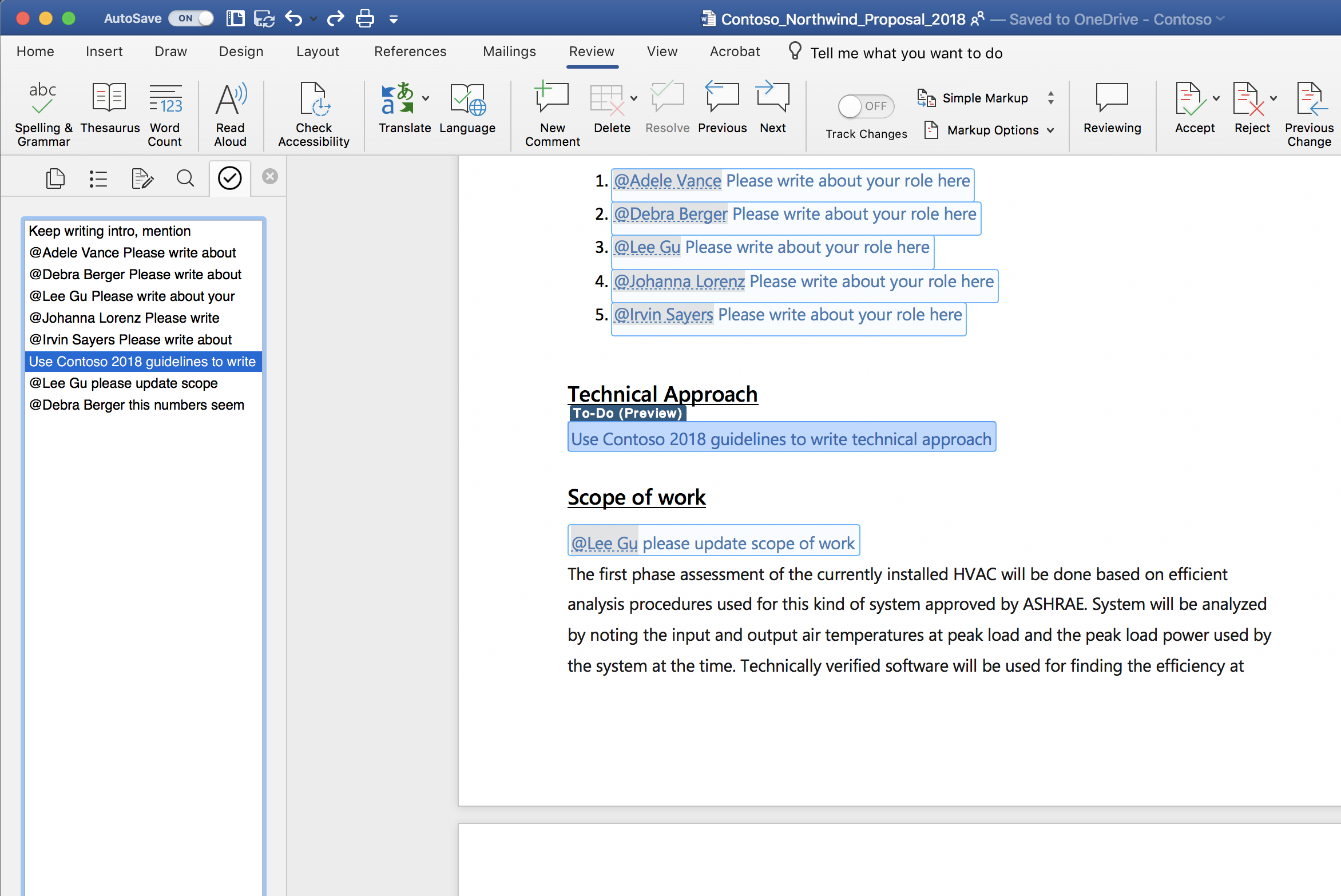
Today, we’re starting to roll out new capabilities to Word that help users create and fill in these placeholders without leaving the flow of their work. For example, type TODO: finish this section or <<insert closing here>> and Word recognizes and tracks them as to-dos. When you come back to the document, you’ll see a list of your remaining to-dos, and you can click each one to navigate back to the right spot.

Screenshot of a Word document open using the AI-powered To-Do feature.

Once you’ve created your to-dos, Word can also help you complete them. If you need help from a friend or coworker, just @mention them within a placeholder. Word sends them a notification with a “deep link” to the relevant place in the document. Soon, they’ll be able to reply to the notification with their contributions, and those contributions will be inserted directly into the document—making it easy to complete the task with an email from any device.

Over time, Office will use AI to help fill in many of these placeholders. In the next few months, Word will use Microsoft Search to suggest content for a to-do like <<insert chart of quarterly sales figures>>. You will be able to pick from the results and insert content from another document with a single click.

These capabilities are available today for Word on the Mac for Office Insiders (Fast) as a preview. We’ll roll these features out to all Office 365 subscribers soon for Word for Windows, the Mac, and the web.

Get started as an Office for Mac Insider

Office Insider for Mac has two speeds: Insider Fast and Insider Slow. To get access to this and other new feature releases, you’ll need a subscription to Office 365. To select a speed, open Microsoft Auto Update and on the Help menu select Check for Updates.

As always, we would love to hear from you, please send us your thoughts at UserVoice or visit us on Twitter or Facebook. You can also let us know how you like the new features by clicking the smiley face icon in the upper-right corner of Word.

Posted on Leave a comment

Tips and ideas for classrooms participating in next week’s Skype-a-Thon

Skype-a-Thon is coming soon! On November 13th and 14th, classrooms across the world will be breaking down their walls and connecting students with peers from various countries and cultures, as well as experts in various fields.

This year, our collective Skype-a-Thon goal will be to travel over 14 million virtual miles. For every 400 miles traveled, Microsoft will make a donation to schools in need. So, not only will we be making a positive change in the world by connecting students from various backgrounds, cultures and faiths, but we’ll also help raise funds for supplies for those less fortunate!

Students and some classmates, appearing on screen via Skype, smile for a group photo.

Students and some classmates, appearing on screen via Skype, smile for a group photo.

For new participants

If you are new to Skype in the Classroom, fear not! Any educator can take their students on a Skype-a-Thon adventure. First, create a free account on the Microsoft Educator Community.  Once there, spend some time perusing the rich content at your fingertips. Find a Virtual Field trip that connects to your unit of study or reach out to a guest speakerwho will inspire your students. You can request a free, live and interactive Skype experience directly on the site. Maybe you want to try a Skype collaboration or a game of Mystery Skype, too. Request a lesson, a field trip, a collaboration event, or a game for Skype-a-Thon, and you will be part of something massive!

For past participants

If you’re a veteran Skype in the Classroom teacher, challenge yourself to take your Skype-a-Thon to the next level. Try to participate in multiple calls during the eventm or travel to several countries in one day. Try something new, like a connected Kahoot using Skype screen sharing. Last year, my class played a Global Pop Culture Kahoot game with students from ten nations. Every question on the Kahoot dealt with pop culture. The students learned that despite their religion, race, and country of origin, they all knew that Shrek lives in a swamp. They found out we are way more alike than we are different! There are so many engaging ideas you can explore on Skype in the Classroom. Challenge yourself to try something new.

How to get parents involved

Maybe you might want to try something unique and include parents in your Skype-a-Thon plans. One fun idea that I do each year is to host an optional pitch-in Skype Breakfast during the morning of Skype-a-Thon. Parents have been hearing about the engaging and authentic learning that has occurred throughout our school year. They are curious and jump at the chance to experience the magic of Skype in the Classroom for themselves.

Students love showing off their Skype skills for their parents, and the parents are always blown away by what they see! Last year, they teamed up with their children for a Mystery Skype adventure with a 5th grade class in Spain.  This year, they’ll join on another Mystery Skype alongside their child. It’s a fun way to kick off Skype-a-Thon!

Another meaningful way to include the parents is to create a homework assignment where the students report back what they learned to their folks. Then, they ask the parents to respond about which Skype-a-Thon destination they found most interesting and why. The kids love having homework that their parents need to do. More importantly, this assignment encourages rich discussion between parent and child. That is a win-win!

A student's note on an answer sheet, describing what they learned from a recent cross-cultural Skype session.

A student's note on an answer sheet, describing what they learned from a recent cross-cultural Skype session.

And don’t forget…

There is a fantastic collection of Skype-a-Thon resources available to seasoned and new Skype enthusiasts alike on the Skype-a-Thon Teacher Toolkit. You might be inspired to create a passport for your class’ Skype-a-Thon journey, create a class map to track your travels, and so much more!

By joining you will be part of something amazing! You’ll be taking action on so many levels, and your students and their parents will benefit as well. Make sure you share your experiences on Twitter by using #skypeathon #MicrosoftEDU, and definitely use the Microsoft Educator Community to register for calls. Miles will be counted when Skype in the Classroom lessons are booked there. Finally, I would recommend you watch the on-demand how-to” webinar for Skype-a-Thon with VP of Education Anthony Salcito and Skype Master Teacher Stacey Ryan, to learn how your class can participate and how you can organize your Skype-a-Thon activities from start to finish.

Have an amazing Skype-a-Thon, everyone!

Posted on Leave a comment

Bringing our October 2018 release to life at Ignite

As we continue our momentum and investments in Microsoft business applications, I’m excited to highlight some of the new capabilities in the October 2018 release of Dynamics 365 and the Power platform at Ignite 2018 today.

In my keynote at the event with Alysa Taylor, we are featuring two customers, Polaris Industries and Northwell Health. These customers exemplify companies that are using Dynamics 365 and the Power platform to fundamentally reimagine how they engage with their customers, use data to optimize their operations, empower their employees and transform their products.

You’ll see how Polaris is transforming their customer engagement processes and manufacturing operations through connected products, using Dynamics 365. And we’ll show some pretty amazing applications of mixed reality as we demonstrate HoloLens used in a field service engagement.

You’ll also hear from Northwell Health about how they are changing patient engagement with Dynamics 365, the Power platform, Office 365 and Azure. One of my favorite parts of their story is about a PowerApp which gives physicians and nurses visibility into each other’s teams – developed by one of their doctors! These business applications are helping teams at Northwell collaborate more effectively and provide even better patient care that is truly transformational.

And this all comes on top up some phenomenal feedback we received from the market following our introduction of new Dynamics 365 AI and Mixed Reality applications last week. And we are incredibly excited to build on all this momentum with the announcement from Satya today on the Open Data Initiative with Adobe and SAP, which represents the next step in our journey to deliver unmatched value to our customers.

In addition, the October release is packed with hundreds of new capabilities across all Dynamics 365 applications and the Power platform, including new connected field service capabilities and deeper integrations with Office 365, Teams, and LinkedIn. Get the full details of this release through our release notes.

And watch my keynote at Ignite, here.

I look forward to hearing your thoughts.

Posted on Leave a comment

Bringing mixed reality and Dynamics 365 together

Hey everyone!

I hope this note finds you well. For those who have been following and participating in our mixed reality journey, welcome to our new home in the Dynamics 365 blog! For those new to us, on behalf of everyone who works on mixed reality business applications at Microsoft it is our pleasure to meet you.

My name is Lorraine Bardeen, and I am the general manager of engineering for Mixed Reality Business Applications at Microsoft. I have the pleasure of working for James Phillips in the Business Applications Group and the privilege to lead a world-class team of engineers working to bring mixed reality to people and organizations across the globe.

I have been working on the mixed reality business for over six years and I still show up at work every day excited to work with customers, partners and developers to innovate and solve real problems using mixed reality. With mixed reality, we can understand data in context and simplify workflows to extend human ability. When this happens workers feel more effective, businesses see more progress and everyone has a chance to participate in the modern workplace.

Today marks an important day for all of us on the mixed reality business applications team. Today, we officially mark general availability of our first Dynamics 365 business applications: Dynamics 365 Remote Assist and Dynamics 365 Layout.

To celebrate this important milestone I wanted to write this post and share more about why mixed reality and Dynamics 365 have come together, what people can expect from these first mixed reality business applications, and how they are already being used and deployed.

Why mixed reality and Dynamics 365 have come together

A couple of weeks ago I had the opportunity to speak to press and analysts in San Francisco about mixed reality business applications at Microsoft. As part of that moment in time, Alysa Taylor talked about our vision for business applications and I had the chance to talk specifically about mixed reality. In particular I talked about why mixed reality and Dynamics 365 have come together and I wanted to share some of that with you here as well.

With Dynamics 365, customers are reimagining their business processes by leveraging modern, unified, intelligent and adaptable solutions that bring together the vast amounts of data across their organization to empower their employees with new tools to help them feel more effective at work. Factory and field service worker. Patient and provider. Storefront and supply chain. No silos — just customers, products, employees and data more closely connected than ever before. Mixed reality represents a totally new part of this solution because of the capabilities it provides.

We recognize that these employees need information in context to apply their knowledge and craft. Not only on a 2-D screen — but information and data in context, at the right place, and at the right time, that they can use hands-free so employees can produce even greater impact for their organizations. We’ve focused on integrating these mixed reailty business applications with the common data service that underlies Dynamics 365 so that companies get the full value of high-value data connecting the full workflow.

Introducing the general availability of Dynamics 365 Remote Assist

With today’s release of Dynamics 365 Remote Assist we are taking an important step forward in helping address some of the current, unmet needs of Firstline Workers. Firstline Workers represent more than 2 billion people in roles that make them the first points of contact between a company and the world it serves, between a company and its products. They are often the first to engage, the first to represent a company’s brand, the first on the scene to address a problem.

With Dynamics 365 Remote Assist we can enable technicians and remote experts to solve problems in real time with heads-up, hands-free video calling, annotations, and file sharing. By identifying and addressing issues accurately we can also eliminate the need for costly travel expenses while improving operational efficiency.

Organizations will be able to communicate securely with industry-leading identity and security measures, including Azure Active Directory. In addition, they will be able to leverage work order data from Dynamics 365 Field Service on-site using the common data service.

For business decision-makers looking for new ways to empower their employees and create more collaborative ways of problem-solving, this is pretty exciting stuff! But enough talking about it — here is Microsoft Dynamics 365 Remote Assist in action.

Introducing the general availability of Dynamics 365 Layout

Lastly, with today’s release of Dynamics 365 Layout we are now providing our customers and partners with a way to visualize room layouts in real-world scale. The ability to walk through proposed layouts in physical space or virtual reality. Review and make changes with stakeholders in real time, saving time and money. Move, resize and rotate 3-D models to edit layouts on the spot. Here is a peek at Dynamics 365 Layout in action.

Mixed reality business applications being deployed

About four months ago we released the public preview of our two mixed reality business applications. During that time, we had the chance to work with and learn from many great companies, and I wanted to take a moment to spotlight a couple of them here.

ZF Group

A great way to see Remote Assist and Layout in action is through the work of ZF Group, a German car-parts manufacturer headquartered in Friedrichshafen. An early partner on our journey, ZF Group has been working with us over the past few months to help ensure these apps, even in preview, are crafted with insights from those who will be using them daily to get their work done. In developing these apps with customers, we are not only looking to make great software — we’re looking to empower the Firstline Workers using the apps.

Learn more about how ZF Group uses Microsoft mixed reality tools.

Chevron

Chevron is already achieving real, measurable results with its global HoloLens deployment. Previously it was required to fly in an inspector from Houston to a facility in Singapore once a month to inspect equipment. Now it has in-time inspection using Dynamics 365 Remote Assist and can identify issues or provide approvals immediately. In addition, remote collaboration and assistance have helped the company operate more safely in a better work environment, serving as a connection point between firstline workers and remote experts, as well as cutting down on travel and eliminating risks associated with employee travel. Learn how Chevron is deploying Microsoft Dynamics 365 Remote Assist and Microsoft HoloLens.

This is just the beginning! We will have a lot more to share in the months ahead, and I am looking forward to sharing more then.

As always, I’m available on Twitter (@lorrainebardeen) and eager to hear about what you’re doing with mixed reality.

Learn more

Posted on Leave a comment

Cybersecurity and the world: A time to reflect, a time to act

Sign the petition to support digital peace: https://digitalpeace.microsoft.com/

As world leaders prepare to meet in Paris to honor the centennial of the armistice that ended World War I, it’s important to apply the lessons learned from the tragedies of the 20th century. It’s a time for people to ensure that their voices are heard in the cause for digital peace. To learn more and add your voice, go to https://digitalpeace.microsoft.com

Posted on Leave a comment

1 week until Skype-a-Thon 2018: Join to open your students’ hearts and minds via global learning

If you want to give your students something they can’t wait to go home and share around the dinner table, and keeps them interested and curious for days, participate in Skype-a-Thon. And if you want to give your students something they’ll never forget from their time with you as their educator, participate in Skype-a-Thon. It’s just a week away and an event you don’t want to miss!

Many of the participating educators in over 90 countries tell us this is their favorite activity of the year, because it engages their students deeply in learning and opens their hearts and minds to the world. Just be ready for the added enthusiasm in your classroom!

One of those participating educators is Todd Flory (Kansas, USA), who says: “We are excited to connect with experts and virtual field trips that will make our academic standards come to life. Our students learn so much more when they can ask questions and do authentic research. We also love connecting with other classrooms around the world, as it helps our students celebrate diversity and learn that our differences are what makes us special and stronger as a global society.”

A classroom of students talk to another classroom via a Skype window projected onto a screen.

A classroom of students talk to another classroom via a Skype window projected onto a screen.

Another educator from Nigeria, Olukemi Olurinola, says: “Participating in Skype-a-Thon is always the highlight of our school year! We open our classrooms to the world and connect with experts and other classrooms to learn about different cultures and environments and help them model compassion for one other. The best way to learn about the world is learning with the world.”

Seated students facing a screen in their classroom as they converse with a remote educator via Skype.

Seated students facing a screen in their classroom as they converse with a remote educator via Skype.

We expect nearly 500,000 children and guest experts around the world to connect via Skype on November 13th and 14th. They’ll share stories about their culture and their environments, play games, take virtual field trips and, most importantly, discover that we are more similar than different around the world.

Participating classrooms and Skype in the Classroom partners will travel an estimated 14 million virtual miles from over 90 countries through these live Skype experiences. And with every 400 virtual miles traveled, participating classrooms will help support up to 35,000 children in need with an education in WE Villages. That’s one of the great things about this event: while it opens the hearts and minds of students, it always opens potential for many more children to receive an education.

It’s not too late to register. You can find a classroom or guest expert to connect with and many resources and activity plans to integrate Skype-a-Thon into your curriculum.

We hope you’ll join this global learning community on their 48-hour journey around the world to leave an impact on the next generation of global citizens. Please share all the fun with @SkypeClassroom and #skypeathon and #MicrosoftEDU.

Posted on Leave a comment

Engineers from Walmart and Microsoft will work side-by-side in new ‘cloud factory’

Walmart is expanding its technology center in Austin, Texas, to accelerate digital innovation that transforms how associates work and delivers more convenient ways for customers to shop.

About 30 technologists, including engineers from both Walmart and Microsoft, will work together side by side in the cloud factory, expected to open in early 2019 as an extension to a strategic partnership announced in July. The factory will be an expansion of Walmart’s innovation hub, a vibrant workplace opened earlier this year in the center of Austin’s growing technology scene.

The Walmart-Microsoft team – known internally as “4.co” for its location at Fourth and Colorado streets – will initially focus on migrating Walmart’s thousands of internal business applications to Microsoft Azure. The team will also build new, cloud-native applications. The collaboration will be part of a multi-year journey to modernize Walmart’s enterprise application portfolio, create more efficient business processes and decrease operational costs associated with legacy architecture.

large, open, modern workplace with colorful mural in background
Walmart’s innovation hub in Austin, Texas.

The work will continue digital solutions already deployed at Walmart, including thousands of IoT sensors on HVAC and refrigeration systems that process a billion daily data messages from stores worldwide. The solution helps Walmart save energy and prevent product loss.

Based in Arkansas, the global retailer is also deploying Microsoft AI in a number of use cases, including internal chatbots that help associates navigate benefits, find mentors and better manage supplier engagements. Walmart has also deployed a natural language processing platform capable of processing 40 terabytes of unstructured text and providing near real-time insights and actions in support of business operations.

To shed light on 4.co and the company’s innovations, Transform chatted with Clay Johnson, executive vice president and enterprise chief information officer at Walmart.

TRANSFORM: Why is digital transformation important to Walmart?

JOHNSON: Technology is changing the way people live, work and shop – and the pace of change is only getting faster. We want to create new and incredibly convenient ways for our customers to shop, and as technology cycles get shorter and shorter, we must increase our speed and agility.

To do this, we’re digitally transforming processes and empowering our associates with consumer-grade technology and tools. Digital transformation is pervasive across the company and we’re pushing the envelope to accelerate innovation.

TRANSFORM: How is Walmart using Microsoft AI? Where do you see it going?

headshot of Clay Johnson
Clay Johnson, executive vice president and enterprise chief information officer at Walmart.

JOHNSON: We’re layering AI across every facet of our business. We have lots and lots of data that represents value we can leverage. That’s where AI, machine learning and Cognitive Services in Microsoft Azure come in to play.

We took our natural language processing platform and a single business case – post-payment auditing – to build out the platform at massive scale and apply it in other use cases. For associates who are tasked with finding that needle in the haystack, machine learning will help them go through unstructured text quickly. But ultimately, it’s not just about efficiency. A lot of this will drive impact to the bottom line.

With our chatbots, associates can use them to find a mentor or ask questions about benefits. They can get simple questions answered quickly. By saving them time, that’s more time they can spend on the sales floor helping our customers.

TRANSFORM: What are some benefits you’ve seen with other technologies like IoT and edge computing?

JOHNSON: With our IoT work and sensor enablement, we’re looking at our energy consumption and other factors to predict equipment failures before they happen. Improving equipment performance can result in enhanced energy efficiency, which lowers costs and our carbon footprint. That’s good for the customer and the environment. Sustainability is a big deal for us.

Putting IoT data into edge analytics lets us look at data at a store level and backhaul it to Azure to look at it across a region or the whole U.S. We started talking to Microsoft about this concept of a set of stores being a “micro-cloud,” and you roll them into Azure for data analytics and insights. A lot of this work is coming out of our Austin site.

TRANSFORM: How did the concept of 4.co come to be? What are the team’s goals?

JOHNSON: With this partnership with Microsoft, we started talking, ‘‘Hey, what’s the best way to accelerate all the stuff we’re doing here? We need help and expertise. We want to move fast. How do we partner our smart people with Microsoft’s smart people?”

Then it was obvious: ”Why don’t we just co-locate the teams together.” We haven’t done something like this before with co-location, but I think the outcomes are going to be huge and strengthen our partnership even more. You’re going to see a lot more co-innovation around IoT, computer vision, big data and real-time analytics.

TRANSFORM: How do you think both companies will benefit?

JOHNSON: We’re going to learn a lot from each other. We’re going to learn a lot from Microsoft –  which apps make sense to get to the cloud quickly and which don’t.

Microsoft’s going to get to see stuff at a scale they’ve never seen before. [Walmart has 11,200 global stores and 2.2 million associates]. I think they’ll learn a lot from our footprint. Co-locating top engineers from both companies will deepen the technical brainpower for creating disruptive, large-scale enterprise solutions for Walmart.

open, modern workplace
Walmart’s innovation hub in Austin, Texas.

TRANSFORM: Why did Walmart pick Austin for its technology office and 4.co? How are you interacting with the community there?

JOHNSON: You see a lot of tech companies and startups in Austin, and we wanted to blend that culture and the universities with our culture as we continue to grow and add tech talent to Walmart. Austin is a huge recruiting opportunity for us. Because our team in Austin works closely with our technology teams in Bentonville, [Arkansas], a pipeline of technology talent into Bentonville has also emerged.

Austin is also a very meetup-heavy city. So we were really purposeful in picking a location that puts us in the middle of the tech meetup scene. We host deep learning, AI and chatbot meetups. We do a lot of Women Who Code events.

We recently did a hackathon with Microsoft and the University of Texas at Austin, where we worked with a no-kill animal shelter. The students really enjoyed doing something for the local community. [The event focused on helping dogs through predictive modeling of the canine parvovirus disease].

TRANSFORM: What’s your vision for the future of retail? 

JOHNSON: I think you’re going to see an omnichannel-type world that is a blend of e-commerce and brick and mortar, where consumers can have access to things at any point, any time. They can order online and pick up in the store or have it delivered same-day. You can see we’re starting to do that with our online grocery right now.

Top photo: Walmart’s technology center in Austin, Texas. All photos courtesy of Walmart. Follow Clay Johnson @ClayMJohnson.