In this episode of “Digital Now,” Chris Capossela, chief marketing officer at Microsoft, explains the richer relationship that has developed between the company and its customers. “When they do well, we do well,” he says, explaining Microsoft’s evolution as an “empowering agent.”
“Digital Now” is a video series hosted by Andrew Wilson, chief digital officer at Microsoft, who invites friends and industry leaders inside and outside of Microsoft to share how they are tackling digital and business transformation, and themes like the future of work, security, artificial intelligence, and the democratization of code and data.
Also in this episode, Capossela and Wilson explore why companies must embrace “ruthless prioritization,” how innovation will be the way out of a tough economy, and why the impact of a company’s hits – think Windows, Office and Azure – far outweighs that of its misses.
For some, the journey into the games industry takes years of persistence and career building in another field before networking and passion lands them that job in gaming. This month, we’re featuring the stories of Xbox employees that started their careers in Retail and explore how they transitioned into their current roles in Xbox. Last time, we met Albert Dankwa III, a Content Program Manager for Xbox Support. Today, we’re happy to share the journey of Chris Douglas, a Business Program Manager for Xbox Game Studios (XGS) Game Camp.
Backstory
Chris grew up playing video games with his family, and from a young age was intrigued by how they worked. He remembers playing his first video game and thinking, “I don’t understand what’s happening. When I move these arrows or press this button, the character on screen moves and jumps, but how? What is going on between the controller and the system and the screen to make all these things happen? That started my journey and got me excited about technology and gaming.”
When he began talking to advisors and teachers about his plans after high school, Chris remembers being told “there’s no money in technology and video games, you won’t be able to do that.” As he got closer to graduation, Chris told his parents that he wanted to be part of the gaming industry, whether that was in development or marketing or some other capacity. He remembers them telling him “I don’t believe that is something for you. We don’t see a lot of people of color, especially black men, with these jobs.” Chris knows his parents weren’t trying to kill his dreams but rather wanted to protect him from failure. Growing up in a black household, Chris says “you don’t have the ability to fail. You don’t have the same privileges as other people and you only get one shot.” Now that he has learned more about the importance of having a growth mindset, Chris understands the benefits and opportunities that come from learning from your failures. Still, he acknowledges that the experiences of other black people often match his parents’ expectations.
After graduating high school, Chris began attending Xavier University of Louisiana in New Orleans, the only historically Black, Catholic university in the United States. Still, many of the computer science professors were white men. Chris continued to meet adversity, but with the recent launch of Xbox from his dream employer Microsoft, he was determined to continue his pursuit of a career in gaming. Shortly after, Chris’ personal life took a turn when his mom found out she had breast cancer. Chris realized he could not work two jobs, support his family, and attend school.
After a series of warehouse and retail jobs, Chris became a store manager at GameStop, where he was promoted several times. While he enjoyed learning about new gaming features, in particular the Xbox 360, Chris realized that brick and mortar stores were not the future of retail. He left GameStop for AT&T, and after 5 years there had almost given up on his dream of gaming and working for Microsoft. Then Microsoft began opening retail stores.
As soon as they announced the store in New Orleans, Chris applied and became a learning specialist working with schools. As he worked with K-12 schools, he realized that many of the students had never seen a computer, so he started working with community development specialists and other groups in Microsoft to bring Surfaces, Minecraft Education, and coding workshops to local schools.
Chris says “the best moment of my entire life was when I walked into a school, and I was wearing my colorful Microsoft shirt, jeans, and Jordans, and this kid said that he had never seen anyone from Microsoft before – he didn’t think Jordans and working at Microsoft could even go together. That’s when I realized these kids were seeing themselves in me and it was incredibly humbling. I have a big responsibility to the kids in my community to help them get to where they want to be.”
Chris began bringing gaming into the outreach programs, inviting streamers and others to talk about games, marketing, and esports. Word got around the city that if you wanted to do something gaming related, talk to Chris at Microsoft.
Near the beginning of the pandemic, Chris was approached for help with a new project called XGS Game Camp, which focused on finding new ways to reach underserved communities interested in creating games. His managers were very supportive and let him split his time between retail and volunteering with XGS Game Camp, and when Microsoft decided to permanently close the retail stores Chris was offered the job of production assistant at inXile Studios, one of the local XGS Game Camp partners.
Chris spent a year learning about production, which touches everything from audio to animation to engineering, and had a great experience in his first real gaming role. But he felt like something was missing without the chance to regularly give back to his community. When Xbox Game Studios decided to further invest in XGS Game Camp and wanted Chris to join the team full time from his home base in New Orleans, he knew it was a perfect fit.
Big Dreams: Basketball or Gaming?
Around age 12, Chris started playing basketball, football, and track. As he focused more on athletics, he discovered a real talent for basketball and his family and friends began encouraging him to pursue a career in the NBA. Chris says, “There are 15,000 Men’s Division 1 NCAA athletes in the United States but only 60 people get drafted into the NBA. That’s a .004% chance, but my family believed I had a better chance of making it to the NBA than of working in the gaming industry!” Not convinced a basketball career was realistic, Chris continued to keep his other goals of being a chef or a game designer in mind as he went into high school. He cut grass and washed cars to pay for games and gaming magazine subscriptions and read everything he could about emerging industry and technology trends. Still, his family and friends urged him to continue playing basketball through high school and college, convinced a career in the NBA was more attainable than a job in gaming.
Chris reflects, “I love basketball more than anything, I really do. It’s one of the most exhilarating things to watch or play. When I used to play basketball, everything else stopped. There is this poetry about it when it’s happening. But there is something even more magical about being able to connect to a character in a game and go through that world and feel connected to the narrative, music, and environment. It’s a surreal experience. If you allow yourself to be open, games will transport you to a different place. You can experience a different reality and for a little bit you can forget about everything that’s happened and be focused on this other moment. For me it’s therapeutic.”
Despite the pressure from his community to give up on gaming, Chris says that “growing up I had to realize that sometimes even the people who love you the most don’t support you because they are trying to protect you, not because they don’t love you. You can’t allow anything to stop your dream.”
What a Business Program Manager does
Chris says that “Xbox Game Studios Game Camp is a program that’s built to prove that extraordinary talent resides everywhere. We try to meet people and talent where they are and help any budding game creators from traditional and non-traditional backgrounds. We want to add diverse voices to gaming – people of color, women, people from underrepresented communities and tough socioeconomic backgrounds. Our goal is to reach everyone interested in making games and demystify the gaming industry and help them with tools and resources. We want to help them realize their dream by building a network of subject matter experts inside Xbox they can learn from.”
As the Business Program Manager for XGS Game Camp, Chris’ job is to strategize the delivery of tools and resources for campers while building a rapport and getting to know them on a personal level. He maintains relationships with marketing, media, brand management, legal, mentors, engineering, non-profits, and more to stay on the bleeding edge of creation tools, engine advancements, and knowledge sharing to empower campers to deliver their vision.
Chris shares, “I really have an ability to change people’s lives. I get to be the person that I wanted to have in my life, to believe in them and their dreams when others don’t. I am thankful I can be that encouragement to keep people from giving up on their dream.”
Gaming History
Chris grew up playing games and he remembers the first Nintendo his parents bought clearly. “I was 7 or 8 and we had just come back from a family vacation at Disney World, which was a really big deal. When we got home, I wanted to play with my friends who I hadn’t seen in a week, but my dad told me I needed to come inside and spend more time with the family. I went to my room and lay on my bed, upset, and he came in and put a Nintendo on my bed – and suddenly it was the greatest day again. We hooked it up immediately and started playing together.”
Chris is currently playing Destiny 2, Deathloop, Overwatch 2, Moonscars, Prodeus, and Halo Infinite.
Xbox Game Studios Game Camp is a two-to-four-month program that is hosted in different cities around the world. Learn more at Xbox Game Studios Game Camp.
Breaks during the workday are essential to our well-being. Amid employee burnout and a human energy crisis in the workplace, we want to help in any way we can.1 While a 15-minute break from your computer won’t fix everything, our research shows that even short breaks allow your brain to reset from the stress of back-to-back meetings.2 It’s a bite-sized step anyone can take.
Enter the THINVITE
That’s why during National Cookie Month, Microsoft 365 and OREO THINS are teaming up to create the THINVITE, a 15-minute snack break delivered straight to your calendar—and your door.
Each THINVITE calendar hold will include a special Microsoft Teams live event link to the entertainment every workplace is hungry for—a glimpse into a day at the office for eight playful pups. The short video, Return to Pawfice, will debut during the first snack break on November 1, 2022, and stream during each THINVITE session. Anyone with the link can join!
And since it wouldn’t be a snack break without snacks, we’re also dropping a limited-edition OREO THINS Snack Break Expansion Cookie Pack. Each expansion pack includes custom-packaged OREO THINS emblazoned with helpful office tips from the iconic Microsoft office assistant, Clippy, plus a special accessory—the must-have Clippy Dippy, designed to keep your hands milk-free while dunking cookies during your snack break.3
To celebrate the collab, we’re also bringing OREO THINS emojis to Microsoft Teams—just type “oreo” or “oreoyum” in your Teams chat emoji search box to find them. The OREO emojis will appear below in the compose bar, just click or tap the one you want to send and press Enter or Send. They’re the perfect way to playfully remind your colleagues to hit refresh with a break.
To learn more about the collaboration, visit the OREO THINVITE page and sign up to join us for a break from 2 to 2:15 PM EDT or 11:00 to 11:15 AM PDT on November 1-3, 2022.
And remember to keep it going!
We’ve had a great time working with OREO THINS and planning the THINVITEs. But we also want to underscore the purpose behind the fun: breaks are an essential part of your workday to support wellbeing. That’s why we build features into technologies like Microsoft Viva to help people schedule focus sessions, meditate and set aside time for breaks.
We want to empower everyone to take time for breaks. Just remember to BYOM—bring your own milk!
Whether you are looking for a custom designed controller for yourself, a loved one, or a special gamer in your life, Xbox Design Lab provides a broad canvas for you to design the perfect controller. Since Xbox Design Lab launched in 2016, the number one fan request has been to include Elite controllers in our unique customization program to empower further personalization of our premium controller. Now you have billions of colorful ways to make the most customizable controller from Xbox unmistakably yours! We’re excited to bring more choices to gamers around the world and can’t wait to see how fans reimagine what it is to be Elite.
Players can choose from a variety of different colors to customize nearly all the external parts of the Elite Series 2 controller including the body, back case, D-pad, bumpers, triggers, thumbsticks, and buttons. You can even choose between a cross-shaped or faceted D-pad and for the first time ever in Xbox Design Lab, color-customize the thumbstick base and ring. Further personalize your design with laser engraving to add your name, Gamertag or custom 16-character message. The best part is that Elite Series 2 controllers are designed to be fully customizable with interchangeable components, so you can play with a specific setup that works best for you. Choose the right components to unleash your best game, such as metallic paddles and different shaped thumbsticks. Add a custom designed carrying case to match your style and keep the controller and components secure and organized. Mix and match colors on different parts until settling on a design that is uniquely yours and have it shipped right to your door.
Once you have your Elite Series 2 controller, head over to the Xbox Accessories App and customize the Xbox button to perfectly pair with your new color scheme. Choose from a wide array of colors that combine red, blue, and green LEDs to produce over 16 million hues of light. While there, you can also set up different button mapping configurations to tailor the controller to your preferred gaming style. Learn more about the Xbox Accessories app to get started.
Designed to meet the needs of today’s competitive gamers, Elite Series 2 controllers deliver exceptional performance, customization, and durability where it matters most — in your hands. Enhance your aiming with adjustable-tension thumbsticks, fire even faster with shorter hair trigger locks and stay on target with a wrap-around rubberized grip. Stay in the game with up to 40 hours of rechargeable battery life (varies with usage and other factors) and refined components that are built to last. Easily pair and switch between Xbox Series X|S and Xbox One consoles, Windows PC, and mobile devices with Xbox Wireless and Bluetooth, so you can be Elite regardless of your preferred gaming platform.
Starting at $149.99 USD MSRP, design the perfect controller for your collection with all the premium Elite Series 2 features. You can buy and personalize individual Elite Accessory Packs to pair with your Elite Series 2 controller, or you can get the controller with all the Elite components for $209.99 USD MSRP. Elite Series 2 Controller are now available in all Xbox Design Lab markets (choose your market and language preference on the Xbox Design Lab homepage). If you don’t know where to start, you’ll find many design inspirations on our website. You can also look through the community gallery to discover and get inspired by other fan creations or share your own. Check out the Frequently Asked Questions (FAQ) section on the Xbox Design Lab website if you have any questions about shipping and handling, product information, and more. Elite Series 2 controllers come with Microsoft’s 1-year limited warranty for added peace of mind, which is in addition to your consumer law rights.
We cannot wait to see the amazing designs that you will create. Be sure to share your designs using #XboxDesignLab on social media so that the rest of the Xbox community can see what you dream up. Visit Xbox Design Lab to begin customizing today!
A volunteer talks to visitors on the USS Midway, a floating museum in San Diego, Calif. Photograph: The Midway Museum
On an idyllic, bluebird day in downtown San Diego, visitors to the USS Midway Museum come aboard the historic aircraft carrier to learn about its 47 years of service history in the United States Navy. At any given time, 50 or so volunteers are welcoming and hosting museum visitors as they experience the ship’s mission: “That freedom is worth defending and preserving at home and far out at sea.”
“Volunteers are the lifeblood of our organization,” says Midway Foundation president Laura White. “We have over 700 active volunteers that make our mission come to life. They are basically another set of our employees, and we wouldn’t be able to do the work we do without them.”
But the museum had two separate IT systems and processes: one for managing volunteers and another for managing monetary donors. “A patron would give us a cash gift and I would pull up a record and have no idea the relationship they had with our organization. Yes, maybe they gave a $5,000 cash donation, but they’ve also been volunteering every Saturday for the last 18 years. It was just impossible to know.”
During the Covid pandemic, the USS Midway expanded their virtual programming to individuals across all 50 states in the United States. However, as the USS Midway Museum prepares to celebrate their 20th anniversary in 2024 and embarks on their largest capital campaign in their history, they knew it was more critical than ever to modernize their systems and processes.
Globally, libraries and museums – like the USS Midway – play a critical role in the preservation and enrichment of cultural heritage around the world. They also provide critical social infrastructure services like job search assistance, children’s programming and internet access in the communities where they operate. These organizations need affordable, modern technology and consistent licensing. And, like most organizations, they are being asked to do more with less.
Known for their physical locations and often hands-on experiences, museums and libraries have been hit hard during the pandemic era, with even more economic headwinds to come. According to UNESCO, museum revenues dropped 80% from 2019 to 2021. And the American Alliance of Museums states that 56% of US museums had to lay off staff, and 60% of museums said operating performance had fallen 40% or more during the pandemic. We saw similar trends when libraries had to close their doors during the pandemic, resulting in staff lay-offs and a shift to more digital services for their patrons.
We believe technology can help.
Aligned to our mission to empower every person and organization on the planet to achieve more, Microsoft provided over $3.2 billion in technology discounts and grants to more than 300,000 nonprofit organizations globally in our fiscal year 2022. But we can do more, and Microsoft is recommitted to doubling the number of nonprofits we serve over the next five years.
In line with that goal, Microsoft is excited to expand its nonprofit technology offers to public libraries and public museums around the world. Building upon our long history of supporting nonprofit museums, these newly eligible organizations, including over 2 million libraries across 99 countries, can further their mission by allowing technology to do more with less, to extend their reach, increase their engagement and leverage efficiencies in their workflow. Eligible organizations can get discounts for products like Microsoft 365 that includes Teams, Outlook, Excel and PowerPoint; as well as Azure, Dynamics 365, Power Apps and even Surface devices. Libraries and museums will also be eligible for our industry-leading grants that encompass Microsoft 365, Azure and Dynamics. And to help all nonprofits reach new visitors, donors and volunteers, Microsoft Advertising is offering a $3,000 monthly grant on its owned-and-operated digital search and native advertising platforms like Bing.
In addition, we now have solutions built specifically for the nonprofit sector in Microsoft Cloud for Nonprofit, including Fundraising and Engagement, Volunteer Management, and Volunteer Engagement, with new features released earlier this month.
Public libraries and public museums will also have access to on-premises licenses for computer labs and other public access devices. Grants of Microsoft Office Standard, Windows Professional, Project Standard, Publisher, Visio Standard and Visual Studio Pro are offered for shared-device scenarios (computer training labs, for example) and available only from TechSoup, an international network of 65 partner organizations that facilitates software grants for nonprofits, charities and NGOs in 236 countries and territories.
White says the USS Midway Museum is looking for a “fresh start,” which is why they have recently chosen the Microsoft platform and Microsoft Cloud for Nonprofit for their donor and volunteer management needs. With Fundraising and Engagement built on Dynamics 365 Sales, together with Volunteer Management and Volunteer Engagement, the organization can work off a common platform instead of multiple solutions.
“It’s kind of a dream for fundraisers and for those of us that are building different relationships throughout the ship to be able to know that a person is a member, a donor, a prospect for a campaign, a volunteer AND an original board member. All of a sudden, these dots are all coming together!”
White also noted that since the museum was already using other Microsoft applications – like Outlook – the staff and volunteers with varied technology backgrounds were able to feel a familiarity between existing Microsoft cloud products and new solutions, providing a sense of comfort with the programs with which they work.
With Microsoft Partner MISSION CRM, the selection committee at USS Midway quickly realized how the technology can be an extension of their staff. “We can set up campaigns and business processes, and the technology is like an additional staff person. This is really like having more hands in the department. And every nonprofit needs that,” says White.
“We want to be America’s living symbol of freedom. The best way to do that is to stay relevant – use technology like Microsoft Dynamics 365 to bring our data together, allowing us to stay connected to all of our constituents.”
Learn more about nonprofit offers from Microsoft and get started today: aka.ms/nonprofits
As companies around the world continue to embrace hybrid work, the new accessibility features in Windows are helping people of all abilities to be as productive at home as when they are in the office.
Carolina Hernandez, who leads accessibility for Windows and recently wrote about how inclusion drives innovation in Windows 11, says that system-wide live captions could also prove useful to people learning another language, or who are in loud or quiet environments – such as those in an active household or in a library, trying to watch something like a class.
“The diversity of the people that we want to serve helps us look at a problem in a more holistic way, because we’re understanding all of the different points of view and we’re trying to make sure that we are designing solutions that can help everyone,” Hernandez says.
The Windows teams also worked on empowering people of all abilities to sharpen their focus, limit distractions and improve their workflow in this update.
Alexis Kane holding a laptop (photo by Dan DeLong)
In the before times (pre-pandemic), Alexis Kane, a product manager on the Windows Accessibility team, often left her laptop behind when she attended in-person meetings. (She commuted to the Redmond, Washington, headquarters of the company daily from her home in Seattle.) Most of her day was spent collaborating with others, so she estimates she actively used her laptop only one-third of her day.
“I wouldn’t even bring my laptop into the conference room. I would sit there and be able to listen to whoever,” says Kane, who prefers to take notes with a pen and paper. “If I was focused, my door would be closed and I wouldn’t look up. So if someone walked by my office, they wouldn’t interrupt me.”
Everything changed during the COVID-19 lockdowns when she had to work from home.
Alexis Kane working on her laptop (photo by Dan DeLong)
Kane found the number of notifications popping up on her laptop – which was now always on during her work hours – to be overwhelming, exacerbated by her ADHD. Pings came left and right – something she admits initiating, because she wanted to relay questions before she forgot them.
“But when you’re the person receiving the notifications, it feels like ‘oh no.’ At least for my brain,” Kane says. “I instantly see this notification and maybe I’m not answering it right now, but I’m definitely thinking about it.”
Another big change that’s still making a big impact on her happens during meetings.
“I struggle with this. There’s been such a change in standards and how we do meetings. And so even now that we’re a little bit back in the office, it’s kind of etiquette to always be on the call as well. And so that means your laptop is still open and you still have access to the meeting chat, which some people I think have really enjoyed, being able to put their comments in the chat during a meeting, if they don’t feel comfortable speaking out, or just want to write out their thoughts,” says Kane, who’s gone back to the office once a week. “For me it now adds double the amount of work, it feels like. I have to go back and read the chat because I can’t do both at once and it’s extremely overwhelming if I try to read them during the meeting. So it’s just kind of constant.”
Hernandez says this could affect other users, too — like people who are blind or have low vision and use screen readers.
“They’re trying to listen to this meeting and then all the chats that are coming in as notifications tell them: message, message, message, message,” she says.
It’s easy to make typos when writing out a website name (URL), but these simple mistakes can lead you to potentially fraudulent websites planted by malicious actors. Website typo protection helps protect you when you accidentally navigate to a fraudulent site after misspelling a well-known site’s URL by guiding you to land on the legitimate site instead.
This year, we increased our phishing and fraud protections by partnering with the Microsoft Bing Indexing team on website typo protection. This partnership enables us to constantly scour the web for new “typosquatters” (the bad actors who target these small errors) and dynamically update Microsoft Edge, thus protecting you against newly identified “typosquatting” sites as soon as they are discovered.
Website typo protection complements the Microsoft Defender SmartScreen service to defend against web threats. Microsoft Defender SmartScreen helps protect users against websites that engage in phishing and malware campaigns. Typosquatters engage in phishing activities too, but there are only so many ways in which one can mistype a brand. Malicious actors know this and choose to host less aggravating content on “typosquat” URLs to avoid detection. Typosquatting site owners profit on users’ mistakes by taking them to advertising sites, affiliate links, false products, fake search engine results, or in some cases by redirecting users into parked domains reserved for very short-lived phishing campaigns.
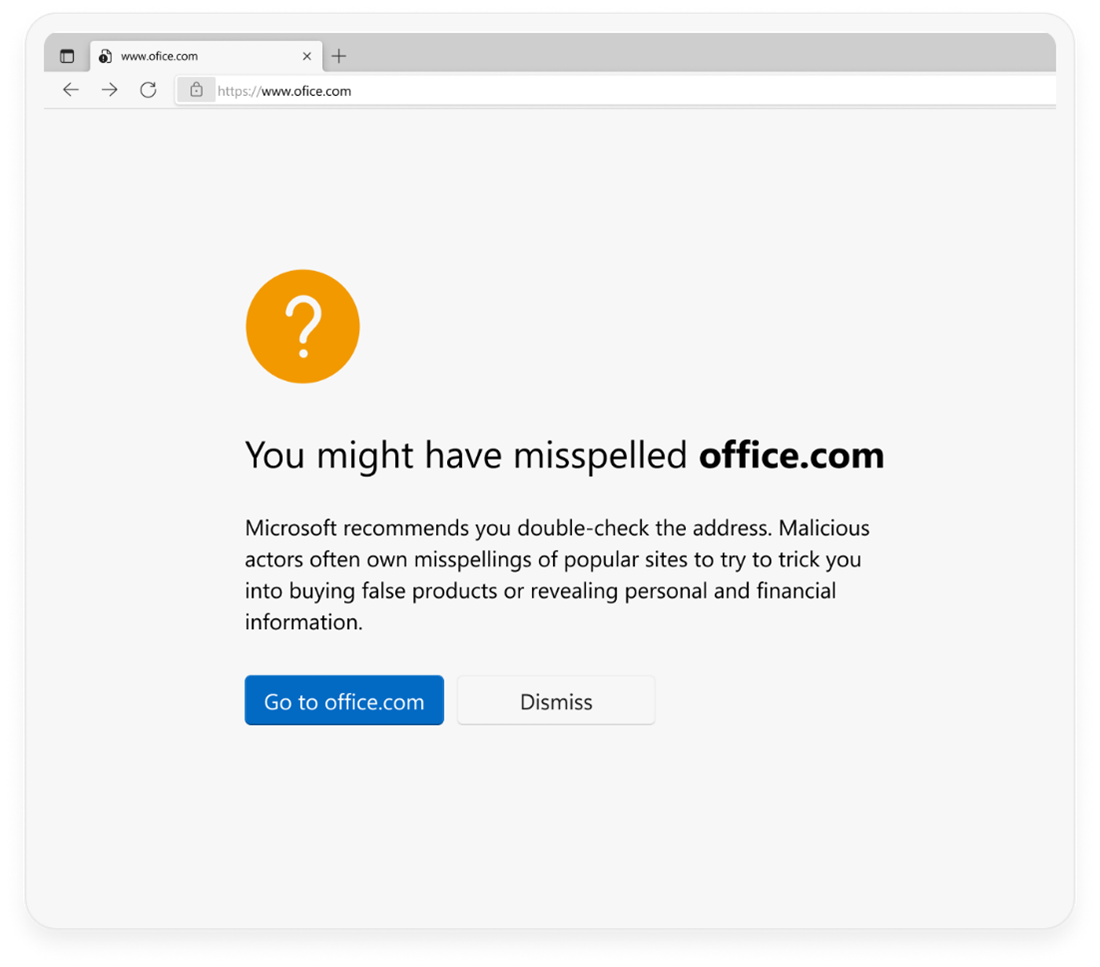
Website typo protection warns users about popular misspellings that could result in loss of personal and financial information.
When encountering a typosquatting site that we have identified, you’ll be greeted with an interstitial warning page suggesting you might have misspelled the site you’re navigating to and asking you to verify the site address before proceeding. Enterprise customers can configure website typo protection through the TyposquattingCheckerEnabled policy.
We would love to hear more about your experience with Microsoft Edge. Please continue to join us on the Microsoft Edge Insider forums or Twitter to discuss your experience and let us know what you think! We hope you enjoy the changes and look forward to your feedback.
The world needs dyslexic thinking, an approach to problem solving, assessing information, and learning. Research tells us that dyslexic thinkers have the exact skills needed for the workplace of today. The Value of Dyslexia report points out that new roles and enhanced tasks will be created across industries that closely match the strengths of dyslexic thinking. These strengths often include:
Leadership and social influence
Creativity
Complex problem-solving
Analytical thinking
Emotional intelligence
This is why we have partnered with global charity Made By Dyslexia to help every educator identify, support, and empower every learner with dyslexia.
In honor of Dyslexia Awareness Month, alongside our partner Made by Dyslexia, New York City Mayor, Eric Adams, and The NYC Department of Education, we are excited to celebrate dyslexic thinking with some important announcements.
100,000 teachers trained
Thanks to Mayor Eric Adams and his team, New York City (NYC) is leading the world in harnessing the limitless potential of dyslexic thinking in every school. Today they celebrate all their teachers being trained in dyslexia, in less than 6 months. Understanding that dyslexic thinking skills—creativity and inventiveness—are fundamental to the fabric of the future, NYC is the first city in the world to train every educator to spot, support, and empower every learner with dyslexia.
Teachers can learn more about dyslexia awareness and teaching using free and engaging self-paced online training on Microsoft Learn. These training modules, used to train all 100,000 NYC teachers, feature dyslexia experts from world-leading schools and offer tried and true methodologies that work for dyslexic learners. NYC’s program for schools also includes structured literacy, dyslexia screening, and dyslexia specialist support pilots.
“We’ve known how to support dyslexia for decades, and we’ve known that without support these children enter a spiral of failure, but nothing has been done. There, however, is a very simple solution to this big problem; we need to train all teachers to spot, support and empower dyslexic students who are in every classroom, around the world. And we need to do it at speed… just like New York City.” -Kate Griggs, CEO & Founder of Made By Dyslexia
There are more than 7 billion people on earth and 1 in 5 of them are dyslexic. While their skills are recognized by the World Economic Forum as the skills every workplace needs, many of these skills are not spotted or supported in schools. Findings in Made By Dyslexia’s new report, “The School Report” reveal that over half of schools globally fail to understand dyslexic challenges. Also, only 1 in 10 teachers has a good understanding of dyslexic strengths, leaving 80% of learners with dyslexia with support that is average, poor, or non-existent. This is why Made by Dyslexia is launching their Learn Dyslexia campaign.
Following the success of NYC, this campaign calls for every school globally to give teachers a “day for dyslexia”—time to skill-up using the free dyslexia training on Microsoft Learn. This online training is comprised of multiple modules which cover dyslexia awareness, dyslexia teaching, and most recently added dyslexia and technology.
In the Dyslexia Awareness training module, learn how to spot, support, and empower learners with dyslexia in the classroom:
The Dyslexia Teaching training module provides strategies to transform teaching and learning:
And finally, the newest module Dyslexia and Technology offers opportunities to explore tech tools to support learners through building on their strengths, as well as supportive technology to mitigate challenges learners with dyslexia often face.
See what teachers are saying about the dyslexia training available on Microsoft Learn:
“It is so outstanding! Ticks all the boxes—keeps your attention, factually strong, easy to digest and most importantly incredibly effective.”
“The training opened my eyes to a whole new way of teaching. It’s also opened our eyes to those children who potentially may have been struggling but we haven’t yet noticed.”
“It’s really deepened my understanding of dyslexia. How many intertwining elements there are—it’s not just the reading and the writing.”
“The Dyslexia Awareness training is great for all teachers, whether they are newly qualified, nearly qualified or highly experienced.”
Read our customer stories to learn more about how Microsoft Education solutions support and help learners with dyslexia thrive.
The World Dyslexia Assembly 2023
The World Dyslexia Assembly 2023, a global celebration of Dyslexic Thinking, will take place at New York City’s David Geffen Hall, Lincoln Center on April 3, 2023. This Assembly will feature engaging programming and speakers across industries including spies, space scientists, star athletes, and other special guests.
“New York is where creative legacies are made. It’s where big ideas come together and synthesize into something unstoppable. So where better to stage our next World Dyslexia Assembly – our unparalleled social movement and event series, which is building the ultimate alliance of game-changers across the globe.” -Kate Griggs, CEO & Founder of Made By Dyslexia
Begin your Learn Dyslexia journey today
Join us and Made By Dyslexia in creating a more inclusive world that embraces those who think differently.
Xbox aims to empower everyone to play the games you want, with the people you want, anywhere you want. And that includes the over 400M players with disabilities in the world. Today with the 2022 Xbox Accessibility Showcase, we celebrate the Disability community and the many people and organizations working to remove barriers to play, ultimately making gaming more accessible around the globe.
This year, we chose to host the Xbox Accessibility Showcase in the Microsoft Inclusive Tech Lab, which is located on Microsoft’s Redmond, WA campus and intentionally built with accessibility in mind from the ground up. The lab strives to encourage developers and designers to intentionally include people with disabilities in the products and services they create, by showcasing how inclusive technologies allow everyone to participate. The same is true for gaming. When we make our experiences, games, and platforms accessible, more people get to experience the power of connection that comes from play, be it bonding with their family, seeing themselves reflected in a game or the joy that comes from helping others discover the fun of gaming.
The importance for more and wide variety of accessibility options year-round, in addition to customization of accessibility options including text, subtitles, captions, difficulty settings
How critical it is to include players with disabilities in design, as collaborators and as an audience.
The importance of standardized settings, increased discoverability of features and communication of accessible gaming.
As we work toward that future of accessibility, today we are happy to share updates that encourage everyone to create, play and connect through gaming. We look forward to partnering with the community and industry in the upcoming years to bring the power of play to more people.
Create
In addition to updates on the Accessibility Developer Resource page, we are excited to share the following resources that make it easier to create games with accessibility and connect with community.
Microsoft Gaming Accessibility Testing Service (MGATS) Players with Disability Focus Offering
Since launching the Microsoft Gaming Accessibility Testing Service (MGATS) in February 2021, hundreds of Xbox and PC titles have had the accessibility of their titles validated against the Xbox Accessibility Guidelines (XAGs), with feedback from players with disabilities shared and details on Xbox’s Game Accessibility Feature Tags applied. This month, a new offering called MGATS- Players with Disability Focus (PwD) launches for studios not quite ready for testing across 20+ XAGs. This service focuses on providing game developers with feedback from players with disabilities around core scenarios, menu navigation, and settings in their games.
Xbox Accessibility Guidelines – Touch Control Guidance
The Xbox Accessibility Guidelines (XAGs) are a set of best practices that have been developed in partnership with industry experts and members of the Gaming & Disability Community. Based off community feedback, this month we launched best practices around touch-based interfaces when it comes to gaming on mobile devices. These new guidelines include details surrounding touch target sizing and placement recommendations, swipe sensitivity, and the importance of supporting mobile-native input accessibility features.
Connect
Gaming has the power to bring people together, and at Xbox we want to bring the joy of play and community to billions of players, including the over 400 Million players with disabilities.
Xbox Ambassador Accessibility Explorer Path
The Xbox Ambassador program is a group of players that celebrate the uniqueness of everyone, promote a safe gaming environment, and above all else, make gaming fun for everyone. And a large part of that is knowing what options are available for gaming. To support this, we announce the new, free Xbox Ambassador Accessibility Explorer Path, an engaging, new learning path meant to teach Xbox Ambassadors all about accessibility. This includes trying out platform and game accessibility features, learning about industry leaders and players with disabilities, as well as discovering accessibility best practices. New missions will be added throughout each season, allowing Explorers to level- up their knowledge. Check out more details and join the Xbox Ambassador program today!
Find Xbox and PC Accessibility Features Support on Support.Xbox.com
Xbox has a redesigned support hub for players to learn about all the accessibility features on console and Windows devices, so players spend less time figuring out how to use a feature and more time playing. With easier navigation, the accessibility articles are now organized by feature category, so players can find the support they need, discover new features and compare features between PC and console. New and updated articles coming in October include Narrator shortcuts (keyboard and controller), Xbox notifications, and copilot on PC. Check out the updated Support.Xbox.com Accessibility site (English available today, additional languages to be available soon) or the short video sharing the key updates.
Play
Through gaming we are able to experience new worlds, gain new perspectives and create new memories from play. For that to happen games need to be accessible. In addition to accessibility pages on to the Family Gaming Database, to make it even easier to find accessibility features on games, we share a few games recently launched, coming soon, or featured in the 2022 Xbox Accessibility Showcase.
Stories of Blossom
Coming to Console and PC in 2023! Join Clara as she brings to life a series of short tales told by her nurturing grandfather. Explore storybook illustrations, befriend cute creatures in odd situations, and help solve their problems along the way. From the very beginning, accessibility was a central part of Stories of Blossom’s development. View the accessibility features in the game here and check out today’s Showcase to learn how the developers worked with Xbox to incorporate accessibility into the game.
Pentiment
Coming to Xbox Game Pass & PC Game Pass, Console, PC, and Steam on November 15. Set in 16th century Bavaria, Pentiment will take players on a narrative journey through the eyes of Journeyman Artist Andreas Maler during a time of great social unrest. Led by game director Josh Sawyer, this game is brought to life by a talented team inspired by illuminated manuscripts, woodcut prints, and history itself.
Late medieval manuscripts are calligraphic and can sometimes be difficult to read. Obsidian Entertainment worked with Xbox to ensure there were a variety of customizable font settings in the game, including font scaling, high contrast mode, text-to-speech, and Easy Read font option, which improves legibility by disabling some fonts and writing effects.
As Dusk Falls
Available now with Xbox Game Pass, Console, PC, Cloud, and Steam. As Dusk Falls is an original interactive drama from Interior/Night that explores the entangled lives of two families across thirty years. Interior/Night believes as many people as possible should be able to play and enjoy As Dusk Falls. The game’s accessibility features can be found under the Settings menu on the game’s main screen or the game’s pause menu. These include a variety of text to speech settings, on-screen UI, gameplay adaptations, a companion app, and more. For more information, click here.
Grounded
Available now with Xbox Game Pass & PC Game Pass, Console, PC, Cloud, and Steam. In Grounded, players wake up in a suburban backyard after being mysteriously shrunk to the size of an ant. Guided by a robot named BURG.L, players must explore, build, and survive while confronting the dangers and perils that come with suddenly being insect sized. Play single-player or co-op with friends as Max, Pete, Willow, or Hoops, and be sure to watch out for those pesky spiders.
Obsidian Entertainment worked closely with the Xbox Research team to explore what triggers arachnophobia. The findings from Xbox Research helped determine the best form for spiders to take in the game, while also deciding how to vary their appearance depending on the severity of the phobia.
This resulted in the game’s Arachnophobia Mode, where players can use a slider to scale the alternate forms of spiders and limit their audio effects, helping to make the game more accessible for everyone. Read more about Grounded’s accessibility features by clicking here.
Work Together
Creating an accessible gaming experience doesn’t start or end with a single company. It takes a collective effort across many organizations and people who believe gaming is for everyone. Here are a few organizations Xbox would like to recognize in honor of this year’s Accessibility Showcase:
SpecialEffect: As seen in today’s showcase, SpecialEffect puts fun and inclusion back into the lives of physically disabled people by helping them to play video games. They are transforming the lives of physically disabled people across the world through the innovative use of technology. At the heart of their work is their mission to maximize fun and quality of life by helping people control video games to the best of their abilities. Microsoft Rewards members in the United States and the United Kingdom can earn and donate points to SpecialEffect throughout October.
RNIB: The Royal National Institute of the Blind (RNIB), is the UK’s leading sight loss charity. They offer practical and emotional support to blind and partially sighted people, their families, and careers. Xbox is delighted to be working with the RNIB to support people who are blind and partially sighted within the gaming community. We look forward to exploring a range of opportunities and initiatives, with the aim of welcoming more perspectives to our gaming communities, for the benefit of all.
Accessible Events
Gaming is one of the most popular forms of global culture, entertainment, and interaction. With over three billion people playing games, it is important to us to host events and content that is accessible, allowing more people to enjoy the moment at the same time as everyone else.
gamescom 2022
When everyone plays, we all win. This year at gamescom 2022, Team Xbox wanted to make sure as many people as possible could experience the joy of play at the event. Several elements the team focused on to create an accessible experience included live broadcast with English Audio Descriptions, along with ASL, BSL and DGS (German) interpretation for both the broadcast and in-booth experience, Xbox Adaptive Controller availability at all game stations and sensory processing gear for those who request it. Check out Brannon Zahand, Senior Accessibility Program Manager at Xbox, explain the accessibility of the event including additional elements that were considered.
Xbox’s Programming & Events Team is on a continuous mission to make its content and videos more accessible, including localized accessibility. This past month that included supporting the Tokyo Game Show 2022, which had Japanese Sign Language (JSL), Japanese Audio Descriptions and English-language Audio Descriptions read by an Australian to be true to the Asia-Pacific countries where the show was exclusively broadcast.
Check out the Xbox Accessibility Showcase via Twitch, XboxASL, and YouTube (available with AD and ASL)
October isNational Disability Employment Awareness Month (NDEAM), a time to celebrate the contributions of America’s workers with disabilities, past and present, while working to achieve parity with this year’s theme “Disability: Part of the Equity Equation.”
At Microsoft, we believe people with disabilities positively impact our company culture, working environment and how we serve our customers. Through partnerships within the disability community, we’re working to help reduce the unemployment rate for people with disabilities around the globe. To date, we’ve hosted Neurodiversity Hiring events, created an inclusive interview process, trained and educated our teams on disability etiquette, and provided a range of interview accommodations to increase the diversity of our teams, and positively impact the culture of our workplace.
However, there’s much more to do. I recently spoke with Susan Lang, Founding CEO of Lime Connect, the largest network globally of high-potential university students and professionals who have disabilities. Susan and I are sharing our answers to the ‘top 5 most common questions’ from jobseekers.
1. What should I look for in an inclusive employer for people with disabilities?
Susan Lang: Finding the right company can be just as important as finding the right role for your skills and experience. To get a better understanding of a company’s culture and how they view disability inclusion you can find out a lot on their website. Look for representation of employees with disabilities and any information on employee resource groups for people with disabilities. Does their diversity statement include disability? If you are applying for a role on their careers site, is it easy to find information regarding how to receive interview accommodations?
Neil Barnett: Many employers have hiring programs specifically for neurodiverse candidates or candidates with disabilities. To find lists of employers focused on disability inclusion, look for partnership with organizations like Lime Connect & Disability:IN. We share the latest news about accessibility at Microsoft and resources to learn more about our hiring programs on the Microsoft Accessibility site.
2. What accommodations can I request for an interview?
Susan Lang: It’s helpful to first find out as much as possible about the interview structure. This includes the number of interviews in a day, length of interview(s), types of questions (behavioral, technical), and format –phone, video call or in-person. Ask the recruiter questions so you have a better idea of what to expect. Having this information will help you identify what accommodations to request that will enable you to focus on demonstrating your skills, strengths, and fit for the position.
Neil Barnett: We want you to shine in interviews so at Microsoft we engage in an interactive process with the candidate to determine effective, reasonable accommodations. We strive for our candidates to feel set up for success so they can have a barrier free experience sharing their skills and experience. Some of the most common accommodation requests we receive includeextra time for interviews, less interviews in a day, being able to utilize your own device, longer breaks between interviews, time for online technical screens, sign language interpreters and CART/Captions.
3. Why would I want to request an accommodation when applying for a job?
Susan Lang: It’s about success on both sides of the equation. Requesting accommodations during the screening and interview stage sets you up for success during the process and allows you to focus on sharing your skills and abilities without having to worry about having your needs met. The employer shows they are invested in you, and they want you to succeed. It’s a good opportunity to assess your potential employer and how supportive they will be for employees with disabilities in the workplace.
Neil Barnett: Interviewing is a two-way process. By offering an accommodation during the screening and interview process, the employer is showing that they are invested in you and they want you to succeed. It’s a good opportunity to assess your potential employer and how supportive they will be for employees with disabilities in the workplace. During a recent Ability Summit session, Employing Disabled Talent: An opportunity to stop the talent drain, two Microsoft employees shared their experience requesting accommodation during the application stage.
“I would advise the candidate not to be shy. I always say that the disability is not so much in the person, as in the environment. Companies must have a commitment to create an accessible environment for all employees and candidates. Never hesitate to ask for the accommodation that you need.” – Juanjo Montiel, Senior Software Engineer, Microsoft
4. Do I have to disclose my disability or provide paperwork to request accommodation for interviews?
Susan Lang: Each employer may have a different process or ask for different forms of documentation. As a member of the Lime Network, you can schedule an appointment with a Career Coach to discuss whether disclosure is right for you and develop an action plan to navigate the accommodation request process with each company and throughout your career search.
Neil Barnett: When applying to Microsoft, you do not need to disclose specifics about your disability when requesting accommodations, but it’s important to identify your needs, so the interview teams can provide a collaborative and inclusive experience. Microsoft does not require that you disclose your disability or provide medical documentation for interview accommodations.
5. How and when should I disclose/talk about my disability during an interview?
Susan Lang: Once you’ve determined that you will disclose your disability, the timing of the communication will often depend on the reason you are disclosing. If you need to request an accommodation for an interview, you will want to have that conversation well in advance of the interview to ensure there is time to get the accommodation in place. If you are looking for an opportunity to highlight an accomplishment or the skills you have developed as a result of living with your disability, you may look for a question during the interview itself that allows you to share those examples. Regardless of the reason, you only need to share the details about your disability that are most relevant to the conversation and remember to keep it simple. If you are requesting an accommodation, focus on identifying your needs and highlighting tools or accommodations that work for you in other settings. You likely know what works best for you and can work collaboratively with your prospective employer to come up with solutions that lead to your success. We love the use of metaphors or stories when disclosing, and don’t forget to practice your disclosure conversation with a friend or a Lime Connect career coach so that you feel confident navigating any discussion about your disability.
Neil Barnett: Deciding whether to disclose your disability is a personal choice. As a person with a disability, you bring unique strengths and skills to your future employer. You may also have experiences or perspectives that help inform how to make products, services, and companies more accessible, which would be a value add to any company.
If you are interested in learning more about working at Microsoft, you can join one of our monthly Inclusive Hiring webinars. Each webinar is hosted by recruiters and members of the Microsoft Inclusive Hiring team and focuses on the hiring application process and requesting interview accommodations. Attendees also have a chance to hear from members of the Microsoft disability employee resource group (ERG), on what it’s like to work at Microsoft. Register by visiting aka.ms/InclusiveHiringWebinar.
And, university students and professionals with all disabilities are encouraged to check out Lime Connect’s site and join The Lime Network to access a full range of programs and services that provide tools, self-confidence, community, and connections that help disabled individuals achieve their dreams.
To ensure that disability is part of broader equity discussions and efforts, it will take an accelerated commitment from all corners, the business community, government agencies, service providers and nonprofits to work towards ultimately improve disability representation in the workforce.